1
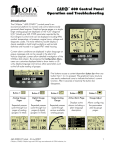
® 750 Control Panel Operation and Troubleshooting Note Most problems with electronically controlled engines can be pinpointed via ECU diagnostic messages. Use the display or ECU diagnostic tool to view fault codes. Engine state information and diagnostic codes displayed by the CANplus display are provided via the CANbus. Automatic Operation The CP750 panel features advanced Automatic Start/Stop control which can meet almost any requirement. Two switch inputs and a transducer input support a number of control scenarios. Single switch mode allows reliable operation with a single switch. Dual switch operation allows greater hysteresis when needed. The transducer input supports simple start/stop operation by level or pressure and maintenance modes with speed modification. Programmable high and low set points control start/stop operation. Level maintenance modes monitor the operating point and adjust the engine speed to match the targeted set point with configurable aggressiveness. Dual switch inputs can be combined with the transducer input for redundant safety to protect against transducer sensor clog or failure. Throttle Control The standard Ramp Throttle uses a momentary rocker switch to adjust the integral throttle control. All throttle commands are sent directly to the engine using CANbus throttle control. Note Throttle control requires CANbus throttling to be enabled in the ECU. CANbus throttling is also known as Torque Speed Control or TSC1. Other throttle options include Digital Rotary Throttle, Two-State Throttle (Idle/Run) or Three-State Throttle (Idle/Intermediate/Run). The Digital Rotary can be installed with the Throttle Ramp Throttle or Three-State Throttle to adjust the Idle, Intermediate and Run speeds. Service Timers The CP750 display provides sixteen (16) service timers to alert the operator of needed maintenance. The time interval for each timer can be adjusted in 10 hour increments. A popup message is displayed after the display self test if a timer has expired alerting the user that service is required. The message is displayed on each power up until the elapsed timer is disabled or reset. CANplus Messenger Telemetry Option The optional CANplus Messenger system provides a variety of features to protect and support the equipment investment. Remote monitoring can alert maintenance requirements, operational problems, improper operation and location with geo-fence alert. The Web-browser interface allows monitoring an entire fleet of equipment in a central location. Contact LOFA Industries for more information. 2 463-3000-08 Initial - 18-Feb-2008