1
LOGOSOL PH360
•
Check that the test piece is lying against both
fences and tighten the back fence's lock screws.
Check that all screws that fix the fences are
properly tightened, and that the cutter can
rotate freely.
Tip: If there is a problem in that the board does not
follow the fences, it could be that the back fence
is not at the right level in relation to the cutter,
that the fences are not completely parallel to one
another, or that the fence does not run straight
through the planer/moulder. If it is difficult to get
the fence to lie perfectly straight through the planer/
moulder, it is better that the fences are slightly
angled to the left, towards cutter 3, as the feed rollers will then press the workpiece against the fence.
If the fences lie at a slight angle to the right, away
from cutter 3, the feed rollers will pull the object
away from the fence, which will lead to incorrect
measurements and a badly planed surface.
Adjusting the moveable cutter
(cutter 3)
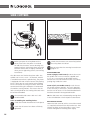
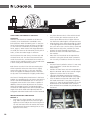
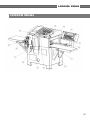
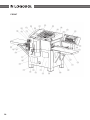
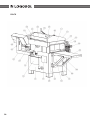
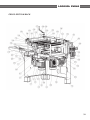
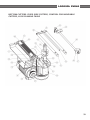
Loosen the lock handle (91) that is located on the
slide under the table and/or the slotted screw that
is located above the slide (38). Then insert the crank
(260) onto the threaded rod on the side of the planer and move the side cutter head to the required
planing width. One rotation of the crank is 4 mm.
Measure the distance between the cutter knives and
the back fence with sliding caliper. This measurement becomes the width of the finished board. Fix
this position with the lock handle under the table.
Indicator
The indicator shows the width measurement in mm
in black, and 1/10 mm in red. Each time, when setting to a new profile: plane a board, measure the
outer measurements with the sliding caliper. Turn
the small handle to the right of the indicator so this
measurement is shown in the window.
Installing a pressure roller for moveable cutters
Two pressure rollers are located in front of the
moveable cutter, to press the workpiece towards
the fence. By adjusting this you can also decide how
wide the workpieces fed into the planer/moulder
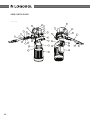
can be. These pressure rollers sit on an arm (77) that
is anchored in the moveable cutter's slide, which
means that they move with the cutter when this is
adjusted.
To set the pressure rollers, loosen the socket head
screws that fix the arm in the moveable cutter's
slide with a 6 mm Allen wrench. Adjust the arm so
that the press rollers are pressed in by approx. 5 mm
when the workpiece is fed into the planer.
A spring plate (supplied on delivery) can be mounted
in front of the moveable cutter between the press
rollers' arm and screw plate. The spring plate has
oval holes that allow adjustment in and out from
the workpiece. The spring plate works partly as a
tension control, but also as a fence in front of the
cutter which reduces the risk of long splinters being
knocked out of the workpiece during large cuts.
Adjust the feather plate so that it is pushed in to a
couple of millimeters from the unplaned edge of the
workpiece.
Check that there is no risk of the spring plate
pushing into the cutter's knife if you are planing an object of variable width. Maintain a
safety margin of at least one centimeter in the
pressed in position.
After the moveable cutter, there is another pressure
roller (76) which pushes the cut workpiece towards
the back fence. Set the pressure roller so that it
protrudes approx. 1-3 mm from the cutter's smallest
plane diameter, at the same height as the pressure
roller.
The height of the pressure roller can also be set with
washers above or below it. Which may be required
for producing certain profiles.
Test run
Always run a test piece and make subsequent adjustments. Run a piece straight through the planer
at the slowest feed speed. Look through the cover
while it is being planed and check that the board is
lying against the fences in front of and behind cutter
2.
Then measure the profile, its height and width, and
subsequently adjust the cutters and the setting for
the molding knives if required.
19