1
Chapter 26
Monitoring and Troubleshooting
Monitoring and Troubleshooting Service in Cisco ISE
Cisco ISE Dashboard
The Cisco ISE dashboard, or home page, is the landing page that appears after you log in to the Cisco
ISE administration console. The dashboard is a centralized management console consisting of metric
meters along the top of the window, with dashlets below.
Dashboard’s real-time data provides an at-a-glance status of the devices and users that are accessing your
network as well as the system health overview.
Note
You must have Adobe Flash Player installed on the Administration node to be able to view the dashlets
and metric meters on the dashboard.
The dashboard shows the activity on the Network Privilege Framework (NPF), and provides detailed
information on the various components.
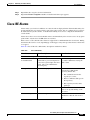
The NPF is composed of the three tiers outlined in Table 26-1.
Table 26-1
NPF Tiers
Tier
Specifications
1
Access control based on identity using 802.1x, MAC authentication bypass (MAB), the
Cisco ISE Profiler service
2
Access control based on identity using 802.1x, MAB, Profiler, guest provisioning of the
Network Admission Control (NAC) manager, central web authentication
3
Access control based on identity and posture using 802.1x, MAB, Profiler, guest
provisioning of the NAC manager, central web authentication
NPF authentication and authorization generates a flow of events. The events from the different sources
are then collected by Cisco ISE monitoring and troubleshooting tools and summarized. You can view the
authentication and authorization results on the dashboard or choose to run any number of reports. For
more information, see Chapter 27, “Reporting.”
The NPF authentication and authorization event flow uses the following process:
1.
NAD performs an authorization or flex authorization.
2.
An unknown agentless identity is profiled with web authorization.
3.
RADIUS server authenticates and authorizes the identity.
4.
Authorization is provisioned for the identity at the port.
5.
Unauthorized endpoint traffic is dropped.
User Roles and Permissions for Monitoring and Troubleshooting Capabilities
Monitoring and troubleshooting capabilities are associated with default user roles. The tasks you are
allowed to perform are directly related to your assigned user role. For more information on the user roles
and their assigned permissions, see Cisco ISE Admin Groups, Access Levels, Permissions, and
Restrictions.
Cisco Identity Services Engine User Guide, Release 1.2
26-2
OL-26134-01