1
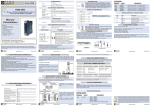
Z-PC Line
EN
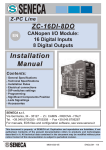
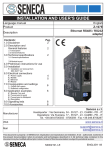
ZC-24DI
CANopen I/O Module:
24 Digital Inputs
Installation
Manual
Contents:
- General Specifications
- Technical Specifications
- Installation Rules
- Electrical connections
- DIP-switches settings
- Programming
- Significant Components Position
- Leds Signallings
- Accessories
SENECA s.r.l.
Via Germania, 34 - 35127 - Z.I. CAMIN - PADOVA - ITALY
Tel. +39.049.8705355 - 8705359 - Fax +39.049.8706287
For manuals, EDS files and configuration software, see
This document is property of SENECA srl. Duplication and reprodution are forbidden, if not
authorized. Contents of the present documentation refers to products and technologies
described in it. All technical data contained in the document may be modified without prior
notice Content of this documentation is subject to periodical revision.
MI001510-I/E
ENGLISH - 1/8
General Specifications
•Twenty-four 16 VDC self-powered digital inputs with shared negative pole.
•Eight digital inputs settable as 32-bit counters with 10 kHz maximum
frequency.
•Can Interface with CANopen protocol: up to 1 Mbps speed.
•CANopen Baud rate and Node ID configurability by DIP-switches or software.
•RS232 Serial Communication with MODBUS-RTU protocol.
•Facilitated power supply and CANopen bus wiring by means of the bus
housed in the DIN rail.
•1500 VAC Isolation among input, power supply and CAN interface circuits.
•Counters increment individually configurable on the rising or falling edges of
the corresponding digital input.
•Overflow indication available for each counter.
•Preset value configurable for each counter.
•Reset and preset commands individually executable on each counter.
•Leds Signallings: Power Supply, Digital Inputs State, CAN Communication,
MODBUS-RTU Communication.
Technical Specifications
INPUTS
Polarity (EN 61131-2 type 2)
Number of channels
Sink (pnp)
24
Number of Counters (if enabled)
8 (32 bit)
UL (state OFF)
0 - 7 VDC
UH (state ON)
11 - 30 VDC
Absorbed Current
3 mA (for each input)
VMAX
30 V
250 μs
Minimum pulse width
Typical: 1.2 ms
Maximum: 3 ms
ON/OFF Delay
Maximum Counters Frequency
10 kHz
MI001510-I/E
ENGLISH - 2/8
POWER SUPPLY
10 - 40 VDC
Voltage
19 - 28 VAC
Consumption
Typical: 1.5 W, Max: 2.5 W
ENVIRONMENTAL CONDITIONS
Temperature
-10 - +65°C
Humidity
30 - 90% at 40°C non condensing
Altitude
up to 2000 m a.s.l
Storage temperature
-20 - +85°C
Protection
IP20
CONNECTIONS
Removable 4-way screw terminals, 3.5 mm pitch.
Rear IDC10 connector for DIN rail.
Connections
3.5 mm stereophonic frontal jack for RS232 (COM)
connection.
DIMENSIONS / BOX
Dimensions
L: 100 mm; H: 112 mm; W: 35 mm
Box
PBT, black
ISOLATIONS / STANDARDS
Isolations Diagram
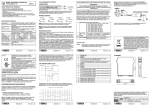
3-Point 1500 VAC Isolation :
Standards
The module complies
following standards:
with
the
EN61000-6-4/2002-10 (electromagnetic
industrial environment).
emission,
EN61000-6-2/2006-10 (electromagnetic
industrial environment).
immunity,
EN61010-1/2001 (safety).
All circuits must be isolated from the other circuits under
dangerous voltage with double isolation. The power
supply transformer must comply with EN60742:
“Isolated transformers and safety transformers”.
MI001510-I/E
ENGLISH - 3/8
Installation Rules
The module is designed to be installed in vertical position on a DIN 46277 rail. In
order to ensure optimum performance and the longest working life, the module(s)
must be supplied adequate ventilation and no raceways or other objects that obstruct
the ventilation slots. Never install modules above sources of heat; we recommend
installation in the lower part of the control panel.
Inserting on the DIN rail
As it is illustrated in the next figure:
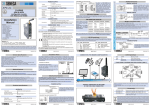
1) Insert the rear IDC10 connector on a DIN rail
free slot (the inserting is univocal since the
connectors are polarized).
2) Tighten the two locks placed at the sides of
the rear IDC10 connector to fix the module.
Electrical Connections
POWER SUPPLY AND CAN INTERFACE
Power Supply and CAN interface are available by using the bus for the Seneca DIN rail,
by the rear IDC10 connector or by Z-PC-DINAL-B accessory (see Accessories).
Rear Connector (IDC10)
In the figure the meaning of the IDC10
connector pins is showed, in the case
the user decides to provide the signals
directly through it.
Z-PC-DINAL-B Accessory Use
In case of Z-PC-DINAL-B accessory
use, the signals may be provided by
terminal blocks. The figure shows the
meaning of the terminals and the
position of the DIP-switch (present on
each DIN rail supports listed on
Accessories) for CAN network
termination.
GNDSHLD: Shield to protect the
connection cables (it is always
recommended).
MI001510-I/E
ENGLISH - 4/8
CAN bus Connection Rules
1) Install the modules on the DIN rail (max 120).
2) Connect the remote modules using cables of proper length. On the table the following
data about the cables length are provided:
-Bus Length: CAN network maximum length as a function of the Baud rate. It is the
lenght of the cables which connect the two bus terminators modules (see Scheme 1).
-Drop Length: maximum length of a drop line (see Scheme 1) as a function of the Baud
Rate.
Bus
Drop
Scheme 1
Baud rate
e
Length
Length
20 kbps
50 kbps
125 kbps
250 kbps
500 kbps
800 kbps
1000 kbps
2500 m
1000 m
500 m
250 m
100 m
50 m
25 m
150 m
60 m
5m
5m
5m
3m
0.3 m
For the best performances, the use of special shielded cables is recommended
(BELDEN 9841 cable for example).
3) Terminate the two ends of the CANbus network by setting to ON the DIP-switch
present on the DIN rail connection supports (see Accessories) where the two ends are
inserted.
DIGITAL INPUTS
MI001510-I/E
ENGLISH - 5/8
RS232 SERIAL PORT
The connection cable DB9 with a 3.5
mm stereophonic jack, can be
assembled as indicated in the following
figure, or can be bought as an accessory
(see Accessories).
DIP-switches Settings
The DIP-switches position defines the module CAN communication parameters:
Address and Baud Rate. In the following figure the Baud Rate and Address values
are listed as a function of the DIP-switches position:
We underline that on all the DIN rail supports listed on Accessories a DIP-switch is present
and if it is set to ON position the CAN network termination is inserted.
Programming
PROGRAMMING THROUGH CAN INTERFACE
The module may be programmed/configured through the CAN interface; refer to the
User Manual for details about the communication.
Factory CAN Parameters
With all the DIP-switches in OFF position (values from memory), the module is
originally programmed as follows:
Baud Rate: 20 kbps, Address: 1
PROGRAMMING THROUGH RS232
The module may be programmed/configured through the RS232 interface by using
MODBUS-RTU protocol; refer to the User Manual for details about the
communication. The connection parameters are the following:
Address: 1, Baud Rate: 2400 Baud, Parity: none, Stop bit: 1.
MI001510-I/E
ENGLISH - 6/8
Significant Components Position
Terminals/Leds/IDC10 Connector/ DIP-switch
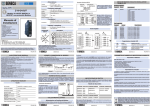
The terminals numbering, the leds position on the frontal panel, the rear IDC10 connector
(fixing on the DIN rail) and the DIP-switch on the rear side are illustrated below.
Frontal Panel
Rear Side
Leds Signallings
LEDS ERR AND RUN: CANOPEN COMMUNICATION STATE
The meaning of leds ERR and RUN is described below; refer to the User Manual for details
about the possible state and the flashing modes of the two leds.
Led ERR (Red) Meaning
N°
LED ERR
(Red)
STATE
1 Off
No error
2 Single flash
Warning limit
reached
3 Double flash
Error Control
Event
4 Triple flash
Sync Error
5 On
Bus off
DESCRIPTION
The Device is in working condition.
At least one of the error counters of the CAN
controller has reached or exceeded the warning level
(too many error frames).
A guard event (NMT-Slave or NMT-master).
The SYNC message has not been received within the
configured communication cycle period time out.
The CAN controller is bus off.
MI001510-I/E
ENGLISH - 7/8
Led RUN (Green) Meaning
N°
LED RUN
(Green)
STATE
DESCRIPTION
1 Single flash
Stopped
The Device is in STOPPED state.
2 Blinking
Pre-Operational The Device is in the PRE-OPERATIONAL state.
3 On
Operational
The Device is in the OPERATIONAL state.
LEDS FAIL AND PWR: GENERAL SYSTEM DIAGNOSTICS
LED PWR
(Green)
Meaning
LED FAIL
(Yellow)
Meaning
On
Power Supply presence.
On
It indicates data reception
on the RS232 port (COM).
LEDS 01..24: DIGITAL INPUTS STATE
LED 01..24
(Green)
Meaning
On
-01..08: If counters are enabled: the correspondent counter is ON.
Otherwise it signals the state of the correspondent generic digital input.
-09..24: The correspondent generic digital input is ON.
Accessories
SUPPORTS FOR MOUNTING ON DIN RAIL GUIDE/ SERIAL CABLE
Code
Description
Z-PC-DINAL-A
Z-PC-DINAL-B
Z-PC-DIN2-A
Z-PC-DIN2-B
Z-PC-DIN8-A
Z-PC-DIN8-B
PM001600
Bus Support: Terminal blocks + 2 slots to connect Z-PC line modules.
Bus Support: Terminal blocks + 1 slot to connect Z-PC line modules.
Bus Support: 2 slots to connect Z-PC line modules.
Bus Support: 1 slot to connect Z-PC line modules.
Bus Support: 8 slots to connect Z-PC line modules.
Bus Support: 4 slots to connect Z-PC line modules.
Serial Cable: from 3,5 mm stereo Jack to DB9F.
Disposal of Electrical & Electronic Equipment (Applicable throughout the European Union and other European
countries with separate collection programs). This symbol, found on your product or on its packaging, indicates
that this product should not be treated as household waste when you wish to dispose of it. Instead, it should be
handed over to an applicable collection point for the recycling of electrical and electronic equipment. By ensuring
this product is disposed of correctly, you will help prevent potential negative consequences to the environment and
human health, which could otherwise be caused by inappropriate disposal of this product. The recycling of materials
will help to conserve natural resources. For more detailed information about the recycling of this product, please
contact your local city office, waste disposal service or thè retail store where you purchased this product.
MI001510-I/E
ENGLISH - 8/8