1
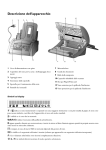
Controls
RES to select a higher resolution when copying or sending (for
text and graphics – FINE, for photographs – PHOTO)
w press twice briefly: to print operating instructions for the most
important functions; press and hold (for two seconds): to start
the automatic installation of your fax machine / printout of Easy
Install
U to select different operation modes. Press briefly: choose
between S and M; press and hold (two seconds): operating mode
U on/off
v if the red lamp flashes, please
read the message on the display
C to delete
M to call up functions
OK to confirm entries
u to select options / to
move the cursor on the display
SMS flashes if there are new
SMS messages in the memory.
For reading, printing and sending SMS messages
n press briefly: to select a phone number
quickly; press and hold (two seconds): to store
a telephone number
a press briefly: to call up a name entry;
press and hold (two seconds): to store a telephone number
L press briefly: to repeat the last five numbers you have dialled; press and hold (two
seconds): to browse the list of callers
R press briefly: for special functions, e. g. for
the use with a private branch exchange; press
and hold (two seconds): to insert a dialling
pause between two figures
l for dialling without lifting the handset and
for hands-free operation
STOP to stop procedures / to eject documents
START/COPY to start the fax transmission or to make copies
ON/OFF to activate / deactivate answering machine
REC press briefly: to record an internal memo; press and hold (two seconds): to record a new outgoing message
PLAY to play back messages. The key flashes when new messages and memos have been recorded