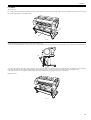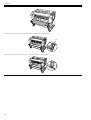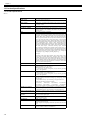
1
Service Manual
iPF750 series
Apr 1 2009
Application
This manual has been issued by Canon Inc. for qualified persons to learn technical theory, installation, maintenance, and repair
of products. This manual covers all localities where the products are sold. For this reason, there may be information in this
manual that does not apply to your locality.
Corrections
This manual may contain technical inaccuracies or typographical errors due to improvements or changes in products. When
changes occur in applicable products or in the contents of this manual, Canon will release technical information as the need
arises. In the event of major changes in the contents of this manual over a long or short period, Canon will issue a new edition
of this manual.
The following paragraph does not apply to any countries where such provisions are inconsistent with local law.
Trademarks
The product names and company names used in this manual are the registered trademarks of the individual companies.
Copyright
This manual is copyrighted with all rights reserved. Under the copyright laws, this manual may not be copied, reproduced or
translated into another language, in whole or in part, without the written consent of Canon Inc.
COPYRIGHT © 2001 CANON INC.
Printed in Japan
Caution
Use of this manual should be strictly supervised to avoid disclosure of confidential information.
Introduction
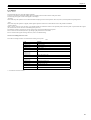
Symbols Used
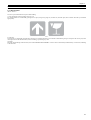
This documentation uses the following symbols to indicate special information:
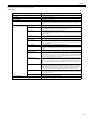
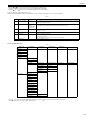
Symbol
Description
Indicates an item of a non-specific nature, possibly classified as Note, Caution, or Warning.
Indicates an item requiring care to avoid electric shocks.
Indicates an item requiring care to avoid combustion (fire).
Indicates an item prohibiting disassembly to avoid electric shocks or problems.
Indicates an item requiring disconnection of the power plug from the electric outlet.
Indicates an item intended to provide notes assisting the understanding of the topic in question.
Memo
Indicates an item of reference assisting the understanding of the topic in question.
REF.
Provides a description of a service mode.
Provides a description of the nature of an error indication.
Introduction
The following rules apply throughout this Service Manual:
1. Each chapter contains sections explaining the purpose of specific functions and the relationship between electrical and mechanical systems with reference to the timing of operation.
In the diagrams,
represents the path of mechanical drive; where a signal name accompanies the symbol , the arrow
indicates the
direction of the electric signal.
The expression "turn on the power" means flipping on the power switch, closing the front door, and closing the delivery unit door, which results in
supplying the machine with power.
2. In the digital circuits, '1'is used to indicate that the voltage level of a given signal is "High", while '0' is used to indicate "Low".(The voltage value, however, differs from circuit to circuit.) In addition, the asterisk (*) as in "DRMD*" indicates that the DRMD signal goes on when '0'.
In practically all cases, the internal mechanisms of a microprocessor cannot be checked in the field. Therefore, the operations of the microprocessors
used in the machines are not discussed: they are explained in terms of from sensors to the input of the DC controller PCB and from the output of the
DC controller PCB to the loads.
The descriptions in this Service Manual are subject to change without notice for product improvement or other purposes, and major changes will be communicated in the form of Service Information bulletins.
All service persons are expected to have a good understanding of the contents of this Service Manual and all relevant Service Information bulletins and be
able to identify and isolate faults in the machine."
Contents
Contents
Chapter 1 PRODUCT DESCRIPTION
1.1 Product Overview .......................................................................................................................................1- 1
1.1.1 Product Overview .................................................................................................................................................... 1- 1
1.2 Features .....................................................................................................................................................1- 2
1.2.1 Features .................................................................................................................................................................. 1- 2
1.2.2 Features .................................................................................................................................................................. 1- 2
1.2.3 Printhead ................................................................................................................................................................. 1- 2
1.2.4 Ink Tank................................................................................................................................................................... 1- 2
1.2.5 Cutter....................................................................................................................................................................... 1- 3
1.2.6 Roll Holder............................................................................................................................................................... 1- 3
1.2.7 Stand ....................................................................................................................................................................... 1- 5
1.2.8 Hard disk drive......................................................................................................................................................... 1- 7
1.2.9 Consumables........................................................................................................................................................... 1- 7
1.3 Product Specifications ................................................................................................................................1- 8
1.3.1 Product Specifications ............................................................................................................................................. 1- 8
1.3.2 Product Specifications ............................................................................................................................................. 1- 9
1.4 Detailed Specifications .............................................................................................................................1- 11
1.4.1 Interface Specifications ......................................................................................................................................... 1- 11
1.5 Names and Functions of Components .....................................................................................................1- 12
1.5.1 Front ...................................................................................................................................................................... 1- 12
1.5.2 Side ....................................................................................................................................................................... 1- 13
1.5.3 Top Cover (Inside)................................................................................................................................................. 1- 13
1.5.4 Roll Unit Cover (Inside) ......................................................................................................................................... 1- 14
1.5.5 Carriage................................................................................................................................................................. 1- 14
1.5.6 Ink Tank Cover (Inside) ......................................................................................................................................... 1- 14
1.5.7 Stand ..................................................................................................................................................................... 1- 15
1.6 Basic Operation ........................................................................................................................................1- 17
1.6.1 Operation Panel..................................................................................................................................................... 1- 17
1.6.2 Display................................................................................................................................................................... 1- 18
1.6.3 Menu...................................................................................................................................................................... 1- 19
1.7 Safety and Precautions ............................................................................................................................1- 37
1.7.1 Safety Precautions ................................................................................................................................................ 1- 37
1.7.1.1 Moving Parts .......................................................................................................................................................................... 1- 37
1.7.1.2 Adhesion of Ink ...................................................................................................................................................................... 1- 37
1.7.1.3 Electric Parts.......................................................................................................................................................................... 1- 39
1.7.1.4 Electric Parts.......................................................................................................................................................................... 1- 40
1.7.2 Other Precautions.................................................................................................................................................. 1- 41
1.7.2.1 Printhead................................................................................................................................................................................ 1- 41
1.7.2.2 Ink Tank ................................................................................................................................................................................. 1- 42
1.7.2.3 Handling the Printer ............................................................................................................................................................... 1- 42
1.7.3 Precautions When Servicing Printer...................................................................................................................... 1- 44
1.7.3.1 Notes on the Data Stored in the Printer ................................................................................................................................. 1- 44
1.7.3.2 Confirming the Firmware Version .......................................................................................................................................... 1- 44
1.7.3.3 Precautions against Static Electricity ..................................................................................................................................... 1- 44
1.7.3.4 Precautions for Disassembly/Reassembly............................................................................................................................. 1- 44
1.7.3.5 Self-diagnostic Feature .......................................................................................................................................................... 1- 44
1.7.3.6 Disposing of the Lithium Battery ............................................................................................................................................ 1- 44
Chapter 2 TECHNICAL REFERENCE
2.1 Basic Operation Outline..............................................................................................................................2- 1
Contents
2.1.1 Printer Diagram........................................................................................................................................................2- 1
2.1.2 Printer Diagram........................................................................................................................................................2- 2
2.1.3 Print Signal Sequence .............................................................................................................................................2- 3
2.1.4 Print Driving .............................................................................................................................................................2- 4
2.2 Firmware .................................................................................................................................................... 2- 6
2.2.1 Operation Sequence at Power-on............................................................................................................................2- 6
2.2.2 Operation Sequence at Power-off............................................................................................................................2- 7
2.2.3 Print Control .............................................................................................................................................................2- 8
2.2.4 Print Position Adjustment Function ........................................................................................................................2- 14
2.2.5 Head Management ................................................................................................................................................2- 14
2.2.6 Printhead Overheating Protection Control .............................................................................................................2- 14
2.2.7 Pause between Pages ...........................................................................................................................................2- 14
2.2.8 White Raster Skip ..................................................................................................................................................2- 14
2.2.9 Sleep Mode............................................................................................................................................................2- 14
2.2.10 Hard Disk Drive ....................................................................................................................................................2- 14
2.3 Printer Mechanical System....................................................................................................................... 2- 16
2.3.1 Outline....................................................................................................................................................................2- 16
2.3.1.1 Outline.................................................................................................................................................................................... 2- 16
2.3.2 Ink Passage ...........................................................................................................................................................2- 17
2.3.2.1 Ink Passage ........................................................................................................................................................................... 2- 17
2.3.2.2 Ink Tank Unit.......................................................................................................................................................................... 2- 18
2.3.2.3 Carriage Unit.......................................................................................................................................................................... 2- 20
2.3.2.4 Printhead................................................................................................................................................................................ 2- 24
2.3.2.5 Purge Unit .............................................................................................................................................................................. 2- 25
2.3.2.6 Maintenance Cartridge........................................................................................................................................................... 2- 30
2.3.2.7 Air Flow .................................................................................................................................................................................. 2- 31
2.3.3 Paper Path .............................................................................................................................................................2- 33
2.3.3.1 Outline.................................................................................................................................................................................... 2- 33
2.3.3.2 Paper Path ............................................................................................................................................................................. 2- 34
2.3.3.3 Cutter Unit.............................................................................................................................................................................. 2- 36
2.4 Printer Electrical System .......................................................................................................................... 2- 37
2.4.1 Outline....................................................................................................................................................................2- 37
2.4.1.1 Overview ................................................................................................................................................................................ 2- 37
2.4.1.2 Overview ................................................................................................................................................................................ 2- 39
2.4.2 Main Controller.......................................................................................................................................................2- 41
2.4.2.1 Main controller PCB components .......................................................................................................................................... 2- 41
2.4.2.2 Main controller PCB components .......................................................................................................................................... 2- 42
2.4.2.3 HDD expansion PCB components......................................................................................................................................... 2- 43
2.4.3 Carriage Relay PCB...............................................................................................................................................2- 44
2.4.3.1 Carriage PCB components .................................................................................................................................................... 2- 44
2.4.4 Maintenance Cartridge Relay PCB ........................................................................................................................2- 44
2.4.4.1 Maintenance cartridge relay PCB components...................................................................................................................... 2- 44
2.4.5 Power Supply.........................................................................................................................................................2- 45
2.4.5.1 Power supply block diagram .................................................................................................................................................. 2- 45
2.5 Detection Functions with Sensors ............................................................................................................ 2- 46
2.5.1 Sensors for covers .................................................................................................................................................2- 46
2.5.2 Ink passage system ...............................................................................................................................................2- 47
2.5.3 Carriage system.....................................................................................................................................................2- 50
2.5.4 Paper path system .................................................................................................................................................2- 52
2.5.5 Others ....................................................................................................................................................................2- 54
Chapter 3 INSTALLATION
3.1 Transporting the Printer.............................................................................................................................. 3- 1
3.1.1 Transporting the Printer ...........................................................................................................................................3- 1
3.1.1.1 Transporting the Printer ........................................................................................................................................................... 3- 1
3.1.2 Reinstalling the Printer.............................................................................................................................................3- 3
3.1.2.1 Reinstalling the Printer............................................................................................................................................................. 3- 3
Contents
Chapter 4 DISASSEMBLY/REASSEMBLY
4.1 Service Parts ..............................................................................................................................................4- 1
4.1.1 Service parts............................................................................................................................................................ 4- 1
4.2 Disassembly/Reassembly...........................................................................................................................4- 2
4.2.1 Disassembly/Reassembly ....................................................................................................................................... 4- 2
4.3 Points to Note on Disassembly and Reassembly .......................................................................................4- 2
4.3.1 Note on locations prohibited from disassembly ....................................................................................................... 4- 2
4.3.2 Moving the carriage manually.................................................................................................................................. 4- 2
4.3.3 Units requiring draining of ink .................................................................................................................................. 4- 2
4.3.4 External Covers ....................................................................................................................................................... 4- 3
4.3.5 Drive Unit............................................................................................................................................................... 4- 12
4.3.6 Cutter..................................................................................................................................................................... 4- 15
4.3.7 Carriage Unit ......................................................................................................................................................... 4- 17
4.3.8 Purge Unit.............................................................................................................................................................. 4- 24
4.3.9 Ink Tank Unit ......................................................................................................................................................... 4- 26
4.3.10 Ink Tube Unit ....................................................................................................................................................... 4- 29
4.3.11 Waste Ink Collection Unit..................................................................................................................................... 4- 33
4.3.12 Multi Sensor......................................................................................................................................................... 4- 38
4.3.13 Linear Encoder .................................................................................................................................................... 4- 39
4.3.14 Head Management Sensor.................................................................................................................................. 4- 44
4.3.15 PCBs.................................................................................................................................................................... 4- 45
4.3.16 Opening the Cap/Moving the Wiper Unit ............................................................................................................. 4- 46
4.3.17 Opening/Closing the Ink Supply Valve/Ink Passage Valve.................................................................................. 4- 48
4.3.18 Draining the ink.................................................................................................................................................... 4- 49
4.4 Applying the Grease .................................................................................................................................4- 50
4.4.1 Applying the Grease .............................................................................................................................................. 4- 50
4.5 Adjustment and Setup Items ....................................................................................................................4- 54
4.5.1 Adjustment Item List .............................................................................................................................................. 4- 54
4.5.2 Procedure after Replacing the Carriage Unit or Multi Sensor ............................................................................... 4- 54
4.5.3 Procedure after Replacing the Feed Roller or Feed Roller Encoder ..................................................................... 4- 54
4.5.4 Procedure after Replacing the Head Management Sensor................................................................................... 4- 54
Chapter 5 MAINTENANCE
5.1 Periodic Replacement Parts .......................................................................................................................5- 1
5.1.1 Periodic Replacement Parts .................................................................................................................................... 5- 1
5.2 Consumable Parts ......................................................................................................................................5- 1
5.2.1 Consumable Parts ................................................................................................................................................... 5- 1
5.3 Periodic Maintenance .................................................................................................................................5- 2
5.3.1 Periodic Maintenance .............................................................................................................................................. 5- 2
Chapter 6 TROUBLESHOOTING
6.1 Troubleshooting ..........................................................................................................................................6- 1
6.1.1 Outline ..................................................................................................................................................................... 6- 1
6.1.1.1 Outline of Troubleshooting....................................................................................................................................................... 6- 1
6.2 Version Up ..................................................................................................................................................6- 1
6.2.1 Firmware Update Tool ............................................................................................................................................. 6- 1
6.3 Service Tools ..............................................................................................................................................6- 2
6.3.1 Tool List ................................................................................................................................................................... 6- 2
Chapter 7 SERVICE MODE
7.1 Service Mode..............................................................................................................................................7- 1
7.1.1 Service Mode Operation.......................................................................................................................................... 7- 1
Contents
7.1.2 Map of the Service Mode .........................................................................................................................................7- 2
7.1.3 Details of Service Mode ...........................................................................................................................................7- 9
7.1.4 e-Maintenance/imageWARE Remote ....................................................................................................................7- 26
7.1.5 Viewing PRINT INF................................................................................................................................................7- 34
7.2 Special Mode............................................................................................................................................ 7- 44
7.2.1 Special Modes for Servicing ..................................................................................................................................7- 44
Chapter 8 ERROR CODE
8.1 Outline ........................................................................................................................................................ 8- 1
8.1.1 Outline......................................................................................................................................................................8- 1
8.2 Warning Table ............................................................................................................................................ 8- 2
8.2.1 Warnings..................................................................................................................................................................8- 2
8.3 Error Table ................................................................................................................................................. 8- 4
8.3.1 Errors .......................................................................................................................................................................8- 4
8.4 Sevice Call Table ..................................................................................................................................... 8- 11
8.4.1 Service Call Errors .................................................................................................................................................8- 11
Chapter 1 PRODUCT DESCRIPTION
Contents
Contents
1.1 Product Overview ..........................................................................................................................................................1-1
1.1.1 Product Overview ........................................................................................................................................................................ 1-1
1.2 Features ..........................................................................................................................................................................1-2
1.2.1 Features ........................................................................................................................................................................................ 1-2
1.2.2 Features ........................................................................................................................................................................................ 1-2
1.2.3 Printhead ...................................................................................................................................................................................... 1-2
1.2.4 Ink Tank ....................................................................................................................................................................................... 1-2
1.2.5 Cutter............................................................................................................................................................................................ 1-3
1.2.6 Roll Holder................................................................................................................................................................................... 1-3
1.2.7 Stand ............................................................................................................................................................................................ 1-5
1.2.8 Hard disk drive............................................................................................................................................................................. 1-7
1.2.9 Consumables ................................................................................................................................................................................ 1-7
1.3 Product Specifications....................................................................................................................................................1-8
1.3.1 Product Specifications ................................................................................................................................................................. 1-8
1.3.2 Product Specifications ................................................................................................................................................................. 1-9
1.4 Detailed Specifications ................................................................................................................................................1-11
1.4.1 Interface Specifications.............................................................................................................................................................. 1-11
1.5 Names and Functions of Components .........................................................................................................................1-12
1.5.1 Front ........................................................................................................................................................................................... 1-12
1.5.2 Side ............................................................................................................................................................................................ 1-13
1.5.3 Top Cover (Inside) ..................................................................................................................................................................... 1-13
1.5.4 Roll Unit Cover (Inside) ............................................................................................................................................................ 1-14
1.5.5 Carriage...................................................................................................................................................................................... 1-14
1.5.6 Ink Tank Cover (Inside)............................................................................................................................................................. 1-14
1.5.7 Stand .......................................................................................................................................................................................... 1-15
1.6 Basic Operation............................................................................................................................................................1-17
1.6.1 Operation Panel.......................................................................................................................................................................... 1-17
1.6.2 Display ....................................................................................................................................................................................... 1-18
1.6.3 Menu .......................................................................................................................................................................................... 1-19
1.7 Safety and Precautions .................................................................................................................................................1-37
1.7.1 Safety Precautions...................................................................................................................................................................... 1-37
1.7.1.1 Moving Parts .................................................................................................................................................................................................1-37
1.7.1.2 Adhesion of Ink.............................................................................................................................................................................................1-37
1.7.1.3 Electric Parts .................................................................................................................................................................................................1-39
1.7.1.4 Electric Parts .................................................................................................................................................................................................1-40
1.7.2 Other Precautions....................................................................................................................................................................... 1-41
1.7.2.1 Printhead .......................................................................................................................................................................................................1-41
1.7.2.2 Ink Tank ........................................................................................................................................................................................................1-42
1.7.2.3 Handling the Printer ......................................................................................................................................................................................1-42
1.7.3 Precautions When Servicing Printer .......................................................................................................................................... 1-44
1.7.3.1 Notes on the Data Stored in the Printer.........................................................................................................................................................1-44
1.7.3.2 Confirming the Firmware Version ................................................................................................................................................................1-44
1.7.3.3 Precautions against Static Electricity ............................................................................................................................................................1-44
1.7.3.4 Precautions for Disassembly/Reassembly.....................................................................................................................................................1-44
1.7.3.5 Self-diagnostic Feature..................................................................................................................................................................................1-44
1.7.3.6 Disposing of the Lithium Battery..................................................................................................................................................................1-44
Chapter 1
1.1 Product Overview
1.1.1 Product Overview
0023-1254
iPF750 / iPF755
This printer is capable of printing on A4- to A0-size cut sheets and its maximum print width is 36 inches. This printer is a desktop large-format printer five-colors
(dye- and pigment-based colors) printer that can be used to print CAD and office documents as well as handy POP and posters.
[3]
[14]
[15]
[1]
[2]
[3]
[6]
[4]
[5]
[13]
[6]
[16]
[7]
[9]
[12]
[11]
[8]
[10]
F-1-1
T-1-1
[1]
Roll media cover
[9]
Maintenance cartridge
[2]
Media loading slot
[10]
Cutter unit
[3]
Roll media temporary table
[11]
Cutter rail
[4]
Release lever
[12]
Paper eject slot
[5]
Operation panel
[13]
Output guide
[6]
Ink tank cover
[14]
Upper cover
[7]
Media alignment line
[15]
Width guide
[8]
Maintenance cartridge cover
[16]
Stand
1-1
Chapter 1
1.2 Features
1.2.1 Features
0023-1255
iPF755
- High resolutions of 2,400 x 1,200 dpi maximum, coupled with the exceptionally light-fast, water-proof and ozone-proof five-color pigment inks of Y, M, C, PBK
and MBK, deliver high-quality photographic picture quality.
- Black ink suitable for the selected media type is automatically selected from two types of black ink, "black ink" for vivid and glossy printing and "matte black
ink" for matte and high-quality printing.
- A 160-by-128-dot-large LCD
- One-inch wide printhead having 2,560 nozzles per color, which are as many as the those of the existing models. High-density printhead technology "FINE" that
can satisfy both of beautiful and fast printing requirements of a high order is employed for accurate ejection of ultrasmall 4-pl drops of ink to the target positions.
Prints with 2,400 x 1,200 dpi resolution can be made at a high speed.
- Imaging processor "L-COA" incorporated for high-speed image data processing. High-speed processing of 5-color, 12-bit large-size images and printer control
for high-accuracy operation of high-density head can be performed with a single chip.
- Standard support for 10Base-T/100Base-TX/1000Base-T and USB 2.0 Hi-Speed.
- Borderless printing on and auto cutting of roll media.
- Hard disk drive mounted for greater ease of job management.
Functional enhancements new to this model include:
- All operations such as loading the roll media and cassette paper can be carried out at the front (top) of the printer, enhancing operability.
- The printer can be installed with its back in touch with the wall, requiring no installation space at the back of the printer.
- A subtank mounted at the ink port allows you to replace the ink tank during printing.
- The pressure of suction from the borderless printing ink catch groove changes automatically with the media size, preventing shift of media edges and staining of
the backside of the media.
- A printhead having nozzles (I-shaped nozzle) with a new shape reduces ink mist, ensuring superfine printing.
- Compatibility with e-maintenance/imageWARE Remote allows centralized management of customers' printer information.
- The newly designed operation panel allows you to operate the printer intuitively.
1.2.2 Features
0023-2438
iPF750
- High resolutions of 2,400 x 1,200 dpi maximum, coupled with the exceptionally light-fast, water-proof and ozone-proof five-color pigment inks of Y, M, C, PBK
and MBK, deliver high-quality photographic picture quality.
- Black ink suitable for the selected media type is automatically selected from two types of black ink, "black ink" for vivid and glossy printing and "matte black
ink" for matte and high-quality printing.
- A 160-by-128-dot-large LCD
- One-inch wide printhead having 2,560 nozzles per color, which are as many as the those of the existing models. High-density printhead technology "FINE" that
can satisfy both of beautiful and fast printing requirements of a high order is employed for accurate ejection of ultrasmall 4-pl drops of ink to the target positions.
Prints with 2,400 x 1,200 dpi resolution can be made at a high speed.
- Imaging processor "L-COA" incorporated for high-speed image data processing. High-speed processing of 5-color, 12-bit large-size images and printer control
for high-accuracy operation of high-density head can be performed with a single chip.
- Standard support for 10Base-T/100Base-TX/1000Base-T and USB 2.0 Hi-Speed.
- Borderless printing on and auto cutting of roll media.
Functional enhancements new to this model include:
- All operations such as loading the roll media and cassette paper can be carried out at the front (top) of the printer, enhancing operability.
- The printer can be installed with its back in touch with the wall, requiring no installation space at the back of the printer.
- A subtank mounted at the ink port allows you to replace the ink tank during printing.
- The pressure of suction from the borderless printing ink catch groove changes automatically with the media size, preventing shift of media edges and staining of
the backside of the media.
- A printhead having nozzles (I-shaped nozzle) with a new shape reduces ink mist, ensuring superfine printing.
- Compatibility with e-maintenance/imageWARE Remote allows centralized management of customers' printer information.
- The newly designed operation panel allows you to operate the printer intuitively.
1.2.3 Printhead
0013-2741
iPF750 / iPF755
The printhead that mounts on the carriage is an integrated six-color disposable printhead.
It has 5,120 nozzles for MBK and 2,560 nozzles for each additional color arranged in a zigzag pattern.
If print quality remains unimproved even after a specified cleaning operation, replace the printhead. Replacement about one year after the date of initial unpacking
is also recommended.
F-1-2
1.2.4 Ink Tank
0012-6188
iPF750 / iPF755
1-2
Chapter 1
The ink tank is disposable.
There are four dye-based ink colors (black, cyan, magenta, and yellow) and one pigment-based ink color (matte black).
This printer features a mechanism by which only the correct color ink tank will fit in the given slot.
When the message No Ink is displayed, replace the ink tank with a new one. Also, each ink tank should generally be replaced six months after you have opened the
package.
F-1-3
1.2.5 Cutter
0023-1309
iPF750 / iPF755
The cutter attached to the cutter unit is a round cutter.
F-1-4
1.2.6 Roll Holder
0023-1308
iPF750 / iPF755
The roller holder accepts paper tubes having inside diameters of both 2 and 3 inches. It is furnished with attachments for 2- and 3-inch diameter paper tubes.
The roll holder clamps the paper tube of a roll not exceeding 150 mm in outside diameter from the inside.
F-1-5
[2-inch paper tube attachment]
F-1-6
[3-inch paper tube attachment R]
F-1-7
1-3
Chapter 1
[3-inch paper tube attachment L]
F-1-8
1-4
Chapter 1
1.2.7 Stand
0023-1260
iPF750 / iPF755
It is a stand [1] that puts the printer. Equipped with casters so that the printer can be easily moved. The output stacker [2] included with stand can use by the two
ways of the regular position or extended position.
[1]
[2]
F-1-9
MEMO:
- When delivering the printing to the output stacker: Use the position [A].
- When not using the output stacker or moving the printer: Use the position [B]. When moving the printer, raise the auxiliary rod to the position of extended position.
[A]
[B]
F-1-10
- Use the output stacker in the regular position. However, for the specified media, it can also be used in the extended position. The media can be removed more
easily when the output stacker is in the extended position. When moving the printer, changing the auxiliary rod to the position of extended position.
- The output stacker can accommodate one sheet. Remove each sheet before printing if you are printing a series of documents.
[Regular position]
F-1-11
1-5
Chapter 1
[Extended position]
F-1-12
Raise the auxiliary rod to the position [A] of the illustration to change to the extended position.
[A]
F-1-13
When using the roll media of more than 24-inch or A1 width, pull out the switching stopper.
F-1-14
1-6
Chapter 1
1.2.8 Hard disk drive
0017-8472
iPF755
Each print job received from the host computer is saved to the 80GB hard disk drive(serial ATA connection) attached to the printer, so the printer can print the job
repeatedly as needed, without having to wait for its retransmission from the host computer.
Saving print jobs will offer the following benefits:
- Eased computer workload
A print job may be automatically preserved to the hard disk when printing or may be preserved to the hard disk without printing. A print job preserved can be
printed in as many copies as needed without having to use the host computer.
- Reprinting after error occurrence
If the printer encounters errors, such as paper out, while printing a print job, it can resume the print operation as soon as the errors are cleared, without needing its
retransmission from the host computer.
- Higher print work efficiency
Print jobs can be printed selectively or in a specified number of copies without using a host computer. Multiple print jobs can be printed batched. Unattended print
operations in the nighttime are also possible.
1.2.9 Consumables
0023-1261
iPF750 / iPF755
Printhead
The consumable printhead is the same as that supplied with the printer.
F-1-15
Ink Tanks
The consumable ink tanks are available in five colors (matte black, black, cyan, magenta, and yellow). They are the same as those supplied with the printer. Each
ink tank must be replaced with a new one six month after you have opened the package.
The ink tank that can be used with this printer is labeled "J".
F-1-16
Maintenance cartridge
The consumable maintenance cartridge is the same as that supplied with the printer.
F-1-17
1-7
Chapter 1
1.3 Product Specifications
1.3.1 Product Specifications
0023-1273
iPF755
Type
Bubble jet large-sized paper printer (stand model)
Feeding system
Roll media: manual feed from top
Cut sheet: manual feed from top
Feeding capacity
- Roll media: 1 roll madia (Outer diameter of roll: 150 mm or less/Inner
diameter of paper tube: 2 or 3 inches)
- Cut sheet: 1 sheet
Delivery method
Forward delivery, face up
Sheet delivery capability
1 sheet (using the outout stacker of the stand. However, 20 sheets can be
stacked according to the condition (A0/36"X48" size plain paper or
recycled paper).
Cutter
Automatic cross-cutter (round blade)
Type of media
Roll Media:
Plain Paper, Plain Paper (High Quality), Plain Paper (High Grade), All
Plain Paper_Conserve MBK, Coated Paper, Heavyweight Coated Paper,
Premium Matte Paper, Premium Glossy Paper 200, Premium SemiGlossy Paper 200, Premium Glossy Paper 280, Premium Semi-Glossy
Paper 280, Back Light Film, Economy Bond Paper, Universal Bond
Paper, Matte Coated Paper 170gsm, Premium RC Photo Luster, Durable
Backlit Film, High Resolution Coated Paper, Matte Coated Paper 90gsm,
Glossy Photographic Paper 190gsm, Glossy Photographic Paper
240gsm, Satin Photographic Paper 240gsm, Glossy Photographic Paper
270gsm, Satin Photographic Paper 270gsm, HW Glossy Photo Paper,
HW Satin Photo Paper, Commercial Proofing Paper, Standard
Paper1569B 80g, Standard Paper1570B 90g, Matt Coated Paper 9171,
Matt Coated Paper 7215, Matt Coated Paper 140g, Opaque Paper White,
Hi Res Graphic Paper, Hi Res Barrier Paper, Photo Realistic Paper 210g,
Photo paper Pearl 260g, Glossy Proofing Paper 195g, Semiglossy
Proofing Paper 195g, Semiglossy Proofing Paper 255g
Cut Paper:
Plain Paper, Plain Paper (High Quality), Plain Paper (High Grade),
Coated Paper, Premiun Matte Paper, Premium Glossy Paper 280,
Premium Semi-Glossy Paper 280, High Resolution Paper, Matte Photo
Paper, Glossy Photo Paper GP-501, Photo Paper Plus Glossy 2, Photo
Paper Pro Platium, Photo Paper Plus Semi-Gloss, Universal Bond Paper,
Premium RC Photo Luster, High Resolution Coated Paper, Matt Coated
Paper 7215, Matt Coated Paper 140g
Supported thickness
0.07mm to 0.8mm
Media size (Roll media)
Width: 254.0mm (10") to 914.4mm (36")
Length: 203.2mm (8") to 18m (709") *1
Outer diameter of roll :150mm or less
*1: The maximum amount of length may vary by the using operating
system or the applications.
Media size (Cut sheet)
Width: 203.2mm (8") to 917.0mm
Length: 279.4mm (11") to 1600mm (63") *1
*1: The maximum amount of length may vary by the using operating
system or the applications.
Printable area (Roll media)
Internal area, excluding a 3-mm top, bottom and left and right margins.
Borderless printing: 0 mm from the leading edge, trailing edge, and left
and right edges.
* The printable area may vary with each type of paper media used.
Width of media allowing borderless printing:
36"(914.4mm),
A0(841.0mm),
B1(728.0mm),
24"(609.6mm),
A1(594.0mm),
B2(515.0mm),
17"(431.8mm),
A2(420.0mm),
14"(355.6mm), 300mm, A3(297.0mm), B4(257.0mm), 10"(254mm)
1-8
Printable area (Cut sheet)
Internal area, excluding a 3-mm top margin, a 23-mm bottom margin and
3-mm left and right margins.
* The printable area may vary with each type of paper media used.
Printing recommendation area
(Roll media)
Internal area, excluding a 20-mm top margin, a 5-mm bottom margin and
5-mm left and right margins.
Printing recommendation area
(Cut sheet)
Internal area, excluding a 20-mm top margin, a 23-mm bottom margin
and 5-mm left and right margins.
Memory
256MB
Increase of memory: none
Hard disk drive
80GB (2.5inch, 5,400rpm)
Firmware
Flash ROM (update from USB or Ethernet)
- Printer description language
GARO (Graphic Arts language with Raster Operation), HP-GL/2, HPRTL
Interface
USB2.0 Hi-Speed
Network (10Base-T/100Base-TX/1000Base-T)
Chapter 1
Operation panel
LCD (160 X 128 dots), 13 keys, 5 LEDs
- Panel language
English
- Message language
English, German, French, Italian, Spanish, Chinese, Korean, Russianand
and Japanese
Printhead/Ink Tank type
Printhead and separate ink tanks
Printhead
PF-04
Structure: Integrated six-color assembly
Number of nozzles: 5,120 for MBK, 2,560 for other each color
Ink tank
PFI-102 MBK/BK/C/Y
PFI-104 M
Capacity: 130 ml per color (Ink tanks supplied with the printer contain
90 ml pf each color.)
Detection functions (Cover
system)
Upper cover open/closed detection: Yes
Ink tank cover open/closed detection: Yes
Detection functions (Ink passage Ink tank presence/absence detection: Yes
system)
Remaining ink level detection (dot count and electrode): Yes
Maintenance cartridge presence/absence detection: Yes
Used ink tank full detection: Yes
Ink supply Valve open/closed detection: Yes
Ink passage Valve open/closed detection: Yes
Detection functions (Carriage
system)
Printhead presence/absence detection: Yes
Carriage position detection: Yes
Carriage home position detection: Yes
Printhead temperature detection: Yes
Printhead height detection: Yes
Non-discharging nozzle detection: Yes
Non-discharging nozzle backup feature: Yes
Ambient temperature/humidity detection: Yes
Detection functions (Paper path
system)
Paper presence/absence detection: Yes
Paper width detection: Yes
Skew detection: Yes
Paper leading edge and trailing edge detection: Yes
Release lever position detection: Yes
Remaining roll media detection: Yes
Feed roller rotation detection: Yes
Roll holder rotation detection: Yes
Cutter positin detection: Yes
Operating noise
Operating: Approx. 50dB (A) or less
Standby: Approx. 35dB (A) or less
Operating environment
Temperature: 15 to 30 degrees centigrade
Humidity: 10% to 80%RH without dew condensation
Print quality guaranteed
environment
Temperature: 15 to 30 degrees centigrade
Humidity: 10% to 80%RH
Power supply
100-240 VAC (50/60 Hz)
Power consumption (Maximum) During printing: Max. 140 W
Power consumption
In power save (sleep) mode:
100-120 VAC : 5W or less
220-240 VAC : 6W or less
During standby: 1 W or less
Printer unit dimensions
(WxDxH)
1304mm(W) x 870mm(D) x 1062mm(H) (with stand and opening the
output stacker)
Weight
Approx. 63.1 kg (with stand and without printhead and ink tank)
1.3.2 Product Specifications
0023-2439
iPF750
Type
Bubble jet large-sized paper printer (stand model)
Feeding system
Roll media: manual feed from top
Cut sheet: manual feed from top
Feeding capacity
- Roll media: 1 roll madia (Outer diameter of roll: 150 mm or less/Inner
diameter of paper tube: 2 or 3 inches)
- Cut sheet: 1 sheet
Delivery method
Forward delivery, face up
Sheet delivery capability
1 sheet (using the outout stacker of the stand. However, 20 sheets can be
stacked according to the condition (A0/36"X48" size plain paper or
recycled paper).
Cutter
Automatic cross-cutter (round blade)
1-9
Chapter 1
Type of media
Roll Media:
Plain Paper, Plain Paper (High Quality), Plain Paper (High Grade), All
Plain Paper_Conserve MBK, Coated Paper, Heavyweight Coated Paper,
Premium Matte Paper, Premium Glossy Paper 200, Premium SemiGlossy Paper 200, Premium Glossy Paper 280, Premium Semi-Glossy
Paper 280, Back Light Film, Economy Bond Paper, Universal Bond
Paper, Matte Coated Paper 170gsm, Premium RC Photo Luster, Durable
Backlit Film, High Resolution Coated Paper, Matte Coated Paper 90gsm,
Glossy Photographic Paper 190gsm, Glossy Photographic Paper
240gsm, Satin Photographic Paper 240gsm, Glossy Photographic Paper
270gsm, Satin Photographic Paper 270gsm, HW Glossy Photo Paper,
HW Satin Photo Paper, Commercial Proofing Paper, Standard
Paper1569B 80g, Standard Paper1570B 90g, Matt Coated Paper 9171,
Matt Coated Paper 7215, Matt Coated Paper 140g, Opaque Paper White,
Hi Res Graphic Paper, Hi Res Barrier Paper, Photo Realistic Paper 210g,
Photo paper Pearl 260g, Glossy Proofing Paper 195g, Semiglossy
Proofing Paper 195g, Semiglossy Proofing Paper 255g
Cut Paper:
Plain Paper, Plain Paper (High Quality), Plain Paper (High Grade),
Coated Paper, Premiun Matte Paper, Premium Glossy Paper 280,
Premium Semi-Glossy Paper 280, High Resolution Paper, Matte Photo
Paper, Glossy Photo Paper GP-501, Photo Paper Plus Glossy 2, Photo
Paper Pro Platium, Photo Paper Plus Semi-Gloss, Universal Bond Paper,
Premium RC Photo Luster, High Resolution Coated Paper, Matt Coated
Paper 7215, Matt Coated Paper 140g
Supported thickness
0.07mm to 0.8mm
Media size (Roll media)
Width: 254.0mm (10") to 914.4mm (36")
Length: 203.2mm (8") to 18m (709") *1
Outer diameter of roll :150mm or less
*1: The maximum amount of length may vary by the using operating
system or the applications.
Media size (Cut sheet)
Width: 203.2mm (8") to 917.0mm
Length: 279.4mm (11") to 1600mm (63") *1
*1: The maximum amount of length may vary by the using operating
system or the applications.
Printable area (Roll media)
Internal area, excluding a 3-mm top, bottom and left and right margins.
Borderless printing: 0 mm from the leading edge, trailing edge, and left
and right edges.
* The printable area may vary with each type of paper media used.
Width of media allowing borderless printing:
36"(914.4mm),
A0(841.0mm),
B1(728.0mm),
24"(609.6mm),
A1(594.0mm),
B2(515.0mm),
17"(431.8mm),
A2(420.0mm),
14"(355.6mm), 300mm, A3(297.0mm), B4(257.0mm), 10"(254mm)
Printable area (Cut sheet)
Internal area, excluding a 3-mm top margin, a 23-mm bottom margin and
3-mm left and right margins.
* The printable area may vary with each type of paper media used.
Printing recommendation area
(Roll media)
Internal area, excluding a 20-mm top margin, a 5-mm bottom margin and
5-mm left and right margins.
Printing recommendation area
(Cut sheet)
Internal area, excluding a 20-mm top margin, a 23-mm bottom margin
and 5-mm left and right margins.
Memory
256MB
Increase of memory: none
Firmware
Flash ROM (update from USB or Ethernet)
- Printer description language
GARO (Graphic Arts language with Raster Operation), HP-GL/2, HPRTL
Interface
USB2.0 Hi-Speed
Network (10Base-T/100Base-TX/1000Base-T)
Operation panel
LCD (160 X 128 dots), 13 keys, 5 LEDs
- Panel language
English
- Message language
English, German, French, Italian, Spanish, Chinese, Korean, Russianand
and Japanese
Printhead/Ink Tank type
Printhead and separate ink tanks
Printhead
PF-04
Structure: Integrated six-color assembly
Number of nozzles: 5,120 for MBK, 2,560 for other each color
Ink tank
PFI-102 MBK/BK/C/Y
PFI-104 M
Capacity: 130 ml per color (Ink tanks supplied with the printer contain
90 ml pf each color.)
Detection functions (Cover
system)
Upper cover open/closed detection: Yes
Ink tank cover open/closed detection: Yes
Detection functions (Ink passage Ink tank presence/absence detection: Yes
system)
Remaining ink level detection (dot count and electrode): Yes
Maintenance cartridge presence/absence detection: Yes
Used ink tank full detection: Yes
Ink supply Valve open/closed detection: Yes
Ink passage Valve open/closed detection: Yes
1-10
Chapter 1
Detection functions (Carriage
system)
Printhead presence/absence detection: Yes
Carriage position detection: Yes
Carriage home position detection: Yes
Printhead temperature detection: Yes
Printhead height detection: Yes
Non-discharging nozzle detection: Yes
Non-discharging nozzle backup feature: Yes
Ambient temperature/humidity detection: Yes
Detection functions (Paper path
system)
Paper presence/absence detection: Yes
Paper width detection: Yes
Skew detection: Yes
Paper leading edge and trailing edge detection: Yes
Release lever position detection: Yes
Remaining roll media detection: Yes
Feed roller rotation detection: Yes
Roll holder rotation detection: Yes
Cutter positin detection: Yes
Operating noise
Operating: Approx. 50dB (A) or less
Standby: Approx. 35dB (A) or less
Operating environment
Temperature: 15 to 30 degrees centigrade
Humidity: 10% to 80%RH without dew condensation
Print quality guaranteed
environment
Temperature: 15 to 30 degrees centigrade
Humidity: 10% to 80%RH
Power supply
100-240 VAC (50/60 Hz)
Power consumption (Maximum) During printing: Max. 140 W
Power consumption
In power save (sleep) mode:
100-120 VAC : 5W or less
220-240 VAC : 6W or less
During standby: 1 W or less
Printer unit dimensions
(WxDxH)
1304mm(W) x 870mm(D) x 1062mm(H) (with stand and opening the
output stacker)
Weight
Approx. 62.9 kg (with stand and without printhead and ink tank)
1.4 Detailed Specifications
1.4.1 Interface Specifications
0023-2577
iPF750 / iPF755
a. USB (standard)
(1) Interface type
USB 2.0 Hi-Speed (Full speed (12 Mbits/sec), High speed (480 Mbits/sec))
(2) Data transfer system
Control transfer
Bulk transfer
(3) Signal level
Compliant with the USB standard.
(4) Interface cable
Twisted-pair shielded cable, 5.0 m max.
Compliant with the USB standard.
Wire materials: AWG No.28, data wire pair (AWF: American Wire Gauge)
AWG No.20 to No.28, power distribution wire pair
(5) Interface connector
Printer side: Series B receptacle compliant with USB standard
Cable side: Series B plug compliant with USB standard
b. Network (standard)
(1) Interface type
Interface compliant with IEEE802.3
(2) Data transfer system
IEEE802.0 10Base-T, IEEE802.3u 100Base-TX/Auto-Negotiation, IEEE802.3ab 1000Base-T/Auto-Negotiation, IEEE802.3x Full Duplex
(3) Interface cable
Category 5 (UTP or FTP) cable, 100 m or shorter
Compliant with ANSI/EIA/TIA-568A or ANSI/EIA/TIA-568B
(4) Interface connector
Printer side: Compliant with IEEE802.3, ANSI X3.263, ISO/IEC60603-7
(5) Protocol
IPX/SPX (Netware4.2(J), 5.1(J), 6.0(J)), SNMP, TCP/IP, AppleTalk, HTTP
1-11
Chapter 1
1.5 Names and Functions of Components
1.5.1 Front
0023-1263
iPF750 / iPF755
[3]
[14]
[15]
[1]
[2]
[6]
[3]
[4]
[5]
[13]
[6]
[16]
[7]
[9]
[12]
[11]
[8]
[10]
F-1-18
[1] Roll media cover
Open this cover, and then load roll media.
[2] Media loading slot
Insert media in this slot to load it.
[3] Roll media temporary table
When loading roll media, place the roll holder here and then insert the media in the roll holder slot.
[4] Release lever
When releasing the paper retainer, press this lever backward.
[5] Operation panel
Use this panel to operate the printer or check the printer status.
[6] Ink tank cover
Open this cover to replace the ink tank.
[7] Media alignment line
This orange line is used to align media.
[8] Maintenance cartridge cover
Open this cover to replace the maintenance cartridge.
[9] Maintenance cartridge
This cartridge absorbs the ink used for maintenance. (Replace it when it becomes full of ink.)
[10] Cutter unit
This cutter with a round blade is used to cut roll media automatically.
[11] Cutter rail
The cutter unit moves on this rail to cut media.
[12] Paper eject slot
All printouts are ejected from this slot.
[13] Output guide
A printout is ejected along this guide.
[14] Upper cover
Open this cover to install the printhead or remove the media jammed inside the printer.
[15] Width guide
When loading cassette paper, move this guide according to the paper size.
[16] Stand
Install the printer on this stand. This stand has casters for easy relocation.
1-12
Chapter 1
1.5.2 Side
0023-1264
iPF750 / iPF755
[1]
[4]
[2]
[3]
[5]
[4]
[4]
F-1-19
[1] Manual pocket
Store the printer manual in this pocket.
[2] Ethernet connector
Connect the Ethernet cable to this connector. The lamp lights when the Ethernet cable is connected properly and the printer is ready to communicate accordingly.
[3] USB port
Connect the USB cable to this port. This port is compatible with the high-speed USB.
[4] Carrying handles
Three carrying handles provided at the left, right, and back allows three persons to carry the printer.
[5] Power receptacle
Plug the power cord into this receptacle.
1.5.3 Top Cover (Inside)
0023-1265
iPF750 / iPF755
1-13
Chapter 1
[7]
[1]
[2]
[3]
[4]
[6]
[5]
F-1-20
[1] Carriage
The carriage moves the printhead. It is an important component used for printing.
[2] Carriage shaft
The carriage moves on this shaft.
[3] Paper retainer
This is an important component used to feed paper. It retains paper.
[4] Platen
The printhead moves on this component to perform printing. Suction holes are provided on the platen surface to prevent media from floating.
[5] Borderless printing ink catch groove
Ink flowed out of the paper edges enter in this groove during borderless printing.
[6] Linear scale
This is an important component used to detect the carriage position. Never touch it when cleaning the parts or removing jammed media inside the upper cover.
[7] Cleaner brush
Use this brush to remove paper dust off the platen when cleaning the parts inside the upper cover.
1.5.4 Roll Unit Cover (Inside)
0023-1266
iPF750 / iPF755
[3]
[4]
[4]
[3]
[1] [2]
F-1-21
[1] Roll holder
Load roll media in this holder.
[2] Holder stopper
Use this part to secure roll media to the roll holder.
[3] Slide guide
Move the roll holder along this guide.
[4] Roll holder slot
Fit the roll holder in this slot.
1.5.5 Carriage
0023-1267
iPF750 / iPF755
1-14
Chapter 1
[4]
[3]
[1]
[2]
F-1-22
[1] Slant adjusting lever
This lever is used to fine adjust slant of rules lines.
[2] Printhead
The printhead has nozzles. It is an important component used to perform printing.
[3] Printhead fixer lever
This lever is used to lock the printhead fixer cover.
[4] Printhead fixer cover
This cover is used to secure the printhead.
1.5.6 Ink Tank Cover (Inside)
0023-1268
iPF750 / iPF755
1-15
Chapter 1
[Left Ink Tank Unit]
[1]
[4]
[3]
[2]
F-1-23
[Right Ink Tank Unit]
[1]
[4]
[3]
[2]
F-1-24
[1] Ink tank lock lever
This lever is used to protect and lock the ink tank. Open/close this lever when replacing the ink tank.
[2] Ink color label
Load each ink tank according to the label color and name.
[3] Ink tank lamp (red)
When the ink tank is opened, the ink tank lamp illuminates as follows:
- Stays lit
The ink tank is loaded properly.
- Not lit
No ink tank is loaded or the remaining ink detection function is disabled.
- Blinking slow
Only a small amount of ink remains in the ink tank.
- Blinking fast
No ink remains in the ink tank.
[4] Ink tank
This is a cartridge containing ink of each color.
1.5.7 Stand
0023-1269
iPF750 / iPF755
1-16
Chapter 1
[5]
[4]
[1]
[2]
OFF
ON
[3]
F-1-25
[1] Accessory pocket
Store the printer accessories.
[2] Basket
Ejected printouts are collected in this basket.
[3] Lockable caster
This caster can be locked.
When relocating the printer, be sure to unlock all four casters. Moving the printer with the casters locked can damage the floor.
[4] Switching stopper
Pull out this stopper when using the basket at the extended position.
[5] Paper guide
This guide is used to lead the ejected printout to the basket.
1-17
Chapter 1
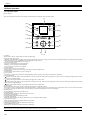
1.6 Basic Operation
1.6.1 Operation Panel
0023-1270
iPF750 / iPF755
This section explains the functions of the buttons and the meanings of the LEDs on the operation panel.
[1]
[15]
Data
[2]
[14]
Message
[3]
[13]
[12]
Load
Feed Cut
Power
[4]
[11]
Stop
Menu
[10]
OK
Back
[5]
Navigate
[6]
[9]
[8]
[7]
F-1-26
[1] Display
Printer menus, statuses, and messages are shown on this display.
[2] Data reception lamp (green)
- Blinking: When the printer is making prints, this lamp indicates that a print job is being received or processed. When the printer is not making prints, this lamp
indicates that the print job is suspended or the firmware data is being received.
- Not lit: This lamp indicates that there is no print job.
[3] Message lamp (orange)
- Stays lit: A warning message is being displayed.
- Blinking: An error message is being displayed.
- Not lit: The printer is normal or not powered.
[4] [Power] button
Use this button to turn on or off the printer.
When the printer is powered or in the sleep mode, the [Power] button lamp stays lit.
[5] [Stop] button
Use this button to stop execution of a job or drying ink.
[6] [Navi] button
Use this key to confirm the procedures for loading/unloading media, replacing an ink tank, and replacing the printhead.
[7] Direction buttons
button: Pressing this button on the [tab selection screen] moves the tab. When a menu requiring you to enter a value is selected, pressing this button allows
you to move to the left-hand digit.
button: Pressing this button in a menu displays the upper item or setting value.
button: Pressing this button on the [tab selection screen] moves the tab. When a menu requiring you to enter a value is selected, pressing this button allows
you to move to the right-hand digit.
button: Pressing this button in a menu displays the lower item or setting value.
[8] [OK] button
Pressing this button on the [tab selection screen] displays the menu for the displayed tab.
In the menu for a tab, pressing this button at the item preceded by [+] allows you to move to the bottom layer of menu items, where you can execute a menu item
or set values. Also press this button when a message asking you to press the [OK] button is shown on the display.
[9] [Back] button
Pressing this button displays the preceding screen.
[10] [Menu] button
Pressing this button displays the [tab selection screen] screen.
[11] [Media Change] button
Press this button when loading/replacing media.
[12] [Media Feed] button
When roll media is loaded, pressing this button allows you to change the media position.
[13] [Media Cut] button
When roll media is loaded, pressing this button cuts the media.
[14] [Cut Sheet] lamp (green)
This lamp stays lit when cut sheet is selected as a media type.
[15] [Roll Media] lamp (green)
This lamp stays lit when roll media is selected as a media type.
MEMO:
When the printer is in the sleep mode, pressing any button other than the [Power] button wakes up the printer.
1-18
Chapter 1
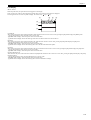
1.6.2 Display
0023-1271
iPF750 / iPF755
When the printer starts, the [tab selection screen] appears on the display.
There are four types of tabs on which the relevant printer status, menu, and error information are displayed.
The tab appears as the icon to the top field of display. The tab moves by
key or
key.
[2]
[1]
[3]
[4]
[A]
[B]
[C]
F-1-27
[1] Media tab
This tab shows the printer status and menu related to media. When this tab is shown in reverse video, pressing the [OK] button displays the [Media] menu.
-[A] Top field of display: Shows the media icon in reverse video.
-[B] Middle field of display: Shows the printer status and a menu name.
-[C] Bottom field of display: Shows the media type in the first row and the media size in the second row.
[2] Ink tab
This tab shows the printer status and menu related to ink. When this tab is shown in reverse video, pressing the [OK] button displays the [Ink] menu.
-[A] Top field of display: Shows the ink icon in reverse video.
-[B] Middle field of display: Shows the printer status and a menu name.
-[C] Bottom field of display: Shows the remaining ink levels of the ink tanks loaded in the printer.
[3] Job tab
This tab shows the printer status and menu related to the print job. When this tab is shown in reverse video, pressing the [OK] button displays the [Job] menu.
-[A] Top field of display: Shows the job icon in reverse video.
-[B] Middle field of display: Shows the printer status and a menu name.
[4] Setup/Adjustment tab
This tab shows the printer status and menu related to setup/adjustment. When this tab is shown in reverse video, pressing the [OK] button displays the [Setup/
Adjustment] menu.
-[A] Top field of display: Shows the setup/adjustment icon in reverse video.
-[B] Middle field of display: Shows the printer status and a menu name.
-[C] Bottom field of display: Shows the remaining ink level of the maintenance cartridge.
1-19
Chapter 1
1.6.3 Menu
0023-2460
iPF750 / iPF755
The printer has a Main menu which includes a menu related to maintenance such as adjustment of ink ejection position of each nozzle and head cleaning, a menu
related to printing settings such as auto cutting and ink drying time, and a menu related to parameters such as a message language.
1. Menu Operation
a) Displaying menu on each tab
Press the
key or
key on the [Tab Selection] screen to select a tab, and press the [OK] key.
A menu associated with each tab is displayed.
Press the
key or
key to select a menu and press the [OK] key.
The menu is selected and menu items are displayed.
Select a menu with [+] on the left side and press the [OK] key to navigate to lower level menus.
b) Setting menu items
Press the
key or
key to select an item to set and press the [OK] key.
The item is checked on the left side check box to confirm that it is set.
After 2 seconds, the menu that is one level above is displayed.
c) Setting numeric value for a menu item
Proceed as follows to set a numeric value for an item such as network settings.
1. Press the
key or
key to move the underscore to the field you want to enter a numeric value.
2. Press the
key or
key to enter a numeric value.
3. Repeat steps 1 and 2 and press the [OK] key when finished.
1-20
Chapter 1
2. Main Menu
The structure and settings of the main menu is as follows. The asterisk mark "*" is default setting.
[Paper Menu]
T-1-2
First Level
[Load Paper]
Second Level
Third Level
[Roll Paper]
(The paper type is displayed
here.)
[Cut Sheet]
(The paper type is displayed
here.)
Fourth Level
Fifth Level
[Eject Paper]
[Chg. Paper Type]
[Roll Paper]
[Chg. Paper Size]
[Sheet Size]
[Cut Sheet]
[Roll Length]
[Roll Width]
[ManageRemainRoll]
[Off]
[On]
[Paper Details]
(The paper type is displayed [Head Height]
here.)
[Automatic]*
[Highest]
[High]
[Standard]
[Low]
[Lowest]
[Super Low]
[Skew Check Lv.]
[High Accuracy]
[Standard]*
[Loose]
[Off]
[Cutting Mode]
[Automatic]
[Eject]
[Manual]
[Cut Speed]
[Fast]
[Standard]
[Slow]
[Trim Edge First]
[Automatic]
[Off]
[On]
[CutDustReduct.]
[Off]
[On]
[VacuumStrngth]
[Automatic]*
[Strongest]
[Strong]
[Standard]
[Weak]
[Weakest]
1-21
Chapter 1
T-1-3
First Level
[Paper Details]
Second Level
Third Level
(The paper type is displayed [Scan Wait Time]
here.)
Fourth Level
[Off]
[1 sec.]
[3 sec.]
[5 sec.]
[7 sec.]
[9 sec.]
[Roll DryingTime]
[Off]
[30 sec.]
[1 min.]
[3 min.]
[5 min.]
[10 min.]
[30 min.]
[60 min.]
[NearEnd RollMrgn]
[3mm]
[NearEnd Sht Mrgn]
[3mm]
[Bordless Margin]
[Automatic]
[20mm]
[20mm]
[Fixed]
[Width Detection]
[Off]
[On]
[Return Defaults]
[Keep Paper Type]
[Off]
[On]
1-22
Fifth Level
Chapter 1
[Ink Menu]
T-1-4
First Level
Second Level
Third Level
Fourth Level
Fifth Level
Fourth Level
Fifth Level
[Rep. Ink Tank]
[Head Cleaning A]
[Job Menu]
T-1-5
First Level
Second Level
Third Level
[Print Job]*14
[Job List]
(Select Print Job.)
[Delete]
[Stored Job]*14
[Mailbox List]
(Enter a password if one has [Job List]
been set.)
[Preempt Jobs]
[Print]
[Delete]
[Print Job List]
[Job Log]
(Choose from information
about the latest three print
jobs.)
[Document Name]
[User Name]
[Page Count]
[Job Status]
[OK]
[CANCELED]
[Print Start Time]
[yyyy/mm/dd hh:mm:ss]
[Print End Time]
[yyyy/mm/dd hh:mm:ss]
[Print Time]
[xxxsec.]
[Print Size]
[xxxxxxxxsq.mm]
[Media Type]
[Interface]
[USB]
[Network]
[HDD]*14
[Ink Consumed]
(Indicates the ink color.)
[xxx.xxx ml]
[Print Job Log]
[Pause Print]
[Off]
[On]
[HDD Information]*14
[Total capacityBox free
space]
1-23
Chapter 1
[Set./Adj. Menu]
T-1-6
First Level
[Test Print]
Second Level
Third Level
Fourth Level
Fifth Level
[Nozzle Check]
[Status Print]
[Interface Print]
[GL2 Set Print]
[Paper Details]
[Print Job Log]
[Menu Map]
[Color Palette]
[Adjust Printer]
[Head Posi. Adj.]
[Auto(Standard)]
[Auto(Advanced)]
[Manual]*4
[Head Inc. Adj.]
[Feed Priority]
[Adj. Priority]
[Automatic]*
[Print Quality]
[Print Length]
[Adj. Quality]*5
[Auto(GenuinePpr)]
[Auto(OtherPaper)]
[Manual]
[Adjust Length]*6
[AdjustmentPrint]
[A:High]
[B:Standard/Draft]
[Change Settings]
[A:High]
[B:Standard/Draft]
[Adj. Fine Feed]*5
[Maintenance]
[Head Cleaning]
[Head Cleaning A]
[Head Cleaning B]
[Nozzle Check]
[Replace P.head]
[Repl. maint cart]
[Head Info]
[ProductName:]
[s/n:]
[Days elapsed:]
[Count [Mdot]:]
[GL2 Settings]
[Quality Manager]
[Color Mode]
[Monochrome]
[Color (CAD) 1]*
[Color (CAD) 2]
[Color (CAD) 3]
[Color (CAD) 4]
[Color (CAD) 5]
[Print Quality]
[Fast]
[Standard]*
[High]
[Input Resolution]
[600dpi]*
[300dpi]
[Print (Economy)]
[Off]*
[On]
1-24
Chapter 1
T-1-7
First Level
[GL2 Settings]
Second Level
[Paper Manager]
Third Level
[Paper Source]
Fourth Level
Fifth Level
[Automatic]*
[Roll Paper]
[Cut Sheet]
[Margin]
[3mm(Standard)]*
[5mm]
[Conserve Paper]
[Off]*
[On]
[Auto Rotate]
[Off]*
[On]
[Nesting]*14
[Use Nesting]
[Off]*
[Nesting WaitTime]*7
[xx min.]
[Cut Lines]*7
[Off]*
[On]
[On]
[Line & Pen Manager]
[Enable merge]
[Off]*
[On]
[Pen Setup]
[Select Palette]
[Software]*
[Palette A]
[Palette B]
[Factory]
[Define Palette]
[Palette A]
(Choose a pen
number.)
[Width]
(Indicates the Width
value.)
[Color]
0-255
[Line Attributes]-[No
Setting]/[Circle
Setting]
(Specify the values of
[Palette B]
(Choose a pen number.) Width, Color, and Line
Attributes.)
(Indicates Width,
Color, and Line
Attributes.)
[Factory]
(Choose a pen
number.)
(Indicates Width,
Color, and Line
Attributes.)
[Reset Palette]
[All Palette]
[Palette A]
[Palette B]
[Smoothing]
[Software]*
[Smooth]
[ThickenFineLines]
[Off]*
[On]
[AdjustFaintLines]
[Off]
[Warning]
[Off]*
[On]
[ProcessingOption]
[On]
[On-the-Fly]*14
[Off]*
[On]
[PageSizeProcess1]
[Off]*
[On]
[PageSizeProcess2]
[Off]*
[On]
[GL2 Set Print]
1-25
Chapter 1
T-1-8
First Level
[Interface Setup]
Second Level
[EOP Timer]*12
Third Level
Fourth Level
Fifth Level
[10 sec.]
[30 sec.]
[1 min.]
[2 min.]
[5 min.]
[10 min.]*
[30 min.]
[60 min.]
[TCP/IP]*12
[IPv4]
[IPv4 Mode]
[Automatic]
[Manual]*
[Protocol]*8
[DHCP]
[On]
[BOOTP]
[On]
[RARP]
[On]
[IP Address]
xxx.xxx.xxx.xxx
[Off]*
[Off]*
[Off]*
[IPv4 Settings]*13
[IPv6]
[Subnet Mask]
xxx.xxx.xxx.xxx
[Default G/W]
xxx.xxx.xxx.xxx
[IPv6 Support]
[On]
[IPv6 StlessAddrs]
[On]*
[DHCPv6]
[On]
[Off]*
[Off]
[Off]*
[NetWare]*12
[NetWare]
[On]
[Off]*
[Frame Type]*9
[Auto Detect]
[Ethernet 2]
[Ethernet 802.2]*
[Ethernet 802.3]
[Ethernet SNAP]
[Print Service]*9
[BinderyPServer]
[RPrinter]
[NDSPServer]
[NPrinter]
1-26
Chapter 1
T-1-9
First Level
[Interface Setup]
Second Level
Third Level
[AppleTalk]*12
[On]
[Ethernet Driver]*12
[Auto Detect]
Fourth Level
Fifth Level
[Off]*
[On]*
[Off]
[Comm.Mode]*10
[Half Duplex]*
[Full Duplex]
[Ethernet Type]*10
[10Base-T]*
[100Base-TX]
[1000Base-T]
[Spanning Tree]
[Not Use]*
[Use]
[MAC Address]
xxxxxxxxxxxx
[Interface Print]*12
[Return Defaults]*12
[System Setup]
[Sleep Timer]
[5 min.]*
[10 min.]
[15 min.]
[20 min.]
[30 min.]
[40 min.]
[50 min.]
[60 min.]
[240 min.]
[Buzzer]
[Off]
[On]*
[Contrast Adj.]
-4,-3,-2,-1,0*,+1,+2,+3,+4
[Date & Time]*12
[Date]
[Date Format]
[yyyy/mm/dd]*
[yyyy/mm/dd]*11
[Time]
[hh:mm]
[dd/mm/yyyy]
[mm/dd/yyyy]
[Language]
[English]
[Japanese]
[Francais]
[Italiano]
[Deutsch]
[Espanol]
[Russian]
[Chinese]
[Korean]
1-27
Chapter 1
T-1-10
First Level
[System Setup]
Second Level
[Time Zone]*12
Third Level
Fourth Level
[0:London(GMT)]
[+1:Paris,Rome]
[+2:Athens,Cairo]
[+3:Moscow]
[+4:Eerevan,Baku]
[+5:Islamabad]
[+6:Dacca]
[+7:Bangkok]
[+8:Hong Kong]
[+9:Tokyo,Seoul]
[+10:Canberra]
[+11NewCaledonia]
[+12:Wellington]
[-12:Eniwetok]
[-11:Midway is.]
[-10Hawaii(AHST)]
[-9:Alaska(AKST)]
[-8:Oregon (PST)]
[-7:Arizona(MST)]
[-6:Texas(CST)]
[-5:NewYork(EST)]
[-4:Santiago]
[-3:Buenos Aires]
[-2:]
[-1:Cape Verde]
[Length Unit]
[meter]*
[feet/inch]
[Detect Mismatch]
[Pause]
[Warning]
[None]
[Hold Job]*14
[Paper Size Basis]
[Roll Selection 1]
[ISO A3 (297mm)]*
Roll Selection 2
[10inch (254mm)]*
[300mm Roll]
[JIS B4 (257mm)]
[Keep Paper Size]
[Off]*
[On]
[TrimEdge Reload]
[Automatic]
[Off]*
[On]
[Rep.P.head Print]
[Off]
[On]*
1-28
Fifth Level
Chapter 1
T-1-11
First Level
[System Setup]
Second Level
[Nozzle Check]
Third Level
[Frequency]
Fourth Level
Fifth Level
[Standard]*
[1 page]
[Warning]
[Off]*
[On]
[Use RemoteUI]*12
[On]*
[Off]
[Reset PaprSetngs]*12
[Erase HDD Data]*14
[High Speed]*12
[Secure High Spd.]*12
[Secure]*12
[Output Method]*14
[Print]*
[Print (Auto Del)]
[Save: Box XX]
[Print After Recv]*14
[Off]*
[On]
[Save: Shared Box]*12*14
[Off]
[On]
[Prep.MovePrinter]
[Admin. Menu]*12
[Change Password]*13
[Init.Admin.Pswd]*13
[Printer Info]
[Paper Info]
[Ink Info]
[Head Info]
[System Info]
[Error Log]
[Other Counter]
*1: Available only if ManageRemainRoll is On.
*2: Available only if Width Detection is set to Off.
*3: Print Anyway is displayed when a job being held is selected.
*4: Available after Auto(Advanced) in Head Posi. Adj. has been used once.
*5: Available when you have specified Feed Priority > Adj. Priority > Automatic or Print Quality.
*6: Available when you have specified Feed Priority > Adj. Priority > Automatic or Print Length.
*7: Available only if Use Nesting is set to On.
*8: Not shown if you have set IPv4 Mode to Manual.
*9: Not shown if you have set NetWare to Off.
*10: Not shown if you have set Auto Detect to On.
*11: Follows the setting in Date Format.
*12: Viewing and configuration is possible for administrators, and only viewing for other users.
*13: Viewing and configuration is possible for administrators only.
*14: Displayed only on models equipped with HDD.
1-29
Chapter 1
3. Main menu during printing
The structure of the main menu during printing is as follows.
T-1-12
First Level
Second Level
[Adj. Fine Feed]
[Printer Info]
[Paper Info]
[Ink Info]
[Head Info]
[System Info]
[Error Log]
[Other Counter]
1-30
Third Level
Fourth Level
Fifth Level
Chapter 1
4. Main Menu Settings
Main menu items are described in the following tables.
[Paper Menu]
T-1-13
Setting Item
Description/Instructions
[Load Paper]
Select and load either cut sheet or roll media.
[Eject Paper]
Remove currently loaded paper.
[Chg. Paper Type]
Change currently set paper type.
[Chg. Paper Size]
Change currently set paper size.
[ManageRemainRoll]
Choose On to print a barcode at the end of a roll before you remove it. The printed barcode can
be used in managing the amount of roll paper left. ChooseOff if you prefer not to print the
barcode.
[Paper Details]
(The paper type is displayed
here.)
[Head Height]
Adjust the Printhead height.
[Skew Check Lv.]
If you print on the paper that has an irregular width, choose Loose for a higher skew detection
threshold, or choose Off to disable skew detection. However, if paper is loaded askew when
detection is Off, note that paper jams or Platen soiling may occur.
[Cutting Mode]
Select whether to use standard round blade cutter or not.
Select [Automatic] to cut paper after printing. Select [Manual] to print a line at the cut position
after printing without cutting. Select [Eject] to prevent the printout from dropping until the ink
dries after printing.
[Cut Speed]
Choose the cutting speed. If you use adhesive paper, choosing Slow helps prevent adhesive
from sticking to the cutter and keeps the cutter sharp.
[Trim Edge First]
If a roll is loaded, the end of the paper will be cut.
[CutDustReduct.]
Choose On to reduce the amount of debris generated when cutting film and similar media by
printing a line at the cut position. This option reduces the amount of debris given off after
cutting. It also helps prevent adhesive from sticking to the cutter and keeps the cutter sharp if
you use adhesive paper.
[VacuumStrngth]
Specify the level of suction that holds paper against the Platen.
[Scan Wait Time]
Specify the time to wait for the ink to dry between each scan in bidirectional printing, in
consideration of how quickly the ink dries. Note that printing will take longer if you specify a
wait time.
[Roll DryingTime]
Specify the time to wait for the ink to dry for each sheet.
[NearEnd RollMrgn]
Specify the minimum margin at the leading edge of roll paper to ensure better printing quality
at the leading edge.
Note that if you choose 3mm, it may lower the printing quality at the leading edge and affect
feeding accuracy. The printed surface may be scratched, and ink may adhere to the leading
edge. It may also cause the Platen to become soiled.
[NearEnd Sht Mrgn]
Specify a margin at the leading edge of sheets to ensure better printing quality at the leading
edge.
Note that if you choose 3mm, it may lower the printing quality at the leading edge and affect
feeding accuracy. The printed surface may be scratched, and ink may adhere to the leading
edge.
[Bordless Margin]
Adjust the margin during borderless printing.
Choose Automatic to have the printer automatically detect the paper width and configure the
margin settings for borderless printing. If margins are mistakenly created when Automatic is
selected, choose Fixed. In this case, the paper width is not detected automatically, and the
document is printed without borders, using the margin settings required by the printer.
[Width Detection]
Set to print from desired position such as when printing inside a frame.
Select [Off] to disable paper width and skew detection. If paper is loaded askew, paper may jam
or platen soiling may occur.
[Return Defaults]
Choose OK to restore Paper Details to the factory default values.
[Print Paper Detail]
Print the paper settings set with [Paper Details].
[Keep Paper Type]
Select [On] to continue using the same type of paper.
1-31
Chapter 1
[Ink Menu]
T-1-14
Setting Item
Description/Instructions
[Rep. Ink Tank]
When replacing the Ink Tank, choose Yes and follow the instructions on the screen.
[Head Cleaning A]
Specify Printhead cleaning options.
Execute Head Cleaning A if printing is faint, oddly colored, or contains foreign substances.
[Job Menu]
T-1-15
Setting Item
[Print Job]
[Stored Job]
[Job List]
(Select Print
Job.)
[Mailbox List] (Enter a
password if
one has been
set.)
Description/Instructions
[Delete]
Delete the current job or queued jobs.
[Preempt Jobs] Print the job first after the current print job is finished printing.
[Print
Anyway]
Displayed when queued job is selected.
[Job List][Print]
Prints a saved job.
[Job List][Delete]
Deletes a saved job.
[Print Job List] Prints a list of saved jobs.
[Job Log]
1-32
(Choose from
information
about the latest
three print
jobs.)
[Document Name]
Displays the name of the document in the most recently printed job.
[User Name]
Displays the name of the user who has transmitted the job.
[Page Count]
Displays the number of sheets of the job.
[Job Status]
Displays the result of processing of the job.
[Print Start Time]
Displays the time at which the job started printing.
[Print End Time]
Displays the time at which the job finished printing.
[Print Time]
Displays the time spent printing the job.
[Print Size]
Displays the size of the paper used for printing the job.
[Media Type]
Displays the type of the paper used for printing the job.
[Interface]
Displays the interface of the job.
[Ink Consumed]
Displays the amount of ink consumed for printing the job.
[Print Job Log]
Print the print job information such as paper type, size, and ink consumption. Ink consumption
is the approximate amount of ink used to print one sheet.
[Pause Print]
Select [On] to stop printing.
[HDD Information]
Displays the total size of the HDD and the remaining box size.
Chapter 1
[Set./Adj. Menu]
T-1-16
Setting Item
[Test Print]
Description/Instructions
[Nozzle Check]
Print a nozzle check pattern.
[Status Print]
Print the printer information.
[Interface Print]
Print the interface settings.
[GL2 Set Print]
Print the GL2 settings.
[Paper Details]
Prints the paper settings set with [Paper Details].
[Print Job Log]
Print print job information such as paper type, size, and ink consumption. Ink consumption is
the approximate amount of ink used to print one sheet.
[Menu Map]
Print the menu list.
[Color Palette]
[Adjust
Printer]
[Head Posi.
Adj.]
Print the GL2 color list.
[Auto(Standard)]
Print and read a test pattern for the automatic adjustment of Printhead alignment relative to the
printing direction.
[Auto(Advanced)]
Print and read a test pattern for the automatic adjustment of Printhead alignment relative to the
nozzle and printing direction.
[Manual]
Print a test pattern for adjustment of Printhead alignment relative to the printing direction. Enter
the adjustment value manually based on the resulting pattern.
[Head Inc. Adj.]
Print an adjustment pattern for adjusting the inclination of the printhead.
[Feed Priority] [Adj. Priority] [Automatic]
Set the priority feed precision. Normally select [Automatic]. Select [Print Quality] to print at
[Print Quality] high quality. Select [Print Quality] to reduce horizontal streaks. Select [Print Length] to
accurately control the feed amount. However, selecting [Print Length] may cause colors to
[Print Length] become slightly uneven in the carriage scan direction.
[Adj. Quality] [Auto(Genuin Set when using paper described in the paper reference guide.
ePpr)]
A pattern to adjust the paper feed amount is printed, and the feed amount is automatically
adjusted from the printed result.
[Auto(OtherPa Set when using paper not described in the paper reference guide.
per)]
A pattern to adjust the paper feed amount is printed, and the feed amount is automatically
adjusted from the printed result.
This takes longer than [Auto (GenuinePpr)] to print and consumes more ink.
[Manual]
[Adjust
Length]
[AdjustmentPr Print a test pattern for adjustment relative to paper stretching or shrinkage, after which you can
int]-[A:High]/ enter the amount of adjustment.
[B:Standard/
Draft]
[Change
Settings][A:High]/
[B:Standard/
Draft]
[Adj. Fine Feed]
[Maintenance] [Head Cleaning]
Select for paper that cannot be adjusted by [Auto(GenuinePpr)] or [Auto(OtherPaper)], such as
highly transparent paper.
Print a pattern to adjust the paper feed amount according to the type of paper.
Displayed when [Print Length] is selected as [Adj. Priority] for [Feed Priority].
Adjust the expansion rate of the currently loaded paper.
Enter the result adjusted with [AdjustmentPrint] or the difference with your own measurement
in %.
Increase the adjustment value to increase the feed amount for paper that tends to expand, and
reduce it for paper that tends to shrink.
Displayed when [Automatic] or [Print Quality] is selected as [Adj. Priority] for [Feed Priority].
Manually adjust the paper feed amount while printing.
Specify Printhead cleaning options.
Choose Head Cleaning A if printing is faint, oddly colored, or contains foreign substances.
Choose Head Cleaning B if no ink is printed at all, or if printing is not improved by Head
Cleaning A.
[Nozzle Check]
Print a nozzle check pattern.
[Replace P.head]
Not displayed during a warning message that the remaining Maintenance Cartridge capacity is
low.
When replacing the Printhead, choose Yes and follow the instructions on the screen.
[Repl. maint cart]
When exchanging the maintenance cartridge, choose Yes and follow the instructions on the
screen.
1-33
Chapter 1
T-1-17
Setting Item
[GL2 Settings] [Quality
Manager]
[Color Mode]
Description/Instructions
[Monochrome Print by the monochrome.
]
[Color (CAD) Print by the standard color.
1]
[Color (CAD) Print by the bright color.
2]
[Color (CAD) Print by the color emulated the Canon iPF500/iPF600/iPF700/iPF510/iPF610/iPF710/iPF605/
3]
iPF720/iPF810/iPF820.
[Color (CAD) Print by the color emulated the HP Designjet 500/800.
4]
[Color (CAD) Print by the color emulated the HP Designjet 1000.
5]
[Print Quality]
[Paper
Manager]
Select the print quality.
[Input Resolution]
Choose the printer input resolution from between [600dpi] and [300dpi].
[Print (Economy)]
Prints with a lower grade of print than normal, but with less ink consumption. Select [ON] to
economize on inks.
[Paper Source]
Select how to feed paper for printing on the HP-GL/2.
[Margin]
Set the top/bottom and left/right margins of the paper. For cut-sheet, the trailing edge margin is
23mm.
However, if the leading edge margin is set with [Paper Details], that value has priority.
[Conserve Paper]
Prints by economizing on paper.
[Auto Rotate]
If a document has its long side shorter than the roll width, the page rotates by 90 degrees
automatically to economize on paper. If a document contains horizontally long data such that
it has its long side longer than the roll width and its short side shorter than the roll width, the
page rotates 90 degrees to print within the boundaries of the paper.
HP RTL cannot rotate.
In case of HP RTL image, the image may be truncated or a blank paper may be ejected because
the image cannot be rotated even if the paper size is rotated by 90 degrees. In that case, set [Auto
Rotate] to [Off].
[Nesting]
[Use Nesting] Select [On] to print pages when they are tiled fully to the roll width, instead of printing them
one by one.
[Nesting
WaitTime]
[Cut Lines]
[Line & Pen
Manager]
[Enable merge]
[Pen Setup]
Set the time to elapse before printing.
Select [On] to print perforated lines between pages.
When lines overlap, set whether to merge or overwrite the colors of the overlapping lines.
Select [Off] to overwrite with the line printed later. Select [On] to merge all overlapping colors.
[Select
Palette]
Select the value related to pen from [Software], [Palette A], [Palette B], or [Factory].
Select [Software] to print according to the application side instruction. Select [Palette A] or
[Palette B] to print with value set by [Define Palette].
[Define
Palette]
Set [Width], [Color], and [Line Attributes] for the palette's [Pen Number]. Select [Factory] to
check the value when [Factory] is selected for [Select Palette].
For [Line Attributes], select the shape of line end and joint between lines as [No Setting] or
[Circle Setting].
[Reset Palette] Return the [Define Palette] settings to factory settings.
[Smoothing]
Choose whether to draw an arc with a smooth curve or with a polygon.
[ThickenFineLines]
Select [On] to print thin lines clearly.
[AdjustFaintLines]
If thin lines print in a tint of color varied from other patterns, selecting [Off] may provide the
print result as intended, though the thin lines may print, interrupted, depending on the color.
[ProcessingOp [Warning]
tion]
[On-the-Fly]
[PageSizeProcess1]
[PageSizeProcess2]
[GL2 Set Print]
1-34
Select [On] to display warnings during GL2.
In printing data consisting solely of HP RTL, if the data is slow to print, select [On] to expedite
the time at which the data starts printing. Verify the print result to make sure that images are
not chipped in this case.
Normally, an image is printed inside margins necessary for printing, but if the image data itself
has margins, the print position will not be offset when this is set [On].
Select [On] to determine the paper size based on the drawing area.
Print the GL2 settings.
Chapter 1
T-1-18
Setting Item
[Interface
Setup]
Description/Instructions
[EOP Timer]
[TCP/IP]
Specify the timeout period before cancellation of print jobs that cannot be received by the
printer.
[IPv4]
[IPv4 Mode]
Choose whether the printer IP address is configured automatically or a static IP address is
entered manually.
[Protocol][DHCP]/
[BOOTP]/
[RARP]
Specify the protocol used to configure the IP address automatically.
[IPv4
Specify the printer network information when using a static IP address.
Settings]-[IP Enter the IP address assigned to the printer, as well as the network subnet mask and default
Address]/
gateway.
[Subnet
Mask]/
[Default G/W]
[IPv6]
[NetWare]
[IPv6
StlessAddrs]
Set whether to use IPv6 stateless address.
[DHCPv6]
Set whether to use DHCPv6 setting.
[NetWare]
Specify the NetWare protocol. To apply your changes, choose Register Setting.
[Frame Type]
Specify the frame type to use.
[Print Service]
Choose the print service.
[AppleTalk]
[Ethernet
Driver]*12
[IPv6 Support] Set whether to support IPv6 connection.
Specify whether to use the AppleTalk protocol. To apply your changes, choose Register
Setting.
[Auto Detect]
Specify the communication method. To apply your changes, choose Register Setting.
Choose On for automatic configuration of the LAN communication protocol. Choose Off to use
settings values of Comm.Mode and Ethernet Type.
[Comm.Mode]
Choose the LAN communication method.
[Ethernet Type]
Choose the LAN transfer rate.
[Spanning Tree]
Choose whether spanning-tree packets are supported over the LAN.
[MAC Address]
Displays the MAC address.
[Interface Print]
Print the interface settings.
[Return Defaults]
Select [OK] to return the [Interface Setup] settings to factory default.
1-35
Chapter 1
T-1-19
Setting Item
[System Setup]
Description/Instructions
[Sleep Timer]
Specify the period before the printer enters Sleep mode.
[Buzzer]
Set the buzzer. Choose On for the buzzer to sound once for warnings and three times for errors.
[Contrast Adj.]
[Date & Time]
Adjust the Display Screen contrast level.
[Date]
[Time]
[Date Format]
Set the current time. This can be set only when [Date] is set.
Specify the date format.
[Language]
Specify the language used on the Display Screen.
[Time Zone]
Specify the time zone. Time zone options indicate a main city in this time zone and the
difference from Greenwich Mean Time.
[Length Unit]
Choose the unit of measurement when roll length is displayed. You can switch the unit
displayed for the remaining paper amount.
[Detect Mismatch]
Set the printing behavior when the paper type and size set with the printer menu does not match
the paper type and size set with the printer driver.
Select [Pause] to pause printing. Select [Warning] to print a warning and continue printing.
Select [None] to continue printing without displaying a warning. Select [Hold Job] to queue the
job with different paper type and size in a job queue on the hard disk.
[Paper Size Basis] [Roll Selection 1]
When the size of roll paper is detected, select which roll width to use if the roll width is between
[ISO A3 (297mm)] and [300mm Roll].
Roll Selection 2
1-36
Set the current date.
When the size of roll paper is detected, select which roll width to use if the roll width is between
[10inch (254mm)] and [JIS B4 (257mm)].
[Keep Paper Size]
Select [On] to give priority to paper size. If the margin set with the printer driver is less than
the margin set with the printer menu, the margin set with the printer menu has priority and text
and images extending beyond the margins are truncated.
Select [Off] to give priority to margin settings. If the margins set with the printer driver and the
margins set with the printer menu are different, the larger settings are used for printing.
[TrimEdge Reload]
Select whether cut the leading edge of the paper when the paper at the standby position has
loaded. Cut it when the roller trace at the standby position attract attention. Choose On to cut it
everytime when the paper at the standby position has loaded. Choose Automatic to cut it when
the paper at the standby position during two days or more has loaded.
[Rep.P.head Print]
Select [On] to automatically perform [Adjust Detail] after replacing the Printhead.
[Nozzle Check]
Set with [Frequency] the timing to check for nozzle clogging after printing. Select [Standard]
to adjust the checking timing according to the nozzle usage.
Select [1 page] to check after each page.
Select [On] for [Warning] to display a warning when the print head nozzle is clogged while
printing.
[Use RemoteUI]
Select [Off] to disable access from RemoteUI and enable setting only from the operation panel.
[Reset PaprSetngs]
Restores settings that you have changed with Media Configuration Tool to the factory default
values.
Chapter 1
T-1-20
Setting Item
[System Setup]
Description/Instructions
[Erase HDD Data] [High Speed]
Delete the file management information of the saved data in the HDD.
[Secure High Spd.] Overwrite the random data in the whole of the hard disk drive.
[Output Method]
[Secure]
Overwrite 00 and FF and random data in the whole of the hard disk drive once at a time.
Execute the verify check whether the data has written correctly to the hard disk drive.
[Print]
Select the output method of jobs sent from software other than the printer driver. This can be
set from the printer if you are using a printer driver.
Select [Print] to print normally. Select [Print (AutoDel)] to print and delete the data in hard
disk. Select [Save: Box XX] to save to box without printing.
[Print (Auto Del)]
[Save: Box XX]
[Print After Recv]
Setting of jobs sent from software other than the printer driver. This can be set from the printer
if you are using a printer driver. Select [On]to print after saving.
[Save: Shared Box]
Select [Off] to print without saving to a common box.
[Prep.MovePrinter
]
[Admin. Menu]
[Printer Info]
Select when moving the printer. Follow the instruction on the screen and perform the necessary
process.
This is not displayed when displaying a warning message about the amount remaining
maintenance cartridge.
[Change Password]
Set a password to restrict displaying/setting of menus as follows. Allowed value is from 0 to
9999999.
- Allow only administrator to display/set
[IPv4]
[Change Password]
[Init.Admin.Pswd]
- Allow administrator to display/set and non-administrator to display only
[Interface Setup] (exclude [IPv4])
[Date & Time]
[Date Format]
[Time Zone]
[Use RemoteUI]
[Reset PaprSetngs]
[Save: Shared Box]
[Init.Admin.Pswd]
Press [OK] to return the [Administrator Menu] password to factory default.
[Paper Info]
The remaining ink levels and the remaining maintenance cartridge ink level are displayed.
[Ink Info]
Displays the currently set paper type, size and printer settings.
[Head Info]
Displays the Printhead information.
[System Info]
Displays the firmware version, serial number, and interface information.
[Error Log]
Displays the most recent error messages (up to 5).
[Other Counter]
Displays the total area printed.
1-37
Chapter 1
1.7 Safety and Precautions
1.7.1 Safety Precautions
1.7.1.1 Moving Parts
0023-1446
iPF750 / iPF755
Moving parts of the printer include the carriage unit driven by the carriage motor, the carriage belt, the ink tube, the flexible cable, the feed roller drives the feed
motor, the pinch roller, and the purge unit driven by the purge motor.
To prevent accidents, the upper cover of the printer is locked during printing. If the top cover is opened in the online/offline mode, the carriage motor, feed motor,
and other driving power supplies are turned off.
Carriage Motor
Roll Media Drive Unit
Pinch Roller
Feed Motor
Flexible Cable
Carriage
Purge Unit
Ink tube
Feed Roller
Cutter Unit
Carriage Height
Adjustment Unit
Cutter
F-1-28
1.7.1.2 Adhesion of Ink
0023-1463
iPF750 / iPF755
1-38
Chapter 1
(1) Ink passages
Be careful not to touch the ink passages of the printer to prevent the printer, workbench, ands, and clothes from being stained with ink.
The ink flows through the ink tank unit, carriage unit, purge unit, maintenance cartridge, and the ink tubes that relay ink to individual units.
Platen
Carriage
Ink Tank Unit
Maintenance Cartridge
Purge Unit
Ink Tank Unit
Head Management Sensor
F-1-29
- Although the ink is not harmful to the human body, it contains organic solvents.
Ink may contaminate the surrounding parts. Carry out the work with due caution. If your hands are stained with ink, wash them with a plenty of water.
Be careful not to allow the ink to get into your mouth or eyes.
If the ink gets into your eyes, flush them with water well and see a doctor.
In case of accidental ingestion of a large quantity of ink, see a doctor immediately.
- It is also effective to use gloves to prevent ink from adhering when working.
- Since this ink contains pigment, stains will not come out of clothing.
(2) Ink Mist
Since the printhead prints by squirting ink onto the media, a minute amount of ink mist is generated in the printing unit during printing. The generated ink mist is
collected in the printer by the airflow. However, uncollected ink mist may stain the platen, carriage unit, exterior, and purge unit.
These stains may soil the print media or hands and clothes when servicing the printer. Wipe them off carefully with a soft, well-wrung cloth.
Upper Cover
Purge Unit
Platen/Carriage/Main Rail
F-1-30
1-39
Chapter 1
1.7.1.3 Electric Parts
0023-2465
iPF750
The electric parts of the printer are activated when the printer is connected to the AC power supply.
At the rear and left/right side of the printer are the main controller, power supply and interface connector. The carriage PCB is incorporated in the carriage unit, and
the operation panel is on the upper right top cover.
When serving the printer with the cover removed, be extremely careful to avoid electric shock and shorting electrical devices.
Operation Panel
Carriage PCB
Power Supply PCB
Main Controller PCB
AC Inlet
Interface Connector
F-1-31
1-40
Chapter 1
1.7.1.4 Electric Parts
0023-1464
iPF755
The electric parts of the printer are activated when the printer is connected to the AC power supply.
At the rear and left/right side of the printer are the main controller, power supply, HDD, and interface connector. The carriage PCB is incorporated in the carriage
unit, and the operation panel is on the upper right top cover.
When serving the printer with the cover removed, be extremely careful to avoid electric shock and shorting electrical devices.
Operation Panel
Carriage PCB
Power Supply PCB
Hard Disk Drive
Main Controller PCB
AC Inlet
Interface Connector
F-1-32
1-41
Chapter 1
1.7.2 Other Precautions
1.7.2.1 Printhead
0020-1924
iPF750 / iPF755
1. How to Handle the Printhead
Do not open the printhead package until you are ready to install the head.
When installing the printhead in the printer, hold the knob[1] and then remove the protective cap 1[2] and protective cap 2[3] in that order.
Do not reattach the protective cap 2[3] to the printhead because the cap may damage the nozzles[4].
To prevent the nozzles from getting clogged with foreign matter or dried ink, install the printhead immediately after you remove the protective caps.
Also make sure to press down the locking lever of the printhead until you feel a click.
In addition, to prevent clogging of the nozzles with foreign matter and improper supply of ink, never touch the nozzles[4] or ink port[6], or wipe it with tissue paper
or anything else.
Do not touch Electriacl contact[5].
Also, never attempt to disassemble/reassemble the printhead or wash it with water.
MEMO:
If the nozzles are clogged or an ink suction problem occurs, white lines can appear on the printout a constant frequency or color dulling can occur. If this problem
is not resolved by cleaning operations, replace the printhead with a new one.
[1]
[4]
[2]
[6]
[3]
[5]
F-1-33
T-1-21
[1] knob
[4] nozzles
[2] protective cap 1
[5] Electrical contact
[3] protective cap 2
[6] ink port
2. Capping
The printer will perform the capping operation when printing has ended or during standby due to an error, in order to protect the printhead and avoid ink leakage.
If the power cord is accidentally unplugged, turn off the Power button, reconnect the power cord, and then turn on the Power button. Confirm that the printer starts
up properly and enters to the "Online" or "Offline" status, and then power off the printer using the Power button.
Improper "capping operation" may cause clogged nozzles due to dried ink or ink leakage from the printhead.
3. When the printer is not used for a long time
Keep the printhead installed in the printer even when it is not used for an extended period of time.
If the printhead is left uninstalled, a printing failure may arise from closed nozzles due to depositing of foreign matter or dried ink when it is reinstalled.
Even if the head remains installed, the nozzle may dry out and cause a printing failure if the ink is drained for transport.
4. Conductivity of Ink
The ink used in this printer is electrically conductive. If ink leaks to into the mechanical unit, wipe clean with a soft, well-wrung damp cloth. If ink leaks onto
electrical units, wipe them completely using tissue paper. If you cannot remove ink completely, replace the electrical units with new ones.
1-42
Chapter 1
If electrical units are powered with ink leaked onto them, the units may damage.
Never connect the power cord when ink has leaded onto the electrical units.
1.7.2.2 Ink Tank
0023-1466
iPF750 / iPF755
1. Unpacking the Ink Tank
Do not unpack the ink tank until you are ready to install it.
When installing the ink tank, be sure to shake it slowly 1 to 2 times before unpacking it. Otherwise, the ink ingredients may precipitate and degrade the print quality.
To prevent foreign matter from entering the ink port, installed the unpacked ink tank in the printer immediately.
2. Handling the Ink Tank
To prevent foreign matter from entering the ink flow path and causing ink suction and printing problems, never touch the ink port and contacts of the ink tank.
When you press down the ink tank cover, the needle enters the ink port, allowing ink to flow between the printer and ink tank.
Do not raise or lower the ink tank cover except when replacing the ink tank.
[2]
[4]
[1]
[3]
F-1-34
[1] Ink tank
[2] Ink tank lock lever
[3] Contacts
[4] Ink port
1.7.2.3 Handling the Printer
0023-1467
iPF750 / iPF755
1. Precautions against Static Electricity
Certain clothing may generate static electricity, causing an electrical charge to build up on your body. Such a charge can damage electrical devices or change their
electrical characteristics.
In particular, never touch the printhead contacts.
[2]
[1]
F-1-35
[1]Carriage unit
[2]Printhead contacts
2. Fixing the Carriage
After completion of printing, the carriage is mechanically locked by the lock pin in the purge unit at the same moment the printhead is capped.
1-43
Chapter 1
3. Contact of Linear Scale/Carriage Shaft
Please do not touch a linear scale and the carriage shaft when the inside of the upper cover is opened, and execute maintenance.
When touching a linear scale and the carriage shaft, it might cause defective movement of the carriage and a defective print.
[2]
[1]
F-1-36
[1] Linear Scale
[2] Carriage Shaft
4. Replacing the maintenance cartridge
When the maintenance cartridge detects that tank is full, the "Repl. Maint. C" error appears. In this case the maintenance cartridge must be replaced.
The printer will not operate until the error is cancelled.
Be careful that the waste ink does not splash when you remove the used maintenance cartridge from the printer.
MEMO:
This printer has an EEPROM in the maintenance cartridge and the maintenance cartridge status is controlled by the main controller PCB which reads and writes
the content of that EEPROM. Therefore, initializing the counter information will not be needed when the maintenance cartridge is replaced.
5. Refilling the ink
After removing the ink in the printer according to the automatic or manual ink draining procedure to disassemble, reassemble, or transport/ship the printer, refill
the ink as soon as possible upon completion of those tasks.
If the ink remaining in the printer after the removal has dried up, the ink deposits on the surfaces of the components may cause damage or abnormal operation.
1-44
Chapter 1
1.7.3 Precautions When Servicing Printer
1.7.3.1 Notes on the Data Stored in the Printer
0013-5942
iPF750 / iPF755
This printer counts the print length, number of ink tank replacements, carriage driving time, number of cleaning operations, number of cutter operations, and so on
and stores them in the main controller's EEPROM as a COUNTER in Service mode.
COUNTER provides important information about the printer usage status.
You can check this information by printing it in the service mode or displaying it on the display.
Following the precautions below when servicing the printer.
(1) Repairing/replacing the PCB
When replacing the main controller, follow the specified replacement procedure.
For the main controller replacement procedure, see "Disassembly/Reassembly" > "Points to Note on Disassembly and Reassembly" > "Boards".
(2) After replacing the carriage unit
The information about the carriage driving time arises in the carriage unit. After replacing the carriage unit, select INITIALIZE > CARRIAGE in the service mode
to initialize the information about the carriage driving time.
(3) After replacing the purge unit
The information about the number of cleanings arises in the purge unit. After replacing the purge unit, select [INITIALIZE] > [PURGE] in the service mode to
initialize (clear) the information about the number of cleanings.
(4) On replacement of supplies
After supplies have been replaced, execute [INITIALIZE] > [PARTS COUNTER] > [PARTS xx] in service mode to initialize (clear) the parts counter information.
For the consumable parts, see "Maintenance" > "Consumable Parts".
You cannot check the counter information once it is initialized (cleared). Be careful not to initialize the counter information before checking it.
You cannot modify the counter information from the operation panel.
1.7.3.2 Confirming the Firmware Version
0013-5945
iPF750 / iPF755
Firmware has been downloaded to the main controller.
When you have replaced the main controller, check that the firmware is the latest version. If not, update it to the latest version.
Reference:
For how to up update the main controller, refer to "TROUBLESHOOTING" > "Update".
1.7.3.3 Precautions against Static Electricity
0013-5947
iPF750 / iPF755
Certain clothing may generate static electricity, causing an electrical charge to build up on your body. Such a charge can damage electrical devices.
To prevent this, discharge any static buildup by touching a grounded metal fitting before you start disassembling the printer.
1.7.3.4 Precautions for Disassembly/Reassembly
0013-5948
iPF750 / iPF755
The precautions for disassembly/reassembly are described in "Disassembly/Reassembly".
1.7.3.5 Self-diagnostic Feature
0013-5950
iPF750 / iPF755
The printer has a self-diagnostic feature to analyze hardware problems.
The self-diagnosis result is shown on the display and indicated by lamps.
For detailed information, see "Error Codes".
1.7.3.6 Disposing of the Lithium Battery
0013-5952
iPF750 / iPF755
The main controller PCB of this printer is equipped with a lithium battery to back up various data.
Risk of explosion if battery is replaced by an incorrect type.
Dispose of used batteries according to the instructions.
"For CA, USA Only
Included battery contains Perchlorate Material-special handling may apply. See
http://www.dtsc.ca.gov/hazardouswaste/perchlorate/ for detail."
1-45
Chapter 1
1-46
Chapter 2 TECHNICAL REFERENCE
Contents
Contents
2.1 Basic Operation Outline.................................................................................................................................................2-1
2.1.1 Printer Diagram............................................................................................................................................................................ 2-1
2.1.2 Printer Diagram............................................................................................................................................................................ 2-2
2.1.3 Print Signal Sequence .................................................................................................................................................................. 2-3
2.1.4 Print Driving ................................................................................................................................................................................ 2-4
2.2 Firmware ........................................................................................................................................................................2-6
2.2.1 Operation Sequence at Power-on................................................................................................................................................. 2-6
2.2.2 Operation Sequence at Power-off ................................................................................................................................................ 2-7
2.2.3 Print Control................................................................................................................................................................................. 2-8
2.2.4 Print Position Adjustment Function........................................................................................................................................... 2-14
2.2.5 Head Management ..................................................................................................................................................................... 2-14
2.2.6 Printhead Overheating Protection Control................................................................................................................................. 2-14
2.2.7 Pause between Pages.................................................................................................................................................................. 2-14
2.2.8 White Raster Skip ...................................................................................................................................................................... 2-14
2.2.9 Sleep Mode ................................................................................................................................................................................ 2-14
2.2.10 Hard Disk Drive ....................................................................................................................................................................... 2-14
2.3 Printer Mechanical System ..........................................................................................................................................2-16
2.3.1 Outline........................................................................................................................................................................................ 2-16
2.3.1.1 Outline...........................................................................................................................................................................................................2-16
2.3.2 Ink Passage................................................................................................................................................................................. 2-17
2.3.2.1 Ink Passage....................................................................................................................................................................................................2-17
2.3.2.1.1 Overview of Ink Passage.......................................................................................................................................................................2-17
2.3.2.2 Ink Tank Unit ................................................................................................................................................................................................2-18
2.3.2.2.1 Structure of Ink Tank Unit ....................................................................................................................................................................2-18
2.3.2.3 Carriage Unit .................................................................................................................................................................................................2-20
2.3.2.3.1 Functions of Carriage Unit....................................................................................................................................................................2-20
2.3.2.3.2 Structure of Carriage Unit .....................................................................................................................................................................2-21
2.3.2.4 Printhead .......................................................................................................................................................................................................2-24
2.3.2.4.1 Structure of Printhead............................................................................................................................................................................2-24
2.3.2.5 Purge Unit .....................................................................................................................................................................................................2-25
2.3.2.5.1 Functions of Purge Unit ........................................................................................................................................................................2-25
2.3.2.5.2 Structure of Purge Unit .........................................................................................................................................................................2-28
2.3.2.6 Maintenance Cartridge ..................................................................................................................................................................................2-30
2.3.2.6.1 Maintenance Cartridge ..........................................................................................................................................................................2-30
2.3.2.7 Air Flow ........................................................................................................................................................................................................2-31
2.3.2.7.1 Air Flow ................................................................................................................................................................................................2-31
2.3.3 Paper Path .................................................................................................................................................................................. 2-33
2.3.3.1 Outline...........................................................................................................................................................................................................2-33
2.3.3.1.1 Overview of Paper Path.........................................................................................................................................................................2-33
2.3.3.2 Paper Path......................................................................................................................................................................................................2-34
2.3.3.2.1 Structure of Feed Roller Unit ................................................................................................................................................................2-34
2.3.3.3 Cutter Unit.....................................................................................................................................................................................................2-36
2.3.3.3.1 Structure of Cutter Unit.........................................................................................................................................................................2-36
2.4 Printer Electrical System..............................................................................................................................................2-37
2.4.1 Outline........................................................................................................................................................................................ 2-37
2.4.1.1 Overview .......................................................................................................................................................................................................2-37
2.4.1.2 Overview .......................................................................................................................................................................................................2-39
2.4.2 Main Controller.......................................................................................................................................................................... 2-41
2.4.2.1 Main controller PCB components.................................................................................................................................................................2-41
2.4.2.2 Main controller PCB components.................................................................................................................................................................2-42
2.4.2.3 HDD expansion PCB components ................................................................................................................................................................2-43
2.4.3 Carriage Relay PCB................................................................................................................................................................... 2-44
2.4.3.1 Carriage PCB components ............................................................................................................................................................................2-44
Contents
2.4.4 Maintenance Cartridge Relay PCB............................................................................................................................................ 2-44
2.4.4.1 Maintenance cartridge relay PCB components............................................................................................................................................. 2-44
2.4.5 Power Supply ............................................................................................................................................................................. 2-45
2.4.5.1 Power supply block diagram......................................................................................................................................................................... 2-45
2.5 Detection Functions with Sensors ............................................................................................................................... 2-46
2.5.1 Sensors for covers ...................................................................................................................................................................... 2-46
2.5.2 Ink passage system..................................................................................................................................................................... 2-47
2.5.3 Carriage system.......................................................................................................................................................................... 2-50
2.5.4 Paper path system ...................................................................................................................................................................... 2-52
2.5.5 Others......................................................................................................................................................................................... 2-54
Chapter 2
2.1 Basic Operation Outline
2.1.1 Printer Diagram
0023-1468
iPF755
Shown below is a printer diagram.
Main Controller PCB
IC301/IC302
SDRAM
Power Supply PCB
CN2
IC601-IC604
SDRAM
J1801
IC701
FLASH ROM
IC802
EEPROM
HDD
J104/
J105
IC201
HDD Controller
IC1
ASIC
IC803
RTC
HDD Expansion PCB
J101
BATS801
Lithium Battery
J101
USB
Carriage PCB
LAN
IC1201
LAN Controller
Maintenance Cartridge
Relay PCB
Linear
J202
Encoder
Printhead
IC401
J101/J102
J201
J2601
J501
IC503
IC504
Maintenance Cartridge
ROM PCB
IC2
ASIC
J3303
Multi
Sensor
Operation Panel PCB
J3401/J3601
J3602
J3202
J3302
Ink Tank
Ink Tank ROM PCB
IC703
FLASH ROM
Sensor/Switch
J3001
J4501
J2801/J2951
J3001/J3201
J3202/J3301
J3302/J3901
J4102/J4501
Feed Roller HP Sensor
Feed Roller Encoder Sensor
Lift Cam Sensor
Paper Detection Sensor
Pump Cam Sensor
Pump Encoder Sensor
Ink Detection Sensor (L)/(R)
Temperature/Humidity Detection Sensor
Head Management Sensor
Cutter HP Sensor
Cutter Left Position Sensor
Ink Supply Valve Open/Closed Detection Sensor (L)/(R)
Ink Passage Valve Open/Closed Detection Sensor (L)/(R)
Shutter HP Sensor
Carriage HP Sensor
Roll Encoder Sensor
Release Lever Lock Sensor
Pinch Roller Pressure Release Switch
Ink Tank Cover Switch (L)/(R)
Upper Cover Lock Switch
Solenoid
Upper Cover Lock Solenoid
Release Lever Lock Solenoid
J2951
J4501
IC2750/IC3001
IC4101/IC4103
IC4200/IC4300
IC4401
Motor Driver
J2801/J2951
J3001/J3202
J3302/J4101
J4201/J4501
Fan
Platen Suction Fan
Mist Fan
Motor
Carriage Motor
Feed Motor
Lift Motor
Purge Motor
Valve Motor (L)/(R)
Shutter Motor
Cutter Motor
Roll Motor
F-2-1
2-1
Chapter 2
2.1.2 Printer Diagram
0023-2523
iPF750
Shown below is a printer diagram.
Main Controller PCB
IC301/IC302
SDRAM
Power Supply PCB
CN2
IC601-IC604
SDRAM
J1801
IC701
FLASH ROM
IC802
EEPROM
IC1
ASIC
IC803
RTC
BATS801
Lithium Battery
J101
USB
Carriage PCB
LAN
IC1201
LAN Controller
Maintenance Cartridge
Relay PCB
Linear
J202
Encoder
Printhead
IC401
J101/J102
J201
J2601
J501
IC503
IC504
Maintenance Cartridge
ROM PCB
IC2
ASIC
J3303
Multi
Sensor
Operation Panel PCB
J3401/J3601
J3602
J3202
J3302
Ink Tank
Ink Tank ROM PCB
IC703
FLASH ROM
Sensor/Switch
J3001
J4501
J2801/J2951
J3001/J3201
J3202/J3301
J3302/J3901
J4102/J4501
Feed Roller HP Sensor
Feed Roller Encoder Sensor
Lift Cam Sensor
Paper Detection Sensor
Pump Cam Sensor
Pump Encoder Sensor
Ink Detection Sensor (L)/(R)
Temperature/Humidity Detection Sensor
Head Management Sensor
Cutter HP Sensor
Cutter Left Position Sensor
Ink Supply Valve Open/Closed Detection Sensor (L)/(R)
Ink Passage Valve Open/Closed Detection Sensor (L)/(R)
Shutter HP Sensor
Carriage HP Sensor
Roll Encoder Sensor
Release Lever Lock Sensor
Pinch Roller Pressure Release Switch
Ink Tank Cover Switch (L)/(R)
Upper Cover Lock Switch
Upper Cover Lock Solenoid
Release Lever Lock Solenoid
J2951
J4501
IC2750/IC3001
IC4101/IC4103
IC4200/IC4300
IC4401
Motor Driver
F-2-2
2-2
Solenoid
J2801/J2951
J3001/J3202
J3302/J4101
J4201/J4501
Fan
Platen Suction Fan
Mist Fan
Motor
Carriage Motor
Feed Motor
Lift Motor
Purge Motor
Valve Motor (L)/(R)
Shutter Motor
Cutter Motor
Roll Motor
Chapter 2
2.1.3 Print Signal Sequence
0017-4696
iPF750 / iPF755
The signal sequence from when the printer receives the print signals until printing starts is shown in Figure.
: Image data
: Mask pattern data
: Heat pulse
: Command data
: PCI bus
: Data bus
: Universal sirial bus
Host computer
Printer driver
a
a
Interface unit
Expansion
USB
LAN
b
b
b
i
EEPROM
c
DDR-SDRAM
ASIC (IC1/L-COA)
Image processing
unit
Printhead
g
EEPROM
d
SDR-SDRAM
FLASH ROM
f
e
Carriage PCB
f
Latch IC
e,h
e
e
i
Ink tank
h
EEPROM
ASIC (IC2)
i
Operation panel
i
Sensor and drive unit
Main controller
F-2-3
a) The printer driver on the host computer transmits print data, including command data, to the printer after compressing the image data, without resolution, color
and 12-color binarization conversion.
To achieve high-quality image output, the image processing table data used for image data color conversion and binarization conversion are generated as command
data to meet the Media Type and other specifications of the printer driver.
b) This printer receives print data from the individual interfaces on the main controller, transmitting the received print data to ASIC (IC1).
c) The main controller decompresses the print data transmitted to the ASIC and gets it through resolution, color and 5-color binarization conversion while loading
the data into DDR-SDRAM from time to time.
It also converts the print data to 5-color binary equivalents of image and command data.
d) The ASIC (IC1) generates image data synthesized with mask data within the ASIC in sync with the discharge time while loading the data into DDR-SDRAM
from time to time.
e) The ASIC (IC2) collects printhead information from EEPROM mounted on the printheads and the printer temperature from the latch IC on the carriage board
and transmit them to the ASIC (IC1).
The ASIC (IC1) also receives mask pattern data from the firmware installed in flash ROM.
f) The ASIC (IC1) converts the image data synthesized with the mask pattern to data associated with the printhead information and the printer temperature, transmitting the data to the printheads as a print signal. It transmits heat pulses to the printheads at the same time to optimize head driving.
g) The printheads convert the received print signal from a serial signal to a parallel signal for each row of nozzles and ANDs it with the heat pulses for perform
printing.
h) The ASIC (IC1) controls the general aspects of image processing and print drive control by detecting the status of the individual printer components with reference to the adjustment values stored in EEPROM. SDR-SDRAM is used as work memory.
i) The ASIC (IC2) controls the general aspects of drive control by controlling button actuations and message displays on the basis of the firmware installed in flash
ROM.
2-3
Chapter 2
2.1.4 Print Driving
0012-6491
iPF750 / iPF755
Print and control signals are transferred via the carriage PCB to the printheads to discharge inks from the nozzle assembly at printing.
Each printhead has 12 trains of nozzles arranged in a zigzag pattern.
This printer uses one printhead.
(In installed state, from left to right, C, M, Y, MBK, MBK, BK)
Print signals directed at each nozzle train are even-numbered nozzle data (Hx-x-DATA-x-EV) and odd-numbered nozzle data (Hx-x-DATA-x-OD). These are
transferred in timing with a data transfer clock (Hx-CLK) and data latch pulses (Hx-LT).
The Heat Enable (Hx-x-HE-x) drive control signal enables inks to be discharged from the nozzles.
1. Pint drive control
Each train of nozzles in a printhead has 2,560 nozzles.
Ink discharge nozzles are selected split in 40-, 20- or 10-nozzle blocks according to the Block Enable information in the even-numbered nozzle data and odd-numbered nozzle data.
Each selected block of nozzles is impressed with a Heat Enable signal generated with variable pulse widths according to the head rank, head temperature and printer
temperature for optimized ink discharges. The nozzles are driven by heater boards in the nozzles to discharge inks. Optimal nozzle blocks are selected according
to the print path.
The diagram below illustrates the relationship between a 40-block nozzle and nozzles driven.
Printhead nozzle No.
0 1 2 3 4 5 6 7 8 9 10 11 1213 1415 1617 1819 2021 2223 24 25 26 27 28 29 30 31 32 33 34 35 36 37 38 39 Block No.
0
1
2
3
4
5
6
7
8
9
10
11
12
13
14
15
16
17
18
19
20
21
22
23
24
25
26
27
28
29
30
31
32
33
34
35
36
37
38
39
40
41
42
43
44
45
46
47
48
49
50
51
52
53
54
55
56
57
58
59
60
61
62
63
64
65
66
67
68
69
70
71
72
73
2559
The pattern is repeated until 2560 nozzles is reached.
F-2-4
2-4
Chapter 2
2. Print drive timing
Each printhead houses 12 trains of nozzles, which share the same data transfer clock (Hx-CLK) and data latch pulses (Hx-LT).
Even-numbered nozzle data (Hx-x-DATA-x-EV), odd-numbered nozzle data (Hx-x-DATA-x-OD) and the Heat Enable (Hx-x-HE-x) signal are generated for each
nozzle train and controlled individually.
Printing is carried out in two ways through reciprocating motion of the carriage.
An encoder sensor mounted on the carriage generates a 150-dpi-pitched linear scale detection signal (ENCODER_A) and a signal (ENCODER_B) shifted 120 degrees in phase. The direction of carriage motion is detected from the status of the ENCODER_B signal relative to the leading edge of the ENCODER_A signal.
The printhead is driven using a 2400-dpi timing signal (internal signal), which is generated by dividing the ENCODER_A signal detected at the 150 dpi timing into
16 equal sections.
Printing in the forward direction is triggered at the leading edge of the detection signal (ENCODER_A).
Printing in the backward direction is carried out the same way as printing in the forward direction but at the trailing edge of the detection signal (ENCODER_A),
when the order of heated nozzles is reversed depending on the sequence of transfer of even-numbered nozzle data and odd-numbered nozzle data.
150dpi
Linear scale
ENCODER_A
ENCODER_B
2400dpi
Internal signal
2400dpi
H0_CLK
H0_A_DATA_0_EV
Data of block 0
Data of block 2
Data of block 4
Data of block 22
H0_A_DATA_1_EV
Data of block 0
Data of block 2
Data of block 4
Data of block 22
H0_A_DATA_0_OD
Data of block 0
Data of block 2
Data of block 4
Data of block 22
H0_A_DATA_1_OD
Data of block 0
Data of block 2
Data of block 4
Data of block 22
H0_LT
H0_A_HE_1
Low active
F-2-5
2-5
Chapter 2
2.2 Firmware
2.2.1 Operation Sequence at Power-on
0012-6310
iPF750 / iPF755
The sequence of printer operations, from power-on to transition to online mode, is flowcharted below. The printer takes less than 1 minute to initialize itself(*).
* Excluding the times spent supplying inks and cleaning the printhead after leaving the printer for extended periods of time.
Power Button ON
Device/resource
Initialization of software
Initialization of various devices
initializarion
Engine status check
Printhead/
ink tank check
Media feed system
initialization
Recovery system
Engine startup status check
Previous power-off status check,etc.
Printhead installation status check
Ink tank installation status check
EEPROM check
Cassette pick-up unit initialization
Roll feed unit initialization
Roll feed unit initialization
Sensor check
Recovery system return to origin
Sensor check
initialization
Carriage motor return to origin
Carriage position
initialization
Remaining ink level detection/
Waste ink level detection
Power-on
automatic recovery operation
Capping
Waiting for print operation
F-2-6
2-6
Chapter 2
2.2.2 Operation Sequence at Power-off
0012-6311
iPF750 / iPF755
Turning off the power switch cuts off the drive voltage supply, launching a firmware power-off sequence as shown below.
If the power cord is disconnected from the wall outlet or the upper cover or any other cover is opend, the printer cancels the ongoing operation and shuts down
immediately. Since printhead capping may or may not have been carried out properly, reconnect the power cord to the wall out and turn on the power switch. Making
sure that the printer has entered online mode, turn off the power switch.
1. Power-off sequence
Hold down for at least once second
Power button OFF
Media ejection
If media remains,it is ejected even
when printing is in progress.
Power-off automatic recovery
Capping
Sensor system power OFF
Writing to EEPROM
Backup of various data
Power-off
F-2-7
2-7
Chapter 2
2.2.3 Print Control
0023-2633
iPF750 / iPF755
1. Print mode
This printer is capable of fast, high-quality printing without blur and non-uniform density by changing the carriage operation, media feeding, other printing methods
according to the selected media type, print quality, print data and so on.
Printing is performed for each color using a maximum of 16 paths in each print mode according to the selected print quality.
This reduces density irregularities caused by the variation in the amounts of ink discharged from individual nozzles. In addition, it shifts the printing timing so that
the current ink layer is nearly fixed before the next ink layer is applied, thus minimizing bleeding.
Even in the same mode, the printer operates in a different way depending on the media setting made using the printer driver.
a) Draft mode
In the draft mode, image data is thinned out and a single band (equivalent to the width of a nozzle array) is printed using two paths.
To use this mode, select "Draft" under "Print Quality" in the printer driver.
b) Standard mode
In the standard mode, a single band (equivalent to the width of a nozzle array) is printed using 4-8 (4, 6, or 8) paths.
To use this mode, select "Standard" under "Print Quality" in the printer driver.
c) High quality mode
In the high quality mode, a single band is printed using 8 or 12 paths.
To use this mode, select "High" under "Print Quality" in the printer driver.
d) Highest quality mode
In the high quality mode, a single band is printed using 12 or 16 paths.
To use this mode, select "Highest" under "Print Quality" in the printer driver.
T-2-1
Printing Modes
2-8
Chapter 2
T-2-2
2-9
Chapter 2
Media Type
Plain Paper/
Recycled
Paper
Plain Paper
Print Priority
Print Quality
Standard
1/2
Bi-directional
1200x1200
MBK
1
Bi-directional
1200x1200
MBK
1
Bi-directional
1200x1200
MBK
1
Bi-directional
1200x1200
MBK
2
Bi-directional
1200x1200
MBK
2
Bi-directional
1200x1200
MBK
Draft
1
Bi-directional
1200x1200
MBK
Standard
2
Bi-directional
1200x1200
MBK
High
4
Bi-directional
1200x1200
MBK
Office Document
Standard
1/2
Bi-directional
1200x1200
MBK
Line Document/Text
Draft
1
Bi-directional
1200x1200
MBK
1
Bi-directional
1200x1200
MBK
1
Bi-directional
1200x1200
MBK
Standard
High
Image
2
Bi-directional
1200x1200
MBK
2
Bi-directional
1200x1200
MBK
Draft
1
Bi-directional
1200x1200
MBK
Standard
2
Bi-directional
1200x1200
MBK
High
4
Bi-directional
1200x1200
MBK
Office Document
Standard
1/2
Bi-directional
1200x1200
MBK
Line Document/Text
Draft
1
Bi-directional
1200x1200
MBK
1
Bi-directional
1200x1200
MBK
1
Bi-directional
1200x1200
MBK
Standard
High
Image
2
Bi-directional
1200x1200
MBK
2
Bi-directional
1200x1200
MBK
Draft
1
Bi-directional
1200x1200
MBK
Standard
2
Bi-directional
1200x1200
MBK
High
4
Bi-directional
1200x1200
MBK
Office Document
Standard
1/2
Bi-directional
1200x1200
MBK
Line Document/Text
Draft
1
Bi-directional
1200x1200
MBK
1
Bi-directional
1200x1200
MBK
1
Bi-directional
1200x1200
MBK
Standard
High
Image
Economy Bond Paper
2
Bi-directional
1200x1200
MBK
2
Bi-directional
1200x1200
MBK
Draft
1
Bi-directional
1200x1200
MBK
Standard
2
Bi-directional
1200x1200
MBK
High
4
Bi-directional
1200x1200
MBK
Office Document
Standard
1/2
Bi-directional
1200x1200
MBK
Line Document/Text
Draft
1
Bi-directional
1200x1200
MBK
1
Bi-directional
1200x1200
MBK
1
Bi-directional
1200x1200
MBK
Standard
High
Image
Universal Bond Paper
2
Bi-directional
1200x1200
MBK
2
Bi-directional
1200x1200
MBK
Draft
1
Bi-directional
1200x1200
MBK
Standard
2
Bi-directional
1200x1200
MBK
High
4
Bi-directional
1200x1200
MBK
Office Document
Standard
1/2
Bi-directional
1200x1200
MBK
Line Document/Text
Draft
1
Bi-directional
1200x1200
MBK
1
Bi-directional
1200x1200
MBK
1
Bi-directional
1200x1200
MBK
Standard
High
Image
Standard Paper 1569B 80g
2
Bi-directional
1200x1200
MBK
2
Bi-directional
1200x1200
MBK
Draft
1
Bi-directional
1200x1200
MBK
Standard
2
Bi-directional
1200x1200
MBK
High
4
Bi-directional
1200x1200
MBK
Office Document
Standard
1/2
Bi-directional
1200x1200
MBK
Line Document/Text
Draft
1
Bi-directional
1200x1200
MBK
1
Bi-directional
1200x1200
MBK
1
Bi-directional
1200x1200
MBK
Standard
High
Image
Standard Paper 1570B 90g
2-10
Used BK ink
Draft
Image
All Plain Paper_Conserve
MBK
Print
Resolution
(dpi)
Line Document/Text
High
Plain Paper (High Grade)
Printing Direction
Office Document
Standard
Plain Paper (High Quality)
Print-Pass
2
Bi-directional
1200x1200
MBK
2
Bi-directional
1200x1200
MBK
Draft
1
Bi-directional
1200x1200
MBK
Standard
2
Bi-directional
1200x1200
MBK
High
4
Bi-directional
1200x1200
MBK
Office Document
Standard
1/2
Bi-directional
1200x1200
MBK
Line Document/Text
Draft
1
Bi-directional
1200x1200
MBK
1
Bi-directional
1200x1200
MBK
Chapter 2
Media Type
Coated Paper Coated Paper
Print Priority
Line Document/Text
Image
Heavyweight Coated Paper
Line Document/Text
Image
High Resolution Paper
Line Document/Text
Image
Premium Coated Paper
Line Document/Text
Image
LightWeight Coated paper
J80270 90g
Line Document/Text
Image
Matte Coated Paper 170gsm
Line Document/Text
Image
Recycled Coated Paper
Line Document/Text
Image
Colored Coated Paper
Image
High Resolution Barrier
Paper 180g
Line Document/Text
Image
Print Quality
Draft
Print-Pass
Printing Direction
Print
Resolution
(dpi)
Used BK ink
1
Bi-directional
1200x1200
BK
1
Bi-directional
1200x1200
BK
Standard
2
Bi-directional
1200x1200
BK
High
4
Bi-directional
1200x1200
BK
4
Bi-directional
1200x1200
BK
Standard
4
Bi-directional
1200x1200
BK
High
8
Bi-directional
2400x1200
BK
Highest
12
Bi-directional
2400x1200
BK
Draft
1
Bi-directional
1200x1200
BK
1
Bi-directional
1200x1200
BK
Standard
2
Bi-directional
1200x1200
BK
High
4
Bi-directional
1200x1200
BK
4
Bi-directional
1200x1200
BK
Standard
4
Bi-directional
1200x1200
BK
High
8
Bi-directional
2400x1200
BK
Highest
12
Bi-directional
2400x1200
BK
Draft
1
Bi-directional
1200x1200
BK
1
Bi-directional
1200x1200
BK
Standard
2
Bi-directional
1200x1200
BK
High
4
Bi-directional
1200x1200
BK
4
Bi-directional
1200x1200
BK
Standard
4
Bi-directional
1200x1200
BK
High
8
Bi-directional
2400x1200
BK
Highest
12
Bi-directional
2400x1200
BK
Draft
1
Bi-directional
1200x1200
BK
1
Bi-directional
1200x1200
BK
Standard
2
Bi-directional
1200x1200
BK
High
4
Bi-directional
1200x1200
BK
4
Bi-directional
1200x1200
BK
Standard
4
Bi-directional
1200x1200
BK
High
8
Bi-directional
2400x1200
BK
Highest
12
Bi-directional
2400x1200
BK
Draft
1
Bi-directional
1200x1200
BK
1
Bi-directional
1200x1200
BK
Standard
2
Bi-directional
1200x1200
BK
High
4
Bi-directional
1200x1200
BK
4
Bi-directional
1200x1200
BK
Standard
4
Bi-directional
1200x1200
BK
High
8
Bi-directional
2400x1200
BK
Highest
12
Bi-directional
2400x1200
BK
Draft
1
Bi-directional
1200x1200
BK
1
Bi-directional
1200x1200
BK
Standard
2
Bi-directional
1200x1200
BK
High
4
Bi-directional
1200x1200
BK
4
Bi-directional
1200x1200
BK
Standard
4
Bi-directional
1200x1200
BK
High
8
Bi-directional
2400x1200
BK
Highest
12
Bi-directional
2400x1200
BK
Draft
1
Bi-directional
1200x1200
BK
1
Bi-directional
1200x1200
BK
Standard
2
Bi-directional
1200x1200
BK
High
4
Bi-directional
1200x1200
BK
4
Bi-directional
1200x1200
BK
Standard
4
Bi-directional
1200x1200
BK
High
8
Bi-directional
2400x1200
BK
Highest
12
Bi-directional
2400x1200
BK
Standard
4
Bi-directional
1200x1200
MBK
High
8
Bi-directional
1200x1200
MBK
Draft
1
Bi-directional
1200x1200
BK
1
Bi-directional
1200x1200
BK
Standard
2
Bi-directional
1200x1200
BK
High
4
Bi-directional
1200x1200
BK
4
Bi-directional
1200x1200
BK
Standard
4
Bi-directional
1200x1200
BK
High
8
Bi-directional
2400x1200
BK
Highest
12
Bi-directional
2400x1200
BK
2-11
Chapter 2
Media Type
Photo Paper
Glossy Photo Paper
Semi-Glossy Photo Paper
Print Priority
Image
Image
Photo Paper Plus Semi-Gloss Image
Photo Paper
Poster Semi-Glossy Photo
Paper
Image
H64160 190 g/m² glossy
Image
H62190 240 g/m² glossy
H62290 240 g/m² satin
H72190 300 g/m² glossy
H72790 300 g/m² glacier
H71190 270 g/m² glossy
H71290 270 g/m² satin
Image
Image
Image
Image
Image
Image
Premium RC Photo Luster ,
10 mil
Image
Photo paper Pearl 260g
Image
H64160 190 g/m² glossy
H62190 240 g/m² glossy
H62290 240 g/m² satin
H72190 300 g/m² glossy
H72790 300 g/m² glacier
H71190 270 g/m² glossy
H71290 270 g/m² satin
2-12
Image
Image
Image
Image
Image
Image
Image
Image
Print Quality
Print-Pass
Printing Direction
Print
Resolution
(dpi)
Used BK ink
Standard
6
Bi-directional
1200x1200
BK
High
8
Bi-directional
2400x1200
BK
BK
Highest
16
Bi-directional
2400x1200
Standard
6
Bi-directional
1200x1200
BK
High
8
Bi-directional
2400x1200
BK
BK
Highest
16
Bi-directional
2400x1200
Standard
6
Bi-directional
1200x1200
BK
High
8
Bi-directional
2400x1200
BK
Highest
16
Bi-directional
2400x1200
BK
Standard
6
Bi-directional
1200x1200
BK
High
8
Bi-directional
2400x1200
BK
Highest
16
Bi-directional
2400x1200
BK
Standard
6
Bi-directional
1200x1200
BK
High
8
Bi-directional
2400x1200
BK
Highest
16
Bi-directional
2400x1200
BK
Standard
6
Bi-directional
1200x1200
BK
High
8
Bi-directional
2400x1200
BK
Highest
16
Bi-directional
2400x1200
BK
Standard
6
Bi-directional
1200x1200
BK
High
8
Bi-directional
2400x1200
BK
Highest
16
Bi-directional
2400x1200
BK
Standard
6
Bi-directional
1200x1200
BK
High
8
Bi-directional
2400x1200
BK
Highest
16
Bi-directional
2400x1200
BK
Standard
6
Bi-directional
1200x1200
BK
High
8
Bi-directional
2400x1200
BK
BK
Highest
16
Bi-directional
2400x1200
Standard
6
Bi-directional
1200x1200
BK
High
8
Bi-directional
2400x1200
BK
Highest
16
Bi-directional
2400x1200
BK
Standard
6
Bi-directional
1200x1200
BK
High
8
Bi-directional
2400x1200
BK
Highest
16
Bi-directional
2400x1200
BK
Standard
6
Bi-directional
1200x1200
BK
High
8
Bi-directional
2400x1200
BK
Highest
16
Bi-directional
2400x1200
BK
Standard
6
Bi-directional
1200x1200
BK
High
8
Bi-directional
2400x1200
BK
BK
Highest
16
Bi-directional
2400x1200
Standard
6
Bi-directional
1200x1200
BK
High
8
Bi-directional
2400x1200
BK
Highest
16
Bi-directional
2400x1200
BK
Standard
6
Bi-directional
1200x1200
BK
High
8
Bi-directional
2400x1200
BK
Highest
16
Bi-directional
2400x1200
BK
Standard
6
Bi-directional
1200x1200
BK
High
8
Bi-directional
2400x1200
BK
Highest
16
Bi-directional
2400x1200
BK
Standard
6
Bi-directional
1200x1200
BK
High
8
Bi-directional
2400x1200
BK
Highest
16
Bi-directional
2400x1200
BK
Standard
6
Bi-directional
1200x1200
BK
High
8
Bi-directional
2400x1200
BK
BK
Highest
16
Bi-directional
2400x1200
Standard
6
Bi-directional
1200x1200
BK
High
8
Bi-directional
2400x1200
BK
Highest
16
Bi-directional
2400x1200
BK
Standard
6
Bi-directional
1200x1200
BK
High
8
Bi-directional
2400x1200
BK
Highest
16
Bi-directional
2400x1200
BK
Standard
6
Bi-directional
1200x1200
BK
High
8
Bi-directional
2400x1200
BK
Highest
16
Bi-directional
2400x1200
BK
Chapter 2
Media Type
Synthetic
Paper
Synthetic Paper
Adhesive Synthetic Paper
Proofing
Paper
Proofing Paper
Print Priority
Image
Image
Image
J37261 200 g/square meter
(non RC paper based)
Image
J37261 200 g/square meter
(non RC paper based)
Image
Print Quality
Print-Pass
Printing Direction
Print
Resolution
(dpi)
Used BK ink
Standard
6
Bi-directional
1200x1200
BK
High
8
Bi-directional
2400x1200
BK
BK
Highest
16
Bi-directional
2400x1200
Standard
6
Bi-directional
1200x1200
BK
High
8
Bi-directional
2400x1200
BK
BK
Highest
16
Bi-directional
2400x1200
Standard
6
Bi-directional
1200x1200
BK
High
8
Bi-directional
2400x1200
BK
BK
Highest
16
Bi-directional
2400x1200
Standard
6
Bi-directional
1200x1200
BK
High
8
Bi-directional
2400x1200
BK
BK
Highest
16
Bi-directional
2400x1200
Standard
6
Bi-directional
1200x1200
BK
High
8
Bi-directional
2400x1200
BK
BK
Highest
16
Bi-directional
2400x1200
Professional Proof and Photo Image
Glossy 195g
Standard
6
Bi-directional
1200x1200
BK
High
8
Bi-directional
2400x1200
BK
Highest
16
Bi-directional
2400x1200
BK
Professional Proof and Photo Image
Semiglossy 195g
Standard
6
Bi-directional
1200x1200
BK
High
8
Bi-directional
2400x1200
BK
Highest
16
Bi-directional
2400x1200
BK
Professional Proof and Photo Image
Semigloss 255g
Standard
6
Bi-directional
1200x1200
BK
High
8
Bi-directional
2400x1200
BK
Highest
16
Bi-directional
2400x1200
BK
Adhesive
Matt Paper
High Resolution Graphic
paper Self ADH
Image
Standard
6
Bi-directional
1200x1200
BK
High
8
Bi-directional
2400x1200
BK
BK
Film Paper
Backlit Film
Image
CAD
Outdoor Backlit (Durable
Backlit Film/9578)
Image
CAD Tracing Paper
Line Document/Text
CAD Translucent Matte Film Line Document/Text
Special
SPECIAL 1
SPECIAL 2
SPECIAL 3
SPECIAL 4
SPECIAL 5
Image
Image
Image
Image
Image
Highest
16
Bi-directional
2400x1200
Standard
6
Bi-directional
1200x1200
BK
High
8
Bi-directional
2400x1200
BK
BK
Highest
16
Bi-directional
2400x1200
Standard
6
Bi-directional
1200x1200
BK
High
8
Bi-directional
2400x1200
BK
Highest
16
Bi-directional
2400x1200
BK
Draft
1
Bi-directional
1200x1200
MBK
1
Bi-directional
1200x1200
MBK
Standard
2
Bi-directional
1200x1200
MBK
High
4
Bi-directional
1200x1200
MBK
4
Bi-directional
1200x1200
MBK
Draft
1
Bi-directional
1200x1200
MBK
1
Bi-directional
1200x1200
MBK
Standard
2
Bi-directional
1200x1200
MBK
High
4
Bi-directional
1200x1200
MBK
4
Bi-directional
1200x1200
MBK
Standard
6
Bi-directional
1200x1200
BK
High
8
Bi-directional
2400x1200
BK
Highest
16
Bi-directional
2400x1200
BK
Standard
6
Bi-directional
1200x1200
BK
High
8
Bi-directional
2400x1200
BK
Highest
16
Bi-directional
2400x1200
BK
Standard
6
Bi-directional
1200x1200
BK
High
8
Bi-directional
2400x1200
BK
Highest
16
Bi-directional
2400x1200
BK
Standard
6
Bi-directional
1200x1200
BK
High
8
Bi-directional
2400x1200
BK
Highest
16
Bi-directional
2400x1200
BK
Standard
6
Bi-directional
1200x1200
BK
High
8
Bi-directional
2400x1200
BK
Highest
16
Bi-directional
2400x1200
BK
2-13
Chapter 2
2.2.4 Print Position Adjustment Function
0012-6313
iPF750 / iPF755
This printer supports a print position adjust the vertical and horizontal print position and the bidirectional print position of the printhead mounted on the carriage
and the feedrate.
Print position adjustment work in two modes: automatic adjustment, in which print position adjustment patterns printed are detected by a multi sensor attached to
the lower left part of the carriage, and manual adjustment, in which print position adjustment patterns that are slightly modified from one another are printed, so
that visually verified adjustment values can be set from the operation panel.
To make print position adjustment, A3-or-larger-sized roll media or cut media are needed.
2.2.5 Head Management
0012-6314
iPF750 / iPF755
This printer supports a nozzle check function to spot non-discharging nozzles in the printhead.
When the printer detects a non-discharging nozzle. it starts cleaning the printhead automatically to correct its discharge failure. If cleaning does not work, the printer
backs up the non-discharging nozzle with an alternative nozzle automatically to ensure unfailing print performance.
Detection timings (automatic):
Power-on, carriage cover open detection, print start (check timing variable by selecting Nozzle Check from the system menu).
2.2.6 Printhead Overheating Protection Control
0012-6315
iPF750 / iPF755
When an abnormal temperature rise in the printhead is detected, overheating protection control launches.
Overheating could occur in the printhaed after a spell of print operations without the nozzles being filled with inks.
Overheating protection control is implemented on the basis of the temperature detected by the head temperature sensor for each nozzle. When an abnormal temperature is detected in any nozzle train, overheating protection control is exerted at one of two levels according to that temperature.
Protection level 1:
If the head temperature sensor (DI sensor) detects a temperature higher than the protection temperature, it halts the carriage temporarily at the scan end position in
the direction of travel according to the carriage scan status.
Printing resumes when the printhead radiates naturally to cool down to below a predetermined temperature or when 30 seconds or longer have elapsed since the
detection of the temperature higher than the protection temperature.
Protection level 2:
If the head temperature sensor (DI sensor) detects a temperature higher than the abnormal temperature, the printer shuts down the print operation immediately,
moving the carriage to the home position for capping, with an error indication on the display.
2.2.7 Pause between Pages
0012-6320
iPF750 / iPF755
An inter-page function is available to prevent ink rubbing, which keeps paper just printed hanging above the platen and waiting for a predetermined period of time
before delivery.
The wait time is user-programmable from the print driver. This feature is particularly useful on paper that takes time to dry after printing, such as films.
2.2.8 White Raster Skip
0012-6322
iPF750 / iPF755
This printer supports a white raster skip function to bypass carriage scanning in a consecutive sequence of voids in print data for added throughput.
2.2.9 Sleep Mode
0012-6324
iPF750 / iPF755
The printer has sleep mode to save on its standby power requirement.
The printer transitions to sleep mode automatically when it has been left idle or no print data has been received for a predetermined period of time while the printer
is online or offline.
The printer exits sleep mode when any operation panel key is activated or print data is received from the host computer.
The time to transition to sleep mode is variable from the operation panel (Default: 5minutes).
2.2.10 Hard Disk Drive
0013-9239
iPF755
This printer features a hard disk drive, which provides the following functions.
- Early release of the host computer
- Error recovery
- Job preservation
- Preserved job print
- Job queue handling
1) Early release of the host computer
Each print job received from the host computer is preserved to the hard disk drive attached to the printer, so the printer can proceed with independent printing,
releasing the host computer before the print job completes.
2) Error recovery
If a print job aborts as a result of any print problem, such as a paper jam or insufficient paper, the printer reloads the print job stored on the hard disk so it can resume
the print job without having to retransmit the job from the host computer to it.
2-14
Chapter 2
3) Job preservation
Print jobs are in the common box, a place of temporary data storage, and in the personal box, a place of permanent data storage.
Normal print jobs are stored in the common box as they are received. Due to the limited hard disk space available, jobs stored in the common box are deleted from
the oldest one in sequence.
Print jobs can be simply stored in the personal box without printing. Print jobs stored in the common box can be moved to the personal box.
4) Preserved job handling
Print jobs stored in the personal box or common box can be printed from the operation panel.
5) Job queue handling
Multiple jobs queued for print can be handled. including the raising priority order of selected jobs in the queue or canceling selected print jobs.
2-15
Chapter 2
2.3 Printer Mechanical System
2.3.1 Outline
2.3.1.1 Outline
0023-1469
iPF750 / iPF755
The printer mechanism can be broadly divided into two major components: the ink passage and paper path.
The ink passage consists of the ink tank unit, the carriage unit having a printhead, the purge unit, the maintenance cartridge, and the tube unit which are used to
supply, circulate, and suck ink.
The paper path consists of the feed roller unit to support one type of media feeding, transport, and ejection.
This section provides an overview of these mechanical components.
Feed Roller
Pinch Roller
Carriage
Ink Tank Unit
Printhead
Ink Tube
Purge Unit
Maintenance Cartridge
Ink Tank Unit
F-2-8
2-16
Chapter 2
2.3.2 Ink Passage
2.3.2.1 Ink Passage
2.3.2.1.1 Overview of Ink Passage
0023-1470
iPF750 / iPF755
The ink passage houses the ink tank, printhead, caps, maintenance jet tray, maintenance cartridge, waste ink collector, ink tubes interconnecting the mechanical
units, suction pump driven mainly for sucking inks and so on. Its functions include supplying, circulating and sucking inks.
The ink passage (per color) is schematically shown below, along with the ink flow.
Mechanical Drive Unit
Ink flow
Ink Tank
Agitation plate
Carriage Unit
Needle(air passage)
Joint
Needle(ink supply)
Printhead
Suction Pump
Cap
Ink Supply Valve
Air passage
Ink Passage Valve
Sub Tank
Waste ink except PBK
Sub Tank ink remaining
detection needle
Waste PBK ink
Maintenance Cartridge
F-2-9
a) Supplying inks from the ink tanks to the ink supply valve assembly
The ink tanks each contain an ink to feed the printhead.
Head differences allow the inks to flow from the ink tanks to the subtanks first, then to the ink supply valves throught the ink passage valves.
Air is discharged through the air passage of the subtanks to keep the internal pressure of the ink tanks constant.
b) Supplying inks from the ink supply valves to the printhead
The ink stored in an ink tank flows to the printhead when the suction pump is driven with the ink supply valve opened and the head capped.
The ink sucked from the caps flows to the maintenance cartridge.
c) Supplying inks while printing
The ink supply valves and ink passage valves are kept open while printing, so that inks are constantly feeding to the printhead under the negative pressure of the
nozzle assembly caused by discharging inks.
Further, waste inks sucked in a cleaning operation and inks from the maintenance jet tray flow into the maintenance cartridge.
If all of ink passages are opened (no ink tank is installed, the ink supply valve is opened, the ink passage valve is opened, and the printhead fixer lever is opened)
when the ink tube is filled with ink, the ink in the ink tube may reverse-flow due to the fluid level difference and ink may leak from the hollow needle of the ink tank.
Do not open all of the ink passages at the same time when the ink tube is filled with ink.
d) Agitation of ink in the ink tank
Ink in the ink tank and the sub tank are agitated to prevent precipitation of pigment-based ink in the ink tank and sub tank.
This function is implemented by reverse-flowing ink to the ink tank and sub tank by opening and closing the ink supply valve and ink passage valve in succession.
Inside the ink tank is provided with an agitation plate to assist agitation of ink. (The agitation plate is also provided in the dye ink tank.
- Operation timing: When a new ink tank is installed or when 168 hours have lapsed since the previous agitation (the agitation is performed irrespective of the
whether the printer is printing or cleaning its head)
- Ink supply valve opening/closing count: 30 times (every 30 seconds)
If 336 or more hours have lapsed, the ink valve opening/closing count and the time until the next agitation are changed according to the length of the tame lapsed.
2-17
Chapter 2
2.3.2.2 Ink Tank Unit
2.3.2.2.1 Structure of Ink Tank Unit
0023-1471
iPF750 / iPF755
a) Ink tank
Each ink tank contains 130 ml of ink (the starter ink tank supplied with the printer contains 90 ml of ink) for each color. The amount of ink is memorized in the
EEPROM mounted to the ink tank.
The amount of the ink remaining in the ink tank is detected as a dot count according to the data memorized in the EEPROM.
When the electrodes mounted to the hollow needle detect a con-conductive state, a message appears on the display to indicate that the ink is nearly empty. If the
dot count reaches the prescribed value, the ink tank is considered to be empty.
b) Ink port
When the ink tank lock lever is pressed down, the hollow needle enters the ink port (covered with a rubber plug), establishing an ink passage between the printer
and ink tank.
c) Air passage
When the ink tank lever of the printer is pressed down, the hollow needle enters the air passage (covered with a rubber plug) and thus the internal pressure of the
ink tank is released, maintaining the internal pressure constant.
d) Notches for preventing incorrect insertion
The ink tanks have notches for preventing insertion. Wrong ink tanks cannot be installed in place due to these notches.
The ink tank lock lever can lowered to start ink supply only when the ink tank has been installed in place.
e) Agitation plate
The agitation plate assists the ink agitation which is performed to prevent precipitation of ink.
Notches for Preventing
incorrect installation
Air Passage
EEPROM
Notches for
preventing
incorrect
installation
Ink Port
Notches for
Preventing
incorrect
installation
Agitation
Plate
Ink Tank
F-2-10
2-18
Chapter 2
f) Ink supply valve
The ink supply valve is located between the ink tank and ink tube to prevent ink leakage from occurring when the ink tube on the ink tank side is opened during
replacement of the ink tank.
The ink supply valve is opened and closed by the valve open/close mechanism which is driven by the valve motor.
The ink tank unit (Left/Right) consist of tank bases each of which contains ink tanks for three colors and the ink tubes for three colors.
The ink supply valve for each color is driven by the valve cam though a link. Ink supply valves for all colors are opened and closed at the same time.
g) Ink passage valve
The sub tank is separated to the two block so that the ink remaining of the sub tank can detect.The ink passage valve connect the two block of the sub tank.
The ink passage valve is opened and closed by the valve open/close mechanism which is driven by the valve motor.
Ink Supply Valve Ink Supply Valve
Open/Closed Detection
Open/Closed
Sensor
Lever
Ink Supply Valve
Ink Supply
Valve Cam
Ink Passage Valve
Open/Closed Lever
Ink Passage Valve
Ink Passage Valve
Open/Closed
Detection Sensor
Ink Passage Valve Cam
Valve Motor
F-2-11
2-19
Chapter 2
2.3.2.3 Carriage Unit
2.3.2.3.1 Functions of Carriage Unit
0023-1473
iPF750 / iPF755
a) Printhead mounting function
The carriage mechanically locks the printhead and is connected to the printhead via the terminals on the carriage PCB.
b) Control function
The carriage incorporates a carriage PCB that relays the signal from the main controller, a linear encoder that generates a print timing signal based on the detected
carriage position, and a multi sensor that detects the media width and skewing to adjust the registration and height.
The carriage PCB and main controller PCB are connected with a flexible cable.
c) Carriage drive function
The carriage motor moves the carriage back and forth on the platen via the carriage belt.
d) Printhead maintenance function
The printer performs the printhead cleaning operation such as printhead wiping and suction at the home position of the carriage.
e) Nozzle check function
The printer detects a non-discharging nozzle using the head management sensor attached to the maintenance jet tray by discharging ink with the carriage stopped
at the maintenance jet tray.
f) Media thickness adjustment function
If the gap between the printhead face and the media increases due to the difference in media thickness, cockling, curling, and so on, more ink mist is generated. In
reverse, if the gap decreases, the head can touch the media surface more frequently.
To maintain the proper gap, the remote lifter is driven to adjust the head height automatically according to the selected media type, media supply method, printing
conditions (borderless/priority print type), environmental conditions (temperature/humidity), and the result of measurement by the multi sensor.
The relationship between media types and head heights (from the platen) is summarized in the table below. Note that the head height is adjusted with priority given
to the media gap measured by the multi sensor.
T-2-3
Head height (mm)
Media type (Value in parentheses:mm)*1
1.0
(select by the user)
1.3
Photo paper, Synthetic paper, Backlit film
1.8
Plain paper, Coated paper
2
Heavyweight coated paper
2.2
Premiun matte paper, Special
2.6
Special (at the low humidity or high humidity)
*1: Roll media, borderless printing, standard mode excert for line document
g) Paper leading edge detection function/paper width detection function/skewing detection function
The leading edge, width, and skewing of the paper fed to the platen is detected by the multi sensor mounted at the lower left of the carriage.
h) Auto printing position adjustment function
The adjustment pattern printed on paper is read by the multi sensor mounted at the lower left of the carriage, thus adjusting the printing timings of each printhead
automatically.
i) Remaining roll media detection function
The amount of the remaining roll paper can be detected using the multi sensor mounted at the lower left of the carriage by printing a barcode at delivery of the roll
media.
j) Internal temperature detection function
The internal temperature around the printhead is detected using the thermistor mounted on the carriage PCB.
2-20
Chapter 2
2.3.2.3.2 Structure of Carriage Unit
0023-2472
iPF750 / iPF755
a) Printhead mounting unit
The printhead is secured to the carriage by the printhead fixer lever.
When the printhead is secured to the carriage, the signal contact of the carriage PCB touches the signal contact point of the printhead, allowing print signals to be
transmitted.
The ink passage from the ink tank is connected to the printhead through the ink tube and joint.
b) Ink port
Ink is supplied to the printhead via an ink tube, which runs between the tube guides via joints to reach the carriage and follows up is motion.
Printhead Fixer Cover
Joint for Ink Supply
Printhead Fixer Lever
Terminal
Carriage Motor
Slant Adjustment Lever
Ink Tube
F-2-12
c) Control unit
The carriage PCB is connected to the main controller PCB with a flexible cable. The flexible cable moves in conjunction with the carriage.
A photo-coupler-type encoder is mounted at the top of the rear of the carriage to detect the slit on the linear scale during carriage movement, thus controlling the
print timing.
d) Carriage drive
Mechanical misregistrations in the vertical/horizontal and bidirectional print positions of the printhead mounted can be corrected by selecting Adjust Printer from
the main menu to shift the print timing.
A DC-operated carriage motor drives the carriage reciprocally on the platen by way of the carriage belt.
The carriage home position, or the capping position, is detected by the sensor flag on the right side of the carriage and the photointerrupter-based carriage HP sensor
on the right side of the printer. When the linear scale position is set as a reference home position for use in subsequent position control operations, the carriage motor
is driven by a control signal generated from the main controller PCB.
e) Printhead maintenance unit
This printer cleans the printhead with the carriage halted at its home position.
Wiping takes through the rotation of the motor.
Wiper blades mounted on the carriage wipe the printhead while the carriage is halted at its home position.
Wet wiping is carried out for added wiping removal performance, whereby the wiper blades are moistened with glycerin as they are pressed against an absorber
impregnated with glycerin.
Maintenance jet ejection is carried out on the cap, at the maintenance jet tray.
A suction operation is carried out by a suction cap in the purge unit.
2-21
Chapter 2
Carriage
Spring (for Printhead Height)
Slant Adjustment Lever
Spring (for Printhead Slant)
Slant Adjustment Lever Shaft
Spring (for Printhead Slant)
Carriage Height Changing Cam
Head Holder
Lift Cam Sensor
Lift Motor
F-2-13
f) Carriage height adjustment unit
The head height is adjusted with the carriage halted at its home position.
The lift motor is driven to rotate the carriage height changing cam within the carriage, in sync with which the lift cams on both sides of the carriage move the head
holder up and down, thereby varying the separation between the face of the printhead and the paper.
The printhead height is detected from the lift cam sensor within the carriage and the distance of rotation of the lift motor.
g) Slant adjustment unit
The tilting of the head is adjusted with the slant adjustment lever.
The point where the slant adjustment lever axis touches the head holder is offset from the fulcrum of the lever axis. Therefore, the printhead is tilted by moving the
slant adjustment lever and moving the position on the right side of the head holder back or forward.
2-22
Chapter 2
Linear Encoder Sensor
Carriage PCB
Shaft Cleaner
Multi Sensor Reference
Multi Sensor
Shaft Cleaner
Linear Scale
Lift Cam Sensor
Head Management Sensor
Lift Drive Unit
F-2-14
h) Multi Sensor
A photo reflective type multi sensor consists of three red LEDs, one red/blue/green LED array, and three light receiving sensors and is used for media end, skew,
and width adjustment, registration adjustment, head height adjustment, and print position adjustment.
The multi sensor reference has three white plates attached to it, so that a reference value can be calculated during carriage height measurement by measuring the
intensity of light reflected upon the white plates.
(Service mode: SERVICE MODE>ADJUST>GAP CALIB.)
i) Shaft cleaner units
The shaft cleaners mounted at the left and right of the carriage are used to clean the carriage and apply oil to the shaft.
j) Internal temperature detection
A themistor for measuring the internal temperature is mounted on the carriage PCB on the rear of the head holder.
2-23
Chapter 2
2.3.2.4 Printhead
2.3.2.4.1 Structure of Printhead
0013-4821
iPF750 / iPF755
A printhead incorporates six nozzle arrays. Each nozzle can be controlled individually so that a six-color discharge action can be performed by a single printhead.
a) Nozzle arrays
A total of 2560 nozzles are arranged in a two-column staggered pattern.
In each column, 1280 nozzles are arranged in a staggered pattern at intervals of 600 dpi, forming a 2560-nozzle arranged at intervals of 1200 dpi.
5/600inch
0
2
2556
2558
0
2
1
3
2557
2559
2556
2558
0
2
1
3
2557
2559
2556
2558
1
3
2557
2559
0
2
2556
2558
1
3
2557
2559
0
2
2556
2558
1
3
2557
2559
0
2
2556
2558
1
3
1/1200inch
2557
2559
82/600inch
F-2-15
b) Nozzle structure
Ink supplied from the ink tank is filtered by a mesh ink filter, and the supplied to the nozzles.
Ink is supplied from the shared ink chamber to the nozzles. When the head driving current is applied to the nozzle heater, ink boils and form bubbles so that ink
droplets are discharged from the nozzles.
Resin
Sillicon plate
Heater
Heater
Shared ink chamber
F-2-16
2-24
Chapter 2
2.3.2.5 Purge Unit
2.3.2.5.1 Functions of Purge Unit
0023-2473
iPF750 / iPF755
To maintain high print quality, the purge unit performs maintenance of the nozzles o the printhead.
The purge unit supports a capping function, cleaning function, and ink supply function.
Purge Unit
F-2-17
a) Capping function
The capping function presses the cap of the purge unit against the face plate on the nozzle section of the printhead to prevent nozzle drying and dust adhesion.
Capping is performed when printing is complete, at the start of the suction operation, and when switching to the standby state due to an error.
The capping function also establishes the ink passage between the printhead and purge unit.
b) Cleaning function
The cleaning function restores the printhead to the state where ink can be easily discharged from nozzles. This function includes the following three types of operations.
- Wiping operation
This operation is performed to remove paper fibers and dried ink from to the face plate.
- Pumping operation
This operation is performed to remove ink from the nozzles and fill the nozzles with fresh ink.
- Maintenance jet operation
This operation is performed to spray ink from the nozzles to the cap, maintenance jet ink groove of the platen to remove bubbles in the nozzles and dust and other
foreign particles.
c) Ink supply function
The suction pump of the purge unit operates together with the ink supply valve to supply ink to the printhead during the initial filling and ink level adjustment.
2-25
Chapter 2
Details of the cleaning function are shown in the table below.
T-2-4
Cleaning mode
2-26
Name of Service mode
or PRINT INF
(Name of Main Menu)
Operation
Description of cleaning
Cleaning 1
CLN-A-1/CLN-M-1
(Head Cleaning A)
Normal cleaning
Removes dried ink from nozzles, thick ink accumulated on the
face, and paper particles.
Cleaning 2
CLN-A-2
Ink level adjustment and cleaning
Adjust the ink level in the head by suction, and then performs
normal cleaning.
Cleaning 3
CLN-A-3
Initial filling ink
Fills the empty tube (during initial installation) with ink, and
then performs normal cleaning.
Cleaning 4
CLN-M-4
(Replace P.head)
Ink drainage for head replacement
Drains ink to replace the head (drains only the ink in the head).
Cleaning 5
CLN-M-5
(Move Printer)
Ink drainage for secondary transport
Drains ink from the head and tube for secondary transport.
Cleaning 6
CLN-A-6/CLN-M-6
(Head Cleaning B)
Normal (strong) cleaning
Performs suction stronger than when adjusting the ink filling
amount in the head or normal cleaning to unclog nozzles.
Cleaning 7
CLN-A-7
Aging
Performs idle ejection after replacement of the head.
Cleaning 10
CLN-A-10
(Move Printer)
Ink filling after secondary transport
Fills the empty tube (during installation after secondary
transport) with ink, and performs normal cleaning.
Cleaning 11
CLN-A-11
Ink filling after head replacement
Performs normal cleaning after head replacement and ink
filling.
Cleaning 15
CLN-A-15
Dot count suction
Performs suction to remove ink adhered to dried nozzles and
thick ink accumulated on the face when the dot count reaches
the prescribed value.
Cleaning 16
CLN-A-16
Precipitated ink agitation
Performs the agitation (ink supply valve open/close) operation
to prevent the ink ingredient from precipitating.
Cleaning 17
CLN-A-17
Cleaning (weak)
Performs cleaning weaker than normal cleaning to unclog
nozzles.
Chapter 2
Cleaning operation timings are as follows.
Printer status
Standby
Power-on
Consumption
(typ.)*1
Cleaning operation
168 hours elapsed capped
Cleaning 1 (Normal
Cleaning)
1g
At least 720 to 960 hours elapsed since the last session of Cleaning 2, 3, 6 or 10 (480 hours after
initial installation)
Cleaning 6 (Normal
(strong) Cleaning)
5g
At initial installation and 96 hours elapsed since the last session of Cleaning 16
Cleaning 16
(Precipitated ink
agitation)
-
1 hour elapsed capped with a specified number of dots discharged per chip completed after last
wiping
Wiping + Idle ejection
0.013g
At initial installation
Cleaning 3 (initial filling 40g
ink)
Both heads and inks
available
The print operation has completed. 168 to 720 hours elapsed capped
Cleaning 1 (Normal
Cleaning)
1g
At least 720 to 960 hours elapsed Cleaning 6 (Normal
since the last session of Cleaning 2, (strong) Cleaning)
3, 6 or 10 (360 to 480 hours after
initial installation)
5g
At least 960 to 2160 hours elapsed Cleaning 2 (Ink level
since the last session of Cleaning 2, adjustment and
3, 6 or 10 (480 hours after initial
cleaning)
installation)
10g
At least 96 hours elapsed since the Cleaning 16
last session of Cleaning 16
(Precipitated ink
agitation)
-
At least 1 hour elapsed capped with Wiping + Idle ejection
a specified number of dots
discharged per chip completed after
last wiping
0.013g
Print operation aborted (uncapped) Up to 72 hours elapsed after an
and CR error occurring
abort
Cleaning 1 (Normal
Cleaning)
1g
Over 72 hours elapsed after an abort Cleaning 6 (Normal
(strong) Cleaning)
5g
Print operation aborted (uncapped) and no CR error occurring
No heads are available
Cleaning 11 (ink filling 10g
after head replacement)
Cleaning 10 (ink filling 40g
on secondary transport)
Power off
Specified number of dots discharged per chip completed since the last session of wiping
Wiping + Idle ejection
0.013g
Before the
start of
printing
Less than 168 hours elapsed capped
Idle ejection
0.013g
At least 168 hours elapsed capped
Cleaning 1 (Normal
Cleaning)
1g
Before printing in the wake of an error occurrence
Cleaning 1 (Normal
Cleaning)
1g
Printing
Before scanning while printing
Idle ejection (+Wiping) - (0.013g)
After the end
of printing
A specified number of dots (color) discharged per chip since the last session of Cleaning 2, 3, 6 or 1 Cleaning 6 (Normal
(strong) Cleaning)
5g
A specified number of dots discharged per chip after the last session of wiping
Wiping + Idle ejection
0.013g
3 minutes elapsed since the last session of capping
Wiping + Idle ejection
0.013g
Total 2 hours elapsed uncapped since the last session of Cleaning 1, 2, 3, 6 or 10
Cleaning 1 (Normal
Cleaning)
1g
When the
Head
Cleaning
menu choice
is executed
Manual Cleaning (Head Cleaning A)
Cleaning 1 (Normal
Cleaning)
1g
Manual cleaning (Head cleaning B)
Cleaning 6 (Normal
(strong) Cleaning)
5g
When the
Replace
Printhead
menu choice
is executed
After head replacement
Cleaning 2 (ink level
adjustment and
cleaning) + Cleaning 4
(ink drainage for head
replacement)
10g
When the
Move Printer
menu choice
is executed
After the Move Printer menu choice is executed
Cleaning 5 (ink drainage 10g
for secondary transport)
After power-on at secondary installation
After power-on at
secondary installation
15g
*1: Quantities of ink consumption by nozzle train
2-27
Chapter 2
2.3.2.5.2 Structure of Purge Unit
0023-1476
iPF750 / iPF755
a) Cap unit
The cap unit is used to cap the printhead nozzles during capping and cleaning. The portion that touches the face plate is made from rubber. Two caps are arranged
for the printhead (six arrays of nozzles) installed in the carriage.
During cleaning, the caps used for both suction and capping are used to suck ink from the printhead using the suction pump.
During capping, the caps are raised by the cap cams operated by the purge motor to cover the arrays when the carriage has moved to the home position, thus protecting the nozzles.
Carriage Lock Pin
Wiper Blade
Pump Cam Sensor
Cap
Glycerin Tank
Pump Encoder Sensor
Purge Motor
F-2-18
2-28
Chapter 2
b) Wiper unit
The wiper unit operated by the purge motor wipes the printhead face.
The printer is provided with a pair of wiper blades for better wiping performance.
The wiping operation is performed by a "slide wipe" method by which the purge motor rotates (in the normal direction) to slide the wiper blade via the wiper cam.
It is performed by a constant-speed movement toward the front of the printer as viewed from the printer front.
The wiper blade, which is positioned at right angles to the printhead, wipes the entire printhead face, and then the narrow blade is used to wipe the nozzle arrays.
After wiping, the wipe blades are cleaned before they are set at the wiping position so that the maximum wiping performance is obtained.
During the wiper blade cleaning, the ink removed form the head is rubbed off by the in scraper.
Absorbent material soaked with glycerin is pressed against the wiper blades to enhance the wiping performance. The amount of glycerin used (tank capacity: 50
ml) is managed by counting the number of times the wiper blade is pressed against the absorbent material. When the count reaches the following value, an advance
notice of replacement (printing can be continued) or a request for replacement (service call error) is displayed.
T-2-5
Advance notice of replacement
47,500times
Service call
50,000times
Glycerin Absorbent Material
Ink Scraper
Printhead
Wiper Blade
Glycerin Tank
Blade Holder
Wiper Cam
Cap
F-2-19
c) Pump unit
This printer uses tube pumps (suction pumps) that press on the ink tubes using rollers to produce negative pressure, thus sucking ink.
Two rollers are used to press on a single tube one after another to control the amount of ink sucked.
The roller rotation timing is detected by the pump cam sensor, and the amount of rotation is controlled by the driving of the purge motor.
Pump Cam Sensor
Cap
Pump Unit
Suction Pump
Cap
Push Rollers
Ink Tubes
To Maintenance Cartridge
Purge Motor
Pump Encode Sensor
F-2-20
2-29
Chapter 2
2.3.2.6 Maintenance Cartridge
2.3.2.6.1 Maintenance Cartridge
0023-2484
iPF750 / iPF755
a) Maintenance cartridge
The maintenance cartridge holds as much about 893 ml (part of MBK (pigment) ink: 210 ml/part of dye ink: 683 ml) of used inks.
b) Used maintenance cartridge ink detection
Used maintenance cartridge ink detection is monitored with regard to a dot count.
When the quantity of the used ink reaches about 800 ml (80% of the cartridge capacity), the warning message "Check maint cartridge capacity" is displayed to tell
that the maintenance cartridge is nearly full.
Printing may continue even when the warning message is displayed.
When the quantity of the used ink reaches about 893 ml (100% of the cartridge capacity), a replacement prompt error message is displayed, telling that the maintenance cartridge is full.
When the printer determines that the maintenance cartridge is full, it shuts down even while it is printing.
The printer will remain inoperable until the maintenance cartridge is replaced.
Memo:
The maintenance cartridge houses EEPROM, so that main controller PCB can control the status of the maintenance cartridge by writing to and reading from the
EEPROM content.
There is no need to initialize the counter information, therefore, when the maintenance cartridge is replaced.
Maintenance Cartridge
F-2-21
2-30
Chapter 2
2.3.2.7 Air Flow
2.3.2.7.1 Air Flow
0023-2485
iPF750 / iPF755
This printer is equipped with a mist fan to collect the ink mist and a suction fan to suck the media to the platen.
The ink floating in air or spattered from the media during printing passes through the suction port because of the air flow inside the printer and is collected inside
the mist fan and mist exhaust duct.
There is a duct below the platen and the ink mist in the duct is collected in the platen suction duct by the platen suction fan.
Platen Shutter
Platen Suction Fan
Mist Fan
Platen Exhaust Duct
Mist Exhaust Duct
F-2-22
There are two ducts below the platen and each is connected to the platen suction fan. One comes from the borderless printing ink receiving grooves and the other
comes from the suction port.
The duct from the borderless printing ink receiving grooves has a shutter unit in front of the platen suction fan. This controls the suction pressure from the borderless
printing ink receiving grooves according to the paper size and number of print passes with the shutter opening amount of the shutter unit in order to prevent ink
flowing and smearing at the edge of paper during borderless printing.
2-31
Chapter 2
The shutter position (opening) is detected by the shutter HP sensor and the rotation of the shutter motor.
The shutter is controlled at the following six positions.
To Suction Fan
To Suction Fan
[4]
[5]
[3]
[6]
[1]
From borderless
printing ink
receiving channel
of HP
[2]
[2]
Borderless printing
From borderless
printing ink
receiving channel
of BP
Non-borderless printing
Shutter Motor
Shutter HP Sensor
Shutter
F-2-23
T-2-6
Shutter
position
2-32
Shutter opening
During borderless
printing
[1]
Only HP side open
Yes (17 inch or shorter
media)
[2]
Fully open
Yes (B2 or larger
media)
During nonbordered printing
Yes
[3]
Fully close
Yes
[4]
1/4 open
Yes
[5]
1/2 open
Yes
[6]
3/4 open
Yes
Chapter 2
2.3.3 Paper Path
2.3.3.1 Outline
2.3.3.1.1 Overview of Paper Path
0023-2511
iPF750 / iPF755
The paper pass comprises an roll unit, a feed roller, a pinch roller pressure drive unit that pressurizes and depressurizes the pinch roller, a roll holder drive unit that
drives the roll holder and sensors that detect the transport status of paper to feed paper in one way, and transport and eject the paper.
Multi Sensor
Pinch Roller
Media
Upper Delivery Guide
Cutter
Roll Encoder Sensor
Platen
Feed Roller
Paper Detection Sensor
F-2-24
2-33
Chapter 2
2.3.3.2 Paper Path
2.3.3.2.1 Structure of Feed Roller Unit
0023-2512
iPF750 / iPF755
Feed Roller Encoder Sensor
Feed Roller HP Sensor
Feed Motor
Pinch Roller
Feed Roller
Paper Detection Sensor
F-2-25
a) Feed roller Unit
The feed roller unit consists of media feeding mechanisms such as feed rollers driven by the feed motor and the pinch roller unit operating in conjunction with the
feed rollers.
While being held flat on the platen, media is fed horizontally under the printhead.
b) Detection Unit
The feed roller unit has a sensor that detects the media feed status and a sensor that detects the status of the mechanisms that constitute the paper path.
2-34
Chapter 2
Release Lever Lock Lever
Release Lever Lock Sensor
Release Lever Lock Solenoid
Roll Holder
Roll Motor
Release Lever
Roll Media Drive Unit
Roll Encoder Sensor
F-2-26
c) Roll media drive unit
The paper feed unit has a roll media drive unit to prevent sagging and skewing of media when feeding a roll media. The roll media drive unit feeds/rewinds the roll
media by rotating the roll holder with the forward/reverse rotation of the roll motor.
The roll encoder sensor of the roll media drive unit detects the rotation of the roll holder during roll media feed, and assumes the end of roll media is reached when
the roll holder stops rotating.
d) Release lever unit
The release lever is used to release the pinch roller pressure when setting the media or fixing jam.
The release lever lock solenoid turns ON and locks the release lever with the release lever lock lever so that the pinch roller pressure cannot be released while
printing.
The release lever lock status is detected with the release lever lock sensor.
2-35
Chapter 2
2.3.3.3 Cutter Unit
2.3.3.3.1 Structure of Cutter Unit
0023-2516
iPF750 / iPF755
When a roll media is used, the cutter unit cuts the leading end of the roll on loading and also cuts the roller on paper ejection. Whether cutting takes place or not
depends on the relevant printer driver setting in the main menu.
The cutter in the cutter unit stands by at the cutter home position, except when a roll media is cut. Power imparted from the cutter motor to the cutter via a circular
belt drives it to travel from right to left for cutting.
F-2-27
2-36
Chapter 2
2.4 Printer Electrical System
2.4.1 Outline
2.4.1.1 Overview
0023-1478
iPF755
The printer electrical system consists of the main controller PCB and power supply PCB and HDD which are mounted on the rear side of the printer, the carriage
PCB and printhead which are mounted in the carriage, and other electrical components such as the operation panel, sensors, and motors.
The main controller PCB manages the image data processing and the entire electrical system, and controls relay PCBs and driver functions.
Main Controller PCB
HDD
Carriage PCB
Operation Panel PCB
Power Supply
F-2-28
2-37
Chapter 2
Power Supply PCB
AC inlet
Main Controller PCB
+26V generation function
IC1501/IC1701
IC1601-IC1603
Power supply control function
+21.5V generation function
BATS801
Lithium Battery
IC601-IC604
SDRAM
IC301/IC302
SDRAM
IC802
EEPROM
IC803
RTC
IC1
Host Computer
Interface control function
IC1201
LAN Controller
HDD Expansion PCB
HDD
Image data control function
IC201
HDD Controller
Hard Disk Drive control function
Linear Encoder detection function
Heat pulse control function
IC701 FLASH ROM
Carriage PCB
Linear Encoder
IC703 FLASH ROM
IC2
Printhead
Operation panel control function
Operation Panel
IC401
EEPROM
DI Sensor reading
control function
Temperature reading
control function
PWM control function
Remaining ink level
detection function
LED control function
Thermistor
Multi Sensor
EEPROM
IC503/IC504
Multi Sensor
control function
Fans
Ink Tank ROM PCB
Maintenance Cartridge
Relay PCB
EEPROM contol function
IC1 EEPROM
Sensor detection function
Sensors
Solenoid control function
Solenoids
Motor control function
IC2750/IC3001
IC4101/IC4103
IC4200/IC4300
IC4401
Motor Driver
F-2-29
2-38
Motors
Chapter 2
2.4.1.2 Overview
0023-2522
iPF750
The printer electrical system consists of the main controller PCB and power supply PCB which are mounted on the rear side of the printer, the carriage PCB and
printhead which are mounted in the carriage, and other electrical components such as the operation panel, sensors, and motors.
The main controller PCB manages the image data processing and the entire electrical system, and controls relay PCBs and driver functions.
Main Controller PCB
Carriage PCB
Operation Panel PCB
Power Supply
F-2-30
2-39
Chapter 2
Power Supply PCB
AC inlet
Main Controller PCB
+26V generation function
IC1501/IC1701
IC1601-IC1603
Power supply control function
+21.5V generation function
BATS801
Lithium Battery
IC601-IC604
SDRAM
IC301/IC302
SDRAM
IC802
EEPROM
IC803
RTC
IC1
Host Computer
Interface control function
IC1201
LAN Controller
Image data control function
Linear Encoder detection function
Heat pulse control function
IC701 FLASH ROM
Carriage PCB
Linear Encoder
IC703 FLASH ROM
IC2
Printhead
Operation panel control function
Operation Panel
IC401
EEPROM
DI Sensor reading
control function
Temperature reading
control function
PWM control function
Remaining ink level
detection function
LED control function
Thermistor
Multi Sensor
EEPROM
IC503/IC504
Multi Sensor
control function
Fans
Ink Tank ROM PCB
Maintenance Cartridge
Relay PCB
EEPROM contol function
IC1 EEPROM
Sensor detection function
Sensors
Solenoid control function
Solenoids
Motor control function
IC2750/IC3001
IC4101/IC4103
IC4200/IC4300
IC4401
Motor Driver
F-2-31
2-40
Motors
Chapter 2
2.4.2 Main Controller
2.4.2.1 Main controller PCB components
0023-2540
iPF755
IC803
IC4101
IC802
BATS801
IC4103
IC1201
IC4200
IC604
IC703
IC2
IC603
IC1
IC701
IC4300
IC602
IC601
IC4401
IC301
IC2750
IC302
IC3001
F-2-32
a) ASIC (IC1/IC2)
The ASIC (IC1/IC2) with a 32/16-bit internal bus is driven in sync with the 165/66 MHz external clock. It supports the following functions:
Image processing unit
This unit converts the RGB multi-value image data or CMYK multi-value data received from the host computer through the interface connector to the binary image
data for the ink colors used.
DMA controller
This controller control DMA transfer of the data transferred through the input interfaces such as the USB and expansion card slot as well as DMA transfer of the
data stored in the DIMM.
Image data generation/output function
This function generates image data for color printing from the received image data and the mask pattern (corresponding to print mode) stored in the FLASH ROM,
and stored the generated image data in DIMM. It also outputs the generated image data to the carriage PCB.
Interrupt controller
This controller receives and processes internal interrupts and external interrupts from the USB, image processing unit, and expansion card slot.
Timer function
Even when the printer is turned off, the timer function is held on using the RTC(IC803) and lithium battery(BATS801) to assist the cleaning function.
When the power cord is plugged to the outlet, power is supplied to the RTC and therefore the lithium battery power is not consumed.
Heat Enable signal control function
This function uses the pulse width to perform variable control of the time of application of the Heat Enable signal to the nozzle heater board for each printhead
nozzle array.
Linear scale count function
This function reads the linear scale when the carriage moves, thus generating the ink discharge timing. It also counts the linear scale timing cycle using the reference
clock to measure the carriage moving speed.
Dot count function
This function controls the discharge dots used as the information for Heat Enable signal control, maintenance jet control, cleaning control, and remaining ink level
for each nozzle array.
Operation panel control function
This function controls serial communication with the operation panel.
PWM control function
This function controls driving of the suction fan and mist fan as well as the temperature of the printhead.
Remaining ink level detection function
This function detects the remaining level of each color of ink based on the signal received from the hollow needle mounted in the ink tank unit.
LED control function
This function controls the LEDs on the ink tank unit.
I/O port function
This function controls input signals from sensors.
Power ON/OFF control function
This function controls turning on/off of the drive power (26 V and 21.5 V) supplied from the power supply PCB.
Head DI sensor read control function
This function controls read operation by the head DI sensor.
Multi sensor control function
This function controls the LED, adjusts the gain, and controls obtainment of the reading for the multi sensor.
EEPROM control function
This function controls the EEPROMs of individual ink tanks, the maintenance cartridge EEPROM, the EEPROM on the maintenance cartridge relay PCB, and the
2-41
Chapter 2
head EEPROM in addition to the on-board EEPROM.
Motor control function
This function controls the carriage motor, feed motor, valve motor (L)/(R), shutter motor, purge motor, lift motor, roll motor and cutter motor based on the input
signals from sensors.
HDD control function
This function controls the hard disk drive.
b) Driver IC (IC4101/4103)
This IC generates a carriage motor control signal based on the control signal from the ASIC.
c) Driver IC (IC4200)
This IC generates a feed motor control signal based on the control signal from the ASIC.
d) Driver IC (IC4300)
This IC generates purge motor and cutter motor control signals based on the control signal from the ASIC.
e) Driver IC (IC4401)
This IC generates roll motor and valve motor (L)/(R) control signals based on the control signal from the ASIC.
f) Driver IC (IC2750)
This IC generates a shutter motor control signal based on the control signal from the ASIC.
g) Driver IC (IC3001)
This IC generates a lift motor control signal based on the control signal from the ASIC.
h) DIMMs (IC301, IC302, IC601, IC602, IC603, IC604)
The DIMM comprising a 512-MB DDR-SDRAM (IC301/IC302) and 256-MB SDR-SDRAM (IC601/IC602/IC603/IC604) is connected to the 32-bit data bus to
be used as a work area.
During print data reception, it is also used as an image buffer.
It cannot be expanded.
i) FLASH ROM (IC701/IC703)
A 128-MB/64-MB flash ROM (IC701/IC703) is connected to the 8-bit data bus to store the printer control program.
j) EEPROM (IC802)
The 256-KB EEPROM stores various setting values, adjustment values, log data, counter values related to the user/servicing.
MEMO:
After replacement of the main controller PCB, the printer must be started up in the service mode to take over the setting and adjustment values to the new PCB
properly (the service mode will be switched to the PCB replacement mode automatically).
2.4.2.2 Main controller PCB components
0023-2542
iPF750
IC803
IC4101
IC802
BATS801
IC4103
IC1201
IC4200
IC604
IC703
IC2
IC603
IC1
IC701
IC4300
IC602
IC601
IC4401
IC301
IC2750
IC302
IC3001
F-2-33
a) ASIC (IC1/IC2)
The ASIC (IC1/IC2) with a 32/16-bit internal bus is driven in sync with the 165/66 MHz external clock. It supports the following functions:
Image processing unit
This unit converts the RGB multi-value image data or CMYK multi-value data received from the host computer through the interface connector to the binary image
data for the ink colors used.
DMA controller
This controller control DMA transfer of the data transferred through the input interfaces such as the USB and expansion card slot as well as DMA transfer of the
data stored in the DIMM.
Image data generation/output function
This function generates image data for color printing from the received image data and the mask pattern (corresponding to print mode) stored in the FLASH ROM,
and stored the generated image data in DIMM. It also outputs the generated image data to the carriage PCB.
Interrupt controller
This controller receives and processes internal interrupts and external interrupts from the USB, image processing unit, and expansion card slot.
2-42
Chapter 2
Timer function
Even when the printer is turned off, the timer function is held on using the RTC(IC803) and lithium battery(BATS801) to assist the cleaning function.
When the power cord is plugged to the outlet, power is supplied to the RTC and therefore the lithium battery power is not consumed.
Heat Enable signal control function
This function uses the pulse width to perform variable control of the time of application of the Heat Enable signal to the nozzle heater board for each printhead
nozzle array.
Linear scale count function
This function reads the linear scale when the carriage moves, thus generating the ink discharge timing. It also counts the linear scale timing cycle using the reference
clock to measure the carriage moving speed.
Dot count function
This function controls the discharge dots used as the information for Heat Enable signal control, maintenance jet control, cleaning control, and remaining ink level
for each nozzle array.
Operation panel control function
This function controls serial communication with the operation panel.
PWM control function
This function controls driving of the suction fan and mist fan as well as the temperature of the printhead.
Remaining ink level detection function
This function detects the remaining level of each color of ink based on the signal received from the hollow needle mounted in the ink tank unit.
LED control function
This function controls the LEDs on the ink tank unit.
I/O port function
This function controls input signals from sensors.
Power ON/OFF control function
This function controls turning on/off of the drive power (26 V and 21.5 V) supplied from the power supply PCB.
Head DI sensor read control function
This function controls read operation by the head DI sensor.
Multi sensor control function
This function controls the LED, adjusts the gain, and controls obtainment of the reading for the multi sensor.
EEPROM control function
This function controls the EEPROMs of individual ink tanks, the maintenance cartridge EEPROM, the EEPROM on the maintenance cartridge relay PCB, and the
head EEPROM in addition to the on-board EEPROM.
Motor control function
This function controls the carriage motor, feed motor, valve motor (L)/(R), shutter motor, purge motor, lift motor, roll motor and cutter motor based on the input
signals from sensors.
b) Driver IC (IC4101/4103)
This IC generates a carriage motor control signal based on the control signal from the ASIC.
c) Driver IC (IC4200)
This IC generates a feed motor control signal based on the control signal from the ASIC.
d) Driver IC (IC4300)
This IC generates purge motor and cutter motor control signals based on the control signal from the ASIC.
e) Driver IC (IC4401)
This IC generates roll motor and valve motor (L)/(R) control signals based on the control signal from the ASIC.
f) Driver IC (IC2750)
This IC generates a shutter motor control signal based on the control signal from the ASIC.
g) Driver IC (IC3001)
This IC generates a lift motor control signal based on the control signal from the ASIC.
h) DIMMs (IC301, IC302, IC601, IC602, IC603, IC604)
The DIMM comprising a 512-MB DDR-SDRAM (IC301/IC302) and 256-MB SDR-SDRAM (IC601/IC602/IC603/IC604) is connected to the 32-bit data bus to
be used as a work area.
During print data reception, it is also used as an image buffer.
It cannot be expanded.
i) FLASH ROM (IC701/IC703)
A 128-MB/64-MB flash ROM (IC701/IC703) is connected to the 8-bit data bus to store the printer control program.
j) EEPROM (IC802)
The 256-KB EEPROM stores various setting values, adjustment values, log data, counter values related to the user/servicing.
MEMO:
After replacement of the main controller PCB, the printer must be started up in the service mode to take over the setting and adjustment values to the new PCB
properly (the service mode will be switched to the PCB replacement mode automatically).
2.4.2.3 HDD expansion PCB components
0023-2545
iPF755
2-43
Chapter 2
IC 201
F-2-34
a) HDD controller IC (IC201)
This controller control the hard disk drive.
2.4.3 Carriage Relay PCB
2.4.3.1 Carriage PCB components
0023-2551
iPF750 / iPF755
IC503
IC504
IC401
F-2-35
a) Latch ICs (IC401)
DI sensor reading control function
This function obtains the DI sensor value in the printhead and head rank for each color and sends it to the main controller PCB based on the control signals from
the main controller.
Environmental temperature reading control
This function sends the environmental temperature detected by the thermistor on the board based t the main controller PCB based on the control signals from the
main controller PCB.
Image data relay function
This function relays the image data from the main controller PCB to the printhead.
The function for processing image data is not supported.
b) Multi sensor control ICs (IC503 and IC504)
These ICs are used to generate the multi sensor LED control signal and adjust the gain.
2.4.4 Maintenance Cartridge Relay PCB
2.4.4.1 Maintenance cartridge relay PCB components
0023-2553
iPF750 / iPF755
IC 1
F-2-36
a) EEPROM (IC1)
The 256-KB EEPROM stores all information written to the EEPROM on the main controller PCB.
2-44
Chapter 2
2.4.5 Power Supply
2.4.5.1 Power supply block diagram
0013-4333
iPF750 / iPF755
AC inlet
100V to 240V
Operation panel
POWER ON
Main controller PCB
Power supply
DC power supply
+26V
control circuit
generation circuit
Noize filter circuit
Transformer
+5V/+3.3V
generation circuit
+21.5V
generation circuit
Rectifying circuit
F-2-37
The power supply converts AC voltages ranging from 100 V to 240 V from the AC inlet to DC voltages for driving the ICs, motor, and others.
The voltage generator circuits include the +26 V generation circuit for driving motors, fans, and sensors and a +21.5 V generator circuit for driving sensors, heads,
logic circuits, and others.
When the power is turned off, +26 V and +21.5 V are reduced to about 12 V and 9 V respectively (power save mode).
Power ON/OFF operation is controlled by the main controller PCB.
2-45
Chapter 2
2.5 Detection Functions with Sensors
2.5.1 Sensors for covers
0023-2554
iPF750 / iPF755
Ink Tank Cover Switch (L)
Ink Tank Cover Switch (R)
Upper Cover Lock Solenoid
F-2-38
Upper cover lock switch
The microswitch-based upper cover lock switch detects the open/closed states of the upper cover.
When the upper cover close, the switch is pressed to detect the closed state of the upper cover.
Ink tank cover switch (L)/(R)
The microswitch-based ink tank cover switches detect the open/closed states of left and right ink tank cover.
When an ink tank cover closes, the switch is pressed to detect the closed state of the ink tank cover.
2-46
Chapter 2
2.5.2 Ink passage system
0023-2556
iPF750 / iPF755
Head Management Sensor
Pump Encoder Sensor
Pump Cam Sensor
Ink Passage Valve Open/Closed
Detection Sensor (L)/(R)
Shutter HP Sensor
Ink Detection Sensor (L)/(R)
Ink Supply Valve Open/Closed
Detection Sensor (L)/(R)
F-2-39
2-47
Chapter 2
Pump cam sensor
The photo-interrupter-type pump cam sensor detects that the sensor light is shielded or unshielded by the rotary cam. The sensor detects the purge unit capping and
wiping states with the combination of the state detected by the pump cam and the state of pump motor rotation control performed by the pump encoder.
Rotary flag
Sensor
- Carriage lock
- Capping
- Suction
- Air passage valve open
- Idle suction
- Printing
- Suction during printing
- Wiping
- Carriage lock
- Air passage
- Carriage move
- Idle ejection
- Idle suction
F-2-40
Pump encoder sensor
The pump encoder is a photo-interruptive type sensor. It reads the slits on the pump motor's encoder film to control the amount of pump motor rotation.
Slits
Sensor
F-2-41
Ink supply valve open/closed detection sensor (L)/(R)
The photo-interrupter-type ink supply valve open/closed detection sensor detect the valve cam state.
When the link that operates in conjunction with the ink supply valve cam shields light, this sensor detects that the ink supply valve has been opened.
Ink passage valve open/closed detection sensor (L)/(R)
The photo-interrupter-type ink passage valve open/closed detection sensor detect the valve cam state.
When the link that operates in conjunction with the ink passage valve cam shields light, this sensor detects that the ink passage valve has been opened.
Ink detection sensor (L)/(R)
Presence of absence of ink in the ink tank is detected according to whether the two hollow needles are electrically connected.
When the ink level in the ink tank lowers below the wall around the hollow needle at the air passage, this hollow needle is electrically disconnected form the hollow
needle located on the ink supply side, thus detecting that the printer has run out of ink.
Ink tank
Wall
Rubber plug
Needle (ink supply)
Needle(air passage)
F-2-42
Shutter HP sensor
The photointerrupter-type sensor detects the presence of the cshutter at the home position.
2-48
Chapter 2
Head management sensor
The photo-transmission-type sensor detects that the printhead is discharging ink.
The carriage moves to and stops at the detection positions for individual nozzle arrays. When the carriage is at a stop, nozzles discharge ink on after another.
The sensor detects each nozzle due to the voltage change caused when ink discharged from the nozzle blocks the sensor light.
Non-discharging nozzle detection is carried out at the following timings:
- After the execution of Cleaning 1, Cleaning 2, Cleaning 3, Cleaning 6 or Cleaning 10
- After the number of copies that has been set by the user menu choice Nozzle Check Frequency have been printed
If more than a specified number of non-discharging nozzles have been located in one session of non-discharging nozzle detection, the normal cleaning sequence is
launched before a second session of non-discharging nozzle detection is conducted. If more than a specified number of non-discharging nozzles are located in the
second session of non-discharging nozzle detection, the normal (High) cleaning session is launched before a third session of non-discharging nozzle detection is
conducted.
If there are at least 320 non-discharging nozzles out of 2560 nozzles as the result of non-discharging nozzle detection, printing is canceled after displaying a message
to replace the head.
However, if service mode: [SERVICE MODE] > [SETTING] > [HEAD DOT INF] is [ON], the following message appears.
If there are at least 30 nozzles unable to correct the non-discharging state and the number of non-discharging nozzles is less than 100 out of 2,560 nozzles as the
result of non-discharging nozzle detection, printing can continue after displaying a message to check the printing. Also, if the number of non-discharging nozzles
is at least 100 but less than 320 nozzles, printing can continue after displaying a message to check the head. And if there are at least 320 non-discharging nozzles,
printing is canceled after displaying a message to replace the head.
Printhead
Nozzle unit
Head management
sensor unit
F-2-43
2-49
Chapter 2
2.5.3 Carriage system
0023-2559
iPF750 / iPF755
Linear Encoder Sensor
Multi Sensor
Carriage HP Sensor
Lift Cam Sensor
F-2-44
Carriage HP sensor
The photointerrupter-based carriage HP sensor detects the home position of the carriage.
Installed on the right side plate of the printer, the sensor detects an edge of the carriage home position on the carriage unit under carriage unit under carriage movement control.
The printer establishes the carriage home position from the position at which its edge is detected as a reference position.
Linear encoder sensor
Mounted on the back of the carriage, the linear encoder detects the position of the carriage from a slit in the linear scale during its movement.
Lift cam sensor
A photointerrupter-based sensor. After the sensor light is shielded by the flag, the lift motor is driven by a predetermined number of pulses to regulate the separation
between the printheads and platen automatically.
Ambient temperature sensor
The thermostat-based ambient temperature sensor mounted on the carriage PCB detects the ambient temperature to which the carriage is exposed.
The resistance of the thermistor that varies as a function of temperature changes in the printer is transmitted to the main controller via the carriage PCB.
The ambient temperature is used to help calibrate the head temperature sensor and detect abnormal ambient temperatures.
Head temperature sensor
The head temperature sensor detects the temperature of the printhead.
The printhead temperature is transmitted to the main controller via the carriage PCB.
The printhead temperature is used to help control the head drive and detect abnormal printhead temperatures.
Printhead contact detection
The printhead contact detects the status of printhead installation by electrical means.
The contact detects the status of contact from voltage changes in the flexible cables on the carriage side that come into contact with two terminals of the printhead
with remote contact surfaces, the power terminals and GND terminal.
2-50
Chapter 2
Multi sensor
A photo reflective type multi sensor consists of three red LEDs, one red/blue/green LED array, and three light receiving sensors and is used for media end, skew,
and width adjustment, registration adjustment, head height adjustment, and print position adjustment.
Media leading edge detection, head height (GAP) detection, and print density detection are performed by independent LED and sensor.
A clear film media detection (regular reflection) LED and a non-clear film media detection (diffused reflection) LED are used for end of media detection.
The head height is detected by receiving the reflection of red LED from the media with two sensors in a light receiving sensor and calculating the difference in
measurements.
The print density is detected by receiving the reflection of red/blue/green LED array from the media and determining the density of the printed surface.
Light-sensitive sensor
(Paper edge detection)
Red LED(Paper edge:
Diffused reflection)
Red LED(GAP)
Light-sensitive sensor
(GAP detection)
Red LED(Paper Edge:
Regular reflection)
Red/Blue/Green LED Array(Density)
Light-sensitive sensor
(Density detection)
Media
Platen
F-2-45
Service mode: After SERVICE MODE > ADJUST > GAP CALIB. has been carried out, pass paper to make sure that it is detected properly.
2-51
Chapter 2
2.5.4 Paper path system
0023-2560
iPF750 / iPF755
Release Lever Lock Sensor
Roll Encoder Sensor
Feed Roller Encoder Sensor
Feed Roller HP Sensor
F-2-46
Feed roller HP sensor
The feed roller HP sensor detects a reference white (transmitted) to black (shielded) transition from the encoder at power on and sets a home position for correcting
the eccentricity of the feed roller.
Feed roller encoder sensor
The feed roller encoder sensor detects the rate of paper transport per revolution of the feed roller from slits in the encoder during driving.
Release lever lock sensor
A photointerrupter type sensor. This sensor detects the release lever lock status when the release lever solenoid turns ON and the sensor flag shields the sensor light.
Roll encoder sensor
A photointerrupter type sensor. This sensor detects the rotation of the roll holder by reading the encoder film at the roll media drive unit.
2-52
Chapter 2
F-2-47
Paper detection sensor
A photoreflective type sensor. When a media is fed from the manual feed unit and roll feed unit, this sensor detects the presence of media by receiving the light
reflected from the media.
Cutter HP sensor
The photointerrupter-type sensor detects the presence of the cutter at the home (rightmost) position.
Cutter left position sensor
The photointerrupter-type sensor detects the presence of the cutter at the leftmost position.
Pinch roller pressure release switch
A micro switch type pinch roller pressure release switch detects the application/release of pinch roller pressure. The pinch roller pressure release switch is depressed
when the media release lever is set and detects the pressure of the pinch roller.
2-53
Chapter 2
2.5.5 Others
0023-2561
iPF750 / iPF755
Temperature/Humidity Detection Sensor
F-2-48
Temperature/humidity detection sensor
The temperature/humidity detection sensor detects the temperature and relative humidity around the printer to implement head height adjustment, maintenance jet
control, waste ink evaporation calculation and suction fan control on the basis of the temperature and relative humidity thus measured.
2-54
Chapter 3 INSTALLATION
Contents
Contents
3.1 Transporting the Printer .................................................................................................................................................3-1
3.1.1 Transporting the Printer ............................................................................................................................................................... 3-1
3.1.1.1 Transporting the Printer ..................................................................................................................................................................................3-1
3.1.2 Reinstalling the Printer ................................................................................................................................................................ 3-3
3.1.2.1 Reinstalling the Printer....................................................................................................................................................................................3-3
Chapter 3
3.1 Transporting the Printer
3.1.1 Transporting the Printer
3.1.1.1 Transporting the Printer
0023-3199
iPF750 / iPF755
Do not remove the printhead once they are installed, as this may cause the nozzles to dry out or accumulate foreign matter. Also the head must be capped and stay
in the carriage while transporting the printer. In spite of this precaution, shocks incurred during transportation can still damage the printhead. Print the "Nozzle
Check" before moving the printer, print the "Nozzle Check" after installing in a new location, and compare the two printouts. If any deterioration is evident in the
output quality, replace the printhead with new ones.
This subsection describes how to transport the printer.
When moving the printer to another place on the same floor of the building, move it slowly so that it does not receive any shocks. Follow the steps shown in "1.
Moving the printer on the same floor".
When moving it elsewhere, follow the steps shown in "2. How to transport the printer to a different floor".
Always hold the carrying handles at the bottom of the printer when lifting and moving the printer. Holding the printer by its cover can deform the cover.
Moving or transport operations where the printer needs to be temporarily tilted or stood upright must be performed by service personnel.
1. Moving the printer on the same floor
1) Turn off the [Power] button, and check that the heads are capped and carriage is locked.
2) Remove the roll holder from the roll unit.
3) Remove the interface cable and power cord from the printer.
4) Unlock the casters on the stand.
5) Hold the printer carrying handle at the bottom, and then slowly move the printer.
If the printer is subjected to strong vibrations when it is moved, it can cause ink leakage or damage to the printhead. Be sure to move the printer slowly and carefully.
2. How to transport the printer to a different floor
Follow the steps shown in a) When the printer is operating properly. When the printer is not operating properly due to breakdown or a power-supply problem, follow
the steps shown in b) When the printer is not operating properly.
a) When the printer is operating properly
To prevent the waste ink from leaking, drain the ink, and then remove the maintenance cartridge. Package the removed maintenance cartridge so that the waste ink
does not leak from it.
1) Turn on the [Power] button on the printer.
2) Remove the roll holder from the roll unit.
3) Enter the Main menu, and then select "Set./Adj. Menu" > "Prep.MovePrinter". Follow the instructions in the messages, and remove all of the ink tanks.
Put the removed ink tanks in the plastic bag with the ink supply part upward and close the opening.
- "Prep.MovePrinter" cannot be selected when "MTCart Full Soon" is displayed.
In this case, replace the maintenance cartridge first.
- Never disconnect the power cord, or open the covers while the "Prep.MovePrinter" operation is in progress since this can cancel the operation. If the "Prep.MovePrinter" operation is canceled while in progress, the printer will remain in offline mode, and it will not switch to online mode. "Ink Filling" is performed when the
power is turned back on after canceling so repeat "Prep.MovePrinter" from the beginning.
4) Once the "Prep.MovePrinter" operation is completed, turn off the [Power] button.
5) Open the upper cover, check that the heads are capped and carriage is locked.
6) Close the upper cover.
7) Disconnect the interface cable and power cord from the printer.
8) Wait 15 minutes after "Prep.MovePrinter" and then remove the maintenance cartridge and package them so that used ink does not leak from them.
Check that used ink is no longer leaking after removing the maintenance cartridge. If it is leaking, install the maintenance cartridge and wait until leaking stops.
9) Attach the cushioning materials and tape.
10) Remove the printer from the stand.
11) Pack the printer into the packing box, and then put the roll media, ink tank and stand in another packing box for moving.
Use the original packing material for the printer and stand. If it is not available, pack them with a sufficient amount of cushioning materials.
b) When the printer is not operating properly
1) Make sure that the printer is turned off.
2) Disconnect the interface cable and power cord from the printer.
3) Remove the roll holder from the roll unit.
4) While referring to DISASSEMBLY/REASSEMBLY > Draining the Ink > Manual Ink Drainage, drain the ink from the printer.
5) While referring to INSTALLATION > Transporting the Printer > Transporting the Printer> Manual Capping, perform the capping and lock of the carriage operations.
6) Remove the maintenance cartridge, and then package it so that the waste ink does not leak from it.
7) Attach all of the external covers.
8) Attach the cushioning materials and tape.
9) Remove the printer from the stand.
3-1
Chapter 3
10) Pack the printer into the packing box, and then put the roll media, ink tank and stand in another packing box for moving.
Use the original packing material for the printer and stand. If it is not available, pack them with a sufficient amount of cushioning materials.
3. Manual capping
When transporting the printer, cap the Printhead to protect the nozzles from drying out and to keep them clean. Follow the procedures described below:
1) While referring to DISASSEMBLY/REASSEMBLY > Points to Note on Disassembly and Reassembly > Opening the caps and releasing the carriage lock pins,
open all of the caps.
2) Move the carriage to the home position.
3) While referring to DISASSEMBLY/REASSEMBLY > Points to Note on Disassembly and Reassembly > Opening the caps and releasing the carriage lock pins.
Manual capping is an emergency measure when the printer does not operate. Manual capping can damage the printhead.
3-2
Chapter 3
3.1.2 Reinstalling the Printer
3.1.2.1 Reinstalling the Printer
0023-3194
iPF750 / iPF755
1. Installing the printer on the same floor
If ink has not been drained from the printer when moving it to another place on the same floor, then an operation check (Test Print) needs to be performed after the
printer is moved to a new location.
2. Installing the printer on a different floor
If ink has been drained when transporting the printer to a different floor, follow the installation procedure below. It is nearly identical to the procedure when installing for the first time.
1) Unpack the printer.
2) Remove the cushioning materials and tape.
3) Reattach the maintenance cartridge.
5) Connect the power cord and interface cable.
6) Turn on the power and following the instruction in the message to install the ink tank. The ink is filled.
7) Load the media, and perform the operation check.
3-3
Chapter 4 DISASSEMBLY/REASSEMBLY
Contents
Contents
4.1 Service Parts...................................................................................................................................................................4-1
4.1.1 Service parts................................................................................................................................................................................. 4-1
4.2 Disassembly/Reassembly...............................................................................................................................................4-2
4.2.1 Disassembly/Reassembly............................................................................................................................................................. 4-2
4.3 Points to Note on Disassembly and Reassembly ...........................................................................................................4-2
4.3.1 Note on locations prohibited from disassembly........................................................................................................................... 4-2
4.3.2 Moving the carriage manually ..................................................................................................................................................... 4-2
4.3.3 Units requiring draining of ink .................................................................................................................................................... 4-2
4.3.4 External Covers............................................................................................................................................................................ 4-3
4.3.5 Drive Unit .................................................................................................................................................................................. 4-12
4.3.6 Cutter.......................................................................................................................................................................................... 4-15
4.3.7 Carriage Unit.............................................................................................................................................................................. 4-17
4.3.8 Purge Unit .................................................................................................................................................................................. 4-24
4.3.9 Ink Tank Unit ............................................................................................................................................................................. 4-26
4.3.10 Ink Tube Unit ........................................................................................................................................................................... 4-29
4.3.11 Waste Ink Collection Unit ....................................................................................................................................................... 4-33
4.3.12 Multi Sensor............................................................................................................................................................................. 4-38
4.3.13 Linear Encoder......................................................................................................................................................................... 4-39
4.3.14 Head Management Sensor ....................................................................................................................................................... 4-44
4.3.15 PCBs ........................................................................................................................................................................................ 4-45
4.3.16 Opening the Cap/Moving the Wiper Unit................................................................................................................................ 4-46
4.3.17 Opening/Closing the Ink Supply Valve/Ink Passage Valve .................................................................................................... 4-48
4.3.18 Draining the ink ....................................................................................................................................................................... 4-49
4.4 Applying the Grease.....................................................................................................................................................4-50
4.4.1 Applying the Grease .................................................................................................................................................................. 4-50
4.5 Adjustment and Setup Items ........................................................................................................................................4-54
4.5.1 Adjustment Item List ................................................................................................................................................................. 4-54
4.5.2 Procedure after Replacing the Carriage Unit or Multi Sensor ................................................................................................... 4-54
4.5.3 Procedure after Replacing the Feed Roller or Feed Roller Encoder.......................................................................................... 4-54
4.5.4 Procedure after Replacing the Head Management Sensor......................................................................................................... 4-54
Chapter 4
4.1 Service Parts
4.1.1 Service parts
0012-6508
iPF750 / iPF755
The service parts indicated below require careful handling.
1. Keep all packages with the warning not to turn over.
Pay careful attention to all individually packaged service part (carriage unit, purge unit, ink tank unit, and other parts) boxes marked "This side up" and handle
appropriately.
F-4-1
2. Feed roller
The feed roller is a functionally important part. Therefore, be careful that the roller is not scratched or marked during storage or transport of the service parts, when
removing them from the individual boxes, when assembling, or performing any other
operations.
For details about handling of the feed roller, refer to DISASSEMBLY/REASSEMBLY > Points to Note on Disassembly and Reassembly > Feeder unit a) Handling
of the feed roller.
4-1
Chapter 4
4.2 Disassembly/Reassembly
4.2.1 Disassembly/Reassembly
0016-9451
iPF750 / iPF755
For the procedure for disassembly/reassembly of the components excluding the major components, refer to the parts catalog.
Illustrations in the parts catalog are assigned illustration numbers according to the order in which parts are disassembled.
4.3 Points to Note on Disassembly and Reassembly
4.3.1 Note on locations prohibited from disassembly
0012-6514
iPF750 / iPF755
Assemblies that are prohibited from disassembly and their adjustment outside the factory cannot be conducted are indicated by red screws.
Don't never loosen or remove the red screw, because normal operation and print can't be done if it is loosened or removed.
F-4-2
4.3.2 Moving the carriage manually
0023-2637
iPF750 / iPF755
Hold the handle [1] when moving the carriage.
Move the carriage as required during assembly and disassembly to prevent the carriage from contacting the parts to be removed.
You cannot move the carriage when capping has been performed. Refer to DISASSEMBLY/REASSEMBLY > Points to Notes on Disassembly and Reassembly
> Opening the caps and moving the wiper unit to remove the caps, and then move the carriage.
[1]
F-4-3
4.3.3 Units requiring draining of ink
0014-8953
iPF750 / iPF755
When disassembling the following units of the ink passage, drain the filled ink completely to prevent ink leakage. For how to drain the ink, refer to DISASSEMBLY/REASSEMBLY > Points to Notes on Disassembly and Reassembly > Draining the ink.
[1] Carriage unit
Refer to DISASSEMBLY/REASSEMBLY > Points to Notes on Disassembly and Reassembly > Carriage unit.
[2] Ink tube unit
Refer to DISASSEMBLY/REASSEMBLY > Points to Notes on Disassembly and Reassembly > Ink tube unit.
[3] Ink tank unit
Refer to DISASSEMBLY/REASSEMBLY > Points to Notes on Disassembly and Reassembly >Ink tank unit.
4-2
Chapter 4
4.3.4 External Covers
0023-3209
iPF750 / iPF755
a) Operation Panel
Removing the Operation Panel
1) To remove the operation panel, open the upper cover [1] and right tank cover [2], and then release two hooks [3] using a flat head screwdriver.
2) Remove the cable from the cable guide, and then remove the ground wire [5] by pushing the hook [4] from the backside of the operation unit and disconnect the
connector [6], and then remove the operation panel [7].
[4]
[5]
[6]
[7]
[3]
[1]
[2]
F-4-4
b) Upper Left Cover
Removing the Upper Left Cover
1) To remove the upper left cover [4], open the upper cover [1] and left tank cover [2], and then release two hooks [3] using a flat head screwdriver.
[1]
[4]
[3]
[2]
F-4-5
4-3
Chapter 4
c) Right Cover
Removing the Right Cover
1) To remove the right cover, remove the operation panel.
2) Remove six screws [1], release two hooks [2], and then remove the right cover [3].
[1]
[1]
[2]
[1]
[2]
[3]
[1]
[1]
F-4-6
d) Left Cover
Removing the Left Cover
1) To remove the left, remove the upper left cover.
2) Remove six screws [1], release two hooks [2], and then remove the left cover [3].
[1]
[2]
[3]
[1]
[1]
[2]
[1]
[1]
F-4-7
4-4
Chapter 4
e) Front Cover
Removing the Front Cover
1) To remove the front cover [5], open the upper cover [1] to remove the cleaner brush [2], remove two screws [3], and then release one hook [4].
[4]
[1]
[2]
[3]
[5]
[3]
F-4-8
f) Output Guide
Removing the Output Guide
1) To remove the output guide, open the maintenance cartridge cover [1] to remove the maintenance cartridge [2], and then remove the blanking cover [3] by inserting a flat blade screwdriver in the slit.
[3]
[2]
[1]
F-4-9
2) Remove two screws [1], and then the output guide (right) [2].
[1]
[2]
F-4-10
4-5
Chapter 4
3) Remove one screw [1], release two hooks [2], and then remove the output guide (middle)/left [3].
[2]
[1]
[3]
F-4-11
g) Left/Right Ink Tank Cover
Removing the Left/Right Ink Tank Cover
1) To remove the left/right ink tank cover [2], remove the left/right cover, and then one screw [1].
<Left Ink Tank Cover>
[2]
[1]
F-4-12
<Right Ink Tank Cover>
[1]
F-4-13
4-6
[2]
Chapter 4
h) Upper Cover
Removing the Upper Cover
1) To remove the upper cover [1], remove the upper left cover, and then slide the upper cover [1] to the left to remove it from the hinge [2].
[1]
[2]
F-4-14
i) Rear Upper Cover
Removing the Rear Upper Cover
1) To remove the rear upper cover [3], remove the left/right cover and upper cover, open the roll cover [1], and then remove eight screws [2].
[2]
[2]
[3]
[2]
[1]
F-4-15
Memo:
The rear upper cover [1] and upper cover [2] can be removed together.
[2]
[1]
F-4-16
4-7
Chapter 4
j) Rear Cover
Removing the Rear Cover
1) To remove the rear cover [2], remove 13 screws [1].
[1]
[1]
[2]
[1]
[1]
F-4-17
k) Roll Feed Unit
Removing the Roll Feed Unit
Memo:
Open/close the roll cover as needed.
1) To remove the roll feed unit, remove the roll holder, and then remove the rear upper cover.
2) Remove six screws [1] and one connector [2], and then the feed guide [3].
[2]
[3]
[3]
[1]
F-4-18
4-8
[3]
Chapter 4
3) Remove four screws [1], and then the left and right roll lower inner covers [2].
<Left roll lower inner cover >
[1]
[2]
F-4-19
<Right roll lower inner cover>
[1]
[2]
F-4-20
4-9
Chapter 4
4) Remove three screws [1], and then remove the left roll cover [2].
[1]
[2]
[1]
F-4-21
5) Remove seven screws [1] and three connectors [2], and then remove the cable from the cable guide to remove the roll feed unit [3].
[2]
[1]
[2]
[1]
[3]
[1]
[1]
F-4-22
4-10
[1]
Chapter 4
l) Release Lever
Removing the Release Lever
1) To remove the release lever, remove five screws [1] and four connectors [2], and then remove the cable from the cable guide to remove the right side plate unit [3].
[1]
[1]
[3]
[1]
[1]
[2]
[2]
F-4-23
2) Remove one spring [1], and then the release lever [2]. Keep the pinch roller pressurized to enable phase adjustment at the time of release lever reinstallation.
[2]
[1]
F-4-24
Precautions about Reinstallation of Release Lever
When reinstalling the release lever, align the notch [1] on the gear portion of the release lever with the protrusion [2] on the gear portion of the pinch roller.
[2]
[1]
F-4-25
4-11
Chapter 4
4.3.5 Drive Unit
0023-3212
iPF750 / iPF755
a) Feed Motor
Removing the Feed Motor
1) To remove the feed motor, remove the left cover.
2) Remove one spring [1], two screws [2], and one connector [3], and then remove the belt [4] from the motor pulley to remove the feed motor [5].
[2]
[3]
[1]
[5]
[4]
F-4-26
Precautions about Reinstallation of Feed Motor
Put the timing belt [4] on the pulley in the feed motor drive unit, tighten the screw [2] temporarily, install the spring [1], and then tighten the screw [2] to secure the
feed motor [5].
b) Action to take after replacing the feed roller encoder and feed roller
This printer as shipped has the feed roller eccentricity (that is, variations in the rate of paper feed from rotation to rotation) corrected for enhanced media feed accuracy. When the feed roller HP sensor or feed roller encoder and feed roller pertaining to the correction of eccentricity variations has been replaced, therefore,
they should require adjustment.
Execute service mode under the following conditions to launch automatic adjustment:
Service mode: SERVICE MODE > ADJUST > PRINT PATTERN > LF TUNING
Media type: Glossy photo paper
If adjustment cannot be done properly by selecting "SERVICE MODE > ADJUST > PRINT PATTERN > LF TUNING" (auto adjustment), carry out manual adjustment.
Service mode SERVICE MODE > ADJUST > PRINT PATTERN > LF TUNING2
Media type: Gloss photo paper
Check the printed pattern and enter values for adjustment.
c) Carriage Motor
Removing the Carriage Motor
1) Move the carriage onto the platen. Refer to "Disassembly/Reassembly > Points to Note on Disassembly and Reassembly > Opening the Cap/Moving the Wiper
Unit".
2) Remove the left/right cover.
3) Remove one screw [1], and then remove the carriage upper cover [2].
[1]
[2]
F-4-27
4-12
Chapter 4
4) Remove one screw [1], pulley retainer [2] and spring [3] to loosen the carriage belt [4]. Remove the belt from the pulley unit [5], and then the pulley unit [5].
[4]
[2]
[3]
[5]
[1]
F-4-28
5) Remove the belt [1] from the pulley [5], and then remove two screws [2] and disconnect one connector [3] to remove the carriage motor [4].
[3]
[4]
[1]
[5]
[2]
F-4-29
Precautions about Reinstallation of Carriage Motor
- Reinstall the carriage belt [1] carefully so that it is not twisted. After reinstalling it, check whether the carriage moves on the platen smoothly.
[1]
F-4-30
4-13
Chapter 4
- Reinstall the pulley retainer [1] in such a manner that it fits in the notch [2] on the side plate.
[2]
[1]
F-4-31
d) Action to take after removing or replacing the carriage motor
After the carriage and carriage motor and carriage belt and linear encoder sensor has been removed or replaced, execute the following service mode.
Service mode: SERVICE MODE > ADJUST > CR MOTOR COG
e) Shutter Motor
Removing the Shutter Motor
1) To remove the shutter motor, remove the output guide (right).
2) Disconnect one connector [1]. While releasing the hook [3] by pressing the protrusion [2], turn the shutter motor unit [4] slightly in the clockwise direction.
Remove the shutter motor unit [4] with it lifted.
[4]
[1]
[2]
[3]
F-4-32
4-14
Chapter 4
4.3.6 Cutter
0023-3213
iPF750 / iPF755
a) Cutter
Removing the Cutter
1) Drain ink. Refer to "Draining Ink" in "Precautions about Disassembly/Reassembly" in "Disassembly/Reassembly".
2) To remove the cutter, remove the left ink tank cover, mist fan, and left ink tank unit.
3) Remove two screws [1] and disconnect one connector [2], and then remove the cutter unit [3].
[1]
[3]
[2]
F-4-33
4-15
Chapter 4
4) Remove one screw [1], move the cutter unit [2] to the left to release it from the protrusion [3], and then remove it rightward.
[3]
[2]
[1]
F-4-34
5) Remove two screws [1], and then remove the cutter [2].
[2]
[1]
F-4-35
4-16
Chapter 4
4.3.7 Carriage Unit
0023-3214
iPF750 / iPF755
a) Carriage Unit
Removing the Carriage Unit
1) Drain ink. Refer to "Draining Ink" in "Precautions about Disassembly/Reassembly" in "Disassembly/Reassembly".
2) Remove the rear upper cover, front cover, and rear cover.
3) Turn off the power, and then move the carriage to the position where there is a notch [1] at the front of the platen as shown in the figure. Refer to "Disassembly/
Reassembly > Points to Note on Disassembly and Reassembly > Opening the Cap/Moving the Wiper Unit".
[1]
F-4-36
4) Remove the printhead.
5) Open the tube guide [1] an angle of 90 degrees frontward, and then remove the tube guide [1] together with the ink tube from the carriage.
Remove the ink tube [2] from the carriage guide, and then remove one spring [3] and two hooks [4] to remove the joint base [5] together with the printhead fixer
lever.
[1]
[4]
[2]
[5]
[3]
F-4-37
4-17
Chapter 4
- Remove the joint carefully so that ink does not spout.
- Put a plastic bag or the like on the ink tube joint to prevent ink from spouting.
F-4-38
6) Move the carriage to the HP side on the platen.
7) Release the hook [1], and then remove the flexible cable guide [2] by sliding it to the left.
[1]
[2]
F-4-39
8) Remove two screws [1], and then remove the feed guide (left) [2].
[2]
[1]
F-4-40
4-18
Chapter 4
9) Remove two screws [1], and then remove the left roll lower inner cover [2].
[1]
[2]
F-4-41
10) Disconnect three flexible cable connectors [1] from the main controller PCB.
[1]
F-4-42
11) Release the hook [1], and then remove the flexible cable guide [2].
[1]
[2]
F-4-43
4-19
Chapter 4
12) Release three hooks [1], and then remove the flexible cable [3] from the flexible cable retainer [2].
[2]
[2]
[1]
[1]
[2]
[3]
[1]
F-4-44
13) While releasing the hook with the guide [1] lifted, slide the flexible cable retainer [2] to remove it.
[2]
[1]
F-4-45
14) Remove one screw [1], and then remove the carriage upper cover [2].
[1]
[2]
F-4-46
4-20
Chapter 4
15) Remove one screw [1], the pulley retainer [2], and spring [3] to loosen the carriage belt [4]. Remove the belt [4] from the pulley unit [5], and then remove the
pulley unit [5].
[4]
[2]
[3]
[5]
[1]
F-4-47
16) Remove the carriage belt from the carriage motor pulley.
17) Remove five screws [1] and disconnect four connectors [2], and then remove the cable from the cable guide to remove the right side plate unit [3].
[1]
[1]
[3]
[1]
[1]
[2]
[2]
F-4-48
18) Remove the carriage unit [1] from the right side of the printer.
[1]
F-4-49
4-21
Chapter 4
Precautions about Reinstallation of Carriage Unit
- Make sure that the linear scale [1] is in the detection zone of the linear encoder sensor [2].
[1]
[2]
F-4-50
- Reinstall the carriage belt [1] carefully so that it is not twisted. After reinstalling it, check whether the carriage moves on the platen smoothly.
[1]
F-4-51
- Reinstall the pulley retainer [1] in such a manner that it fits in the notch [2] on the side plate.
[2]
[1]
F-4-52
- The phase of the carriage height adjuster is automatically adjusted as the motor turns, requiring no on-site adjustment.
Precautions about Reinstallation of Carriage Belt
- When reinstalling the carriage belt, push it deeply into the belt holder of the carriage.
F-4-53
4-22
Chapter 4
b) Action following the replacement of the carriage unit/multi sensor
Because the distance between the multi sensor (in the carriage unit) and the nozzles (in the printhead) is varied from one unit to another, the printer as shipped has
its optical axis corrected to adjust the image write position. When the carriage unit or multisensor has been replaced or disassembled and reassembled, they require
adjustment.
Execute service mode under the following conditions:
* The multi sensor reference plate(QL2-3160-000:MOUNT, MULTI SENSOR REFERENCE) must be replaced at the same time whenever the carriage or the multi
sensor is being replaced.
- Service mode : SERVICE MODE > ADJUST > GAP CALIB.
- Service mode : SERVICE MODE > ADJUST > PRINT PATTERN > OPTICAL AXIS
Media type : Photo glossy paper
Media size : Media having a width equal toor larger then that of A2-size paper
- After the carriage and carriage motor and carriage belt and linear encoder sensor has been removed or replaced, execute the following service mode.
Service mode: SERVICE MODE > ADJUST > CR MOTOR COG
4-23
Chapter 4
4.3.8 Purge Unit
0023-3215
iPF750 / iPF755
a) Purge Unit
Removing the Purge Unit
1) Turn off the power, and then move the carriage onto the platen. Refer to "Disassembly/Reassembly > Points to Note on Disassembly and Reassembly > Opening
the Cap/Moving the Wiper Unit".
2) Remove the right cover.
3) Remove five screws [1] and disconnect five connectors [2], and then remove the cable from the cable guide to remove the right side plate unit [3].
[2]
[1] [2]
[1]
[1]
[3]
[1]
[1]
[2]
[2]
F-4-54
4) Remove two screws [1] and one waste ink tube joint [2], the cable from the cable guide, and then the purge unit [3].
[1]
[3]
[1]
[2]
F-4-55
4-24
Chapter 4
- Remove the waste ink tube joint carefully so that ink does not spout.
- To prevent ink from dripping off, hang the waste ink tube joint on the side plate with the joint up. Take extra care not to damage the ink tube.
F-4-56
Precautions about Reinstallation of Purge Unit
When reinstalling the waste ink tube joint, insert it deeply until it clicks. Also check that the joint is not disconnected and the tube is not buckled.
F-4-57
4-25
Chapter 4
4.3.9 Ink Tank Unit
0023-3216
iPF750 / iPF755
a) Ink Tank Unit
Removing the Right Ink Tank Unit
1) Perform ink drainage. Refer to "Disassembly/Reassembly > Points to Note on Disassembly and Reassembly > Draining the ink".
2) Remove the right cover, right ink tank cover, and front cover.
3) Remove four screws [1] and disconnect two connectors [2], and then remove the cable from the cable guide.
4) Remove the joint [3] between the ink tube unit and ink tank unit carefully, the ink tube from the guide, and then remove the right ink tank unit [4].
[1]
[2]
F-4-58
[4]
[3]
[1]
F-4-59
4-26
Chapter 4
- Remove the joint carefully so that ink does not spout.
- Put a plastic bag or the like on the ink tube joint to prevent ink from spouting.
F-4-60
F-4-61
4-27
Chapter 4
Removing the Left Ink Tank Unit
1) Perform ink drainage. Refer to "Disassembly/Reassembly > Points to Note on Disassembly and Reassembly > Draining the ink".
2) Remove the left cover, left ink tank cover, and front cover.
3) Remove four screws [1] and disconnect two connectors [2], and then remove the cable from the cable guide.
4) Remove the joint [3] between the ink tube unit and ink tank unit carefully, the ink tube from the guide, and then remove the left ink tank unit [4].
[2]
[1]
F-4-62
[4]
[1]
[3]
F-4-63
4-28
Chapter 4
- Remove the joint carefully so that ink does not spout.
- Put a plastic bag or the like on the ink tube joint to prevent ink from spouting.
F-4-64
F-4-65
b) Valve Motor Unit
Removing the Valve Motor Unit
1) Remove the ink tank unit.
2) Remove three screws [1] and disconnect three connectors [2], and then remove the cable from the cable guide to remove the valve unit [4] while pressing down
the protrusion [3].
[3]
[1]
[2]
[4]
[1]
[2]
F-4-66
4-29
Chapter 4
4.3.10 Ink Tube Unit
0023-3328
iPF750 / iPF755
a) Ink Tube Unit
Removing the Ink Tube Unit
1) Perform ink drainage. Refer to "Disassembly/Reassembly > Points to Note on Disassembly and Reassembly > Draining the ink".
2) Turn off the power, and then move the carriage to the position where there is a notch [1] at the front of the platen as shown below. Refer to "Disassembly/Reassembly > Points to Note on Disassembly and Reassembly > Opening the Cap/Moving the Wiper Unit".
[1]
F-4-67
3) Remove the printhead.
4) Open the tube guide [1] an angle of 90 degrees frontward, and then remove the tube guide [1] together with the ink tube.
Remove the ink tube [2] from the carriage guide and one spring [3], release two hooks [4], and then remove the joint base [5] together with the printhead fixer lever.
[1]
[4]
[2]
[5]
[3]
F-4-68
4-30
Chapter 4
Put a plastic bag or the like on the ink tube joint to prevent ink from spouting.
F-4-69
5) Remove two screws [1] and disconnect two connectors [2], and then remove the solenoid base [3].
[2]
[3]
[1]
F-4-70
6) Remove the joint [1] between the ink tube unit [2] and ink tank unit carefully, and then remove the ink tube unit [2] from the guide.
[1]
[2]
[1]
F-4-71
- Remove the joint carefully so that ink does not spout.
- Put a plastic bag or the like on the ink tube joint to prevent ink from spouting.
F-4-72
4-31
Chapter 4
F-4-73
F-4-74
F-4-75
4-32
Chapter 4
Precautions about Reinstallation of Ink Tube Unit
- Insert the ink tube and joint deeply into the guide.
- When installing the ink tube unit, align marking [1] on the ink tube unit to the right end of guide [2] and the left end of tape [3] to within 4mm from the left end
of tube guide [4].
[3]
[4]
0+4mm
[2]
[1]
F-4-76
After detaching the joint of the ink tube unit, the joint might become easy to come off by the ink that has adhered to it.
In that case, please wash the joint by alcohol and remove the adhering ink.
4-33
Chapter 4
4.3.11 Waste Ink Collection Unit
0023-3329
iPF750 / iPF755
When disassembling the waste ink collection unit, pay attention to the ink leaking from the disassembled parts. Put the parts of the disassembled waste ink collection
unit in a plastic bag or the like with care given to the ink leaking from the portion [A] enclosed in a circle.
The service parts packing box may include a plastic bag for packing replacement parts. Use it for putting consumable parts of the waste ink collection unit.
[8]
[3]
[5]
[7]
[1]
[4]
[6]
[9]
[2]
[7]
F-4-77
T-4-1
No
Name
Q'ty
Consumables
Service Mode
(PARTS xx)
[1]
Mist Fan
1
QM3-5854
Yes
Mi-1
[2]
Mist Exhaust Duct
1
QM3-5853
Yes
Mi-1
[3]
Platen Suction Fan
1
QM3-5905
[4]
Platen Exhaust Duct
1
QM3-5805
Yes
WF-2
[5]
Head Management Sensor
1
QM3-5956
Yes
HMa-1
[6]
Maintenance Cartridge
1
-
[7]
Ink Tank Unit Waste Ink Tray
1
-
[8]
Purge Unit Waste Ink Tray
1
-
[9]
Front Duct
1
-
[1] Mist Fan
[A]
F-4-78
4-34
Part number
Chapter 4
[2] Mist Exhaust Duct
[A]
F-4-79
[3] Platen Suction Fan
[A]
F-4-80
[4] Platen Exhaust Duct
[A]
F-4-81
[5] Head Management Sensor
[A]
F-4-82
4-35
Chapter 4
a) Mist Fan
Removing the Mist Fan
1) Remove the rear upper cover and front cover.
2) Remove two screws [1] and disconnect two connectors [2], and then remove the cable from the cable guide to remove the support plate [3].
[3]
[1]
[1]
[2]
F-4-83
3) Remove four screws [1] and disconnect three connectors [2], and then remove the cable from the cable guide to remove the mist fan [3].
[3]
[1]
[1]
[2]
[2]
[2]
[1]
F-4-84
b) Mist Exhaust Duct
Removing the Mist Exhaust Duct
1) Remove the mist fan.
2) Remove one screw [1], and then remove the cable from the cable guide to remove the mist exhaust duct [2].
[2]
F-4-85
4-36
[1]
Chapter 4
Memo:
The mist fan [1] and mist exhaust duct [2] can be removed together.
[1]
[2]
F-4-86
Precautions about Reinstallation of Mist Exhaust Duct
Make sure that the protrusion [1] on the mist exhaust duct fits in the notch [2] on the side plate.
[2]
[1]
F-4-87
c) Platen Suction Fan
Removing the Platen Suction Fan
1) Remove the output guide (right)/(middle).
2) Remove one screw [1] and disconnect one connector [2] to remove the platen suction fan [3].
[1]
[3]
[2]
F-4-88
4-37
Chapter 4
3) After drawing out the platen suction fan [1], turn it up side down immediately so that ink does not drip off.
[1]
F-4-89
d) Platen Exhaust Duct
Removing the Platen Exhaust Duct
1) Remove the mist exhaust duct and left ink tank unit.
2) Remove one screw [1], and then the platen exhaust duct [2].
[1]
[2]
F-4-90
4-38
Chapter 4
4.3.12 Multi Sensor
0023-3335
iPF750 / iPF755
a) Removing the Multi Sensor
1) Turn off the power, and then move the carriage onto the platen. Refer to "Disassembly/Reassembly > Points to Note on Disassembly and Reassembly > Opening
the Cap/Moving the Wiper Unit".
2) Remove the printhead to protect it.
3) Remove one screw [1] and disconnect one connector [2], and then the multi sensor [3].
[2]
[1]
[3]
F-4-91
b) Removing the Multi Sensor Reference Plate
1) Remove one screw [1], and then remove the multi sensor reference plate [2].
[1]
[2]
F-4-92
c) Action following the replacement of the carriage unit/multi sensor
Because the distance between the multi sensor (in the carriage unit) and the nozzles (in the printhead) is varied from one unit to another, the printer as shipped has
its optical axis corrected to adjust the image write position. When the carriage unit or multisensor has been replaced or disassembled and reassembled, they require
adjustment.
Execute service mode under the following conditions:
* The multi sensor reference plate(QL2-3160-000:MOUNT, MULTI SENSOR REFERENCE) must be replaced at the same time whenever the carriage or the multi
sensor is being replaced.
- Service mode : SERVICE MODE > ADJUST > GAP CALIB.
- Service mode : SERVICE MODE > ADJUST > PRINT PATTERN > OPTICAL AXIS
Media type : Photo glossy paper
Media size : Media having a width equal toor larger then that of A2-size paper
4-39
Chapter 4
4.3.13 Linear Encoder
0023-3337
iPF750 / iPF755
a) Linear Encoder
Removing the Linear Encoder Sensor
1) Remove the carriage unit.
2) Remove two screws [1], and then remove the linear encoder sensor cover [2].
[1]
[2]
F-4-93
3) Remove two screws [1] and disconnect one connector [2], and then remove the linear encoder sensor [3].
[1]
[2]
[3]
F-4-94
Removing the Linear Scale
1) Turn off the power, and then move the carriage [1] to HP side on the platen. Refer to "Disassembly/Reassembly > Points to Note on Disassembly and Reassembly
> Opening the Cap/Moving the Wiper Unit".
[1]
F-4-95
4-40
Chapter 4
Memo:
When removing or installing the linear scale, move the carriage unit to the HP side on top of the platen to prevent the linear scale from touching the linear encoder
sensor.
2) Remove the left/right cover and left/right ink tank cover.
3) Remove one screw [1], and then remove the carriage upper cover [2].
[1]
[2]
F-4-96
4) Remove the spring [1], release the notch from the protrusion [2] on the side plate, and then remove the linear scale [3] from the left side.
[1]
[3]
[2]
F-4-97
4-41
Chapter 4
Precaution about Reinstallation of Linear Encoder Sensor/Linear Scale
- When removing or installing the linear scale, move the carriage unit to the HP side on top of the platen to prevent the linear scale from touching the linear encoder
sensor.
- Reinstall the linear scale in such a manner that the "R" mark on the linear scale is on the right side of the printer and the "L" mark is on the left side of the printer
when viewed from the front of the printer.
L
R
F-4-98
4-42
Chapter 4
- Reinstall the linear scale in such a manner that it passes through the notch in the guide [1] and the notch [2] on the side plate.
[1]
[1]
[2]
F-4-99
- Never touch the detection part [1] of the linear scale.
[1]
R
L
R
F-4-100
4-43
Chapter 4
- Make sure that the linear scale [1] is in the detection zone of the linear encoder sensor [2].
[1]
[2]
F-4-101
b) Action to take after removing or replacing the linear encoder sensor
After the carriage and carriage motor and carriage belt and linear encoder sensor has been removed or replaced, execute the following service mode.
Service mode: SERVICE MODE > ADJUST > CR MOTOR COG
4-44
Chapter 4
4.3.14 Head Management Sensor
0023-3339
iPF750 / iPF755
a) Head Management Sensor
Removing the Head Management Sensor
1) Remove the purge unit.
2) Remove one screw [1] and one disconnect connector [2], release one protrusion [3], and then remove the head management sensor [4].
[1]
[4]
[2]
[3]
F-4-102
b) Procedure after replacing the head management sensor
Since the distance between the head management sensor and the carriage unit varies among printers, the optical axis is factory-adjusted to adjust the non-discharging
detection position. When you have replaced the head management sensor or performed assembly/reassembly of surrounding parts that can change the distance between the head management sensor and the carriage unit, reasjustment is required.
Peform the readjustment in the service mode.
Service mode : SERVICE MODE > ADJUST > NOZZLE CHK POS.
4-45
Chapter 4
4.3.15 PCBs
0023-3347
iPF750 / iPF755
Do not replace the main controller PCB and the maintenance cartridge relay PCB (ROM board) at the same time.
Both PCBs hold vital information, such as settings and a carriage drive time. Before either PCB is replaced, such information is temporarily saved through internal
communication with the other PCB and is automatically written to the new PCB when it is installed. For this reason, the two PCBs cannot be replaced at the same
time. To replace both PCBs, work in order of (a) > (b).
When the main controller PCB and maintenance cartridge relay PCB have been replaced with service parts, check that the latest version of firmware is installed in
them.
If not, upgrade the firmware to the latest version.
a) Replacing the maintenance cartridge relay PCB (ROM board)
1) Turn off the power and disconnect the power plug.
2) Replace the maintenance cartridge relay PCB.
3) Reconnect the power plug and turn on the power while pressing the [Load] and [Navigate] keys. (Start the printer in PCB replacement mode.)
4) Release the key, but not before making sure that "Initializing" appears on the display. (The message lamp lights when printer enters PCB replacement mode.)
5) Wait until "REPLACE MODE" appears on the display.
6) Select MC BOARD and press the [OK] key.
7) Turn off the power, but not before making sure that "Power off" appears on the display.
8) Turn on the power.
9) Check the firmware version. If the firmware is not the latest version, upgrade the firmware to the latest version.
b) Replacing the main controller PCB
1) Turn off the power and disconnect the power plug.
2) Replace the main controller PCB.
3) Reconnect the power plug and turn on the power while pressing the [Load] and [Navigate] keys. (Start the printer in PCB replacement mode.)
4) Release the key, but not before making sure that "Initializing" appears on the display. (The message lamp lights when printer enters PCB replacement mode.)
5) Wait until "REPLACE MODE" appears on the display.
6) Select CPU BOARD and press the [OK] key.
7) Turn off the power, but not before making sure that "Power off" appears on the display.
8) Turn on the power.
9) Check the firmware version. If the firmware is not the latest version, upgrade the firmware to the latest version.
4-46
Chapter 4
4.3.16 Opening the Cap/Moving the Wiper Unit
0023-3340
iPF750 / iPF755
a) Opening the Cap/Releasing the Carriage Lock Pin by service mode
After entering the service mode, execute the following mode.
Service mode: SERVICE MODE > FUNCTION > CR UNLOCK
b) Opening the Cap/Releasing the Carriage Lock Pin/Moving the Wiper Unit manually
1) Insert a flat blade screwdriver in the slot on the left cover to remove the blanking cover [1].
[1]
F-4-103
4-47
Chapter 4
2) Insert a Phillips screw driver in the "+" groove on the purge unit and turn it counterclockwise. The cap and carriage lock pin lower, allowing the carriage to move.
Also, the wiper unit can move.
F-4-104
F-4-105
Memo:
Turning the screwdriver continuously repeats the vertical movement of the cap and carriage lock pin and the to-and-fro movement of the wiper unit. Visually check
that the cap has been opened and the carriage lock pin has been released.
F-4-106
4-48
Chapter 4
4.3.17 Opening/Closing the Ink Supply Valve/Ink Passage Valve
0023-3341
iPF750 / iPF755
a) Opening/Closing the Ink Supply Valve/Ink Passage Valve
1) Remove the ink tank cover.
2) Press down the lever [1] to open the ink supply valve and the ink passage valve.
[1]
F-4-107
- If the printhead fixer lever is released with the ink supply valve and ink passage valve to an ink tube open while the tube is filled with an ink, the ink in the tube
could flow backward to the ink tank unit, leaking through the hollow needle in the ink tank.
- If the valve remains open, as on occurrence of the valve open/close error, remove the valve motor unit and (see Disassembly/Reassembly > Points to Note on
Disassembly/Reassembly > Ink Tank Unit) and close the ink supply valve.
4-49
Chapter 4
4.3.18 Draining the ink
0023-3348
iPF750 / iPF755
There are two ways to drain the ink passage of inks: automatic and manual.
Be sure to drain the ink from the ink passage to prevent ink leakage before disassembling any component of the ink passage or reshipping the printer.
1. Automatic Ink Drain
Execute Automatic Ink Drain by selecting "Set./Adj. Menu" > "Prep.MovePrinter" from the main menu.
Execute Automatic Ink Drain once again if the printer shuts down due to a power failure or any other trouble before the operation completes.
2. Manual Ink Drain
Drain the ink passage of inks manually if any electrical component in the printer fails or firmware malfunctions or if the printer fails to be powered on.
1) Remove left/right cover, left/right ink tank cover. See Disassembly/Reassembly > Points to Note on Disassembly/Reassembly > External Covers.
2) Remove the ink tanks.
3) Move the carriage to above the platen. See Disassembly/Reassembly > Points to Note on Disassembly/Reassembly > Opening the caps and moving the wiper unit.
4) Release the printhead fixer lever.
5) Open the ink supply valves/ink passage valves to allow the inks to flow into the ink tank unit waste ink tray.
4-50
Chapter 4
4.4 Applying the Grease
4.4.1 Applying the Grease
0023-2642
iPF750 / iPF755
Apply the grease at the location shown below.
Smear the grease lightly and evenly with a flat brush.
Don't apply the grease to locations other than those designated. Unwanted grease may cause poor print quality, take particular care that grease does not get onto the
wiper, cap, or the linear scale.
T-4-2
No.
Place
Kind
Joint Base Rib
2
Shaft Cleaner
EU-1
soaks enough
3
Upper Cover Hinge Catch
EU-1
approx.8-20mg
4
Molykote PG-641
Quantity
1
Note
approx.8-20mg
Roll Cover Slide Guid
EU-1
approx.8-20mg
Contact between Pinch Roller Release Shaft and Pinch
Roller
Molykote PG-641
approx.8-20mg
Pinch Roller Pressure Release Gear
Molykote PG-641
approx.8-20mg
Release lever
Molykote PG-641
approx.8-20mg
Bushing of Feed Roller
Molykote PG-641
approx.8-20mg
1. Joint Base Rib [1]
[1]
F-4-108
4-51
Chapter 4
2. Shaft Cleaner [1]
[1]
F-4-109
4-52
Chapter 4
3. Upper Cover Hinge Catch [1]/Roll Cover Slide Guide [2]
[2]
[1]
F-4-110
4-53
Chapter 4
4. Contact between Pinch Roller Release Shaft and Pinch Roller [1]/Pinch Roller Pressure Release Gear [2]/Release lever [3]/Bushing of Feed Roller [4]
[1]
[2]
[4]
[3]
[4]
F-4-111
4-54
Chapter 4
4.5 Adjustment and Setup Items
4.5.1 Adjustment Item List
0023-5489
iPF750 / iPF755
The following adjustment procedures need to be performed when parts have been replaced or remove and then reinstalled:
T-4-3
Adjustment item
Adjustment timing
Multi sensor recalibration
Multi sensor replacement/removal
Adjusting feed roller eccentricity
Feed roller
Carriage unit replacement/removal
Feed roller encoder
Head management sensor recalibration
Head management sensor replacement/removal
Carriage unit replacement/removal
Carriage motor recalibration
Carriage unit replacement/removal
Carriage unit replacement/removal
Carriage unit replacement/removal
4.5.2 Procedure after Replacing the Carriage Unit or Multi Sensor
0023-2640
iPF750 / iPF755
a) Note on replacing the carriage unit and the multi sensor
- The multi sensor reference plate(QL2-3160-000:MOUNT, MULTI SENSOR REFERENCE) must be replaced at the same time whenever the carriage or the multi
sensor is being replaced.
b) Multi Sensor Recalibration
Because the distance between the multi sensor (in the carriage unit) and the nozzles (in each printhead) is varied from one unit to another, the printer has its optical
axis corrected and paper gap adjustment sensor gain and calibration adjusted prior to shipment. When the carriage unit or multi sensor has been replaced, they
should require adjustment.
Execute service mode under the following conditions to launch automatic adjustment:
1) Optical axis correction
- Service mode : SERVICE MODE > ADJUST > PRINT PATTERN > OPTICAL AXIS
Media type : Photo glossy paper
Media size : Media having a width equal toor larger then that of A2-size paper
2) Paper gap adjustment
- Service mode: SERVICE MODE > ADJUST > GAP CALIB.
c) Carriage Motor Adjustment
- After the carriage and carriage motor and carriage belt and linear encoder sensor has been removed or replaced, execute the following service mode.
Service mode: SERVICE MODE > ADJUST > CR MOTOR COG
4.5.3 Procedure after Replacing the Feed Roller or Feed Roller Encoder
0012-6594
iPF750 / iPF755
Feed roller eccentricity is factory-adjusted (correction of variation in the paper feed amount per rotation). It is necessary to adjust feed roller eccentricity after replacing the feed roller encoder or feed roller.
In the service mode, perform automatic adjustment of feed roller eccentricity.
Service mode : SERVICE MODE > ADJUST > PRINT PATTERN > LF TUNING
Media type : Photo glossy paper
If adjustment cannot be done properly by selecting "SERVICE MODE > ADJUST > PRINT PATTERN > LF TUNING" (auto adjustment), carry out manual adjustment.
Service mode SERVICE MODE > ADJUST > PRINT PATTERN > LF TUNING2
Media type: Gloss photo paper
Check the printed pattern and enter values for adjustment.
4.5.4 Procedure after Replacing the Head Management Sensor
0013-7146
iPF750 / iPF755
Since the distance between the head management sensor and the carriage unit varies among printers, the optical axis is factory-adjusted to adjust the non-discharging
detection position. When you have replaced the head management sensor or performed assembly/reassembly of surrounding parts that can change the distance between the head management sensor and the carriage unit, readjustment is required
Perform the readjustment in the service mode.
Service mode : SERVICE MODE > ADJUST > NOZZLE CHK POS.
4-55
Chapter 5 MAINTENANCE
Contents
Contents
5.1 Periodic Replacement Parts ...........................................................................................................................................5-1
5.1.1 Periodic Replacement Parts ......................................................................................................................................................... 5-1
5.2 Consumable Parts...........................................................................................................................................................5-1
5.2.1 Consumable Parts......................................................................................................................................................................... 5-1
5.3 Periodic Maintenance.....................................................................................................................................................5-2
5.3.1 Periodic Maintenance................................................................................................................................................................... 5-2
Chapter 5
5.1 Periodic Replacement Parts
5.1.1 Periodic Replacement Parts
0012-6595
iPF750 / iPF755
T-5-1
Level
Periodic Replacement part
User
None
Service
Personnel
None
5.2 Consumable Parts
5.2.1 Consumable Parts
0023-2641
iPF750 / iPF755
T-5-2
Consumables
Name
Service
User
CARRIAGE UNIT
Part number
QM3-5824-000
Service Mode
Life sheets/
Q'ty
A0
1
14000
PARTS xx
CR-1/CR-4
States (Error Code)
OK/W1/W2
FLEXIBLE CABLE UNIT
QM3-4580-000
1
14000
CR-2
OK/W1/W2
ENCODER SENSOR UNIT
QM3-4574-000
1
14000
CR-3
OK/W1/W2
SCALE, LINEAR
QC3-1501-000
1
PAD
QC3-1514-000
4
MULTI SENSOR UNIT
QM3-5831-000
1
14000
CR-5
OK/W1/W2
MOUNT, MULTI SENSOR
REFERENCE
QL2-3160-000
1
14000
CR-1/CR-4/
CR-5
OK/W1/W2
INK TUBE UNIT
QM3-5951-000
1
14000
SP-1
OK/W1/E144-4047
PURGE UNIT
QM3-5834-000
1
14000
PG-1
OK/W1/E141-4046
HEAD MANAGEMENT SENSOR UNIT QM3-5956-000
1
14000
HMa-1
OK/W1/E194-404A
MOTOR, DC
QK1-5068-000
1
14000
MT-1
MOTOR, DC
QK1-5067-000
1
14000
PL-1
FAN UNIT
QM3-5854-000
1
14000
Mi-1
MIST FAN DUCT UNIT
QM3-5853-000
1
14000
CUTTER
QM3-5846-000
1
14000
CT-1
OK/W1/W2
ABSORBER, INK
QC3-1552-000
1
14000
WF-1
OK/W1/E146-4001
Note
include the
consumable parts of
CR-2 or CR-3.
replace with the
carriage unit or the
multi sensor unit at
the same time.
OK/W1/E146-4001
ABSORBER, INK
QC3-1808-000
1
14000
WF-1
OK/W1/E146-4001
WASTE INK BOX UNIT
QM3-5805-000
1
14000
WF-2
OK/W1/E146-4001
See "Product Overview> Features> Consumables"
After supplies have been replaced, execute [INITIALIZE] > [PARTS COUNTER] > [PARTS xx] in service mode to initialize (clear) the parts counter information.
5-1
Chapter 5
5.3 Periodic Maintenance
5.3.1 Periodic Maintenance
0023-2576
iPF750 / iPF755
T-5-3
Level
Periodic maintenance
User
Cleaning of ink mist and other substances(about once each month
Service personnel
None
a) Printer cleaning
To keep up with print quality and prevent troubles, clean the printer about once each month.
1) Turn off the printer power.
2) Remove the power cord and interface cable.
3) Wipe the external surfaces of the printer with a cloth moistened with water and then wrung tight and then dry them finally with a dry cloth.
F-5-1
- Be sure to turn off the printer power and pull out the power cord from the outlet. If the power is accidentally turned on, contact with moving internal parts can
result in injury.
- Do not use flammable solvents, such as thinner and benzine, on the printer. Solvents coming into contact with any electrical parts inside the printer could result
in fires or electrical shock hazards.
4) Open the Upper Cover.
F-5-2
5-2
Chapter 5
5) If paper dust has accumulated in the suction holes [1] on the Platen, the borderless printing ink grooves [2], use the included Cleaning Brush [3] to wipe it away.
[2]
[3]
[1]
F-5-3
MEMO:
If the Cleaning Brush is dirty, rinse it in water.
4) Using a damp cloth that you have wrung out completely, wipe inside the Upper Cover to clean it. Wipe away any ink residue on all over the Platen [1], the Pinch
Roller Unit [2], the Borderless Printing Ink Grooves [3], the Output Guide [4], and so on.
[1]
[3]
[2]
[4]
F-5-4
5-3
Chapter 5
- Do not dry the interiors of the upper cover with a dry cloth. Electrostatic charges could make the internal components susceptible to dirt, resulting in degraded
print quality.
- Do not use flammable solvents, such as thinner and benzine, on the printer. Solvents coming into contact with any electrical parts inside the printer could result
in fires or electrical shock hazards.
- Do not touch linear scale [1] and carriage shaft [2].
[2]
[1]
F-5-5
MEMO:
When cleaning between the Platen and Output Guide, use a damp cloth that you have wrung out completely to wipe over the ejection slot and along grooves.
F-5-6
5) Close the upper cover.
5-4
Chapter 5
5-5
Chapter 6 TROUBLESHOOTING
Contents
Contents
6.1 Troubleshooting .............................................................................................................................................................6-1
6.1.1 Outline.......................................................................................................................................................................................... 6-1
6.1.1.1 Outline of Troubleshooting .............................................................................................................................................................................6-1
6.2 Version Up .....................................................................................................................................................................6-1
6.2.1 Firmware Update Tool ................................................................................................................................................................. 6-1
6.3 Service Tools..................................................................................................................................................................6-2
6.3.1 Tool List....................................................................................................................................................................................... 6-2
Chapter 6
6.1 Troubleshooting
6.1.1 Outline
6.1.1.1 Outline of Troubleshooting
0013-1940
iPF750 / iPF755
1. Outline
Troubles subject to troubleshooting are classified into those shown on the display (warning, error, and service call) and those not shown on the display.
The code of warning and error is shown by combining alphanumeric characters of eight digits and four digits.
The code of service call error is shown by the initial character of "E" and combining alphanumeric characters of three digits and four digits.
No code number is displayed when a warning occurs. Selecting [SERVICE MODE] > [DISPLAY] > [WARNING] allows you to check the warning log.
2. Precautions for Troubleshooting
1) Check the environmental conditions and the media used for printing.
2) Before performing troubleshooting, make sure that all connectors and cables are connected properly.
3) When servicing the printer with the external cover removed and the AC power supplied, be extremely careful to avoid electric shock and shorting electrical
devices.
4) In the following sections, the troubleshooting steps are described such that the component related to the most probable cause of the problem will be repaired
or replaced first, being followed by components with less problem probability. If multiple components have the same problem probability, the steps are described
begging with the easiest one.
After performing each step, check to see if the problem has been resolved by making test prints. If the problem persists, proceed to the next step.
5) After completion of the troubleshooting, check that all connectors and cables have been reconnected and screws have been tightened firmly.
6) Whenever you have performed replacement or repair services, make test prints to check whether the problem has been resolved.
6.2 Version Up
6.2.1 Firmware Update Tool
0023-5295
iPF750 / iPF755
Use of the following tools allows you to update the firmware of the main controller incorporated in the printer.
- imagePROGRAF Firmware Update Tool
- L Printer Service Tool
1. imagePROGRAF Firmware Update Tool
imagePROGRAF Firmware Update Tool is the same as that for user.
Procedure:
1) Start imagePROGRAF Firmware Update Tool.
2) Place the printer in the online mode.
3) Transfer the firmware data to the printer according to the instructions shown on the display.
4) The data shown on the LCD on the operation panel changes and the firmware is updated automatically.
5) When firmware update is completed, the printer will start again.
File transfer route:
USB, network
2. L Printer Service Tool
Procedure:
1) Start L Printer Service Tool.
2) Place the printer in the online mode.
3) Specify the firmware file(.jdl) and then transfer it.
4) The data shown on the LCD on the operation panel changes and the firmware is updated automatically.
5) When firmware update is completed, the printer will start again.
File transfer route:
USB, network
6-1
Chapter 6
6.3 Service Tools
6.3.1 Tool List
0023-2570
iPF750 / iPF755
T-6-1
General-purpose tools
Application
Long phillips scerewdriver
Inserting and removing screw
Phillips scerewdriver
Inserting and removing screw
Flat-head screwdriver
Removing the E-ring
Needle-nose pliers
Inserting and removing the spring parts
Hex key wrench
Inserting and removing hexagonal screws
Flat brush
Applying grease
Lint free paper
Wiping off ink
Rubber gloves
Preventing ink stains
T-6-2
Special-purpose tools
6-2
Application
Grease MOLYKOTE PG-641
(CK-0562-000)
Applying to specified locations
EU-1
(QY9-0037-000)
Soaking or applying to specified locations
Cover switch tool
(QY9-0103-000)
Pressing the cover switch
Chapter 7 SERVICE MODE
Contents
Contents
7.1 Service Mode .................................................................................................................................................................7-1
7.1.1 Service Mode Operation .............................................................................................................................................................. 7-1
7.1.2 Map of the Service Mode............................................................................................................................................................. 7-2
7.1.3 Details of Service Mode............................................................................................................................................................... 7-9
7.1.4 e-Maintenance/imageWARE Remote........................................................................................................................................ 7-26
7.1.5 Viewing PRINT INF.................................................................................................................................................................. 7-34
7.2 Special Mode................................................................................................................................................................7-44
7.2.1 Special Modes for Servicing ...................................................................................................................................................... 7-44
Chapter 7
7.1 Service Mode
7.1.1 Service Mode Operation
0023-2922
iPF750 / iPF755
a) How to enter the Service mode
Enter service mode according to the following procedure:
1) Turn off the printer power.
2) Turn on the power while pressing the [Load] key and [Navigate] key.
* Keep pressing the above keys until "Initializing" is displayed.
3) "S" appears at the top right of the display.
4) Press the
key or
key to choose the [Set./Adj. Menu] and press the [OK] key.
"SERVICE MODE" appears in the menu list and the MESSAGE LED flashes.
5) Press the
key or
key to choose "SERVICE MODE" and press the [OK] key.
* Service mode is added to the [Set./Adj. Menu]. Service mode can be entered even when an error occurs (an error message is displayed) by turning off the power
once and then pressing the above keys.
b) How to exit the Service mode
Turn off the printer.
c) Key operation in the service mode
- Selecting menus and paremeters:
or
key
- Going to the next lower-level menu:
key
- Going to the previous higher-level menu:
key
- Determining a selected menu or parameter:[OK] key
7-1
Chapter 7
7.1.2 Map of the Service Mode
0023-2927
iPF750 / iPF755
The hierarchy of menus and parameters in the Service Mode is as shown below.
T-7-1
First Level
DISPLAY
Second Level
PRINTINF
SYSTEM
Third Level
YES/NO
Fourth Level
Fifth Level
Sixth Level
: Select YES to print
S/N
TYPE
LF TYPE
TMP
RH
SIZE LF
SIZE LF
SIZE CR
SIZE CR
AFTER INST
HEAD
S/N
INK
C
LOT
--BK
WARNING
01
--20
ERROR
01
--20
JAM
01
--05
INK CHECK
I/O DISPLAY
000 000
I/O DISPLAY 1
I/O DISPLAY 2
I/O DISPLAY 3
ADJUST
PRINT PATTERN
NOZZLE 1
: Press the [OK] button to
execute
OPTICAL AXIS
: Press the [OK] button to
execute
LF TUNING
LF TUNING 2
HEAD ADJ.
MANUAL HEAD ADJ
ADJ. SETTING
DETAIL
: Press the [OK] button to
execute
BASIC
: Press the [OK] button to
execute
A
A-1
: Adjustment value entry
--A-24
: Adjustment value entry
F
F-1
: Adjustment value entry
SAVE SETTINGS
YES/NO
---
RESET SETTINGS
NOZZLE CHK POS.
GAP CALIB.
YES/NO
CHANGE LF TYPE
0/1
CR REG
EXECUTE
YES/NO
RESET
YES/NO
CR MOTOR COG
7-2
YES/NO
YES/NO
YES/NO
Chapter 7
T-7-2
First Level
FUNCTION
Second Level
CR UNLOCK
Third Level
Fourth Level
Fifth Level
YES/NO
CR LOCK
YES/NO
PG CHECK
YES/NO
CR AUTO SCAN
YES/NO
CR SCAN COUNT
1
: Press the [OK] button to
set
---
CR SCAN SIZE
30
: Press the [OK] button to
set
1
: Press the [OK] button to
set
---
CR SCAN SPEED
5
: Press the [OK] button to
set
1
: Press the [OK] button to
set
--5
STIRRING CHECK
YES/NO
OPT SENS OUTPUT
YES
: Press the [OK] button to
set
OUTPUT0
--OUTPUT6
NO
NOZZLE CHK
YES/NO
NOZZLE INF
C
--BK
MEMORY CHK
DDR
EEP
REPLACE
HEAD CNT CHK
YES/NO
CUTTER
YES/NO
7-3
Chapter 7
T-7-3
First Level
COUNTER
Second Level
PRINTER
Third Level
LIFE TTL
LIFE ROLL
LIFE CUTSHEET
LIFE A
--LIFE F
POWER ON
W-INK
CUTTER
WIPE
SLEEP ON
CARRIAGE
PRINT
DRIVE
CR COUNT
CR DIST.
PRINT COUNT
PURGE
CLN-A-1
CLN-A-2
CLN-A-3
CLN-A-6
CLN-A-7
CLN-A-10
CLN-A-11
CLN-A-15
CLN-A-16
CLN-A-17
CLN-A-TTL
CLN-M-1
CLN-M-4
CLN-M-5
CLN-M-6
CLN-M-TTL
CLEAR
CLR-INK CONSUME
CLR-MTC EXC.
CLR-HEAD EXC.
CLR CR-1 EXC.
CLR CR-2 EXC.
CLR CR-3 EXC.
CLR CR-4 EXC.
CLR CR-5 EXC.
CLR SP-1 EXC.
CLR PG-1 EXC.
CLR HMa-1 EXC.
CLR MT-1 EXC.
CLR PL-1 EXC.
CLR Mi-1 EXC.
CLR CT-1 EXC.
CLR WF-1 EXC.
CLR WF-2 EXC.
CLR-FACTORY CNT.
7-4
Fourth Level
Fifth Level
Chapter 7
T-7-4
First Level
COUNTER
Second Level
EXCHANGE
Third Level
Fourth Level
Fifth Level
MTC EXC.
HEAD EXC.
BOARD EXC.(M/B)
CR-1 EXC.
CR-2 EXC.
CR-3 EXC.
CR-4 EXC.
CR-5 EXC.
SP-1 EXC.
PG-1 EXC.
HMa-1 EXC.
MT-1 EXC.
PL-1 EXC.
Mi-1 EXC.
CT-1 EXC.
WF-1 EXC.
WF-2 EXC.
DETAIL-CNT
MOVE PRINTER
N-INK CHK(C)
--N-INK CHK(BK)
MEDIACONFIG-CNT
INK-USE1
INK-USE1(C)
--INK-USE1(BK)
INK-USE1(TTL)
N-INK-USE1(C)
--N-INK-USE1(BK)
N-INK-USE1(TTL)
INK-USE2
INK-USE2(C)
--INK-USE2(BK)
INK-USE2(TTL)
N-INK-USE2(C)
--N-INK-USE2(BK)
N-INK-USE2(TTL)
INK-EXC
INK-EXC(C)
--INK-EXC(BK)
INK-EXC(TTL)
N-INK-EXC(C)
--N-INK-EXC(BK)
N-INK-EXC(TTL)
7-5
Chapter 7
T-7-5
First Level
COUNTER
Second Level
MEDIA 1
Third Level
NAME
TTL
TTL
ROLL
ROLL
CUTSHEET
CUTSHEET
--MEDIA 7
NAME
TTL
TTL
ROLL
ROLL
CUTSHEET
CUTSHEET
MEDIA OTHER
NAME
TTL
TTL
ROLL
ROLL
CUTSHEET
CUTSHEET
MEDIASIZE1 ROLL
P-SQ 36-44
P-SQ 36-44
P-SQ 24-36
P-SQ 24-36
P-SQ 17-24
P-SQ 17-24
P-SQ -17
P-SQ -17
P-CNT 36-44
P-CNT 24-36
P-CNT 17-24
P-CNT -17
MEDIASIZE2 ROLL
D-SQ 36-44
D-SQ 36-44
D-SQ 24-36
D-SQ 24-36
D-SQ 17-24
D-SQ 17-24
D-SQ -17
D-SQ -17
D-CNT 36-44
D-CNT 24-36
D-CNT 17-24
D-CNT -17
7-6
Fourth Level
Fifth Level
Chapter 7
T-7-6
First Level
COUNTER
Second Level
MEDIASIZE1 CUT
Third Level
Fourth Level
Fifth Level
P-SQ 36-44
P-SQ 36-44
P-SQ 24-36
P-SQ 24-36
P-SQ 17-24
P-SQ 17-24
P-SQ -17
P-SQ -17
P-CNT 36-44
P-CNT 24-36
P-CNT 17-24
P-CNT -17
MEDIASIZE2 CUT
D-SQ 36-44
D-SQ 36-44
D-SQ 24-36
D-SQ 24-36
D-SQ 17-24
D-SQ 17-24
D-SQ -17
D-SQ -17
D-CNT 36-44
D-CNT 24-36
D-CNT 17-24
D-CNT -17
HEAD DOT CNT. 1
C
--BK
TTL
HEAD DOT CNT. 2
C
--BK
TTL
PARTS CNT.
COUNTER CR-1
OK/W1/W2/E
1:
2:
3:
4:
--COUNTER WF-2
OK/W1/W2/E
1:
2:
3:
4:
7-7
Chapter 7
T-7-7
First Level
SETTING
Second Level
Third Level
Fourth Level
ON/OFF
RTC
DATE
XXXX/XX/XX
: Date entry
TIME
XX:XX
: Time entry
VALIDITY
PV AUTO JUDGE
ON/PFF
NETWORK
CERTIFICATE
CA-CERTIFICATE
E-RDS
E-RDS SWITCH
ON/OFF
UGW ADDRESS
http://XXX
UGW PORT
XXXXX
COM TEST
YES
COM-LOG
INITIALIZE
HEAD DOT INF
ON/OFF
WARNIG
: Press the [OK] button to
clear
ERROR
: Press the [OK] button to
clear
ADJUST
: Press the [OK] button to
clear
W-INK
: Press the [OK] button to
clear
CARRIAGE
: Press the [OK] button to
clear
PURGE
: Press the [OK] button to
clear
INK-USE CNT
: Press the [OK] button to
clear
CUTTER-CHG-CNT
: Press the [OK] button to
clear
W-INK-CHG CNT
: Press the [OK] button to
clear
HEAD-CHG CNT
: Press the [OK] button to
clear
HDD BOX PASS.
ALL FOLDERS
: Press the [OK] button to
clear
FOLDER 1
: Press the [OK] button to
clear
---
PARTS-CHG CNT
FOLDER 29
: Press the [OK] button to
clear
PARTS CR-1
: Press the [OK] button to
clear
---
PARTS COUNTER
PARTS WF-2
: Press the [OK] button to
clear
PARTS CR-1
: Press the [OK] button to
clear
--PARTS WF-2
USER SETTEING
7-8
Fifth Level
Pth
YES/NO
CA-KEY
YES/NO
ERDS-DAT
YES/NO
: Press the [OK] button to
clear
Sixth Level
YYYY/MM/DD
Chapter 7
7.1.3 Details of Service Mode
0023-2941
iPF750 / iPF755
This section provides details of the Service mode menu.
a) DISPLAY
Displays and prints the printer information.
1) PRINF INF
Prints adjustment values in the User menu, [DISPLAY] and [COUNTER] parameters on A4-size or lager paper.
When a roll media is used, the layout is optimized according to the media width.
2) SYSTEM
Displays the printer information shown below.
T-7-8
Display
Description
Unit
S/N
Serial number of printer
-
TYPE
Type setting on main controller PCB
* iPF755/750 is represented by 36".
-
LF TYPE
Feed roller type: 0 or 1
-
TMP
Ambient temperature
centigrade
degrees
RH
Ambient humidity
%
SIZE LF
Detected size of loaded media (feed direction)
0 is always detected for the roll media.
mm/inch
SIZE CR
Detected size of loaded media (carriage scan direction)
mm/inch
AFTER
INST.
Number of days since initial installation
Days
3) HEAD
Displays the following EEPROM information of the printhead.
T-7-9
Display
Description
S/N
Serial number of printhead
LOT
Lot number of printhead
4) INK
Displays the numbers of days passed since installation of the following ink tanks.
T-7-10
Display
BK
Description
Unit
Number of days passed since the BK ink tank was installed
Days
MBK
Number of days passed since the MBK ink tank was installed
Days
MBK2
Number of days passed since the MBK ink tank was installed
Days
C
Number of days passed since the C ink tank was installed
Days
M
Number of days passed since the M ink tank was installed
Days
Y
Number of days passed since the Y ink tank was installed
Days
5) WARNING
Displays the warning history (up to 20 events). The newest event has the smallest history number.
6) ERROR
Displays the error history (up to 20 events). The newest event has the smallest history number.
7-9
Chapter 7
7) JAM
Displays log of jams that have occurred (up to five events). The newest event has the smallest history number.
Indicates the date and time of jam and error code. "0000" is displayed if there is no log.
0 1
M M /
X X X X -
X X X X
D D
H H :
M M
F-7-1
Press the
key to display detail information.
Press the
key or
key to navigate among detail information display 1 to 4.
Detail information display 1
J A M
1 :
0 1
X X X X X X X X X
1 2 3 4 5 6 7 8 9
F-7-2
Detail information display 2
J A M
2 :
0 1
X X X X X X X X X
10
F-7-3
Detail information display 3
J A M
3 :
0 1
X X X X
11
F-7-4
Detail information display 4
J A M
4 :
0 1
X X X X X X X X
12
F-7-5
T-7-11
Display
Description
LCD display contents
1
Jam type
1:Carriage error, 2:Jam, 3:Feed failure (delay), 4:Cut failure, 0:Unknown
2
Media
1:Roll media, 2:Cut sheet, 0:Unknown
3
Jam timing
1:Feed, 2:Print, 3:Eject, 0:Unknown
4
Media width detection
1:ON, 2:OFF, 0:Unknown
5
Head height
SL:1.0mm, L:1.3mm, M1:1.8mm, M2:2.0mm, M3:2.2mm, 0:Unknown
6
Platen shutter position
1:Fully close, 2:HP side only open, 3:1/4 open, 4:1/2 open, 5:3/4 open, 6:Fully open, 0:Unknown
7
Cut mode setting
1:User cut, 2:Eject cut, 3:Auto cut, 0:Unknown
8
Environment
Display Media Information Tool's environment settings A to F according to Temperature/Humidity Detection
Sensor, 0:Unknown
9
Borderless printing setting
1:Bordered printing, 2:Borderless printing, 0:Unknown
10
Print mode
Display print mode, 0:Unknown
11
Media siz
Display media size, 0:Unknown
12
Media name
Display media name, 0:Unknown
8) INK CHECK
Displays the history of execution of turning off the remaining ink level detection (by using the refilled ink tank) in the order of C, M, Y, MBK, MBK2 and BK.
0: No execution
1: Executed at least once
7-10
Chapter 7
b) I/O DISPLAY
The information of each sensor and switch is shown in the display.
Sensor and switch status is shown in the display.
ON=1 OFF or not used=0
ON = 1
OFF or not used = 0
Screen 1
T-7-12
I
/
O
D
I
S
P
L
A
Y
0
0
0
0
0
0
0
0
0
0
0
1
1
2
3
4
5
6
7
8
9
10 11 12 13 14 15 16 (Display position)
0
0
Upper row
0
0
0
Lower row
Screen 2
T-7-13
I
/
O
0
0
0
0
D
I
S
P
L
A
Y
0
0
0
0
0
0
0
2
0
0
Upper row
0
0
0
Lower row
17 18 19 20 21 22 23 24 25 26 27 28 29 30 31 32 (Display position)
Screen 3
T-7-14
I
/
O
0
0
0
0
D
I
S
P
L
A
Y
0
0
0
0
0
0
0
3
0
0
Upper row
0
0
0
Lower row
33 34 35 36 37 38 39 40 41 42 43 44 45 46 47 48 (Display position)
7-11
Chapter 7
Screen 1, Screen 2 and Screen 3 are selectable with the
and
keys.
These screens display the associated sensor status as listed in the table below.
T-7-15
Display
position
7-12
Sensor name
LCD display contents
1
Pump Cam Sensor
0:Sensor ON, 1:Sensor OFF
2
Ink supply valve open/closed detection
sensor (R)
0:Sensor OFF, 1:Sensor ON
3
(Not Used)
-
4
(Not Used)
5
(Not Used)
6
Lift cam sensor
0:Sensor ON, 1:Sensor OFF
7
Feed roller HP sensor
0:Sensor ON, 1:Sensor OFF
8
Upper cover lock switch
0:Cover close, 1:Cover open
9
(Not Used)
0:Cover open, 1:Cover close
-
10
Ink tank cover switch (R)
0:Cover open, 1:Cover close
11
Ink tank cover switch (L)
0:Cover open, 1:Cover close
12
(Not Used)
-
13
(Not Used)
-
14
(Not Used)
-
15
(Not Used)
-
16
(Not Used)
-
17
(Not Used)
-
18
(Not Used)
-
19
(Not Used)
-
20
Cutter HP sensor
0:Sensor ON, 1:Sensor OFF
21
Cutter left position sensor
0:Sensor ON, 1:Sensor OFF
22
Carriage HP sensor
0:Sensor ON, 1:Sensor OFF
23
(Not Used)
-
24
Paper detection sensor
0:Media loaded, 1:No media
25
(Not Used)
-
26
(Not Used)
-
27
(Not Used)
-
28
(Not Used)
-
29
(Not Used)
-
30
Ink supply valve open/closed detection
sensor (L)
0:Sensor OFF, 1:Sensor ON
31
Ink Passage valve open/closed detection
sensor (R)
0:Sensor ON, 1:Sensor OFF
32
Ink Passage valve open/closed detection
sensor (L)
0:Sensor ON, 1:Sensor OFF
33
Release lever lock sensor
0:Sensor ON, 1:Sensor OFF
34
Pinch roller pressure release switch
0:Realeased, 1:Pressured
35
Shutter HP sensor
0:Sensor OFF, 1:Sensor ON
36
(Not Used)
-
37
(Not Used)
-
38
(Not Used)
-
39
(Not Used)
-
40
(Not Used)
-
41
Fexible cable connection detection (J3601 0:Connect, 1:Disconnect
pin no.50)
42
Fexible cable connection detection (J3601 0:Connect, 1:Disconnect
pin no.1)
43
Fexible cable connection detection (J3602 0:Connect, 1:Disconnect
pin no.50)
44
Fexible cable connection detection (J3602 0:Connect, 1:Disconnect
pin no.1)
45
(Not Used)
-
46
(Not Used)
-
47
(Not Used)
-
48
(Not Used)
-
Chapter 7
c) ADJUST
Performs adjustments and prints the adjustment and check patterns necessary for adjusting the printer parts.
1) PRINT PATTERN
T-7-16
Display
Description
NOZZLE 1
Prints the nozzle check pattern by single direction/ single pass without using the non-discharging
back up.
It is used to check for the non-discharging nozzles.
- Media size: A4
- Media type: any
OPTICAL AXIS
Prints the pattern and adjusts the optical axis of the multi sensor.
For details, refer to "Disassembly/Reassembly" > "Adjustment and Setup Items" > "Procedure
after replacing the carriage unit or multi sensor".
- Media type: photo glossy paper
LF TUNING
Carry out automatic correction of eccentricity of the feed roller. For more details, refer to
"Disassembly/Reassembly" > "Adjustment and Setup Items" > "Procedure after replacing the
feed roller and reed roller encoder".
- The media type is "gloss photo paper".
LF TUNING 2
Carry out manual correction of eccentricity of the feed roller. For more details, refer to
"Disassembly/Reassembly" > "Adjustment and Setup Items" > "Procedure after replacing the
feed roller and reed roller encoder".
- The media type is "gloss photo paper".
2) HEAD ADJ.
Set or initialize the registration adjustment values of each printheads.
T-7-17
Display
MANUAL HEAD ADJ
ADJ. SETTING
Description
DETAIL
Prints the detail patterns for the manual head adjustment.
After printing, the mode will change to [ADJ. SETTING]. Check the printed patterns and input the set values.
BASIC
Prints the basic patterns for the manual head adjustment.
After printing, the mode will change to [ADJ. SETTING]. Check the printed patterns and input the set values.
A to F
A-1 to F-2
SAVE SETTINGS
RESET SETTINGS
This mode is to input the registration adjustment values.
It is possible to return the values to the former one by printing the status print before changing the value.
Save the registration adjustment values that has been input.
Initialize the registration adjustment values (to 0).
3) NOZZLE CHK POS.
This mode for adjusting the optical axis of the head management sensor. For details, refer to "Disassembly/Reassembly" > "Adjustment and Setup Items" > "Procedure after replacing the head management sensor".
4) GAP CLIB.
This mode measures the gap between the printhead and media by multi sensor and corrects the calibration value.
5) CHANGE LF TYPE
Change the type of the feed roller.
0: Old feed roller
1: New feed roller
7-13
Chapter 7
6) CR REG
Executes automatic head adjustment.
Make this adjustment if the resist remains partially misregistered after user-mode head adjustment.
EXECUTE: Execute automatic head adjustment.
RESET: Reset the resist adjustment value (0).
- Applicable media size is A2 (17inch) or larger.
- Applicable media type is photo glossy paper
If an error message appears when performing CR REG, check the following.
Replace the multi sensor if the error recurs after checking and performing CR REG again.
<CHECK>
1. Check for non-discharging of the printhead and dirty media, and replace the printhead and/or media if necessary.
2. Perform [Head Cleaning A].
3. Perform [Head Posi. Adj.]-[Auto].
7) CR MOTOR COG
Adjust the carriage motor rotation.
Perform in the following cases:
- When removing/attaching or replacing the carriage or carriage belt.
- When replacing the carriage motor or linear encoder sensor.
- When there is excessive load on the carriage (such as when jamming)
If the following error message appears when performing CR MOTOR COG, check that carriage and carriage belt are installed properly and clean the rail shaft. If
the error still occurs, replace the carriage motor.
C R
V
I B R A T
E R R O R
F-7-6
7-14
I
O N
Chapter 7
d) FUNCTION
1) CR UNLOCK
Unlocks the carriage.
When CR UNLOCK is performed, the carriage lock pin is lowered and the carriage can be moved.
2) CR LOCK
Locks the carriage.
When CR LOCK is performed, the carriage lock pin is raised and the carriage is locked.
3) PG CHECK
Initializes the purge unit.
4) CR AUTO SCAN
The carriage scans.
When CR AUTO SCAN is performed, the carriage scans with the count, width, and speed set with CR SCAN COUNT/CR SCAN SIZE/CR SCAN SPEED.
5) CR SCAN COUNT
Sets the number of scans (1 to 30) to be performed with CR AUTO SCAN.
Default:1
6) CR SCAN SIZE
Sets the scan width to be performed with CR AUTO SCAN.
1:A4, 2:A3, 3:A2, 4:24inch, 5:36inch
Default:5
7) CR SCAN SPEED
Sets the speed of the scan to be performed with CR AUTO SCAN.
1:12.5, 2:25, 3:33.3, 4:40, 5:50 (Unit: inch/sec)
Default:1
MEMO:
The settings set with CR SCAN COUNT, CR SCAN SIZE, CR SCAN SPEED are reset to default when the power is reset.
8) STIRRING CHECK
Agitates the ink tank.
9) OPT SENS OUTPUT
Displays the values (analog value) multi sensor detected from the media.
You can confirm the amount of margin the media has with the values read with the multi sensor and the status of the multi sensor by comparing the values with the
threshold.
Press the
key or
OUTPUT 0
key to navigate among OUTPUT 0 to 6 windows.
O U T P U T 0
X X X X X X X X X
X X X X X X
1 1 1 2 2 2 3 3 3
4 4 4 5 5 5
F-7-7
OUTPUT 1
O U T P U T 1
X X X X X X X X X
X X X X X X
6 6 6 7 7 7 8 8 8
9 9 9 10 10 10
F-7-8
OUTPUT 2
O U T P U T 2
X X X X X X X X X
X X X X X X
11 11 11 12 12 12 13 13 13
14 14 14 15 15 15
F-7-9
OUTPUT 3
O U T P U T 3
X X X X X X X X X
X X X X X X
16 16 16 17 17 17 18 18 18
19 19 19 20 20 20
F-7-10
7-15
Chapter 7
OUTPUT 4
O U T P U T 4
X X X X X X X X X
X X X X X X
21 21 21 22 22 22 23 23 23
24 24 24 25 25 25
F-7-11
OUTPUT 5
O U T P U T 5
X X X X X X X X X
X X X X X X
26 26 26 27 27 27 28 28 28
29 29 29 30 30 30
F-7-12
OUTPUT 6
O U T P U T 6
X X X X X X X X X
X X X X X X
31 31 31 32 32 32 33 33 33
34 34 34 35 35 35
F-7-13
T-7-18
Display
position
Description
1
Media edge (diffuse reflection) media output (including outside light)
2
Media edge (diffuse reflection) outside light output (when LED is OFF)
3
Media edge (diffuse reflection) platen output (excluding outside light)
4
Media edge (diffuse reflection) gain
5
Media edge (diffuse reflection) current value (Unit: X10mA)
6
Media edge (regular reflection) media output (including outside light)
7
Media edge (regular reflection) outside light output (when LED is OFF)
8
Media edge (regular reflection) platen output (excluding outside light)
9
Media edge (regular reflection) gain
10
Media edge (regular reflection) current value (Unit: X10mA)
11
GAP1 media output (including outside light)
12
GAP1 outside light output (when LED is OFF)
13
GAP1 platen output (excluding outside light)
14
GAP1 gain
15
GAP1 current value (Unit: X10mA)
16
GAP2 media output (including outside light)
17
GAP2 outside light output (when LED is OFF)
18
GAP2 platen output (excluding outside light)
19
GAP2 gain
20
GAP2 current value (Unit: X10mA)
21
Density (red) media output (including outside light)
22
Density (red) outside light output (when LED is OFF)
23
Density (red) platen output (excluding outside light)
24
Density (red) gain
25
Density (red) current value (Unit: X10mA)
26
Density (green) media output
27
Density (green) outside light output (including outside light)
28
Density (green) platen output (excluding outside light)
29
Density (green) gain
30
Density (green) current value (Unit: X10mA)
31
Density (blue) media output (including outside light)
32
Density (blue) outside light output (when LED is OFF)
33
Density (blue) platen output (excluding outside light)
34
Density (blue) gain
35
Density (blue) current value (Unit: X10mA)
MEMO:
- Display is all "?" if "GAP CALIB" is not performed.
- If the value exceeds 1000, 999 is displayed.
7-16
Chapter 7
1. Checking "OUTPUT 0" and "OUTPUT 1" when media (excluding clear film) is fed
[Check 1]
Check whether the multi sensor performance has degraded or whether the media is compatible with the multi sensor.
When "Media edge (diffuse reflection) gain" and "Media edge (diffuse reflection) current value" are maximum values and "Media edge (diffuse reflection) media
output" is 186 or less, an error occurs.
Maximum value of "Media edge (diffuse reflection)" gain: 255
Maximum value of "Media edge (diffuse reflection)" current value: 320
When the multi sensor and media are normal, the following values are displayed:
T-7-19
Media edge (diffuse reflection) Media edge (diffuse reflection) Media edge (diffuse reflection)
gain
current value
media output
Plain paper
About 10-35
Glossy paper
About 8-25
Tracing paper
About 30-100
About 200
About 500-600
[Check 2]
Check whether the multi sensor performance has degraded or whether the media is compatible with the multi sensor.
When the difference between "Media edge (diffuse reflection) gain" and "Media edge (diffuse reflection) platen output" is 100 or less, an error occurs.
When the multi sensor and media are normal, the difference is about 300-600.
[Check 3]
Check the effect of external diffuse light.
When the difference between "Media edge (diffuse reflection) external light output" and "Media edge (diffuse reflection) platen output" is 500 or more, the effect
of diffuse light is judged as being great.
When the effect is normal, the difference is about 50-300.
[Check 4]
Check whether the media is compatible.
When the result of "Media edge (regular reflection) gain"x"Media edge (regular reflection) current value" is five times as large as the result of "Media edge (diffuse
reflection) gain"x"Media edge (diffuse reflection) current value", the media is judged as being incompatible with the multi sensor.
If the media is compatible, the result is about 0.5 to 1.5 times for plain/glossy paper; about 1-3 times for tracing paper.
[Check 5]
Check whether the media is compatible.
When the result of "Media edge (diffuse reflection) gain"x"Media edge (diffuse reflection) current value" is in one of the following, the media may be incompatible
with the multi sensor.
- Nine or more times as large as that of plain paper (normally, 2000-7000)
- Ten or more times as large as that of glossy paper (normally, 1600-5000)
- Three or more times as large as that of tracing paper (normally, 6000-20000)
2. Checking "OUTPUT 0" when clear film is fed
[Check 1]
Check whether the multi sensor performance has degraded or whether the media is compatible.
When the "Media edge (regular reflection) gain" and "Media edge (regular reflection) current value" are maximum values and "Media edge (regular reflection)
media output" is 186 or less, an error occurs.
Maximum value of "media edge (regular reflection)" gain: 255
Maximum value of "media edge (regular reflection)" current value: 320
When the multi sensor and media are normal, the following values are displayed:
T-7-20
Media edge (regular
reflection) gain
Clear film
About 10-60
Media edge (regular
reflection) current value
About 200
Media edge (regular
reflection) media output
About 500-600
[Check 2]
Check whether the multi sensor performance has degraded or whether the media is compatible.
When the difference between "Media edge (regular reflection) gain" and "Media edge (regular reflection) platen output" is 100 or less, an error occurs.
When the multi sensor and media are normal, the difference is about 250-500.
[Check 3]
Check the effect of external diffuse light.
When the difference between "Media edge (regular reflection) external light output" and "Media edge (regular reflection) platen output" is 500 or more, the effect
of diffuse light is judged as being great.
When the effect is normal, the difference is about 50-300.
3. Checking "OUTPUT 2/OUTPUT 3" and "OUTPUT 4/OUTPUT 5/OUTPUT 6"
[Check 1]
Check whether the multi sensor performance has degraded or whether the media is compatible.
When "GAP gain" and "GAP current value" are maximum values and "GAP media output" is 93 or less, an error occurs.
7-17
Chapter 7
Maximum value of "GAP gain": 255
Maximum value of "GAP current value": 320
When the multi sensor and media are normal, "GAP gain" is about 30-250; "GAP current value" is about 200.
[Check 2]
Check whether the multi sensor performance has degraded or whether the media is compatible.
When "Density gain" and "Density current value" are maximum values and "Density media output" is 168 or less, an error occurs.
Maximum value of "Density gain": 255
Maximum value of "Density current value": 245
When the multi sensor performance and media are normal, "Density gain" is about 5-100; "Density current value" is about 200.
10) NOZZLE CHECK
Checks for non-discharging nozzle with head management sensor.
11) NOZZLE INF
Displays the result of non-discharging nozzle check performed with "NOZZLE CHECK" by nozzle row of each ink color.
- Press the
key or
key to switch the ink color.
- AE:A-EVEN row, AO:A-ODD row, BE:B-EVEN row, BO:B-ODD row
C
A E
: O K
A O : O K
B E
: O K
B O : O K
F-7-14
12) MEMORY CHK
T-7-21
Display
Description
DDR
Checks the DDR-SDRAM mounted on the Main Controller PCB.
EEP
Checks the EEPROM.
13) HEAD CNT CHK
Confirms the contact status of the printhead.
e) REPLACE
1) CUTTER
This mode is for replacing the cutter.
f) COUNTER
Displays the life (operation frequency and time) of each unit, print counts for each media type, and else.
The count values can be printed from [PRINT INF].
1) PRINTER: Counters related to product life
T-7-22
Display
LIFE TTL
Description
Unit
Cumulative number of printed media (equivalent of A4)
sheets
LIFE ROLL
Cumulative number of printed roll media (equivalent of A4)
sheets
LIFE CUTSHEET
Cumulative number of printed cut sheets (equivalent to A4)
sheets
LIFE A-F
Cumulative number of printed media for environments A to F
sheets
POWER ON
Cumulative power-on time (excluding the sleep time)
Hours
W-INK
Remaining capacity of the maintenance cartridge
%
CUTTER
Number of cutting operations (count as 1 by moving back and
forth)
Times
WIPE
Number of wiping operations
Times
SLEEP ON
Cumulative sleep-on time
Hours
2) CARRIAGE: Counters related to carriage unit
T-7-23
Display
PRINT
7-18
Description
Cumulative printing time
Unit
Hours
DRIVE
Cumulative carriage moving time
Hours
CR COUNT
Cumulative carriage scan count (count as 1 by moving back and forth)
Times
CR DIST.
Cumulative carriage scan distance (count as 1 by moving 210mm)
Times
PRINT COUNT
Cumulative print end count (count as 1 by capping)
Times
Chapter 7
3) PURGE: Counters related to purge unit
T-7-24
Display
Description
Unit
CLN-A-1
Cumulative number of automatic cleaning 1 (normal suction) operations
Times
CLN-A-2
Cumulative number of automatic cleaning 2 (ink level adjusting) operations
Times
CLN-A-3
Cumulative number of automatic cleaning 3 (initial filling) operations
Times
CLN-A-6
Cumulative number of automatic cleaning 6 (strong normal suction) operations
Times
CLN-A-7
Cumulative number of automatic cleaning 7 (aging) operations
CLN-A-10
Cumulative number of automatic cleaning 10 (ink filling after secondary transportation) operations
Times
CLN-A-11
Cumulative number of automatic cleaning 11 (ink filling after head replacement) operations
Times
CLN-A-15
Cumulative number of automatic cleaning 15 (dot count small suction) operations
Times
CLN-A-16
Cumulative number of automatic cleaning 16 (sedimented ink agitation) operations
Times
CLN-A-17
Cumulative number of automatic cleaning 17 (small suction) operations
Times
CLN-A-TTL
Total number of automatic cleaning operations
Times
CLN-M-1
Cumulative number of manual cleaning 1 (normal suction) operations
Times
CLN-M-4
Cumulative number of manual cleaning 4 (ink draining from head after head replacement) operations
Times
CLN-M-5
Cumulative number of manual cleaning 5 (ink draining from head and tube before transportation ) operations
Times
CLN-M-6
Cumulative number of manual cleaning 6 (normal strong suction) operations
Times
CLN-M-TTL
Total number of manual cleaning operations
Times
4) CLEAR: Counters related to counter initialization
T-7-25
Display
CLR-INK CONSUME
Description
Cumulative count of ink section consumption amount clearing
Unit
Times
CLR-MTC EXC.
Cumulative count of maintenance cartridge replacement count clearing
Times
CLR-HEAD EXC.
Cumulative count of printhead replacement count clearing
Times
CLR-UNIT CR-1 EXC.
Cumulative count of unit CR-1(carriage unit bushing) replacement count clearing
Times
CLR-UNIT CR-2 EXC.
Cumulative count of unit CR-2(fexible cable unit) replacement count clearing
Times
CLR-UNIT CR-3 EXC.
Cumulative count of unit CR-3(linear encoder sensor/linear scale/shaft cleaner)
replacement count clearing
Times
CLR-UNIT CR-4 EXC.
Cumulative count of unit CR-4(carriage height changing cam) replacement count
clearing
Times
CLR-UNIT CR-5 EXC.
Cumulative count of unit CR-5(multi sensor) replacement count clearing
Times
CLR-UNIT SP-1 EXC.
Cumulative count of unit SP-1(ink tube unit) replacement count clearing
Times
CLR-UNIT PG-1 EXC.
Cumulative count of unit PG-1(purge unit) replacement count clearing
Times
CLR-UNIT HMa-1 EXC.
Cumulative count of unit HMa-1(head management sensor) replacement count clearing Times
CLR-UNIT MT-1 EXC.
Cumulative count of unit MT-1(carriage motor) replacement count clearing
CLR-UNIT PL-1 EXC.
Cumulative count of unit PL-1(feed motor) replacement count clearing
Times
CLR-UNIT Mi-1 EXC.
Cumulative count of unit Mi-1(mist fan/mist exhaust duct) replacement count clearing
Times
CLR-UNIT CT-1 EXC.
Cumulative count of unit CT-1(cutter) replacement count clearing
Times
CLR-UNIT WF-1 EXC.
Cumulative count of unit WF-1(ink absorber under the maintenance cartridge unit)
replacement count clearing
Times
CLR-UNIT WF-2 EXC.
Cumulative count of unit WF-2(platen exhaust duct) replacement count clearing
Times
CLR-FACTORY CNT.
For factory
Times
Times
7-19
Chapter 7
5) EXCHANGE: Counters related to parts replacement
T-7-26
Display
Description
Unit
MTC EXC.
Maintenance cartridge replacement count
Times
HEAD EXC.
Printhead replacement count
Times
BOARD EXC.(M/B)
Main controller PCB replacement count
Times
CR-1 EXC.
CR-1(carriage unit bushing) replacement count
(Count of executing [INITIALIZE] > [PARTS COUNTER] > [PARTS CR-1])
Times
CR-2 EXC.
CR-2(fexible cable unit) replacement count
(Count of executing [INITIALIZE] > [PARTS COUNTER] > [PARTS CR-2])
Times
CR-3 EXC.
CR-3(linear encoder sensor/linear scale/shaft cleaner) replacement count
(Count of executing [INITIALIZE] > [PARTS COUNTER] > [PARTS CR-3])
Times
CR-4 EXC.
CR-4(carriage height changing cam) replacement count
(Count of executing [INITIALIZE] > [PARTS COUNTER] > [PARTS CR-4])
Times
CR-5 EXC.
CR-5(multi sensor) replacement count
(Count of executing [INITIALIZE] > [PARTS COUNTER] > [PARTS CR-5])
Times
SP-1 EXC.
SP-1(ink tube unit) replacement count
(Count of executing [INITIALIZE] > [PARTS COUNTER] > [PARTS SP-1])
Times
PG-1 EXC.
PG-1(purge unit) replacement count
(Count of executing [INITIALIZE] > [PARTS COUNTER] > [PARTS PG-1])
Times
HMa-1 EXC.
HMa-1(head management sensor) replacement count
(Count of executing [INITIALIZE] > [PARTS COUNTER] > [PARTS HMa-1])
Times
MT-1 EXC.
MT-1(carriage motor) replacement count
(Count of executing [INITIALIZE] > [PARTS COUNTER] > [PARTS MT-1])
Times
PL-1 EXC.
PL-1(feed motor) replacement count
(Count of executing [INITIALIZE] > [PARTS COUNTER] > [PARTS PL-1])
Times
Mi-1 EXC.
Mi-1(mist fan/mist exhaust duct) replacement count
(Count of executing [INITIALIZE] > [PARTS COUNTER] > [PARTS Mi-1])
Times
CT-1 EXC.
CT-1(cutter) replacement count
(Count of executing [INITIALIZE] > [PARTS COUNTER] > [PARTS CT-1])
Times
WF-1 EXC.
WF-1(ink absorber under the maintenance cartridge unit) replacement count
(Count of executing [INITIALIZE] > [PARTS COUNTER] > [PARTS WF-1])
Times
WF-2 EXC.
WF-2(platen exhaust duct) replacement count
(Count of executing [INITIALIZE] > [PARTS COUNTER] > [PARTS WF-2])
Times
6) DETAIL-CNT: Other counters
T-7-27
Display
Description
Unit
MOVE PRINTER
Number of times "Prep.MovePrinter" on Main menu is executed.
Times
N-INKCHK(XX)
XX: Ink color
Count of turning off the ink remaining level detection for each color
Times
MEDIACONFIG-CNT
Count of media registered by media editor
Times
7) INK-USE1: Counters related to ink consumption
T-7-28
Display
Description
Unit
INK-USE1(XX)
XX: Ink color
Cumulative consumption amount of generic ink
ml
INK-USE1(TTL)
Total amount of the cumulative consumption of generic ink
ml
N-INK-USE1(XX)
XX: Ink color
Cumulative consumption amount of refilled ink
ml
N-INK-USE1(TTL)
Total amount of the cumulative consumption of refilled ink
ml
8) INK-USE2: Counters related to ink consumption
T-7-29
Display
7-20
Description
Unit
INK-USE2(XX)
XX: Ink color
Consumption amount of generic ink of the currently installed ink tank.
ml
INK-USE2(TTL)
Total consumption amount of generic ink of the currently installed ink tanks
ml
N-INK-USE2(XX)
XX: Ink color
Consumption amount of refilled ink of the currently installed ink tank
ml
N-INK-USE2(TTL)
Total consumption amount of refilled ink of the currently installed ink tanks
ml
Chapter 7
9) INK-EXC: Counters related to ink tank replacement
T-7-30
Display
Description
Unit
INK-EXC(XX)
XX: Ink color
Cumulative count of generic ink tank replacement
ml
INK-EXC(TTL)
Total amount of tho cumulative count of generic ink tank replacement
ml
N-INK-EXC(XX)
XX: Ink color
Cumulative count of refilled ink tank replacement
ml
N-INK-EXC(TTL)
Total amount of tho cumulative count of refilled ink tank replacement
ml
10) MEDIA x (x: 1 to 7): Counters related to media
One to seven media types are displayed individually in order with large cumulative print area.
T-7-31
Display
Description
Unit
NAME
Media type
-
TTL
Total amount of cumulative print area of roll media and cut sheet (metric) Sq.m
TTL
Total amount of cumulative print area of roll media and cut sheet (inch) Sq.f
ROLL
Cumulative print area of roll media (metric)
Sq.m
ROLL
Cumulative print area of roll media (inch)
Sq.f
CUT SHEET
Cumulative print area of cut sheet (metric)
Sq.m
CUT SHEET
Cumulative print area of cut sheet (inch)
Sq.f
11) MEDIA OTHER: Counters related to media
Displays the total amount of cumulative print area of the other media type than the above-mentioned
T-7-32
Display
Description
Unit
NAME
Media type
-
TTL
Total amount of cumulative print area of roll media and cut sheet (metric) Sq.m
TTL
Total amount of cumulative print area of roll media and cut sheet (inch) Sq.f
ROLL
Cumulative print area of roll media (metric)
Sq.m
ROLL
Cumulative print area of roll media (inch)
Sq.f
CUT SHEET
Cumulative print area of cut sheet (metric)
Sq.m
CUT SHEET
Cumulative print area of cut sheet (inch)
Sq.f
12) MEDIASIZE1 ROLL: Counters related to roll media printing
T-7-33
Display
P-SQ 36-44
Description
Unit
Cumulative print area of paper equal to or larger than 36 inches but less than 44 inches (physical size)
Sq.m/Sq.f
Sq.m/Sq.f
P-SQ 24-36
Cumulative print area of paper equal to or larger than 24 inches but less than 36 inches (physical size)
P-SQ 17-24
Cumulative print area of paper equal to or larger than 17 inches but less than 24 inches (physical size)
Sq.m/Sq.f
P-SQ -17
Cumulative print area of paper less than 17 inches (physical size)
Sq.m/Sq.f
P-CNT 36-44
Cumulative number of sheets of A4-equivalent paper equal to or larger than 36 inches but less than 44 inches sheets
(physical size)
P-CNT 24-36
Cumulative number of sheets of A4-equivalent paper equal to or larger than 24 inches but less than 36 inches sheets
(physical size)
P-CNT 17-24
Cumulative number of sheets of A4-equivalent paper equal to or larger than 17 inches but less than 24 inches sheets
(physical size)
P-CNT -17
Cumulative number of sheets of A4-equivalent paper less than 17 inches (physical size)
sheets
13) MEDIASIZE2 ROLL: Counters related to roll media printing
T-7-34
Display
Description
Unit
D-SQ 36-44
Cumulative print area of paper equal to or larger than 36 inches but less than 44 inches (data size)
Sq.m/Sq.f
D-SQ 24-36
Cumulative print area of paper equal to or larger than 24 inches but less than 36 inches (data size)
Sq.m/Sq.f
D-SQ 17-24
Cumulative print area of paper equal to or larger than 17 inches but less than 24 inches (data size)
Sq.m/Sq.f
D-SQ -17
Cumulative print area of paper less than 17 inches (data size)
Sq.m/Sq.f
D-CNT 36-44
Cumulative number of sheets of A4-equivalent paper equal to or larger than 36 inches but less than 44 inches sheets
(data size)
D-CNT 24-36
Cumulative number of sheets of A4-equivalent paper equal to or larger than 24 inches but less than 36 inches sheets
(data size)
D-CNT 17-24
Cumulative number of sheets of A4-equivalent paper equal to or larger than 17 inches but less than 24 inches sheets
(data size)
D-CNT -17
Cumulative number of sheets of A4-equivalent paper less than 17 inches (data size)
sheets
7-21
Chapter 7
14) MEDIASIZE1 CUT: Counters related to cut sheet printing
T-7-35
Display
Description
P-SQ 36-44
Unit
Cumulative print area of paper equal to or larger than 36 inches but less than 44 inches (physical size)
Sq.m/Sq.f
P-SQ 24-36
Cumulative print area of paper equal to or larger than 24 inches but less than 36 inches (physical size)
Sq.m/Sq.f
P-SQ 17-24
Cumulative print area of paper equal to or larger than 17 inches but less than 24 inches (physical size)
Sq.m/Sq.f
P-SQ -17
Cumulative print area of paper less than 17 inches (physical size)
Sq.m/Sq.f
P-CNT 36-44
Cumulative number of sheets of A4-equivalent paper equal to or larger than 36 inches but less than 44 inches sheets
(physical size)
P-CNT 24-36
Cumulative number of sheets of A4-equivalent paper equal to or larger than 24 inches but less than 36 inches sheets
(physical size)
P-CNT 17-24
Cumulative number of sheets of A4-equivalent paper equal to or larger than 17 inches but less than 24 inches sheets
(physical size)
P-CNT -17
Cumulative number of sheets of A4-equivalent paper less than 17 inches (physical size)
sheets
15) MEDIASIZE2 CUT: Counters related to cut sheet printing
T-7-36
Display
Description
Unit
D-SQ 36-44
Cumulative print area of paper equal to or larger than 36 inches but less than 44 inches (data size)
Sq.m/Sq.f
D-SQ 24-36
Cumulative print area of paper equal to or larger than 24 inches but less than 36 inches (data size)
Sq.m/Sq.f
D-SQ 17-24
Cumulative print area of paper equal to or larger than 17 inches but less than 24 inches (data size)
Sq.m/Sq.f
D-SQ -17
Cumulative print area of paper less than 17 inches (data size)
Sq.m/Sq.f
D-CNT 36-44
Cumulative number of sheets of A4-equivalent paper equal to or larger than 36 inches but less than 44 inches sheets
(data size)
D-CNT 24-36
Cumulative number of sheets of A4-equivalent paper equal to or larger than 24 inches but less than 36 inches sheets
(data size)
D-CNT 17-24
Cumulative number of sheets of A4-equivalent paper equal to or larger than 17 inches but less than 24 inches sheets
(data size)
D-CNT -17
Cumulative number of sheets of A4-equivalent paper less than 17 inches (data size)
sheets
16) HEAD DOT CNT.1: Counter related to dot count
T-7-37
Display
Description
Unit
XX
XX: Ink color
Dot counts of each colors of the currently installed printhead
(x 1,000,000) dots
TTL
Total dot counts of each colors of the currently installed printhead
(x 1,000,000) dots
17) HEAD DOT CNT.2: Counter related to dot count
T-7-38
Display
7-22
Description
Unit
XX
XX: Ink color
Cumulative dot counts of each colors
(x 1,000,000) dots
TTL
Total cumulative dot counts of each colors
(x 1,000,000) dots
Chapter 7
18) PARTS CNT. : Counter related to consumable parts
C O U N T E R
C R - 1
a a
b b b b b
F-7-15
The displays are selectable with the
and
Cunter of the consumable part (current)
keys.
C O U N T E R
C R - 1
1 :
x x x x x
F-7-16
Life of the consumable part
C O U N T E R
C R - 1
2 :
x x x x x
F-7-17
Use rate until part replacement
C O U N T E R
C R - 1
3 :
x x x %
F-7-18
Counter of the consumable part (accumulate)
C O U N T E R
C R - 1
4 :
x x x x x
F-7-19
T-7-39
Display
Description
COUNTER
xx-x
xx-x: Unit number of consumable parts
(For detail, refer to "Maintenance and Inspection" > "Consumable Parts")
Unit
Days
Display the status (aa) and the days passed since the counter (bbbb) resetting.
- Status
OK: Use rate (until part replacement) of all consumable parts included in each unit
are below 90%.
W1: Use rate (until part replacement) of either of the consumable parts included in
each unit has reached 90% or more.
W2: Use rate (until part replacement) of either of the consumable parts included in
each unit has reached 100%, but no need to stop the printer.
E : Use rate (until part replacement) of either of the consumable parts included in
each unit has reached 100%, and the printer needs to be stopped.
1:
Unit number of consumable parts
Counter of the consumable part (current)
2:
Life of the consumable part
3:
Use rate until part replacement
4:
Counter of the consumable part (accumulate)
%
7-23
Chapter 7
g) SETTING
Make various settings.
1) Pth
Turn on or off the head pulse rank control function.
Default: OFF
2) RTC
Set RTC (real time clock) after replacing the lithium battery on the main controller PCB.
T-7-40
Display
Description
DATE yyyy/mm/dd
Set date
TIME
Set time
hh:mm
3) PV AUTO JUDGE
Sets ink saver mode.
Default: OFF
4) NETWORK
See "e-maintenance/imageWARE Remote" for detail.
5) E-RDS
See "e-maintenance/imageWARE Remote" for detail.
6) HEAD DOT INF
Set whether to turn ON/OFF displaying of message as the result of non-discharging nozzle detection.
Default: OFF
T-7-41
Number of non-discharging
nozzle (nozzle/2,560-nozzles)
0-99
ON
OFF
Displays a message to check the
printing.
-
100-319
Displays a message to check the head. -
320 or more
Displays a message to replace the head.
h) INITIALIZE
Clear the [DISPLAY] histories, [ADJUST] settings, [COUNTER] values, and other parameters.
T-7-42
Display
Initialize the history of WARNING.
(All displayed contents of [DISPLAY] > [WARNING] will be initialized.)
ERROR
Initialize the history of ERROR.
(All displayed contents of [DISPLAY] > [ERROR] will be initialized.)
ADJUST
Initialize the value of band adjustment (by user) and head adjustment.
The automatically adjusted value will not be initialized.
W-INK
Initialize the remaining capacity (%) of the maitenance cartridge.
(Clear [COUNTER] > [PRINTER] > [W-INK])
CARRIAGE
Initialize the counter related to carriage unit.
(Clear [COUNTER] > [CARRIAGE])
PURGE
Initialize the counter related to purge unit.
(Clear [COUNTER] > [PURGE])
INK-USE CNT
Initialize the consumption amount of ink.
(Clear [COUNTER] > [INK-USE2], and count up [COUNTER] > [CLEAR] > [CLR-INK
CONSUME])
CUTTER-CHG-CNT
Initialize the cutter unit replacement frequency.
(Clear [COUNTER] > [EXCHANGE] > [CUTTER EXC.], and count up [COUNTER] >
[CLEAR] > [CLR-CUTTER EXC.])
W-INK-CHG CNT
Initialize the maintenance cartridge replacement frequency.
(Clear [COUNTER] > [EXCHANGE] > [MTC EXC.], and count up [COUNTER] > [CLEAR]
> [CLR-MTC EXC.])
HEAD-CHG CNT
Initialize the printhead replacement frequency.
(Clear [COUNTER] > [EXCHANGE] > [HEAD EXC.], and count up [COUNTER] >
[CLEAR] > [CLR-HEAD EXC.])
HDD BOX PASS. ALL FOLDERS
7-24
Description
WARNING
Initialize the BOX password of all folders of the hard disk drive to factory default.
FOLDER xx
Initialize the BOX password of FOLDER xx of the hard disk drive to factory default.
PARTS-CHG
CNT
PARTS xx-x
xx-x: Unit number of consumable parts
(For details, refer to "Maintenance and Inspection" > "Consumable Parts")
Initialize the consumable part replacement frequency.
(Clear [COUNTER] > [EXCHANGE] > [xx-x EXC], and count up [COUNTER] > [CLEAR]
> [CLR xx-x EXC.])
PARTS
COUNTER
PARTS xx-x
xx-x: Unit number of consumable parts
(For details, refer to "Maintenance and Inspection" > "Consumable Parts")
Initialize the counter amount of the consumable parts.
(Clear [COUNTER] > [PARTS CNT.] > [COUNTER xx-x])
* After replacing the consumable part, be sure to execute this menu.
Chapter 7
Display
Description
USER SETTING
Initializes the user menu.
Same as executing the following mode in the user menu.
-[Set./Adj. Menu]-[System Setup]-[Reset PaprSetngs]
-[Set./Adj. Menu]-[Interface Setup]-[Return Defaults]
CA-KEY
See "e-maintenance/imageWARE Remote" for detail.
ERDS-DAT
See "e-maintenance/imageWARE Remote" for detail.
7-25
Chapter 7
7.1.4 e-Maintenance/imageWARE Remote
0023-1100
iPF750 / iPF755
1. Overview
The e-Maintenance/imageWARE Remote system allows a customer's device information and status to be monitored via the Internet on a server called the UGW
(Universal Gateway) Server.
The following device information/ statuses can be monitored.
- Service mode counters
- Parts counters
- Mode counters
- Firmware information
- Service call errors log
- Jam log
- Alarm log
- Alert change statuses (Toner/ ink low/ out, etc.)
Device monitor information above is sent by the e-RDS (embedded Remote Diagnostic System), which is embedded in the devices.
Further, as the above is all customer information, https SOAP protocol is used for communication between the UGW and the device, providing enhanced security
(SSL client communication)
UGW
e-RDS
F-7-20
2. Feature and benefits
Device (e-RDS) embedded with network module can realize a front-end processing of the e-Maintenance/imageWARE Remote system without attaching an extra
hardware equipment.
The e-Maintenance/ imageWARE Remote system can be implemented without imposing a burden on the users.
3. Settings procedures
3.1 Advance preparations
To monitor the device with e-Maintenance/imageWARE Remote, the following settings are required.
1) Advance confirmation
Check with the UGW administrator whether the printer to be connected to the e-Maintenance/imageWARE remotely has been registered in the UGW.
2) Advance preparations
Interview the user's system administrator in advance to find out the following information about the network.
Information item -1
IP address setting methods
Check whether automatic setting or manual setting is to be used, and confirm the information below.
- Automatic setting: (DHCP, RARP, BOOTP) (ON/OFF selection)
or
- Manual setting: IP address, subnet mask and gateway address to be set
Information item -2
Is there a DNS server in use?
If there is a DNS server in use, find out the following.
- Primary DNS server address
- Secondary DNS server address (optional)
Information item -3
Is there a proxy server?
If there is a proxy server in use, find out the following.
- Proxy server address
- Port number connected to proxy server
Information item -4
Is proxy server authentication required?
If proxy server authentication is required, find out the following.
- User name and password required for proxy authentication
3) Network settings
Based on the results of the information obtained in (2) Advance preparations, make the device network related settings in accordance with the following procedures.
3.2 e-RDS settings
1) Enter the service mode.
- Turn off the printer power.
- Turn on the power while pressing the [Load] key and [Navigate] key.
* Keep pressing the above keys until "Initializing" is displayed.
- "S" appears at the top right of the display.
7-26
Chapter 7
- Press the
or
key to choose the [Set./Adj. Menu]and press the [OK] key.
* "SERVICE MODE" appears in the menu list and the MESSAGE LED flashes.
- Press the
key or
key to choose "SERVICE MODE" and press the [OK] key.
2) Set the following e-RDS setting items No.1-4.
(If the result of the communication test (COM-TEST) is "NG", execute setting items No.5-6 to solve the problem.)
T-7-43
No.
Item
Type
Description
1
E-RDS SWITCH
2 bytes
OFF : Disable/ ON : Enable e-Maintenance/ imageWARE Remote system to send device information,
meter data, and error statuses to the UGW.
Default value is OFF (not in use)
2
UGW-ADDRESS
129 bytes
(NULL
included, SJIS
not allowed)
The UGW address by default : https://a01---.
The complete address is not provided in this document for security reason.
3
UGW-PORT
4 bytes
The UGW Port Number by default : 443
Validation : 1-65535
4
COM-TEST
To perform Communication test with UGW and set "OK!"/ "NG!" as the result.
5
COM-LOG
Detailed communication data log
Switches to display time when error occurred, error code, and error data up to now.
Max 30 loggings retained.
Max 128 characters (not containing NULL) for Error information.
6
ERDS-DAT
Initialize e-RDS setting data
3.3 Service Mode Menu Tree
T-7-44
First Level
Second Level
Third Level
Fourth Level
Fifth Level
DISPLAY
I/O DISPLAY
ADJUST
FUNCTION
REPLACE
COUNTER
SETTEING
Pth
RTC
PV AUTO JUDGE
NETWORK
CERTIFICATE
CA-CERTIFICATE
E-RDS
E-RDS SWITCH:*1
ON/OFF
UGW-ADDRESS:*1
http://XXX
UGW-PORT:*1
XXXXX
COM-TEST:*1
YES
VALIDITY:*1
YYYY/MM/DD
COM-LOG:*1
HEAD DOT INF
INITIALIZE
WARNING
ERROR
ADJUST
W-INK
CARRIAGE
PURGE
INK-USE CNT
W-INK-CHG CNT
HEAD-CHG CNT
HDD BOX PASS
PARTS-CHG CNT
PARTS COUNTER
USER SETTEING
CA-KEY:*1
YES/NO
ERDS-DAT:*1
YES/NO
* Press
key to move to the next menu of the same layer, and press
* The menus shown in '*1' are the e-RDS-related menus.
key to move to the menu of one layer deeper.
7-27
Chapter 7
3.4 e-RDS Related Setting Details
1) e-RDS's Operation Mode [E-RDS SWITCH]
In service mode, referring to the "Service Mode Menu Tree", go to [E-RDS SWITCH] menu using
(1) Choose between [ON] or [OFF] using the
and
E -
key and
key.
keys.
R D S
S W I T C H
O F F
F-7-21
(2) Press [OK] key to determine the operation mode and go back to the previous screen.
E -
R D S
S W I T C H
= O N
F-7-22
- When the operation mode is determined, "=" will be displayed.
- OFF:When it is set to [OFF], e-RDS is not used. Default value is OFF.
- ON:When it is set to [ON], e-RDS is used.
2) UGW Address [UGW-ADDRESS] and UGW port [UGW-PORT]
Usually, the default values set in advance are used for the setting value of [UGW-ADDRESS] and [UGW-PORT]. Unless there is a special instruction, the default
value should not be changed. If it should be changed, the communication with UGW may have an error. If [UGW-ADDRESS] and [UGW-PORT] are changed, the
new setting will be enabled after power OFF/ON.
Therefore, usually, the setup is not necessary.
* If you change under a special instruction, perform the following procedure.
(1) Setting address for UGW
- In service mode, referring to the "Service Mode Menu Tree", go to [UGW-ADDRESS] menu using
E -
key and
key.
R D S
U G W
A D D R E S S
F-7-23
- Press
key to enter the Setup Mode. (A character indicating the input mode (in the upper right corner of the screen) and the cursor are displayed.)
Enter UGW address (URL).
U G W
h t
t
A D D R E S S
p :
/
:
a
/
F-7-24
Display to indicate an input mode
A:Alphabet capital letter
a:Alphabet small letter
1:Numerical character
- The cursor is shown at the first letter.
- Use
and
keys to select characters to enter.
- Press [Back] key to cancel what you entered and go back to the previous screen.
- Press [OK] key to determine what you entered and go back to the previous screen.
(2) Setting up the GW Port Number
- In service mode, referring to the "Service Mode Menu Tree", go to [UGW-PORT] menu using
E -
key and
key.
R D S
U G W
P O R T
F-7-25
- Press
key to enter the Setup Mode. (A cursor is displayed.)
Enter a port number.
U G W
P O R T
0 0 0 0 0
F-7-26
- Use
and
keys to select characters to enter.
- Press [Back] key to cancel what you entered and go back to the previous screen.
- Press [OK] key to determine what you entered and go back to the previous screen.
* The actual setting value of UGW address [UGW-ADDRESS] and UGW port [UGW-PORT] are categorized as confidential information, so they are not described in this manual.
7-28
Chapter 7
3) Communication Test [COM-TEST]
(1) In service mode, referring to the "Service Mode Menu Tree", go to [COM-TEST] menu using
key and
key.
C O M - T E S T
Y E S
F-7-27
(2) Press [OK] key to start the test. ("=" is displayed at the start of the test.)
C O M - T E S T
= Y E S
F-7-28
(3) During the communication test, "CHECK NOW" is displayed.
C O M - T E S T
C H E C K
N O W .
.
F-7-29
- Once the communication test is started, it cannot be cancelled.(Other operation won't be accepted until the result is obtained.)
(4) If the communication test was successful, "CHECK RSLT:OK" is displayed.
C O M - T E S T
C H E C K
R S L T :
O K
F-7-30
- Press
key to exit this operation mode and go back to the top of [COM-TEST] menu.
(5) If the communication test was failed, "CHECK RSLT:NG" is displayed.
C O M - T E S T
C H E C K
R S L T :
N G
F-7-31
- Press
key to exit this operation mode and go back to the top of [COM-TEST] menu.
- If you cannot obtain the result after 30 seconds from the start of a communication test, the test is considered failed and the same screen will appear.
* When the communication test was successful, it is necessary to take the interval of 5 minutes before performing the next communication test.
4) Communication Log [COM-LOG]
Communication Error Information/Detailed Communication Error Information can be displayed on the screen at the time of a communication error with the Service
Center (including proxy server error). When a communication error occurs, you can refer to this information to study how to deal with the problem.
* For the countermeasure corresponding to each Communication Error Information or Detailed Communication Error Information, see the list of error message in
"4. Troubleshoot".
(1) In service mode, referring to the "Service Mode Menu Tree", go to [COM-LOG] menu using
E -
key and
key.
R D S
C O M - L O G
F-7-32
(2) Press
key, and communication error information is displayed. On the upper line of the LCD, a log number (01-30) and an error code are shown; on the
bottom line, an occurrence date and time of the error is shown.
N o
:
0 1
Y Y Y Y /
X X X X X X X X H
M M /
D D
H H : M M
F-7-33
- COM-LOG information can be saved up to 30 cases.
- Use Right and Left keys to change logs to display.
- Logs are displayed in the sequence of the time of occurrence. (Log number 1 is the latest log.)
- Press
key to exit this operation mode and go back to the top of [COM-LOG] menu.
* If the Communication Error Information is not saved, the screen below will appear.
C O M - L O G
N O
L O G
F-7-34
7-29
Chapter 7
- Press
(3) Press
key to exit the communication error information screen and go back to the top of [COM-LOG] menu.
key to display the Detailed Communication Error Information (maximum 128 characters).
1st-32nd characters of Detailed Communication Error Information are shown.
X X X X X X X X X X X X X X X X
X X X X X X X X X X X X X X X X
F-7-35
33rd-64th characters of Detailed Communication Error Information are shown.
X X X X X X X X X X X X X X X X
X X X X X X X X X X X X X X X X
F-7-36
65th-96th characters of Detailed Communication Error Information are shown.
X X X X X X X X X X X X X X X X
X X X X X X X X X X X X X X X X
F-7-37
97th-128th characters of Detailed Communication Error Information are shown.
X X X X X X X X X X X X X X X X
X X X X X X X X X X X X X X X X
F-7-38
- Use
and
keys to move among Screen and Screen. (Detailed Communication Error Information can be made with maximum 128 characters, however, even
if the information is made up with 1 to 96 characters, all Screens are still displayed.)
- Press
key to exit the Detailed Communication Error Information screen and go back to the Communication Error Information screen.
* If Detailed Communication Error Information does not exist, the screen below will appear.
N O
E R R O R
D E T A I
L
F-7-39
- Press
key to exit the Detailed Communication Error Information screen and go back to the Communication Error Information screen.
5) Initializing the e-RDS setting [ERDS-DAT]
Usually, the setup is not necessary.
Use this procedure when you want to reset the e-RDS settings to the factory default.
(1) In service mode, referring to the "Service Mode Menu Tree", go to [ERDS-DAT] menu using
E
- R D S
D A T
N O
F-7-40
(2) Choose between YES/NO using
and
keys, and press [OK] key to set.
E
- R D S
D A T
= Y E S
F-7-41
7-30
key and
key.
Chapter 7
- Press [OK] key, and "=" will appear and the initializing process will begin.
[NO]: Do not initialize the e-RDS setting. Default value is [NO].
[YES]: Initialize the e-RDS setting.
6) Displaying the CA Certificate Information [VALIDITY]
For the secure communication between the device (e-RDS) and the UGW, an authentication technology from a certification authority is used. A license has been
issued from the certification authority. For this reason, the devices are shipped with the CA (Certificate Authority) certificate enabled in advance to prove the license
obtained.
Therefore, usually, the setup is not necessary.
To confirm that this CA certificate is valid or how long it will be valid, you can display the expiration date of the CA certificate information.
(1) In service mode, referring to the "Service Mode Menu Tree", go to [VALIDITY] menu using
C A
- C E R T I
V A L I
D I
F I
key and
key.
C A T E
T Y
F-7-42
(2) Press
key, and the expiration date of the CA certificate will be displayed.
V A L I
D I
T Y
Y Y Y Y /
M M /
D D
F-7-43
- Press
key to exit the CA certificate expiration date display screen and go back to the top of [VALIDITY] menu.
* If the CA certificate is deleted, the screen below will appear.
V A L I
N O T
D I
I
T Y
N S T A L L E D
F-7-44
- Press
key to exit the CA certificate expiration date display screen and go back to the top of [VALIDITY] menu.
7) Deleting the CA Certificate [CA-KEY]
For the secure communication between the device (e-RDS) and the UGW, an authentication technology from a certification authority is used. A license has been
issued from the certification authority. For this reason, the devices are shipped with the CA (Certificate Authority) certificate enabled in advance to prove the license
obtained.
The device (e-RDS) uses this CA certificate to communicate with the UGW, thus CA must not be deleted.
Therefore, usually, the setup is not necessary.
* If you delete the CA certificate under a special instruction, perform the following procedure.
(1) In service mode, referring to the "Service Mode Menu Tree", go to [CA-KEY] menu using
C A -
key and
key.
K E Y
N O
F-7-45
(2) Choose between YES/NO using
and
keys, and press [OK] key to set.
C A
- K E Y
= Y E S
F-7-46
- Press [OK] key, and "=" will appear and the initializing process will begin.
[NO]: Do not delete the CA certificate. Default value is [NO].
[YES]: Delete the CA certificate.
7-31
Chapter 7
4. FAQ
T-7-45
Question
Answer
Q1
No.
Registration information of the device (E-RDS) is once
deleted from the UGW server, and is re-registered after that.
If a communication test is not
carried out, then device information on UGW becomes
invalid.
When registration of the device (e-RDS) is deleted from the
UGW, the status will be changed to that the communication
test has not completed because related
information has lost from a database. Therefore, device
information will also become invalid if that condition is going
for seven days without carrying out the communication
test. Hence, to avoid the invalid condition, carry out the
communication test.
Q2
The communication test with the UGW server results NG!
The following cases can be considered in the becoming NG
case.
- 1. Name resolution was failed due to an incorrect host name
or DNS server has been halted.
- 2. Network cable is blocked off. Network cable is broken.
- 3. Proxy server settings are not correct.
Q3
Could you describe the timing of data transmitting from the The schedule of data transmitting, and the start time are
device (e-RDS) to the UGW, and what data size is sent to the determined by settings in the UGW side. The timing is once
UGW?
per 16 hours by default, and counter data size
could be maximum 1400 bytes.
Q4
Can I turn the device power off during the device (e-RDS)
operation?
While operating the device (e-RDS), the power of the device
must be ON. If power OFF is needed, do not leave the device
power OFF for long time. It will
become "Device is busy, try later" errors if the power supply
of network equipment such as HUB is made prolonged OFF.
5. Troubleshooting
T-7-46
No.
1
7-32
Condition detected
Action
The communication test has failed. Check network conditions such as proxy server settings and so on.
- Check the communication log from COM-LOG. -> Execute "Remedy" in the "Error
message list".
- Check whether RGW-ADDRESS or RGW-PORT settings have changed.
Chapter 7
6. Error message list
Details of the errors and their remedies are as described below.
(The meaning of server indicates the UGW in this section)
T-7-47
No.
Error Message
Cause
Remedy
1
SUSPEND:
Communication test is not
performed
E-RDS has been booted up (device reboot) with E- Perform the communication test [COMTEST] in service mode.
RDS SWITCH = ON but the
communication test had not yet been performed.
2
Event Registration is Failed
Event Registration is Failed Processing (event
processing) within the device has failed.
Turn the device OFF/ ON. If the error persists, replace the
device system software (firmware).
(Upgrade)
3
URL Scheme error (not https)
The header of the URL of the registered UGW is
not in https format. A "https://" input error.
Check that the value of UGW-ADR has been entered correctly
as https://a01---.
4
Server connection error
An UGW connection error. Displayed in the event Check the network-related settings according to "No.1:
of a TCP/IP communication fault.
Communication test is not performed" in "Troubleshooting".
5
URL server specified is illegal
A URL different to that specified by the UGW has Check that the value of UGW-ADR has been entered correctly
been set. An URL address setting error.
as https://a01---.
6
Proxy connection error
Cannot connect to proxy server.
Check proxy server address and re-enter if necessary.
Displayed when unable to connect to proxy server.
7
Proxy authentication error
Displayed when the authentication to the proxy
server has failed.
Check the user name and password required in order to login
to the proxy, and re-enter if necessary.
8
Server certificate error
Device's route certificate is unavailable.
Reinstall the latest device system software (firmware).
(Upgrade)
9
Server certificate expired
The route certificate registered with the device has Check that the device time and date are correctly set. If the
expired.
device time and date are correct, upgrade to the latest system
software (firmware).
10
Unknown error
Some other kind of communication error has
occurred.
11
SOAP Fault
SOAP communication error has occurred.
Check that the value of UGW-PORT is 443.
12
Server response error (NULL)
A UGW response error (when UGW error code
processing has failed).
A HTTPS communication error.
Try again after a period of time. If the same error persists,
check the UGW status with the UGW administrator.
13
Server response error
(Hexadecimal)
[Error detailed in the UGW]:*1
A UGW response error.
Displayed when communication with UGW has
been successful, but an error of some sort has
prevented UGW from responding.
Check an error code (hexadecimal) returned from the UGW,
then retry after a period of time.
14
Device internal error
An internal device error. An error due to the device Switch the device OFF/ ON. Or, replace the device system
side.
software. (Upgrade)
15
Server schedule is invalid
During the communication test, there has been
some kind of error in the schedule values passed
from UGW.
16
Server response time out
If this error occurs when the communication test is being run,
UGW response time out.
Due to network congestion, etc., the response from wait some time and rerun the test.
UGW does not come within the specified time.
17
Server not found
There is a mistake in the UGW URL, and UGW
cannot be accessed.
Check that the value of Service mode > E-RDS/RGW-ADR is
https://a01---.
18
E-RDS switch is set OFF
E-RDS is disabled.
Set E-RDS SWITCH = ON, and run COM-TEST in service
mode.
19
Server schedule is not exist
Server schedule does not exist.
Blank schedule data have been received from
UGW.
Check the device settings status with the UGW administrator.
20
Network is not ready, try later
Network-related settings have not been made for
the device.
Make network-related settings properly for the device
(printer).
21
URL error
A URL setting error.
Non-URL text string entered in URL field.
Check that the value of UGW-ADR is https://a01---.
22
Proxy address resolution error
A proxy server address resolution error.
Check that the proxy server name is correct.
23
Server certificate verify error
The server certificate verification (URL check)
error.
Check that the value of UGW-ADR is https://a01---.
24
Server address resolution error
UGW address resolution has failed.
Check that the value of UGW-ADR is https:// a01---.
Try again after a period of time. If the same error occurs again,
check the UGW status with the UGW administrator.
When the error occurs, report the details to the support
department. Then, after the UGW side has responded, retry the
communication test.
*1:[Hexadecimal] indicates an error code returned from the UGW in hexadecimal.
7. Service cautions
After performing the following service actions, it is necessary to perform the resetting of the e-RDS.
Failure to do so will result that the counter transmitting value to the UGW may become unusual.
- System software (firmware) upgrade
- After replacing the main controller board, the following settings in service mode must not be changed unless there are specific instructions to do so. Changing
these values will cause error in communication with the UGW.
(Initial values)
UGW-PORT: 443
UGW-ADDRESS: https://a01---.
7-33
Chapter 7
7.1.5 Viewing PRINT INF
0023-2569
iPF750 / iPF755
a) PRINT INF item detail
The details of each PRINT INF item displayed when performing [SERVICE MODE] > [DISPLAY] > [PRINTINF] are as follows:
T-7-48
Print item
SYSTEM
7-34
Print content
Printed value
S/N
Serial number of printer
characters/numerals of 8-byte
TYPE
Type setting on main controller PCB
36
LF TYPE
Feed roller type
0: old type roller
1: new type roller
TMP
Ambient temperature
Unit: Centigrade degree
RH
Ambient humidity
Unit: %
SIZE LF
Detected size of loaded media (feed direction)
mm (0 is always detected for the roll media.)
SIZE CR
Detected size of loaded media (carriage scan direction)
mm
AFTER INST.
Number of days since initial installation
Unit: Day(s)
HEAD
S/N
Serial number of printhead
characters/numerals (8 digits)
LOT
Lot number of printhead
characters/numerals (8 digits)
INK
BK, MBK, MBK2, Number of days passed since the ink tank was installed
C, M, Y
Unit: Days
WARNING
01-20
Warning history (up to 20 events)
Number: Lowest is the most recent
Date: mm/dd
Time: mm/ss
Error code: Last 4 digits
Cumulative number of printed media (equivalent of A4)
ERROR
01-20
Error history (up to 20 events)
Number: Lowest is the most recent
Date: mm/dd
Time: mm/ss
Error code: Last 4 digits
Cumulative number of printed media (equivalent of A4)
Chapter 7
Print item
JAM
Print content
JAM log (5 records)
Number: Lowest is the most recent
Date: mm/dd
Time: mm/ss
Error code: Last 4 digits
01
Jam type
1: CR error
2: Jam
3: Feed failure (delay)
4: Cut failure
*: Unknown
02
Media format
1: Roll media
2: Cut sheet
*: Unknown
03
Jam timing
1: Feed
2: Print
3: Eject
*: Unknown
04
Width detection OFF mode
1: ON
2: OFF
*: Unknown
05
Head height
0: SL (1.0mm)
1: L (1.3mm)
2: M1 (1.8mm)
3: M2 (2.0mm)
4: M3 (2.2mm)
5: H (2.6mm)
*: Unknown
06
INK CHK
Printed value
01-05
1: Fully close
2: Only HP side open
3: 1/4 open
4: 1/2 open
5: 3/4 open
6: Fully open
*: Unknown
07
Cut mode
1: User cut
2: Eject cut
3: Auto cut
*: Unknown
08
Media passing environment
0: A (Temperature: 15 - 25 degrees centigrade/Humidity:
40% - 60%)
1: B (Temperature: 25 - 30 degrees centigrade/Humidity:
40% - 60%)
2: C (Temperature: 15 - 30 degrees centigrade/Humidity:
10% - 40%)
3: D (Temperature: 15 - 30 degrees centigrade/Humidity:
60% - 80%)
4: E (Temperature: 15 - 30 degrees centigrade/Humidity:
0% - 10%, Temperature: to 15 degrees centigrade, from
30 degrees centigrade/Humidity: 0% - 50% [Low
humidity side not guaranteed])
5: F (Temperature: 15 degrees centigrade - 30 degrees
centigrade/Humidity: 80% - 100%, Temperature: to 15
degrees centigrade, from 30 degrees centigrade /
Humidity: 50% - 100% [High humidity side not
guaranteed])
*: Unknown
09
Borderless/Bordered
1: Bordered printing
2: Borderless printing
*: Unknown
10
Print mode label No.
Display print mode
*: Unknown
11
Media size
Display size
*: Unknown
12
Media type
Display media name
*: Unknown
BK, MBK, MBK2, Refill log
C, M, Y
Print whether disable remaining ink detection was
previously set
0: Disable remaining ink detection was never set
1: Disable remaining ink detection was set at least once
7-35
Chapter 7
Print item
COUNTE PRINTER POWER ON
R
SLEEP ON
CARRIA
GE
PURGE
CLEAR
Print content
Cumulative power-on time
Cumulative sleep-on time
Unit: hours
CUTTER
Number of cutting operations
Unit: times
WIPE
Number of wiping operations
Unit: times
W-INK
Remaining capacity of the maintenance cartridge
Unit: %
PDL
Cumulative number of printed media according to PDL
GARO: xx sheets
HP-GL/2: xx sheets
PRINT
Cumulative printing time
Unit: hours
DRIVE
Cumulative carriage moving time
Unit: hours
CR-COUNT
Cumulative carriage scan count (count as 1 by moving back Unit: times
and forth)
CR-DIST.
Cumulative carriage scan distance (count as 1 by moving
210mm)
Unit: times
Unit: times
PRINT-COUNT
Cumulative print end count (count as 1 by capping)
CLN-A
Cumulative number of automatic cleaning operations
1
Cumulative number of automatic cleaning 1 (normal
suction) operations
2
Cumulative number of automatic cleaning 2 (ink level
adjusting) operations
3
Cumulative number of automatic cleaning 3 (initial filling)
operations
6
Cumulative number of automatic cleaning 6 (strong normal
suction) operations
7
Cumulative number of automatic cleaning 7 (aging)
operations
8
Cumulative number of automatic cleaning 8 (flashing)
operations
10
Cumulative number of automatic cleaning 10 (ink filling
after secondary transportation) operations
11
Cumulative number of automatic cleaning 11 (ink filling
after head replacement) operations
15
Cumulative number of automatic cleaning 15 (dot count
small suction) operations
16
Cumulative number of automatic cleaning 16 (sedimented
ink agitation) operations
17
Cumulative number of automatic cleaning 17 (small suction)
operations
TTL
Total number of automatic cleaning operations
CLN-M
Cumulative number of manual cleaning 1 operations
1
Cumulative number of manual cleaning 1 (normal suction)
operations
4
Cumulative number of manual cleaning 4 (ink draining from
head after head replacement) operations
5
Cumulative number of manual cleaning 5 (ink draining from
head and tube before transportation ) operations
6
Cumulative number of manual cleaning 6 (normal strong
suction) operations
TTL
Total number of manual cleaning operations
INK CONSUME
Cumulative count of ink section consumption amount
clearing
MTC EXC.
Cumulative count of maintenance cartridge replacement
count clearing
HEAD EXC.
Cumulative count of printhead replacement count clearing
PARTS CR1 EXC. Cumulative count of unit CR-1(carriage unit bushing)
replacement count clearing
PARTS CR2 EXC. Cumulative count of unit CR-2(fexible cable unit)
replacement count clearing
PARTS CR3 EXC. Cumulative count of unit CR-3(linear encoder sensor/linear
scale/shaft cleaner) replacement count clearing
PARTS CR4 EXC. Cumulative count of unit CR-4(carriage height changing
cam) replacement count clearing
PARTS CR5 EXC. Cumulative count of unit CR-5(multi sensor) replacement
count clearing
PARTS SP1 EXC. Cumulative count of unit SP-1(ink tube unit) replacement
count clearing
PARTS PG1 EXC. Cumulative count of unit PG-1(purge unit) replacement
count clearing
PARTS HMa1
EXC.
Cumulative count of unit HMa-1(head management sensor)
replacement count clearing
PARTS MT1
EXC.
Cumulative count of unit MT-1(carriage motor) replacement
count clearing
PARTS PL1 EXC. Cumulative count of unit PL-1(feed motor) replacement
count clearing
PARTS Mi1 EXC. Cumulative count of unit Mi-1(mist fan/mist exhaust duct)
replacement count clearing
7-36
Printed value
Unit: hours
Unit: times
Unit: times
Unit: times
Chapter 7
Print item
HEAD INF.1
[Installed head]
Print content
Printed value
01
Date & time installed (last 4 times)
YY/MM/DD
Display order: Installed date (last) -> Installed date (2nd
to last) -> Installed date (3rd to last) -> Installed date
(initial)
02
Removal date & time (last 3 times)
YY/MM/DD
Display order: Last -> 2nd to last -> 3rd to last
03
Main unit serial No. (last 3 times)
Display order: Last -> 2nd to last -> 3rd to last
04
CLN_A (auto) count
Unit: Times
05
CLN_A (manual) count
06
Cleaning B (auto/left cap) count
07
Cleaning B (auto/right cap) count
08
CLN_B (manual) count
09
Head replacement ink drain count
10
Secondary transport ink drain count
11
Secondary transport ink fill count
12
Ink filling after head replacement count
13
Recovery suction
14
Number of sheets printed
Unit: Sheets (A4 equivalent sheets)
15
Error log
YY/MM/DD xxxx (last 4 digits)
01: Last, 02: 2nd to last, 03: 3rd to last, ..., 20: 20th to last
16
Refill tank usage log (per chip)
A: x, B: x, C: x, D: x, E: x, F: x
17
Firmware version (last 3)
XX.XX YY/MM/DD
Display order: Last -> 2nd to last -> 3rd to last
18
Head highest temperature (per chip)
A: xxx, B: xxx, C: xxx, D: xxx, E: xxx, F: xxx
19
Number of non-discharging nozzles (per nozzle row) chip A AA: xxx, AB: xxx, BA: xxx, BB: xxx, CA: xxx, CB:
row A, chip A row B to chip F row A, chip F row B
xxx, DA: xxx, DB: xxx, EA: xxx, EB: xxx, FA: xxx, FB:
xxx
20
EEPROM format Ver
HEAD INF.2
01
[Head installed 2nd to
last]
Date & time installed (last 4 times)
YY/MM/DD
Display order: Installed date (last) -> Installed date (2nd
to last) -> Installed date (3rd to last) -> Installed date
(initial)
02
Removal date & time (last 3 times)
YY/MM/DD
Display order: Last -> 2nd to last -> 3rd to last
03
Main unit serial No. (last 3 times)
Display order: Last -> 2nd to last -> 3rd to last
04
CLN_A (auto) count
Unit: Times
PARTS CNT.
05
CLN_A (manual) count
06
Cleaning B (auto/left cap) count
07
Cleaning B (auto/right cap) count
08
CLN_B (manual) count
09
Head replacement ink drain count
10
Secondary transport ink drain count
11
Secondary transport ink fill count
12
Ink filling after head replacement count
13
Recovery suction
14
Number of sheets printed
Unit: Sheets (A4 equivalent sheets)
15
Error log
YY/MM/DD xxxx (last 4 digits)
01: Last, 02: 2nd to last, 03: 3rd to last, ..., 20: 20th to last
16
Refill tank usage log (per chip)
A: x, B: x, C: x, D: x, E: x, F: x
17
Firmware version (last 3)
XX.XX YY/MM/DD
Display order: Last -> 2nd to last -> 3rd to last
18
Head highest temperature (per chip)
A: xxx, B: xxx, C: xxx, D: xxx, E: xxx, F: xxx
19
Number of non-discharging nozzles (per nozzle row) chip A AA: xxx, AB: xxx, BA: xxx, BB: xxx, CA: xxx, CB:
row A, chip A row B to chip F row A, chip F row B
xxx, DA: xxx, DB: xxx, EA: xxx, EB: xxx, FA: xxx, FB:
xxx
20
EEPROM format Ver
[Value of each
parts counter]
Status
OK/W1/W2/E
Number of days after set
Unit: Days
Count
Life threshold
Usage
Unit: %
Cumulative count
7-37
Chapter 7
Print item
COGFF
Printed value
Cogging FF result
0: Disabled
1: Enabled
2: Check required
3: Adjust required
PARAM0-F
Parameters 1
REF: Motor error (6 digits)
PHASE: Phase (3 digits)
AMP: Amplitude (3 digits)
RATE: Decay rate (3 digits)
PARAM0-B
Parameters 2
REF: Motor error (6 digits)
PHASE: Phase (3 digits)
AMP: Amplitude (3 digits)
RATE: Decay rate (3 digits)
LF SCALE
LF-A
adjustment value (user LF-B
value)
SCALE-A
LF8 pass
SCALE-B
Scale fast
PV AUTO JUDGE
7-38
Print content
CONDITION
LF1 pass
Scale clean
Ink reduction mode
ON (NORMAL/LOW only when ON)/Number of times
OFF is entered
Chapter 7
b) Layout
PRINT INF layout is shown below.
1/ 5
Canon imagePROGRAF iPFxxx PRINT IN F
Firm:xx.xx Boot:xx.xx MIT(DBF):x.xx MIT(DB):x.xx
S/N:xxxxxxxx Date:yyyy/mm/dd
SYSTEM
S/N:xxxxxxxx TYPE:12 -LF:1 TMP:xx RH:xx SIZE-LF:xxxxx.x -CR:xxxxx.x AFTER INST:xxxx x
HEAD
IN
K
S/N:xxxxxxxx LOT:xxxxxxxx C:xxxxxx M:xxxxxx Y:xxxxxx MBK:xxxxxx MBK2:xxxxxx BK:xxxxxx
WARNING
01:MM/DD HH:MM xxxxxxxx-xxxx xxxxxxxx 02:MM/DD HH:MM xxxxxxxx-xxxx xxxxxxx x
03:MM/DD HH:MM xxxxxxxx-xxxx xxxxxxxx 04:MM/DD HH:MM xxxxxxxx-xxxx xxxxxxxx
05:MM/DD HH:MM xxxxxxxx-xxxx xxxxxxxx 06:MM/DD HH:MM xxxxxxxx-xxxx xxxxxxxx
07:MM/DD HH:MM xxxxxxxx-xxxx xxxxxxxx 08:MM/DD HH:MM xxxxxxxx-xxxx xxxxxxxx
09:MM/DD HH:MM xxxxxxxx-xxxx xxxxxxxx 10:MM/DD HH:MM xxxxxxxx-xxxx xxxxxxxx
11:MM/DD HH:MM xxxxxxxx-xxxx xxxxxxxx 12:MM/DD HH:MM xxxxxxxx-xxxx xxxxxxxx
13:MM/DD HH:MM xxxxxxxx-xxxx xxxxxxxx 14:MM/DD HH:MM xxxxxxxx-xxxx xxxxxxxx
15:MM/DD HH:MM xxxxxxxx-xxxx xxxxxxxx 16:MM/DD HH:MM xxxxxxxx-xxxx xxxxxxxx
17:MM/DD HH:MM xxxxxxxx-xxxx xxxxxxxx 18:MM/DD HH:MM xxxxxxxx-xxxx xxxxxxxx
19:MM/DD HH:MM xxxxxxxx-xxxx xxxxxxxx 20:MM/DD HH:MM xxxxxxxx-xxxx xxxxxxxx
ERROR
01:MM/DD HH:MM xxxxxxxx-xxxx xxxxxxxx 02:MM/DD HH:MM xxxxxxxx-xxxx xxxxxxxx
03:MM/DD HH:MM xxxxxxxx-xxxx xxxxxxxx 04:MM/DD HH:MM xxxxxxxx-xxxx xxxxxxxx
05:MM/DD HH:MM xxxxxxxx-xxxx xxxxxxxx 06:MM/DD HH:MM xxxxxxxx-xxxx xxxxxxxx
07:MM/DD HH:MM xxxxxxxx-xxxx xxxxxxxx 08:MM/DD HH:MM xxxxxxxx-xxxx xxxxxxxx
09:MM/DD HH:MM xxxxxxxx-xxxx xxxxxxxx 10:MM/DD HH:MM xxxxxxxx-xxxx xxxxxxxx
11:MM/DD HH:MM xxxxxxxx-xxxx xxxxxxxx 12:MM/DD HH:MM xxxxxxxx-xxxx xxxxxxxx
13:MM/DD HH:MM xxxxxxxx-xxxx xxxxxxxx 14:MM/DD HH:MM xxxxxxxx-xxxx xxxxxxxx
15:MM/DD HH:MM xxxxxxxx-xxxx xxxxxxxx 16:MM/DD HH:MM xxxxxxxx-xxxx xxxxxxx x
17:MM/DD HH:MM xxxxxxxx-xxxx xxxxxxxx 18:MM/DD HH:MM xxxxxxxx-xxxx xxxxxxxx
19:MM/DD HH:MM xxxxxxxx-xxxx xxxxxxxx 20:MM/DD HH:MM xxxxxxxx-xxxx xxxxxxx x
JAM
01:MM/DD HH:MM xxxx xxxxxxxx
01:x 02:x 03:x 04:x 05:xx 06:x 07:x 08:x
09:x 10:xxx 11:media_sizexxxxxx 12:media_namexxxxxx
02:MM/DD HH:MM xxxx xxxxxxxx
01:x 02:x 03:x 04:x 05:xx 06:x 07:x 08:x
09:x 10:xxx 11:media_sizexxxxxx 12:media_namexxxxx x
03:MM/DD HH:MM xxxx xxxxxxxx
01:x 02:x 03:x 04:x 05:xx 06:x 07:x 08:x
09:x 10:xxx 11:media_sizexxxxxx 12:media_namexxxxx x
04:MM/DD HH:MM xxxx xxxxxxx x
01:x 02:x 03:x 04:x 05:xx 06:x 07:x 08:x
09:x 10:xxx 11:media_sizexxxxxx 12:media_namexxxxx
05:MM/DD HH:MM xxxx xxxxxxx x
01:x 02:x 03:x 04:x 05:xx 06:x 07:x 08:x
09:x 10:xxx 11:media_sizexxxxxx 12:media_namexxxxxx
F-7-47
7-39
Chapter 7
2/5
Canon imagePROGRAF iPFxxx PRINT INF
Firm:xx.xx Boot:xx.xx MIT(DBF):x.xx MIT(DB):x.xx
S/N:xxxxxxxx Date:yyyy/mm/dd
INK CHECK
C:x M:x Y:x MBK:x MBK2:x BK:x
COUNTER
PRINTER
LIFE-TTL:xxxxxx LIFE-ROLL:xxxxxx LIFE-CUTSHEET:xxxxxx
LIFE A:xxxxxx B:xxxxxx C:xxxxxx D:xxxxxx E:xxxxxx F:xxxxxx
POWER-ON:xxxxxx SLEEP-ON:xxxxxx CUTTER:xxxxxx WIPE:xxxxxx W-INK:xxxxxx
PDL: GARO:xxxxxx HP-GL/2:xxxxxx
CARRIAGE
PRINT:xxxxxx DRIVE:xxxxxx CR-COUNT:xxxxxx CR-DIST.:xxxxxx PRINT-COUNT:xxxxxx
PURGE
CLN-A : 1:xxxxx 2:xxxxx 3:xx 6:xxxx 7:xxx 10:xxx 11:xxx 15:xxx 16:xxxxx 17:xxxxx TTL:xxxxxx
CLN-M : 1:xxxxx 4:xxx 5:xx 6:xxxxx TTL:xxxxx
CLEAR
INK CONSUME:xxx MTC EXC.:xxx HEAD EXC.:xxx
PARTS CR1 EXC.:xx PARTS CR2 EXC.:xx PARTS CR3 EXC.:xx PARTS CR4 EXC.:xx PARTS CR5 EXC.:xx
PARTS SP1 EXC.:xx PARTS PG1 EXC.:xx PARTS HMa1 EXC.:xx PARTS MT1 EXC.:xx PARTS PL1 EXC.:xx
PARTS Mi1 EXC.:xx PARTS CT1 EXC.:xx PARTS WF1 EXC.:xx PARTS WF2 EXC.:xx
FACTORY CNT.:xx
EXCHANGE
MTC EXC.:xxx HEAD EXC.:xxx BOARD EXC.(M/B):xx
PARTS CR1 EXC.:xx PARTS CR2 EXC.:xx PARTS CR3 EXC.:xx PARTS CR4 EXC.:xx PARTS CR5 EXC.:xx
PARTS SP1 EXC.:xx PARTS PG1 EXC.:xx PARTS HMa1 EXC.:xx PARTS MT1 EXC.:xx PARTS PL1 EXC.:xx
PARTS Mi1 EXC.:xx PARTS CT1 EXC.:xx PARTS WF1 EXC.:xx PARTS WF2 EXC.:xx
DETAIL-CNT
MOVE PRINTER:xxx MEDIACONFIG-CNT:xxx
N-INKCHK: C:xxxx M:xxxx Y:xxxx MBK:xxxx MBK2:xxxx BK:xxxx
INK-USE1
INK C:xxxxx.xml M:xxxxx.xml Y:xxxxx.xml MBK:xxxxx.xml MBK2:xxxxx.xml BK:xxxxx.xml
TTL:xxxxxx.xml
NINK C:xxxxx.xml M:xxxxx.xml Y:xxxxx.xml MBK:xxxxx.xml MBK2:xxxxx.xml BK:xxxxx.xml
TTL:xxxxxx.xml
INK-USE2
INK C:xxxxx.xml M:xxxxx.xml Y:xxxxx.xml MBK:xxxxx.xml MBK2:xxxxx.xml BK:xxxxx.xml
TTL:xxxxxx.xml
NINK C:xxxxx.xml M:xxxxx.xml Y:xxxxx.xml MBK:xxxxx.xml MBK2:xxxxx.xml BK:xxxxx.xml
TTL:xxxxxx.xml
INK-EXC
INK C:xxxx M:xxxx Y:xxxx MBK:xxxx MBK2:xxxx BK:xxxx
TTL:xxxxx
NINK C:xxxx M:xxxx Y:xxxx MBK:xxxx MBK2:xxxx BK:xxxx
TTL:xxxxx
F-7-48
7-40
Chapter 7
3/5
Canon imagePROGRAF iPFxxx PRINT INF
Firm:xx.xx Boot:xx.xx MIT(DBF):x.xx MIT(DB):x.xx
S/N:xxxxxxxx Date:yyyy/mm/dd
NAME : xxxxxxxxxxxxxxxxxxxxxxxxxxxxxxxx
TTL
: xxxxxxx.x m2 xxxxxxx.x sq.f
ROLL
: xxxxxxx.x m2 xxxxxxx.x sq.f
CUTSHEET : xxxxxxx.x m2 xxxxxxx.x sq.f
MEDIA 3
MEDIA 4
NAME : xxxxxxxxxxxxxxxxxxxxxxxxxxxxxxxx
TTL
: xxxxxxx.x m2 xxxxxxx.x sq.f
ROLL
: xxxxxxx.x m2 xxxxxxx.x sq.f
CUTSHEET : xxxxxxx.x m2 xxxxxxx.x sq.f
MEDIA 5
MEDIA 6
NAME : xxxxxxxxxxxxxxxxxxxxxxxxxxxxxxxx
TTL
: xxxxxxx.x m2 xxxxxxx.x sq.f
ROLL
: xxxxxxx.x m2 xxxxxxx.x sq.f
CUTSHEET : xxxxxxx.x m2 xxxxxxx.x sq.f
MEDIA 7
MEDIA OTHER
NAME : xxxxxxxxxxxxxxxxxxxxxxxxxxxxxxxx
TTL
: xxxxxxx.x m2 xxxxxxx.x sq.f
ROLL
: xxxxxxx.x m2 xxxxxxx.x sq.f
CUTSHEET : xxxxxxx.x m2 xxxxxxx.x sq.f
MEDIA SIZE1 ROLL P-SQ/P-CNT
36-44: xxxxxxx.x m2 xxxxxxx.x sq.f
24-36: xxxxxxx.x m2 xxxxxxx.x sq.f
17-24: xxxxxxx.x m2 xxxxxxx.x sq.f
0-17: xxxxxxx.x m2 xxxxxxx.x sq.f
MEDIA SIZE2 ROLL D-SQ/D-CNT
36-44: xxxxxxx.x m2 xxxxxxx.x sq.f
24-36: xxxxxxx.x m2 xxxxxxx.x sq.f
17-24: xxxxxxx.x m2 xxxxxxx.x sq.f
0-17: xxxxxxx.x m2 xxxxxxx.x sq.f
MEDIA SIZE1 CUT P-SQ/P-CNT
36-44: xxxxxxx.x m2 xxxxxxx.x sq.f
24-36: xxxxxxx.x m2 xxxxxxx.x sq.f
17-24: xxxxxxx.x m2 xxxxxxx.x sq.f
0-17: xxxxxxx.x m2 xxxxxxx.x sq.f
MEDIA SIZE2 CUT D-SQ/D-CNT
36-44: xxxxxxx.x m2 xxxxxxx.x sq.f
24-36: xxxxxxx.x m2 xxxxxxx.x sq.f
17-24: xxxxxxx.x m2 xxxxxxx.x sq.f
0-17: xxxxxxx.x m2 xxxxxxx.x sq.f
NAME : xxxxxxxxxxxxxxxxxxxxxxxxxxxxxxxx
TTL
: xxxxxxx.x m2 xxxxxxx.x sq.f
ROLL
: xxxxxxx.x m2 xxxxxxx.x sq.f
CUTSHEET : xxxxxxx.x m2 xxxxxxx.x sq.f
NAME : xxxxxxxxxxxxxxxxxxxxxxxxxxxxxxxx
TTL
: xxxxxxx.x m2 xxxxxxx.x sq.f
ROLL : xxxxxxx.x m2 xxxxxxx.x sq.f
CUTSHEET : xxxxxxx.x m2 xxxxxxx.x sq.f
NAME : xxxxxxxxxxxxxxxxxxxxxxxxxxxxxxxx
TTL
: xxxxxxx.x m2 xxxxxxx.x sq.f
ROLL
: xxxxxxx.x m2 xxxxxxx.x sq.f
CUTSHEET : xxxxxxx.x m2 xxxxxxx.x sq.f
NAME : xxxxxxxxxxxxxxxxxxxxxxxxxxxxxxxx
TTL
: xxxxxxx.x m2 xxxxxxx.x sq.f
ROLL : xxxxxxx.x m2 xxxxxxx.x sq.f
CUTSHEET : xxxxxxx.x m2 xxxxxxx.x sq.f
0
0
0
0
0
0
0
0
0
0
0
0
0
0
0
0
F-7-49
7-41
Chapter 7
4/5
Canon imagePROGRAF iPFxxx PRINT INF
Firm:xx.xx Boot:xx.xx MIT(DBF):x.xx MIT(DB):x.xx
S/N:xxxxxxxx Date:yyyy/mm/dd
HEAD DOT CNT.1
C:xxxxxxxxx M:xxxxxxxxx Y:xxxxxxxxx MBK:xxxxxxxxx MBK2:xxxxxxxxx BK:xxxxxxxxx
TTL:xxxxxxxxxxxxxxx
HEAD DOT CNT.2
C:xxxxxxxxx M:xxxxxxxxx Y:xxxxxxxxx MBK:xxxxxxxxx MBK2:xxxxxxxxx BK:xxxxxxxxx
TTL:xxxxxxxxxxxxxxx
HEAD INF.1
1:YY/MM/DD YY/MM/DD YY/MM/DD YY/MM/DD 2:YY/MM/DD YY/MM/DD YY/MM/DD
3:xxxxxxxx xxxxxxxx xxxxxxxx
4:xxxxx 5:xxxxx 6:xxxxx 7:xxxxx 8:xxx 9:xxx 10:xxx 11:xxx 12:xxx
13:xxxxxxxx 19:1
14: 1:YY/MM/DD xxxxxxxx-xxxx 2:YY/MM/DD xxxxxxxx-xxxx 3:YY/MM/DD xxxxxxxx-xxxx
4:YY/MM/DD xxxxxxxx-xxxx 5:YY/MM/DD xxxxxxxx-xxxx 6:YY/MM/DD xxxxxxxx-xxxx
7:YY/MM/DD xxxxxxxx-xxxx 8:YY/MM/DD xxxxxxxx-xxxx 9:YY/MM/DD xxxxxxxx-xxxx
10:YY/MM/DD xxxxxxxx-xxxx 11:YY/MM/DD xxxxxxxx-xxxx 12:YY/MM/DD xxxxxxxx-xxxx
13:YY/MM/DD xxxxxxxx-xxxx 14:YY/MM/DD xxxxxxxx-xxxx 15:YY/MM/DD xxxxxxxx-xxxx
16:YY/MM/DD xxxxxxxx-xxxx 17:YY/MM/DD xxxxxxxx-xxxx 18:YY/MM/DD xxxxxxxx-xxxx
19:YY/MM/DD xxxxxxxx-xxxx 20:YY/MM/DD xxxxxxxx-xxxx
15:A:x B:x C:x D:x E:x F:x
16:XX.XX YY/MM/DD XX.XX YY/MM/DD XX.XX YY/MM/DD
17:A:xxx B:xxx C:xxx D:xxx E:xxx F:xxx
18:AA:xxx AB:xxx BA:xxx BB:xxx CA:xxx CB:xxx DA:xxx DB:xxx EA:xxx EB:xxx FA:xxx FB:xxx
HEAD INF.2
1:YY/MM/DD YY/MM/DD YY/MM/DD YY/MM/DD 2:YY/MM/DD YY/MM/DD YY/MM/DD
3:xxxxxxxx xxxxxxxx xxxxxxxx
4:xxxxx 5:xxxxx 6:xxxxx 7:xxxxx 8:xxx 9:xxx 10:xxx 11:xxx 12:xxx
13:xxxxxxxx 19:1
14: 1:YY/MM/DD xxxxxxxx-xxxx 2:YY/MM/DD xxxxxxxx-xxxx 3:YY/MM/DD xxxxxxxx-xxxx
4:YY/MM/DD xxxxxxxx-xxxx 5:YY/MM/DD xxxxxxxx-xxxx 6:YY/MM/DD xxxxxxxx-xxxx
7:YY/MM/DD xxxxxxxx-xxxx 8:YY/MM/DD xxxxxxxx-xxxx 9:YY/MM/DD xxxxxxxx-xxxx
10:YY/MM/DD xxxxxxxx-xxxx 11:YY/MM/DD xxxxxxxx-xxxx 12:YY/MM/DD xxxxxxxx-xxxx
13:YY/MM/DD xxxxxxxx-xxxx 14:YY/MM/DD xxxxxxxx-xxxx 15:YY/MM/DD xxxxxxxx-xxxx
16:YY/MM/DD xxxxxxxx-xxxx 17:YY/MM/DD xxxxxxxx-xxxx 18:YY/MM/DD xxxxxxxx-xxxx
19:YY/MM/DD xxxxxxxx-xxxx 20:YY/MM/DD xxxxxxxx-xxxx
15:A:x B:x C:x D:x E:x F:x
16:XX.XX YY/MM/DD XX.XX YY/MM/DD XX.XX YY/MM/DD
17:A:xxx B:xxx C:xxx D:xxx E:xxx F:xxx
18:AA:xxx AB:xxx BA:xxx BB:xxx CA:xxx CB:xxx DA:xxx DB:xxx EA:xxx EB:xxx FA:xxx FB:xxx
F-7-50
7-42
Chapter 7
5/5
Canon imagePROGRAF iPFxxx PRINT INF
Firm:xx.xx Boot:xx.xx MIT(DBF):x.xx MIT(DB):x.xx
S/N:xxxxxxxx Date:yyyyy/mm/dd
PARTS CNT.
PARTS CR1 : OK
PARTS CR2 : OK
PARTS CR3 : OK
PARTS CR4 : OK
PARTS CR5 : OK
PARTS SP1 : OK
PARTS PG1 : OK
PARTS HMa1 : OK
PARTS MT1 : OK
PARTS PL1 : OK
PARTS Mi1 : OK
PARTS CT1 : OK
PARTS WF1 : OK
PARTS WF2 : OK
0
0
0
0
0
0
0
0.0
0.0
0.0
0.0
0.0
0
0
0 0
0 0
0 0
0 0
0 0
0 0
0 0
0.0 0%
0.0 0%
0.0 0%
0.0 0%
0.0 0%
0 0%
0 0%
0 0%
0 0%
0 0%
0 0%
0 0%
0 0%
0 0%
0.0
0.0
0.0
0.0
0.0
0
0
0
0
0
0
0
0
0
COGFF
CONDITION : 0
PARAM0-F : REF: xxxxxx xxxxxx xxxxxx xxxxxx PHASE: xxx xxx xxx xxx
AMP:
xxx
xxx
xxx
xxx RATE: xxx xxx xxx xxx
PARAM0-B : REF: xxxxxx xxxxxx xxxxxx xxxxxx PHASE: xxx xxx xxx xxx
AMP:
xxx
xxx
xxx
xxx RATE: xxx xxx xxx xxx
LF-A
ROLL LARGE : XXX.XXXX MIDDLE : XXX.XXXX SMALL : XXX.XXXX SMALLER : XXX.XXXX
CUT LARGE : XXX.XXXX MIDDLE : XXX.XXXX SMALL : XXX.XXXX SMALLER : XXX.XXXX
LF-B
ROLL LARGE : XXX.XXXX MIDDLE : XXX.XXXX SMALL : XXX.XXXX SMALLER : XXX.XXXX
CUT LARGE : XXX.XXXX MIDDLE : XXX.XXXX SMALL : XXX.XXXX SMALLER : XXX.XXXX
SCALE-A
ROLL LARGE : XXX MIDDLE : XXX SMALL : XXX SMALLER : XXX
CUT LARGE : XXX MIDDLE : XXX SMALL : XXX SMALLER : XXX
SCALE-B
ROLL LARGE : XXX MIDDLE : XXX SMALL : XXX SMALLER : XXX
CUT LARGE : XXX MIDDLE : XXX SMALL : XXX SMALLER : XXX
PV AUTO JUDGE : ON(NORMAL) , 0
F-7-51
7-43
Chapter 7
7.2 Special Mode
7.2.1 Special Modes for Servicing
0023-3043
iPF750 / iPF755
This printer supports the following special modes in addition to the service mode:
- PCB replacement mode
- Download mode
1. PCB replacement mode
This mode is used when replacing the main PCB or MC relay PCB.
By executing this mode,
- Backup data of the settings and counter values stored in the MC relay PCB are moved to the new main PCB.
- The data such as the settings and counter values are copied to the MC relay PCB.
a) Entering the PCB replacement mode
Follow the same procedure as that for entering the service mode.
(With the [Load] key and [Navigate] key pressed down, turn on the [Power] key.)
When the printer starts up, compare the serial number memorized in the main PCB's EEPROM with that memorized in the MC relay PCB's EEPROM. If they do
not match, or no serial number is memorized in either EEPROM, enter the PCB replacement mode.
b) Procedure
Select "CPU BOARD" or "MC BOARD" using the
and
- CPU BOARD
Select this after replacing the main PCB.
The data in the MC relay PCB is copied to the main PCB.
keys, and then press the [OK] key to determine it.
- MC BOARD
Select this before replacing the main PCB.
The data in the main PCB is copied to the MC relay PCB.
Use this when the MC relay PCB is a new one.
c) Exiting the PCB replacement mode
Turning off the [Power] key of the printer allows you to exit the PCB replacement mode.
For details on how to replace the PCB, see "Disassembly/Reassembly > Points to Note on Disassembly and Reassembly > PCBs".
2. Download mode
Use this mode only when updating the firmware without performing initialization.
a) Entering the download mode
1) Turning off the [Power] key of the printer.
2) With the [Stop] and [Navigate] keys pressed down, turn on the [Power] key of the printer.
* Keep pressing the above buttons until "Initializing" appears on the display.
b) Procedure
When "Download Mode/Send Firmware" is shown on the display, transfer the firmware.
When downloading of the firmware is completed, the printer is turned off automatically.
7-44
Chapter 7
7-45
Chapter 8 ERROR CODE
Contents
Contents
8.1 Outline............................................................................................................................................................................8-1
8.1.1 Outline.......................................................................................................................................................................................... 8-1
8.2 Warning Table................................................................................................................................................................8-2
8.2.1 Warnings ...................................................................................................................................................................................... 8-2
8.3 Error Table .....................................................................................................................................................................8-4
8.3.1 Errors............................................................................................................................................................................................ 8-4
8.4 Sevice Call Table .........................................................................................................................................................8-11
8.4.1 Service Call Errors ..................................................................................................................................................................... 8-11
Chapter 8
8.1 Outline
8.1.1 Outline
0023-3204
iPF750 / iPF755
The printer indicates errors using the display and LEDs.
If an error occurs during printing, the printer status is also displayed on the status monitor of the printer driver.
The following three types of errors are displayed on the display:
- Warning
Status where the print operation can be continued without remedying the cause of the problem. This can, however, adversely affect the printing results.
- Error
Status where the print operation is stopped, and the regular operation cannot be recovered until the cause of the problem is remedied.
- Service call error
When a service call error occurs, the error is not cleared and the error indication remains on the operation panel even if the printer is powered off and on again.
(Occurrence of the service call error is indicated again at power-on.)
This measure is taken to prevent user's recovery of the service call error and damages to the printer.
Service call errors can be cleared, however, by starting up the printer in the service mode.
For how to take actions against warnings and errors, refer to "Troubleshooting".
Overview of warnings and error codes
The codes of warnings and errors are shown below acording to the system.
T-8-1
Code
Diagnosis
0181xxxx-xxxx
Ink warning
0180xxxx-xxxx
Printhead warning
0184xxxx-xxxx
Maintenance cartridge warning
0134xxxx-xxxx
GARO warning
0303xxxx-xxxx
Cover error
0301xxxx-xxxx
0306xxxx-xxxx
0386xxxx-xxxx
Media error
0313xxxx-xxxx
Sensors, fans, motors error
0380xxxx-xxxx
Printhead error
0381xxxx-xxxx
0383xxxx-xxxx
Ink error
0384xxxx-xxxx
Maintenance cartridge error
0387xxxx-xxxx
Cutter unit error
0389xxxx-xxxx
Media take-up unit error
0390xxxx-xxxx
Firmware error
Exxx-xxxx
Service call error
* "x" stands for a numeric or letter.
8-1
Chapter 8
8.2 Warning Table
8.2.1 Warnings
0023-3205
iPF750 / iPF755
* Codes represent the numbers that are displayed in DISPLAY in service mode and that are recorded in PRINTINF. Messages that are not accompanied by a code
indication are not logged.
T-8-2
Display massage
Code*
Action
0180104-1000
BK ink tank near-empty
Ink Level: Check
0180101-1001
Y ink tank near-empty
Ink Level: Check
0180102-1002
M ink tank near-empty
Ink Level: Check
0180103-1003
C ink tank near-empty
Ink Level: Check
0180106-1006
MBK ink tank near-empty
Ink Level: Check
0180106-1007
MBK2 ink tank near-empty
Problem with Printhead.
Chk printing results
01800500-1010
Number of non-discharging nozzles in printhead:
Warning level
Clean the printheads. Renew the printheads.
Identify the head management sensor unit.
Prepare for maint cart
replacement.
01841001-281A
Maintenance cartridge near-full
Replace the maintenance cartridge.
Prepare for parts
replacement.
Call for service.
Parts counter W1 level
Check the parts counter in service mode.
Parts replacement time has
passed.
Call for service.
Parts counter W2 level
After checking the parts counter in service mode,
replace any part whose counter is nearing the error
value.
Verify the transmitted data before reprinting.
GARO W1221
01341221-1030
GARO (image mode): Unknown command
GARO W1222
01341222-1031
GARO (image mode): Invalid parameter count (no
parameters)
GARO W1223
01341223-1032
GARO (image mode): Required parameter missing
GARO W1225
01341225-1034
GARO (image mode): Other warning
GARO W1226
01341226-103A
GARO (image mode): Image processing table error
GARO W1231
01341231-1035
GARO (setup): Unknown command
GARO W1232
01341232-1036
GARO (setup): Invalid parameter count
GARO W1233
01341233-1037
GARO (setup): Required parameter missing
GARO W1234
01341234-1038
GARO (setup): Data out of bounds
GARO W1235
01341235-1039
End of paper feed.
Cannot feed paper more.
8-2
Condition detected
Ink Level: Check
Renew the ink tanks.
GARO (setup): Other warning
Forced feed limit
Check the remaining quantity of roll media.
This type of paper is not
compatible with HP-GL/2.
01860006-1015
Non-support paper of HP-GL/2
Exchange for the compatible paper to HP-GL/2.
GL2:W0501
The memory is full.
01340501-1040
Memory full (HP-GL/2)
Check if there is the non-image area of the print.
Verify the transmitted data before reprinting.
GL2:W0904
The memory is full.
01340904-1048
Overflow of Polygon buffer (HP-GL/2)
GL2:W0903
The memory is full.
01340903-1047
Overflow of replot buffer (HP-GL/2)
GL2:W0502
The parameter is out of
range.
01340502-1041
Invalid parameter (HP-GL/2)
GL2:W0504
This command is not
supported.
01340504-1043
Invalid command (HP-GL/2)
Mail box nearly full.
Delete unwanted data
011A1001-2901
The free hard disk space left for Personal Boxes in the Delete unneeded jobs stored in Personal Boxes.
printer's hard disk does not have more than 1 GB,
combined.
Mail box full.
Now printing without
saving data.
01861003-2902
100 jobs are stored in the Personal Box.
Delete unneeded jobs stored in Personal Boxs.
Not much ink is left. Prepare 01810103-1003
to replace the ink.
C ink tank near-empty
Renew the C ink tank.
Not much ink is left. Prepare 01810102-1002
to replace the ink.
M ink tank near-empty
Renew the M ink tank.
Not much ink is left. Prepare 01810101-1001
to replace the ink.
Y ink tank near-empty
Renew the Y ink tank.
Not much ink is left. Prepare 01810106-1006
to replace the ink.
MBK ink tank near-empty
Renew the MBK ink tank.
Not much ink is left. Prepare 01810104-1000
to replace the ink.
BK ink tank near-empty
Renew the BK ink tank.
Ink tank is empty.
Replace the ink tank.
01810303-1403
C ink tank empty
Renew the C ink tank.
Ink tank is empty.
Replace the ink tank.
01810302-1402
M ink tank empty
Renew the M ink tank.
Verify the transmitted data before reprinting.
Chapter 8
Display massage
Code*
Condition detected
Action
Ink tank is empty.
Replace the ink tank.
01810301-1401
Y ink tank empty
Renew the Y ink tank.
Ink tank is empty.
Replace the ink tank.
01810306-1406
MBK ink tank empty
Renew the MBK ink tank.
Ink tank is empty.
Replace the ink tank.
01810304-1400
BK ink tank empty
Renew the BK ink tank.
No ink tank loaded.
Check ink tank.
01810103-1413
C ink tank removal
Attach the C ink tank.
No ink tank loaded.
Check ink tank.
01810102-1412
M ink tank removal
Attach the M ink tank.
No ink tank loaded.
Check ink tank.
01810101-1411
Y ink tank removal
Attach the Y ink tank.
No ink tank loaded.
Check ink tank.
01810106-1416
MBK ink tank removal
Attach the MBK ink tank.
No ink tank loaded.
Check ink tank.
01810104-1410
BK ink tank removal
Attach the BK ink tank.
The paper is too small.
013200D2-1051
Size clip error
Check the media size check.
Change the media size.
Maximum jobs stored.
Delete unwanted data.
011A1006-2907
Saved jobs exceed the Personal Box capacity.
Press the stop button to cancel the print job.
Delete print jobs from the queue.
Delete unneeded jobs stored on the hard disk.
8-3
Chapter 8
8.3 Error Table
8.3.1 Errors
0023-3206
iPF750 / iPF755
* Codes represent the numbers that are displayed in DISPLAY in service mode.
If the same message is displayed when the printer is turned off, then back on, take action as recommended in the Action column.
T-8-3
Display massage
PHead needs cleaning.
Press Online to clear
error.
Code*
03800500-280C
Condition detected
Action
Printhead found to have many non-discharging
Clean the printhead. Identify the nozzles in a nozzle check
nozzles during a non-discharging inspection (printing pattern. Replace the printhead.
paused)
Paper size not detected. 03010000-200C
Lift the release lever and
reload the paper.
Unable to detect the leading end of paper
Check the leading end of paper. Reload the paper.
Leading edge detection
error.
Unable to detect the trailing end of cut sheet
Check the sheet length. Check to see if paper has not
jammed.
Paper size not detected. 03010000-2017
Lift the release lever and
reload the paper.
Paper (right) edge detection error
Check the right edge of paper. Check the paper type.
Paper size not detected. 03010000-2018
Lift the release lever and
reload the paper.
Paper (left) edge detection error
Check the left edge of paper. Check the paper type.
Cannot adjust printhead.
03863000-2820
Printhead registration unadjustable
Check the paper on which a pattern is printed for smears.
Check the environment for interferences from outside
light.
Clean the printhead.
03863000-2821
LF unadjustable
Check the paper on which a pattern is printed for smears.
Check the environment for interferences from outside
light.
Clean the printhead.
Undersized paper loaded for internal printing (A4 or
larger)
Replace with A4/Letter or any larger-sized paper.
Undersized paper loaded for internal printing (A3 or
larger)
Replace with A3/11"x17" or any larger-sized paper.
Undersized paper loaded for internal printing (roll
media)
Replace with roll media at least 10 inches in width.
03010000-2E25
Paper jam while feeding/ejecting/printing
Remove the paper jam and reload the paper.
03010000-2E27
Paper jam during feeding/printing/ejection
Reload the paper.
This paper cannot be
used.
Check supported paper
sizes.
03010000-200E
Undersized paper (cut sheets/roll media)
Replace with larger-sized paper.
This paper cannot be
used.
Check supported paper
sizes.
03010000-200F
Oversized paper (cut sheets/roll media)
Replace with smaller-sized paper.
Use another paper.
03010000-2F33
Unadjustable because of transparent media
Replace with adjustable media.
Paper loaded askew.
Lift the release lever.
03016000-2010
Skew
Correct the skew in the paper and reload it.
Paper size not detected.
Reload paper.
03010000-200A
Unable to detect the paper width (Paper loaded at an
improper position)
Reload the paper
Paper jam.
03010000-2E27
Paper jam during feeding/printing/ejection
Reload the paper
03010000-200D
Lift the release lever and
align leading edge with
orange line.
Press Online to clear the
error and readjust
printhead.
Cannot adjust printhead.
Press Online to clear the
error and readjust
printhead.
Cannot print as specified. 03010000-2E1F
Lift the release lever and
replace paper with A4/
LTR (vertical) or larger.
Cannot print as specified. 03010000-2E1F
Lift the release lever and
replace paper with A3/
Ledger (vertical) or
larger.
Cannot print as specified. 03010000-2E1F
Lift the release lever and
replace roll with 10 in.
wide or larger roll.
Cannot detect papr
Remove paper and press
Load/Eject.
Cannot feed paper
Lift the release lever and
reload paper.
Press Online to clear the
error.
Press Load/Eject and
reload the paper.
8-4
Chapter 8
Display massage
Code*
Condition detected
Action
Paper size not detected. 03010000-200C
Lift the release lever and
reload the paper.
Roll media loading size detection failure
Reload the roll media.
Cannot adjust eccentric.
Eccentricity correction disabled
Check to see if paper has not jammed.
03863000-2822
Press Online to clear the
error.
Sheet printing is selected. 03860002-2E02
Data with a cut sheet specification has been received Load cut sheets at the paper tray port.
but no cut sheets are loaded.
Press Load/Eject and load
sheets.
Roll printing is selected,
but sheets are loaded.
03860002-2E0A
Data with a roll media specification has been received Replace with roll media.
when a cut sheet tray is loaded.
03060A00-2E00
Data with a roll media specification has been received Load roll media.
but no roll media are loaded.
03060A00-2E0E
Roll media unit not installed
Install the roll media unit.
03060A00-2E1B
Roll media end
Renew the supply of roll media.
Paper type mismatch
Check the type of paper that can be fed and reload the
paper.
Press OK, remove the
sheets, and load a roll.
Roll printing is selected.
Press Load/Eject and load
a roll.
No Roll Feed Unit.
Turn printer off and
install roll feed unit.
The roll is empty.
Lift the release lever and
replace the roll.
Wrong paper feed slot for 03061000-2E15
this paper type.
Press Load/Eject and
reload the paper.
Manual printing is
selected, but a roll is
loaded.
03860001-2E0C
Data with a cut sheet specification has been received Load cut sheets at the paper tray port.
when roll media are loaded.
03130031-2E23
Cutter unit failure
Check the cutter unit.
03130031-2F14
Writing to the ASIC register disabled
Replace the main controller PCB
03130031-2F16
Mist fan error
Check the mist fan.
03130031-2F17
Suction fan lock detection error
Check the suction fan.
03130031-2F20
Purge motor cam position error
Check the purge unit.
03130031-2F22
Pump travel timeout
Check the purge unit.
03130031-2F23
Purge motor error
Pump inoperable
Check the purge unit.
03130031-2F25
Unable to detect the carriage motor home position
Check the carriage unit. Check the linear encoder for
smears.
03130031-2F26
Carriage inoperable
Check the carriage unit and surrounding parts.
Press Load/Eject and
remove the roll.
Hardware error.
03130031-2E23
Turn off printer, wait,
then turn on again.
Hardware error.
03130031-2E14
Turn off printer, wait,
then turn on again.
Hardware error.
03130031-2E16
Turn off printer, wait,
then turn on again.
Hardware error.
03130031-2E17
Turn off printer, wait,
then turn on again.
Hardware error.
03130031-2E20
Turn off printer, wait,
then turn on again.
Hardware error.
03130031-2E22
Turn off printer, wait,
then turn on again.
Hardware error.
03130031-2E23
Turn off printer, wait,
then turn on again.
Hardware error.
03130031-2E25
Turn off printer, wait,
then turn on again.
Hardware error.
03130031-2E26
Turn off printer, wait,
then turn on again.
8-5
Chapter 8
Display massage
Hardware error.
03130031-2E27
Code*
Condition detected
Action
03130031-2F27
Carriage travel timeout
Check the carriage unit and surrounding parts.
03130031-2F1F
Pump cam sensor error
Check the purge unit.
03130031-2F2A
Unable to detect the feed roller home position
Check the feed roller encoder and surrounding part.
Check to see if paper has not jammed.
03010000-2F29
Feed motor timeout (Roll media)
Check the roll feed unit. Check roll media. Check to see
if paper has not jammed in the printer.
03130031-2F2E
Roll travel timeout
Check the roll feed unit.
03130031-4027
Lift travel timeout error
Check the carriage unit and surrounding parts.
03130031-2F13
A/D converter external trigger output stop detection
hardware error 1
Replace the new printhead.
03130031-2F32
Multi sensor error
Check the environment for interferences from outside
light.
Replace the multi sensor unit.
03130031-2F3A
Valve motor error
Check the ink supply unit.
03130031-2F3B
CS communication error
Remove the ink tanks and then reload them.
Check the main controller PCB.
03130031-260E
Gap detection error
Check the carriage unit and surrounding parts.
Replace the main controller PCB.
03130031-2618
VH voltage error
Check the power supply unit.
03130031-260F
Gap reference surface error
Replace the reference surface sheet.
03060B00-2E24
Roll feed unit failure
Replace the roll feed unit.
03900001-4049
ROM data for another model has been transferred.
Transmit valid ROM data.
03900001-4042
MIT data transfer failure
Verify the validity of MID data before transferring it.
Turn off printer, wait,
then turn on again.
Hardware error.
03130031-2E1F
Turn off printer, wait,
then turn on again.
Hardware error.
03130031-2E2A
Turn off printer, wait,
then turn on again.
Hardware error.
03130031-2E29
Turn off printer, wait,
then turn on again.
Hardware error.
03130031-2E2E
Turn off printer, wait,
then turn on again.
Hardware error.
03130031-4027
Turn off printer, wait,
then turn on again.
Hardware error.
03130031-2E13
Turn off printer, wait,
then turn on again.
Hardware error.
03130031-2F32
Turn off printer, wait,
then turn on again.
Hardware error.
03130031-2F3A
Turn off printer, wait,
then turn on again.
Hardware error.
03130031-2F3B
Turn off printer, wait,
then turn on again.
Hardware error.
03130031-260E
Turn off printer, wait,
then turn on again.
Hardware error.
03130031-2618
Turn off printer, wait,
then turn on again.
Hardware error.
03130031-260F
Turn off printer, wait,
then turn on again.
Roll feed unit err
Turn off printer and
check roll feed unit
Unknown file.
Check file format.
Turn off printer, wait a
while, then turn it on
again.
Unknown file.
Check file format.
Turn off printer, wait a
while, then turn it on
again.
8-6
Chapter 8
Display massage
Hardware error.
03130031-2F2B
Code*
Condition detected
Action
03130031-2F2B
LF operation failure
Check to see if paper has not jammed.
Check the feed motor and feed roller.
03800200-2802
Invalid printhead installed
Replace printhead
03800300-2801
Printhead DI compensation failure
Replace printhead
03800400-2803
Printhead EEPROM error
Replace printhead
03800500-2F2F
Non-discharging error
Identify the head management sensor unit
Replace the head management sensor unit
Replace the printhead
03800500-2F30
Non-discharging position adjustment error
Identify the head management sensor unit
Replace the head management sensor unit
Replace the printhead
Ink tank is empty.
03810104-2500
Press OK and replace ink
tank.
Bk ink tank empty
Renew the Bk ink tank
03810101-2501
Ink tank is empty.
Press OK and replace ink
tank.
Y ink tank empty
Renew the Y ink tank
03810102-2502
Ink tank is empty.
Press OK and replace ink
tank.
M ink tank empty
Renew the M ink tank
03810103-2503
Ink tank is empty.
Press OK and replace ink
tank.
C ink tank empty
Renew the C ink tank
Ink tank is empty.
03810106-2506
Press OK and replace ink
tank.
MBk ink tank empty
Renew the MBk ink tank
Ink tank is empty.
03810106-2507
Press OK and replace ink
tank.
MBk2 ink tank empty
Renew the MBk ink tank
Ink insufficient.
03810204-2580
Press OK and replace ink
tank.
Low on the Bk ink tank (as during cleaning)
Replace with a fully replenished Bk ink tank
Ink insufficient.
03810201-2581
Press OK and replace ink
tank.
Low on the Y ink tank (as during cleaning)
Replace with a fully replenished Y ink tank
Ink insufficient.
03810202-2582
Press OK and replace ink
tank.
Low on the M ink tank (as during cleaning)
Replace with a fully replenished M ink tank
Ink insufficient.
03810203-2583
Press OK and replace ink
tank.
Low on the C ink tank (as during cleaning)
Replace with a fully replenished C ink tank
Ink insufficient.
03810206-2586
Press OK and replace ink
tank.
Low on the MBk ink tank (as during cleaning)
Replace with a fully replenished MBk ink tank
Ink insufficient.
03810204-2590
Press OK and replace ink
tank.
Low on the Bk ink tank (during pre-printing checks)
Replace with a fully replenished Bk ink tank
Ink insufficient.
03810201-2591
Press OK and replace ink
tank.
Low on the Y ink tank (during pre-printing checks)
Replace with a fully replenished Y ink tank
Ink insufficient.
03810202-2592
Press OK and replace ink
tank.
Low on the M ink tank (during pre-printing checks)
Replace with a fully replenished M ink tank
Ink insufficient.
03810203-2593
Press OK and replace ink
tank.
Low on the C ink tank (during pre-printing checks)
Replace with a fully replenished C ink tank
Ink insufficient.
03810206-2596
Press OK and replace ink
tank.
Low on the MBk ink tank (during pre-printing checks) Replace with a fully replenished MBk ink tank
Turn off printer, wait,
then turn on again.
Printhead error
Open top cover and
replace the printhead.
Printhead error
Open top cover and
replace the right
printhead.
Printhead error
Open top cover and
replace the right
printhead.
Hardware error.
03800500-2F2F
Turn off printer, wait,
then turn on again.
Hardware error.
03800500-2F30
Turn off printer, wait,
then turn on again.
Ink tank error.
03830204-2540
Bk ink tank ID error
Replace with a valid Bk ink tank
Press OK and replace ink
tank.
8-7
Chapter 8
Display massage
Ink tank error.
Code*
Condition detected
Action
03830201-2541
Y ink tank ID error
Replace with a valid Y ink tank
03830202-2542
M ink tank ID error
Replace with a valid M ink tank
03830203-2543
C ink tank ID error
Replace with a valid C ink tank
03830206-2546
MBk ink tank ID error
Replace with a valid MBk ink tank
03830206-2547
MBk2 ink tank ID error
Replace with a valid MBk ink tank
No ink tank loaded.
Press OK and check ink
tank.
03830104-2520
BK ink tank not installed
Install a Bk ink tank
No ink tank loaded.
Press OK and check ink
tank.
03830101-2521
Y ink tank not installed
Install a Y ink tank
No ink tank loaded.
Press OK and check ink
tank.
03830102-2522
M ink tank not installed
Install a M ink tank
No ink tank loaded.
Press OK and check ink
tank.
03830103-2523
C ink tank not installed
Install a C ink tank
No ink tank loaded.
Press OK and check ink
tank.
03830106-2526
MBK ink tank not installed
Install a MBk ink tank
No ink tank loaded.
Press OK and check ink
tank.
03830106-2527
MBK2 ink tank not installed
Install a MBk ink tank
Top cover is open.
03031000-2F38
Top cover abnormally open
Close the top cover and turn on the printer again.
03031000-2E10
Ink tank cover abnormally open
Close the ink tank cover and turn on the printer again.
03841001-2819
Maintenance cartridge full
Renew the maintenance cartridge.
03841001-281B
Not enough space in the maintenance cartridge prior
to cleaning
Replace the maintenance cartridge.
03841201-2816
Maintenance cartridge EEPROM error
Renew the maintenance cartridge.
03841201-2817
Maintenance cartridge ID error
Renew the maintenance cartridge.
03861001-2405
Paper loaded at a position inaccessible for borderless Check to see if a borderless printing spacer is installed.
printing
Reload the paper.
03861001-2406
Data unfit for borderless printing
Press OK and replace ink
tank.
Ink tank error.
Press OK and replace ink
tank.
Ink tank error.
Press OK and replace ink
tank.
Ink tank error.
Press OK and replace ink
tank.
Ink tank error.
Press OK and replace ink
tank.
Turn off printer, wait a
while, and turn it on
again.
Ink tank cover is open.
Turn off printer,wait a
while, and turn it on
again.
Maintenance cartridge
full.
Replace the maintenance
cartridge.
No Maintenance
Cartridge capacity.
Replace the maintenance
cartridge.
Maintenance cartridge
problem.
Replace the maintenance
cartridge.
Maintenance cartridge
problem.
Replace the maintenance
cartridge.
Borderless printng not
possible. Check roll
position.
Online: Print
Load/Eject:
Change Paper
Borderless printng not
possible. Check paper
size setting.
Online: Print
Load/Eject:
Change Paper
8-8
Check the paper size.
Change the paper size.
Chapter 8
Display massage
Code*
Insufficient paper for job 03862000-2E09
Condition detected
Action
Not enough roll media on remaining roll media
quantity detection
Renew the supply of roll media.
Cannot cut paper.
03870001-2015
Lift the release lever and
reload the paper.
Cutting failure
Cut paper manually.
Check the cutter.
Cannot adjust optic axis. 03863000-2824
Optical axis error
Check the multi sensor.
Check the head management sensor.
Non-support media of HP-GL/2
Exchange for the compatible paper to HP-GL/2 before
reprinting.
Online: Print
Stop: Stop Printing
Load/Eject:
Change Paper
Press Online to clear the
error.
This type of paper is not 03061000-2E15
compatible with HP-GL/
2.
Online: Print
Stop: Stop Printing
Load/Eject:
Change Paper
Mail box full.
031A1001-2905
Delete unwanted data on
your computer to resume
printing. Press Stop to
cancel printing.
The job store executed when the free hard disk space Delete unneeded jobs stored in Personal Boxes.
left for Personal Boxes in the printer's hard disk is full.
Mail box full.
Cannot save. Delete
unwanted data on your
computer to resume
printing.
Press Stop to cancel
printing.
031A1006-2906
The store executed when 32 jobs are stored in the
Personal Box.
Delete unneeded jobs stored in Personal Boxes.
Hard disk error.
Press OK to reformat
031A1002-2908
Hard disk format error
Press the [OK] button to start reformatting the hard disk.
When formatting is finished, the printer automatically
restarts.
File read error.
031A1002-2909
Hard disk file error
Restart the printer. Only the corrupted files will be
deleted, and the printer will restart.
Hardware error.
03800500-2F31
Turn off printer, wait,
then turn on again.
03800500-2F31
Non-discharge detection optical axis error
Check the head management sensor.
Replace the head management sensor.
Replace the printhead.
Hardware error.
03130031-2F3C
Turn off printer, wait,
then turn on again.
03130031-2F3C
LF pressure error
Check the pinch roller and surrounding part.
Replace the pinch roller pressure drive unit.
No printhead
Install printhead.
03800100-2800
Printhead not installed
Install the printhead.
Wrong printhead.
Open top cover and
replace the printhead.
03800200-2811
Printhead version error
Replace the printhead.
No maintenance
cartridge.
Check the maintenance
cartridge.
03841101-2818
Mauntenance cartridge not installed
Install the maintenance cartridge.
This type of media is not 03860006-2825
compatible with HP-GL/
2.
Paper type mismatch at HP-GL/2 printing
Exchange for the compatible paper to HP-GL/2 before
reprinting.
Cannot cut paper.
03870001-2019
Lift the release lever and
reload the paper.
Cut failure (during jam occure)
Check the cutter unit and surrounding part.
Replace the cutter.
Insufficient paper for job 03862001-2E31
Not enough roll media
Renew the supply of roll media.
Paper jam.
Manually rewind roll all
the way and press OK.
03010000-2E3A
Madia load failure
Check the pick-up unit and roll media.
Check to see if paper has not jammed.
Sheet printing is selected. 03060100-2E02
Press Load/Eject and load
sheets.
Cut sheet in not set
Load cut sheets at the paper tray port.
Borderless printng not
possible. Check
supported paper.
03861001-2408
Borderless printing disabled (unsupported size)
Check the media size.
Change the media size.
Borderless printng not
03861001-2407
possible. Paper stretched
or shrank.
Confirm usage cond. of
the paper.
Borderless printing disabled (engine detection)
Reload the paper.
Turn off printer, wait a
while, and turn it on
again.
Invalid files will be
deleted.
8-9
Chapter 8
Display massage
Code*
Roll printing is selected. 03060A00-2E35
Press Load/Eject and load
a roll.
8-10
Condition detected
Roll media is not loaded for internal printing.
Action
Reload the roll media.
Chapter 8
8.4 Sevice Call Table
8.4.1 Service Call Errors
0023-3208
iPF750 / iPF755
*Codes correspond to the numbers shown on the DISPLAY in the service mode.
T-8-4
Code
Description
Action
E141-4046
Number of recovery rotations reaching
50,000 or more
Replace the purge kit, and then clear the parts counter in the service mode.
E146-4001
Borderless/flow idle ejection/mist recovery Replace the waste ink tank unit or mist fan or waste ink absorber or multi sensor reference,
count error
and then clear the parts counter in the service mode.
E161-403E
Abnormal temperature rise in printhead
Replace the printhead.
E194-404A
Non-discharging nozzle count error
Replace the head management sensor unit, and then clear the parts counter in the service
mode.
E196-4040
Checksum error
Replace the main controller PCB.
E196-4041
Flash memory erase error
Replace the main controller PCB.
E196-4042
Flash memory write error
Replace the main controller PCB.
E196-4045
EEPROM write error
Replace the main controller PCB.
E196-404C
Serial number mismatch between boards
Execute PCB replacement mode or replace the main controller PCB.
E196-404D
Machine ID mismatch between boards
Replace the main controller PCB.
E196-404E
EEPROM read error
Replace the main controller PCB.
E198-401C
RTC error
Replace the lithium battery or replace the main controller PCB.
E198-401D
RTC low battery error
Replace the lithium battery or replace the main controller PCB.
E198-401E
RTC clock stop
Replace the lithium battery or replace the main controller PCB.
E199-404B
Temperature/humidity sensor board
connector out of position
Check the temperature/humidity sensor board connector or replace the board.
E602-401A
HDD failure
Replace the HDD unit.
E602-401B
HDD connection error
Check the HDD connector/Replace the HDD unit.
E144-4047
Number of carrriage scan operation is full Replace the tube unit, and then clear the parts counter in the service mode.
E144-4048
Printhead ink filling failure
Replace the printhead.
E196-4043
Memory error
Execute firmware update or replace the main controller PCB.
E196-4044
Firmware size error
Execute firmware update or replace the main controller PCB.
8-11
Apr 1 2009