1
Using the
Vivago® Personal Wellness Manager
The Personal Wellness Manager collects information of your activity
level. The collecting of data begins when you start using the watch.
The first information is ready to be studied after one day’s use but the
full benefit of your watch you get after one months use of the watch,
when it has collected enough data.
Fastening the watch
Fasten the watch on your wrist so that it feels comfortable and does not restrict your wrist
movements. However, please note that it should be tight enough to ensure that the bottom
face of the watch is in close contact with your skin, even when you move your arm around.
This is important, because your watch can only monitor the activity level and physiological
signals when it is in direct contact with your skin. The Watch is too loose if it can be rotated.
Do not insert pads or other materials between the watch and the wrist.
The watch knows if it is on the wrist or not. If the watch is removed from the wrist or it is too
loose on the wrist, it stops measuring activity. From this time there will not be measurement
data available.
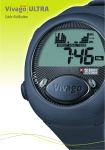
The buttons function
The watch has three buttons: Mode (1), Vivago (2) and Light (3). With the Mode and Vivago buttons you can browse through the different menus, see figure below. By Pressing the
Light button the background light will switch on. The light will automatically switch off after
30 seconds.
1
3
2
5




![SS HNBL-018 Owners manual HN1004-5 [EN] A3.indd - Jouef](http://vs1.manualzilla.com/store/data/006909007_1-61f91df4c9e84909195a3d6de9b86041-150x150.png)