1
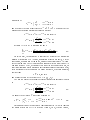
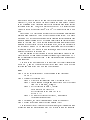
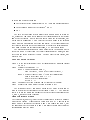
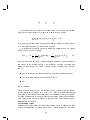
BinClass: A Software Package for
Classifying Binary Vectors User's
Guide
Mats Gyllenberg
Timo Koski
Tatu Lund
Turku Centre for Computer Science
TUCS Technical Reports
No 411, June 2001
BinClass: A Software Package for
Classifying Binary Vectors User's
Guide
Mats Gyllenberg
Dept. of Math., Univ. of Turku, FIN-20014, Turku Finland
Turku Center for Compute Science (TUCS),
University of Turku, FIN-20014, Turku, Finland
Timo Koski
Dept. of Math., Univ. of Turku, FIN-20014, Turku Finland
Dept. of Math., Royal Inst. of Tech., 10044 Stockholm, Sweden
Tatu Lund
Dept. of Math., Univ. of Turku, FIN-20014, Turku Finland
corresponding author
Turku Centre for Computer Science
TUCS Technical Report No 411
June 2001
ISBN 952-12-0845-7
ISSN 1239-1891
Abstract
In this document we introduce a software package BinClass for the classication of binary vectors and analysis of the classication results. First
we will give brief introduction to the mathematical foundations and theory
of clustering, cumulative classication and mixture classication. We also
introduce methods for analysis of the classications including trees (dendrograms), comparison of the classications and bootstrapping. A few pseudoalgorithms are presented. These methods are included in the software package. The third and fourth chapters are the user's guide to the actual software
package. Finally a short sample session is presented to give insight into how
the software actually works and to illustrate the function of some of the many
parameters. Apart from being a user's guide to the software package, this
document can be seen as a review and tutorial to classication methodology
of binary data. This is due to extensive research done on the subject at our
department.
Keywords: classication, binary data, software, stochastic complexity
TUCS Research Group
Biomathematical Research Group
Contents
1 Introduction
2 Theory
2.1 Clustering . . . . . . . . . . . . . . . . . . . . . . . . . . .
2.1.1 Minimum Error . . . . . . . . . . . . . . . . . . . .
2.1.2 Stochastic Complexity . . . . . . . . . . . . . . . .
2.1.3 Algorithms . . . . . . . . . . . . . . . . . . . . . .
2.1.4 Trees . . . . . . . . . . . . . . . . . . . . . . . . . .
2.2 Cumulative Classication . . . . . . . . . . . . . . . . . . .
2.3 Mixture Classication . . . . . . . . . . . . . . . . . . . .
2.4 Similarity of Classications . . . . . . . . . . . . . . . . . .
2.4.1 A Dissimilarity Measure . . . . . . . . . . . . . . .
2.4.2 Maximal Intersection and Consensus Classication
2.5 Bootstrap . . . . . . . . . . . . . . . . . . . . . . . . . . .
3 File formats
3.1
3.2
3.3
3.4
Filenames . . . . . . . . . . . . . . . . . . . . . .
The format description le and the input data set
The partition le . . . . . . . . . . . . . . . . . .
Centroid le . . . . . . . . . . . . . . . . . . . . .
4 Using BinClass
4.1 Classication methods . . . . . . . . . . . . .
4.1.1 SC minimizer (GLA and Local Search)
4.1.2 Joining (PNN+GLA) . . . . . . . . . .
4.1.3 Splitting . . . . . . . . . . . . . . . . .
4.1.4 Mixture classication . . . . . . . . . .
4.1.5 Cumulative classication . . . . . . . .
4.2 Analysis of the results . . . . . . . . . . . . .
4.2.1 Reporting . . . . . . . . . . . . . . . .
4.2.2 Comparison . . . . . . . . . . . . . . .
4.2.3 Bootstrap analysis for GLA . . . . . .
4.2.4 Trees . . . . . . . . . . . . . . . . . . .
4.3 Tools . . . . . . . . . . . . . . . . . . . . . . .
4.3.1 Calculate centroids . . . . . . . . . . .
4.3.2 Calculate SC function . . . . . . . . .
4.3.3 Data generator . . . . . . . . . . . . .
4.3.4 Sort partitions . . . . . . . . . . . . . .
4.3.5 Classication intersections . . . . . . .
1
.
.
.
.
.
.
.
.
.
.
.
.
.
.
.
.
.
.
.
.
.
.
.
.
.
.
.
.
.
.
.
.
.
.
.
.
.
.
.
.
.
.
.
.
.
.
.
.
.
.
.
.
.
.
.
.
.
.
.
.
.
.
.
.
.
.
.
.
.
.
.
.
.
.
.
.
.
.
.
.
.
.
.
.
.
.
.
.
.
.
.
.
.
.
.
.
.
.
.
.
.
.
.
.
.
.
.
.
.
.
.
.
.
.
.
.
.
.
.
.
.
.
.
.
.
.
.
.
.
.
.
.
.
.
.
.
.
.
.
.
.
.
.
.
.
.
.
.
.
.
.
.
.
.
.
.
.
.
.
.
.
.
.
.
.
.
.
.
.
.
.
.
.
.
.
.
.
.
.
.
.
.
.
.
.
.
.
.
.
.
.
.
.
.
.
.
.
.
.
.
.
.
.
3
4
4
4
5
8
16
18
21
23
24
24
27
28
28
28
29
30
31
31
31
35
35
36
37
38
38
39
40
41
41
42
42
43
44
44
5 Compiling BinClass
46
2
1 Introduction
In this document we introduce a software package for the classication of
binary vectors and analysis of the classication results. During recent years
we have studied various aspects of classication methodology at the department of applied mathematics of the University of Turku. Thus, the software
package at hand has grown large. Essential tools in this work have been
dierent kinds of classication or clustering algorithms and algorithms to
analyze and collect the essential information of the classication results. We
include a particularly large reference list to review the historical and recent
studies.
First we will give a brief introduction to the mathematical foundations
and theory of clustering, cumulative classication and mixture classication.
We also introduce methods for analysis of the classications including trees
(dendrograms), comparison of the classications and bootstrapping. A few
pseudo-algorithms are presented. We discuss implementation details and
alternatives which are included in BinClass and can be chosen by the user
to compare their behavior in the real world.
The third and fourth chapters are the user's guide to the actual software
package. BinClass is a powerful toolkit for the classication of binary vectors
and numerical taxonomy. Its design is modular. Each module is an independent tool and performs a particular task. Common tasks of numerical
taxonomy include: classication (clustering data), identication (cumulative
classication), analysis and comparison of the classication results.
Most of the tasks are heavily memory and CPU consuming, and thus
BinClass is meant to run mainly on high-end UNIX, Linux and Win32 (Windows NT) based workstations. Due to the command line interface and ANSI
C compliance, BinClass compiles easily on most of the platforms available.
Finally, a short sample session is presented to give insight into how the
software actually works and to illustrate the function of some of the many
parameters.
3
2 Theory
2.1 Clustering
The main focus of BinClass is on classifying (clustering) data consisting of
binary vectors. By clustering we mean division of the set of vectors to a
set of disjoint subsets (clusters, classes) in a such way that the cost of the
classication is minimal. There are many methods available and some of
them are implemented in BinClass.
The clustering problem is an important eld of research in computer science. Classication of data is a fundamental tool in pattern recognition and
vector quantization, which are applications of image processing and computer vision [17]. Classication is also important in neural and self learning
systems [31]. Their applications vary widely from business to medicine. Our
research group has been interested in the problem in the taxonomic sense,
especially bacterial taxonomy [15]. The ability to classify things is undoubtly
one of the key features of human intelligence. It is also well known that the
clustering problem is a dicult one, and we have to resort on approximate
solutions [8, 14].
We rst discuss methods to measure the cost of classication. There are
simple error measures such as MSE which are quite commonly used in many
applications, and more complex ones such as stochastic complexity. We shall
rst discuss these and then the algorithms.
2.1.1 Minimum Error
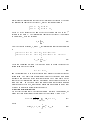
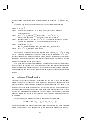
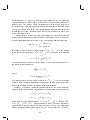
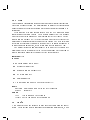
Let us suppose that a set of binary vectors X t of form x(l) = (x1(l) ; x2(l) ; : : : ; xd(l) ),
xi(l) 2 [0; 1], denoted by X t = fx(l) jl = 1; 2; : : : ; tg is classied to a set of k
disjoint classes C = fC1; : : : ; Ck g, Cj = fx(l) jl = 1; 2; : : : ; tj g, j 2 [1; : : : ; k]
by some method. Then for each class Cj we compute the number of the ones
in each column i by
tj
X
tij = xi(l)
l=1
and dene the centroid of the class Cj by
^j = (^1j ; : : : ; ^dj ); ^ij = ttij :
j
(1)
Furthermore, we dene the Hypothetical Mean Organism (HMO), by rounding ^j
aj = (a1j ; : : : ; adj ); aij = b^ij + 1=2c
(2)
4
Later we call aj the class representative of the class Cj .
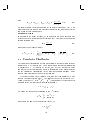
Now we dene various error measures for the classication C. In the
simplest case the distance of each vector to its class is the Hamming-distance
to aj
d
X
(3)
(x(l) ; Cj ) = jxi(l) ? aij j:
i=1
We can easily approximate the distortion or incoherence of a single class by
X
(4)
I (Cj ) = t1 (x; Cj ):
j x2Cj
We can also dene the distance with L1 or L2 norms and ^j
L1
(x(l) ; C
j ) = jj
x(l) ; C
j jj1
=
L2(x(l) ; Cj ) = jjx(l); Cj jj22 =
d
X
i=1
jxi(l) ? ^ij j;
d X
i=1
2
xi(l) ? ^ij ;
(5)
(6)
respectively. This gives us together with the ^j an alternate method to dene
the class representative as the closest vector to the centroid
tj
a^j = arg min
L (x(l) ; Cj )
l=1 2
Now the total error produced by the classication C can be expressed as
E (X t; C) =
tj
k X
X
j =1 l=1
D(x(l) ; Cj )
(7)
where D(x(l) ; Cj ) is either (x(l) ; Cj ), L1(x(l) ; Cj ) or L2(x(l) ; Cj ). Note
that by all of these criteria the number of classes k producing minimal error
is t, i.e. the classication to t singleton classes. This means that (7) does
not measure the cost of the classication structure. Usually t k, and it
is desirable to nd out the optimal number of classes in the data. Next we
shall discuss that problem and at the same time we take a more theoretical
look at the classication problem.
2.1.2 Stochastic Complexity
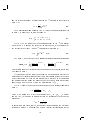
According to Rissanen [35], the best model to explain a given set of data is
the one which minimizes the sum of (1) the length in bits of the description
5
of the model, and (2) the length in bits of the description of the data with
the help of the model. This is the so-called Occam's razor, the principle that
tells us not to introduce more concepts than necessary to explain observed
facts. Classifying a collection of items (here binary vectors) according to
some specied method (classication model) can be viewed as a means for
encoding information about the data. Following this principle, according to
Rissanen the best classication is therefore the one which requires the least
number of bits to code the classication with respect to the model chosen,
and to code the items within the classication.
Let X t = fx(l) jl = 1; 2; : : : ; tg be a set of t elements of the form x(l) =
(x1(l) ; x2(l) ; : : : ; xd(l) ), xi(l) 2 [0; 1] for all l 2 [1; 2; : : : ; t]; i 2 [1; 2; : : : ; d]. Our
task is to determine a classication of X t into k classes so that the cost of the
classication is minimal. Let us consider the idea of a family of latent classes
to k denoted by Cj = fx(l) jl = 1; 2; : : : ; tj g; j 2 [1; : : : ; k]. Conditionally, on
any Cj we consider the multivariate Bernoulli distribution
p(xjj ; Cj ) =
Here
Yd
i=1
ijxi (1 ? ij )1?xi :
(8)
ij = P (xi = 1jj Cj ):
Let us suppose that there is a mixing distribution j ; j = 1; : : : ; k; j P
0; kj=1 j = 1. Then we think of X t as being generated by two-stage
sampling procedure so that rst Cj is drawn using j ; j = 1; : : : ; k and then
x(l) is drawn using the corresponding p(xjj ; Cj ). Hence, the probabilistic
model class is the nite mixture
k
X
p(xj; ) = j p(xjj ; Cj ); = f1; : : : ; k g; = f1; : : : k g:
j =1
However, some of this information is actually hidden, so that we do not
have the identity of Cj at our disposal when getting x(l) . The parameters
(j ; j ) will also be regarded as unknown. Let us set
(
if x(l) is sampled for p(xjj ; Cj )
(l)
uj := 01 otherwise
Thus, the full information data is
(l) (l) t k
x ; uj l=1j=1:
The classication problem is now to estimate uj(l) using the partial information data x(l) . Clearly this task is related to forming estimates of j
6
and j , which we shall denote by ^j and ^j respectively. First we assume that
x(1) ; : : : ; x(t) are independent(l) samples of the mind described above. Then the
joint distribution of (x(l) ; uj ) is
u(jl)
Yt Yk (l)
p(x jj ; Cj )j :
(9)
l=1 j =1
Our strategy is to get rid of j and j in expression (9) in such a way
that what remains is a likelihood function for (x(l) ; uj(l))tl=1 kj=1. One way to
do this is model averaging, i.e. we form
L(X t ; u; k) =
Then
Z Yt Yk l=1 j =1
p(x(l) jj ; Cj )j
u(jl)
d!(; ):
SCu(X t; u) = ? log2 L(X t ; u; k)
is called stochastic complexity. This is clearly a generalized log-likelihood
function that only depends on the variable directly connected to the classication problem. Let us now suppose that we have xed some estimates of
Cj in the form of a partition of the training set X t . Thus we have
Cj = fxjl = 1; 2; : : : ; tj g; j = 1; : : : ; k
and we compute
tj
X
tij = xi(l)
l=1
Then, if we chose !(; ) as a product of appropriate uniform prior
distribution we get
! X
!
!
k X
d
(
t
t
+
k
?
1
t
!
j + 1)!
log2 t !(t ? t )! : (10)
+
SC = log2 t ! : : : t ! +log2
t
1
k
ij j
ij
j =1 i=1
Alternatively, if we chose !(; ) as a product of a Jereys prior we get
!
!
k
?(
k=
2)?(
t
+
k=
2)
SC = dk + 2 log2 () + log2 Pk
j =1 ?(tj + 1=2)
!
k X
d
X
?(
t
j)
log2 ?(t + 1=2)?(t ? t + 1=2) ;
+
(11)
ij
j
ij
j =1 i=1
where tj is the number of binary vectors in class Cj , and tij is the number
of binary vectors in the class Cj with the ith bit equal to 1 (log denotes the
logarithm to the base 2). The rst two terms in equation (10) describe the
complexity of the classication structure, and the last term the complexity
of the binary vectors with respect to the classication.
7
2.1.3 Algorithms
So far we have discussed mathematical criteria to measure the goodness or the
cost of the classication. The next task is simply to generate a classication,
by optimizing MSE, SC or some other criteria. The naive method to do this
is to check every possible classication and calculate the criteria for each of
them as described above and choose the one producing the optimum.
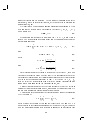
Let us take a quick view to the complexity of the problem. The number
of the unique vectors to be classied is t, and we need
t tond a classication into k classes. Then the multinomial number t1 ;:::;tk is the number
of classications whose class sizes are t1; :::; tk . Thus the number of the all
classications of k classes is
!
X
t :
t1 + +tk =t t1 ; :::; tk
j :tj >0
8
In this case the ordering of the classes does not matter, i.e. classications
(abjc) and (cjab) are equivalent. Thus, we have to eliminate k! from such
orderings, which gives us the formula
!
X
t ;
S (t; k) = k1!
t1 + +tk =n t1; :::; tk
j :tj >0
8
whose explicit form is
!
k
X
S (t; k) = k1! (?1)k?j kj j t :
j =0
(12)
S (t; k) is also know as Stirling's number of the second kind [2]. We immediately see it is growing exponentially. Moreover, it has been proven
that nding the taxonomic key and the generalized Lloyd-max are NP-hard
problems [8, 14]. Thus, we need more intelligent method to render a classication. To accomplish this, we need to loosen our criteria a little, namely,
we will accept local optima. Many algorithms are suggested for the classication problem, each having its benets and draw-backs. Usually more robust
methods tend to have a longer running time. Perhaps the most abundantly
used method is the Generalized Lloyd Algorithm (GLA) [17, 32], which is
also known as k-means or the Gray, Buzo, Linde -algorithm. An outline of
the algorithm is as follows
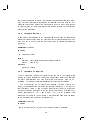
GLA
8
Step 0. Generate initial solution C and calculate ^ (and ^ )
Step 1. Generate classication Cnew
8x(l) ; l 2 [1; : : : ; t]:
Determine class j 2 [1; : : : ; k] of x(l) for which D(x(l); Cj )
assumes minimal value
Step 2. Recalculate ^ (and ^ ) and let C = Cnew
Step 3. Fix possible empty cell problem
Step 4. Repeat the so-called
Lloyd-iteration of steps 1 and 2 until
P
P
tj
k
overall error j=1 l=1 D(x(l) ; Cj ) does not decrease anymore.
This algorithm also plays an important role in the more advanced methods. It will converge to local minima when D(x(l) ; Cj ) is correctly selected.
A natural choice for D(x(l) ; Cj ) when using SC is the Shannon codelength
CL(x(l) ; Cj ) = ?
d X
i=1
(1 ? xij(l) ) log2 (1 ? ^ij ) + xij(l) log2 ^ij ? log2 ^j (13)
GLA is dependent on the quality of the initial solution generated in step
0. Usually randomization is applied here. The most typical way to generate
the initial solution is as follows [39]
Step 0.1. Draw k vectors z(1) ; : : : ; z(k) from input set X t randomly
Step 0.2. Set ^j = z(l) ; j 2 [1; : : : ; k]
Note that the number of ways to choose the initial centroids is kt , and
thus we have to rely on the random centroids. Other widely used way to
initialize this algorithm is presented by McQueen [40].
If we will use CL(x(l) ; Cj ) as our nearest neighbor rule, we need two more
steps
Step 0.3. 8x(l) ; l 2 [1; : : : ; t]:
Determine class j 2 [1; : : : ; k] of x(l) for which D(x(l); Cj )
assumes minimal value, D(x(l); Cj ) being a distance
measure which does not apply ^
Step 0.4. Calculate ^
The next open question to answer is the empty cell (orphaned centroid )
problem introduced in step 3. Orphaned centroids have no vectors assigned
to them in step 2 of the algorithm. It is clear that we must remedy this
problem, otherwise the number of non-empty classes would be less than the
prescribed k. The most natural way to x the problem is to split one class
in two [30]
Empty Cell Fix
9
Step 3.0. For each orphaned centroid perform the following:
Step 3.1. Denote the orphaned centroid with ^j ,
Determine the class Cj ; j 2 [1; : : : ; k], whose distortion (4)
is the largest
Step 3.2. Split the class Cj :
Apply a suitable split heuristic to the class Cj : three examples
a) move a random vector x(r) from class Cj to Cj
and set ^j = x(r)
b) move a vector x(l) ; l 2 [1; : : : ; tj ], whose distance
D(x(l) ; Cj ) is the largest, to the class Cj and set ^j = x(l)
c) nd two vectors x(l) and x(m) , l; m 2 [1; : : : ; tj ], whose
distance (x(l) ; x(l) ) from each other is the largest and
set ^j = x(l) and ^j = x(m)
GLA is in many cases a good and quick method. The time complexity
of the algorithm is O(tk), where t is the number of elements to be classied
and k is the number of classes. This is clear, because in the algorithm every
element must be tested against each class. The number of iterations and
the complexity of the distance calculations can be regarded as a constant.
The drawback is that GLA is not robust, i.e. it can sometimes get stuck
in not so good local minima. To remedy this problem we can either run
GLA several times and choose the best local minimum, or then we can use a
more advanced method such as genetic algorithms, tabu search [12], or local
search [9]. Also simulated annealing [41] and other optimization strategies
have been suggested. We will introduce the local search next.
Local Search
Step 1. Draw k random initial centroids from the input data set;
Step 2. Run two iterations of GLA [32] with the L2 -metric. Let the
result of the clustering be Cbest and calculate SC(Cbest ) by
formula (10);
Step 3. Iterate the next steps until t = max-iter :
Step 3.1. Apply search operator to Cbest and
let the solution be Cmod;
Step 3.2. Apply two iterations of GLA with L2 -metrics
to the solution Cmod;
Step 3.3. Calculate SC(Cmod );
Step 3.4. If SC(Cmod ) > SC(Cbest ),
then let the Cbest := Cmod and SC(Cbest ) := SC(Cmod);
Step 4. Calculate ^ ;
10
Step 5. Apply GLA to minimize D given by (13), Cbest as
initial solution until the result does not change.
Multi-Operator Local Search
We can incorporate various operators in step 3, the best results are often
obtained by utilizing many of them from time to time.
SJ1: Split-and-join (variant 1)
It may be protable to code two very close clusters as a single cluster and to
use the centroid thus gained at some other part of the vector space. This is
because a cluster with high internal distortion probably has a weak cluster
representative (centroid). The SJ1 operator tries to x this by joining the
two closest clusters according to the L2-distance of centroids and by splitting the most incoherent cluster according to the internal distortion (average
Hamming-distance to cluster representative (4)).
RWO: Replace-worst
As noted above, a cluster with high internal distortion is likely to be coded
ineciently when measured by stochastic complexity. The Replace-worst
heuristic draws a new random centroid from the input data set for the most
incoherent cluster. Incoherence is measured by the internal distortion (4).
The application of GLA after this search operator will re-map the vectors.
RSA: Replace-smallest
Small clusters are likely to be coded ineciently, because a code word consumed by the coding of a small cluster could perhaps be used more eciently
for something else. Small clusters also emerge as a side eect of other search
operators. One possibility to x this is to draw a new random centroid for
the smallest cluster. Again the application of GLA after this search operator
re-maps the vectors.
RSW: Random-swap
Global and random change of the cluster centroid is sometimes a good approach. In this way we can escape from a bad local minimum. The randomswap operation selects a random cluster and draws a new random centroid
from the input data set for the chosen cluster. It may be that none of the
other methods is applicable any longer, but the random-swap still helps us
to proceed towards more promising regions of the search space.
SJ2: Split-and-join (variant 2)
11
This operation joins the smallest cluster and its closest neighbor. The closeness of the clusters is measured by the L2 -metric between the cluster centroids.
After the joining, the operation splits the most incoherent cluster according
to the internal distortion (4).
CMO: Class-move
As noted with random-swap, it is necessary to introduce randomness in the
search. On the other hand, the solution process may already be on the
right track towards an advantageous region of the search space so that it
is protable to make only minor changes. This is pursued in the operation
class-move, which is the same as random-swap with the only dierence being
that the new centroid is drawn randomly from the same cluster which was
chosen to be replaced. This operation moves the cluster in search space in a
random direction without destroying it completely.
Adaptive Local Search
Cyclical application of the LS operators in MOLS is in the long run very
similar to a random choice of LS operators with uniform distribution. This
observation helps us to enhance the multi-operator search further. Depending on the data, the initial values of the centroids and the state of the search,
dierent search operators tend to work better than others. On the other
hand, when a certain operator is used in succession its power may become
exhausted. One way to overcome this shortcoming is to make the algorithm
adaptive. This means that when one operator turns out to be successful
(the application of the operator leads to a better value of the optimization
criteria, here stochastic complexity), the algorithm should use it more frequently. When doing this, we should still maintain some possibility to switch
to another search operator at a later stage of the solution process. Next, we
propose a way of accomplishing this kind of strategy.
Let the initial distribution of the probabilities of using the dierent LS
operators be
p(0) (y) = 61 ; y = 1; : : : ; 6:
Here y is an operator from the set fSJ1, RWO, RSA, RSW, SJ2, CMOg.
This means that each operator is initially equally probable to be used. Next
we dene the indicator function
(
operator yy was successful at the iteration t
(
t
)
f (y) = 10 ,, ifotherwise.
Let n(yt) be the number of successes for operator y from the beginning up to
iteration t. Initially, n(0)
y = 0 for all y . In every iteration the success count
12
is updated by
(
(t)
(t+1)
0
= nny(t) + 1 ifif ff (t+1) ((yy)) =
=1
y
and we denote the sum of successes by n(t) = P6y=1 n(yt) . The up-date of the
probabilities for using dierent operators is given by
n(yt+1)
p(t+1) (y) = p(t) (y) if f (t+1) (y) = 0 for all y
8 (t)
>
+1+
(t+1)
< nn(yt)+1+6
(
t
+1)
p (y) = > n(yt)+ if f (t+1) (y) = 1
: n(t)+1+6 if f (y) = 0:
Because f (t+1) (y) = 1 is true only for one y
6
X
y=1
?
n(yt) + 1 + + n(t) n(yt) + 5
(
t
+1)
p (y) =
n(t) + 1 + 6
= 1:
(14)
In this model, the parameter controls the weight of the underlying
uniform distribution. If is small, adaptation occurr more easily. On the
other hand, should not be too small, because this prevents any p(t) (y) from
ever becoming zero. There is one possible drawback in this simple model; it
has long memory. Next, we enhance this model to use shorter memory, so
that in a situation where a previously successful operator becomes inecient,
the model adapts to the situation. We dene a weight wy(t) for each operator,
initially take
wy(0) = 0; for all y
and denote the sum of the weights by w(t) = P6y=1 wy(t) .
The new up-date of the probabilities for using dierent operators is given
by
p(t+1) (y) = p(t) (y) if f (t+1) (y) = 0 for all y
8
>
<
(
t
+1)
p (y) = >
:
wy(t) +1+
w(t)(+1+6
wyt)+
w(t)+1+6
if f (t+1) (y) = 1
if f (t+1) (y) = 0:
We update the weights wy(t) after each iteration by
wy(t+1)
(
(t)
if f (t+1) (y) = 0 and wy(t) ? (t) 0
y ? (t)
= w
wy(t) + 1 ? (t) if f (t+1) (y) = 1
(15)
(16)
In this update model we have a new control parameter (t) which controls
the length of memory. If (t) = 0 for all t then wy(t) = n(yt) for all t and y,
13
and the new model is exactly the same as the previous one. The larger the
value of (t), the more quickly the model forgets the past history. Usually
in the beginning of the clustering process the operators have larger success
rates than at the end. Thus, the model works better if (t) is larger for small
t and vice versa. By substituting n(yt) with wy(t) (14) holds for the new model
also.
In section 4.1.1 we introduce a versatile utility for nding classications
having a good value of SC (here we refer to good local minima). It is based
on LS and GLA methods with various implementation-specic enhancements
and user-denable parameters. The experimental results on real data can be
found in [23] and [22]. The BinClass software package also includes some
auxiliary utilities related to the minimization of SC, which are discussed in
the sections 4.1.2 and 4.1.3. To analyze the uncertainty due to the probabilistic nature of the GLA and LS implementations, a simple tool of statistical
analysis is described in section 4.2.3.
For comparison we implemented two other traditional methods in BinClass; the Split [17] and Pairwise Nearest Neighbor [48, 17] algorithms. GLA
can be incorporated in both of them. Many variations of both methods have
been suggested.
The idea of the Split algorithm is to start from the trivial classication
where k = 1, and all t elements are put in the same class. Then we start
splitting one class at the time with some split strategy.
Split
Step 0. Let the initial solution C1 be partitioning to one class only;
Let k = 1;
Step 1. Generate the solution Ck+1 :
Step 1.1. Find the most incoherent class Cj according to (4)
Step 1.2. Take a random vector z and nd vector which is the farest
j (z; x(l) );
from it: y = arg maxtl=1
Step 1.3. Set the centroid of class Cj to be z;
Form a new empty class Ck+1;
Set the centroid of the class Ck+1 to y;
Set k = k + 1;
Step 1.4. Re-map the vectors of the class Cj according to
the nearest neighbor rule;
Step 2. Optionally, the Lloyd-iteration can be issued at this phase;
Step 3. Repeat steps 1 and 2 until the stop criteria is met.
The split phase (step 1) can either be deterministic, or utilize another kind
of heuristic than the one presented here. The criteria to stop the algorithm
14
in step 3 can be one of following.
The total cost of the classication (e.g. SC) does not decrease anymore
The predened number of the classes k is met
k=t
The split method looks at rst glance like a good method to minimize
SC, because we can easily test a range of the classications with a dierent
number of the classes. Split is indeed a fast method for this purpose, but
it also has its weaknesses. A bad choice at the early phase of the solution
might lead to a bad solution (the error cumulates). If the target number of
the classes is rather small the split algorithm will provide a solution quickly.
If we know the number of classes beforehand, GLA is of course faster.
The pairwise nearest neighbor method works just in the opposite way to
the split method. We start from the trivial classication to t classes, so that
every element forms a class of its own. Then we start to join classes, one
pair at a time.
Pairwise Nearest Neighbor
Step 0. Let the initial solution Ct to be a classication to t singleton classes;
Let k = t;
Step 1. Generate the solution Ct?1 :
Step 1.1. Choose a random class Cj ,
Find the class Cj which is the closest to class Cj ;
Step 1.2. Remove classes Cj and Cj from the classication;
Form a new class Cnew = Cj [ Cj ;
add Cnew to the classication;
Set k = k ? 1;
Step 2. Optionally the Lloyd-iteration can be issued at this phase;
Step 3. Repeat steps 1 and 2 until the stop critereon is met.
The join phase (step 1) can also be deterministic. Many criteria can be
used to determine the closeness between classes Cj and Cj . The simplest
choice is to use the Hamming-distance between the class representatives or
L1- and L2 -norms between centroids.
0
0
0
0
Mean Minimum Distance
The center point, however, is not the only characteristic related to distance
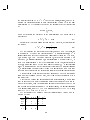
between two classes. Classes have a \diameter" as well. Consider small
image below: Centroids of the classes B and C are equally far from A, but
the nearest pair of the vectors in B and A are nearer to each other than the
corresponding pair in A and C.
15
n
i
B
i
A
C
One possible way to measure the distance could be the Hamming-distance
between the closest pair of the class members of the two classes.
min min (x; y); (x; y) =
x2Cj y2Cj
d
X
i=1
jxi ? yij:
This, however, doesn't cover the situation when the classes are oddly shaped
(e.g. one being long and the other being circular).
The average of the pairwise closest Hamming-distances over the classes
or the mean minimum distance
0
1
X
1 X min (y; x)A ;
D2(Cj ; Cj ) = 21 @ t1 ymin
(
x
;
y
)
+
tj y2Cj x2Cj
j x2Cj 2Cj
0
0
0
(17)
0
seems to work in most cases. Another possible strategy is to use stochastic
complexity as the joining criteria. This is done by selecting the join which
produces the minimum SC value. Criteria to stop the algorithm in step 3
can be
The total cost of the classication (SC) does not decrease anymore
The predened number of the classes k is met
k=1
2.1.4 Trees
When we examine how the PNN algorithm works, we notice that the history
of the joins forms a binary tree. Now if we think of a starting situation
be a ready-made classication instead of the individual vectors, we can use
this kind of algorithm to build a hierarchy on the non-hierarchical classication. Sometimes a tree-like hierarchy is needed for the deeper analysis of the
organization of the data.
Parsimonious trees
Perhaps the most used and the most traditional method to render this kind
of trees or dendrograms is called parsimony. A parsimonious tree is the one
16
minimizing the information lost due to the joining of the classes. We dene
the information content of the class Cj , rst by taking one column
(
tij > tj ? tij ; hij = tij
tij tj ? tij ; hij = tj ? tij ;
where hij is the largest of the number of the zero and one bits in the ith
column of the class Cj . The information content of the class Cj is obtained
by summing hij over the columns.
d
X
hj =
i=1
hij :
(18)
Now if we take two classes, Cj and Cj , the information content of their union
is
(
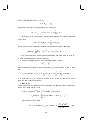
(tij + tij ) > (tj + tj ) ? (tij + tij ); hij[j = tij + tij
(tij + tij ) (tj + tj ) ? (tij + tij ); hij[j = (tj + tj ) ? (tij + tij )
0
0
0
0
0
0
0
0
0
0
0
d
X
hj[j =
0
i=1
hij[j
0
(19)
0
These two equations (18) and (19) gives us a way to dene the loss of the
information due to the joining
(20)
hj + hj ? hj[j ;
0
0
and the natural way is to join the classes that produce the smallest loss of
information. The basic idea of parsimony is not very far away from using
stochastic complexity as a tree forming critereon. They both deal with the
concept of the information content. Parsimony has been used for quite a
long time now. In the early years computers could not perform oating
point arithmetic very well, and thus the parsimony was dened in a way that
it can be implemented using integer arithmetic.
Distortion minimizing tree
Let is recall the formula (4) for class distortion. Similarly to parsimony, we
dene the class distortion of the union of the two classes Cj and Cj by
X
I (Cj[j ) = t +1 t
(21)
(x; Cj [ Cj );
j
j x2Cj [Cj
0
0
0
0
where
0
(x(l) ; Cj [ Cj ) =
0
d
X
17
i=1
jxi(l) ? aij[j j:
0
(22)
and
aj[j = (a1j[j ; : : : ; adj[j ); aij[j = b ttij ++ ttij + 1=2c
j
j
0
0
0
0
0
0
(23)
We should choose the join producing the smallest distortion by (21). This
denition for a tree is not much dierent from parsimony, and shows that we
can dene trees in various ways.
Hellinger-distance
In addition to the above methods, we implemented a method based on posterior predictive distributions out of curiosity [24]. We dene the distribution
^ in an alternate way
(24)
^ij = ttij ++ 21
and dene the Hellinger-distance
D
H(C
j ; Cj ) = 1 ?
0
Yd q
i=1
j
q
q q ^ij ^ij
1 ? ^ij 1 ? ^ij +
0
2.2 Cumulative Classication
0
(25)
The cumulative classication method was originally developed in an intuitive
manner by H.G. Gyllenberg [19]. A rm logical and mathematical foundation
is presented by M. Gyllenberg et. al. [24, 26]. Here we give only a short
summary of the key notions and a precise formulation of the algorithm used
for the cumulative classication in the BinClass software package. Some
experimental results are reviewed in [25] and [26].
We denote vectors to be classied by x, and their components xi which
take on the binary values 0 or 1. The length of the vector is denoted by d.
Assume that a set X t = fx(1) ; x(2) ; : : : ; x(t) g consisting of t vectors has been
classied into k disjoint classes forming a taxonomy
C = fC1; C2; : : : ; Ck g:
We dene the indicator of belonging to the j th class by
uj(l)
(
if x(l) 2 Cj
:= 01 otherwise
and denote the number of elements in class Cj by
tj =
t
X
l=1
18
uj(l)
and the relative frequency of binary ones in the ith position of the vectors in
class Cj by
t
X
fij = t1 uj(l) xi(l) :
(26)
j l=1
The Hypothetical Mean Organism (HMO) [33] or the optimal predictor [16]
of class Cj is denoted by aj and is dened by
(
aij = 10 ifif 10=2 <f f<ij 1=21 :
ij
(27)
We let sij be the number of the prediction errors in the ith component
when the HMO is used as the predictor. In other words, it is the number of
the vectors in the class Cj whose ith component diers from aij
sij =
t
X
l=1
uj(l) jxi(l) ? aij j
(28)
The class Cj is described by the marginal posterior predictive distribution
!!1?jzi?aij j
Yd sij + 1 !jzi?aij j
s
ij + 1
1? t +2
p(zjaj ; cj ) =
j
i=1 tj + 2
(29)
This formula should be interpreted as the probability of vector z, given that
it belongs to class Cj .
We emphasize that the use of the probability distributions to describe the
classes and the classications does not imply any randomness of the vectors
we are classifying. It is simply a mathematically precise way of expressing
our own uncertainty about the properties of the vectors, given our present
knowledge, which is the set X t and the classication fCj gkj=1.
We let j denote the predictive prior probability of a strain belonging to
class Cj
j = t +tj k++1 ; j = 1; : : : ; k;
where is a parameter. Since the probabilities j ; j = 1; 2; : : : ; k do not
add up to 1, this means in particular that we incorporate the predictive
probability
k+1 = t + k + of observing a new class, that is, a vector not included among the k already
established classes. The parameter has a clearcut interpretation as the
19
number of classes not yet observed. As this number is unknown this interpretation is, albeit of theoretical interest, of little practical importance for
applications [24, 26].
We identify new vectors using Bayesian predictive identication. By this
we mean that we identify a new vector z with the class Cj ; j = 1; 2; : : : ; k +1,
which maximizes
p(zjaj ; Cj )j :
(30)
If expression (30) assumes its maximum for j = k + 1, a new class is
formed. The identication as dened above can be equivalently based on the
discriminant functions
lj (z) =
and
where
and
d
X
i=1
wij jzi ? aij j + bj + log(tj + 1); j = 1; : : : ; k;
lk+1(z) = log( ? d);
sij + 1
wij = log t ?
j sij + 1
(31)
(32)
!
(33)
!
t
j ? sij + 1
bj = log t + 2 :
(34)
j
i=1
In this formulation the vector z is identied with the class Cj for which
lj assumes the greatest value. Observe that lk+1 is independent of both the
vector z to be identied and the classication obtained so far. It can therefore
be viewed as the rejection threshold : If lj (z) < lk+1 for all j = 1; 2; : : : ; k,
then we reject the identication of z within the present classication and
found a new class augmenting the classication [24, 26].
Another interpretation for the rejection threshold is that the vector z
does not belong to present knowledge C, and should be considered trash. We
can use both approaches depending on the application.
As a measure of the goodness of the classication we choose the predictive
t. It is dened by
k
d
k X
X
X
(35)
wij sij + tj bj ;
L=
d
X
j =1
j1 i1
where wij and bj are dened by (33) and (34) respectively. The number ?L is
closely related to the stochastic complexity (SC) dened by (10), which is used
with the clustering algorithm as a measure of goodness. In our experiments
20
we have found correlation coecients around 0:94 between ?L and SC [24,
26].
We apply the theory provided above with the following algorithm.
Step 1. Let t = t0
Step 2. Determine the index j = j for which lj (x(t+1) jCt ) assumes
its largest value.
Step 3. If 1 j k, place x(t+1) into class Cj . If j = k + 1,
a new class having x(t+1) as its only element is formed.
Step 4. Increase t and tj by one. If j = k + 1 then also increase k by one.
Update the taxonomy j by the assignment of Step 3.
Step 5. Recalculate fij , aij
and sij using formulae (26), (27) and (28), respectively
Step 6. If t < t0 + n, continue from step 2.
Note that we can begin the cumulation from scratch, i.e. t0 = 0 and
k = 0. Another alternative is that we have a initial taxonomy C0 with t0
vectors classied to k classes by some method, and we then update this initial
taxonomy with further data by cumulative classication. Optionally we can
disable the creation of the new classes.
It is clear that the resulting taxonomy depends heavily on the input order
of the vectors. In section 4.1.5 we discuss utility for cumulative classication
using the algorithm presented above. It is designed to create single classications or analyze the eect of the input ordering of the vectors to classication
results.
2.3 Mixture Classication
Our goal is to cluster (classify) a training set (of size t) of d dimensional
binary vectors to k classes by estimating the probability parameters of a
nite mixture of k multivariate Bernoulli distributions from the data. As a
result of the estimation procedure we will get a matrix P whose arrays are
the conditional probabilities of each class given each particular vector. These
we call the probabilities of belonging to the classes. In the nal clustering
phase we assign the vector to the class to which it has the highest probability
of beloning.
Let us consider a parametric family of probability functions
ff (xjj ) : x = (x1 ; : : : ; xd ) 2 Bd; j = 1; : : : ; kg
where each probability density function f (xjj ) is dened in the d-dimensional
binary vector space. The parameters j are statistical parameters that de21
scribe class characteristics. We set
= f1 ; : : : ; k g:
and denote a mixing distribution for the classes by
= fj ; : : : ; k g 2 Rk : j 0;
k
X
j =1
j = 1
This allows us to dene nite mixture as a probability density function
of the form
k
X
fk (x) = fk (xj; ) = if (x; i);
i=1
where we use the multivariate Bernoulli probability density functions
f (xjj ) =
Yd
i=1
ijxi (1 ? ij )1?xi ; xj 2 f0; 1g; 0 ij 1:
This is a statistical model of classication and has been used in SC minimizing classications as described above.
Given the training set of t d-dimensional binary vectors
x(1) ; : : : ; x(t)
and the number of classes k (xed in advance), we have to nd and such
that
; = argmax L(; ) =
Xt
l=1
ln fk (x(l) ) =
t
k
X
X
l=1
ln[
j =1
j f (x(l) jj )]:
It is clear that L(; ) is closely related to SC. Both of them are derived
from the same statistical model.
Algorithm
An outline of the EM-algorithm for estimating the parameters of binary data
(steps 0-2) looks like this [18].
Step 0. Choose (0) and (0) (random), such that
fk(0) (x(l) ) =
k
X
j =1
(l) (0)
(0)
j f (x jj ) > 0; l = 1; : : : ; t
and compute the matrix
P(0)
j
(0)
f (x(l) j(0) )
j
(0)
(
l
)
k
t
(0)
(
l
)
= [p (j x )]j=1l=1 ; p (j x ) =
fk(0) (x(l) )
j
j
22
(36)
Step 1. Compute parameters (s+1) and (s+1) for each s = 1; 2; : : :
using
Xt
(js+1) = 1 p(s)(j; x(l) );
t l=1
and
j(s+1)
1
Xt
= Pt p(s) (j jx(l) ) x(l) p(s)(j jx(l) ); i = 1; 2; : : : ; k:
l=1
l=1
Step 2. Compute the matrix P(s+1) from parameters (s+1) and (s+1)
(s+1) f (x(l) j(s+1))
P(s+1) = [p(s+1) (j jx(l) )]kj=1tl=1 ; p(s+1)(ijx(l) ) = j (s+1) (l)j
fk (x )
and continue from Step 1 until there is no change in parameters, which
can be shown to mean that the likelihood function L(; ) is maximized [18, 34]. We can use this algorithm to classify binary vectors by
adding one more step.
Step 3. Identication: We denote the optimal probability matrix from
step 2 after, the algorithm has been stopped by
P = [p() (j jx(l) )]kj=1tl=1:
(37)
Assign vector x(l) to class j if
j = arg 1max
p (j jx(l))
j k
for l = 1; : : : ; t.
This algorithm is a special case of the expectation maximization algorithm [18,
34]. It is known that L((s+1); (s+1) ) L((s); (s)) for every s after steps
1 and 2 [18, 34]. Variations of the EM-algorithm are used in classication
software packages such as SNOB [36] and Autoclass [5]. The basic procedure
of the algorithm is similar to GLA (k-means) [32], we choose random initial
values and have an iteration which converges towards the local maximum.
The dierence is that we do not assign vectors to classes in the statistical
estimation phase.
2.4 Similarity of Classications
Let us suppose that the set X t is classied several times with either different initial values of some algorithm or by dierent methods (GLA, LS,
PNN, Split, EM). This produces a set of dierent local optima. We are interested in the dierences of these results on the classication level, namely
the structural closeness of the classications.
23
2.4.1 A Dissimilarity Measure
There are basically two ways of measuring the dierence between classications. First we can measure the smallest number of modications (usually
set operations) that are needed to make the two classications equal, or we
count some well-dened dierences between them [3]. Given two classications generated from the same training set X t denoted by C0 = fC10 ; : : : ; Ck0 g
and C00 = fC100; : : : ; Ck00 g, we dene the concordance matrix
0
00
M = (mT1 ; : : : ; mTk ); mi = (mj 1 ; : : : ; mik ); mj j = Cj0 \ Cj00 :
0
0
00
0 00
0
00
(38)
The distance measure can now be calculated from the concordance matrix
by
D1(C0 ; C00 ) =
2k 0k
1 k 0k
13
X
X
X
1 4X
k
k
@
m A + @ mj j ? max
m A5 (39)
j =1 j j
j =1 j j
2 j =1 j =1 mj j ? max
j =1 j =1
The distance D1(C0; C00 ) can be interpreted as the mean number of dierently
classied vectors when comparing C0 to C00 and vice versa.
Sometimes it is necessary to use a measure which is not dependent on the
number of vectors in the classication. Then we can use anity
t
(40)
A1(C0 ; C00 ) = t ? D1(C
0 ; C00 )
0
00
0 00
0
00
00
00
00
0
0 00
0
0 00
00
0
0
0 00
instead.
Formulas (39) and (40) depict the dierence and similarity of the classications. We also get some information by investigating the matrix M.
This may not be enough. It might be important to identify the vectors in
concordance in both of the classications. This can be done by generating a
consensus classication C of the classications C0 and C00 .
2.4.2 Maximal Intersection and Consensus Classication
As the method for nding the consensus classication we present here an
intersection operation for two classications. We do this by extending the
natural intersection operation for sets.
First we recall how meet is dened for partitions. If we have two partitions
1 and 2, we say 2 is coarser than 1 or 2 1 , if each set of 1 is a subset
of one of the sets in 2. This gives us a partial ordering and we can put the
partitions in a lattice. Now, if we could have all partitions in the lattice, the
meet 1 ^ 2 is clearly found there. Again we can regard the meet as being
24
the intersection [1]. However, there are some properties in this denition
which are unwanted in our case. All elements of the partitions 1 and 2 are
included in 1 ^ 2 , and we would like number of elements to be reduced in
the intersection. Also, our classications are not necessarily real partitions.
The set of elements forming the rst classication might be a superset of the
set forming the second classication, or there might be some elements which
are not common to both.
A classication is a set of sets, each class being a set. For the intersection
of two classications we need intersections of their classes. To do this we have
to nd a counterpart for each class. First, we dene an auxiliary function
b(x(l) ; C
(
1 if x(l) 2 Cj
)
=
j
0 otherwise
and denote classes of the rst classication by C0 = fC10 ; : : : ; Ck0 g and classes
of the second classication by C00 = fC100; : : : ; Ck00 g then the match function
is
t
0
00
j
X
0
m(Cj0 ; Cj00 ) =
00
0
0
l=1
b(x(l) ; Cj00 ):
00
Now the counter part class Cj00 for the class Cj0 in the classication C00 is the
one maximizing the formula
0
0
k
max
m(Cj0 ; Cj00 );
j =1
00
namely
00
0
00
0 ; C 00 ):
m
(
C
Cj00 = arg Cmax
j
j
2C
0
j
00
00
00
0
00
The intersection of the two classes is given by Cj00 \ Cj0 . It might of course
be that multiple possible counterpart classes exist. In such a case all of them
are chosen, because we want to nd a maximal intersection.
Secondly, we perform the intersection operation for the whole classication rst by intersecting each class against its counterpart in both directions
0
0
8j 0 2 1; : : : ; k0; Cj0 \ Cj00 ;
0
0
8j 00 2 1; : : : ; k00; Cj00 \ Cj0 ;
which gives us two classications C0 = fC10 \ C100 ; : : : ; Ck0 \ Ck00 g and C00 =
fC100 \ C10 ; : : : ; Ck00 \ Ck0 g. Classications C0 and C00 are not necessarily
00
00
00
00
0
0
identical; one may have classes the other does not. But if their countering
classes in classications C0 and C00 exists, they will be identical. Therefore,
25
the nal intersection C = C0 \ C00 for the two classications is got by including the classes appearing in both classications C0 and C00 in the nal
classication C . We calculate the size or the cardinality of the intersection
by
k
X
jCj = jCj j;
j =1
which will measure the similarity of the classications. The dissimilarity is
presented by
D2(C0; C00 ) = t ? jC j:
(41)
Formula (41) is a lower bound for formula (39). Likewise, we can calculate
the anity
t
A2(C0; C00 ) = t ? D2(C
(42)
0 ; C00 ) :
Let us illustrate the mathematics presented above with the following
two examples. We have two classications C0 = jabcdjef jghj and C00 =
jabjcdef jghj; now there are two possible counterpart classes for C10 = abcd,
C100 = ab and C200 = cdef . The same holds for C200 in the other direction. This
gives us C0 = jabjcdjef jghj and C00 = jabjcdjef jghj. The nal result C is
then C = jabjcdjef jghj. This is the coarsening of the two classication in
a theory partitions sense. Let us take another example, C0 = jabcdjefgjhj
and C00 = jabcjdef jghj. Now the intermediate results are C0 = jabcjef jhj and
C00 = jabcjef jgjhj. The nal result is thus C = jabcjef jhj. Now we see that
there are fewer elements in the intersection than in the original classications.
This operation is commutative but not associative. There is no counter
example simple enough to be t here, but it can be easily generated with a
computer trial.
Note that if we dene our operation as minimal intersection, which means
that in cases where multiple countering classes exists none of them are included in the result, then the operation would not be associative either. This
can be shown by a counterexample: C1 = jabcjdef jghj, C2 = jabcdjef jghj and
C3 = jabjcdef jghj, now (C1 \ C2 ) \ C3 = jabjef jghj but C1 \ (C2 \ C3 ) = jghj,
thus (C1 \ C2 ) \ C3 6= C1 \ (C2 \ C3).
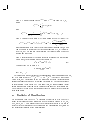
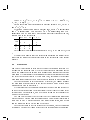
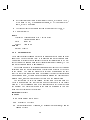
Let us calculate the distance between classications C0 and C00 as expressed by (39):
abcd efg h tj mj
abc 3
3 0
def 1
2
3 1
gh
1 1 2 1
tj 4
3 1
mj 1
0 0
00
00
0
0
26
Above tj = Pkj mj j , tj = Pkj mj j and mj = tj ? maxkj mj j ,
mj = tj ? maxkj mj j .
In this case dissimilarity measures give dierent values: D1(C0; C00 ) = 1:5
and D2(C0; C00 ) = 2.
Let us now consider only slightly dierent case, where C0 = jabcjdef jghj
and C00 = jabjcdef jghj. This gives us C0 = C00 = jabjdef jghj, thus C =
jabjdef jghj. Now we note that c was the only dierently classied element,
thus omitted in the intersection.
abc def gh tj mj
ab 2
2 0
cdef 1 3
4 1
gh
2 2 0
tj
3 3 2
mj 1 0 0
Note that the dissimilarity measures agree: D1(C0; C00 ) = 1 and D2 (C0; C00 ) =
1
We want to emphasize that this intersection operation is maximal in the
sense that the number of elements included in the intersection is the largest
possible.
0
00
00
0 00
0
0
00
0
0 00
00
00
0
0 00
00
0
0
00
0 00
00
00
0
0
2.5 Bootstrap
Sometimes it is necessary to estimate the reliability of a sample of values. Let
us consider the following case. We collect butteries of a particular species
(say a few hundred specimen) and then measure some characteristic such us
wing span. We can calculate the mean and other statistical characteristics for
the set of collected butteries. We can claim that, for example the average
wing span of particular species is what we have measured in our experiment.
There are problems in this experiment. First of all, we cannot measure
the wing span of all butteries of the species involved. Some of them have
perhaps never lived in our lifetime.
We can think that the situation is as follows: we have just sampled a very
small set of butteries from the almost innite or at least very large set of
all butteries. The question is, how well this small sample set represents the
whole set of butteries.
The same holds exactly for the results of the classication algorithms
described above. When we run these algorithms we get dierent local minima
from time to time. There are possibly very many local minima, and we can
run the algorithm only a limited number of times.
There are methods to test the reliability of the sample, called re-sampling
techniques. The most well know of these are the jackknife and the bootstrap.
27
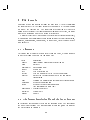
3 File formats
Four kind of les can appear as input for BinClass: 1) the le containing
the input data set; 2) the input format description le; 3) the partitioning
le and 4) the centroid le. The input format description le is used to
parameterize the input: the lengths and positioning of the vector, the name
and the ID-string and how the ID-string is interpreted.
Output les include 1) partition les describing the classication result,
2) various log les containing verbose information of the run (classication,
analysis, bootstrapping, comparison), 3) report les, tree les and 4) generated data sets.
3.1 Filenames
A le name sux is used to identify the le formats. Thus, it is only required
to give the lename body on the command line.
sux
.header
.data
.partition[X]
.report
.tree
.treele
.order[X]
description
Input/output data format description le
Data set
Partitioning le(s)
Report le
Tree description le
Tree le (compatible with the Phylip package)
Data set in the order as applied to the cumulative
classication
.base
Training set classication for cumulative classication
.bootstrap
Results of bootstrap run
.result
Result of the partition comparison
(the concordance matrix (38))
.generated[X] Generated data set
.centroids
Centroid le
.output
Log le
3.2 The format description le and the input data set
In the format description le there are the following elds. The ordering of
the elds is not relevant. The starting column is always 0, and the name of
the vector starts at column 0.
28
vecos=
veclen=
idlen=
idos=
idord=
the starting column of the vector
the length of the vector
the length of the ID string
the starting column of the ID string
the interpretation order of the ID string
(a string of the length of the ID-string)
namelen= the length of the name, ie. the label of the vector
(the name always starts at the index 0)
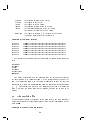
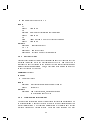
Example of the input format:
SALM
SALM
SALM
SALM
SALM
SALM
SALM
ENTE
ENTE
ENTE
ENTE
ENTE
ENTE
ENTE
1072-81
0149-84
0044-82
0291-82
0611-81
3302-75
0012-78
01000000111000110011000110110100001010000010001
01000000111000110011000110110100001010000010001
01000000111000110011000110110100001010000010001
01000000111000110011000110110100001010000010011
01000000111000110011000110110100001010000110011
01000000010000101110000010110100001100100110001
01011001111000110011000110111111011001110110101
The format description le for the input data set shown above looks like
this:
vecoffs=23
veclen=47
idlen=7
idoffs=15
idord=671234#
namelen=9
The above description tells the program that the vector itself starts at
the oset 23 and is 47 characters long. The ID-string starts at the oset 15
and is 15 characters long. The ID-string is translated so that the last two
characters (6,7) are most signicant and then the four rst digits at positions
1; : : : ; 4. One character is omitted. The name of the vector is 9 characters
long. Note that the name need not be unique, whereas the ID has to be
unique.
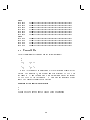
3.3 The partition le
The partition le follows the format of the data set le, the only dierence
being that between the classes (partitions) there is a line beginning with the
word Class.
Example of the partition le format
29
Class
SALM ENTE
SALM ENTE
SALM ENTE
SALM ENTE
SALM ENTE
SALM ENTE
SALM ENTE
SALM ENTE
Class
SALM TYPH
SALM TYPH
SALM TYPH
SALM TYPH
SALM TYPH
0100-85
1208-82
3302-75
0291-82
0776-82
0232-86
1210-79
1072-81
01000001111000100011000000010000001010000010001
01001000111000100011000110110100001010000010001
01000000010000101110000010110100001100100110001
01000000111000110011000110110100001010000010011
01000000101000110011000110110100001010000010001
01000000101000110011000110110100001010000010001
01000000111000110011000110110100001010000010001
01000000111000110011000110110100001010000010001
0328-82
1140-77
1141-77
0473-79
0889-78
01000001001000100010000100011100001000000010001
01000001101000100010000100011100001010100010011
01000001101000100010000100011100001010100010001
01001001101000100010000100011100001010100010001
01001000101000100010000100011110001010100010001
3.4 Centroid le
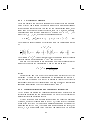
The le containing the centroids has the following format:
k
d
f1;1 ... f1;d f1
...
... ...
fk;1 ... fk;d fk
Here k is the number of classes and d is the dimension (length) of the
vectors. The numbers fi;j are decimal numbers of format X.XXXXX (in
the range 0 : : : 1) and the numbers fi are decimal numbers of the format
X.XXXXXXXXXX (in the range 0 : : : 1). Numbers are separated by one
space. The lines are separated by a line feed.
Example of the centroid le format
2
6
0.70000 0.67416 0.61866 0.69617 0.77512 0.72440 0.5102539062
0.28963 0.31057 0.36740 0.26570 0.18195 0.22732 0.4897460938
30
4 Using BinClass
The BinClass software is designed to be machine independent, i.e. portable.
We have written the program to conform with the ANSI-C standard as far as
possible. Standards do not cover visual programming. Macintosh, Windows
and X-Windows are all totally dierent in architecture. Thus, we did not
develop a graphical user interface (GUI) for BinClass. BinClass is used via
the command prompt, which is usually available in all systems. The general
format of BinClass invocation is as follows:
binclass command switches le base
Most of the switches are optional and have default values.
The following call gives a list of available commands:
binclass help
and the following gives brief lists of available switches for the specic
commands.
binclass command
4.1 Classication methods
4.1.1 SC minimizer (GLA and Local Search)
The classication tool is the most complex part of the software. It uses
AMOLS 1 [27] and GLA 2 [32, 17] algorithms to minimize the stochastic
complexity [21].
GLA assigns vectors of the input set to their classes in the classication
by a nearest neighbor rule (distance measure, error measure). There are
six alternatives implemented in BinClass that can be chosen with the command line switch -f. These are: Hamming-distance to HMO, L1-distance
to centroid, L2-distance to centroid, Shannon-codelength, L1-distance with
Shannon-codelength and L2-distance with Shannon-codelength. The two last
variants work by running rst iterations with L1 or L2 and by nishing with
the Shannon-codelength. This combined version works best in most cases
because some numerical problems are avoided. Simple methods (Hammingdistance, L1-distance) are included for demonstration purposes.
1
2
Adaptive Multi-Operator Local Search
Generalized Lloyd Algorithm also known as GBL = Gray, Buzo, Linde and k-means
31
The method to generate the initial centroids is chosen with switch -c from
among ve alternatives: purely randomized, statistically randomized (by the
input set), statistically coin tossed, random input vectors and initialization
by the RPNN 3 [17] algorithm.
Centroids are by default represented by oating point arithmetics, but
they can be rounded to 0,1 with the switch -R. This option is included to
demonstrate that rounded centroids will result in much poorer classications [10].
Search for the SC minimum
The main purpose of this tool is to nd the SC minimum as a function of
the number of classes. This is meant to be a two step process where we rst
apply GLA to nd a region where this minimum probably lies, and then we
can apply more a powerful but more time-consuming local search for that
region.
The program generates various candidate classications with GLA. By
default the candidate with least stochastic complexity is chosen. If the switch
-C is chosen the program will instead select the candidate with least overall
error according to the metric chosen with switch -f.
The classication tool is used to nd the optimal number of classes according to stochastic complexity. There are two methods for this purpose.
The rst one is to scan the range of classications beginning with -b
classes and ending with -s classes. The number of candidates tried is dened
with switch -n. This is the faster but less intelligent method.
The second method is the automatic SC-minimizer. The candidate classications are inspected beginning with the one that has only one class,
the method then proceeds by increasing number of classes until there is no
enhancement in the value of stochastic complexity in -S steps. The classications are then inspected further with a ping-pong algorithm.
ping-pong
Step 0. Let the minimum of stochastic complexity
found on rst scan be SCk
Step 1. If there is a classication with k < k classes
such that SCk > SCk?1:
try more candidates until SCk < SCk?1
if SCk < SCk ,
let SCk = SCk and restart
Step 2. If there is a classication with k > k classes such
that SCk > SCk+1:
3
Randomized dairwise Nearest Neighbor
32
try more candidates until SCk < SCk+1
if SCk < SCk ,
let SCk = SCk and restart
Step 3. Repeat Steps 1 and 2 until the conditions are not met
To ensure that the program stops, a safety value is needed, which is
dened by the switch-F. Set the initial number of candidate classications
with the switch -a. The automatic search usually yields better results and
avoids bad local minima, but on the other hand the running times can be
very long. Finding the correct parameters is not very easy and requires some
test runs to see how the program behaves on a particular dataset.
Some of the calculations in the program involves logarithms which are not
valid when the centroid value is 1 or 0. Thus, the value of the the centroid
needs to be xed with a small constant . The value of can be set with the
switch -E. Normally the default value works well. Too small value of can
also cause numerical problems.
Instead of repeating GLA, we can use smarter techniques. One of these
is local search.
Local Search SC minimizer
There are basically two ways to apply LS in BinClass. The rst one is to
utilize only one search operator by using the command line switches -r1 to
-r6. Another alternative is to try all operators using command line switches
-r7 or -r8. The iteration count of the LS algorithm is controlled by switch
-j. Usually the number of iterations needed ranges from 100 to 5000. The
switch -r8 chooses the adaptive version of the LS algorithm.
command: classify
switches
-q quiet mode (no screen output)
-EFF set epsilon to FF
-nXX use non-automatic search with XX test candidates
-aXX use automatic SC minimizer with at least XX test candidates
-Llename load initial centroids from the le
-l save (log) centroids
-C choose partition by error metric instead of SC
33
-R use rounded centroids
-BFF test candidates until a better classication is obtained in the next
step according to the error measure (rst error value will be FF)
-bXX start with classication into XX classes (default: 1)
-sXX end with classication into XX classes, 0 = automatic (default: 0)
-SXX stop when no improvement in XX steps (default: 10) (valid only when
-a set)
-cX initial centroids: 1: purely random, 2: statistically random, 3: statistically coin tossed, 4: random input vectors (default), 5: initialize with
RPNN algorithm
-FX safety value (maximum number of candidates) (default: 500)
-fX nearest neighbor rule 1: Hamming-distance (Gower), 2: L1-norm (MAE),
3: L2-norm (MSE), 4: Shannon-codelength, 5: Hybrid L1+Shannon
(default), 6: L2+Shannon
-rX Initialize with MSE and perform Local Search with operator 1: Split
and Join v1, 2: Replace worst class, 3: Replace smallest class, 4: Random swap 5: Split and Join v2, 6: Class Move 7: Cycle all operators.
Enhance result using GLA as set by -f1,2,3,4 8: As 7 but use all operators adaptively
-jX Local search iteration count to XX (default=50)
-eX Empty cell (orphaned centroid) x method 1. Replace by worst match,
2. Replace by random vector 3. 1. + extra iteration (for -w only), 4.
2. + extra iteration
-w use class weighted version of Shannon-codelength
-J use stochastic complexity with Jerey's prior (11)
inputs
.data training set
.header format le
outputs
.output log le
.centroids saved centroids if switch (-l) was set
.partition best partition (classication) found
34
4.1.2 Joining (PNN+GLA)
The module \join" has an implementation of the PNN + GLA -A, RPNN
+ GLA [17] and SC-join -J algorithms. The SC-join algorithm does not
include GLA. The PNN + GLA and RPNN + GLA algorithms use GLA
after the distance has dropped below the threshold value set by switch -T.
The program continues joining classes until there is no decrease in the value
of the stochastic complexity. With big datasets which actually have a small
number of classes, this algorithm is slow, but is known to give good results
on certain type of datasets.
command: joingla
switches
-q quiet mode (no screen output)
-A use deterministic version (PNN instead of RPNN)
-EFF set epsilon to FF
-TFF GLA starting threshold
-JXX Join with SC criterion until XX classes remain
inputs
.data
data set
.partition1 input partition if -J set
.header
format le
outputs
.output
log le
.partition best partition (classication) found
.partition2 best partition (classication) found, if -J set
4.1.3 Splitting
The \split" module is an implementation of the Split+GLA [17] algorithm.
It works just the opposite to the joining method. There are both randomized
and deterministic versions -A of the algorithm. Splitting is continued until
there is no decrease in the value of SC in a prescribed number of steps -S. The
split method yields results very quickly and thus can be used to pre-screen
a dataset before the use of the automatic SC minimizer in the classication
module.
command: splitgla
switches
35
-q quiet operation (no screen output)
-A use the deterministic version
-EFF set epsilon to FF
-SXX stop until no improvement in XX steps (default: 10)
inputs
.data data set
.header format le
outputs
.output log le
.partition best found partition (classication)
4.1.4 Mixture classication
The mixture classication module rst generates a set classications with
the EM-algorithm by using dierent random initial values. The number of
classications is determined with switch -s and number of classes to be used
is determined with switch -k. Several characteristics for each classication
are calculated. These include the values of L, SC and number of well-t
elements. A well-t element is an element whose probability of belonging
to class is over 0:995. In the next phase anities (40) (distances (39)) of
each classication to the best classication by SC are calculated. In the nal
phase various statistical analyses are performed to calculated characteristics.
command: mixture
switches
-q quiet operation (no screen output)
-EFF set epsilon to FF
-kXX perform tests for XX classes
-sXX set the number of classication to test to XX
inputs
.data data set
.header format le
outputs
.output log le
.partition best found partition (classication)
.result
probability matrix (37)
36
4.1.5 Cumulative classication
Cumulative classication [25, 26] has a totally dierent preamble. It does
not include iterative enhancement like GLA does. There are two methods
for cumulative classication implemented in BinClass, the SC method and
the Bayesian predictive method [24]. In the SC method vectors are assigned
to their classes by SC and a new class is founded if it produces less SC
than assigning the vector to any class. The Bayesian predictive method is
based on more profound theory. It requires that the so-called delta value is
set by switches -D or -d. Vectors are assigned to classes which predict the
vector with the largest certainty. The delta value is related to the expected
frequency of appearing new classes and thus a large delta tends to produce
more classes than a small one. Goodness of the overall prediction is called
predictive t and dened by (35).
In step 2 of the Bayesian predictive method we issue formula (32) described in section 2.2 in the step 2.2. formula (31) is used.
In the SC method the condition of step 2 is determined if the input vector
x as its own class produces smaller value of the SC (dened by (10)) than
vector x assigned to any of the present classes. Similarly, in step 2.2 the
closest class cj is determined from the smallest value of the SC when x is
assigned to a particular class.
The outcome of the cumulative classication is in the order in which the
vectors in the input set are issued. BinClass by default issues the data in
random order. Other options are ascending order by ID-strings -O (which
often means chronological ordering) and preservation of the input set order
-I, which allows for testing of particular orderings.
The analysis tool invoked with switch -N runs cumulative classication
for several dierent orderings and calculates statistical information. The
number of samples taken from the cumulation history can be dened with
switch -s.
command: cumulative
switches
-q no screen output (quiet mode)
-O issue data in ascending order by ID-strings
-I preserve the order of the input data set
-S use SC instead of Bayesian predictive classier
-sXX take XX samples of cumulation history
37
-EFF set epsilon to FF
-NXX run analysis for XX dierent orderings
-DFF xed delta value of XX
-dFF decreasing delta beginning from XX
inputs
.data input data set
.header format le
.base partition containing the training set (optional)
outputs
.output
.partition
.order
-N
.output
.partition1
.order1
.partition2
.order2
log le
resulting classication
input set in the order in which it was issued
results of the analysis
best partition by PF
corresponding order
worst partition by PF
corresponding order
4.2 Analysis of the results
4.2.1 Reporting
The reporting tool generates a verbal version of the partition. The report
can include the whole partition or condensed information of the classes. Depending on the values of some parameters, certain statistical information is
given.
Without any parameters the program generates a list of the classes including the size, the number of dierent names (species) HMO (2) and the
centroid (1). The switch -p6 adds a list of frequencies and count by dierent
name (species) on a per class basis. A list of vectors belonging to each class
is given with switch -p3. Distances (3) and (13) between each vector and
the centroid are also printed in the listing after each vector.
A list of frequencies (centroids/HMO) and a count of dierent names is
generated with switch -p2. A list of matches by vector (vectors listed in
ascending sorted order) is generated with switch -p4.
A distance matrix can also be included with switch -p1. It is the net mean
distance matrix between classes. Lines of the matrix (class neighborhood)
can be included in the class list with switch -p5.
38
If switch -d is set all decimal numbers are rounded and the output is
given in 1/0 digital format. This gives a better image of HMO:s by name.
With switch -p7 the program will print out a probability matrix generated
by equation (36).
command: report
switches
-q no screen output
-d use rounded output 1/0 instead of decimal numbers
-pX parameters 1: include distance matrix, 2: include frequencies by
name, 3: include vectors, 4: list matches, 5: class neighborhood 6:
name frequencies by class, 7: probability matrix 0: everything
inputs
.partition the partition
.header format le
outputs
.report report le
4.2.2 Comparison
The comparison module generates a concordance matrix (38) as dened in
section 2.4 of two partitions with respect to the input set. Both of the
partitions must contain all the vectors in the input set. Usually the input
set and partitions contain the same vectors.
The concordance matrix can include absolute values (number of vectors
in class-wise intersection) or relative values (two percentages). The matrix
can also be opened in list format. The out-putted matrix has on automatic
layout so that it is printable on several sheets.
The comparison module also computes the distance of these two partitions
as dened by (39) and (40).
command: compare
switches
-q quiet operation
-M use ID-strings to match vectors (otherwise use codelength)
-V1 output absolute values
39
-V2 output relative values
-V3 output as list format also
inputs
.partition1
.partition2
.data
.header
outputs
rst partition for comparison
second partition for comparison
set of vectors to be compared
format le
.result result of comparison (concordance matrix)
4.2.3 Bootstrap analysis for GLA
The bootstrap [6] module performs a statistical analysis on the GLA algorithm and the correlation coecient between stochastic complexity and
the distance of classications [6].
command: bootstrap
switches
-q quiet mode
-P save best partition
-NXX generate XX partitions for analysis
-KXX use XX classes
-IXX run XX iterations of Monte-Carlo bootstrap-analysis
-w use class weighted version of Shannon-codelength
-J use stochastic complexity with Jerey's prior (11)
inputs
.data input set
.header format le
outputs
.bootstrap results of bootstrap analysis
.partition best partition (if -P was set)
40
4.2.4 Trees
A partition as a classication result does not have any hierarchical structure.
Trees can be rendered from the classications to analyze the classication
hierarchy and other details depending on the application-like taxonomic relationships.
Trees rendered with BinClass are formed with the PNN algorithm using
four alternative distance criteria. The Hellinger-distance (25) is a measure
between the posterior probability distributions [24] of the classes. The average minimum distance (17) is the net distance between the vectors of the
classes and is independent on the shapes of the classes. The SC-minimizing
tree minimizes stochastic complexity stepwise [23]. The fourth alternative is
to render a parsimonious tree, a tree minimizing criteria dened by (20).
The output includes a human readable ASCII le of the tree and a tree
denition le which is compatible with the Phylip package. Later one can be
used to generate a graphical version of the tree for documents.
command: tree
switches
-q no screen output (quiet mode)
-H1 Hellinger-distance tree
-H2 average minimum distance tree
-H3 SC-minimizing tree
-H4 parsimonious tree
-J Use stochastic complexity with Jerey's prior (11)
inputs
.partition partition le from which the tree is rendered
.header format le
outputs
.tree
tree in readable ASCII format
.treele Phylip compatible tree denition le
4.3 Tools
A few handy utilities are included in BinClass to prepare data for experiments. These include a data generator for generating training sets, which
41
can be purely random or biased by Bernoulli-distributions of available partition. The third generator picks random vectors from the given data set. The
partition sorter sorts classes in a partition in size-wise order from largest
to smallest, and the partition intersection module performs set operations
between two partitions.
4.3.1 Calculate centroids
If you didn't log centroids in the classication or you have a classication
produced elsewhere and need the centroids for the classication tool to be
used with the -L switch, you can use this module to calculate appropriate
centroids.
command: centroids
switches
-q No output (quiet)
inputs
.partition any classication in partition le format
.header format le
outputs
.centroids results
4.3.2 Calculate SC function
There is an option to save the centroids in a log le in the classication
module to be used afterwards. This option was included mainly to regenerate
the other classications (the best local minima for each k) part the SCminimum. This module can take advantage of these saved centroids.
It will recalculate the SC values (with uniform (10) and Jerey's (11)
prior), the Shannon-complexity and the average codelength. Note that the
same options (-f and -w) and the same input data set have to be used as
when the centroids was saved to get the correct functions. The module will
also t functions a=k + bk + c and a log(k) + bk + c in the minimum least
squares (MLE) sense to the SC values. These functions have a similar shape
to the stochastic complexity as a function of k.
command: function
switches
-EFF Set Epsilon to FF, must be below one (default: 0.001000)
42
-fX Set error function 1: Hamming Distance (Gower), 2: L1 norm (MAE),
3: L2 norm (MSE), 4: Shannon codelength, 5: L1+Codelength (Default), 6: L2+Codelength
-w Use class-weighted codelength instead of basic one for (-f4,5,6,7)
-q No output (quiet)
inputs
.centroids centroids saved with -l switch of the
classication module
.data
input set
.header format le
outputs
.output results
4.3.3 Data generator
The module generates random data sets or pseudo-data sets based on prior
knowledge. The rst option (-G1) is to generate completely random data.
This option is included to demonstrate the optimal classication by SC (10)
for the completely random data in the classication to one class only, i.e. the
completely random source is unclassiable.
The second option (-G2) generates random data weighted by the centroids
calculated from the given classication. Centroids are weighted by the sizes
of the classes. The data set produced in this way demonstrates the fact
that it might dier statistically from the original (the one the classication
was generated from), because clusters generated around the centroids have
uniform error, and this is not usually the case with the natural data.
The last option (-G3) picks random vectors from the given data set.
There is a sub-option (-u) not to place picked vectors back in the source
data set. This is reasonable only if the generated data set is smaller than
the original. The statistical prole of the data set generated in this way
resembles the statistics of the original.
command: generate
switches
-q no screen output (quiet mode)
-vXX generate XX vectors
-GX data generator type 1: random, 2: Bernoulli-distributions, 3: sample
random vectors
43
-u sample unique vectors with -G3
inputs
-G1
.header
-G2
.partition
.header
-G3
.data
.header
outputs
format le
partition for calculation of distributions
format le
input le from which the vectors are sampled
format le
.generated generated data set
-G3 + -u
.generated1 sampled vectors
.generated2 vectors which are left unsampled
4.3.4 Sort partitions
Classiers excluding the cumulative classication save the classes in the classication (partition) le in the descending order by size. Sometimes this is
necessary to sort the classes of the result of the cumulative classication or
another classication program. Thus, we included a simple and small utility
to sort the classes by their size.
command: sortpart
switches
-q No output (quiet)
inputs
.partition1 any classication in partition le format
.header
format le
outputs
.partition2 same classication, classes appear now
in descending order by size
4.3.5 Classication intersections
The partition intersection module can perform intersection operations with
two classications. Generally the idea is to build a third classication of two
given classications. The resulting classication will contain only vectors
similarly classied by certain criteria. There are three versions. The rst
44
and the naive method is to include the vectors which are in both partitions
in the destination partition. The other two methods are to compute the
minimal and the maximal intersection as dened in the section 2.4.
There are also two analysis tools in this module. The rst one performs
(maximal) intersection operations iteratively to reduce the number of elements in the test set. The rst two classications are generated with the
local search algorithm from dierent initial values, and their (maximal) intersection is computed. Then a new classication is generated with the local
search algorithm (again from dierent random initial values), and it is intersected with the previous intersection result. This is repeated iteratively
until the number of elements no longer decreases or the iteration counter
reaches 50. The purpose of this test is to nd the most \stable" part of the
classications [28]. This test makes sense only if the intersection operation
is relatively independent of the order of the classications given. However,
this is not allways the situation, because our intersection operation is not
associative. This can be tested with the second analysis tool.
command: intersection
switches
-q No output (quiet)
-r Perform relative intersection operation
-s Perform minimal intersection operation
-m Perform maximal intersection operation
-aXX Analyses data with the maximal intersection operation (use XX
classes)
-AXX Analyses the stability of the maximal intersection operation (use
XX classes)
inputs
.partition1 any classication in partition le format
.partition2 any classication in partition le format
.header
format le
outputs
.partition the intersection of partitions of 1 and 2
45
5 Compiling BinClass
Source code distribution of the BinClass software consists of a collection of
les ending with .c and .h. Those les include the source code of the program
and they are needed to compile the program. You will also need a ANSI-C
compatible C-compiler. GNU-CC is such a compiler and it is available for
for most systems for free. In the source code distribution package we have
included a suitable makele for the most common target platforms. Because
we have tried to be quite strict in the programming, there is a minimal
number of machine-dependent features. The program consists of roughly
16000 lines of code, but should compile quickly (in one minute on a standard
modern computer).
Compiler
GNU
Linux
GNU
OSF1 / Digital UNIX V4.0 Digital
OSF1 / Digital UNIX V4.0 GNU
IRIX
SGI
Windows NT / Windows 9X Borland
Windows NT
GNU
4
Amiga OS
SAS
System
2
CPU
3
Intel x861
Alpha EV5
Alpha EV5
MIPS R10000
Intel x861
Intel x861
Motorola 680x05
All 32-bit Intel 486 compatible CPUs including AMD, Cyrix
no system-dependent options
3 no CPU-dependent options
4 version 2.0 or newer is required
5 FPU is required
1
2
Table 1: The list of the makeles included in the distribution archive
There are some requirements in the target environment. First of all, type
double (double precision oating point numbers) must be at least 64-bit long.
Otherwise some computations will either lead to failure or too small accuracy.
In non-UNIX systems the function lgamma (logarithm of gamma) might not
be present, and therefore we wrote such a function into the program. If you
know that this function is not found on your system, although it is a UNIX
system, you should dene USE CUSTOM GAMMA in the le \dep.h".
46
References
[1] Andrews, G.E.: \The Theory of Partitions", Encyclopedia of Mathematics and Its Applications Volume 2, Addison-Wesley, ISBN 0-20113501-9, 1976.
[2] Brualdi, R.: \Introductory Combinatorics", North Holland, ISBN 07204-8610-6, 1977.
[3] Day, W.H.E: \The Complexity of Computing Matrix Distances Between
Partitions", Math Social Sci., 1, 1981, 269-287.
[4] Dybowski, W. and Franklin, D.A.: \Conditional probability and the
identication of bacteria", Journal of General Microbiology, 54, 1968,
215-229.
[5] Cheeseman, P., Kelly, J., Self, M., Stutz, J., Taylor, W., and Freeman,
D.: \Autoclass: A Bayesian Classication System", Proceedings of the
Fifth International Conference on Machine Learning, Ann Arbor MI.
June 12-14, 1988, Morgan Kaufman Publishers, San Francisco, 54-64.
[6] Efron, B.: \The Jackknife, The Bootstrap and Other Resampling Plans",
SIAM, ISBN: 0-89871-179-7, 1982.
[7] Farmer III, J.J., Betty R. Davis, Hickman-Brenner, F.W., Alma
McWhorter, Huntley-Carter, G.P., Asbury, M.A., Conradine Riddle,
Wahten-Grady, H.G., Elias, C., Fanning, G.R., Steigerwalt, A.G., Caroline M. O'Hara, Morris, G.K., Smith, P.B., Don J. Brenner: \Biochemical Identication of New Species and Biogroups of Enterobacteriaceae
Isolated from Clinical Specimens", Journal of Clinical Microbiology, 21,
1985, 46-76.
[8] Fischbacher, U.: \Finding the maximum a posteriori probability (MAP)
in a Bayesian taxonomic key is NP-hard", J. Math. Biol. 34, 1996, 926936.
[9] Franti, P. and Kivijarvi, J.: \Random swapping technique for improving clustering in un supervised classication", Proc. 11th Scandinavian
Conf. on Image Analysis (SCIA'99), Kangerlussuaq, Greenland, 1999,
407-413.
[10] Franti, P. and Kaukoranta, T.: \Binary vector quantizer design using
soft centroids", Signal Processing: Image Communication, 14, 1999,
677-681.
47
[11] Franti, P., Gyllenberg, H.G., Gyllenberg, M., Kivijarvi, J., Koski, T.,
Lund, T., and Nevalainen, O.: \Minimizing stochastic complexity using
GLA and local search with applications to classication of bacteria",
BioSystems, 57, 1999, 37-48.
[12] Franti, P., Kivijarvi, J. and Nevalainen, O.: \Tabu search algorithm
for codebook generation in vector quantization", Pattern Recognition,
31(8), 1998, 1139-1148.
[13] Magyar, G., Johnsson, M. and Nevalainen, O.: An adaptive Hybrid
Genetic Algorithm for the 3-Matching Problem", IEEE Trans. on Evolutionary Computation, 4(2), 2000.
[14] Garey, M.R., Johnson, D.S. and Witsenhausen, H.S.: \The Complexity
of the Generalized Lloyd-Max Problem", IEEE Transactions on Information Theory, 28(2), 1982, 255-256.
[15] Gilmour, J.S.L.: \A Taxonomic Problem", Nature, 134, 1937, 10401042.
[16] Gower, J.C.: \Maximal Predictive Classication", Biometrics, 30, 1974,
643-654.
[17] Gray, R.M., Gersho, A.: \Vector Quantization and Signal Compression",
Kluwer Academic Publishers, ISBN 07923-9181-0, 1991.
[18] Grim, J.: \On Numerical Evaluation of Maximum-Likelihood Estimates
for Finite Mixtures of Distributions", Kybernetika, 18(3), 1983, 173-190.
[19] Gyllenberg, H.G.: \Continuous Cumulation of Identication Matrices",
Helsingin Yliopiston Mikrobiologian Laitoksen Julkaisuja 20, 1981.
[20] Gyllenberg, M., Koski, T.: \Numerical Taxonomy and Principle of Maximum Entropy", Journal of Classication, 13, 1996, 213-229.
[21] Gyllenberg, M., Koski, T. Verlaan, M.: \Classication of Binary Vectors
by Stochastic Complexity", Journal of Multivariate Analysis, 63, 1997,
47-72.
[22] Gyllenberg, H.G., Gyllenberg, M., Koski, T., Lund, T., Schindler, J.,
Verlaan, M.: \Classication of Enterobacteriaceae by Minimization of
Stochastic Complexity", Microbiology 143, 1997, 721-732.
48
[23] Gyllenberg, H.G., Gyllenberg, M., Koski, T. and Lund, T.: \Minimization of Stochastic Complexity as a Taxonomic Tool", Computer Methods
and Programs in Biomedicine, 56, 1998, 11-22,
[24] Gyllenberg, M. and Koski, T.: \Bayesian Predictiveness and Exchangeablity in Classication", submitted.
[25] Gyllenberg, H.G., Gyllenberg, M., Koski T., Lund T. and Schindler J.:
\An Assessment of Cumulative Classication", Quantitative Microbiology, 1, 1999, 7-27.
[26] Gyllenberg, M., Koski, T., Lund, T. and Gyllenberg, H.G.: \Bayesian
Predictive Identication and Cumulative Classication of Bacteria" Bulletin of Mathematical Biology, 61, 1999, 85-111.
[27] Gyllenberg, H.G., Gyllenberg, M., Koski T., Lund T., Mannila H., and
Meek C.: \Singling out ill-t items in a classication. Application to the
taxonomy of Enterobacteriaceae ", Archives of Control Sciences, Special
Issue on Estimation and Control in Medicine and Biology, 9, 1999, 97105.
[27] Gyllenberg, M., Koski T., Lund T. and Nevalainen, O.: \Clustering by
adaptive local search with multiple search operators", Pattern Analysis
and Applications, 3, 2000, 348-357.
[28] Gyllenberg, M., Koski T., and Lund T.: \Applying the EM-algorithm to
classication of bacteria", Proceedings of the International ICSC Congress on Intelligent Systems and Applications, F. Naghdy, F.Kurfess, H.
Ogata, E. Szczerbicki, H. Bothe and H. Tlaneld (eds.), 2, 2000, 65-71.
[29] Hinterding, R., Michalewicz, Z. and Eiben, A.E.: \Adaptation in Evolutionary Computation: A Survey", IEEE International Conference on
Evolutionary Computation, Indianapolis, April 13-16, 1997, 65-69.
[30] Kaukoranta, T., Franti, P. and Nevalainen, O.: \Reallocation of GLA
Codevectors for Evading Local Minimum", Turku Center for Computer
Science, TUCS Technical Report No 25, ISBN 951-650-777-8, 1996.
[31] Kohonen, T.: \Self-Organization and Associative Memory", SpringerVerlag, Berlin, 1989.
[32] Linde, Y., Buzo, A. and Gray, R.M.: \An Algorithm for Vector Quantizer Design", IEEE Trans. on Communications, 28, 1980, 84-95.
49
[33] Liston, J., Wiebe, W.J. and Colwell, R.R.: \Quantitative approach to
the study of bacterial organisms". Journal of Bacteriology, 85, 1963,
1061-1070.
[34] Redner, R.A. and Walker, H.F.: \Mixture Densities, Maximum Likelihood and The EM Algorithm", SIAM Review, 26(2), 1984, 195-239.
[35] Rissanen, J.: \Stochastic Complexity in Statistical Inquiry", Singapore:
World Scientic, 1989.
[36] Wallace, C.S.: \An Improved Program for Classication", ACSC-9,
8(1), 1986, 357-366.
[37] Willcox, W.R., Lapage, S.P. and Holmes, B.: \A review of numerical
methods in bacterial identication", Antonie Leeuwenhoek, 46, 1980,
233-299.
[38] Wolpert, D.H. and Macready, W.G.: \No Free Lunch Theorems for
Optimization", IEEE Transactions on Evolutionary Computation, 1(1),
1997, 67-82.
[39] Forgy, E.: \Cluster analysis of multivariate data: Eciency vs. interpretability of classications", Biometrics, 21, 1965, 768.
[40] McQueen, J.B.: \Some methods of classication and analysis of multivariate observations", Proc. 5th Berkeley Symposium in Mathematics,
Statistics and Probability, vol 1., pp. 281-296, Univ. of California, Berkeley, USA, 1967.
[41] Vaisey, J. and Gersho, A.: \Simulated annealing and codebook design",
Proc. ICASSP, 1988, 1176-1179.
[42] Reeves, R.C, ed.: Modern Heuristic Techniques for Combinatorial Problems, Reeves, R.C., ed., pp. 70-150, McGraw-Hill, 1995.
[43] Nasrabadi, N.M.: \Vector quantization of images based upon the Kohonen self-organization feature maps", Neural Networks, 1, 1988, 518518.
[44] Pen~a, J.M., Lozano, J.A. and Larran~aga P.: \An empirical comparison
of four initialization methods for the k-means algorithm", Pattern Recognition Letters, 20, 1999, 1027-1040.
50
[45] Homeister, F. and Back, T.: \Genetic self-learning", In Varela, F.J.
and Bourgine P., eds., Toward a Practice of Autonomous Systems - Proc.
First European Conf. Articial Life (ECAL'92), pp. 227-235, Paris, Dec
11-13, 1991, The MIT Press, Cambridge MA.
[46] Bischof, H., Leonardis, A. and Sleb, A.: \MDL Principle for Robust
Vector Quantization", Pattern Analysis and Applications, 2, 1999, 5972.
[47] Cherkassky, V. and Mulier, F.: \Learning from data: Concepts, Theory
and Methods", Wiley and Sons, 1998.
[48] Equitz, W.H.: \A new vector quantization clustering algorithm", IEEE
Trans. Acoustics Speech Signal Processing, 1, 1989, 1568-1575.
51
Turku Centre for Computer Science
Lemminkaisenkatu 14
FIN-20520 Turku
Finland
http://www.tucs.abo.
University of Turku
Department of Mathematical Sciences
Abo Akademi University
Department of Computer Science
Institute for Advanced Management Systems Research
Turku School of Economics and Business Administration
Institute of Information Systems Science