1
Measuring an SPM Spectrum
An SPM spectrum measurement can be carried out
along with either SPM dBm/dBc or SPM LR/HR. It is
measured in addition to the ordinary shock values.
Please note that the spectrum has a secondary role
in bearing condition evaluation. The primary measure
for bearing condition is the evaluated shock pulse
measurement.
In cases where the spectrum shows a good match for
one or more of the bearing patterns, it is a confirmation
that the measured shock pulses are coming from the
bearing and not from other possible shock sources on
the machine. Thus, the spectrum can make it unnecessary to verify by lubrication test or signal strength
comparison (searching for the strongest signal source
with the handheld probe).
3
1
2
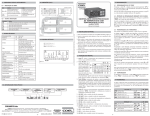
To obtain a spectrum, go to MENU > ‘Measuring point
data’. Mark the ‘SPM Spectrum’ row (1). Press the ENTER
key and set SPM Spectrum to ‘Yes’ (2).
The default setting is a power spectrum over the range
0 to 1000 Hz. It has 1600 lines of which 800 peaks are
saved. The standard window Hanning is used. All these
settings can be edited.
Please note that is not necessary to have an exact rpm
reading in order to measure a spectrum. However,
the exact rpm is very important when you want to
interpret the spectrum, especially when you upload it
to Condmaster and search for bearing patterns with
the help of the bearing symptoms.
D
All bearing symptoms use the rpm as a variable. If the
stored rpm data does not agree with the actual rpm at
the time the shock signal was measured, Condmaster
cannot find the bearing patterns correctly. Thus, by
working with rough estimates of the rpm instead of fresh
measurements, the symptom search and especially the
symptom value calculation is made worthless.
For measurements intended for saving in Condmaster,
it is therefore highly recommended to mark ‘Variable
speed’ (3).
For spectrum functions in Leonova, se part B of this
manual.
Shock pulse measurement
D:33