1
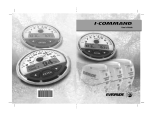
IMPORTANT: This User’s Guide outlines the functionality and usage of the
I-Command™ Integrated Performance System. Before using the I-Command Digital gauge, first read and understand ALL of the supplied product
literature, as well as the boat’s user’s guide and outboard’s operator’s guide.
This User’s Guide should be stored onboard for reference.
The photographs, illustrations, and display screens used in this Guide might
not depict actual models, figures, data fields, equipment, or software versions, but are intended as representative views for reference only. The continuing accuracy of this Guide cannot be guaranteed.
† NMEA 2000 is a registered trademark of the National Marine Electronics Association or its
subsidiaries.
The following trademarks are the property of Bombardier Recreational
Products Inc. or its affiliates.
Evinrude ® E-TEC ™
I-Command ™
Johnson ®
S.A.F.E. ™ (Speed Adjusting Failsafe Electronics)
Bombardier Recreational Products Inc.
250 Sea Horse Drive
Waukegan, Illinois 60085 United States
© 2005 BRP US Inc. All rights reserved.
TM, ® Trademarks and registered trademarks of Bombardier Recreational Products Inc. or its affiliates.
1
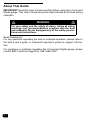
About This Guide
IMPORTANT: Read this User’s Guide carefully before using the I-Command
Digital gauge. This User’s Guide should be kept onboard at all times during
operation.
WARNING
For your safety and the safety of others, follow all safety
warnings and recommendations supplied with the boat
and outboard. Do not disregard any of the safety precautions and instructions.
Need Assistance?
For any questions regarding the boat or outboard operation, please refer to
the boat’s user’s guide, or outboard’s operator’s guide for support information.
For questions or problems regarding the I-Command Digital gauge, please
contact BRP Customer Support at 1-847-689-7090.
2
TABLE OF CONTENTS
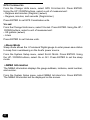
INTRODUCTION . . . . . . . . . . . . . . . . 4 I-COMMAND SYSTEM SET-UP . . .
Bus Devices . . . . . . . . . . . . . . . . .
BASIC I-COMMAND OPERATION . . 5
Gauge Reset . . . . . . . . . . . . . . . .
Powering Up . . . . . . . . . . . . . . . . . 5
Gauge Configuration . . . . . . . . . .
Overview of Gauge Menus . . . . . . 6
Temperature Sensors . . . . . . . .
Gauge Setup . . . . . . . . . . . . . . . . . 7
Fuel Flow . . . . . . . . . . . . . . . . .
Configuring Boat Setup . . . . . . . 8
Fluid Level . . . . . . . . . . . . . . . .
PAGES . . . . . . . . . . . . . . . . . . . . . . . 9
Fluid Level Calibration . . . . . . .
Types of Page Displays . . . . . . . . . 9
Fluid Tank Setup
Analog Displays . . . . . . . . . . . . . 9
and Calibration . . . . . . . . . . . .
Digital Displays . . . . . . . . . . . . . . 9
GPS Module, Paddle Wheel
Engine Trim . . . . . . . . . . . . . . . 10
Speed and Trim Tabs . . . . . .
Diagnostics . . . . . . . . . . . . . . . . 10
Fuel Manager . . . . . . . . . . . . . . 10 ADVANCED OPERATION . . . . . . .
Customizing Pages . . . . . . . . . . .
GPS Position . . . . . . . . . . . . . . 10
Trim Tabs . . . . . . . . . . . . . . . . .
Synchronizer . . . . . . . . . . . . . . 10
GPS Position . . . . . . . . . . . . . .
Trim Tabs . . . . . . . . . . . . . . . . . 10
Fuel Manager . . . . . . . . . . . . . .
Page Options . . . . . . . . . . . . . . . . 11
System Setup . . . . . . . . . . . . . . . .
Viewing . . . . . . . . . . . . . . . . . . . 11
Engine Displayed . . . . . . . . . . .
Menus . . . . . . . . . . . . . . . . . . . 11
Bus Devices . . . . . . . . . . . . . . .
Adding Pages . . . . . . . . . . . . . . 11
Sonar Alarms . . . . . . . . . . . . . .
Removing Pages . . . . . . . . . . . 12
Engine/Tank Configuration . . . .
Page Scrolling . . . . . . . . . . . . . 12
Reset Values . . . . . . . . . . . . . .
Pop-Ups . . . . . . . . . . . . . . . . . . 13
System Information . . . . . . . . .
Screen Settings . . . . . . . . . . . . . . 14
Speed Range . . . . . . . . . . . . . .
Audio Settings . . . . . . . . . . . . . . . 14
Pressure Range . . . . . . . . . . . .
Change Units . . . . . . . . . . . . . .
Sleep Mode . . . . . . . . . . . . . . .
NMEA Information . . . . . . . . . .
PRODUCT WARRANTY . . . . . . . . .
15
15
15
16
17
17
17
20
21
22
23
23
24
24
24
27
27
27
27
27
28
28
28
28
29
30
30
31
3
INTRODUCTION
The I-Command Digital gauge uses NMEA 2000 † CANBus technology,
allowing the sharing of information between different electronic devices
which can be connected to an electrical network on a boat.
CANBus is a Controller Area Network (“CAN”) pathway (“Bus”), allowing
multiple components to communicate with each other via a central network.
The network allows the I-Command Digital gauge to communicate with
other boat instruments, displays, and engine and accessory functions
beyond the scope of the engine instruments. This information is displayed
on the gauge LCD screen.
The network collects and manages information from the Evinrude ® E-TEC ™
outboard through a central processing unit within each gauge and then displays that information.
The I-Command Digital gauge is designed to enhance the engine monitoring capabilities of the boater. Additionally, the wiring system is reduced and
simplified, resulting in a reduction of weight and complexity.
4
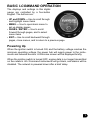
BASIC I-COMMAND OPERATION
The displays and settings in this digital
gauge are controlled by a five-button
keypad. The buttons are:
• UP and DOWN — Use to scroll through
and highlight menu items
• MENU — Use to open basic menu to
set up display pages
• PAGES / ENTER — Use to scroll
forward through pages, and to select
menu items
• EXIT— Use to scroll backward through
pages, close menus, and to return to a previous page
Powering Up
When the ignition switch is turned ON, and the battery voltage reaches the
minimum operating voltage, the power hub will supply power to the instruments and network devices. A Welcome screen will be displayed briefly.
When the ignition switch is turned OFF, engine data is no longer transmitted
on the network. All I-Command instruments will go blank, and alarms will be
disabled. The network is powered down after a brief delay.
5
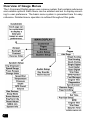
Overview of Gauge Menus
The I-Command Digital gauge uses a menu system that contains submenus
and variable options. Each menu can be entered and set to display according to user preference. The basic menu system is presented here for easy
reference. Detailed menu operation is outlined throughout this guide.
6
Gauge Setup
When the I-Command Digital gauge powers up for the first time, the screen
will show the Boat Setup menu. The Boat Setup must be complete before
proceeding. During Boat Setup, the number of engines and gas tanks on the
vessel must be inputted.
NOTE: If the I-Command Digital gauge was Dealer-installed, Boat Setup
may already be completed. To repeat or reconfigure Boat Setup, press
MENU. Select SYSTEM SETUP. Press ENTER. Select ENG/TANK CFG. Press
ENTER twice.
Boat Setup will only appear again if the Engine/Tank configuration is reset,
certain sensors are added, or if configuration is lost.
NOTE: For multiple gauge setups, Boat Setup needs to be entered on one
gauge. The setup will be set on other I-Command network-connected
gauges.
7
¾Configuring Boat Setup
With Boat Setup highlighted, press ENTER. A menu will appear, allowing
choices of the number of engines and fuel tanks on the vessel:
• 1 Eng/1 Tank
• 1 Eng/2 Tank
• 2 Eng/1 Tank
• 2 Eng/2 Tanks
• 3 Eng/1 Tank
• 3 Eng/3 Tanks
Using the UP / DOWN buttons, choose the applicable option. Press ENTER.
After setting the engine/tank configuration, enter each tank size on the Set
Tank Size menu. This menu will appear with up to three options, depending
on the number of tanks chosen during Boat Setup:
• Port Tank
• Stbd Tank (Starboard tank)
• Cen Tank (Center tank)
Using the UP / DOWN buttons, select the tank to set up. Press ENTER. The
Setting Tank Size screen appears. If only one tank was selected during Boat
Setup, the Setting Tank Size screen appears automatically.
Using the UP and DOWN buttons, input how many gallons the tank will hold.
Press ENTER to set gallon capacity.
Press EXIT and repeat steps for each of the remaining tanks.
After all fuel tank capacities have been set, press EXIT repeatedly to return
to the main display.
After resetting the configuration, the Boat Setup screen appears. From the
Boat Setup screen, press ENTER to access the engine/tank configuration
menu.
8
PAGES
Pages are an essential part of the I-Command Digital gauge. Pages allow
users to mix and match data that will be displayed on the LCD screen. Once
page preferences are set, the gauge allows customized pages to display the
data most important to the user. To customize pages, see “Customizing
Pages” on page 23.
The I-Command Digital gauge supports up to 16 pages, allowing pages to
be added more than once, with each one customized differently.
Types of Page Displays
Page displays can be presented in analog or digital format as single, dual, or
quad displays.
• Single page display — One analog gauge or digital reading
• Dual page display — Two analog gauges or digital readings
• Quad page display — Four analog gauges or digital readings
¾Analog Displays
Analog page displays allow the following data combinations:
•
•
•
•
•
Alt Voltage
Atmospheric Pressure
Battery Voltage
Engine Temp
Fluid Level
• GPS Speed
• Paddle Wheel Speed
• Pitot Speed (not supported)
• Tachometer
• Temperature
¾Digital Displays
Digital page displays allow the following data combinations:
•
•
•
•
•
•
•
•
Alt Voltage
Atmospheric Pressure
Battery Voltage
Depth
Engine Load
Engine Temperature
Fuel Economy
Fuel Flow
• Fuel Range
• Fuel Remaining
• GPS Speed
• Paddle Wheel Speed
• Pitot Speed (not supported)
• Tachometer
• Temperature
• Total Engine Hours
9
NOTE: Certain pages may need a network accessory in order to display
information. Speed readings require a GPS or paddlewheel. Fuel management requires a fuel memory module.
See an authorized Dealer for accessories.
¾Engine Trim
The Engine Trim page monitors the position of the boat's engine in percentages.
¾Diagnostics
The Diagnostics page monitors engine performance and displays any
alarms or warnings.
¾Fuel Manager
The Fuel Manager page has three displays which can show any combination of the following data:
•
•
•
•
•
Fuel Flow
Fuel Economy
Fuel Remaining
Fuel Range
GPS Speed
•
•
•
•
Paddle Wheel Speed
Pitot Speed (not supported)
Seasonal Fuel
Trip Fuel Used
¾GPS Position
The GPS Position page displays the boat's position in latitude and longitude,
using degrees-minutes-seconds or degrees-minutes as units of measure.
¾Synchronizer
The Synchronizer page will show RPM for up to three engines, allowing
users to synchronize the engines for smoother performance.
¾Trim Tabs
The Trim Tab page monitors the position of the trim tabs using either percentages or degrees as units of measure. Trim tabs are not supported.
10
Page Options
¾Viewing
Pages may be viewed by:
• Scrolling pages manually by using the ENTER and EXIT keys; or
• Setting pages to scroll automatically. See “Page Scrolling” on page 12.
NOTE: The ENTER and EXIT keys aid scrolling through pages on the main
display. Pressing the ENTER key moves the scroll in one direction. Pressing
the EXIT key moves the scroll in the other direction.
¾Menus
Each page has its own menu with the following basic menu categories:
• Page
• Screen
• Audio Setup
• System Setup
Pages may be displayed one at a time or in a timed scroll set at a chosen
interval. See “Page Scrolling” on page 12.
¾Adding Pages
Pages can be added to the Main display.
Press the MENU button. Using the UP / DOWN buttons, select PAGES.
Press ENTER. Select ADD PAGE. Press ENTER. Use the UP / DOWN buttons to view the list of available pages.
Highlight the desired page and press ENTER. An adding page prompt
appears. Press ENTER to add the page. (To exit the menu and not add the
page, press the EXIT button until the main display reappears.)
After adding the page, the main display reappears and the selected page is
part of the main display list.
11
¾Removing Pages
Pages can be removed from the Main display.
Scroll to the page to be removed. Press MENU button. Using the UP /
DOWN buttons, select PAGES. Press ENTER. Select REMOVE PAGE. Press
ENTER.
A remove page prompt appears. Press the ENTER button to remove the
page which was displayed on the Main display. (To exit the menu and not
remove the page, press the EXIT button until the main display reappears.)
After removing the page, the Main display reappears and the page is no
longer a part of the Main display list.
¾Page Scrolling
Pages can be viewed by manual or automatic scrolling.
MANUAL
To scroll through pages manually, use the ENTER and EXIT buttons to view
pages.
AUTOMATIC
To scroll through pages automatically, a viewing interval must be selected.
Press MENU button. Select PAGES. Press ENTER. Using the UP / DOWN
buttons, select PAGE SCROLLING. Press ENTER. Select SET TIME. Press
ENTER.
Using the UP / DOWN buttons, select an interval between one and sixty
seconds. Press ENTER to set automatic scrolling interval.
NOTE: To turn off automatic page scrolling, repeat the first two steps. When
the Page Scrolling menu appears, select OFF. Press ENTER.
12
¾Pop-Ups
The Pop-Up feature alerts users when changes occur in a monitored category (RPM or Engine Trim). Pop-ups appear when a user-specified incremental measurement is met. When an increment changes, the main page
for the category will pop up on the main display for a preset duration. See
“Stay-on Time” on page 13 to set the pop-up duration.
SETUP
Select PAGES on the Main menu. Press ENTER. Using the UP / DOWN buttons, scroll to POP-UPS SETUP. Press ENTER.
RPM — To set the RPM pop-up, highlight RPM. Press ENTER. Select OFF
to turn off the RPM pop-up, or select SET THRESHOLD. Press ENTER. The
threshold for RPM ranges from 50 to 3,000 RPM. Set the desired RPM
value that activates the pop-up by using the UP / DOWN buttons.
Engine Trim — To set the Engine Trim pop-up, highlight ENGINE TRIM. Press
ENTER. Select OFF to turn off the Engine Trim pop-up, or select SET
THRESHOLD. Press ENTER. The threshold for Engine Trim ranges from 3%
to 50%. Set the desired Engine Trim value that activates the pop-up by
using the UP / DOWN buttons.
Trim Tabs — Trim Tabs are not supported.
STAY-ON TIME
In the Pop-Ups Setup menu, highlight STAY-ON TIME. Press ENTER. The
stay-on time ranges between two and fifteen seconds. Set the desired
stay-on time by using the UP / DOWN buttons. The value selected controls
the stay-on times for both monitoring categories (RPM or Engine Trim).
NOTE: For multiple engine setups, the Pop-ups for RPM and Engine Trim
will display the current engine the gauge is monitoring.
13
Screen Settings
The LCD display screen can be customized to user preferences for:
• Backlight
• Contrast
• Reverse video (reverse dark and light for increased nighttime visibility)
To set screen preferences, press the MENU button. Using the UP / DOWN
buttons, select SCREEN. Press ENTER.
NOTE: Adjusting the screen backlighting, contrast, or reverse video will set
the preference for all I-Command Digital gauges connected to the network.
To adjust screen backlighting — From the Screen menu, select BACKLIGHT. Press ENTER. Using the UP / DOWN buttons, set the adjustment bar
for the backlight to a desired level. Press EXIT to return to Screen menu, or
press ENTER to return to the Main display.
To adjust screen contrast — From the Screen menu, select CONTRAST.
Press ENTER. Using the UP / DOWN buttons, set the adjustment bar for the
contrast to a desired level. Press EXIT to return to Screen menu, or press
ENTER to return to the Main display.
To set screen to reverse video — From the Screen menu, select REVERSE
VIDEO. Press ENTER. The dark and light colors have reversed (white text on
a black background now appears as black text on a white background).
To turn OFF reverse video — From the Screen menu, select REVERSE
VIDEO. Press ENTER. Reverse video is disabled. Press the EXIT button
twice to return to the Main display.
Audio Settings
The I-Command Digital gauge will emit audible sounds during operation.
The following audible notices can be adjusted in Audio Setup:
• Key sounds
• Alarm sounds
To adjust audio sounds — Press MENU. Using the UP / DOWN buttons,
select AUDIO SETUP. Press ENTER. Select KEY SOUNDS or ALARM SOUNDS.
Press ENTER. Select ON or OFF setting. Press ENTER to set the sound.
The Audio Setup Menu appears. Press EXIT to return to Main display.
14
I-COMMAND SYSTEM SET-UP
The I-Command Digital gauge must be configured in order to accurately display the following engine and boat data:
• Fuel Flow
• Fluid Level
• GPS Module / Paddle Wheel
• Trim Tabs (not supported)
Bus Devices
The I-Command Digital gauge can be used to detect and configure other
network-enabled devices and gauges by executing the Bus Devices command. The Bus Devices command allows users to run a system check on all
configurable devices connected to the network.
To run the Bus Devices command — Press MENU. Select SYSTEM SETUP.
Using the UP / DOWN buttons, highlight BUS DEVICES. Press ENTER.
“Searching Bus Devices” displays. Once all devices are detected, a list of
the devices (Bus Devices list) displays.
The Bus Devices command acts as the device manager for the network,
allowing configuration of devices. This command also sets and resets critical
values such as alarms and calibration.
NOTE: Devices will vary in name and number depending on what has been
connected to the network. The number of sensors attached to the network
will match the number that comes up on the Bus Devices list.
Gauge Reset
If gauge settings are modified and the results are unsatisfactory, the gauge
can be reset to its factory default settings using the Reset Values command.
To reset gauge values — Press MENU. Using the UP / DOWN buttons,
select SYSTEM SETUP. Press ENTER. Choose RESET VALUES. Press
ENTER. Press ENTER again to reset the values.
WARNING
Resetting values is a factory hard reset. All settings will
be wiped out.
15
NOTE: Resetting values resets the gauge only, and does not affect engine/
tank configuration or the calibration and configuration settings of other
devices on the network.
If a sensor is configured or reconfigured, its designation is assigned or reassigned to a different sensor location on the boat.
The following items can be configured, unconfigured or reconfigured:
• Temperature Sensors (UNCFG TEMP)
• Fuel Flow Sensors (UNCFG F FLOW)
• Fluid Level (UNCFG F LEVEL)
If UNCFG TEMP, UNCFG F FLOW, or UNCFG FLUID LEVEL appear on the bus
devices list, that sensor is unconfigured.
Up to three of each sensor (temperature, fuel, fluid) can be configured and
displayed on the gauge.
Gauge Configuration
• GPS Module and Paddle Wheel Speed do not require configuration.
• Engines and tanks are configured through the System Setup menu (see
“System Setup” on page 27).
• Trim Tabs are not supported.
NOTE: The configuration settings can be cleared for each sensor individually, by resetting values from the sensor's configuration menu. Only sensors
selected from the Bus Devices list will be set back to its defaults. See
“Gauge Reset” on page 15.
To configure gauge sensors — Press MENU. Using the UP / DOWN buttons, select SYSTEM SETUP. Press ENTER. Highlight BUS DEVICES and press
ENTER. After a few moments, detected network items are listed. Highlight
the item to configure and press ENTER.
16
¾Temperature Sensors
The temperature sensors should be configured in order to assign proper
sensor locations.
To unconfigure a temperature sensor — Choose UNCONFIGURE from the
configuration menu. Press ENTER. Confirm sensor unconfiguration message by pressing ENTER. The Bus Devices list reappears.
To configure a temperature sensor — Choose UNCFG TEMP from the configuration menu. Press ENTER. Confirm sensor configuration message by
pressing ENTER. The Selecting Temp menu appears. Highlight a temperature option (Temp 1, Temp 2, Temp 3, etc.) on the Selecting Temp menu and
press ENTER. The temperature sensor has been configured as the selected
temperature option. The Bus Devices list reappears.
To reconfigure a temperature sensor — A “Name Already Selected” message will appear if a sensor is already configured with that sensor name. If
the “Name Already Selected” message appears, follow steps to unconfigure
a temperature sensor.
After the temperature sensor unconfigure, select Temp 1 (or Temp 2, etc.).
Press ENTER. Choose RECONFIGURE. Press ENTER. The Temperature
Selection menu appears. Select desired temperature sensor. Press ENTER.
After the Bus Devices list reappears, follow steps to configure a temperature
sensor.
¾Fuel Flow
NOTE: Evinrude E-TEC outboards interface with the I-Command Digital
gauge, providing sensor configuration for fuel flow. No setup or configuration
is required.
¾Fluid Level
Fluid Level settings monitors up to three tanks for each fluid level category:
• Fuel
• Fresh Water
• Oil
• Black Water
• Waste Water
• Live Well
17
Fuel tanks are displayed as “Fuel Tank (P)” for port, “Fuel Tank (C)” for center, and “Fuel Tank (S)” for starboard. A single fuel tank installation is displayed as “Fuel Tank.”
If multiple tanks for the other fluid tanks exits (fresh water, oil, etc.) each will
have a numerical designation.
If a tank(s) has not been configured, it will appear as UNCFG F LEVEL.
To unconfigure Fluid Level — From the Bus Devices list, choose a configured Fluid Level. Press ENTER. Using the UP / DOWN buttons, highlight
UNCONFIGURE. Press ENTER. Press ENTER again to confirm the unconfigure device command. The Bus Devices list reappears on and the UNCFG F
LEVEL option appears on the list.
To configure Fluid Level — Select UNCFG F LEVEL from the Bus Devices
list. Press ENTER. The fluid levels can be configured by selecting a fluid
level option from the list and pressing ENTER.
FUEL LEVEL CONFIGURATION
Select FUEL from the configuration list. Press ENTER. Using the UP /
DOWN buttons, highlight a tank option (port, starboard, center). Press
ENTER. The Fuel Level is now configured for the selected tank.
FRESH WATER CONFIGURATION
Select FRESH WATER from the configuration list. Press ENTER. Using the
UP / DOWN buttons, input the tank number (1, 2, or 3). Press ENTER.
Using the UP / DOWN buttons, input the tank capacity. Press ENTER. The
Fresh Water tank is now configured.
WASTE WATER CONFIGURATION
Select WASTE WATER from the configuration list. Press ENTER. Using the
UP / DOWN buttons, input the tank number (1, 2, or 3). Press ENTER.
Using the UP / DOWN buttons, input the tank capacity. Press ENTER. The
Waste Water tank is now configured.
LIVE WELL CONFIGURATION
Select LIVE WELL from the configuration list. Press ENTER. Using the UP /
DOWN buttons, input the tank number (1, 2, or 3). Press ENTER. Using the
UP / DOWN buttons, input the tank capacity. Press ENTER. The Live Well
tank is now configured.
18
OIL LEVEL CONFIGURATION
Select OIL from the configuration list. Press ENTER. Using the UP / DOWN
buttons, highlight a tank option (port, starboard, center). Press ENTER.
Using the UP / DOWN buttons, input the tank capacity. Press ENTER. The
Oil Level is now configured for the selected tank.
BLACK WATER CONFIGURATION
Select BLACK WATER from the configuration list. Press ENTER. Using the
UP / DOWN buttons, input the tank number (1, 2, or 3). Press ENTER.
Using the UP / DOWN buttons, input the tank capacity. Press ENTER. The
Black Water tank is now configured.
NOTE: The I-Command Digital gauge must be set to Fuel Level Sensor for
the Fuel Remaining Source to display fuel level information properly. See
“Fuel Manager” on page 24.
To reconfigure Fluid Level — Select a configured Fluid Level (Fuel Tank,
Oil Tank, Black Water Tank, Waste Water Tank, Fresh Water Tank, Live Well
Tank) from the Bus Devices list. Press ENTER. Highlight RECONFIGURE.
Press ENTER to reconfigure fluid level sensor.
To set Fluid Level Warning — Select a configured Fluid Level from the Bus
Devices List. Press ENTER. Highlight LEVEL WARNING. Press ENTER.
Choose LOW LEVEL or HIGH LEVEL. Set the selected warning level to OFF or
to a desired percentage. Use the UP / DOWN buttons to select a desired
percentage. Press ENTER. The Bus Devices list reappears
NOTE: It is recommended a LOW LEVEL warning be set for tanks which consume fluids (such as fuel, oil, etc.). A LOW LEVEL warning will activate when
the fluid level drops below a preset percentage of the tank’s capacity. It is
recommended a HIGH LEVEL warning be set for tanks which add fluid as the
boat is used (black water, waste water). A High Level warning will activate
when the tank is nearing capacity.
To calibrate Fluid Level — See “Fluid Level Calibration” on page 20.
19
To reset Fluid Level values — Select RESET VALUES from the tank configuration menu. Press ENTER. Press ENTER again to reset the tank device
configuration values. The tank reverts to the default setting. The previously
set calibration is removed.
NOTE: By resetting values from the configuration menu, ONLY the device
selected from the Bus Devices list will be set back to its defaults.
WARNING
Resetting any sensor will lose all configuration and calibration for that sensor.
¾Fluid Level Calibration
Calibrating Fluid level is an important step to ensuring the tank status is correctly transmitted over the network.
The Fluid Level screens are designed to give users an approximate representation of fluid usage and levels. Due to various factors such as system
configurations, tank sizes and shapes, and boating conditions, the I-Command Digital gauge is only a guide to fluid management and cannot be
relied upon to display exact readings. Return to port immediately if tank
levels are low, or an alarm is activated.
The I-Command system can monitor fluid level and consumption. To
improve tank management accuracy, calibrate all tank level sensors so all
information can be collected. See “Fluid Level” on page 17 for detailed
instructions on fluid level configuration.
IMPORTANT: Always confirm fuel level before boating, and check fuel level
often. The fuel level reading is designed to be a reference for fuel level during usage; however, it is recommended boat operators apply the fuel usage
principle of 1/3 fuel to destination, 1/3 fuel to return to port, and 1/3 fuel for
reserve.
WARNING
Running out of fuel could cause the operator of the boat
to have diminished or no control of the vessel, presenting a risk of personal injury to the operator, passengers,
and people who are nearby.
20
¾Fluid Tank Setup and Calibration
Tank calibration is optional. It is recommended tanks be calibrated to ensure
an accurate reading from the sensor. For best accuracy, begin calibration
with an empty tank.
Press the MENU button. Select SYSTEM SETUP. Press ENTER.
Using the UP / DOWN buttons, highlight BUS DEVICES. Press ENTER.
On the Bus Devices list, select the fluid level source to be calibrated. Press
ENTER. Select CALIBRATE. Press ENTER. The calibration choices are
two-point, three-point, or five-point.
After EMPTY calibration point is set, fluid must be added for each subsequent
calibration point.
TWO-POINT CALIBRATION
Two-point calibration has two settings:
• Empty level
• Full level
Two-point calibration is recommended only for rectangular or square shaped
tanks which allow the fluid level sensor to provide an accurate reading of the
fluid level at the top and bottom of the tank.
To perform a two-point calibration — Choose EMPTY setting. Press
ENTER to calibrate. Add fluid until tank is full. Choose FULL setting. The
“Calibrating Set Tank to Full Level” message appears. Press ENTER to
complete the calibration and return to the two-point calibration menu. Press
EXIT to return to the Bus Devices list.
THREE-POINT CALIBRATION
Three-point calibration has three settings:
• Empty level
• Half level
• Full level
Three-point calibration is designed for tanks that vary in shape from the top
to the bottom, leading to an inaccurate fluid level sensor reading, in the narrower, bottom portion of the tank.
21
To perform a three-point calibration — Choose EMPTY setting. Press
ENTER to calibrate. Add fluid until tank is half full. Choose HALF setting.
Press ENTER to calibrate. Add fluid until tank is full. Choose FULL setting.
The “Calibrating Set Tank to Full Level” message appears. Press ENTER to
complete the calibration and return to the three-point calibration menu.
Press EXIT to return to the Bus Devices list.
FIVE-POINT CALIBRATION
Five-point calibration has five settings:
• Empty level
• One-quarter level
• Half level
• Three-quarter level
• Full level
Five-point calibration is recommended for the most uniquely formed tanks
which vary greatly in shape from top to bottom, making an accurate fluid
level sensor reading impossible without calibration.
To perform a five-point calibration — Choose EMPTY setting. Press
ENTER to calibrate. Add fluid until tank is one-quarter full. Choose 1 QTR
setting. Press ENTER to calibrate. Add fluid until tank is half full. Choose
HALF setting. Press ENTER to calibrate. Add fluid until tank is three-quarter
full. Choose 3 QTR setting. Press ENTER to calibrate. Add fluid until tank is
full. Choose FULL setting. The “Calibrating Set Tank to Full Level” message
appears. Press ENTER to complete the calibration and return to the
five-point calibration menu. Press EXIT to return to the Bus Devices list.
¾GPS Module, Paddle Wheel Speed and Trim Tabs
The remaining items from the Bus Devices list, GPS Module, Paddle Wheel
Speed and Trim Tab Sensors do not need to be configured. If GPS Module
or Paddle Wheel Speed are highlighted and ENTER pressed, the “Device
Working Properly” message appears. Trim Tabs are not supported.
22
ADVANCED OPERATION
Customizing Pages
Each page can be customized to display a data type based on user preferences.
To access a page-specific menu, the desired page must appear on the Main
display the menu button is pressed. To add a page, see “Adding Pages” on
page 11. See “Types of Page Displays” on page 9 for a detailed explanation
of single, dual, and quad analog and digital page displays.
NOTE: If a page is set to show information from a device that is not working
properly, or is not connected to the I-Command network, the data boxes on
the gauge will flash. This indicates the device is not sending data to the network. Possible causes are a weak GPS signal, or an unconfigured device.
To configure a device, see setup steps in “Bus Devices” on page 15.
SINGLE ANALOG PAGE
To customize the Single Analog page — From the single analog page on
the Main display, press MENU. Select CUSTOMIZE. Press ENTER. Using the
UP / DOWN buttons, scroll through the categories. Press ENTER to set the
desired category as the default display.
NOTE: The System Setup menu for all three analog gauges feature Speed
Range and Pressure Range. See “System Setup” on page 27 for information on speed range and pressure range settings.
DUAL ANALOG PAGE
To customize the Dual Analog page — From the dual analog page on the
Main display, press MENU. Select CUSTOMIZE. Press ENTER. Select the top
or bottom gauge to customize. Press ENTER. Using the UP / DOWN buttons, scroll through the categories. Press ENTER to set the desired category as the default display for the top or bottom (depending on selection)
gauge. Repeat steps to set the display for the other (top or bottom) gauge, if
desired.
QUAD ANALOG PAGE
To customize the Quad Analog page — From the quad analog page on
the Main display, press MENU. Select CUSTOMIZE. Press ENTER. Select the
top left, top right, bottom left, or bottom right gauge to customize. Press
ENTER. Using the UP / DOWN buttons, scroll through the categories. Press
ENTER to set the desired category as the default display for the desired
gauge. Repeat steps to set the display for the other gauges, if desired.
23
SINGLE DIGITAL PAGE
To customize the Single Digital page — From the single digital page on
the Main display, press MENU. Select CUSTOMIZE. Press ENTER. Using the
UP / DOWN buttons, scroll through the categories. Press ENTER to set the
desired category as the default display.
DUAL DIGITAL PAGE
To customize the Dual Digital page — From the dual digital page on the
Main display, press MENU. Select CUSTOMIZE. Press ENTER. Select the top
or bottom data box to customize. Press ENTER. Using the UP / DOWN buttons, scroll through the categories. Press ENTER to set the desired category as the default display for the top or bottom (depending on selection)
data box. Repeat steps to set the display for the other (top or bottom) data
box, if desired.
QUAD DIGITAL PAGE
To customize the Quad Digital page — From the quad digital page on the
Main display, press MENU. Select CUSTOMIZE. Press ENTER. Select the top
left, top right, bottom left, or bottom right data box to customize. Press
ENTER. Using the UP / DOWN buttons, scroll through the categories. Press
ENTER to set the desired category as the default display for the desired
data box. Repeat steps to set the display for the other data boxes, if desired.
¾Trim Tabs
Trim Tabs are not supported.
¾GPS Position
The GPS page displays user position in latitude and longitude, measured in
degrees, minutes, and seconds; or degrees and minutes.
¾Fuel Manager
NOTE: Fuel management requires a fuel memory module.
See an authorized Dealer for accessories.
The Fuel Manager page can display multiple monitoring categories. See
“Fuel Manager” on page 10 for a list of categories.
NOTE: For multiple engine applications, the engine display must be set in
order to customize the Fuel Manager for a specific engine. The selected
engine appears at the bottom of the Fuel Manager page. See “Engine Displayed” on page 27 for information on specifying the engine display.
24
The Fuel Manager menu controls the following options:
• Customize
• Fuel Setup
• Pages (see “Customizing Pages” on page 23)
• Screen (see “Screen Settings” on page 14)
• Audio Setup (see “Audio Settings” on page 14)
• System Setup (see “System Setup” on page 27)
CUSTOMIZE
To customize Fuel Manager — From the Fuel Manager page on the Main
display, press MENU. Select CUSTOMIZE. Press ENTER. Using the UP /
DOWN buttons, choose a data box to customize. Highlight the desired item.
Press ENTER to set the data for the selected data box. To customize other
data boxes, repeat the steps above.
FUEL SETUP
From the Fuel Manager page, press MENU. Select Fuel Setup. Press
ENTER. The Fuel Setup menu appears. It controls the following options:
• Fuel Remaining Source
• Reset Seasonal
• Refill Tank
• Partial Fill
• Economy Speed Source
• Reset Trip Fuel
— Fuel Remaining Source
The two options—Engine Fuel Flow and Fluid Level Sensor—allow users to
choose which sensor is used to monitor fuel level.
From the Fuel Setup menu, select FUEL REM SRC. Press ENTER. Using the
UP / DOWN buttons, highlight ENG/FFLOW or FLUID LEV SNSR. Press
ENTER to set the default fluid level sensor.
— Reset Seasonal
Fuel usage can be tracked for trips and even entire seasons. The reset seasonal option allows a reset of the total seasonal fuel usage.
From the Fuel Setup menu, select RST SEASONAL. Press ENTER. Press
ENTER again to reset the seasonal fuel total to zero.
NOTE: Resetting seasonal fuel will set fuel usage to zero for all outboards in
multiple outboard setups.
25
— Refill Tank
The Refill Tank option allows a recalibration of the fuel tank after it has been
filled to full capacity.
From the Fuel Setup menu, select REFILL TANK. Press ENTER. Refill the fuel
tank until it is full. Press ENTER. Using the UP / DOWN buttons, input the
amount of fuel added to the fuel tank. Press ENTER to set.
— Partial Fill
The Partial Fill option helps maintain the accuracy of the Fuel Remaining
and Fuel Range figures, by allowing users to input fuel added to the tank.
From the Fuel Setup menu, select PARTIAL FILL. Press ENTER. Add fuel to
the fuel tank. Using the UP / DOWN buttons, input the amount of fuel added
to the fuel tank. Press ENTER to set.
— Economy Speed Source
The Economy Speed Source option allows customization of the speed measurement source.
From the Fuel Setup menu, select ECO SPEED SRC. Press ENTER. Using
the UP / DOWN buttons, select a speed source (Paddle Wheel Speed, Pitot
Speed, or GPS Speed). Press ENTER to set the speed source.
NOTE: Paddle Wheel Speed is best suited for low speeds, while Pitot Speed
will work best at high speeds. GPS Speed works well at both high and low
speeds.
— Reset Trip Fuel
The Reset Trip Fuel option resets a trip fuel usage total.
From the Fuel Setup menu, select RST TRIP FUEL. Press ENTER. Press
ENTER again to reset the seasonal fuel total to zero.
26
System Setup
From the Main display, press MENU. Using the UP / DOWN buttons, select
SYSTEM SETUP. Press ENTER. The following options appear:
•
•
•
•
•
•
Engine Displayed
Bus Devices
Sonar Alarms
Eng/Tank Configuration
Reset Values
System Information
• Change Units
• Sleep Mode
• Speed Range
• Pressure Range
• NMEA Information
¾Engine Displayed
I-Command can monitor up to three engines. The Engine Displayed option
controls which engine is monitored.
From the System Setup menu, select Engine Displayed. Press ENTER.
Using the UP / DOWN buttons, choose Port, Center, or Starboard. Press
ENTER to set the Engine Displayed option.
¾Bus Devices
From the System Setup menu, select BUS DEVICES. Press ENTER. The
“Searching for Bus Devices” message appears, and a list of all devices
attached to the network appears.
¾Sonar Alarms
Sonar alarms are available to aid in avoiding underwater objects or shallow
operating conditions. A transducer (enabling depth and temperature) or triducer (enabling depth, temperature, and speed) is required for sonar alarm
functionality. See an authorized Dealer.
From the System Setup menu, select SONAR ALARMS. Press ENTER. Using
the UP / DOWN buttons, choose DEEP or SHALLOW. Press ENTER. Select
SET DEPTH (or choose the option to turn the sonar alarm feature OFF). Press
ENTER. Using the UP / DOWN buttons, select the desired depth. Press
ENTER to set the Sonar Alarm.
¾Engine/Tank Configuration
See “Gauge Setup” on page 7 for information on setting up the engine and
tank configuration.
27
¾Reset Values
From the System Setup menu, select Reset Values. Press ENTER. Press
MENU, highlight SYSTEM SETUP and press ENTER. Press ENTER again
to reset all values to zero.
NOTE: Resetting values will not clear Engine/Tank configuration or the settings of EP sensors previously calibrated or configured.
¾System Information
The system information screen provides information about the version and
build of the I-Command software.
From the System Setup menu, select SYSTEM INFO. Press ENTER. The system information will be displayed on the screen.
¾Speed Range
Speed range controls the range of speed displayed on the I-Command Digital gauge.
From a single, dual, or quad analog page on the Main display, press MENU.
Highlight SYSTEM SETUP. Press ENTER. Using the UP / DOWN buttons,
select SPEED RANGE. Press ENTER. Choose the desired speed range (0-40;
0-80; or 0-120). Press ENTER to set the speed range.
¾Pressure Range
Pressure range controls the range of pressure displayed on the I-Command
Digital gauge.
From a single, dual, or quad analog page on the Main display, press MENU.
Highlight SYSTEM SETUP. Press ENTER. Using the UP / DOWN buttons,
select PRESSURE RANGE. Press ENTER. Select ENGINE WATER.
Other categories display, but are not supported:
• Engine oil
• Fuel
• Engine boost
• Transmission oil
Choose the desired engine water pressure range (0-15; 0-30; 0-60; 0-80; or
0-100 psi). Press ENTER to set the engine water pressure range.
28
¾Change Units
Measurement units can be customized to suit user preference.
From the System Setup menu, select CHANGE UNITS. Press ENTER. Using
the UP / DOWN buttons, select a monitoring category:
• Speed/distance
• Temperature
• Pressure
• Depth
• GPS coordinates
• Volume
SPEED AND DISTANCE
From the Change Units menu, select SPEED AND DISTANCE. Press ENTER.
Using the UP / DOWN buttons, select a unit of measurement:
• Statute (default)
• Nautical
• Metric
Press ENTER to set speed and distance units.
TEMPERATURE
From the Change Units menu, select TEMPERATURE. Press ENTER. Using
the UP / DOWN buttons, select a unit of measurement:
• Fahrenheit (default)
• Celsius
Press ENTER to set temperature units.
PRESSURE
From the Change Units menu, select PRESSURE. Press ENTER. Using the
UP / DOWN buttons, select a unit of measurement:
• PSI (default)
• Bars
Press ENTER to set pressure units.
DEPTH
From the Change Units menu, select DEPTH. Press ENTER. Using the UP /
DOWN buttons, select a unit of measurement:
• Feet (default)
• Fathoms
• Meters
Press ENTER to set depth units.
29
GPS COORDINATES
From the Change Units menu, select GPS COORDINATES. Press ENTER.
Using the UP / DOWN buttons, select a unit of measurement:
• Degrees and minutes (Deg/min) (default)
• Degrees, minutes, and seconds (Deg/min/sec)
Press ENTER to set GPS Coordinates units.
VOLUME
From the Change Units menu, select VOLUME. Press ENTER. Using the UP /
DOWN buttons, select a unit of measurement:
• US gallons (default)
• Liters
Press ENTER to set Volume units.
¾Sleep Mode
Sleep mode allows the I-Command Digital gauge to enter power-save status
to keep from overdrawing on the boat’s power source.
From the System Setup menu, select SLEEP MODE. Press ENTER. Using
the UP / DOWN buttons, select ON or OFF. Press ENTER to set the sleep
mode.
¾NMEA Information
The NMEA information displays the gauge address, instance, serial number,
and version.
From the System Setup menu, select NMEA INFORMATION. Press ENTER.
The NMEA information will be displayed on the screen.
30
PRODUCT WARRANTY
BRP LIMITED WARRANTY FOR EVINRUDE/JOHNSON GENUINE PARTS
AND ACCESSORIES SOLD IN THE UNITED STATES AND CANADA
Bombardier Recreational Products Inc. (“BRP”) warrants its Evinrude ®/Johnson ® Genuine
Parts and accessories (“Product”) sold by authorized Evinrude or Johnson dealers in the fifty
United States and Canada from defects in material or workmanship for the period and under
the conditions described below. This limited warranty does not apply to Products not bearing
the Evinrude or Johnson trademarks that are made by other manufacturers. This limited warranty extends to the original retail purchaser only (“Purchaser”) and is not transferable to any
subsequent owner. This warranty is available only on Products purchased as new and
unused from a dealer authorized to distribute the Products in the country in which the sale
occurred (“Dealer”).
Powerhead assemblies are warranted for a period of SIX (6) CONSECUTIVE MONTHS from
the date of purchase. All other Products are warranted for a period of TWELVE (12) CONSECUTIVE MONTHS from the date of purchase.
Purchaser must bring the Product, including any defective part therein, and proof of purchase
of the Product (original bill of sale) to Dealer promptly after the appearance of the defect and,
in any event, within the warranty period. Purchaser must sign the repair/work order prior to
repair to validate warranty coverage and must provide BRP/Dealer with a reasonable opportunity to repair/replace the defective part. All replaced parts become the property of BRP.
BRP’s obligations under this warranty are limited to, at its sole discretion, repairing or replacing parts of Product found to be defective in material or workmanship, in BRP’s reasonable
judgment. Repair or replacement of parts will be without charge for parts and labor, at any
authorized Dealer. No claim of breach of warranty shall be cause for cancellation or rescission of the sale of Product to Purchaser. BRP reserves the right to improve, modify or change
Products without assuming any obligation to modify Products previously manufactured. If
warranty service is required outside of the fifty United States or Canada, Purchaser will bear
responsibility for any additional charges due to local practices and conditions including, but
not limited to, freight, insurance, taxes, license fees, import duties, and any financial charges
levied by governments, states, territories and agencies.
31
The following are not warranted under any circumstances: (a) normal wear and tear; (b)
routine maintenance items including, but not limited to, adjustments, oil changes, water
pumps, carburetor maintenance, spark plug replacements, etc.; (c) cosmetic damage or paint
changes due to exposure to the elements; or (d) damage caused by: improper or lack of
installation, maintenance, winterization and/or storage; failure to follow the procedures and
recommendations in the Operator’s Guide; removal of parts, improper repairs, service, maintenance, or modification; use of parts or accessories not manufactured or approved by BRP
that are either incompatible with Product or adversely affect its operation, performance, or
durability; repairs done by anyone, including Purchaser, other than an authorized Dealer;
abuse, misuse, abnormal use, neglect, racing, improper operation or operation of Product in
a manner inconsistent with the Operator’s Guide; external damage, accident, submersion,
water ingestion, fire, theft, vandalism or act of God; operation with fuels, oils or lubricants not
suitable for use with Product (see Operator’s Guide); rust or corrosion; or cooling system
blockage by foreign material.
This warranty will be voided in its entirety and rendered null and void: (a) where Product has
been altered or modified in such a way so as to adversely affect its operation, performance or
durability, or has been altered or modified to change its intended use; or (b) where Product is
or has been used for racing or any other competitive activity, at any point.
ALL WARRANTIES, EXPRESSED OR IMPLIED, INCLUDING WITHOUT LIMITATION ANY
WARRANTY OF MERCHANTABILITY OR FITNESS FOR A PARTICULAR PURPOSE ARE
LIMITED IN DURATION TO THE LIFE OF THIS EXPRESS LIMITED WARRANTY. ALL
INCIDENTAL, CONSEQUENTIAL, DIRECT, INDIRECT OR OTHER DAMAGES OF ANY
KIND ARE EXCLUDED FROM COVERAGE UNDER THIS WARRANTY INCLUDING, BUT
NOT LIMITED TO: expense for gasoline, expense for transporting Product to and from
Dealer, removal of Product from a boat and reinstallation, mechanic’s travel time, in-and-out
of water charges, slip or dock fees, trailering or towing, storage, telephone, cell phone, fax or
telegram charges, rental of a like or replacement Product or boat during warranty services or
down time, taxi, travel, lodging, loss of or damage to personal property, inconvenience, cost
of insurance coverage, loan payments, loss of time, income, revenue, profits, enjoyment or
use of Product.
SOME JURISDICTIONS DO NOT ALLOW FOR THE DISCLAIMERS, LIMITATIONS OF
INCIDENTAL OR CONSEQUENTIAL DAMAGES, OR OTHER EXCLUSIONS IDENTIFIED
ABOVE. AS A RESULT, THEY MAY NOT APPLY TO YOU. THIS WARRANTY GIVES YOU
SPECIFIC RIGHTS, AND YOU MAY ALSO HAVE OTHER LEGAL RIGHTS THAT MAY
VARY FROM JURISDICTION TO JURISDICTION.
No distributor, Dealer or any other person is authorized to make any affirmation, representation or warranty regarding Product other than those contained in this limited warranty and, if
made, shall not be enforceable against BRP. BRP reserves the right to modify this warranty
at any time, being understood that such modification will not alter the warranty conditions
applicable to the Products sold while this warranty is in effect. For assistance, please contact
BRP US Inc. Customer Support Services, 250 Sea Horse Drive, Waukegan, IL, 60085,
1-847-689-7090 or visit www.brp.com.
32
For Products sold outside the fifty United States and Canada, the BRP Limited Warranty for
Evinrude/Johnson Genuine Parts and Accessories Sold in the United States and Canada
(“Limited Warranty”) applies, except it is modified as follows:
• The Limited Warranty applies only to Products purchased as new and unused from a distributor or dealer authorized to distribute Products in the country in which the sale occurred.
• Products purchased for commercial use, or used commercially at any time during the warranty period, are warranted for SIX (6) CONSECUTIVE MONTHS from the date of purchase. Product is used commercially when it is used in connection with any work or
employment that generates income, during any part of the warranty period. Product is also
used commercially when, at any point during the warranty period, it is installed on a boat
that has commercial tags or is licensed for commercial use.
• If warranty service is required outside of the country of original sale, Purchaser bears
responsibility for any and all charges due to local practices and conditions that exceed or
are in addition to customary charges in the country of sale, such as, but not limited to,
freight, insurance, taxes, license fees, import duties, and any financial charges levied by
governments, states, territories and agencies.
• For assistance, please contact BRP US Inc. Customer Support Services, 250 Sea Horse
Drive, Waukegan, Illinois, 60085, 1-847-689-7090, or the affiliate of BRP Inc. where the
Product was sold to the retail Purchaser.
No other change to the Limited Warranty shall be made or implied.
Effective as of December 1, 2001.
33
34