1
KAL-D
measuring range so that it now extends across the entire LED strip at the
maximum system flow.
• The adjustment procedure is now complete. It may be repeated as often as
necessary.
c) Measuring mode
After adjustment, the flow monitor is once again in measuring mode.
The flow is constantly monitored and the actual value of the flow speed is
displayed on the LED strip.
Switching point setting
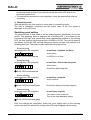
The potentiometer is now used to set the switching point (threshold) of the flow
switch. The switching point is displayed as a blinking LED. If the extent of the
illuminated LED light strip (actual flow value) reaches the position of the blinking
LED, the flow monitor switches over from ALARM to FLOW. This can be seen at
the display: the DUAL LED that was showing a steady red light now switches to a
steady green light. The output is also switched at the same time.
Slowly blinking
switching point LED (setpoint)
ΟΟΟ⊗ΟΟ ΟΟ
actual flow < setpoint (no flow)
Alarm status
⊗ DUAL LED illuminated red
no LEDs lit = no flow
Slowly blinking
switching point LED (setpoint)
actual flow < flow below set-point
⊗⊗⊗ΟΟΟ ΟΟ
Alarm status
light strip actual value
Actual flow below setpoint
⊗ DUAL LED illuminated red
Quickly blinking
switching point LED (setpoint)
⊗⊗⊗⊗ΟΟ ΟΟ
actual flow = setpoint
output switches
light strip actual value
⊗ DUAL LED illuminated green
Actual flow has just reached setpoint
Slowly blinking
switching point LED (setpoint)
actual flow> setpoint
⊗⊗⊗⊗⊗⊗ΟΟ
light strip actual value
Flow status (ideal conditions)
This is the most desirable status.
⊗ DUAL LED illuminated green
After the settings are completed, screw the cover tightly back on the housing
(make sure that the window for viewing the LED strip is aligned with the strip.).
page 10
KAL-D 10/03