1
Operating Instructions
for advanced features
Digital Camera
Model No.
DMC-SZ10
Please read these instructions carefully before using this product,
and save this manual for future use.
SQW0149
F0215HH0
until
2015/03/18
Contents
Before Use
Care of the camera ...................................................................................................... 6
Standard Accessories................................................................................................. 7
Names and Functions of Main Parts.......................................................................... 8
Preparation
Charging the Battery..................................................................................................11
• Inserting the Battery............................................................................................ 12
• Charging ............................................................................................................. 13
• Approximate operating time and number of recordable pictures ........................ 16
Inserting and Removing the Card (optional) .......................................................... 18
About the Built-in Memory/the Card ........................................................................ 19
• Approximate number of recordable pictures and available recording time......... 21
Setting Date/Time (Clock Set) .................................................................................. 22
• Changing the Clock Setting ................................................................................ 23
Tips for taking good pictures ................................................................................... 24
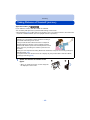
• Fit the strap and hold the camera carefully......................................................... 24
• Preventing jitter (camera shake)......................................................................... 24
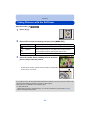
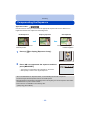
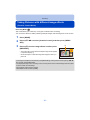
Basic
Selecting the Recording Mode................................................................................. 25
Taking pictures using the automatic function (Intelligent Auto Mode) ................ 26
• Changing the settings ......................................................................................... 29
Taking pictures with your favourite settings (Normal Picture Mode)................... 30
Focusing .................................................................................................................... 31
Recording Motion Pictures....................................................................................... 33
Playing Back .............................................................................................................. 35
• Displaying Multiple Screens (Multi Playback) ..................................................... 36
• Using the Playback Zoom................................................................................... 36
Deleting Pictures ....................................................................................................... 37
• To delete a single picture .................................................................................... 37
• To delete multiple pictures (up to 50) or all the pictures ..................................... 37
Setting the Menu ....................................................................................................... 38
• Setting menu items ............................................................................................. 38
• Using the Quick Menu ........................................................................................ 40
About the Setup Menu .............................................................................................. 41
Recording
Taking Pictures of Yourself ([Self Shot]) ................................................................. 46
About the Monitor ..................................................................................................... 52
Using the Zoom ......................................................................................................... 53
• Optical Zoom ...................................................................................................... 53
• Extra Optical Zoom (EZ) ..................................................................................... 54
• Intelligent Zoom .................................................................................................. 54
-2-
• Digital Zoom........................................................................................................ 54
Taking Pictures Using the Built-in Flash................................................................. 55
• Switching to the appropriate flash setting ........................................................... 55
Taking Pictures with the Self-timer.......................................................................... 59
Compensating the Exposure.................................................................................... 60
Taking Pictures with different image effects (Creative Control Mode)................. 61
• [Expressive] ........................................................................................................ 62
• [Retro] ................................................................................................................. 62
• [Old Days] ........................................................................................................... 62
• [High Key] ........................................................................................................... 62
• [Low Key] ............................................................................................................ 63
• [Sepia]................................................................................................................. 63
• [Dynamic Monochrome]...................................................................................... 63
• [Impressive Art]................................................................................................... 63
• [High Dynamic] ................................................................................................... 64
• [Cross Process] .................................................................................................. 64
• [Toy Effect] .......................................................................................................... 64
• [Miniature Effect]................................................................................................. 65
• [Soft Focus]......................................................................................................... 65
• [Star Filter] .......................................................................................................... 66
• [One Point Color] ................................................................................................ 66
Taking panorama pictures (Panorama Shot Mode)................................................ 67
Taking pictures that match the scene being recorded (Scene Mode) .................. 70
• [Portrait] .............................................................................................................. 71
• [Soft Skin] ........................................................................................................... 71
• [Scenery]............................................................................................................. 71
• [Sports]................................................................................................................ 71
• [Night Portrait]..................................................................................................... 72
• [Night Scenery] ................................................................................................... 72
• [HDR] .................................................................................................................. 72
• [Food].................................................................................................................. 73
• [Baby1]/[Baby2] .................................................................................................. 73
• [Pet] .................................................................................................................... 73
• [Sunset]............................................................................................................... 73
• [High Sens.] ........................................................................................................ 74
• [Starry Sky] ......................................................................................................... 74
• [Glass Through] .................................................................................................. 74
Using the [Rec] Menu................................................................................................ 75
• [Picture Size]....................................................................................................... 75
• [Sensitivity].......................................................................................................... 76
• [White Balance]................................................................................................... 77
• [AF Mode] ........................................................................................................... 79
• [i.Exposure]......................................................................................................... 81
• [i.Zoom]............................................................................................................... 81
• [Digital Zoom]...................................................................................................... 81
• [Burst Shooting] .................................................................................................. 82
• [AF Assist Lamp]................................................................................................. 83
-3-
• [Red-Eye Removal]............................................................................................. 84
• [Stabilizer] ........................................................................................................... 84
• [Date Stamp] ....................................................................................................... 85
• [Self Shot] ........................................................................................................... 85
Using the [Motion Picture] Menu ............................................................................. 86
• [Rec Quality] ....................................................................................................... 86
• [Continuous AF] .................................................................................................. 86
Playback/Editing
Various methods of playback................................................................................... 87
• [Slide Show]........................................................................................................ 88
• [Category Selection] ........................................................................................... 90
• [Calendar] ........................................................................................................... 91
Having Fun with Recorded Pictures ([Creative Retouch]) .................................... 92
Using the [Playback] Menu....................................................................................... 93
• [Location Logging] .............................................................................................. 93
• [Creative Retouch] .............................................................................................. 94
• [Resize]............................................................................................................... 95
• [Cropping] ........................................................................................................... 96
• [Protect] .............................................................................................................. 97
• [Copy] ................................................................................................................. 98
Wi-Fi
Wi-FiR function .......................................................................................................... 99
• What you can do with the Wi-Fi function .......................................................... 101
Controlling with a Smartphone/Tablet................................................................... 102
• Installing the smartphone/tablet app “Image App” ........................................... 102
• Connecting to a smartphone/tablet................................................................... 103
• Taking pictures via a smartphone/tablet (remote recording)............................. 107
• Playing back pictures in the camera ................................................................. 107
• Saving images stored in the camera ................................................................ 108
• Sending location information to the camera from a smartphone/tablet ............ 109
• Sending images to a smartphone/tablet by controlling the camera ...................110
When sending images to PC ...................................................................................113
To transfer images automatically ([Smart Transfer]) ............................................116
• Configuring [Smart Transfer] .............................................................................117
• Transferring automatically .................................................................................117
• [Set Destination] ................................................................................................118
• [Display Log] ......................................................................................................118
About Connections ..................................................................................................119
• Connecting to a PC (via a network) .................................................................. 120
• Connecting to a smartphone/tablet (direct connection) .................................... 123
• Connecting quickly with the same settings as the previous ones
([History Connection]/[Favorite Connection]) ................................................... 124
• About settings for sending images.................................................................... 126
[Wi-Fi Setup] Menu .................................................................................................. 128
-4-
Connecting to other equipment
Playing Back Pictures on a TV Screen.................................................................. 130
Saving still pictures and motion pictures on your PC......................................... 132
• Transferring images to a PC............................................................................. 133
Printing the Pictures ............................................................................................... 135
• Selecting a single picture and printing it ........................................................... 136
• Selecting multiple pictures and printing them ................................................... 136
• Print Settings .................................................................................................... 137
Others
Screen Display......................................................................................................... 140
Message Display ..................................................................................................... 142
Troubleshooting ...................................................................................................... 145
Cautions for Use...................................................................................................... 156
-5-
Before Use
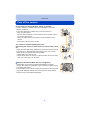
Care of the camera
Do not subject to strong vibration, shock, or pressure.
• The lens, monitor, or external case may be damaged if used in the
following conditions.
It may also malfunction or image may not be recorded if you:
– Drop or hit the camera.
– Sit down with the camera in your trousers pocket or forcefully insert it
into a full or tight bag, etc.
– Attach any items such as accessories to the strap attached to the
camera.
– Press hard on the lens or the monitor.
This camera is not dust/splash/water proof.
Avoid using the camera in places with a lot of dust, water, sand,
etc.
• Liquid, sand and other foreign material may get into the space around the
lens, buttons, etc. Be particularly careful since it may not just cause
malfunctions, but it may also become irreparable.
– Places with a lot of sand or dust.
– Places where water can come into contact with this unit, such as when
using it on a rainy day or at the beach.
∫ About Condensation (When the lens is fogged up)
• Condensation occurs when the ambient temperature or humidity
changes. Be careful of condensation since it causes lens stains, fungus
and camera malfunction.
• If condensation occurs, turn the camera off and leave it for about 2 hours.
The fog will disappear naturally when the temperature of the camera
becomes close to the ambient temperature.
-6-
Before Use
Standard Accessories
Check that all the accessories are supplied before using the camera.
• The accessories and their shape will differ depending on the country or area where the camera was
purchased.
For details on the accessories, refer to “Basic Operating Instructions”.
• Battery Pack is indicated as battery pack or battery in the text.
• SD Memory Card, SDHC Memory Card and SDXC Memory Card are indicated as card in the text.
• The card is optional.
You can record or play back pictures on the built-in memory when you are not using a card.
-7-
Before Use
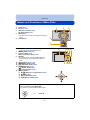
Names and Functions of Main Parts
1
2
3
4
Flash (P55)
Lens (P6, 157)
Self-timer indicator (P59)
AF Assist Lamp (P83)
Microphone
• Be careful not to cover the microphone with your
1
2
3
finger.
5
Lens barrier
4
5
6
7
8
9
Monitor (P52, 140, 157)
• Peel off the protective film before use.
[MODE] button (P25, 87)
Charging lamp (P13)
Wi-Fi® connection lamp (P100)
Speaker
• Be careful not to cover the speaker with your
6
7 8 9 10
finger. Doing so may make sound difficult to
hear.
10
11
12
13
[Wi-Fi] button (P100, 103)
[MENU/SET] button (P38)
[(] (Playback) button (P35)
[Q.MENU] button (P40)
[ ] (Delete) button (P37)
[ ] (Cancel) button (P39)
14 Cursor buttons
A: 3/[È] (Exposure compensation) (P60)
B: 4/[DISP.] (P52)
C: 2/[ë] (Self-timer) (P59)
D: 1/[‰] (Flash setting) (P55)
11 1213 14
In these operating instructions, the cursor buttons are described as shown in the figure
below or described with 3/4/2/1.
e.g.: When you press the 4 (down) button
or
Press 4
-8-
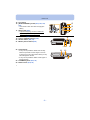
Before Use
15 Lens barrel
16 [AV OUT/DIGITAL] socket (P13, 130, 133,
135)
• This socket is also used when charging the
15
16
17
battery.
17 Strap eyelet (P24)
• To prevent dropping, be sure to attach the
supplied strap and fit it to your wrist.
18
19
20
21
Zoom lever (P53)
Camera [ON/OFF] button (P22)
Shutter button (P26, 30)
Motion picture button (P33)
18
19 20
22 Tripod mount
• It may not be possible to attach and securely
fasten a tripod with a screw length of 5.5 mm
(0.22 inch) or more to the camera. Doing so may
also damage the camera.
• It may not be possible to attach certain types of
tripods properly.
23 Card/Battery door (P12, 18)
24 Release lever (P12, 18)
-9-
22
21
23
24
Before Use
Monitor
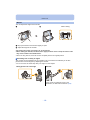
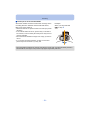
You can adjust the angle of the monitor.
1
When closing
2
1 Flip up the bottom of the monitor lightly to open.
2 Adjust the angle of the monitor.
• Be careful not to catch your finger, etc. in the monitor.
• When rotating the monitor, be careful not to apply too much force or drop the camera. This
may cause scratches and malfunctions.
• When not using this unit, close the monitor completely back to the original position.
∫ Recording from a variety of angles
The monitor can be rotated to suit your needs. This is convenient as it allows you to take
pictures from various angles by adjusting the monitor.
• Do not cover the AF Assist Lamp with your fingers or other objects.
Taking pictures at a low angle
Self shot
• If the monitor is rotated as shown in the
illustration, the Self Shot Mode starts. (P46)
- 10 -
Preparation
Charging the Battery
Use the dedicated AC adaptor (supplied), USB connection cable (supplied) and battery.
• The battery is not charged when the camera is shipped. Charge the battery before use.
• Charge the battery only when it is inserted in the camera.
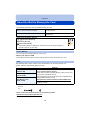
Camera conditions
Charge
Turned off
≤
Turned on
—
∫ About batteries that you can use with this unit
It has been found that counterfeit battery packs which look very similar to the
genuine product are made available for purchase in some markets. Some of these
battery packs are not adequately protected with internal protection to meet the
requirements of appropriate safety standards. There is a possibility that these battery
packs may lead to fire or explosion. Please be advised that we are not liable for any
accident or failure occurring as a result of use of a counterfeit battery pack. To
ensure that safe products are used, we recommend that a genuine Panasonic battery
pack is used.
∫ About the power supply
If you use the AC adaptor (supplied) when the battery is in this unit, you can supply power from
a power outlet via the USB connection cable (supplied).
• The battery may be running out during recording.
The camera will turn off if the battery power is gone.
• Before connecting or disconnecting the AC adaptor (supplied), turn the camera off.
- 11 -
Preparation
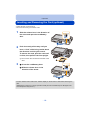
Inserting the Battery
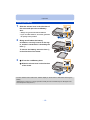
1
Slide the release lever in the direction of
the arrow and open the card/battery
door.
• Always use genuine Panasonic batteries.
• If you use other batteries, we cannot guarantee
the quality of this product.
2
Being careful about the battery
orientation, securely insert it all the way
in, and then check that it is locked by the
lever A.
To remove the battery, move the lever A
in the direction of the arrow.
3
1: Close the card/battery door.
2: Slide the release lever in the direction
of the arrow.
• Turn the camera off and wait for the “LUMIX” display on the monitor to clear before removing the
battery.
(Otherwise, this unit may no longer operate normally and the card itself may be damaged or the
recorded pictures may be lost.)
- 12 -
Preparation
Charging
• Charge the battery in areas with an ambient temperature, between 10 oC and 30 oC (50 oF and
86 oF) (same as the battery temperature), is recommended.
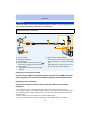
Insert the battery into this unit.
Check that this unit is turned off.
To power outlet
F USB connection cable (supplied)
AC adaptor (supplied)
• Check the directions of the connectors, and
PC (Turned on)
plug them straight in or unplug them straight
Insert the USB connection cable so that its [
]
out.
mark will face the [ ] mark side of the camera.
(Otherwise the connectors may bend out of
E Charging lamp
shape, which may cause malfunction.)
• It may take a few seconds until the lamp
lights up.
A
B
C
D
(Charging from the power outlet)
Connect the AC adaptor (supplied) and this camera with the USB connection
cable (supplied), and insert the AC adaptor (supplied) into the power outlet.
(Charging from a computer)
Connect the computer and this camera with the USB connection cable
(supplied).
• If the computer enters a suspended state while charging the battery, charging may stop.
• Connecting this camera to a notebook computer that is not connected to a power outlet will cause
the notebook computer battery to drain faster. Do not leave the camera connected for extended
periods of time.
• Be sure to always connect the camera to a computer USB terminal.
Do not connect the camera to a monitor, keyboard or printer USB terminal, or a USB hub.
- 13 -
Preparation
∫ About the charging lamp
Lit red:
Off:
Charging.
Charging has completed.
(When charging is complete, disconnect the camera from the power
outlet or computer.)
Blinking red: Charging error.
(Refer to P145 for details.)
∫ Charging time
When using the AC adaptor (supplied)
Charging time
Approx. 170 min
• The indicated charging time is for when the battery has been discharged completely.
The charging time may vary depending on how the battery has been used.
The charging time for the battery in hot/cold environments or a battery that has not been
used for a long time may be longer than normal.
• When power is supplied from a computer, the power supply capacity of the computer
determines the charging time.
∫ Battery indication
The battery indication is displayed on the monitor.
• The indication turns red and blinks if the remaining
battery power is low. Recharge the battery or replace it
with a fully charged battery.
- 14 -
Preparation
• Do not leave any metal items (such as clips) near the contact areas of the power plug.
Otherwise, a fire and/or electric shocks may be caused by short-circuiting or the resulting
heat generated.
• Do not use any other USB connection cables except the supplied one or a genuine Panasonic USB
connection cable (DMW-USBC1: optional).
• Do not use any other AC adaptors except the supplied one.
• Do not use a USB extension cable.
• The AC adaptor (supplied) and USB connection cable (supplied) are for this camera only. Do not use
them with other devices.
• Remove the battery after use.
(The battery will be exhausted if left for a long period of time after being charged.)
• The battery becomes warm after using and during and after charging. The camera also becomes
warm during use. This is not a malfunction.
• The battery can be recharged even when it still has some power left, but it is not recommended that
the battery charge be frequently topped up while the battery is fully charged.
(Since characteristic swelling may occur.)
• If a problem occurs in the power outlet, such as a power outage, charging may not be completed
normally. If this happens, disconnect the USB connection cable (supplied) and connect it again.
• When the charging lamp does not light even if you connect the camera to the AC adaptor (supplied)
or a PC, check if they are connected correctly.
• If you reconnect the USB connection cable (supplied) when the camera is fully charged, the
charging lamp turns on for a while.
- 15 -
Preparation
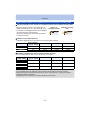
Approximate operating time and number of recordable pictures
∫ Recording still pictures
Number of recordable
pictures
Approx. 200 pictures
Recording time
Approx. 100 min
By CIPA standard in Normal
Picture Mode
Recording conditions by CIPA standard
• CIPA is an abbreviation of [Camera & Imaging Products Association].
• Temperature: 23 oC (73.4 oF)/Humidity: 50%RH when monitor is on.
• Using a Panasonic SD Memory Card.
• Using the supplied battery.
• Starting recording 30 seconds after the camera is turned on.
(When the Optical Image Stabiliser function is set to [ON].)
• Recording once every 30 seconds using full flash every second recording.
• Changing the zoom magnification from Tele to Wide or vice versa in every recording.
• Turning the camera off every 10 recordings and leaving it until the temperature of the battery
decreases.
The number of recordable pictures varies depending on the recording interval time. As
the recording interval time becomes longer, the number of recordable pictures
decreases.
[For example, if you were to take one picture every two minutes, then the number of
pictures would be reduced to approximately one-quarter of the number of pictures given
above (based upon one picture taken every 30 seconds).]
∫ Recording motion pictures
When [Rec Quality] is set to [HD]
Recordable time
Approx. 70 min
Actual recordable time
Approx. 35 min
• These times are for an ambient temperature of 23 oC (73.4 oF) and a humidity of 50%RH.
Please be aware that these times are approximate.
• Actual recordable time is the time available for recording when repeating actions such as turning this
unit on and off, starting/stopping recording, zoom operation, etc.
• Motion pictures can be recorded continuously for up to 15 minutes. Also, continuous recording
exceeding 2 GB is not possible.
Remaining time for continuous recording is displayed on the screen.
- 16 -
Preparation
∫ Playback
Playback time
Approx. 170 min
• The operating times and number of recordable pictures will differ according to the
environment and the operating conditions.
For example, in the following cases, the operating times will shorten and the number of recordable
pictures is reduced:
– In low-temperature environments, such as on ski slopes.
– When using [Monitor Luminance].
– When operations such as flash and zoom are used repeatedly.
• When the operating time of the camera becomes extremely short even after properly charging the
battery, the life of the battery may have expired. Buy a new battery.
- 17 -
Preparation
Inserting and Removing the Card (optional)
• Check that this unit is turned off.
• We recommend using a Panasonic card.
1
2
Slide the release lever in the direction of
the arrow and open the card/battery
door.
Push it securely all the way until you
hear a “click” while being careful about
the direction in which you insert it.
To remove the card, push the card until
it clicks, then pull the card out upright.
A: Do not touch the connection terminals of the
card.
3
1: Close the card/battery door.
2: Slide the release lever in the
direction of the arrow.
• Turn the camera off and wait for the “LUMIX” display on the monitor to clear before removing the
card.
(Otherwise, this unit may no longer operate normally and the card itself may be damaged or the
recorded pictures may be lost.)
- 18 -
Preparation
About the Built-in Memory/the Card
The following operations can be performed using this unit:
When a card has not been inserted
Pictures can be recorded on the built-in memory
and played back.
When a card has been inserted
Pictures can be recorded on the card and
played back.
• When using the built-in memory:
k>ð (access indication¢1)
5
• When using the card:
¢1
(access indication )
¢1 The access indication is displayed in red when pictures are being recorded on
the built-in memory (or the card).
Built-in Memory
• You can copy the recorded pictures to a card. (P98)
• Memory size: Approx. 80 MB
• The access time for the built-in memory may be longer than the access time for a card.
Card
The following cards, which conform to the SD standard, can be used with this unit.
(These cards are indicated as card in the text.)
Remarks
SD Memory Card
(8 MB to 2 GB)
SDHC Memory Card
(4 GB to 32 GB)
SDXC Memory Card
(48 GB, 64 GB)
• Use a card with SD Speed Class¢2 with “Class 6” or higher
when recording motion pictures.
• SDHC Memory Cards and SDXC Memory Cards can be used
only with their compatible devices.
• Check that the PC and other equipment are compatible when
using the SDXC Memory Cards.
http://panasonic.net/avc/sdcard/information/SDXC.html
• Operation of the cards on the left has been confirmed with
Panasonic’s cards.
¢2 SD Speed Class is the speed standard regarding continuous writing. Check via the label on the
card, etc.
e.g.:
• Please confirm the latest information on the following website.
http://panasonic.jp/support/global/cs/dsc/
(This site is English only.)
- 19 -
Preparation
• During access (image writing, reading and deleting, formatting etc.), do not turn this unit off,
remove the battery, card or disconnect the AC adaptor (supplied). Furthermore, do not
subject the camera to vibration, impact or static electricity.
The card or the data on the card may be damaged, and this unit may no longer operate
normally.
If operation fails due to vibration, impact or static electricity, perform the operation again.
• Write-Protect switch A provided (When this switch is set to the [LOCK] position, no
further data writing, deletion or formatting is possible. The ability to write, delete and
format data is restored when the switch is returned to its original position.)
• The data on the built-in memory or the card may be damaged or lost due to
electromagnetic waves, static electricity or breakdown of the camera or the card. We
recommend storing important data on a PC etc.
• Do not format the card on your PC or other equipment. Format it on the camera only to ensure
proper operation. (P45)
• Keep the Memory Card out of reach of children to prevent swallowing.
- 20 -
Preparation
Approximate number of recordable pictures and available recording time
∫ About the display of the number of recordable pictures and available recording time
• Switch the display (number of recordable pictures,
Number of
Available recording
available recording time, etc.) by pressing 4. (P52) recordable pictures
time
• The number of recordable pictures and the available
R1m10s
recording time are an approximation.
5
(These vary depending on the recording conditions
and the type of card.)
∫ Number of recordable pictures
• [i99999] is displayed if there are more than 100,000 pictures remaining.
Picture size
16M (4:3)
3M (4:3)
0.3M (4:3)
Built-in Memory
(Approx. 80 MB)
8
80
350
8 GB
32 GB
64 GB
830
7900
34200
3300
32000
141000
6700
64000
245000
∫ Available recording time (when recording motion pictures)
• “h” is an abbreviation for hour, “m” for minute and “s” for second.
Recording
quality setting
Built-in Memory
(Approx. 80 MB)
8 GB
32 GB
64 GB
HD
j
35m00s
2h20m00s
4h50m00s
VGA
j
1h20m00s
5h50m00s
12h00m00s
QVGA
2m00s
4h10m00s
17h20m00s
35h40m00s
• The recordable time is the total time of all the motion pictures which have been recorded.
• Motion pictures can be recorded continuously for up to 15 minutes. Also, continuous recording
exceeding 2 GB is not possible.
Remaining time for continuous recording is displayed on the screen.
- 21 -
Preparation
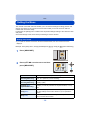
Setting Date/Time (Clock Set)
• The clock is not set when the camera is shipped.
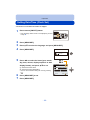
1
Press camera [ON/OFF] button.
• If the language select screen is not displayed, proceed
to step 4.
2
3
4
Press [MENU/SET].
Press 3/4 to select the language, and press [MENU/SET].
Press [MENU/SET].
Please set the clock
Clock Set
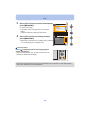
5
Press 2/1 to select the items (year, month,
day, hour, minute, display sequence or time
display format), and press 3/4 to set.
A: Time at the home area
B: Time at the travel destination
• You can cancel without setting the clock by pressing
[
6
7
Clock Set
10 : 00 1 . DEC . 2015
D.M.Y
24hrs
].
Cancel
Press [MENU/SET] to set.
Press [MENU/SET].
- 22 -
Select
Set
Preparation
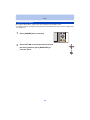
Changing the Clock Setting
Select [Clock Set] on the [Setup] menu and then press [MENU/SET]. (P38)
• The clock can be reset as shown in steps 5 and 6.
• The clock setting is maintained for about 7 days using the built-in clock battery even without
the battery.
(Leave the charged battery in the unit for 2 hours to charge the built-in battery.)
• If the clock is not set, the correct date cannot be printed when you order a photo studio to print the
picture, or when you stamp the date on the pictures with [Date Stamp].
- 23 -
Preparation
Tips for taking good pictures
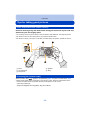
Fit the strap and hold the camera carefully
Hold the camera gently with both hands, keep your arms still at your side and
stand with your feet slightly apart.
• Do not swing around or pull forcefully on the unit with the strap attached. The strap may break.
• Be careful not to move the camera when you press the shutter button.
• Be careful not to put your fingers on the flash, AF assist lamp, microphone, speaker or lens etc.
A Flash
B AF assist lamp
C Microphone
D Speaker
E Strap
Preventing jitter (camera shake)
When the Jitter alert [
] appears, use [Stabilizer] (P84), a tripod or the Self-timer (P59).
• Shutter speed will be slower particularly in the following cases. Keep the camera still from the
moment the shutter button is pressed until the picture appears on the screen.
– [Slow Sync./Red-Eye]
– [Night Portrait]/[Night Scenery]/[Starry Sky] (Scene Mode)
- 24 -
Basic
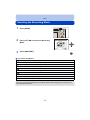
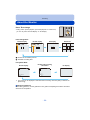
Selecting the Recording Mode
1
2
Press [MODE].
Press 3/4/2/1 to select the Recording
Mode.
Rec Mode
Normal Picture
Cancel
3
Select
Set
Press [MENU/SET].
∫ List of Recording Modes
¦
Intelligent Auto Mode (P26)
The subjects are recorded using settings automatically selected by the camera.
!
Normal Picture Mode (P30)
The subjects are recorded using your own settings.
Creative Control Mode (P61)
Record while checking the image effect.
Panorama Shot Mode (P67)
This mode allows you to take panorama pictures.
Û
Scene Mode (P70)
This mode allows you to take pictures that match the scene being recorded.
• When the mode has been switched from Playback Mode to Recording Mode, the previously set
Recording Mode will be set.
- 25 -
Basic
Taking pictures using the automatic function
(Intelligent Auto Mode)
Recording Mode:
The camera will set the most appropriate settings to match the subject and the recording
conditions so we recommend this mode for beginners or those who want to leave the settings
to the camera and take pictures easily.
• The following functions are activated automatically.
– Scene Detection
– Backlight Compensation
– Intelligent ISO sensitivity control
– Auto White Balance
– Face Detection
– [i.Exposure]
– [i.Zoom]
– [AF Assist Lamp]
– [Red-Eye Removal]
– [Stabilizer]
– [Continuous AF]
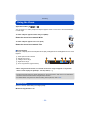
1
2
Press [MODE].
Press 3/4/2/1 to select [Intelligent Auto],
and then press [MENU/SET].
- 26 -
Basic
3
Press the shutter button halfway to focus.
A
• The focus indication A (green) lights when the subject is
focused.
• The AF area B is displayed around the subject’s face by
the Face Detection function. In other cases, it is
displayed at the point on the subject which is in focus.
• The minimal distance (how close you can be to the
subject) will change depending on the zoom factor.
Please check with the recordable range display on the
screen. (P31)
4
Press the shutter button fully (push it in
further), and take the picture.
- 27 -
B
Basic
Scene Detection
When the camera identifies the optimum scene, the icon of the scene concerned is displayed in
blue for 2 seconds, after which its colour changes to the usual red.
When taking pictures
[i-Portrait]
[i-Scenery]
[i-Macro]
[i-Night Portrait]¢
[i-Night Scenery]
[i-Sunset]
¢ Only displayed when the flash is set to [
].
• [¦] is set if none of the scenes are applicable, and the standard settings are set.
• When [ ] or [ ] is selected, the camera automatically detects a person’s face, and it will adjust
the focus and exposure. (Face Detection)
• Due to conditions such as the ones below, a different scene may be identified for the same subject.
– Subject conditions: When the face is bright or dark, the size of the subject, the colour of the
subject, the distance to the subject, the contrast of the subject, when the subject is moving
– Recording conditions: Sunset, sunrise, under low brightness conditions, when the camera is
shaken, when zoom is used
• [¦] is used for recording when recording motion pictures. Scene Detection does not work.
The Backlight Compensation
When there is a backlight, the subject appears darker and the camera will automatically
attempt to correct it by increasing the brightness of the picture.
In Intelligent Auto Mode, backlight compensation works automatically.
(Depending on the backlighting conditions, backlighting may not be detected correctly.)
- 28 -
Basic
Changing the settings
Following menus can be set.
Menu
Item
¢
¢
[Rec]
[Picture Size] /[Burst Shooting] /[Self Shot]
[Motion Picture]
[Rec Quality]
[Setup]
[Online Manual]/[Clock Set]/[World Time]/[Airplane Mode]/[Beep]/
[Language]
• Menu items other than those listed above are not displayed, but you
can set them in other Recording Modes.
[Wi-Fi]
[New Connection]/[History Connection]/[Favorite Connection]/
[Wi-Fi Setup]
• For the setting method of the menu, refer to P38.
¢ Available settings may be different from other Recording Modes.
About the flash (P55)
• When [
] is selected, [
], [
], [
] or [
] is set depending on the type of subject and
brightness.
• When [
], [
] is set, [Red-Eye Removal] is enabled.
• Shutter speed will be slower during [
] or [
].
- 29 -
Basic
Taking pictures with your favourite settings
(Normal Picture Mode)
Recording Mode:
The camera automatically sets the shutter speed and the aperture value according to the
brightness of the subject.
You can take pictures with greater freedom by changing various settings in the [Rec] menu.
1
2
Press [MODE].
Press 3/4/2/1 to select [Normal Picture],
and then press [MENU/SET].
3
Aim the AF area at the point you want to focus on.
4
Press the shutter button halfway to focus.
A ISO sensitivity
B Aperture value
C Shutter speed
• Aperture value and shutter speed is displayed in red
when correct exposure is not achieved.
(Exclude when using a flash)
5
Press the shutter button fully (push it in
further), and take the picture.
- 30 -
F3.1
1/60
A B
C
100
Basic
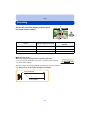
Focusing
A
Aim the AF area at the subject, and then press
the shutter button halfway.
100
1/60
F3.1
B
Focus
When the subject is focused
When the subject is not
focused
Focus indication A
On
Blinks
AF area B
White>Green
White>Red
Sound
Beeps 2 times
Beeps 4 times
• The AF area may be displayed larger for certain zoom magnifications and in dark places.
∫ About focus range
The focus range is displayed when operating the zoom.
• The focus range is displayed in red when it is not focused after pressing
the shutter button halfway.
The focus range may change gradually depending on the zoom position.
e.g.: Range of focus during the Intelligent Auto Mode
W
T
3 cm (0.098 feet)
1.5 m (4.9 feet)
- 31 -
0.03m W
∞
T
1.0X
Basic
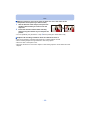
∫ When the subject is not in focus (such as when it is not in the centre of the
composition of the picture you want to take)
1 Aim the AF area at the subject, and press the
shutter button half way to fix the focus and
exposure.
2 Press and hold the shutter button half way
while moving the camera as you compose the
picture.
• You can repeatedly retry the actions in step 1 before pressing the shutter button fully.
∫ Subject and recording conditions which are difficult to focus in
• Fast-moving subjects, extremely bright subjects or subjects without contrast
• When recording subjects through windows or near shiny objects
• When it is dark or when jitter occurs
• When the camera is too close to the subject or when taking a picture of both distant and near
subjects
- 32 -
Basic
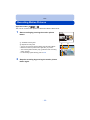
Recording Motion Pictures
Applicable modes:
This unit can record motion pictures in QuickTime Motion JPEG format.
1
Start recording by pressing the motion picture
button.
A Available recording time
B Elapsed recording time
• You can record motion pictures fitting each Recording Mode.
• Release the motion picture button right after you press it.
• The recording state indicator (red) C will flash while recording
motion pictures.
• For the setting of [Rec Quality], refer to P86.
A
R 1m07s
3s
B
2
Stop the recording by pressing the motion picture
button again.
- 33 -
C
Basic
• Depending on the type of the card, the card access indication may appear for a while after recording
motion pictures. This is not a malfunction.
• The screen may be blacked out momentarily, or the unit may record noise due to static electricity or
electromagnetic waves etc. depending on the environment of the motion picture recording.
• Even if the aspect ratio setting is the same in still pictures and motion pictures, the angle of view may
change at the start of the motion picture recording.
When [Video Rec Area] (P43) is set to [ON], angle of view during motion picture recording is
displayed.
• About zooming while recording motion pictures
– If you use Extra Optical Zoom or Intelligent Zoom, the angle of view may change drastically when
you start or finish recording a motion picture.
– If you operate the zoom etc. while recording motion pictures, the sound of the operation may be
recorded.
– The zoom speed will be slower than usual when recording motion pictures.
– Operating the zoom while recording motion pictures can take time for the image to come into
focus.
• Since the camera adjusts the focus and lens aperture automatically while recording a motion picture,
it may record the operation sound.
• Motion pictures cannot be recorded in the following cases.
– [Soft Focus]/[Star Filter] (Creative Control Mode)
• It will be recorded in following categories for certain Scene Modes. A motion picture recording
matching each scene will be performed for the ones not listed below.
Selected Scene Mode
Scene Mode while recording motion picture
[Baby1]/[Baby2]
Portrait Mode
[Night Portrait]/[Night Scenery]/[Starry Sky]
Low Light Mode
[Sports]/[HDR]/[Pet]
Normal motion picture
- 34 -
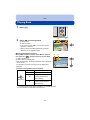
Basic
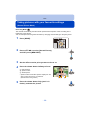
Playing Back
1
Press [(].
2
Press 2/1 to select pictures.
A
A File number
B Picture number
• If you press and hold 2/1, you can play back the
pictures in succession.
• Speed of picture Forwarding/Rewinding changes
depending on the playback status.
∫ Playing Back Motion Pictures
Press 2/1 to select a picture with a Motion Picture
icon (such as [
]), and then press 3 to play back.
C Motion picture icon
D Motion picture recording time
• After playback starts, the elapsed playback time is displayed
on the screen.
For example, 8 minutes and 30 seconds is displayed as
[08m30s].
100-0001
D
C
03s
• Operations during Motion Picture Playback
3
Play/Pause
[MENU/SET] Stop
2
Fast rewind¢/
Frame-by-frame rewind
(while pausing)
1
Fast forward¢/
Frame-by-frame forward
(while pausing)
ーヮユワヶバヴユヵヾ
¢ The fast forward/rewind speed increases if you press 1/2 again.
– You can adjust the volume with the zoom lever.
- 35 -
B
1/5
Basic
• This camera complies with the DCF standard “Design rule for Camera File system” established by
JEITA “Japan Electronics and Information Technology Industries Association” and with Exif
“Exchangeable Image File Format”. Files that do not comply with the DCF standard cannot be
played back.
• Images recorded or edited with the camera may not be played back correctly on other devices and
applied effects may not appear on the devices.
Also, images recorded on other devices may not be played back on the camera and functions of the
camera may not be available for the images.
• The lens barrel retracts about 15 seconds after switching from Recording Mode to Playback Mode.
While the lens barrel is retracting, you may not be able to operate the camera.
• The file format that can be played back with this camera is QuickTime Motion JPEG.
• Be careful not to block the speaker of the camera during playback.
Displaying Multiple Screens (Multi Playback)
A
Rotate the zoom lever towards [L] (W).
1/26
1 screen>12 screens>30 screens>Calendar screen
display
A Number of the selected picture and the total number of
recorded pictures
• Rotate the zoom lever towards [Z] (T) to return to the
previous screen.
• Pictures displayed using [ ] cannot be played back.
∫ To return to normal playback
Press 3/4/2/1 to select a picture and then press [MENU/SET].
Using the Playback Zoom
Rotate the zoom lever towards [Z] (T).
2X
1k>2k>4k>8k>16k
• When you rotate the zoom lever towards [L] (W) after
enlarging the picture, the magnification becomes lower.
• When you change the magnification, the zoom position
indication B appears for about 2 seconds, and the position of
the enlarged section can be moved by pressing 3/4/2/1.
• The more a picture is enlarged, the more its quality deteriorates.
- 36 -
B
Basic
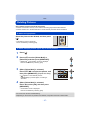
Deleting Pictures
Once deleted, pictures cannot be recovered.
• Pictures on the built-in memory or the card that are being played back will be deleted.
• Pictures that are not in the DCF standard or those that are protected cannot be deleted.
To delete a single picture
Select the picture to be deleted, and then press
[ ].
• Confirmation screen is displayed.
Q.MENU
Picture is deleted by selecting [Yes].
To delete multiple pictures (up to 50) or all the pictures
1
2
Press [
].
Press 3/4 to select [Delete Multi] or
[Delete All] and then press [MENU/SET].
• [Delete All] > Confirmation screen is displayed.
Pictures are deleted by selecting [Yes].
3
(When [Delete Multi] is selected)
Press 3/4/2/1 to select the picture, and
then press [MENU/SET]. (Repeat this step.)
•[
] appears on the selected pictures.
If [MENU/SET] is pressed again, the setting is
cancelled.
4
2.
1
2
3
4
5
6
7
8
9
(When [Delete Multi] is selected)
Press 2 to select [OK], and then press
[MENU/SET].
• Confirmation screen is displayed.
Pictures are deleted by selecting [Yes].
• Do not turn the camera off while deleting.
• Depending on the number of pictures to be deleted, it may take some time to delete them.
- 37 -
Basic
Setting the Menu
The camera comes with menus that allow you to choose the settings for taking pictures and
playing them back just as you like and menus that enable you to have more fun with the
camera and use it more easily.
In particular, the [Setup] menu contains some important settings relating to the camera’s clock
and power.
Check the settings of this menu before proceeding to use the camera.
Setting menu items
• If you rotate the monitor and set the camera to Self Shot Mode, the menu screen will not be
displayed.
Example: In the [Rec] menu, change [AF Mode] from [Ø] ([1-Area]) to [š] ([Face Detection])
1
2
Press [MENU/SET].
Press 3/4/2/1 to select menu and then
press [MENU/SET].
Menu
Rec
Setup
Cancel
Menu
Motion
Picture
Wi-Fi
Select
Set
Description of settings
[Rec] (P75)
(Recording Mode only)
The menu lets you set the Colouring, Sensitivity or Number of
pixels, etc. of pictures you are recording.
[Motion Picture] (P86)
(Recording Mode only)
This menu lets you set the setting for motion pictures such as
recording quality.
[Playback] (P93)
(Playback Mode only)
This menu lets you make changes to the pictures taken. For
example, you can set protection for the pictures taken, or crop
them.
[Setup] (P41)
This menu lets you perform the clock settings, beep tone settings
and other settings which make it easier for you to operate the
camera.
[Wi-Fi] (P99)
This menu lets you make the settings necessary to connect to
Wi-Fi or use the Wi-Fi function.
- 38 -
Basic
3
Press 3/4 to select the menu item and then
press [MENU/SET].
A Menu screen page
• It will switch to the next page when you reach the
bottom.
(It will also switch by rotating the zoom lever)
4
Press 3/4 to select the setting and then
press [MENU/SET].
A
1/4
Rec
Picture Size
AUTO
Sensitivity
AWB
White Balance
AF Mode
Select auto focus mode
Cancel
Select
Set
Select
Set
AF Mode
Face Detection
Focus detected
person’s face
• Depending on the menu item, its setting may not appear
or it may be displayed in a different way.
Cancel
∫ Close the menu
Press [ ] repeatedly until the recording/playback
screen is displayed.
• When recording images, you can also close the menu by
pressing the shutter button halfway.
Q.MENU
• There are functions that cannot be set or used depending on the modes or menu settings being
used on the camera due to the specifications.
- 39 -
Basic
Using the Quick Menu
By using the Quick Menu, some of the menu settings can be easily found.
• The features that can be adjusted using Quick Menu are determined by the mode or a display style
the camera is in.
1
Press [Q.MENU] when recording.
Q.MENU
2
Press 3/4/2/1 to select the menu item and
the setting and then press [MENU/SET] to
close the menu.
- 40 -
Basic
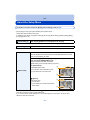
About the Setup Menu
For details on how to select the [Setup] menu settings, refer to P38.
• [Clock Set], [Economy] and [Auto Review] are important items.
Check their settings before using them.
• In Intelligent Auto Mode, only [Online Manual], [Clock Set], [World Time], [Airplane Mode], [Beep],
[Language] can be set.
[Online Manual]
U [Clock Set]
[URL display]/[USB connection]/[QR Code display]
Setting Date/Time.
• Refer to P22 for details.
Set the time in your home area and travel destination.
You can display the local times at the travel destinations and record
them on the pictures you take.
After selecting [Destination] or [Home], press 2/1 to select an
area, and press [MENU/SET] to set.
• Set [Home] first thing after purchasing.
[Destination] can be set after setting up [Home].
“ [Destination]:
Travel destination area
[World Time]
A
10:00
A Current time of the destination area
B Time difference from home area
B
+ 9:00
Cancel
– [Home]:
Your home area
C
Select
Set
Select
Set
10:00
London
Casablanca
C Current time
D Time difference from GMT (Greenwich
Mean Time)
D
GMT+ 0:00
Cancel
• Press 3 if you are using Daylight Savings [
19:00
Tokyo
Seoul
]. (The time will move forward by 1 hour.)
Press 3 once more to return to the normal time.
• If you cannot find the travel destination in the areas displayed on the screen, set by the time
difference from the home area.
- 41 -
Basic
Restricts Wi-Fi settings.
[ON]:
Wi-Fi functions cannot be used.
[Airplane Mode]
[OFF]
• When you bring the camera on an airplane or to a hospital, etc., set
[Airplane Mode] to [ON], and turn off the camera because electromagnetic
waves, etc. emitted by the camera may interfere with gauges.
r [Beep]
This allows you to set the beep and shutter sound.
[t] ([Low])/[u] ([High])/[s] ([Off])
Brightness, colour, or red or blue tint of the monitor is adjusted.
[Brightness]:
Adjust the brightness.
[Contrast · Saturation]:
Adjust the contrast or clarity of colours.
[Monitor Display]
[Red Tint]:
Adjust the red tint.
[Blue Tint]:
Adjust the blue tint.
1
2
Select the settings by pressing 3/4, and adjust with 2/1.
Press [MENU/SET] to set.
• Some subjects may appear differently from actuality on the monitor. However, this does not affect
the recorded pictures.
• When [Monitor Luminance] is set to [High Angle], [Brightness] and [Contrast · Saturation] cannot be
adjusted.
- 42 -
Basic
These menu settings make it easier to see the monitor when you are in
bright places or when you are holding the camera high above your
head.
[Monitor Luminance]
[„] ([Auto Power Monitor])¢:
The brightness is adjusted automatically depending on how bright it is
around the camera.
[…] ([Power Monitor]):
The monitor becomes brighter and easier to see even when taking
pictures outdoors.
[Å] ([High Angle])¢:
The monitor is easier to see when taking pictures with the camera held
high above your head.
[OFF]
¢ Can be set only when Recording Mode is set.
• [High Angle] is also cancelled if you turn the camera off or [Auto Power Off] is activated.
• The brightness of the pictures displayed on the monitor is increased so some subjects may appear
different from real life on the monitor. However, this does not affect the recorded pictures.
• When [Monitor Luminance] is set, the usage time is reduced.
[Video Rec Area]
Angle of view for motion picture recording can be checked.
[ON]/[OFF]
• Motion picture recording area display is only an approximation.
• Recording area display may disappear when zooming to Tele depending on the picture size setting.
• The setting is fixed to [OFF] in the following case.
– Intelligent Auto Mode
- 43 -
Basic
The camera is automatically turned off if the camera has not been
used for the time selected on the setting.
Also, the battery life is conserved by dimming the monitor.
q [Economy]
p [Auto Power Off]:
The camera is automatically turned off if the camera has not been
used for the time selected on the setting.
[2MIN.]/[5MIN.]/[10MIN.]/[OFF]
ECO
[Monitor Power Save]:
The brightness of the monitor is lowered.
[ON]/[OFF]
• [Auto Power Off] is fixed to [5MIN.] in the following case.
– Intelligent Auto Mode
• [Auto Power Off] does not work in the following cases.
– When connecting to a PC or a printer
– When recording or playing back motion pictures
– During a Slide Show
– During panorama playback (while pausing)
– When using a Wi-Fi connection
Set the length of time that the picture is displayed after taking the still
picture.
[1SEC]
o [Auto Review]
[2SEC]
[HOLD]:
The pictures are displayed until one of the buttons is pressed.
[OFF]
• [Auto Review] is activated regardless of its setting in the following case.
– When using [Burst Shooting].
• The setting is fixed to [2SEC] in the following case.
– Intelligent Auto Mode
• [Auto Review] does not work when recording motion pictures.
When you turn off the camera or switch the Recording Mode, the
[Exposure Comp. exposure value is set to [0 EV].
Reset]
[ON]/[OFF]
- 44 -
Basic
w [Reset]
The recording or setup settings are reset to the default.
• When the setup settings are reset, the following settings are also reset.
– The birthday settings for [Baby1]/[Baby2] and [Pet] in Scene Mode.
• The folder number and the clock setting are not changed.
[Reset Wi-Fi
Settings]
Reset all settings in the [Wi-Fi] menu to factory default settings.
• Always reset the camera when disposing or selling it to prevent personal information saved within
the camera from being misused.
• Always reset the camera after making a copy of personal information when sending the camera in to
be repaired.
Set to match the colour television system in each country or the type of
TV.
| [TV Connection]
[|] ([Video Out]):
[NTSC]:
Video output is set to NTSC system.
[PAL]:
Video output is set to PAL system.
[
] ([TV Aspect]):
[W]:
When connecting to a 16:9 screen TV.
[X]:
When connecting to a 4:3 screen TV.
• This will work when the AV cable (optional) is connected.
[Version Disp.]
It is possible to check which version of firmware is on the camera.
• Press [MENU/SET] on the version display screen to display information about the software on the
unit.
[Format]
The built-in memory or card is formatted.
Formatting irretrievably deletes all the data so check the data
carefully before formatting.
• Do not turn the camera off during formatting.
• If a card has been inserted, only the card is formatted. To format the built-in memory, remove the
card.
• If the card has been formatted on a PC or other equipment, format it on the camera again.
• It may take longer to format the built-in memory than the card.
• If the card cannot be formatted, please try another card before contacting Panasonic.
~ [Language]
Set the language displayed on the screen.
• If you set a different language by mistake, select [~] from the menu icons to set the desired
language.
- 45 -
Recording
Taking Pictures of Yourself ([Self Shot])
Applicable modes:
If you rotate the monitor, Self Shot Mode is activated.
You can easily take pictures of yourself while looking at the screen.
• When [Self Shot] (P85) in [Rec] menu is set to [OFF], even if you rotate the monitor, the camera will
not be set to Self Shot Mode. (It is set to [ON] at the time of purchase.)
In Self Shot Mode...
• Deciding on a composition is easier because recording is
performed while looking at the screen.
• Using the soft skin effect allows the faces of subjects to
appear brighter and the skin colour to appear smoother.
• Pictures with different poses and facial expressions can be
taken at once by increasing the number of pictures to be
recorded.
• Settings for the respective Recording Modes are maintained, except for the recording settings for
Self Shot Mode (P48).
• In Playback Mode, the camera can be set to display only the pictures taken in Self Shot Mode.
([Category Selection]) (P90)
1
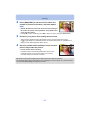
Rotate the monitor as shown in the
figure.
• When you rotate the monitor, a mirror image will
be displayed on the monitor.
- 46 -
Recording
2
Press [MENU/SET] to set the soft skin effect, the
number of pictures to be taken, and other details.
(P48)
M
1pic.
• Operate the buttons on the back of the unit while looking at
the screen. Be careful not to operate the wrong buttons and
not to drop the camera.
• Press 3/4 to select a setting, press 2/1 to select an option, and press [MENU/SET].
3
Decide on your poses while looking at the monitor.
• The AF area is displayed around the subject’s face by the Face Detection function.
(If [š] in [AF Mode] is not available with the current Recording Mode, an available focus
setting for each Recording Mode will be used.)
4
Press the shutter button halfway to focus and then
press it fully to take the picture.
2
• Look at the lens when recording.
• Countdown starts, and recording takes place when it ends.
If multiple pictures are set to be recorded, the recording
continues until the set number is reached.
• Be careful not to look at the light from the flash and the AF Assist Lamp directly.
• The recorded image during Auto Review is also displayed as a mirror image. This means the date
recorded with [Date Stamp] also appears reversed.
- 47 -
Recording
Recording settings in Self Shot Mode
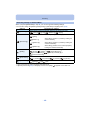
When you press [MENU/SET] in step 2, you can change the following settings.
• You can also change the [Slimming Mode] setting in [Self Shot] in the [Rec] menu. (P49)
Settings
([Soft Skin])
Description of settings
Makes people’s faces look brighter and their skin tones look softer.
[
] ([OFF])/[
] ([Low])/[
] ([Medium])/[
] ([High])
Blurs the background. The in-focus portion guide is displayed on the screen.
[
] ([OFF])
[ ] ([Pattern 1]):
When taking pictures of yourself by holding the
camera vertically.
[
] ([Pattern 2]):
When taking pictures of yourself by holding the
camera horizontally.
[
] ([Pattern 3]):
When taking pictures of two or three people by
holding the camera horizontally.
([Defocusing])
([Flash])
Sets the flash output method.
] ([Auto/Red-Eye])¢2/
[
] ([Auto])/[
] ([iAuto])¢1/[
[ ] ([Forced Flash On])/[
] ([Slow Sync./Red-Eye])¢2/
[ ] ([Forced Flash Off])
([Shot Count])
Sets the number of pictures to be taken in succession.
[
] (1 picture)/[
] (2 pictures)/[
] (3 pictures)/[
([Countdown])
Takes a picture after a countdown.
[
] ([OFF])/[
] (3)/[
] (10)
¢1 This can be set only when Intelligent Auto Mode is set.
¢2 [Red-Eye Removal] (P84) on the [Rec] menu is set to [ON], [
- 48 -
] (4 pictures)
] appears on the flash icon.
Recording
• When the [Soft Skin] is set
– The smoothing effect is applied to the part that has a similar tone to the complexion of a subject, as
well.
– This mode may not be effective under insufficient lighting.
• When a setting other than [OFF] is selected for [Defocusing], display of the recording screen will be
delayed more than usual.
• [Soft Skin] is not available in the following cases:
– Creative Control Mode
– Scene Mode
• [Defocusing] is not available in the following cases:
– Creative Control Mode
– Panorama Shot Mode
– [Starry Sky] (Scene Mode)
• [Flash] is not available in the following cases:
– When a setting other than [OFF] is selected for [Defocusing]
– Creative Control Mode
– Panorama Shot Mode
– When recording motion pictures
• [Shot Count] is not available in the following cases:
– Panorama Shot Mode
– When recording motion pictures
• [CountDown] is not available in the following cases:
– Panorama Shot Mode
– When recording motion pictures
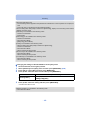
∫ Changing the settings of Self Shot Mode from the [Rec] menu
1
2
3
4
Close the monitor to its original position.
Select [Self Shot] on the [Rec] menu and then press [MENU/SET]. (P38)
Press 3/4 to select [SET] and then press [MENU/SET].
Press 3/4 to select the menu item and then press [MENU/SET].
Item
[Slimming Mode]
5
Description of settings
Makes people look slimmer.
[HIGH]/[LOW]/[OFF]
• For information on other settings, refer to P48.
Press 3/4 to select the setting and then press [MENU/SET].
• Exit the menu after it is set.
• [Slimming Mode] is not available in the following case:
– Panorama Shot Mode
- 49 -
Recording
Taking panorama pictures in Self Shot Mode
You can also take panorama pictures in Self Shot Mode.
By recording with Panorama Shot Mode, you can enjoy a variety of self-portraits, such as those
with your friends or those incorporating a wide background.
• For information on taking pictures in Panorama Shot Mode, please also refer to P67 “Taking
panorama pictures (Panorama Shot Mode)”.
1
2
3
Press [MODE].
Press 3/4/2/1 to select [Panorama Shot], and then press [MENU/SET].
Press 3/4 to select the recording direction and then press [MENU/SET].
• If a screen that lets you select the recording direction is not displayed, press 1.
• The recording direction is reversed horizontally when the monitor is rotated. Select the direction
4
5
Press 3/4 to select image effects and then press [MENU/SET].
Rotate the monitor to enable Self Shot Mode.
• Instructions explaining how to take a picture will be displayed.
Read the instructions explaining how to take a picture, and press [MENU/SET].
• The instructions continue to the next page. Press [MENU/SET] repeatedly until the
6
7
opposite to the desired direction of rotation.
recording screen is displayed.
Point the camera at the front, and strike a pose while look at the monitor.
• The AF area is displayed around the subject’s face by the Face Detection function.
• If you have selected [No Effect] in step 4, you can set the [Soft Skin] by pressing [MENU/SET].
(P48)
• To change settings other than [Soft Skin], such as the recording direction, close the monitor
8
9
10
back to the original position before changing them.
Press the shutter button halfway (or fully) to lock the focus and exposure.
• After pressing the shutter button halfway (or fully), release your finger from it completely.
• You can re-adjust the focus and exposure as many times as you want by pressing [ ].
Point the camera to the position where you start recording, press the shutter button
fully, and pan the camera in the direction indicated on the screen in step 6 to take
the picture.
Press the shutter button once again to end the picture recording.
• Recording can also be ended by keeping the camera still while recording.
• Recording can also be ended by moving the camera to the end of the guide.
- 50 -
Recording
∫ Technique for Panorama Shot Mode
Swivel the camera around its centre when moving it in the
recording direction. Hold the camera with both hands,
taking care not to shake it.
• Swivel the camera at a speed of about 2 seconds per quarter
Example:
When you have selected
[
] in step 3
revolution.
• If the camera shakes too much, pictures may not be able to
be recorded, or the recorded panorama picture may become
narrower (smaller).
• Move the camera towards the edge of the range you wish to
record.
• If you change the facial expression or blink, the recorded
picture may look unnatural. Try to stay still.
• Since the distance between the camera and subject is close when you take panorama pictures in
Self Shot Mode, the edges of the pictures may appear significantly distorted.
- 51 -
Recording
About the Monitor
Press 4 to change.
• During motion picture playback, panorama playback or a slide show,
you can only select “Normal Display” or “No Display”.
In Recording Mode
Normal display
Normal display
5
R1m10s
1
2
No display
Guidelines¢
1 Number of recordable pictures
2 Available recording time
In Playback Mode
Normal display
100-0001
1/5
Display with recording
information
100-0001
No display
1/5
AWB
10:00 1.DEC.2015
Retouch
100 F3.1
1/60
Retouch
¢ This screen is not displayed in Self Shot Mode if a setting other than [OFF] is selected for
[Defocusing].
∫ About the guidelines
When taking pictures, use the guide lines as a guide for adjusting the balance and other
elements of composition.
- 52 -
Recording
Using the Zoom
Applicable modes:
You can zoom in to make people and objects appear closer or zoom out to record landscapes
in wide angle.
To make subjects appear further away use (Wide)
Rotate the zoom lever towards Wide.
To make subjects appear closer use (Tele)
Rotate the zoom lever towards Tele.
∫ Screen display
Example of display when Extra Optical Zoom (EZ), Intelligent Zoom and Digital Zoom are used
together.
A
B
C
D
E
Extra Optical Zoom indication
Optical Zoom range
Intelligent Zoom range
Digital Zoom range
Zoom magnification (approximation)
• When using the Zoom function, an estimate of the focus range will appear in conjunction
with the zoom display bar. [Example: 0.03 m (0.098 ft.) –¶]
• The lens barrel will extend or retract depending on the zoom position. Take care not to obstruct the
movement of the lens barrel when using the Zoom function.
• For details about using the zoom while recording motion pictures, refer to P34.
Optical Zoom
Zooms in without deteriorating the image quality.
Maximum magnification: 12k
- 53 -
Recording
Extra Optical Zoom (EZ)
This function works when any of the picture sizes (P75) indicated with
is selected.
You can zoom in further than you can with the Optical Zoom without deteriorating the image
quality.
Maximum magnification: 27k
(This includes the optical zoom magnification. The magnification level differs depending
on [Picture Size] setting.)
• “EZ” is an abbreviation of “Extra Optical Zoom”.
• This function is not available in the following cases:
– [Impressive Art]/[Toy Effect] (Creative Control Mode)
– [HDR]/[High Sens.] (Scene Mode)
– When [Burst Shooting] is set to [
]
– When recording motion pictures
Intelligent Zoom
Enabled when [i.Zoom] (P81) in the [Rec] menu is set to [ON].
You can zoom in up to twice the original zoom magnification while minimising the deterioration
of the image quality.
• This will work automatically in Intelligent Auto Mode.
• This function is not available in the following cases:
– [Impressive Art]/[Toy Effect] (Creative Control Mode)
– [HDR]/[High Sens.] (Scene Mode)
– When [Burst Shooting] is set to [
]
– When recording motion pictures
Digital Zoom
This function works when [Digital Zoom] (P81) in the [Rec] menu is set to [ON].
Although the image quality deteriorates every time you zoom in further, you can zoom in up to
four times the original zoom magnification.
• When using the [i.Zoom], the maximum magnification of the Digital Zoom is limited to 2k.
• We recommend using a tripod and the Self-timer (P59) for taking pictures.
• This function is not available in the following cases:
– Intelligent Auto Mode
– [Impressive Art]/[Toy Effect]/[Miniature Effect] (Creative Control Mode)
– [HDR]/[High Sens.] (Scene Mode)
– When [Burst Shooting] is set to [
]
- 54 -
Recording
Taking Pictures Using the Built-in Flash
Applicable modes:
Flash
Do not cover it with your fingers or other objects.
Switching to the appropriate flash setting
Set the flash to match the recording.
1
Press 1 [‰].
- 55 -
Recording
2
Press 3/4 to select the setting and then press [MENU/SET].
Settings
([Auto])
([iAuto])¢1
[‡]
[
]
[
] ([Auto/Red-Eye])¢2
[‰]
[
[Œ]
([Forced Flash On])
]
([Slow Sync./
Red-Eye])¢2
([Forced Flash Off])
Description of settings
The flash is automatically activated when the recording
conditions make it necessary.
The flash is automatically activated when the recording
conditions make it necessary.
It is activated once before the actual recording to reduce the
red-eye phenomenon (eyes of the subject appearing red in
the picture) and then activated again for the actual
recording.
• Use this when you take pictures of people in low
lighting conditions.
The flash is activated every time regardless of the recording
conditions.
• Use this when your subject is back-lit or under
fluorescent light.
If you take a picture with a dark background landscape, this
feature will slow the shutter speed when the flash is
activated so that the dark background will become bright.
Simultaneously, it reduces the red-eye phenomenon.
• Use this when you take pictures of people in front of a
dark background.
The flash is not activated in any recording conditions.
• Use this when you take pictures in places where the
use of flash is not permitted.
¢1 This can be set only when Intelligent Auto Mode is set.
The icon changes depending on the type of subject and brightness.
¢2 The flash is activated twice. The subject should not move until the second flash is
activated.
[Red-Eye Removal] (P84) on the [Rec] menu is set to [ON], [ ] appears on the flash
icon.
- 56 -
Recording
∫ Available Flash Settings in Recording Mode
The available flash settings depend on the Recording Mode.
(±: Available, —: Not available, ¥: Scene Mode initial setting)
‡
*+:;
,/
ï5
.
1í9
¢ [
‰
Œ
±¢
—
—
—
±
±
±
±
—
±
±
¥
±
—
±
—
—
—
—
¥
¥
—
±
—
±
—
—
—
¥
±
±
—
±
—
¥
] is displayed.
• When [
] is selected, [
], [
], [
] or [
] is set depending on the type of subject and
brightness.
• When [
], [
] is set, [Red-Eye Removal] is enabled.
• Shutter speed will be slower during [
] or [
].
• The flash setting may change if the Recording Mode is changed. Set the flash setting again if
necessary.
• The flash setting is memorised even if the camera is turned off. However, the Scene Mode flash
setting is reset to the initial setting when the Scene Mode is changed.
• Flash will not be activated when recording motion picture.
- 57 -
Recording
∫ The available flash range (approximation)
[AUTO] in
[Sensitivity]
Wide
Tele
0.6 m (2.0 feet) to 5.2 m (17 feet)
1.5 m (4.9 feet) to 2.6 m (8.5 feet)
∫ Shutter speed for each flash setting
Flash setting
Shutter speed (Sec.)
Flash setting
Shutter speed (Sec.)
‡
1/60 to 1/2000
1 to 1/2000
‰
Œ
• In Intelligent Auto Mode, shutter speed changes depending on the identified scene.
• In Scene Mode, shutter speed will be different from the above table.
• If you bring the flash too close to an object, the object may be distorted or discoloured by the heat or
lighting from the flash.
• Recording a subject from too close, or without sufficient flash will not provide the appropriate level of
exposure, and may result in a picture that is too white or dark.
• When the flash is being charged, the flash icon blinks red, and you cannot take a picture even when
you press the shutter button fully.
• If recording a subject without sufficient flash, the White Balance may not be properly adjusted.
• The effects of the flash may not be adequately achieved under the following conditions.
– When the shutter speed is too fast
• It may take time to charge the flash if you repeatedly take pictures. Take a picture after the access
indication disappears.
• The Red-Eye Reduction effect differs between people. Also, if the subject is far away from the
camera or was not looking at the first flash, the effect may not be evident.
- 58 -
Recording
Taking Pictures with the Self-timer
Applicable modes:
1
Press 2 [ë].
2
Press 3/4 to select the setting and then press [MENU/SET].
[
]
Settings
([10sec.])
[
]
([2sec.])
Description of settings
Picture is taken 10 seconds after shutter is pressed.
Picture is taken 2 seconds after shutter is pressed.
• When using a tripod, etc., this setting is a convenient way to
avoid the jitter caused by pressing the shutter button.
[OFF]
3
j
Press the shutter button halfway to focus and then
press it fully to take the picture.
• The Self-timer indicator A blinks and the shutter is activated after
10 seconds (or 2 seconds).
• If you use the zoom, the lens barrel will be extended or retracted. This may cause the camera to tilt.
We recommend fixing the camera on a tripod or other support.
• This function is not available in the following cases:
– In Self Shot Mode
(When taking pictures in Self Shot Mode, you can set the Self-timer in [Countdown]. (P48))
– When recording motion pictures
- 59 -
Recording
Compensating the Exposure
Applicable modes:
Use this function when you cannot achieve appropriate exposure due to the difference in
brightness between the subject and the background.
Underexposed
Properly exposed
Compensate the exposure
towards positive.
1
2
Overexposed
Compensate the exposure
towards negative.
Press 3 [È] to display [Exposure Comp.].
Press 2/1 to compensate the exposure and then
press [MENU/SET].
• The exposure compensation value appears on the screen.
• Select [0 EV] to return to the original exposure.
• “EV” is an abbreviation of “Exposure Value”, a unit indicating the amount of exposure.
The EV changes with the aperture value or the shutter speed.
• When [Exposure Comp. Reset] in the [Setup] menu is set to [OFF], the current exposure value will be
maintained even if you turn off the camera.
• This function is not available in the following case:
– [Starry Sky] (Scene Mode)
- 60 -
Recording
Taking Pictures with different image effects
(Creative Control Mode)
Recording Mode:
This mode allows you to add any of 15 types of effects before recording.
You can set the effects to add by selecting example images and checking them on the screen.
1
2
3
Press [MODE].
Press 3/4/2/1 to select [Creative Control], and then press [MENU/
SET].
Press 3/4 to select image effects and then press
[MENU/SET].
A
• The image effect of the selected example image will be applied
in a preview display A.
• A brief description of selected image effect appears when you
press 2.
• To change the Creative Control Mode, press [MENU/SET], select [Creative Control] using 3/4/2/
1, and then press [MENU/SET].
• The displayed image on the recording screen and the preview of the selected image effect may differ
from the actual recorded image.
• ISO sensitivity will be fixed to [AUTO].
• White Balance will be fixed to [AWB].
- 61 -
Recording
For details on how to select the “Creative Control Mode” settings, refer to P61.
¢ These pictures are examples to show the effect.
[Expressive]
This effect emphasises the colour to make a pop art picture.
[Retro]
This effect gives a faded image.
[Old Days]
This effect adds a bright, soft and nostalgic feel to the overall image.
[High Key]
This effect adds a bright, airy and soft feel to the overall image.
• If you select this effect with Panorama Shot Mode, the effect may not be
apparent in places with insufficient brightness.
- 62 -
Recording
[Low Key]
This effect adds a dark and relaxing feel to the overall image and
enhances bright parts.
[Sepia]
This effect creates a sepia image.
[Dynamic Monochrome]
This effect gives a higher contrast to create an impressive black and
white picture.
[Impressive Art]
This effect gives your photo a dramatic contrast look.
• If you select this effect with Panorama Shot Mode, seams between
pictures may become noticeable.
- 63 -
Recording
[High Dynamic]
This effect produces the optimum brightness for both dark and bright
parts.
[Cross Process]
This effect gives your photo a dramatic colour look.
Items that can be set
Colour
Green tone/Blue tone/Yellow tone/Red tone
• Press 2/1 to select the colour to enhance,
and press [MENU/SET].
[Toy Effect]
This effect reduces peripheral brightness to give the impression of a toy
camera.
Items that can be set
Colour
Orange emphasised
• Press 2/1 to select the colour tone, and
press [MENU/SET].
- 64 -
Blue emphasised
Recording
[Miniature Effect]
This effect blurs peripheral areas to give the impression of a diorama.
Items that can be set
Direction of the blur
Horizontal/Vertical
• Press 2/1 to select the direction of the blur,
and press [MENU/SET].
• Display of the recording screen will be delayed more than usual and the
screen will look as if frames are being dropped during motion picture
recording.
• No sound is recorded in motion pictures.
• Approximately 1/10 of the time period is recorded.
(If you record for 10 minutes, the resulting motion picture recording will be
approximately 1 minute long.)
The displayed available recording time is approximately 10 times. When
switching to Recording Mode, please check the available recording time.
• Even if motion picture recording is terminated in a short time, the recording
may actually continue for a certain period of time.
Keep the camera still until the recording is complete.
• When taking pictures of a large size, the screen may turn black after taking
the picture because of signal processing. This is not a malfunction.
[Soft Focus]
This effect blurs the overall image to produce a soft feel.
- 65 -
Recording
[Star Filter]
This effect transforms pin-points of light into a star effect.
[One Point Color]
This effect leaves one selected colour to emphasise impressiveness.
∫ Set the colour to leave in
1
Fit the colour you want to leave in the
frame at the centre of the screen, and
then press [MENU/SET].
• You can set the colour again by pressing
2
Check the colour you have set, and
then press [MENU/SET].
• The set colour is memorised even if the
2.
camera is turned off.
• Depending on the subject, the set colour may not be left in.
- 66 -
Recording
Taking panorama pictures (Panorama Shot Mode)
Recording Mode:
Pictures are recorded continuously while moving the camera horizontally or vertically, and are
combined to make a single panorama picture.
This mode allows you to add any of 13 types of effects before recording.
1
2
3
4
Press [MODE].
Press 3/4/2/1 to select [Panorama Shot], and then press [MENU/SET].
Press 3/4 to select the recording direction and
then press [MENU/SET].
Press 3/4 to select image effects and then press [MENU/SET].
• You can add the same image effect as the Creative Control Mode with the same operation as
the Creative Control Mode.
(except for [Toy Effect] and [Miniature Effect]) (P62–66)
• During panorama picture recording, the following image effect of the Creative Control Mode
is not visible on the screen:
– [Star Filter]
• If you are not going to add an image effect, select [No Effect].
5
After confirming the recording direction, press [MENU/SET].
• If the selected recording direction is the same as that of the previous recording, the screen
that lets you check the recording direction may not be displayed.
• A horizontal/vertical guide is displayed.
If you press 1, you will return to step 3.
6
Press the shutter button halfway to focus.
- 67 -
Recording
7
Press the shutter button fully and record a picture while moving the
camera in a small circle in the direction selected in Step 3.
Recording from left to right
A
Trace a half-circle with the camera, taking about 4 seconds.
• Move the camera at a constant speed.
Pictures may not be able to be recorded properly if the camera is moved too fast or slow.
• If the camera is not panned enough (1/4 or less of a circle), the recording may not be
successful.
A Recording direction and panning (Guide)
8
Press the shutter button once again to end the picture recording.
• Recording can also be ended by keeping the camera still while recording.
• Recording can also be ended by moving the camera to the end of the guide.
∫ Technique for Panorama Shot Mode
B Move the camera in the recording direction
without shaking it.
(If the camera shakes too much, pictures
may not be able to be recorded, or the
recorded panorama picture may become
narrower (smaller).)
C Move the camera towards the edge of the
range you wish to record.
(The edge of the range will not be recorded
in the last frame)
- 68 -
Recording
• The zoom position is fixed to Wide.
• [Stabilizer] is fixed to [OFF].
• The focus, White Balance, and exposure are fixed at the optimum values for the first picture. As a
result, if the focus or brightness changes substantially during recording, the entire panorama picture
may not be recorded at the suitable focus or brightness.
• White Balance is fixed to [AWB] while an image effect is applied.
• When multiple pictures are combined to create a single panorama picture, the subject may appear
distorted or the connection points may be noticeable in some cases.
• The number of recording pixels in the horizontal and vertical directions of the panorama picture
varies depending on the recording direction and the number of combined pictures.
The maximum number of pixels is shown below.
Recording direction
Horizontal Resolution
Vertical Resolution
Horizontal
3200 pixels
720 pixels
Vertical
960 pixels
3200 pixels
• A panorama picture may not be able to be created, or the pictures may not be combined properly
when recording the following subjects or under the recording conditions below.
– Subjects with a single, uniform colour or repetitive pattern (such as the sky or a beach)
– Moving subjects (person, pet, car, waves, flowers blowing in the breeze, etc.)
– Subjects where the colour or patterns change in a short time (such as an image appearing on a
display)
– Dark places
– Locations with flickering light sources such as fluorescent lights or candles
∫ About playback
3
ーヮユワヶバヴユヵヾ
Start panorama playback/Pause¢
[MENU/SET] Stop
¢ You can perform frame-by-frame forward/rewind by pressing 1/2 during a pause.
- 69 -
Recording
Taking pictures that match the scene being
recorded (Scene Mode)
Recording Mode:
You can select any of 15 types of Scene Modes according to the subject and scene.
1
2
3
Press [MODE].
Press 3/4/2/1 to select [Scene Mode], and then press [MENU/SET].
Press 3/4/2/1 to select the Scene Mode and
then press [MENU/SET].
Scene Mode
1
2
Baby1
Suitable for taking pictures of your
Cancel
Select
Set
• To change the Scene Mode, press [MENU/SET], select [Scene Mode] using 3/4/2/1, and then
press [MENU/SET].
• The following cannot be set in Scene Mode as the camera adjusts automatically.
– [Sensitivity]/[i.Zoom]
- 70 -
Recording
[Portrait]
When taking pictures of people outdoors during the daytime, this mode allows you to improve
the appearance and make their skin tones look healthier.
∫ Technique for Portrait Mode
To make this mode more effective:
1 Rotate the zoom lever as far as possible to Tele.
2 Move close to the subject to make this mode more effective.
[Soft Skin]
When taking pictures of people outdoors during the daytime, this mode enables the texture of
their skin to appear even softer than with [Portrait].
(It is effective when taking pictures of people from the chest up.)
∫ Technique for Soft Skin Mode
To make this mode more effective:
1 Rotate the zoom lever as far as possible to Tele.
2 Move close to the subject to make this mode more effective.
• If a part of the background etc. is a colour similar to skin colour, this part is also smoothed.
• This mode may not be effective when there is insufficient brightness.
[Scenery]
This allows you to take pictures of a wide landscape.
[Sports]
Setting for when you want to take pictures of sports scenes or other fast-moving events.
• This mode is suitable for taking pictures of subjects at distances of 5 m (16 feet) or more.
- 71 -
Recording
[Night Portrait]
This allows you to take pictures of a person and the background with near real-life brightness.
• Use the flash. (You can set to [
].)
• Ask the subject not to move while taking a picture.
• We recommend using a tripod and the Self-timer for taking pictures.
• Shutter speed may slow down up to 1/4 seconds.
• Noise may become visible when you take pictures in dark places.
[Night Scenery]
This allows you to take vivid pictures of the nightscape.
• We recommend using a tripod and the Self-timer for taking pictures.
• Shutter speed may slow down up to 8 seconds.
• The shutter may remain closed (max. about 8 sec.) after taking the picture because of signal
processing. This is not a malfunction.
• Noise may become visible when you take pictures in dark places.
[HDR]
You can combine several pictures with different levels of exposure into a single picture with rich
gradation.
You can minimise the loss of gradations in bright areas and dark areas when, for example, the
contrast between the background and the subject is large.
∫ Picture Size
Select the picture size of 3M (4:3), 2.5M (3:2), 2M (16:9) or 2.5M (1:1).
∫ What Is HDR?
HDR stands for High Dynamic Range and refers to a technique for expressing a wide contrast
range.
• Do not move the camera during the continuous shooting after pressing the shutter button.
• You cannot take the next picture until the combination of pictures is complete.
• A moving subject may be recorded with unnatural blurs.
• The continuous shooting may not work under certain recording conditions. In that case, a single
picture is recorded.
- 72 -
Recording
[Food]
This mode allows you to take pictures of food with a natural hue without being affected by the
ambient light in restaurants, etc.
[Baby1]/[Baby2]
This takes pictures of a baby with a healthy complexion.
It is possible to set different birthdays for [Baby1] and [Baby2]. You can display those during
playback.
∫ Birthday setting
1 Press 3/4 to select [Age] and then press [MENU/SET].
2 Press 3/4 to select [SET] and then press [MENU/SET].
3 Enter the birthday.
2/1: Select the items (year/month/day)
3/4: Setting
[MENU/SET]: Set
• When the birthday is set, [Age] is automatically set to [ON].
• If [ON] is selected when the birthday has not been registered, the setting screen appears
4
automatically.
Press 4 to select [Exit] and then press [MENU/SET] to finish.
∫ To cancel [Age]
Select the [OFF] setting in step 2.
• If [Age] is set to [OFF] even when the birthday has been set, the age will not be displayed.
[Pet]
Select this when you want to take pictures of a pet such as a dog or a cat.
You can set your pet’s birthday.
For information about [Age], refer to [Baby1]/[Baby2] on P73.
[Sunset]
Select this when you want to take pictures of a sunset view.
This allows you to take vivid pictures of the red colour of the sun.
- 73 -
Recording
[High Sens.]
This mode minimises the jitter of the subjects, and enables you to take pictures of these
subjects in dimly lit rooms.
∫ Picture Size
Select the picture size of 3M (4:3), 2.5M (3:2), 2M (16:9) or 2.5M (1:1).
[Starry Sky]
This mode allows you to take vivid pictures of a starry sky or a dark subject.
∫ Setting the shutter speed
Select a shutter speed of [15 sec.], [30 sec.] or [60 sec.].
• Press the shutter button fully to display the countdown screen. Do not move the camera after this
screen is displayed.
When countdown finishes, [Please wait...] is displayed for the same length of time as the set shutter
speed for signal processing.
• The shutter opens for 15, 30 or 60 seconds. Be sure to use a tripod. We also recommend taking
pictures with the Self-timer.
[Glass Through]
Objects in the distance are prioritised for focus.
This mode is ideal for taking pictures of scenery and other landscapes through clear glass,
such as in vehicles or buildings.
• The camera may focus on the glass if it is dirty or has dust on it.
• The pictures taken may not look natural if the glass is coloured. When this happens, change the
White Balance settings. (P77)
- 74 -
Recording
Using the [Rec] Menu
For details on [Rec] menu settings, refer to P38.
[Picture Size]
Applicable modes:
Set the number of pixels.
The higher the numbers of pixels, the finer the detail of the pictures will appear even when they
are printed onto large sheets.
Settings
[
Picture Size
]
4608k3456
]¢
3264k2448
[
]
2048k1536
[
]¢
640k480
]
4608k3072
[
[
[
[
7
]¢
3264k2176
2.5
]
2048k1360
[
]
4608k2592
[
]
1920k1080
]
3456k3456
[
[
2.5
]
1536k1536
¢ This item cannot be set in the Intelligent Auto Mode.
X:
Aspect ratio of a 4:3 TV
Y:
Aspect ratio of a 35 mm film camera
W : Aspect ratio of a high-definition TV, etc.
:
Square aspect ratio
• In specific modes, Extra Optical Zoom cannot be used, and the picture size for [
] is not displayed.
For details regarding modes in which Extra Optical Zoom cannot be used, refer to P54.
• Pictures may appear mosaic depending on the subject and the recording conditions.
- 75 -
Recording
[Sensitivity]
Applicable modes:
This allows the Sensitivity to light (ISO sensitivity) to be set. Setting to a higher figure enables
pictures to be taken even in dark places without the resulting pictures coming out dark.
Settings
[AUTO]
[
]
Description of settings
The ISO sensitivity is automatically adjusted according to the
brightness.
• Maximum [1600]
([Intelligent ISO])
[100]/[200]/[400]/[800]/
[1600]
The ISO sensitivity is adjusted according to the movement of the
subject and the brightness.
• Maximum [1600]
The ISO sensitivity is fixed to various settings.
[100]
Recording location
(recommended)
[1600]
When it is light (outdoors)
When it is dark
Shutter speed
Slow
Fast
Noise
Less
Increased
Increased
Less
Jitter of the subject
• For the focus range of flash when [AUTO] is set, refer to P58.
• The ISO sensitivity is automatically set under the following conditions.
– When recording motion pictures
– When [Burst Shooting] is set to [
]
- 76 -
Recording
[White Balance]
Applicable modes:
In sunlight, under incandescent lights or in other such conditions where the colour of white
takes on a reddish or bluish tinge, this item adjusts to the colour of white which is closest to
what is seen by the eye in accordance with the light source.
Settings
Description of settings
[AWB] ([Auto White Balance]) Automatic adjustment
[V]
([Daylight])
[Ð]
([Cloudy])
When taking pictures outdoors under a cloudy sky
[î]
([Shade])
When taking pictures outdoors in the shade
[Ñ]
([Incandescent])
When taking pictures under incandescent lights
[Ò]
([White Set])
Value set by using [Ó]
[Ó] ([White Set Setting])
When taking pictures outdoors under a clear sky
Set manually
• Under fluorescent lighting, LED lighting fixture etc., the appropriate White Balance will vary
depending on the lighting type, so use [AWB] or [Ó].
• The White Balance setting for a Scene Mode returns to [AWB] when the Scene Mode is changed.
• The setting is fixed to [AWB] in the following cases.
– [Scenery]/[Night Portrait]/[Night Scenery]/[Food]/[Sunset]/[Starry Sky] (Scene Mode)
- 77 -
Recording
∫ Auto White Balance
Depending on the conditions prevailing when pictures are taken, the pictures may take on a
reddish or bluish tinge. Furthermore, when a multiple number of light sources are being used or
there is nothing with a colour close to white, Auto White Balance may not function properly. In
this case, set the White Balance to a mode other than [AWB].
1 Auto White Balance will work within this range
2 Blue sky
3 Cloudy sky (Rain)
4 Shade
5 Sunlight
6 White fluorescent light
7 Incandescent light bulb
8 Sunrise and sunset
9 Candlelight
KlKelvin Colour Temperature
Setting the White Balance manually
Set the White Balance value. Use to match the condition when taking photographs.
1
2
Select [Ó] and then press [MENU/SET].
Aim the camera at a sheet of white paper etc. so that the
frame in the centre is filled by the white object only and
then press [MENU/SET].
• White Balance may not be set when the subject is too bright or too
dark. Set the White Balance again after adjusting to appropriate
brightness.
• Exit the menu after it is set.
- 78 -
Recording
[AF Mode]
Applicable modes:
This allows the focusing method that suits the positions and number of the subjects to be
selected.
Settings
[š]
[
]
[Ø]
Description of settings
([Face
Detection])
The camera automatically detects the person’s face. (max. 12 areas)
The focus and exposure can then be adjusted to fit that face no matter
what portion of the picture it is in.
([9-Area])¢
Up to 9 points for each AF area can be focused.
This is effective when the subject is not in the centre of the screen.
(AF area frame will be same as image aspect ratio setting.)
([1-Area])
The camera focuses on the subject in the AF area on the centre of the
screen.
¢ [Ø] will be used during motion picture recording.
• The setting is fixed to [š] in the following case.
– In Self Shot Mode
(If [š] is not available with the current Recording Mode, an available focus setting for each
Recording Mode will be used.)
• The setting is fixed to [Ø] in the following cases.
– [Miniature Effect] (Creative Control Mode)
– [Starry Sky] (Scene Mode)
• It is not possible to set [š] in the following cases.
– [Soft Focus] (Creative Control Mode)
– Panorama Shot Mode (except in Self Shot Mode)
– [Night Scenery]/[Food] (Scene Mode)
- 79 -
Recording
∫ About [š] ([Face Detection])
The following AF area frames are displayed when the camera detects the
faces.
Yellow:
When the shutter button is pressed halfway, the frame turns green when the
camera is focused.
White:
Displayed when more than one face is detected. Other faces that are the same distance away
as the faces within the yellow AF areas are also brought into focus.
• Under certain picture-taking conditions including the following cases, the face detection function may
fail to work, making it impossible to detect faces.
[AF Mode] is switched to [ ] ([Ø] while motion pictures are taken).
– When the face is not facing the camera
– When the face is at an angle
– When the face is extremely bright or dark
– When the facial features are hidden behind sunglasses, etc.
– When the face appears small on the screen
– When there is little contrast on the faces
– When there is rapid movement
– When the subject is not a human being
– When the camera is shaking
– When Digital Zoom is used
• If the camera is registering something other than someone’s face, change the settings to something
other than [š].
- 80 -
Recording
[i.Exposure]
Applicable modes:
Contrast and exposure will be adjusted automatically when there is a big difference in
brightness between the background and subject, to bring the image close to real life.
Settings: [ON]/[OFF]
• Compensation effect may not be achieved depending on the conditions.
[i.Zoom]
Applicable modes:
Zoom magnification can be increased while minimising deterioration of the image quality.
Settings: [ON]/[OFF]
• Refer to P54 for details.
[Digital Zoom]
Applicable modes:
This can enlarge subjects even more than the Optical Zoom, Extra Optical Zoom, or [i.Zoom].
Settings: [ON]/[OFF]
• Refer to P54 for details.
- 81 -
Recording
[Burst Shooting]
Applicable modes:
Pictures are taken continuously while the shutter button is pressed.
Settings
Description of settings
Burst speed
[˜]
([Burst On])
approx. 1.4 pictures/second
• The burst speed becomes slower halfway.
The exact timing of this depends on the type of card
and the Picture Size.
Burst speed
Maximum
recordable
pictures
200 pictures¢
approx. 3.5 pictures/second
• This can be set only during Normal Picture Mode.
• The picture size is fixed to 3M (4:3), 2.5M (3:2), 2M
(16:9) or 2.5M (1:1).
• The Burst speed changes according to the recording
[
] ([Hi-Speed Burst])
conditions.
• The number of Burst recording pictures may increase
200 pictures¢
when you use a card with fast writing speed or card is
formatted.
• The ISO sensitivity is automatically adjusted.
However, the ISO sensitivity is increased to make the
shutter speed become high-speed.
[OFF]
—
—
¢ The number of Burst recording pictures are limited by the picture-taking conditions and the type
and/or status of the card used.
- 82 -
Recording
• Depending on the operating conditions, it may take time to take the next picture if you repeat
the recording of pictures.
• It may take time to save pictures taken in Burst Mode on the card. If you take pictures
continuously while saving, the maximum number of recordable pictures decreases. For
continuous shooting, use of a high speed memory card is recommended.
• The burst speed (pictures/second) may become slower depending on the recording
environment. For example, it may become slower in dark locations.
• The focus, zoom, exposure, White Balance, shutter speed and ISO sensitivity are fixed to the
settings for the first picture.
• This function is not available in the following cases:
– Self Shot Mode
– [Toy Effect]/[Miniature Effect]/[Soft Focus]/[Star Filter] (Creative Control Mode)
– [HDR]/[Starry Sky] (Scene Mode)
• When the Self-Timer is used, the number of recordable pictures in Burst Mode is fixed to 3.
• The flash setting is fixed to [Œ].
[AF Assist Lamp]
Applicable modes:
AF assist lamp will illuminate the subject when the shutter button is pressed halfway, making it
easier for the camera to focus when recording in low light conditions.
(Larger AF area is displayed depending on the recording conditions.)
Settings: [ON]/[OFF]
• The effective distance of the assist lamp is approximately 1.5 m (4.9 feet).
• Depending on the state of the zoom or subject, the effective distance may
become shorter.
• When you do not want to use the AF Assist Lamp A (e.g. when taking pictures
of animals in dark places), set the [AF Assist Lamp] to [OFF]. In this case, it
will become more difficult to focus on the subject.
• The setting is fixed to [OFF] in the following cases.
– [Scenery]/[Night Scenery]/[Sunset]/[Glass Through] (Scene Mode)
- 83 -
Recording
[Red-Eye Removal]
Applicable modes:
When Red-Eye Reduction ([
], [
]) is selected, Red-Eye Removal is performed
whenever the flash is used. The camera automatically detects red-eye and corrects the picture.
Settings: [ON]/[OFF]
• This function works only when the camera detects a face.
• Under certain circumstances, red-eye cannot be corrected.
[Stabilizer]
Applicable modes:
The camera detects jitter during recording and automatically corrects it, so you can record
images with reduced jitter.
Settings: [ON]/[OFF]
• The setting is fixed to [ON] in the following case.
– When recording motion pictures
• The setting is fixed to [OFF] in the following case.
– [Starry Sky] (Scene Mode)
• The stabiliser function may not be effective in the following cases.
Be careful of camera jitter when you press the shutter button.
– When there is a lot of jitter.
– When the zoom magnification is high.
– In Digital Zoom range.
– When taking pictures while following a moving subject.
– When the shutter speed becomes slower to take pictures indoors or in dark places.
- 84 -
Recording
[Date Stamp]
Applicable modes:
You can take a picture with date and time of recording.
Settings
Description of settings
[W/O TIME]
Stamp the year, month, and day.
[WITH TIME]
Stamp the year, month, day, hour, and minutes.
[OFF]
—
• Date information for pictures recorded with the [Date Stamp] set cannot be deleted.
• When printing pictures with [Date Stamp] at a shop or with a printer, the date will be printed
on top of the other if you choose to print with the date.
• If the time has not been set, you cannot stamp with the date information.
• The setting is fixed to [OFF] in the following cases.
– When recording motion pictures
– When using [Burst Shooting]
• [Date Stamp] cannot be set in the Intelligent Auto Mode. Setting of other Recording Mode will be
reflected.
• You can also set printing with the recording date (P137) by recording with [Date Stamp] set to [OFF].
[Self Shot]
Applicable modes:
You can set the soft skin effect, the number of pictures to be taken, and other details for Self
Shot Mode.
Settings
[ON]
Description of settings
If you rotate the monitor, Self Shot Mode is activated.
[OFF]
[SET]
—
Changes the settings of [Soft Skin]/[Defocusing]/[Slimming Mode]/[Shot
Count]/[CountDown].
• Refer to P46 for details.
- 85 -
Recording
Using the [Motion Picture] Menu
For details on [Motion Picture] menu settings, refer to P38.
• The [Motion Picture] menu is not displayed in the following cases.
– [Soft Focus]/[Star Filter] (Creative Control Mode)
[Rec Quality]
Applicable modes:
This sets up the picture quality of motion pictures.
Settings
Picture size
[HD]
1280k720
[VGA]
640k480
[QVGA]
320k240
fps
Aspect ratio
16:9
30
4:3
• When recording to the built-in memory, [Rec Quality] is fixed to [QVGA].
[Continuous AF]
Applicable modes:
It will continually keep on focusing on a subject for which the focus was once set.
Settings: [ON]/[OFF]
• Set this function to [OFF] if you wish to fix the focus on the position where you started the motion
picture recording.
• The setting is fixed to [OFF] in the following case.
– [Starry Sky] (Scene Mode)
- 86 -
Playback/Editing
Various methods of playback
You can play back the recorded pictures in various methods.
1
2
3
Press [(].
Press [MODE].
Press 3/4/2/1 to select item, and then press [MENU/SET].
• Following items can be selected.
[
] ([All]) (P35)
[
] ([Slide Show]) (P88)
[
] ([Category Selection]) (P90)
[
] ([Calendar]) (P91)
- 87 -
Playback/Editing
[Slide Show]
You can play back the pictures you have taken in sequence at specified intervals.
This playback method is recommended when you have connected the camera to a TV set to
view the pictures you have taken.
1
Select the group to play back by pressing 3/4, and
then press [MENU/SET].
Slide Show
All
Category Selection
• During [Category Selection], press 3/4/2/1 to select a
category, and then press [MENU/SET].
Refer to P90 for category details.
2
Playback All the pictures
Cancel
Press 3 to select [Start] and then press [MENU/SET].
∫ Operations during slide show
The cursors displayed during playback correspond to 3/2/1 and [MENU/SET].
3
[MENU/SET]
Play/Pause
Stop
2
Back to previous picture (while pausing)
1
Ahead to next picture (while pausing)
ーヮユワヶバヴユヵヾ
- 88 -
Select
Set
Playback/Editing
∫ Changing the slide show settings
You can change the settings for Slide Show Playback by selecting
[Effect] or [Setup] on the slide show menu screen.
[Effect]
Screen effects can be added to picture transitions.
[ON]/[OFF]
• When playing back a panorama picture, the [Effect] setting is disabled.
Slide Show
Start
ON
Effect
Setup
Select screen effect
Cancel
Select
Set
[Setup]
[Duration] or [Repeat] can be set.
Settings
Description of settings
[Duration]
[1SEC]/[2SEC]/[3SEC]/[5SEC]
[Repeat]
[ON]/[OFF]
• [Duration] can be set only when [OFF] has been selected as the [Effect] setting.
• When playing back a panorama picture, the [Duration] setting is disabled.
• Motion pictures cannot be played back as a slide show. When [
] (motion picture) is selected in
[Category Selection], the first frames of the motion pictures are displayed as still pictures in a slide
show.
- 89 -
Playback/Editing
[Category Selection]
This mode allows you to search images by Scene Mode or other categories (such as [Portrait],
[Scenery] or [Night Scenery]) and sort the pictures into each of the categories. You can then
play back the pictures in each category.
Press 3/4/2/1 to select the category and then press
[MENU/SET] to set.
• You can play back only the category in which an image has been found.
∫ About the categories to be sorted
Category
Recording information e.g. Scene Modes
*
[Portrait]/[i-Portrait]/[Soft Skin]/[Night Portrait]/[i-Night Portrait]/[Baby1]/[Baby2]
[Self Shot]
,
Panorama Shot Mode/[Scenery]/[i-Scenery]/[Sunset]/[i-Sunset]/[Glass
Through]
.
[Night Portrait]/[i-Night Portrait]/[Night Scenery]/[i-Night Scenery]/[Starry Sky]
[Sports]
Î
[Baby1]/[Baby2]
í
[Pet]
1
[Food]
[Motion Picture]
• If you run a Calendar Search, Category Selection will be cancelled.
- 90 -
Playback/Editing
[Calendar]
You can search for images by recorded date.
1
Press 3/4/2/1 to select the date you want to
search.
SUN MON TUE WED THU FRI
6
7
SAT
1
2
8
9 10 11 12
3
4
5
13 14 15 16 17 18 19
20 21 22 23 24 25 26
27 28 29 30 31
12 2015
2
Press [MENU/SET] to display a list of pictures.
1/52
• Pictures are displayed with Multi Playback (30 screens).
The cursor appears on the picture at the beginning of the selected
date.
3
Press 3/4/2/1 to select a picture and then press
[MENU/SET].
• To continue the search, return to the previous screen by rotating
the zoom lever towards [W]. (P36)
• The recording date of the picture selected in the playback screen becomes the date selected when
the calendar screen is first displayed.
• You can display the calendar between January 2000 and December 2099.
• If the date is not set in the camera, the recording date is set as the 1st January, 2015.
• If you take pictures after setting the travel destination in [World Time], the pictures are displayed by
the dates at the travel destination in Calendar Playback.
- 91 -
Playback/Editing
Having Fun with Recorded Pictures ([Creative Retouch])
You can add your desired effects to the pictures that you have taken.
• The processed pictures are newly generated, so be sure that you have enough space in the built-in
memory or on the card. Note also that processing will not be possible if the Write-Protect switch of
the card is in the [LOCK] position.
• Effects may be difficult to see depending on the picture.
1
2
Press 2/1 to select a picture, and then press 3.
Press 3/4 to select image effects and then press [MENU/SET].
• Image effects that are the same as the ones in Creative Control Mode can be added.
(P62 –66)
• A brief description of selected image effect appears when you press 2.
• To set the colour you want to keep by using [One Point Color],
move the frame at the centre of the screen to the desired colour
with 3/4/2/1, and then press [MENU/SET].
• If you select [No Effect], an image with no effect is displayed.
To proceed the retouch operation, select another image effect.
If you are not going to add any effect, exit the menu.
• Confirmation screen is displayed.
It is executed when [Yes] is selected.
∫ When selecting [Creative Retouch] from the [Playback] menu
1 Select [Creative Retouch] on the [Playback] menu. (P38)
2 Press 2/1 to select a picture, and then press [MENU/SET].
3 Press 3/4 to select image effects and then press [MENU/SET].
• Confirmation screen is displayed.
It is executed when [Yes] is selected.
• The image effect may appear weak compared to the effect given by the Creative Control Mode.
• The preview display and the image after the retouch operation may differ in the level of effects.
• This function is not available in the following cases:
– Motion pictures
– Pictures taken in Panorama Shot Mode
- 92 -
Playback/Editing
Using the [Playback] Menu
For details on [Playback] menu settings, refer to P38.
You can perform actions like cropping recorded pictures, as well as set up the protection of
recorded images, etc.
• With [Creative Retouch], [Resize] or [Cropping], a new edited picture is created.
A new picture cannot be created if there is no free space on the built-in memory or the card so we
recommend checking that there is free space and then editing the picture.
• Images recorded or edited with the camera may not be played back correctly on other devices and
applied effects may not appear on the devices.
Also, images recorded on other devices may not be played back on the camera and functions of the
camera may not be available for the images.
[Location Logging]
The location information (longitude/latitude) acquired by the smartphone/tablet can be sent to
the camera and written in images.
• Pictures in the built-in memory cannot store location information.
If you want to record location information on them, copy the pictures in the built-in memory to a
memory card, then perform [Location Logging].
Preparation:
Sending location information to the camera from the smartphone/tablet. (P109)
1
2
3
Select [Location Logging] on the [Playback] menu.
Press 3/4 to select [Add Location Data] and then press [MENU/SET].
Press 3/4 to select the period you intend to record location information
on pictures, then press [MENU/SET].
• Confirmation screen is displayed.
It is executed when [Yes] is selected.
• Images with location information are indicated with [
- 93 -
].
Playback/Editing
∫ To pause the recording of location information
Press [MENU/SET] while recording of the location information onto pictures is taking
place.
• During a suspended period, [±] is displayed.
Select the period with [±] to restart the recording process from the picture you left off.
∫ To delete the received location information
1 Select [Location Logging] on the [Playback] menu.
2 Press 3/4 to select [Delete Location Data] and then press [MENU/SET].
3 Press 3/4 to select the period you want to delete, then press [MENU/SET].
• Confirmation screen is displayed.
It is executed when [Yes] is selected.
• This function is not available in the following cases:
– Images recorded after location information was sent to the camera (P109)
– Motion pictures
– Images with location information already written to them
– Images protected by [Protect]
– When there is insufficient space left on the card
– When the Write-Protect switch to the card is set to the [LOCK] position
– Images recorded with other devices
[Creative Retouch]
You can add the effect of [Creative Retouch] to recorded pictures.
• For details, refer to P92.
- 94 -
Playback/Editing
[Resize]
To allow easy posting to web pages, attachment to email etc., picture size (number of pixels) is
reduced.
1
2
3
Select [Resize] on the [Playback] menu.
Press 3/4 to select [SINGLE] or [MULTI] and then press [MENU/SET].
Select the picture and size.
[SINGLE] setting
1 Press 2/1 to select the picture, and then press
[MENU/SET].
2 Press 2/1 to select the size, and then press [MENU/
SET].
[MULTI] setting
1 Press 3/4 to select the size, and then press [MENU/
SET].
2 Press 3/4/2/1 to select the picture, and then press
[MENU/SET]. (repeat this step)
• If you press [MENU/SET] again, the setting is cancelled.
3 Press 2 to select [OK], and then press [MENU/SET].
• Confirmation screen is displayed.
It is executed when [Yes] is selected.
Exit the menu after it is executed.
• You can set up to 50 pictures at one time in [MULTI].
• The picture quality of the resized picture will deteriorate.
• This function is not available in the following cases:
– Motion pictures
– Pictures taken in Panorama Shot Mode
– Pictures with date stamped
- 95 -
3
2.
1
2
3
4
5
6
7
8
9
Playback/Editing
[Cropping]
You can enlarge and then clip the important part of the recorded picture.
1
2
3
4
Select [Cropping] on the [Playback] menu.
Press 2/1 to select the picture, and then press [MENU/SET].
Use the zoom lever and press 3/4/2/1 to select the parts to be
cropped.
Zoom lever (W):
Reduction
Zoom lever (T):
Enlargement
3/4/2/1:
Move
Press [MENU/SET].
• Confirmation screen is displayed.
It is executed when [Yes] is selected.
Exit the menu after it is executed.
• The picture quality of the cropped picture will deteriorate.
• Small size pictures may not be cropped.
• This function is not available in the following cases:
– Motion pictures
– Pictures taken in Panorama Shot Mode
– Pictures with date stamped
- 96 -
Playback/Editing
[Protect]
You can set protection for pictures you do not want to be deleted by mistake.
1
2
3
Select [Protect] on the [Playback] menu.
Press 3/4 to select [SINGLE] or [MULTI] and then press [MENU/SET].
Select the picture, and then
press [MENU/SET].
[SINGLE]
[MULTI]
• The settings are cancelled when
[MENU/SET] is pressed again.
1
2
3
4
5
6
• Exit the menu after it is set.
∫ Cancelling all the [Protect] settings
1 Select [Protect] on the [Playback] menu.
2 Press 3/4 to select [CANCEL] and then press [MENU/SET].
• Confirmation screen is displayed.
It is executed when [Yes] is selected.
Exit the menu after it is executed.
• Even if you protect pictures in the built-in memory or a card, they will be deleted if the built-in
memory or the card is formatted.
- 97 -
Playback/Editing
[Copy]
You can copy the data of the pictures you have taken from the built-in memory to a card or from
a card to the built-in memory.
1
2
Select [Copy] on the [Playback] menu.
Press 3/4 to select the copy destination and then press [MENU/SET].
[
] ([IN>SD]): All the picture data in the built-in memory are copied onto the card
at one time.
[
] ([SD>IN]): One picture at a time is copied from the card to the built-in memory.
Press 2/1 to select the picture and then press [MENU/SET].
• Confirmation screen is displayed.
It is executed when [Yes] is selected.
Exit the menu after it is executed.
• Do not turn the camera off at any point during the copying process.
• If a picture exists with the same name (folder number/file number) as the picture to be copied in the
copy destination when [
] is selected, a new folder is created and the picture is copied.
If a picture exists with the same name (folder number/file number) as the picture to be copied in the
copy destination when [
] is selected, that picture is not copied.
• It may take time to copy the picture data.
• [Protect] settings will not be copied. Set them again after copying has finished.
- 98 -
Wi-Fi
Wi-FiR function
∫ Use the camera as a wireless LAN device
When using equipment or computer systems that require more reliable security than wireless
LAN devices, ensure that the appropriate measures are taken for safety designs and defects
for the systems used. Panasonic will not take any responsibility for any damage that arises
when using the camera for any purpose other than as a wireless LAN device.
∫ Use of the Wi-Fi function of this camera is presumed to be in countries where this
camera is sold
There is the risk that the camera violates the radiowave regulations if used in countries other
than those where this camera is sold, and Panasonic takes no responsibility for any violations.
∫ There is the risk that data sent and received via radio waves may be intercepted
Please note that there is the risk that data sent and received via radio waves may be
intercepted by a third party.
We strongly recommend that you set an encryption to maintain information security.
∫ Do not use the camera in areas with magnetic fields, static electricity or interference
• Do not use the camera in areas with magnetic fields, static electricity or interference, such as near
microwave ovens. These may cause the interruption of the radio waves.
• Using the camera near devices such as microwave ovens or cordless telephones that use the
2.4 GHz radio wave band may cause a decrease in performance in both devices.
∫ Do not connect to the wireless network you are not authorised to use
When the camera utilises its Wi-Fi function, wireless networks will be searched automatically.
When this happens, wireless networks that you are not authorised to use (SSID¢) may be
displayed, however do not attempt to connect to the network as it may be considered as
unauthorised access.
¢ SSID refers to the name that is used to identify a network over a wireless LAN connection. If the
SSID matches for both devices, transmission is possible.
∫ Before Use
• Set the date and time settings in advance. (P22)
• To use the Wi-Fi function on this unit, a wireless access point or a destination device equipped with
the wireless LAN function is required.
Use a IEEE802.11b, IEEE802.11g or IEEE802.11n compatible device when using a wireless access
point.
• The camera cannot be used to connect to a public wireless LAN connection.
• It is recommended to use a fully charged battery when sending images.
When the battery indicator is flashing red, the connection with other equipment may not start or the
connection may be disrupted.
(A message such as [Communication error] is displayed.)
• The camera cannot connect to Wi-Fi networks when an AV cable (optional) is connected to it. In
addition, the [Wi-Fi] button is disabled.
- 99 -
Wi-Fi
∫ About the Wi-Fi connection lamp
Lit blue:
The Wi-Fi connection is on standby
Blinking blue:
Sending/receiving data through the Wi-Fi
connection
∫ About the [Wi-Fi] button
Pressing and holding [Wi-Fi] before connecting to Wi-Fi
(When connecting to a smartphone/tablet)
• The information required for connecting the smartphone/tablet to this
unit (QR code, SSID and password) is displayed. (P103)
Please set on your smartphone
Please scan the QR code using Image App,
or enter the password into Wi-Fi settings
SSID:
Password:
Cancel
Pressing [Wi-Fi] before connecting to Wi-Fi
• Following items can be selected.
[New Connection] (P103)
[History Connection] (P124)
[Favorite Connection] (P124)
[Wi-Fi Setup] (P128)
Pressing [Wi-Fi] when using a Wi-Fi connection
• Following items can be selected.
When the camera is connected using [Remote Shooting & View], a guide explaining how to
terminate the Wi-Fi connection is displayed. (P106)
[Terminate the Connection]
[Change the Destination]
[Change Settings for Sending
Images]
[Register the Current
Destination to Favorite]
[Network Address]
Terminates the Wi-Fi connection.
Terminates the Wi-Fi connection, and allows you to select a
different Wi-Fi connection.
Refer to P127 for details.
Registering the current connection destination or the
connection method, you can easily connect with the same
connection method next time.
Displays the MAC address and IP address of this unit.
• Do not remove the memory card or battery or move to an area without any reception while
sending images.
• The monitor display may become distorted for an instant while connected to the service, however
this will not affect the image being sent.
- 100 -
Wi-Fi
What you can do with the Wi-Fi function
Controlling with a Smartphone/Tablet
Recording images remotely with a smartphone (P107)
Playing back pictures in the camera (P107)
Saving images stored in the camera (P108)
Sending acquired location information to the camera
(P109)
When sending images to PC
Sending an image each time a recording is made (P114)
Sending selected images (P115)
To transfer images automatically (P116)
These operating instructions refer to both smartphones and tablets as “smartphones” from this
point on unless noted otherwise.
• When sending images on a mobile network, high packet communication fees may be incurred
depending on the details of your contract.
• Pictures may not be completely sent depending on radio wave conditions. If the connection is
terminated while sending pictures, pictures with missing sections may be sent.
- 101 -
Wi-Fi
Controlling with a Smartphone/Tablet
Using a smartphone, you can record images on the camera
and save them.
You need to install “Panasonic Image App” (referred to as
“Image App” from this point on) on your smartphone.
Installing the smartphone/tablet app “Image App”
The “Image App” is an application provided by Panasonic.
• OS
App for AndroidTM:
Android 2.3.3 or higher
App for iOS:
iOS 6.0 or higher
(Please note that the iPhone 3GS is not supported.)
1
2
Connect the smartphone to a network.
(Android) Select “Google PlayTM Store”.
(iOS)
3
4
Select “App StoreSM”.
Enter “Panasonic Image App” or “LUMIX” into the search box.
Select “Panasonic Image App”
and install it.
• Use the latest version.
• Supported OSs are current as of January 2015 and are subject to change.
• Read the [Help] in the “Image App” menu for further details on how to operate.
• The screen differs depending on the OS.
• The screens and procedures described from this point on are those at the time when the model first
became available for purchase. The screens and procedures may change with version updates.
• The service may not be able to be used properly depending on the type of smartphone being used.
For information on the “Image App”, refer to the support site below.
http://panasonic.jp/support/global/cs/dsc/
(This Site is English only.)
• When downloading the app on a mobile network, high packet communication fees may be incurred
depending on the details of your contract.
- 102 -
Wi-Fi
Connecting to a smartphone/tablet
By pressing and holding [Wi-Fi], you can easily connect the camera to a smartphone or tablet.
Preparations
• Install the “Image App” in advance. (P102)
1
Press and hold [Wi-Fi].
• The information required for connecting the smartphone to this unit
(QR code, SSID and password) is displayed.
• You can also set up a Wi-Fi connection to the camera by selecting
the following menu items:
1 Press [Wi-Fi].
2 Press 3/4/2/1 to select [New Connection], and then
press [MENU/SET].
Wi-Fi
New
Connection
Favorite
Connection
Cancel
3 Press 3/4 to select [Remote Shooting & View], and then
press [MENU/SET].
History
Connection
Wi-Fi
Setup
Select
Set
Select a function
Remote Shooting & View
Send Images While Recording
Send Images Stored in the Camera
Cancel
- 103 -
Select
Set
Wi-Fi
2
Operate the smartphone.
• The connection method differs according to your smartphone.
• When the connection is complete, a message indicating that the smartphone is connected is
displayed on its screen.
(After this operation, it may take a while for the connection to be completed.)
If you are using an iOS device
When scanning the QR code to set up a connection
(If you are reconnecting the camera, steps 1 to 5 are not required)
1 Start “Image App”. (P102)
2 Select [QR code], and then select [OK].
3 Using “Image App”, scan the QR code displayed on the
screen of the camera.
Please set on your smartphone
Please scan the QR code using Image App,
or enter the password into Wi-Fi settings
SSID:
Password:
Cancel
4 Install the profile.
• A message will be displayed on the browser.
• If the smartphone is locked with a passcode, enter the passcode to unlock the
smartphone.
5 Press the home button to close the browser.
6 Turn on the Wi-Fi function in the setting menu of the smartphone/tablet.
Wi-Fi
Wi-Fi
0123456789ABC
7 Select the SSID displayed on the screen of the camera.
Wi-Fi
0123456789ABC
8 Return to the home screen, and then start “Image App”.
(P102)
- 104 -
Wi-Fi
When using an SSID and password to set up a connection
1 Turn on the Wi-Fi function in the setting menu of the smartphone/tablet.
2 Select the SSID displayed on the screen of the camera.
Wi-Fi
0123456789ABC
3 Enter the password displayed on the screen of the camera.
(Only when connecting for the first time)
4 Start “Image App”. (P102)
If you are using an Android device
When scanning the QR code to set up a connection
1 Start “Image App”. (P102)
2 Select [QR code].
3 Using “Image App”, scan the QR code displayed on the
screen of the camera.
Please set on your smartphone
Please scan the QR code using Image App,
or enter the password into Wi-Fi settings
SSID:
Password:
Cancel
When using an SSID and password to set up a connection
1 Start “Image App”. (P102)
• If a message appears stating that a camera search is in progress, close the message.
2 Select [Wi-Fi].
3 Select the SSID displayed on the screen of the camera.
Please set on your smartphone
Please scan the QR code using Image App,
or enter the password into Wi-Fi settings
SSID:
Password:
Cancel
4 Enter the password displayed on the screen of the
camera.
(Only when connecting for the first time)
• If you mark the box that enables the smartphone to display the password, you can see
the password as you enter it.
- 105 -
Wi-Fi
∫ Terminating the connection
After use, terminate the connection to the smartphone. Once turning off the connection,
you can perform normal recording and playback.
1
Press [ ].
• Confirmation screen is displayed.
2
On the smartphone, close “Image App ”.
It is executed when [Yes] is selected.
(If you are using an iOS device)
On the screen of “Image App”, press the home button to close the app.
(If you are using an Android device)
On the screen of “Image App”, press the return button twice to close the app.
- 106 -
Wi-Fi
Taking pictures via a smartphone/tablet (remote recording)
1
2
Connect to a smartphone. (P103)
Operate the smartphone.
1 Select [ ].
2 Operate the zoom to decide on the composition.
3 Release the shutter.
• The recorded images are saved in the camera.
• Motion pictures cannot be recorded.
• Some settings are not available.
• If you use the zoom, the lens barrel will be extended or
A
retracted. This may cause the camera to tilt. We
recommend fixing the camera on a tripod or other
support.
• Remote recording is disabled in the following Recording Modes. If you try to use it, the camera will
switch to Normal Picture Mode.
– Panorama Shot Mode
– [HDR] (Scene Mode)
• When you use the remote recording function, the camera’s controls other than the camera [ON/OFF]
button and the [ ] button are disabled.
Playing back pictures in the camera
1
2
Connect to a smartphone. (P103)
Operate the smartphone.
1 Select [
].
• You can switch the images to be displayed
by selecting the icon (A) on the top left of
the screen. To display images stored in the
camera, select [LUMIX].
2 Touch an image to enlarge it.
• Motion pictures cannot be played back.
- 107 -
Wi-Fi
Saving images stored in the camera
1
2
Connect to a smartphone. (P103)
Operate the smartphone.
1 Select [
].
• You can switch the images to be displayed
by selecting the icon (A) on the top left of
the screen. To display images stored in the
camera, select [LUMIX].
2 Touch and hold an image, and drag it to
save it.
• Motion pictures cannot be saved.
- 108 -
Wi-Fi
Sending location information to the camera from a smartphone/tablet
You can acquire location information from a smartphone, and write it on images afterwards.
• You can write location information sent from a smartphone on images by using [Location Logging] in
the [Playback] menu of the camera. (P93)
*36
1
2
3
4
5
6
Synchronise the times
Start recording location information
Start recording images
Finish recording the location information
Send the location information
Write the location information using [Location Logging] in the [Playback] menu
∫ Operate the smartphone
1
2
3
4
Connect to a smartphone. (P103)
Select [
].
Select [Geotagging].
Select an icon.
Starts/stops recording location information.
• Before you start recording location information, perform [Time sync].
• The smartphone battery drains faster while location information is being recorded.
When recording of location information is not necessary, stop it.
Sends location information.
• Follow the on-screen messages to operate the smartphone.
• Cautions for Use:
Be sure to pay special attention to the privacy, the likeness rights, etc. of the subject when
you use this function. Use at your own risk.
• If you have changed the clock setting of this unit or the smartphone after [Time sync], perform
[Time sync] again.
• On the smartphone, you can set the acquisition interval of location information and check the
transfer status of location information.
Refer to [Help] in the “Image App” menu for details.
- 109 -
Wi-Fi
Sending images to a smartphone/tablet by controlling the camera
∫ Methods for sending and images that can be sent
JPEG
Motion JPEG
Sending an image each time a recording is made
([Send Images While Recording])
±
—
Sending selected images
([Send Images Stored in the Camera])
±
—
• Some images may not be played back or sent depending on the device.
• For information on the playback of images, check the operating instructions of the destination
device.
• For details on how to send images, refer to P126.
Preparations
• Install the “Image App” in advance. (P102)
Click the followings to jump to the beginning of each menu.
Sending an image each time a recording is made ([Send Images While
Recording]) P111
Sending selected images ([Send Images Stored in the Camera]) P112
- 110 -
Wi-Fi
Sending an image each time a recording is made ([Send Images While Recording])
1
2
3
Press [Wi-Fi].
Press 3/4/2/1 to select [New Connection], and then press [MENU/SET].
Press 3/4 to select [Send Images While Recording], and
then press [MENU/SET].
Select a function
Remote Shooting & View
Send Images While Recording
Send Images Stored in the Camera
Cancel
4
5
6
7
8
9
Select
Press 3/4 to select [Smartphone], and then press [MENU/
SET].
Press [MENU/SET].
Press [MENU/SET].
• For details on the connection methods, refer to P104, 105.
Press 3/4 to select a device you want to connect, and then press [MENU/SET].
Check the send setting, and then press [MENU/SET].
• To change the send setting, press 2. (P127)
Take pictures.
• The pictures are sent automatically after taking them.
• To change the setting or disconnect, press [Wi-Fi]. (P100)
You cannot change the settings while sending pictures. Wait until sending is complete.
• You cannot record motion pictures when the camera is connected using [Send Images While
Recording].
- 111 -
Set
Wi-Fi
Sending selected images ([Send Images Stored in the Camera])
1
2
3
Press [Wi-Fi].
Press 3/4/2/1 to select [New Connection], and then press [MENU/SET].
Press 3/4 to select [Send Images Stored in the Camera],
and then press [MENU/SET].
Select a function
Remote Shooting & View
Send Images While Recording
Send Images Stored in the Camera
Cancel
4
5
6
7
8
9
Select
Set
Press 3/4 to select [Smartphone], and then press [MENU/
SET].
Press [MENU/SET].
Press [MENU/SET].
• For details on the connection methods, refer to P104, 105.
Press 3/4 to select a device you want to connect, and then press [MENU/SET].
Check the send setting, and then press [MENU/SET].
• To change the send setting, press 2. (P127)
Press 3/4 to select [SINGLE] or [MULTI] and then press [MENU/SET].
• To change the setting or disconnect, press [Wi-Fi]. (P100)
[SINGLE] setting
1 Press 2/1 to select the picture.
2 Press [MENU/SET].
[MULTI] setting
1 Press 3/4/2/1 to select the picture, and then press
[MENU/SET]. (repeat this step)
• If you press [MENU/SET] again, the setting is cancelled.
2 Press 2 to select [OK], and then press [MENU/SET].
• The number of pictures that can be sent by [MULTI] is
limited.
• Confirmation screen is displayed. It is executed when [Yes] is selected.
- 112 -
2.
1
2
3
4
5
6
7
8
9
Wi-Fi
When sending images to PC
You can send pictures and motion pictures recorded with
this unit to a PC.
You can also set this unit so that images on it are transferred
automatically while it is being charged.
(Smart Transfer) (P116)
∫ Methods for sending and images that can be sent
JPEG
Motion JPEG
Sending an image each time a recording is made
([Send Images While Recording])
±
—
Sending selected images
([Send Images Stored in the Camera])
±
±
• When you send a motion picture, we recommend supplying power with the AC adaptor (supplied).
• Some images may not be played back or sent depending on the device.
• For information on the playback of images, check the operating instructions of the destination
device.
• For details on how to send images, refer to P126.
Preparations
(On your PC)
(On the camera)
• If the workgroup of the destination PC has been • Turn the computer on.
• Prepare folders for receiving images on the PC
changed from the standard setting, you also
need to change the setting of this unit in [PC
Connection]. (P128)
before sending a picture to the PC. (P114)
Click the followings to jump to the beginning of each menu.
Sending an image each time a recording is made ([Send Images While
Recording]) P114
Sending selected images ([Send Images Stored in the Camera]) P115
- 113 -
Wi-Fi
To create a folder that receives images
• Create a PC user account [account name (up to 254 characters) and password (up to
32 characters)] consisting of alphanumeric characters.
An attempt to create a receive folder may fail if the account includes non-alphanumeric characters.
• The name of a destination folder must consist of 20 or less alphanumeric characters.
(For Windows)
Supported OS: Windows VistaR/WindowsR 7/WindowsR 8/WindowsR 8.1
Example: Windows 7
1 Select a folder you intend to use for receiving, then right-click.
2 Select [Properties], then enable sharing of the folder.
• For details, refer to the operating instructions of your PC or Help on the OS.
(For Mac)
Supported OS: OS X v10.5 to v10.10
Example: OS X v10.8
1 Select a folder you intend to use for receiving, then click on the items in the
following order.
[File]
[Get Info]
2 Enable sharing of the folder.
• For details, refer to the operating instructions of your PC or Help on the OS.
Sending an image each time a recording is made ([Send Images While Recording])
1
2
3
4
5
6
7
8
9
Press [Wi-Fi].
Press 3/4/2/1 to select [New Connection], and then press [MENU/SET].
Press 3/4 to select [Send Images While Recording], and then press [MENU/SET].
Press 3/4 to select [PC], and then press [MENU/SET].
Press [MENU/SET].
• For details on the connection methods, refer to P120.
Press 3/4 to select the PC you want to connect to, and
then press [MENU/SET].
• When the PC you want to connect to is not displayed, select
[Manual Input], and enter the computer name of the PC (NetBIOS
name for Apple Mac computers).
Select a function
Remote Shooting & View
Send Images While Recording
Send Images Stored in the Camera
Cancel
Select
Set
Press 3/4 to select the destinations folder of the PC, and then press [MENU/SET].
Check the send setting, and then press [MENU/SET].
• To change the send setting, press 2. (P127)
Take pictures.
• To change the setting or disconnect, press [Wi-Fi]. (P100)
You cannot change the settings while sending pictures. Wait until sending is complete.
• You cannot record motion pictures when the camera is connected using [Send Images While
Recording].
- 114 -
Wi-Fi
Sending selected images ([Send Images Stored in the Camera])
1
2
3
4
5
6
7
8
9
Press [Wi-Fi].
Press 3/4/2/1 to select [New Connection], and then press [MENU/SET].
Press 3/4 to select [Send Images Stored in the Camera], and then press [MENU/
SET].
Press 3/4 to select [PC], and then press [MENU/SET].
Press [MENU/SET].
• For details on the connection methods, refer to P120.
Press 3/4 to select the PC you want to connect to, and then press [MENU/SET].
• When the PC you want to connect to is not displayed, select [Manual Input], and enter the
computer name of the PC (NetBIOS name for Apple Mac computers).
Press 3/4 to select the destinations folder of the PC, and then press [MENU/SET].
Check the send setting, and then press [MENU/SET].
• To change the send setting, press 2. (P127)
Press 3/4 to select [SINGLE] or [MULTI] and then press [MENU/SET].
• To change the setting or disconnect, press [Wi-Fi]. (P100)
[SINGLE] setting
1 Press 2/1 to select the picture.
2 Press [MENU/SET].
[MULTI] setting
1 Press 3/4/2/1 to select the picture, and then press
[MENU/SET]. (repeat this step)
• If you press [MENU/SET] again, the setting is cancelled.
2 Press 2 to select [OK], and then press [MENU/SET].
• The number of pictures that can be sent by [MULTI] is
2.
1
2
3
4
5
6
7
8
9
limited.
• Confirmation screen is displayed. It is executed when [Yes] is selected.
• Folders sorted by the sent date are created in the specified folder, and pictures are saved in those
folders.
• If the screen for a user account and password entry appears, enter the one you set on your PC.
• When the computer name (NetBIOS name for Apple Mac computers) contains a space (blank
character), etc., it may not be recognised correctly.
If a connection attempt fails, we recommend that you change the computer name (or NetBIOS
name) to the one consisting of only alphanumeric characters, with a maximum of 15 characters.
- 115 -
Wi-Fi
To transfer images automatically ([Smart Transfer])
Smart Transfer is a function that automatically transfers images in the camera to a PC.
The transfer starts when you connect the camera to the AC adaptor (supplied).
Example of [Auto Transfer]
A AC adaptor (supplied)
B USB connection cable (supplied)
C PC
1
2
3
4
Set [Auto Transfer] to [ON]
Record
Charge
Start a transfer
To perform Smart Transfer, follow the steps below:
1 Set up Smart Transfer (initial setup). (P117)
2 Perform [Auto Transfer]. (P117)
• When [Auto Transfer] is set to [ON], the camera automatically uploads recorded images. For this
reason images may be uploaded unintentionally if, for example, you share this unit with other
people.
Panasonic assumes no responsibility for any damages caused by uploaded images.
• Panasonic assumes no responsibility for any damages caused by the use of [Smart Transfer].
• When you bring the camera on an airplane or to a hospital, etc., set [Airplane Mode] to [ON], and
turn off the camera because electromagnetic waves, etc. emitted by the camera may interfere with
gauges. (P42)
• When a charging error occurs, Smart Transfer may not be performed. (P145)
• Smart transfer is not available for images stored in the built-in memory.
• [Smart Transfer] is not available when the memory card is locked.
- 116 -
Wi-Fi
Configuring [Smart Transfer]
When using Smart Transfer for the first time, follow the steps below to set it up.
From the next time on, you can change the settings from [Set Destination] (P118).
1
2
3
4
Select [Wi-Fi Setup] in the [Wi-Fi] menu, and press [MENU/SET]. (P38)
Press 3/4 to select [Smart Transfer], and press [MENU/SET].
Select the method for connecting to a wireless access point, and set.
• Refer to P120 for details.
Set the transfer destination.
• For details about the preparations before the transfer, refer to “When sending images to PC” on
P113.
1 Press 3/4 to select a PC you want to connect, and then press [MENU/SET].
2 Press 3/4 to select the folder you want to send, and then press [MENU/SET].
5
6
Press 3/4 to select [Auto Transfer], and press [MENU/SET].
Press 3/4 to select [ON], and press [MENU/SET].
• Only the images you recorded when [Auto Transfer] is set to [ON] is transferred.
Transferring automatically
You can transfer images while charging the camera.
Preparation:
Configure [Smart Transfer] in advance. (P117)
1
2
Turn off the camera.
(When using a power outlet)
Connect the AC adaptor (supplied) and this camera with the USB connection cable
(supplied), and insert the AC adaptor (supplied) into the power outlet.
(When using a PC)
Connect this unit to a PC by using the USB connection cable (supplied).
• Smart Transfer will start.
(When the remaining battery power is low, charging may be given the priority.)
• Depending on the specifications of the PC, [Smart Transfer] may fail.
• If there are images that are not transferred when [Auto Transfer] is set to [OFF], the message that
confirms whether to transfer these images is displayed. Select a desired option.
- 117 -
Wi-Fi
[Set Destination]
Changing the transfer destination or settings of images.
1
2
3
4
Select [Wi-Fi Setup] in the [Wi-Fi] menu, and press [MENU/SET]. (P38)
Press 3/4 to select [Smart Transfer], and press [MENU/SET].
Press 3/4 to select [Set Destination], and press [MENU/SET].
Press 3/4 to select the item, and press [MENU/SET].
Item
Description of settings
[Destination]
Changes the wireless access point to be connected.
Select the method for connecting to a wireless access point, and set.
• Refer to P120 for details.
[Size]
Resizes the image to send.
[Original]/[Change]
• You can select the picture size from [M] or [S] in [Change].
The aspect ratio does not change.
[Display Log]
You can check the date and details of transferred images.
1
2
3
Select [Wi-Fi Setup] in the [Wi-Fi] menu, and press [MENU/SET]. (P38)
Press 3/4 to select [Smart Transfer], and press [MENU/SET].
Press 3/4 to select [Display Log], and press [MENU/SET].
• Dates and content of transferred images are displayed.
Exit the menu when you are done viewing.
- 118 -
Wi-Fi
About Connections
You can select a connection method after selecting a Wi-Fi function and a destination.
When connecting with the same settings as the previous ones, you can use the Wi-Fi function
quickly by connecting via [History Connection] or [Favorite Connection].
Connecting to a PC ([Via Network]) (P120)
Connects via a wireless access point.
Connect to the
network (AP)
Via Network
A
Cancel
OK
Connecting to a smartphone/tablet ([Direct]) (P123)
Your device connects directly to this unit.
Connect directly
to the destination
Cancel
Direct
OK
A Wireless access point
- 119 -
Wi-Fi
Connecting to a PC (via a network)
You can select the method for connecting to a wireless access point.
¢ WPS refers to a function that allows you to easily configure the
settings related to the connection and security of wireless LAN
devices.
To check if the wireless access point you are using is compatible with
WPS, refer to the manual of the wireless access point.
Select connection method
Use button on
the WPS device
WPS (PIN code)
From List
WPS
WPS button
Cancel
Connection method
WPS (Push-Button)
Select
Set
Description of settings
Save push button type wireless access point that is compatible with
Wi-Fi Protected SetupTM with a WPS mark.
[WPS (Push-Button)]
e.g.:
Press the wireless access point WPS
button until it switches to WPS Mode.
• Refer to the wireless access point instruction
manual for details.
Save PIN code type wireless access point that is compatible with Wi-Fi
Protected Setup with a WPS mark.
1
[WPS (PIN code)]
2
3
[From List]
Press 3/4 to select the wireless access point you are
connecting to, and press [MENU/SET].
Enter the PIN code displayed on the camera screen into
the wireless access point.
Press [MENU/SET].
• Refer to the wireless access point instruction manual for details.
Select this option when you are not sure about the WPS compatibility, or
when you want to search for and connect to a wireless access point.
• Refer to P121 for details.
- 120 -
Wi-Fi
If you are not sure about the WPS compatibility (connecting by [From List])
Search for available wireless access points.
• Confirm encryption key of the selected wireless access point if the network authentication is
encrypted.
• When connecting by [Manual Input], confirm SSID, encryption type, encryption key of the wireless
access point you are using.
1
2
Press 3/4 to select the wireless access point you are
connecting to, and press [MENU/SET].
• Pressing 2 will search for a wireless access point again.
• Wireless access points with non-alphanumeric characters may not
be displayed correctly.
• If no wireless access point is found, refer to “When connecting
with [Manual Input]” on P121.
Select the destination (AP)
0123456ABCD
0123456ABCD-1
Manual Input
Update
Cancel
Select
Set
(If network authentication is encrypted)
Enter the encryption key.
• For details on how to enter characters, refer to “Entering Text” section on P122.
• A maximum of 64 characters can be entered.
∫ When connecting with [Manual Input]
1 On the screen displayed in step 1 of “If you are not sure about the WPS
compatibility (connecting by [From List])”, select [Manual Input] by pressing 3/4,
then press [MENU/SET].
2 Enter the SSID of the wireless access point you are connecting to, then select [Set].
• For details on how to enter characters, refer to “Entering Text” section on P122.
• A maximum of 32 characters can be entered.
3 Press 3/4 to select the network authentication type, and press [MENU/SET].
• For information on network authentication, see the manual of the wireless access point.
4 Press 3/4 to select the encryption type, and press [MENU/SET].
• The type of settings that can be changed may vary depending on the details of network
authentication settings.
Network authentication type
5
Encryption types that can be set
[WPA2-PSK]/[WPA-PSK]
[TKIP]/[AES]
[Common Key]
[WEP]
[Open]
[No Encryption]/[WEP]
(When an option other than [No Encryption] is selected)
Enter the encryption key and select [Set].
• Check the wireless access points instruction manual and settings when saving a wireless access
point.
• If no connection can be established, the wireless access point’s radio waves may be too weak.
Refer to “Message Display” (P142) and “Troubleshooting” (P145) for details.
• Transmission speed may decrease, or may not be usable depending on the environment it is used
in.
- 121 -
Wi-Fi
∫ Entering Text
When a screen that looks like the one on the right is displayed, you
can enter characters.
(Only alphabetical characters and symbols can be entered.)
GHI
A
a
ABC
DEF
JKL
MNO
PQRS TUV WXYZ
1
&
A
A
aa
Delete
Delete
Set
Set
Cancel
1
Select
Input
Press 3/4/2/1 to select text and then press [MENU/SET] to register.
• Move the cursor to [ ] and then press [MENU/SET] to switch text between [A] (capitals), [a]
(lower case), [1] (numbers) and [&] (special characters).
• To enter the same character again, rotate the zoom lever towards [Z] (T) to move the cursor.
• The following operations can be performed by moving the cursor to the item and pressing
[MENU/SET]:
– []]:
– [Delete]:
– [ ]:
– [ ]:
2
Enter a blank
Delete a character
Move the entry position cursor to the left
Move the entry position cursor to the right
• A maximum of 30 characters can be entered.
• A maximum of 15 characters can be entered for [ ], [ ] and [ ].
Press 3/4/2/1 to move the cursor to [Set] and then press [MENU/SET] to end text
input.
• Text can be scrolled if all of the entered text does not fit on the screen.
- 122 -
Wi-Fi
Connecting to a smartphone/tablet (direct connection)
You can directly connect your device and the camera.
Enter SSID and
password
Manual Connection
OK
Cancel
Connection method
[Manual Connection]
Description of settings
Enter the SSID and password into the
device. The SSID and password are
displayed on the connection waiting
screen of this unit.
• You can also set up a connection by
scanning a QR code with a smartphone.
(P104, 105)
- 123 -
Please set on your smartphone
Please scan the QR code using Image App,
or enter the password into Wi-Fi settings
SSID:
Password:
Cancel
Wi-Fi
Connecting quickly with the same settings as the previous ones
([History Connection]/[Favorite Connection])
When the Wi-Fi function is used, a record is saved in the history. You can register records as
favourites.
Connecting from the history or favourites allows you to easily connect with the same settings as
the previous ones.
1
2
Press [Wi-Fi].
Press 3/4/2/1 to select [History Connection] or
[Favorite Connection], and then press [MENU/
SET].
Wi-Fi
New
Connection
Favorite
Connection
Cancel
3
History
Connection
Wi-Fi
Setup
Select
[History Connection]
Connects with the same settings as the previous ones.
[Favorite Connection]
Connects with settings registered as favourites.
Select the desired connection setting with 3/4,
and then press [MENU/SET].
Set
History Connection
• If the smartphone is connected to a wireless access point other
than the camera, it cannot connect to the camera.
Change the wireless access point to connect to in the Wi-Fi
Cancel
settings of the smartphone to the camera.
You can also select [New Connection] and reconnect the devices. (P103)
Register to Favorite
Select
Set
Registering records as favourites
1
2
3
4
Press [Wi-Fi].
Press 3/4/2/1 to select [History Connection], and then press [MENU/SET].
Select the item you want to register to favourites with 3/4, and then press 1.
Enter a registration name.
• The registration name field will be blank before you enter characters.
• For details on how to enter characters, refer to “Entering Text” section on P122.
• A maximum of 30 characters can be entered.
- 124 -
Wi-Fi
Editing the items registered to favourites
1
2
3
4
Press [Wi-Fi].
Press 3/4/2/1 to select [Favorite Connection], and then press [MENU/SET].
Select the favourite item you want to edit with 3/4, and then press 1.
Press 3/4 to select the item, and press [MENU/SET].
Item
Description of settings
[Remove from Favorite]
[Change the Order in
Favorite]
[Change the Registered
Name]
—
Select the destination with 3/4, and then press [MENU/SET].
• For details on how to enter characters, refer to “Entering Text”
section on P122.
• A maximum of 30 characters can be entered.
Save frequently-used Wi-Fi connection settings as favourites
The number that can be saved in the history is limited.
We recommend that you save frequently-used Wi-Fi connection settings by registering them
as favourites. (P124)
Checking the connection detail of the history or favourite
If 2 is pressed when selecting an item in the history or favourites, the detail of the connection
can be displayed.
• Performing [Reset Wi-Fi Settings] clears the history and the contents saved in [Favorite Connection].
• When connecting to a network to which many PCs are connected by using [History Connection] or
[Favorite Connection], a connection attempt may fail because the previously-connected device will
be identified from among many devices.
If a connection attempt fails, reconnect by using [New Connection].
- 125 -
Wi-Fi
About settings for sending images
To send images, select [New Connection] , and select the method for sending them.
Even after completing the connection, you can still change the size of the images to be sent.
Select a function
Remote Shooting & View
Send Images While Recording
Send Images Stored in the Camera
Cancel
Select
Set
∫ Images that can be sent
Destination
JPEG
Motion JPEG¢
[Smartphone]
±
—
[PC]
±
±
¢ Sending by [Send Images While Recording] is not available.
• Some images may not be played back or sent depending on the device.
• For information on the playback of images, check the operating instructions of the destination
device.
- 126 -
Wi-Fi
Send Images While Recording
A picture can be automatically sent to a specified device every time you take it.
• Since the camera gives priority to recording, sending may take longer during the recording.
• When connected with [Send Images While Recording], [
] is
displayed on the recording screen, and [ ] is displayed while sending
a file.
• If you turn off this unit or the Wi-Fi connection before sending is
complete, unsent pictures will not be resent.
• You may not be able to delete files or use the playback menu while
sending.
• Motion pictures cannot be sent.
Send Images Stored in the Camera
Images can be selected and sent after recording.
• Some images taken with a different camera may not be able to be sent.
• Images that have been modified or edited with a computer may not be able to be sent.
Changing the settings for sending images
If you press 2 after completing a connection, you can change the size of the images to be
sent.
Resize the image to send.
[Size]
[Original]:
Send the image without changing the size.
[Change]:
You can select the picture size from [M] or [S].
The aspect ratio does not change.
• The size in which motion pictures will be sent cannot be changed.
- 127 -
Wi-Fi
[Wi-Fi Setup] Menu
For details on how to select the [Wi-Fi] menu settings, refer to P38.
Configure the settings required for the Wi-Fi function.
[Wi-Fi Setup] cannot be changed when connected to Wi-Fi.
1
2
Select [Wi-Fi Setup] in the [Wi-Fi] menu, and press [MENU/SET].
Press 3/4 to select item, and press [MENU/SET].
[Smart Transfer]
—
• Refer to P116 for details.
[PC Connection]
You can set the workgroup.
To send images to a PC, a connection to the same workgroup as the
destination PC is required.
(The default setting is “WORKGROUP”.)
[Change Workgroup Name]:
Enter the workgroup of the connecting PC.
[Restore to Default]:
Restores the default state.
• For details on how to enter characters, refer to “Entering Text” section on P122.
• If you are using the PC with standard settings, you do not need to change the workgroup.
You can change the name of this unit.
[Device Name]
1
2
Press 2.
Enter the desired device name.
• For details on how to enter characters, refer to “Entering Text”
section on P122.
• A maximum of 32 characters can be entered.
- 128 -
Wi-Fi
[Wi-Fi Password]
To prevent incorrect operation or use of the Wi-Fi function by a third
party and to protect saved personal information, it is recommended
that you protect the Wi-Fi function with a password.
Setting a password will automatically display the password input
screen when the Wi-Fi function is used.
[Setup]:
Enter any 4-digit numbers as the password.
[Delete]
• For details on how to enter characters, refer to “Entering Text” section on P122.
• Make a copy of password.
If you forget the password, you can reset it with [Reset Wi-Fi Settings] in the [Setup] menu, however
other settings will also be reset.
[Network Address]
Displays the MAC address and IP address of this unit.
• A “MAC Address” is a unique address that is used to identify network equipment.
• “IP Address” refers to a number that identifies a PC connected to a network such as the Internet.
Usually, the addresses for homes are automatically assigned by the DHCP function such as a
wireless access point. (Example: 192.168.0.87)
- 129 -
Connecting to other equipment
Playing Back Pictures on a TV Screen
Pictures recorded with this unit can be played back on a TV screen.
Preparations:
Set the [TV Aspect]. (P45)
Turn this unit and the TV off.
1
Connect the camera and a TV.
• Check the directions of the connectors, and plug them straight in or unplug them straight out.
(Otherwise the connectors may bend out of shape, which may cause malfunction.)
• Always use a genuine Panasonic AV cable (DMW-AVC1: optional).
A Yellow: to the video input socket
B White: to the audio input socket
2
3
C AV cable (optional)
D Insert the AV cable so that its [
] mark
will face the [ ] mark side of the camera.
Turn the TV on and select external input.
Turn the camera on and then press [(].
• Depending on the [Picture Size], black bands may be displayed on the top and bottom or the left and
right of the pictures.
• Change the screen mode on your TV if the picture is displayed with the top or bottom cut off.
• When pictures are displayed, they may not be displayed properly depending on the type of TV.
• If you perform Multi Playback or Playback Zoom on a TV screen with an aspect ratio of 16:9, images
may appear distorted when you play them back.
• You can view pictures on TVs in other countries (regions) which use the NTSC or PAL system when
you set [Video Out] in the [Setup] menu.
• No sound is output from the camera speakers. Also, pictures are not displayed on the monitor.
• When the camera is connected to the TV with an AV cable, motion pictures recorded in [HD] are not
displayed in the HD picture quality.
• Read the operating instructions for the TV.
- 130 -
Connecting to other equipment
The recorded still pictures can be played back on a TV with an SD Memory Card slot.
• Depending on the TV model, pictures may not be displayed on the full screen.
• The file format of the motion pictures that can be played back differs depending on the TV model.
• In some cases, panorama pictures cannot be played back. Also, auto-scroll playback of
panorama pictures may not work.
• For cards compatible with playback, refer to the operating instructions of the TV.
- 131 -
Connecting to other equipment
Saving still pictures and motion pictures on your
PC
You can transfer the pictures in the camera to a PC by connecting the camera and the PC.
• Some PCs can read directly from the card removed from the camera. For details, refer to the
operating instructions of your PC.
• If the computer being used does not support SDXC Memory Cards, a message prompting you
to format may appear.
(Doing so will cause recorded images to be erased so do not choose to format.)
If the card is not recognised, please refer to the below support site.
http://panasonic.net/avc/sdcard/information/SDXC.html
∫ PC that can be used (OS)
The unit can be connected to any PC capable of recognising a mass storage device.
• Windows support:
Windows Vista/Windows 7/Windows 8/Windows 8.1
• Mac support:
OS X v10.5 to v10.10
∫ Playback and editing on a PC
Software for image playback or editing is not supplied with this product.
To play back or edit still pictures or to play back motion pictures, use the following software:
Software for still pictures
• For Windows:
MicrosoftR Windows Photo Viewer/Windows Photo Gallery/
Windows LiveR Photo Gallery (online service)
• For Mac:
iPhoto, provided by Apple
Software for motion pictures
• Software supporting Motion JPEG format is required.
• The software information above is current as of January 2015.
The software specifications are subject to changes without prior notice, and do not guarantee that
the software will continue to operate in the future.
• If software is not installed on your PC, download it from the website of the software provider.
• For information on how to use software, contact the software provider.
- 132 -
Connecting to other equipment
Transferring images to a PC
1
Connect the computer and camera with the USB connection cable
(supplied).
• Please turn this unit on and your PC before connecting.
• Check the directions of the connectors, and plug them straight in or unplug them straight out.
(Otherwise the connectors may bend out of shape, which may cause malfunction.)
• Do not use any other USB connection cables except the supplied one or a genuine
Panasonic USB connection cable (DMW-USBC1: optional).
A USB connection cable (supplied)
B Insert the USB connection cable so that its [
camera.
2
3
] mark will face the [ ] mark side of the
Press 4 to select [PC], and then press [MENU/SET].
• For Windows:
A drive ([LUMIX]) is displayed in [Computer]
• For Mac:
A drive ([LUMIX]) is displayed on the desktop
Drag and drop files and folders in the camera to the PC.
• When the image transfer is complete, disconnect the USB connection cable safely.
• If the remaining battery power becomes low while the camera and the PC are communicating, the
alarm beeps.
Disconnect the USB connection cable safely. Otherwise, data may be destroyed.
• Before inserting or removing a card, turn the camera off and disconnect the USB connection cable.
Otherwise, data may be destroyed.
- 133 -
Connecting to other equipment
∫ About the folder structure of the camera
The content (folder structure) of the built-in memory of the camera/the card is displayed on a
PC as follows:
• Built-in Memory
• Card
DCIM
100_PANA
P1000001.JPG
P1000002.JPG
DCIM:
Images
1 Folder number
2 File number
3 JPG:
Still pictures
MOV:
Motion pictures
¢ Cannot be created in the built-in memory.
P1000999.JPG
101_PANA
999_PANA
MISC
PRIVATE
• A new folder is created when pictures are taken in the following situations.
– When a card containing a folder with the same folder number has been inserted (Such as when
pictures were taken using another maker of camera)
– When there is a picture with file number 999 inside the folder
∫ Connection in the PTP Mode
Select [PictBridge(PTP)] when connecting USB connection cable.
• When there are 1000 or more pictures on a card, the pictures may not be imported in the PTP Mode.
- 134 -
Connecting to other equipment
Printing the Pictures
If you connect the camera to a printer supporting PictBridge, you can select the pictures to be
printed out and instruct that printing be started on the camera’s monitor.
• Some printers can print directly from the card removed from the camera. For details, refer to the
operating instructions of your printer.
Preparations:
Turn on the camera and the printer.
Remove the card before printing the pictures from the built-in memory.
Check print quality and other settings on the printer before printing the pictures.
1
Connect the printer and camera with the USB connection cable
(supplied).
• Check the directions of the connectors, and plug them straight in or unplug them straight out.
(Otherwise the connectors may bend out of shape, which may cause malfunction.)
• Do not use any other USB connection cables except the supplied one or a genuine
Panasonic USB connection cable (DMW-USBC1: optional).
A USB connection cable (supplied)
B Insert the USB connection cable so that its [
camera.
2
] mark will face the [ ] mark side of the
Press 3 to select [PictBridge(PTP)], and then press [MENU/SET].
• If the remaining battery power becomes low while the camera and the printer are connected, the
alarm beeps. If this happens during printing, stop printing at once. If not printing, disconnect the USB
connection cable.
• Disconnect the USB connection cable only after you turn off the camera.
• Do not disconnect the USB connection cable while [å] (Cable disconnect prohibit icon) is displayed.
(May not be displayed depending on the type of printer used)
• Before inserting or removing a card, turn the camera off, and disconnect the USB connection cable.
• Motion pictures cannot be printed out.
- 135 -
Connecting to other equipment
Selecting a single picture and printing it
1
2
Press 2/1 to select the picture and then press
[MENU/SET].
PictBridge
Press 3 to select [Print start] and then press
[MENU/SET].
6LQJOH6HOHFW
3ULQWVWDUW
3ULQWZLWK'DWH
1XPRISULQWV
3DSHU6L]H
3DJH/D\RXW
• Refer to P137 for the items which can be set before starting to
print the pictures.
• Disconnect the USB connection cable after printing.
&DQFHO
2))
6HOHFW
6HW
Selecting multiple pictures and printing them
1
2
3
Press 3.
Press 3/4 to select an item and then press [MENU/SET].
[Multi Select]
Multiple pictures are printed at one time.
• Press 3/4/2/1 to select the pictures, and then press [MENU/SET].
(When [MENU/SET] is pressed again, the setting is cancelled.)
• After the pictures have been selected, press 2 to select [OK], and
then press [MENU/SET].
[Select All]
Prints all the stored pictures.
• When 481 or more images are stored, 480 images will be printed,
starting with the oldest one.
• To print the 481st and subsequent images, select images in
[Multi Select].
Press 3 to select [Print start] and then press [MENU/SET].
• If the print check screen has appeared, select [Yes], and print the pictures.
• Refer to P137 for the items which can be set before starting to print the pictures.
• Disconnect the USB connection cable after printing.
- 136 -
Connecting to other equipment
Print Settings
Select and set the items both on the screen in step 2 of the “Selecting a single picture
and printing it” and in step 3 of the “Selecting multiple pictures and printing them”
procedures.
• When you want to print pictures in a paper size or a layout which is not supported by the camera, set
[Paper Size] or [Page Layout] to [{] and then set the paper size or the layout on the printer.
(For details, refer to the operating instructions of the printer.)
[Print with Date]
[ON]
Date is printed.
[OFF]
Date is not printed.
• If the printer does not support date printing, the date cannot be printed on the picture.
• Depending on the printer, the date print settings of the printer may take precedence so check if this
is the case.
• When printing images with [Date Stamp], please remember to set [Print with Date] to [OFF] or the
date will print on top.
When asking the photo shop to print the pictures
• By stamping the date using [Date Stamp] (P85) before going to a photo shop, the dates can be
printed at the photo shop.
[Num.of prints]
You can set the number of prints up to 999.
- 137 -
Connecting to other equipment
[Paper Size]
{
Settings on the printer are prioritised.
[L/3.5qk5q]
89 mmk127 mm
[2L/5qk7q]
127 mmk178 mm
[POSTCARD]
100 mmk148 mm
[A4]
210 mmk297 mm
[A3]
297 mmk420 mm
[10k15cm]
100 mmk150 mm
[4qk6q]
101.6 mmk152.4 mm
[8qk10q]
203.2 mmk254 mm
[LETTER]
216 mmk279.4 mm
[CARD SIZE]
54 mmk85.6 mm
• Paper sizes not supported by the printer will not be displayed.
- 138 -
Connecting to other equipment
[Page Layout] (Layouts for printing that can be set with this unit)
{
Settings on the printer are prioritised.
á
1 picture with no frame on 1 page
â
1 picture with a frame on 1 page
ã
2 pictures on 1 page
ä
4 pictures on 1 page
• An item cannot be selected if the printer does not support the page layout.
∫ Layout printing
When printing a picture several times on 1 sheet of paper
For example, if you want to print the same picture 4 times on 1 sheet of paper, set
[Page Layout] to [ä] and then set [Num.of prints] to 4 for the picture that you want to print.
When printing different pictures on 1 sheet of paper
For example, if you want to print 4 different pictures on 1 sheet of paper, set [Page Layout] to
[ä] and then set [Num.of prints] to 1 for each of the 4 pictures.
• The camera is receiving an error message from the printer when the [¥] indication lights orange
during printing. After finishing printing, make sure there are no problems with the printer.
• If the number of prints is high, the pictures may be printed several times. In this case, the remaining
number of prints indicated may differ from the number set.
- 139 -
Others
Screen Display
∫ In recording
1
2
3
4 5
6
7
23
22
21
20
19
18
17
16
5
8
9
3s
15
1
2
3
4
5
6
7
8
9
10
11
12
13
14
10
11
Recording Mode
Recording Quality (P86)
Picture Size (P75)
Flash (P55)
Optical Image Stabiliser (P84)
Jitter alert (P24):
White Balance (P77)
Creative control adjustment display
(P61):
Battery indication (P14)
Burst (P82)
Intelligent Exposure (P81)
Focus (P31)
AF area (P31)
Self-timer (P59)
Shutter speed (P30)
Aperture value (P30)
ISO sensitivity (P76)
100
F3.1
1/60
14
13
12
15 Exposure compensation (P60)
AF assist lamp (P83):
16 Age (P73)
Current date and time
World Time (P41): “
Zoom (P53):
W
T
1.0X
17 Elapsed recording time (P33): 8m30s ¢
18 Monitor Luminance (P43)
Monitor power save (P44): ECO
19 Date Stamp (P85)
20 Connected to Wi-Fi
21 Recording state (P33)
22 Built-in memory (P19)
Card (P19) (displayed only during
recording):
23 Number of recordable pictures (P21)
Available recording time (P21,
33): R8m30s ¢
¢ m: minute, s: second
- 140 -
Others
∫ In playback
1
15
14
13
12
11
2
3
4
100 _ 0001
03s
5
6
1/5
7
8
10
9
1
2
3
4
5
6
7
8
9
Playback Mode (P87)
Protected picture (P97)
Date stamped display (P85)
After Creative Retouch (P92)
Picture Size (P75)
Battery indication (P14)
Picture number
Total pictures
Elapsed playback time (P35): 08m30s ¢
Location Information display (P93, 109)
Creative Retouch (P92)
Motion picture playback (P35)
Play panorama (P69)
10 Recorded date and time
World Time (P41): “
Recording information (P52)
Age (P73)
11 Power Monitor (P43)
Monitor power save (P44): ECO
12 Folder/File number (P134)
13 Motion picture recording time
(P35): 08m30s ¢
14 Recording Quality (P86)
15 Built-in memory (P19)
Cable disconnect prohibit icon (P135)
¢ m: minute, s: second
• The information of images recorded with other devices, such as their icons or recording information,
may not be displayed correctly. In addition, the functions of the camera may not be available for
them.
- 141 -
Others
Message Display
Confirmation messages or error messages will be displayed on the screen in some cases.
The major messages are described below as examples.
[This picture is protected]
• Delete the picture after cancelling the protect setting. (P97)
[Some pictures cannot be deleted]/[This picture cannot be deleted]
• Pictures not based on the DCF standard cannot be deleted.
Perform formatting (P45) on this unit after saving necessary data on a PC, etc.
[Built-in memory full. Please insert memory card.]/[Memory card full]/
[Not enough space on built-in memory]/[Not enough memory on the card]
• There is no space left on the built-in memory or the card.
• When you copy pictures from the built-in memory to the card (batch copy), the pictures are copied
until the capacity of the card becomes full.
[Some pictures cannot be copied]/[Copy could not be completed]
• The following pictures cannot be copied.
– When a picture with the same name as the picture to be copied exists in the copy destination.
(Only when copying from a card to the built-in memory.)
– Pictures not based on the DCF standard.
[Built-In Memory Error]/[Format built-in memory?]
• This message will be displayed when you format the built-in memory on a PC.
Format the built-in memory on the camera again. (P45)
The data on the built-in memory will be deleted.
[Memory card error.
This card cannot be used in this camera.
Format this card?]
• It is a format that cannot be used with this unit.
– Insert a different card and try again.
– Reformat on this unit (P45) after saving necessary data using a PC, etc.
Data will be deleted.
[Please turn camera off and then on again]/[System Error]
• This is displayed when the lens has stopped operating normally due to being pressed on by a hand
etc.
Turn the camera off and on. If the message persists, contact the dealer or Panasonic.
- 142 -
Others
[Memory Card Error]/[This memory card cannot be used]
• Use a card compatible with this unit. (P19)
[Insert SD card again]/[Try another card]
• An error has occurred accessing the card.
Insert the card again.
• Insert a different card.
[Read Error/Write Error
Please check the card]
• It has failed to read or write data.
Remove the card after turning this unit off. Insert the card again, turn this unit on, and try to read or
write the data again.
• The card may be broken.
• Insert a different card.
[Motion recording was cancelled due to the limitation of the writing speed of the card]
• Use a card with SD Speed Class with “Class 6” or higher when recording motion pictures.
• In the event that it stops even after using a “Class 6” card or higher, the data writing speed has
deteriorated so it is recommended to make a backup and then format (P45).
Depending on the type of the card, motion picture recording may stop in the middle.
[A folder cannot be created]
• A folder cannot be created because there are no remaining folder numbers that can be used.
Format the card on this unit after saving necessary data on a PC etc. (P45)
[This battery cannot be used]
• Use a genuine Panasonic battery. If this message is displayed even when a genuine Panasonic
battery is used, contact the dealer or Panasonic.
• If the battery terminal is dirty, clean it and remove any objects.
- 143 -
Others
[Failed to connect wireless access point]/[Connection failed]/[No destination found]
• Check following regarding the wireless access point.
– The wireless access point information set on this unit is wrong.
Check the authentication type, encryption type, and encryption key. (P121)
– Power of the wireless access point is not turned on.
– Setting of the wireless access point is not supported by this unit.
• Check the network setting of the destination.
• Radio waves from other devices may block the connection to a wireless access point.
Check other devices that are connected to the wireless access point and devices that use the
2.4 GHz band.
[No picture to send]
• This is displayed when there is no image to transmit due to the restriction of the destination.
Check the file type of the image to transmit. (P126)
[Connection failed. Please retry in a few minutes.]/
[Network disconnected. Transfer stopped.]
• Radio waves from the wireless access point are getting weak.
Perform the connection closer to the wireless access point.
• There is no reply from the server or it has exceeded the communication processing time.
Try again after a while.
• Depending on the wireless access point, connection may be automatically disconnected after
specific time has passed.
Reconnect the connection again.
[Connection failed]
• Check following regarding the smartphones you intend to connect.
– The smartphone does not operate.
– Change the access point to connect to in the smartphone Wi-Fi settings to this camera.
– There is no free storage space on the smartphone.
[Cannot get IP address. Please set wireless AP’s IP address setting to DHCP.]
• Turn on DHCP settings of the IP address of the connected wireless access points.
[Cannot connect to server]
• If a message is displaying asking to update the root certificate, agree to update the root certificate.
- 144 -
Others
Troubleshooting
First, try out the following procedures (P145–155).
If the problem is not resolved, it may be improved by selecting [Reset] (P45) on the
[Setup] menu.
Battery and power source
The camera cannot be operated even when it is turned on.
The camera turns off immediately after it is turned on.
• The battery is exhausted.
> Charge the battery.
• If you leave the camera on, the battery will be exhausted.
> Turn the camera off frequently by using the [Economy]. (P44)
The camera does not turn off.
The camera has stopped responding during use.
• If the camera should stop responding or stop working correctly in other ways, remove the battery,
re-insert it, and turn on the camera again.
• We recommend that you keep the following points in mind when using the camera:
– Before using the card, format (P45) it on the camera.
(Save all necessary data on the card to a PC or other device in advance.)
– Before using the camera, set the clock. (P22)
– Operate the buttons and other controls slowly and carefully.
(If you press a button repeatedly in quick succession or press multiple buttons simultaneously, the
camera may stop responding.)
– Perform the next recording or operation only after the access indication (P19) disappears.
(If you operate the camera while the access indication is displayed, the image being recorded may
not be saved correctly.)
The charging lamp blinks.
• This phenomenon occurs when charging in a location where the temperature is very high or very low.
> Reconnect the USB connection cable (supplied) in a location where the ambient temperature
(and the temperature of battery) is in a 10 oC to 30 oC (50 oF to 86 oF) range, and try charging
again.
Cannot charge the battery.
• Disconnect the USB connection cable (supplied) and connect it again.
• If your PC is not capable of supplying sufficient power, charging is not possible.
Card/battery door does not close.
• Insert the battery securely all the way in. (P12)
- 145 -
Others
Recording
The picture cannot be recorded.
• Is there any memory remaining on the built-in memory or the card?
> Delete the pictures which are not necessary to increase available space in the memory. (P37)
• You may not be able to record for a short while after turning this unit on when using a large capacity
card.
The recorded picture is whitish.
• The picture can become whitish if there is dirt, e.g. fingerprints on the lens.
> If the lens is dirty, turn on the camera, eject the lens barrel and gently wipe the lens surface with
a soft, dry cloth.
The recorded picture is too bright or dark.
• Check that the exposure is correctly compensated. (P60)
Multiple pictures are taken at one time.
• Set [Burst Shooting] (P82) of the [Rec] menu to [OFF].
The subject is not focused properly.
• The focus range varies depending on the Recording Mode.
> Set to the proper mode for the distance to the subject.
• The subject is beyond the focus range of the camera. (P31)
• There is camera shake (jitter) or the subject is moving slightly. (P24)
The recorded picture is blurred.
The Optical Image Stabiliser is not effective.
• The shutter speed becomes slower when pictures are taken in dark places so hold the camera firmly
with both hands to take the pictures. (P24)
• When taking pictures at a slow shutter speed, use the Self-timer. (P59)
The recorded picture looks rough.
Noise appears on the picture.
• Is the ISO sensitivity high or the shutter speed slow?
(ISO sensitivity is set to [AUTO] when the camera is shipped. Therefore, when taking pictures
indoors etc. noise will appear.)
> Decrease the ISO sensitivity. (P76)
> Take pictures in bright places.
• Have you set [High Sens.] in Scene Mode, or [Burst Shooting] in [Rec] menu to [
]?
If so, the resolution of the recorded picture decreases slightly because of high sensitivity processing,
but this is not a malfunction.
- 146 -
Others
The brightness or the hue of the recorded picture is different from the actual scene.
• When recording under fluorescent or LED lighting fixture etc., increasing the shutter speed may
introduce slight changes to brightness and colour. These are a result of the characteristics of the
light source and do not indicate a malfunction.
When recording pictures or half-pressing the shutter button, reddish stripes may
appear on the monitor. Alternatively, part or all of the monitor may turn a reddish
colour.
• This is a characteristic of CCDs, and it appears when the subject has a bright
part. Some unevenness may occur in the surrounding areas, but this is not a
malfunction.
It is recorded in motion pictures but is not recorded on still pictures.
• It is recommended that when you take pictures you take care not to expose
the screen to sunlight or any other source of strong light.
Motion picture recording stops in the middle.
• Use a card with SD Speed Class with “Class 6” or higher when recording motion pictures.
• Depending on the type of the card, recording may stop in the middle.
> If motion picture recording stops during use of a card of at least “Class 6” or if you use a card that
has been formatted on a PC or other equipment, the data-writing speed is lower. In such cases,
we recommend that you make a backup of the data and then format (P45) the card in this unit.
Recording by Panorama Shot Mode is ended before finishing.
• If the camera is moved too slowly, the camera assumes that camera motion was stopped and ends
the still picture recording.
• If there is a lot of camera shake in the recording direction while moving the camera, recording ends.
> When recording in Panorama Shot Mode, try to trace a small half-circle parallel to the recording
direction, taking about 4 seconds to complete the half-circle (approximate).
> When recording panorama pictures in Self Shot Mode, swivel the camera around its centre at a
speed of about 2 seconds per quarter revolution (approximate).
The Burst speed is slow.
• Depending on the operating conditions, it may take time to take the next picture if you repeat
the recording of pictures.
• It may take time to save pictures taken in Burst Mode on the card. If you take pictures
continuously while saving, the maximum number of recordable pictures decreases. For
continuous shooting, use of a high speed memory card is recommended.
• The burst speed (pictures/second) may become slower depending on the recording
environment. For example, it may become slower in dark locations.
• The burst speed becomes slower halfway.
The exact timing of this depends on the type of card and the Picture Size.
- 147 -
Others
Monitor
The monitor becomes darker or brighter for a moment.
• This phenomenon appears when you press the shutter button halfway to set the aperture value and
does not affect the recorded pictures.
• This phenomenon also appears when the brightness changes when the camera is zoomed or when
the camera is moved. This is because of operation of the automatic aperture of the camera, and it is
not a malfunction.
The monitor flickers indoors.
• The monitor may flicker for a few seconds after turning this unit on. This is an operation to correct
flicker caused by lighting such as fluorescent lights, LED lights etc. and is not a malfunction.
The monitor is too bright or dark.
• Is [Monitor Luminance] active? (P43)
• Perform [Monitor Display]. (P42)
Black, red, blue and green dots appear on the monitor.
• This is not a malfunction. These pixels do not affect the recorded pictures.
Noise appears on the monitor.
• In dark places, noise may appear to maintain the brightness of the monitor.
This does not affect the pictures you are recording.
Flash
The flash is not activated.
• Is the flash setting set to [Œ]?
> Change the flash setting. (P55)
• The flash cannot be used in the following cases:
– When a setting other than [OFF] is selected for [Defocusing] in Self Shot Mode
– Creative Control Mode (P61)
– Panorama Shot Mode (P67)
– [Scenery]/[Night Scenery]/[HDR]/[Sunset]/[Starry Sky]/[Glass Through] (Scene Mode) (P70)
– When recording in [Burst Shooting] (P82)
Flash is activated several times.
• The flash is activated twice when Red-Eye Reduction (P56) has been set.
- 148 -
Others
Playback
The picture is not played back.
The recorded pictures are not displayed.
• Is there a picture on the built-in memory or the card?
The pictures on the built-in memory appear when a card is not inserted. The picture data on the card
appears when a card is inserted.
• Is this a folder or picture which was processed in the PC?
If it is, it cannot be played back by this unit.
• Has [Category Selection] been set for playback?
> Change to [All]. (P87)
The folder number and the file number are displayed as [—] and the screen turns
black.
• Is this a non-standard picture, a picture which has been edited using a PC or a picture which was
taken by another maker of digital cameras?
• Did you remove the battery immediately after picture-taking or did you take the picture using a
battery with a low remaining charge?
> Format the data to delete the pictures mentioned above. (P45)
(Other pictures will be deleted as well and it will not be possible to restore them. Therefore, check
well before formatting.)
With a Calendar Search, pictures display dates differing from the actual dates on
which the pictures were taken.
• Is the clock in the camera set properly? (P22)
• When pictures edited using a PC or pictures taken by other equipment are searched, they may
display dates differing from the actual dates on which the pictures were taken.
White round spots like soap bubbles appear on the recorded picture.
• If you take a picture with the flash in a dark place or indoors, white round
spots may appear on the picture caused by the flash reflecting off of particles
of dust in the air. This is not a malfunction.
- 149 -
Others
Red part of the recorded image has changed colour to black.
• When Red-Eye Removal ([
], [
]) is in operation, if you take a picture of a subject with red
colour surrounded by a skin tone colour, that red part may be corrected to black by the Red-Eye
Removal function.
> It is recommended to take a picture with the flash setting set to [‡], [‰] or [Œ], or
[Red-Eye Removal] on the [Rec] menu set to [OFF]. (P84)
[Thumbnail is displayed] appears on the screen.
• Is it a picture that has been recorded with other equipment?
In such cases, these pictures may be displayed with a deteriorated picture quality.
The sound of the recorded motion pictures sometimes breaks up.
• This unit automatically adjusts the aperture during motion picture recording. At such times, the
sound may break up. This is not a malfunction.
- 150 -
Others
About the Wi-Fi function
A Wi-Fi connection cannot be established.
Radio waves get disconnected.
Wireless access point is not displayed.
(General tips for using a Wi-Fi connection)
• Try [Reset Wi-Fi Settings] in the [Setup] menu.
• Use within the communication range of the device to be connected.
• Is any device, such as microwave oven, cordless phone, etc., that uses 2.4 GHz frequency operated
nearby?
> Radio waves may get interrupted when used simultaneously. Use them sufficiently away from the
device.
• When the battery indicator is flashing red, the connection with other equipment may not start or the
connection may be disrupted.
(A message such as [Communication error] is displayed.)
• If you place the camera on a metal table or shelf, the radio waves may be adversely affected. In such
cases, you may not be able to establish a connection. Move the camera away from the metal
surface.
(About a wireless access point)
• Check if the wireless access point to connect is in operating state.
• The camera may not display or connect to a wireless access point depending on the radio wave
condition.
> Move this unit closer to the wireless access point
> Remove the obstacles between this unit and the wireless access point
> Change the direction of this unit
> Change the location and orientation of the wireless access point.
> Perform the [Manual Input]. (P121)
• It may not display even if the radio waves exist depending on the setting of the wireless access
point.
> Check the settings of the wireless access point.
> When the network SSID of the wireless access point is set not to broadcast, the wireless access
point may not be detected. Enter the network SSID to start the connection (P121) or enable the
SSID broadcast of the wireless access point.
• Connection types and security setting methods are different depending on the wireless access point.
(Refer to the operating instructions of the wireless access point.)
• Is the 5 GHz/2.4 GHz switchable wireless access point connected to other equipment using the
5 GHz band?
> The use of a wireless access point that can use 5 GHz/2.4 GHz simultaneously is recommended.
It cannot be used simultaneously with this camera if it is not compatible.
It takes long time every time to connect to a smartphone.
• It may take longer time to connect depending on the Wi-Fi connection setting of the smartphone, but
it is not a malfunction.
- 151 -
Others
This unit is not displayed in the Wi-Fi setting screen of the smartphone.
• From the Wi-Fi setting menu on the smartphone, turn off and then on the Wi-Fi function.
Images cannot be transmitted to a PC.
• When the firewall of the OS, security software, etc. is enabled, connecting to the PC may not be
possible.
When I try to set up a Wi-Fi connection with a Windows 8 PC, my user name and
password are not recognised, so I cannot connect to the PC.
• Some OS versions, including Windows 8, use two types of accounts: a local account and a Microsoft
account.
> Be sure to use the user name and password for the local account.
The PC is not recognised when I use a Wi-Fi connection.
The camera cannot be connected to PC via Wi-Fi connection.
• The default workgroup name is set to “WORKGROUP”. If you changed the workgroup name, the PC
will not be recognised.
> In [Change Workgroup Name] in [PC Connection] of the [Wi-Fi Setup] menu, change the
workgroup name to that of the PC you are connecting to.
Refer to P128 for details.
• Please confirm login name and password are correctly typed.
• When the system time of Mac computer or Windows PC connected to a camera differs severely from
that of the camera, the camera cannot be connected to the computer or PC in some OSs.
> Please confirm [Clock Set] and [World Time] of the camera matches with time, date and time
zone in Windows PC or Mac computer. When both settings do not match severely, please match
them.
Settings were deleted after I sent the camera in to be repaired.
• The settings stored in the camera may be deleted depending on the type of repair.
> Always make a copy of important settings.
I have forgotten the password for the Wi-Fi.
• Execute the [Reset Wi-Fi Settings] in the [Setup] menu. (P45)
> Be aware that all the information you have set in the [Wi-Fi Setup] menu will also be reset.
Transmission of the image fails midway.
Some images cannot be transmitted.
• Image cannot be transmitted when the battery indicator is flashing red.
• Is the size of the image too large?
> Reduce the size of the still picture, then transmit (P118, 127).
• Motion pictures that are too large in size cannot be transmitted.
- 152 -
Others
TV, PC and printer
The picture does not appear on the television.
• Is the camera connected to the TV correctly?
> Set the TV input to External Input Mode.
The display areas on the TV screen and the camera’s monitor are different.
• Depending on the TV model, the pictures may be elongated horizontally or vertically or they may be
displayed with their edges cut off.
The motion pictures cannot be played back on a TV.
• Are you trying to play back the motion pictures by directly inserting the card in the card slot of the
TV?
> Connect the camera to the TV with the AV cable (optional) and then play back the pictures on the
camera. (P130)
The picture is not displayed fully on the TV.
• Check [TV Aspect] setting. (P45)
Cannot communicate with the PC.
• Is the camera connected to the PC correctly?
• Is the camera recognised by the PC correctly?
> Select [PC] when connecting. (P133)
> Turn this unit off and on.
The card is not recognised by the PC.
(The built-in memory is recognised.)
• Disconnect the USB connection cable. Connect it again while the card is inserted in the camera.
• If there are two or more USB terminal on a single PC, try connecting the USB connection cable to
another USB terminal.
The card is not recognised by the PC.
(SDXC memory card is used)
• Check if your PC is compatible with SDXC memory cards.
http://panasonic.net/avc/sdcard/information/SDXC.html
• A message prompting to format the card may be displayed when connecting, but do not format.
• If the [Access] displayed on the monitor does not disappear, disconnect the USB connection cable
after turning this unit off.
The picture cannot be printed when the camera is connected to a printer.
• Pictures cannot be printed using a printer that does not support PictBridge.
> Select [PictBridge(PTP)] when connecting. (P135)
- 153 -
Others
The ends of the pictures are cut at printing.
• When using a printer with a Cropping or borderless printing function, cancel this function before
printing.
(For details, refer to the operating instructions for the printer.)
• When you order photo studios to print pictures, ask the photo studio if the 16:9 pictures can be
printed.
The panorama picture is not printing correctly.
• Since aspect ratio of a panorama picture differs from normal pictures, it may not always be possible
to print it correctly.
> Please use a printer that supports panorama pictures.
(For details, refer to the operating instructions for the printer.)
Others
An unreadable language was selected by mistake.
• Press [MENU/SET], select the [Setup] menu icon [
].
Then press [MENU/SET], and then select the [~] icon to set the desired language. (P45)
A red lamp sometimes turns on when the shutter button is pressed halfway.
• In dark places, the AF Assist Lamp lights red to make it easier to focus on a subject.
The AF Assist Lamp does not turn on.
• Is [AF Assist Lamp] on the [Rec] menu set to [ON]? (P83)
• The AF Assist Lamp does not turn on in bright places.
The camera becomes warm.
• The surface of the camera may become warm during use. This does not affect the performance or
quality of the camera.
The lens clicks.
• When the brightness changes due to zoom or camera movement, etc., the lens may click and the
picture on the screen may drastically change. However, the picture is not affected. The sound is
caused by the automatic adjustment of the aperture. This is not a malfunction.
The clock is reset.
• If you do not use the camera for a long time, the clock may be reset.
> [Please set the clock] message will be displayed; please reset the clock. (P22)
- 154 -
Others
When pictures are taken using the zoom, they are slightly distorted and the areas
around the subject contain colours which are not actually present.
• It is possible that the subject may be warped slightly, or the borders get coloured, depending on the
zoom magnification, due to the characteristics of the lens, but this is not a malfunction.
Zooming stops instantaneously.
• When using the Extra Optical Zoom, the zooming action will stop temporarily. This is not a
malfunction.
The file numbers are not recorded consecutively.
• When you perform an operation after taking a certain action, the pictures may be recorded in folders
with different numbers from the ones used prior to the operation.
The file numbers are recorded with previously used numbers.
• If you insert or remove the battery before turning off this unit, the folder and file numbers for the
pictures taken will not be stored in the memory. When this unit is turned on again and pictures are
taken, they may be stored under file numbers which should have been assigned to previous
pictures.
The card cannot be formatted.
• Formatting is not available in Intelligent Auto Mode. Switch the Recording Mode to another one.
(P25)
- 155 -
Others
Cautions for Use
Optimal use of the camera
Keep this unit as far away as possible from electromagnetic equipment (such as
microwave ovens, TVs, video games etc.).
• If you use this unit on top of or near a TV, the pictures and/or sound on this unit may be disrupted by
electromagnetic wave radiation.
• Do not use this unit near cell phones because doing so may result in noise adversely affecting the
pictures and/or sound.
• Recorded data may be damaged, or pictures may be distorted, by strong magnetic fields created by
speakers or large motors.
• Electromagnetic wave radiation may adversely affect this unit, disturbing the pictures and/or sound.
• If this unit is adversely affected by electromagnetic equipment and stops functioning properly, turn
this unit off and remove the battery or disconnect AC adaptor. Then reinsert the battery or reconnect
AC adaptor and turn this unit on.
Do not use this unit near radio transmitters or high-voltage lines.
• If you record near radio transmitters or high-voltage lines, the recorded pictures and/or sound may
be adversely affected.
Always use the supplied cords and cables.
If you use optional accessories, use the cords and the cables supplied with them.
Do not extend the cords or the cables.
Do not spray the camera with insecticides or volatile chemicals.
• If the camera is sprayed with such chemicals, the body of the camera may be damaged and the
surface finish may peel off.
Do not keep rubber or plastic products in contact with the camera for a long period of
time.
- 156 -
Others
Cleaning
Before cleaning the camera, remove the battery or disconnect the power plug from the
outlet. Then wipe the camera with a dry, soft cloth.
• When the camera is soiled badly, it can be cleaned by wiping the dirt off with a wrung wet cloth, and
then with a dry cloth.
• Do not use solvents such as benzine, thinner, alcohol, kitchen detergents, etc., to clean the camera,
since it may deteriorate the external case or the coating may peel off.
• When using a chemical cloth, be sure to follow the accompanying instructions.
About the monitor
• Do not press the monitor with excessive force. Uneven colours may appear on the monitor and it
may malfunction.
• If the camera is cold when you turn it on, the picture on the monitor will be slightly darker than usual
at first. However, the picture will return to normal brightness when the internal temperature of the
camera increases.
Extremely high precision technology is employed to produce the monitor screen.
However, there may be some dark or bright spots (red, blue, or green) on the screen.
This is not a malfunction. The monitor screen has more than 99.99% effective pixels
with a mere 0.01% of the pixels inactive or always lit. The spots will not be recorded
on pictures on the built-in memory or a card.
About the lens
• If there is liquid or sand on the lens, wipe it with a soft, dry cloth.
• If the lens is dirty, turn on the camera, eject the lens barrel and gently wipe the lens surface with a
soft, dry cloth.
• Do not force open the lens barrier.
• Do not press the lens with excessive force.
• Do not leave the camera with the lens facing the sun, as rays of light from the sun may cause it to
malfunction. Also, be careful when placing the camera outside or near a window.
- 157 -
Others
Battery
The battery is a rechargeable lithium ion battery. Its ability to generate power comes
from the chemical reaction that takes place inside it. If the surrounding temperature is
too high or too low, the operating time of the battery may become shorter.
Always remove the battery after use.
• Place the removed battery in a plastic bag, and store or carry away from metallic objects (clips, etc.).
If you drop the battery accidentally, check to see if the body of the battery and the
terminals are damaged.
• Inserting a damaged battery in the camera will damage the camera.
Do not remove or damage the external label on the battery.
• Using a battery with part or all of the external label removed or using the one with a torn label may
result in malfunctions.
Bring charged spare batteries when going out.
• Be aware that the operating time of the battery becomes shorter in low temperature conditions such
as at a ski resort.
• When you travel, do not forget to bring the AC adaptor (supplied) and USB connection cable
(supplied) so that you can charge the battery in the country that you are travelling in.
Dispose of unusable battery.
• The battery has a limited life.
• Do not throw the battery into fire because it may cause an explosion.
Do not allow battery terminals to come into contact with metal objects (such as
necklaces, hairpins, etc.).
• This can cause short-circuiting or heat generation and you may be badly burned if you touch a
battery.
AC adaptor (supplied)
• If you use the AC adaptor (supplied) near a radio, the radio reception may be disturbed.
Keep the AC adaptor (supplied) 1 m (3.3 feet) or further away from radios.
• The AC adaptor (supplied) may generate whirring sounds when it is being used. This is not a
malfunction.
• After use, be sure to disconnect the power supply device from the electrical outlet.
(A very small amount of current is consumed if it is left connected.)
- 158 -
Others
Card
Do not leave the card where the temperature is high, where electromagnetic waves or
static electricity are easily generated or exposed to direct sunlight.
Do not bend or drop the card.
• The card may be damaged or the recorded content may be damaged or deleted.
• Put the card in the card case or the storage bag after use and when storing or carrying the card.
• Do not allow dirt, dust, or water to get into the terminals on the back of the card and do not touch the
terminals with your fingers.
Notice for when transferring to another party, or disposing of the memory card
“Format” or “delete” using the camera or a PC will only modify the file management
information, it will not erase the data in the memory card completely.
It is recommended to physically destroy the memory card or use the commercially
available computer data deletion software to completely erase the data in the memory
card before transferring to another party or disposing.
Management of data in the memory card is the responsibility of the user.
About the personal information
If a birthday is set for [Baby1]/[Baby2], this personal information is kept in the camera and
recorded in the image.
Setting a Wi-Fi password is recommended to protect personal information. (P129)
Disclaimer
• Information including personal information may be altered or vanish due to erroneous operation,
effect of static electricity, accident, malfunction, repair, or other handlings.
Please note in advance that Panasonic is not liable in any way for any direct or indirect damage from
the alteration or vanishing of information or personal information.
When requesting a repair, transferring to another party, or disposing
• Reset the settings to protect the personal information. (P45)
• After making a copy of personal information, always delete information such as personal information
and wireless LAN connection settings that you have saved within the camera with [Reset Wi-Fi
Settings] (P45).
• If there are pictures stored in the built-in memory, copy them onto the memory card (P98) before
formatting the built-in memory (P45) as needed.
• Remove the memory card from the camera when requesting a repair.
• Built-in memory and settings may return to factory default when camera is repaired.
• Please contact the dealer where you purchased the camera or Panasonic if above operations are
not possible due to malfunction.
When transferring to another party, or disposing of the memory card, please refer to
“Notice for when transferring to another party, or disposing of the memory card” above.
When uploading images on web services
• Images may contain information that can be used for identifying individuals such as titles, recording
dates, and location information. When uploading images on web services, check carefully, and then
upload.
- 159 -
Others
When not using the camera for a long period of time
• Store the battery in a cool and dry place with a relatively stable temperature: [Recommended
temperature: 15 oC to 25 oC (59 oF to 77 oF), Recommended humidity: 40%RH to 60%RH]
• Always remove the battery and the card from the camera.
• If the battery is left inserted in the camera, it will discharge even if the camera is turned off. If the
battery continues to be left in the camera, it will discharge excessively and may become unusable
even if charged.
• When storing the battery for a long period of time, we recommend charging it once a year. Remove
the battery from the camera and store it again after it has completely discharged.
• We recommend storing the camera with a desiccant (silica gel) when you keep it in a closet or a
cabinet.
About the picture data
• Recorded data may be damaged or lost if the camera breaks down due to inappropriate handling.
Panasonic will not be liable for any damage suffered due to loss of recorded data.
About tripods or unipods
• When you use a tripod, make sure the tripod is stable when this unit is attached to it.
• You may not be able to remove the card or the battery when using a tripod or unipod.
• Make sure that the screw on the tripod or unipod is not at an angle when attaching or detaching the
camera. You may damage the screw on the camera if you use excessive force when turning it. Also,
the camera body and the rating label may be damaged or scratched if the camera is attached too
tightly to the tripod or unipod.
• Read the operating instructions for the tripod or unipod carefully.
- 160 -
• SDXC Logo is a trademark of SD-3C, LLC.
• QuickTime and the QuickTime logo are trademarks or registered trademarks
of Apple Inc., used under license therefrom.
• iPhoto, Mac and Mac OS are trademarks of Apple Inc., registered in the U.S.
and other countries.
• iPhone is a trademark of Apple Inc., registered in the U.S. and other countries.
• Microsoft, Windows, Windows Vista and Windows Live are either registered
trademarks or trademarks of Microsoft Corporation in the United States and/or other countries.
• App Store is a service mark of Apple Inc.
• Android and Google Play are trademarks or registered trademarks of Google Inc.
• The Wi-Fi CERTIFIED™ Logo is a certification mark of Wi-Fi Alliance®.
• The Wi-Fi Protected Setup™ Identifier mark is a certification mark of Wi-Fi Alliance®.
• “Wi-Fi®” is registered trademarks of Wi-Fi Alliance®.
• “Wi-Fi Protected Setup™”, “WPA™”, and “WPA2™” are trademarks of Wi-Fi Alliance®.
• QR Code is a registered trademark of DENSO WAVE INCORPORATED.
• Other names of systems and products mentioned in these instructions are usually the registered
trademarks or trademarks of the manufacturers who developed the system or product concerned.
Disposal of Old Equipment and Batteries
Only for European Union and countries with recycling systems
These symbols on the products, packaging, and/or accompanying
documents mean that used electrical and electronic products and batteries
must not be mixed with general household waste.
For proper treatment, recovery and recycling of old products and used
batteries, please take them to applicable collection points in accordance with
your national legislation.
By disposing of them correctly, you will help to save valuable resources and
prevent any potential negative effects on human health and the environment.
For more information about collection and recycling, please contact your local
municipality.
Penalties may be applicable for incorrect disposal of this waste, in
accordance with national legislation.
Note for the battery symbol (bottom symbol):
This symbol might be used in combination with a chemical symbol. In this
case it complies with the requirement set by the Directive for the chemical
involved.