1
D6D10-2
VIEW
Ⅲ.OPERATION
Calling: press “ Call ” button to call the indoor phone and talk with the
householder of the indoor phone. The householder can unlock
the door by pressing “ Unlock ” button.
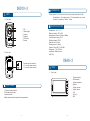
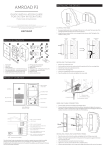
1. Front view
Ⅳ.SPECIFICATIONS
①
①
②
③
④
⑤
⑥
②
③
④
⑤
MIC
Infrared light
Camera
Speaker
Call button
Screws
⑥
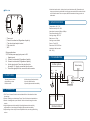
2. Rear view
①
L1
L2
① System connect terminal
L1 connect indoor monitor
L2 connect indoor monitor
Temperature: -40 ℃~70 ℃
Relative humidity: 45%~95%
Atmospheric pressure: 86Kpa~108Kpa
Fire endurance rating: IP33
Working voltage: DC12V
Static current: 0.17mA
Working current: 150mA
Camera: Color 420L; B/W 480L
Dimension : 170*105*55mm
Installation: Wall mounted
N.W: 260g
D6 A 8 -2
VIEW
1. Front view
①
②
③
④
⑤
⑥
⑦
Ⅱ.FUNCTIONS
1. Two way communication
2. Transmit video image
3. power indicator
4. Night camera infrared automatic compensation
- 1 -
⑧
⑨
- 2 -
①
②
③
④
⑤
⑥
⑦
⑧
⑨
Power indicator
Talk indicator
Adjust brightness
Monitor
Adjust contrast
Adjust volume
Call
Unlock
MIC