1
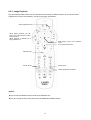
3.5
HDD Installation/Exchange
Warning: If you change the HDD of a TViX equipped with an HDD, the warranty will be voided.
Power Connector
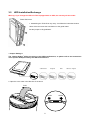
1. Assembling the TViX HD is very easy. Just follow the instructions below:
Use a driver and screw the hard disk on to the guide board.
Set the jumper to ‘Single Master’.
< Jumper Settings >
The ‘Jumper Setting’ differs according to the HDD manufacturers, so please refer to the instructions
of the specific HDD provided by the HDD manufacturers.
SAMSUNG
Seagate
IBM
2. Open the cover case in the direction of the arrow.
PULL
LOCK
21
OPEN
Western Digital