1
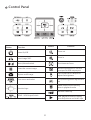
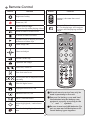
Functions indicated by
can only be used by the remote control.
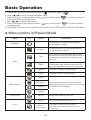
5. Switch the focus mode to Macro.
Press MENU (
) -->
)--> select Focus (
select Macro
or press Macro button (
controller.
)(
) on remote
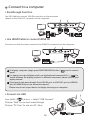
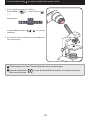
6. Connect the lens with microscope adapter to
the microscope.
If the image is not clear. Please adjust the focus of microcope.
Press the AF button (
fine-tune the focus.
) or use the manual focus button on remote control to
20