1
12KHR-N
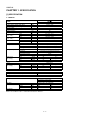
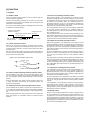
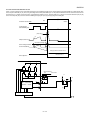
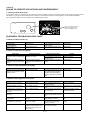
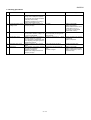
1.18. Difference of operation in Auto and Manual modes
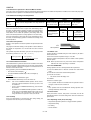
In the Auto mode, the temperature setting is automatically determined based on the outside air temperature. In addition, the air to air heat pump operation differs from the operation in the Manual mode as explained below.
1.18.1 Difference relating to set temperature
Temperature
setting
method
Auto mode
Cooling
Heating
Dehumidifying
Automatic temperature setting based on outside air temperature. Can be changed within r2qC using remote control.
Manual mode
Heating
Can be changed
between 18 and 32qC
using remote control.
Cooling
Can be changed
between 18 and 32qC
using remote control.
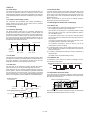
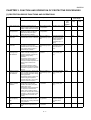
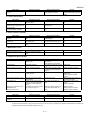
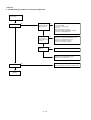
1.19. Dehumidifying operation control
ZONE
If the room temperature is 26qC or higher when dehumidifying operation starts, the dehumidifying operation provides a low cooling effect in
accordance with the room temperature setting automatically determined based on the outside air operation. (The setting value is the
same as the set temperature for cooling operation in the auto mode.)
Dehumidifying
Automatic setting.
Can be changed
within r2qC.
COMPRESSOR
Hot keep (When
room temperature
reaches setting temperature)
If the room temperature is lower than 26qC when dehumidifying operation starts, the dehumidifying operation minimizes the lowering of the
room temperature.
FAN
AUTO
OFF
SOFT
LOW
HIGH
Ultra soft
(Lower than Fan
speed “soft”)
Keep the setting
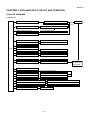
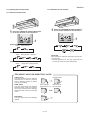
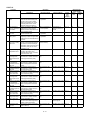
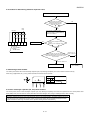
1.20. Self Clean operation
Heating or Fan operation and Cluster operation are performed simultaneously.
O
0.6 C
The judgment of whether Heating or Fan operation is used is based on
the outside air temperature at 3 minutes after the start of internal
cleaning.
Set temperature
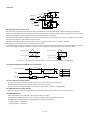
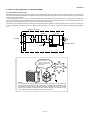
1.23. Winter cool
The operation stops after 40 minutes. (The air to air heat pump shows
the remaining minutes: 40 o 39 o 38 ... 3 o 2 o 1)
Heating operation
Cooling operation is available during the winter season by the built in
winter cool function.
Fan operation
O
24 C
Lower limit of outdoor temperature range is -10qC DB.
When the outside air temperature is low, the outdoor unit fan operates
at slower speed.
Outside air temperature
1.21. Plasmacluster Ion function
NOTE: Built-in protect device may work when outdoor temperature
falls below 21qC DB., depending on conditions.
The Plasmacluster lon generator inside the air conditioner will release
positive and negative plasmacluster ions into the room. Approximately
the same numbers of positive and negative ions released into the air
will reduce some airborne mold.
1.24. 10qC OPERATION
Heating operation with 10qC set temperature will be performed.
1) Press the MODE button of Remote controller and select HEAT
mode.
During operation, press the PLASMACLUSTER button.
•
The remote control will display “
•
The blue PLASMACLUSTER lamp on the unit will light up.
“.
2) Press the ON / OFF button to start HEAT operation.
3) Press the 10qC button.
TO CANCEL
•
Press the PLASMACLUSTER button again.
•
Use of the PLASMACLUSTER operation will be memorized, and it will be activated the next time you turn on the
air conditioner.
•
To turn off the PLASMACLUSTER lamp, press the DISPLAY button.
•
To perform the PLASMACLUSTER operation in FAN only
mode, press the PLASMACLUSTER button while the unit
is not operating. The mode symbol of the remote control
will go off and the fan speed can not be set to AUTO.
The remote control will display 10qC.
TO CANCEL
The PLASMACLUSTER lamp on the unit will turn off.
NOTE: •
Hot keep zone ٕ
Press the 10qC button again.
•
10qC operation will also be cancelled when the operation mode is
changed, or when the unit is turned off.
NOTE:
•
10qC operation will not be available with heating operation automatically selected by AUTO mode.
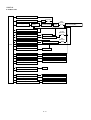
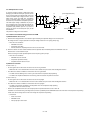
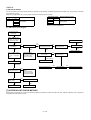
1.25. Auto restart
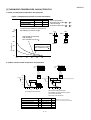
1.22. Hot keep
When power failure occures, after power is recovered, the unit will
automatically restart in the same setting which were active before the
power failure.
If the room temperature is in the Hot keep zone during heating, the
compressor is turned off to prevent overheating.
1.25.1 Operating mode (Cool, Heat, Dry)
2 – 12
•
Temperature adjustment (within 2qC range) automatic operation
•
Temperature setting
•
Fan setting
•
Air flow direction