1
 How to use our Q writer to do the recording & playback
Step 1 :
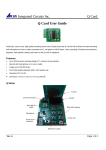
Insert Q card into Q writer
Step 2 :
Connect the battery & speaker case.
Step 3 :
Slide the MIC/LINE IN SW to left for microphone recording
Slide the MIC/LINE IN SW to right for line in recording.
Step 4 :
Slide the REC/PLAY SW to REC. Press and release S001, hear
“ BEEP ” sound with LED on to start the first section recording. Press
again to hear BEEP sound with LED off to stop its recording. Same as
S002-S007.
Step 6 :
Slide the REC/PLAY SW to PLAY. Press and release TACT SW to play
voices with LED On. After finished the playback, LED will be off. Same
as S002-S007.
Step.7 :
If all messages reach to 340secs,, there will be a long “ Beep “ sound
to remind you that you can not record any further data.
***
How to delete the original messages and record new data :
You will hear “ BEEP “ “ BEEP “ sound to remind that you can not
do any recording if there are messages in . You have to keep press
Erase key then press the section key that you want to change ( LED on
in the meantime ) to delete its original data. Then you can start your new
recording.