1
OpenShift All Versions User Guide
69
Chapter 5. Storage Management
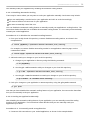
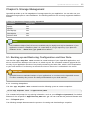
OpenShift provides up to 512 megabytes of storage space for your application. You can also use your
allocated storage space to store databases. T he following table lists the currently supported database
formats:
T able 5.1. Databases Supported by OpenShift
Database
Supported
MySQL
Yes
MySQLi
Yes
PDO MySQL
Yes
PDO SQLite
Yes
Amazon-RDS
Yes
Note
PHP Database Object (PDO) drivers are available only for MySQL and SQLite databases. If your
application contains a database, place it in a new folder in your git repository. If you place the
database in the ../data folder, git push will not affect it.
5.1. Backing up and Restoring Configuration and User Data
Use the rhc app snapshot save command to create backups of your OpenShift applications, and
also to restore those backups to the server. As a back-up tool, this command creates a gzipped tar file
not only of your application but also of any locally-created log and other files, which is then downloaded
to your local machine. T he directory structure that exists on the server is maintained in the tar file.
Important
OpenShift does not maintain backups of your applications or user data on the OpenShift servers.
T he files created by this process are always downloaded to your local machine.
5.1.1. Creating Snapshots
T he rhc app snapshot save command uses the following syntax to create a snapshot:
$ rhc app snapshot save -a Application_Name
T he command will prompt for any missing information, such as your rhlogin and password. T he default
filename for the snapshot is $Application_Name.tar.gz. You can override this path and filename with
the --filepath option.
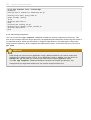
T he following example demonstrates the process of creating and downloading a snapshot: