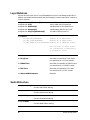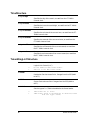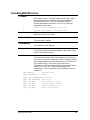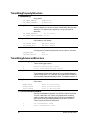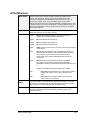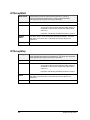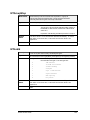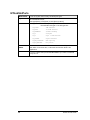
1
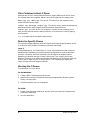
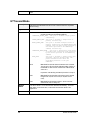
SmartBits
Advanced Multiport Performance Tester/Simulator/Analyzer
SmartLib
User Guide
Programming Library Version 3.05
FEBRUARY 1999
Supporting these development environments:
Microsoft Windows Version 3.1
Windows 95
Windows NT
UNIX
Borland C/C++
Microsoft Visual C/C++
GNU C/C++
Microsoft Visual Basic
Borland Delphi
Tcl
P/N 340-0029-002 Rev G
Netcom Systems, Inc.
(818) 700-5100 Phone
(818) 709-7881 FAX
Copyright 1993-1998 Netcom Systems, Inc. All Rights Reserved. Printed February 1999.
Disclaimer
The information contained in this manual is the property of Netcom Systems, Inc. and is
furnished for use by recipient only for the purpose stated in the Software License Agreement
accompanying the user documentation. Except as permitted by such License Agreement, no
part of this publication may be reproduced, stored in a retrieval system, or transmitted, in any
form or by any means, without the prior written permission of Netcom Systems, Inc.
Information contained in the user documentation is subject to change without notice and does not
represent a commitment on the part of Netcom Systems, Inc. Netcom Systems, Inc. assumes no
responsibility or liability for any errors or inaccuracies that may appear in the user documentation.
Trademarks
SmartBits is a trademark of Netcom Systems, Inc.
Warranty
Netcom Systems, Inc. warrants to recipient that hardware which it supplies with this user
documentation (“Product”) will be free from significant defects in materials and workmanship
for a period of twelve (12) months from the date of delivery (the “Warranty Period”), under
normal use and conditions.
Defective Product under warranty shall be, at Netcom Systems’ discretion, repaired or replaced or
a credit issued to recipient’s account for an amount equal to the price paid for such Product
provided that: (a) such Product is returned to Netcom Systems after first obtaining a return
authorization number and shipping instructions, freight prepaid, to Netcom Systems’ location in
the United States; (b) recipient provide a written explanation of the defect claimed; and (c) the
claimed defect actually exists and was not caused by neglect, accident, misuse, improper
installation, improper repair, fire, flood, lightning, power surges, earthquake or alteration.
Netcom Systems will ship repaired Product to recipient, freight prepaid, within ten (10) working
days after receipt of defective Product. Except as otherwise stated, any claim on account of
defective materials or for any other cause whatsoever will conclusively be deemed waived by
recipient unless written notice thereof is given to Netcom Systems within the Warranty Period.
Product will be subject to Netcom Systems’ standard tolerances for variations.
TO THE EXTENT PERMITTED BY APPLICABLE LAW, ALL IMPLIED WARRANTIES, INCLUDING
BUT NOT LIMITED TO IMPLIED WARRANTIES OF MERCHANTABILITY, NONINFRINGEMENT
AND FITNESS FOR A PARTICULAR PURPOSE, ARE HEREBY EXCLUDED, AND THE LIABILITY OF
NETCOM, IF ANY, FOR DAMAGES RELATING TO ANY ALLEGEDLY DEFECTIVE PRODUCT
SHALL BE LIMITED TO THE ACTUAL PRICE PAID BY THE YOU FOR SUCH PRODUCT. IN NO
EVENT WILL NETCOM SYSTEMS BE LIABLE FOR COSTS OF PROCUREMENT OF SUBSTITUTE
PRODUCTS OR SERVICES, LOST PROFITS, OR ANY SPECIAL, DIRECT, INDIRECT,
CONSEQUENTIAL OR INCIDENTAL DAMAGES, HOWEVER CAUSED AND ON ANY THEORY OF
LIABILITY, ARISING IN ANY WAY OUT OF THE SALE AND/OR LICENSE OF PRODUCTS OR
SERVICES TO RECIPIENT EVEN IF ADVISED OF THE POSSIBILITY OF SUCH DAMAGES AND
NOTWITHSTANDING ANY FAILURE OF ESSENTIAL PURPOSE OF ANY LIMITED REMEDY.
ii
SmartLib User Guide
Contents
Chapter 1: Introduction
1
SmartLib ....................................................................................................................... 1
Backward Compatibility ................................................................................................ 1
SmartLib Documentation.............................................................................................. 2
The SmartLib Manuals ..................................................................................... 2
Understanding Prefixes: ET, HT, and HG ....................................................... 2
System Requirements .................................................................................................. 3
General Programming Notes ....................................................................................... 3
Link Timeout Issues ..................................................................................................... 3
Creating a Keep-Alive Loop ............................................................................... 3
SmartLib Response to a Broken Link (Time-out)............................................. 4
Working with multiple SMB hubs.................................................................................. 5
The Master Hub.................................................................................................. 6
Troubleshooting and Technical Support....................................................................... 6
Chapter 2: Programming for MS Windows
7
Installing SmartLib for MS Windows ............................................................................ 7
Win Directory Structure and Content ............................................................... 7
General Windows Programming Notes........................................................................ 8
Developing with C/C++................................................................................................. 9
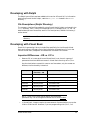
File Descriptions (COMMLIB Directory) .......................................................... 9
Developing with Tcl .................................................................................................... 11
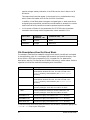
File Descriptions (Tcl Directory) ..................................................................... 11
File Descriptions (Tcl\Tcl76 Directory) .......................................................... 12
File Descriptions (Tcl/Tcl80 Directory) .......................................................... 12
File Descriptions (Tcl\Tclfiles Directory) ....................................................... 12
Developing with Delphi ............................................................................................... 13
File Descriptions (Delphi Directory) ............................................................... 13
Developing with Visual Basic...................................................................................... 13
Important Differences - VB vs. C/C++............................................................ 13
File Descriptions Used for Visual Basic ......................................................... 14
Chapter 3: Programming for UNIX
15
Installing SmartLib for UNIX ....................................................................................... 15
Step-by-Step UNIX Installation ...................................................................... 15
SmartLib User Guide
iii
UNIX Directory Structure and Content ....................................................................... 17
Developing with C/C++ ................................................................................... 19
Developing with TCL ....................................................................................... 19
Chapter 4: Examples
20
Example Code Location ................................................................................... 20
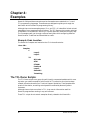
The TCL Demo Scripts:.............................................................................................. 20
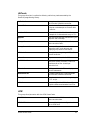
AllCards............................................................................................................ 21
ATM .................................................................................................................. 21
ET1000.............................................................................................................. 22
FastCard........................................................................................................... 22
Layer3 ............................................................................................................... 23
SmartAPI.......................................................................................................... 24
Token Ring ....................................................................................................... 24
The C Demo Modules: ............................................................................................... 24
Basic C Demo Configuration - Steps 1-5......................................................... 24
Files Contained in Each C Demo .................................................................... 26
Notes for Specific Demos.................................................................................. 26
Running the C Demos ...................................................................................... 26
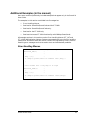
Additional Examples (in the manual).......................................................................... 27
Error Handling Macros ................................................................................... 27
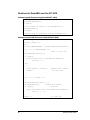
Routines for SmartBits and the ET-1000 ....................................................... 28
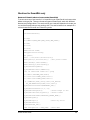
Routines for SmartBits only ............................................................................ 29
Routines for the ET-1000 only......................................................................... 34
Routines that access ET-1000 functionality for 10Mbps SmartCards.......... 36
Chapter 5: Original Function Summary
38
Chapter 6: Data Structures
52
Usage ......................................................................................................................... 52
CaptureStructure ........................................................................................................ 53
CollisionStructure ....................................................................................................... 54
CountStructure ........................................................................................................... 55
EnhancedCounterStructure........................................................................................ 56
FrameSpec................................................................................................................. 60
HTCountStructure ...................................................................................................... 62
HTLatencyStructure ................................................................................................... 62
HTTriggerStructure .................................................................................................... 63
iv
SmartLib User Guide
HTVFDStructure......................................................................................................... 64
Layer3Address ........................................................................................................... 66
SwitchStructure .......................................................................................................... 66
TimeStructure............................................................................................................. 68
TokenRingLLCStructure............................................................................................. 68
TokenRingMACStructure ........................................................................................... 69
TokenRingPropertyStructure...................................................................................... 70
TokenRingAdvancedStructure ................................................................................... 70
TriggerStructure ......................................................................................................... 72
VFDStructure.............................................................................................................. 72
VGCardPropertyStructure .......................................................................................... 73
Chapter 7: SmartLib Detailed Description
74
ETAlignCount ............................................................................................................. 74
ETBNC ....................................................................................................................... 75
ETBurst ...................................................................................................................... 77
ETCaptureParams ..................................................................................................... 77
ETCaptureRun ........................................................................................................... 77
ETCollision ................................................................................................................. 78
ETDataLength ............................................................................................................ 78
ETDataPattern............................................................................................................ 79
ETDribbleCount.......................................................................................................... 79
ETEnableBackgroundProcessing .............................................................................. 80
ETGap ........................................................................................................................ 80
ETGapScale ............................................................................................................... 81
ETGetAlignCount ....................................................................................................... 82
ETGetBaud................................................................................................................. 82
ETGetBNC ................................................................................................................. 83
ETGetBurstCount ....................................................................................................... 83
ETGetBurstMode........................................................................................................ 83
ETGetCapturePacket ................................................................................................. 84
ETGetCapturePacketCount ....................................................................................... 84
ETGetCaptureParams................................................................................................ 84
ETGetCollision ........................................................................................................... 85
ETGetController ......................................................................................................... 85
ETGetCounters .......................................................................................................... 85
ETGetCRCError ......................................................................................................... 85
ETGetCurrentLink ...................................................................................................... 87
SmartLib User Guide
v
ETGetDataLength ...................................................................................................... 87
ETGetDataPattern...................................................................................................... 87
ETGetDribbleCount .................................................................................................... 87
ETGetErrorStatus....................................................................................................... 88
ETGetFirmwareVersion.............................................................................................. 88
ETGetGap .................................................................................................................. 89
ETGetGapScale ......................................................................................................... 89
ETGetHardwareVersion ............................................................................................. 90
ETGetLibVersion ........................................................................................................ 90
ETGetLinkFromIndex ................................................................................................. 90
ETGetLinkStatus ........................................................................................................ 91
ETGetJET210Mode.................................................................................................... 91
ETGetLNM ................................................................................................................. 91
ETGetPreamble.......................................................................................................... 92
ETGetReceiveTrigger................................................................................................. 92
ETGetRun .................................................................................................................. 92
ETGetSel.................................................................................................................... 93
ETGetSerialNumber ................................................................................................... 93
ETGetSwitch .............................................................................................................. 93
ETGetTotalLinks ........................................................................................................ 94
ETGetTransmitTrigger ............................................................................................... 94
ETGetVFDRun ........................................................................................................... 94
ETIsBackgroundProcessing....................................................................................... 95
ETLink ........................................................................................................................ 95
ETLNM ....................................................................................................................... 96
ETLoopback ............................................................................................................... 96
ETMake2DArray......................................................................................................... 97
ETMake3DArray......................................................................................................... 97
ETMFCounter............................................................................................................. 98
ETPreamble ............................................................................................................... 98
ETReceiveTrigger ...................................................................................................... 99
ETRemote .................................................................................................................. 99
ETReset ..................................................................................................................... 99
ETReturnAddress..................................................................................................... 100
ETRun ...................................................................................................................... 100
ETSetBaud ............................................................................................................... 101
ETSetCurrentLink..................................................................................................... 101
vi
SmartLib User Guide
ETSetCurrentSockLink............................................................................................. 102
ETSetJET210Mode .................................................................................................. 102
ETSetGPSDelay....................................................................................................... 102
ETSetSel .................................................................................................................. 103
ETSetTimeout .......................................................................................................... 104
ETSetup ................................................................................................................... 105
ETSocketLink ........................................................................................................... 106
ETTransmitCRC....................................................................................................... 106
ETTransmitTrigger ................................................................................................... 107
ETUnLink.................................................................................................................. 107
ETVFDParams ......................................................................................................... 107
ETVFDRun ............................................................................................................... 108
HGAddtoGroup......................................................................................................... 109
HGAlign .................................................................................................................... 109
HGBurstCount .......................................................................................................... 110
HGBurstGap............................................................................................................. 110
HGBurstGapAndScale ............................................................................................. 111
HGClearGroup ......................................................................................................... 111
HGClearPort............................................................................................................. 112
HGCollision .............................................................................................................. 112
HGCollisionBackoffAggressiveness......................................................................... 112
HGCRC .................................................................................................................... 113
HGDataLength ......................................................................................................... 113
HGDribble................................................................................................................. 113
HGDuplexMode........................................................................................................ 114
HGFillPattern............................................................................................................ 114
HGGap ..................................................................................................................... 115
HGGapAndScale...................................................................................................... 116
HGGetCounters........................................................................................................ 116
HGGetEnhancedCounters ....................................................................................... 117
HGGetGroupCount................................................................................................... 117
HGGetLEDs ............................................................................................................. 117
HGIsPortInGroup...................................................................................................... 118
HGIsHubSlotPortInGroup......................................................................................... 118
HGMultiBurstCount .................................................................................................. 118
HGRemoveFromGroup ............................................................................................ 119
HGRemovePortIdFromGroup .................................................................................. 120
SmartLib User Guide
vii
HGResetPort ............................................................................................................ 121
HGRun ..................................................................................................................... 121
HGSelectTransmit.................................................................................................... 122
HGSetGroup............................................................................................................. 123
HGSetGroupType..................................................................................................... 124
HGSetSpeed ............................................................................................................ 125
HGSetTokenRingAdvancedControl.......................................................................... 125
HGSetTokenRingErrors ........................................................................................... 126
HGSetTokenRingLLC............................................................................................... 126
HGSetTokenRingMAC ............................................................................................. 127
HGSetTokenRingProperty........................................................................................ 127
HGSetTokenRingSrcRouteAddr .............................................................................. 128
HGSetVGProperty.................................................................................................... 128
HGStart .................................................................................................................... 129
HGStep..................................................................................................................... 129
HGStop..................................................................................................................... 129
HGSymbol ................................................................................................................ 130
HGTransmitMode..................................................................................................... 130
HGTrigger................................................................................................................. 131
HGVFD..................................................................................................................... 132
HTAlign..................................................................................................................... 132
HTBurstCount........................................................................................................... 133
HTBurstGap ............................................................................................................. 133
HTBurstGapAndScale .............................................................................................. 134
HTCardModels ......................................................................................................... 135
HTClearPort ............................................................................................................. 136
HTCollision ............................................................................................................... 136
HTCollisionBackoffAggressiveness ......................................................................... 137
HTCRC..................................................................................................................... 137
HTDataLength .......................................................................................................... 138
HTDribble ................................................................................................................. 139
HTDuplexMode ........................................................................................................ 140
HTFillPattern ............................................................................................................ 141
HTFindMIIAddress ................................................................................................... 142
HTFrame .................................................................................................................. 143
HTGap...................................................................................................................... 144
HTGapAndScale ...................................................................................................... 145
viii
SmartLib User Guide
HTGetCardModel ..................................................................................................... 146
HTGetCounters ........................................................................................................ 147
HTGetEnhancedCounters ........................................................................................ 148
HTGetEnhancedStatus ............................................................................................ 148
HTGetHubLEDs ....................................................................................................... 151
HTGetLEDs .............................................................................................................. 151
HTGetHWVersion .................................................................................................... 152
HTGetStructure ........................................................................................................ 153
HTGroupStart ........................................................................................................... 154
HTGroupStep ........................................................................................................... 154
HTGroupStop ........................................................................................................... 155
HTHubId ................................................................................................................... 155
HTHubSlotPorts ....................................................................................................... 156
HTLayer3SetAddress ............................................................................................... 157
HTLatency ................................................................................................................ 158
HTMultiBurstCount ................................................................................................... 159
HTPortProperty ........................................................................................................ 159
HTPortType .............................................................................................................. 161
HTReadMII ............................................................................................................... 162
HTResetPort............................................................................................................. 163
HTRun ...................................................................................................................... 163
HTSelectReceive...................................................................................................... 164
HTSelectTransmit .................................................................................................... 165
HTSendCommand ................................................................................................... 166
HTSeparateHubCommands..................................................................................... 167
HTSetCommand ...................................................................................................... 168
HTSetSpeed............................................................................................................. 169
HTSetStructure......................................................................................................... 170
HTSetTokenRingAdvancedControl .......................................................................... 171
HTSetTokenRingErrors............................................................................................ 172
HTSetTokenRingLLC ............................................................................................... 173
HTSetTokenRingMAC.............................................................................................. 173
HTSetTokenRingProperty ........................................................................................ 175
HTSetTokenRingSrcRouteAddr ............................................................................... 176
HTSetVGProperty .................................................................................................... 177
HTSymbol................................................................................................................. 177
HTTransmitMode ..................................................................................................... 178
SmartLib User Guide
ix
HTTrigger ................................................................................................................. 179
HTVFD ..................................................................................................................... 180
HTWriteMII ............................................................................................................... 181
NSCreateFrame ....................................................................................................... 182
NSCreateFrameAndPayload.................................................................................... 183
NSDeleteFrame........................................................................................................ 184
NSModifyFrame ....................................................................................................... 185
NSSetPayLoad ......................................................................................................... 186
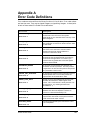
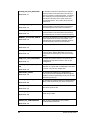
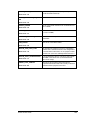
Appendix A Error Code Definitions
187
Appendix B Notes on Tcl
190
Appendix C Revision History
198
Version 3.05 ............................................................................................................. 198
Version 3.04 ............................................................................................................. 199
Version 3.03 ............................................................................................................. 201
Version 3.02 ............................................................................................................. 202
Version 3.00 ............................................................................................................. 202
Version 2.50-20 ........................................................................................................ 203
Version 2.42 ............................................................................................................. 204
Version 2.37 ............................................................................................................. 204
Version 2.32 ............................................................................................................. 204
Version 2.31 ............................................................................................................. 205
Version 2.3 ............................................................................................................... 205
Version 2.22 ............................................................................................................. 206
Version 2.21 ............................................................................................................. 206
Version 2.20 ............................................................................................................. 206
Version 2.13 ............................................................................................................. 207
Version 2.12 ............................................................................................................. 207
Version 2.11 ............................................................................................................. 207
Version 2.10 ............................................................................................................. 207
New functions................................................................................................. 207
New advanced functions ................................................................................ 208
Corrected Errors............................................................................................. 208
Version 2.01 ............................................................................................................. 210
Version 2.0 ............................................................................................................... 211
Software Additions ........................................................................................ 211
x
SmartLib User Guide
Notes on Using Microsoft Visual Basic......................................................... 211
Visual Basic Demonstration Application ..................................................... 213
Software Modifications.................................................................................. 214
Version 1.32 ............................................................................................................. 214
Software Additions ........................................................................................ 214
Software Modifications.................................................................................. 214
Software Environment ................................................................................... 214
Corrected Errors............................................................................................. 215
Compatibility with previous version ............................................................. 215
Version 1.3 ............................................................................................................... 216
Software.......................................................................................................... 216
User's Manual ................................................................................................ 216
Compatibility with previous version ............................................................. 216
Appendix D Obsolete Functions and Structures
217
SetLatencyStructure ................................................................................................. 218
ETGetCaptureTime .................................................................................................. 219
HGBurst.................................................................................................................... 220
HGClear ................................................................................................................... 220
HGEcho.................................................................................................................... 220
HGSelectReceivePort .............................................................................................. 221
HGSelectTMTPort .................................................................................................... 221
HGSetLED................................................................................................................ 223
HTBurst .................................................................................................................... 223
HTClear .................................................................................................................... 224
HTEcho .................................................................................................................... 224
HTGroup................................................................................................................... 225
HTLatencyTest ......................................................................................................... 225
HTSelectReceivePort ............................................................................................... 226
HTSelectTMTPort .................................................................................................... 227
HTSetLED ................................................................................................................ 228
SmartLib User Guide
xi
Chapter 1:
Introduction
The SmartLib User Guide contains a basic overview of the Smartlib programming
library, as well as a complete overview of the original library functions. The newer
Message Functions and the test modules (SmartAPI) are included in separate
manuals.
This User Guide includes information such as installation instructions, examples, and
notes for specific programming languages.
This chapter discusses basic concepts and uses for SmartLib, as well as general
information about SmartLib manuals.
SmartLib
SmartLib programming library helps developers create custom test applications for
Netcom Systems' SmartCards, SmartBits, and ET-1000.
SmartLib can be used to automate testing, or create applications that test a single,
unique network component. It can be used to create simple GUIs for results gathering
and analysis, making tests useful for a production line. Or, it can be used to create a
complex suite of tests. SmartLib is a powerful programming tool, fueled by the desire
to test the cutting edge.
SmartLib programming library supports:
•
Ethernet 10 MB, 100 MB, and Gigabit systems,
•
Token Ring 4MB and 16 MB systems,
•
VG/AnyLan in Ethernet mode,
•
ATM technologies including DS1, E1, 25MB, E3, DS3, OC-3c, and OC-12c with
Signaling control as well as traffic generation.
•
Frame Relay V.35.
SmartLib offers three approaches to test application development.
1. The Original functions (Hardware API) which interfaces with the
hardware and firmware of older SmartCards.
2. The Message Functions (Hardware API) which provide a more
standardized syntax to interface with the hardware and firmware of
newer SmartCards: ATM, Frame Relay, Gigabit, Layer3, Ethernet/Fast
Ethernet, and Multi-Layer.
3. The SmartAPI test routines (pre-created test modules) that interface
with the Original and Message Functions.
Backward Compatibility
Additional features are constantly being added to Netcom Systems' suite of products.
New modules require changes to the library. Every attempt is made to keep updates
backwardly compatible so that applications developed for older modules function with
minimal modifications.
SmartLib User Guide
1
NOTE: Be sure to check the readme.txt file with each release, as
well as the Revisions section of this manual to see what changes
affect your programs.
SmartLib Documentation
SmartLib 3.04 documentation now consists of printed manuals as well as manuals in
PDF Format located on the CD. For the on-line manuals, look in:
<Your CD>: | Documents | Manuals | SmartLib |
Note that the SmartLib Training Material is on the CD in Microsoft PowerPoint
format (*.ppt).
To view and print PDF files, you can use one of the Acrobat readers (for UNIX or
Windows) located in:
<Your CD>: | Tools |
The SmartLib Manuals
SmartLib User Guide covers the first group of routines (original hardware API
functions and parameters). It also discusses SmartLib installation, examples, and
notes pertaining to specific programming languages.
Message Functions reference manual contains a thorough overview of the Message
Functions (used with newer SmartCards). Basic concepts and parameter break-down
are in the front, while the reference material for each parameter is covered in the body
of the book.
SmartAPI for Smart Applications presents an overview of the Smart Applications
(RFC-1242) Benchmark test series. Topics include basic test concepts, test
methodology, and reference material for each function and structure.
SmartAPI for Smart Signaling presents an overview of the Smart Signaling ATM test
series. Topics include basic test concepts, test methodology, and reference material for
each function and structure.
SmartLib Training Material is a Power Point presentation used by Netcom Systems
trainers. Although this material designed for training purposes, it contains useful
information, pointers, and examples.
NOTE: Although SmartLib provides interfaces for multiple
programming languages, the documentation is including
syntax entries are written with C/C++ programming
conventions unless otherwise noted.
For more helpful information see the Examples chapter in this manual.
Understanding Prefixes: ET, HT, and HG
In the SmartBits Library, function names are prefixed by either ET, HG, or HT. The
ET functions interact with the ET-1000 controller, and are not designed to work with
SmartCards. The HT prefix indicates communication to a single SmartCard, while the
HG prefix indicates communication to a group of SmartCards.
2
SmartLib User Guide
System Requirements
This version of the programming library has been tested with firmware release 10.06,
the most current release of SmartBits/ET-1000 firmware at the time of this writing.
The most current release of Netcom Systems' firmware is available from the Netcom
Systems web site. Go to www.netcomsystems.com and click the "Support" link.
This release of SmartLib does not function with an HT-40 and passive cards. Do NOT
install either this installation or the firmware upgrade if you are using an HT-40 and
passive cards.
General Programming Notes
•
Source code modules that call SmartLib library routines must include the
appropriate header file (ET1000.H for “C/C++”, ET1000.B32 for 32-bit Visual
Basic, etc.). Each programming environment has a facility for configuring a list
of ‘include subdirectories’. The header file must reside in one of the directories
on the 'included subdirectories' list. See the appropriate "developing" section in
this manual for more information.
•
Applications that call SmartLib functions must link with the appropriate
Smartlib library file. Each programming environment has a facility for
configuring a list of ‘library subdirectories’. The SmartLib library file must reside
in one of the directories on the 'library subdirectory' list. Some programming
environments require that this library be manually added to the project. See the
appropriate programming section in this manual for more information.
•
16-bit environments must have the compiler switch ‘struct member byte
alignment’ set to 1 byte. For 32-bit environments, set the compiler switch ‘struct
member byte alignment’ to 4 bytes.
For more specific information about the different programming environments, see
Chapter 2 and Chapter 3.
Link Timeout Issues
An Ethernet "Link" between the PC and a SmartBits chassis will timeout after 30
minutes of inactivity. This means that if there is no communication initiated by the PC
for 30 minutes, the socket will be closed by the chassis. The timeout feature frees the
SmartBits chassis to accept other link attempts should the initial link be lost.
A serial link has no time-out feature.
Creating a Keep-Alive Loop
If you want your link to stay connected after more than 30 minutes of inactivity, you
can insert a "Keep-Alive" loop in your application. This code loop issues a command to
the SMB chassis at a given interval (for example, 29 minutes). This prevents the link
from timing out. Examples of the Stay-Alive loops are given below.
NOTE: For SmartLib 3.03 and before, use HTGetHubLEDs in
place of ETGetLinkStatus. For SmartLib 3.05 and later, Do
NOT useHTGetHubLEDs since it won't keep the link alive
with an SMB 6000.
SmartLib User Guide
3
A Simple C Keep-Alive Routine.
This example loops forever. It keeps the link alive by communicating with the
SmartBits controller every 29 minutes.
while (ETGetLinkStatus() >= 0) {
/* 29 minutes * 60 seconds/minute * 1000 millis/second
NSDelay(29*60*1000);
}
A TCL Keep-Alive Routine
This keep-alive loop can be called periodically from within an existing loop. This would
allow code to continue to run - and would access the chassis only after a specified time
of no interaction with the SMB controller.
This Demo runs continuously and activates proc keepalive every 20 seconds (so you
can see the results). For an actual keep alive program, activate proc keepalive
every 1200 or 1400 seconds (since there are 1740 seconds in 29 minutes).
########################################################
# timeout.tcl
########################################################
proc keepalive {} {
#Access the SMB controller so it doesn't time-out.
ETGetLinkStatus
puts ""
puts "*******************************************"
puts "*
20 seconds have passed: Access SMB
*"
puts "*******************************************"
puts ""
}
# Initialize a beginning time.
set starttime [clock seconds]
# Loop for 20 seconds.
while {1 == 1} {
# Get the current time.
set nowtime [clock seconds]
# Test for values - run keepalive if 20 seconds has passed.
if { [expr $nowtime - $starttime] > 20} {
keepalive
# Reset the starttime.
set starttime [clock seconds]
} else {
puts "A one second pause inserted to emulate your program
running"
after 1000
}
}
SmartLib Response to a Broken Link (Time-out)
Usually a link is closed by using the ETUnLink command. Occasionally a link is
broken due to network failure, power loss, or chassis time-out, for example. If this
occurs while a SmartLib script or application is executing, the next SmartLib command
4
SmartLib User Guide
issued will attempt to elicit a response from the SMB link for 30 seconds before
reporting an error.
NOTE: Prior releases of SmartLib attempted to get a response
for a default 5 minutes before assuming a broken link.
You can increase or decrease the SmartLib timeout value with the ETSetTimeout
command on page 104.
Working with multiple SMB hubs.
SmartCards are mounted in a SmartBits hub (also called a card-cage, or a chassis). In
order to control a SmartCard, you must identify which hub it is in, the slot in the hub,
and the port on the card you wish to use. At this time, SmartCards have one port so set
the port to 0.
Each element is numbered starting from zero. So, to specify the first (and only) port on
the third card in the first hub, you would set the values: iHub 0, iSlot 2, and iPort 0.
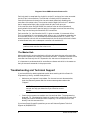
When you work with multiple hubs, there is a variation on the number system
depending on if and how you have linked stacks of hubs. See the diagram below.
Expansion
Connection
Controller
Hubs 0, 4, and 8 are
linked directly to the
PC, and control the
other SMB hubs in the
stack.
Master Hub
Because of the expansion
connections in this example,
this is the only hub to receive
synchronized commands like
HGStart.
See:
HTSeparateHubCommands.
Hub
Connection
PC
PC Links
Controller
Hub 0
Controller
Hub 4
Hub 1
Hub 5
Between
Hub stacks
Controller
Hub 8
Not Present
Not Present
Not Present
Not Present
Not Present
Hub 2
Hub 3
Between Hubs
Hub Stack 1
SmartLib User Guide
Hub Stack 2
Hub Stack 3
5
Diagram of three SMB hub stacks linked to a PC.
Each hub stack is comprised of a single link to the PC and up to four hubs connected
via the 37 pin hub connections. The hub that is linked to the PC becomes the
Controller and acts as the brains for the entire stack (effectively disabling the
controllers of the other hubs). There can be a total of eight links to the PC. Whether
that is comprised of eight hubs, or eight stacks of hubs is left up to you.
If the controller hubs are SMB 2000s, the stacks of hubs can be connected and
synchronized via the small Expansion ports in the upper corners of the controlling
hubs. They can also be synchronized via GPS connections.
Each controller (i.e., hub linked to the PC ) is given a number in increments of four.
This is true whether it is connected to other hubs or not. In the diagram example, the
first controller hub is 0. It is connected to three subordinate hubs: 1, 2, and 3. The
second controller hub is 4 with one subordinate hub, the third controller hub is 8 with
no subordinate hubs, and a subsequent controller hub would be 12.
NOTE: Each controller hub ID increments by four whether the
previous stack contains four hubs or not.
The Master Hub
When working with synchronized stacks of hubs, each stack has one active controller,
but the entire system can have only one master controller. The Master controller is the
controller that uses only the OUT expansion slot, and uses no IN expansion slot.
It is important to understand which controllers are slaves and which is the master so
that you transmit commands in the proper order.
Troubleshooting and Technical Support
If you have difficulty obtaining desired results when working with the SmartLib
Programming Library, consider these pointers:
•
Make sure your manual is up-to-date. For the most current documentation,
check the Netcom Systems web site at www.netcomsystems.web under
"Support".
NOTE: The part-number in the lower right corner of each
manual can help you determine if you have the current
version.
•
Create your programs one module at a time and test often. The programming
language, Tcl, (provided with SmartLib) is particularly useful for this task as it
allows you to test a command without compiling. You can send function calls
directly from the command line.
If you have SmartLib-specific questions you can call Netcom Systems Technical
Support at (818) 885-2152.
6
SmartLib User Guide
Chapter 2:
Programming for MS Windows
This chapter contains information about programming in the Microsoft Windows
environment. It includes installation instructions, directory and file definitions,
general SmartLib tips, and information specific to these compilers: C/C++, Tcl, Visual
Basic, and Delphi.
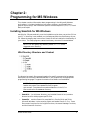
Installing SmartLib for MS Windows
AutoPlay for CDs automatically runs the installation script when you put the CD into
your PC. If AutoPlay is not enabled, run the Setup.exe from the root directory of your
CD. follow the step-by-step instructions. SmartLib will be installed in the directory of
your choice. The Setup program creates the directory structure illustrated below.
NOTE: You can specify any directory name. SmartLib is the
suggested main directory.
Win Directory Structure and Content
The directories contain files grouped together for specific programming languages.
Descriptions of the files are documented later in this chapter with the appropriate
programming language. The general contents of the folders are listed below.
NOTE: SmartLib provides multiple program interfaces with
header and project files repeated for each program
environment.. Complete source code comments are in the C/C++
files contained in the Commlib directory.
•
SmartLib - (or whichever directory you installed SmartLib into) contains
directories which hold program-specific files.
•
Commlib - contains SmartLib's compiled DLL files for 16 bit and 32 bit
Microsoft Windows. It also contains project and header files for C\C++. These
files contain functions for the Original functions, the newer Message Functions,
and the SmartAPI functions.
SmartLib User Guide
7
This directory additionally contains some legacy Visual Basic *.txt files used
for backward compatibility.
•
Delphi - contains the source files needed to create SmartLib applications using
Delphi programming language. This directory also contains DEL_TIPS.TXT, an
informative file with information about using SmartLib with Delphi.
•
Tcl - Contains a README.TXT file with important TCL information such has
how to install TCL, and locations of DLLs. Also included is the TCL_TIPS.TXT
file which contains information about programming with SmartLib under TCL.
•
Tcl\Tcl76 - Contains DLLs used when working with SmartLib under TCL 7.6.
This directory also contains the executable file needed to install TCL 7.6.
•
Tcl\Tcl80 - Contains DLLs used when working with SmartLib under TCL 8.0.
•
Tcl\TclFiles - This directory contains the SmartLib's single, complete Tcl
header file, ET1000.TCL. This file must be "sourced" in your Tcl applications. It
also contains SHOW.TCL, a Tcl utility used for viewing elements of a structure.
Lastly, this directory contains MISC.TCL, an important error handler for Tcl.
•
Vb - Contains SmartLib project and header files for Microsoft Visual Basic.
These files include the 16 and 32 bit versions of the Visual Basic programming
interface files. This directory also contains Vb_tips.txt with information
specific to using SmartLib with Visual Basic.
NOTE: Sample code in both TCL and C can be found on the
CD under the SAMPLES directory. Since the examples cover
different information, it's advisable to look at both TCL and C
examples.
This set of library functions can be used for development of Microsoft Windows™ based
applications on IBM PC and compatibles. SmartLib functions work on a hardware
platform capable of supporting MS Windows.
SmartLib functions can be called from any program using the cdecl convention or the
FAR PASCAL convention. Microsoft Windows applications capable of calling a
Dynamic Link Library can use these functions. This includes applications such as
Excel, National Instruments LabView, and Visual Basic. Although a wide variety of
applications can use SmartLib functions, your Software Developer's Kit includes four
interfaces to the library specifically designed for use with C/C++, Tcl, Visual Basic, and
Delphi.
General Windows Programming Notes
The MS Windows link libraries are compiled with the "Large" memory model.
For MS Windows 16 bit applications, create an "import" library. To do this, open a DOS
box and go the directory where etsmbw16.dll is located. Issue the command,
“implib etsmbw16.lib etsmbw16.dll." The library will be created automatically.
Every effort will be made to keep Smartlib compatible with earlier versions. As more
functions are added, you may only need to relink your application with the new library.
For Microsoft Windows applications using the DLL, relinking may not be necessary.
8
SmartLib User Guide
Developing with C/C++
This section describes the list of files used for programming with C or C++. It also
contains some notes about using SmartLib in the C/C++ environment. For additional
information, see the "readme" file on your installation diskette.
For “C/C++” program development, ET1000.H should be referenced (included) in your
source files. This file provides the function prototypes, defined values, and structure
declarations used by the library. You must also link with the SmartLib *.LIB files
which matches your development environment.
If you develop with Borland's C/C++, compile using SMBW32BC.LIB. If you develop
using Microsoft's C/C++, compile using SMBW32VC.LIB. Applications from either
compiler use the same SmartLib *.DLL during run time.
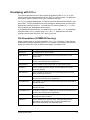
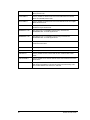
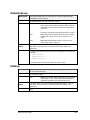
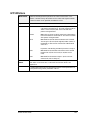
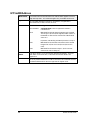
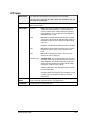
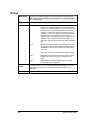
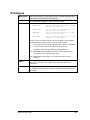
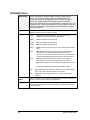
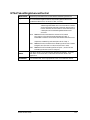
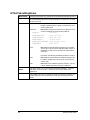
File Descriptions (COMMLIB Directory)
Below is a description of the files installed in the COMMLIB directory. These files are
predominantly used for developing with C/C++. However, this directory also contains
SmartLib's central DLL files, as well as some legacy Visual Basic files.
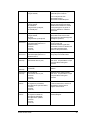
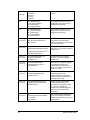
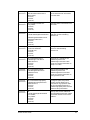
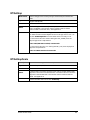
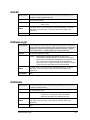
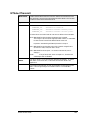
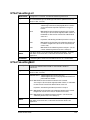
File Name
File Type
ATMAPI.H
In development for future release.
ATMITEMS.H
Library header file of defines and structure definitions for ATM
SmartCards.
ATMITM32.TXT
Visual Basic 5 legacy file, needed only for backward compatibility with
earlier Visual Basic/SmartLib applications.
ATMSGAPI.H
Library header file of the Smart API for ATM Signaling tests.
ET1000.H
Library header file of basic defines, structure definitions, and all
function prototypes.
ETHITEMS.H
Library header file of defines and structure definitions for the new
Ethernet Message Functions.
ETSMBAPI.TXT
Visual Basic 3 legacy file, needed only for backward compatibility with
earlier Visual Basic/SmartLib applications.
ETSMBW16.DLL
The dynamic link library for use with 16-bit applications developed for
Windows 95 or NT.
ETSMBW32.DLL
The dynamic link library for use with 32-bit applications developed for
Windows 95 or NT.
ETSMBW32.TXT
Visual Basic 5 legacy file, needed only for backward compatibility with
earlier Visual Basic/SmartLib applications.
ETTYPES.H
Library header file of necessary ETSMB variable types (like U64 for
working with 64 bit numbers).
FRAME.H
Library header file for the new, easier, frame-building functions:
NSCreateFrame, NSSetPayLoad, HTFrame, NSDeleteFrame,
NSCreateFrameAndPayLoad, NSModifyFrame.
SmartLib User Guide
9
FRITEMS.H
Library header file of defines and structure definitions for the Frame
Relay SmartCards.
FSTITEMS.H
Library header file of defines and structure definitions for the Fast
Ethernet (100 MB) SmartCards.
GIGITEMS.H
Library header file of defines and structure definitions for the Gigabit
Ethernet SmartCard.
L3ITEMS.H
Library header file of defines and structure definitions for the Layer3
and Multi-Layer SmartCards.
SMBW32VC.LIB
The Visual C/C++ compatible import library used with the
ETSMBW32.DLL for 32-bit applications.
SMBW32BC.LIB
The Borland C/C++ compatible import library used with the
ETSMBW32.DLL for 32-bit applications.
STMITEMS.H
Library header file of defines and structure definitions for some
common Stream items.
TCPISP.H
In development for future release.
TCPITEMS.H
In development for future release.
TESTAPI.H
Library header file of the Smart API for RFC-1242 and RFC-1944
Tests.
TESTCMMN.H
Library header file of common defines and structure definitions for the
Smart APIs.
WANITEMS.H
Library header file of defines and structure definitions common to
both Wide Area Network SmartCards (ATM and Frame Relay). This
file includes defines such as DSI, EI, and DS3.
10
SmartLib User Guide
Developing with Tcl
Tcl is a flexible programming language, noted for its on-the-fly command-line
capabilities. With Tcl, you can test a function call from the text-based command line,
with out having to compile a program. This allows you to test the logic of your code,
line-by-line.
Tcl programming language (7.6 and 8.0) are included with your SmartLib Software
Developer's Kit as well as the SmartLib files needed to develop test applications with
Tcl.
NOTE: for an in-depth discussion of working with the SmartLib
TCL interface, see Appendix B on page 190 of this manual .
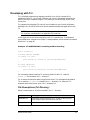
At this time, the SmartLib documentation uses C/C++ conventions. To understand
syntax differences. Compare this simple Tcl example below, with the identical example
written for C on page 28.
Example: ET-1000/SMB-1000 -Connecting and Disconnecting
source et1000.tcl
set iRsp [ETLink $ETCOM1]
if {$iRsp < 0} then {
puts "Could not connect to the ET-1000/SMB-1000"
}
set iRsp [ETUnLink]
if {$iRsp < 0} then {
puts "Could not disconnect from ET-1000/SMB-1000"
}
For information about installing Tcl and using SmartLib with Tcl, read the
Readme.txt file located in the Tcl directory.
For an extensive discussion about using SmartLib with Tcl, see Appendix B Notes on
Tcl or read the TCL_TIPS.TXT located in the Tcl directory. For extensive TCL
examples see the files under <your CD> :\Samples\Tcl\
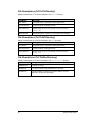
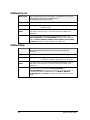
File Descriptions (Tcl Directory)
Below is a description of the files installed in the Tcl directory.
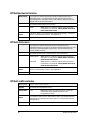
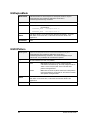
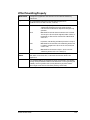
File Name
File Type
README.TXT
Information about installation of TCL as well as setting up your
environment to work with SmartLib under TCL.
TCL_TIPS.TXT
Notes and information specific to using SmartLib with Tcl.
SmartLib User Guide
11
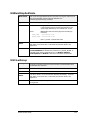
File Descriptions (Tcl\Tcl76 Directory)
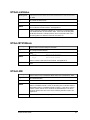
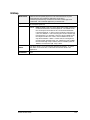
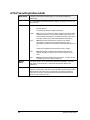
Below is a description of the files installed in the Tcl76 directory.
File Name
File Type
TCL76.DLL
Tcl project library, used when creating applications.
TCLSTRUC.DLL
Tcl DLL used for creating structures.
TCLET100.DLL
SmartLib API for Tcl. This file maps Tcl calls to the main
ETSMB*.DLL.
WIN76P2.EXE
Executable file for installing Tcl 7.6 programming language.
File Descriptions (Tcl/Tcl80 Directory)
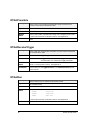
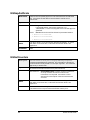
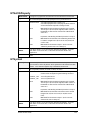
Below is a description of the files installed in the Tcl directory.
File Name
File Type
TCL80.DLL
Tcl project library, used when creating applications.
TCLSTRUC.DLL
Tcl DLL used for creating structures.
TCLET100.DLL
SmartLib API for Tcl. This file maps Tcl calls to the main
ETSMB*.DLL.
File Descriptions (Tcl\Tclfiles Directory)
Below is a description of the files installed in the Tcl\Tclfiles directory.
File Name
File Type
SAMPLE.TCL
A sample Tcl script.
SHOW.TCL
Tcl Utility used for viewing elements in a structure.
ET1000.TCL
SmartLib header file containing SmartLib defines, structure
definitions, and function prototypes.
12
SmartLib User Guide
Developing with Delphi
The Delphi source files have been added to this version of SmartLib. For information
about using SmartLib with Delphi, read the DEL_TIPS.TXT located in the DELPHI
directory.
File Descriptions (Delphi Directory)
The necessary interface files needed for using SmartLib with Delphi are located in the
DELPHI directory. Each *.PAS file corresponds to a C/C++ Header file or “.H” file. For
detailed descriptions of these files, see the "File Descriptions (COMMLIB Directory)"
section above.
NOTE: The central SmartLib DLL is located in the Commlib
directory.
Developing with Visual Basic
SmartLib Programming Library includes files specifically for the Microsoft Visual
Basic environment. Although much of the information that applies to C/C++ is also
valid for Visual Basic, exceptions and differences are noted in this section.
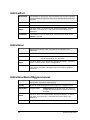
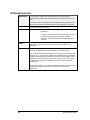
Important Differences - VB vs. C/C++
•
Because C/C++ is case sensitive and Visual Basic is not, there is a group of
parameters that have different names in Visual Basic than they do in C/C++.
Use the chart below to see which name to use. Remember, only the names are
different; the functionality is identical.
For C/C++
(SmartLib
Previous) - VB
(SmartLib 3.02) - VB
HTSTOP
HTRUN_STOP
Use either name
HTSTEP
HTRUN_STEP
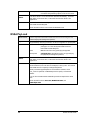
Use either name
HTRUN
HTRUN_RUN
HTRUN_RUN or HTRUN_ VALUE
ETSTOP
ETRUN_STOP
Use either name
ETSTEP
ETRUN_STEP
Use either name
ETRUN
ETRUN_RUN
Use either name
NOTE: The HTRUN name-change applies to the constant
parameter only. Do not change the name of the HTRUN function.
•
In Visual Basic, integers require the same amount of space whether you use the
16 bit or 32 bit version. However, if you are programming with C/C++, "int"
SmartLib User Guide
13
requires a larger memory allocation in the 32 bit version than it does in the 16
bit version.
This means that items that appear in the manual as int, are declared as Long
within SmartLib's header and LIB files for 32 bit Visual Basic.
In addition, Visual Basic does not support unsigned types. In some cases where
unsigned types are specified, conversions must be made. An example is a counter
result where all thirty-two bits are used to represent a positive number.
•
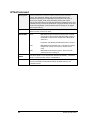
In this version of SmartLib, the parameters for HTVFDStructure have been
renamed to more closely match the parameter names used with C/C++.
For C/C++
(SmartLib
Previous) - VB
(SmartLib 3.02) - VB
*Data
iPointer
pData
DataCount
iLength
DataCount
File Descriptions Used for Visual Basic
The necessary interface files needed for using SmartLib with Visual Basic are located
in the Vb directory; with DLLs and legacy files located in the Commlib directory. Each
of the *.B16 or *.B32 files corresponds to a C/C++ Header file. For detailed file
descriptions, see the "File Descriptions (COMMLIB Directory)" section above. Below is
a general list of the files used when developing with Visual Basic.
File Name
File Type
ETSMBW16.DLL
The dynamic link library for use with 16-bit applications
developed for Windows 95 or NT. This file is located in the
Commlib directory, and installed in your Windows\System
directory.
ETSMBW32.DLL
The dynamic link library for use with 32-bit applications
developed for Windows 95 or NT. This file is located in the
Commlib directory, and installed in your Windows\System
directory.
*.B16
Library header files of defines, structure definitions, and
function prototypes. These files are used for VB 16 bit.
*.B32
Library header files of defines, structure definitions, and
function prototypes. These files are used for VB 32 bit.
ETSMBAPI.TXT
Visual Basic legacy files located in the Commlib directory.
ETSMBW32.TXT
Visual Basic legacy files located in the Commlib directory.
ATMITM32.TXT
Visual Basic legacy files located in the Commlib directory.
To use the SmartLib functions, data structures, and constants, include the appropriate
*.b16 or *.b32 files in your VB project.
14
SmartLib User Guide
Chapter 3:
Programming for UNIX
SmartLib 3.04 supports both C and TCL (7.6 and 8.0.3) programming environments. It
also supplies extensive TCL and C code examples, and the SmartLib manuals in PDF
format (both on the CD).
SmartLib tested under UNIX versions listed below:
•
SunOS 4.1.4.
•
Solaris 2.5.1 - on SPARC architecture.
•
Solaris 2.5.1 - on x86 architecture.
•
Linux 2.0.0 and above - on x86 architecture.
Installing SmartLib for UNIX
The installation for UNIX is now more automated and flexible. To install SmartLib
3.04 for UNIX, you can run the setup.sh installation utility and pick the specific files
you wish to install.
The CD contains both source code and pre-compiled shared libraries.
NOTE: These programs must be installed on your system and
993in your PATH before you install SmartLib for UNIX:
gcc (including the standard C++ library), make, and gunzip.
Step-by-Step UNIX Installation
1. Insert the SmartLib CD-ROM into your CD drive.
2. Mount the CD.
™ Under Solaris, this is automatic. Your CD will be mounted at /cdrom/netcom.
™ Under Linux, enter mount -r /dev/cdrom /mnt/cdrom . Your CD will be
mounted at /mnt/cdrom.
™ Under SunOS, use the correct mount command.
3.
4.
Change to the directory where the CD is mounted.
Run the script setup.sh. The Setup script will prompt you to answer a
number of questions so that your SmartLib installation is customized to your
needs. Key concepts to consider when you install are:
™ Where should SmartLib files be installed?
Several subdirectories are created depending on which features you elect to
install. For system-wide access, it is best to install as root and place SmartLib
in /usr/local. If you don't have root access, you can install in your account. (For
SmartLib User Guide
15
example, if your home directory is /export/home/jdoe, enter
/export/home/jdoe/smartlib.)
™ Do I want precompiled versions of SmartLib, or do I want to compile the source
files on my system?
In most cases use the precompiled versions. They have been tested, and will
install much faster. On Linux, however, you may be unable to use the
precompiled libraries. If you elect not to install the pre-compiled version of the
library, source files are installed instead, and then compiled in your
environment during the install process.
When installing with Linux, libc.so and libn.so may have been renamed so that
our installation script cannot find them. To correct this problem create a
symbolic link (a small pointer file) in the directory where you libc.so.n and
libn.so.n reside.
An example of creating a symbolic link is shown below.
ln -s libc.so libc.so.5
ln -s libn.so libn.so.5
™ Will I write scripts with TCL?
If so, which version: 7.6. or 8.0? There is also an option to install the TCL
programming language (provided on the CD).
16
SmartLib User Guide
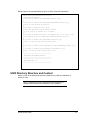
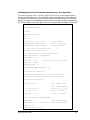
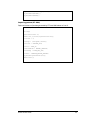
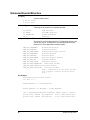
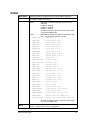
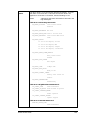
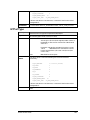
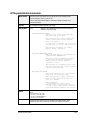
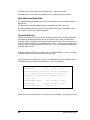
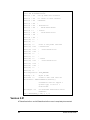
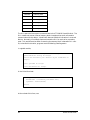
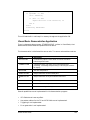
Below is part of an example Setup script for a UNIX SmartLib installation:
Please enter the installation directory:
/export/home/build/test
Do you want to install the Programming Library? [y/n]
y
Do you want to install the precompiled Programming Library? [y/n]
If not, it will be built from source.
y
Do you want to install Tcl 8.0? [y/n]
If yes, the installed versions will be removed.
Say n if you want to install Tcl 7.6 instead.
y
Do you want to install TclStruct 1.3 (requiring Tcl 7.5 or later)? {y/n]
It is required if you are using the Programming Library with Tcl.
y
Do you want to install the precompiled TclStruct? [y/n]
If not, it will be built from the source files.
y
Do you want to install the Tcl Extension to the Programming Library? [y/n]
y
Do you want to install the precompiled Tcl Extension? [y/n]
If not, it will be built from the source files.
y
---------------------------------------Installing Programming Library...
------------------------------------------------------------------------------Installing Tcl 8.0...
----------------------------------------
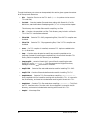
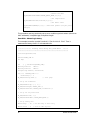
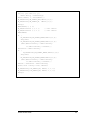
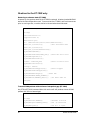
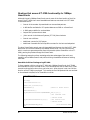
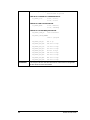
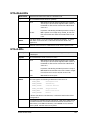
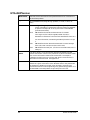
UNIX Directory Structure and Content
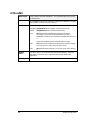
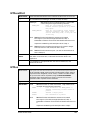
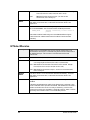
Below is a list of the possible directories created during a UNIX installation of
SmartLib 3.04.
NOTE: Depending on your selections during installation, a
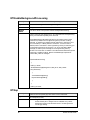
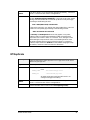
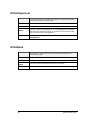
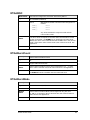
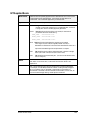
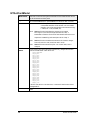
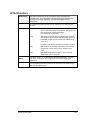
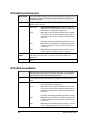
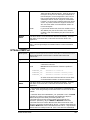
subset of these directories are loaded on your computer.
SmartLib User Guide
17
Though the directory structure can be expanded, this section gives a general overview
of all the top level directories.
•
/bin - Contains files to run the TCL shell. (tclsh is a pointer to the current
TCL shell file.)
•
/include - Contains header files used when coding with SmartLib. (For file
definitions, see the Windows "Developing with C/C++" in the previous chapter.
This directory also includes files used for compiling *.so files.
•
/lib - Contains the compiled *.so files. This directory may include *.so files for
TCL if the TCL interface was selected.
•
/lib/tcl8.0 - Contains TCL 8.0.3 programming files, if the 8.0 TCL compiler was
installed.
•
/lib/tcl7.6 - Contains TCL 7.6 programming files, if the 7.6 TCL compiler was
installed.
•
/man - If a TCL compiler is installed, numerous TCL topics are added to the
/man/* directories.
•
/tmp - Contains other directories used if source code is compiled on the
computer (instead of installing pre-compiled files). Once SmartLib and/or TCL
library files are compiled, this directory can be deleted.
•
/tmp/proglib - contains SmartLib's C source files for compiling the main
SmartLib *.os file: libetsmb.so. This file supports the Original functions,
Message Functions, and the SmartAPI functions.
•
tmp/Tcl8.0 - Contains files and subdirectories used for installing TCL 8.0.3.
•
tmp/Tcl7.6 - Contains files and subdirectories used for installing TCL 7.6.
•
tmp/tclstruct - Contains TCL files used when compiling libtclstruct.so.
Once compiled, this file is used for working with structures in TCL. It is stored in
the /lib directory, and must be included when working with SmartLib in TCL.
•
tmp/tclext - Contains TCL files used when compiling tclet100.so. This file is
the TCL interface to the C function calls. Once compiled it is stored in the /lib
directory, and must be included when working with SmartLib in TCL.
•
tmp/tcl - More temp files.
18
SmartLib User Guide
Developing with C/C++
For information and file descriptions specific to the SmartLib C/C++ interface, see
Developing with C/C++ in the Windows section of this book, on page 9.
Developing with TCL
For information and file descriptions specific to the SmartLib TCL interface, see
Developing with C/C++ in the Windows section of this book, on page 9.
NOTE: For extensive TCL and C code examples on the CD
under: <Your CD>/Samples.
SmartLib manuals can be found in *.PDF format under <Your
CD>/Documents/Manuals/SmartLib.
SmartLib User Guide
19
Chapter 4:
Examples
SmartLib 3.04 provides an extensive series of example source code both in C++ and
TCL programming languages. These Demos are designed to guide you through the
basic tasks with the SmartLib programming library.
Although there are two example groups ( C++, and TCL), it is beneficial to look at both
regardless of your programming environment. The TCL demo scripts contain code that
is used both in the field and in training. It contains pertinent comments for every step.
The C examples walk you through a series of basic tasks while configuring different
SmartCards for Traditional and SmartMetrics traffic.
Example Code Location
The SmartLib Examples are located on the CD in these directories:
<Your CD>
Samples
C
Layer2
Layer3
Tcl
All Cards
ATM
ET1000
FastCard
Layer3
SmartAPI
TokenRing
The TCL Demo Scripts:
The TCL Demo scripts are a group of useful, heavily-commented modules which cover
key tasks you need to accomplish with SmartLib. This collection of scripts has been
created, refined, and used by our Technical Support Specialists. These samples offer
practical information, answering actual questions received by Netcom Systems
customers.
Although these scripts are written in TCL, they contain information useful to
SmartLib programmers working in any environment.
These TCL scripts do not contain examples directly related to the SmartAPIs.
20
SmartLib User Guide
AllCards
This group of scripts is a collection of basic, preliminary tasks executed by the
SmartLib programming library.
1stlink.tcl
A simple serial port link routine between
the PC and a Smartbits controller.
Backoff.tcl
Sets the backoff time - how quickly an
Ethernet card attempts to transmit after
a collision.
cardmod.tcl
Returns the model of the SmartCards.
Example of a 2 dimensional array in TCL.
gap2.tcl
Sets the interframe gap, decrementing the
gap with each code loop.
Group.tcl
Creates a "Group" of two SmartCards, and
then transmits traffic.
GroupCount.tcl
Creates a "Group" of two cards. It then
transmits traffic, and retrieves and
displays group counter information.
LibVer.tcl
Example of passing strings in TCL. Gets
SmartLib version.
misc.tcl
Important error handler for TCL.
multi-link.tcl
Links and unlinks from multiple
controllers (stack of chassis). There is a
possible stack of four chassis per
controller link.
Show.tcl
Utility provided with TCL to display
structure elements.
SocketLink.tcl
A simple Ethernet link routine between
the PC and a Smartbits controller.
Startup.tcl
Sample code to include at the beginning of
a TCL script.
vfd.tcl
Creates traffic with VFD 1, 2, and 3.
Explains differences between the VFDs.
ATM
This group of scripts works with the ATM SmartCards.
1stATM.tcl
Creates a series of PVC connections, and
then transmits data.
ATMDATA.tcl
Gets and displays the configuration data
for an ATM card.
SmartLib User Guide
21
ET1000
These examples deal with ET1000 functionality. The ET1000 is the precursor to the
SMB1000. It supports two ports and does not have removable SmartCards. These
samples include code for an actual ET1000, as well as for ST-64XX cards emulating an
ET1000. This functionality can be useful if, for example, you have ST-6410 SmartCards
and you want to capture test frames.
ET1000MODE.tcl
Defines frames with VFDs and then
transmits traffic.
These routines use ST-64XX cards and an
SMB chassis to accesses ET-1000
functionality.
ETVFD_CYCLE.TCL
Defines frames with VFDs and then
transmits traffic.
These routines executes the same
functions as ET1000Mode.tcl, except that
they control an actual ET1000.
multi.tcl
General overview of the ET1000
capabilities.
FastCard
This group of examples works with the SX-7210 and SX7410 Fast Ethernet
SmartCards. These cards support 10/100 Mb traffic. They do not support Histograms
and VTEs (i.e., no Signature field).
capture.tcl
Configures a main traffic stream, as well
as an alternate stream (e.g., an error
stream). It transmits the traffic. It then
captures incoming traffic and displays the
capture.
gap1.tcl
Sets the interframe gap, transmits traffic,
and displays the rate so that user can see
the effect of gap change.
mii.tcl
Reads and writes from the MII registers.
It changes the baudrate so that the cards
auto-negotiate to correct the speed.
misc.tcl
Important error handler used for TCL.
This routine provides error messages for
anywhere in the script, as opposed to only
reporting errors for the last function call.
setspeed.tcl
Uses the HT commands to set speed,
mode, and duplex for individual cards and
for groups of cards.
22
SmartLib User Guide
Layer3
This group of examples covers creating streams with "Layer3" SmartCards, such as the
L3-6710 and the ML-7710.
L3stack.tcl
Configures the SmartCards local IP
address, Gateway, etc.
This is for background traffic such as
PING frames, SNMP frames, etc., in
addition to the regular test traffic.
l3min.tcl
This script does the minimum
configuration of a Layer 3 card, with the
exception of setting up the actual traffic
streams.
ipstream.tcl
Creates multiple streams using
L3_DEFINE_IP_STREAM and
L3_DEFINE_MULTI_IP_STREAM
(described in the Message Function
manual).
ipxstream.tcl
Creates multiple IPX streams.
udpstream.tcl
Creates multiple UDP streams.
L3mod_stream_array.tcl
Creates a group of IP streams, and then
modifies only the packet length of some of
the streams.
L3Trigger.tcl
Illustrates the use of
L3_CAPTURE_ALL_TYPE and
L3_CAPTURE_TRIGGERS_TYPE.
l3_v2_hist_lat.tcl
Uses L3_HIST_V2_LATENCY and
L3_HIST_V2_LATENCY_INFO to
capture and display latency information
over time intervals.
L3Zero.tcl
Uses
L3_DEFINED_STREAM_COUNT_INFO
to display the number of streams
currently defined on the target card.
L3_STREAM_INFO.tcl
Uses L3_STREAM_INFO to display IP
stream data.
L2-L3.tcl
Shows how to switch a SmartCard from
"Layer 2" mode to "Layer 3" mode.
SmartLib User Guide
23
SmartAPI
This example work with the SmartLib API.
SmartAPI.tcl
Demonstrates the four SmartAPPs tests:
Throughput, Back-to-Back, Packet Loss,
and Latency.
Token Ring
This example works with Token Ring SmartCards.
TokenRing.tcl
Sets up transmission perameters and two
VFDs on a Token Ring SmartCard
The C Demo Modules:
This next section describes the two C demo modules. Each module is divided into a
number of steps. This allows you to see the actions needed for basic testing with the
SmartLib programming library.
•
Layer 2 - Provides a basic demonstration of setting up unidirectional traffic
between source and destination with the SmartCard in Traditional mode. The card
configurations cover each type of SmartCard when set to "Layer 2"/Traditional
mode.
In Traditional mode, the complex Layer2,3, and 4 testing requires more effort than
in "Layer 3"/SmartMetrics mode. Traditional mode uses VFDs (Variable Field
Definitions) to set up one or more traffic streams. ARP responses and Histogram
results are not available.
•
Layer 3 - Provides a basic demonstration of setting up unidirectional traffic
between source and destination with SmartCards in SmartMetrics mode. The card
configurations cover each type of SmartCard when set to "Layer 3/"SmartMetrics
mode. In SmartMetrics mode, a card uses VFDs as well as the more complex VTEs
to set up traffic streams. ARP responses and other network interactions are
automatic. Relational Histogram results are available. Not all card types support
SmartMetrics mode.
Basic C Demo Configuration - Steps 1-5
Although the Demos are different, the Demos follow a basic course arranged in Steps.
Below is a list of the steps with general descriptions of each.
Example: Code Snippet from demo.cpp (the main routine in the Layer 2
demo).
Note the five Step-procedures called by the routine.
24
SmartLib User Guide
Step1_ExamineSystem();
Step2_DetermineConnections();
/* Show card types, models and version
information */
/* Determine connections */
Step3_ResetAndSetupAll();
/* Reset and setup each card */
Step4_Transmit(STAGGERED_START);
Step5_ShowAllCounters();
/* Transmit packets */
/* Show counters */
Step4_Transmit(SYNCHRONIZED_START);
Step5_ShowAllCounters();
/* Transmit packets */
/* Show counters */
/* Terminate our session with SmartBits */
printf("\nPress any key to UnLink and close the window\n");
Basic Steps for the C Demos:
Step 1 -
Queries the SmartCards to see the kinds of cards present in the
chassis.
Step 2 -
Pairs cards so that each destination card has a source card.
™ For Layer2 and Layer3 demos, the next like card is configured as the
destination card. Un-paired cards are not used in the test.
™ The cards in the SmartAPI demo are paired according to the test
configuration.
Step 3 -
Sets cards to a know state and then sends the proper configuration
for each card type. Step 3 is the most complex step of this demo
series.
Step 4 -
Starts the test traffic.
Step 5 -
Displays the result information.
SmartLib User Guide
25
Files Contained in Each C Demo
Although each of the C Demo modules contains a slightly different set of files, there
are common features throughout. Below is a list of file types you can expect to see.
Demo*.cpp (or) *Main.cpp - The central file used to link the computer to the
chassis and call the test Steps.
*Step1*.cpp (through) *Step5*.cpp - Files which contain code that executes the
demo steps. See the "Basic Steps Explained" above for Step definitions.
*Utils*.cpp - The catch-all file. For example, it contains certain constants, error
code, and the routines used for reading from the *.ini files found in Smart Signaling
and SmartAPI.
*.h - The header file for the specific demo project.
Notes for Specific Demos
This section provides additional notes and tips for working with specific demos. Use it
in conjunction with the basic information previously mentioned.
Layer 3
As mentioned earlier, if a SmartCard is in "Layer 3"/SmartMetrics mode, numerous
capabilities are available such multiple streams configurable on a per-stream basis,
true ARP interaction, and most importantly for this module, Histogram results.
Depending on whether you wish to view Latency over Time, Latency per Stream,
Sequence Tracking, etc, a different Histogram is enabled on the SmartCard. Note that
for the Layer 3 Demo, there is no Step 5 cpp file. This is because you display the
results using one of the Histogram modules.
Running the C Demos
To compile and run the C demos:
For MS Windows:
1. Create a 32bit Console Applications Project.
2. Add the source files for the desired demo and the appropriate Netcom Systems
library into the project.
3. Compile the demo, and run the program.
For UNIX:
1. Create a makefile that compiles all cpp files, then links them with libetsmb.so to
produce an executable.
2. Run the executable.
26
SmartLib User Guide
Additional Examples (in the manual)
Here are a number of previously included examples that appear only in the SmartLib
User Guide.
The examples in this section are divided into five categories:
•
Error Handling Macros.
•
Routines for SmartBits/SmartCards and the ET-1000.
•
Routines for SmartBits/SmartCards only.
•
Routines for the ET-1000 only.
•
Routines that access ET-1000 functionality with 10Mbps SmartCards.
All example routines in this section use the Error Handling Macros (ET_INT and
ET_LONG) defined below. Netcom Systems recommends that you use error handling
macros such as these to check each call to a SmartLib Programming Library routine.
Resulting error messages can then be used to track and troubleshoot problems.
Error Handling Macros
// Also assumes that an int iRsp is in scope
#define ET_INT(a)
\
{
\
iRsp = (a);
\
if (iRsp<0) printf(“Error in Command: %d\n”,iRsp); \
}
// Also assumes that a long lRsp is in scope
#define ET_LONG(a)
\
{
\
lRsp = (a);
\
if (lRsp<0) printf(“Error in Command: %ld\n”,lRsp);\
}
SmartLib User Guide
27
Routines for SmartBits and the ET-1000
Connecting and disconnecting (SmartBits/ET-1000)
int iRsp;
ET_INT(ETLink(ETCOM1));
if (iRsp<0)
printf(“Could not connect to the ET/SMB-1000\n”);
ET_INT(ETUnLink());
if (iRsp<0)
printf(“Could not disconnect from the ET/SMB-1000\n”);
Multiple connect and disconnect (SmartBits/ET-1000)
#define MAX_ETSYSTEM
4
int iRsp, iIndex = 0;
int i;
int iPorts[MAX_ETSYSTEM] = {ETCOM1,ETCOM2,ETCOM3,ETCOM4};
for (i = 0; i < MAX_ETSYSTEM; i++)
{
//Link to all in list
ET_INT(ETLink(iPorts[i]));
if (iRsp<0)
printf(“Connect error to ET/SMB-1000 ETCOM%d\n”,
iPorts[i] + 1 );
else
{
iPorts[iIndex] = iPorts[i];
//update actual ComPort
iIndex++;
// for this link
}
}
for (i = 0; i< iIndex; i++)
{
ETSetCurrentLink( iPorts[ i ] );
ET_INT(ETUnLink());
//Unlink each connect
if (iRsp<0)
//On error,
printf(“Disconnect error from ET/SMB-1000 ETCOM%d\n”,
iPorts[ i ] + 1 );
}
iIndex = 0;
28
//no links now
SmartLib User Guide
Routines for SmartBits only
Restore all SmartCards to a known state (SmartBits)
To ensure accuracy of test results, it is important to set SmartCards to a known state
before running a test. There are numerous types of SmartCards, each with different
features and configurations. The reset routine you create will depend on the tests you
run and the SmartCards you are working with. The routine below is an example of a
minimal reset for Ethernet and Token Ring cards.
#include “et1000.h”
void ResetSmartBits()
{
int iRsp;
int iSMBPorts[MAX_HUBS][MAX_SLOTS][MAX_PORTS];
int iHub;
int iSlot;
int iPort;
HTVFDStructure htVFD;
HTTriggerStructure htTrig;
int* piData;
piData = (int*)malloc(60*sizeof(int));
memset(piData,0,60*sizeof(int));
//Zero packet content
memset(&htVFD,0,sizeof(htVFD));
memset(&htTrig,0,sizeof(htTrig));
ET_INT(HGSetGroup(NULL));
ET_INT(HTHubSlotPorts(iSMBPorts));
//Set all SmartCards found into a group
for (iHub=0;iHub<MAX_HUBS;iHub++)
for (iSlot=0;iSlot<MAX_SLOTS;iSlot++)
for (iPort=0;iPort<MAX_PORTS;iPort++)
if (iSMBPorts[iHub][iSlot][iPort]==CT_ACTIVE)
ET_INT(HGAddtoGroup(iHub,iSlot,iPort));
ET_INT(HGSelectTransmit(HTTRANSMIT_OFF));
ET_INT(HTSelectReceive(-1,-1,-1));
ET_INT(HGDataLength(60));
//Packet length w/o CRC
ET_INT(HGFillPattern(60,piData)); //Packet content
ET_INT(HGTransmitMode(CONTINUOUS_PACKET_MODE));
ET_INT(HGGap(96L));
ET_INT(HGAlign(0));
//Reset any errors
ET_INT(HGDribble(0));
ET_INT(HGCRC(ET_OFF));
htVFD.Configuration = HVFD_NONE;
SmartLib User Guide
//Reset VFDs
29
ET_INT(HGVFD(HVFD_1,&htVFD));
ET_INT(HGVFD(HVFD_2,&htVFD));
ET_INT(HGVFD(HVFD_3,&htVFD));
ET_INT(HGTrigger(HTTRIGGER_1,HTTRIGGER_OFF,&htTrig));
ET_INT(HGTrigger(HTTRIGGER_2,HTTRIGGER_OFF,&htTrig));
free(piData);
//Reset triggers
ET_INT(HGSetGroup(NULL));
}
30
SmartLib User Guide
Send 100 packets to each of 10 MAC addresses from 1 port (SmartBits)
This routine uses two VFDs. The first, either VFD1 or VFD2, is static and is used as
the source MAC address. The second, VFD3, contains ten destination MAC addresses.
Ten packets are transmitted using a different destination address from VFD3 for each
packet. Once each of the addresses has been used, the routine recycles to the beginning
of VFD3 and begins the process again until all hundred packets have been transmitted.
#include “et1000.h”
void SmartXmt1000to10()
{
int iRsp;
HTVFDStructure htVFD;
int i,j;
int* pi;
int iDest[6] = {1,0,0,0,0,0};
//Source address
ET_INT(HTRun(HTSTOP,0,0,0));
//First, stop sending
memset(&htVFD,0,sizeof(htVFD));
//Setup VFD fields
pi = (int*)malloc(10*6*sizeof(int));
memset(pi,0,10*6*sizeof(int));
//Set source address via static HTVFD field
htVFD.Configuration = HVFD_STATIC;
htVFD.Range = 6;
htVFD.Offset = 48;
//Bit position of source address
htVFD.Data = iDest;
htVFD.DataCount = 0;
ET_INT(HTVFD(HVFD_1,&htVFD,0,0,0));
/*
Set destination addresses to:
000000000001,000000000002,000000000003,000000000004,
000000000005,000000000006,000000000007,000000000008,
000000000009,00000000000a,
*/
for (i=0;i<10;i++)
//Fill integer array
{
//with 10 MAC addresses
for (j=0;j<5;j++)
//Start all at 0, last
pi[i*5+j] = 0;
//digit increments as
pi[i*5+5] = i+1;
// shown in comments
}
htVFD.Configuration = HVFD_ENABLED;
htVFD.Range = 6;
htVFD.Offset = 0;
//Size of MAC address
//Bit position of destination address
htVFD.Data = pi;
htVFD.DataCount = 10*6;
SmartLib User Guide
31
ET_INT(HTVFD(HVFD_3,&htVFD,0,0,0));
//Enable the VFD3
ET_INT(HTTransmitMode(SINGLE_BURST_MODE,0,0,0));
//set single burst
ET_INT(HTBurstCount(100L*10L,0,0,0));
//set burst count
ET_INT(HTRun(HTRUN,0,0,0)); //Send 1000 packet (100 per port)
free(pi);
}
This procedure uses any previously set up error conditions, packet content (other than
MAC addresses), interpacket gap, and packet length.
SmartBits - Measuring Latency
This example transmits a packet from Hub 0 - Slot 0 to Hub 0 - Slot 1. Then it
measures the latency time in .1 microsecond units.
/////////////////////////////////////////////////////////
/////////////// Latency Test using Trig and DFill
//////
/////////////////////////////////////////////////////////
void LatencyFrom1To2(void)
{
#define PACKET_SIZE 60
int iRsp;
int
i, j, FillPattern[PACKET_SIZE];
HTLatencyStructure
HTLat1;
HTLatencyStructure
HTLat2;
unsigned long ulResult, ulFirstValue;
for( i=0; i<PACKET_SIZE; i++)
FillPattern[i] = i;
ET_INT(HGSetGroup( NULL ));
// clear group
// set up one transmitter
ET_INT(HGAddtoGroup( 0, 0, 0 ));
ET_INT(HGDataLength( PACKET_SIZE ));
ET_INT(HGFillPattern( PACKET_SIZE, FillPattern ));
// set up for one packet burst
ET_INT(HGBurstCount( 1 ));
ET_INT(HGTransmitMode( SINGLE_BURST_MODE ));
// Set up latency data
HTLat1.Range
= 12; // use this many of iData array
HTLat1.Offset
= 0;
32
// start at this may bits
SmartLib User Guide
// put in reverse order so MAC addresses will be correct!
for( i=0, j=11; i<12; i++, j--)
HTLat1.iData[j] = FillPattern[i];
memset( &HTLat2, 0 , sizeof(HTLat2) );
ET_INT(HTLatency(HT_LATENCY_RXTX,&HTLat1,0,0,0));
ET_INT(HTLatency(HT_LATENCY_RX,
&HTLat1,0,1,0));
HGStop();
HTRun(HTSTOP, 0, 1, 0);
ET_INT(HTClearPort( 0, 0, 0 ));
// clear counters
ET_INT(HTClearPort( 0, 1, 0 ));
// clear counters
HGRun(HTRUN);
do
{
ET_INT(HTLatency(HT_LATENCY_REPORT,&HTLat1,0,1,0));
delay(2000);
ET_INT(HTLatency(HT_LATENCY_REPORT,&HTLat2,0,1,0));
}while((HTLat1.ulLatency != HTLat2.ulLatency)
&& (HTLat1.ulLatency < 20000000L) );
ulFirstValue = HTLat1.ulLatency;
do
{
ET_INT(HTLatency(HT_LATENCY_REPORT,&HTLat1,0,0,0));
delay(2000);
ET_INT(HTLatency(HT_LATENCY_REPORT,&HTLat2,0,0,0));
}while((HTLat1.ulLatency != HTLat2.ulLatency)
&& (HTLat1.ulLatency < 20000000L) );
ulResult = ulFirstValue - HTLat1.ulLatency;
printf( "Port 1 latency: %lu\n", ulResult);
ET_INT(HTLatency( HT_LATENCY_OFF, &HTLat1, 0, 0, 0));
ET_INT(HTLatency( HT_LATENCY_OFF, &HTLat1, 0, 1, 0));
HGStop();
}
SmartLib User Guide
33
Routines for the ET-1000 only.
Restoring to a known state (ET-1000)
At power-up, the previous state of the ET1000 is restored. A battery backed NVRAM
stores the last configuration used. To ensure that the ET1000 is set to a known state
prior to running a test, a routine similar to the one below should be used.
void ResetET1000()
{
int iRsp;
CollisionStructure cs;
TriggerStructure ts;
VFDStructure* pVS;
pVS = (VFDStructure*)malloc(sizeof(VFDStructure));
memset(&cs,0,sizeof(cs));
//Zero structures used
memset(&ts,0,sizeof(ts));
memset(pVS,0,sizeof(VFDStructure));
ET_INT(ETRun(ETSTOP));
ET_INT(ETTransmitCRC(ETCRC_OFF)); //Reset CRC error state
ET_INT(ETAlignCount(0));
ET_INT(ETDribbleCount(0));
cs.Mode = COLLISION_OFF;
//Reset collision state
ET_INT(ETCollision(&cs));
ts.Range = 0x0008;
ET_INT(ETReceiveTrigger(&ts));
//Reset triggers
ET_INT(ETTransmitTrigger(&ts));
ET_INT(ETVFDParams(pVS));
//Reset VFD
ET_INT(ETVFDRun(ETVFD_DISABLE));
ET_INT(ETBurst(ETBURST_OFF,1L));
//Set burst mode off
free(pVS);
}
Transmit 1000 packets with minimum interpacket gap (ET-1000)
Any ETRun(ETRUN) command after this routine will still produce a burst of 1000
packets with 9.6 microsecond gap.
void ETBurst1000()
{
int iRsp;
34
ET_INT(ETSetSel(ETSELA));
//Transmit on Port A
ET_INT(ETGapScale(ETGAP_100NS))
//Use .1µ resolution
ET_INT(ETGap(90L));
//use 90 + 6 .1µsec
SmartLib User Guide
ET_INT(ETBurst(ETBURST_ON,1000L));
ET_INT(ETRun(ETSTEP));
ET_INT(ETRun(ETRUN));
}
Capturing packets (ET-1000)
Captures the burst of packets generated by ETBurst1000 above on Port B.
void ETCapture()
{
int iRsp;
CaptureStructure cs;
memset(&cs,0,sizeof(CaptureStructure));
cs.Offset = 0;
cs.Range = (unsigned)(1518*8);
cs.Filter = CAPTURE_ALL;
cs.Port = PORT_B;
cs.BufferMode = BUFFER_ONESHOT;
cs.TimeTag = TIME_TAG_OFF;
cs.Mode = CAPTURE_ENTIRE_PACKET;
ET_INT(ETCaptureParams(&cs));
ETBurst1000();
}
SmartLib User Guide
35
Routines that access ET-1000 functionality for 10Mbps
SmartCards.
Although the early 10Mbps SmartCards contain most of the functionality of their forrunner, the ET-1000, there are a few additional features contained in the ET-1000.
These features are:
•
Control of the number of preamble bits on transmitted packets.
•
A 4KB buffer available for VFD packet data versus 2KB on a SmartCard.
•
A 1MB capture buffer for received data.
•
Output BNC pulse and clock data
•
Jitter control via the Netcom Systems JET-210 jitter simulator
•
Control over collisions
•
Additional counter for SQE pulses
•
Additional Preamble Bits and Gap Bits counters for the last received packet
The later SmartCards contain many of these additional features, but the full ET-1000
feature set can still be accessed by the 10Mbps SmartCards. You can use functions
within a routine to generate packets from the controller (either SmartBits or the ET1000), passing the packets through the SmartCards.
The following example routines are designed to take advantage of the multi-port
capability of the 10Mbs SmartCards, while utilizing the additional features residing
controller.
SmartBits Collision Testing using ET-1000
To force a packet collision using the ET-1000 with 10Mbps SmartCards, the ET1000
and SmartBits are set to a known state. Then commands are sent to select the ET1000
transmit and receive functions for a particular port. After the port is set, the Collision
function of the ET1000 is employed. This causes the first 100 packets that are received
on the selected Hub/Slot/Port of SmartBits to collide.
void SMBCollide()
{
int iRsp;
CollisionStructure cs;
memset(&cs,0,sizeof(cs));
ResetET1000();
//Reset to known states
ResetSmartBits();
ET_INT(HTSelectTransmit(HTTRANSMIT_COL,0,0,0));
//Set transmit from
// ET1000 PortB
ET_INT(HTSelectReceive(0,0,0));
//Set receive from
// ET1000 PortB
ET_INT(ETLNM(ETLNM_OFF));
off
36
//Live Network Mode
SmartLib User Guide
//Set elements of collision structure
cs.Offset = 32+64;
//32 bits into frame
cs.Duration = 96;
//Collide for 96 bits
cs.Count = 100;
//Against 100 packets
cs.Mode = CORP_B;
//Must use ET1000 PortB
ET_INT(ETCollision(&cs));
//Make it so
}
SmartLib User Guide
37
Chapter 5:
Original Function Summary
The table below contains a brief summary of each "Original" functions covered in the
SmartLib User Guide 3.04. They are grouped by category. Although there are some
new functions in this module of the SmartLib programming library, they do not
incorporate the newer methods supported in the Message Functions.
For more information about each of these Original functions, consult Chapter 6
SmartLib Detailed Description.
Category
Function Name
Description
BNC
int ETBNC
(int BNCid,
int Config)
Defines the mode for all rear panel
BNC connectors.
BNC
int ETGetBNC
(int BNCid)
Retrieves the configuration of the
BNC identified by BNCid
BNC
int ETGetJET210Mode
(void)
Returns the current JET-210
mode.
BNC
int ETSetJET210Mode
(int Mode)
Enables or disables the JET-210
mode.
Burst
int ETBurst
(int Mode,
long Count)
Specifies the Burst Mode and
Count.
Burst
long ETGetBurstCount
(void)
Returns the current Burst Count.
Burst
int ETGetBurstMode
(void)
Returns the current Burst Mode.
Capture
int ETCaptureParams
(CaptureStructure* CStruct)
Specifies Capture Offset, Range,
Port, memory mode and run mode.
All parameters must be put into
CStruct before calling this
function.
Capture
int ETCaptureRun()
Starts or Aborts Capturing,
depending on the value of Start.
Parameters must be previously set
up in ETCaptureParams(...).
Capture
int ETGetCapturePacket
(long PI,
int* Buffer,
int BufferSize)
Dumps the data from a captured
packet, referenced by PI, into a
memory location pointed to by
Buffer. Up to Max characters are
returned in Buffer. Buffer is NOT
null terminated. Returns number
of characters placed in Buffer.
38
SmartLib User Guide
Capture
long ETGetCapturePacketCount
(void)
Returns the number of complete
packets captured.
Capture
int ETGetCaptureParams
(CaptureStructure* CStruct)
Returns current capture
parameters in the structure
pointed to by CaptureStructure.
Collision
int ETCollision
(CollisionStructure* CStruct)
Determines the collision mode,
offset, duration and count. All
parameters are put into CStruct
before calling this function.
Collision
int ETGetCollision
(CollisionStructure* CStruct)
Returns the current mode of the
collision.
Comm
int
ETEnableBackgroundProcessing
(int bFlag)
Allows enhanced responsiveness of
foreground applications.
Comm
long ETGetBaud
(void)
Returns the current baud rate
setting.
Comm
int ETGetCurrentLink
(void)
Returns the current ET ComPort.
Comm
int ETGetErrorStatus
(void)
Returns the error status of the
serial link.
Comm
int ETGetLinkFromIndex
(int iLink)
Returns the ET ComPort
associated with the specified link
number in iLink.
Comm
int ETGetLinkStatus
(void)
Returns 0 if remote link not
established, otherwise, returns the
identity of the COM port that has
been successfully linked to the
attached ET-1000.
Comm
int ETGetTotalLinks
(void)
Returns total number of ET-1000
links.
Comm
int ETIsBackgroundProcessing
(void)
Returns 1 if the Programming
Library is currently executing a
function.
Comm
int ETLink
(int ComPort)
Establishes a communication link
to an ET-1000 using the port
specified in ComPort. Baud Rate
automatically adjusts to the baud
rate of the ET-1000.
Comm
int ETSetBaud
(int Baud)
Adjusts the Baud rate of the serial
link.
Comm
int ETSetCurrentLink
(int ComPort)
Sets the attached ET-1000 link
specified in the ComPort as the
current link for ET commands in
the Programming Library.
SmartLib User Guide
39
Comm
int ETSetCurrentSockLink
(char* IPAddr)
Specify which SmartLib Link
(SMB to PC) is the current Link.
If you have multiple Links, use
this command prior to sending
"ET" controller-specific commands
such as ETGetHardwareVersion.
You do not need to used this
command prior to sending
SmartCard-specific commands.
Comm
int ETSetTimeout
(unsigned TimeOutValue)
Specifies the time-out value used
by the serial port in timing the
response from the attached ET1000.
Comm
int ETUnLink
(void)
Unlinks the communication
session with the attached ET1000.
Comm
unsigned ETRemote
(int Mode)
Sets the attached ET-1000 in the
remote or manual mode.
Control
int ETGetLNM
(void)
Returns the current Live Network
Mode state of the attached ET1000.
Control
int ETGetRun
(void)
Returns the current run state of
the attached ET-1000.
Control
int ETGetSel
(void)
Returns the current Sel Setting of
the attached ET-1000; A, A/B or B.
Control
int ETGetSwitch
(SwitchStructure* SStruct)
Loads SStruct with the front panel
switch settings.
Control
int ETLNM
(int Mode)
Activates or Deactivates the Live
Network Mode in the attached ET1000.
Control
int ETLoopback
(int ABPort,
int Status)
Controls whether or not a port (A
or B) is looped back on itself.
Control
int ETRun
(int RunValue)
Sets the run state of the ET-1000.
Control
int ETSetGPSDelay
(ulong ulSeconds)
Determines what the HGRun start
time will be if GPS if available.
Calculations are based on the
estimated time to send a message
to the remote hub.
Control
int ETSetSel
(int SelValue)
Sets the Sel switch to A, A/B or B.
Control
int ETSetup
(int Mode,
int SetupId)
Stores the current setup internally
in ET-1000 using the reference
number in SetupId. Also used to
recall setup in ET-1000 referenced
by SetupId.
40
SmartLib User Guide
Counters
int ETGetCounters
(CountStructure* CStruct)
Gets all counter information and
loads them into the structure
pointed to by CountStructure.
Counters
int ETMFCounter
(int ABPort,
int Mode)
Identifies the item to be counted
by the Multi-Function counters.
Port identifies Port A or Port B.
Counters
int ETReset
(void)
Resets all counters and logic on
the attached ET-1000.
Data
int ETDataLength
(long Count)
Specifies the number of bytes per
packet to be used in transmitting
data from the ET-1000.
Data
int ETDataPattern
(int Pattern)
Defines the background data
pattern to transmit.
Data
long ETGetDataLength
(void)
Returns the current length of
transmitted data packet, in bytes.
Data
int ETGetDataPattern
(void)
Returns the identity of the current
background transmit data pattern.
Data/VFD
int ETGetVFDRun
(void)
Returns the current run state of
the VFD.
Data/VFD
int ETVFDParams
(VFDStructure* VFDdata)
Sends VFD data to the ET-1000.
Structure VFDdata includes a
start pattern array, an increment
pattern array, the offset value and
the range value.
Data/VFD
int ETVFDRun
(int Start)
Starts or halts VFD transmission.
Gap
int ETGap
(long Count)
Specifies the gap value that is
scaled by ETGapScale(...).
Gap
int ETGapScale
(int TimeOfGap)
Specifies that either the 100ns gap
scale or the 1µs gap scale is to be
used in determining the gap time
Gap
long ETGetGap
(void)
Returns the gap value currently
being transmitted.
Gap
int ETGetGapScale
(void)
Returns the current scale being
used for the Gap.
General
int ETGetFirmwareVersion
(char* Buffer)
Returns the firmware version
identifier for the attached ET1000.
General
int ETGetHardwareVersion
(char* Buffer)
Returns the Hardware version
identifier for the attached ET1000.
General
int ETGetLibVersion
(char* pszDescription,
(char* pszVersion)
Returns the version information
for the current rev of the
programming library.
SmartLib User Guide
41
General
int ETGetSerialNumber
(char* Buffer)
Returns the Serial Number
identifier for the attached ET1000.
General
void* ETReturnAddress
(void* pVoid)
Returns the same pointer passed.
This is a special function for
VisualBasic.
Preamble
int ETGetPreamble
(void)
Returns the current preamble
count being placed in the transmit
stream.
Preamble
int ETPreamble
(int Count)
Specifies the preamble bit count.
TError
int ETAlignCount
(int Count)
Specifies the number of alignment
error bits to insert into the
transmit stream.
TError
int ETDribbleCount
(int Count)
Specifies the number of dribble
bits to insert into the transmit
stream.
TError
int ETGetAlignCount
(void)
Returns the current alignment
error bits being inserted into the
transmit data stream.
TError
int ETGetCRCError
(void)
Retrieves the current state of CRC
error injection.
TError
int ETGetDribbleCount
(void)
Returns the current dribble bits
being inserted into the transmit
data stream.
TError
int ETTransmitCRC
(int Active)
Enables or disables transmission
of CRC errors.
Trigger
int ETGetReceiveTrigger
(TriggerStructure* RStruct)
Fills RStruct with the receive
trigger parameters currently being
implemented in the attached ET1000.
Trigger
int ETGetTransmitTrigger
(TriggerStructure* TStruct)
Fills TStruct with the transmit
trigger parameters currently being
implemented in the attached ET1000.
Trigger
int ETReceiveTrigger
(TriggerStructure* RStruct)
Sends the receive trigger
parameters to the ET-1000. All
trigger information is contained in
RStruct.
Trigger
int ETTransmitTrigger
(TriggerStructure* TStruct)
Sends the transmit trigger
parameters to the ET-1000. All
trigger information is contained in
TStruct.
SmartBits
int HGAlign(int iBits)
Creates alignment bit errors on
transmission.
42
SmartLib User Guide
SmartBits
int HGBurstCount
(long lVal)
Sets the amount of packets to be
sent in each burst when in a burst
mode.
SmartBits
int HGBurstGap
(long lVal)
Sets the time gap in between each
burst when in a multiburst
transmit mode.
SmartBits
int HGBurstGapAndScale
(long lVal,
int iScale)
Sets the time gap in between each
burst when in a multiburst
transmit mode, according to the
given scale.
SmartBits
int HGClearGroup
(void)
Ungroups a number of ports that
were previously grouped together
with the HGSetGroup or the
HGAddtoGroup command.
SmartBits
int HGClearPort
(void)
Clears the counters.
SmartBits
int
HGCollisionBackoffAggressivenes
s
(unsigned int uiAggressiveness)
Sets a flag to determine the upper
bound for the delay during
multiple collisions. This value is a
power of 2 of the uiAggressiveness
factor.
SmartBits
int HGCRC
(int iMode)
Creates CRC errors on
transmission.
SmartBits
int HGDataLength
(int iLength)
Determines the packet data length
on each transmitted packet. Also
can be used to produce random
data length packets.
SmartBits
int HGDribble
(int iBits)
Creates dribbling bit errors on
transmission.
SmartBits
int HGFillPattern
(int iSize,
int* piData)
Defines the fill pattern to be
transmitted in the data field of
each packet.
SmartBits
int HGDuplexMode
(int iMode)
Sets the Duplex Mode of the
current group
SmartBits
int HGGap
(long lPeriod)
Determines the gap period
between transmitted packets on
each port of a group of SmartBits
ports, and automatically adjusts
the gap period to match the hub
card being addressed. Also can be
used to produce random gap
periods.
SmartBits
int HGGapAndScale
(long lPeriod, int iScale)
Determines the gap period
between transmitted packets on
each port of a group of SmartBits
ports using the user specified
scale. Also can be used to produce
random gap periods.
SmartLib User Guide
43
SmartBits
int HGGetCounters
(HTCountStructure htCount)
Retrieves counter information
from the cards in the current
group.
SmartBits
int HGMultiBurst
(long lVal)
Sets the amount of bursts to send
when in a multiburst transmit
mode.
SmartBits
int HGRun
(int Mode)
Sets the run mode for each port of
a group of SmartCards.
SmartBits
int HGStart
(void)
Used to start transmission on a
group of SmartBits ports.
SmartBits
int HGStep
(void)
Used to send a single packet on
each port of a group of SmartBits
ports.
SmartBits
int HGStop
(void)
Used to stop transmission on each
port of a group of SmartBits ports.
SmartBits
int HGTransmitMode
(int iMode)
Sets up to send packets in the
transmit mode selected.
SmartBits
int HGTrigger
(int TrigId,
int Config,
TriggerStructure* ptsInfo)
Sets up the trigger pattern and
mode on each port of a group of
SmartBits ports.
SmartBits
int HGVFD
(int VFDId,
HTVFDStructure* phtvfdInfo)
Sets up the VFD data and
operating state on each port of a
group of SmartBits ports.
SmartBits
int HGSelectTransmit
(int Mode)
Selects the mode for the ET-1000’s
Port B to transmit using the
current group. This command can
be used on both SmartCards and
Passive Hub Cards.
SmartBits
int HTBurstCount
(long lVal,
int iHub,
int iSlot,
int iPort)
Sets the amount of packets to be
sent in each burst when in a burst
mode.
SmartBits
int HTBurstGap
(long lVal,
int iHub,
int iSlot,
int iPort)
Sets the time gap in between each
burst when in a multiburst
transmit mode.
SmartBits
int HTBurstGapAndScale
(long lVal,
int iScale,
int iHub,
int iSlot,
int iPort)
Sets the time gap in between each
burst when in a multiburst
transmit mode, according to the
given scale.
44
SmartLib User Guide
SmartBits
int HTTransmitMode
(int iMode,
int iHub,
int iSlot,
int iPort)
Sets up to send packets in the
transmit mode selected.
SmartBits
int HTDuplexMode
(int iMode,
int iHub,
int iSlot,
int iPort)
Sets the Duplex Mode of the
selected port
SmartBits
Group
int HGAddtoGroup
(int iHub,
int iSlot,
int iPort)
Along with HGSetGroup, this
command can be used to add
individual hub/slot/port cards to a
group.
SmartBits
Group
int HGGetGroupCount
(void)
Returns the number of ports
currently in the configured group.
SmartBits
Group
int HGIsPortInGroup
(int iPortId)
Used to check if an individual port
is currently in the configured
group.
SmartBits
Group
int HGIsHubSlotPortInGroup
(int iHub,
int iSlot,
int iPort)
Used to check if an individual
hub/slot/port is in the currently
configured group.
SmartBits
Group
int HGRemoveFromGroup
(int iHub,
int iSlot,
int iPort)
Used to remove an individual
hub/slot/port cards from a
currently configured group.
SmartBits
Group
int HGRemovePortIdFromGroup
(int iPortId)
Used to remove an individual
iPortId from a currently
configured group.
SmartBits
Group
int HGSetGroup
(char* PortIdGroup)
Used to set group ports on a
SmartBits for purposes of
concurrently configuring, starting,
stopping, and stepping the
transmission of packets from
several ports.
SmartBits
Group
int HGSetGroupType
(int Index,
int *PortIdList)
Used to set group ports on a
SmartBits by card type for
purposes of concurrently
configuring, starting, stopping,
and stepping the transmission of
packets from several ports.
SmartCard
int HTAlign
(int iBits,
int iHub,
int iSlot,
int iPort)
Creates alignment errors on
transmission.
SmartLib User Guide
45
SmartCard
int HTClearPort
(int iHub,
int iSlot,
int iPort)
Clears the counters.
SmartCard
int
HTCollisionBackoffAggressivenes
s
(unsigned int uiAggressiveness,
int iHub,
int iSlot,
int iPort)
Sets a flag to determine the upper
bound for the delay during
multiple collisions. This value is a
power of 2 of the uiAggressiveness
factor.
SmartCard
int HTCRC
(int iMode,
int iHub,
int iSlot,
int iPort)
Creates CRC errors on
transmission.
SmartCard
int HTDataLength
(int iLength,
int iHub,
int iSlot,
int iPort)
Determines the packet data length
on each transmitted packet. This
command can also be used to
produce random data length
packets.
SmartCard
int HTDribble
(int iBits,
int iHub,
int iSlot,
int iPort)
Creates dribbling bit errors on
transmission.
SmartCard
int HTFillPattern
(int iSize,
int* piData,
int iHub,
int iSlot,
int iPort)
Defines the fill pattern to be
transmitted in the data field of
each packet.
SmartCard
long HTFrame
(long iFrameID,
int iHub,
int iSlot,
int iPort,
unsigned short uiStreamIndex)
Puts specified frame elements into
the SmartCard frame buffer.
SmartCard
int HTGap
(long lPeriod,
int iHub,
int iSlot,
int iPort)
Determines the gap period
between transmitted packets, and
automatically adjusts the gap
period to match the hub card being
addressed. Also can be used to
produce random gap periods.
SmartCard
int HTGapAndScale
(long lPeriod,
int iScale,
int iHub,
int iSlot,
int iPort)
Sets the gap period between
transmitted packets based on the
desired scale. Also can be used to
produce random gap periods.
46
SmartLib User Guide
SmartCard
int HTGetCounters
(HTCountStructure* htCount,
int iHub,
int iSlot,
int iPort)
Retrieves counter information
from a SmartCard.
SmartCard
int HTGetHWVersion
(unsigned long* pulVersion,
int iHub,
int iSlot,
int iPort)
Retrieves Card specific version
information from a SmartCard.
SmartCard
int HTGroupStart
(int iHub)
Used to simultaneously start
transmission in a group of ports of
a single SmartBits.
SmartCard
int HTGroupStep
(int iHub)
Used to simultaneously send
individual packets in a group of
ports of a single SmartBits.
SmartCard
int HTGroupStop
(int iHub)
Used to simultaneously stop
transmission in a group of ports of
a single SmartBits.
SmartCard
int HTHubId
(char
PortTypes[MAX_HUBS][MAX_SL
OTS][MAX_PORTS])
Fills an array with the currently
connected port types with internal
character code.
SmartCard
int HTHubSlotPorts
(int
iPortTypes[MAX_HUBS][MAX_S
LOTS][MAX_PORTS])
Fills an array with the currently
connected port types.
SmartCard
int HTLatency
(HTLatencyStructure* pHTLat,
int iHub,
int iSlot,
int iPort)
Used to run latency tests on ports
in a SmartBits. The
HTLatencyStructure data
structure contains all information
necessary to run the test, results
are returned in the ulResults
value when checking for latency
reports.
SmartCard
int HTLayer3SetAddress
(Layer3Address*
pLayer3Address,
int iHub,
int iSlot,
int iPort)
Configures the card to send/receive
background traffic such as PING,
SNMP, etc.
SmartCard
int HTMultiBurst
(long lVal,
int iHub,
int iSlot,
int iPort)
Sets the amount of bursts to send
when in a multiburst transmit
mode.
SmartCard
int HTPortProperty
(unsigned long* pulProp,
int iHub,
int iSlot,
int iPort)
Identifies the properties of the port
at the specified Hub/Slot/Port.
SmartLib User Guide
This command is not used to set
up regular L3 test streams.
47
SmartCard
int HTPortType
(int iHub,
int iSlot,
int iPort)
Identifies the card type at the
specified Hub/Slot/Port.
SmartCard
int HTRun
Sets up the run mode.
(int iMode,
int iHub,
int iSlot,
int iPort)
SmartCard
int HTSelectReceive
(int iHub,
int iSlot,
int iPort)
Selects a single receive port on the
SmartBits which is to be routed to
the ET-1000's Port B for analysis.
Only one port can be selected at a
time. This command can be used
on both SmartCards and Passive
Hub cards.
SmartCard
int HTSelectTransmit
(int iMode,
int iHub,
int iSlot,
int iPort)
Selects a port on the SmartBits(s)
which is to transmit the ET-1000's
Port B signals. This command can
be used on both SmartCards and
Passive Hub Cards.
SmartCard
int HTSendCommand
(int iState)
Causes SmartCard commands to
be deferred or executed, according
to the State input.
SmartCard
int HTSeparateHubCommands
Determines how commands are
synchronized across multiple hubs,
including whether GPS is used or
not.
(int iFlag)
Used in conjunction with HGRun,
HGStart, HGStop, HGStep,
HTSendCommand.
SmartCard
int HTTrigger
(int TrigId,
int Config,
TriggerStructure* ptsInfo,
int iHub,
int iSlot,
int iPort)
Sets up the trigger pattern and
mode.
SmartCard
long NSCreateFrame
(FrameSpec_Type* framespec)
Automates and simplifies creation
of frames with the use of the
structure: Framespec.
SmartCard
long NSCreateFrameAndPayload
(FrameSpec_Type* framespec,
int iPayloadSize,
unsigned char* pucPayload)
Uses a single function for
simplified creation of frame with a
customized payload (fill pattern).
48
SmartLib User Guide
SmartCard
long NSDeleteFrame
(long lFrameID)
Deletes single frame prototype
specified by the frame ID.
Use in conjunction with
NSCreateFrame or
NSCreateFrameAndPayload.
SmartCard
long NSModifyFrame
(long lFrameID,
int iIdentifier,
unsigned char* pucBytes,
int iNumBytes)
Modifies frame components
without the need for byte offset.
Modifications based on a created
frame prototype. A large list of
values is defined for iIdentifier
parameter.
SmartCard
long NSSetPayLoad
(long lFrameID,
int iSize,
unsigned char* pucPayload)
Used in conjunction with
NSCreateFrame; this function
configures the customized payload
(background pattern).
VG
SmartCard
int HTSetVGProperty
(VGCardPropertyStructure *
pVGPStructure,
int iHub,
int iSlot,
int iPort)
Configures End/Master node,
priority mode, and
Ethernet/TokenRing operation
parameters for the VG SmartCard.
VGCardPropertyStructure
contains setup information,
VG
SmartCard
int HGSetVGProperty
(VGCardPropertyStructure *
pVGPStructure)
Sets up VG property information
of a group of VG SmartCards.
SmartCard
100 Mbps
int HGCollision
(CollisionStructure* pCS)
Determines the collision mode,
and count. All parameters are put
into pCS before calling this
function.
SmartCard
int HGSymbol
(int iMode)
Generates invalid waveform data
pattern.
SmartCard
100 Mbps
int HTCollision
(CollisionStructure* pCS,
int iHub,
int iSlot,
int iPort)
Determines the collision mode,
and count. All parameters are put
into pCS before calling this
function.
SmartCard
100 Mb
int HTFindMIIAddress
(unsigned int* puiAddress,
unsigned short* puiControlBits,
int iHub,
int iSlot,
int iPort)
Finds the first MII Address on a
FastCard transceiver, and fills in
the Address and the control
register values found.
SmartCard
100 Mb
int HTReadMII
(unsigned int uiAddress,
unsigned int uiRegister,
unsigned short* puiBits,
int iHub,
int iSlot,
int iPort)
Reads a specific MII
Address/Register
100 Mbps
SmartLib User Guide
49
SmartCard
int HTSymbol
(int iMode,
int iHub,
int iSlot,
int iPort)
Generates invalid waveform data
pattern.
TCL
int ETMake2DArray
(char* pszArrayName,
int iSizeFirstDim,
int iSizeSecondDim)
This function creates a virtual 2
dimensional array with the TCL
programming language.
TCL
int ETMake3DArray
(char* pszArrayName,
int iSizeFirstDim,
int iSizeSecondDim,
int iSizeThirdDim)
This function creates a virtual 3
dimensional array with the TCL
programming language.
TokenRing
SmartCard
int HGGetEnhancedCounters
(EnhancedCounterStructure*
pEnCounter)
Retrieves standard counters
information and card related
counter information from the cards
in the current group.
TokenRing
SmartCard
int
HGSetTokenRingAdvancedContr
ol
(TokenRingAdvancedStructure*
pTRAdvancedStructure)
Configures frames to explore ring
operation for a group of TokenRing
SmartCards.
TokenRing
SmartCard
int HGSetTokenRingErrors
(int ErrorTrafficRatio,
int iTRErrors)
Configures frames to include
errors for a group of TokenRing
SmartCards.
TokenRing
SmartCard
int HGSetTokenRingLLC
(TokenRingLLCStructure*
pTRLStructure)
Transmit LLC frames for a group
of TokenRing SmartCards.
TokenRingLLCStructure data
structure contains information to
setup LLC frame.
TokenRing
SmartCard
int HGSetTokenRingMAC
(TokenRingMACStructure*
pTRMStructure)
Sets up MAC header for a group of
TokenRing SmartCards.
TokenRingMACStructure data
structure contains information to
configure MAC frame.
TokenRing
SmartCard
int HGSetTokenRingProperty
(TokenRingPropertyStructure*
pTRPStructure)
Configures speed, early token
release, duplex selection and
port/station ring operation mode
for a group of TokenRing
SmartCards. TokenRingProperty
data structure contains setup
information.
TokenRing
SmartCard
int
HGSetTokenRingSrcRouteAddr
(int UseSRA,
int* piData)
Sets up source route address for a
group of TokenRing SmartCards.
piData parameter contains source
route address.
100 Mbps
50
SmartLib User Guide
TokenRing
SmartCard
int HTGetEnhancedCounters
(EnhancedCounterStructure*
pEnCounter,
int iHub,
int iSlot,
int iPort)
Retrieves standard counter and
card related counter information
from the cards.
TokenRing
SmartCard
int HTGetEnhancedStatus
(int* piData,
int iHub,
int iSlot,
int iPort)
Retrieves status information from
the cards.
TokenRing
SmartCard
int
HTSetTokenRingAdvancedContro
l
(TokenRingAdvancedStructure*
pTRAdvancedStructure,
int iHub,
int iSlot,
int iPort)
Configures frames to explore ring
operation for the TokenRing
SmartCard.
TokenRing
SmartCard
int HTSetTokenRingErrors
(int ErrorTrafficRatio,
int iTRErrors,
int iHub,
int iSlot,
int iPort)
Configures frames to include
errors for the TokenRing
SmartCard.
TokenRing
SmartCard
int HTSetTokenRingLLC
(TokenRingLLCStructure*
pTRLStructure,
int iHub,
int iSlot,
int iPort)
Transmit LLC frames for the
TokenRing SmartCard.
TokenRingLLCStructure data
structure contains information to
setup LLC frame.
TokenRing
SmartCard
int HTSetTokenRingMAC
(TokenRingMACStructure*
pTRMStructure,
int iHub,
int iSlot,
int iPort)
Sets up MAC header for the
TokenRing SmartCard.
TokenRingMACStructure data
structure contains information to
configure MAC frame.
TokenRing
SmartCard
int HTSetTokenRingProperty
(TokenRingPropertyStructure*
pTRPStructure,
int iHub,
int iSlot,
int iPort)
Configures speed, early token
release, duplex selection and
port/station ring operation mode
for the TokenRing SmartCard.
TokenRingProperty data structure
contains setup information.
TokenRing
SmartCard
int
HTSetTokenRingSrcRouteAddr
(int UseSRA,
int* piData,
int iHub,
int iSlot,
int iPort)
Sets up source route address for
the TokenRing SmartCard. piData
parameter contains source route
address.
SmartLib User Guide
51
Chapter 6:
Data Structures
This chapter contains detailed information about a group of structures in the SmartLib
programming library. These structures are used in conjunction with specific commands
documented in. They can be used with all Ethernet SmartCards as well as with Token
Ring SmartCards.
The structures that are not contained in this chapter are structures used by the
SetStructure and the GetStructure commands. This second group of structures is
documented in Message Functions manual of this Software Development Kit.
Usage
Some data structures require additional memory allocation.
In most cases, define the structure at the beginning of your function. For example:
int SetETCollision(void)
{
CollisionStructure Collide;
//Collision structure
Collide.Offset = 0x20;
Collide.Duration = 0x36;
Collide.Count = 14486;
Collide.Mode = CORP_A;
ETCollision(&Collide);
//Set it so
}
Some library functions will automatically put information into the structures you
declare. In these cases, declare the functions and then call the appropriate library
routine. For example:
int GetETCollision(void)
{
CollisionStructure Collide;
ETGetCollision(&Collide);
printf("Collision Offset is:
printf("Collision Duration is:
}
//defines a structure
//which the library fills
%d\n",Collide.Offset);
%d\n",Collide.Duration);
Some library functions require you to put information into the declared data structures
before calling them. If this is not done, the library might produce unpredictable
results. For example:
int BadSetETCollision(void)
{
CollisionStructure Collide;
//defines a structure, but
//contents unspecified
ETCollision(&Collide);
//call with unintended
//results
}
52
SmartLib User Guide
CaptureStructure
unsigned Offset
Integer value specifying the offset (in bit times) from the first
bit after the preamble. Ranges from 0 to 65535 (0x0000 to
0xFFFF). This value is returned as 0 in ETGetCaptureParams
if Mode is CAPTURE_ENTIRE_PACKET.
unsigned Range
Integer value specifying the number of bits to capture within
each packet, once the capture criteria have been met. Ranges
from 0 to 65535 (0x0000 to 0xFFFF). If Range is larger than
the packet size, then capturing on that packet is halted at the
end of the packet. This value is returned as 0 in
ETGetCaptureParams if Mode is
CAPTURE_ENTIRE_PACKET.
int Filter
Specifies the type of data to capture and filter. The Filter type
can be any one or a combination of the following. To get a
combination, create an integer by "OR-ing" together criteria
from the list. Remember that the range and offset values still
apply. Thus when "All Data" is selected, only that data that
satisfies the range and offset criteria is actually captured and
stored.
CAPTURE_NONE
CAPTURE_ANY
CAPTURE_NOT_GOOD
CAPTURE_GOOD
CAPTURE_ERRS_RXTRIG
CAPTURE_RXTRIG
CAPTURE_CRC
CAPTURE_ALIGN
CAPTURE_OVERSIZE
CAPTURE_UNDERSIZE
CAPTURE_COLLISION
None (off)
Any data on the line
Non standard Ethernet packets
Packets without error
Packets with any following errors (same
as previous version’s “All Data”)
Specified by Receive Trigger
CRC erred packets
Alignment erred packets
Oversize packets
Undersize packets
Collision packets
int Port
Identifies the port used in capturing data:
PORT_A
PORT_B
Port A
Port B
int BufferMode
Specifies how the capture buffer is to be used:
BUFFER_CONTINUOUS
BUFFER_ONESHOT
SmartLib User Guide
Continuous capture; when the capture buffer
fills up, it continues capturing data,
which overwrites the previously captured
data.
One-shot; when the capture buffer fills
up, capturing is stopped.
53
int TimeTag
This Value must always be off to get valid capture data. [Use of
TIME_TAG_ON will result in unpredictable results]:
TIME_TAG_OFF
Time tagging is disabled
int Mode
Determines the capture mode:
CAPTURE_ENTIRE_PACKET
Capture all data
CAPTURE_RANGE
Capture only the portions of packets
specified by Range and Offset
CAPTURE_OFF
Off (no capture)
CollisionStructure
unsigned Offset
Specifies the offset, in bits, starting from the first bit of the
preamble where the collision is to take place. This value is only
used when the Collision Mode is COLLISION_ADJ, CORP_A
or CORP_B. It is ignored when the Collision Mode is
COLLISION_LONG. Ranges from 0 to 65535 (0x0000 to
0xFFFF). Note that the Offset value entered here also
pertains to the collisions produced on the SmartBits when it is
attached to the ET-1000.
unsigned Duration
Specifies the duration in bits that the collision is to be asserted.
This value is only used when the Collision Mode is
COLLISION_ADJ, CORP_A or CORP_B. It is ignored when
the Collision Mode is COLLISION_LONG. Ranges from 1 to
65535 (0x0000 to 0xFFFF). A duration of 0 is invalid. Note
that the Duration value entered here also pertains to the
collisions produced on the SmartBits when it is attached to the
ET-1000.
int Count
Specifies the number of consecutive collisions to produce (one in
each packet) before the collision goes inactive. This number is
limited to the range 0 to 1024. A count of 0 essentially disables
the collision counting mechanism, thus producing continuous
collisions of the specified type.
int Mode
Specifies the collision mode:
COLLISION_OFF
COLLISION_LONG
COLLISION_ADJ
CORP_A
CORP_B
54
Collision Off
Long Collision
Adjustable Collision (on transmission)
Collision on receive packet, Port A
Collision on receive packet, Port B
SmartLib User Guide
CountStructure
unsigned long ERAEvent
Event count for CRC errors on Port A
unsigned long ERARate
Rate count for CRC errors on Port A
unsigned long ERBEvent
Event count for CRC errors on Port B
unsigned long ERBRate
Rate count for CRC errors on Port B
unsigned long TXAEvent
Event count for transmitted bits on Port A
unsigned long TXARate
Rate count for transmitted bits on Port A
unsigned long TXBEvent
Event count for transmitted bits on Port B
unsigned long TXBRate
Rate count for transmitted bits on Port B
unsigned long RXAEvent
Event count for received bits on Port A
unsigned long RXARate
Rate count for received bits on Port A
unsigned long RXBEvent
Event count for received bits on Port B
unsigned long RXBRate
Rate count for received bits on Port B
unsigned long CXAEvent
Event count for collisions on Port A
unsigned long CXARate
Rate count for collisions on Port A
unsigned long CXBEvent
Event count for collision on Port B
unsigned long CXBRate
Rate count for collisions on Port B
unsigned long ALAEvent
Event count for alignment errors Port A
unsigned long ALARate
Rate count for alignment errors Port A
unsigned long ALBEvent
Event count for alignment errors Port B
unsigned long ALBRate
Rate count for alignment errors Port B
unsigned long UPAEvent
Event count for undersize pkts Port A
unsigned long UPARate
Rate count for undersize pkts Port A
unsigned long UPBEvent
Event count for undersize pkts Port B
unsigned long UPBRate
Rate count for undersize pkts Port B
unsigned long OPAEvent
Event count for oversize pkts Port A
unsigned long OPARate
Rate count for oversize pkts Port A
unsigned long OPBEvent
Event count for oversize pkts Port B
unsigned long OPBRate
Rate count for oversize pkts Port B
unsigned long MFAEvent
Event Multi-Function Count, Port A
unsigned long MFARate
Rate Multi-Function Count, Port A
unsigned long MFBEvent
Event Multi-Function Count, Port B
unsigned long MFBRate
Rate Multi-Function Count, Port B
SmartLib User Guide
55
EnhancedCounterStructure
int iMode
Counter mode control
0 Set to Count
1 Set to Rate
int iPortType
Card type is returned in this member variable
CT_ACTIVE
CT_FASTX
CT_TOKENRING
CT_VG
10Mb Ethernet
10/100Mb Ethernet
4/16Mb TokenRing
VG/AnyLan
unsigned long ulMask1
Bit mask for the Standard counters. The Standard counter type
can be any one, (or a combination calculated by performing a
bitwise "or") of the applicable constants below:
SMB_STD_TXFRAMES
Transmitted Packets
SMB_STD_TXBYTES
Transmitted Bytes
SMB_STD_TXTRIGGER
Transmitted Trigger Packets
SMB_STD_RXFRAMES
Received Packets
SMB_STD_RXBYTES
Received Bytes
SMB_STD_RXTRIGGER
Received Trigger Packets
SMB_STD_ERR_CRC
Checksum Packets
SMB_STD_ERR_ALIGN
Alignment Packets
SMB_STD_ERR_UNDERSIZE
Undersized Packets
SMB_STD_ERR_OVERSIZE Oversized Packets
SMB_STD_ERR_COLLISION
Collision Packets
(Get a combination of the above by "ORing" together criteria from the above
list.)
For Example:
EnhancedCounterStructure ECSTx;
int iErr = 0;
memset(&ECSTx, 0, sizeof(ECSTx));
ECSTx.ulMask2 = L3_ARP_REQ + L3_ARP_REPLIES;
iErr = HTGetEnhancedCounters(&ECSTx, TxHub, TxSlot, TxPort);
printf (msg, "ECSTx Arp Requests: %u\n", CSTx.ulData[39]);
printf (msg, "ECSTx Arp Replies:
%u\n", CSTx.ulData[41]);
56
SmartLib User Guide
unsigned long ulMask2
Bit mask for the Additional counters on some of the
SmartCards. The Additional counter type can be any one (or a
combination calculated by performing a bitwise "or") of the
applicable constants below:
TR_MASK
Allowable possible bits.
The following are recognized in ulMask2 for the Token Ring
SmartCard:
TR_LATENCY
TR_TOKEN_RT
TR_RXMAC
TR_RXABORTFRAMES
TR_LINEERRORS
TR_BURSTERRORS
TR_BADTOKEN
TR_PURGEEVENTS
TR_BEACONEVENTS
TR_CLAIMEVENTS
TR_INSERTIONS
Latency time in 100ns counts
Rotation time in microseconds.
Counters indicated by TR_MAC are derived
from Ring Error Monitor MAC frames,
others are from direct counts. Consult
the TR architectural specification for
the definition of these counts.
Received MAC frames. Mac frames are used
to manage a ring.
Abort Frames. These frames end with an
"Abort Delimiter" rather than the normal
"End Delimiter." These are frames that
the transmitter stopped sending before
they were complete.
Line errors counter. Line errors occur
when the line ceases to have signal for
a designated length of time. Typically
this is caused by an unplugged wire.
Burst errors counter. Burst Errors are
when the line is disconnected for a
short time, typically less than 5 bit
times.
Corrupted tokens. Bad Tokens are when
there is garbage instead of tokens
(which look like small frames).
Purge MAC frames detected. The presence
of "Purge" MAC frames occurs just before
the ring starts working normally.
Beacon MAC frames detected. Beacons are
MAC frames used to determine if the ring
is complete. Stations send them if they
can't establish a ring.
Claim MAC frames detected. Claims are
MAC frames used to let stations bid to
throw and monitor the token.
Request initializations. Request
Initialization frames are MAC frames
sent as a station joins the ring. They
can be used to indicate how often
stations join the ring.
The MAC type error counts below are
taken from "Ring Error Monitor"
reporting frames. Stations keep track of
errors Internally. Periodically, (or
when the counters overflow), they report
SmartLib User Guide
57
the errors to the "Ring Error Monitor."
For your convenience, SmartLib tracks
these errors. This information, however,
will not be as complete at that from a
program such as "LAN Manager."
For definitions of the errors below, see
the "Architectural Reference" or
standards documents.
TR_MAC_LINEERRORS
TR_MAC_INTERNALERRORS
TR_MAC_BURSTERRORS
TR_MAC_ACERRORS
TR_MAC_ABORTTX
TR_MAC_LOSTFRAME
TR_MAC_RXCONGESTED
TR_MAC_FRAMECOPIED
TR_MAC_FREQUENCYERROR
TR_MAC_TOKENERROR
SMB_VG_MASK
Isolating line errors.
Internal errors.
Burst errors
AMP detects circulating frame
Abort delimiter detected
Incompletely stripped frame
Receiver congestion
Possible duplicate address
Excessive jitter detected
Circulating frames
Allowable possible bits
The following are recognized in ulMask2 for the VG
SmartCard:
SMB_VG_INV_PKTMARK
SMB_VG_ERR_PKT
SMB_VG_TRANSTRAIN_PKT
SMB_VG_PRIO_PROM_PKT
L3_MASK
58
Invalid packet marker errors
Errored packets received
Transition into training
Priority promoted packets received or
transmitted
Allowable possible bits
SmartLib User Guide
The following are used in ulMask2 for Layer 3 SmartCards.
L3_FRAMEERROR
L3_TX_RETRIES
L3_TX_EXCESSIVE
L3_TX_LATE
L3_RX_TAGS
L3_TX_STACK
L3_RX_STACK
L3_ARP_REQ
L3_ARP_SEND
L3_ARP_REPLIES
L3_PINGREP_SENT
L3_PINGREQ_SENT
L3_PINGREQ_RECV
Framing errors. Framing Errors, caused
by dribbling, occur when the total
number of bits received by the card is
not a multiple of 8. On a 10 Mbps card,
1 to 7 additional bits are possible. On
a 100 Mbps card, the error is off by 4
bits.
Number of transmit collisions/retries
Number of times a frame needed more than
16 retries. (This is only available for
L3-6705 and L3-6710.)
Number of collisions that occurred more
than 64 bytes into a frame. (This is
only available for L3-6705 and L3-6710.)
Number of number of received frames that
have "signature" fields
Number of frames transmitted from the
SmartCard's local stack
Number of Number of frames received by
the SmartCard's local stack
Number of ARP request frames
originating on the SmartCard
Number of ARP reply frames originating
on the SmartCard
Number of ARP request frames received by
the SmartCard
Number of ICMP Ping reply frames sent by
the SmartCard
Number of ICMP Ping request frames sent
by the SmartCard
Number of ICMP Ping request frames
received by the SmartCard
unsigned long ulData[64]
Array of counters returned. ulMask1 and ulMask2 are bit
masks that identify the 64 possible counters, with bit 0 of
ulMask1 corresponding to ulData[0], bit 1 of ulMask1
corresponding to ulData[1], bit 0 of ulMask2 corresponding to
ulData[32] and so on.
SmartLib User Guide
59
FrameSpec
This structure is used in conjunction with NSCreateFrame and
NSCreateFrameAndPayload.
int Encap
The type of frame encapsulation used. In addition to iEncap,
this information determines the value of the iSize variable.
ENCAP_ETHERNET
ENCAP_ATM_PVC
ENCAP_ATM_SVC_SNAP
ENCAP_ATM_SVC_LANE802_3
ENCAP_ATM_SVC_LANE802_5
ENCAP_ATM_SVC_CLASSICAL_IP
ENCAP_TOKEN_RING
ENCAP_BRIDGE_FR
ENCAP_ROUTE_FR
Frame Relay
Frame Relay
int iSize
Specifies the size of the frame prototype being created. The
maximum size is 2K bytes. Set the frame size to be large
enough to contain the encapsulation information and protocol
header. Any extra space left over will be filled by the iPattern
value.
CRC and Preamble are not included in this frame size.
An example size for a frame is:
(Encapsulation w/ 2 bytes for protocol added once protocol is
selected) + (protocol) +(optional payload bytes)
int iProtocol
Specifies what type of protocol header is used. In addition to
iEncap, this information determines the value of the iSize
variable.
FRAME_PROTOCOL_NULL
No protocol header used. The
background-fill pattern pads the
frame after the encapsulation bytes.
FRAME_PROTOCOL_IP
FRAME_PROTOCOL_UDP
FRAME_PROTOCOL_TCP
FRAME_PROTOCOL_ARP
FRAME_PROTOCOL_RARP
FRAME_PROTOCOL_IPX
FRAME_PROTOCOL_ICMP
int iPattern
60
SmartLib User Guide
The background fill pattern that is added to the frame once the
encapsulation bits and the protocol bits have been set. How
many bits of pattern are added to the frame is determined by
how much of the iSize is used up by the encap and protocol bits.
PAT_0000
PAT_1111
PAT_AAAA
PAT_5555
PAT_F0F0
PAT_0F0F
PAT_FF00
PAT_00FF
PAT_FFFF
Fills
Fills
Fills
Fills
Fills
Fills
Fills
Fills
Fills
PAT_INCB
First byte is 0x 00. The value of each
byte after, increments by 1 and wraps at
0x FF.
First word is 0x 0000. The value of each
word after, increments by 1 and wraps at
0x FFFF.
First byte is 0x FF. The value of each
byte after, decrements by 1 and wraps at
0x FF.
First word is 0x FFFF. The value of each
word after, decrements by 1 and wraps at
0x 0000.
Custom - No pattern is defined, so use
NSSetPayload to add a custom pattern, or
use NSCreateFrameAndPayload.
Randomly generates fill pattern.
PAT_INCW
PAT_DECB
PAT_DECW
PAT_CUST
PAT_RAND
SmartLib User Guide
extra
extra
extra
extra
extra
extra
extra
extra
extra
frame
frame
frame
frame
frame
frame
frame
frame
frame
space
space
space
space
space
space
space
space
space
with
with
with
with
with
with
with
with
with
0000000
1111111
AAAAA
5555555
F0F0F0F
0F0F0F0F
FF00FF00
00FF00FF
FFFFFFF
61
HTCountStructure
unsigned long RcvPkt
Current number of packets received
unsigned long TmtPkt
Current number of packets transmitted
unsigned long Collision
Current number of collisions
unsigned long RcvTrig
Current number of Trigger received
unsigned long RcvByte
Current number of Bytes received
unsigned long CRC
Current number of CRC errors received
unsigned long Align
Current number of Alignment errors detected
unsigned long Oversize
Current number of Oversize errors detected
unsigned long Undersize
Current number of Undersize errors detected
unsigned long RcvPktRate
Number of received packets per second
unsigned long TmtPktRate
Number of transmitted packets per second
unsigned long CRCRate
Number of CRC errors received per second
unsigned long OversizeRate
Number of Oversize errors received per second
unsigned long UndersizeRate
Number of Undersize errors received per second
unsigned long CollisionRate
Number of Collisions detected per second
unsigned long AlignRate
Number of Alignment errors received per second
unsigned long RcvTrigRate
Number of triggers received per second
unsigned long RcvByteRate
Number of bytes received per second
HTLatencyStructure
int Range
This is the size of the iData array to use, in bytes.
int Offset
Offset in bits for the first bit of the iData trigger from the first
bit of the transmitted packet.
int iData[12]
The actual data that will stop the latency counter.
unsigned long ulLatency
Receives the latency value when using
HT_LATENCY_REPORT. See function HTLatency for more
details.
62
SmartLib User Guide
HTTriggerStructure
unsigned Offset
Specifies the number of bit times that pass between the first
non-preamble bit and when the trigger word is searched for in
the data stream. Ranges from 0 to 65535 (0x0000 to 0xFFFF),
where 0 matches the first bit after the preamble.
int Range
Specifies the size of the trigger word, in bytes. Ranges from 1
to 6.
int Pattern[6]
Array of bytes containing the trigger word. Pattern[0] is the
LSByte, Pattern[5] is the MSByte. For triggers 1 & 2, enter the
data pattern array in reverse order.
SmartLib User Guide
63
HTVFDStructure
int Configuration
Determines the capabilities of the VFD being implemented.
Select the constant that applies.
Configurations specific to VFD1 and VFD2 are:
HVFD_NONE
HVFD_RANDOM
HVFD_INCR
HVFD_DECR
HVFD_STATIC
VFD off
Random pattern
Incrementing pattern
Decrementing pattern
Static pattern
Configuration options for VFD3 are:
HVFD_NONE
HVFD_ENABLED
VFD3 off
VFD3 on
NOTE: VFD3 operates differently from 1 and 2. It is a large
buffer that can be used in segments to create more complex
patterns than increment or decrement.
int Range
Determines the length of the VFD field that will be laid into the
frame.
For VFD1 and VFD2:
To specify the length in units of bytes, use a positive integer
from 1 to 6.
To specify the length in units of bits, use a negative integer
from -1 to -48. The minus symbol flags the library that the
number represents bits instead of bytes. Since 100MB
Ethernet cards send traffic in increments of four bits, a range
that is not in multiples of four will be rounded up to the nearest
nibble for these cards.
For VFD3:
The length of VFD3 is set in bytes. For Gigabit Ethernet cards,
the bit length is from 1 to 16384. For all other SmartCards the
bit length is from 1 to 2047.
int Offset
Determines the bit number in the frame where VFD is
overlaid. Measurement begins immediately after the preamble.
Ranges from 0 to 12,112.
For a 100MB Ethernet SmartCard, values that are not
multiples of four are rounded up to the next 4 bit (nibble)
increment.
int* Data
Points to an array of integers which constitute the pattern for
the VFD.
64
SmartLib User Guide
NOTE: For Visual Basic, use int*iData instead of int*Data.
NOTE For VFD1 and VFD2 only:
Elements values are entered into the array with the most
significant bit first.
For example:
iDate[0] 0
iDate[1] 1
iDate[2] 2
iDate[3] 3
iDate[4] 4
iDate[5] 5
Creates the VFD pattern: 543210
int DataCount
NOTE: This value has a different use for VFD1 and 2 than it
does for VFD3.
For VFD1 and VFD2:
The DataCount is used in conjunction with Configuration to
limit the number of patterns generated.
DataCount is the Cycle-count (number of different patterns
that will be generated before being repeated). If DataCount is
set to 0, Cycle-count is disabled.
Example 1:
If Configuration = HVFD_INCR
And if DataCount = 6
Results in six VFD patterns. The initial pattern is used in the
first frame. The next five values increment, creating a series of
five new patterns. The initial pattern is then used again, and
the cycle repeats itself.
Example 2:
If Configuration = HVFD_INCR
And if DataCount = 0
The VFD increments the full value that the Range allows, and
then cycles over again.
For VFD3:
The buffer size of the Data array. Used in combination with the
Range to determine how often a pattern is repeated. For
example, if the DataCount is 24 and the Range is 6, there will
be four six byte patterns before the first is repeated.
SmartLib User Guide
65
Layer3Address
Use this structure with the HTLayer3SetAddress function to set background traffic in
addition to the defined test streams (See the Message Functions manual for creation of
Layer 3 streams).
unsigned char szMACAddress[6]
sets MAC addr of this SmartCard
unsigned char IP[4]
sets IP addr of this SmartCard
unsigned char Netmask[4]
sets Netmask for this SmartCard
unsigned char Gateway[4]
sets Gateway addr for this Card
unsigned char PingTargetAddress[4]
the addr PINGs are sent to
int iControl
L3_CTRL_ARP_RESPONSES
Enables Tx of ARP frames.
L3_CTRL_PING_RESPONSES
Enables Tx of PING frames.
L3_CTRL_SNMP_OR_RIP_RESPONSES Enables Tx of SNMP/RIP frames.
The intervals at which frames
are transmitted is determined
by paramaters below.
int iPingTime
How often (in seconds) a PING frame
is transmitted. 0 = no PING frames.
int iSNMPTime
How often (in seconds) an SNMP frame
is transmitted. 0 = no SNMP frames.
int iRIPTime
How often (in seconds) a RIP frame
is transmitted. 0 = no RIP frames.
int iGeneralARPResponse
Obsolete.
SwitchStructure
unsigned long Gap
Current Gap Switch setting
unsigned long Data
Current Data Switch setting
unsigned Disp
Current Disp Switch setting
unsigned Mode
Current Mode Switch setting
int Run
66
SmartLib User Guide
Current Run Switch setting: Run = ETRUN when the system
is in the RUN state, Run = ETSTEP when the system is in the
STEP state, and Run = ETSTOP when the system is in the
STOP state.
int Sel
Current Sel Switch setting: Sel = ETSELA when transmitting
out Port A, Sel = ETSELB when transmitting out Port B, and
Sel = ETPINGPONG when the system is in the "Ping Pong"
mode.
SmartLib User Guide
67
TimeStructure
unsigned days
Specifies the day of the month, as read from the ET-1000's
internal clock.
unsigned hours
Specifies the hours since midnight, as read from the ET-1000's
internal clock.
unsigned minutes
Specifies the minutes of the current hour, as read from the ET1000's internal clock.
unsigned seconds
Specifies the seconds of the current minute, as read from the
ET-1000's internal clock.
unsigned milliseconds
Specifies the milliseconds of the current second, as read from
the ET-1000's internal clock.
unsigned microseconds
Specifies the microseconds of the current second, as read from
the ET-1000's internal clock.
TokenRingLLCStructure
int UseLLC
Logical Link Control (LLC)
0
1
No LLC added to MAC frame header.
Add LLC to the MAC frame header
int DSAP
Destination Service Access Point. Ranges from 0 to 255 (0x00
to 0xFF).
int SSAP
Source Service Access Point Ranges from 0 to 255 (0x00 to
0xFF).
int LLCCommand
Sets the type of LLC field to be added to the frame header.
0
1
68
TEST frame set to ‘Poll’
SNAP frame (used to encapsulate an Ethernet frame
from the ‘type’ field)
SmartLib User Guide
TokenRingMACStructure
int UseMAC
MAC header control. The MAC header consists of AC and FC
bytes, followed by MAC destination and source addresses,
followed by optional LLC control, followed by optional
SourceRouteAddress information. AC and FC are always
prepended to frame data.
0
1
No MAC header prepended to frame data.
Prepend a MAC header to the frame data.
int Stations
(Reserved - Must be 1 for now)
int MACSrc[6]
The Source MAC Address
int MACDest[6]
The Destination MAC Address
int FramesPerToken
The number of frames to be transmitted for each token. Range
from 1 to 340 (0x01 to 0x154)
int FrameControl
This is the value of the Frame Control byte put on the front of
each frame. This byte is independent of the fill pattern and any
preformed header but may be overwritten by a VFD field. This
byte is defined fully in the Token Ring Architectural
Specification and should not be altered from the default value
of 0x40 (TRFC_DEFAULT) without knowledge of the
consequences. There are several other values defined in the
header file:
TRFC_DEFAULT
TRFC_PCF_BEACON
TRFC_ PCF_CLAIMTOKEN
TRFC_ PCF_RINGPURGE
TRFC_ PCF_AMP
TRFC_ PCF_SMP
TRFC_ PCF_DAT
TRFC_ PCF_RRS
SmartLib User Guide
Standard frame
Beacon
Claim Token
Ring Purge
Active Monitor Present
Standby Monitor Present
Duplicate Address Test
Remove Ring Station
69
TokenRingPropertyStructure
int SpeedSetting
Ring speed
TR_SPEED_4MBITS
TR_SPEED_16MBITS
4 Mbits/Sec
16 Mbits/Sec
int EarlyTokenRelease
Allows a station to transmit a token immediately after a frame
was sent. This feature only applies to a ring running at 16
Mbits/Sec
TR_TOKEN_DEFAULT
TR_TOKEN_EARLY_RELEASE
Do not allow
Allow
int DuplexMode
Half duplex or full duplex
TR_DUPLEX_HALF
TR_DUPLEX_FULL
TKP Half duplex
TXI Full duplex
int DeviceOrMAUMode
Configures the TokenRing SmartCard to be a port or a station
TR_MODE_MAU
TR_MODE_DEVICE
Port
Station
TokenRingAdvancedStructure
int UseHoldingGap
Token holding gap control.
1
0
Activate advanced gap control.
Do not issue advanced gap control.
int GapValue
Time between frames when the token is not released between
frames. Range from 1 to 1,600,000, which equals the number of
100 nanosecond periods between frames. The default value is 1.
int GapScale
Scale value.
NANO_SCALE
MICRO_SCALE
MILLI_SCALE
Scale in nanoseconds
Scale in microseconds
Scale in milliseconds
int UseIntermediateFrameBits
Sets the Intermediate frame bit in the EDEL field of the frame.
This bit is defined in the Token Ring Specification as being
used to indicate that another frame is to follow immediately,
with no token being released between the frames. (See the
Token Ring Architectural Reference.)
1
0
70
Set Intermediate frame
Clear Intermediate frame
SmartLib User Guide
int UseAC
Activates a user-specified Access Control field in transmitted
frames.
Set AC from ACdata field
Set AC from captured token
1
0
int ACdata
Access Control byte value.
NOTE - Consult the Token Ring Architectural Reference for
details of bit fields in this byte. This byte is used to distinguish
between tokens and frames and to operate the Token Priority
Protocol. Casual setting of bits in this byte will probably cause
ring errors.
int AdvancedControl1
Advanced control byte 1. This byte gives the user control over
how the card connects to the ring on startup and how it
responds to ring errors.
Bit 3-2: Controls connection on startup
0 No affect (previous settings in NVRAM are used)
1 Connects to the ring on startup (default)
2 Stays off the ring on startup
3 Stays off the ring on startup and allows bit 1 to
control the connection.
Bit 1:
Connection control
0 Deinserted
1 Inserted
Bit 0:
‘Halt on Error’ - stops the card from
transmitting when a Beacon, Claim or Purge frame
is received by the card,
0 Inactive
1 Active
int AdvancedControl2
Advanced control byte 2.
Bit 4:
0
1
Bit 3:
0
1
Internal Loopback
Off
On
Test Mode (this mode is used to simulate an
Active Monitor when running as a Station so that
the card can be used standalone to test passive
Token Ring components.)
Off
On
unsigned long AReserved1
Reserved field
unsigned long AReserved2
Reserved field
SmartLib User Guide
71
TriggerStructure
unsigned Offset
Specifies the number of bit times that pass between the first
non-preamble bit and when the trigger word is searched for in
the data stream. Ranges from 0 to 65535 (0x0000 to 0xFFFF).
int Range
Specifies the size of the trigger word, in bits. Ranges from 1 to
96 (0x0001 to 0x0060)
int Pattern[12]
Array of bytes containing the trigger word. Pattern[0] is the
LSByte, Pattern[11] is the MSByte. (Lower 8 bits of each
element contains trigger information. The upper 8 bits are
"don't cares")
VFDStructure
unsigned Offset
Specifies the position in the transmit data stream where VFD
data begins. Measured in bit times elapsed since the final
preamble bit. Ranges from 0 to 65535 (0x0000 to 0xFFFF)
unsigned Range
Specifies the size of the VFD word, in bytes. Ranges from 1 to
4095(0x0001 to 0xFFF)
int Start[4096]
Contains the VFD Start pattern. Start[0] is the LSByte,
Start[4095] is the MSByte.
int Increment[4096]
Contains the VFD Increment (decrement) word. Increment[0]
is the LSByte, Increment[4095] is the MSByte.
NOTE: Due to the large memory requirements of this structure, it
is recommended that you dynamically allocate (and deallocate)
memory space for it in your program. For example:
72
SmartLib User Guide
main()
{
VFDStructure *VFD;
//pointer to a VFD structure
VFD = (VFDStructure*)malloc(sizeof(VFDStructure));
//allocates memory
VFD->Range = 32;
VFD->Offset = 8;
//for example:
//code to set up the data patterns
ETVFD(VFD);
//send to ET1000/SMB-1000
{}
// other code...
free(VFD);
//deallocates far memory
}
VGCardPropertyStructure
int EndOrMasterNode
Allows a VG SmartCard to be configured as an End node or a
Master node.
VG_CFG_END_NODE
VG_CFG_MASTER
End Node
Master Node
int PriorityPromotion
Priority promotion
VG_CFG_NO_PRIO_PROMO No promotion
VG_CFG_PRIORITY_PROMO
Yes
int EtherNetOrTokenRing
Configures the VG SmartCard to be operated in Ethernet or in
TokenRing
VG_CFG_ETHERNET
CG_CFG_TOKENRING
SmartLib User Guide
Ethernet
TokenRing
73
Chapter 7:
SmartLib Detailed Description
Each of the library functions is described below in detail. The functions are arranged
in alphabetical order.
Functions prefixed with “ET” pertain to the ET-1000.
Functions prefixed with “HT” pertain to a single port on a SmartBits, and will require
a “Hub Slot Port” designation in the parameter list.
Functions prefixed with “HG” operate on a group of SmartBits Ports as defined by the
user in a string passed to the HGSetGroup(PortIdGroup) command. This group of ports
can be maintained and modified through use of the following commands:
int HGAddtoGroup(iHub,iSlot,iPort),
int HGRemoveFromGroup(),
int HGRemovePortIdFromGroup(),
int HGIsPortInGroup(),
int HGIsHubSlotPortInGroup(),
int HGGetGroupCount().
See the detailed descriptions below for how to use each command.
NOTE: Some functions may require a lot of time to execute. This is
particularly true of the VFD and Capture related functions when
passing large amounts of data.
ETAlignCount
Description
Specifies the number of alignment error bits to insert into the transmit
stream. This is used to generate alignment errors. If Count is zero, then
alignment errors are not introduced into the transmit stream.
Syntax
int ETAlignCount(int Count)
Parameters
Count
Return
Value
The return value is >= 0 if the function executed successfully. The return
value is < 0 if the function failed. See Appendix A.
Comments
None
74
int Specifies the number of alignment error bits to
introduce into every transmitted packet. Ranges from 0
to 7. Numbers outside this range are invalid and will
not have an effect on the alignment error count.
SmartLib User Guide
ETBNC
Description
Defines the function associated with the rear panel BNC connectors.
Syntax
int ETBNC(int BNCid, int Config)
Parameters
BNCid
int Identifies the rear panel BNC connector being
addressed.
ETBNC_1 = BNC#1
ETBNC_2 = BNC#2
ETBNC_3 = BNC#3
All other values are invalid and will not have an effect
on the current BNC mode.
Config
int Identifies the specific function associated with the
BNC. The following arguments are valid:
ETBNC_INPUT
Input (Hi-Z)
ETBNC_RXEA
Receive enable, Port A
ETBNC_RXEB
Receive enable, Port B
ETBNC_RCKA
Receive Clock, Port A
ETBNC_RCKB
Receive Clock, Port B
ETBNC_RDATA
Receive Data, Port A
ETBNC_RDATB
Receive Data, Port B
ETBNC_TXEA
Transmit Enable, Port A
ETBNC_TXEB
Transmit Enable, Port B
ETBNC_TDAT
Transmit Data
ETBNC_COLLISIONA
Collision, Port A
ETBNC_COLLISIONB
Collision, Port B
ETBNC_CRCA
CRC Error, Port A
ETBNC_CRCB
CRC Error, Port B
ETBNC_UNDRA
Undersize Error, Port A
ETBNC_UNDRB
Undersize Error, Port B
ETBNC_OVRA
Oversize Error, Port A
ETBNC_OVRB
Oversize Error, Port B
ETBNC_ALA
Alignment Error, Port A
ETBNC_ALB
Alignment Error, Port B
ETBNC_TXTRIG
Transmit Trigger
ETBNC_RXTRIG
Receive Trigger
ETBNC_10MHZ
10 MHz internal clock
ETBNC_10MHZINV
10 MHz internal clock, inverted
ETBNC_20MHZ
20 MHz internal clock
ETBNC_20MHZINV
20 MHz internal clock, inverted
ETBNC_EXTCLK
External Clock input, BNC#3 only
ETBNC_EXTCLKINV
External Clock inverted input, BNC#3 only
All other values are invalid and will not have an effect
on the current BNC mode
Return
Value
The return value is >= 0 if the function executed successfully. The return
value is < 0 if the function failed. See Appendix A.
SmartLib User Guide
75
Comments
If the JET-210 mode had previously been active, then the execution of this
function for BNCid will place BNCid in the requested mode and the other
two BNCid's in the input mode. Conversely, any subsequent execution of
the SetJET210Mode(1) function will place all three BNCid's in the JET210 mode.
ADVICE: When in doubt, use function ETGetBNC(...) to find out
specifically what mode the BNC's are in.
76
SmartLib User Guide
ETBurst
Description
Specifies the Burst Mode and the Burst Count
Syntax
int ETBurst(int Mode, long Count)
Parameters
Mode
int Identifies whether or not the Burst Mode is on or off:
ETBURST_ON
Burst mode ON
ETBURST_OFF
Burst mode OFF
All other values are invalid and will not have an effect
on the current burst mode.
Count
long Specifies the number of packets to be transmitted
during the Burst. Ranges from 1 to 224-1 (1-16777215)
All values outside this range are invalid and will not
have an effect on the current burst mode.
Return
Value
The return value is >= 0 if the function executed successfully. The return
value is < 0 if the function failed. See Appendix A.
Comments
Once the Burst Mode is enabled, the ETRun function takes on a different
characteristic: "Step" causes the ET-1000 to internally load the Burst
Count. "Run" causes the ET-1000 to either transmit the number of
packets previously loaded (using "Step") OR transmit a single packet if no
internal Burst Counts were previously loaded.
ETCaptureParams
Description
Specifies Capture Offset, Range, Filter, Port, Buffer mode, Time-tag and
run mode. All parameters must be put into CStruct before calling this
function.
Syntax
int ETCaptureParams(CaptureStructure* CStruct)
Parameters
CStruct
Return
Value
The return value is >= 0 if the function executed successfully. The return
value is < 0 if the function failed. See Appendix A.
Comments
See CaptureStructure definition in Data Structures chapter of this
manual.
CaptureStructure* Points to the CStruct structure
that holds all the capture parameters. The structure
must be loaded before calling this routine. If CStruct
contains values outside appropriate ranges, this
function will not execute.
ETCaptureRun
Description
Starts (or restarts) the capture process.
Syntax
int ETCaptureRun(void)
Parameters
None
Return
The return value is >= 0 if the function executed successfully. The return
SmartLib User Guide
77
Value
value is < 0 if the function failed. See Appendix A.
Comments
It is advised that you set up the desired capture parameters with the
ETCaptureParams(CaptureStructure *CStruct) function before
calling this function. Otherwise, the attached ET-1000 will run whatever
capture sequence was previously left in it. Use the
ETGetCapturePacketCount function to monitor the number of packets
successfully captured after you initiate the capture process with this
command. Use the ETGetCapturePacket(...) function to retrieve
packets captured. To clear the buffer, you must turn the Capture off and
then back on. If a capture is currently in progress when this function is
executed, all captured data obtained thus far will be discarded and
replaced with new capture information.
ETCollision
Description
Determines the collision mode, offset, duration and count.
Syntax
int ETCollision(CollisionStructure* CStruct)
Parameters
CStruct
Return
Value
The return value is >= 0 if the function executed successfully. The return
value is < 0 if the function failed. See Appendix A.
Comments
See the definition of CollisionStructure in the Data Structures portion
of this manual.
CollisionStructure* Holds information pertaining to
the collision mode (off, long, adjustable, Port A receive
packet or Port B receive packet), the collision offset (in
bits), duration (bit-times) and count.
ETDataLength
Description
Specifies the number of bytes per packet to be used in transmitting data
from the ET-1000.
Syntax
int ETDataLength(long Count)
Parameters
Count
Return
Value
The return value is >= 0 if the function executed successfully. The return
value is < 0 if the function failed. See Appendix A.
Comments
Count does not include the 4 CRC bytes appended to every normal
Ethernet packet.
78
long Contains the number of bytes that are to be
inserted in each packet. Ranges from 0 to 999,999.
Values outside this range are invalid and will not have
an effect on the transmitted data length.
SmartLib User Guide
ETDataPattern
Description
Defines the background data pattern to transmit
Syntax
int ETDataPattern(int Pattern)
Parameters
Pattern
int Determines the type of pattern that is transmitted
out Port A and/or Port B. The choices are:
ETDP_ALLZERO
All 0
ETDP_ALLONE
All 1
ETDP_RANDOM
Random
ETDP_AAAA
Continuous AAAA(hex)
ETDP_5555
Continuous 5555(hex)
ETDP_F0F0
Continuous F0F0(hex)
ETDP_0F0F
Continuous 0F0F(hex)
ETDP_00FF
Continuous 00FF00FF(hex)
ETDP_FF00
Continuous FF00FF00(hex)
ETDP_0000FFFF
Continuous 0000FFFF0000FFFF(hex)
ETDP_FFFF0000
Continuous FFFF0000FFFF0000(hex)
ETDP_00000000FFFFFFFF
Continuous 00000000FFFFFFFF(hex)
ETDP_FFFFFFFF00000000
Continuous FFFFFFFF00000000(hex)
ETDP_INCR8
Incrementing 8 bit pattern
ETDP_INCR16
Incrementing 16 bit pattern
ETDP_DECR8
Decrementing 8 bit pattern
ETDP_DECR16
Decrementing 16 bit pattern
All other values are invalid and will result in no
changes to the currently transmitted data pattern
Return
Value
The return value is >= 0 if the function executed successfully. The return
value is < 0 if the function failed. See Appendix A.
Comments
If VFD is active, then its pattern will be transmitted for the duration and
offset specified in the applicable VFDStructure. Any transmitted data
outside this envelope will consist of the data pattern specified in this
function.
ETDribbleCount
Description
Specifies the number of dribble bits to insert into the transmit stream.
Syntax
int ETDribbleCount(int Count)
Parameters
Count
Return
Value
The return value is >= 0 if the function executed successfully. The return
value is < 0 if the function failed. See Appendix A.
Comments
None
SmartLib User Guide
int Determines the number of dribble bits to insert.
Range is 0 to 7. A value of 0 inserts no dribble bits.
Any value outside this range is invalid and will result in
no changes to the current dribble count.
79
ETEnableBackgroundProcessing
Description
Allows enhanced responsiveness of foreground applications.
Syntax
int ETEnableBackgroundProcessing(int bFlag)
Parameters
bFlag
Return
Value
Comments
The return value is the previous state of BackgroundProcessing.
int 0 to disallow, 1 to allow.
Use this function with extreme care. All commands to the Programming
library are executed completely then returned.
ETEnableBackgroundProcessing allows for the same process or other
processes to proceed while a Programming library function is being
executed. A guard flag is enabled around reentrancy in the library, but
you could end up in “deadly-embrace” situations. If this function is
enabled, while a command in the Programming Library is executing, you
are performing operations on the stack. So, do not use WM_TIMER
messages, or button press messages to call Programming Library
functions if this function is enabled. The code executed when background
processing is enabled is below. Note the PeekMessage loop does not
process WM_USER+n messages.
if (bAllowIdleProcessing)
{
bIdling = TRUE;
while(PeekMessage(&Msg,NULL,WM_NULL,WM_USER1,PM_REMOVE))
{
TranslateMessage(&Msg);
DispatchMessage(&Msg);
}
}
bIdling = FALSE;
ETGap
Description
Specifies the inter-packet gap value that is to be transmitted.
Syntax
int ETGap(long Count)
Parameters
Count
80
long Determines the gap value to be inserted in the transmit
stream of both ports. Ranges from 0 to 999,999. Any values
outside this range are invalid and result in no changes to the
current gap setting.
SmartLib User Guide
Return
Value
The return value is >= 0 if the function executed successfully. The return
value is < 0 if the function failed. See Appendix A.
Comments
The value of Count is further scaled by the most recent value left in
function ETGapScale(int TimeOfGap). If the scale is set to the "100ns"
setting, then the number left in Count will produce an inter-packet gap
according to the following formula:
GAP = 600+(100*Count) nanoseconds
If the scale is set to the "1µs" setting, then the number left in Count will
produce an inter-packet gap according to the following formula:
GAP = 0.6+Count microseconds
The ETGap and ETGapScale functions may appear in any order;
however, keep in mind that the attached ET-1000 will execute each
instruction in the order in which it is received. Thus, setting the scale
before setting the Gap value will result in the sending of two or more
consecutive packets with an interim value for the gap. To avoid this
problem, stop transmission (ETRun function) before changing the Gap
parameters, and then re-start transmission when done.
ETGapScale
Description
Specifies that either a 100ns gap scale or a 1µs gap scale is to be used in
determining the gap time.
Syntax
int ETGapScale(int TimeOfGap)
Parameters
TimeOfGap
int Determines the scale to be used for setting the gap
time:
ETGAP_100NS
100 nanosecond gap scale
ETGAP_1US
1 microsecond gap scale
All other values are invalid and will result in no
changes to the gap scale setting.
Return
Value
he return value is >= 0 if the function executed successfully. The return
value is < 0 if the function failed. See Appendix A.
Comments
See the comment section under function ETGap(long Count).
SmartLib User Guide
81
ETGetAlignCount
Description
This function returns the number of alignment error bits currently being
inserted into the transmit data stream.
Syntax
int ETGetAlignCount(void)
Parameters
None
Return
Value
The return value will range from 0 to 7 -- corresponding to the number of
alignment error bits being inserted. If the return value is less than zero,
then a failure occurred. See Appendix A.
Comments
To set the number of alignment error bits for transmission, use function
ETAlignCount.
ETGetBaud
Description
This function is used to obtain the current baud rate settings for the
communications port.
Syntax
long ETGetBaud(void)
Parameters
None
Return
Value
Comments
The return value indicates the baud rate as a long value.
82
None
SmartLib User Guide
ETGetBNC
Description
Retrieves the configuration of the BNC identified by BNCid.
Syntax
int ETGetBNC(int BNCid)
Parameters
BNCid
int Identifies the BNC connector whose configuration is
needed:
ETBNC_1
BNC #1
ETBNC_2
BNC #2
ETBNC_3
BNC #3
Any values outside this range are invalid and will
return a failure code.
Return
Value
The return value corresponds to the most recent command which set the
function for the BNC. See ETBNC for an identification of these values.
(Note that a return value of 99 indicates that the BNCs are in the JET-210
mode.) If the return value is less than zero, then a failure occurred. See
Appendix A.
Comments
See function ETBNC to set the configuration for a particular BNC.
ETGetBurstCount
Description
Returns the current Burst Count.
Syntax
int
Parameters
long ETGetBurstCount(void)
Return
Value
Returns the current Burst Count, which ranges from 1 to 224-1. If the
return value is less than zero, then a failure occurred. See Appendix A.
Comments
The Burst Mode need not be enabled in order to execute this function. See
the ETBurst function to establish the burst mode and count.
ETGetBurstMode
Description
Returns the current Burst Mode.
Syntax
int ETGetBurstMode(void)
Parameters
None
Return
Value
Returns the current Burst Mode, which ranges from ET_OFF (0) to
ET_ON (1). If the return value is less than zero, then a failure code has
been returned. See Appendix A.
Comments
See the ETBurst function to establish the burst mode and count.
SmartLib User Guide
83
ETGetCapturePacket
Description
Dumps the data from a captured packet into a specified location.
Syntax
int ETGetCapturePacket(long PI, int far * Buffer, int BufferSize)
Parameters
PI
long Identifies the packet whose contents are to be read
into Buffer. Packet numbers start at zero.
Buffer
int* (far pointer) Points to an area in memory where the
packet data is to be placed.
BufferSize
int Determines the maximum number of characters to
be put into Buffer.
Return
Value
The return value specifies the number of characters written into Buffer
(not counting NULL, if any) if the function executed successfully. It will
be a positive number greater than or equal to zero. If the return value is
less than zero, then a failure occurred. See Appendix A.
Comments
To determine the number of packets before actually retrieving them, use
ETGetCapturePacketCount(...).
ETGetCapturePacketCount
Description
eturns the number of complete packets captured thus far.
Syntax
long ETGetCapturePacketCount(void)
Parameters
None
Return
Value
This function returns a long integer if it executed correctly. The integer
indicates the number of packets successfully captured by the attached ET1000. If the return value is less than zero, then it is a failure code. See
Appendix A.
Comments
If in Continuous Capture mode, you must stop capture before getting the
CapturePacketCount.
ETGetCaptureParams
Description
Returns the current capture parameters.
Syntax
int ETGetCaptureParams(CaptureStructure* CStruct)
Parameters
CStruct
Return
Value
The return value is >= 0 if the function executed successfully. The return
value is < 0 if the function failed. See Appendix A.
Comments
Use function ETCaptureParams to define the capture parameters on the
attached ET-1000. You need not define the capture parameters before
calling this function. The information returned in the CaptureStructure
structure represents the current setup on the attached ET-1000. See the
definition of CaptureStructure in the Data Structures portion of this
manual.
84
CaptureStructure* Pointer to the CaptureStructure
structure that is to hold the capture parameters.
SmartLib User Guide
ETGetCollision
Description
Returns the current mode of the collision.
Syntax
int ETGetCollision(CollisionStructure* CStruct)
Parameters
CStruct
Return
Value
The return value is >= 0 if the function executed successfully. The return
value is < 0 if the function failed. See Appendix A.
Comments
See the definition of CollisionStructure in the Data Structures portion
of this manual.
CollisionStructure* Points to the structure to be filled
with information pertaining to the collision setup inside
the attached ET-1000.
ETGetController
Description
Returns the current type of SMB controller.
Syntax
int ETGetCollision(void)
Parameters
None
Return
Value
CONTROLLER_ET1000
CONTROLLER_SMB1000
CONTROLLER_SMB2000
CONTROLLER_SMB200
CONTROLLER_SMB6000
Comments
ETGetCounters
Description
Retrieves all counter information from the attached ET-1000.
Syntax
int ETGetCounters(CounterStructure* CStruct)
Parameters
CStruct
Return
Value
The return value is >= 0 if the function executed successfully. The return
value is < 0 if the function failed. See Appendix A.
Comments
See the definition of CounterStructure in the Data Structures portion
of this manual.
CounterStructure* Points to the CounterStructure
structure which is to hold all the information pertaining
to the ET-1000's internal counters.
ETGetCRCError
Description
This function is used to inquire whether or not CRC errors are currently
being transmitted by the attached ET-1000.
Syntax
int ETGetCRCError(void)
Parameters
None
SmartLib User Guide
85
Return
Value
This function returns ET_OFF (0) if CRC errors are currently NOT being
transmitted. A value of ET_ON (1) is returned if CRC errors ARE
currently being transmitted. A return value less than zero is a failure
code. See Appendix A.
Comments
None
86
SmartLib User Guide
ETGetCurrentLink
Description
This function is used to inquire which attached ET-1000s in the
Programming Library is the current one.
Syntax
int ETGetCurrentLink(void)
Parameters
None
Return
Value
This function returns the ET-1000 ComPort which is associated with
“current” ET-1000.
Comments
See ETSetCurrentLink, ETLink.
ETGetDataLength
Description
Returns the current length, in bytes, of the transmitted data packet.
Syntax
long ETGetDataLength(void)
Parameters
None
Return
Value
This function returns the length, in bytes, of the attached ET-1000's
transmitted data packets. The number does not include the four bytes of
CRC. If this function is successful, the returned value will range from 0 to
999,999. A returned value less than zero is a failure code, indicating that
the function failed. See Appendix A.
Comments
None
ETGetDataPattern
Description
Returns the identity of the current background transmit data pattern.
Syntax
int ETGetDataPattern(void)
Parameters
None
Return
Value
If the function executed successfully, it returns a value corresponding to
the current background data pattern. These values have the same
meaning as parameter Pattern in function ETDataPattern. This function
returns a failure code if it failed. (Failure codes are less than zero.) See
Appendix A.
Comments
None
ETGetDribbleCount
Description
Returns the current number of dribble bits being inserted into the
transmit stream of the attached ET-1000.
Syntax
int ETGetDribbleCount(void)
Parameters
None
Return
Value
Returns the number of dribble bits being inserted. Ranges from 0 to 7.
This function returns a failure code if it failed. (Failure codes are less
than zero.) See Appendix A.
SmartLib User Guide
87
Comments
None
ETGetErrorStatus
Description
This function is used to inquire the nature of the most recent failure on
the communications port.
Syntax
int ETGetErrorStatus(void)
Parameters
None
Return
Value
The return value indicates the failure code of the most recent serial port
failure. See Appendix A. If no failures have been detected, this function
returns a zero.
Comments
See Appendix A to interpret the return value from this function.
ETGetFirmwareVersion
Description
This function is used to retrieve the current SmartBits firmware version of
the attached ET-1000. It is expressed as an eight character array (with a
terminating NULL character), which is left in Buffer. Buffer must have
enough room for at least 9 characters.
Syntax
int ETGetFirmwareVersion(char* Buffer)
Parameters
Buffer
Return
Value
The return value is >= 0 if the function executed successfully. The return
value is < 0 if there was a failure. See Appendix A.
Comments
The version is returned as a character string, not an integer.
88
char* Points to a memory location where the version
information is to be placed. NOTE: Buffer must be at
least 9 characters long.
SmartLib User Guide
ETGetGap
Description
Returns the gap value currently being transmitted by the attached ET1000.
Syntax
long ETGetGap(void)
Parameters
None
Return
Value
Returns the gap value currently in use by the attached ET-1000. Ranges
from 0 to 999,999. This function returns a failure code if it failed.
(Failure codes are less than zero.) See Appendix A.
Comments
The correspondence between the gap value and the actual gap time in the
ET-1000's transmit stream depends on the current gap scale in use. Use
function ETGetGapScale to find out what scale is currently in use.
-- If the scale is set to the "100ns" setting (ETGAP_100NS), then the
physical gap value is expressed as:
GAP = 600+(100*ReturnValue) nanoseconds
-- If the scale is set to the "1µs" setting (ETGAP_1US), then the physical
gap value is expressed as:
GAP = 9.6+ReturnValue microseconds.
ETGetGapScale
Description
Returns the current gap scale in use by the attached ET-1000.
Syntax
int ETGetGapScale(void)
Parameters
None
Return
Value
If the function is successful, then the return value is 0 when the ET-1000
gap scale is set to the 1 microsecond scale. The return value is 1 when the
gap scale is 100 nanoseconds. This function returns a failure code if it
failed. See Appendix A.
Comments
See the comment section of function ETGetGap.
SmartLib User Guide
89
ETGetHardwareVersion
Description
This function is used to retrieve the current hardware version of the
attached ET-1000. It is expressed as an eight character array (with a
terminating NULL character), which is left in Buffer. Buffer must have
enough room for at least 9 characters.
Syntax
int ETGetHardwareVersion(char* Buffer)
Parameters
Buffer
Return
Value
The return value is >= 0 if the function executed successfully. The return
value is < 0 if there was a failure. See Appendix A.
Comments
The version is returned as a character string, not an integer.
char* Points to a memory location where the version
information is to be placed. NOTE: Buffer must be at
least 9 characters wide.
ETGetLibVersion
Description
This function is used to retrieve the version information for the
programming library currently in use by the program making the call. The
first string is a text description of the library. The second string is the
version number in ASCII.
Syntax
int ETGetLibVersion(char* pszDescription, char* pszVersion)
Parameters
pszDescription
char* Points to a memory location where the library
description is to be placed. NOTE: Buffer must be at
least 50 characters wide.
pszVersion
char* Points to a memory location where the version
information is to be placed. NOTE: Buffer must be at
least 20 characters wide.
Return
Value
The return value is >= 0 if the function executed successfully. The return
value is < 0 if there was a failure. See Appendix A.
Comments
The version is returned as a character string, not an integer.
ETGetLinkFromIndex
Description
Returns the ET-1000 ComPort.
Syntax
int ETGetLinkFromIndex(int iLink)
Parameters
iLink
Return
Value
This function returns the ET-1000 ComPort which is associated with the
specified ETLink attempt. The return value is < 0 if there was a failure.
See Appendix A.
Comments
See ETSetCurrentLink.
90
int Specifies which ET-1000 connection. A value of 1
meaning the first ET-1000 connection to the
Programming Library.
SmartLib User Guide
ETGetLinkStatus
Description
Indicates the current status of the link between the PC and the attached
ET-1000.
Syntax
int ETGetLinkStatus(void)
Parameters
None
Return
Value
Returns the identity of the COM port if the link is established.
failure code if the function failed. See Appendix A.
Comments
Use this function to determine whether or not there is a communication
link established with an attached ET-1000. If the link has already been
established and then is abruptly broken (due to a physical break in the
connecting device or cable) this function will return a 0.
Returns a
ETGetJET210Mode
Description
Returns the current ET-1000 JET210 mode.
Syntax
int ETGetJET210Mode(void)
Parameters
None
Return
Value
ET_OFF
JET-210 mode disabled
ET_ON
JET-210 mode enabled
Returns a failure code if the function failed. See Appendix A.
Comments
None
ETGetLNM
Description
Returns the current Live Network Mode status of the attached ET-1000.
Syntax
int ETGetLNM(void)
Parameters
None
Return
Value
The return value is either ETLNM_ON to indicate that the attached ET1000's Live Network Mode is active, or ETLNM_OFF to indicate that the
attached ET-1000's Live Network Mode is inactive. If the return value is
neither of these, then an error condition has been detected. The return
value will be less than zero in this case, indicating the failure code. See
Appendix A.
Comments
Live Network Mode is currently only available for the ET-1000's Port A.
SmartLib User Guide
91
ETGetPreamble
Description
Returns the current number of preamble bits being inserted into the
transmit stream by the attached ET-1000.
Syntax
int ETGetPreamble(void)
Parameters
None
Return
Value
Returns the number of preamble bits being used. Ranges from 10 to 128.
A return value less than 0 indicates a failure. See Appendix A.
Comments
None
ETGetReceiveTrigger
Description
Returns with the receive trigger parameters currently being implemented
by the attached ET-1000.
Syntax
int ETGetReceiveTrigger(TriggerStructure* RStruct)
Parameters
RStruct
Return
Value
The return value is >= 0 if the function executed successfully. The return
value is < 0 if there was a failure. See Appendix A.
Comments
See the definition of TriggerStructure in the Data Structures portion
of this manual.
TriggerStructure* Points to a TriggerStructure
structure which is to contain the trigger parameters
ETGetRun
Description
Returns the current run state of the attached ET-1000.
Syntax
int ETGetRun(void)
Parameters
None
Return
Value
The return value depends on the run state:
ETSTOP
"Stop" mode
ETSTEP
"Step" mode
ETRUN
"Run" mode
A return value less than 0 indicates a failure. See Appendix A.
Comments
92
SmartLib User Guide
ETGetSel
Description
Returns the current Select state of the attached ET-1000.
Syntax
int ETGetSel(void)
Parameters
None
Return
Value
Return value depends on the current Select state:
ETSELA
Transmit on A, receive on B
ETSELB
Transmit on B, receive on A
ETPINGPONG
Ping Pong mode
Return value is less than zero if the function failed. See Appendix A.
Comments
ETGetSerialNumber
Description
This function is used to retrieve the current serial number of the attached
ET-1000. It is expressed as an eight character array (with a terminating
NULL character), which is left in Buffer. Buffer must have enough room
for at least 9 characters.
Syntax
int ETGetSerialNumber(char* Buffer)
Parameters
Buffer
Return
Value
The return value is >= 0 if the function executed successfully. The return
value is < 0 if there was a failure. See Appendix A.
Comments
The serial number is returned as a character string, not an integer.
char* Points to a memory location where the serial
number is to be placed. NOTE: Buffer must be at
least 9 characters wide.
ETGetSwitch
Description
Reads the front panel settings of the attached ET-1000 and returns the
settings.
Syntax
int ETGetSwitch(SwitchStructure* SStruct)
Parameters
SStruct
Return
Value
Return value is >= 0 if the function executed successfully. Return value is
< 0 if the function failed. See Appendix A.
Comments
See SwitchStructure definition in Data Structures portion of this
manual.
SmartLib User Guide
SwitchStructure* Points to a SwitchStructure
structure that is to be loaded with information
pertaining to the attached ET-1000's front panel switch
settings.
93
ETGetTotalLinks
Description
Returns total ET-1000 connections.
Syntax
int ETGetTotalLinks(void)
Parameters
None
Return
Value
This function returns the total ET-1000 system connected to Programming
Library. A value of 2 meaning there are two ET-1000 connected.
Comments
See ETSetCurrentLink.
ETGetTransmitTrigger
Description
Returns with the transmit trigger parameters currently being
implemented by the attached ET-1000.
Syntax
int ETGetTransmitTrigger(TriggerStructure* TStruct)
Parameters
TStruct
Return
Value
The return value is >= 0 if the function executed successfully. A failure
code, which is less than zero, is returned if this function failed to execute.
See Appendix A.
Comments
See the definition of TriggerStructure in the Data Structures portion
of this manual.
TriggerStructure* Points to a TriggerStructure
structure which is to contain the trigger parameters
ETGetVFDRun
Description
This function returns the current run state of the VFD pattern on the
attached ET-1000.
Syntax
int ETGetVFDRun(void)
Parameters
None
Return
Value
Return value depends on the VFD run state:
ET_OFF
VFD NOT being transmitted
ET_ON
VFD being transmitted
A failure code, which is less than zero, is returned if this function failed to
execute. See Appendix A.
Comments
94
None
SmartLib User Guide
ETIsBackgroundProcessing
Description
Determine if the Programming Library is currently executing a function.
Syntax
int ETIsBackgroundProcessing(void)
Parameters
None
Return
Value
The return value is >0 if true, 0 if false. A failure code, which is less than
zero, is returned if the function failed. See Appendix A.T
Comments
This returns the state of the guard flag used to control reentrancy in the
Programming Library.
Description
Forges a communication link between the PC and the attached ET-1000.
Syntax
int ETLink(int ComPort)
Parameters
ComPort
ETLink
int Determines the COM port to be used to run the
remote link to the attached ET-1000:
ETCOM1
Serial COM port 1
ETCOM2
Serial COM port 2
ETCOM2
Serial COM port 3
ETCOM4
Serial COM port 4
Any ComPort values outside this range are discarded
and will have no effect on the link status.
Return
Value
The return value is less than or equal to 0 if the function failed to
establish a link with the attached ET-1000.
Comments
This function must execute successfully before any communication
between the host PC and the remote ET-1000 can take place. While
executing this function, the PC will search for the Baud rate at which the
attached ET-1000 responds. It may take a while (up to 30 seconds) for this
function to execute, as it must seek out and search several Baud rates
before deciding whether or not the attached ET-1000 is responding
correctly.
SmartLib User Guide
95
ETLNM
Description
Activates or de-activates Live Network Mode.
Syntax
int ETLNM(int Type)
Parameters
Type
int Determines the state of the live network mode:
ETLNM_ON
Live Network Mode ON
ETLNM_OFF
Live Network Mode OFF
Return
Value
The return value is >= 0 if the function executed successfully. A failure
code, which is less than zero, is returned if this function failed to execute.
See Appendix A.
Comments
ive Network Mode is currently available only on Port A of the attached ET1000.
ETLoopback
Description
Activates or de-activates internal loopback of the specified Port.
Syntax
int ETLoopback(int Port, int Status)
Parameters
Port
int Determines the ET-1000 port for activation or
deactivation of the internal loopback:
LOOP_PORT_A
Loopback on Port A
LOOP_PORT_B
Loopback on Port B
Any other values are invalid and will have no effect on
the attached ET-1000.
Status
int Determines the loopback status of Port:
ETLOOPBACK_ON
Loopback the port
ETLOOPBACK_OFF
Do not loopback the port
Return
Value
The return value is >= 0 if the function executed successfully. A failure
code, which is less than zero, is returned if this function failed to execute.
See Appendix A.
Comments
None
96
SmartLib User Guide
ETMake2DArray
Description
This function creates virtual 2 dimensional arrays with the TCL
programming language.
Syntax
int ETMake2DArray (char* pszArrayName, int iSizeFirstDim, int
iSizeSecondDim)
Parameters
pszArrayName
char* A pointer to the name of the virtual array created
with TCL. Use pszArrayName for any functions that
require 2D arrays.
iSizeFirstDim
int Specifies the number of elements in the first
dimension of the array.
iSizeSecondDim int Specifies the number of elements in the second
dimension of the array.
Return
Value
The return value is >= 0 if the function executed successfully. A failure
code, which is less than zero, is returned if this function failed to execute.
See Appendix A.
Comments
This is a TCL work-around, only found in ET1000.TCL.
This TCL utility function can be used, for example, with HTCardModels
where the first array is MAX_HUBS and the second array is MAX_SLOTS.
For more information, see Tcl_tips.txt in your SmartLib installation.
ETMake3DArray
Description
This function creates virtual 3 dimensional arrays with the TCL
programming language.
Syntax
int ETMake3DArray (char* pszArrayName, int iSizeFirstDim, int
iSizeSecondDim, int iSizeThirdDim )
Parameters
pszArrayName
char* A pointer to the name of the virtual array created
with TCL. Use pszArrayName for any functions that
require 3D arrays.
iSizeFirstDim
int Specifies the number of elements in the first
dimension of the array.
iSizeSecondDim int Specifies the number of elements in the second
dimension of the array.
iSizeThirdDim
int Specifies the number of elements in the third
dimension of the array.
Return
Value
The return value is >= 0 if the function executed successfully. A failure
code, which is less than zero, is returned if this function failed to execute.
See Appendix A.
Comments
This is a TCL work-around, only found in ET1000.TCL.
This TCL utility function can be used, for example, with HTFrame where
the first array is iHub, the second is iSlot, and the third is iPort.
For more information, see Tcl_tips.txt in your SmartLib installation.
SmartLib User Guide
97
ETMFCounter
Description
This function establishes the item to be counted by the associated MultiFunction counter.
Syntax
int ETMFCounter(int Port, int Mode)
Parameters
Port
int Determines the ET-1000 port whose associated
Multi-Function counter is to be re-assigned:
MFPORT_A
ET-1000 Port A
MFPORT_B
ET-1000 Port B
All other values are invalid and will not have any effect
on the ET-1000.
Mode
int Identifies the item to be counted by the Port's MultiFunction counter. Values are:
ETMF_PACKET_LENGTH Packet Length
ETMF_RXTRIG_COUNT
Receive Trigger Count
ETMF_TXTRIB_COUNT
Transmit Trigger Count
ETMF_TIME_ROUNDTRIPTime from Port to Port
ETMF_TIME_PORT2PORTTime from Port to other Port
ETMF_RXTRIG_RATE
Receive Trigger Rate
ETMF_TXTRIG_RATE
Transmit Trigger Rate
ETMF_PREAMBLE_COUNTNumber of preamble bits in Port
ETMF_GAP_TIME
Packet Gap Time in Port
ETMF_SQE_COUNT
SQE count in Port
ETMF_TOTAL_LENGTH
Total packet length in Port
All other values are invalid and will not have any effect on the ET-1000.
Return
Value
The return value is >= 0 if the function executed successfully. A failure
code, which is less than zero, is returned if the function failed. See
Appendix A.
Comments
None
ETPreamble
Description
This function is used to set the preamble bit count that is to be
transmitted by the attached ET-1000.
Syntax
int ETPreamble(int Count)
Parameters
Count
Return
Value
The return value is >= 0 if the function executed successfully. A failure
code, which is less than zero, is returned if the function failed. See
Appendix A.
Comments
None
98
int Specifies the number of preamble bits to be inserted
into the transmit stream of the attached ET-1000.
Ranges anywhere from 10 to 128. Any values outside
this range are invalid and will have no effect on the
attached ET-1000.
SmartLib User Guide
ETReceiveTrigger
Description
This function is used to set up the receive trigger on the attached ET-1000.
Syntax
int ETReceiveTrigger(TriggerStructure* RStruct)
Parameters
RStruct
Return
Value
The return value is >= 0 if the function executed successfully. A failure
code, which is less than zero, is returned if the function failed. See
Appendix A.
Comments
ee the definition of TriggerStructure in the Data Structures portion of
this manual.
TriggerStructure* Points to a TriggerStructure
structure that contains all the trigger information
necessary to set up the receive trigger on the attached
ET-1000.
ETRemote
Description
This function is used to set the attached ET-1000 in either the local or
remote mode.
Syntax
unsigned ETRemote(int Mode)
Parameters
Mode
int Determines the mode in which the attached ET1000 operates:
ETLOCALMODE
Local Mode
ETREMOTEMODE
Remote Mode
All other values are invalid and will have no effect on
the attached ET-1000.
Return
Value
The return value is >= 0 if the function executed successfully. A failure
code, which is less than zero, is returned if the function failed. See
Appendix A.
Comments
Once the attached ET-1000 is placed in the local mode, it will no longer
respond to instructions sent to it by the PC -- except, of course, the
instruction generated by ETRemote. This function will typically be used
to place the attached ET-1000 in local mode so that it responds to user
input from its front panel. (In remote mode, all front panel functions,
except DISPLAY and RESET are inoperative.)
ETReset
Description
Resets all counters on the attached ET-1000.
Syntax
int TReset(void)
Parameters
None
Return
Value
The return value is >= 0 if the function executed successfully. A failure
code, which is less than zero, is returned if the function failed. See
Appendix A.
Comments
This function essentially emulates the activation of the attached ET1000's front panel RESET switch.
SmartLib User Guide
99
ETReturnAddress
Description
Returns the same void pointer passed.
Syntax
void * ETReturnAddress(void *)
Parameters
p
Return
Value
Comments
avoid * (32 bit value, which in Visual Basic is a long)
Description
This function sets the run state on the attached ET-1000.
Syntax
int ETRun(int RunValue)
Parameters
RunValue
int Determines the run state to be executed on the
attached ET-1000:
ETSTOP
Halts transmission
ETSTEP
Sends a single packet
ETRUN
Sends continuous packets
void* Standard pointer.
Visual Basic does not have a pointer type, yet can pass arguments by
reference. The HTVFD structure includes a pointer. This function is a
workaround to allow a long to be used as a pointer for the
HTVFDStructure. This is seen in the example snippet in the VFD bug fix
above.
ETRun
All other values are invalid and will have no effect on
the attached ET-1000.
Return
Value
The return value is >= 0 if the function executed successfully. A failure
code, which is less than zero, is returned if the function failed. See
Appendix A.
Comments
The result of executing this function differs somewhat when the attached
ET-1000 is in the BURST mode. See function ETBurst for a complete
description.
100
SmartLib User Guide
ETSetBaud
Description
Adjusts the Baud rate of the ET-1000's serial link.
Syntax
int ETSetBaud(int Baud)
Parameters
Baud
int Determines the Baud rate at which the attached ET1000 operates:
ETBAUD2400
2400 Baud
ETBAUD4800
4800 Baud
ETBAUD9600
9600 Baud
ETBAUD19200
19.2 kBaud
ETBAUD38400
38.4 kBaud
All other values are invalid and will have no effect on
the attached ET-1000.
Return
Value
The return value is >= 0 if the function executed successfully. A failure
code, which is less than zero, is returned if the function failed. See
Appendix A.
Comments
Once the Baud rate of the attached ET-1000 has been changed, it will no
longer be able to communicate with the PC. After executing this function,
you should break and re-establish the link using the ETUnLink and
ETLink functions. (The ETLink function automatically finds the Baud
rate at which the attached ET-1000 is currently operating.) ADVICE: If
problems occur while trying to link at a different baud rate, place the ET1000 in the local mode by pressing its RESET switch. Then activate mode
A4 and SET the baud rate as appropriate.
ETSetCurrentLink
Description
Specify which SmartLib Link (SMB to PC) is the current Link.
If you have multiple Links, use this command prior to sending "ET"
controller-specific commands such as ETGetHardwareVersion. You do not
need to used this command prior to sending SmartCard-specific
commands.
Syntax
int ETSetCurrentLink(int ComPort)
Parameters
ComPort
int Specified the attached ET-1000 with ComPort to be
used in SmartLib for related ET commands:
ETCOM1
Serial COM port 1
ETCOM2
Serial COM port 2
ETCOM2
Serial COM port 3
ETCOM4
Serial COM port 4
Any ComPort values outside this range are discarded and
will have no effect on the link status.
Return
Value
The return value is >= 0 if the function executed successfully. A failure
code, which is less than zero, is returned if the function failed. See
Appendix A.
SmartLib User Guide
101
Comments
Instead of changing ET related commands, to include another parameter
to specify which ET-1000 system in the Programming Library functions in
order to support multiple ET-1000 connections, use ETSetCurrentLink to
specify “Current” ET-1000 for the related ET commands.
ETSetCurrentSockLink
Description
Specify which SmartLib Link (SMB to PC) is the current Link.
If you have multiple Links, use this command prior to sending "ET"
controller-specific commands such as ETGetHardwareVersion. You do not
need to used this command prior to sending SmartCard-specific
commands.
Syntax
Parameters
Return
Value
int ETSetCurrentSockLink(char* IPAddr)
IPAddr
char* Specifies the IP address of the SMB controller you
want to send a command to.
The return value is >= 0 if the function executed successfully. A failure
code, which is less than zero, is returned if the function failed. See
Appendix A.
Comments
ETSetJET210Mode
Description
To set up the attached ET-1000 to operate with or without a JET-210
(Jitter Simulator) attached.
Syntax
int ETSetJET210Mode(int Mode)
Parameters
Mode
int Sets the JET-210 mode of the attached ET-1000:
ET_OFF
Disable the JET-210 mode
ET_ON
Enable the JET-210 mode
All other values are invalid and will not work on ET1000.
Return
Value
The return value is >= 0 if the function executed successfully. A failure
code, which is less than zero, is returned if the function failed. See
Appendix A.
Comments
Since the JET-210 Jitter Simulator assumes control over the three rear
panel BNC connectors on the attached ET-1000, the BNC functions will be
pre-empted. Use the ETBNC function to re-establish BNC functionality
after disabling the JET-210 mode. Disabling the JET-210 mode with this
function effectively puts the three BNC connectors into Input mode.
ETSetGPSDelay
Description
102
Determines the actual start time communicated to a remote hub by
SmartLib User Guide
HGRun, and HGStart, HGStop, and HGStep when GPS is available.
Calculations are based on the estimated time to send a message to the
remote hub.
The default delay used by HGRun, and HGStart, HGStop, and HGStep for
GPS synchronized starts is 20 seconds plus an additional 10 seconds for
each hub. Use this function to change the default start time if:
* There is not enough time for the remote host to receive the message.
This can cause the local hubs to start before the remote hubs receive the
command.
* The default delay is unnecessarily long.
Syntax
int ETSetGPSDelay(ulong ulSeconds)
Parameters
ulSeconds
Return
Value
The return value is >= 0 if the function executed successfully. A failure
code, which is less than zero, is returned if the function failed. See
Appendix A.
Comments
This command is only used by HGRun, HGStart, HGStop, and HGStep
when GPS is available.
ulong Determines the delay added to the current time
so that local and remote hubs can start synchronously.
ETSetSel
Description
This function determines the transmission function associated with Port A
and Port B of the attached ET-1000.
Syntax
int ETSetSel(int SelValue)
Parameters
SelValue
int Determines mode associated with the ET-1000
ports:
ETSELA
Transmit on A, receive on B
ETSELB
Transmit on B, receive on A
ETPINGPONG
"Ping Pong" mode
All other values are invalid and will not work on the ET1000
Return
Value
The return value is >= 0 if the function executed successfully. A failure
code, which is less than zero, is returned if the function failed. See
Appendix A.
Comments
None
SmartLib User Guide
103
ETSetTimeout
Description
This function how long SmartLib will wait for a response from the SMB
controller before timing out. The default timeout value is 5 seconds.
Syntax
int ETSetTimeout(unsigned TimeOutValue)
Parameters
TimeOutValue
Return
Value
The return value is >= 0 if the function executed successfully. A failure
code, which is less than zero, is returned if the function failed. See
Appendix A.
Comments
Passing a value of 0 will set the timeout to approximately 24 days,
effectively disabling timeout for most purposes.
104
unsigned int Determines the time-out value, in
milliseconds. Ranges from 1 to 2,147,483,647
milliseconds (0x7FFFFFFF).
SmartLib User Guide
ETSetup
Description
Stores and recalls the current setup internally in the attached ET-1000.
Syntax
int ETSetup(int Mode, int SetupId)
Parameters
Mode
int Determines the mode of the setup function:
ETSTORESETUP
store the current setup
ETRECALLSETUP
recall a stored setup
All other values are invalid and will have no effect on
the ET-1000.
SetupId
int Identifies the specific setup to store or recall. For
recall, this value ranges from 0 to 8; whereas 0 is the
"factory default" setup. (It cannot be changed.) You are
allowed to store setups 1 to 8. Any values outside these
ranges are invalid and will have no effect on the ET1000.
Return
Value
The return value is >= 0 if the function executed successfully. A failure
code, which is less than zero, is returned if the function failed. See
Appendix A.
Comments
The setups referenced in this function refer to setups that are stored
internally within the attached ET-1000. There are no library functions
available for storing and recalling setups from the PC's disk.
NOTE: Recalling a previous setup in the ET-1000 will probably result in
the loss of the communication link. After executing this function, your
application program should unlink itself from the attached ET-1000 and
then re-link. Use the following procedure:
1. Issue the ETUnLink command
2. Wait 4 seconds. This allows the ET-1000's serial port to settle after the
recall operation.
3. Re-link using the ETLink(...) function.
You may find that a re-link will result in a different Baud rate than
before. Use the ETSetBaud(...) function if you wish to re-establish the link
at a particular Baud rate. (Note that after issuing ETSetBaud, you must
again UnLink and then Link.)
SmartLib User Guide
105
ETSocketLink
Description
This function is used to connect to a SmartBits system over an IP socket
connection. First use the serial connection to configure the SmartBits
chassis with an appropriate IP address.
Syntax
int ETSocketLink(char* hostname, int port)
Parameters
hostname
char* Specified the IP address of the SmartBits system
to attempt to link to.
port
int The user specified port number of IP device to which
we want to link. Default value should place this at
16385.
Return
Value
The return value is >= 0 if the function executed successfully. A failure
code, which is less than zero, is returned if the function failed. See
Appendix A.
Comments
The IP address of a SmartBits device may be changed using the serial port
interface. Use a terminal emulation program such as "Terminal" to
connect the PC to the chassis.
Once connected to SmartBits, transmit the command ipaddr to view the
current IP address. Transmit ipaddr (new address) to set the new IP
address. For example:
ipaddr 129.186.145.5
ETTransmitCRC
Description
Enables or disables transmission of CRC errors on the attached ET-1000.
Syntax
int ETTransmitCRC(int Active)
Parameters
Active
int Determines the state of the CRC error insertion on
the attached ET-1000:
ETCRC_ON
Enable CRC transmission
ETCRC_OFF
Disable CRC transmission
All other values are invalid and will not have an effect
on the attached ET-1000.
Return
Value
The return value is >= 0 if the function executed successfully. A failure
code, which is less than zero, is returned if the function failed. See
Appendix A.
Comments
None
106
SmartLib User Guide
ETTransmitTrigger
Description
This function is used to set up the transmit trigger on the attached ET1000.
Syntax
int ETTransmitTrigger(TriggerStructure* TStruct)
Parameters
TStruct
Return
Value
The return value is >= 0 if the function executed successfully. A failure
code, which is less than zero, is returned if the function failed. See
Appendix A.
Comments
See the definition of TriggerStructure in the Data Structures portion
of this manual.
TriggerStructure* Points to a TriggerStructure
structure that contains all the trigger information
necessary to set up the transmit trigger on the attached
ET-1000.
ETUnLink
Description
This function causes the communication link between the PC and the
attached ET-1000 to be broken. The allocated COM port will be freed up
for other applications to use.
Syntax
int ETUnLink(void)
Parameters
None
Return
Value
The return value is >= 0 if the function executed successfully. A failure
code, which is less than zero, is returned if the function failed. See
Appendix A.
Comments
It is highly recommended that this function be performed as part of
shutting down the ET-1000 application. This guarantees that DOS will
recognize the allocated COM port as having been freed from any
application, and is thus available. Also, the execution of this function
automatically puts the attached ET-1000 in the manual mode.
ETVFDParams
Description
This function sends VFD information to the attached ET-1000.
Syntax
int ETVFDParams(VFDStruct* VFDdata)
Parameters
VFDdata
Return
Value
The return value is >= 0 if the function executed successfully. A failure
code, which is less than zero, is returned if the function failed. See
Appendix A.
Comments
Depending on the size of the Range parameter of VFDdata, this function
may take some time to download its information to the attached ET-1000.
See the definition of VFDStruct in the Data Structures portion of this
manual.
SmartLib User Guide
VFDStruct* Points to a VFDStruct structure which
contains all the VFD information required to implement
a VFD pattern on the attached ET-1000.
107
ETVFDRun
Description
This function starts or halts the transmission of VFD data from the
attached ET-1000.
Syntax
int ETVFDRun(int Start)
Parameters
Start
int Determines the state of the VFD transmission:
ETVFD_ENABLE
Enable VFD transmission
ETVFD_DISABLE
Disable VFD transmission
All other values are invalid and will not have an effect
on the attached ET-1000.
Return
Value
The return value is >= 0 if the function executed successfully. A failure
code, which is less than zero, is returned if the function failed. See
Appendix A.
Comments
VFD information must first be sent to the attached ET-1000 using the
ETVFDParams function. Once the ETVFDParams function has set up
the VFD parameters, VFD transmission may be enabled and disabled
numerous times without the need to execute ETVFDParams again -- as
long as the VFD data doesn't need to be changed. If ETVFDParams is
not executed before this function, the attached ET-1000 will implement
whatever VFD information it contains. NOTE: Sometimes the ET-1000
will power-up with VFD active and running. Use ETGetVFDRun to
determine whether or not this is so, and then use ETVFDRun(...) to place
the ET-1000 in a known state.
108
SmartLib User Guide
HGAddtoGroup
Description
Along with HGSetGroup, this command can be used to add individual
hub/slot/port cards to a group.
Syntax
int HGAddtoGroup (int iHub, int iSlot, int iPort)
Parameters
iHub
int Identifies the hub where the SmartCard is located.
The range is 0 (first hub) through N(number of hubs) -1.
Remember to subtract one since the hub identification
starts at 0.
Important: See Working with Multiple Hubs in Chapt 1.
iSlot
int Identifies the slot where the SmartCard is located.
Ranges from 0 (first slot in Hub) to 19 (last card in
Hub).
iPort
int Identifies the SmartCard port. On the current
SmartCards, iPort is always 0.
Return
Value
The return value is >= 0 if the function executed successfully. A failure
code, which is less than zero, is returned if the function failed. See
Appendix A.
Comments
Currently, this command should be used in Hub/Slot/Port ascending order.
Example:
HGSetGroup(NULL);
HGAddtoGroup(0,0,0);
HGAddtoGroup(0,1,0);
This will add the first two cards in the first hub to a group.
HGAlign
Description
Create alignment errors on the previously selected group. This function is
valid for SmartCards only.
Syntax
int HGAlign(int iBits)
Parameters
iBits
Return
Value
The return value is >= 0 if the function executed successfully. A failure
code, which is less than zero, is returned if the function failed. See
Appendix A.
Comments
None
SmartLib User Guide
int Sets the number of extra alignment bits to transmit.
Valid range is 0 to 7. Setting this value to 0 disables
generation of packets with alignment bit errors.
109
HGBurstCount
Description
Sets the number of packets transmitted in a single burst from all ports
associated with the PortIdGroup defined by the
HGSetGroup(PortIdGroup) command.
Syntax
int HGBurstCount(long lVal)
Parameters
lVal
Return
Value
The return value is >= 0 if the function executed successfully. A failure
code, which is less than zero, is returned if the function failed. See
Appendix A.
Comments
This instruction does not cause a burst of packets to be sent. Use
HGTransmitMode, or HTTransmitMode to select a burst mode, and
then use HGRun, HGStart, HGStep, HTGroupStart, HTGroupStep,
or HTRun to actually start the transmission of the burst.
long Specifies the burst count. Ranges anywhere from
1 to 16,777,215.
HGBurstGap
Description
Sets up the time gap between bursts of packets from all ports associated
with the PortIdGroup defined by the HGSetGroup(PortIdGroup)
command.
Syntax
int HGBurstGap(long lVal)
Parameters
lVal
Return
Value
The return value is >= 0 if the function executed successfully. A failure
code, which is less than zero, is returned if the function failed. See
Appendix A.
Comments
This instruction is only applied if HGTransmitMode, or
HTTransmitMode has selected one of the MULTI_BURST_MODE, or
CONTINUOUS_BURST mode selections. Use HGRun, HGStart,
HTGroupStart, and HTRun to actually start the transmission of the
bursts.
110
long Specifies the inter-burst gap in tenths of a
microsecond. Ranges anywhere from 1 to 16 million.
SmartLib User Guide
HGBurstGapAndScale
Description
Sets up the time gap between bursts of packets, at the given scale from all
ports associated with the PortIdGroup defined by the
HGSetGroup(PortIdGroup) command.
Syntax
int HGBurstGapAndScale(long lVal, int iScale)
Parameters
lVal
long Specifies the inter-burst gap value. Legal values
range anywhere from the lowest gap possible on the
group being addressed up to a maximum of 1.6 sec.
iScale
int Specifies the scale of the gap value according to
following:
NANO_SCALE
= nanoseconds scale
MICRO_SCALE = microseconds scale
MILLI_SCALE = milliseconds scale.
Return
Value
The return value is >= 0 if the function executed successfully. A failure
code, which is less than zero, is returned if the function failed. See
Appendix A.
Comments
This instruction is only applied if HGTransmitMode, or
HTTransmitMode has selected one of the MULTI_BURST_MODE, or
CONTINUOUS_BURST mode selections. Use HGRun, HGStart,
HTGroupStart, and HTRun to start the transmission of the bursts.
HGClearGroup
Description
Ungroups a number of ports that were previously grouped together with
the HGSetGroup command.
Syntax
int HGClearGroup(void)
Parameters
None
Return
Value
The return value is >= 0 if the function executed successfully. A failure
code, which is less than zero, is returned if the function failed. See
Appendix A.
Comments
Since there can only be one group defined at a time, HGClearGroup needs
no arguments.
SmartLib User Guide
111
HGClearPort
Description
This command is used to clear internal counters from all ports associated
with the PortIdGroup defined by the previous HGSetGroup(PortIdGroup)
command.
Syntax
int HGClearPort(void)
Parameters
None
Return
Value
The return value is >= 0 if the function executed successfully. A failure
code, which is less than zero, is returned if the function failed. See
Appendix A.
Comments
This command is used on SmartCards. For Passive Hub cards, use the
HGClear command.
HGCollision
Description
Determines the collision mode, and count for the 100 Mbits Fast
SmartCard.
Syntax
int HGCollision(CollisionStructure* CStruct)
Parameters
CStruct
Return
Value
The return value is >= 0 if the function executed successfully. The return
value is < 0 if the function failed. See Appendix A.
Comments
See the definition of CollisionStructure in the Data Structures portion
of this manual. The offset and length fields are not used for 100 Mbits
SmartCard.
CollisionStructure* Holds information pertaining to
the collision mode (off, on), and count.
HGCollisionBackoffAggressiveness
Description
Determines the wait factor for backing off from multiple collisions only on
SmartCards in a previously selected group.
Syntax
int HGCollisionBackoffAggressiveness(unsigned int uiAggressiveness)
Parameters
uiAggressiveness
Return
Value
The return value is >= 0 if the function executed successfully. A failure
code, which is less than zero, is returned if the function failed. See
Appendix A.
Comments
None
112
unsigned int Set the backoff factor. The amount of
time actually delayed follows as powers of two using
this factor.
SmartLib User Guide
HGCRC
Description
Create packets with CRC errors on the previously selected group. This
function is valid for SmartCards only.
Syntax
int HGCRC(int iMode)
Parameters
iMode
Return
Value
The return value is >= 0 if the function executed successfully. A failure
code, which is less than zero, is returned if the function failed. See
Appendix A.
Comments
None
int Set the error facility on or off. Valid flags: ET_ON
and ET_OFF
HGDataLength
Description
This command is used to specify the length of the data field in the packets
being transmitted by the SmartBits ports associated with the PortIdGroup
defined by the previous HGSetGroup(PortIdGroup) command.. Applies
only to SmartCards. A random packet size can also be selected.
Syntax
int HGDataLength(int iLength)
Parameters
iLength
Return
Value
he return value is >= 0 if the function executed successfully. A failure
code, which is less than zero, is returned if the function failed. See
Appendix A.
Comments
None
int Specifies the length of the packets that are to be
transmitted on the addressed port. The length is specified in
bytes, and it includes everything between the preamble and the
CRC. The actual transmitted packet will be extended four
bytes for the CRC. Length can range from 1 to 8191. A Length
of 0 will cause random packet sizes to be transmitted.
HGDribble
Description
Create dribbling bit errors on the previously selected group. This function
is valid for SmartCards only.
Syntax
int HGDribble(int iBits)
Parameters
iBits
Return
Value
The return value is >= 0 if the function executed successfully. A failure
code, which is less than zero, is returned if the function failed. See
Appendix A.
Comments
None
SmartLib User Guide
int Sets the number of dribbling bits to transmit. Valid
range is 0 to 7. Setting this value to 0 disables
generation of packets with dribbling bit errors.
113
HGDuplexMode
Description
Indicates whether to set full duplex or half duplex mode for all ports
associated with the PortIdGroup defined by the previous
HGSetGroup(PortIdGroup) command.
Syntax
int HGDuplexMode(int iMode)
Parameters
iMode
int Sets the Duplex mode where iMode should be one of
the following:
FULLDUPLEX_MODE
Full duplex mode on
HALFDUPLEX_MODE
Half duplex mode on
Return
Value
The return value is >= 0 if the function executed successfully. A failure
code, which is less than zero, is returned if the function failed. See
Appendix A.
Comments
None
HGFillPattern
Description
Specifies the data pattern that is to be transmitted from all ports
associated with the PortIdGroup defined by the previous
HGSetGroup(PortIdGroup) command. This command applies only to
SmartCards. Any VFD data will overwrite this pattern.
Syntax
int HGFillPattern(int iSize, int* piData)
Parameters
iSize
int Identifies the size, in bytes, of the fill pattern
contained in the Data array. Size may range from 60 to
2044. A value of 0 (zero) will cause a random data
pattern to be generated.
piData
int* Points to the array which contains the data pattern
to be transmitted. A value of NULL will cause a random
data pattern to be generated.
Return
Value
The return value is >= 0 if the function executed successfully. A failure
code, which is less than zero, is returned if the function failed. See
Appendix A.
Comments
None
114
SmartLib User Guide
HGGap
Description
Specifies the inter-packet gap that is to be transmitted from all ports
associated with the PortIdGroup defined by the previous
HGSetGroup(PortIdGroup) command. Also allows random gaps to be
transmitted. This command applies only to SmartCards.
Syntax
int HGGap(long lPeriod)
Parameters
lPeriod
Return
Value
The return value is >= 0 if the function executed successfully. A failure
code, which is less than zero, is returned if the function failed. See
Appendix A.
Comments
None
SmartLib User Guide
long On 10Mbit cards, this value equals the number of tenths of
microseconds between transmitted packets. On 100Mbit cards,
this value equals the number of tens of nanoseconds between
transmitted packets. In either case, lPeriod may range from 10
(=1us) to 1,600,000. A value of 0 (long) will cause a random gap
to be generated. For example, if lPeriod = 96, for 10Mbit cards,
the Gap will be 96*0.1us = 9.6us, and for 100Mbit cards, the
Gap will be 96*10ns = 960ns. In both cases, the cards get the
minimum legal interpacket gap. For TokenRing cards at 4Mbit,
the minimum legal “Gap” is 250ns, and for TokenRing cards at
16Mbits, the minimum legal “Gap” is 65ns.
115
HGGapAndScale
Description
Specifies the inter-packet gap that is to be transmitted on the addressed
port. Also allows random gaps to be transmitted. Applies only to
SmartCards.
Syntax
int HGGapAndScale(long lPeriod, int iScale)
Parameters
lPeriod
long Identifies the number of “scaled” units to be between
transmitted packets. Period may range from 1 to
1,600,000,000. A value of 0 (long) will cause a random gap to be
generated.
iScale
int Determines the scale for the lPeriod parameter based on:
1 lPeriod is in nanoseconds
2 lPeriod is in microseconds,
3 lPeriod is in milliseconds.
Return
Value
The return value is >= 0 if the function executed successfully. A failure
code, which is less than zero, is returned if the function failed. See
Appendix A.
Comments
None
HGGetCounters
Description
Retrieves counters from all ports in the group defined by the previous
HGSetGroup/HGAddtoGroup command. This information is placed into
the HTCountStructures pointed to in the input argument. This command
applies only to SmartCards.
Syntax
int HGGetCounters(HTCountStructure* phtCountStruct)
Parameters
phtCountStruct
Return
Value
The return value is >= 0 if the function executed successfully. A failure
code, which is less than zero, is returned if the function failed. See
Appendix A.
Comments
It is assumed that the calling function has declared the
HTCountStructure array and reserved sufficient memory for it.
116
HTCountStructure* A pointer to the first element of
an array of counter structures in which count
information is to be placed. See section 5 of this
document for a description of the HTCountStructure
structure.
SmartLib User Guide
HGGetEnhancedCounters
Description
Retrieves standard counters and card related counters from all ports in
the group defined by the previous HGSetGroup/HGAddtoGroup
commands. This information is placed into the
EnhancedCounterStructure pointed to in the input argument. Applies to
SmartCards and TokenRing SmartCard.
Syntax
int HGGetEnhancedCounters(EnhancedCountStructure* pEnCounter)
Parameters
pEnCounter
Return
Value
The return value is >= 0 if the function executed successfully. A failure
code, which is less than zero, is returned if the function failed. See
Appendix A.
Comments
It is assumed that the calling function has declared the
EnhancedCountStructure array and reserved sufficient memory for it.
EnhancedCounterStructure* A pointer to the first
element of an array of counter structures in which count
information is to be placed. See section 5 for a
description of the EnhancedCountStructure structure.
HGGetGroupCount
Description
Returns the number of ports currently configured in the group.
Syntax
int HGGetGroupCount(void)
Parameters
None
Return
Value
Returns the number of ports currently configured in the group. The return
value is >= 0 if the function executed successfully. A failure code, which is
less than zero, is returned if the function failed. See Appendix A.
Comments
HGGetLEDs
Description
Determine the state of the LEDs on ports in the currently defined group.
Syntax
int HGGetLEDs(int* piLEDs)
Parameters
piLEDs
Return
Value
The return value is >= 0 if the function executed successfully. A failure
code, which is less than zero, is returned if the function failed. See
Appendix A.
Comments
Behavior of this function is undefined if the port group contains passive
cards.
SmartLib User Guide
int* a pointer to an integer array of at least the number
of cards in the group size that receives the LED states of
all SmartCards in the current group.
117
HGIsPortInGroup
Description
Returns whether the specified port is currently configured in the group.
Syntax
int HGIsPortInGroup(int iPortId)
Parameters
iPortId
Return
Value
Returns a positive (non-zero) number if TRUE, zero if FALSE. The return
value is >= 0 if the function executed successfully. A failure code, which
is less than zero, is returned if the function failed. See Appendix A.
Comments
None
int the counting ordinal ID of the port in the test bay
whose inclusion in the group is to be checked.
HGIsHubSlotPortInGroup
Description
Returns whether the specified port is currently configured in the group.
Syntax
int HGIsHubSlotPortInGroup(int Hub, int Slot, int Port)
Parameters
iHub
int Identifies the hub where the SmartCard is located.
The range is 0 (first hub) through N(number of hubs) -1.
Remember to subtract one since the hub identification
starts at 0.
Important: See Working with Multiple Hubs in Chapt 1.
iSlot
int Identifies the slot where the SmartCard is located.
Ranges from 0 (first slot in Hub) to 19 (last card in
Hub).
iPort
int Identifies the SmartCard port. (On the current
SmartCard, Port is always 0.)
Return
Value
Returns a positive (non-zero) number if TRUE, zero if FALSE. The return
value is >= 0 if the function executed successfully. A failure code, which is
less than zero, is returned if the function failed. See Appendix A.
Comments
None
HGMultiBurstCount
Description
Sets up the number of bursts for transmitting out a SmartCard while in
MULTI_BURST_MODE.
Syntax
int HGMultiBurstCount(long lVal)
Parameters
lVal
Return
Value
The return value is >= 0 if the function executed successfully. A failure
code, which is less than zero, is returned if the function failed. See
Appendix A.
Comments
This instruction is only applied if HGTransmitMode, or
HTTransmitMode has selected MULTI_BURST_MODE. Use HGRun,
HGStart, HTGroupStart, and HTRun to start the transmission of the
bursts.
118
long Specifies the burst count. Ranges anywhere from
1 to 16,777,215.
SmartLib User Guide
HGRemoveFromGroup
Description
Along with HGSetGroup, this command can be used to remove individual
hub/slot/port designations from a currently configured group.
Syntax
int HGRemoveFromGroup (int iHub, int iSlot, int iPort)
Parameters
iHub
int Identifies the hub where the SmartCard is located.
The range is 0 (first hub) through N(number of hubs) -1.
Remember to subtract one since the hub identification
starts at 0.
Important: See Working with Multiple Hubs in Chapt 1.
iSlot
int Identifies the slot where the SmartCard is located.
Ranges from 0 (first slot in Hub) to 19 (last card in
Hub).
iPort
int Identifies the SmartCard port. On the current
SmartCards, iPort is always 0
Return
Value
The return value is >= 0 if the function executed successfully. A failure
code, which is less than zero, is returned if the function failed. See
Appendix A.
Comments
None
SmartLib User Guide
119
HGRemovePortIdFromGroup
Description
This command can be used to remove individual hub/slot/port designations
from a currently configured group which has been set up using
HGSetGroup.
Syntax
int HGRemovePortIdFromGroup (int iPortId)
Parameters
iPortId
Return
Value
The return value is >= 0 if the function executed successfully. A failure
code, which is less than zero, is returned if the function failed. See
Appendix A.
Comments
The first hub in the daisy chain from the control section would contain the
first set of ports to be identified. The port in the left-most (lowest
numbered) slot in the first hub is identified as iPortId=1, the next port in
the sequence going left to right across the slots, would be identified as
iPortId=2, and so on until all existing ports in the first hub have been
identified. Any empty slots are skipped over for the purposes of assigning
PortId numbers. The next hub in the daisy chain connection (at the back
of the test bay) would then continue with the next counting number as the
iPortId identifier.
int Identifies the port which is to be removed from the
currently configured group. The value used for the
iPortId is determined from the ordinal counting number
of existing ports in the test bay.
Example 1: Assume you have a 4 hub test bay with 20 ports in each hub.
Then the ports in the first hub are identified left to right as ports 1
through 20. The second hub ports are identified left to right as ports 21
through 40. The third hub ports are identified left to right as ports 41
through 60. And the fourth hub ports are identified left to right as ports 61
through 80.
Example 2: Assume you have a four hub test bay with 7 ports in the first
hub, 4 ports in the second hub, no ports in the third hub and 3 ports in the
fourth hub. The first hub ports are identified left to right as ports 1
through 7. The second hub ports are identified left to right as ports 8
through 11. The third hub is skipped over as any other empty slots are
and the counting continues at the next port, which happens to be in the
fourth hub. The ports in the fourth hub are then identified left to right as
ports 12 through 15.
120
SmartLib User Guide
HGResetPort
Description
Resets the SmartCards defined in the current group to a default condition
with all errors off.
Syntax
int HGResetPort(int iResetType)
Parameters
iResetType
int Identifies the run mode of the board. Legal modes
can be conveyed using the following constants:
RESET_FULL
Reset all card parameters including
hardware interface parameters (e.g. Token
Ring Speed)
RESET_PARTIAL
Reset all card parameters except hardware
interface parameters (e.g. Token Ring
Speed)
Return
Value
The return value is >= 0 if the function executed successfully. A failure
code, which is less than zero, is returned if the function failed. See
Appendix A.
Comments
This command is not implemented on the ATM and WAN(FR) SmartCards
at this time.
Description
Sets up the run state for all ports associated with the PortIdGroup defined
by the previous HGSetGroup(PortIdGroup) command. The port can be set
up to transmit a series of packets ("RUN" state), transmit a single packet
("STEP" state) or stop transmission altogether ("STOP" state). If the
Burst mode has been set up to transmit a burst of packets (using the
HTTransmit command), then transitioning from "STOP" to "RUN" will
cause the specified number of packets to be transmitted. This command
applies only to SmartCards.
HGRun
This command works in conjunction with HTSeparateHubCommands. If
no setting is specified, the default used for HGRun is
HUB_DEFAULT_ACTION.
Syntax
int HGRun(int iMode)
Parameters
iMode
int Identifies the run mode of the board. Legal modes
can be conveyed using the following constants:
HTRUN
HTRUN_VALUE
Transmit continuously or send a burst of
packets. **Use HTRun_Value for Visual
Basic.**
HTSTEP
Transmit a single packet.
HTSTOP
Halt transmission of packets altogether.
Return
Value
The return value is >= 0 if the function executed successfully. A failure
code, which is less than zero, is returned if the function failed. See
Appendix A.
Comments
Because VisualBasic does not distinguish by case, this value has been put
in the ETSMBAPI.TXT file:
HTRUN_VALUE
SmartLib User Guide
Transmit continuously or send a burst of
packets.
121
HGSelectTransmit
Description
Enables the PortB transmission of the ET-1000 to be transmitted to the
ports in the currently defined group. Transmission mode is determined by
iMode. This function is valid for both Passive and SmartCards.
Syntax
int HGSelectTransmit(int iMode)
Parameters
iMode
int Determines the function of the Port:
HTTRANSMIT_OFF
Transmitter is turned off
HTTRANSMIT_STD
Transmitter transmits standard packets
HTTRANSMIT_COL
Transmitter transmits collision packets
All other values are invalid and will not have an effect
on the SmartBits.
Return
Value
The return value is >= 0 if the function executed successfully. A failure
code, which is less than zero, is returned if the function failed. See
Appendix A.
Comments
This function assumes that at least one SmartBits is attached to the ET1000. It will be ignored by the ET-1000 if there is not an SmartBits
present.
122
SmartLib User Guide
HGSetGroup
Description
Groups an number of SmartBits ports. These ports may then be
manipulated as a group using the any of the SmartLib “HG” commands.
Syntax
int HGSetGroup(char* pszPortIdGroup)
Parameters
pszPortIdGroup
char* A NULL terminated ASCII character string with
a maximum of 512 characters. This string defines which
ports are members of the active group.
Although a port is usually specified by identifying the
iHub, iSlot, and iPort, group members are identified by
a single number. This number is the actual sequence
number of the port - with numbers starting at the
Master controller.
The pszPortIdGroup numbers:
* Start at 1 (as opposed to 0).
* Do not count blank slots as part of the sequence.
* Do not account for the hub number.
So, for example, if you had four different hubs with one
card each, you could include them all in the group with
these values: "1,2,3,4"
Ports may be separated by commas and/or spaces. Any
number of commas or blank spaces may be inserted
between the port numbers, as long as the overall length
of the string doesn't exceed 512.
Dashes may also be used to identify the group. For
example: "1-100, 105, 256" groups the first one hundred
ports as well as the hundred and fifth, and the two
hundred and fifty-sixth port.
You can group ports in ascending or descending order so
that "4 - 1" is a valid value.
Port numbers are asigned from left to right, top to
bottom, first link to last link.
To clear an old group selection, use HGClearGroup. You
can also pass NULL as the PortIdGroup.
Return
Value
The return value is >= 0 if the function executed successfully. A failure
code, which is less than zero, is returned if the function failed. See
Appendix A.
Comments
Only one group can exist at a time. All “HG” commands will act upon the
last PortIdGroup defined by HGSetGroup(PortIdGroup ). Groups may be
defined and redefined at any time. See also HGAddtoGroup.
The first hub in the daisy chain from the control section would contain the
first set of ports to be identified. The port in the left-most (lowest
numbered) slot in the first hub is identified as iPortId=1, the next port in
the sequence going left to right across the slots, would be identified as
iPortId=2, and so on until all existing ports in the first hub have been
identified. Any empty slots are skipped over for the purposes of assigning
PortId numbers. The next hub in the stack would then continue with the
SmartLib User Guide
123
next counting number as the iPortId identifier.
HGSetGroupType
Description
Reserves a group of ports by card types within a SmartBits configuration.
These ports may then be manipulated simultaneously with one another
(as a group) using the any of the “HG” commands defined herein.
Syntax
int HGSetGroupType(int Index, int* pPortIdList)
Parameters
Index
int Size of card type array. The default setting is
CT_MAX_CARD_TYPE. A value of -1 will select all
types of cards, a value of 0 will clear the group selection.
pPortIdList
int* An array of integers which describes the ports that
are to be grouped. pPortIdList[0] is designates
CT_ACTIVE (10 MB Ethernet) card types to be included
in the group. PPortIdList[1] is for CT_PASSIVE card
types, pPortIdList[2] is for CT_FASTX card types, and
so on for each of the CT_xxx card types.
For each value of pPortIdList[]:
0 means do not select this card type,
1 means to include this card type in the group.
For example:
Index = 8, and {0, 0, 1, 1, 0, 0, 0, 1} will select all the FAST, TOKENRING,
and GIGABIT cards.
To clear an old group selection, pass 0 in the Index.
Return
Value
The return value is >= 0 if the function executed successfully. A failure
code, which is less than zero, is returned if the function failed. See
Appendix A.
Comments
Only one group can exist at any time for the “HG” commands. Groups can
cross hub boundaries. Groups may be defined and redefined at any time.
All “HG” commands will act upon the last PortIdList defined by
HGSetGroupType(Index, PortIdList ). This command can be used to reset
a group previously set by HGSetGroup command.
124
SmartLib User Guide
HGSetSpeed
Description
Sets selected speed for all ports associated with the PortIdGroup defined
by the previous HGSetGroup(PortIdGroup) command.. The speed selected
must be appropriate to the addressed SmartCard type.
Syntax
int HGSetSpeed(int iSpeed)
Parameters
iSpeed
int Determines the speed of the Port:
SPEED_10MHZ
Sets a 10 MB capable SmartCard to a 10 MHZ
Signaling rate
SPEED_100MHZ
Sets a 100 MB capable SmartCard to a 100
MHZ Signaling rate
SPEED_4MHZ
Sets a 4 MB capable SmartCard to a 4 MHZ
Signaling rate
SPEED_16MHZ
Sets a 16 MB capable SmartCard to a 16 MHZ
Signaling rate
SPEED_155MHZ
Sets a 155 MB capable SmartCard to a 155
MHZ Signaling rate
SPEED_25MHZ
Sets a 25 MB capable SmartCard to a 25 MHZ
Signaling rate
Return
Value
The return value is >= 0 if the function executed successfully. A failure
code, which is less than zero, is returned if the function failed. See
Appendix A.
Comments
None
HGSetTokenRingAdvancedControl
Description
Generates specialized frames for all ports associated with the
PortIdGroup defined by the previous HGSetGroup(PortIdGroup)
command. This command only works for TokenRing SmartCard.
Syntax
int HGSetTokenRingAdvancedControl(TokenRingAdvancedStructure
*pTRAdvancedStructure)
Parameters
pTRAdvancedStructure
Return
Value
The return value is >= 0 if the function executed successfully. A failure
code, which is less than zero, is returned if the function failed. See
Appendix A.
Comments
This command will cause ring operation to fail if not used with full
knowledge of the Token Ring Architectural Specification.
SmartLib User Guide
TokenRingAdvancedStructure* Points to a
TokenRingAdvancedStructure (see page 70)
which contains all the information required to
transmit special control frames.
125
HGSetTokenRingErrors
Description
Simultaneously generates error frame traffic for all ports associated with
the PortIdGroup defined by the previous HGSetGroup(PortIdGroup)
command. This command only works for TokenRing SmartCard.
Syntax
int HGSetTokenRingErrors(int ErrorTrafficRatio, int iTRErrors)
Parameters
ErrorTraficRatio int Specifies the error traffic ratio in tenths of percent.
Ranges anywhere from 0 to 1000. A value of 0 will turn
off error generation.
iTRErrors
int Specifies the type of frame errors to generate. Value
can be a combined OR of the following defines:
TR_ERR_FCS
FCS errors
TR_ERR_FRAME_COPY
Frame copy errors
TR_ERR_FRAME_BIT
Frame Bit errors
TR_ERR_FRAME_FS
FS Frame errors
TR_ERR_ABORT_DELIMITER
TR_ERR_BURST
Abort delimiter errors
Burst errors
Return
Value
The return value is >= 0 if the function executed successfully. A failure
code, which is less than zero, is returned if the function failed. See
Appendix A.
Comments
The number in the ratio is nominally in tenths of a percent. However, as it
is rationalized to a count the precision will be poor at large percentage
values.
HGSetTokenRingLLC
Description
Simultaneously configures an LLC frame for all ports associated with the
PortIdGroup defined by the previous HGSetGroup(PortIdGroup)
command. This command only works for TokenRing SmartCards.
Syntax
int HGSetTokenRingLLC(TokenRingLLCStructure *pTRLStructure)
Parameters
pTRLStructure
Return
Value
The return value is >= 0 if the function executed successfully. A failure
code, which is less than zero, is returned if the function failed. See
Appendix A.
Comments
TokenRing MAC header also has to be defined for this command to take
effect.
126
TokenRingLLCStructure* Points to a
TokenRingLLCStructure which contains all the
information required to preform LLC Type 1 frames.
SmartLib User Guide
HGSetTokenRingMAC
Description
Simultaneously configures a TokenRing MAC header for all ports
associated with the PortIdGroup defined by the previous
HGSetGroup(PortIdGroup) command. This command only works for
TokenRing SmartCard.
Syntax
int HGSetTokenRingMAC(TokenRingMACStructure *pTRMStructure)
Parameters
pTRMStructure
Return
Value
The return value is >= 0 if the function executed successfully. A failure
code, which is less than zero, is returned if the function failed. See
Appendix A.
Comments
None
TokenRingMACStructure* Points to a
TokenRingMACStructure (see page 69) which defines a
preformed MAC header.
HGSetTokenRingProperty
Description
Simultaneously configures ring operation characteristics for all ports
associated with the PortIdGroup defined by the previous
HGSetGroup(PortIdGroup) command. This command only works for
TokenRing SmartCard.
Syntax
int HGSetTokenRingProperty(TokenRingPropertyStructure
*pTRPStructure)
Parameters
pTRPStructure
Return
Value
The return value is >= 0 if the function executed successfully. A failure
code, which is less than zero, is returned if the function failed. See
Appendix A.
Comments
This command defines card properties which are retained in non-volatile
storage. These parameters should not be altered on a live ring as they will
probably cause ring malfunction (usually Beaconing by other stations
which might cause them to close down pending a hard reset).
SmartLib User Guide
TokenRingPropertyStructure* Points to a
TokenRingPropertyStructure (see page 70) which
contains all the information required to configure ring
operation.
127
HGSetTokenRingSrcRouteAddr
Description
Simultaneously configures a Source Route Address(SRA) for all ports
associated with the PortIdGroup defined by the previous
HGSetGroup(PortIdGroup) command. This command only works for
TokenRing SmartCard.
Syntax
int HGSetTokenRingSrcRouteAddr(int UseSRA, int *piData)
Parameters
UseSRA
int specifies whether an SRA field will be included in a
TokenRing frame.
0
No SRA defined
1
Use SRA defined in piData parameter.
piData
int * Points to an array of int which contains the Source
Route Address information. The maximum length of
this array is 32 and the length information is encoded in
the lower 5 bits of the first byte of SRA.
Return
Value
The return value is >= 0 if the function executed successfully. A failure
code, which is less than zero, is returned if the function failed. See
Appendix A.
Comments
his field is part of a pre-formed header and so the MAC header has to be
active for it to be active. The data in this field will be parsed by the card to
determine the size of the source routing field to use and the maximum
frame size to transmit. (See the Token Ring Architectural Reference for
details of how to code this field.)
HGSetVGProperty
Description
Simultaneously configures VG SmartCards operation characteristics for
all ports associated with the PortIdGroup defined by the previous
HGSetGroup(PortIdGroup) command.
Syntax
int HGSetVGProperty(VGCardPropertyStructure *pVGPStructure)
Parameters
pVGPStructure
Return
Value
The return value is >= 0 if the function executed successfully. A failure
code, which is less than zero, is returned if the function failed. See
Appendix A.
Comments
None
128
VGCardPropertyStructure* Points to a
VGCardPropertyStructure (see the section on Data
Structures) which contains all the information required
to configure VG Cards.
SmartLib User Guide
HGStart
Description
Simultaneously starts transmission of packets from all ports associated
with the PortIdGroup defined by previous HGSetGroup(PortIdGroup)
command.
Syntax
int HGStart(void)
Parameters
None
Return
Value
The return value is >= 0 if the function executed successfully. A failure
code, which is less than zero, is returned if the function failed. See
Appendix A.
Comments
This command works in conjunction with HTSeparateHubCommands. If
no setting is specified, the default used for HGStart is
HUB_DEFAULT_ACTION.
HGStep
Description
Simultaneously causes the transmission of a single packet or burst from
all ports associated with the PortIdGroup defined by the previous
HGSetGroup(PortIdGroup) command.
Syntax
int HGStep(void)
Parameters
None
Return
Value
The return value is >= 0 if the function executed successfully. A failure
code, which is less than zero, is returned if the function failed. See
Appendix A.
Comments
This command works in conjunction with HTSeparateHubCommands. If
no setting is specified, the default used for HGStep is
HUB_DEFAULT_ACTION.
HGStop
Description
Simultaneously halts the transmission of packets from all ports associated
with the PortIdGroup defined by the previous HGSetGroup(PortIdGroup)
command.
Syntax
int GStop(void)
Parameters
None
Return
Value
he return value is >= 0 if the function executed successfully. A failure
code, which is less than zero, is returned if the function failed. See
Appendix A.
Comments
This command works in conjunction with HTSeparateHubCommands. If
no setting is specified, the default used for HGStop is
HUB_DEFAULT_ACTION.
SmartLib User Guide
129
HGSymbol
Description
Generates symbol error for the 100 Mbits SmartCard. The group of ports
can be set up to transmit a series of packets which generates invalid wave
form data pattern. This command applies only to 100 Mbits SmartCards.
Syntax
int HGSymbol(int Mode)
Parameters
Mode
int Identifies the symbol mode of the board. Legal
modes can be conveyed using the following constants:
SYMBOL_OFF
Turn off symbol errors
SYMBOL_ON
Turn on symbol errors
Return
Value
The return value is >= 0 if the function executed successfully. A failure
code, which is less than zero, is returned if the function failed. See
Appendix A.
Comments
None
HGTransmitMode
Description
Indicates how to control the transmission of packets when running for all
ports associated with the PortIdGroup defined by the previous
HGSetGroup(PortIdGroup) command.
Syntax
int HGTransmitMode(int iMode)
Parameters
iMode
int Indicates the mode of operation when transmitting
packets according to the following defined values:
CONTINUOUS_PACKET_MODE
Sets port to transmit single packets
continuously.
SINGLE_BURST_MODE
Sets port to transmit a single burst of
packets, and then stop.
MULTI_BURST_MODE
Sets port to transmit multiple bursts of
packets, indicated by the HxMultiBurstCount
command, with each burst being separated by
the amount specified in the HxBurstGap
command, and then stop.
CONTINUOUS_BURST_MODE
Sets port to continuously send bursts
of packets with each burst being separated
by the amount specified in the HxBurstGap
command.
ECHO_MODE
Sets port to transmit a single packet upon
receiving a Receive Trigger event.
Return
Value
The return value is >= 0 if the function executed successfully. A failure
code, which is less than zero, is returned if the function failed. See
Appendix A.
Comments
None
130
SmartLib User Guide
HGTrigger
Description
Sets up the triggering mechanism from all ports associated with the
PortIdGroup defined by the previous HGSetGroup(PortIdGroup)
command. HTTrigger specifies the trigger number (1 or 2), the
operational configuration, trigger pattern range, trigger pattern offset and
trigger pattern data. This function applies only to SmartCards.
Syntax
int HGTrigger(int iTrigId, int iConfig, HTTriggerStructure* phtTStruct)
Parameters
iTrigId
int Identifies the trigger source. There are two possible
triggers on each SmartCard. They are identified as
follows:
HTTRIGGER_1
Trigger 1
HTTRIGGER_2
Trigger 2
iConfig
int There are three possible types of configurations for
the triggers on the SmartCards:
HTTRIGGER_OFF
disables the triggering mechanism for
TrigId
HTTRIGGER_ON
enables the triggering mechanism for TrigId
HTTRIGGER_DEPENDENTenables the triggering mechanism for TrigId
after the other trigger has triggered.
phtTStruct
HTTriggerStructure* A structure containing the
trigger pattern, offsets and ranges. Note that the
maximum range is 6 bytes. Though the range is
specified in bytes, the specified number is rounded up to
the nearest byte multiple. i.e.; the SmartCards can only
trigger on patterns that are a length that is a multiple
of 8 bits. The offset ranges from 1 to 12,112 bits
(specified in bits). See section 5 of this document for
more information on the HTTriggerStructure.
Return
Value
The return value is >= 0 if the function executed successfully. A failure
code, which is less than zero, is returned if the function failed. See
Appendix A.
Comments
It is possible to misconfigure triggers when using
HTTRIGGER_DEPENDENT.
A TrigId set to HTTRIGGER_DEPENDENT is to be active after the
other TrigId trigger has occurred. So, if trigger 2 is set to be dependent on
trigger 1:
A properly configured trigger dependent combination would be:
HGTrigger(HTTRIGGER_1,HTTRIGGER_ON,&TStruct)
HGTrigger(HTTRIGGER_2,HTTRIGGER_DEPENDENT,&TStruct)
A misconfigured trigger combination would be:
HGTrigger(HTTRIGGER_1,HTTRIGGER_OFF,&TStruct)
HGTrigger(HTTRIGGER_2,HTTRIGGER_DEPENDENT,&TStruct)
Here, trigger 2 will never fire because trigger 1 is off.
SmartLib User Guide
131
HGVFD
Description
Sends VFD information to all ports in the group defined by the previous
HGSetGroup(PortIdGroup) command. Applies only to SmartCards.
Syntax
int HGVFD(int VFDId, HTVFDStructure* HStruct)
Parameters
VFDId
int Identifies the VFD pattern being addressed. There are a
total of three VFD patterns. They are identified as shown
below:
HVFD_1
VFD Pattern 1
HVFD_2
VFD Pattern 2
HVFD_3
VFD Pattern 3
HStruct
HTVFDStructure* Structure holds VFD information used
with a SmartCard (VFD Configuration, Range, Offset and
Pattern).
Return
Value
The return value is >= 0 if the function executed successfully. A failure
code, which is less than zero, is returned if the function failed. See
Appendix A.
Comments
None
HTAlign
Description
Create alignment errors on the selected Hub/Slot/Port. This function is
valid for SmartCards only.
Syntax
int HTAlign(int iBits, int iHub, int iSlot, int iPort)
Parameters
iBits
int Sets the number of extra alignment bits to transmit. Valid
range is 0 to 7. Setting this value to 0 disables generation of
packets with alignment bit errors.
iHub int Identifies the hub where the SmartCard is located.
The range is 0 (first hub) through N(number of hubs) -1. Remember
to subtract one since the hub identification starts at 0.
Important: See Working with Multiple Hubs in Chapt 1.
iSlot
int Identifies the slot where the SmartCard is located. Ranges
from 0 (first slot in iHub) to 19 (last card in Hub).
iPort int Identifies the SmartCard port. With current cards, iPort is
always 0.
Return
Value
The return value is >= 0 if the function executed successfully. A failure
code, which is less than zero, is returned if the function failed. See
Appendix A.
Comments
None
132
SmartLib User Guide
HTBurstCount
Description
Sets the number of packets to transmit in a single burst from a
SmartCard.
Syntax
int HTBurstCount(long lVal, iHub, iSlot, iPort)
Parameters
lVal
long Specifies the burst count. Ranges from 1 to 16,777,215.
iHub int Identifies the hub where the SmartCard is located.
The range is 0 (first hub) through N(number of hubs) -1. Remember
to subtract one since the hub identification starts at 0.
Important: See Working with Multiple Hubs in Chapt 1.
iSlot
int Identifies the slot where the SmartCard is located. Ranges
from 0 (first slot in Hub) to 19 (last card in Hub).
iPort int Identifies the SmartCard port. On current cards, Port is always
0.
Return
Value
The return value is >= 0 if the function executed successfully. A failure
code, which is less than zero, is returned if the function failed. See
Appendix A.
Comments
This instruction does not cause a burst of packets to be sent. Use
HGTransmitMode, or HTTransmitMode to select a burst mode, and
then use HGRun, HGStart, HGStep, HTGroupStart, HTGroupStep,
or HTRun to actually start the transmission of the burst.
HTBurstGap
Description
Sets up the time gap between bursts of packets from a SmartCard.
Syntax
int HTBurstGap(long lVal, iHub, iSlot, iPort)
Parameters
lVal long Specifies the inter-burst gap in tenths of a microsecond.
Ranges anywhere from 1 to 16,777,215.
iHub int Identifies the hub where the SmartCard is located.
The range is 0 (first hub) through N(number of hubs) -1. Remember to
subtract one since the hub identification starts at 0.
Important: See Working with Multiple Hubs in Chapt 1.
iSlot int Identifies the slot where the SmartCard is located. Ranges
from 0 (first slot in Hub) to 19 (last card in Hub).
iPort int Identifies the SmartCard port. On current cards, Port is always
0.
Return
Value
he return value is >= 0 if the function executed successfully. A failure
code, which is less than zero, is returned if the function failed. See
Appendix A.
Comments
This instruction is only applied if HGTransmitMode, or
HTTransmitMode has selected one of the MULTI_BURST_MODE, or
CONTINUOUS_BURST mode selections. Use HGRun, HGStart,
HTGroupStart, and HTRun to actually start the transmission of the
bursts.
SmartLib User Guide
133
HTBurstGapAndScale
Description
Sets up the time gap between bursts of packets, at the given scale from a
SmartCard.
Syntax
int TBurstGapAndScale(long lVal, int iScale, iHub, iSlot, iPort)
Parameters
lVal
long Specifies the inter-burst gap value. Legal values
range anywhere from the lowest gap possible on the
card being addressed up to a maximum of 1.6 sec.
iScale
int Specifies the scale of the gap value according to
following:
NANO_SCALE
= nanoseconds scale
MICRO_SCALE = microseconds scale
MILLI_SCALE = milliseconds scale.
iHub
iHub int Identifies the hub where the SmartCard is
located.
The range is 0 (first hub) through N(number of hubs) -1.
Remember to subtract one since the hub identification
starts at 0.
Important: See Working with Multiple Hubs in Chapt 1.
iSlot
int Identifies the slot where the SmartCard is located.
Ranges from 0 (first slot in Hub) to 19 (last card in
Hub).
iPort
int Identifies the SmartCard port. (On the current
SmartCards, Port is always 0.)
Return
Value
The return value is >= 0 if the function executed successfully. A failure
code, which is less than zero, is returned if the function failed. See
Appendix A.
Comments
This instruction is only applied if HGTransmitMode, or
HTTransmitMode has selected one of the MULTI_BURST_MODE, or
CONTINUOUS_BURST mode selections. Use HGRun, HGStart,
HTGroupStart, and HTRun to actually start the transmission of the
bursts.
134
SmartLib User Guide
HTCardModels
Description
Retrieves an array of integers which corresponds to the card model written
at the top of the SmartCard front panel.
Syntax
int HTCardModels(int iCardModels[MAX_HUBS][MAX_SLOTS])
Parameters
iCardModels
int On return, this array will be filled with CM_ values
where the hub and slot indices of the array refer to an
iCardModel entry which correspond to the model of the
SmartCard actually plugged into the SmartBits chassis.
The returned values will be one of the following:
CM_UNKOWN
CM_NOT_PRESENT
CM_SE_6205
CM_SC_6305
CM_ST_6405
CM_ST_6410
CM_SX_7205
CM_SX_7405
CM_SX_7410
CM_TR_8405
CM_VG_7605
CM_L3_6705
CM_AT_9025
CM_AT_9155
CM_AS_9155
CM_GX_1405
CM_WN_3405
CM_AT_9015
CM_AT_9020
CM_AT_9034
CM_AT_9045
CM_AT_9622
CM_L3_6710
CM_SX_7210
CM_ML_7710
Return
Value
The return value is >= 0 if the function executed successfully. A failure
code, which is less than zero, is returned if the function failed. See
Appendix A.
Comments
None
SmartLib User Guide
135
HTClearPort
Description
This command is used to clear internal counters in a SmartCards port.
Syntax
int HTClearPort(int iHub, int iSlot, int iPort)
Parameters
iHub
int Identifies the hub where the SmartCard is located.
The range is 0 (first hub) through N(number of hubs) -1.
Remember to subtract one since the hub identification
starts at 0.
Important: See Working with Multiple Hubs in Chapt 1.
iSlot
int Identifies the slot where the SmartCard is located.
Ranges from 0 (first slot in Hub) to 19 (last card in
Hub).
iPort
int Identifies the SmartCard port. (On the current
SmartCards, Port is always 0.)
Return
Value
The return value is >= 0 if the function executed successfully. A failure
code, which is less than zero, is returned if the function failed. See
Appendix A.
Comments
None
HTCollision
Description
etermines the collision mode, and count for the 100 Mbits Fast
SmartCard.
Syntax
int HTCollision(CollisionStructure* CStruct, int iHub, int iSlot, int iPort)
Parameters
CStruct
CollisionStructure* Holds information pertaining to the
collision mode (off, on), and count.
iHub
int Identifies the hub where the SmartCard is located.
The range is 0 (first hub) through N(number of hubs) -1.
Remember to subtract one since the hub identification starts
at 0.
Important: See Working with Multiple Hubs in Chapt 1.
iSlot
int Identifies the slot where the SmartCard is located.
Ranges from 0 (first slot in Hub) to 19 (last card in Hub).
iPort
int Identifies SmartCard port. On current cards, Port is
always 0.
Return
Value
The return value is >= 0 if the function executed successfully. The return
value is < 0 if the function failed. See Appendix A.
Comments
See the definition of CollisionStructure in the Data Structures portion
of this manual. The offset and length fields are not used for 100 Mbits
SmartCard.
136
SmartLib User Guide
HTCollisionBackoffAggressiveness
Description
Determines the wait factor for backing off from multiple collisions.
Syntax
int HTCollisionBackoffAggressiveness(unsigned int uiAggressiveness, int
iHub, int iSlot, int iPort)
Parameters
uiAggressiveness unsigned int Set the backoff factor. The amount of
time actually delayed follows as powers of two using this
factor.
iHub
int Identifies the hub where the SmartCard is located.
The range is 0 (first hub) through N(number of hubs) -1.
Remember to subtract one since the hub identification starts at 0.
Important: See Working with Multiple Hubs in Chapt 1.
iSlot
int Identifies the slot where the SmartCard is located. Ranges
from 0 (first slot in Hub) to 19 (last card in Hub).
iPort
int Identifies the SmartCard port. On the current SmartCards,
iPort is always 0.
Return
Value
The return value is >= 0 if the function executed successfully. A failure
code, which is less than zero, is returned if the function failed. See
Appendix A.
Comments
None
Description
Create packets with CRC errors on the selected Hub/Slot/Port. This
function is valid for SmartCards only.
Syntax
int HTCRC(int iMode, int iHub, int iSlot, int iPort)
Parameters
iMode
int Set the error facility on or off. Valid flags: ET_ON and
ET_OFF
iHub
int Identifies the hub where the SmartCard is located.
The range is 0 (first hub) through N(number of hubs) -1.
Remember to subtract one since the hub identification starts at
0.
HTCRC
Important: See Working with Multiple Hubs in Chapt 1.
iSlot
int Identifies the slot where the SmartCard is located. Ranges
from 0 (first slot in Hub) to 19 (last card in Hub).
iPort
int Identifies SmartCard port. On current cards, iPort is
always 0.
Return
Value
The return value is >= 0 if the function executed successfully. A failure
code, which is less than zero, is returned if the function failed. See
Appendix A.
Comments
(Not used by the TokenRing SmartCard)
SmartLib User Guide
137
HTDataLength
Description
This command is used to specify the length of the data field in the packets
being transmitted by the specified SmartBits port. This command applies
only to SmartCards. A random packet size can also be selected.
Syntax
int HTDataLength(int iLength, int iHub, int iSlot, int iPort)
Parameters
iLength
int Specifies the length of the packets that are to be transmitted
on the addressed port. The length is specified in bytes, and it
includes everything between the preamble and the CRC. The
actual transmitted packet will be extended four bytes for the
CRC. Length can range from 1 to 8191. A Length of 0 will
cause random packet sizes to be transmitted.
iHub
int Identifies the hub where the SmartCard is located.
The range is 0 (first hub) through N(number of hubs) -1.
Remember to subtract one since the hub identification starts at
0.
Important: See Working with Multiple Hubs in Chapt 1.
iSlot
int Identifies the slot where the SmartCard is located. Ranges
from 0 (first slot in Hub) to 19 (last card in Hub).
iPort
int Identifies the SmartCard port. (On the current SmartCards,
Port is always 0.)
Return
Value
The return value is >= 0 if the function executed successfully. A failure
code, which is less than zero, is returned if the function failed. See
Appendix A.
Comments
None
138
SmartLib User Guide
HTDribble
Description
Create dribbling bit errors on the selected Hub/Slot/Port.
Syntax
int HTDribble(int iBits, int iHub, int iSlot, int iPort)
Parameters
iBits
int Sets the number of dribbling bits to transmit. Valid
range is 0 to 7. Setting this value to 0 disables
generation of packets with dribbling bit errors.
iHub
int Identifies the hub where the SmartCard is located.
The range is 0 (first hub) through N(number of hubs) -1.
Remember to subtract one since the hub identification
starts at 0.
Important: See Working with Multiple Hubs in Chapt 1.
iSlot
int Identifies the slot where the SmartCard is located.
Ranges from 0 (first slot in Hub) to 19 (last card in
Hub).
iPort
int Identifies the SmartCard port. On the current
SmartCards, iPort is always 0.
Return
Value
The return value is >= 0 if the function executed successfully. A failure
code, which is less than zero, is returned if the function failed. See
Appendix A.
Comments
None
SmartLib User Guide
139
HTDuplexMode
Description
Indicates whether to set full duplex or half duplex mode for the
hub/slot/port indicated.
Syntax
int HTDuplexMode(int iMode, int iHub, int iSlot, int iPort)
Parameters
iMode
int Sets the Duplex mode where iMode should be one of
the following:
FULLDUPLEX_MODE
Full duplex mode on
HALFDUPLEX_MODE
Half duplex mode on
iHub
int Identifies the hub where the SmartCard is located.
The range is 0 (first hub) through N(number of hubs) -1.
Remember to subtract one since the hub identification
starts at 0.
Important: See Working with Multiple Hubs in Chapt 1.
iSlot
int Identifies the slot where the SmartCard is located.
Ranges from 0 (first slot in Hub) to 19 (last card in
Hub).
iPort
int Identifies the SmartCard port. On the current
SmartCards, iPort is always 0.
Return
Value
The return value is >= 0 if the function executed successfully. A failure
code, which is less than zero, is returned if the function failed. See
Appendix A.
Comments
(Not used by the TokenRing SmartCard)
140
SmartLib User Guide
HTFillPattern
Description
Specifies the background fill pattern that is laid into the frame. This
pattern is written over by other fields such as VFDs and Signature fields.
If the Fill Pattern is not specified, the default is all 0s.
Syntax
int HTFillPattern(int iSize, int* piData, int iHub, int iSlot, int iPort)
Parameters
iSize
int Identifies the size, in bytes, of the fill pattern
contained in the Data array. Size may range from 60 to
2044. A value of 0 (zero) will cause a random data
pattern to be generated.
piData
int* Points to the array which contains the data pattern
to be transmitted. A value of NULL will cause a random
data pattern to be generated.
iHub
int Identifies the hub where the SmartCard is located.
The range is 0 (first hub) through N(number of hubs) -1.
Remember to subtract one since the hub identification
starts at 0.
Important: See Working with Multiple Hubs in Chapt 1.
iSlot
int Identifies the slot where the SmartCard is located.
Ranges from 0 (first slot in Hub) to 19 (last card in
Hub).
iPort
int Identifies the SmartCard port. (On the current
SmartCards, Port is always 0.)
Return
Value
The return value is >= 0 if the function executed successfully. A failure
code, which is less than zero, is returned if the function failed. See
Appendix A.
Comments
A random data pattern will be generated if either the iSize parameter is 0,
or the piData array pointer parameter in NULL.
SmartLib User Guide
141
HTFindMIIAddress
Description
This function will find the first MII PHY address which appears to have a
legal device present. This command applies only to 100 Mb SmartCards.
Syntax
int HTFindMIIAddress(unsigned int* puiAddress, unsigned short*
puiControl Bits, int Hub, int Slot, int Port)
Parameters
puiAddress
unsigned int* Specific address found is returned here.
puiControlBits
unsigned short* Control register bits read are
returned here.
iHub
int Identifies the hub where the SmartCard is located.
The range is 0 (first hub) through N(number of hubs) -1.
Remember to subtract one since the hub identification
starts at 0.
Important: See Working with Multiple Hubs in Chapt 1.
iSlot
int Identifies the slot where the SmartCard is located.
Ranges from 0 (first slot in iHub) to 19 (last card in
Hub).
iPort
int Identifies the SmartCard port. (On the current
SmartCards, Port is always 0.)
Return
Value
The return value is >= 0 if the function executed successfully. A failure
code, which is less than zero, is returned if the function failed. See
Appendix A.
Comments
Of the 32 possible addresses on an MII transceiver, this command will find
the lowest address which returns a legal control register value.
142
SmartLib User Guide
HTFrame
Description
Puts specified frame elements into the SmartCard frame buffer.
Use HTFrame in conjunction with NSCreateFrame, NSModifyFrame, and
NSCreateFrameAndPayload.
Syntax
long HTFrame (long iFrameID, int iHub, int iSlot, int iPort, unsigned
short uiStreamIndex )
Parameters
lFrameID
long The FrameID number is unique for each frame
created with NSCreateFrame. It is returned when a
frame is created, and is used to identify the specified
frame "blueprint". This number does not change when
NSModifyFrame is used.
iHub
int Identifies the hub where the SmartCard is located.
The range is 0 (first hub) through N(number of hubs) -1.
Remember to subtract one since the hub identification
starts at 0.
Important: See Working with Multiple Hubs in Chapt 1.
iSlot
int Identifies the slot where the SmartCard is located.
Ranges from 0 (first slot in Hub) to 19 (last card in
Hub).
iPort
int Identifies the SmartCard port. (On the current
SmartCards, Port is always 0.)
uiStreamIndex
unsigned short This uiStreamIndex has a value of 0
(not used), unless you are working with ATM. Because
of the complexity of an ATM stream setup, each ATM
stream must be indexed. ATM streams include traffic
information as well as frame content.
See ATM_STREAM in the Message Functions manual
for more information.
Since NSCreateFrame functions are intended for "layer
2" mode, VTEs and Signature fields are not part of
these frames.
Return
Value
The return value is >= 0 if the function executed successfully. A negative
value is returned if the function fails. See Appendix A.
Comments
A related function is NSDeleteFrame.
SmartLib User Guide
143
HTGap
Description
pecifies the inter-packet gap that is to be transmitted on the addressed
port. Also allows random gaps to be transmitted. This command applies
only to SmartCards.
Syntax
int HTGap(long lPeriod, int iHub, int iSlot, int iPort)
Parameters
lPeriod
long On 10Mbit cards, this value equals the number of
tenths of microseconds between transmitted packets in
bit time. On 100Mbit SmartCards, this value equals the
number of tens of nanoseconds between transmitted
packets. In either case, lPeriod may range from 10 to
1,600,000. A value of 0 (long) will cause a random gap
to be generated. For example, if lPeriod = 96, for
10Mbit cards, the Gap will be 96*0.1us = 9.6us, and for
100Mbit cards, the Gap will be 96*10ns = 960ns. In
both cases, the cards get the minimum legal interpacket
gap.
iHub
int Identifies the hub where the SmartCard is located.
The range is 0 (first hub) through N(number of hubs) -1.
Remember to subtract one since the hub identification
starts at 0.
Important: See Working with Multiple Hubs in Chapt 1.
iSlot
int Identifies the slot where the SmartCard is located.
Ranges from 0 (first slot in Hub) to 19 (last card in
Hub).
iPort
int Identifies the SmartCard port. (On the current
SmartCards, Port is always 0.)
Return
Value
The return value is >= 0 if the function executed successfully. A failure
code, which is less than zero, is returned if the function failed. See
Appendix A.
Comments
None
144
SmartLib User Guide
HTGapAndScale
Description
Specifies the inter-packet gap (based on a selected time unit "scale") to be
transmitted from the specified port. Also allows random gaps to be
transmitted. This command applies only to SmartCards.
Syntax
int HTGapAndScale(long lPeriod, int iScale, int iHub, int iSlot, int iPort)
Parameters
lPeriod
long Identifies the number of time units between transmitted
packets. Period may range from 1 to 1,600,000,000. A value of
0 (long) will cause a random gap to be generated.
iScale
int Determines the size of the unit (scale) for the lPeriod
parameter based on the following:
NANO_SCALE
= nanoseconds scale
MICRO_SCALE = microseconds scale
MILLI_SCALE = milliseconds scale.
iHub
int Identifies the hub where the SmartCard is located.
The range is 0 (first hub) through N(number of hubs) -1.
Remember to subtract one since the hub identification starts at 0.
Important: See Working with Multiple Hubs in Chapt 1.
iSlot
int Identifies the slot where the SmartCard is located. Ranges
from 0 (first slot in Hub) to 19 (last card in Hub).
iPort
int Identifies the SmartCard port. (On the current SmartCards,
Port is always 0.)
Return
Value
The return value is >= 0 if the function executed successfully. A failure
code, which is less than zero, is returned if the function failed. See
Appendix A.
Comments
Gap is set according to the valid increments of the network topography.
For example, if a 100 Mbps Ethernet network is being tested, the gap is
set in increments of 40 ns. Whether nanoseconds, microseconds, or
milliseconds is selected, SmartLib divides the increment (in this case, 40
ns) into the desired gap setting, and drops the remainder.
SmartLib User Guide
145
HTGetCardModel
Description
Retrieves a character string which matches the card model written at the
top of the SmartCard front panel.
Syntax
int HTGetCardModel(char* pszCardModel, int iHub, int iSlot, int iPort)
Parameters
pszCardModelt
iHub
char* A pointer to a character array into which the
Card Model identifier will be written. The card model
identifier is the front panel label on the SmartCard (e.g.
L3-6710, ML-7710, AT-9622, etc).
int Identifies the hub where the SmartCard is located.
The range is 0 (first hub) through N(number of hubs) -1.
Remember to subtract one since the hub identification starts at 0.
Important: See Working with Multiple Hubs in Chapt 1.
Return
Value
iSlot
int Identifies the slot where the SmartCard is located. Ranges
from 0 (first slot in Hub) to 19 (last card in Hub).
iPort
int Identifies the SmartCard port. On current cards, Port is
always 0.
Upon success, the return value is the correct CM_ integer value for the
SmartCard addressed. Valid values are:
CM_NOT_PRESENT
CM_SE_6205
CM_SC_6305
CM_ST_6405
CM_ST_6410
CM_SX_7205
CM_SX_7405
CM_SX_7410
CM_TR_8405
CM_VG_7605
CM_L3_6705
CM_AT_9025
CM_AT_9155
CM_AS_9155
CM_GX_1405
CM_WN_3405
CM_AT_9015
CM_AT_9020
CM_AT_9034
CM_AT_9045
CM_AT_9622
CM_L3_6710
CM_SX_7210
CM_ML_7710
A failure code, which is less than zero, is returned if the function failed.
See Appendix A.
Comments
146
None
SmartLib User Guide
HTGetCounters
Description
Retrieves information from all the counters within the addressed
SmartBits port. This information is placed into the HTCountStructure
pointed to in the input argument. This command applies only to
SmartCards.
Syntax
int HTGetCounters(HTCountStructure* phtHStruct, int iHub, int iSlot,
int iPort)
Parameters
phtHStruct
HTCountStructure* A pointer to the structure in
which count information is to be placed. See section 5 of
this document for a description of the
HTCountStructure structure.
iHub
int Identifies the hub where the SmartCard is located.
The range is 0 (first hub) through N(number of hubs) -1.
Remember to subtract one since the hub identification
starts at 0.
Important: See Working with Multiple Hubs in Chapt 1.
iSlot
int Identifies the slot where the SmartCard is located.
Ranges from 0 (first slot in Hub) to 19 (last card in
Hub).
iPort
int Identifies the SmartCard port. (On the current
SmartCards, Port is always 0.)
Return
Value
The return value is >= 0 if the function executed successfully. A failure
code, which is less than zero, is returned if the function failed. See
Appendix A.
Comments
It is assumed that the calling function has declared a HTCountStructure
and reserved memory for it.
SmartLib User Guide
147
HTGetEnhancedCounters
Description
Retrieves standard counters and card related counters from the port. This
information is placed into the EnhancedCounterStructure pointed to in
the input argument.
Syntax
int HTGetEnhancedCounters(EnhancedCountStructure* pEnCounter, int
iHub, int iSlot, int iPort)
Parameters
pEnCounter
EnhancedCounterStructure* A pointer to the first
element of an array of counter structures in which count
information is to be placed. (See page 56.)
iHub
int Identifies the hub where the SmartCard is located.
The range is 0 (first hub) through N(number of hubs) -1.
Remember to subtract one since the hub identification
starts at 0.
Important: See Working with Multiple Hubs in Chapt 1.
iSlot
int Identifies the slot where the TokenRing SmartCard
is located. Ranges from 0 (first slot in Hub) to 19 (last
card in Hub).
iPort
int Identifies the TokenRing SmartCard port. (On the
current TokenRing SmartCard, Port is always 0.)
Return
Value
The return value is >= 0 if the function executed successfully. A failure
code, which is less than zero, is returned if the function failed. See
Appendix A.
Comments
None
HTGetEnhancedStatus
Description
Retrieves card related status information from the port. This information
is placed into the int pointed to in the input argument. This command
applies to SmartCards and TokenRing SmartCards.
Syntax
int HTGetEnhancedStatus(unsigned long* piData, int iHub, int iSlot, int
iPort)
Parameters
piData
unsigned long* A pointer to an unsigned long in which
status information is to be placed.
iHub
int Identifies the hub where the SmartCard is located.
The range is 0 (first hub) through N(number of hubs) -1.
Remember to subtract one since the hub identification
starts at 0.
Important: See Working with Multiple Hubs in Chapt 1.
148
iSlot
int Identifies the slot where the TokenRing SmartCard
is located. Ranges from 0 (first slot in Hub) to 19 (last
card in Hub).
iPort
int Identifies the TokenRing SmartCard port. (On the
current TokenRing SmartCard, Port is always 0.)
SmartLib User Guide
Return
Value
The return value is >= 0 if the function executed successfully. A failure
code, which is less than zero, is returned if the function failed. See
Appendix A. If the return is successful, then the following is true:
piData
A bitmap of card status information is returned in the
high three bytes:
If bit set on a Token Ring SmartCard:
TR_STATUS_ACCESSED
Card received stream
download
TR_STATUS_BADSTREAM
Not used
TR_STATUS_BURST_MODE Card is in burst mode
TR_STATUS_BEACONING
Card received MAC beacon
frame
TR_STATUS_DEVICE
If set in half duplex, station
If off in half duplex, MAU
If set in full duplex, adapter
If off in full duplex, concentrator
TR_STATUS_EARLY_TOKEN_RELEASE
Early token release
enabled
TR_STATUS_FULL_DUPLEX
Full duplex
TR_STATUS_16MB
16 Mbps mode
TR_STATUS_RING_ALIVE
Ready for TX
TR_STATUS_LATENCY_STABLE
Latency value stable for
readout.
TR_STATUS_TRANSMITTING
Transmitting
If bit set on a Gigabit Ethernet SmartCard:
GIG_STATUS_LINK
Link established
GIG_STATUS_TX_PAUSE
Pause holdoff in process
GIG_STATUS_CAPTURED_FRAMES
Frames captured
GIG_STATUS_CAPTURE_STOPPED
Capture stopped
If bit set on an SX-7410 SmartCard:
FAST7410_STATUS_LINK
Link established
SmartLib User Guide
149
FAST7410_STATUS_TX_PAUSE
Pause holdoff in process
If bit set on a L3-6705 or L3-6710 SmartCard:
L3_STATUS_6710
If set, L3-6710,
If off, L3-6705
If bit set on a VG-xxxx SmartCard:
VG_STATUS_MODE
If set, Ethernet,
If off, TokenRing
If bit set on a Frame Relay SmartCard:
FR_STATUS_LINK_OK
link established
FR_STATUS_GROUP_MEMBER
card is "grouped"
Comments
150
FR_STATUS_UNI_UP
UNI is up
FR_STATUS_EIA_DSR
DSR line is high
FR_STATUS_EIA_CTS
CTS line is high
FR_STATUS_EIA_DCD
DCD line is high
FR_STATUS_EIA_TM
TM line is high
FR_STATUS_EIA_DTR
DTR line is high
FR_STATUS_EIA_RTS
RTS line is high
FR_STATUS_EIA_RDL
RDL line is high
FR_STATUS_EIA_LLB
LLB line is high
The low byte contains card LED information. Please refer to the appendix
on LED values for more information.
SmartLib User Guide
HTGetHubLEDs
Description
Determine the state of the LEDs on a SmartBits hub.
Syntax
int HTGetHubLEDs(int iHub, int* piLEDs)
Parameters
iHub
int Identifies the hub where the SmartCard is located.
The range is 0 (first hub) through N(number of hubs) -1.
Remember to subtract one since the hub identification
starts at 0.
Important: See Working with Multiple Hubs in Chapt 1.
piLEDs
int* a pointer to an integer array of MAX_SLOTS size
that receives the LED states of all SmartCards in hub
iHub.
Return
Value
The return value is >= 0 if the function executed successfully. A failure
code, which is less than zero, is returned if the function failed. See
Appendix A.
Comments
Behavior of this function is undefined if the hub contains passive cards.
HTGetLEDs
Description
Determine the state of the LEDs on an SmartCard type at the specified
hub/slot/port.
Syntax
int HTGetLEDs(int iHub, int iSlot, int iPort)
Parameters
iHub
int Identifies the hub where the SmartCard is located.
The range is 0 (first hub) through N(number of hubs) -1.
Remember to subtract one since the hub identification
starts at 0.
Important: See Working with Multiple Hubs in Chapt 1.
Return
Value
iSlot
int Identifies the slot where the card is located. Ranges
from 0 (first slot in Hub) to 19 (last card in Hub).
iPort
int Identifies the card port.
The return value is the current state of the LEDs. This return value can
be and’ed against the following to determine if the LED is on.
HTLED_TXRED
Unconfigured card
HTLED_TXGREEN
Transmitting
HTLED_COLLRED
Collision detected
HTLED_COLLGREEN
Trigger detected
HTLED_RXRED
Receive with errors
HTLED_RXGREEN
Receive
A failure code, which is less than zero, is returned if the function failed.
See Appendix A.
Comments
This function is available only for SmartCards. LED return states are not
a hardware function, but are derived from the states of the counters. If
both HTLED_COLLRED and HTLED_COLLGREEN are set, then the
LED is yellow. No other LED can be yellow.
SmartLib User Guide
151
HTGetHWVersion
Description
Retrieves version information of the specified SmartCard. Information is
retrieved into pulData.
Syntax
int HTGetHWVersion(unsigned long* pulData, int iHub, int iSlot, int
iPort)
Parameters
pulData unsigned long* A pointer to an unsigned long array in which
version information is to be placed. The size of the array depends
on specific card inquired. An array size of 32 is recommended.
[See comments below.]
iHub
int Identifies the hub where the SmartCard is located.
The range is 0 (first hub) through N(number of hubs) -1.
Remember to subtract one since the hub identification starts at 0.
For more information, see Working with Multiple Hubs in Chapt
1.
iSlot
int Identifies the slot where the SmartCard is located. Ranges
from 0 (first slot in Hub) to 19 (last card in Hub).
iPort
int Identifies the Card port. (On the current SmartCards, Port is
always 0.)
Return
Value
The return value is >= 0 if the function executed successfully and will
indicate the number of items in the pulData array which have been loaded
with version information related to this SmartCard. For example, a
TokenRing Card will return 3. A failure code, which is less than zero, is
returned if the function failed. See Appendix A.
Comments
Each SmartCard will fill the pulData array with only that number of
items that is given as the return value. No other items in the pulData will
be changed. A TokenRing Card will return Firmware, Transmit, and
Receive information in the unsigned long array pointed at by pulData. It is
recommended to zero the pulData array items prior to this call.
152
SmartLib User Guide
HTGetStructure
Description
Sends a command to a SmartCard which accepts HTGetStructure()
actions. The commands, defines, and structure definitions for this
command can be found in the Message Functions manual for Layer 3,
Multi-Layer, Gigabit, ATM, and Frame Relay SmartCards. These
SmartCards allow control using HTSetCommand(), HTSetStructure(), and
HTGetStructure(). The correct combination of iType parameter values and
the structure parameter cause the SmartCards to be setup in an elegant
and intricate manner.
Syntax
int HTGetStructure(int iType1,int iType2,int iType3,int iType4,void*
pData,int iSize,int iHub, int iSlot, int iPort);
Parameters
iType1
int defines the command action. The value (and action)
depends on the SmartCard being addressed.
iType2
int value depends on SmartCard
IType3
int value depends on SmartCard
IType4
int value depends on SmartCard
pData
void* Pointer to a structure or an array in which returned data
will be placed.
iSize
int indicates the maximum size of the pData pointer which
should be utilized. While in most cases this will be the size of
the structure, in some cases it is the size of an array of
structures or bytes. See the Message functions manual for
clarification.
iHub
int Identifies the hub where the SmartCard is located.
The range is 0 (first hub) through N(number of hubs) -1.
Remember to subtract one since the hub identification starts at
0.
Important: See Working with Multiple Hubs in Chapt 1.
iSlot
int Identifies the slot where the SmartCard is located.
Ranges from 0 (first slot in Hub) to 19 (last card in
Hub).
iPort
int Identifies the SmartCard port. (On the current
SmartCard, Port is always 0.)
Return
Value
The return value is >= 0 if the function executed successfully. The exact
value will vary according to what iType parameters have been used The
return value is < 0 if the function failed. See Appendix A.
Comments
See the Message functions manual for appropriate values for the iType and
structure parameters for HTSetCommand(), HTSetStructure(), and
HTGetStructure().
SmartLib User Guide
153
HTGroupStart
Description
Simultaneously starts the transmission of packets in a group of
SmartCards within the specified hub. The group must have been
previously defined using the “Set Group” commands.
Syntax
int HTGroupStart(int iHub)
Parameters
iHub
int Identifies the hub where the SmartCard is located.
The range is 0 (first hub) through N(number of hubs) -1.
Remember to subtract one since the hub identification
starts at 0.
Important: See Working with Multiple Hubs in Chapt 1.
Return
Value
The return value is >= 0 if the function executed successfully. A failure
code, which is less than zero, is returned if the function failed. See
Appendix A.
Comments
None
HTGroupStep
Description
Simultaneously causes the transmission of a single packet in each of a
group of SmartCards within the specified hub. The group must have been
previously defined using the “Set Group” commands.
Syntax
int HTGroupStep(int iHub)
Parameters
iHub
int Identifies the hub where the SmartCard is located.
The range is 0 (first hub) through N(number of hubs) -1.
Remember to subtract one since the hub identification
starts at 0.
Important: See Working with Multiple Hubs in Chapt 1.
Return
Value
The return value is >= 0 if the function executed successfully. A failure
code, which is less than zero, is returned if the function failed. See
Appendix A.
Comments
None
154
SmartLib User Guide
HTGroupStop
Description
Simultaneously halts the transmission of packets in a group of
SmartCards within the specified hub. The group must have been
previously defined using the “Set Group” commands.
Syntax
int HTGroupStop(int iHub)
Parameters
iHub
int Identifies the hub where the SmartCard is located.
The range is 0 (first hub) through N(number of hubs) -1.
Remember to subtract one since the hub identification
starts at 0.
Important: See Working with Multiple Hubs in Chapt 1.
Return
Value
The return value is >= 0 if the function executed successfully. A failure
code, which is less than zero, is returned if the function failed. See
Appendix A.
Comments
None
HTHubId
Description
Fill an array with the currently connected port types.
Syntax
int HTHubId(char PortTypes[MAX_HUBS][MAX_SLOTS][MAX_PORTS])
Parameters
PortTypes
char An array of character that will be filled with one of
the available card types. The card types are:
A
10Mb Ethernet
F
10/100Mb Fast Ethernet
T
4/16Mb TokenRing
V
VG/AnyLan
3
Layer 3 10Mb Ethernet
G
Gigabit Ethernet
S
ATM Signaling
N
Not present
Return
Value
The return value is >= 0 if the function executed successfully. A failure
code, which is less than zero, is returned if the function failed. See
Appendix A.
Comments
None
SmartLib User Guide
155
HTHubSlotPorts
Description
Fill an array with the currently connected port types.
Syntax
int HTHubSlotPorts(int
iPortTypes[MAX_HUBS][MAX_SLOTS][MAX_PORTS])
Parameters
iPortTypes
int An array of integers that will be filled with one of
the available card types. The card types are:
CT_ACTIVE
10Mb Ethernet
CT_FASTX
10/100Mb Ethernet
CT_TOKENRING
4/16Mb TokenRing
CT_VG
VG/AnyLan
CT_L3
Layer 3 10Mb Ethernet
CT_GIGABIT
Gigabit Ethernet
CT_ATM_SIGNALING
ATM Signaling
CT_NOT_PRESENT
Not present
Return
Value
The return value is >= 0 if the function executed successfully. A failure
code, which is less than zero, is returned if the function failed. See
Appendix A.
Comments
For TCL: Use the utility function ETMake3DArray in order to create 3D
arrays in TCL.
156
SmartLib User Guide
HTLayer3SetAddress
Description
Configures the card to send/receive background traffic such as PING,
SNMP, etc.
This command is not used to set up regular L3 test streams.
Syntax
int HTLayer3SetAddress ( Layer3Address* pLayer3Address, int iHub, int
iSlot, int iPort )
Parameters
pLayer3Address
Layer3Address A pointer to the structure containing
Layer 3 information such as IP address.
For more information about Layer3Address structure
elements, see Chapter 6:
Data Structures.
iHub
int Identifies the hub where the SmartCard is located.
The range is:
0 (first hub) through n(number of hubs) -1.
Remember to subtract one since the hub identification
starts at 0. For more information, see Working with
Multiple Hubs in Chapt 1.
Return
Value
Comments
iSlot
int Identifies the destination SmartCard.
iPort
int Identifies the port on the SmartCard. At this time
the iPort value is set to 0.
The return value is >= 0 if the function executed successfully. A failure
code, which is less than zero, is returned if the function failed. See
Appendix A.
Use HTLayer3SetAddress if you want to send additional frames during your
test process such as PING, SNMP, RIP, and Card ARP response.
This command is not necessary for defining test traffic. To set up test traffic
(traditional mode) see the NSCreateFrame series. To set up test traffic in
the more powerful SmartMetrics mode, see the Message Functions manual
under your specific SmartCard type.
For using this command with multiple SmartCards in TCL see also:
ETMake3DArray.
SmartLib User Guide
157
HTLatency
Description
Tests latency using the SmartBits.
Syntax
int HTLatency(int iMode, HTLatencyStructure* pHTLat, int iHub, int
iSlot, int iPort)
Parameters
iMode
int Set one of four specific modes of operation:
HT_LATENCY_OFF
removes the SmartCard from participating in
any latency measurements.
HT_LATENCY_RX
Sets the SmartCard as a latency receiver.
Only ports set as receivers can use the
latency report function.
HT_LATENCY_RXTX
Set as latency receiver, and also as
latency transmitter. The receive setting
enables the latency report function on this
card
HT_LATENCY_TX
Set as latency transmitter. (can not use
the latency report function)
HT_LATENCY_REPORT
Enables latency counter value to be
returned in the ulReport member of the
HTLatencyStructure provided in pHTLat
below. (The Latency Counter value is in
units of 100 nanoseconds.) Only ports set
as receivers will obtain valid results when
using this mode. The latency counters start
running when a group transmit function
starts, and stops when a packet matching
the contents and at the position of data
set in pHTLat.
pHTLat HTLatencyStructure* This structure sets the position, size and
contents of packet data that will stop latency counters when a
complete match occurs, and holds the ulReport value when
retrieving the latency measurements on each port.
iHub
int Identifies the hub where the SmartCard is located.
The range is 0 (first hub) through N(number of hubs) -1.
Remember to subtract one since the hub identification starts at 0.
Important: See Working with Multiple Hubs in Chapt 1.
iSlot
int Identifies the slot where the SmartCard is located. Ranges
from 0 (first slot in Hub) to 19 (last card in Hub).
iPort
int Identifies the SmartCard port. On current cards, iPort is
always 0.
Return
Value
The return value is >= 0 if the function executed successfully. A failure
code, which is less than zero, is returned if the function failed. See
Appendix A.
Comments
Note - When using this command, VFD 3 of the transmitting port, and the
Triggers of any receiving ports are utilized. [Also, on 10MB cards, the
ByteCount counter function is disabled.]
The latency counter is a special counter in a SmartCard. It is enabled
when a card is set in latency mode, and starts counting when a group
transmit command [e.g. HGGroupStart()] is issued. It stops when a
packet is received which matches the characteristics specified in the
HTLatencyStructure when HT_LATENCY_RX or HT_LATENCY_RXTX
was issued.
158
SmartLib User Guide
The actual latency measurement is determined by subtracting the
HTLatencyStructure.ulReport values of the transmitting SmartCard from
the receiver SmartCard. This difference is the bit to bit latency
measurement. Your program will need to make any adjustments for cutthrough vs. store and forward operations of the device(s) attached to each
port.
On 10MB cards, the ByteCount counter function is superseded with the
Latency counter function. When getting the counters from a 10MB card
which is included in a Latency measurement, the ByteCount value will
reflect the raw Latency measurement.
HTMultiBurstCount
Description
Sets up the number of bursts for transmitting out a SmartCard while in
MULTI_BURST_MODE.
Syntax
int HTMultiBurstCount(long lVal, iHub, iSlot, iPort)
Parameters
lVal
long Specifies the burst count. Ranges anywhere from 1 to
16,777,215.
iHub int Identifies the hub where the SmartCard is located.
The range is 0 (first hub) through N(number of hubs) -1. Remember
to subtract one since the hub identification starts at 0.
Important: See Working with Multiple Hubs in Chapt 1.
iSlot
int Identifies the slot where the SmartCard is located. Ranges
from 0 (first slot in Hub) to 19 (last card in Hub).
iPort int Identifies the SmartCard port. (On the current SmartCards,
Port is always 0.)
Return
Value
The return value is >= 0 if the function executed successfully. A failure
code, which is less than zero, is returned if the function failed. See
Appendix A.
Comments
This instruction is only applied if HGTransmitMode, or
HTTransmitMode has selected MULTI_BURST_MODE. Use HGRun,
HGStart, HTGroupStart, and HTRun to start the transmission of the
bursts.
HTPortProperty
Description
Determine the card type at the specified hub/slot/port.
Syntax
int HTPortProperty(unsigned long *pulProperties, int iHub, int iSlot, int
iPort)
Parameters
pulProperties
SmartLib User Guide
unsigned long * The contents of this address gets filled
with the value of the properties for the specified port.
The value is filled with the logical OR values below.
This value can be AND’ed against the following to
determine if the Port Property is present:
159
CA_SIGNALRATE_10MB
10 MB capable
CA_SIGNALRATE_100MB
100 MB capable
CA_DUPLEX_FULL
Full Duplex capable
CA_DUPLEX_HALF
Half Duplex capable
CA_CONNECT_MII
MMI connector
CA_CONNECT_TP
Twisted Pair connector
CA_CONNECT_BNC
BNC connector
CA_CONNECT_AUI
AUI connector
CA_CAN_ROUTE
Routing capable
CA_VFDRESETCOUNT
Resets VFD1 &2 counter
CA_SIGNALRATE_4MB
4 MB capable
CA_SIGNALRATE_16MB
16 MB capable
CA_CAN_COLLIDE
Generates collisions
CA_SIGNALRATE_25MB
25 MB capable
CA_SIGNALRATE_155MB
155 MB capable
CA_BUILT_IN_ADDRESS
Has a built in address
CA_HAS_DEBUG_MONITOR
Allows Debug monitoring
CA_SIGNALRATE_1000MB
1 GB capable
CA_CONNECT_FIBER
Fiber optic connector
CA_CAN_CAPTURE
Has capture capability
CA_ATM_SIGNALING
Performs ATM Signaling
CA_CONNECT_V35
CA_SIGNALRATE_8MB
CA_SIGNALRATE_622MB
CA_SIGNALRATE_45MB
CA_SIGNALRATE_34MB
CA_SIGNALRATE_1_544MB
CA_SIGNALRATE_2_048MB
CA_HASVFDREPEATCOUNT
iHub
int Identifies the hub where the SmartCard is located.
The range is 0 (first hub) through N(number of hubs) -1.
Remember to subtract one since the hub identification starts at 0.
Important: See Working with Multiple Hubs in Chapt 1.
Return
Value
160
iSlot
int Identifies the slot where the card is located. Ranges from 0
(first slot in Hub) to 19 (last card in Hub).
iPort
int Identifies the card port.
The return value is one of the following if the function executed
successfully:
CT_NOT_PRESENT
0 (Card not present)
CT_ACTIVE
1
CT_FASTX
3
CT_TOKENRING
4
CT_VG
5
SmartLib User Guide
CT_GIGABIT
8
CT_ATM_SIGNALING
9
CT_WAN_FRAME_RELAY
CT_MAX_CARD_TYPE
10
CT_WAN_FRAME_RELAY
A failure code, which is less than zero, is returned if the function failed.
See Appendix A.
Comments
For more detail about CA_VFDRESETCOUNT, see HT_VFD_Structure.
HTPortType
Description
Determine the card type at the specified hub/slot/port.
Syntax
int HTPortType(int iHub, int iSlot, int iPort)
Parameters
iHub
int Identifies the hub where the SmartCard is located.
The range is 0 (first hub) through N(number of hubs) -1.
Remember to subtract one since the hub identification
starts at 0.
Important: See Working with Multiple Hubs in Chapt
1.iSlot
int Identifies the slot where the card is
located. Ranges from 0 (first slot in Hub) to 19 (last
card in Hub).
iPort
Return
Value
int Identifies the card port.
The return value is one of the following if the function executed
successfully:
CT_NOT_PRESENT
0 (Card not present)
CT_ACTIVE
1
CT_FASTX
3
CT_TOKENRING
4
CT_VG
5
CT_GIGABIT
8
CT_ATM_SIGNALING
9
CT_WAN_FRAME_RELAY
CT_MAX_CARD_TYPE
10
CT_WAN_FRAME_RELAY
A failure code, which is less than zero, is returned if the function failed.
See Appendix A.
Comments
None
SmartLib User Guide
161
HTReadMII
Description
Reads a specific MII Address/Register. This command applies only to 100
Mb SmartCards.
Syntax
int HTReadMII(unsigned int uiAddress, unsigned int uiRegister, unsigned
short* puiBits, int iHub, int iSlot, int iPort)
Parameters
uiAddress unsigned int Specific address. Must be from 0 to 31
uiRegister unsigned int Specific register. Must be from 0 to 31
puiBits
unsigned short* Bits read are returned here
iHub
int Identifies the hub where the SmartCard is located.
The range is 0 (first hub) through N(number of hubs) -1.
Remember to subtract one since the hub identification starts at
0.
Important: See Working with Multiple Hubs in Chapt 1.
iSlot
int Identifies the slot where the SmartCard is located. Ranges
from 0 (first slot in Hub) to 19 (last card in Hub).
iPort
int Identifies SmartCard port. On current cards, Port is always
0.
Return
Value
The return value is >= 0 if the function executed successfully. A failure
code, which is less than zero, is returned if the function failed. See
Appendix A.
Comments
None
162
SmartLib User Guide
HTResetPort
Description
Resets the addressed SmartCard to a default condition with all errors off.
Syntax
int HTResetPort(int iResetType, int iHub, int iSlot, int iPort)
Parameters
iResetType
int Identifies the run mode of the board. Legal modes
can be conveyed using the following constants:
RESET_FULL
Reset all card parameters including
hardware interface parameters (e.g. Token
Ring Speed)
RESET_PARTIAL
Reset all card parameters except hardware
interface parameters. This option can be
used for Token Ring cards, to keep the card
in the ring.
iHub
int Identifies the hub where the SmartCard is located.
The range is 0 (first hub) through N(number of hubs) -1.
Remember to subtract one since the hub identification starts at 0.
Important: See Working with Multiple Hubs in Chapt 1.
iSlot
int Identifies the slot where the SmartCard is located. Ranges
from 0 (first slot in Hub) to 19 (last card in Hub).
iPort
int Identifies the SmartCard port. (On the current SmartCards,
Port is always 0.)
Return
Value
The return value is >= 0 if the function executed successfully. A failure
code, which is less than zero, is returned if the function failed. See
Appendix A.
Comments
This command is not implemented on the ATM and WAN (FR) card
families at this time.
Description
Sets up the run state of an SmartCard. A card can be set up to transmit a
series of packets ("RUN" state), transmit a single packet ("STEP" state) or
stop transmission altogether ("STOP" state). If the Burst mode has been
set up to transmit a burst of packets (using the HTTransmitMode
command), then transitioning from "STOP" to "RUN" will cause the
specified number of packets to be transmitted.
Syntax
int HTRun(int Mode, int iHub, int iSlot, int iPort)
Parameters
Mode
HTRun
int Identifies the run mode of the board. Legal modes can be
conveyed using the following constants:
HTRUN
**For Visual Basic use HTRUN_VALUE. **
Transmit continuously or send a burst of
packets.
HTSTEP
Transmit a single packet.
HTSTOP
Halt transmission of packets.
iHub
int Identifies the hub where the SmartCard is located.
The range is 0 (first hub) through N(number of hubs) -1.
Remember to subtract one since the hub identification starts at
0.
Important: See Working with Multiple Hubs in Chapt 1.
SmartLib User Guide
163
iSlot
int Identifies the slot where the SmartCard is located. Ranges
from 0 (first slot in Hub) to 19 (last card in Hub).
iPort
int Identifies the SmartCard port. (On the current
SmartCards, Port is always 0.)
Return
Value
The return value is >= 0 if the function executed successfully. A failure
code, which is less than zero, is returned if the function failed. See
Appendix A.
Comments
Because VisualBasic does not distinguish by case, these values have been
put in the ETSMBAPI.TXT file to be used for the Mode parameter:
HTRUN_VALUE
Transmit continuously or send a burst of
packets.
Note: Select a desired mode using HTTransmitMode before using the
HTRUN function. Otherwise the transmit mode will be the one used
previously.
HTSelectReceive
Description
Selects a port on a SmartBits that is to be used for receive data. The
receive data from this port is routed directly back to the ET-1000's Port B
for detailed analysis. This function is valid for both Passive and
SmartCards.
Syntax
int HTSelectReceive(int iHub, int iSlot, int iPort)
Parameters
iHub int Identifies the destination hub where the SmartCard is located.
Can range anywhere from 0 (first hub) to 3 (fourth hub).
iSlot
int Identifies the slot where the SmartCard is located. Ranges
from 0 (first slot in Hub) to 19 (last card in Hub).
iPort int Identifies the SmartCard port. On the current SmartCards,
iPort is always 0.
Return
Value
The return value is >= 0 if the function executed successfully. A failure
code, which is less than zero, is returned if the function failed. See
Appendix A.
Comments
If any of iHub, iSlot, iPort are equal to -1, the last selected port will be
disabled.
If disabling HTSelectReceive and the last selected port is unknown, then
the first available active port will be selected, then deselected. No check is
made as to whether this card is currently transmitting. This function
assumes that at least one SmartBits is attached to the ET-1000. It will be
ignored by the ET-1000 if there is not a SmartBits present.
164
SmartLib User Guide
HTSelectTransmit
Description
Enables the PortB transmission of the ET-1000 to be transmitted to the
port specified Transmission mode is determined by iMode. This function
is valid for both Passive and SmartCards.
Syntax
int HTSelectTransmit(int iMode, int iHub, int iSlot, int iPort)
Parameters
iMode
int Determines the function of the Port:
HTTRANSMIT_OFF
Transmitter is turned off
HTTRANSMIT_STD
Transmitter transmits standard packets
HTTRANSMIT_COL
Transmitter transmits collision packets
All other values are invalid and will not have an effect on the SmartBits.
iHub int Identifies the hub where the SmartCard is located.
The range is 0 (first hub) through N(number of hubs) -1. Remember
to subtract one since the hub identification starts at 0.
Important: See Working with Multiple Hubs in Chapt 1.
iSlot
int Identifies the slot where the card is located. Ranges from 0
(first slot in Hub) to 19 (last card in Hub).
iPort int Identifies the card port. On current SmartCards, iPort is
always 0.
NOTE:
If any of iHub, iSlot, iPort are equal to -1, then the last
selected port will be disabled.
Return
Value
The return value is >= 0 if the function executed successfully. A failure
code, which is less than zero, is returned if the function failed. See
Appendix A.
Comments
This function assumes that at least one SmartBits is attached to the ET1000. It will be ignored by the ET-1000 if there is not a SmartBits
present.
SmartLib User Guide
165
HTSendCommand
Description
This function is used to save a small amount of time by storing up
commands on the SMB, and then sending them to the SmartCards all at
once.
This function works in conjunction with HTSeparateHubCommands. The
default setting used by HTSendCommand is HUB_DEFAULT_ACTION.
Syntax
int HTSendCommand(int State)
Parameters
State
int If zero, all commands that can be queued up are
queued up.
If non-zero, commands are not deferred; they are sent to
the SmartCards as soon as they reach the SMB
controller. Any commands that have been deferred are
sent first.
Return
Value
The return value is >= 0 if the function executed successfully. A failure
code, which is less than zero, is returned if the function failed. See
Appendix A.
Comments
It is strongly advised that this function not be called unless the time
necessary to handle each function separately is intolerably long.
Call HTSendCommand at the beginning of a long series of commands with
"State" set to 0. This causes the SMB to start buffering certain commands
instead of forwarding them separately to the SmartCards. Before the last
command, call this function once again with "State" set to 1. This causes
the SMB to then send all the deferred commands to the cards at once,
shotgun style.
NOTE: This function is not useful if commands are sent to the SMB across
a network that adds more time than the time from controller to
SmartCard.
166
SmartLib User Guide
HTSeparateHubCommands
Description
Determines how commands are synchronized across multiple hubs,
including whether GPS is used or not.
Used in conjunction with HGRun, HGStart, HGStop, HGStep, and
HTSendCommand.
Syntax
int HTSeparateHubCommands (int iFlag)
Parameters
iFlag
int This value determines how if and how SmartBits
chassis are synchronized.
HUB_GROUP_DEFAULT_ACTION
Enables a group action across SMB hubs.
and stacks (GPS is not used).
This setting allows a single command for
stacks of hubs linked by the expansion
ports (see comment).
Use this value to skip GPS sync time if GPS
is available but you don't want to use it.
This value is the default for
HGStart, HGStep, and HGStop.
HGRun,
HUB_GROUP_INDEPENDENT_ACTION
Enables a group start for each SMB hub. No
synchronization BETWEEN hubs.
This setting causes a separate command to
be sent for each SMB hub regardless of
whether there are stacks, expansion
connection, or GPS.
This parameter was originally used to deal
with older equipment that could not perform
a group start across hubs.
HUB_GROUP_SYNC_ACTION
Enables GPS capability for a synchronized
group start across multiple hubs.
This setting allows a single command for
stacks of hubs linked by the expansion
ports (see comment).
ERROR CONDITIONS:
1 - GPS enabled on a "Slave stack"
(expansion cable plugged in the IN port.)
2 - One or more active "Links" (direct to
the PC)with neither expansion con nor GPS.
Return
Value
The return value is the value HTSeparateHubCommands was previously
set to:
0 = HUB_DEFAULT_ACTION
1 = HUB_ACT_AS_LINK_UNIT
2 = HUB_ACT_INDEPENDENTLY
3 = HUB_ACT_AS_MASTER
Comments
Expansion ports refer to ports available on the SMB 2000 or later.
Expansion ports are used to link one stack of chassis to another.
SmartLib User Guide
167
HTSetCommand
Description
Sends a command to a SmartCard which accepts HTSetCommand()
actions. The commands, defines, and structure definitions for this
command can be found in the Message Functions manual for Layer 3,
Multi-Layer, Gigabit, ATM, and Frame Relay SmartCards. These
SmartCards allow control using HTSetCommand(), HTSetStructure(), and
HTGetStructure(). The correct combination of iType parameter values and
the structure parameter cause the SmartCards to be setup in an elegant
and intricate manner.
Syntax
int HTSetCommand(int iType1,int iType2,int iType3,int iType4,void*
pData,int iHub, int iSlot, int iPort);
Parameters
iHub
int Identifies the hub where the SmartCard is located.
The range is 0 (first hub) through N(number of hubs) -1.
Remember to subtract one since the hub identification
starts at 0.
Important: See Working with Multiple Hubs in Chapt 1.
iSlot
int Identifies the slot where the SmartCard is located.
Ranges from 0 (first slot in Hub) to 19 (last card in
Hub).
iPort
int Identifies the SmartCard port. (On the current
SmartCard, Port is always 0.)
Return
Value
The return value is >= 0 if the function executed successfully. The return
value is < 0 if the function failed. See Appendix A.
Comments
See the Message functions manual for appropriate values for the iType and
structure parameters for HTSetCommand(), HTSetStructure(), and
HTGetStructure().
168
SmartLib User Guide
HTSetSpeed
Description
Sets the addressed port to the selected speed. The speed selected must be
appropriate to the addressed SmartCard type.
Syntax
int HTSetSpeed(int iSpeed, int iHub, int iSlot, int iPort)
Parameters
iSpeed
int Determines the speed of the Port:
SPEED_10MHZ
Sets a 10 MB capable SmartCard to a 10 MHZ
Signaling rate (Ethernet)
SPEED_100MHZ
Sets a 100 MB capable SmartCard to a 100
MHZ Signaling rate (Ethernet)
SPEED_4MHZ
Sets a 4 MB capable SmartCard to a 4 MHZ
Signaling rate (Token Ring)
SPEED_16MHZ
Sets a 16 MB capable SmartCard to a 16 MHZ
Signaling rate (Token Ring)
All other values are invalid and will not have an effect on the SmartBits.
iHub int Identifies the hub where the SmartCard is located.
The range is 0 (first hub) through N(number of hubs) -1. Remember
to subtract one since the hub identification starts at 0.
Important: See Working with Multiple Hubs in Chapt 1.
iSlot
int Identifies the slot where the card is located. Ranges from 0
(first slot in Hub) to 19 (last card in Hub).
iPort int Identifies the card port. On current SmartCards, iPort is
always 0.
Return
Value
The return value is >= 0 if the function executed successfully. A failure
code, which is less than zero, is returned if the function failed. See
Appendix A.
Comments
On 100 MB Ethernet SmartCards, speed auto-negotiation can be enabled
by configuring the MII registers. See the HTWriteMII() command for more
information.
SmartLib User Guide
169
HTSetStructure
Description
Sends a command to a SmartCard which accepts HTSetStructure()
actions. The commands, defines, and structure definitions for this
command can be found in the Message functions manual for Layer 3,
Multi-Layer, Gigabit, ATM, and Frame Relay SmartCards. These
SmartCards allow control using HTSetCommand(), HTSetStructure(), and
HTGetStructure(). The correct combination of iType parameter values and
the structure parameter cause the SmartCards to be setup in an elegant
and intricate manner.
Syntax
int HTSetStructure(int iType1,int iType2,int iType3,int iType4,void*
pData,int iSize,int iHub, int iSlot, int iPort);
Parameters
iType1
int defines the command action. The value (and action)
depends on the SmartCard being addressed.
iType2
int value depends on SmartCard.
IType3
int value depends on SmartCard.
IType4
int value depends on SmartCard.
pData
void* Pointer to a structure or an array containing the data to
send.
iSize
int indicates the size of the pData pointer which should be
utilized. While in most cases this will be the size of the
structure, in some cases it is the size of an array of structures
or bytes. See the Message Functions manual for clarification.
iHub
int Identifies the hub where the SmartCard is located.
The range is 0 (first hub) through N(number of hubs) -1.
Remember to subtract one since the hub identification starts at
0.
Important: See Working with Multiple Hubs in Chapt 1.
iSlot
int Identifies the slot where the SmartCard is located. Ranges
from 0 (first slot in Hub) to 19 (last card in Hub).
iPort
int Identifies the SmartCard port. On current cards, Port is
always 0.
Return
Value
The return value is >= 0 if the function executed successfully. The return
value is < 0 if the function failed. See Appendix A.
Comments
See the Message Functions manual for appropriate values for the iType
and structure parameters for HTSetCommand(), HTSetStructure(), and
HTGetStructure().
170
SmartLib User Guide
HTSetTokenRingAdvancedControl
Description
Generates specialized frames for the selected TokenRing SmartCard.
Syntax
int HTSetTokenRingAdvancedControl(TokenRingAdvancedStructure
*pTRAdvancedStructure, int iHub, int iSlot, int iPort)
Parameters
pTRAdvancedStructure TokenRingAdvancedStructure* Points to a
TokenRingAdvancedStructure structure which contains
all the information required to transmit special control
frames. See Data Structure section of this document for
a description of the TokenRingAdvancedStructure
structure.
iHub
int Identifies the hub where the SmartCard is located.
The range is 0 (first hub) through N(number of hubs) -1.
Remember to subtract one since the hub identification starts at 0.
Important: See Working with Multiple Hubs in Chapt 1.
iSlot
int Identifies the slot where the TokenRing SmartCard is located.
Ranges from 0 (first slot in Hub) to 19 (last card in Hub).
iPort
int Identifies the TokenRing SmartCard port. (On the current
TokenRing SmartCard, Port is always 0.)
Return
Value
The return value is >= 0 if the function executed successfully. A failure
code, which is less than zero, is returned if the function failed. See
Appendix A.
Comments
This command will cause ring operation to fail if not used with caution.
SmartLib User Guide
171
HTSetTokenRingErrors
Description
Generates traffic with error frames for the selected TokenRing SmartCard.
Syntax
int HTSetTokenRingErrors(int ErrorTrafficRatio, int iTRErrors, int iHub,
int iSlot, int iPort)
Parameters
ErrorTraficRatio int Specifies the error traffic ratio in tenths of seconds.
Ranges anywhere from 0 to 1000. A value of 0 will turn
off error generation.
iTRErrors
int Specifies the type of frame errors to generate. Value
can be a combined OR of the following defines:
TR_ERR_FCS
FCS errors
TR_ERR_FRAME_COPY
Frame copy errors
TR_ERR_FRAME_BIT
Frame Bit errors
TR_ERR_FRAME_FS
FS Frame errors
TR_ERR_ABORT_DELIMITER
Abort delimiter errors
TR_ERR_BURST
Burst errors
iHub
int Identifies the hub where the SmartCard is located.
The range is 0 (first hub) through N(number of hubs) -1.
Remember to subtract one since the hub identification
starts at 0.
Important: See Working with Multiple Hubs in Chapt 1.
iSlot
int Identifies the slot where the TokenRing SmartCard
is located. Ranges from 0 (first slot in Hub) to 19 (last
card in Hub).
iPort
int Identifies the TokenRing SmartCard port. (On the
current TokenRing SmartCard, Port is always 0.)
Return
Value
The return value is >= 0 if the function executed successfully. A failure
code, which is less than zero, is returned if the function failed. See
Appendix A.
Comments
The number in the ratio is nominally in tenths of a percent. However, as it
is rationalized to a count the precision will be poor at large percentage
values.
172
SmartLib User Guide
HTSetTokenRingLLC
Description
Configures LLC frame for the selected TokenRing SmartCard.
Syntax
int HTSetTokenRingLLC(TokenRingLLCStructure *pTRLStructure, int
iHub, int iSlot, int iPort)
Parameters
pTRLStructure
TokenRingLLCStructure* Points to a
TokenRingLLCStructure (see page 68) which contains
all the information required to preform LLC Type 1
frames.
iHub
int Identifies the hub where the SmartCard is located.
The range is 0 (first hub) through N(number of hubs) -1.
Remember to subtract one since the hub identification
starts at 0.
Important: See Working with Multiple Hubs in Chapt 1.
iSlot
int Identifies the slot where the TokenRing SmartCard
is located. Ranges from 0 (first slot in Hub) to 19 (last
card in Hub).
iPort
int Identifies the TokenRing SmartCard port. (On the
current TokenRing SmartCard, Port is always 0.)
Return
Value
The return value is >= 0 if the function executed successfully. A failure
code, which is less than zero, is returned if the function failed. See
Appendix A.
Comments
A TokenRing MAC header has to be defined first for LLC to take effect.
HTSetTokenRingMAC
Description
Configures TokenRing MAC header for the selected TokenRing
SmartCard.
Syntax
int HTSetTokenRingMAC(TokenRingMACStructure *pTRMStructure, int
iHub, int iSlot, int iPort)
Parameters
pTRMStructure
TokenRingMACStructure* Points to a
TokenRingMACStructure (see page 69) which defines a
preformed MAC header.
iHub int Identifies the hub where the SmartCard is located.
The range is 0 (first hub) through N(number of hubs) -1. Remember
to subtract one since the hub identification starts at 0.
Important: See Working with Multiple Hubs in Chapt 1.
iSlot
int Identifies the slot where the TokenRing SmartCard is located.
Ranges from 0 (first slot in Hub) to 19 (last card in Hub).
iPort int Identifies the TokenRing SmartCard port. (On the current
TokenRing SmartCard, Port is always 0.)
Return
Value
The return value is >= 0 if the function executed successfully. A failure
code, which is less than zero, is returned if the function failed. See
Appendix A.
Comments
None
SmartLib User Guide
173
174
SmartLib User Guide
HTSetTokenRingProperty
Description
Configures ring operation characteristics for the selected TokenRing
SmartCard.
Syntax
int HTSetTokenRingProperty(TokenRingPropertyStructure
*pTRPStructure, int iHub, int iSlot, int iPort)
Parameters
pTRPStructure
TokenRingPropertyStructure* Points to a
TokenRingPropertyStructure (see page 70) which
contains all the information required to configure ring
operation.
iHub
int Identifies the hub where the SmartCard is located.
The range is 0 (first hub) through N(number of hubs) -1.
Remember to subtract one since the hub identification
starts at 0.
Important: See Working with Multiple Hubs in Chapt 1.
iSlot
int Identifies the slot where the TokenRing SmartCard
is located. Ranges from 0 (first slot in Hub) to 19 (last
card in Hub).
iPort
int Identifies the SmartCard port. (On the current
TokenRing SmartCard, Port is always 0.)
Return
Value
The return value is >= 0 if the function executed successfully. A failure
code, which is less than zero, is returned if the function failed. See
Appendix A.
Comments
This command defines card properties which are retained in non-volatile
storage. These parameters should not be altered on a live ring as they will
probably cause ring malfunction (usually Beaconing by other stations
which might cause them to close down pending a hard reset).
SmartLib User Guide
175
HTSetTokenRingSrcRouteAddr
Description
Configures Source Route Address(SRA) for the selected TokenRing
SmartCard.
Syntax
int HTSetTokenRingSrcRouteAddr(int UseSRA, int *piData, int iHub, int
iSlot, int iPort)
Parameters
UseSRA
int specifies if a SRA field is included in a TokenRing frame.
0
No SRA defined
1
Use SRA filed defined in piData parameter.
piData
int * Points to an array of int which contains the Source Route
Address information. The maximum length of this array is 32
and the length information is encoded in the lower 5 bits of the
first byte of this array of SourceRouteAddress information.
iHub
int Identifies the hub where the SmartCard is located.
The range is 0 (first hub) through N(number of hubs) -1.
Remember to subtract one since the hub identification starts at
0.
Important: See Working with Multiple Hubs in Chapt 1.
iSlot
int Identifies the slot where the TokenRing SmartCard is
located. Ranges from 0 (first slot in Hub) to 19 (last card in
Hub).
iPort
int Identifies the TokenRing SmartCard port. (On the current
TokenRing SmartCard, Port is always 0.)
Return
Value
The return value is >= 0 if the function executed successfully. A failure
code, which is less than zero, is returned if the function failed. See
Appendix A.
Comments
This field is part of a pre-formed header and so the MAC header has to be
active for it to be active. The data in this field will be parsed by the card to
determine the size of the source routing field to use and the maximum
frame size to transmit. (See the Token Ring Architectural Reference for
details of how to code this field.)
176
SmartLib User Guide
HTSetVGProperty
Description
Configures ring operation characteristics for the selected VG SmartCard.
Syntax
int HTSetVGProperty(VGCardPropertyStructure *pVGPStructure)
Parameters
pVGPStructure
VGCardPropertyStructure* Points to a
VGCardPropertyStructure (see page 70) which contains
all the information required to configure Card.
iHub
int Identifies the hub where the SmartCard is located.
The range is 0 (first hub) through N(number of hubs) -1.
Remember to subtract one since the hub identification
starts at 0.
Important: See Working with Multiple Hubs in Chapt 1.
iSlot
int Identifies the slot where the TokenRing SmartCard
is located. Ranges from 0 (first slot in Hub) to 19 (last
card in Hub).
iPort
int Identifies the SmartCard port. (On the current
TokenRing SmartCard, Port is always 0.)
Return
Value
The return value is >= 0 if the function executed successfully. A failure
code, which is less than zero, is returned if the function failed. See
Appendix A.
Comments
None
HTSymbol
Description
Generates symbol error for the 100 Mbits SmartCard. The port can be set
up to transmit a series of packets which generates invalid wave form data
pattern. This command applies only to 100 Mbits SmartCards.
Syntax
int HTSymbol(int Mode, int iHub, int iSlot, int iPort)
Parameters
Mode
int Identifies the symbol mode of the board. Legal
modes can be conveyed using the following constants:
SYMBOL_OFF
Turn off symbol errors
SYMBOL_ON
Turn on symbol errors
iHub
int Identifies the hub where the SmartCard is located.
The range is 0 (first hub) through N(number of hubs) -1.
Remember to subtract one since the hub identification
starts at 0.
Important: See Working with Multiple Hubs in Chapt 1.
Return
Value
iSlot
int Identifies the slot where the SmartCard is located.
Ranges from 0 (first slot in Hub) to 19 (last card in
Hub).
iPort
int Identifies the SmartCard port. (On the current
SmartCards, Port is always 0.)
The return value is >= 0 if the function executed successfully. A failure
code, which is less than zero, is returned if the function failed. See
Appendix A.
SmartLib User Guide
177
Comments
None
HTTransmitMode
Description
Indicates to the selected Port how to control the transmission of packets
when running.
Syntax
int HTTransmitMode(int iMode, int iHub, int iSlot, int iPort)
Parameters
iMode
int Indicates the mode of operation when transmitting
packets according to the following defines:
CONTINUOUS_PACKET_MODE
Sets port to transmit single packets
continuously.
SINGLE_BURST_MODE
Sets port to transmit a single burst of
packets, and then stop.
MULTI_BURST_MODE
Sets port to transmit multiple bursts of
packets, indicated by the HxMultiBurstCount
command, with each burst being separated by
the amount specified in the HxBurstGap
command, and then stop.
CONTINUOUS_BURST_MODE
Sets port to repetitively send bursts
of packets with each burst being separated
by the amount specified in the HxBurstGap
command.
ECHO_MODE
iHub
Sets port to transmit a single packet upon
receiving a Receive Trigger event. The
packet transmitted will match the
programmed parameters of the port
addressed.
int Identifies the hub where the SmartCard is located.
The range is 0 (first hub) through N(number of hubs) -1.
Remember to subtract one since the hub identification
starts at 0.
Important: See Working with Multiple Hubs in Chapt 1.
iSlot
int Identifies the slot where the SmartCard is located.
Ranges from 0 (first slot in Hub) to 19 (last card in
Hub).
iPort
int Identifies the SmartCard port. (On the current
SmartCards, Port is always 0.)
Return
Value
The return value is >= 0 if the function executed successfully. A failure
code, which is less than zero, is returned if the function failed. See
Appendix A.
Comments
None
178
SmartLib User Guide
HTTrigger
Description
Sets up the triggering mechanism for a SmartCard. HTTrigger specifies
the trigger number (1 or 2), the operational configuration, trigger pattern
range, trigger pattern offset and trigger pattern data. This function
applies only to SmartCards.
Syntax
int HTTrigger(int iTrigId, int iConfig, HTTriggerStructure* phtTStruct,
int iHub, int iSlot, int iPort)
Parameters
iTrigId
int Identifies the trigger source. There are two possible
triggers on each SmartCard. They are identified as
follows:
HTTRIGGER_1
Trigger 1
HTTRIGGER_2
Trigger 2
iConfig
int There are three possible types of configurations for
the triggers on the SmartCards:
HTTRIGGER_OFF
disables the triggering mechanism for
TrigId
HTTRIGGER_ON
enables the triggering mechanism for TrigId
HTTRIGGER_DEPENDENTenables the triggering mechanism for TrigId
after the other trigger has triggered.
phtTStruct
HTTriggerStructure* A structure containing the
trigger pattern, offsets and ranges. Note that the
maximum range is 6 bytes, and. though the range is
specified in bits., the specified number is rounded up to
the nearest byte multiple. i.e.; the SmartCards can only
trigger on patterns that are a length that is a multiple
of 8 bits. The offset ranges from 1 to 12,112 bits
(specified in bits). See the Data Structures section of
this document for more information on the
HTTriggerStructure.
iHub
int Identifies the hub where the SmartCard is located.
The range is 0 (first hub) through N(number of hubs) -1.
Remember to subtract one since the hub identification
starts at 0.
Important: See Working with Multiple Hubs in Chapt 1.
iSlot
int Identifies the slot where the SmartCard is located.
Ranges from 0 (first slot in Hub) to 19 (last card in
Hub).
iPort
int Identifies the SmartCard port. (On the current
SmartCards, Port is always 0.)
Return
Value
The return value is >= 0 if the function executed successfully. A failure
code, which is less than zero, is returned if the function failed. See
Appendix A.
Comments
It is possible to misconfigure triggers when using
HTTRIGGER_DEPENDENT.
A TrigId set to HTTRIGGER_DEPENDENT is to be active after the
other TrigId trigger has occurred. So, if trigger 2 is set to be dependent on
trigger 1:
SmartLib User Guide
179
A properly configured trigger dependent combination would be:
HTTrigger(HTTRIGGER_1,HTTRIGGER_ON,&TStruct,0,0,1)
HTTrigger(HTTRIGGER_2,HTTRIGGER_DEPENDENT,&TStruct
,0,0,1)
A misconfigured trigger combination would be:
HTTrigger(HTTRIGGER_1,HTTRIGGER_OFF,&TStruct,0,0,1)
HTTrigger(HTTRIGGER_2,HTTRIGGER_DEPENDENT,&TStruct
,0,0,1)
Here, trigger 2 will never fire because trigger 1 is off.
HTVFD
Description
Sends VFD information to a SmartCard. This function applies only to
SmartCards.
Syntax
int HTVFD(int iVFDId, HTVFDStructure* phtHStruct,int iHub, int iSlot,
int iPort)
Parameters
iVFDId
int Identifies the VFD pattern being addressed. There
are a total of three VFD patterns. They are identified as
shown below:
HVFD_1
VFD Pattern 1
HVFD_2
VFD Pattern 2
HVFD_3
VFD Pattern 3
phtHStruct
HTVFDStructure* pointer to a structure that holds
VFD information for use with a SmartCard. This
structure holds the VFD Configuration, Range, Offset
and Pattern. See section 5 of this document for more
details on this structure.
iHub
int Identifies the hub where the SmartCard is located.
The range is 0 (first hub) through N(number of hubs) -1.
Remember to subtract one since the hub identification
starts at 0.
Important: See Working with Multiple Hubs in Chapt
1.iSlot
int Identifies the slot where the
SmartCard is located. Ranges from 0 (first slot in Hub)
to 19 (last card in Hub).
iPort
int Identifies the SmartCard port. (On the current
SmartCards, Port is always 0.)
Return
Value
The return value is >= 0 if the function executed successfully. A failure
code, which is less than zero, is returned if the function failed. See
Appendix A.
Comments
None
180
SmartLib User Guide
HTWriteMII
Description
Writes a specific MII Address/Register. This command applies only to 100
Mb SmartCards.
Syntax
int HTWriteMII(unsigned int uiAddress, unsigned int uiRegister,
unsigned short uiBits, int iHub, int iSlot, int iPort)
Parameters
uiAddress
unsigned int Specific address. Must be from 0 to 31
uiRegister
unsigned int Specific register. Must be from 0 to 31
uiBits
unsigned short Bit value to write to address/register
iHub
int Identifies the hub where the SmartCard is located.
The range is 0 (first hub) through N(number of hubs) -1.
Remember to subtract one since the hub identification
starts at 0.
Important: See Working with Multiple Hubs in Chapt 1.
iSlot
int Identifies the slot where the SmartCard is located.
Ranges from 0 (first slot in Hub) to 19 (last card in
Hub).
iPort
int Identifies the SmartCard port. (On the current
SmartCards, Port is always 0.)
Return
Value
The return value is >= 0 if the function executed successfully. A failure
code, which is less than zero, is returned if the function failed. See
Appendix A.
Comments
None
SmartLib User Guide
181
NSCreateFrame
Description
Automates and simplifies creation of frames with the use of the structure:
FrameSpec.
Syntax
long NSCreateFrame( FrameSpec_Type* framespec)
Parameters
framespec
FrameSpec_Type* pointer to a structure that holds
information about the type of frame(s) to be created.
Elements shown below can have a wide variety of
values.
For values of iEncap, iSize, iProtocol, and iPattern, see
FrameSpec structure definition in Chapter 6:
Data Structures.
Return
Value
iEncap
The type of frame (Ethernet, ATM, etc.)
iSize
The size of the frame. If iSize value is
either too large or too small (based on
selected iEncap and iProtocol values), an
error value is returned.
iProtocol
The type of Layer 3 protocol to use, e.g.,
IP, ARP, None, etc.
iPattern
The background pattern to use. This pattern
is used to pad the frame (to match the
iSize value) after all specified bytes have
been inserted.
If successful, a Frame ID is returned. This ID represents a single frame
prototype. Use this ID to put the frame in the card buffer with HTFrame.
If failure occurs, a negative integer is returned. See Appendix A.
Comments
For a custom payload (background pattern), set the iPattern to
PAT_CUST, and then create the custom pattern with NSSetPayload.
Once a frame is created, put it into the SmartCard transmit buffer using
the HTFrame function. (This function is similar to HTFillPattern.)
Related functions: NSDeleteFrame, NSCreateFrameAndPayload, and
NSModifyFrame.
Since NSCreateFrame functions are intended for "layer 2" mode, VTEs
and Signature fields are not part of these frames.
182
SmartLib User Guide
NSCreateFrameAndPayload
Description
Automates and simplifies creation of frames with the use of the structure:
FrameSpec.
For use only with a customized payload (fill pattern). For predefined
SmartLib payload, use NSCreateFrame.
Syntax
long NSCreateFrame( FrameSpec_Type* framespec, int iPayloadSize,
unsigned char* pucPayload)
Parameters
framespec
FrameSpec_Type* pointer to a structure that holds
information about the type of frame(s) to be created.
Structure elements shown below can have a wide variety
of values.
For values of iEncap, iSize, iProtocol, and iPattern, see
FrameSpec structure definition in Chapter 6:
Data Structures.
Return
Value
iEncap
The type of frame (Ethernet, ATM, etc.)
iSize
The size of the frame. If iSize value is
either too large or too small (based on
selected iEncap and iProtocol values), an
error value is returned.
iProtocol
The type of Layer 3 protocol to use, e.g.,
IP, ARP, None, etc.
iPattern
The background pattern to use. For this
function the only valid value is: PAT_CUST.
iPayloadSize
int Specifies the length of the payload (fill pattern)
array.
pucPayload
unsigned char Pointer to user-created array
containing the customized payload (fill pattern).
If successful, a Frame ID is returned. This ID represents a single frame
prototype. Use this ID to put the frame in the card buffer using the
HTFrame function. (This function is similar to HTFillPattern.)
If failure occurs, a negative integer is returned. See Appendix A.
Comments
If you want to use a pre-created fill pattern, use NSCreateFrame.
A second way to accomplish the same task ( a frame with a custom fill
pattern) is to use the NSCreateFrame function, using PAT_CUST for the
iPattern parameter, and then defining the custom pattern with
NSSetPayload.
Once a frame is created, put it into the SmartCard transmit buffer using
HTFrame. (This function is similar to HTFillPattern.)
Other related functions: NSDeleteFrame and NSModifyFrame.
SmartLib User Guide
183
NSDeleteFrame
Description
Deletes a single frame prototype specified by the lFrameID.
The frame prototype is identified by the Frame ID (which is returned by
NSCreateFrame and NSCreateFrameAndPayload).
Syntax
long NSDeleteFrame ( long iFrameID )
Parameters
lFrameID
long The ID number is unique to each frame prototype,
and is returned when a frame is created.
Use the iFrameID value to put the frame in the card
buffer with HTFrame, and to delete the frame from the
SmartLib buffer with NSDeleteFrame.
Return
Value
The return value is >= 0 if the function executed successfully. A failure
value of less than zero is returned if the function failed. See Appendix A.
Comments
Use NSDeleteFrame to clear the Prototype From the SmartLib buffer once
that type of frame is no longer needed.
Other related functions: HTFrame, NSCreateFrame, NSSetPayload,
NSCreateFrameAndPayload, and NSModifyFrame.
184
SmartLib User Guide
NSModifyFrame
Description
Modifies a section of a frame created by NSCreateFrame, or by
NSCreateFrameAndPayload. This function can be used for a series of
frames based on an original frame prototype.
Syntax
long NSModifyFrame ( long lFrameID, int iIdentifier, unsigned char*
pucBytes, int iNumBytes )
Parameters
lFrameID
long The FrameID number is unique for each frame
prototype. It is returned by NSCreateFrame and
NSCreateFrameAndPayload.
iIdentifier
int This value specifies which portion of the frame to
modify. For example, you might modify the Destination
MAC, or the Time-to-Live, etc. By selecting an element,
you do not need to know it's offset, only its size and
content.
Note: Some elements can modify "Only" one type of
frame, while others have multiple uses defined by "All
Followed."
FRAME_VERSION
FRAME_HEADER_LENGTH
FRAME_UDP_HEADER_LENGTH
FRAME_TCP_HEADER_LENGTH
FRAME_TYPE_SERVICE
FRAME_TOTAL_LENGTH
FRAME_SEQUENCE
FRAME_UDP_SEQUENCE
FRAME_TCP_SEQUENCE
FRAME_FLAGS
FRAME_FRAGMENTS_OFFSET
FRAME_TIME_TO_LIVE
FRAME_PROTOCOL
FRAME_HEADER_CRC
FRAME_UDP_HEADER_CRC
FRAME_TCP_HEADER_CRC
FRAME_DST_IP_ADDR
FRAME_SRC_IP_ADDR
FRAME_SRC_PORT
FRAME_DST_PORT
FRAME_ACKNOWLEDGE
FRAME_RESERVED
FRAME_URG_BIT
FRAME_ACK_BIT
FRAME_PSH_BIT
FRAME_RST_BIT
FRAME_SYN_BIT
FRAME_FIN_BIT
FRAME_WINDOW_SIZE
FRAME_URGENT_POINTER
FRAME_HARDWARE_TYPE
FRAME_HEADER_TYPE
FRAME_HARDWARE_SIZE
FRAME_PROTOCOL_TYPE
FRAME_PROTOCOL_SIZE
FRAME_OPERATION
FRAME_HEADER_CODE
FRAME_IDENTIFIER
FRAME_SEN_MAC_ADDR
FRAME_REC_MAC_ADDR
FRAME_HOP
FRAME_DST_SOCKET
FRAME_SRC_SOCKET
FRAME_ICMP_HEADER_CRC
pucBytes
SmartLib User Guide
"ONLY" IP version.
"ALL FOLLOWED:" IP length, IPX length.
"ONLY" UDP length.
"ONLY" TCP length.
"ONLY" IP type of service.
"ONLY" IP total length.
"ALL FOLLOWED:" IP sequence, ICMP
sequence.
"ONLY" UDP sequence.
"ONLY" TCP sequence.
"ONLY" IP flags.
"ONLY" IP fragment and offset.
"ONLY" IP time to live.
"ONLY" IP protocol.
"ALL FOLLOWED:" IP checksum, IPX checksum.
"ONLY" UDP checksum.
"ONLY" TCP checksum.
"ANY" frame Destination IP Address.
"ANY" frame Source IP Address.
"ANY" frame Source Port number
"ANY" frame Destination Port number.
"ONLY" TCP Acknowledge number.
"ONLY" TCP reserved bits.
"ONLY" TCP URG bit.
"ONLY" TCP ACK bit.
"ONLY" TCP PSH bit.
"ONLY" TCP RST bit.
"ONLY" TCP SYN bit.
"ONLY" TCP FIN bit.
"ONLY" TCP window size.
"ONLY" TCP urgent pointer.
"ALL FOLLOWED:" ARP, RARP hardware type.
"ALL FOLLOWED:" ICMP Header type, IPX
Header Type.
"ALL FOLLOWED:" ARP, RARP hardware size.
"ALL FOLLOWED:" ARP, RARP protocol type.
"ALL FOLLOWED:" ARP, RARP protocol size.
"ALL FOLLOWED:" ARP, RARP operations.
"ONLY" ICMP Header codes.
"ONLY" ICMP Identifier.
"ANY" protocol MAC sender address.
"ANY" protocol MAC receiver address.
"ONLY" IPX Hop
"ONLY" IPX destination socket.
"ONLY" IPX source socket.
"ONLY" ICMP Header checksum.
unsigned char* Pointer to the replacement bytes
used to modify the frame component.
185
iNumBytes
int Length of new segment (pucBytes). If this value does
not match the bytes being replace, an error will result.
Return
Value
The return value is >= 0 if the function executed successfully. A failure
code, which is less than zero, is returned if the function failed. See
Appendix A.
Comments
Use this function after creating a frame with either NSCreateFrame or
NSCreateFrameAndPayload.
Other related functions: HTFrame and HSDeleteFrame.
NSSetPayLoad
Description
Used in conjunction with NSCreateFrame; this function configures the
customized payload (background pattern).
Syntax
long NSSetPayLoad (long lFrameID, int iSize, unsigned char* pucPayload)
Parameters
lFrameID
long The FrameID number is unique for each frame
prototype. It is returned by NSCreateFrame and
NSCreateFrameAndPayload.
iSize
int The size of the array specifying the payload.
pucPayload
unsigned char* The pointer to the array specifying
the payload (the background pattern).
Return
Value
The return value is >= 0 if the function executed successfully. A failure
code, which is less than zero, is returned if the function failed. See
Appendix A.
Comments
NSSetPayLoad is only used in conjunction with NSCreateFrame, when the
value of iPattern (in the structure FrameSpec) is PAT_CUST. This causes
NSCreateFrame to not specify a background pattern.
Other pre-created payload patterns are available. However, when
PAT_CUST is specified, use NSSetPayLoad to specify a customized
pattern.
You can also use NSCreateFrameAndPayLoad to accomplish the same
task.
Other related functions: HTFrame, NSDeleteFrame, and
NSModifyFrame.
186
SmartLib User Guide
Appendix A
Error Code Definitions
Error codes are returned from the library functions in lieu of data. Error codes values
are less than zero. They may be signed integers or signed long integers. A description
of each of these codes is included in the table below.
Error Code
Description
UNSPECIFIED_ERROR
An error condition which could not be identified was
encountered. This will occur if the system
experienced an error that does not fit into any of the
above categories.
Error value: -1
PORT_NOT_LINKED
Error value: -2
UNLINK_FAILED
Error value: -3
INCORRECT_MODE
Error value: -4
PARAMETER_RANGE
Error value: -5
PACKET_NOT_AVAILABLE
Error value: -6
SERIAL_PORT_DATA
Error value: -7
ET1000_OUT_OF_SYNC
Error value: -8
PACKET_NOT_FOUND
Error value: -9
FUNCTION_ABORT
Error value: -10
SmartLib User Guide
An attempt to use a Programming Library function
was made when no active link exists to the ET-1000
or SMB-1000.
An attempt to unlink the ET-1000 from the serial
port failed. This could occur if the ET-1000 is
already unlinked from the port before the
ETUnLink command is called.
The attached ET-1000 was put into a such a mode
of operation that the attempted call to the library
function was not applicable. For instance, you
cannot access any packet data unless the capture
mode has been enabled.
An incorrect or invalid range was specified on a
parameter of a library function. This may include
ranges within structures whose pointers are passed
as a parameter to the function.
An attempt was made to access information from an
indexed packet that is not currently within the
capture buffer of the attached ET-1000.
Though no errors were detected on the serial port,
the data returned from it doesn't appear to be
correct. This is indicative of a serial port with a lot
of interference. Try reducing the baud rate
(ETSetBaud(...)).
The attached ET-1000 is operating in a mode
different than what was expected. Perform an
ETUnLink command followed by Link.
An attempt to locate a packet within the ET-1000's
capture buffer was made, but the packet contents
could not be found and/or verified.
A function was aborted by the user before it could
run to completion.
187
ACTIVE_HUB_NOT_INITIALIZED
Error value: -11
ACTIVE_HUB_NOT_PRESENT
Error value: -12
WRONG_HUB_CARD_TYPE
Error value: -13
MEMORY_ALLOCATION_ERROR
An attempt to execute a command that requires a
SmartCard was unsuccessful due to the library's
failure to properly initialize the board. The library
will always try to initialize the board if it hasn't
been done so already, but for some reason, the
initialization failed. This could indicate a failed
SmartCard.
An attempt to execute a command that requires a
SmartCard was unsuccessful due to the fact that
the addressed port had no board installed in it.
An attempt to execute a command that requires a
SmartCard was unsuccessful due to the fact that
the addressed port contained a Passive Hub board.
Error value: -14
The library attempted to allocate memory for some
internal operations and was unsuccessful. This
indicates that the PC Memory Manager could not
find the necessary space to run the function.
UNSUPPORTED_INTERLEAVE
Not currently implemented.
Error value: -15
PORT_ALREADY_LINKED
Error value: -16
HUB_SLOT_PORT_UNAVAILBLE
Error value: -17
GROUP_HUB_SLOT_PORT_ERR
OR
Error value: -18
REENTRANT_ERROR
Error value: -19
DEVICE_NOT_FOUND_ERROR
Error value: -20
PORT_RELINK_REQUIRED
Error value: -21
DEVICE_NOT_READY
Error value: -22
GROUP_NOT_HOMOGENEOUS
Error value: - 23
188
The Programming Library supports 1 connection at
a time to an ET-1000 or SMB-1000. An ETLink
command was issued when an active link already
exists.
A request was made to perform an operation on a
Hub/Slot/Port that does not exist in the current
configuration.
A request was made to create or perform an
operation on a group with a Hub/Slot/Port that does
not exist in the current configuration.
An attempt was made to call a Programming
Library function while BackgroundProcessing was
enabled, and the Programming Library was already
performing a function.
An attempt was made to address an attached device
which could not be found [e.g. an MII transceiver].
The connection is down, but no disconnect action
was taken by either side.
At this time, this error value is returned when a
Token Ring is down.
Not currently implemented. (Only used by
undocumented commands).
SmartLib User Guide
INVALID_GROUP_COMMAND
Error value: - 24
ERROR_SMARTCARD_INIT_FAIL
ED
Not currently implemented. (Only used by
undocumented commands).
Unable to initialize SmartCard.
Error value: - 25
SOCKET_FAILED
Error value: - 26
SOCKET_TIMEOUT
Error value: - 27
COMMAND_RESPONSE_ERROR
Error value: - 28
CRC_ERROR
Error in the socket connection for an Ethernet Link
(PC to SMB).
Timeout on the socket connection for an Ethernet
Link (PC to SMB).
Invalid command response received from
SmartBits.
CRC error in the data transfer.
Error value: - 29
INVALID_LINK_PORT_TYPE
Error value: - 30
INVALID_SYNC_CONFIGURATION
Error value: - 31
SERIAL_PORT_TIMEOUT
Error value: -98
SmartLib User Guide
An attempt was made to link a PC to a SmartBits
chassis over a connection which is not recognized as
a normal Serial Comm Port, nor as a proper TCP/IP
Socket Link. (This error message should not occur.)
User attempted to perform a GPS/sync action when
the SMB is not set for GPS. (Could indicate that
GPS is not ready.)
The serial port timed out while waiting for a
response from the ET-1000. This usually indicates a
problem with the physical serial link.
189
Appendix B
Notes on Tcl
Introduction
-----------The SmartLib Programming Library commands can be utilized
from Tcl just as they can from C++ or any other supported language. This
section describes how to use the SmartLib commands and data structures
through the Tcl interface.
Loading SmartLib
-----------------------In order to use SmartLib with Tcl, you need to start your
Tcl script by "sourcing" the SmartLib Tcl interface header file,
et1000.tcl, with the following line:
source et1000.tcl
Of course, you may need to specify a path to et1000.tcl if your program
is running in a different directory. The et1000.tcl file will perform
the following tasks:
1. Loads the interface library (tclet100.dll in Windows, tclet100.so in
Unix). This library maps the Tcl SmartLib commands to their
corresponding C/C++ SmartLib commands. The interface library
loads the actual C/C++ SmartLib (etsmbw32.dll in Windows,
libetsmb.so in Unix).
2. Loads the TclStruct 1.3 library. TclStruct is an extension to Tcl
which we use to represent data structures in Tcl. Using data structures
will be discussed in more detail later in this document.
3. Initializes all the pre-defined constants. All the "#define" statements
in the C/C++ SmartLib header files have been translated to "set"
statements in Tcl, allowing you to use these constants in your scripts.
190
SmartLib User Guide
4. Creates all the SmartLib data structure types. All data structures
used by the SmartLib are declared using the syntax dictated by the
TclStruct extension.
Commands
-------SmartLib commands can be called in Tcl in much the same way as they are
in C/C++. The difference is that the function calls follow the standard
Tcl syntax instead of the C/C++ syntax. For example, compare the following
calls to ETLink and HGAddToGroup in C/C++ and Tcl:
C/C++:
ETLink(ETCOM2);
HGAddToGroup(iHub, iSlot, iPort);
Tcl:
ETLink $ETCOM2
HGAddToGroup $iHub $iSlot $iPort
Checking a command's return value, a common (and recommended) practice when
using the SmartLib, can also be done similarly through Tcl:
C/C++:
iResponse = HGAddToGroup(iHub, iSlot, iPort);
Tcl:
set iResponse [HGAddToGroup $iHub $iSlot $iPort]
Data Structures
--------------Data structures are represented in Tcl using the TclStruct extension. All
data structure types are declared in et1000.tcl using the "struct_typedef"
command provided by TclStruct. To create a data structure of a previously
declared type, use the "struct_new" command. For example, to create a data
SmartLib User Guide
191
structure named "gt" of the type "GIGTransmit", use the following line:
struct_new gt GIGTransmit
Arrays of data structures can also be created by the struct_new command.
The following example creates the variable "strms" to be an array of five
"StreamIP" structures:
struct_new strms StreamIP*5
Data structure fields are referenced by a simple syntax. The structure
name is followed by an open parenthesis ("("), followed by the name of the
desired field to reference, followed by a close parenthesis (")").
Sub-fields are separated by periods ("."). For example, using the
"strms" variable created above, set the third stream's uiFrameLength
field to 60 with:
set strms(2.uiFrameLength) 60
For more examples of using data structures in Tcl, refer to the provided
samples: sample.tcl in the TclFiles directory and the Tcl scripts in the
Manufacturing directory.
Memory allocated for data structures using the struct_new command can be
freed like any other variable in Tcl, using the "unset" command. For
example:
unset gt
unset streams
Data types
---------The data structure types declared in et1000.tcl contain fields with
types corresponding to those in the C/C++ header files. Because of the
nature of Tcl, you must take care in setting character values. Tcl
assumes that any value assigned to a "char" or "uchar" field is meant to
be a character. However, it is common and sometimes necessary to assign
a numeric value to a character field. For example, suppose you wanted to
192
SmartLib User Guide
set the first byte of the ucVFD1Data field of the GIGTransmit structure to
the character with a value of 8. In C/++, this can be done like this:
gt.ucVFD1Data[0] = 8; // C/C++ syntax
In Tcl, however, a direct translation of this line of code would cause the
field to be set to the character '8' instead of the character
with the value 8. To specify a character value in Tcl, use the "format"
command:
set gt(ucVFD1Data.0.uc) [format %c 8] ;# Tcl syntax
A backslash can be used as a short-hand method to set simple character
values, such as 0 or 1.
set gt(ucLoopBackMode) \1
Tcl does support hexadecimal values. The syntax is identical to C/C++:
set gt(ucVFD1Data.0.uc) [format %c 0x8A]
You can use the backslash character notation with hex numbers as well:
set gt(ucLoopBackMode) \x01
Arrays
-----Many of the SmartLib data structures contain fields that are arrays of
basic types. In the Tcl interface to the SmartLib, arrays of basic
types are implemented as arrays of "utility structure" types which we
provide. These utility structures are structures containing a single field
which is one of the basic types. For example, the "ULong" structure contains
a single element of type "ulong" (unsigned long). The "Char" structure
contains a single "char" element. To illustrate this concept, let's examine
the "HTTriggerStructure". The HTTriggerStructure contains a "Pattern" field
which is an array of six integers. Notice that in et1000.tcl, the
SmartLib User Guide
193
HTTriggerStructure is declared as follows:
struct_typedef HTTriggerStructure {struct
{uint Offset}
{int Range}
{Int*6 Pattern}
}
As you can see, the Pattern field consists of an array of six "Int"s (not
"int"s). The Int type is the data structure used for arrays of integers
(specifically "short"s). It is defined as follows:
struct_typedef Int {struct
{short i}
}
In Tcl, to fill this structure with the desired data, you must specify the
"i" field. Compare the following equivalent C/C++ and Tcl code:
C/C++:
HTTriggerStructure trig;
trig.Offset = 0;
trig.Range = 6;
trig.Pattern[0] = 0x0A;
trig.Pattern[1] = 0x0B;
trig.Pattern[2] = 0x0C;
trig.Pattern[3] = 0x0D;
trig.Pattern[4] = 0x0E;
trig.Pattern[5] = 0x0F;
Tcl:
struct_new HTTriggerStructure trig
set trig(Offset) 0
set trig(Range) 6
set trig(Pattern.0.i) 0x0A
set trig(Pattern.1.i) 0x0B
set trig(Pattern.2.i) 0x0C
set trig(Pattern.3.i) 0x0D
194
SmartLib User Guide
set trig(Pattern.4.i) 0x0E
set trig(Pattern.5.i) 0x0F
Multi-Dimensional Arrays
-----------------------Some of the SmartLib commands have multi-dimensional arrays arguments,
such as HTHubSlotPorts and HTCardModels. We have provided the utility
functions ETMake2DArray and ETMake3DArray that create 2-dimensional and
3-dimensional arrays, respectively. Observe the following example of how
to create and use a multi-dimensional array:
ETMake3DArray HSP $MAX_HUBS $MAX_SLOTS $MAX_PORTS
HTHubSlotPorts HSP
for {set iPort 0} {$iPort < $MAX_PORTS} {incr iPort} {
for {set iHub 0} {$iHub < $MAX_HUBS} {incr iHub} {
for {set iSlot 0} {$iSlot < $MAX_SLOTS} {incr iSlot} {
puts $HSP($iHub,$iSlot,$iPort)
}
}
}
Pointers
-------In rare cases in the SmartLib, structure fields may be pointers to a
particular data type. An example of this is the "Data" field of the
HTVFDStructure data structure. In C/C++ form, the HTVFDStructure is
declared in et1000.h like this:
typedef struct
{
int Configuration;
int Range;
int Offset;
int* Data;
int DataCount;
} HTVFDStructure;
SmartLib User Guide
195
The Data field is a pointer to an int. Since Tcl doesn't support pointers,
we use another form of indirection. The Data field is declared as a
character array instead. The Tcl structure as declared in et1000.tcl is
like this:
struct_typedef HTVFDStructure {struct
{int Configuration}
{int Range}
{int Offset}
{char*256 Data}
{int DataCount}
}
The Data field will be used to hold the name of an integer array created
locally. The integer array can be created as an array of Int structures:
struct_new localData Int*50
For example purposes, let's say we have created a variable of type
HTVFDStructure:
struct_new vfd HTVFDStructure
After filling in the local data array...
set localData(0.i) 0xAA
set localData(1.i) 0xAB
# ... etc ...
...we set the Data field to be the name of the newly created integer array:
set vfd(Data) localData
Notice that there is no "$" in front of "localData". This is because we are
setting the Data field to the actual string "localData", the name of the
variable, not the value of that variable.
Structure Commands
196
SmartLib User Guide
-----------------Advanced SmartLib programming is done through the use of the "structure
commands": HTSetStructure, HTGetStructure, and HTSetCommand. These
structure commands can be used in Tcl similar to how they are used in
C/C++. In some instances, these commands require you to pass an array of
basic elements as the "pData" argument. In these cases you must use
an array of one of the single element utility structures: UChar, Char,
Int, etc. Just create an array of these structures and use that as the
pData argument. The following example sets the background data to an
incrementing pattern of 60 bytes:
struct_new data UChar*60
for {set i 0} {$i < 60} {incr i} {
set data($i.uc) [format %c $i]
}
HTSetStructure $GIG_STRUC_FILL_PATTERN 0 0 0 data 60 $iHub $iSlot
$iPort
Although you may use the "uiLen" argument to specify the size of the data
being sent or received in the pData argument, it is not actually necessary
to do so when using the Tcl interface. The SmartLib Tcl interface
calculates the size of the data being sent or received itself and passes this
value on to the core SmartLib.
More Examples
---------------For more examples of using the SmartLib with Tcl, refer the extensive collection of
TCL examples found in the Samples | Tcl directory of the installation CD.
SmartLib User Guide
197
Appendix C
Revision History
Version 3.05
- Added support for the SMB-6000 SmartBits chassis and the LAN6200A SmartCard, to the level of compatibility with the SMB-2000
SmartBits chassis and the GX-1405 SmartCard.
- New function: ETSetGPSDelay(unsigned long ulSeconds); to set the
delay time before a GPS synchronized start/stop.
- Fixed RemoveHubSlotPortFromGroup() - only worked in certain
cases. Now it should work all the time.
- Fixed bug in HTDuplexMode to allow half-duplex settings.
- Fixed bug in one-to-many test if ATM is on one side. (Bug #3920)
- Changed HTBurst "AH" for "mode" command.
- Fixed bug for throughput test.
card was the source.
Rate never increased when ATM
- One-to-many ATM test improved to support result retrieval when
multiple streams have only one connection.
- Fixed bug where ATM cards after first card weren't being
initialized in one-to-many or many-to-one tests.
- Fixed bug where ATM card was being initialized several times.
- Added function ETIsSyncCapable for GPS support.
- Added one more decimal place of resolution to status results.
- Changed ucSearchType field to ulSearchType.
- Added utility functions for U64 structure
- Fixed SASA bug in ARP replies: IP destination was incorrect when
both "multiple trials" and "learning every trials" options elected.
- Report format modified to allow apps to create tabular reports.
- SASA corrected to check packet errors before calculating
throughput results.
- Store and Forward latency calculation fixed for Token Ring,
100Mbit Ethernet, and 1Gbit Ethernet.
- Extended frame relay timeout period to be 2 * NN1 * NT1 to fix a
reported bug.
- Fixed problem with decoding 2 bytes of the lecid returned back
from card.
- Per-Connection Burst Count (ATM-2). This feature enables
applications controlling the ATM cards to specify a quantity of
frames to transmit (and then stop) for each active connection.
- Per-Port Burst Count (ATM-2) This feature is the same as above
except here we specify it for each card or per-port basis inclusive
of all active connections)
198
SmartLib User Guide
- Cell Scheduling (ATM-2) This feature provides the ability to
schedule N connections equally and at a specific percentage of line
rate.
- Stream Copy, Stream Modify and Stream Fill for ATM cards. This
feature helps reduce the setup time associated with configuring
streams. Stream Copy creates a given number of streams (up to the
max for the card) which are identical to an already existing
"source" stream. Stream Modify modifies the parameters of a given
number of streams which already exist on a card, with an absolute
value. Stream Fill, is similar to the Stream Modify feature,
except here a delta value to increment, from the initial value, is
specified.
- Frame Copy for ATM cards. This feature helps reduce the setup
time with configuring frames. Frame Copy defines frames for
multiple existing streams in a single command.
- Histogram retrieval from the frame relay cards has been fixed.
Index and count now work as well for the FR_HIST_LATENCY_INFO
iType.
- Modified HTSeparateHubCommands(HUB_GROUP_SYNC_ACTION) to return
error if SmartBits is not configured properly for GPS or
synchronized start.
- Modified Tcl interface to allow either of the following syntaxes
for declaring a single element array: "struct_new ulVar ULong" OR
"struct_new ulVar ULong*1".
- Added SMB-200 support for ETGetController() function--returns
CONTROLLER_SMB200 constant.
- HGSetGroup fixed so it can support setting a group across
multiple links. (Bug #3767)
- ETLink, ETSocketLink fixed so that if it is successfully
executed, the return value will be the new link count.
- Added the capability to change gigabit latency adjustment factors
from the .ini file.
- Modified ETLink to check if a comport is already linked before
attempting to link again. (Bug #3894)
- Changed FieldCount member of Layer3ModifyStreamDelta to
FieldRepeat.
- Fixed problems with HGResetPort.
- Added capability to specify which histogram records to retrieve.
- Added new error codes.
- Fixed report file and log file problem for Unix (Bug #4278)
- New constant names for HTSeparateHubCommands.
- Modified ETSetTimeout to use max timeout when given 0 as the
timeout parameter.
- Fixed HTLatency to not require background pattern to be set
separately.
- Fixed Unix byte-ordering problems with SmartAPI.
Version 3.04
- Added Ethernet message functions.
SmartLib User Guide
199
- Support for starts synchronized by GPS added.
- Added support for ATMClassicalIPInfo structure.
- Added support for T1/E1 Frame Relay cards.
- Fixed bug where StopOnError failed to stop test under UNIX SmartAPI.
for SmartApps default error callback.
- Fixed ETGetBaud bug with multiple links.
- Fixed HGSetSpeed function.
- Added TCL and C sample code.
- Fixed timeouts on high-latency connections.
- Added delay for UNI restart on ATM cards.
- Added option to setup Stream8023 streams for Frame Relay cards in
the SmartAPI for SmartApps.
- Increased latency resolution from 32 to 64 bits with ATM cards.
- Added support for Gigabit autonegotiation to SmartAPI for SmartApps.
- Changed SmartAPI for SmartApps to allow back-to-back test to reach
100% regardless of resolution setting.
- Changed SmartAPI for SmartApps to report packet loss based on the
transmitter rate instead of the receiver.
- Added lUseIdenticalRate parameter to ATM setup for SmartAPI for
SmartApps.
- Added uiMaxRateWithTeardown and uiMaxRateWithoutTeardown into
ATMCardCapability structure.
- Changed HTResetPort to stop ping, SNMP, and ARP reply packets from
being transmitted from Layer 3 cards.
- Fixed bug in HTGetStructure when used with ATM cards to retrieve
more than 2048 bytes of data.
- Added VFD1, 2, and 3 Block count to support 7710.
- Added support for WN-3415 and -3420 to HTGetCardModel.
- Added commands for ATM Classical IP client establish/release
- Fixed bug causing L3 and ML cards to crash if reset while running.
- Fixed bug with WriteMII to register 0.
- Added new command for per-connection burst count.
- Added support for UNI 3.0 signaling in the back to back mode for the
SmartSignaling API.
- Modified the test approach for the Call Capacity test of the
SmartSignaling API. The test will now run until all connections
200
SmartLib User Guide
have failed rather than quitting after the first failed connection.
- The timestamps in the Signaling API are now 64 bits long supporting
time durations to 58,000+ years.
- Added HGClearGroup command to replace obscure HGSetGroup(NULL)
- Added "Frame" functions for easy static frame generation. Functions
allow multiple frames to be created, modified, and set as the fill
pattern. Sensible default frame values are placed into new frames,
and the CRC is recalculated automatically as the frame contents are
altered.
- Fixed installation problems under SunOS 4.1.4. The installation is
now successful with the following items installed first: GCC shared
library, GNU Make 3.77, and GNU ld 2.9.1 (which comes in GNU
binutils 2.9.1).
- Programming Library extension to Tcl 7.6 or 8.0 now installs
successfully under SunOS 4.1.4.
- Fixed excessively long timeout for duplicate socket link.
- Fixed excessively long timeout for unlink from dead SmartBits.
- Added embedded structure definitions in Message Functions manual.
- Corrected code omissions in SmartAPI Manual.
- Split SmartAPI manual into: SmartAPI for SmartApps and SmartAPI for Smart Sig.
- Manuals converted to full-size 8.5 X 11 page format.
- Extensive documentation about histograms (SmartMetrics Results).
Version 3.03
- Added Frame Relay SmartCard support to TestAPI.
- Implemented HTResetPort and HGResetPort for Gigabit SmartCards.
- Added Enable Pause Flow Control option to TestAPI for Gigabit and
Fast Ethernet SmartCards.
- Added synchronized start capability between master and slave links.
- Support for Gigabit SmartCard VFD3 buffer sizes of up to 16K.
- Fixed minor Gigabit SmartCard VFD3 bugs.
- Added interface support for Tcl 8.0 to Windows SmartLib.
- Extended maximum number of calls for ATM SmartCards from 512 to 8388607.
- Added Linear Search for the ATM Peak Call Rate test in the TestAPI.
- Added option of no call teardowns for ATM Peak Call Rate test - affecting
Message Functions and TestAPI.
SmartLib User Guide
201
- Additional Smart API results format.
- Other miscellaneous minor bug fixes and improvements. Contact Technical
Support for complete list.
Documentation:
- New Manual, SmartLib Smart API, covering functionality and concepts.
- Corrected examples in SmartLib User Guide, Chapter 8.
- Miscellaneous updates and corrections.
Version 3.02
Added support for the following SmartCards:
ML-7710 100Mb Multi-Layer 10/100 Mbps Ethernet SmartCard
Fixes and new features:
- Reworked all gap commands to send all data in nanoseconds to be consistent
with SmartWindow
- Increased receive time-out for command downloads
- Fix of capture count retrieval
- Added Frame relay Get_Structure call to return WAN card version
- Corrected static ILMI command
- Full list available from Technical support
- Corrected report file results problem
- Corrected GbE gap size update
New Documentation:
- User Manual - Major update for new functions supported in Version 3.00 and
3.02.
- SmartLib Message Functions manual - All new manual:
The SmartLib Message Functions manual is used in addition to the SmartLib
User Manual. It covers the newer SmartLib Hardware API functions in detail.
It contains a complete list of the SmartLib 3.02 message functions and all
related
parameters. It also includes basic concepts of the message function syntax, as
well as examples specific to different programming languages.
Version 3.00
Added support for the following SmartCards:
202
SmartLib User Guide
SX-7410 100Mb Fast Ethernet
AT-9622 622Mb OC-12c ATM
AT-9155 155Mb OC-3 ATM Signaling and Frame Generation
AT-9045 45Mb DS3 ATM Signaling and Frame Generation
AT-9034 34Mb E3 ATM Signaling and Frame Generation
AT-9020 2.048 E1 ATM Signaling and Frame Generation
AT-9015 1.544 T1 ATM Signaling and Frame Generation
GX-1405 Gigabit Ethernet
WN-3405 V.35 FrameRelay
Visual Basic Interface changes:
Added updated Visual Basic Interface files. These files are in the VB
directory with filenames matching their corresponding ".h" header files.
The 16-bit VB files have extensions ".b16" and the 32-bit VB files have
extensions ".b32". In addition to containing updated commands, structures,
and constants, the new VB interface files have the following changes from
the previously distributed VB interface files:
- HTVFDStructure:
iPointer and iLength fields have been renamed to pData and
DataCount respectively, to more closely match the field
names in et1000.h.
The previously distributed VB interface files (etsmbapi.txt, etsmbw32.txt,
and atmitem32.txt) are still distributed in the CommLib directory, for use
with previously written tests. These do NOT contain updated commands,
structures, and constants, however.
Version 2.50-20
Added TestAPI functions to perform the RFC1242 tests and retrieve
the test results.
int NS1242TestStart( int iTestType,
PortPairStruct *pPortPair,
int iTestPairs,
TestSetup *pTestSetup,
StatusCallbackFunc StatusCallBack,
SmartLib User Guide
203
ErrorCallbackFunc ErrorCallBack );
int NS1242TestStartVB( int iTestType,
PortPairStruct *pPortPair,
int iTestPairs,
TestSetup *pTestSetup );
int NS1242TestStop( int iTestType );
int NS1242TestReport( int iTestType, char *pszReport );
Version 2.42
Added functions to set and save card speed and duplex modes.
Added functions to get the card specific minimum and maximum
interpacket gap allowed and acceptable, and length allowed and acceptable.
Version 2.37
Added functions to save trigger configurations.
Fixed bug where port 79 (hub 4, port 19) card type was being overwritten.
Fixed Interburst gap.
Added HGStartSetGroup and HxModifyFillPattern.
Fixed VB prototypes
Automatically defer sending group configure hub group command
until group start/stop/step is required. This can result in very large
speedups when using HGSetGroup and HGAddToGroup in a loop.
Added the STATUS_xxx items which are documented under the
GetEnhancedStatus() manual. However, entered the values as the correct
values being returned from the TokenRing card.
In HTHubSlotPorts(), added valid returns for CT_TOKENRING and CT_VG.
Version 2.32
Fixed behaviour for Multiburst gap for 100mb cards.
Added optimization for HGAddToGroup command where a
HGStartSetGroup()/HGEndSetGroup pair can bracket a multiple change
of ports in a group to speed up command processing time.
Added HGModifyFillPattern and HTModifyFillPattern to allow multiple
cards to be programmed followed by a difference file for particular
cards.
204
SmartLib User Guide
Version 2.31
Added library commands for VG SmartCard:
int HGSetVGProperty(pVGPStructure)
int HTSetVGProperty(pVGPStructure, iHub, iSlot, iPort)
Version 2.3
Added library commands for better “group” configuration control:
int HGGetGroupCount(void)
int HGRemoveFromGroup(int iHub, int iSlot, int iPort)
int HGRemovePortIdFromGroup(int iPortId)
int HGIsPortInGroup(int iPortId)
int HGIsHubSlotPortInGroup(int iHub, int iSlot, int iPort)
Added TokenRing SmartCard commands:
int HTPortProperty(unsigned long* pulProperties,int iHub, int iSlot, int iPort)
int HTSetTokenRingErrors(iTRErrors, iHub, iSlot, iPort)
int HTSetTokenRingAdvancedControl(pTRAdvancedStructure, iHub, iSlot, iPort)
int HGSetTokenRingAdvancedControl(pTRAdvancedStructure)
int HGSetTokenRingErrors(iTRErrors)
int HTSetTokenRingProperty(pTRPStructure, iHub, iSlot, iPort)
int HTSetTokenRingLLC(pTRLStructure, iHub, iSlot, iPort)
int HTSetTokenRingMAC(pTRMStructure, iHub, iSlot, iPort)
int HTSetTokenRingSrcRouteAddr(UseSRA, piData, iHub, iSlot, iPort)
int HTGetEnhancedCounters(pEnCounter, iHub, iSlot, iPort)
int HTGetEnhancedStatus(piData, iHub, iSlot, iPort)
int HGGetEnhancedCounters(pEnCounter)
int HGSetTokenRingProperty(pTRPStructure)
int HGSetTokenRingLLC(pTRLStructure)
int HGSetTokenRingMAC(pTRMStructure)
int HGSetTokenRingSRA(UseSRA, piData)
Added link status commands. These COM port “linkage” related functions now allow
multiple ET-1000 and/or ETSMB-1000 systems to be connected and controlled from a
single program using the ETSMB Programming Library.
int ETSetCurrentLink(ComPort)
int ETGetCurrentLink()
int ETGetLinkFromIndex(iLink)
SmartLib User Guide
205
int ETGetTotalLinks()
Version 2.22
Fixed Gap scale and gap range problem.
Documented HTCollisionBackoffAggressiveness().
Version 2.21
Added:
int ETGetLibVersion(pszDescription, pszVersion)
long ETGetBaud();
int HTFindMIIAddress(pAddress,pControlBits,hub,slot,port).
Now allow Range = 0 when HTVFD set to HVFD_NONE.
Fixed a bug in RecallSettings() when being issued to a 100 Mbit FastCard.
Version 2.20
Added support for 100 Mbit Fast cards.
Added HTReadMII and HTWriteMII functions to support the 100 Mbit Fast cards.
Added HTDuplexMode() and HGDuplexMode().
The Range for (ET)VFDStructure Base pattern and Increment buffer has been limited
to 4096 bytes.
The packet length may now range from 1 to 8191 bytes in the HTDataLength()
command to allow runts and jabbers. A value of zero still generates random lengths.
Extended the HTVFDStructure.Range member to allow specifying bit sized fields for
VFD1 and VFD2.
Added library commands for the following SmartCard controls:
int HTTransmitMode(iMode, hub, slot, port)
int HTBurstCount(lCount, hub, slot, port)
int HTInterBurstGap(lCount, hub, slot, port)
int HTInterBurstGapAndScale(lCount, iScale, hub, slot, port)
int HTMultiBurstCount(lCount, hub, slot, port)
int HTGapAndScale(lCount, iScale, hub, slot, port)
and the corresponding hub group commands:
int HGTransmitMode(iMode)
int HGBurstCount(lCount)
int HGInterBurstGap(lCount)
int HGInterBurstGapAndScale(lCount,iScale)
int HGMultiBurstCount(lCount).
206
SmartLib User Guide
int HGGapAndScale(lCount, iScale)
The two commands, HxTransmitMode(), and HxBurstCount() replaces the single
command HxBurst(). The HxBurst() cmd used to set the burst count, and then
immediately set the transmit mode. With the introduction of the HxTransmitMode()
command, the user now has explicit control over the transmit mode. Future
commands should use the HxTransmitMode(iMode), and HxBurstCount(lCount)
commands and no longer utilize the HxBurst() command.
The introduction of the HxGapAndScale() commands affect the interpretation of the
HxGap() command. Please review the detailed description of each command for specific
behaviors in common usage.
Version 2.13
Added missing HGSelectTransmit prototype.
Fixed sample ET1000 initialization code.
Version 2.12
Added support for Solaris, SunOS 4.x, and Linux.
HTGap and HGGap commands were limited to an unsigned int.
HTLatency did not set the appropriate trigger.
All references to Active port were changed to SmartCard.
Version 2.11
Visual Basic function prototypes for HTGetHubLEDs and HGGetLEDs were incorrect.
The SETUP program would not allow installation from a non-root directory.
A:\SETUP or C:\SETUP would work, C:\TEMP\SETUP would not.
Version 2.10
New functions
HGAddtoGroup now can be used along with HGSetGroup to create groups of ports.
HTLatency can now be used to measure latency using specific cards.
HTCRC and HGCRC can be used to generate CRC errors.
HTAlign and HGAlign can be used to generate alignment errors.
HTDribble and HGDribble can be used to generate dribbling bit errors.
HTPortType and HTHubSlotPorts can be used to determine what cards exist in a
SmartBits hub.
HTVFD now supports a static field definition for easy programming of MAC addresses.
HTGetLEDs and HGGetLEDs now returns LED states.
HTGetHubLEDs now returns LED states for an entire hub.
SmartLib User Guide
207
HTSelectTransmit now selects via Hub/Slot/Port ET-1000 transmission.
HTSelectReceive now selects via Hub/Slot/Port ET-1000 reception and capture.
New advanced functions
ETEnableBackgroundProcessing which can be used to enhance the responsiveness of
applications.
ETIsBackgroundProcessing determines if a background process is running.
ETReturnAddress returns a pointer to a Visual Basic data type. An example of this
call is shown in the VFD3 code snippet below.
Corrected Errors
Using ETSetup with ETRECALLSETUP and SetupId of 0 (return to factory defaults),
could leave an attached SmartBits hub in an unknown state. Now, all hubs and all
cards are reset to the default state when this command is issued. Also, the connection
to the ET-1000/SmartBits is maintained across this call. The baud rate in effect before
issuing this call is restored before the call returns. There is no need to disconnect and
reconnect after this call.
ETSetBaud now maintains a connection to the ET-1000/SmartBits. There is no longer
a need to disconnect and reconnect after using this call.
Initial connection time when using an ETLink command may be minimized by calling
ETSetBaud to the baud rate of the device prior to ETLink as below:
ETSetBaud(ETBAUD_38400);
//Start searching at 38400
ETLink(ETCOM2);
//Try to connect to ET1000
//This will search all baud rates, but will set the baud
//rate to 38400 for the first search.
If you want to
//guarantee the fastest possible connection after
//connect, use:
ETSetBaud(ETBAUD_38400);
//Start searching at 38400
ETLink(ETCOM2);
//Try to connect to ET1000
ETSetBaud(ETBAUD_38400);
//Reset to 38400
Visual Basic structure definition HTVFDStructure has changed. The new structure is:
208
SmartLib User Guide
Type HTVFDStructure
Configuration As Integer
Range As Integer
Offset As Integer
iPointer As Long
iLength As Integer
End Type
An example Visual Basic snippet to set a VFD3 field is:
SmartLib User Guide
209
Static inData(24) As Integer
Static VFD As HTVFDStructure
inData(0) = 255
'Set up "VFD" data structure
inData(1) = 255
'to contain 2 source and dest
inData(2) = 255
'addresses
inData(3) = 255
'
inData(4) = 255
' Destination:
inData(5) = 255
'
inData(6) = 0
' Source:
inData(7) = 160
'
inData(8) = 134
'
inData(9) = 255
'
inData(10) = 0
'
“FF-FF-FF-FF-FF-FF”
“00-A0-86-FF-00-00”
inData(11) = 0
inData(12) = 0
'Start of 2nd packet structure
inData(13) = 160
' Destination:
inData(14) = 134
'
inData(15) = 255
'
inData(16) = 0
'
inData(17) = 0
'
inData(18) = 0
' Source:
inData(19) = 160
'
inData(20) = 134
'
inData(21) = 255
'
inData(22) = 0
'
inData(23) = 1
'
“00-A0-86-FF-00-00”
“00-A0-86-FF-00-01”
VFD.Configuration = HVFD_ENABLED
VFD.Range = 12
'Bytes in VFD
VFD.Offset = 0
'Offset in bits from first bit
VFD.iPointer = ETReturnAddress(inData(0))
'VisualBasic does not support a
'pointer type, so this is a
'work-around.
VFD.iLength = 24
'two different destination/source
'addresses
iRtn = HTVFD(HVFD_3, VFD, 0, 0, 0)
Version 2.01
HTSelectReceivePort and HGSelectReceivePort were incompletely documented.
210
SmartLib User Guide
Version 2.0
Software Additions
A new set of Hub “Group” commands have been added. All of these commands are
prefixed with an “HG” and are fully described in the Detailed Description section of
this manual. The customer should look to utilize these new “HG” commands any time
that multiple SmartBits ports are being sent the same “HT” command. Significant
performance improvements can be achieved in the ET-1000/SmartBits programming
time.
There are two main steps to utilizing the new “HG” commands. First, one must setup
a “PortIdGroup” string using the new HGSetGroup(char* PortIdGroup) command.
Then use the “HG” commands similar to how the HT commands are currently used.
Every subsequent “HG” command will take effect on all ports listed in the PortIdGroup
string.
This has benefits in coding and significant execution time improvements when dealing
with more than a few cards at a time. For most programmers, this will enable more
inline coding, thus preventing most need to repetitively loop through all the ports to be
set up using the HT commands. At run time, the combined overhead of the code loops,
operating system, serial communication, and instrument hardware response times are
cut by as much as twenty times. This can be quite a significant performance increase if
many commands are used to configure and reconfigure your SmartCards during and
between various test procedures. There is a new coding example with this distribution
which demonstrate the HG commands in C (PORTGRUP.EXE).
The library is now available as a Microsoft Windows Version 3.1 DLL. This file is
called ETSMBW16.DLL and should be copied to the \WINDOWS\SYSTEM directory.
The HTCountStructure was changed to use unsigned longs for all event counters.
Notes on Using Microsoft Visual Basic
Applications that are created in Visual Basic may call any exported DLL function.
Visual Basic calls these functions “external procedures”. These external procedures
must be defined by using the “Declare” statement in the Declarations section of a form
or module. Netcom distributes a file named “ETSMBAPI.TXT” which declares all the
functions and structures referenced in this manual. This file may be included in your
Visual Basic projects.
Structures are called “User-Defined Data Types” in Visual Basic. All structures
referenced in this manual have equivalent Type definitions in ETSMBAPI.TXT.
Some of the constants used have changed names. This is because Visual Basic does not
allow functions and global constants to have the same names.
SmartLib User Guide
211
C
Visual Basic
HTSTOP
HTRUN_STOP
HTSTEP
HTRUN_STEP
HTRUN
HTRUN_RUN
ETSTOP
ETRUN_STOP
ETSTEP
ETRUN_STEP
ETRUN
ETRUN_RUN
The DLL opens the Comm port to communicate to the ET-1000 & SmartBits Hub. The
DLL creates and uses an internal memory block throughout the set of calls used to
communicate with the device. Visual Basic does not handle this situation in a normal
fashion. Normally, Visual Basic loads and unloads a DLL for each call or procedure
used. This would have the effect of removing the memory block in-between DLL calls.
So, to handle this situation, programs use the following code fragments:
In a global module,
Declare Function LoadLibrary Lib "Kernel" (ByVal
lpLibFileName As String) As Integer
Declare Sub FreeLibrary Lib "Kernel" (ByVal hLibModule As
Integer)
Global OpenedET As Integer
Global ETLibHandle As Integer
in the initial form load:
Sub Form_Load ()
ETLibHandle = LoadLibrary("etsmbw16.dll")
OpenedET = ETLink(ETCOM2)
End Sub
At the unload of this form, use:
212
SmartLib User Guide
Sub Form_Unload (Cancel As Integer)
If (OpenedET > 0) Then
iRtn = ETUnLink()
If (iRtn < 0) Then
MsgBox "Bad Close of ET Connection", 48
End If
End If
FreeLibrary ETLibHandle
End Sub
This will load the DLL and keep it in memory throughout the application life.
Visual Basic Demonstration Application
There is a demonstration program, ETVBDEMO.EXE, written in Visual Basic, that
demonstrates several different capabilities of the device.
This demonstration is distributed the source code. The source code modules used are:
Form
Description
SPLASH.FRM
A introductory “splash” screen shown for a short time while
initializing the ET-1000
CONNECT.FRM
A background form, not shown, that controls background
processing. This background processing is retrieving the counters
for display
MAIN.FRM
The main sample form
ETSETUP.FRM
Setup transmission of the ET-1000 ports
SMBSETUP.FR
M
Setup transmission of any of the SmartCards found.
PATTERN.FRM
A dummy pattern editor
GLOBALS.BAS
Global variables used by the forms above.
ETSMBAPI.BAS
A module created by including the ETSMBAPI.TXT file.
Several capabilities are not implemented in this demonstration program:
•
VFD fields do not have any effect.
•
Hex pattern editors for the Fill and VFD fields are not implemented.
•
Triggering is not implemented.
•
Error generation is not implemented.
SmartLib User Guide
213
•
Echo mode is not implemented.
•
The program does not query the device state prior to displaying any information.
No checking is done prior to transmission of packet length, gap, data contents,
error generation or any other type of packet transmission capability.
•
The SMB Hub/Port cards when switched, do not update the state of the
Run/Stop/Burst buttons
Software Modifications
HTTrigger was confusing to operate. HT_TRIGGER_ON, HT_TRIGGER_OFF, and
HT_TRIGGER_INDEPENDENT are now the only mode arguments required
Version 1.32
Software Additions
An HTEcho command has been added to the library. This command is detailed in a
new page in the reference section of the manual. Once a card is setup to trigger on an
event (e.g. data pattern received), then that card will echo the received packet by
transmitting it out the same port of that card.
Software Modifications
The HTVFDStructure now has a new parameter which is necessary for VFD_3. This
structure has been amended to add the integer variable member “DataCount” to the
end of the structure. The HTVFDStructure.DataCount member should be filled with
the byte count (the size) of the Data buffer your program wants VFD_3 to pull bytes
from to make up packet transmissions. This is the same buffer that is pointed to by
the HTVFDStructure.Data member. The HTVFDStructure.Range member is still the
packet size.
The HTSelectReceivePort(int PortId) now allows the programmer to turn off the
last selected Receive Port by entering a PortId of 0 (zero). This is equivalent to the
newly defined value in the ET1000.H file as defined in the following table.
Defined Value
Value Meaning
HTRECEIVE_OFF
OFF
This allows the programmer to turn off the receive mode of the last board routed to
PortB of the ET1000 for analysis.
Software Environment
The ET-1000 library now supports Borland C/C++ 4.02 as well as 4.0 and 3.1. To do
this, the name of the Borland 4.0 library has changed. Refer to the table below for the
correct library to use with your program. You must decide which library is compatible
before attempting to link.
214
SmartLib User Guide
File Name
File Type
B4ET1000.LI
B
For development of Borland C/C++ version
4.02 applications
B40ET1K.LIB
For development of Borland C/C++ version
4.0 applications
B3ET1000.LI
B
For development of Borland C/C++ version
3.1 applications
MSET1000.LI
B
For development of Microsoft C/C++ (Visual
C/C++ version 1.5) applications
ET1000.H
Library header file
Corrected Errors
The VFD’s were not correctly generated.
The Trigger pattern was not correctly generated.
The Trigger_Off Mode parameter was not disabling the Trigger.
The HTSelectReceivePort command was not functional.
The HTSelectTMTPort command indexed SmartBits ports incorrectly. It now indexes
them like Passive Hub cards which assumes two ports per board.
IMPORTANT NOTE:
Even though SmartCards have only one port, they are indexed as if there are two
ports. This is important to note if you use any of the following three library calls which
take a single PortId parameter instead of the “Hub, Slot, Port“ addressing of other
commands. These three commands are:
HTSelectReceivePort(PortId, Mode),
HTSelectTMTPort(PortId, Mode),
HTSetLED(PortId, Color).
So, if you have all SmartCards, if PortId is equal to 1 or 2, it will address the first
SmartCard in the first Hub. Similarly, PortId equal to 3 or 4 will address the second
SmartCard in the first Hub. And so on through to PortId 159 or 160 will address
SmartCard 20 in the fourth Hub. For customers whose cards have two ports already,
those are Passive cards, so your code should not be affected.
Compatibility with previous version
Most code previously linked with version 1.3 of this library will link with version 1.32
without modifications other than what has been noted above. There have also been
upgrades to the Firmware that must be loaded before the HTEcho command will work.
For best results you should have firmware version 8 or above to avoid problems when
trying to control an attached SmartBits. Do NOT link your code with version 1.32
unless you have upgraded (or are about to upgrade) the firmware on your ET-1000 to
Version 8 or above.
SmartLib User Guide
215
A field upgrade of ET-1000 firmware is available from Netcom Systems. The firmware
is upgraded using a MS-DOS executable program (provided by Netcom Systems), and
it requires about five to ten minutes to complete the upgrade process.
Version 1.3
Software
Functions for controlling and monitoring a SmartBits with SmartCards installed have
been added. These additional commands allow you to exercise control over any
SmartCards installed within the SmartBits Hub Tester. Compatibility with the
previous HT-40 functions is maintained.
Structure HTCountStructure has been added; it is used to obtain statistical
information on the SmartBits SmartCards.
Structure HTVFDStructure has been added. HTVFDStructure is used to define VFD
information required by all SmartCards that are to implement VFD functions.
Functions for setting and reading the Live Network Mode (LNM) of the ET-1000 have
been added. These functions are ETGetLNM() for reading the current status of LNM
and ETLNM() for setting LNM in a specific mode.
The ET-1000 library now supports Borland C/C++ 3.1 as well as 4.0. Separate library
files have been released for each type of compiler. If you are using a Borland compiler,
you must decide which library is compatible before attempting to link.
A function for getting the timestamp of a captured packet has been provided. Function
ETGetCaptureTime() performs this task. A new structure, "TimeStructure," has been
provided with this release for holding the timestamp information.
User's Manual
There have been several modifications to this manual due to either A) the addition of
functions in the library, or B) correction of errors in the Version 1.2 User's Manual.
Compatibility with previous version
All code previously linked with version 1.2 of this library will link with version 1.3
without modification; however, attempting to run this new version on an ET-1000 that
does not have firmware version 8 or above may produce problems when trying to
control an attached HT-40. Thus, do NOT link your code with version 1.3 unless you
have upgraded (or are about to upgrade) the firmware on your ET-1000 to Version 8 or
above. Field upgrade firmware is available from Netcom Systems. The firmware is
upgraded using a MS-DOS executable program (provided by Netcom Systems), and it
requires about five to ten minutes to complete the upgrade process.
216
SmartLib User Guide
Appendix D
Obsolete Functions and Structures
Capture
int ETGetCaptureTime
(TimeStructure*
TStruct)
OBSOLETE this function is not supported.
SmartBits
int HGBurst
OBSOLETE Sets the burst count and then sets burst
mode. Replaced by the two commands:
HGBurstCount and HGTransmitMode.
(long lVal)
int HGClear
HT-40
(void)
SmartBits
int HGEcho
(int iMode)
SmartBits
int
HGSelectReceivePort
(int PortId)
SmartBits
int HGSelectTMTPort
(int Mode)
SmartBits
int HGSetLED
(int Color)
SmartBits
int HTBurst
(long lVal,
int iHub,
OBSOLETE Used on an HT-40 with Passive Hub
cards only. Clears all ports of a PortIdGroup attached
to the ET-1000. Passive cards only. For non-Passive
SmartCards this function has been replaced by the
command: HTClearPort
OBSOLETE When Mode is ON, the select port will
echo back the received packet when a trigger
condition is met. Replaced by the command:
HGTransmitMode
OBSOLETE Selects a single receive port on the HT40 Hub Tester(s) which is to be routed to the ET1000's Port B for analysis. Only one port can be
selected at a time. This command can be used on both
SmartCards and Passive Hub cards. Replaced by the
command,: HGSelectReceive.
OBSOLETE Selects the HT-40 Hub Tester(s) to
transmit the ET-1000’s Port B signals through the
PortIds in the PortIdGroup. This command an be
used on both SmartCards and Passive Hub Cards.
Replaced by the command: HGSelectTransmit.
OBSOLETE Illuminates an HT-40's LED associated
with a PortIdGroup in the specified color
OBSOLETE Sets the burst count and then sets the
transmit mode to a single burst of packets. Replaced
by the two commands: HTBurstCount and
HTTransmitMode.
int iSlot,
int iPort)
HT-40
int HTClear
(int HubId)
OBSOLETE Used on an HT-40 with Passive Hub
cards only. Clears one or all HT-40 Hub Testers
attached to the ET-1000.
Passive cards only. For non-Passive SmartCards this
function has been replaced by the command,
HTClearPort.
SmartLib User Guide
217
SmartBits
int HTEcho
(int iMode,
int iHub,
OBSOLETE When Mode is ON, the select port will
echo back the received packet when a trigger
condition is met. Replaced by the command:
HTTransmitMode.
int iSlot,
int iPort)
SmartBits
int HTGroup
OBSOLETE Use HGSetGroup
(int iHub,
char*
pszGroupString)
SmartCard
int HTLatencyTest
(SetLatencyStruc
ture* pSLS,
Used to group ports on a SmartBits for purposes of
coordinating starting, stopping and stepping the
transmission of Ethernet packets from different ports.
Replaced by the command: HGSetGroup and its
related “HG..” (group) commands.
OBSOLETE Used to run latency tests on a group of
ports of a SmartBits. Replaced by the command:
HTLatency.
unsigned long*
pulResults,
int iMode)
SmartBits
int
HTSelectReceivePort
(int PortId)
SmartBits
int HTSelectTMTPort
(int PortId,
int Mode)
SmartBits
int HTSetLED
(int PortId,
int Color)
OBSOLETE Selects a single receive port on the HT40 Hub Tester(s) which is to be routed to the ET1000's Port B for analysis. Only one port can be
selected at a time. This command can be used on both
SmartCards and Passive Hub cards. Replaced by the
command: HTSelectReceive.
OBSOLETE A transmit port on the HT-40 Hub
Tester(s) which is to transmit the ET-1000's Port B
signals. This command can be used on both
SmartCards and Passive Hub Cards. Replaced by the
command: HTSelectTransmit.
OBSOLETE Illuminates an HT-40's LED associated
with a particular port in the specified color. This
command can be used on both SmartCards and
Passive Hub Cards.
SetLatencyStructure
int Hub
Identifies the hub on which latency tests are to be run. Ranges
from 0 to 3.
int TransmitSlot
Identifies the transmit slot within the hub that is to transmit
the test pattern. This test pattern is used on receiving slots to
determine the latency.
int ReceiveSlot[20]
218
SmartLib User Guide
An array of 20 integers. A zero in a particular position of the
array indicates that the corresponding slot on the hub is NOT
used for latency testing. A one in a particular position of the
array indicates that the corresponding slot on the hub IS used
for latency testing.
int Offset
This is the offset, in bits, from the beginning of the packet
(after the preamble bits) that the bit pattern is located. Packets
containing the bit pattern are transmitted from the slot
identified in TransmitSlot and triggered upon in the slots
identified in the ReceiveSlot array.
int Range
unsigned char Pattern[12]
This is the size of the bit pattern, in bytes. This contains the bit
pattern, represented as unsigned characters across the entire
array. Pattern[12] contains the most significant byte,
Pattern[0] the least significant.
ETGetCaptureTime
Current implementation always forces TIME_TAG_OFF. This command does not
return valid information.
Description
Returns time stamp information from the most recently acquired captured
packet
Syntax
int ETGetCaptureTime(TimeStructure* Tstruct)
Parameters
TStruct
Return
Value
The return value is >= 0 if the function executed successfully. The return
value is < 0 if the function failed. See Appendix A.
Comments
1. See the definition of TimeStructure in the Data Structures portion of
this manual.
TimeStructure* Points to the structure to be filled
with time stamp information.
2. The TimeTag member of the CaptureStructure structure most recently
sent to the ET-1000 (via the ETCaptureParams function) must be set to
TIME_TAG_ON in order for this function to yield any useful information.
In other words, the ET-1000 must be told to save time tag
ETCaptureParams function) must be set to TIME_TAG_ON in order for
this function to yield any useful information. In other words, the ET-1000
must be told to save time tag information with each captured packet
before ETGetCaptureTime can be expected to produce any data.
Furthermore, function ETGetCapturePacket must be executed prior to
executing this function. ETGetCapturePacket actually acquires the time
tag information and puts it into an internal array – ETGetCaptureTime
simply copies this information into the provided TimeStructure structure.
Thus, the time tag information provided by this function pertains to the
packet most recently acquired by ETGetCapturePacket.
SmartLib User Guide
219
HGBurst
Description
Sets up a burst count for transmitting a burst of packets from all ports
associated with the PortIdGroup defined by the
HGSetGroup(PortIdGroup) command.
Syntax
int HGBurst(long lVal)
Parameters
lVal
Return
Value
The return value is >= 0 if the function executed successfully. A failure
code, which is less than zero, is returned if the function failed. See
Appendix A.
Comments
This instruction does not cause a burst of packets to be sent. Use HGRun,
HGStart, HGStep, HTGroupStart, HTGroupStep, and HTRun to
actually start the transmission of the burst.
long Specifies the burst count. Ranges anywhere from
0 to 16,777,215. A value of zero turns off the burst
mode, and a non-zero value automatically enables the
burst mode.
HGClear
Description
Clears one or all HT-40 Hub Testers attached to the ET-1000. This
instruction applies only to HT-40s populated with passive hub cards. For
SmartBits with SmartCards, use HTClearPort.
Syntax
int HGClear()
Parameters
None.
Return
Value
The return value is >= 0 if the function executed successfully. A failure
code, which is less than zero, is returned if the function failed. See
Appendix A.
Comments
This function assumes that at least one HT-40 Hub Test device is attached
to the ET-1000. It will be ignored by the ET-1000 if there is not an HT-40
device present.
HGEcho
Description
Indicates whether to echo back the received packet when a Trigger
condition is met from all ports associated with the PortIdGroup defined by
the previous HGSetGroup(PortIdGroup) command.
Syntax
int HGEcho(int iMode)
Parameters
iMode
Return
Value
220
int Indicates whether the selected Port should turn ON
or OFF it’s echo mode. The OFF mode puts the card
into a continuous mode of operation.
HTECHO_ON
Sets port to Echo mode
HTECHO_OFF
Sets port to Continuous mode (disabling
Echo)
The return value is >= 0 if the function executed successfully. A failure
code, which is less than zero, is returned if the function failed. See
Appendix A.
SmartLib User Guide
Comments
None
HGSelectReceivePort
Description
Selects a port on an HT-40 Hub Tester(s) or SmartBits that is to be used
for receive data. The receive data from this port is routed directly back to
the ET-1000's Port B for detailed analysis. This function is valid for both
Passive and SmartCards.
Syntax
int HGSelectReceivePort(int PortId)
Parameters
PortId
NOTE:
int Determines the specific port on the HT-40 Hub Tester or
SmartBits from which to route data back to the ET-1000’s
Port B for detailed analysis. Each HT-40 has up to 40
passive ports, or 20 active ports. Up to 4 HT-40s may be
cascaded for a total of 160 passive ports, or 80 active ports.
PortId ranges from 1 (Port 1 of the first HT-40) to 160, or 80
(last port on the last HT-40). The selected port will be used
for analysis of received data. If PortId is 0, the currently
selected receive port will be set off. Any values outside this
range are invalid and will not have an effect on the attached
ET-1000 or its HT-40 counterpart.
This command follows the same PortId numbering
convention as the HGSetGroup command. The ports
are referenced according to their actual presence in the
Hub Tester. For example, if the first board in the first
Hub is not present, PortId = 1 will refer to the next
actual board in the Hub Tester system.
Return
Value
The return value is >= 0 if the function executed successfully. A failure
code, which is less than zero, is returned if the function failed. See
Appendix A.
Comments
Because the ET-1000 circuitry only allows one channel to be fully detailed,
this command only works on the single port listed in the PortId
parameter, but is referenced the same as all ports in the “HG” commands
(See ”NOTE” above). This function assumes that at least one SmartBits or
HT-40 Hub Test device is attached to the ET-1000. It will be ignored by
the ET-1000 if there is not a SmartBits or HT-40 device present.
HGSelectTMTPort
Description
Enables the PortB transmission of the ET-1000 to be transmitted to all
ports associated with the PortIdGroup defined by the previous
HGSetGroup(PortIdGroup) command. Transmission mode is determined
by Mode. This function is valid for both Passive and SmartCards.
Syntax
int HGSelectTMTPort(int Mode)
Parameters
Mode
int Determines the function of the Port specified in
PortId:
HTTRANSMIT_OFF
Transmitter is turned off
HTTRANSMIT_STD
Transmitter transmits standard packets
HTTRANSMIT_COL
Transmitter transmits collision packets
All other values are invalid and will not have an effect on the attached ET1000 or its HT-40 counterpart.
SmartLib User Guide
221
Return
Value
T he return value is >= 0 if the function executed successfully. A failure
code, which is less than zero, is returned if the function failed. See
Appendix A.
Comments
1. This function assumes that at least one SmartBits is attached to the
ET-1000. It will be ignored by the ET-1000 if there is not a SmartBits or
HT-40 device present.
2. Note that when the HTTRANSMIT_COL parameter is set in the Mode
argument, the collision type produced by the specified SmartBits or HT-40
port is determined by the most recent parameters placed in the
CollisionStructure and sent to the ET-1000 with the ETCollision
command. Specifically, only the Offset and Duration fields of the
CollisionStructure are used to determine the offset and duration of the
collisions produced by the specified HT-40 port. It doesn't matter what the
Count or Mode fields of the CollisionStructure are set to -- only the Offset
and Duration are used by the HT-40. (This is true even if the Mode field
of the CollisionStructure is set to COLLISION_OFF -- Collisions are
turned off for the ET-1000's ports but not necessarily the same is true for
the HT-40's ports.)
222
SmartLib User Guide
HGSetLED
Description
Illuminates the HT-40's LED in the specified color for all ports associated
to the PortIdGroup defined by the previous HGSetGroup(PortIdGroup).
Syntax
int HGSetLED(int Color)
Parameters
Color
HTLED_OFF
int Determines the color in which to illuminate the
selected Port's LED:
LED is off
HTLED_RED
LED is on and red
HTLED_GREEN
LED is on and green
HTLED_ORANGE
LED is on and orange
Any values outside this range are invalid and will not
have an effect on the attached ET-1000 or its HT-40
counterpart
Return
Value
T he return value is >= 0 if the function executed successfully. A failure
code, which is less than zero, is returned if the function failed. See
Appendix A.
Comments
This function assumes that at least one HT-40 is attached to the ET-1000.
It will be ignored by the ET-1000 if there is not an HT-40 present.
HTBurst
Description
Sets up a burst count for transmitting a burst of packets from a
SmartCard.
Syntax
int HTBurst(long lVal, int iHub, int iSlot, int iPort)
Parameters
lVal
long Specifies the burst count. Ranges anywhere from
0 to 16,777,215. A value of zero turns off the burst
mode, and a non-zero value automatically enables the
burst mode.
iHub
int Identifies the hub where the SmartCard is located.
The range is 0 (first hub) through N(number of hubs) -1.
Remember to subtract one since the hub identification
starts at 0.
Important: See Working with Multiple Hubs in Chapt
1.iSlot
int Identifies the slot where the
SmartCard is located. Ranges from 0 (first slot in Hub)
to 19 (last card in Hub).
iPort
int Identifies the SmartCard port. (On the current
SmartCards, Port is always 0.)
Return
Value
The return value is >= 0 if the function executed successfully. A failure
code, which is less than zero, is returned if the function failed. See
Appendix A.
Comments
This instruction does not cause a burst of packets to be sent. The HTRun
command must be used to start the transmission of the burst.
SmartLib User Guide
223
HTClear
Description
Clears one or all HT-40 Hub Testers attached to the ET-1000. This
instruction applies only to HT-40s populated with passive hub cards. For
SmartBits with SmartCards, use HTClearPort.
Syntax
int HTClear(int iHubId)
Parameters
iHubId
int Identifies the specific Hub Tester that is to be
cleared:
HTHUBID_1
Hub Tester 1
HTHUBID_2
Hub Tester 2
HTHUBID_3
Hub Tester 3
HTHUBID_4
Hub Tester 4
HTHUBID_ALL
All attached Hubs
Any other value is invalid and will not have an effect on
the attached ET-1000 or its HT-40 counterpart.
Return
Value
The return value is >= 0 if the function executed successfully. A failure
code, which is less than zero, is returned if the function failed. See
Appendix A.
Comments
This function assumes that at least one HT-40 Hub Test device is attached
to the ET-1000. It will be ignored by the ET-1000 if there is not an HT-40
device present.
HTEcho
Description
Indicates to the selected Port whether to echo back a programmed packet
when a Trigger condition is met.
Syntax
int HTEcho(int iMode, int iHub, int iSlot, int iPort)
Parameters
iMode
int Indicates whether the selected Port should turn ON
or OFF it’s echo mode. The OFF mode puts the card
into a continuous mode of operation.
HTECHO_ON
Sets port to Echo mode
HTECHO_OFF
Sets port to Continuous mode (Disabling
Echo)
iHub
int Identifies the hub where the SmartCard is located.
The range is 0 (first hub) through N(number of hubs) -1.
Remember to subtract one since the hub identification
starts at 0.
Important: See Working with Multiple Hubs in Chapt 1.
Return
Value
224
iSlot
int Identifies the slot where the SmartCard is located.
Ranges from 0 (first slot in Hub) to 19 (last card in
Hub).
iPort
int Identifies the SmartCard port. (On the current
SmartCards, Port is always 0.)
The return value is >= 0 if the function executed successfully. A failure
code, which is less than zero, is returned if the function failed. See
Appendix A.
SmartLib User Guide
Comments
None
HTGroup
Description
Reserves a group of ports within a specified hub. These ports may then be
manipulated simultaneously with one another (as a group) using the
HTGroupStart(), HTGroupStep() and HTGroupStop() instructions.
Syntax
int HTGroup(int iHub, char* pszGroupString)
Parameters
iHub
int Identifies the hub where the SmartCard is located.
The range is 0 (first hub) through N(number of hubs) -1.
Remember to subtract one since the hub identification
starts at 0.
Important: See Working with Multiple Hubs in Chapt 1.
pszGroupString
char* A NULL terminated ASCII character string of up
to 255 characters which describes the ports that are to
be grouped. Port descriptions consist of numbers
separated by commas and/or blank spaces. A range of
ports may be specified by inserting a hyphen between
two port numbers. For example:
0 ,, 3,5 11 - 7, 17 19 specifies ports 0, 3, 5, 7, 8,
9, 10, 11, 17 and 19. Note that though the range
appears to specify a descending order, it is still
interpreted correctly. Ranges are inclusive; thus, the
endpoints (7 and 11, in this case) are part of the group.
Also, any number of commas or blank spaces may be
inserted between the port numbers, as long as the
overall length of the string doesn't exceed 255.
Return
Value
The return value is >= 0 if the function executed successfully. A failure
code, which is less than zero, is returned if the function failed. See
Appendix A.
Comments
Only one group can exist at any time within a hub. Groups cannot cross
hub boundaries. i.e.; you cannot group ports in one hub with ports in
another hub. This function can only group SmartCards together.
HTGroup() will not return an error indication if you attempt to group ports
that are not of the SmartBits type. Groups may be defined and redefined
at any time. Each SmartBits hub may have its own group defined.
HTLatencyTest
Description
Sets up the hub identified in LStruct for latency testing. A single slot is
selected for transmission of a packet containing a bit pattern, and several
receive slots are set up to trigger on the reception of packets containing
the pattern. This function is also used to read the results of a latency test.
The results of the latency test are deposited in array "Data," which
contains 20 elements corresponding to each of the 20 possible slots.
Syntax
int HTLatencyTest(SetLatencyStructure* LStruct, unsigned long* Data,
int Mode)
Parameters
LStruct
SmartLib User Guide
SetLatencyStructure* Points to a
SetLatencyStructure data structure which contains all
information necessary to set up a hub for latency
testing. This structure also contains the array in which
225
the results of latency test are deposited. See section 5 of
this document for a complete description of this
structure.
Data
unsigned long* Points to an array large enough to hold
20 unsigned long types. The results of the latency
measurement are deposited in this array -- each
element in the array corresponds to a particular slot.
For example, slot 0's results are deposited into Data[0],
slot 1 into Data[1], and so on. A value of 0xFFFFFFFF
indicates an invalid reading. The results are provided
in terms of bit times. (i.e.; 100 ns increments.)
Mode
int Defines the mode of operation for this command. If
Mode == HT_RUN_LATENCY, then a latency test is
run. i.e.; the transmitting slot is instructed to transmit
a packet with a particular bit sequence, and all the
requested receivers are instructed to trigger on that
same pattern. Results returned in Data may not be
valid upon return from this function. If Mode ==
HT_GET_LATENCY, then the results from a previous
function call (in which Mode == HT_RUN_LATENCY)
are scooped up from the receiving ports and returned in
the Data array. When HTLatencyTest is run in this
mode, only the "Hub" element of the HStruct needs to be
defined.
Return
Value
The return value is >= 0 if the function executed successfully. A failure
code, which is less than zero, is returned if the function failed. See
Appendix A.
Comments
1. The calling function must allocate sufficient room (20 unsigned longs)
within the space pointed to by Data before calling this routine.
2. When this function is run with Mode == HT_RUN_LATENCY, the
results returned in Data most likely will not be valid. In order to get valid
results, this function must be run again with Mode ==
HT_GET_LATENCY. It must follow the initial execution of this function,
but only after a period of time at which all trigger packets have arrived on
their receive ports. In other words, you must run this function twice: the
first time, the function sends out the packets and starts all the necessary
timers; the second time, the function gets results from all the timers.
Obviously, on the second time that this function is executed, you must be
reasonably sure that the trigger packets have had enough time to arrive at
the receive ports.
3. It typically requires 3 clock periods (300 nanoseconds) for the latency
pattern to circulate out the transmit slot and directly into a receive slot.
This must be subtracted off any latency measurements made with these
slots.
HTSelectReceivePort
Description
Selects a port on an HT-40 or SmartBits that is to be used for receive data.
The receive data from this port is routed directly back to the ET-1000's
Port B for detailed analysis. This function is valid for both Passive and
SmartCards.
Syntax
int HTSelectReceivePort(int PortId)
Parameters
int
226
Determines the specific port on the HT-40 Hub Tester or
SmartLib User Guide
SmartBits from which to route data back to the ET1000’s Port B for detailed analysis. Each HT-40 has up
to 40 ports, and up to 4 HT-40s may be cascaded for a
total of 160 ports. PortId ranges from 1 (Port 1 of the
first HT-40) to 160 (Port 40 on the last HT-40). The
selected port will be used for analysis of received data.
If PortId is 0, the currently selected receive port will be
set off. Any values outside this range are invalid and
will not have an effect on the attached ET-1000 or its
HT-40 counterpart.
NOTE:
If you have all SmartCards, then Port numbers 1 and 2
will address your port on the card in slot 1, and Port
numbers 3 and 4 will address your port on the card in
slot 2, etc.
Return
Value
The return value is >= 0 if the function executed successfully. A failure
code, which is less than zero, is returned if the function failed. See
Appendix A.
Comments
This function assumes that at least one SmartBits is attached to the ET1000. It will be ignored by the ET-1000 if there is not an HT-40 device
present.
HTSelectTMTPort
Description
Selects a transmit port on an HT-40 or Smart Bits. Transmission mode is
determined by Mode. This function is valid for both Passive and
SmartCards.
Syntax
int HTSelectTMTPort(int PortId, int Mode
Parameters
PortId
int Identifies the HT-40 port to which the data length
command is to be sent.
Mode
int Determines the function of the Port specified in
PortId:
HTTRANSMIT_OFF
Transmitter is turned off
HTTRANSMIT_STD
Transmitter transmits standard packets
HTTRANSMIT_COL
Transmitter transmits collision packets
All other values are invalid and will not have an effect
on the attached ET-1000 or its HT-40 counterpart.
Return
Value
The return value is >= 0 if the function executed successfully. A failure
code, which is less than zero, is returned if the function failed. See
Appendix A.
Comments
1. This function assumes that at least one SmartBits is attached to the
ET-1000. It will be ignored by the ET-1000 if there is not an HT-40 device
present.
2. Note that when the HTTRANSMIT_COL parameter is set in the Mode
argument, the collision type produced by the specified HT-40 port is
determined by the most recent parameters placed in the
CollisionStructure and sent to the ET-1000 with the ETCollision
command. Specifically, only the Offset and Duration fields of the
CollisionStructure are used to determine the offset and duration of the
collisions produced by the specified HT-40 port. It doesn't matter what the
Count or Mode fields of the CollisionStructure are set to -- only the Offset
and Duration are used by the HT-40. (This is true even if the Mode field
SmartLib User Guide
227
of the CollisionStructure is set to COLLISION_OFF -- Collisions are
turned off for the ET-1000's ports but not necessarily the same is true for
the HT-40's ports.)
HTSetLED
Description
Illuminates an HT-40's LED associated with a particular port in the
specified color.
Syntax
int HTSetLED(int PortId, int Color)
Parameters
PortId
int Identifies the HT-40 port to which the data length
command is to be sent..
Color
int Determines the color in which to illuminate the
selected Port's LED:
HTLED_OFF
LED is turned off
HTLED_RED
LED is turned ON and is red
HTLED_GREEN
LED is turned ON and is green
HTLED_ORANGE
LED is turned ON and is orange
Any values outside this range are invalid and will not
have an effect on the attached ET-1000 or its HT-40
counterpart.
Return
Value
The return value is >= 0 if the function executed successfully. A failure
code, which is less than zero, is returned if the function failed. See
Appendix A.
Comments
his function assumes that at least one HT-40 Hub Test device is attached
to the ET-1000. It will be ignored by the ET-1000 if there is not an HT-40
device present.
228
SmartLib User Guide
SmartLib User Guide
229