1
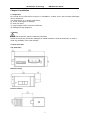
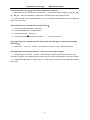
IA Networks Technology IPM3400 User Guide Dimension of this product is 99mm(length)× 32mm(wide)× 78mm(high) Products come with external split type clip on CT’s. Use only the attached CT’s, and do not disconnect CT’s from meter. and never direct connect the other CT’s from the secondary side。 Please read this operation manual carefully before using。 Please re-confirm the measure position。 IPM3400 can be installed as rail mounting mode or embedded, no need to drill a hole or screw to fix it(rail mounting width can up to the length of 35 mm )。 Meter auxiliary power for IPM3400 is DC 10V -30V。 3.4 Mounting and Dismounting 3.4.1 Mounting Pull down the “latch” of meter, and mount the meter on to the rail and lock it, as shown in below picture. Pull down 3.4.2 Dismounting Wire Disconnection 1. Open the clicked CT first and remove CTS from lines,Do not disconnect CT from terminals. 2. Disconnect the voltage input wires from terminals and wrap the wire tips with plastic tape. 3. Disconnect the communication wires from terminal. 4. Disconnect the Aux power from terminal and wrap the wire tip with plastic tape. Dismount From the back to pull down the latch, then can release the meter 7