1
Specifications
2-3-3 Mouse Connector (MOUSE IN)
(Common to front and side)
Mini DIN 6-pin (Female)
6
Pin
No.
1
5
4
3
2
1
<Manufactured by Hoshi Electronics,Inc.:
TCS7568-43-201 or equivalent>
Signal name
MOUSE DATA
2
NC
3
GND
4
+5V (OUT)
5
MOUSE CLK
6
NC
• The mouse connection can be used for all equipment conforming to
the PS/2 mouse standards. However, Pro-face cannot guarantee the
FP will operate normally for all types of host and mouse combinations.
This unit was developed using the Microsoft Mouse®. Microsoft's other
mouse products, the "IntelliMouse" and the "3 Button" mouse cannot
be used with this unit.
• When connecting the Mouse, be sure to use the Mouse Type Host
connector (MOUSE OUT) and the Host PC Mouse/Keyboard cable (FPCK01)
• Do not connect this cable when the power to the FP and the host (PC)
are both ON.
• After connecting the mouse, please re-start the Host unit's OS.
• When Windows 95 or Windows NT is used, set the “Control panel Mouse - Motion” feature to the standard pointer speed and hide the
pointer trace.
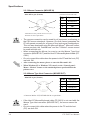
2-3-4 Mouse Type Host Connector (MOUSE OUT)
Mini DIN 4-pin (Female)
4
2
Pin No.
Signal name
1
GND
2
+ 5V
3
MOUSE CLK
4
DATA
3
1
<Connector Maker: JST, JST/MD-S6100 or equivalent>
• If the Host PC Mouse/Keyboard cable (FP-CK01) is not used with the
Mouse Type Host connector (MOUSE OUT), the mouse cannot be
used.
• Do not connect this cable when the power to the FP and the host
(PC) are both ON.
2-6
FP-790T User Manual