1
Specifications
2-5
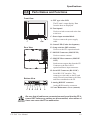
Parts Names and Functions
Front View
A: TFT type color LCD
The FP units’ output display. Data
from the host are displayed.
B: Touch panel
Used to switch screens and write data
to the host.
C: Power input terminal block
J
Used to connect the power supply
cable.
A,B
D: Status LED (Under development)
E: Setup switches (DIP switches)
Rear View
Used to set the FP's operation mode.
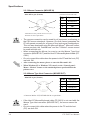
F: MOUSE Connector (MOUSE IN)
Used to connect a mouse.
G: MOUSE Host connector (MOUSE
OUT)
Sends mouse output data from the FP.
Connects to the Host’s PS\2
equivalent Mouse input connector.
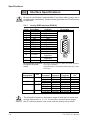
H: Serial I/F Connector (RS-2332C)
C
Bottom View
Serial RS-232C interface. This
connects a serial cable to the FP, and
sends FP touch panel data to the Host,
and Host commands to the FP.
I: Analog RGB I/F connector
Analog RGB interface connector
J: Front Maintenance Cover (unused)
I
H
G
F E
D
C
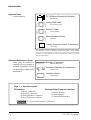
Be sure that all cables are connected correctly and that the FP is
turned OFF before any cables are disconnected, since either of
these can cause the FP to malfunction.
FP-790T User Manual
2-9