1
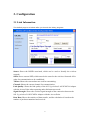
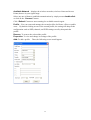
Available Network – displays the wireless networks (wireless clients and Access
Points) that are in your signal range.
Select any one of them to establish communications by simply mouse double-click
or click on the “Connect” button.
Click “Refresh” button to start scanning for available network again.
Profile – You can create and manage the created profiles for Home, offices or public
areas. By double-clicking on one of the created profile, the setting will adapt to the
configuration such as SSID, channel, and WEP settings saved by that particular
profile.
Remove: To remove the selected the profile
Properties: To view and change its settings of the profile.
Add: To add a profile. Then, the following screen would appear.
13