1
Lab-LINK for Windows User Manual
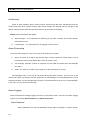
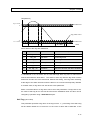
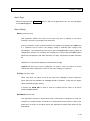
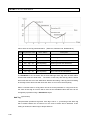
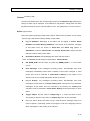
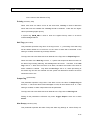
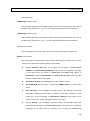
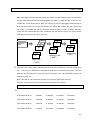
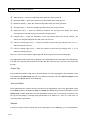
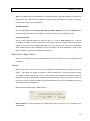
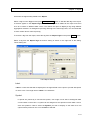
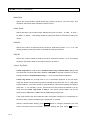
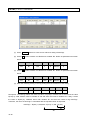
Ex: Acquire bit 8 ~ bit 10 in a word data and convert it into an integer with range of 0 to 7.
Mask Setting: 0x0700
Shift Setting: 8
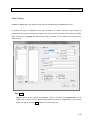
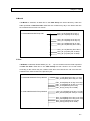
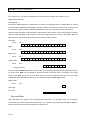
Description: Mask operation is applied first. As shown in the figure below, by setting Mask to 0x0700
(that is 0000011100000000 using binary number notation), all other bits except bit 8, bit 9 and bit10
are all set to 0 (binary notation: 00000xxx00000000, where xxx represent bit 8, bit 9 and bit10).
After the mask operation, shift operation is performed by the IO driver. Since shift setting is 8, all bits
will be moved rightward for 8 positions. Those bits moved beyond bit 0 will be discarded. After the
shift operation, the masked data become xxx in binary number notation.
Raw data
bit 15
bit 0
x
x
x
x
x
x
x
x
x
x
x
x
x
x
x
x
0
0
0
0
1
1
1
0
0
0
0
0
0
0
0
0
0
0
0
x
x
x
0
0
0
0
0
0
0
0
0
0
0
0
0
x
x
x
Mask
bit 15
bit 0
0
Mask data
bit 15
bit 0
0
Shifted data
bit 15
bit 0
→ Shift 8 positions
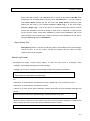
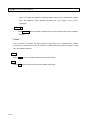
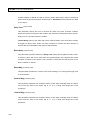
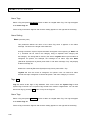
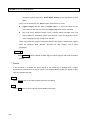
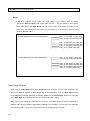
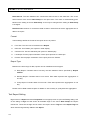
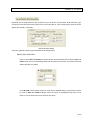
Due to its nature, Mask should not be performed on bit data and should be set to the default 0xFFFF
for such cases. Shift can be applied to bit data but with a different effect. As shown in the figure
below, when Shift is set to 8 for a bit data, it will move the bit leftward and insert 0 for the newly
created bits. The shifted data will then be converted according to Data Type setting.
Before Shift
bit 15
bit 0
x
After shift
bit 8 bit 0
0
0
0
0
0
x
x
x
Gain and Offset
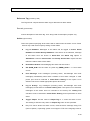
Gain and offset are usually used in analog data conversion. For example, they can be used to
convert the raw data to appropriate engineering unit. In general, gain and offset calculation applies a
linear conversion to the raw data using the formula below:
10-24