1
IV. Clock Setting
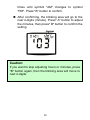
You will see the Clock Mode, after confirming
the beep setting.
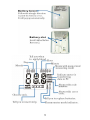
1. You will see 2-digits (second) at the center,
2-digits (month) and 2-digits (day) at the top
left corner, 2-digits (hour) and 2-digits
(minute) at the top right corner.
2. You activate alarm in this mode when clock
time matches the time set in the alarm mode.
3. You can stop the alarm by pressing "A"
button, or it will stop after 10 seconds.
4.
Press "B" button to leave the “advanced
setting mode”.
41