1
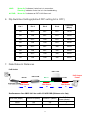
2. Application Notes 1) Ethernet & Power Extension over RJ-11 Cable PSE Power Up to 300m over RJ-11 POT-1110 RJ-45 POT-0100 RJ-45 Line Power FSW-0513 PSE Power 3. Features Two-wire cables are used to connect 100Mbps Fast Ethernet PoE devices Max. distance up to 300m for 24AWG cable Max. data rate up to 60 Mbps full duplex Remote PoE capability for PD devices of WiFi AP, IP camera, IP telephones Up to 15 watts for remote PoE, depending on PSE Power Easy installation by indoor & outdoor different models IEEE 802.3af PSE Compliant for Class 0-3 Dip Switches for RJ-11 rate settings Auto MDIX for 10/100 BaseT Ethernet LAN Ports Low-Latency for Video/Voice/Data applications 4. Packing Contents Inside the package you should find: (1) One POT-xxxx unit (Master or Slave) (2) One User Manual Please check if the packing is damaged or any component is missing. If so, please contact your distributor. 5. LED Indicators On the front panel of POT-xxxx, there are 4 LED indicators as the following POWER: “Green On” indicates power is on and normal. LAN: “Green On” indicates Ethernet LAN port is in connection. “Flashing” indicates Ethernet LAN data activities. 2