1
LINE:
“Green On” indicates 2-wire line is in connection.
“Flashing” indicates 2-wire line is in line handshaking.
ACTIVE: “Green On” indicates as POT-0110 Slave unit.
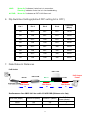
6. Dip Switches Settings(default DIP setting All is OFF)
Pin 1
Pin 2
Pin 3
Pin 4
Line Rate
(Mbps)
NA
OFF
OFF
OFF
10/10
NA
ON
OFF
OFF
20/20
NA
OFF
ON
OFF
30/30
NA
ON
ON
OFF
40/40
NA
OFF
OFF
ON
50/50
NA
ON
OFF
ON
60/60
NA
OFF
ON
ON
60/60
NA
ON
ON
ON
60/60
7. Data Rates & Distances
PoE Switch
POT-1110
RJ-45
POT-0100
RJ-45
RJ-11
PSE Power
PSE Power
PSE Power
A
B
C
Performance for AWG 24 Line with 15.4W PSE (Distance A=1m)
Line Rate (Mbps)
Max. PoE Output
Power (Watts)
Distance B (Meter)
Distance C (Meter)
60/60
100
100
7
60/60
200
100
NA
3
PoE Output
Power