1
5.3 THE STANDARD CMOS FEATURES
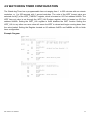
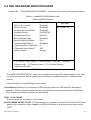
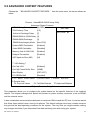
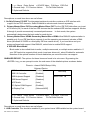
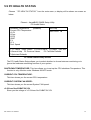
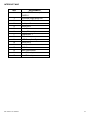
Highlight the 〝STANDARD CMOS FEATURES 〞and press the <ENTER> key and the screen
will display the following table:
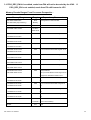
Phoenix - AwardBIOS CMOS Setup Utility
Standard CMOS Features
Date (mm:dd:yy)
Time (hh:mm:ss)
▶ IDE Primary Master
▶ IDE Primary Slave
▶ IDE Secondary Master
▶ IDE Secondary Slave
Wed, Feb 23 2005
9 : 32 : 52
[ None]
[ None]
[ None]
[ None]
Video
Halt On
[EGA/VGA]
[All, But Keyboard]
Base Memory
Extended Memory
Total Memory
640K
1013760K
1014784K
Item Help
Menu Level
►
Change the day,
month, year and
century
↑↓→←: Move Enter: Select +/-/PU/PD:Value F10:Save ESC:Exit
F1:General Help
F5: Previous Values
F6: Fail-Safe Defaults
F7:Optimized
Defaults
CMOS Setup screen
In the above Setup Menu, use the arrow keys to highlight the item and then use the <PgUp> or
<PgDn> keys to select the value you want in each item.
Date: < Month >, < Date > and <Year >. Ranges for each value are in the CMOS Setup Screen, and
the week-day will skip automatically.
Time: < Hour >, < Minute >, and < Second >. Use 24 hour clock format, i.e., for PM numbers, add 12
to the hour. For example: 4: 30 P.M. You should enter the time as 16:30:00.
IDE Primary Master / Slave:
IDE Secondary Master / Slave:
The BIOS can automatically detect the specifications and optimal operating mode of almost all IDE
hard drives. When you select type AUTO for a hard drive, the BIOS detect its specifications during
POST, every time system boots.
If you do not want to select drive type AUTO, other methods of selecting drive type are available:
EX-96085 User Manual
58