1
Shake Table Rig Laboratory User Guide
Version 2.0
4
Rig Data Acquisition
Users are able to save sensor data for displacement, coil damping as well as the generated Fast Fourier
Transform (FFT).
4.1 Saving Displacement & Coil Damping Data
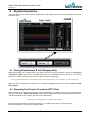
Displacement data can be saved whilst your session and the rig control software is active by clicking the
“Start Save” button. Data will be recorded and saved to a tab-delimited text (.txt) file at 0.01 second
intervals. The data is divided up into columns, with the column order being:
Time (s), Level 0 Displacement (mm), Level 1 Displacement (mm), Level 2 Displacement (mm), Level 1 Coil Output (%), Level 2 Coil Output (%)
When you have completed your experiment or recorded the appropriate data, be sure to click the “Stop
Save” button.
4.2 Exporting Fast Fourier Transform (FFT) Data
Real-time Fast Fourier Transform (FFT) data can be saved whilst your session and the rig control software is
active, by clicking the “Export FFT” button. Data will be recorded and saved to a tab-delimited text (.txt) file.
The data is divided up into columns, with the column order being:
Frequency (Hz), Level 0 Amplitude, Level 1 Amplitude, Level 2 Amplitude
Since the FFT data is purely real-time acquisition (i.e. a snapshot), there are no other buttons to
press/consequently no need to stop saving the data.
Labshare © 2011
Page 10