1
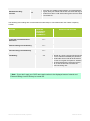
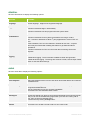
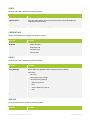
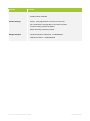
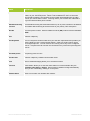
CHAPTER 43 DEFINITIONS TERM DEFINITION Always Forward Every call will be forwarded to the number configured. Communication History Communication History lists your missed, received and placed calls made from any of your TIPT UC-One devices. The time and details of the call are also displayed. Contacts Contacts displays a list of your contacts, as you use TIPT UC-One you will modify contacts to suit your needs. These can be a combination of contacts from your directory, Outlook or contacts your have added using Add Contacts. Contacts are useful for: Searching all contacts, including your Directory and Outlook contacts if you have it configured. Lists your own contacts – these can be added from your Directory, Outlook, or by using Add Contacts and entering the contacts details. Do not disturb If you enable this DND you will not receive calls. Calls are automatically forwarded to your voicemail if DND is enabled. Telephony Directory The Telephony Directory (Enterprise Directory) for your Enterprise. This will display only when you search. Forward when unanswered Calls will be forwarded to the configured phone number after a certain number of rings. Please refer to the support web site http://www.telstra.com/tiptresources for information on how to change the number of rings before a call is forwarded in CommPilot. Forward when busy Calls will be forwarded only when the phone being called is busy. Forward when unreachable Calls will be forwarded when your TIPT desk phone is not accessible or inactive due to power loss to the site, no network connectivity or no internet access is available. Hide number When the Hide Number feature is enabled your number is hidden from the display of the called party. When enabled, Hide Number only works for calls to contacts external to your enterprise. Calls to colleagues at your business site will still see your number displayed. TIPT UC-One Client User Guide | April 2015 PAGE 231 OF 290