1
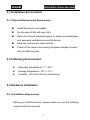
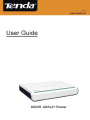
D820R ADSL2+ Router User Guide 1) ON/OFF: Turn on/off the Router’s power 2) POWER: The power socket for power adapter. Notice: please use the matched power adapter (9V~50Hz 1A). Use of a different voltage may damage your Router. 3) RESET: The reset button for restoring to factory default settings. Notice: Press the button three times with one conoid thing. After all indicators turn off, the Router will reboot and restore to default settings. 4) LAN: RJ-45 LAN port for connecting to hub, switch or PC’s network adapter in your local network. 5) LINE: Connect to the Modem port the Voice Splitter or connecting the telephone line. 2.2 Minimum Requirements 64MB Memory 200MHz CPU 10/100M Network Adapter Internet Explorer 5.0 Operating system supporting TCP/IP protocol Broadband Internet service (XDSL/Cable Modem) 5