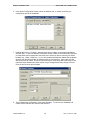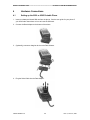
1
DIRECT INTERNET DATA ------------------------------------------------------ HARDWARE/SOFTWARE REQUIREMENTS 2 Hardware/Software Requirements To use Iridium Direct Internet Data Service, you will need the following: A Windows-based PC, with: • • • Windows 95, 98, Me, NT4.0 (Service Pack 4 or later) or 2000 CD-ROM drive Serial port A SIM Card that is provisioned for data (note that this SIM can also be used for voice calls). An Iridium Phone (A Motorola 9500 or 9505 Portable Phone, or a 9520 Mobile Phone) with a data-capable internal software version. Check the software version in the phone by pressing *#91# on the keypad. • • • Motorola 9500 Phone must have software version INC0620 or later Motorola 9505 Phone must have software version LAC109G or later Motorola 9520 Phone must have software version RAC0620 or later Hardware and Software, depending on the type of phone you are using, according to the table below: Type of Iridium Phone used for data calls 9500 or 9505 9500 or 9505 Phone, with 9520 Mobile Phone a 9570 Portable Dock* Phone Hardware and Software Data Kit (shown below), which includes: • Data Adapter • Serial Cable (9-Pin, M/F) • Stand • Iridium World Data Services CD Iridium World Data Services CD (Available in the Data Kit. Also sold separately) Serial Cable (9-Pin, M/F) (Not sold as a standalone item by Iridium. This item is widely available at retail stores) * The 9570 Portable Dock requires an adapter (sold separately) for use with the 9505 Portable Phone. Data Kit Components: Iridium Satellite LLC 4 Rev. 2; June 15, 2001