1
4.
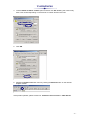
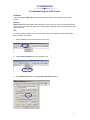
Tick the Delete all offline content option and then click OK. Deleting this content may
take a few minutes depending on the amount of content stored in this area.
5.
Click OK.
6.
Refresh the ASIC Forms main menu by clicking the Refresh button on the Internet
Explorer toolbar.
If the problem persists, please contact our Customer Service Team on 1300 304 197.
-2-