Transcript
Operating Instructions - Carlton
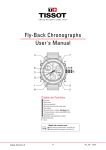
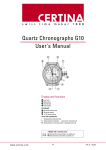
The Carlton uses the Seiko VK64 mecha-quartz chronograph movement. An overview of the timekeeping
functions of the movement as used in the Carlton model is shown below:
A) Time Set : Pull out the crown fully and rotate the crown either clockwise or counter-clockwise to move the
time forward or backwards respectively.
B) Chrono Start/Stop: Push in the top pusher button to start or stop the central chronograph seconds hand.
C) Chrono Reset: Push in the bottom pusher button to reset the central chronograph hand to 12 (zero).
*IMPORTANT* - DO NOT RESET THE CHRONO HAND UNLESS IT IS STOPPED. RESETTING WHILE IN
OPERATION MAY CAUSE DAMAGE TO THE MOVEMENT.
D) Chrono Seconds: The central chronograph hand will beat 5 times per second when in operation. Be
default, the chrono seconds hand is reset to zero at the 12 o’clock position.
E)
24 Hour Display: The right sub-dial displays the current time in a simplified 24-hour format. The time
displayed on this dial is linked to the main hour and minute hands and cannot be adjusted separately.
F)
Chrono Minute Totaliser: The left sub-dial displays a count of minutes accumulated while the central
chrono hand has been in operation. A maximum of 60 minutes can be counted in one cycle.
OTHER INFORMATION:
Battery Life: The standard battery life for the VK64 movement is 3 years.
Full technical information on the Seiko VK64 movement can be found on the Time Module HK website:
http://www.timemodule.com/index.php