1
4) LIGHT
This button toggles the display backlight on and off. However, if this button is held for 3 seconds
a menu will appear which can be scrolled through by pressing the “LIGHT” button. The menu will
offer the following selections, which will be blinking to indicate a selectable option:
1) IMMED – the backlight will only be on while the “LIGHT” button is being pressed.
2) 30 SEC – the backlight will turn off 30 seconds after the “LIGHT” button is no longer being
pressed.
3) 1 MIN – the backlight will turn off 1 minute after the “LIGHT” button is no longer being
pressed.
4) 5 MIN – the backlight will turn off 5 minutes after the “LIGHT” button is no longer being
pressed.
5) NEVER – (default) – the backlight will stay on until the “LIGHT” button is pressed again.
Note: If while in the menu, the “LIGHT” button is not pressed for 3 seconds (to either scroll or
select), the gauge will revert back to the current pressure. While in this menu, pressing the
“ZERO/CLEAR” button will also bring the gauge back to the current pressure. The backlight
option selected will be saved when the gauge is turned off.
5) UNITS
This button accesses a scrollable menu of pressure measurement “unit” options: psi, Bar, kg/cm²,
kPa, mPa, ftH20, in. Hg, mmHg, cmHg. For most water potential readings Bar or mPa scale is
used.
Pressing the “UNITS” button once will show the first selection (blinking). Pressing the button
again will show the next blinking entry, and so on until the menu is completed. Upon completion
of the menu, pressing the button again will exit the menu and use the last selected units. Selection of a units option is made by pressing the “UNITS” button for 3 seconds while the option
is being displayed. If while in the menu, the “UNITS” button is not depressed in 3 seconds
(to either scroll or select) the unit will revert back to the current pressure. While in this menu,
pressing the “ZERO/CLEAR” button will also bring the unit back to the current pressure. The
units option selected will be saved when the gauge is turned off.
BATTERY
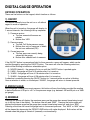
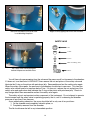
Gauge powered by two AAA batteries. The battery icon located in the lower right hand corner of the display – indicates the power level
with three segments:
1) No segments filled: Less than 10% battery life remaining.
2) One segment filled: 10% to 25% battery life remaining.
3) Two segments filled: 25% to 50% battery life remaining.
4) Three segments filled: 50% to 100% battery life remaining.
When the batteries get too weak for the gauge to operate reliably, the gauge will shut off. If
the gauge is turned on with batteries in this condition, the version and range display will show
momentarily, but the gauge will again shut off. If the batteries are too weak the gauge will not turn on.
9