1
Operating Instructions
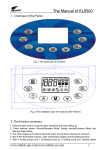
On/Off
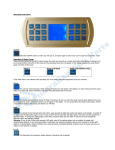
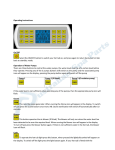
Select the ON/OFF button to switch your hot tub on, and press again to return back your hot tub back to standby mode. When three dashes
are displayed then the hot tub is in standby mode.
Operation of Water Pumps
There are three buttons to control the water pumps, the water level must be of a certain level before they operate. Pressing any of the 3 pumps buttons
will switch on the pump and the associated pump icon will appear on the display, pressing the pump button again will switch off the pump
Pump 1
Pump 2 (if fitted)
Pump 3 (Circulation pump)
If the water level is not sufficient when operating any of the pumps, then the appropriate pump icon will flash.
Ozone
This runs the ozone and purge programme. All pumps and blower will switch on to purge all the water from the pipes. It will then revert to a
ozone function.
Blower
This button operates the air blower (if fitted). The blower will only run when the water level has been detected to be over the required level.
When running the blower icon will appear in the display. To turn off just press the blower button again. If there is not sufficient water in the hot tub,
the blower icon will flash.
Light
To operate the hot tub light press this button, when pressed the light bulb symbol will appear on the display. To switch off the light press the
light button again. If your hot tub is fitted with the perimeter LED light option, this button will also operate the perimeter lights. To change the
setting/colour of the light, switch the lights off, then back on and this will cycle through the different colours and settings available.
Warning: If you hot tub is fitted with perimeter LED lights, some of the lighting options are not suitable for people with photosensitive epilepsy. A very
small percentage of individuals may experience epileptic seizures when exposed to certain light patterns or flashing lights. Certain conditions may induce
previously undetected epileptic symptoms even in persons who have no history of prior seizures or epilepsy.
F<>C
This alternates the temperature display between Fahrenheit and centigrade when the hot tub is in standby mode.
Locking/Unlocking you tub
This button will operate the panel lock, so none of the other buttons can accidentally be pressed. To lock your hot tub press the LOCKED
button, the padlock icon will display in the control panel and this will lock the controls from accidentally being pressed, to unlock your hot tub press and
hold the LOCKED button until the controls are released. NB: If no activity is reported on the control panel for 30 minutes the panel will automatically
lock.
Setting the Clock
To set the clock on your hot tub press the CLOCK button, the time display will now flash, press HOUR to adjust the hour and press MIN to
adjust the minutes. Once set leave the control panel for a short time for it to let the time display stop flashing, the time is now set.
Setting the Heat
Your hot tub is thermostatically controlled. There must be sufficient water in the hot tub for the heating and filtering to work correctly
To heat your hot tub, press the HEAT button start the water circulation pump. This pump must be running during heating to circulate the
water through the hot tub, then press the heat button a second time to turn on the heater. You will see the heater icon start flashing. After 10 seconds
the heat icon will stop flashing on the display indicator the heating has started. Pressing the Heat button again will switch off the heater and the
circulation pump will stop running 10 seconds after. NB: if you press Pump 3 whilst the hot tub is heating, this will override the automatic feature, so
when the temperature reaches temperature, the heating will stop, but the circulation pump will continue to operate.
To adjust the temperatures of your hot tub press the
button to adjust the temperature. The default temperature is 37c (99f) (temperature
range is from 30c to 45c/86f – 108f). Once the hot tub has reached the required temperature the heating will automatically shut down until the
temperature drops below the preset temperature, at that point, heating will automatically restart. NOTE: Do not run the hot tub above 40c.
Freeze Protection
If it is detected that the water temperature drops below 5c the heating will automatically be turned on until the water temperature reaches 9c.
Setting the Pre Heat Cycle
This function allows for the heating cycle to be switched on at a predetermined time for a pre-determined duration.
To switch ON the preheating cycle on press HEAT then the ON/OFF button, you will see “ON” displayed on the control panel.
To switch the heat cycle off, press the HEAT button, then press the HEAT button again and the display will now show “OFF”.
Programming the Heating Cycle
To change the pre heating cycle press the HEAT button (when your hot tub is in standby mode) you will now enter the heating programming mode. The
time will start flashing. This is the time you wish the heating to begin. Use the HOUR and MIN buttons to adjust the time. Press SET. You will now enter
the duration you wish the hot tub to heat for. Use the HOUR and MIN buttons to adjust this. Press SET. You can now enter the temperature you wish
the hot tub to heat to. Use the TEMP button to adjust this. Press HEAT button to return to Standby mode.
Setting the Filtration Cycle
This function allows the water filtration cycle to operate automatically; you can set what time and the duration you wish the hot tub to cycle for. We
recommend you have this set to run for at least 2 hours per day.
To switch ON press PUMP3 then the ON/OFF button, a circulation symbol will be displayed on the control panel.
To switch off, press PUMP3 then press PUMP 3 again, the circulation symbol will now disappear.
Programming the Filtration Cycle
Press PUMP 3 (when the hot tub is in standby mode). The panel time will now flash, use the HOUR and MIN buttons to adjust the time you wish the
filtration to start. Then press SET, you can now alter the duration of the filtration cycle. Use the HOUR and MIN buttons to adjust the filtration length.
Press PUMP 3 to return to standby mode.
Radio/CD Operation
Your hot tub has a FM radio and auxiliary CD/MP3 control built into the control panel.
The FM/CD button controls the Radio and CD functions, pressing the FM/CD button with cycle through the FM radio > CD input > Off.
Tuning the radio
Use the TUN+ and TUN- buttons to tune the radio to the desired frequency.
Volume
Press the FUN button, and the volume value in the display will flash. Then use the TUN+ and TUN- to adjust the volume.
Selecting a Preset Radio Station
Press the MEM button to cycle through the preset radio frequencies
Storing Radio Channels in Memory
Once the desired frequency has been tuned, press and hold the MEM button for 2 seconds until a beep is heard and the memory preset number flashes.
Press MEM to cycle through the preset buttons until the required preset number is displayed. Then press and hold the MEM button again to store the
frequency, a beep will be heard and the station is now set.
Operation of Remote Control
1. Any functional button of the system works with a "beep" sound accompanied by the buzzer.
2. The functional buttons on the remote controller have the same operation methods with the corresponding functional buttons on the button panel.
Specifications
1) Rated voltage: AC220V
2) Working voltage range: AC180V~AC248V
3) Rated power: 50Hz
4) Controllable current: <55A
5) Power consumption: <10W (all loads OFF)
6) Applied ambient temperature: +5℃ ~ +40℃
7) Sensitivity to the noise limit of the radio: 20 dBµV
8) Step-down transformer meeting the requirements of 1500V high voltage test as specified by IEC standard
Controlled devices
1) Water pump: AC220V/3HP
2) Air blower: AC220V/1.25HP
3) Thermostatic heater 1: AC220V/2KW-5KW
4) Ozone: AC12V/15W
5).Underwater lamp :AC12V/20W
Precautions for Installation and Use
In order to guarantee the products function, prolong its lifetime and ensure the safety during using, please read the followi ng items carefully before
using:
1. The power cable can not be used until it is checked carefully and quality is confirmed.
2. The end user should not connect unqualified electrical appliances to the controller. Disassembling or modifying any connecters in the controller is
prohibited.
3. The connection wire of power box should be wired according to the specification.
4. The installation of the hot tub should be carried out by qualified personal according to the installation manual.
5. Do not try to repair or modify parts of the controller, the high-voltage might cause danger. All the maintenance and repairing should be carried our
by qualified personal.
Special Statements
1. The product must be repaired by the manufacturer of the controller or qualified servicemen authorized by its agents if necessary otherwise the
product is not allowed to be warranted and all lose caused thereof are not assumed by our company.
2. The instruction manual is only for reference and all designs and descriptions included herein are subject to change and update without prior notice.
The manufacturer has the sole right to interpret any ambiguity, error or missing in the instruction manual if existed.
For any consequences caused by wrong operation, the user should bear the responsibility.
Programming the Control System
To Change Running Mode
To switch between programs to run between low and high power running modes:Low Power
In this mode, main pumps and blower will not operate when heating is in progress.
Press FM/CD, VOL-, VOL+ then PUMP1 button. “P Control” will then flash – Press ON/OFF button to set into low power mode. The “P Control” indication
will be permanently displayed
High Power
In this mode all main pumps and blower operate when heating is in progress.
To set to full power mode, press F FM/CD, VOL-, VOL+ then PUMP1. “P Control” will then flash and wait for a moment for it to stop flashing, the tub is
now back in full power mode