1
2
1.1
Required Installation Information
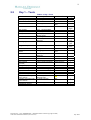
The person completing the installation quotation on the Cable Gate should pass the following
information to the installer:
•
•
•
•
•
•
•
•
•
•
•
•
Business name of customer
Contact name within the customer’s organisation
Telephone number of contact person
Fax number of contact person
Name of person who provided the quotation
Contact phone number of the person who provided the quotation
Installation site address
Details of the required Cable Gate specification:
o Spacing between the post centres
o Required powder coat colour for the posts
o Access control systems required to interface with the Cable Gate
o Any other specific customer requirements regarding the gate specification
Detailed access control system specifications:
o Precise details of the selected access control systems including proposed locations
relative to the Cable Gate.
o Number of key fobs, proximity cards, and other access control “keys” required by
the customer.
o Manufacturers documentation on the selected access control systems detailing
interface requirements to other equipment.
A detailed site plan showing the following details:
o Precise location of the Cable Gate relative to other fixed landmarks such as
buildings, roads, etc.
o Precise location of the access control system reader posts (if required).
o Preferred excavation paths for the conduit trenches (if required)
o Precise location (including height above ground level) for any “gate switching
box” that may be required for manual switching of the gate state.
o Location of GPO’s (power points) and water connections available for the
installers use.
o Details of the soil type and condition to permit the installer to select the most
appropriate excavation method ahead of the installation date.
Personal Protective Equipment (PPE) requirements for customer’s site. Note also that
permissions may have to be obtained for entry onto secure sites.
Any other customer specific instructions that are relevant to the installation at hand.
Document No. 13-01 (CONFIDENTIAL – Matilda Products Limited Copyright © 2004)
Cable Gate Installation Manual (Revision 0.2)
July 2004