1
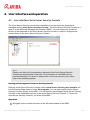
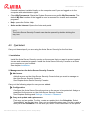
User interface and operation Navigation elements are also displayed as objects in the right-hand detail window of the MMC. Open these objects in the detail window by double-clicking. The Configuration is located under the node Settings. Expand the node and click the module you would like to configure. You can select various configuration sections in the detail window: Commands and actions are available via icons in the detail window and via context menus of the individual console nodes or of objects in the detail window. When configuring a server, you must confirm information in the window Settings with the button OK or Accept in order to accept the new settings. Your settings are cancelled with the button Cancel. Avira Server Security Console overview Avira Server Security Display of the created servers with connection status Actions: Add server Note The local Avira server and all Avira severs added by the registered user are displayed on the Avira Server Security Console. Server Display of server status Actions: start product update update license file reload configuration display report file rename server disconnect server connect server delete server Overview system status (last system test, last update, license) statistical data of the on-access scan of the Realtime Protection and the on-demand scan of the System Scanner program version Avira Server Security - User Manual (Status: 23 Sep. 2011) 21