1
Matrix 518 User Guide
Introduction:
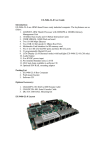
Matrix 518 is an ARM9-based Linux ready industrial computer. The key
features are as follow:
1.
2.
3.
4.
5.
6.
7.
8.
9.
10.
11.
12.
13.
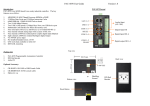
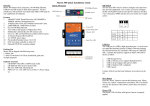
Matrix 518 Layout
ARM926EJ-S ARM Thumb Processor 400MHz w/MMU
32-KByte Data Cache and 32-KByte Instruction Cache
64MB SDRAM, 128MB NAND Flash on board
Two 10/100 Mbps Ethernet
Two USB 2.0 full speed (12 Mbps) Host Ports, one USB device port
Multimedia Card Interface for Micro SD memory card
Eight 3-in-1 RS-232/422/485 ports
21 programmable Digital I/O port
Audio Output
9 to 40VDC power input
Pre-installed Standard Linux 2.6 OS
GNU tool chain available in Artila CD
Optional DIN RAIL mounting adaptor
Reset
Button
4
Packing List
104
25
12.5
1.
2.
3.
Matrix 518 Box Computer
Wall mount bracket
Artila CD
Optional Accessory:
1.
2.
3.
CB-RJ45F9-150: RJ45 to DB9 Female Cable
CBL-F10M9-20: Serial Console Cable
DK-35A: DIN RAIL Mounting Kit
167.5
5.9
10
1
40
Pin Assignment and Definition
Digital I/O Port ( DB25 Female)
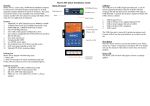
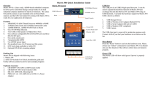
Reset Button
Press the “Reset” button to activate the hardware reset.
You should only use this function if the software does
not function properly.
Power LED
The Power LED will show solid green if power is
properly applied
Ready LED
The Ready LED will show solid green if Matrix 518
complete system boot up. If Ready LED is off during
system boot up, please check if power input is correct.
Turn off the power and restart Matrix 518 again. If
Ready LED is still off, please contact the manufacture
for technical support.
Link/Act LED
When Ethernet port are connected to the network, Link/
Act will show solid green and if there is traffic is the
Ethernet, this LED will flash
Serial Port LED
These eight dual color LEDs indicate the data traffic at
the serial ports. When RXD line is high then Green
light is ON and when TXD line is high, Yellow light is
ON.
Ethernet Port
Pin No.
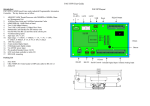
Serial Console Port:
Serial console port is located inside the box at CON1. You
need to use console cable (CBL-F10M9-20) to access it
1
9
2
10
Pin No.
1
DIO0
14
DIO13
2
DIO1
15
DIO14
Serial Console RS-232
3
DIO2
16
DIO15
N/C
2
N/C
4
DIO3
17
DIO16
3
RXD
4
N/C
5
TXD
6
N/C
5
DIO4
18
DIO17
6
DIO5
19
DIO18
7
DIO6
20
DIO19
8
DIO7
21
DIO20
9
DIO8
22
GND
10
DIO9
23
GND
11
DIO10
24
VCC3
12
DIO11
25
VCC5
13
DIO12
7
N/C
8
N/C
9
GND
10
N/C
Note:
1.
VCC3: 3.3 VDC output
2.
VCC5: 5 VDC output
3.
GND: Digital Ground
Serial Ports:
Port 1~8: 3-in-1 Software Configurable
RS-232/422/485
NOTE: Only Port 2,5,6,7,8 have full modem signals
DSR,DTR, DCD
Function
1
To use the serial console port, you need to open the metal case
of Matrix-518 and the CON1 connector is near the reset button
and LEDs. Use any terminal software such as hyper terminal and
configure the setting as follow:
Baud Rate: 115200
Data bits: 8
Parity: N
Stop bit: 1
Terminal type: VT100
Function
Factory Default Settings
LAN 1 IP Address: 192.168.2.127
LAN 2 IP Address: 192.168.3.127
Login: root or guest ( telnet guest only)
Password: root or guest ( telnet guest only)
Serial Console Port:
Baud rate: 115200
Data format: 8 Bits, No Parity, 1 Stop bit (N,8,1)
Flow Control: None
Terminal type: VT100
Default started service
1.
amgrd (Artila broadcast search daemon)
2.
ssh (secured shell) with sftp
3.
syslog/klogd (system and kernel log)
4.
telnet server (disable root with /etc/securetty)
5.
ftp server (vsftp)
6.
web server (apache2)
7.
Ready LED (debug LED for internal use)
Network Settings
Power on and System boot up
Once Matrix-518 is correctly power on, it will start boot Linux
kernel and mount file system. You can use Ethernet and telnet
and login Matrix-518. Once kernel loaded, it will find /sbin/
init and execute it. The initialization configuration is at /etc/
inittab. Once boot up, you can use telnet to login Matrix-518.
Use vi editing tool to edit the /etc/network/interfaces for network
setting. The default setting is static IP 192.168.2.127. Matrix-518
also supports Wireless LAN. Use
wireless_essid XXX
wireless_key YYY
To add SSID and WEP key if necessary. XXX is SSID and YYY
is WEP Key
Matrix-504 supports USB WLAN adaptor (Ralink RT2571).
You can enable the driver module (rt73usb) by adding rt73usb in
/etc/modules
File System
The 128MB NAND Flash memory of Matrix-518 contains Boot
loader (uBoot), Linux Kernel, Root File System and user disk
(\home). The file system and disk space are shown as follow
Insert kernel module
To insert kernel module while system boot up, please use vi to
edit /etc/modules to add module to load e.g.
Inittab and Run levels:
Inittab contains information of system initialization. The
system initialization script /etc/rcS.d runs first then the run
level 5 /etc/rc5.d Matrix-518 uses run level for system setup
and the default run level is number 5. Please refer to
introduction to linux (http://tille.garrels.be/training/tldp/) for
information about run level. Following is the run levels
setting:
Run level 0: halt
Run level 1 is single user ( login and service are disabled )
Run level 2~5 are multiple users
Run level 6 is reboot.
Please refer to loader menu section for selection of run level
rt73usb
To load the USB WLAN adaptor.
Devices list
The supported devices are shown at /dev directory. Following
list are most popular ones:
1.
ttyS0: serial console port
2.
ttyS1 to ttyS8: serial port 1 to port 8
3.
sda to sdb: USB flash disk
4.
ttyUSB0 to ttyUSB1: USB RS-232 adaptor (fdti_sio.ko)
5.
rtc: Real Time Clock
6.
gpio: General Purpose digital I/O
7.
ttyACM0 and ttyACM1: USB Modem (CDC compliant)
8.
mmc : SD driver
Mounting External Storage Memory
To find out the device name of the external memory device
which plug into Matrix 518, you can use the command
dmesg | grep sd
dmesg | grep mmc
To find out the device type (sda , sdb or mmc)
And use
mount /dev/sda1
mount/dev/mmc
to mount the USB disk or SD card and folder is local at
media/sda1 or /mnt/sda1
SSH Console
Matrix 518 supports SSH. If you use Linux computer, you can
use SSH command to login Matrix 518. The configuration of
SSH and key are located at
/etc/ssh
The key generation program is available at /usr/bin
Welcome Message
To modify the welcome message, user can use text edit to
modify the /etc/motd.
Putty Console Software
For Windows user, you can download the putty software at
http://www.chiark.greenend.org.uk/~sgtatham/putty/
download.html to use SSH to login Matrix-518
Utility Software:
Matrix 518 includes busybox utility collection and Artila
utility software and there are placed at :
/sbin
/bin
/usr/bin
/use/sbin
Please refer to Appendix for the utility collection list
Web Page Directory
The web pages are placed at /usr/www and the
/etc/lighttpd.conf contains the lightttpd web server settings. The
home page name should be index.html
Adjust the system time
To adjust the RTC time, you can follow the command
date MMDDhhmmYYYY
where
MM=Month (01~12)
DD=Date (01~31)
hh=Hour
mm=minutes
YYYY= Year
hwclock –w
To write the date information to RTC
User can also use NTP client utility in Artila CD to adjust the
RTC time.
ntpclient [time server ip]
ipkg package software management
ipkg is a light software package utility. It can be used to
install, upgrade and remove the software package for Matrix518. Currently user can use ipkg to install the software
package from Artila FTP. You can find the configuration at
ipkg.conf
When Matrix-518 is connected to network and issue command
ipkg update
To update the package list and use
ipkg install
to install software package and
ipkg remove
to remove software
ipkg list
to list available software
ipkg list_installed
to list software installed
Please refer to Appendix for more about ipkg
Install GNU Tool Chain
Find a PC with Linux OS installed as followed:
Fedore 7, ubuntu 7.04, OpenSUSE 10.2, Mandriva 2008,
Debian 5.0, Centos (RedHat) 5 and above.
Login as a root user then copy the arm-linux-4.3.2.tar.gz to root
directory of PC. Under root directory, type following command
to install the Matrix 504 Tool Chain
#tar -xvfj arm-linux-4.3.3.tar.bz2
The tool chain file name are
arm-linux-gnueabi-gcc
arm-linux-gnueabi-g++
arm-linux-gnueabi-strip
Version: gcc 4.3.3, glibc 2.9, binutils 2.18
Artila Utility Software:
The introduction of Artila utility software as follow:
1. update : update loader, environment file and kernel image.
Type update—help to find the command usage
For Windows user, please download the toolchain from
CodeSourcery at
http://www.codesourcery.com/sgpp/lite/arm/portal/
package4547/public/arm-none-linux-gnueabi/arm-2009q1-203arm-none-linux-gnueabi.exe
The tool chain file name are
arm-none-linux-gnueabi-gcc
arm-none-linux-gnueabi-g++
arm-none-linux-gnueabi-strip
Version: gcc 4.3.3, glibc 2.8, binutils 2.19
Update can only operated under supervisor mode (password :
root). Please use command su and login as root
Getting started with the Hello program
There are many example programs in Artila CD. To compile the
sample you can use the Make file and type
make
To compile and link the library. Once done, use ftp command
ftp 192.168.2.127
Then login with password. Use bin command to set transfer
mode to binary
ftp>bin
to transfer the execution file to Matrix 504 user disk (/home/
guest) and use
chmod +x file.o
To change it to execution mode and
./file.o
to run the program
Auto start program on boot:
To start a program on boot, you can use /etc/rc.local
For example to use vi to edit rc.local
hello &
exit 0
Hello will be executed after system boot up. rc.local has the
similar function as /etc/rc in Matrix-504
2. setuart: configure serial port setting. An example show as
followed to configure port 1 as RS-485 interface with baud rate
921600.
3. setconsole: Unlike Matrix-510 which shares the serial
console port with the serial port 3, Matrix-518 uses dedicated
pins for serial console (debug port). setconsole command
allows user to redirect the serial console port to any one of the
four serial port of M-518. Therefore user can avoid opening
the metal case to access the serial console.
3. version: find out the version of OS.
4. gpioctl: The gpio can be configured by gpioctl and the
usage is as shown followed.
5. audio command:
madplay - play mp3 file
aplay - play wav file
amixer - volume control
alsamixer - graph control
Loader Menu
Loader menu helps user to select the run level of system boot
up. User need to use serial console to enter loader menu.
Please configure the serial port of terminal as follow:
Frequently Asked Question
1. Forgot password:
If you forgot the password for login, please use serial console and
use run level 1 to boot system. Use passwd to change the password
setting.
Baud Rate: 115200
Data bits: 8
Parity: N
Stop bit: 1
Flow Control: None
Terminal type: VT100
Once power up M-518, please repeatedly keying “@” and
you will see the loader menu appear as follow:
2. Forgot the IP address
If you forgot the M-502 IP address, you can use the Java Manager
available in Artila CD to search the IP address of M-502
Or use serial console port to find out the IP address by
#ifconfig
If you miss the timing, please power on again the M-502 and
do it again. Select U will prompt the run level selection
message. Run level 0 is halt, run level 1 is single user
( disable login and service ). Run level 2~5 are multiple
users and run level 6 is reboot. To view the run level
configuration, please check
/etc/inittab
3. System fail to boot
If you mess up the root file system and make the system fail to boot,
M-502 will automatically switch to boot from Dataflash file system
and a console menu will show up at console port to help user
perform system recovery. System Recovery Section will tell you
how to recover the system.
System Recovery
Update Image Starts
Make Files System Starts
If NAND Flash file system does fail, DataFlash file system
will automatically boot up and a Console Menu at console
port will appear as follow:
Update Image Completes
Note:
1. Update Image: this option can recover the loader, kernel
and file system by using an USB disk. The USB disk
contains the images files with the path as follow:
1.
2.
3.
Loader: m518/m518.alf
Kernel: m518/m518K
File system: m518/m518R
The files are available in Artila CD. Please prepare an USB
disk and copy the image files to it before choosng this option.
2. Make Filesystem: this option is used to create customized
file system. Before using this function, you need to copy the
folder of mkimage518 in the Artila CD to an USB disk. This
function will create a new file system image for users and
they can use it to duplicate the customized file system to other
Matrix-518.
3. Recovery Env.: The option will recover the environment
files as default setting. Use this function only when the
NAND file system crash.
4. Show Info: Show the version information of Matix-518
5. Reboot: Reboot the NAND flash file system.
Use Arrow keys up and down to selection the functions
Use Arrow keys left and right to go to higher or lower levels
of menu screen
To force system go into DataFlash booting, repeatedly
keying “!” (Shift +1 ) right after Matrix-518 power on.
Appendix
Utility Collection
ipkg software package management
The webmin for Matrix-518 provides following modules:
1.
2.
3.
4.
5.
6.
7.
8.
9.
10.
11.
12.
13.
14.
15.
16.
Matrix-518 uses ipkg to manage the software installation, upgrade and
removal. Artila will continuously add the kernel module and utility at
our ftp server, user can install these software from Artila’s ftp server. In
addition user can also setup your ftp server to update the software you
want. To install the utility from Artila ftp, please use vi to edit the /etc/
ipkg.conf
src/gz arm ftp://ftp:[email protected]/Matrix518/Linux/Utility
src/gz kernel ftp://ftp:[email protected]/Matrix518/Linux/modules
1.
2.
3.
4.
5.
6.
busybox v1.14.2-tiny utility collection
sysvinit v2.86 -standard Linux initialization
util-linux-mount/umount v2.12r-support long file name
ssh v4.6p1– support sftp server
usbutils v0.7– USB id program
lighttpd v 1.7-web server
wget v1.9.1– used in ipkg software
iptables v1.3.8– IP routing
ipkg v.0.99.163– software package management
procps v3.2.7– support webmin process management
vsftpd v2.0.5– ftp server
bash v3.2-GNU shell
wireless_tools v29– wireless LAN utility
ppp v2.4.3-ppp dial up utility
psmics v22.2– procps supplement
artila utility v.1.1– handy utility added by Artila
You can find more utility at Artila Matrix-504 CD and use
ipkg to install the utility.
Webmin: webmin configuration
System: system boot, process and log management
Server: Apache and SSH server configuration
Network: network configuration
Hardware: RTC setting
Others: File manager, upload and download
Remember to use command
You can also copy the Utility and module folder from Artila CD to a
USB disk, then use USB disk to install the software by changing the
ipkg.conf
src/gz usb_arm ftp://root:[email protected]/media/sda1/Utility
src/gz usb_kernel ftp://root:[email protected]/media/sda1/modules
Make sure the USB disk is correctly mounted, now use command
ipkg update
to update the package list and use
ipkg install webmin
To install webmin. Webmin is a web-based interface to system
administration. To start webmin, go to /etc/webmin and type
start webmin
Then you can use browser to visit Matrix-518 port 10000
http: //192.168.2.127 : 10000
depmod –a /lib/modules/2.6.29.4/modules.dep
To update the dependency list if new kernel module
were added.