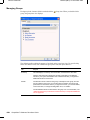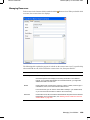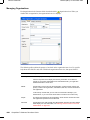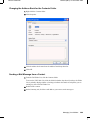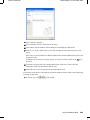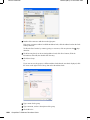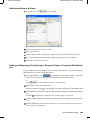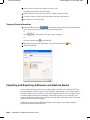
1
Novell Confidential Manual (ENU) 21 December 2004 Novell GroupWise ® www.novell.com 7 WINDOWS CLIENT USER GUIDE August 15, 2005 Novell Confidential Manual (ENU) 21 December 2004 Legal Notices Novell, Inc. makes no representations or warranties with respect to the contents or use of this documentation, and specifically disclaims any express or implied warranties of merchantability or fitness for any particular purpose. Further, Novell, Inc. reserves the right to revise this publication and to make changes to its content, at any time, without obligation to notify any person or entity of such revisions or changes. Further, Novell, Inc. makes no representations or warranties with respect to any software, and specifically disclaims any express or implied warranties of merchantability or fitness for any particular purpose. Further, Novell, Inc. reserves the right to make changes to any and all parts of Novell software, at any time, without any obligation to notify any person or entity of such changes. Any products or technical information provided under this Agreement may be subject to U.S. export controls and the trade laws of other countries. You agree to comply with all export control regulations and to obtain any required licenses or classification to export, re-export, or import deliverables. You agree not to export or re-export to entities on the current U.S. export exclusion lists or to any embargoed or terrorist countries as specified in the U.S. export laws. You agree to not use deliverables for prohibited nuclear, missile, or chemical biological weaponry end uses. Please refer to www.novell.com/info/exports/ for more information on exporting Novell software. Novell assumes no responsibility for your failure to obtain any necessary export approvals. Copyright © 2005 Novell, Inc. All rights reserved. No part of this publication may be reproduced, photocopied, stored on a retrieval system, or transmitted without the express written consent of the publisher. Novell, Inc. has intellectual property rights relating to technology embodied in the product that is described in this document. In particular, and without limitation, these intellectual property rights may include one or more of the U.S. patents listed at http://www.novell.com/company/legal/patents/ and one or more additional patents or pending patent applications in the U.S. and in other countries. Novell, Inc. 404 Wyman Street, Suite 500 Waltham, MA 02451 U.S.A. www.novell.com GroupWise 7 Windows Client User Guide Augusat 15, 2005 Online Documentation: To access the online documentation for this and other Novell products, and to get updates, see www.novell.com/documentation. Novell Confidential Novell Trademarks C3PO is a trademark of Novell, Inc. eDirectory is a trademark of Novell, Inc. GroupWise is a registered trademark of Novell, Inc. in the United States and other countries. NDS is a registered trademark of Novell, Inc. in the United States and other countries. NetMail is a trademark of Novell, Inc. Novell is a registered trademark of Novell, Inc. in the United States and other countries. Nterprise is a trademark of Novell, Inc. ZENworks is a registered trademark of Novell, Inc. in the United States and other countries. Third-Party Materials All third-party trademarks are the property of their respective owners. Manual (ENU) 21 December 2004 Novell Confidential Manual (ENU) 21 December 2004 Novell Confidential Manual (ENU) 21 December 2004 Contents 1 About This Guide 15 Getting Started 17 Starting the GroupWise Client . . . . . . . . . . . . . . . . . . . . . . . . . . . . . . . Running the Setup Program . . . . . . . . . . . . . . . . . . . . . . . . . . . . . . Starting GroupWise 7 . . . . . . . . . . . . . . . . . . . . . . . . . . . . . . . . . . Getting Acquainted with the Main GroupWise Window. . . . . . . . . . . . . . . . . . . Nav Bar . . . . . . . . . . . . . . . . . . . . . . . . . . . . . . . . . . . . . . . . . Toolbar . . . . . . . . . . . . . . . . . . . . . . . . . . . . . . . . . . . . . . . . . Panels . . . . . . . . . . . . . . . . . . . . . . . . . . . . . . . . . . . . . . . . . . Folder and Item List Header . . . . . . . . . . . . . . . . . . . . . . . . . . . . . . Folder List . . . . . . . . . . . . . . . . . . . . . . . . . . . . . . . . . . . . . . . . Understanding the Home View . . . . . . . . . . . . . . . . . . . . . . . . . . . . . . . Using Different GroupWise Modes (Online, Caching, and Remote) . . . . . . . . . . . . Online Mode . . . . . . . . . . . . . . . . . . . . . . . . . . . . . . . . . . . . . . Caching Mode. . . . . . . . . . . . . . . . . . . . . . . . . . . . . . . . . . . . . . Remote Mode . . . . . . . . . . . . . . . . . . . . . . . . . . . . . . . . . . . . . . Understanding Your Mailbox . . . . . . . . . . . . . . . . . . . . . . . . . . . . . . . . Bolded Items in Your Mailbox . . . . . . . . . . . . . . . . . . . . . . . . . . . . . . Icons Appearing Next to Items in Your Mailbox, Sent Items Folder, and the Calendar . Viewing Options in Your Mailbox . . . . . . . . . . . . . . . . . . . . . . . . . . . . Using Panels . . . . . . . . . . . . . . . . . . . . . . . . . . . . . . . . . . . . . . . . Customizing Your Panels . . . . . . . . . . . . . . . . . . . . . . . . . . . . . . . . Creating a New Panel . . . . . . . . . . . . . . . . . . . . . . . . . . . . . . . . . . Resizing a Panel . . . . . . . . . . . . . . . . . . . . . . . . . . . . . . . . . . . . Using the Nav Bar . . . . . . . . . . . . . . . . . . . . . . . . . . . . . . . . . . . . . Customizing the Nav Bar . . . . . . . . . . . . . . . . . . . . . . . . . . . . . . . . Using the Toolbar . . . . . . . . . . . . . . . . . . . . . . . . . . . . . . . . . . . . . . Customizing the Toolbar Display . . . . . . . . . . . . . . . . . . . . . . . . . . . . Using Shortcut Keys . . . . . . . . . . . . . . . . . . . . . . . . . . . . . . . . . . . . Learning More . . . . . . . . . . . . . . . . . . . . . . . . . . . . . . . . . . . . . . . Online Help . . . . . . . . . . . . . . . . . . . . . . . . . . . . . . . . . . . . . . . GroupWise 7 Documentation Web Page . . . . . . . . . . . . . . . . . . . . . . . . GroupWise Cool Solutions Web Community . . . . . . . . . . . . . . . . . . . . . . 2 . . . . . . . . . . . . . . . . . . . . . . . . . . . . . . . . . . . . . . . . . . . . . . . . . . . . . . . . . . . . . . . . . . . . . . . . . . . . . . . . . . . . . . . . . . . . . . . . . . . . . . . . . . . . . . . . . . . . . . . . . . . . . . . . . . . . . . . . . . . . . . . . . . . . . . . . . . . . . . . . . . . . . . . . . . . . . . . . . . . . . . . . . . . . . . . . . . . . . . . . . . . . . . . . . . . . . . . . . . . . . . . . . . . . . . . . . . . . . . . . . . . . . . . . . . . . . . . . . . . . . . . . . . . . . . . . . . . . . . . . . . . . . . . . . . . . . . . . . . . . . . . . . . . . . . . . . . . . . . . . . . . . . . . . . . . . . . . . . . . . . . . . . . . . . . . . . . . . . . . . . . . . . . . . . . . . . . . . . . . . . . . . . . . . . . . . . . . . . . . . . . . . . . . . . . . . . . . . . . . . . . . . . . . . . . . . . . . . . . . . . . . . . . . . . . . . . . . . . . . . . . . . . . . . . . . . . . . . . . . . . . . . . . . . . . . . . . . . . . . . . . . . . . . . . . . . . . . . . . . . . . . . . . . . . . . . . . . . . . . . . . . . . . . . . . . . . . . . . . . . . . . . . . . . . . . . . . . . . . . . . . . . . . . . . . . . . . . . . . . . Logging in to GroupWise Logging In to GroupWise . . . . . . . . . . . . . . . . . . . . . Logging In to Your Mailbox . . . . . . . . . . . . . . . . . . Logging in to Your Mailbox from Another User’s Workstation Assigning Passwords to Your Mailbox . . . . . . . . . . . . . . LDAP Authentication . . . . . . . . . . . . . . . . . . . . . Adding, Changing, and Removing Your Password . . . . . . Bypassing Your GroupWise or LDAP Password . . . . . . . Proxies and Mailbox Passwords . . . . . . . . . . . . . . . Mailbox Passwords and Remote Mode . . . . . . . . . . . . 17 17 17 18 18 19 20 20 21 25 26 26 27 27 27 28 28 30 32 33 33 34 35 35 35 35 37 39 39 39 40 41 . . . . . . . . . . . . . . . . . . . . . . . . . . . . . . . . . . . . . . . . . . . . . . . . . . . . . . . . . . . . . . . . . . . . . . . . . . . . . . . . . . . . . . . . . . . . . . . . . . . . . . . . . . . . . . . . . . . . . Contents 41 41 42 42 42 43 44 44 45 5 Novell Confidential Manual (ENU) 21 December 2004 Mailbox Passwords and Caching Mode . . . . . . . . . . . . . . . . . . . . . . . . . . . . . . . . . . . . . . . . 45 3 Working with Items in Your Mailbox Understanding GroupWise Item Types . . . . . . . . . . . . . . . . . . . . Sending and Receiving Items . . . . . . . . . . . . . . . . . . . . . . . . . Sending Mail Messages . . . . . . . . . . . . . . . . . . . . . . . . . . Sending Phone Messages . . . . . . . . . . . . . . . . . . . . . . . . . Changing the Font of Items You Send . . . . . . . . . . . . . . . . . . . Formatting Bulleted and Numbered Lists . . . . . . . . . . . . . . . . . Adding a Signature or vCard to Items You Send . . . . . . . . . . . . . Spell-Checking Items You Send . . . . . . . . . . . . . . . . . . . . . . Undoing the Last Text Action . . . . . . . . . . . . . . . . . . . . . . . Using Routing Slip . . . . . . . . . . . . . . . . . . . . . . . . . . . . . . . Creating a Routed Item . . . . . . . . . . . . . . . . . . . . . . . . . . Requiring a Password before Marking a Routed Item Completed . . . . . Completing a Routed Item . . . . . . . . . . . . . . . . . . . . . . . . . Addressing a Routed Item with an Address Book . . . . . . . . . . . . . Downloading POP3 and IMAP4 Accounts to GroupWise . . . . . . . . . . . Adding a POP3 or IMAP4 Account to GroupWise . . . . . . . . . . . . . Modifying Properties of a POP3 or IMAP4 Account . . . . . . . . . . . . Downloading Items from POP3 and IMAP4 Accounts . . . . . . . . . . . Downloading New Items from POP3 and IMAP4 Accounts Automatically. Downloading Only the Header (Subject) for IMAP4 Accounts . . . . . . . Using GroupWise to Send POP3 and IMAP4 Mail. . . . . . . . . . . . . Deleting an Item from a POP3 or IMAP4 Account . . . . . . . . . . . . . Connecting to a POP3 or IMAP4 Server Using SSL. . . . . . . . . . . . Importing POP3 and IMAP4 Accounts . . . . . . . . . . . . . . . . . . . Storing Your POP3 Items on a Mail Server . . . . . . . . . . . . . . . . Changing the Length of Time for POP3 and IMAP4 Server Timeouts. . . Subscribing and Unsubscribing to IMAP4 Folders. . . . . . . . . . . . . Alphabetizing the Folders in an IMAP4 Account . . . . . . . . . . . . . . Downloading Voice Mail Attachments through an IMAP4 Account . . . . Attaching Files . . . . . . . . . . . . . . . . . . . . . . . . . . . . . . . . . Attaching a File to an Item . . . . . . . . . . . . . . . . . . . . . . . . . Attaching a Document Reference to an Item . . . . . . . . . . . . . . . Embedding an OLE Object in an Item . . . . . . . . . . . . . . . . . . . Viewing Attached Files. . . . . . . . . . . . . . . . . . . . . . . . . . . Opening Attached Files . . . . . . . . . . . . . . . . . . . . . . . . . . Managing Sent Items . . . . . . . . . . . . . . . . . . . . . . . . . . . . . Confirming Delivery of Items You’ve Sent . . . . . . . . . . . . . . . . . Displaying Sent Items . . . . . . . . . . . . . . . . . . . . . . . . . . . Resending Items . . . . . . . . . . . . . . . . . . . . . . . . . . . . . . Retracting Items You’ve Sent . . . . . . . . . . . . . . . . . . . . . . . Checking the Status of Your Items . . . . . . . . . . . . . . . . . . . . Receiving Notification About Items You Send . . . . . . . . . . . . . . . Requesting a Reply for Items You Send . . . . . . . . . . . . . . . . . . Changing the Subject of a Sent Item . . . . . . . . . . . . . . . . . . . Managing Received Items . . . . . . . . . . . . . . . . . . . . . . . . . . . Reading Items You Receive . . . . . . . . . . . . . . . . . . . . . . . . Changing the Font of Items You Receive . . . . . . . . . . . . . . . . . Replying to Items You Receive . . . . . . . . . . . . . . . . . . . . . . Forwarding Items to Other Users . . . . . . . . . . . . . . . . . . . . . Using Categories to Organize Items . . . . . . . . . . . . . . . . . . . . Changing the Subject of an Item You’ve Received . . . . . . . . . . . . Creating a Checklist . . . . . . . . . . . . . . . . . . . . . . . . . . . . Delegating Items . . . . . . . . . . . . . . . . . . . . . . . . . . . . . . 6 GroupWise 7 Windows Client User Guide 47 . . . . . . . . . . . . . . . . . . . . . . . . . . . . . . . . . . . . . . . . . . . . . . . . . . . . . . . . . . . . . . . . . . . . . . . . . . . . . . . . . . . . . . . . . . . . . . . . . . . . . . . . . . . . . . . . . . . . . . . . . . . . . . . . . . . . . . . . . . . . . . . . . . . . . . . . . . . . . . . . . . . . . . . . . . . . . . . . . . . . . . . . . . . . . . . . . . . . . . . . . . . . . . . . . . . . . . . . . . . . . . . . . . . . . . . . . . . . . . . . . . . . . . . . . . . . . . . . . . . . . . . . . . . . . . . . . . . . . . . . . . . . . . . . . . . . . . . . . . . . . . . . . . . . . . . . . . . . . . . . . . . . . . . . . . . . . . . . . . . . . . . . . . . . . . . . . . . . . . . . . . . . . . . . . . . . . . . . . . . . . . . . . . . . . . . . . . . . . . . . . . . . . . . . . . . . . . . . . . . . . . . . . . . . . . . . . . . . . . . . . . . . . . . . . . . . . . . . . . . . . . . . . . . . . . . . . . . . . . . . . . . . . . . . . . . . . . . . . . . . . . . . . . . . . . . . . . . . . . . . . . . . . . . . . . . . . . . . . . . . . . . . . . . . . . . . . . . . . . . . . . . . . . . . . . . . . . . . . . . . . . . . . . . . . . . . . . . . . . . . . . . . . . . . . . . . . . . . . . . . . . . . . . . . . . . . . . . . . . . . . . . . . . . . . . . . . . . . . . . . . . . . . . . . . . . . . . . . . . . . . . . . . . . . . . . . . . . . . . . . . . . . . . . . . . . . . . . . . . . . . . . . . . . . . . . . . . . . . . . . . . . . . . . . . . . . . . . . . . . . . . . . . . . . . . . . . . . . . . . . . . . . . . . . . . . . . . . . . . . . . . . . . . . . . . . . . . . . . . . . . . . . . . . . . . . . . . . . . . . . . . . . . . . . . . . . . . . . . . . . . . . . . . . . . . . . . . . . . . . . . . . . . . . . . . . . . . . . . . . . . . . . . . . . . . . . . . . . . . . . . . . . . . . . . . . . . . . . . . . . . . . . . . . . . . . . . . . . . . . . . . . . . . . . . . . . . . . . . . . . . . . . . . . . . . . . . . . . . . . . . . . . . . . . . . . . . . . . . . . . . . . . . . . . . . . . . . . . . . . . . . . . . . . . . . . . . . . . . . . . . . . . . . . . . . . . . . . . . . . . . . . . . . . . . . . . . . . . . . . . . . . . . . . . . . . . . . . . . . . . . . . . . . . . . . . . . . . . . . . . . . . . . . . . . . . . . . . . . . . . . . . . . . 47 48 48 50 51 53 54 55 58 58 59 60 60 60 61 63 63 64 64 65 66 66 67 67 69 69 69 70 70 70 71 71 73 74 74 75 75 75 75 76 76 77 78 79 80 80 82 83 85 85 89 90 95 Novell Confidential Manual (ENU) 21 December 2004 Handling Unwanted Mail . . . . . . . . . . . . . . . . . . . . . . . . . . . . . . . . . . . . . . . . . . . . . . . 96 Changing Item Types . . . . . . . . . . . . . . . . . . . . . . . . . . . . . . . . . . . . . . . . . . . . . . . . 103 Viewing and Composing Items in HTML . . . . . . . . . . . . . . . . . . . . . . . . . . . . . . . . . . . . . . 105 4 Using GroupWise Messenger from Within GroupWise 107 Using GroupWise Messenger from Within GroupWise . . . . . . . . . . . . . . . . . . Displaying the GroupWise Messenger Presence . . . . . . . . . . . . . . . . . . . Sending an Instant Message From the GroupWise Messenger Presence . . . . . . Sending an Instant Message From the File Menu . . . . . . . . . . . . . . . . . . Displaying the GroupWise Messenger Contact List. . . . . . . . . . . . . . . . . . Adding Contacts from GroupWise to GroupWise Messenger. . . . . . . . . . . . . Specifying Whether or Not to Start GroupWise Messenger When GroupWise Starts Displaying GroupWise Messenger Options . . . . . . . . . . . . . . . . . . . . . . 5 . . . . . . . . . . . . . . . . . . . . . . . . . . . . . . . . . . . . . . . . . . . . . . . . . . . . . . . . . . . . . . . . . . . . . . . . . . . . . . . . . . . . . . . . . . . . . . . . . . . . . . . . . . . . . . . . Scheduling Group and Posted Items Scheduling Appointments . . . . . . . . . . . . . . . . . . . . . . . Scheduling an Appointment for Other Users . . . . . . . . . . . . Rescheduling an Appointment . . . . . . . . . . . . . . . . . . . Canceling an Appointment . . . . . . . . . . . . . . . . . . . . . Scheduling an Appointment for Yourself . . . . . . . . . . . . . . Checking When Everyone Is Available . . . . . . . . . . . . . . . Formatting Your Appointments in ICAL . . . . . . . . . . . . . . . Sending Tasks . . . . . . . . . . . . . . . . . . . . . . . . . . . . . Assigning a Task to Other Users . . . . . . . . . . . . . . . . . . Assigning a Task to Yourself . . . . . . . . . . . . . . . . . . . . Marking Tasks Completed . . . . . . . . . . . . . . . . . . . . . Sending Reminder Notes . . . . . . . . . . . . . . . . . . . . . . . . Scheduling a Reminder Note for Yourself. . . . . . . . . . . . . . Scheduling a Reminder Note for Other Users . . . . . . . . . . . Accepting or Declining Scheduled Items . . . . . . . . . . . . . . . . Accepting and Declining Resource Requests. . . . . . . . . . . . Specifying a Time Zone for an Appointment . . . . . . . . . . . . . . Scheduling Recurring Items . . . . . . . . . . . . . . . . . . . . . . Scheduling a Recurring Item by Dates . . . . . . . . . . . . . . . Scheduling a Recurring Item by Example. . . . . . . . . . . . . . Scheduling a Recurring Item Based on Another Day of the Week . Scheduling a Recurring Item Based on the Last Day of the Month . Scheduling Auto-Dates by Formula . . . . . . . . . . . . . . . . . Using Auto-Date Formula Functions and Operators . . . . . . . . 6 . . . . . . . . 107 108 108 108 108 108 109 109 111 . . . . . . . . . . . . . . . . . . . . . . . . . . . . . . . . . . . . . . . . . . . . . . . . . . . . . . . . . . . . . . . . . . . . . . . . . . . . . . . . . . . . . . . . . . . . . . . . . . . . . . . . . . . . . . . . . . . . . . . . . . . . . . . . . . . . . . . . . . . . . . . . . . . . . . . . . . . . . . . . . . . . . . . . . . . . . . . . . . . . . . . . . . . . . . . . . . . . . . . . . . . . . . . . . . . . . . . . . . . . . . . . . . . . . . . . . . . . . . . . . . . . . . . . . . . . . . . . . . . . . . . . . . . . . . . . . . . . . . . . . . . . . . . . . . . . . . . . . . . . . . . . . . . . . . . . . . . . . . . . . . . . . . . . . . . . . . . . . . . . . . . . . . . . . . . . . . . . . . . . . . . . . . . . . . . . . . . . . . . . . . . . . . . . . . . . . . . . . . . . . . . . . . . . . . . . . . . . . . . . . . . . . . . . . . . . . . . . . . . . . . . . . . . . . . . . . . . . . . . . . . . . . . . . . . . . . . . . . . . . . . . . . . . . . . . . . . . . . . . . . . . . . . . . . . . . . . . . . . . . . . . . . . . . . . . . . . . . . . . . . . . . . . . . . . . . . . . . . . . . . . . . . . . . . . . . . . . . Viewing Your Calendar . . . . . . . . . . . . . . . . . . . . . . . . . . Opening the Calendar Folder or a Calendar View . . . . . . . . . . Navigating in the Calendar . . . . . . . . . . . . . . . . . . . . . . Creating a Calendar. . . . . . . . . . . . . . . . . . . . . . . . . . Changing a Calendar’s Color . . . . . . . . . . . . . . . . . . . . . Selecting Calendars to Display . . . . . . . . . . . . . . . . . . . . Viewing As Calendar . . . . . . . . . . . . . . . . . . . . . . . . . Understanding the Icons Appearing Next to Items in Your Calendar . Reading an Item in Your Calendar . . . . . . . . . . . . . . . . . . . . Saving an Item in Your Calendar . . . . . . . . . . . . . . . . . . . . Using the Multi-User Calendar . . . . . . . . . . . . . . . . . . . . . . Viewing the Calendars of Multiple Users or Resources. . . . . . . . Modifying a Multi-User List . . . . . . . . . . . . . . . . . . . . . . Creating a Multi-User Calendar View . . . . . . . . . . . . . . . . . Printing Calendar Items. . . . . . . . . . . . . . . . . . . . . . . . . . . . . . . . . . . . . . . . . . . . . . . . . . . . . . . . . . . . . . . . . . . . . . . . . . . . . . . . . . . . . . . . . . . . . . . . . . . . . . . . . . . . . . . . . . . . . . . . . . . . . . . . . . . . . . . . . . . . . . . . . . . . . . . . . . . . . . . . . . . . . . . . . . . . . . . . . . . . . . . . . . . . . . . . . . . . . . . . . . . . . . . . . . . . . . . . . . . . . . . . . . . . . . . . . . . . . . . . . . . . . . . . . . . . . . . . . . . . . . . . . . . . . . . . . . . . . . . . . . . . . . . . . . . . . . . . . . . . . . . . . . . . . . . . . . . . . . . . . . . . . . . . . . . . . . . . . . . . . . . . . . . . . . . . . . . . . . . . . . . . . . . . . . . Using Your Calendar 111 112 113 114 114 115 117 117 118 119 120 120 121 121 123 123 123 124 125 125 126 126 127 127 133 Contents 134 134 135 136 136 136 137 137 137 137 138 138 138 139 139 7 Novell Confidential Printing Your Calendar, Task List, or Reminder Note List . Printing the Calendars of Multiple Users. . . . . . . . . . Changing the First Day of the Week in Your Calendar . . . . Viewing a Different Date in the Calendar . . . . . . . . . . . Viewing All Day Events in the Calendar . . . . . . . . . . . . Setting Alarms for Calendar Items. . . . . . . . . . . . . . . Setting an Alarm . . . . . . . . . . . . . . . . . . . . . . Specifying How Long Before an Event the Alarm Sounds . Sending an Alarm to an Electronic Pager . . . . . . . . . 7 Manual (ENU) 21 December 2004 . . . . . . . . . . . . . . . . . . . . . . . . . . . . . . . . . . . . . . . . . . . . . . . . . . . . . . . . . . . . . . . . . . . . . . . . . . . . . . . . . . . . . . . . . . . . . . . . . . . . . . . . . . . . . . . . . . . . . . . . . . . . . . . . . . . . . . . . . . . . . . . . . . . . . . . . . . . . . . . . . . . . . . . . . . . . . . . . . . . . . . . . . . . . . . . . . . . . . . . . . . . . . . . . . . . . . . . . . . . . . . . . . . . . . . . . . . . . . . . . . . . . . . . . . . . . Managing Your Mailbox Using the Folder List . . . . . . . . . . . . . . . . . . . . . . . . . . . . . . Displaying the Full Folder List or Simple Folder List . . . . . . . . . . . . . Renaming Folders . . . . . . . . . . . . . . . . . . . . . . . . . . . . . . Deleting Folders . . . . . . . . . . . . . . . . . . . . . . . . . . . . . . . Creating a Personal Folder . . . . . . . . . . . . . . . . . . . . . . . . . Creating a Shared Folder . . . . . . . . . . . . . . . . . . . . . . . . . . Moving or Linking an Item to Another Folder . . . . . . . . . . . . . . . . Understanding Find Results Folders. . . . . . . . . . . . . . . . . . . . . Changing or Deleting Folder Display Settings . . . . . . . . . . . . . . . . Using Shared Folders . . . . . . . . . . . . . . . . . . . . . . . . . . . . . . Sharing an Existing Folder with Other Users (v6.5 and v6.5 for NNLS 1.0) . Posting a Message to a Shared Folder . . . . . . . . . . . . . . . . . . . Viewing Discussion Threads in a Shared Folder . . . . . . . . . . . . . . Managing Contacts Through Your Mailbox . . . . . . . . . . . . . . . . . . . Managing Contacts . . . . . . . . . . . . . . . . . . . . . . . . . . . . . Managing Groups . . . . . . . . . . . . . . . . . . . . . . . . . . . . . . Managing Resources . . . . . . . . . . . . . . . . . . . . . . . . . . . . Managing Organizations . . . . . . . . . . . . . . . . . . . . . . . . . . . Changing the Address Book for the Contacts Folder . . . . . . . . . . . . Sending a Mail Message from a Contact . . . . . . . . . . . . . . . . . . Changing the Display Name of a Contact . . . . . . . . . . . . . . . . . . Viewing All Correspondence You Have Had with a Contact. . . . . . . . . Using Mailbox Storage Size Information . . . . . . . . . . . . . . . . . . . . Viewing Your Mailbox Size Information . . . . . . . . . . . . . . . . . . . Deleting Items from Your Mailbox Using Mailbox Storage Size Information. Archiving Items from Your Mailbox Using Mailbox Storage Size Information Running Notify . . . . . . . . . . . . . . . . . . . . . . . . . . . . . . . . . . Starting Notify . . . . . . . . . . . . . . . . . . . . . . . . . . . . . . . . Reading an Item from Notify . . . . . . . . . . . . . . . . . . . . . . . . . Sending an Alarm to an Electronic Pager . . . . . . . . . . . . . . . . . . Displaying the Notify Dialog Box When You Receive Notification . . . . . . Turning Off Notification . . . . . . . . . . . . . . . . . . . . . . . . . . . Setting How Often Notify Checks for New Items. . . . . . . . . . . . . . . Setting How to Be Notified When Outgoing Messages Change Status . . . Setting How to Be Notified of Items in Your Mailbox. . . . . . . . . . . . . Being Notified of Someone Else's Messages . . . . . . . . . . . . . . . . Archiving the Items in Your Mailbox . . . . . . . . . . . . . . . . . . . . . . . Archiving an Item in Your Mailbox . . . . . . . . . . . . . . . . . . . . . . Viewing Archived Items . . . . . . . . . . . . . . . . . . . . . . . . . . . Unarchiving Items . . . . . . . . . . . . . . . . . . . . . . . . . . . . . . Archiving Items Automatically . . . . . . . . . . . . . . . . . . . . . . . . Printing Items in Your Mailbox. . . . . . . . . . . . . . . . . . . . . . . . . . Printing GroupWise Items . . . . . . . . . . . . . . . . . . . . . . . . . . Printing Status Information about an Item . . . . . . . . . . . . . . . . . . Printing Calendars . . . . . . . . . . . . . . . . . . . . . . . . . . . . . . 8 . . . . . . . . . GroupWise 7 Windows Client User Guide 140 141 142 142 142 142 143 143 144 147 . . . . . . . . . . . . . . . . . . . . . . . . . . . . . . . . . . . . . . . . . . . . . . . . . . . . . . . . . . . . . . . . . . . . . . . . . . . . . . . . . . . . . . . . . . . . . . . . . . . . . . . . . . . . . . . . . . . . . . . . . . . . . . . . . . . . . . . . . . . . . . . . . . . . . . . . . . . . . . . . . . . . . . . . . . . . . . . . . . . . . . . . . . . . . . . . . . . . . . . . . . . . . . . . . . . . . . . . . . . . . . . . . . . . . . . . . . . . . . . . . . . . . . . . . . . . . . . . . . . . . . . . . . . . . . . . . . . . . . . . . . . . . . . . . . . . . . . . . . . . . . . . . . . . . . . . . . . . . . . . . . . . . . . . . . . . . . . . . . . . . . . . . . . . . . . . . . . . . . . . . . . . . . . . . . . . . . . . . . . . . . . . . . . . . . . . . . . . . . . . . . . . . . . . . . . . . . . . . . . . . . . . . . . . . . . . . . . . . . . . . . . . . . . . . . . . . . . . . . . . . . . . . . . . . . . . . . . . . . . . . . . . . . . . . . . . . . . . . . . . . . . . . . . . . . . . . . . . . . . . . . . . . . . . . . . . . . . . . . . . . . . . . . . . . . . . . . . . . . . . . . . . . . . . . . . . . . . . . . . . . . . . . . . . . . . . . . . . . . . . . . . . . . . . . . . . . . . . . . . . . . . . . . . . . . . . . . . . . . . . . . . . . . . . . . . . . . . . . . . . . . . . . . . . . . . . . . . . . . . . . . . . . . . . . . . . . . . . . . . . . . . . . . . . . . . . . . . . . . . . . . . . . . . . . . . . . . . . . . . . . . . . . . . . . . . . . . . . . . . . . . . . . . . . . . . . . . . . . . . . . . . . . . . . . . . . . . . . . . . . . . . . . . . . . . . . . . . . . . . . . . . . . . . . . . . . . . . . . . . . . . . . . . . . . . . . . . . . . . . . . . . . . . . . . . . . . . . . . . . . . . . . . . . . . . . . . . . . . . . . 147 149 149 149 150 150 150 151 152 152 153 154 155 155 156 158 159 160 161 161 162 164 165 166 166 166 167 168 168 168 168 168 169 169 169 169 170 171 171 171 171 172 172 173 173 Novell Confidential Creating Rules . . . . . . . . . . . . . . . . . . . . . . . . . . . . . . Actions a Rule Can Perform . . . . . . . . . . . . . . . . . . . . . Events That Trigger a Rule . . . . . . . . . . . . . . . . . . . . . . Creating a Rule . . . . . . . . . . . . . . . . . . . . . . . . . . . . Creating a Vacation Rule . . . . . . . . . . . . . . . . . . . . . . . Creating a Rule to Forward All Mail to a Private Mail Account . . . . Copying a Rule to Make a New Rule . . . . . . . . . . . . . . . . . Editing a Rule . . . . . . . . . . . . . . . . . . . . . . . . . . . . . Deleting a Rule . . . . . . . . . . . . . . . . . . . . . . . . . . . . Limiting Items Affected by a Rule . . . . . . . . . . . . . . . . . . . Running a Rule Manually . . . . . . . . . . . . . . . . . . . . . . . Enabling or Disabling a Rule . . . . . . . . . . . . . . . . . . . . . Giving Other People Access to Your Mailbox . . . . . . . . . . . . . . Receiving Proxy Rights . . . . . . . . . . . . . . . . . . . . . . . . Assigning Proxy Rights to Another User . . . . . . . . . . . . . . . Adding and Removing Proxy Names and Rights in Your Access List Managing Someone Else's Mailbox or Calendar . . . . . . . . . . . Adding and Removing Users in Your Proxy List . . . . . . . . . . . Marking an Item Private . . . . . . . . . . . . . . . . . . . . . . . . Saving Items in Your Mailbox. . . . . . . . . . . . . . . . . . . . . . . Saving an Item to Disk or to a GroupWise Library . . . . . . . . . . Saving Status Information. . . . . . . . . . . . . . . . . . . . . . . Saving an Unfinished Item . . . . . . . . . . . . . . . . . . . . . . Owning Resources . . . . . . . . . . . . . . . . . . . . . . . . . . . . Accepting and Declining Resource Requests. . . . . . . . . . . . . Receiving Notification for Another User or Resource . . . . . . . . . Creating a Rule for a Resource . . . . . . . . . . . . . . . . . . . . Opening and Emptying the Trash . . . . . . . . . . . . . . . . . . . . Opening Your Trash . . . . . . . . . . . . . . . . . . . . . . . . . Undeleting an Item in the Trash. . . . . . . . . . . . . . . . . . . . Saving an Item That Is in Your Trash . . . . . . . . . . . . . . . . . Emptying the Trash . . . . . . . . . . . . . . . . . . . . . . . . . . Emptying Selected Items from the Trash . . . . . . . . . . . . . . . Emptying the Trash Automatically . . . . . . . . . . . . . . . . . . Deleting Items from Your Mailbox . . . . . . . . . . . . . . . . . . . . Deleting an Item from Your Mailbox. . . . . . . . . . . . . . . . . . Deleting and Emptying Items from Your Mailbox . . . . . . . . . . . Backing Up Your Mailbox . . . . . . . . . . . . . . . . . . . . . . . . . Backing Up Your Mailbox . . . . . . . . . . . . . . . . . . . . . . . Restoring Items from Backup . . . . . . . . . . . . . . . . . . . . . Repairing Your Mailbox . . . . . . . . . . . . . . . . . . . . . . . . . . Finding Items . . . . . . . . . . . . . . . . . . . . . . . . . . . . . . . Finding an Item By Example . . . . . . . . . . . . . . . . . . . . . Finding an Item Using Search Criteria . . . . . . . . . . . . . . . . Saving the Results of a Find . . . . . . . . . . . . . . . . . . . . . Finding a Document and Creating a Reference to It in Your Mailbox. Finding an Item Using Advanced Find . . . . . . . . . . . . . . . . Finding Text in Items . . . . . . . . . . . . . . . . . . . . . . . . . . . Filtering Items. . . . . . . . . . . . . . . . . . . . . . . . . . . . . . . Creating a New Filter . . . . . . . . . . . . . . . . . . . . . . . . . Creating a New Filter Using Advanced Filter . . . . . . . . . . . . . Selecting a Filter . . . . . . . . . . . . . . . . . . . . . . . . . . . Clearing a Filter . . . . . . . . . . . . . . . . . . . . . . . . . . . . Deleting a Filter . . . . . . . . . . . . . . . . . . . . . . . . . . . . Narrowing Your Filter . . . . . . . . . . . . . . . . . . . . . . . . . Manual (ENU) 21 December 2004 . . . . . . . . . . . . . . . . . . . . . . . . . . . . . . . . . . . . . . . . . . . . . . . . . . . . . . . . . . . . . . . . . . . . . . . . . . . . . . . . . . . . . . . . . . . . . . . . . . . . . . . . . . . . . . . . . . . . . . . . . . . . . . . . . . . . . . . . . . . . . . . . . . . . . . . . . . . . . . . . . . . . . . . . . . . . . . . . . . . . . . . . . . . . . . . . . . . . . . . . . . . . . . . . . . . . . . . . . . . . . . . . . . . . . . . . . . . . . . . . . . . . . . . . . . . . . . . . . . . . . . . . . . . . . . . . . . . . . . . . . . . . . . . . . . . . . . . . . . . . . . . . . . . . . . . . . . . . . . . . . . . . . . . . . . . . . . . . . . . . . . . . . . . . . . . . . . . . . . . . . . . . . . . . . . . . . . . . . . . . . . . . . . . . . . . . . . . . . . . . . . . . . . . . . . . . . . . . . . . . . . . . . . . . . . . . . . . . . . . . . . . . . . . . . . . . . . . . . . . . . . . . . . . . . . . . . . . . . . . . . . . . . . . . . . . . . . . . . . . . . . . . . . . . . . . . . . . . . . . . . . . . . . . . . . . . . . . . . . . . . . . . . . . . . . . . . . . . . . . . . . . . . . . . . . . . . . . . . . . . . . . . . . . . . . . . . . . . . . . . . . . . . . . . . . . . . . . . . . . . . . . . . . . . . . . . . . . . . . . . . . . . . . . . . . . . . . . . . . . . . . . . . . . . . . . . . . . . . . . . . . . . . . . . . . . . . . . . . . . . . . . . . . . . . . . . . . . . . . . . . . . . . . . . . . . . . . . . . . . . . . . . . . . . . . . . . . . . . . . . . . . . . . . . . . . . . . . . . . . . . . . . . . . . . . . . . . . . . . . . . . . . . . . . . . . . . . . . . . . . . . . . . . . . . . . . . . . . . . . . . . . . . . . . . . . . . . . . . . . . . . . . . . . . . . . . . . . . . . . . . . . . . . . . . . . . . . . . . . . . . . . . . . . . . . . . . . . . . . . . . . . . . . . . . . . . . . . . . . . . . . . . . . . . . . . . . . . . . . . . . . . . . . . . . . . . . . . . . . . . . . . . . . . . . . . . . . . . . . . . . . . . . . . . . . . . . . . . . . . . . . . . . . . . . . . . . . . . . . . . . . . . . . . . . . . . . . . . . . . . . . . . . . . . . . . . . . . . . . . . . . . . . . . . . . . . . . . . . . . . . . . . . . . . . . . . . . . . . . . . . . . . . . . . . . . . . . . . . . . . . . . . . . . . . . . . . . . . . . . . . . . . . . . . . . . . . . . . . . . . . . . . . . . . . . . . . . . . . . . . . . . . . . . . . . Contents . . . . . . . . . . . . . . . . . . . . . . . . . . . . . . . . . . . . . . . . . . . . . . . . . . . . . . . 174 174 175 176 177 178 178 178 179 179 179 179 180 180 181 181 182 183 183 184 184 185 185 185 185 186 186 187 187 187 188 188 188 188 189 189 189 189 189 190 190 191 191 192 193 194 194 196 196 197 199 200 200 200 200 9 Novell Confidential Using Filter and Rule Wildcard Characters and Switches . Using Filter and Rule Operators . . . . . . . . . . . . . . Understanding Filter and Rule Fields . . . . . . . . . . . Using the Columns in Your Mailbox . . . . . . . . . . . . . . Changing Columns in Your Mailbox . . . . . . . . . . . . Sorting Items in Your Mailbox by Column . . . . . . . . . 8 Manual (ENU) 21 December 2004 . . . . . . . . . . . . . . . . . . . . . . . . . . . . . . . . . . . . . . . . . . . . . . . . . . . . . . . . . . . . . . . . . . . . . . . . . . . . . . . . . . . . . . . . . . . . . . . . . . . . . . . . . . . . . . . . . . . . . . . . . . . . . . . . . . . . . . . . . . . . . . . . . . . . . . . . . . . . . . . . . . . . . . . . Using the Address Book Understanding Address Books . . . . . . . . . . . . . . . . . . . . . . . . . . . . . . . Using the Address Book, the Address Selector, and the Contacts Folder. . . . . . . . System Address Book . . . . . . . . . . . . . . . . . . . . . . . . . . . . . . . . . . Frequent Contacts Address Book . . . . . . . . . . . . . . . . . . . . . . . . . . . . Personal Address Books. . . . . . . . . . . . . . . . . . . . . . . . . . . . . . . . . LDAP Address Books . . . . . . . . . . . . . . . . . . . . . . . . . . . . . . . . . . Shared Address Books . . . . . . . . . . . . . . . . . . . . . . . . . . . . . . . . . Quick Info . . . . . . . . . . . . . . . . . . . . . . . . . . . . . . . . . . . . . . . . . . Searching for Users and Resources. . . . . . . . . . . . . . . . . . . . . . . . . . . . . Searching for User, Resource, Organization, and Group Addresses . . . . . . . . . . Using Filters to Narrow an Address Search . . . . . . . . . . . . . . . . . . . . . . . Defining Name Completion Search Order . . . . . . . . . . . . . . . . . . . . . . . . Using LDAP in the Address Book . . . . . . . . . . . . . . . . . . . . . . . . . . . . . . Adding a Directory Service to an Address Book . . . . . . . . . . . . . . . . . . . . . Searching for a Person Through a Directory Service . . . . . . . . . . . . . . . . . . Establishing a Secure Connection to a Directory Service . . . . . . . . . . . . . . . . Modifying the Properties of a Directory Service . . . . . . . . . . . . . . . . . . . . . Specifying the Search Criteria a Directory Service Uses . . . . . . . . . . . . . . . . Changing the Length of Time a Directory Service Searches . . . . . . . . . . . . . . Using Groups to Address Items . . . . . . . . . . . . . . . . . . . . . . . . . . . . . . . Creating and Saving a Personal Group . . . . . . . . . . . . . . . . . . . . . . . . . Addressing Items to a Group . . . . . . . . . . . . . . . . . . . . . . . . . . . . . . Adding and Removing Contacts from a Personal Group or Corporate Distribution List . Viewing Group Information . . . . . . . . . . . . . . . . . . . . . . . . . . . . . . . Importing and Exporting Addresses and Address Books . . . . . . . . . . . . . . . . . . Importing Addresses into a Personal Address Book. . . . . . . . . . . . . . . . . . . Exporting Addresses from the Address Book . . . . . . . . . . . . . . . . . . . . . . Importing Third-Party Address Books . . . . . . . . . . . . . . . . . . . . . . . . . . Changing How Information Displays in the Address Book . . . . . . . . . . . . . . . . . Opening and Closing Address Books . . . . . . . . . . . . . . . . . . . . . . . . . . Specifying the Columns to Display in an Address Book . . . . . . . . . . . . . . . . . Sorting an Address Book . . . . . . . . . . . . . . . . . . . . . . . . . . . . . . . . Viewing Links to the System Address Book . . . . . . . . . . . . . . . . . . . . . . . Choosing the Display Format of Names . . . . . . . . . . . . . . . . . . . . . . . . . Printing Labels and Lists from the Address Book . . . . . . . . . . . . . . . . . . . . . . Printing Labels . . . . . . . . . . . . . . . . . . . . . . . . . . . . . . . . . . . . . . Printing Lists . . . . . . . . . . . . . . . . . . . . . . . . . . . . . . . . . . . . . . . Using the Address Selector and Address Book to Send Messages. . . . . . . . . . . . . Using the Address Selector to Address an Item . . . . . . . . . . . . . . . . . . . . . Sending Mail from the Address Book . . . . . . . . . . . . . . . . . . . . . . . . . . Using Frequent Contacts . . . . . . . . . . . . . . . . . . . . . . . . . . . . . . . . . . Using Frequent Contacts to Address Items . . . . . . . . . . . . . . . . . . . . . . . Setting Frequent Contacts Options . . . . . . . . . . . . . . . . . . . . . . . . . . . Using Predefined Filters for the Frequent Contacts Address Book . . . . . . . . . . . Creating Personal Address Books. . . . . . . . . . . . . . . . . . . . . . . . . . . . . . Creating a Personal Address Book . . . . . . . . . . . . . . . . . . . . . . . . . . . Deleting a Personal Address Book . . . . . . . . . . . . . . . . . . . . . . . . . . . Editing a Personal Address Book . . . . . . . . . . . . . . . . . . . . . . . . . . . . 10 . . . . . . GroupWise 7 Windows Client User Guide 201 202 203 207 207 207 209 . . . . . . . . . . . . . . . . . . . . . . . . . . . . . . . . . . . . . . . . . . . . . . . . . . . . . . . . . . . . . . . . . . . . . . . . . . . . . . . . . . . . . . . . . . . . . . . . . . . . . . . . . . . . . . . . . . . . . . . . . . . . . . . . . . . . . . . . . . . . . . . . . . . . . . . . . . . . . . . . . . . . . . . . . . . . . . . . . . . . . . . . . . . . . . . . . . . . . . . . . . . . . . . . . . . . . . . . . . . . . . . . . . . . . . . . . . . . . . . . . . . . . . . . . . . . . . . . . . . . . . . . . . . . . . . . . . . . . . . . . . . . . . . . . . . . . . . . . . . . . . . . . . . . . . . . . . . . . . . . . . . . . . . . . . . . . . . . . . . . . . . . . . . . . . . . . . . . . . . . . . . . . . . . . . . . . . . . . . . . . . . . . . . . . . . . . . . . . . . . . . . . . . . . . . . . . . . . . . . . . . . . . . . . . . . . . . . . . . . . . . . . . . . . . . . . . . . . . . . . . . . . . . . . . . . . . . . . . . . . . . . . . . . . . . . . . . . . . . . . . . . . . . . . . . . . . . . . . . . . . . . . . . . . . . . . . . . . . . . . . . . . . . . . . . . . . . . . . . . . . . . . . . . . . . . . . . . . . . . . . . . . . . . . . . . . . . . . . . . . . . . . . . . . . . . . . . . . . . . . . . . . . . . . . . . . . . . . . . . . . . . . . . . . . . . . . . . . . . . . . . . . . . . . . . . . 209 210 212 213 213 214 214 214 215 216 216 217 217 217 218 219 219 219 219 220 220 223 223 224 224 225 225 226 228 228 229 229 229 230 230 230 231 233 233 233 234 234 235 235 236 236 237 237 Novell Confidential Manual (ENU) 21 December 2004 Synchronizing Address Book Entries . . . . . . . . . . . . . . . Setting Personal Address Book Properties . . . . . . . . . . . . . . Viewing an Address Book's Properties . . . . . . . . . . . . . . Sharing an Address Book with Another User . . . . . . . . . . . Viewing Groups, Organizations, or Resources in the Address Book . Advanced Address Book Options . . . . . . . . . . . . . . . . . . Defining Copy Options . . . . . . . . . . . . . . . . . . . . . . Changing Your MAPI Configuration. . . . . . . . . . . . . . . . 9 . . . . . . . . . . . . . . . . . . . . . . . . . . . . . . . . . . . . . . . . . . . . . . . . . . . . . . . . . . . . . . . . . . . . . . . . . . . . . . . . . . . . . . . . . . . . . . . . . . . . . . . . . . . . . . . . . . . . . . . . . . . . . . . . . . . . . . . . . . . . . . . . . . . . . . . . . . . . . . . . . . . . . . . . . . . . . . . . . . . . . . . . . . . . . . . . . . . . . . . . Using Remote Mode 245 Remote Password . . . . . . . . . . . . . . . . . . . . . . . . . . . . . . . . . . . Remote Requests . . . . . . . . . . . . . . . . . . . . . . . . . . . . . . . . . . . Remote Connection Types . . . . . . . . . . . . . . . . . . . . . . . . . . . . . . . If Your Remote Connection Is Expensive . . . . . . . . . . . . . . . . . . . . . . Remote Features . . . . . . . . . . . . . . . . . . . . . . . . . . . . . . . . . . . . Smart Docking . . . . . . . . . . . . . . . . . . . . . . . . . . . . . . . . . . . . . Preparing to Use Remote. . . . . . . . . . . . . . . . . . . . . . . . . . . . . . . . Setting Up Your Remote Mailbox . . . . . . . . . . . . . . . . . . . . . . . . . . Setting Up Multiple Remote Mailboxes on a Shared Computer . . . . . . . . . . Specifying Remote Properties . . . . . . . . . . . . . . . . . . . . . . . . . . . Sending and Retrieving Items in Remote Mode . . . . . . . . . . . . . . . . . . . . Downloading Items, Rules, Addresses, and Documents to Your Remote Mailbox . Sending Items in Remote Mode . . . . . . . . . . . . . . . . . . . . . . . . . . Viewing Pending Requests . . . . . . . . . . . . . . . . . . . . . . . . . . . . . Retrieving Items That Were Not Completely Downloaded . . . . . . . . . . . . . Using Busy Search in Remote Mode . . . . . . . . . . . . . . . . . . . . . . . . Filtering the System Address Book for Your Remote Mailbox . . . . . . . . . . . Deleting Items from Your Remote Mailbox . . . . . . . . . . . . . . . . . . . . . Configuring Your Remote Connections. . . . . . . . . . . . . . . . . . . . . . . . . Connections . . . . . . . . . . . . . . . . . . . . . . . . . . . . . . . . . . . . . Creating a Modem Connection . . . . . . . . . . . . . . . . . . . . . . . . . . . Creating a TCP/IP Connection . . . . . . . . . . . . . . . . . . . . . . . . . . . Creating a Network Connection . . . . . . . . . . . . . . . . . . . . . . . . . . . Copying a Remote Connection . . . . . . . . . . . . . . . . . . . . . . . . . . . Editing a Remote Connection . . . . . . . . . . . . . . . . . . . . . . . . . . . . Deleting a Remote Connection . . . . . . . . . . . . . . . . . . . . . . . . . . . Specifying Your Remote Location . . . . . . . . . . . . . . . . . . . . . . . . . . . . . . . . . . . . . . . . . . . . . . . . . . . . . . . . . . . . . . . . . . . . . . . . . . . . . . . . . . . . . . . . . . . . . . . . . . . . . . . . . . . . . . . . . . . . . . . . . . . . . . . . . . . . . . . . . . . . . . . . . . . . . . . . . . . . . . . . . . . . . . . . . . . . . . . . . . . . . . . . . . . . . . . . . . . . . . . . . . . . . . . . . . . . . . . . . . . . . . . . . . . . . . . . . . . . . . . . . . . . . . . . . . . . . . . . . . . . . . . . . . . . . . . . . . . . . . . . . . . . . . . . . . . . . . . . . . . . . . . . . . . . . . . . . . . . . . . . . . . . . . . . . . . . . . . . . . . . . . . . . . . . . . . . . . . . . . . . . . . . . . . . . . . . . . . . . . . . . . . . . . . . . . . . . . . . . . . . . . . . . . . . . . . . . . . . . . . . . . . . . . . . . . . . . . . . . . . . . . . . . . . . . . . . . . . . . 10 Using Caching Mode 246 246 246 246 246 246 247 247 248 249 251 251 252 253 253 253 254 255 256 256 258 259 260 260 260 260 261 263 Caching Features . . . . . . . . . . . . . . . . . . . . . . . . . . . . Setting Up Your Caching Mailbox . . . . . . . . . . . . . . . . . . . Synchronizing Your Caching Mailbox with Your Online Mailbox . . . . Deleting Items in Your Caching Mailbox . . . . . . . . . . . . . . . . Opening a Different Version of a Document in Your Caching Mailbox . Viewing Pending Requests . . . . . . . . . . . . . . . . . . . . . . Connection Status . . . . . . . . . . . . . . . . . . . . . . . . . . . . . . . . . . . . . . . . . . . . . . . . . . . . . . . . . . . . . . . . . . . . . . . . . . . . . . . . . . . . . . . . . . . . . . . . . . . . . . . . . . . . . . . . . . . . . . . . . . . . . . . . . . . . . . . . . . . . . . . . . . . . . . . . . . . . . . . . . . . . . . . . . . . . . . . . . . . . . . . . . . . . . . . . . . . . . . . . . . . . . . . . . . . . . . . . . . . . . . . . . . . . . . . . . . . . . . . . . . . . . . . . . . . . . . . . . . . . . . . . . . . . . . . . . . . . . . . . . . . . . . . . . . . . . . . . . . . . . . . . . . . . . . . . . . . . . . . . . . . . . . . . . . . . . . . . . . . . . . . . . . . . . . . . . . . . . . . . . . . . . . . . . . . . . . . . . . . . . . . . . . . 11 Using Newsgroups Adding a News Account . . . . . . . . . . . . . . . . Deleting a News Account . . . . . . . . . . . . . . . . Subscribing to a Newsgroup . . . . . . . . . . . . . . Posting a New Discussion to a Newsgroup. . . . . . . Replying to a Message in a Newsgroup . . . . . . . . Adding a Signature to All Newsgroup Items You Send . Changing the Display Name for Newsgroup Postings . Updating the Local Newsgroup Folder . . . . . . . . . 239 240 240 241 242 243 243 243 264 264 265 265 266 266 266 267 . . . . . . . . . . . . . . . . . . . . . . . . . . . . . . . . . . . . . . . . . . . . . . . . . . . . . . . . . . . . . . . . Contents 267 268 269 269 269 270 270 271 11 Novell Confidential Deleting an Item in a Newsgroup from Your GroupWise Item List Collapsing or Expanding All Threads in a Newsgroup . . . . . . Performing a Search on a Newsgroup Server. . . . . . . . . . . Marking Items in a Newsgroup According to Your Interests. . . . Specifying Download Settings for Individual Newsgroups. . . . . Manual (ENU) 21 December 2004 . . . . . . . . . . . . . . . . . . . . . . . . . . . . . . . . . . . . . . . . . . . . . . . . . . . . . . . . . . . . . . . . . . . . . . . . . . . . . . . . . . . . . . . . . . . . . . . . . . . . . . . . . . . . . . . . . . . . . . . . . . . . . . . . . . . . . . . 12 Sending Secure Message (S/MIME) Secure Message Concepts . . . . . . . . . . . . . . . . . . . . . . . . . Digitally Signing or Encrypting an Item . . . . . . . . . . . . . . . . . . . Digitally Signing or Encrypting All Items . . . . . . . . . . . . . . . . . . . Obtaining a Security Certificate from a Certificate Authority . . . . . . . . Selecting a Security Service Provider . . . . . . . . . . . . . . . . . . . . Selecting a Security Certificate for Digitally Signing Items . . . . . . . . . Searching for Recipient Encryption Certificates Using LDAP . . . . . . . . Selecting the Method Used for Encrypting Items . . . . . . . . . . . . . . Checking If the Digital Signature of an Item Was Verified. . . . . . . . . . Viewing Security Certificates You Have Received and Changing the Trust. Viewing Your Own Security Certificates . . . . . . . . . . . . . . . . . . . Importing or Exporting Security Certificates . . . . . . . . . . . . . . . . . 273 . . . . . . . . . . . . . . . . . . . . . . . . . . . . . . . . . . . . . . . . . . . . . . . . . . . . . . . . . . . . . . . . . . . . . . . . . . . . . . . . . . . . . . . . . . . . . . . . . . . . . . . . . . . . . . . . . . . . . . . . . . . . . . . . . . . . . . . . . . . . . . . . . . . . . . . . . . . . . . . . . . . . . . . . . . . . . . . . . . . . . . . . . . . . . . . . . . . . . . . . . . . . . . . . . . . . . . . . . . . . . . . . . . . . . . . . . . . . . . . . . . . . . . . . . . . . . . . . . . . . . . . . Managing Your Documents in GroupWise . . . . . . . . . . . . . . . . . . . . Storing Documents in Libraries . . . . . . . . . . . . . . . . . . . . . . . . Understanding Document References . . . . . . . . . . . . . . . . . . . . . Specifying Document Properties. . . . . . . . . . . . . . . . . . . . . . . . Creating Documents. . . . . . . . . . . . . . . . . . . . . . . . . . . . . . . . Creating a Document Using an Application's Template . . . . . . . . . . . . Creating a Document Using a GroupWise Template . . . . . . . . . . . . . Creating a Document Using a File as a Template . . . . . . . . . . . . . . . Making Any Document a Template . . . . . . . . . . . . . . . . . . . . . . Creating a Reference to a Document . . . . . . . . . . . . . . . . . . . . . Organizing Your Documents . . . . . . . . . . . . . . . . . . . . . . . . . . . Specifying When Document References Are Added to the Documents Folder Changing the Maximum Number of References in the Documents Folder . . Importing Documents into a GroupWise Library. . . . . . . . . . . . . . . . . . Specifying Files to Import . . . . . . . . . . . . . . . . . . . . . . . . . . . Choosing an Import Method . . . . . . . . . . . . . . . . . . . . . . . . . . Importing Documents Using Quick Import . . . . . . . . . . . . . . . . . . . Importing Documents Using Custom Import . . . . . . . . . . . . . . . . . . Sharing Documents . . . . . . . . . . . . . . . . . . . . . . . . . . . . . . . . Specifying Users Who Can Share the Document . . . . . . . . . . . . . . . Specifying Default Sharing Rights for Documents . . . . . . . . . . . . . . . Specifying Users' Rights to the Document. . . . . . . . . . . . . . . . . . . Giving a User Rights for All Document Versions. . . . . . . . . . . . . . . . Giving a User Rights to a Specific Document Version . . . . . . . . . . . . . Giving Users Rights to Modify the Sharing Settings for a Document . . . . . Preventing Other Users from Accessing Your Document . . . . . . . . . . . Publishing Documents to the Web with WebPublisher . . . . . . . . . . . . . . Publishing a Document to the Web . . . . . . . . . . . . . . . . . . . . . . Unpublishing a Document from the Web . . . . . . . . . . . . . . . . . . . Viewing the History of a Document . . . . . . . . . . . . . . . . . . . . . . . . Viewing the Activity Log for Deleted Documents . . . . . . . . . . . . . . . Viewing the Activity of a Document . . . . . . . . . . . . . . . . . . . . . . Viewing Who Has a Document Open or Checked Out . . . . . . . . . . . . Checking Out Documents . . . . . . . . . . . . . . . . . . . . . . . . . . . . . Checking Out a Document . . . . . . . . . . . . . . . . . . . . . . . . . . . . . . . . . . . . . . . . . . . . . . . . . . . . . . . . . . . . . . . . . . . . . . . . . . . . . . . . . . . . . . . . . . . . . . . . . . . . . . . . . . . . . . . . . . . . . . . . . . . . . . . . . . . . . . . . . . . . . . . . . . . . . . . . . . . . . . . . . . . . . . . . . . . . . . . . . . . . . . . . . . . . . . . . . . . . . . . . . . . . . . . . . . . . . . . . . . . . . . . . . . . . . . . . . . . . . . . . . . . . . . . . . . . . . . . . . . . . . . . . . . . . . . . . . . . . . . . . . . . . . . . . . . . . . . . . . . . . . . . . . . . . . . . . . . . . . . . . . . . . . . . . . . . . . . . . . . . . . . . . . . . . . . . . . . . . . . . . . . . . . . . . . . . . . . . . . . . . . . . . . . . . . . . . . . . . . . . . . . . . . . . . . . . . . . . . . . . . . . . . . . . . . . . . . . . . . . . . . . . . . . . . . . . . . . . . . . . . . . . . . . . . . . . . . . . . . . . . . . . . . . . . . . . . . . . . . . . . . . . . . . . . . . . . . . . . . . . . . . . . . . . . . . . . . . . . . . . . . . . . . . . . . . . . . . . . . . . . . . . . . . . . . . . . . . . . . . . . . . . . . . . . . . . . . . . . . . . . . . . . . . . . . . . . . . . . . . . . . . . . . . . . . . . . . . . . . . . . . . . . . . . . . . . . . . . . . . . . . . . . . . . . . . . . . . . . . . . . . . . . . . . . . . . . 13 Creating and Working with Documents 12 GroupWise 7 Windows Client User Guide 271 271 272 272 272 273 275 275 276 277 277 277 278 279 279 279 280 281 281 282 283 284 285 286 287 287 288 288 289 290 291 291 292 292 292 294 296 297 297 298 298 299 299 300 300 301 302 303 303 303 304 304 304 Novell Confidential Manual (ENU) 21 December 2004 Checking Out Multiple Documents . . . . . . . . . . . . . . . . . . . . Viewing All the Documents You Have Checked Out . . . . . . . . . . . Updating a Checked-Out Document Without Checking It In . . . . . . . Checking In Documents . . . . . . . . . . . . . . . . . . . . . . . . . . . Checking in a Document and Leaving a Copy in the Check-Out Location Checking in an Unchanged Document . . . . . . . . . . . . . . . . . . Checking in a Document and Deleting It from the Check-Out Location. . Checking In a Document and Making It a New Version. . . . . . . . . . Deleting Documents . . . . . . . . . . . . . . . . . . . . . . . . . . . . . Deleting Groups of Documents . . . . . . . . . . . . . . . . . . . . . . Deleting a Document Reference from Your Mailbox . . . . . . . . . . . Deleting a Specific Version of a Document . . . . . . . . . . . . . . . . Deleting All Versions of a Document . . . . . . . . . . . . . . . . . . . Copying Documents . . . . . . . . . . . . . . . . . . . . . . . . . . . . . Copying a Document . . . . . . . . . . . . . . . . . . . . . . . . . . . Copying a Document to Another Library . . . . . . . . . . . . . . . . . Saving Documents . . . . . . . . . . . . . . . . . . . . . . . . . . . . . . Saving Items as Documents . . . . . . . . . . . . . . . . . . . . . . . Saving Changes to a Document's Contents . . . . . . . . . . . . . . . Saving Documents Outside of the GroupWise Library . . . . . . . . . . Opening Documents . . . . . . . . . . . . . . . . . . . . . . . . . . . . . Opening a Document . . . . . . . . . . . . . . . . . . . . . . . . . . . Opening Multiple Versions of a Document . . . . . . . . . . . . . . . . Storing Multiple Versions of a Document . . . . . . . . . . . . . . . . . . . Creating a New Version of a Document. . . . . . . . . . . . . . . . . . Viewing Version Information for a Document . . . . . . . . . . . . . . . Specifying the Official Version of a Document . . . . . . . . . . . . . . Managing Groups of Documents . . . . . . . . . . . . . . . . . . . . . . . Preparing for a Mass Operation. . . . . . . . . . . . . . . . . . . . . . Selecting Documents for the Mass Operation . . . . . . . . . . . . . . Acting as the Librarian . . . . . . . . . . . . . . . . . . . . . . . . . . Copying a Group of Documents . . . . . . . . . . . . . . . . . . . . . Moving a Group of Documents . . . . . . . . . . . . . . . . . . . . . . Changing the Properties of a Group of Documents . . . . . . . . . . . . Changing Sharing for a Group of Documents. . . . . . . . . . . . . . . Deleting a Group of Documents . . . . . . . . . . . . . . . . . . . . . Viewing Documents When Your Network or GroupWise Is Unavailable . . . Enabling Document Echoing . . . . . . . . . . . . . . . . . . . . . . . Deleting Unneeded Documents from Your Remote Library. . . . . . . . Integrating GroupWise with Your Applications . . . . . . . . . . . . . . . . Integrating Applications During Setup . . . . . . . . . . . . . . . . . . Integrating Applications After Setup . . . . . . . . . . . . . . . . . . . Turning Off Integrations . . . . . . . . . . . . . . . . . . . . . . . . . . Turning On Integrations . . . . . . . . . . . . . . . . . . . . . . . . . . Using Non-Integrated Applications . . . . . . . . . . . . . . . . . . . . Returning Documents to the Library . . . . . . . . . . . . . . . . . . . . . Using Reset Document Status . . . . . . . . . . . . . . . . . . . . . . Using Reset Document Status in Remote/Caching Mode . . . . . . . . Using the Unreturned Documents Dialog Box . . . . . . . . . . . . . . Replacing a Document with a File from Backup . . . . . . . . . . . . . . . . . . . . . . . . . . . . . . . . . . . . . . . . . . . . . . . . . . . . . . . . . . . . . . . . . . . . . . . . . . . . . . . . . . . . . . . . . . . . . . . . . . . . . . . . . . . . . . . . . . . . . . . . . . . . . . . . . . . . . . . . . . . . . . . . . . . . . . . . . . . . . . . . . . . . . . . . . . . . . . . . . . . . . . . . . . . . . . . . . . . . . . . . . . . . . . . . . . . . . . . . . . . . . . . . . . . . . . . . . . . . . . . . . . . . . . . . . . . . . . . . . . . . . . . . . . . . . . . . . . . . . . . . . . . . . . . . . . . . . . . . . . . . . . . . . . . . . . . . . . . . . . . . . . . . . . . . . . . . . . . . . . . . . . . . . . . . . . . . . . . . . . . . . . . . . . . . . . . . . . . . . . . . . . . . . . . . . . . . . . . . . . . . . . . . . . . . . . . . . . . . . . . . . . . . . . . . . . . . . . . . . . . . . . . . . . . . . . . . . . . . . . . . . . . . . . . . . . . . . . . . . . . . . . . . . . . . . . . . . . . . . . . . . . . . . . . . . . . . . . . . . . . . . . . . . . . . . . . . . . . . . . . . . . . . . . . . . . . . . . . . . . . . . . . . . . . . . . . . . . . . . . . . . . . . . . . . . . . . . . . . . . . . . . . . . . . . . . . . . . . . . . . . . . . . . . . . . . . . . . . . . . . . . . . . . . . . . . . . . . . . . . . . . . . . . . . . . . . . . . . . . . . . . . . . . . . . . . . . . . . . . . . . . . . . . . . . . . . . . . . . . . . . . . . . . . . . . . . . . . . . . . . . . . . . . . . . . . . . . . . . . . . . . . . . . . . . . . . . . . . . . . . . . . . . . . . . . . . . . . . . . . . . . . . . . . . . . . . . . . . . . . . . . . . . . . . . . . . . . . . . . . . . . . . . . . . . . . . . . . . . . . . . . . . . . . . . . . . . . . . . . . . . . . . . . . . . . . . . . . . . . . . . . . . . . . . . . . . . . . . . . . . . . . . . . . . . . . . . . . . . . . . . . . . . . . . . . . . . . . . . . . . . . . . . . . . . . . . . . . . . . . . . . . . . . . . . . . . . . . . . . . . . . . . . . . . . . . . . . . . . . . . . . . . . . . . . . . . . . . . . . . . . . . . . . . . . . . . . . . . . . . . . . . . . . 14 Customizing GroupWise Delaying Delivery of an Item . . . . . . . . . Getting a Return Receipt for Items You Send Requesting a Reply for All Items You Send . Specifying Where Archived Items Are Stored 305 306 306 307 308 309 309 309 309 310 310 311 311 311 311 312 312 312 312 313 314 315 315 315 316 316 316 317 317 318 318 319 322 325 329 333 335 336 337 337 338 338 338 339 340 341 342 342 343 343 345 . . . . . . . . . . . . . . . . . . . . . . . . . . . . . . . . . . . . . . . . . . . . . . . . . . . . . . . . . . . . . . . . . . . . . . . . . . . . . . . . . . . . . . . . . . . . . . . . . . . . . . . . . . . . . . . . . . . . . . . . . . . . . . . . . . . . . . . . . . . . . . . . Contents . . . . 346 346 347 348 13 Novell Confidential Changing the Priority of Items You Send . . . . . . . . . Customizing Headers . . . . . . . . . . . . . . . . . . . Changing the GroupWise Interface Language . . . . . . Changing Your Default Views . . . . . . . . . . . . . . . Specifying How Long Before an Event an Alarm Sounds . Automatically Spell-Checking Every Message You Send . Setting the Sent Items Default View Action . . . . . . . . Setting the Web Browser Behavior . . . . . . . . . . . . Setting the File Attachment Behavior . . . . . . . . . . . Setting Your Default Start Folder . . . . . . . . . . . . . Setting the Message Attachment Behavior . . . . . . . . Setting the QuickViewer Default Behavior. . . . . . . . . Allowing Offline Send/Receive . . . . . . . . . . . . . . Displaying HTML External Images . . . . . . . . . . . . Setting Your Default Plain Text Reply Format. . . . . . . Setting Your Default HTML Reply Format . . . . . . . . . Selecting a GroupWise Scheme. . . . . . . . . . . . . . Customizing Individual GroupWise Appearance Settings . Customizing Your Toolbar . . . . . . . . . . . . . . . . . Customizing Your Library Settings . . . . . . . . . . . . Setting the Default Library . . . . . . . . . . . . . . Using Startup Options . . . . . . . . . . . . . . . . . . . Using a GroupWise Startup Option . . . . . . . . . . 15 GroupWise Frequently Asked Questions 14 GroupWise 7 Windows Client User Guide Manual (ENU) 21 December 2004 . . . . . . . . . . . . . . . . . . . . . . . . . . . . . . . . . . . . . . . . . . . . . . . . . . . . . . . . . . . . . . . . . . . . . . . . . . . . . . . . . . . . . . . . . . . . . . . . . . . . . . . . . . . . . . . . . . . . . . . . . . . . . . . . . . . . . . . . . . . . . . . . . . . . . . . . . . . . . . . . . . . . . . . . . . . . . . . . . . . . . . . . . . . . . . . . . . . . . . . . . . . . . . . . . . . . . . . . . . . . . . . . . . . . . . . . . . . . . . . . . . . . . . . . . . . . . . . . . . . . . . . . . . . . . . . . . . . . . . . . . . . . . . . . . . . . . . . . . . . . . . . . . . . . . . . . . . . . . . . . . . . . . . . . . . . . . . . . . . . . . . . . . . . . . . . . . . . . . . . . . . . . . . . . . . . . . . . . . . . . . . . . . . . . . . . . . . . . . . . . . . . . . . . . . . . . . . . . . . . . . . . . . . . . . . . . . . . . . . . . . . . . . . . . . . . . . . . . . . . . . . . . . . . . . . . . . . . . . . . . . . . . . . . . . . . . . . . . . . . . . . . . . . . . . . . . . . . . . . . . . . . . . . . . . . . . . . . . . . . . . . . . . . . . . . . . . . . . . . . . . . . . . . . . . . . . . . . . . . . . . . . . . . . . . . . . . . . . . . . . . . . . . . . . . . . . . . . . . . . . . . . . . . . . . . . . . . . . . . . . . . . . . . . . . . . . . . . . . . . . . . . . . . . . . . . . . . . . . . . . . . . . . . . . . . . . . . . . . . . . . . . . . . . . . . . . . 349 349 350 350 351 352 352 352 353 353 353 353 353 353 354 354 354 355 357 358 359 359 361 363 Novell Confidential Manual (ENU) 21 December 2004 About This Guide This Novell® GroupWise® 7 Windows Client User Guide explains how to use the GroupWise Windows* client. The guide is divided into the following sections: “Getting Started” on page 17 “Logging in to GroupWise” on page 41 “Working with Items in Your Mailbox” on page 47 “Using GroupWise Messenger from Within GroupWise” on page 107 “Scheduling Group and Posted Items” on page 111 “Using Your Calendar” on page 133 “Managing Your Mailbox” on page 147 “Using the Address Book” on page 209 “Using Remote Mode” on page 245 “Using Caching Mode” on page 263 “Using Newsgroups” on page 267 “Sending Secure Message (S/MIME)” on page 273 “Creating and Working with Documents” on page 281 “Customizing GroupWise” on page 345 “GroupWise Frequently Asked Questions” on page 363 Additional Documentation For additional GroupWise documentation, see the following guides at the Novell GroupWise 7 documentation Web site (http://www.novell.com/documentation/gw7): Installation Guide Administration Guide Multi-System Administration Guide Interoperability Guide Troubleshooting Guides GroupWise WebAccess Client User Guide GroupWise Cross-Platform Client User Guide GroupWise Client Frequently Asked Questions (FAQ) Documentation Updates For the most recent version of the GroupWise 7 Windows Client User Guide, visit the Novell GroupWise 7 documentation Web site (http://www.novell.com/documentation/gw7). About This Guide 15 Novell Confidential Manual (ENU) 21 December 2004 Documentation Conventions In Novell documentation, a greater-than symbol (>) is used to separate actions within a step and items in a cross-reference path. A trademark symbol (®, TM, etc.) denotes a Novell trademark. An asterisk (*) denotes a third-party trademark. User Comments We want to hear your comments and suggestions about this manual and the other documentation included with this product. Please use the User Comment feature at the bottom of each page of the online documentation, or go to www.novell.com/documentation/feedback.html and enter your comments there. 16 GroupWise 7 Windows Client User Guide Novell Confidential 1 Manual (ENU) 21 December 2004 Getting Started GroupWise® is a robust, dependable messaging and collaboration system that connects you to your universal mailbox anytime and anywhere. This section gives you an overview of the GroupWise client to help you start using GroupWise quickly and easily. “Starting the GroupWise Client” on page 17 “Getting Acquainted with the Main GroupWise Window” on page 18 “Understanding the Home View” on page 25 “Using Different GroupWise Modes (Online, Caching, and Remote)” on page 26 “Understanding Your Mailbox” on page 27 “Using Panels” on page 32 “Using the Nav Bar” on page 35 “Using the Toolbar” on page 35 “Using Shortcut Keys” on page 37 “Learning More” on page 39 Starting the GroupWise Client To begin using GroupWise, you or your system administrator must install GroupWise on your computer. Your system administrator might prompt you to install GroupWise by using ZENworks®. This section contains the following topics: “Running the Setup Program” on page 17 “Starting GroupWise 7” on page 17 Running the Setup Program 1 If you are not automatically prompted to install GroupWise, contact your system administrator to find out the location of the GroupWise client Setup program, setup.exe. 2 Make sure you are logged in as yourself on your computer. 3 Click Start, click Run, browse to the file location, select setup.exe, then click OK. 4 Follow the instructions in the Setup Wizard. Starting GroupWise 7 1 Double-click on your desktop to display the GroupWise Main Window. Getting Started 17 Novell Confidential Manual (ENU) 21 December 2004 Getting Acquainted with the Main GroupWise Window Your main work area in GroupWise is called the Main Window. From the Main Window of GroupWise, you can read your messages, schedule appointments, view your Calendar, manage contacts, change the mode of GroupWise you’re running in, open folders, open documents, and much more. The basic components of the Main Window are explained below. Nav Bar Nav Bar The Nav Bar provides for quick access to your most commonly used folders. By default, the Home, Mailbox, Calendar, Sent Items, and Contacts are on the Nav Bar. You can add to the Nav Bar. For more information about the Nav Bar, see “Using the Nav Bar” on page 35 18 GroupWise 7 Windows Client User Guide Novell Confidential Manual (ENU) 21 December 2004 Toolbar Toolbar The toolbar lets you quickly accomplish common GroupWise tasks, such as opening the Address Book, sending mail messages, and filtering items. For information about the toolbar, see “Using the Toolbar” on page 35 and “Customizing Your Toolbar” on page 357. Getting Started 19 Novell Confidential Manual (ENU) 21 December 2004 Panels Panels The panels display your frequently used information in a quick glimpse. You can add additional panels from a list of preconfigured panels, or you can create new panels and display the information you want. For more information about panels, see “Using Panels” on page 32 Folder and Item List Header The Folder and Item List header provides a drop-down list where you can select the mode of GroupWise you want to run (Online, Caching, Remote, or Remote (Offline)), select to open your archived or backup mailbox, and select a proxy mailbox. For information about these features, see “Using Different GroupWise Modes (Online, Caching, and Remote)” on page 26, “Archiving the Items in Your Mailbox” on page 170, “Backing Up Your Mailbox” on page 189, and “Giving Other People Access to Your Mailbox” on page 180. This header also provides the Show drop-down list, from which you can select to see only items of a specific category. For information about categories, see “Using Categories to Organize Items” on page 85. The new Filter icon ( ) is also on this header, giving you convenient access to predefined and custom filters. For information about filtering, see “Filtering Items” on page 196. To change how information displays in headers, right-click the header and choose options. For more information, see “Customizing Headers” on page 349. 20 GroupWise 7 Windows Client User Guide Novell Confidential Manual (ENU) 21 December 2004 Folder List Folder list The Folder List at the left of the Main Window lets you organize your GroupWise items. You can create new folders to store your items in. Next to any folder (except for shared folders), the number of unread items is shown in square brackets. Next to the Sent Items folder, the number in square brackets shows how many items are pending to be sent from Caching or Remote mode. For information about the different GroupWise folders, see “Using the Folder List” on page 147. There are two different Folder Lists, the Full Folder List and the Simple Folder List. The Full Folder List displays all folders, while the Simple Folder List displays only folders that pertain to the folder you are currently in. For example, if you are in the Mailbox folder, the Cabinet folders are displayed, and if you are in the Calendar folder, the Calendar folders are displayed. If you want, you can close your folder list to leave more room for other views, such as the Calendar, in the Main Window. Click the Folders List icon in the upper right corner to open or close the Folder List display. Here is what you’ll find in each of the default folders: “Home Folder” on page 22 “Mailbox Folder” on page 22 “Sent Items Folder” on page 22 “Calendar Folder” on page 23 “Contacts Folder” on page 23 Getting Started 21 Novell Confidential Manual (ENU) 21 December 2004 “Checklist Folder” on page 23 “Cabinet” on page 24 “Documents Folder” on page 24 “Work in Progress Folder” on page 24 “Junk Mail Folder” on page 24 “Trash Folder” on page 25 “Shared Folders” on page 25 “IMAP4 Account Folder” on page 25 “NNTP Newsgroup Account Folder” on page 25 Home Folder Your Home folder (indicated by your name then Home) represents your GroupWise database. All folders in you Main Window are subfolders of your user folder. The Home folder is where you go to access the Home view. For more information about the Home view, see “Understanding the Home View” on page 25. Mailbox Folder The Mailbox displays all the items you have received, with the exception of scheduled items (appointments, tasks, and reminder notes) you have accepted or declined. Accepted scheduled items are moved to the Calendar. Sent Items Folder The Sent Items folder displays all sent items from the Mailbox and Calendar. The Sent Items folder in versions prior to GroupWise 6.5 was a query folder, which had some differences from the current Sent Items folder. The following is a comparison between the previous Sent Items query folder and the current Sent Items folder. 22 Sent Items Folder (Current) Sent Items Query Folder (Previous) A system folder that cannot be deleted. A Find Results folder that can be deleted and recreated. (For more information about Find Results folders, see “Understanding Find Results Folders” on page 151.) All sent items reside in this folder unless they are moved to a folder other than the Mailbox or Calendar. If a sent item is moved to another folder, it no longer displays in the Sent Items folder. No items actually reside in this folder. This folder is a Find Results folder, which means a Find is performed when you click the folder and the results of the Find (all sent items) are displayed in the folder. If you delete an item from this folder, the original item remains in its original folder and redisplays the next time you open this folder. You can resend, reschedule, and retract sent items from this folder. You can resend, reschedule, and retract sent items from this folder. GroupWise 7 Windows Client User Guide Novell Confidential Manual (ENU) 21 December 2004 Calendar Folder The Calendar folder shows several calendar view options. If you hide your Folders list by clicking View, then clicking Folders List, the Main Window shows a better view of your Calendar. The Calendar folder contains any additional folders that you have created. You can use the Folder List to choose which calendars to display. The selected calendars are displayed in the calendar view. Contacts Folder The Contacts folder , by default, represents the Frequent Contacts address book in the Address Book. (You can change the folder properties so that it represents a different address book in the Address Book. For information, see “Changing the Address Book for the Contacts Folder” on page 161.) Any modification you make in the Contacts Folder is also made in the Frequent Contacts address book. From this folder, you can view, create, and modify contacts, resources, organizations, and groups. Your proxies never see your Contacts folder. Checklist Folder Use the Checklist folder to create a task list. You can move any items (mail messages, phone messages, reminder notes, tasks, or appointments) to this folder and arrange them in the order you want. Each item is marked with a check box so that you can check items off as you complete them. If you want another folder to work the way the Checklist folder does, click the folder, click the Display drop-down list on the toolbar, then select Checklist. The folder will then have a Checklist area at the top of the folder where you can drag items. The following is a comparison between the Checklist folder and the Task List query folder (found in previous versions of GroupWise). Checklist Folder Task List Folder A system folder that cannot be deleted. A Find Results folder that can be deleted and recreated. (For more information about Find Results folders, see “Understanding Find Results Folders” on page 151.) This folder contains the following items: No items actually reside in this folder. This folder is a Find Results folder, which means a Find is performed when you click the folder and the results of the Find (all scheduled tasks) are displayed in the folder. If you delete an item from this folder, the original item remains in its original folder and redisplays the next time you open this folder. Items you have moved to this folder Items you have created in this folder Items in other folders that you have marked Show in Checklist Items that are part of a checklist that you have created in another folder Any item type can reside in this folder. Only tasks show in this folder. Tasks are scheduled items that are associated with a due date. To mark an item completed, click the check box next to the item in the Item List. To mark an item completed, open the item, then click Completed. Getting Started 23 Novell Confidential Manual (ENU) 21 December 2004 Checklist Folder Task List Folder To set a due date, open the item, click the Checklist tab, then specify a date. Due dates are set by the person who sent you the task. If you post a task for yourself, you can set a due date. To set the priority of an item, drag the task to a new position in the checklist. To set the priority of an item, open the item, then type a priority in the Priority field. Checklist items do not display in the Task List of the Calendar. Tasks display in the Task List of the Calendar and can be marked Completed from the Calendar. If a checklist item is due today, the check box in the Checklist is green. If a checklist item is past due, the check box is red. Tasks that are past due show as red in the Calendar. Cabinet The Cabinet contains all your personal folders. You can rearrange and nest folders by clicking Edit, then clicking Folders. Documents Folder Your document references are organized in the Documents folder so you can locate them easily. Any document references you create or open are added to the Documents folder; if you specify, any document references you view or import are also added. You can also specify that none of these actions adds a document reference to the Documents folder. The Documents folder can contain only documents. If any other type of item is moved to this folder by a GroupWise client older than version 5.5 (for example, from an older version of GroupWise Remote), the item is deleted. The Documents folder contains, by default, your 20 most recent document references. You can change this number from 0 to 5000 document references. After the maximum number is reached, the oldest document reference is deleted. You can also manually delete document references from the Documents folder. The Documents folder has two Find Results folders. Authored contains document references for all the documents which you are the author of. Default Library contains document references for all the documents you have access to in the default library. You can change or delete the Author and Default Library folders. You can create other document Find Results folders according to your needs. For example, you can create a Find Results folder for a specific library, subject, author, or document type. Work in Progress Folder The Work In Progress folder to finish later. is a folder where you can save messages you have started but want Junk Mail Folder All e-mail items from addresses and Internet domains that are junked through Junk Mail Handling are placed in the Junk Mail folder . This folder is not created in the folder list unless a Junk Mail option is enabled. 24 GroupWise 7 Windows Client User Guide Novell Confidential Manual (ENU) 21 December 2004 While Junk Mail options are enabled, this folder cannot be deleted. However, the folder can be renamed or moved to a different location in the folder list. If all Junk Mail options are disabled, the folder can be deleted. The folder can also be deleted if the Junk Mail Handling feature is disabled by the system administrator. To delete items from the Junk Mail Folder, right-click the folder, click Empty Junk Mail Folder, then click Yes. For more information about Junk Mail Handling, see “Handling Unwanted Mail” on page 96. Trash Folder All deleted mail and phone messages, appointments, tasks, documents, and reminder notes are stored in the Trash folder . Items in the Trash can be viewed, opened, or returned to your Mailbox before the Trash is emptied. (Emptying the Trash removes items in the Trash from the system.) You can empty your entire Trash, or empty only selected items. Items in the Trash are automatically emptied according to the days entered in the Cleanup tab in Environment Options, or you can empty the Trash manually. The system administrator may specify that your Trash is emptied automatically on a regular basis. Shared Folders A shared folder is like any other folder in your Cabinet, except other people have access to it. You can create shared folders or share existing personal folders in your Cabinet. You choose whom to share the folder with, and what rights to grant each user. Then, users can post messages to the shared folder, drag existing items into the folder, and create discussion threads. You can't share system folders, which include the Cabinet, Trash, and Work In Progress folders. If you place a document in a shared folder, people with rights to the shared folder don't automatically have rights to edit the document. Before they can edit the document, you must give them Edit rights on the Document Sharing tab. IMAP4 Account Folder If you add a folder for an IMAP4 account, a icon displays in your Folder List. NNTP Newsgroup Account Folder If you add a folder for an NNTP newsgroup account, a icon displays in your Folder List. Understanding the Home View The Home View is a quick view of your most important information. The Home View uses panels to display information in sections. By default, the Home View displays your calendar for the day, your checklist items, your unread messages, and the QuickViewer on the right side of the window. The panels are organized in a two-column view. Getting Started 25 Novell Confidential Manual (ENU) 21 December 2004 Nav Bar Toolbar Folder list Panels However, the Home View is fully customizable. You can create additional panels that display the information you need. In addition, you can select to have only a one-column view. This stacks the panes into one column instead of the default two columns. As well as showing panels, you can display your folder list and the QuickViewer. Using Different GroupWise Modes (Online, Caching, and Remote) GroupWise provides four different ways to run the GroupWise client: Online mode, Caching mode, Remote mode, and Remote (Offline) mode. You might be able to run GroupWise in any of the four modes, or your system administrator might require that you use only a certain mode. Most GroupWise features are available in all four GroupWise modes, with some exceptions. Subscribing to other users’ notifications is not available in Caching mode. Subscribing to other users’ notifications and Proxy are not available in Remote mode. Any feature that requires a connection, for example to the GroupWise system or to an IMAP4 account, is not available in Remote (Offline) mode. Online Mode When you use Online mode, you are connected to your post office on the network. Your mailbox displays the messages and information stored in your network mailbox (also called your Online Mailbox). Online mode is connected to your network mailbox continuously. In Online mode, if 26 GroupWise 7 Windows Client User Guide Novell Confidential Manual (ENU) 21 December 2004 your Post Office Agent shuts down or you lose your network connection, you temporarily lose your connection to your mailbox. You should use this mode if you do not have a lot of network traffic, or if you use several different workstations and do not want to download a local mailbox to each one. Caching Mode Caching mode stores a copy of your network mailbox, including your messages and other information, on your local drive. This allows you to use GroupWise whether or not your network or Post Office Agent is available. Because you are not connected to the network all the time, this mode cuts down on network traffic and has the best performance. A connection is made automatically to retrieve and send new messages. All updates are performed in the background so your work is not interrupted. To use Caching mode, the client installation must be a standard installation, not a workstation installation. You should use this mode if you have enough disk space on your local drive to store your mailbox. Several users can set up their Caching Mailboxes on a single shared computer. If you run Caching Mode and Remote Mode on the same computer, the same local mailbox (also called the Caching Mailbox or Remote Mailbox) can be used to minimize disk space usage. If disk space is limited, you can restrict the items that are downloaded to your local mailbox. You can specify to get the subject line only or specify a size limit. For more information about setting up Caching Mode, see Chapter 10, “Using Caching Mode,” on page 263. Remote Mode Remote mode is familiar to GroupWise users on the road. Similar to Caching mode, a copy of your network mailbox, or the portion of the mailbox you specify, is stored on your local drive. You can retrieve and send messages on a periodic basis with the type of connection you specify (modem, network, or TCP/IP). If you do not want a complete copy of your network mailbox, you can restrict what is retrieved, such as only new messages or only message subject lines. To use Remote mode, the client installation must be a standard installation, not a workstation installation. For more information about setting up Remote Mode, see Chapter 9, “Using Remote Mode,” on page 245. Understanding Your Mailbox Your received items are stored in your GroupWise Mailbox. You can quickly change what is displayed by clicking a setting on the Display drop-down list. You can further restrict which items display in your Mailbox by using filters. See Chapter 7, “Managing Your Mailbox,” on page 147 for more information. You can organize your messages by moving them into folders within your Cabinet, and you can create new folders as necessary. See “Using the Folder List” on page 147 for more information. Getting Started 27 Novell Confidential Manual (ENU) 21 December 2004 You can also organize your messages by assigning them categories. Each category displays as a different color in your Mailbox. You can filter on categories. See “Using Categories to Organize Items” on page 85 for more information. Bolded Items in Your Mailbox All unopened items in your Mailbox are bolded to help you easily identify which items and documents you have not yet read. The icon appearing next to an item also indicates if it is unopened. Collapsed discussion threads are marked with bold text to show that there are items in the thread that are unread. This saves you the time of expanding each thread to check if there are newly posted items. Sent items in the Sent Items folder are also bolded to show when they are queued but not uploaded, status information has not been received about the item being delivered, or they have not yet been transferred to the Internet. Icons Appearing Next to Items in Your Mailbox, Sent Items Folder, and the Calendar The icons that appear next to items in your Mailbox, Sent Items folder, and the Calendar show information about the items. The following table explains what each icon means. Icon Description Next to an item you have sent in Remote or Caching mode, the icon indicates that the item has been queued, but the queue has not been uploaded. After the item has been uploaded, this icon indicates that status information has not been received about the item being delivered to the destination post office or transferred to the Internet. Next to the Sent Items folder, the icon indicates that there is at least one item that has been queued but the queue has not been uploaded. Appears next to an item you have sent. If the item has been opened by at least one person, this icon appears until all recipients have 1) opened the mail, phone message, or reminder note; 2) accepted the appointment; or 3) completed the task. Appears next to an item you have sent. The item couldn't be delivered to the destination post office or it failed to transfer to the Internet. Appears next to an item you have sent. Next to an appointment or task, this icon indicates that at least one person has declined/deleted the item. Next to a mail message, phone message, or reminder note, this icon indicates that at least one person has deleted the item without opening it. One or more attachments are included with the item. One or more sound annotations are included with the item, or the item is a voice mail message. Draft item. Appears next to an item you have sent. 28 GroupWise 7 Windows Client User Guide Novell Confidential Manual (ENU) 21 December 2004 Icon Description Appears next to an item you have replied to. Appears next to an item you have forwarded. Appears next to an item you have delegated. Appears next to an item you have replied to and forwarded Appears next to an item you have replied to and delegated. Appears next to an item you have forwarded and delegated. Appears next to an item you have replied to, forwarded, and delegated Posted item. Specific version of a document. Official version of a document. Unopened mail message with a low, standard, or high priority. Opened mail message with a low, standard, or high priority. Unopened and opened appointment with a low, standard, or high priority. Unopened and opened task with a low, standard, or high priority. Unopened reminder note with a low, standard, or high priority. Opened reminder note with a low, standard, or high priority. Unopened phone message with a low, standard, or high priority. Opened phone message with a low, standard, or high priority. The sender has requested that you reply to this item. The item can be a low, standard, or high priority. This icon appears in a Busy Search. If it appears to the left of a username or resource, you can click a scheduled time across from the username or resource on the Individual Schedules tab to display more information about the appointment in the box below. However, the user or resource owner must give you appointment Read rights in the Access List before this icon appears. See “Adding and Removing Proxy Names and Rights in Your Access List” on page 181. This icon appears on your Calendar. An alarm is set for the item. This icon appears on your Calendar. The item is a group appointment, reminder note, or task. Getting Started 29 Novell Confidential Manual (ENU) 21 December 2004 Icon Description This icon appears on your Calendar. The item is marked private. This icon appears on your Calendar. You declined the item but didn’t delete it. Viewing Options in Your Mailbox You can view the items in your Mailbox four different ways, depending on how you want the information organized. Details, Discussion Threads, As Calendar, and As Checklist are all found on the View menu. You can choose to have the display settings be temporary or permanent depending how you set them. To permanently set your display setting: 1 Right-click the folder you want to change the display settings for, then click Properties. 2 Click the Display tab, then click More Display Settings. 3 Select the display setting from the View By drop-down list. 4 Click OK twice. To temporarily set your display settings: 1 Click View > Display Settings, then the display setting you want. Details Details displays a list of your items and information about them in columns, including Subject, Date, CC, Priority, Document Type, Due Date, Size, Version#, and many other categories. Details is the default Mailbox view if you have not changed your Mailbox properties. For information about adding or rearranging columns, see “Using the Columns in Your Mailbox” on page 207. Discussion Threads Discussion Threads shows the e-mail discussion of an original item and all its replies grouped in hierarchical order. 30 GroupWise 7 Windows Client User Guide Novell Confidential Manual (ENU) 21 December 2004 Panels As panel displays a customized view of information in GroupWise. For example, by default in the Home view, you see an Unread Messages panel. The Unread Messages panel displays a list of items you have not read. The Checklist panel is another default panel on the Home view. The Checklist panel displays items that are in your checklist folder. As Calendar As Calendar displays all scheduled items saved in a particular folder. This is useful if you organize all your appointments and other items for a specific project in one folder. Getting Started 31 Novell Confidential Manual (ENU) 21 December 2004 As Checklist As Checklist displays a checklist area at the top of your Item List where you can create a checklist using the items in your Item List. Each item that is dragged to the checklist area displays with a check box so that you can mark it completed. You can assign due dates, priorities, and more to checklist items. Any items you move to the checklist area also displays in the Checklist folder in the Folder List. For more information about creating a checklist, see “Creating a Checklist” on page 90. Using Panels A panel is a customized view of information in GroupWise. For example, by default in the Home view, you see an Unread Messages panel. The Unread Messages panel displays a list of items you have not read. The Checklist panel is another default panel on the Home view. The Checklist panel displays items that are in your checklist folder. 32 GroupWise 7 Windows Client User Guide Novell Confidential Manual (ENU) 21 December 2004 A panel can be created to display a multitude of information, from unread items to a summary calendar. A predefined list of panels has been created, but you can also create your own custom panels. Customizing Your Panels 1 Right-click the folder that you want to modify the panels for, then click Properties. 2 Click the Display tab. 3 Select Panels from the View By drop-down list. 4 Click Customize Panels. 5 Select whether you want to view the panels in one or two columns. 6 Select from the list of available panels, or create your own panels by clicking New Panel. 7 Click Add next to the column you want the column to display in. 8 (Optional) Click Move Up or Move Down to position the column where you want it to display. 9 Click OK. Creating a New Panel 1 Click the panel drop-down arrow, then click Add Panel. 2 Click New Panel. Getting Started 33 Novell Confidential Manual (ENU) 21 December 2004 3 Type the panel name in the Name the New Panel field. 4 Select whether you want the panel to display a folder or the Address Book. If you select a folder, click Change Folder to select the folder to display the contents of. or If you select Address Book, use the drop-down list to select the address book you want to display. 5 Select a display setting from the Choose Display Settings drop-down list. Calendar: Displays the panel as a graphical calendar. Checklist: Displays the panel as a checklist. Details: Displays the details for items in the panel. Discussion Thread: Displays the items in the panel grouped according to threads. or Click More Display Settings for additional display settings. 6 (Optional) Click Filter to add a filter to the panel. 7 Click OK, then click Add to display the panel. Resizing a Panel You might want to resize the height of a panel to display more or less information. To change the height of a panel, move your mouse cursor to the top of the line until displays, then drag the mouse cursor up or down to resize the panel. 34 GroupWise 7 Windows Client User Guide Novell Confidential Manual (ENU) 21 December 2004 Using the Nav Bar The Nav bar is located at the top of the GroupWise window. It is designed for quick access to the folders you use the most. By default the Nav Bar contains the Home, Mailbox, Calendar, Sent Items, and Contacts. However, the Nav Bar is customizable, so you can add the folders you use the most. Customizing the Nav Bar 1 Right-click the Nav Bar, then click Customize Nav Bar. 2 Select the folders you want to display on the Nav Bar. 3 Select a color scheme for the Nav Bar. 4 Click OK. Using the Toolbar Use the toolbar to access many of the features and options found in GroupWise. The toolbar at the top of a folder or item is context sensitive; it changes to provide the options you need most in that location. You can customize each toolbar by adding and deleting buttons, choosing button order, and placing separators between buttons. Customizing the Toolbar Display 1 If the toolbar is not displayed, click View, then click Toolbar. 2 Right-click the toolbar, then click Customize Toolbar. 3 Click the Show tab. Getting Started 35 Novell Confidential Manual (ENU) 21 December 2004 4 Click how you want the toolbar to display. 5 Select if you want a single row of buttons, or multiple rows of buttons if necessary. 6 Click the Customize tab. 7 To add a button, click a category in the Categories list box, click a button in the Controls box, then click Add Button. Categories are menu titles in the Main Window. The buttons in the Controls box correspond to features found under the menu title. For example, the buttons for the File category are actions under the File menu (opening views, printing, saving, and so on). 8 To remove a button, leave the Toolbar Properties dialog box open, then drag the button off the toolbar in the Main Window. 9 To change the order of a button on a toolbar, leave the Toolbar Properties dialog box open, then drag the button to a new location on the toolbar in the Main Window. 10 To add space between buttons, leave the Toolbar Properties dialog box open, then drag one button away from the other button. or To remove space between buttons, leave the Toolbar Properties dialog box open, then drag one button toward another button. 11 Click OK. 36 GroupWise 7 Windows Client User Guide Novell Confidential Manual (ENU) 21 December 2004 Using Shortcut Keys You can use a number of shortcut keys in GroupWise for accessibility or to save time when you perform various operations. The table below lists some of these keystrokes, what they do, and the context where they work. Keystroke Action Where It Works F1 Open online help Main Window, Calendar, item, dialog box F2 Search for text In an item F4 Open the selected item Item List F5 Refresh the view Main Window, Calendar F8 Mark the selected item Private Item List F9 Open the Font dialog box In an item Ctrl+A Select all items; select all text Item List; text Ctrl+B Bold text In text Ctrl+C Copy selected text In text Ctrl+D Open a new document management document Main Window, Calendar, item, dialog box Ctrl+F Open the Find dialog box Main Window, Calendar, item, dialog box Ctrl+G Go to today’s date Calendar Ctrl+I Italicize text In text Ctrl+L Attach a file to a message In a new item Ctrl+M Open a new mail message Main Window, Calendar, item, dialog box Ctrl+N Normal text In text Ctrl+O Open the selected message Item List Ctrl+P Open the Print dialog box Main Window, item Ctrl+Q Turn the QuickViewer on and off Main Window, Calendar Ctrl+R Mark the selected item unread Item List Ctrl+S Save a draft in the Work in Progress folder In an item Ctrl+U Underline text In text Ctrl+V Paste selected text In text Ctrl+X Cut selected text In text Getting Started 37 Novell Confidential Manual (ENU) 21 December 2004 Keystroke Action Where It Works Ctrl+Z Undo the last action In text Ctrl+Enter Open the selected item Item List Ctrl+Del Delete an item In an item Ctrl+F1 Open the Spell Checker In an item Ctrl+Up-arrow Open the previous or next item In an item Select text one word at a time In text Ctrl+Shift+L Insert numbered or bulleted list In text Ctrl+Shift+A Open a new appointment Main Window, Calendar, item, dialog box Ctrl+Shift+D Open a new document reference Main Window, Calendar, item, dialog box Ctrl+Shift+T Open a new task Main Window, Calendar, item, dialog box Ctrl+Shift+R Open a new reminder note Main Window, Calendar, item, dialog box Ctrl+Shift+P Open a new phone message Main Window, Calendar, item, dialog box Alt+F4 From the Main Window or Calendar, exit GroupWise. Main Window, Calendar, item, dialog box or Ctrl+Down-arrow Ctrl+Shift+Left-arrow or Ctrl+Shift+Rightarrow From an item, exit the item. From a dialog box, exit the dialog box. 38 Alt+F6 Toggle between the Main Window and the most recently opened item Main Window, item Alt + [letter] Activate the menu bar (Use the underlined letters in the menu names) Main Window, Calendar, item Alt + D Send item In a new item Alt+Enter Display the properties of the selected item Item List GroupWise 7 Windows Client User Guide Novell Confidential Manual (ENU) 21 December 2004 Keystroke Action Where It Works Shift+Left-arrow Select text one character at a time In text Select text to the end or beginning of a line In text Shift + [letter] In the Folder List, Shift + the first letter of a subfolder name goes to the subfolder. Folder list Tab Cycle through fields, buttons, and areas Main Window, Calendar, dialog box, item Shift+Tab Reverse the order of cycling through fields, buttons, and areas Main Window, Calendar, dialog box, item Ctrl+Tab In text, indent the text. In text, dialog box or Shift+Right-arrow Shift+End or Shift+Home In a tabbed dialog box, open the next tab. Learning More You can learn more about GroupWise from the following resources: “Online Help” on page 39 “GroupWise 7 Documentation Web Page” on page 39 “GroupWise Cool Solutions Web Community” on page 40 Online Help Complete user documentation is available in Help. In the Main Window, click Help, click Help Topics, then use the Contents tab, Index tab, or Search tab to locate the help topics you want. In order to use Help with the GroupWise client, you must have Internet Explorer 4.x or higher installed. GroupWise 7 Documentation Web Page For this user guide and extensive GroupWise administration documentation, go to the GroupWise 7 area on the Novell Documentation (http://www.novell.com/documentation/lg/gw7/docui/ index.html) Web site. This user guide is also available from the GroupWise client by clicking Help, then clicking User’s Guide. Getting Started 39 Novell Confidential Manual (ENU) 21 December 2004 GroupWise Cool Solutions Web Community At GroupWise Cool Solutions, you’ll find tips, tricks, feature articles, and answers to frequent questions. In the Main Window, click Help, then click Cool Solutions Web Community or go to http://www.novell.com/coolsolutions/gwmag (http://www.novell.com/coolsolutions/gwmag). 40 GroupWise 7 Windows Client User Guide Novell Confidential 2 Manual (ENU) 21 December 2004 Logging in to GroupWise This section tells you about GroupWise® login options and GroupWise passwords. “Logging In to GroupWise” on page 41 “Assigning Passwords to Your Mailbox” on page 42 Logging In to GroupWise When you start GroupWise, you might be prompted to type information such as your password, TCP/IP address of your post office agent, and so forth. This Startup dialog box changes, depending on the information GroupWise needs to be able to open your Mailbox, and the GroupWise mode that you log in to. Your system administrator might restrict the GroupWise modes you can log in to. You can use a startup option to force the Startup dialog box to be displayed when you start GroupWise. “Logging In to Your Mailbox” on page 41 “Logging in to Your Mailbox from Another User’s Workstation” on page 42 Logging In to Your Mailbox 1 Start GroupWise. If you have not specified a password for your Mailbox and GroupWise needs no additional information, you bypass the Startup dialog box and GroupWise is displayed. To force the GroupWise Startup dialog box to be displayed, right-click the GroupWise icon on the desktop, click Properties, click the Shortcut tab, in the Target box, after the GroupWise executable, type a space, type /@u-?, then click OK. For information about other startup options, see “Using Startup Options” on page 359. 2 If you are prompted for a password, type the password in the Password box. 3 Click the mode of GroupWise you are logging in to and type additional information necessary, such as the path to the post office, the TCP/IP address and port of the post office agent, the path to your Caching or Remote mailbox. If you do not know the required information, contact your system administrator. 4 Click OK. Logging in to GroupWise 41 Novell Confidential Manual (ENU) 21 December 2004 Logging in to Your Mailbox from Another User’s Workstation You must be on the same post office as the other user to log into your own Mailbox from his or her workstation. 1 Log in to the network with your own user ID. or To force the GroupWise Startup dialog box to be displayed, right-click the GroupWise icon on the desktop, click Properties, click the Shortcut tab, in the Target box, after the GroupWise executable, type a space, type /@u-?, then click OK. 2 Start GroupWise. 3 Type your user ID in the User ID box. 4 Click the Password box, type your password, then click OK. Assigning Passwords to Your Mailbox You can assign a password to your Mailbox. GroupWise passwords are case sensitive (for example, Wednesday is not the same as WEDNESDAY). If you forget your password, you cannot access any of your items. “LDAP Authentication” on page 42 “Adding, Changing, and Removing Your Password” on page 43 “Bypassing Your GroupWise or LDAP Password” on page 44 “Proxies and Mailbox Passwords” on page 44 “Mailbox Passwords and Remote Mode” on page 45 “Mailbox Passwords and Caching Mode” on page 45 LDAP Authentication If your system administrator has turned on LDAP authentication, your LDAP password is used to access your Mailbox rather than a GroupWise password. With LDAP authentication, you are required to have a password and you cannot remove your password. 42 GroupWise 7 Windows Client User Guide Novell Confidential Manual (ENU) 21 December 2004 If your system administrator has disabled changing your LDAP password in GroupWise, you may need to change your password using a different application. Contact your system administrator for more information. Adding, Changing, and Removing Your Password “Adding a Password” on page 43 “Changing Your Password” on page 43 “Removing Your Password” on page 43 Adding a Password If your system administrator has turned on LDAP authentication, your LDAP password is used to access your Mailbox rather than a GroupWise password, and you cannot add a password using this method. 1 In the Main Window, click Tools, then click Options. 2 Double-click Security, then click the Password tab. 3 In the New Password text box, type the password. 4 In the Confirm New Password text box, type the password, click OK, then click Close. Changing Your Password If your system administrator has turned on LDAP authentication and has disabled changing your LDAP password in GroupWise, you might need to change your password using a different application. Contact your system administrator for more information. 1 In the Main Window, click Tools, then click Options. 2 Double-click Security, then click the Password tab. 3 In the Old Password text box, type the password you want to change, then press the Tab key. 4 In the New Password text box, type the new password. 5 In the Confirm New Password text box, type the new password again, click OK, then click Close. Removing Your Password If your system administrator has turned on LDAP authentication, you are required to have a password and you cannot remove it. 1 Click Tools, then click Options. 2 Double-click Security, then click the Password tab. 3 Type your old password, then click OK. 4 Click Clear Password. 5 Click OK, then click Close. Logging in to GroupWise 43 Novell Confidential Manual (ENU) 21 December 2004 Bypassing Your GroupWise or LDAP Password If you have a password but do not want to be prompted for it every time you start GroupWise, you have several options. The availability of these options depends on the platform on which you run GroupWise, the options your system administrator has set, and other products you have installed. Remember My Password When you run GroupWise on Windows 98 or higher, are logged in to the network as yourself, and have selected this option in Security Options or during login, you are not prompted for your password on the current workstation. Windows remembers the password. No Password Required With eDirectory When you are logged in to Novell® eDirectoryTM or NDS® as yourself on any workstation and have selected this option in Security Options, you are not prompted for your password. Because eDirectory has identified you, the password is not required. Use Single Sign-On When you are logged in to eDirectory as yourself on any workstation where Novell SecureLogin is installed and you have selected this option in Security Options or during login, you are not prompted for your password. Single sign-on locates your stored password. If other users log in to GroupWise on your workstation, they should deselect this option during login. This does not turn the option off, but makes sure the other password is not stored in place of yours. Bypassing Your GroupWise Password The availability of these options depends on the platform on which you run GroupWise, the options your system administrator has set, and other products you have installed. 1 Click Tools, then click Options. 2 Double-click Security, then make sure the Password tab is selected. 3 Select No Password Required With eDirectory. or Type your password, type a new password, type the new password again, then select Remember Password or Use Single Sign-On. 4 Click OK, then click Close. You can also select Remember My Password or Use Single Sign-On in the Startup dialog box at login. Proxies and Mailbox Passwords Setting a password for your Mailbox does not affect a proxy’s ability to access your Mailbox. A proxy’s ability to access your Mailbox is determined by the rights you assign him or her in your Access List. 44 GroupWise 7 Windows Client User Guide Novell Confidential Manual (ENU) 21 December 2004 Mailbox Passwords and Remote Mode To use Remote mode, you must assign a password to your Online Mailbox. If you assign a password when you’re running Remote, the password you create affects only your Remote Mailbox. For example, if you are running Remote mode at home and you create a password in Security Options, the password you create affects only your Remote Mailbox. The password does not affect your Online Mailbox at the office. Changing Your Online Mailbox Password from Remote Mode If your system administrator has turned on LDAP authentication and has disabled changing your LDAP password in GroupWise, you might need to change your password using a different application. Contact your system administrator for more information. 1 Click Accounts, click Account Options, then select your GroupWise account. 2 Click Properties, then click Server. 3 Change the password in the Online Mailbox Password field. 4 Click OK. Mailbox Passwords and Caching Mode To use GroupWise in Caching mode, you must assign a password to your Online Mailbox. If you assign a password when you're in Caching mode, the password you create affects only your Caching Mailbox. For example, if you are running in Caching mode and you create a password in Security Options, the password you create only affects your Caching Mailbox. The password does not affect your Online Mailbox. Changing Your Online Mailbox Password from Caching Mode If your system administrator has turned on LDAP authentication and has disabled changing your LDAP password in GroupWise, you might need to change your password using a different application. Contact your system administrator for more information. 1 Click Accounts, click Account Options, then select your GroupWise account. 2 Click Properties, then click Advanced. 3 Change the password in the Online Mailbox Password field. 4 Click OK. Logging in to GroupWise 45 Novell Confidential 46 GroupWise 7 Windows Client User Guide Manual (ENU) 21 December 2004 Novell Confidential 3 Manual (ENU) 21 December 2004 Working with Items in Your Mailbox GroupWise® provides many options for sending and receiving different kinds of e-mail. “Understanding GroupWise Item Types” on page 47 “Sending and Receiving Items” on page 48 “Using Routing Slip” on page 58 “Downloading POP3 and IMAP4 Accounts to GroupWise” on page 61 “Attaching Files” on page 70 “Managing Sent Items” on page 75 “Managing Received Items” on page 80 Understanding GroupWise Item Types Every day you communicate in a variety of ways. To accommodate these needs, GroupWise delivers your items using a variety of item types. Each item type is explained below. Mail A mail message is for basic correspondence, such as a memorandum or letter. Appointment An appointment lets you invite people to and schedule resources for meetings or events. You can schedule the date, time, and location for the meeting. You can use posted appointments to schedule personal events such as a doctor’s appointment, a reminder to make a phone call at a certain time, and so forth. Appointments display on the Calendar. See “Scheduling Appointments” on page 111. Task A task lets you place a to-do item on your own or on another person’s Calendar. You can schedule a due date for the task and include a priority (such as A1). Uncompleted tasks are carried forward to the next day. See “Sending Tasks” on page 117. TIP: You can also create a checklist that is not associated with your Calendar. In this type of checklist, any item type (mail, appointment, task, reminder note, phone message) can be used. For information, see “Creating a Checklist” on page 90. Reminder Note A reminder note is posted on a specific date on your own or another person’s Calendar. You can use reminder notes to remind yourself or others of deadlines, holidays, days off, and so forth. Posted reminder notes are useful as reminders for birthdays, vacations, pay days, and so forth. See “Sending Reminder Notes” on page 120. Working with Items in Your Mailbox 47 Novell Confidential Manual (ENU) 21 December 2004 Phone Message A phone message helps you inform someone of a phone call or visitor. You can include such information as caller, phone number, company, urgency of the call, and so forth. You cannot answer your phone from a phone message. See “Sending Phone Messages” on page 50. Sending and Receiving Items This section contains the following topics: “Sending Mail Messages” on page 48 “Sending Phone Messages” on page 50 “Changing the Font of Items You Send” on page 51 “Adding a Signature or vCard to Items You Send” on page 54 “Spell-Checking Items You Send” on page 55 “Undoing the Last Text Action” on page 58 Sending Mail Messages A mail message has a primary recipient, subject line, date, and can be carbon copied and blind copied to other users. You can also attach files, document references, sounds, movies, and OLE objects to your mail messages. CC (Carbon Copy) Carbon copy recipients (CC) receive a copy of an item. CC recipients are users who would benefit from the information in an item, but are not affected by or directly responsible for it. All recipients can see that a carbon copy was sent. They can also see the names of the CC recipients. BC (Blind Copy) Blind copy recipients (BC) receive a copy of an item. Other recipients receive no information about blind copies. Only the sender and the blind copy recipient know that a blind copy was sent. If a recipient replies and chooses Reply to All, the blind copy recipient does not receive the reply. 1 Click on the toolbar. You can select a different mail view by clicking the down-arrow in 48 GroupWise 7 Windows Client User Guide . Novell Confidential Manual (ENU) 21 December 2004 2 In the To box, type a username, then press Enter. Repeat for additional users. If necessary, type usernames in the CC and BC boxes. or To select usernames from a list, click Address on the toolbar, double-click each user, then click OK. 3 To change the From name (to another account or proxy), click , then click a name. 4 Type a subject. 5 Type a message. You can specify many options, such as making this message a high priority, requesting a reply from recipients, and more, by clicking the Send Options tab. Working with Items in Your Mailbox 49 Novell Confidential Manual (ENU) 21 December 2004 If you want, you can change the font of the message text. For information, see “Changing the Font of Items You Send” on page 51. 6 Include any attachments by clicking Attach a File on the toolbar. 7 Click Send on the toolbar. Sending Phone Messages A phone message is a note you can send to notify other GroupWise users of calls they received while they were out of the office or unavailable. Phone messages are stored in the recipient’s Mailbox. You cannot answer your phone from a phone message. You can change the phone messages you receive into tasks, reminder notes, or other posted item views. This way, you can leave a record of the conversation on the date it was held (reminder note) or create a to-do item to complete at a later date (task). See “Changing Item Types” on page 103. 1 Click File, click New, then click Phone Message. You can place a New Phone Message button on the toolbar. See “Customizing the Toolbar Display” on page 35. 50 GroupWise 7 Windows Client User Guide Novell Confidential Manual (ENU) 21 December 2004 2 In the To box, type a username, then press Enter. Repeat for additional users. If necessary, type usernames in the CC and BC boxes. or To select usernames from a list, click Address on the toolbar, double-click each user, then click OK. 3 Type the name, company, and phone number of the caller. 4 Click the check boxes that apply to this phone message. 5 Type the message in the Message box. If you want, change the font of the message text. For information, see “Changing the Font of Items You Send” on page 51. 6 To change the From name (to another account or proxy), click , then click a name. 7 Click Send on the toolbar. Changing the Font of Items You Send The recipient of an item sees the changes you make in Plain Text view if he or she views the item in Plain Text view. The recipient of an item sees the changes you make in HTML view if he or she views the item in HTML view. You might want to let the recipient know which view you composed the item in. Working with Items in Your Mailbox 51 Novell Confidential Manual (ENU) 21 December 2004 This section contains the following topics: “Changing the Font in Plain Text View” on page 52 “Changing the Font in HTML View” on page 52 Changing the Font in Plain Text View 1 In an open item you are composing, click View, then click Plain Text. 2 Click the Message box. 3 Click Edit, click Font, then click Font again. 4 Click a font and a font style. 5 Click a size. 6 Click any other options you want to change, then click OK. You can also bold, italicize, or underline portions of text using toolbar buttons. Changing the Font in HTML View 1 In an open item you are composing, click View, then click HTML. 52 GroupWise 7 Windows Client User Guide Novell Confidential Manual (ENU) 21 December 2004 2 Use the HTML toolbar to change the font, add background colors, add images, and more. You might need to re-size the item view horizontally to see all the buttons on the HTML toolbar. You can set a default font for items you compose in HTML view. For information, see “Viewing and Composing Items in HTML” on page 105. Formatting Bulleted and Numbered Lists You can easily include bulleted and numbered lists in messages. “Formatting Lists in Plain Text View” on page 53 “Formatting Lists in HTML View” on page 53 Formatting Lists in Plain Text View In an open item you are composing in Plain Text view: 1 Press Ctrl+Shift+L to insert a bulleted list. 2 Press Ctrl+Shift+L again to change it to a numbered list. 3 Continue to press Ctrl+Shift+L to select from the six list formats available. 4 Type the list item, then press Enter to create the next item in the list. 5 Press Enter twice after the last list item to turn off the list formatting. Formatting Lists in HTML View In an open item you are composing in HTML view: 1 Use the HTML toolbar to insert a bulleted or numbered list 2 Type the list item, then press Enter to create the next item in the list. 3 Press Enter, then press Backspace after the last item to turn off the list formatting. Working with Items in Your Mailbox 53 Novell Confidential Manual (ENU) 21 December 2004 Adding a Signature or vCard to Items You Send Use Signatures to insert a signature or tagline at the end of items you send. For example, you can have GroupWise automatically list your name, phone number, and e-mail address at the bottom of every item you send. If you have a number of different accounts, including POP3, IMAP4, and NNTP newsgroup accounts, you can create a different signature for each account. You can also create multiple signatures for the same account. Signatures are created in HTML, this allows you to add graphics and formatting to your signature. When you send a text message, the HTML signature is converted to text. In addition to personal signatures, your system administrator can create a global signature for everyone to use. The system administrator can require the global signature. If the system administrator requires the global signature, it is automatically appended to all items that are sent. If the system administrator does not require the global signature, it is appended to your signature. If you don’t have a signature, the global signature is not added to sent items if it is not required. You can also have GroupWise automatically add a vCard*, or virtual business card, to the end of messages. GroupWise searches the Address Book for your user information and places it at the end of any messages you send. This section contains the following topics: “Understanding vCard Files” on page 54 “Adding a Signature or vCard to Items” on page 54 Understanding vCard Files vCards are electronic business cards formatted according to standards set by the Internet Mail Consortium. A vCard file has a .vcf extension, and you can add the file to your outgoing e-mail items. Third-party companies create software you can use to create vCards that include text, graphics, and sound. When you use GroupWise to generate your vCard, it uses the information from the fields in your Address Book listing. To view a vCard that has been attached to an item, right-click it, then click View Attachment. For information about importing vCard information into an address book, see “Importing Information from a vCard” on page 227. Creating a Signature 1 Click Tools > Options, then double-click Environment. 2 Click the Signature tab. 3 Select Signature, then click New. 4 Type a name for the signature, then click OK. 5 Create your signature in the HTML editor that is provided. 6 Select if you want this signature to be your default signature. 7 Click OK. Adding a Signature or vCard to Items 1 To specify a signature for all items, click Tools, click Options, then double-click Environment. 2 Click the Signature tab. 54 GroupWise 7 Windows Client User Guide Novell Confidential Manual (ENU) 21 December 2004 3 Click Electronic Business Card (vCard) or Signature. 4 If you selected Signature, the signature to use in the Signature Name drop-down list. or If you selected vCard, either specify a .vcf file or leave the field empty to have the vCard use information from your listing in the Address Book. 5 Click a signature option. 6 Click OK. You can have both a signature and a vCard at the same time. Spell-Checking Items You Send There are two ways to spell-check the items you send. Quick Speller checks the spelling as you type, and underlines the words that are spelled wrong. You run Spell Checker separately, either manually or by selecting to have it run when you click Send. Both features check for misspelled words, duplicate words, and irregular capitalization in items you are creating. When Quick Speller finds a misspelled word, you can replace it with a word Quick Speller suggests or skip the word always for that message. You can also add the word to a user word list. When Spell Checker finds a misspelled word, you can replace it with a word Spell Checker suggests, edit the word manually, or skip the word. You can also define an automatic replacement for the word, or add the word to a user word list. Working with Items in Your Mailbox 55 Novell Confidential Manual (ENU) 21 December 2004 You use Environment Options to set up Spell Checker to automatically spell check your messages before you send them. This section contains the following topics: “Spell-Checking an Item with Quick Speller” on page 56 “Spell-Checking an Item with Spell Checker” on page 56 “Spell-Checking Items Automatically with Spell Checker” on page 57 “Editing Your User Word List” on page 57 Spell-Checking an Item with Quick Speller 1 Right-click the misspelled word in the Subject or Message box. 2 Click the correctly spelled word. or Click Skip Always to skip the word in the rest of the message. or Click Add to Word List to add the word to your word list. Disabling Quick Speller 1 Right-click the misspelled word in the Subject or Message box. 2 Click Disable Quick Speller. To re-enable Quick Speller, right-click in the Subject or Message box, then click Enable Quick Speller. Spell-Checking an Item with Spell Checker 1 Click the Subject or Message box. or Select the text to spell-check. 2 Click Tools, then click Spell Check. 56 GroupWise 7 Windows Client User Guide Novell Confidential Manual (ENU) 21 December 2004 3 To specify a user word list to add words to, click the Add To drop-down list and select an option. 4 To specify a range of text to check, click the Check drop-down list and select an option. 5 When Spell Checker stops on a word, click any of the available options, or edit the word manually. You can choose from the following options: Replace: Replaces a misspelled word with a word Spell Checker suggests. To replace a misspelled word, double-click the word or click the word, then click Replace. To make your own corrections, edit the word in the Replace With box, then click Replace. Skip Once: Skips the word one time. Spell Checker stops the next time it encounters the word. Skip Always: Skips every occurrence of the word throughout the document. Spell Checker ignores the word until the next time you spell-check. Add: Adds the word to the current user word list, which stores supplemental words so that Spell Checker can recognize the word in future spell-checks. QuickCorrect: Defines an automatic replacement for a word or phrase. When Spell Checker stops on a word, click QuickCorrect to replace the word with the text in the Replace With box and add the replacement to the user word list QuickCorrect* uses. Next time you type the word, QuickCorrect automatically replaces it. Suggest: Displays additional words or phrases in the Replacements list box. 6 Click Yes when spell-checking is complete. Spell-Checking Items Automatically with Spell Checker You can spell-check items automatically every time you click Send. 1 Click Tools, click Options, then double-click Environment. 2 Click Check Spelling Before Send, then click OK. Editing Your User Word List Changes you make in a user word list are effective only if you have QuickCorrect turned on. In the Message box of an item you are creating, click Tools, click QuickCorrect, then make sure the Replace Words As You Type check box has a check mark. For more information about user word lists, click Tools, click Spell Check in an item you have created. In the Writing Tools dialog box, click Customize, click User Word Lists, then click Help. To make changes in your user word list: 1 In the Spell Checker, click Customize, click User Word Lists, then click the list you want to modify. If you haven’t added lists of your own, the default word list is the only list available. Working with Items in Your Mailbox 57 Novell Confidential Manual (ENU) 21 December 2004 2 To add a new entry, type it in the Word/Phrase text box, then click Add Entry. or To delete an entry, select it, then click Delete Entry. or To change an entry, select it, make the changes, then click Add Entry. 3 Click Close when you have finished making changes. Undoing the Last Text Action You can undo the last text action in the Subject or Message field of a message you are composing. 1 Click Edit, then click Undo. You can also undo an action by pressing Ctrl+Z. (For information about other shortcut keys, see “Using Shortcut Keys” on page 37.) Using Routing Slip Use Routing Slip to send a mail message or task to several users consecutively. You determine the order of the route. When a user marks the routed item Completed, it is sent to the next user on the route. If there are attachments to the routed item, each user on the route can view and add comments to them. When comments are added to an attachment, all subsequent users on the route see the comments. The final user on the route sees all the comments that were added. 58 GroupWise 7 Windows Client User Guide Novell Confidential Manual (ENU) 21 December 2004 You can track the status of a routed item you have sent by checking the item's Properties. When you send a routed item to an external address, the item is automatically marked Completed (because the external recipient will not be able to mark it) and sent to the next user on the route. If you want to prevent a proxy from marking routed items Completed, you can require a password to complete a routed item. This section contains the following topics: “Creating a Routed Item” on page 59 “Requiring a Password before Marking a Routed Item Completed” on page 60 “Completing a Routed Item” on page 60 “Addressing a Routed Item with an Address Book” on page 60 Creating a Routed Item 1 Open a mail message or task. 2 Click Actions, then click Routing Slip. 3 In the Route box, type a username, then press Enter. Repeat for each user included in the route. or Click Address on the toolbar to select usernames from the Address Selector dialog box. You can also specify personal groups as recipients of a routed item. When you use the Address Selector dialog box, the group is expanded into its members so that you can specify the order of the users in the route. 4 Type a subject and message. Working with Items in Your Mailbox 59 Novell Confidential Manual (ENU) 21 December 2004 5 If you want to prevent a proxy from marking routed items Completed, you can require the recipient's GroupWise password to mark the item Completed. Click the Send Options tab, click Security, then select Require Password to Complete Routed Item. 6 Click Send on the toolbar. Requiring a Password before Marking a Routed Item Completed To require a password for all routed items you create: 1 Click Tools, then click Options. 2 Double-click Security, then click the Send Options tab. 3 Select Require Password to Complete Routed Item. 4 Click OK. For information on GroupWise passwords, see “Assigning Passwords to Your Mailbox” on page 42. Completing a Routed Item 1 When you are finished with the assignment or instructions in the routed item, open the item. 2 If you need to view and edit an attachment to the routed item, open the attachment in its associated application, make your changes, then save the file. The file is saved to your computer’s temporary files directory. Do not change the path, or your changes will not be included when the routed item is sent to the next recipient. Close the application. IMPORTANT: To be able to edit attachments in a routed item, you must have the GroupWise 5.5 Enhancement Pack or higher installed. 3 In the item, select Actions, click Mark Completed, then click OK. You can also select the Completed check box in the item header. 4 If the sender has required a password to complete the item, type your GroupWise password, then click OK. The item is sent to the next user on the route. 5 Click Close. Addressing a Routed Item with an Address Book 1 In a mail message or task, click Address on the toolbar. 2 Select the Routing Slip check box. 60 GroupWise 7 Windows Client User Guide Novell Confidential Manual (ENU) 21 December 2004 3 Ctrl+click names in the order you want to route the item, then click Route. or Double-click names in the order you want to route the item. Use drag and drop to change the order of names in the list of addresses. 4 Click OK. Downloading POP3 and IMAP4 Accounts to GroupWise If you have multiple e-mail accounts, you know that it’s inconvenient to change locations to look at each account. You can add your POP3 and IMAP4 Internet mail accounts to GroupWise so that you can read and send messages for all your accounts from GroupWise. Adding POP3 and IMAP4 Accounts to GroupWise Before you add a POP3 or IMAP4 account to GroupWise, you need to know the type of mail server being used (POP3 or IMAP4), your account name and password, and the name of the incoming and outgoing mail servers. You can get this information from your Internet Service Provider or LAN administrator. Microsoft* Secure Password Authentication is supported for accessing Exchange servers and MSN accounts. Configuring POP3 and IMAP4 Accounts The Accounts menu in the GroupWise Main Window allows you to access account features, such as adding an account, setting account properties, and sending and retrieving items from Internet mail accounts. Working with Items in Your Mailbox 61 Novell Confidential Manual (ENU) 21 December 2004 Using POP3 and IMAP4 Accounts in Online Mode If the Accounts menu is not available in your Online Mailbox, your system administrator has specified that POP3 and IMAP4 accounts cannot be used in Online mode. Using POP3 and IMAP4 Accounts in Remote and Caching Modes While you are using Remote mode, you can check Internet mail accounts without connecting to GroupWise. The Accounts menu is always available in Remote mode. If you are using GroupWise in either Remote mode or Caching mode, you have the option of not uploading a POP3 or IMAP4 account to your Online Mailbox. To make sure you don’t upload, click Accounts > Account Options, select an account, click Properties, then uncheck Upload This Account to the GroupWise Online Mailbox. Storing Items on the IMAP4 or POP3 Server Your IMAP4 account items are always stored on the IMAP4 server. You can choose to have your POP3 account items stored on the POP3 server. If you store items on the server, you can read those items from more than one computer. Understanding IMAP4 Accounts When you add an IMAP4 account, the folder you see in GroupWise represents the folder on your IMAP4 server. Any actions in the GroupWise folder, such as creating, or deleting, are performed on the IMAP4 server as well. When you delete an item, it is marked for deletion on the IMAP4 server. To remove the item, you need to purge it. You can download only the subject (header) of an item, or you can download the entire item. You can move items from another folder into an IMAP4 folder, and the items are created on the IMAP4 server. If you use your IMAP4 account while you are in Remote mode, any changes you make are synchronized with the GroupWise server the next time you connect to your Online Mailbox. Querying in IMAP4 folders is not supported. Proxy for IMAP4 folders is not supported. Using the GroupWise E-Mail Importer Utility The GroupWise E-Mail Importer Utility lets you import information from supported POP3 and IMAP4 clients into GroupWise. The Accounts menu > Account Options > Add option lets you create new accounts. For information about importing accounts from supported e-mail clients, see “Importing POP3 and IMAP4 Accounts” on page 67. This section contains the following topics: “Adding a POP3 or IMAP4 Account to GroupWise” on page 63 “Modifying Properties of a POP3 or IMAP4 Account” on page 63 “Downloading Items from POP3 and IMAP4 Accounts” on page 64 “Downloading New Items from POP3 and IMAP4 Accounts Automatically” on page 64 “Downloading Only the Header (Subject) for IMAP4 Accounts” on page 65 “Using GroupWise to Send POP3 and IMAP4 Mail” on page 66 “Deleting an Item from a POP3 or IMAP4 Account” on page 66 62 GroupWise 7 Windows Client User Guide Novell Confidential Manual (ENU) 21 December 2004 “Connecting to a POP3 or IMAP4 Server Using SSL” on page 67 “Importing POP3 and IMAP4 Accounts” on page 67 “Storing Your POP3 Items on a Mail Server” on page 69 “Changing the Length of Time for POP3 and IMAP4 Server Timeouts” on page 69 “Subscribing and Unsubscribing to IMAP4 Folders” on page 69 “Alphabetizing the Folders in an IMAP4 Account” on page 70 “Downloading Voice Mail Attachments through an IMAP4 Account” on page 70 Adding a POP3 or IMAP4 Account to GroupWise Make sure you know the type of mail server being used (POP3 or IMAP4), your account login name and password, and the name of the incoming and outgoing mail servers. Contact your Internet Service Provider for this information. 1 Click Accounts > Account Options. 2 Click Add. 3 Follow the prompts. Modifying Properties of a POP3 or IMAP4 Account 1 Click Accounts, then click Account Options. 2 Click the Account you want to modify. Working with Items in Your Mailbox 63 Novell Confidential Manual (ENU) 21 December 2004 3 Click Properties. 4 Click the tabs to find the properties you want to modify. 5 Modify the properties, then click OK. For IMAP4 accounts, if you change the account name, the name of the IMAP4 folder is also changed. Downloading Items from POP3 and IMAP4 Accounts 1 To download items from one account, click Accounts, click Send/Retrieve, then click the account name. or To download items from all accounts in which Include This Account When Doing Send/ Retrieve On All Marked Accounts is selected in the account properties, click Accounts, click Send/Retrieve, then click All Marked Accounts. In Remote mode, if Include This Account When Doing Send/Retrieve On All Marked Accounts is selected in Remote Properties, you can download items from your Online Mailbox at the same time as your Internet mail accounts. Downloading New Items from POP3 and IMAP4 Accounts Automatically 1 Click Accounts, then click Account Options. 2 Click General Options. 64 GroupWise 7 Windows Client User Guide Novell Confidential Manual (ENU) 21 December 2004 3 To download items periodically, select Send/Retrieve All Marked Accounts Every _ Minutes. Specify how often you want items to be sent and retrieved. 4 To download items every time you start GroupWise, select Send/Retrieve All Marked Accounts at Startup. The settings affect all accounts that have Include This Account When Doing Send/Retrieve On All Marked Accounts selected in the account’s properties. If you have created new items for these accounts and have not yet sent them, they are sent at the same time new items are downloaded. To quickly turn this option on and off, click Accounts, then click Auto Send/Retrieve. It is active when a check mark is displayed. Downloading Only the Header (Subject) for IMAP4 Accounts 1 Click Accounts, then click Account Options. 2 Click the IMAP4 account, then click Properties. 3 Click the Advanced tab. Working with Items in Your Mailbox 65 Novell Confidential Manual (ENU) 21 December 2004 4 Select Download Headers Only. 5 Click OK, then click Close. After downloading the headers (subjects) of items, you can download the complete item by opening the item while you are connected to the Internet. Using GroupWise to Send POP3 and IMAP4 Mail 1 In an item you want to send, click Actions, click Send Using, then click the account from which you want to send. or Click , then click the account. The From name associated with that account will be in the From box of this item. To set the default account from which items are sent, click Accounts, click Account Options, click an account, then click Set Default. Deleting an Item from a POP3 or IMAP4 Account 1 To delete an item from an IMAP4 or POP3 account, click the item, then press Delete. or To delete an IMAP4 item from the IMAP4 server, drag the item from the IMAP4 folder and drop it in a regular GroupWise folder. or 66 GroupWise 7 Windows Client User Guide Novell Confidential Manual (ENU) 21 December 2004 To delete POP3 items from the POP3 server as they are downloaded, click Accounts, click Account Options, double-click the POP3 account, click the Advanced tab, make sure Leave A Copy Of Messages On The Server is unchecked, then click OK. If you select both Leave A Copy Of Messages On The Server and Remove From Server After __ Days, the POP3 items will be deleted from the POP3 server the specified number of days after the item is downloaded. If you select both Leave A Copy Of Messages On The Server and Remove From Server After Deleting From Trash, the POP3 items are deleted from the POP3 server when you manually empty them from the Trash. If GroupWise automatically empties your Trash, the items are not deleted from the POP3 server. Connecting to a POP3 or IMAP4 Server Using SSL You can connect to your POP3 or IMAP4 mail server using SSL, an Internet security protocol that helps maintain the confidentiality of your messages. In order for you to use this option, your mail server must support SSL. 1 Click Accounts, then click Account Options. 2 Click the account, then click Properties. 3 Click the Advanced tab. 4 Select Use SSL, then specify the digital certificate you want to use. This certificate enables GroupWise to use SSL to authenticate to the mail server you have chosen. (If no certificates are listed in the drop-down list, you need to use your Web browser to obtain a certificate from an independent Certificate Authority. For more information, see “Obtaining a Security Certificate from a Certificate Authority” on page 276.) 5 Click OK, then click Close. Importing POP3 and IMAP4 Accounts Use the GroupWise E-Mail Importer Utility to import existing POP3 and IMAP4 accounts into GroupWise. In addition to importing messages from your existing POP3 and IMAP4 accounts, you will save time by not having to retype address book entries into the GroupWise address book. 1 Click File, then click Import POP3/IMAP. Working with Items in Your Mailbox 67 Novell Confidential Manual (ENU) 21 December 2004 The Installed E-Mail Clients list box displays the e-mail accounts installed on your machine. 2 Select the e-mail account you want to import into GroupWise, then click Next. 3 Click the appropriate check boxes to import the account information into GroupWise. You can choose e-mail messages, address books, account settings, or any combination of the three. 4 Click Next. 5 Click the folders that you want to import from your existing e-mail account into GroupWise. When you import a folder, all messages and subdirectories in that folder are also imported. 6 Click Next. 7 Type a name for the new GroupWise folder to contain the imported messages and folders, use the Up, Down, Right, and Left buttons to position the folder in the GroupWise Cabinet, then click Next. 8 Type a name for the new GroupWise address book to contain the imported addresses. The name you type will display on a new tab in the GroupWise Address Book. 9 Click Next. 10 Click the accounts that you want to import into GroupWise, then click Next. 11 Accept the default name for the new account, then click Next. or Select the account folder in the list box, click Change Folder, type a new name, click OK, then click Next. 12 Review the summary information to ensure that it is correct, then click Next. or Click Back to change your import options. 13 Ensure that the e-mail account was successfully imported, then click Done. 68 GroupWise 7 Windows Client User Guide Novell Confidential Manual (ENU) 21 December 2004 Storing Your POP3 Items on a Mail Server 1 Click Accounts, then click Account Options. 2 Click the POP3 account name. 3 Click Properties. 4 Click the Advanced tab. 5 Click Leave A Copy Of Messages On The Server. 6 Click OK, then click Close. Changing the Length of Time for POP3 and IMAP4 Server Timeouts 1 Click Accounts, then click Account Options. 2 Click the account name. 3 Click Properties. 4 Click the Advanced tab. 5 Type the number of minutes in the Minutes To Wait For Server To Respond box. 6 Click OK, then click Close. Subscribing and Unsubscribing to IMAP4 Folders This feature is available if your IMAP4 server supports subscribing and unsubscribing to folders. When you unsubscribe to a folder, it no longer displays in your list of folders under the IMAP4 Working with Items in Your Mailbox 69 Novell Confidential Manual (ENU) 21 December 2004 server, even though it is still in your IMAP4 account. This is especially useful if you are accessing an NNTP account through an IMAP4 folder. 1 Click Accounts, then click Account Options. 2 Click the IMAP4 account, then click Folders. 3 Click the All tab to see all the folders in this account. or Click the Subscribed tab to see the folders you are currently subscribed to. 4 If you want to list folders containing specific text in the folder name (instead of listing all of the folders), type the text in the Search for Folders Containing text box, then click Search. 5 Click the folder name, then click Subscribe. or To unsubscribe to a folder, click the folder name, then click Unsubscribe. 6 Click Close. Alphabetizing the Folders in an IMAP4 Account 1 In the Full Folder List, right-click the IMAP4 account folder, then click Sort Folders. This option is not available if the folders are already alphabetized. To access the Full Folder List, click the folder list header drop-down list (above the Folder List; it probably displays Online or Caching to indicate what mode of GroupWise you are running in), then click Full Folder List. Downloading Voice Mail Attachments through an IMAP4 Account If you are accessing a telephony server through this IMAP4 account, GroupWise can download the external file bodies for voice mail attachments. 1 Click Accounts, then click Account Options. 2 Click the IMAP4 account, then click Properties. 3 Click the Advanced tab. 4 Select Download External File Bodies. 5 Click OK, then click Close. Attaching Files Use Attach File to send one or more files to other users. You can attach a file that exists on your hard disk, diskette, or network drive. The recipients can open the attached file, save it, view it, or print it. If you change the attached file after you have sent it, the recipients do not see the changes. If you attach a file that is password-protected, the recipient cannot open or view the attachment without entering the password. For information about attaching documents that are in a GroupWise Library, see “Attaching a Document Reference to an Item” on page 71. 70 GroupWise 7 Windows Client User Guide Novell Confidential Manual (ENU) 21 December 2004 This section contains the following topics: “Attaching a File to an Item” on page 71 “Attaching a Document Reference to an Item” on page 71 “Embedding an OLE Object in an Item” on page 73 “Viewing Attached Files” on page 74 “Opening Attached Files” on page 74 Attaching a File to an Item 1 Open a new item. 2 Fill in the To, Subject, and Message boxes. 3 Click Attach a File on the toolbar, then browse to and select the file or files you want to send. To remove an attached file, right-click the attachment, then click Delete. 4 Click OK. 5 Click Send on the toolbar. Moving or deleting a file on a disk or network drive does not affect a file you’ve attached to an item and sent. If you delete an attached file, it is not erased from disk or network drive; it is simply removed from the attachment list. Attaching a Document Reference to an Item If the file you want to attach is a document stored in GroupWise Library, you can attach a document reference. When a recipient opens the attachment, the document in the library opens if the recipient has rights to open or view the document and if the library is available. If any recipients do not have sufficient document rights, or if they are not using an e-mail product that supports GroupWise Library, or if the library is unavailable, only a copy of the document opens. If the recipient edits the copy, the changes do not affect the actual document in the library. For more information about document rights, see “Sharing Documents” on page 296. Working with Items in Your Mailbox 71 Novell Confidential Manual (ENU) 21 December 2004 Dragging and Dropping an Attachment from a Received Item When you receive an item, you can drag any of its attachments into a folder or onto your desktop. A document reference attachment that you drag and drop becomes a shortcut to a document reference or to a copy of the document, depending on your rights to the document and the availability of the library. Document Reference Attachments and Remote Mode You might receive an item with a document reference attachment when you are running in Remote mode. When you open the attachment, the document will open from your Remote Library, even if the document in your Remote Library is an older version than the attachment. If the document does not exist in your Remote Library, you are prompted to connect now or later to your Online Mailbox to retrieve the document. You can also send items with document reference attachments from Remote mode. However, if the document does not exist in your Remote Library, any recipients who do not have sufficient rights to the document in the Master Library or who are not using an e-mail product that supports GroupWise Library do not receive a copy of the document. In addition, if the Master Library is unavailable, recipients do not receive a copy of the document. If any of these conditions exist, you need to attach an actual copy of the document in addition to the document reference. To attach a document reference to an item, 1 Open a new item. 2 Fill in the To, Subject, and Message boxes. 3 Right-click in the Attachments box, then click Attach Document Reference. 4 The Select Document dialog box displays. 72 GroupWise 7 Windows Client User Guide Novell Confidential Manual (ENU) 21 December 2004 5 In the Library drop-down list, click the library that contains the document you want to attach. 6 In the Document # box, type the document number. If you don’t know the number of the document, click Find to locate the document in the library. To attach a document displayed in the Find Results dialog box, click the document, then click OK. 7 In the Version drop-down list, click which version you want to attach. If you select Specific Version, type the version number in the Version # box. 8 Click OK. 9 Click Send on the toolbar. Embedding an OLE Object in an Item In order for a recipient of an item to view or edit embedded OLE objects, the recipient must be using GroupWise for Windows. For example, a GroupWise for Macintosh* recipient cannot view embedded OLE objects. 1 Open and address an item. 2 Click File, click Attachments, then click Attach Object. 3 To embed an existing object, click Create from File, type the path and filename, then click OK. Skip to Step 8. Working with Items in Your Mailbox 73 Novell Confidential Manual (ENU) 21 December 2004 or To create a new object and embed it, follow Steps 4-8 4 Click Create New, then select a type of object. 5 Click OK to open the application. 6 Create the object you want to embed. 7 Click the application’s File menu, then click Exit. This step might differ depending on the application. 8 Complete the item if necessary, then click Send on the toolbar. If the recipients open the object and edit it, they must save it under a new filename. Otherwise, when they try to close the mail message, they receive an error. If you have copied an OLE object to the Clipboard, you can embed it in an open item by using Paste Special on the Edit menu. Viewing Attached Files When you click an attached file, the attachment is displayed in the message pane with a viewer. This is usually faster than opening the attachment; however, the attachment might not be formatted properly. If the attachment type is not supported, you receive an error. 1 Open the item containing the attachment. 2 Click the attachment. or Right-click the attachment, then click View Attachment or View in New Window. or If you cannot see an icon representing the attachment in your view, click File, click Attachments, then click View. Opening Attached Files When you open an attached file by double-clicking it, GroupWise determines the correct application to open the file in. You can accept the suggested application, or you can type the path and filename to another application. 1 Open the item containing the attachment. 2 Double-click the attachment. or Right-click the attachment, then click Open or Open With. or If you cannot see an icon representing the attachment in your view, click File, click Attachments, then click Open. By default, GroupWise warns you if an attachment is larger than 1000 KB (1 MB). To eliminate the warning message, click Tools > Options > Environment > Default Actions, then deselect Warn If Larger Than. You can also adjust the attachment size at which the warning message is displayed. 74 GroupWise 7 Windows Client User Guide Novell Confidential Manual (ENU) 21 December 2004 Managing Sent Items This section contains the following topics: “Confirming Delivery of Items You’ve Sent” on page 75 “Displaying Sent Items” on page 75 “Resending Items” on page 75 “Retracting Items You’ve Sent” on page 76 “Checking the Status of an Item” on page 77 “Receiving Notification About Items You Send” on page 77 “Requesting a Reply for Items You Send” on page 78 “Changing the Subject of a Sent Item” on page 79 Confirming Delivery of Items You’ve Sent GroupWise provides several ways for you to confirm that your item was delivered. Track an Item You Sent You can check the status in the Properties window of any item you’ve sent. For information, see “Checking the Status of Your Items” on page 76. Receive Notification When the Item is Opened or Deleted You can receive notification when the recipient opens or deletes a message, declines an appointment, or completes a task. For information, see “Receiving Notification About Items You Send” on page 77. Request a Reply You can inform the recipient of an item that you need a reply. GroupWise adds a sentence to the item stating that a reply is requested and changes the icon in the recipient’s Mailbox to a double arrow. For information, see “Requesting a Reply for Items You Send” on page 78. Displaying Sent Items You might want to display items you previously sent. For example, you can read a sent item, resend it with or without corrections, and in some cases, retract it (if it has not already been opened by the recipient). 1 Click the Sent Items folder in the Nav Bar. All sent items reside in this folder unless they are moved to a folder other than the Mailbox or Calendar. If a sent item is moved to another folder, it no longer displays in the Sent Items folder. To display sent items that have been moved to other folders, open those folders. Resending Items Use Resend to send an item a second time, perhaps with corrections. 1 Click the Sent Items folder in the Nav Bar. Working with Items in Your Mailbox 75 Novell Confidential Manual (ENU) 21 December 2004 2 Right-click the item you want to resend, then click Resend. 3 If the item was an auto-date item, click This Instance or All Instances. 4 Make any changes to the item, if necessary, then click Send on the toolbar. 5 Click Yes to retract the original item. or Click No to leave the original item. You can check the Properties of the original item to see if GroupWise was able to retract it. Rightclick the item in the Mailbox, then click Properties. Mail and phone messages cannot be retracted if they have already been opened. Retracting Items You’ve Sent Use Delete to retract a sent item from the recipient’s Mailbox. You can retract a mail or phone message from those recipients who haven't yet opened the item. You can retract an appointment, reminder note, or task at any time. 1 Click the Sent Items folder in the Nav Bar. 2 Right-click the item you want to retract, then click Delete. 3 Select the appropriate option. 4 If you have selected to retract this item from other recipients’ mailboxes, you can type a comment to the recipients, explaining why the item was retracted. 5 Click OK. To see which recipients have opened your message, right-click the item, then click Properties. Checking the Status of Your Items Properties lets you check the status of any item you’ve sent. For example, you can see when an item was delivered and when the recipient opened or deleted the item. If a recipient accepted or declined an appointment and included a comment, you’ll see the comment in the Properties window. You also see if a recipient marked a task Completed. Properties also shows information about items you receive. You can see who else received the item (except for blind copy recipients), the size and creation date of attached files, and more. There are two views for the Properties. Basic Properties: Displays the Properties header, and a list of recipients. The list of recipients displays the recipient’s name and user ID, what actions the recipient has taken with the item, date and time of last action, and any comments. Advanced Properties: Displays the Properties header, recipients, Post Offices, files, and options for the item. The Advanced Properties page is more of interest to system administrators when they need to track the item for troubleshooting purposes. You can save and print status information for an item. For information about a document, use the Activity Log in Properties. See “Viewing the History of a Document” on page 303. This section contains the following topics: 76 GroupWise 7 Windows Client User Guide Novell Confidential Manual (ENU) 21 December 2004 “Checking the Status of an Item” on page 77 “Saving the Status Information of an Item” on page 77 “Printing the Status Information of an Item” on page 77 Checking the Status of an Item 1 Right-click an item in your Mailbox or Calendar, then click Properties. The icons next to an item can give also you helpful status information. See “Icons Appearing Next to Items in Your Mailbox, Sent Items Folder, and the Calendar” on page 28. To change to the Advanced Properties, click Style drop-down arrow, then click Advanced Properties. Saving the Status Information of an Item 1 Right-click an item, then click Properties. 2 Click File, then click Save As. GroupWise gives the item a temporary filename. You can change the filename and default folder to save the file. 3 Click Save. Printing the Status Information of an Item 1 Right-click an item, then click Properties. 2 Right-click in the Properties window, then click Print. Receiving Notification About Items You Send 1 To receive notification for one item, open an item view, click the Send Options tab, then click Status Tracking. Working with Items in Your Mailbox 77 Novell Confidential Manual (ENU) 21 December 2004 or To always receive notification for items you send, click Tools, click Options, double-click Send, then click the tab for the item type. 2 In the Return Notification group box, specify the type of return receipt you want. You are automatically subscribed to Notify in Options. If you have deselected to receive alarms and notifications, you cannot receive notifications with Notify. For more information, see “Running Notify” on page 167. If you are sending an item to an Internet address, you can click Enable Delivery Confirmation. If the receiver's Internet e-mail system enables status tracking, you can receive status about the item you send. 3 Click OK. Requesting a Reply for Items You Send 1 To request a reply for one item, open an item view, click the Send Options tab, then click General. or To request a reply for all items you send, click Tools, click Options, then double-click Send. 2 Click Reply Requested, then specify when you want to receive the reply. The recipient sees next to the message. If you select When Convenient, “Reply Requested: When convenient” appears at the top of the message. If you select Within x Days, “Reply Requested: By xx/xx/xx” appears at the top of the message. 3 Click OK. 78 GroupWise 7 Windows Client User Guide Novell Confidential Manual (ENU) 21 December 2004 Changing the Subject of a Sent Item 1 Open an item from your Mailbox or Calendar. 2 Click the Personalize tab. 3 Type a new subject in the My Subject text box. This personalized subject displays in your Mailbox and/or Calendar and in the Mailbox and/or Calendar of anyone who proxies for you. If you change the subject of an item in a shared folder, other users of the shared folder see the original subject. To see the original subject, open the item and look in the Subject field in the item header. When you create a basic filter or perform a Find with a specific word in the Subject field, the filter/ Find results show items whose original subject or personalized subject contains this word. When you create an advanced filter or find, use the Subject field to search for the original subject, and use the My Subject field to search for the personalized subject. When you create a rule that looks for a specific word in the Subject field, the rule only looks at the original subject. Working with Items in Your Mailbox 79 Novell Confidential Manual (ENU) 21 December 2004 Managing Received Items GroupWise stores all the mail messages, appointments, and other items you receive in your Mailbox. From your Mailbox, you can read items, reply to items, and forward items you’ve received. You can organize items by assigning them to categories or by creating a checklist. You can delegate tasks and appointments to other users. You can handle unwanted Internet e-mail with Junk Mail Handling. You can even change an item, such as a mail message, to another type of item, such as an appointment. This section contains the following topics: “Reading Items You Receive” on page 80 “Changing the Font of Items You Receive” on page 82 “Replying to Items You Receive” on page 83 “Forwarding Items to Other Users” on page 85 “Using Categories to Organize Items” on page 85 “Changing the Subject of an Item You’ve Received” on page 89 “Creating a Checklist” on page 90 “Delegating Items” on page 95 “Handling Unwanted Mail” on page 96 “Changing Item Types” on page 103 “Viewing and Composing Items in HTML” on page 105 Reading Items You Receive You can read items you receive in your Mailbox or Calendar. Your Mailbox displays a list of all of the items you have received from other users. Posted appointments, tasks, and reminder notes appear in your Calendar, not in your Mailbox. You can open and read all types of new items in your Mailbox. However, you might want to read tasks and reminder notes in your Calendar so you can view new messages while looking at your schedule. 80 GroupWise 7 Windows Client User Guide Novell Confidential Manual (ENU) 21 December 2004 Phone and mail messages stay in your Mailbox until you delete them. Appointments, reminder notes, and tasks stay in your Mailbox until you accept, decline, or delete them. When you accept an appointment, reminder note, or task, it is moved to your Calendar. All Mailbox items are marked with an icon.The icons change depending on whether or not the item has been opened. See “Icons Appearing Next to Items in Your Mailbox, Sent Items Folder, and the Calendar” on page 28 for more information. In addition, all unopened items in your Mailbox are bolded to help you easily identify which items and documents you have not yet read. This is especially useful for collapsed discussion threads because it saves you the time of expanding each thread to check if there are newly posted items. This section contains the following topics: “Reading Items in Your Mailbox” on page 81 “Reading HTML Items” on page 81 “Reading Items in the QuickViewer” on page 81 “Marking an Item Unread” on page 82 Reading Items in Your Mailbox 1 Double-click the item you want to read. Reading HTML Items For information about reading items that were composed in HTML, see “Viewing and Composing Items in HTML” on page 105. Reading Items in the QuickViewer Use QuickViewer to scan the contents of your items. QuickViewer saves time because you don’t need to open each item; you simply click an item or press the Down-arrow to read your items. If you click a document reference, the document displays in the QuickViewer. You can display an item’s attachment by clicking the attachment in the drop-down list on the QuickViewer toolbar. OLE attachments, however, do not display in the QuickViewer. When you read an item in the QuickViewer, the icon changes to the opened status. For example, the closed envelope representing a mail message changes to an opened envelope. You can specify that some folders show QuickViewer every time you open them, while others never show QuickViewer. 1 Click on the Nav Bar. Working with Items in Your Mailbox 81 Novell Confidential Manual (ENU) 21 December 2004 2 Size the QuickViewer by dragging a corner of the window or by dragging the horizontal dividing line up or down. If you size and close the QuickViewer, it will be the same size when you open it again. Size it by dragging a corner of the window, not by clicking the maximize button. 3 In the Mailbox, click each item that you want to read. To view an attachment, click the drop-down list on the QuickViewer header, then click the attachment. You cannot open OLE attachments in the QuickViewer. Right-click the QuickViewer window to choose other options. 4 To change how information displays in the header, right-click the header and choose options. For more information, see “Customizing Headers” on page 349. 5 To close the QuickViewer, click on the toolbar. Marking an Item Unread If you open an item to read it, and then decide you want to read the item later, you can mark the item unread. Marking the item unread changes the item to bold and changes the item’s icon to unopened so you will know you still need to read the item. 1 In the Mailbox, click the item in the Item List. 2 Click Actions, then click Read Later. Marking an item you have opened unread does not change the status of the item in Properties. For example, if you have opened an item, then marked the item unread, the sender of the item still sees the item status as Opened in the Properties window. Changing the Font of Items You Receive This information applies to reading an item in an item view or in the QuickViewer. This font change is only in effect while you read the item. If you close the item and re-open it, the font returns to the Windows system default font or the font that the sender composed the item in. The Windows system default font affects every program on your desktop. To change the Windows system default font, open the Control Panel and change Display Properties. 82 GroupWise 7 Windows Client User Guide Novell Confidential Manual (ENU) 21 December 2004 You cannot change the font in the QuickViewer if the item was composed in HTML view. 1 Select the text you want to change. 2 Click Edit, then click Font. or Right-click the window, click Font, then click Font. 3 Click a font and a font style. 4 Click a size. 5 Click any other options you want to change, then click OK. To change the default Read view font style and size, click Tools > Options, then double-click Environment. Click the Views tab, then select the default Read view as Plain Text. Select a font style and a font size. Select if you want to force the font style and font size, then click OK. Replying to Items You Receive Use Reply to respond to an item. You can reply to everyone who received the original item or to the sender only, without needing to create and address a new message. You can also include a copy of the original message in your reply. Your reply will include Re: preceding the original subject text. You can modify the subject text if you want. This section contains the following topics: “Replying to an Item” on page 83 “Replying to an Item in a Shared Folder” on page 84 Replying to an Item 1 Open the item you want to reply to. 2 Click Reply on the toolbar. Working with Items in Your Mailbox 83 Novell Confidential Manual (ENU) 21 December 2004 3 Click Reply to Sender. or Click Reply to All. To include the message text in your reply, make sure Include Message Received From Sender is selected. 4 Click OK. 5 Type your message, then click Send on the toolbar. If the original item included BC or CC recipients and you selected to reply to all, your reply will be sent to the CC recipients but not to the BC recipients. Replying to an Item in a Shared Folder 1 Open or select an item in the shared folder. 2 Click Reply on the toolbar. 3 Click a reply option. You can reply to the original discussion topic, rather than to the item you are reading. Or, you can reply to any item you are reading, whether it’s an original discussion topic or someone else’s reply. In both cases, these replies are posted in the shared folder and not sent to individuals. If you reply privately to the individual who wrote the item, your reply is not posted to the shared folder. 4 Click OK. 5 Type your reply, then click Post on the toolbar. 84 GroupWise 7 Windows Client User Guide Novell Confidential Manual (ENU) 21 December 2004 Forwarding Items to Other Users Use Forward to send items you receive and document references to other users. When you forward an item, it is sent as an attachment to a mail message. The mail message includes your name and any additional comments you have made. This section contains the following topics: “Forwarding an Item” on page 85 “Forwarding Multiple Items” on page 85 Forwarding an Item 1 Open the item you want to forward. 2 Click Actions, then click Forward. or Click Actions, then click Forward as Attachment. 3 Add the names of the users to whom you want to forward the item. 4 Type a message (optional). 5 Click Send on the toolbar. If you can’t accept an appointment, task, or reminder note, you can delegate the item instead of forwarding it. Delegating places a Delegated status in the item’s Properties window, letting the sender know you have transferred responsibility for the item to another person. Forwarding Multiple Items 1 Ctrl+click the items you want to forward in your Mailbox. 2 Click Actions, then click Forward as Attachment. 3 Add the names of the users to whom you want to forward the item. 4 Type a message (optional). 5 Click Send on the toolbar. If you can’t accept an appointment, task, or reminder note, you can delegate the item instead of forwarding it. Delegating places a delegated status in the item’s Properties window, letting the sender know you have transferred responsibility for the item to another person. Using Categories to Organize Items Categories provide you with a way to organize your items. You can assign a category to any item, including contacts. You create and add categories and can give each category an identifying color. The colors display in the Item List and in the Calendar. Working with Items in Your Mailbox 85 Novell Confidential Manual (ENU) 21 December 2004 You can assign more than one category to an item, and specify which category is the primary one. The color of the primary category will be used to identify the item. When you reply to an item that has been assigned a category, the same category is assigned to the reply message. Four default categories (Follow-Up, Low Priority, Personal, and Urgent) are available for you to immediately assign to items. You can modify and delete them if you choose, as well as continue to create new categories. You can filter on categories by using the Show menu next to the Filter icon. You can add a Category column heading and sort your Item List by category. This section contains the following topics: “Assigning a Category to an Item” on page 87 86 GroupWise 7 Windows Client User Guide Novell Confidential Manual (ENU) 21 December 2004 “Adding a Category” on page 88 “Deleting a Category” on page 88 “Renaming a Category” on page 89 “Seeing All Items in a Certain Category” on page 89 Assigning a Category to an Item To quickly assign a category to an item: 1 Right-click an item in your Mailbox or Calendar, then click the category. The 10 most recently used categories are available from this right-click menu. (If you have not yet used categories, they are displayed alphabetically.) To assign multiple categories to an item, assign a category to a new item you are composing, or assign a category that does not display on the right-click menu: 1 Right-click an item in your Mailbox or Calendar, click Categories, then click More. or Open an item in your Mailbox or Calendar, click the Personalize tab, then click Edit Categories. or Open a new item to compose, click the Send Options tab, then click Edit Categories. 2 Select the check box of the category you want to assign. or Type a new category name in the text box next to Add, then click Add. Working with Items in Your Mailbox 87 Novell Confidential Manual (ENU) 21 December 2004 If you assign one of the default categories (Follow-Up, Low Priority, Personal, and Urgent) to an item you are sending, the item arrives in the recipient’s Mailbox with that category assigned. If you assign a category that you created to an item you are sending, the item arrives in the recipient’s Mailbox with no category assigned. 3 To change the color of an existing category or assign a color to a new category, select the category name, click Edit Color, click a color, then click OK. 4 To assign additional categories to this item, select the check boxes of those categories. When you assign multiple categories to an item, the color of the primary category is the color that will show in the Item List. When you sort the Item List by category, items are sorted by their primary category. By default, the first category you assign is the primary category. Or, to set the primary category for this item, select a category, then click Primary. 5 Click OK. Adding a Category 1 Right-click an item, click Categories, then click More. 2 Type the category name in the field at the bottom of the Categories dialog box. 3 Click Add. The Add button becomes active when you begin typing a category name. 4 To assign a color to a category, select the category name in the list, click Edit Color, click a color, then click OK. 5 To assign this category to the selected item, select the check box to the left of the category name, then click OK. Deleting a Category 1 Right-click an item in your Mailbox or Calendar, click Categories, then click More. 2 Select the category name, then click Delete. 3 Click Yes, then click OK. The category is removed from the list, and from all the items to which it was assigned. 88 GroupWise 7 Windows Client User Guide Novell Confidential Manual (ENU) 21 December 2004 Renaming a Category 1 Select the category name, then click Rename. 2 Type the new name, then click OK. The category is renamed in the list, and for all the items to which it was assigned. Seeing All Items in a Certain Category 1 In the upper right corner of your Mailbox or Calendar view, click the Filter icon > Categories, then click the category name. The 10 most recently used categories are available from the Show menu. (If you have not yet used categories, they are displayed alphabetically.) All items that have been assigned this category will display. To clear this selection, click the Filter icon, then click Clear Categories. Changing the Subject of an Item You’ve Received 1 Open an item from your Mailbox or Calendar. 2 Click the Personalize tab. 3 Type a new subject in the My Subject text box. Working with Items in Your Mailbox 89 Novell Confidential Manual (ENU) 21 December 2004 This personalized subject displays in your Mailbox and/or Calendar and in the Mailbox and/or Calendar of anyone who proxies for you. If you change the subject of an item in a shared folder, other users of the shared folder will see the original subject. To see the original subject, open the item and look in the Subject field in the item header. When you create a basic filter or perform a Find with a specific word in the Subject field, the filter/ Find results shows items whose original subject or personalized subject contains this word. When you create an advanced filter or find, use the Subject field to search for the original subject, and use the My Subject field to search for the personalized subject. When you create a rule that looks for a specific word in the Subject field, the rule only looks at the original subject. Creating a Checklist Use the Checklist folder to create a task list. You can move any items (mail messages, phone messages, reminder notes, tasks, or appointments) to this folder and arrange them in the order you want. Each item is marked with a check box so that you can check off items as you complete them. After you have moved an item to the Checklist folder, you can open it, click the Checklist tab, and assign it a due date. You can also mark it Completed and set its position in the list from the Checklist tab. You can also make other folders work the way the Checklist folder does. 90 GroupWise 7 Windows Client User Guide Novell Confidential Manual (ENU) 21 December 2004 The Checklist folder is a system folder. It replaces the Task List folder. For a comparison of the Checklist folder and the Task List folder, see Checklist Folder under “Folder List” on page 21. IMPORTANT: If you or your system administrator has set up auto-archiving of items in your Mailbox, checklist items will also be archived based on the original date you received the item, not based on the due date you assign it. This section contains the following topics: “Creating a Master Checklist in the Checklist Folder” on page 91 “Creating a New Item in the Checklist Folder” on page 92 “Moving an Item to the Checklist Folder” on page 93 “Marking an Item to Display in the Checklist Folder” on page 93 “Creating a Checklist in a Folder Other Than the Checklist Folder” on page 93 “Assigning a Due Date to an Item in the Checklist Folder” on page 94 “Marking or Unmarking a Checklist Item Completed” on page 95 Creating a Master Checklist in the Checklist Folder 1 Drag items to the Checklist folder in the Full Folder List . To access the Full Folder List, click the folder list header drop-down list (above the Folder List; it probably displays Online or Caching to indicate what mode of GroupWise you are running in), then click Full Folder List. In the Checklist folder, the items display with a check box to the left of them. When you complete an item in the checklist, you can mark it complete by selecting the check box. You can move items to the Checklist folder from a shared folder only if you are the owner of the shared folder. 2 To arrange the items in the order you want, drag them to the position you want. 3 To assign a due date and a numerical position (order) in the Checklist to an item, open the item and add this information on the Checklist tab. Working with Items in Your Mailbox 91 Novell Confidential Manual (ENU) 21 December 2004 You can also create a checklist area in another folder and drag items to the area. After items are in a checklist area of any folder, they will also display in the master Checklist folder, even though they are still located in the original folder. Creating a New Item in the Checklist Folder 1 Click the Checklist folder. 2 If no items exist in the Checklist folder, click the down-arrow on the icon, then click Posted Message. Type a subject and message, then click Post on the toolbar. Skip to Step 6. or If items already exist in the Checklist folder, follow Steps 3-5 below. 3 Click the position in the checklist where you want to add a new item. For example, if you want the item to be first in the checklist, click the first item. 4 Begin typing the subject text. 5 When you are finished typing the subject text, press Enter. The item you have created displays as a posted mail item in the position you selected, and the item that was originally in that position is moved down one position in the checklist. 92 GroupWise 7 Windows Client User Guide Novell Confidential Manual (ENU) 21 December 2004 6 To add additional information to this item, open it and type additional text on the Mail tab. 7 To assign a due date to the item, open it, click the Checklist tab, click Due On, then click a date. Moving an Item to the Checklist Folder 1 Right-click a selected item or items, then click Move to Checklist Folder. You can also open an item, click Actions, then click Move to Checklist Folder. The item or items are moved from this folder to the Checklist folder, where you can arrange them in the order you want, assign due dates, mark them Completed, and so forth. You can only move items to the Checklist folder from a shared folder if you are the owner of the shared folder. To return an item to its original folder, drag the item from the Checklist folder to the original folder. Marking an Item to Display in the Checklist Folder Use this action to display an item in the Checklist folder without moving the item to the Checklist folder. 1 Click an item or select multiple items. 2 Click Actions > Show in Checklist. You can also open an item, click Actions, then click Show in Checklist. The item or items stay in the original folder, but they also display in the Checklist folder, where you can arrange them in the order you want, assign due dates, mark them Completed, and so forth. You can also open these items in their original folder to mark them Completed. You can only mark items to display in the Checklist folder from a shared folder if you are the owner of the shared folder. Creating a Checklist in a Folder Other Than the Checklist Folder 1 Click a folder. 2 Click View > Display Settings > As Checklist. The top of the item list for this folder now displays “Drag items here to add them to the checklist.” 3 Select one or more items and drag them to this area of the item list for this folder. The items now display with a check box to the left of them. Working with Items in Your Mailbox 93 Novell Confidential Manual (ENU) 21 December 2004 4 To arrange the items the order you want, drag them to the place you want. 5 To show only the items that are part of the checklist in this folder, click an item in the folder, click Actions, click Checklist Actions, then click Hide Non-Checklist Items. Perform this step again to show all items in the folder. Any items you add to the checklist area of a folder will also display as part of the master checklist in the Checklist folder. If you click another folder and then click this folder again, the default Display setting shows in the Display drop-down list, which is not Checklist unless you have changed it. You can select it again from the Display drop-down list, or you can change the default Display setting by right-clicking the folder, clicking Properties, clicking the Display tab, clicking Checklist on the Setting Name drop-down list, then clicking OK. If you perform a sort on this folder, only the non-checklist items are sorted. Assigning a Due Date to an Item in the Checklist Folder 1 Open an item in the Checklist folder. 2 Click the Checklist tab. 3 Select Due On, then click a date. 94 GroupWise 7 Windows Client User Guide Novell Confidential Manual (ENU) 21 December 2004 Marking or Unmarking a Checklist Item Completed 1 Click the box next to the checklist item. Delegating Items Use Delegate to reassign a scheduled item to someone else. The sender can determine who you delegated the item to by looking at the item’s Properties. This section contains the following topics: “Delegating an Appointment, Task, or Reminder Note from the Main Window” on page 95 “Delegating an Appointment, Task, or Reminder Note from the Calendar View” on page 96 Delegating an Appointment, Task, or Reminder Note from the Main Window 1 In the Item list, click a task, reminder note, or appointment. 2 Click the Nav Bar drop-down arrow > Actions > Delegate. 3 In the To box, type a username, then press Enter. or To select a username from a list, click Address on the toolbar, double-click the user, then click OK. 4 Type any additional comments to the recipient. 5 Click Send on the toolbar. 6 Click Yes if you want this item to remain in your Calendar. or Click No if you want this item deleted from your Calendar. Working with Items in Your Mailbox 95 Novell Confidential Manual (ENU) 21 December 2004 Delegating an Appointment, Task, or Reminder Note from the Calendar View 1 In a Calendar view, right-click a task, reminder note, or appointment, then click Delegate. 2 In the To box, type a username, then press Enter. or To select a username from a list, click Address on the toolbar, double-click the user, then click OK. 3 Type any additional comments to the recipient. 4 Click Send on the toolbar. 5 Click Yes if you want the item to remain in your Calendar. or Click No if you want the item deleted from your Calendar. Handling Unwanted Mail Use Junk Mail Handling to decide what to do with unwanted Internet e-mail that is sent to your GroupWise e-mail address. Internet e-mail includes all e-mail where the sender’s address is in the form of [email protected], [email protected], and so forth. This is an example of an e-mail message from the Internet: 96 GroupWise 7 Windows Client User Guide Novell Confidential Manual (ENU) 21 December 2004 Junk Mail Handling does not apply to internal e-mail. Internal e-mail is e-mail where the sender is part of your GroupWise system and the From field shows only the name of the sender, not an Internet address as explained above. If you want to block or junk internal e-mail, you can use Rules. (For more information, see “Creating Rules” on page 174.) This is an example of an internal e-mail message: You have three options for blocking or junking Internet e-mail: You can add individual e-mail addresses or entire Internet domains to a Block List. Items from these addresses or Internet domains are blocked and never arrive in your Mailbox. An Internet domain is the part of the e-mail address that comes after the @. For example, in the address [email protected], the Internet domain is mymail.com. You can add individual e-mail addresses or entire Internet domains to a Junk List. Items from these addresses or Internet domains are delivered to the Junk Mail folder in your Mailbox. You can specify that the items in this folder be automatically deleted after <n> days. Working with Items in Your Mailbox 97 Novell Confidential Manual (ENU) 21 December 2004 You can specify that any e-mail items from users whose addresses are not in your personal address books (including your Frequent Contacts address book and any personal address books you have created) are sent to the Junk Mail folder. This is sometimes called “white listing.” For information about the Junk Mail folder, see Junk Mail Folder under “Folder List” on page 21. In addition to the Block List and Junk List, there is a Trust List. Use this list to add e-mail addresses or Internet domains that you do not want blocked or junked, no matter what is specified in the other two lists. For example, you may have zcompany.com in your Block List, but you have one friend whose address is [email protected]. Add this friend’s e-mail address to the Trust List. If you specify Junk Mail Handling options in Caching or Remote mode, make sure to synchronize with your Online Mailbox in order to see the same options when you log in to GroupWise on another computer. However, e-mail from contacts in your Frequent Contact address book and your corporate address book will not be blocked. Your system administrator can turn off Junk Mail Handling so that it is not available. This section contains the following topics: “Blocking or Junking E-Mail From a User” on page 98 “Blocking or Junking E-Mail From an Internet Domain” on page 100 “Junking E-Mail From Users Not In a Personal Address Book” on page 101 “Deleting Items From the Junk Mail Handling Folder” on page 101 “Preventing E-Mail From a User or Internet Domain From Being Junked or Blocked” on page 102 “Modifying Junk Mail Handling Lists and Settings” on page 103 Blocking or Junking E-Mail From a User 1 Right-click an item with an Internet address, then click Junk Mail. 2 Click Junk Sender. or Click Block Sender. 98 GroupWise 7 Windows Client User Guide Novell Confidential Manual (ENU) 21 December 2004 3 Select Junk E-Mail From This Address or Block E-Mail From This Address. If you select Junk, the address is added to the Junk List. All future e-mail items from this email address will be delivered to the Junk Mail folder . You can specify that the items in this folder be automatically deleted after <n> days. This folder is not created in the folder list unless a Junk Mail option is enabled or an address or Internet domain is added to the Junk List (which enables the Junk List option). If you select Block, the address is added to the Block List. All future e-mail items from this e-mail address will not be delivered to your Mailbox. Your Junk List and Block List can each include up to 1000 entries. If more than 1000 entries are added, the least-used entries are discarded. 4 If the Junk List or Block List is not enabled, select Enable Junk List or Enable Block List. At any time, you can click Tools, click Junk Mail Handling, click Junk List or Block List, then click New to add an e-mail address to the Junk List or Block List. Working with Items in Your Mailbox 99 Novell Confidential Manual (ENU) 21 December 2004 Blocking or Junking E-Mail From an Internet Domain An Internet domain is the part of the e-mail address that comes after the @. For example, in the address [email protected], the Internet domain is mymail.com. 1 Right-click an item, then click Junk Mail. 2 Click Junk Sender. or Click Block Sender. 3 Select Junk Any E-Mail From This Internet Domain or Block Any E-Mail From This Internet Domain. If you select Junk, the Internet domain is added to the Junk List. All future e-mail items from this Internet domain will be delivered to the Junk Mail folder . You can specify that the items in this folder be automatically deleted after <n> days. This folder is not created in the folder list unless a Junk Mail option is enabled or an address or Internet domain is added to the Junk List (which enables the Junk List option). If you select Block, the Internet domain is added to the Block List. All future e-mail items from this Internet domain will not be delivered to your Mailbox. 100 GroupWise 7 Windows Client User Guide Novell Confidential Manual (ENU) 21 December 2004 Your Junk List and Block List can each include up to 1000 entries. If more than 1000 entries are added, the least-used entries are discarded. 4 If the Junk List or Block List is not enabled, select Enable Junk List or Enable Block List. At any time, you can click Tools, click Junk Mail Handling, click Junk List or Block List, then click New to add an Internet domain to the Junk List or Block List. Junking E-Mail From Users Not In a Personal Address Book 1 Click Tools > Junk Mail Handling. 2 Select Enable Junk Mail Using Personal Address Books. 3 Click OK. All future items from e-mail addresses not in your Frequent Contacts address book and other personal address books will be delivered to the Junk Mail folder. You can specify that the items in this folder be deleted after <n> days. Deleting Items From the Junk Mail Handling Folder 1 Click Tools > Junk Mail Handling. 2 Click Automatically Delete Items __ Days After Delivery (Move to Trash). Working with Items in Your Mailbox 101 Novell Confidential Manual (ENU) 21 December 2004 Specify how long you want items retained in the Junk Mail folder. 3 Click OK. To manually delete items from the Junk Mail folder, right-click the Junk Mail folder, click Empty Junk Mail Folder, then click Yes. Preventing E-Mail From a User or Internet Domain From Being Junked or Blocked 1 Click Tools > Junk Mail Handling. 2 Click the Trust List tab. 3 Click New, type an e-mail address or Internet domain, then click OK. An address or Internet domain can be in upper, lower, or mixed case. For example, [email protected] and [email protected] are both the same. You cannot use wildcard characters such as * or ? in an Internet domain name. However, an Internet domain, for example idomain.com, affects all e-mail from idomain.com and any subdomains that prefix this Internet domain, for example, offers.idomain.com or members.idomain.com. A domain of abcidomain.com is not affected. 4 Click OK. 102 GroupWise 7 Windows Client User Guide Novell Confidential Manual (ENU) 21 December 2004 All future items from this e-mail address or Internet domain are not blocked or delivered to the Junk Mail folder, no matter what is specified in the Block List and Junk List. Modifying Junk Mail Handling Lists and Settings 1 Click Tools > Junk Mail Handling. 2 On the Settings tab, modify any settings. Click , then click an option for information about each option. 3 Click the tab of the list you want to modify. 4 To add an e-mail address or Internet domain to a list, click New, type the e-mail address or Internet domain, then click OK. An address or Internet domain can be in upper, lower, or mixed case. For example, [email protected] and [email protected] are both the same. You cannot use wildcard characters such as * or ? in an Internet domain name. However, an Internet domain, for example idomain.com, affects all e-mail from idomain.com and any subdomains that prefix this Internet domain, for example, offers.idomain.com or members.idomain.com. A domain of abcidomain.com is not affected. 5 To change an e-mail address or Internet domain, click the address or Internet domain, click Edit, make changes, then click OK. 6 To remove an e-mail address or Internet domain from a list, click the address or Internet domain, then click Remove. 7 Click OK. Changing Item Types You can use Change To to convert an item in your Mailbox to another type of item. For example, you can change a mail message in your Mailbox to an appointment in your Calendar. The new appointment contains all the information from the mail message (such as To, CC, and BC lists, subject, and message text) that is applicable in the appointment. When you change a mail or phone message to another type of item (such as an appointment or task), the original item is removed from your Mailbox and the new item is added in the appropriate location, such as the Calendar. When you change an item, GroupWise displays the default item view selected in Environment Options. This section contains the following topics: “Changing an Item in Your Mailbox to Another Type of Item” on page 103 “Changing an Item in Your Calendar to Another Type of Item” on page 104 “Changing a Posted Item to a Group Item” on page 104 Changing an Item in Your Mailbox to Another Type of Item 1 In your Mailbox, click the item you want to change. 2 Click Edit > Change To, then click an item type. or Working with Items in Your Mailbox 103 Novell Confidential Manual (ENU) 21 December 2004 Click Edit > Change To, click More, then click an item type. You can choose posted or group items. Posted items are sent directly to your Calendar. Group items are sent to the Mailboxes of individuals and groups the message is sent to. 3 Type any necessary information. 4 Click Send or Post on the toolbar. When you change a mail or phone message to another type of item (such as an appointment or task), the original item is removed from your Mailbox and the new item is added in the appropriate location, such as the Calendar. Changing an Item in Your Calendar to Another Type of Item 1 Click Calendar in the Folder List. 2 Click the item you want to change in the Appointments, Tasks, or Reminder Notes List. 3 Drag the item to the list that corresponds to the type of item you want to change it to. For example, drag a task to the Appointments List to change it to an appointment. To copy an appointment, task, or reminder note, press Ctrl while you drag the item. 4 Type any necessary information. 5 Click Send or Post on the toolbar. Changing a Posted Item to a Group Item 1 In your Calendar, click a posted item. 2 Click Edit > Change To, then click More. 104 GroupWise 7 Windows Client User Guide Novell Confidential Manual (ENU) 21 December 2004 3 Click Group, then click OK. 4 Type any necessary information. 5 Click Send on the toolbar. Viewing and Composing Items in HTML You can view items in GroupWise that have been composed in HTML from other users or from Web-based information services. You can click any links that are included in the item and jump to the linked Web sites. If you have Internet Explorer 4.x or higher installed on the same computer as GroupWise, you can compose messages in HTML. An HTML toolbar above the Message box gives you HTML options such as text formatting, text color, lists, inserting lines and pictures, inserting a background image, and inserting links. For information about changing the font of items you send and receive, see “Changing the Font of Items You Send” on page 51 and “Changing the Font of Items You Receive” on page 82. This section contains the following topics: “Setting the Default View” on page 105 “Changing the Default Font in the HTML Compose View” on page 106 Setting the Default View If you do not like your default read or compose view (whether it is HTML or Plain Text), you can change it. open an item, click View, then click Plain Text or HTML. If you select Plain Text as your default read view, then select a font style and size. You can also select to force the font style and font size for all items you read. To change the view in one item: 1 Open an item. 2 Click View, then click Plain Text or HTML. To set the default view: 1 Click Tools > Options. 2 Double-click Environment. 3 Click the Views tab. Working with Items in Your Mailbox 105 Novell Confidential Manual (ENU) 21 December 2004 4 Make selections in the Default Compose View and Default Read View group boxes. 5 In the Default Read View group box, select Force next to Plain Text if you want to prevent HTML-only messages from being displayed automatically when no plain text version is available. If you select Force, a message informs you whenever an HTML-only message cannot be displayed; however, you can still click View > HTML to view it. If you do not select Force, HTML-only messages are displayed in HTML, even though you have selected Plain Text for the default read view. 6 Select a default font style. 7 Select a default font size. 8 Click OK. Changing the Default Font in the HTML Compose View You can also choose a different default font for your outgoing messages. 1 Click Tools > Options. 2 Double-click Environment. 3 Click the Views tab. 4 In the Default Compose View group box, select HTML if you want compose messages in HTML. 5 Select a default font style. 6 Select a default font size. 7 Click OK. 106 GroupWise 7 Windows Client User Guide Novell Confidential 4 Manual (ENU) 21 December 2004 Using GroupWise Messenger from Within GroupWise Novell® GroupWise® Messenger is a corporate instant messaging product that uses eDirectory for its user database. You can create a Contact List, send instant messages, create an archive of messages, allow and block others from seeing your availability, and more. GroupWise Messenger options are available only if GroupWise Messenger is installed and running. Using GroupWise Messenger from Within GroupWise The following GroupWise Messenger options are available within GroupWise: “Displaying the GroupWise Messenger Presence” on page 108 “Sending an Instant Message From the GroupWise Messenger Presence” on page 108 “Sending an Instant Message From the File Menu” on page 108 “Displaying the GroupWise Messenger Contact List” on page 108 “Adding Contacts from GroupWise to GroupWise Messenger” on page 108 Using GroupWise Messenger from Within GroupWise 107 Novell Confidential Manual (ENU) 21 December 2004 “Specifying Whether or Not to Start GroupWise Messenger When GroupWise Starts” on page 109 “Displaying GroupWise Messenger Options” on page 109 Displaying the GroupWise Messenger Presence In GroupWise you can see the GroupWise Messenger Presence information for people who are in your corporate address book. The presence information is displayed in three places: the Quick Info in the To, CC, and BC fields of an item, the From field of a received item, and the Quick Info of a contact in the Address Book. From the GroupWise Messenger Presence you can send a message to contacts who are online or idle. Sending an Instant Message From the GroupWise Messenger Presence 1 In GroupWise, click the Address Book icon. 2 Click the person you want to send a message to. 3 The Quick Info information for that user is displayed with the GroupWise Messenger Presence displayed. 4 Click the Presence icon. A GroupWise Messenger Conversation window displays. 5 Type the message. 6 Press Enter, or press Alt+Enter. Sending an Instant Message From the File Menu 1 In GroupWise, click File > New, then click Instant Message. 2 Click the person you want to send a message to. or Click the Find User button to search for a person who is not in your Contact List. 3 Click OK. 4 Type the message. 5 Press Enter, or press Alt+Enter. Displaying the GroupWise Messenger Contact List 1 In GroupWise, click Tools, click Messenger, then click Contact List. Adding Contacts from GroupWise to GroupWise Messenger 1 From the GroupWise Address Book, drag and drop the contact in to your GroupWise Messenger Contact List. To add contacts from your GroupWise Messenger Contact List, drag and drop the contact from you GroupWise Messenger Contact List to your GroupWise Address Book. 108 GroupWise 7 Windows Client User Guide Novell Confidential Manual (ENU) 21 December 2004 Specifying Whether or Not to Start GroupWise Messenger When GroupWise Starts 1 In GroupWise, click Tools, then click Options. 2 Double-click Environment. 3 On the General tab, select or deselect Launch Messenger At Startup. If you are running both GroupWise and GroupWise Messenger and you exit GroupWise, GroupWise Messenger continues to run until you exit it also. Displaying GroupWise Messenger Options 1 In GroupWise, click Tools, click Messenger, then click Preferences. 2 Select the options you want, then click OK. Using GroupWise Messenger from Within GroupWise 109 Novell Confidential 110 GroupWise 7 Windows Client User Guide Manual (ENU) 21 December 2004 Novell Confidential 5 Manual (ENU) 21 December 2004 Scheduling Group and Posted Items You can schedule appointments, tasks, and reminder notes for yourself and other users, whether the event happens once or on a recurring basis. You can also reserve a block of time with a posted appointment. For information about how appointments, tasks, and reminder notes differ from other item types, see “Understanding GroupWise Item Types” on page 47. Using Auto-Date, you can schedule recurring appointments, tasks, or reminder notes. For more information, see “Scheduling Recurring Items” on page 124. If you want to find out whether someone accepted a task or is coming to your meeting, you can check for an accepted or declined status in the item’s Properties. For more information, see “Checking the Status of Your Items” on page 76. Notify can send you a notification when recipients have accepted, declined, or completed items. For more information, see “Receiving Notification About Items You Send” on page 77. All scheduled items can be retracted or rescheduled, even if the recipients have already opened and accepted them. For more information, see “Retracting Items You’ve Sent” on page 76 and “Rescheduling an Appointment” on page 113. For more information about managing items after they have been sent or received, see “Managing Sent Items” on page 75 and “Managing Received Items” on page 80. This section contains the following topics: “Scheduling Appointments” on page 111 “Sending Tasks” on page 117 “Sending Reminder Notes” on page 120 “Accepting or Declining Scheduled Items” on page 123 “Specifying a Time Zone for an Appointment” on page 123 “Scheduling Recurring Items” on page 124 Scheduling Appointments Use appointments to schedule blocks of time on a specific date or range of dates. You can use Busy Search to check for a time when all the users and resources you want for an appointment are available. This section contains the following topics: “Scheduling an Appointment for Other Users” on page 112 “Rescheduling an Appointment” on page 113 Scheduling Group and Posted Items 111 Novell Confidential Manual (ENU) 21 December 2004 “Canceling an Appointment” on page 114 “Scheduling an Appointment for Yourself” on page 114 “Checking When Everyone Is Available” on page 115 “Formatting Your Appointments in ICAL” on page 117 Scheduling an Appointment for Other Users 1 Click on the toolbar. 2 In the To box, type a username, then press Enter. Repeat for additional users. In addition, include any resource IDs (such as conference rooms) in the To box. If necessary, type usernames in the CC and BC boxes. or To select usernames or resources from a list, click Address on the toolbar, double-click each user, then click OK. 3 To change the From name (to another account or proxy), click , then click a name. 4 Type the place description in the Place box. 5 Specify the start date. or Click to specify a date or auto-date for your appointment. or Select All Day Event for an all day event. 6 Specify a start time and duration. Duration can be in minutes, hours, or days. 7 Specify how you want the appointment to appear as. Appointments can appear as Free, Tentative, Busy, or Out of the Office. 8 Type a subject and message. If you want, change the font of the message text. For information, see “Changing the Font of Items You Send” on page 51. 112 GroupWise 7 Windows Client User Guide Novell Confidential Manual (ENU) 21 December 2004 9 If you want to make sure the people and resources for the appointment are available, you can do a busy search by clicking Busy Search on the toolbar. See “Checking When Everyone Is Available” on page 115. You can specify many options, such as making this appointment a high priority, requesting a reply from recipients, and more, by clicking the Send Options tab. 10 Click Send on the toolbar. Rescheduling an Appointment If you want to make sure the people and resources for the appointment are available, you can do a busy search by clicking Busy Search on the toolbar. 1 Click the Sent Items folder in the Folder List. 2 Click the appointment to reschedule. 3 Click Actions, then click Resend. 4 If the original appointment was an auto-date appointment, click This Instance or All Instances. 5 Make your changes, then click Send on the toolbar. 6 Click Yes to retract the original item. To reschedule an appointment for a new time on the same day, open your Calendar and drag the appointment to the new time. Scheduling Group and Posted Items 113 Novell Confidential Manual (ENU) 21 December 2004 Canceling an Appointment You can cancel an appointment if you scheduled it or if you have the necessary Proxy rights to the scheduler’s Mailbox. 1 Click the Sent Items folder in the Folder List. 2 Click the appointment you want to cancel. 3 Click Edit, then click Delete. 4 If the original appointment was an auto-date appointment, click This Instance or All Instances. 5 Click All Mailboxes, then click OK. Scheduling an Appointment for Yourself If you are not available for meetings, schedule a posted appointment for those times. When another user includes you in an appointment and does a busy search, the user can see you are not available at those times, but can still schedule over your appointment. Posted appointments are placed in your Calendar on the date you specify. They are not placed in your Mailbox or in any other user’s Mailbox. 1 On the toolbar, click the arrow on the 114 GroupWise 7 Windows Client User Guide button, then click Posted Appointment. Novell Confidential Manual (ENU) 21 December 2004 or In your Calendar, open a view with an Appointments List, click a date, then double-click a time in the Appointments List. 2 (Optional) Type a subject and a place if necessary. 3 Specify the start date. or Click to specify a date or auto-date for your appointment. or Select All Day Event for an all day event. 4 Specify a start time and duration. Duration can be in minutes, hours, or days. 5 Specify how you want the appointment to appear as. Appointments can appear as Free, Tentative, Busy, or Out of the Office. 6 (Optional) Type a message. You can specify many options, such as making this appointment a high priority and more, by clicking the Options tab. 7 (Optional) Specify a Show Appointment As type by clicking Actions, clicking Show Appointment As, then clicking a type. 8 Click Post on the toolbar. Posted appointments are placed in your Calendar on the date you specified. They are not placed in your Mailbox or in any other user’s Mailbox. Checking When Everyone Is Available Use Busy Search to find a time when all the people and resources you want to schedule for a meeting are available. This section contains the following topics: “Performing a Busy Search” on page 115 “Changing Busy Search Options” on page 117 Performing a Busy Search 1 In an appointment you are creating, specify usernames and resource IDs in the To box. 2 Specify the first possible day for the meeting in the Start Date box. 3 Specify the meeting’s duration. 4 Click Busy Search on the toolbar. Scheduling Group and Posted Items 115 Novell Confidential Manual (ENU) 21 December 2004 The legend at the bottom of the Busy Search dialog box shows the meaning of the various Show Appointment As patterns on the grid. If appears to the left of the username or resource, you can click a scheduled time across from the username or resource on the Individual Schedules tab to display more information about the appointment in the box below. However, the user or resource owner must give you appointment Read rights in their Access List before the icon appears. See “Adding and Removing Proxy Names and Rights in Your Access List” on page 181. To exclude a username or resource from the search without deleting it, click the Available Times tab, then click the check box next to the user or resource to deselect it. Excluding a person or resource from the search is useful if a user (like a CC recipient) should be invited to a meeting but does not necessarily need to attend. To include a user or resource name that has been excluded, click the check box next to the user or resource to select it. 5 Click Auto-Select to select the first available meeting time, then click OK to transfer the users, resources, and selected time and duration back to the appointment you were scheduling. or Click Auto-Select until the time you want is displayed, then click OK to transfer the users, resources, and selected time and duration back to the appointment you were scheduling. or 116 GroupWise 7 Windows Client User Guide Novell Confidential Manual (ENU) 21 December 2004 Click the Available Times tab to see possible meeting times, click a time to select it, then click OK to transfer the users, resources, and selected time and duration back to the appointment you were scheduling. 6 To remove a user or resource from the Invite to Meeting list after the search, click the Available Times tab, click the username or resource to remove, press Delete, then click Yes. This is useful if you want to include several conference rooms in the search to find one that is available, then eliminate those you do not want. 7 Complete and send the appointment. If you want to do a busy search before creating an appointment, click Tools, then click Busy Search. Specify information in the Busy Search dialog box, then click OK to perform a busy search. When you find a time you want for a meeting, click Request Meeting to transfer the information to a new appointment view, then complete the appointment. You can change the search range for one appointment by scheduling the appointment with Tools > Busy Search and changing the number in the Number of Days to Search box. Changing Busy Search Options You can change the search range, time, and days default for all appointments on the Busy Search tab in Date Time Options. 1 Click Tools > Options, double-click Date & Time, then click the Busy Search tab. 2 Change the options you want. 3 Click OK. Formatting Your Appointments in ICAL 1 Click Accounts, then click Account Options. 2 Click General Options. 3 Select Use ICAL When Sending Appointments Via SMTP. 4 Click OK. If the recipients of your appointment use messaging and calendaring software that supports ICAL, they receive an appointment item. If their messaging and calendaring software does not support ICAL, they receive a mail item with the appointment information added to the message text. Sending Tasks A task is an item to be completed by a specified date and time that displays on the Calendar. When you assign a task to a user, the user can accept or decline the task, but until it is declined or completed, the task appears on the user’s Tasks List and on the user’s Calendar each day. After it is accepted, a task appears on the Calendar on its start date. When the due date is past, the task displays in red on the Calendar. When you mark a task Completed, it no longer carries over to the next day on your Calendar. After you finish a task, you can mark it Completed. As the originator of an assigned task, you can have GroupWise send you notification when the task is marked Completed. (You must have Notify running to receive notification). A Completed status, including the date and time the task was marked Completed, is placed in the Properties window. Scheduling Group and Posted Items 117 Novell Confidential Manual (ENU) 21 December 2004 TIP: You can also create a checklist that is not associated with your Calendar. In this type of checklist, any item type (mail, appointment, task, reminder note, phone message) can be used. For information, see “Creating a Checklist” on page 90. This section contains the following topics: “Assigning a Task to Other Users” on page 118 “Assigning a Task to Yourself” on page 119 “Marking Tasks Completed” on page 120 Assigning a Task to Other Users 1 Click File > New > Task. 2 In the To box, type a username, then press Enter. Repeat for additional users. If necessary, type usernames in the CC and BC boxes. or To select usernames from a list, click Address, double-click each user, then click OK. 3 To change the From name (to another account or proxy), click , then click a name. 4 Type the date you want the task to begin and the date you want the task to be completed. You can type the same date in both boxes. or Click 118 to specify dates or auto-dates for your task. GroupWise 7 Windows Client User Guide Novell Confidential Manual (ENU) 21 December 2004 5 Type the subject. 6 Type a priority for the task. The task priority can consist of a character followed by a number. The following are acceptable formats: A1, C2, B, 3, and so forth. Task priorities are optional. 7 Type a description of the task. You can specify many options, such as making this task a high priority, requesting a reply from recipients, and more, by clicking the Send Options tab. If you want, change the font of the message text. For information, see “Changing the Font of Items You Send” on page 51. 8 Click Send on the toolbar. Assigning a Task to Yourself 1 In your Calendar, open a view with a Tasks List (for example, the Day view), click a date, then double-click an empty space in the Tasks List. 2 Type a subject. 3 Type a priority for the task. The task priority can consist of a character followed by a number. The following are acceptable formats: A1, C1, B, 3, and so forth. Task priorities are optional. 4 Type the date you want the task to begin and the date you want the task to be completed. You can type the same date in both boxes. Scheduling Group and Posted Items 119 Novell Confidential Manual (ENU) 21 December 2004 or If necessary, click to specify dates or auto-dates for your task. 5 Type a message. You can specify many options, such as making this task a high priority and more, by clicking the Options tab. 6 Click Post on the toolbar. Posted tasks are placed in your Calendar. They are not placed in your Mailbox, or in any other user’s Mailbox. TIP: You can also create a checklist that is not associated with your Calendar. In this type of checklist, any item type (mail, appointment, task, reminder note, phone message) can be used. For information, see “Creating a Checklist” on page 90. Marking Tasks Completed When you finish a task, you can mark it Completed. Tasks you mark Completed are not carried over to the next day on your Calendar. Completed tasks are distinguished by a check mark in your Calendar. Overdue tasks display in red. If you mark a task Completed, then realize you left some part of it incomplete, you can unmark it. Unmarked tasks display on the current day in your Calendar. When you mark a task Completed, GroupWise sends notification to the originator of the task if he or she selected return notification in Send Options. A Completed status, including the date and time the task was marked Completed, is placed in the originator’s Properties window. This section contains the following topics: “Marking a Task Completed” on page 120 “Checking the Completion Status of a Task” on page 120 Marking a Task Completed 1 Click the Calendar icon on the Nav Bar. 2 With the task pane displayed, select the check box next to the task. To unmark a task that has been marked Completed, deselect the marked check box next to the task. Checking the Completion Status of a Task 1 Click the Sent Items folder in the Nav Bar. 2 Open the task you want to check. 3 Click the Properties tab. Sending Reminder Notes Reminder notes are like mail messages except they are scheduled for a particular day and appear on the Calendar for that date. You can use reminder notes to show vacations, holidays, pay days, birthdays, and so forth. This section contains the following topics: 120 GroupWise 7 Windows Client User Guide Novell Confidential Manual (ENU) 21 December 2004 “Scheduling a Reminder Note for Yourself” on page 121 “Scheduling a Reminder Note for Other Users” on page 121 Scheduling a Reminder Note for Yourself Posted reminder notes are placed in your Calendar on the date you specify. They are not placed in your Mailbox or in any other user’s Mailbox. 1 From your Calendar, open a view with a Reminder Notes List (for example, the Week view). 2 Click a date, then double-click an empty space in the Reminder Notes List. 3 If necessary, click to specify a start date or auto-date for your reminder note. 4 Type a subject and the reminder note. You can specify many options, such as making this reminder note a high priority and more, by clicking the Options tab. 5 Click Post on the toolbar. To access the information later, open your Calendar and select the date the information appears on. Double-click the reminder note in the Reminder Notes List. Scheduling a Reminder Note for Other Users 1 Click File > New > Reminder Note. Scheduling Group and Posted Items 121 Novell Confidential Manual (ENU) 21 December 2004 2 In the To box, type a username, then press Enter. Repeat for additional users. If necessary, type usernames in the CC and BC boxes. or To select usernames from a list, click Address on the toolbar, double-click each user, then click OK. 3 To change the From name (to another account or proxy), click , then click a name. 4 Type a subject (optional) and the reminder note message. If you want, change the font of the message text. For information, see “Changing the Font of Items You Send” on page 51. 5 In the Start Date box, type the date this reminder note should appear in the recipients’ Calendars. or Click to specify a start date or auto-date for your reminder note. You can specify many options, such as making this reminder note a high priority, requesting a reply from recipients, and more, by clicking the Send Options tab. 6 Click Send on the toolbar. 122 GroupWise 7 Windows Client User Guide Novell Confidential Manual (ENU) 21 December 2004 Accepting or Declining Scheduled Items When you receive an appointment, task, or reminder note, you might not be able to accept. In GroupWise, you can let the sender know if you accept or decline, specify a level of acceptance or availability, and add additional comments. You can also delegate the item to another user. The sender can find your response by checking the item’s Properties. 1 Open the appointment, task, or reminder note. 2 Click Accept or Decline on the toolbar. or Click the down-arrow to the right of the button to select an Accept level of availability, or to select Decline with Options. 3 If you selected Decline with Options, you can type a comment (optional), then click OK. By default, the sender can view your comment by viewing the item properties in the Sent Items folder. However, for more noticeable notification when someone declines an item, the sender has the option under Tools > Options > Send > Appointment/Task/Reminder Note to set Return Notification When Declined to Mail Receipt, Notify, or both. 4 If the item is an Auto-Date item, click This Instance to accept or decline this one Auto-Date item, or click All Instances to accept or decline all instances of the Auto-Date item. Accepting and Declining Resource Requests You can accept or decline resource requests only if you are the resource owner and have been granted Read and Write rights. 1 In the Main Window or Calendar, click File > Proxy. or Click the folder list header drop-down list (above the Folder List; it probably displays Online or Caching to indicate what mode of GroupWise you are running in). 2 Click the resource you own. If the resource you own isn’t listed, click Proxy, type the name of the resource you own in the Name box, then click OK. 3 Double-click the item you need to accept or decline. 4 Click Accept or Decline on the toolbar. Specifying a Time Zone for an Appointment The Time Zone feature lets you schedule a meeting for recipients in different time zones who will be meeting in a single location. Normally, GroupWise automatically adjusts meeting times based on the recipients’ time zones. For example, a meeting scheduled by a user in Utah for 10:00 would be displayed as 9:00 for a recipient in California and as 12:00 for a user in New York because these users are in different time zones. Because GroupWise adjusts the time, all the users scheduled for a conference call would call in at the same moment, even though their local time might differ. Use the Time Zone feature if you don’t want GroupWise to adjust to the recipients’ local time zone. For example, if you are in the Saskatchewan time zone and include users from the Mountain Scheduling Group and Posted Items 123 Novell Confidential Manual (ENU) 21 December 2004 Time (US & Canada) time zone in your appointment, you would use the Time Zone feature if these users are flying to Saskatchewan for the appointment. Time Zone ensures that the appointment in their Calendars and Mailboxes shows the correct Saskatchewan time. 1 Open and create a new appointment. 2 Click Actions, click Select Time Zone, click the Time Zone drop-down list and select the time zone for the appointment location, then click OK. 3 Click Send on the toolbar. When the users you have scheduled with the Time Zone feature receive the appointment, they see a time annotation after the subject when they see the appointment in their Mailboxes. For example, if the subject of the meeting is “Marketing Conference” and the time zone is Saskatchewan, users would see a subject and time annotation similar to the following: Marketing Conference (Saskatchewan). In the users’ Calendars, the place is annotated with the time zone, rather than the subject. Scheduling Recurring Items Use Auto-Date to schedule recurring appointments, tasks, and reminder notes. Auto-Dates can occur on the same day every week (for example, every Monday), the same days of the month (for example, the 15th and last day), or any other defined series of dates. You can also use Auto-Date to schedule irregular or infrequent events, such as holidays. When you send an auto-date item, GroupWise copies the item and places one of the defined dates in each copy of the item. For example, if you define five dates for the event, GroupWise makes five copies of the item and schedules one copy for each date. If you send the item to other users, you will have five outgoing items with a five-occurrence auto-date. If you receive the event, you will find five copies of the incoming item in your Mailbox, each scheduled for a different date. You can create an auto-date three ways. Dates lets you select specific days from a year calendar. Example lets you schedule events on the same day every week, the same day each month, or periodically. Formula lets you enter the scheduling information in text format. This section contains the following topics: “Scheduling a Recurring Item by Dates” on page 125 124 GroupWise 7 Windows Client User Guide Novell Confidential Manual (ENU) 21 December 2004 “Scheduling a Recurring Item by Example” on page 125 “Scheduling a Recurring Item Based on Another Day of the Week” on page 126 “Scheduling a Recurring Item Based on the Last Day of the Month” on page 126 “Scheduling Auto-Dates by Formula” on page 127 “Using Auto-Date Formula Functions and Operators” on page 127 Scheduling a Recurring Item by Dates 1 In an appointment, task, or reminder note you are scheduling, click Actions, then click Auto- Date. 2 Click the days you want to schedule. 3 To move to a different year, click the year button, type the new year, then click OK. 4 If you want to clear all the dates you have selected, click Reset. 5 Click OK. Scheduling a Recurring Item by Example 1 In an appointment, task, or reminder note you are scheduling, click Actions, then click Auto- Date. 2 Click the Example tab. 3 In the Range group box, specify the starting date and ending date. or To specify a certain number of occurrences rather than a range, specify the starting date, click the End drop-down list, click Occurrences, then specify the number of occurrences. 4 Click the Days of the Week drop-down list, then click an option. 5 Click the months to schedule. To schedule all of the months, double-click any month. 6 If you clicked Days of the Month, click an option from the On drop-down list, then click the numbered days you want to schedule (for example, 1 and 15). or If you clicked Days of the Week, click the ordinal number across from the day of the week to schedule (for example, 2nd Tue). or If you clicked Periodic, specify a period length (for example, Recur Every 15 Days). 7 If you want to clear the dates you have selected, click Reset. 8 To verify that you scheduled the correct dates, click the Dates tab. The dates you scheduled in the Example tab are selected in the calendars. If you want to deselect any occurrence, click the days you want to deselect on the Dates tab. 9 Click OK. Scheduling Group and Posted Items 125 Novell Confidential Manual (ENU) 21 December 2004 Scheduling a Recurring Item Based on Another Day of the Week You can schedule recurring items for events that occur a specified number of days prior to or after a specified day of the week. For example, you could schedule a meeting on the Monday following the first Sunday of each month (which may or may not be the first Monday of the month). 1 In an appointment, task, or reminder note you are scheduling, click Actions, then click Auto- Date. 2 Click the Example tab. 3 In the Range group box, specify the starting date and ending date. 4 Click the months you want to include. To include all months, double-click any month in the Months group box. 5 Click one or more ordinal numbers in the row across from the day of the week you want to base your scheduling on (for example, 1st in the Sun row). 6 Click a day of the week (for example, Sun). 7 Specify the number of days to offset (for example, 1), then click OK. 8 To verify the dates you have scheduled, click the Dates tab and check the dates selected in the calendar. 9 Click OK. Scheduling a Recurring Item Based on the Last Day of the Month You can schedule recurring items for events that occur a specified number of days before or after the last day of the month. For example, if you want a reminder note to appear in your Reminder Notes List on the second-to-last day of each month, type -1 in Step 8 below. 1 In an appointment, task, or reminder note you are scheduling, click Actions, then click Auto- Date. 2 Click the Example tab. 3 In the Range group box, specify the starting date and ending date. 4 Click the months you want to include. To include all months, double-click any month in the Months group box. 5 Click the Days of the Week pop-up list, then click Days of the Month. 6 Click one or more days of the week (for example, Mon, Wed, and Fri). To include all days, double-click any day in the group box. 7 Click Last, then click the Last button. 8 Specify the number of days to offset, then click OK twice. 9 To verify the dates you have scheduled, click the Dates tab and check the dates selected in the calendar. 10 Click OK. 126 GroupWise 7 Windows Client User Guide Novell Confidential Manual (ENU) 21 December 2004 Scheduling Auto-Dates by Formula Schedule items this way for events that occur on the same day each week (for example, every Monday), the same day each month (for example, the 15th and last day), the same day fo the year each year (for example, June 20), or in a defined period of time (for example, every 14 days). You can accomplish the same type of scheduling more easily using the Example and Dates tabs. Formulas should only be used if you are comfortable working with them. 1 In an appointment, task, or reminder note you are scheduling, click Actions, then click Auto- Date. 2 Click the Formula tab. 3 In the Range group box, specify the starting date and ending date. or To specify a certain number of occurrences rather than a range, specify the starting date, click Occurrences in the End drop-down list, then specify the number of occurrences. 4 Type the formula text. 5 If you want to clear the Auto-Date dialog box, click Reset. 6 To verify that you have scheduled the correct days, click the Dates tab. The days you scheduled are selected in the calendar. If you want to deselect any occurrence, click the day you want to deselect on the Dates tab. 7 Click OK. If you want the item to be scheduled annually, just type the month and date in the formula text field (for example June 20). An annual appoint is helpful for reminder items like birthday reminders. For information on how to enter formula text, see “Using Auto-Date Formula Functions and Operators” on page 127. Using Auto-Date Formula Functions and Operators You can schedule auto-dated items by formula, dates, or example. Formulas should only be used if you prefer them; scheduling is much easier by dates or example. This section contains the following topics: “Auto-Date Formula Functions” on page 127 “Auto-Date Formula Operators” on page 128 Auto-Date Formula Functions Use the auto-date functions listed below to schedule specific days of a week, month, or year. You must use the exact spelling of the functions. For example, GroupWise reads “tue”, but not “tues”. GroupWise formula functions are not case-sensitive. This section contains the following topics: “Day of the Week” on page 128 “Day of the Month” on page 128 “Day of the Year” on page 128 “Month of the Year” on page 128 Scheduling Group and Posted Items 127 Novell Confidential Manual (ENU) 21 December 2004 “Year” on page 128 “Weekday of the Month” on page 128 Day of the Week For example, TUE would schedule all Tuesdays. Day of the Month For example, the number 3 would schedule the 3rd day of the month. Also, the word LAST would schedule the last day of the month. Day of the Year For example, 35 would schedule the thirty-fifth day of the year. Month of the Year For example, JAN would schedule all days in January. Year For example, 2006 would schedule all days in 2006. Weekday of the Month For example, TUE(1). This would schedule the first Tuesday of the month. Also, SUN(LAST) would schedule the last Sunday of the month, and FRI(LAST-1) would schedule the second to last Friday of the month. Auto-Date Formula Operators An operator is a character or word you insert in an auto-date formula to perform a specific operation. Each operator is assigned a priority, meaning that when a formula is evaluated, some operations are performed before others. You can use grouping operators to group operators according to their priorities. The table below lists operators and their priorities. Additional details about the operators are provided following the table. 128 Function Priority A blank space (high-priority And) 1 Plus or + 2 Minus or - 2 To or: 3 Every. . .Starting 4 Every. . .Ending 4 Before 5 On/Before 5 GroupWise 7 Windows Client User Guide Novell Confidential Manual (ENU) 21 December 2004 Function Priority After 5 On/After 5 Near 5 Near/After 5 Or or , 6 Not or ! 6 And or & (low-priority And) 7 This section contains the following topics: “Grouping Operators” on page 129 “High-Priority And” on page 130 “Offset Operators” on page 130 “Range” on page 130 “Periodic Operators” on page 130 “Relative Operators” on page 131 “Or” on page 131 “Not” on page 131 “Low-Priority And” on page 131 Grouping Operators Use parentheses as grouping operators to change the priority of operators or to group functions together for clarification. For example, because the high-priority And operator (a space) has a higher priority than the Or operator (a comma), the formula below means that all scheduled days must fall on a Tuesday or must fall on a Thursday and be in the month of July or must be in the month of August. tue,thu jul,aug In other words, the formula is performed as if parentheses were inserted as follows: (tue,thu) (jul,aug) Now examine the following formula: (tue),(thu jul),(aug) This formula would schedule all Tuesdays, all Thursdays in the month of July, and all days in the months of August. Notice how the meaning changes when parentheses are included as in the formula below. (tue,thu) (jul,aug) Scheduling Group and Posted Items 129 Novell Confidential Manual (ENU) 21 December 2004 With the above formula, all scheduled days must fall on a Tuesday or Thursday and must be in the month of July or August. The end result is that only Tuesdays and Thursdays in July and August are scheduled. High-Priority And A space between two functions acts as an And operator, meaning that both functions must hold true. For example, 25 means the 25th day of all months in all years. But 25 oct means that all scheduled days must fall on the 25th day of the month and must be in October. And 25 oct 2006 means that all scheduled days must fall on the 25th day of the month and must be in October and must be in the year 2006. Offset Operators You can use a positive offset operator (+ or the word PLUS) or a negative offset operator (- or the word MINUS) to add a relative offset to a function or statement. For example, to schedule an event three days before the first Thursday in February for all years, you could enter the following formula: thu(1) feb-3 Range The range operator (: or the word To) functions like a series of Or operators (see “Or” on page 131) between each item (day, month, etc.) in the range. For example, if you want to schedule the 15th of every month, but only if the 15th is a weekday, you could enter either of the following formulas: 15&mon:fri 15(mon:fri) This formula means that all scheduled days must fall on the 15th of the month and must be a day from Monday to Friday. Another way of describing the formula is that all scheduled days must fall on the 15th of the month and must be a Monday or Tuesday or Wednesday or Thursday or Friday. Periodic Operators The three periodic operators are Every, Starting, and Ending. Use Every in combination with Starting and/or Ending to schedule days at regular intervals, beginning on a specific date and/or ending on a specific date. For example, suppose you want to schedule a meeting for once a week starting on March 3, 2006 and continuing through June 11, 2006. You could use the following formula: every 7 starting mar 3 2006 ending jun 11 2006 The formula schedules every seventh day starting with March 3, 2006 and ending with June 11, 2006. The starting date is always scheduled as the first day and the ending date is scheduled only if it naturally falls at the Every interval. If you do not use both the Starting and Ending operators, the starting or ending date is the first or last date in the Calendar file. For example, examine the following formula: every 7 starting mar 3 2006 130 GroupWise 7 Windows Client User Guide Novell Confidential Manual (ENU) 21 December 2004 The above formula schedules every seventh day starting on March 3, 2006 and continuing to the last date in the Calendar file. The Every command works with numbers up to 30. For example, “every 45 starting mar 3 2006” is not a valid formula. Relative Operators The six relative operators are Before, On/Before, After, On/After, Near, and On/Near. Use these operators to schedule days relative to a specific date. For example, to schedule the Monday closest to November 6 in all years, you could enter the following formula: mon on/near nov 6 If you need to schedule the first Tuesday after November 6, 2006, you could enter the following formula: tue after nov 6 2006 Or You can use the Or operator (a comma or the word Or) to indicate that one or the other function or statement must hold true in order to schedule days. For example, to schedule an appointment on the 15th day of each month in the year 2006, but only if the 15th falls on a Tuesday or Thursday, enter the following formula: 15 2006 (tue,thu) Not When placed before a function, the Not operator (! or the word Not) negates that function. For example, if you want to schedule all days in January 2006 except for Tuesdays and Thursdays, you could use the following formula: jan 2006 !tue !thu Low-Priority And Like a space, the low-priority And operator (& or the word And) between two functions indicates that both functions must hold true. However, the low-priority And has the lowest priority of all operators. For example, examine the following formula: tue,thu jul,aug This means that scheduled days must be a Tuesday or must be a Thursday and must be in July or must be in August. However, suppose you were to substitute the high-priority And (a space) with a low-priority And, as in the following formula: tue,thu and jul,aug The above formula indicates that scheduled days must be a Tuesday or must be a Thursday and must be in July or must be in August. In the first formula, the And operator is evaluated before the Or operators. In the second formula, the And operator is evaluated after the Or operators. Scheduling Group and Posted Items 131 Novell Confidential 132 GroupWise 7 Windows Client User Guide Manual (ENU) 21 December 2004 Novell Confidential 6 Manual (ENU) 21 December 2004 Using Your Calendar You can view your schedule in a variety of views or formats, including day, week, month, year, task list, project planner, and multi-user. For example, the month view lets you view a month schedule, while the Multi-User view lets you view, compare, and manage the schedules of multiple users or resources to whose Calendars you have proxy rights and the Summary Calendar Panel lets you see a text summary of your calendar. You can use Graphic Display to show appointment duration in blocks to visualize time use in your schedule or you can use Text Display to better comprehend the sequence of your appointments. Time intervals in the Appointments List can be adjusted from ten minutes to two hours, depending on how detailed a list you want to see. You can also define your work schedule to display only your office hours on your Calendar. And by using Show Appointment As, you can display levels of availability for appointments in Busy Search and in your Calendar. You can have multiple calendars that display in your calendar view. You can create a unique color for each calendar, making it quickly identifiable in the calendar view. You can share each calendar or all calendars with other users. Use the Show and Filter ( ) drop-down lists in the Calendar header to filter for scheduled items according to category or other filter criteria. Many types of calendar views and printouts are available to let you choose the one that displays the information you need. This section contains the following topics: “Viewing Your Calendar” on page 134 “Reading an Item in Your Calendar” on page 137 “Saving an Item in Your Calendar” on page 137 “Using the Multi-User Calendar” on page 138 “Printing Calendar Items” on page 139 “Changing the First Day of the Week in Your Calendar” on page 142 “Viewing a Different Date in the Calendar” on page 142 “Viewing All Day Events in the Calendar” on page 142 “Setting Alarms for Calendar Items” on page 142 For additional calendaring and scheduling information, see Chapter 5, “Scheduling Group and Posted Items,” on page 111. Using Your Calendar 133 Novell Confidential Manual (ENU) 21 December 2004 Viewing Your Calendar This section contains the following topics: “Opening the Calendar Folder or a Calendar View” on page 134 “Navigating in the Calendar” on page 135 “Creating a Calendar” on page 136 “Changing a Calendar’s Color” on page 136 “Selecting Calendars to Display” on page 136 “Viewing As Calendar” on page 137 “Understanding the Icons Appearing Next to Items in Your Calendar” on page 137 Opening the Calendar Folder or a Calendar View The calendar folder in the Nav Bar has a toolbar that provides access to several Calendar view options. You can add more buttons to the Calendar toolbar and configure them however you want. The view that is displayed when you exit your Calendar displayed when you open the Calendar folder again. 1 Click Calendar in the Nav Bar, then click the buttons on the Calendar toolbar to choose different views. 134 GroupWise 7 Windows Client User Guide Novell Confidential Manual (ENU) 21 December 2004 You can view the Calendar in various formats, including week, month, and year. Click a different button on the Calendar toolbar. You can right-click any day in the Calendar to get more options. For example, you can see any day in an expanded view that displays in a separate window. You can also switch between Graphic Display and Text Display. If you want, you can close your folder list to leave more room for other views in the Main Window. Click View, then click Folders List to open or close the Folder List display. Navigating in the Calendar Use the Calendar toolbar to see what you want in the Calendar: 1 To select a date to view, click , then click a date. 2 To return to today's date, click . 3 To move forward or back 1 day, 1 month, or 1 year, depending upon what the calendar display is set to, click . 4 To see a day view, click . 5 To see a week view, click . 6 To see a month view, click 7 To see a year view, click . . 8 To see a Multi-User view, click . Using Your Calendar 135 Novell Confidential Manual (ENU) 21 December 2004 9 To show or hide appointments (on views where this applies), click 10 To show or hide tasks (on views where this applies), click . 11 To show or hide reminder notes (on views where this applies), click 12 To show another day in the week view, click 13 To remove a day from the week view, click . . . . Creating a Calendar 1 Click File > New > Calendar. 2 Type a name for the new calendar. 3 Select a color for the calendar by clicking the color square. 4 Select what order you want your calendars to display by selecting the calendar, then click Move Up or Move Down. 5 Click OK. Changing a Calendar’s Color 1 In the Folder List, click the calendar color square. 2 Select a color. Selecting Calendars to Display 1 Select the calendar check box next to the calendars you want to display in the calendar view. 136 GroupWise 7 Windows Client User Guide Novell Confidential Manual (ENU) 21 December 2004 Viewing As Calendar This method of viewing your Calendar is useful if you store all your appointments or other items for a specific project or client in one folder and want to see your schedule for that project only. 1 Click a project folder in the Folder List. 2 Click View > Display Settings > As Calendar. All scheduled, accepted items that are saved in that folder display. Understanding the Icons Appearing Next to Items in Your Calendar The icons that appear in your calendar give you additional information about items. See “Icons Appearing Next to Items in Your Mailbox, Sent Items Folder, and the Calendar” on page 28 for more information. Reading an Item in Your Calendar 1 Click Calendar in the Folder List. 2 Double-click the item you want to read. In all views except the Year view, you can rest your mouse pointer on most items and see information such as Subject, Time, Place, and To. Saving an Item in Your Calendar 1 In your Mailbox or Calendar, click the item you want to save, click File > Save As. 2 Ctrl+click the item and attachments you want to save. 3 Select to save the item to disk or to a GroupWise® Library. 4 Type a filename for the item in the Save File As box. or Type a subject name in the Subject box. 5 To save the item in a different directory than is shown in the Current Directory text box, click Browse, then select the new directory. or To save the item in a different GroupWise Library, click the drop-down list, then select a library name. 6 If you are saving to disk, select Report Filename Conflicts to be prompted before replacing a file with the same name. 7 If you are saving to a GroupWise Library, make sure Set Properties Using Default Values is selected unless you want to specify document properties at this time. 8 Click Save, then click Close. Saved items remain in your Calendar as well as being copied to the location you specify. Items are saved in WordPerfect* format with a .doc extension so that they can also be opened in Word. Attachments are saved in their original format. Using Your Calendar 137 Novell Confidential Manual (ENU) 21 December 2004 Using the Multi-User Calendar The Multi-User Calendar view lets you see the schedules of several users or resources side-byside. Use this view to find out what everyone’s schedule is for the day, or find out which of your company’s conference rooms is free at a specific time. IMPORTANT: You must have the appropriate Proxy rights for each user or resource in order to include them in a Multi-User view. (See “Giving Other People Access to Your Mailbox” on page 180.) For example, if you do not have Read rights for appointments, you will not be able to see another person's schedule in the Multi-User view. For each Multi-User view, you need to create a list of the users or resources whose calendars you want to display. The order of names in the list, called a Multi-User List, determines the order in which the calendars display in the Multi-User view. This section contains the following topics: “Viewing the Calendars of Multiple Users or Resources” on page 138 “Modifying a Multi-User List” on page 138 “Creating a Multi-User Calendar View” on page 139 Viewing the Calendars of Multiple Users or Resources You must have the appropriate Proxy rights to add users to a Multi-User List and view their schedules in a Multi-User view. See “Giving Other People Access to Your Mailbox” on page 180. 1 Click Calendar in the Nav Bar, then click the Multi-User view button on the Calendar toolbar. 2 If this is the first time you have used the Multi-User view, right-click in the Multi-User view, click Multi-User List, click the check boxes by the names of the users whose calendars you want to view, then click OK. 3 View the users' schedules. 4 If you have appropriate Proxy rights and want to schedule an appointment, you can click and drag from the time you want the appointment to be, across the users you want to include in the appointment. You can modify the Multi-User List associated with this Multi-User view. You can also create additional Multi-User views. Modifying a Multi-User List You must have the appropriate Proxy rights to add users and resources to a Multi-User List and to view their calendars in a Multi-User view. See “Giving Other People Access to Your Mailbox” on page 180. 1 Click Calendar in the Nav Bar, then click on the Calendar toolbar. (If you have created additional Multi-User views, the button may look like 2 Right-click in the Multi-User view, then click Multi-User List. or Click the arrow to the right of 3 To add a user or resource, click , then click Add or Remove Users. , double-click a name, then click OK. 4 To delete a user or resource, click the name, then click Remove User. 138 GroupWise 7 Windows Client User Guide .) Novell Confidential Manual (ENU) 21 December 2004 or To delete all the names in the list, click Edit, then click Remove All. 5 To change the order of the names in the list, click a name, then click the up-arrow or down- arrow button. The order of names determines the order in which the calendars display in the Multi-User view. 6 To remove a user or resource calendar from the Multi-User view without deleting the name from the list, deselect the check box by the name. 7 To insert all the names in your Proxy List, click Edit, then click Insert Proxy List. 8 To reset the list, click Edit, click Remove All, click Edit, then click Insert Last List. 9 Click OK to save and exit the dialog box. or Click Apply to save without exiting. Creating a Multi-User Calendar View You must have the appropriate Proxy rights to add users to a Multi-User List and view their schedules in a Multi-User view. See “Giving Other People Access to Your Mailbox” on page 180. 1 Click Calendar in the Nav Bar. 2 Right-click the Calendar toolbar, then click Properties. 3 Click New, then specify a new Name so you can distinguish Multi-User views from one another. 4 Click Multi-User in the View Name drop-down list, then click OK twice. The Multi-User List dialog box displays. 5 If a user or resource you want in the Multi-User view is not listed, click . 6 Double-click a user or resource, click OK, then repeat for each user you want to add. 7 Select the check boxes of the users whose calendars you want to display, then click OK. You can create additional Multi-User views for other groups of users or resources. Printing Calendar Items Use Print Calendar to print appointments, tasks, and reminder notes in different formats and on various page sizes. When you print the Calendar on a color printer, the Calendar prints in full color. This shows which appointments belong to which calendar, and which appointments have categories. This section contains the following topics: “Printing Your Calendar, Task List, or Reminder Note List” on page 140 “Printing the Calendars of Multiple Users” on page 141 Using Your Calendar 139 Novell Confidential Manual (ENU) 21 December 2004 Printing Your Calendar, Task List, or Reminder Note List 1 Click File > Print Calendar. 2 Click a calendar format in the Format group box. 3 Click a paper size in the Form Size group box. 4 Click a calendar view under Available Forms. 5 Click Portrait or Landscape. 6 Click the Content tab, type a starting date, then read and select other options. 7 Click Font, make selections, then click OK. 8 Click the Options tab, then read and select other options. For help on any option, click 140 GroupWise 7 Windows Client User Guide , then click the option. Novell Confidential Manual (ENU) 21 December 2004 9 Click the Preview button to see how the page layout looks with the selected options. If necessary, change the options. 10 Click Print. Printing the Calendars of Multiple Users 1 Make sure you have Proxy Read rights to the Mailboxes of all the users whose schedules you want to print. 2 Click File, then click Proxy to make sure that all of the users whose schedules you want to print appear in your Proxy List. If they do not appear on the list, add them. 3 Click File > Print Calendar. 4 Click Multi-User in the Format group box, click Setup, then select the users whose schedules you want to print. 5 Specify the maximum number of proxy schedules to print per page in Proxies Per Page. For example, if you are going to print the schedules of nine users, but only want three schedules per page, you would specify 3. 6 Click OK. 7 Click a calendar view under Available Forms. Using Your Calendar 141 Novell Confidential Manual (ENU) 21 December 2004 8 Click a paper size in the Form Size group box. 9 Click Portrait or Landscape. 10 Click the Content tab, then read and select other options. 11 Click the Options tab, then read and select other options. For help on a dialog box option, click , then click the option. 12 Click the Preview button to see how the multi-user page layout looks with the selected options. 13 Click Print. Changing the First Day of the Week in Your Calendar 1 Click Tools, then click Options. 2 Double-click Date & Time, then click the Calendar tab. 3 Select a day in the Month Display Options group box, then click OK. Viewing a Different Date in the Calendar 1 If the view displayed has a Calendar toolbar, click , then click a date. or If the view displayed has no toolbar, click View, click Go to Date, specify a date, then click OK. 2 If the view displayed has a Calendar toolbar, click . or If the view displayed has no Calendar toolbar, click View, then click Go to Today. Going to a different date is not applicable in some views. Viewing All Day Events in the Calendar All day events are located at the top of the calendar in the All-Day-Events Pane. Setting Alarms for Calendar Items GroupWise can sound an alarm to remind you of an upcoming appointment. It can also send an alarm to an electronic pager. In addition, you can choose to open a file or to run a program when the alarm goes off. For example, you can set an appointment to back up your files when you aren't at work and your computer is on. 142 GroupWise 7 Windows Client User Guide Novell Confidential Manual (ENU) 21 December 2004 In Date Time Options, you can specify a default that automatically sets an alarm each time you accept an appointment. Click Tools, click Options, double-click Date & Time, then select Set Alarm When Accepted. This section contains the following topics: “Setting an Alarm” on page 143 “Specifying How Long Before an Event the Alarm Sounds” on page 143 “Sending an Alarm to an Electronic Pager” on page 144 Setting an Alarm Notify must be running for an alarm to sound. 1 In your Mailbox or Calendar, click an appointment. 2 Click Actions, then click Alarm. 3 Specify the number of hours or minutes before the appointment that you want the alarm to sound. 4 Click Set. If Alarm is dimmed, make sure that the appointment time hasn’t already passed. To remove an alarm that has been set for appointment, click the appointment, click Actions, click Alarm, then click Clear. Specifying How Long Before an Event the Alarm Sounds 1 Click Tools, then click Options. 2 Double-click Date & Time, then click the Calendar tab. 3 Make sure Set Alarm When Accepted is selected. 4 Specify the number of minutes before an event that you want an alarm to sound. Using Your Calendar 143 Novell Confidential Manual (ENU) 21 December 2004 5 Click OK. Sending an Alarm to an Electronic Pager You can set an alarm in your mailbox or calendar to notify you about the status of a message through an electronic paging device. Notify must be running for you to receive notification of alarms, incoming items, or a change in status of outgoing items. To set up alarms to be diverted to a pager: 1 Make sure Notify is running. 2 Right-click on the Windows taskbar, then click Options. 3 Click the Alarms tab. 144 GroupWise 7 Windows Client User Guide Novell Confidential Manual (ENU) 21 December 2004 4 Click Send to Pager. 5 Enter the SMTP address to your electronic pager. For example, [email protected]. You can also enter the GroupWise Pager Gateway addressing syntax. Notify sends the subject of the appointment to your pager at the designated alarm time. Using Your Calendar 145 Novell Confidential 146 GroupWise 7 Windows Client User Guide Manual (ENU) 21 December 2004 Novell Confidential 7 Manual (ENU) 21 December 2004 Managing Your Mailbox GroupWise® provides many features to help you manage your Mailbox. This section contains the following topics: “Using the Folder List” on page 147 “Using Shared Folders” on page 152 “Managing Contacts Through Your Mailbox” on page 155 “Using Mailbox Storage Size Information” on page 165 “Running Notify” on page 167 “Archiving the Items in Your Mailbox” on page 170 “Printing Items in Your Mailbox” on page 172 “Creating Rules” on page 174 “Giving Other People Access to Your Mailbox” on page 180 “Saving Items in Your Mailbox” on page 184 “Owning Resources” on page 185 “Opening and Emptying the Trash” on page 187 “Deleting Items from Your Mailbox” on page 189 “Backing Up Your Mailbox” on page 189 “Repairing Your Mailbox” on page 190 “Finding Items” on page 191 “Finding Text in Items” on page 196 “Filtering Items” on page 196 “Using the Columns in Your Mailbox” on page 207 Using the Folder List Use folders to store and organize your items. For example, you can group all items related to a particular task or subject together. There are two folder list views. The Simple Folder List is a context-sensitive folder list. It displays the folders that are relative to the folder you are currently in. The following graphic displays what a typical Simple Folder List looks like. Managing Your Mailbox 147 Novell Confidential Manual (ENU) 21 December 2004 The Full Folder List displays all the folders that you have. The following graphic displays what a typical Full Folder List looks like. All folders are subfolders of your user folder. The user folder represents your user Home view, and contains all of your GroupWise information. Click + and - to expand and collapse folders. For information about the individual folders you might have in your Folder List, see the following: “Home Folder” on page 22 “Mailbox Folder” on page 22 “Sent Items Folder” on page 22 “Calendar Folder” on page 23 “Contacts Folder” on page 23 “Checklist Folder” on page 23 “Cabinet” on page 24 “Documents Folder” on page 24 “Work in Progress Folder” on page 24 “Junk Mail Folder” on page 24 “Trash Folder” on page 25 “Shared Folders” on page 25 “IMAP4 Account Folder” on page 25 “NNTP Newsgroup Account Folder” on page 25 Next to any folder (except for shared folders), the number of unread items is shown in square brackets. Next to the Sent Items folder, the number in square brackets shows how many items are pending to be sent from Caching or Remote mode. 148 GroupWise 7 Windows Client User Guide Novell Confidential Manual (ENU) 21 December 2004 You can organize items in your folders by moving or linking them. When you move an item into a folder, it is taken from one location and placed in another. When you link an item to a folder, the item still exists in its original folder and it also appears in the new folder. When you change a linked item, it is also changed in the other folders. If an item is linked to multiple folders and you delete the original item, the copies in your other folders remain. You can define a different set of properties for each folder in your Mailbox. For example, you can sort the items in one folder by date, and sort the items in another folder by company. You can store unfinished items in a predefined folder called Work In Progress. (See “Saving an Unfinished Item” on page 185.) You can store all of your documents in the Documents folder. (See “Organizing Your Documents” on page 289.) You can also make folders public by sharing them. (See “Using Shared Folders” on page 152.) You can create rules to automatically sort items to different folders. (See “Creating Rules” on page 174.) This section contains the following topics: “Displaying the Full Folder List or Simple Folder List” on page 149 “Renaming Folders” on page 149 “Deleting Folders” on page 149 “Creating a Personal Folder” on page 150 “Creating a Shared Folder” on page 150 “Moving or Linking an Item to Another Folder” on page 150 “Understanding Find Results Folders” on page 151 “Changing or Deleting Folder Display Settings” on page 152 Displaying the Full Folder List or Simple Folder List 1 Click the folder list header drop-down list (above the Folder List; it probably displays Online or Caching to indicate what mode of GroupWise you are running in). 2 Click Full Folder List or Simple Folder List. Renaming Folders 1 In the Folder List, right-click the folder, then click Rename. 2 Type a new name for the folder. You cannot rename the Calendar, Documents, Mailbox, Sent Items, Checklist, Contacts, Cabinet, Work In Progress, or Trash folders. Deleting Folders 1 Right-click the folder you want to delete, then click Delete. 2 Click Items Only or Folder(s) and Items, then click OK. You cannot delete the Calendar, Documents, Mailbox, Sent Items, Checklist, Contacts, Cabinet, Work In Progress, or Trash folders. You can delete the Junk Mail folder only if Junk Mail Handling has been disabled. To delete a folder that is shared with you, right-click the folder, click Delete, then click Yes. Managing Your Mailbox 149 Novell Confidential Manual (ENU) 21 December 2004 Creating a Personal Folder 1 In the Folder List, click File > New > Folder. 2 Make sure Personal Folder is selected, then click Next. 3 Type the name and description for the new folder. 4 Click Up, Down, Right, or Left to position the folder where you want it in the Folder List, then click Next. 5 Specify the display settings for the folder, then click Finish. If you create a folder, then decide you want it in a different position, drag the folder to a new position in the Folder List. Creating a Shared Folder 1 In the Folder List, click File > New > Folder. 2 Click Shared Folder, then click Next. 3 Type a name and description for the new folder. 4 Click Up, Down, Right, or Left to position the folder where you want it in the Folder List, then click Next. 5 Specify the display settings for the folder, then click Next. 6 In the Name box, start typing the name of the user. 7 When the user’s name appears in the box, click Add User to move the user into the Share List. 8 Click the user’s name in the Share List. 9 Select the access options you want for the user. 10 Repeat Steps 6-9 for each user you want to share the folder with. 11 Click Next. 12 Specify the display settings you want for the folder. 13 When you’re done, click Finish. For more information about shared folders, see “Using Shared Folders” on page 152. Moving or Linking an Item to Another Folder 1 Drag an item from the Item List to the folder you want. Press Alt while you drag the item to remove it from all folders it was previously linked to and place it in only that folder. Press Ctrl while you drag the item to link it to that folder. You can also click an item, click Edit, click Move/Link to Folders, select the folders you want to move or link the item to, then click Move or Link. Select Delete Old Links to remove the item from all folders it was previously linked to and place it in the selected folder. If you delete the original item, the copies in your other folders remain. 150 GroupWise 7 Windows Client User Guide Novell Confidential Manual (ENU) 21 December 2004 Understanding Find Results Folders A Find Results folder is a folder that displays the results of a query. When the folder is opened, GroupWise examines the search criteria defined for the folder, searches for everything specified, then displays everything it finds in the Item List. You can act on items in a Find Results folder the same way you act on items in any folder, such as opening, forwarding, printing, copying, moving, or deleting them, but the original item remains stored in the folder where the search found it. This means that if you move or delete an item from a Find Results folder, the item is deleted from the Item List, but not from the original location. The next time you open the Find Results folder, the search is performed again and the item is once again displayed. You can see the folder where each item originated if you open a Find Results folder and look at the columns of information displayed in the Item List. The Folder column lists where each item is actually stored. You can create your own Find Results folders and define the search criteria you want, such as all items from a particular address or all items with a certain word in the Subject line. The Sent Items Folder and the Task List Folder (if you have them) are both Find Results folders. Sent Items searches for every item you have sent, no matter which folder or subfolder it’s now stored in, and displays the results. The Task List searches the Calendar and displays all of your completed and uncompleted tasks. If you accidentally delete your Sent Items folder or Task List Folder, you can restore it. This section contains the following topics: “Creating a Find Results Folder” on page 151 “Restoring Your Sent Items or Task List Folder” on page 152 Creating a Find Results Folder 1 In the Folder List, click File > New > Folder. 2 Click Find Results Folder. 3 To create a Find Results folder with your own search criteria, click Custom Find Results Folder, then click Next. or To create a Find Results folder based on Find By Example, click Custom Find By Example Folder, then click Next. or If you want to use a predefined Find Results folder as a template for creating a custom folder, click Predefined Find Results Folder, select the predefined folder you want to base your folder on (for example, Sent Items), select Modify Predefined Find Results Folder, then click Next. 4 Type the name and the description for your folder. 5 Click Up, Down, Right, or Left to position the folder where you want it in the Folder List, then click Next. 6 Specify the search criteria, find by example criteria, or information for items you want to find. 7 If you don’t want the folder to update results each time you open it, deselect Find New Matching Items Each Time the Folder Is Opened. 8 Click Next. 9 Specify any display settings you want for this folder, then click Finish. Managing Your Mailbox 151 Novell Confidential Manual (ENU) 21 December 2004 Restoring Your Sent Items or Task List Folder The Sent Items folder and Task List folder in versions prior to GroupWise 6.5 were Find Results (query) folders, which have some differences from the current Sent Items folder and Checklist folder. This procedure restores the previous Sent Items folder or Task List folder. For a comparison between the current Sent Items folder and previous Sent Items folder, see “Sent Items Folder” on page 22. For a comparison between the current Checklist folder and the previous Task List folder, see “Checklist Folder” on page 23. 1 In the Folder List, click File > New > Folder. 2 Click Find Results Folder, then click Predefined Find Results Folder. 3 Click Task List or All Sent Items. 4 Click Next. 5 Click Up, Down, Right, or Left to position the folder where you want it in the Folder List. 6 Click Finish. Changing or Deleting Folder Display Settings You can control the name that will appear in the Display drop-down list, the source of the items in the folder, the column display, and the order in which items will sort in the folder. 1 Right-click any folder in the Folder List, then click Properties. 2 Click the Display tab. 3 Click the display setting you want to modify in the Setting Name drop-down list. 4 Make any changes to the display settings in the dialog box. 5 Click Save As, change the display settings name as required, then click OK. 6 To delete a folder display setting, click the display setting, then click Delete. 7 Click OK. Using Shared Folders A shared folder is like any other folder in your Cabinet, except other people have access to it and it appears in their Cabinets. You can create shared folders or share existing personal folders in your Cabinet. You choose whom to share the folder with, and what rights to grant each user. Then, users can post messages to the shared folder, drag existing items into the folder, and create discussion threads. You can’t share system folders, which include the Calendar, Documents, Mailbox, Sent Items, Checklist, Contacts, Cabinet, Work In Progress, Junk Mail Handling and Trash folders. This is what the contents of a typical shared folder looks like: 152 GroupWise 7 Windows Client User Guide Novell Confidential Manual (ENU) 21 December 2004 If you place a document in a shared folder, people with rights to the shared folder don’t automatically have rights to edit the document. Before they can edit the document, you must give them Edit rights on the Document Sharing tab. In Remote and Caching modes, changes in shared folders are updated whenever you connect to the master GroupWise system. This section contains the following topics: “Sharing an Existing Folder with Other Users (v6.5 and v6.5 for NNLS 1.0)” on page 153 “Posting a Message to a Shared Folder” on page 154 “Viewing Discussion Threads in a Shared Folder” on page 155 Sharing an Existing Folder with Other Users (v6.5 and v6.5 for NNLS 1.0) 1 In the Folder List, right-click the folder you want to share, then click Sharing. Managing Your Mailbox 153 Novell Confidential Manual (ENU) 21 December 2004 2 Click Shared With. 3 In the Name box, start typing the name of a user, or click the Address Book button to select the user from the Address Selector dialog box. 4 When the user’s name appears in the box, click Add User to move the user into the Share List. 5 Click the user’s name in the Share List. 6 Select the access options you want for the user. 7 Repeat Steps 3-6 for each user you want to share the folder with. 8 Click OK. If you want the folder to have a specific function, you can create a new display setting. For example, if the folder is for shared discussions, you should create a setting that views items by reply thread and contains both sent and received items. Right-click the folder, click Properties, then click Display. Posting a Message to a Shared Folder 1 Click the shared folder in your Folder List to open it. 2 Click File > New > Discussion/Note. If you want to post a different type of item, such as a task, click Edit, click Change To, then click an item type. 3 Type a subject. 4 Type your message. 154 GroupWise 7 Windows Client User Guide Novell Confidential Manual (ENU) 21 December 2004 5 Click Attach to attach files. 6 Click Post on the toolbar. To reply to an existing item in a shared folder, open the item, click Reply, select a reply option, then click OK. See “Replying to an Item in a Shared Folder” on page 84 for more information. Viewing Discussion Threads in a Shared Folder 1 In a shared folder, click the Nav Bar Options drop-down arrow View > Display Settings > Discussion Threads. 2 To expand or collapse a discussion thread, click the - and + next to the original discussion item. 3 To scroll through different discussions, press Ctrl+Left-arrow or Ctrl+Right-arrow. Managing Contacts Through Your Mailbox GroupWise Contact Management gives you access to your contacts, groups, resources, and organizations from the Contacts folder in the Folder List. The Contacts folder shows, by default, all the entries in your Frequent Contacts address book. Any modification you make in the Contacts folder is also made in the corresponding address book (Frequent Contacts or other address book). Any modification you make in the address book is reflected in the Contacts folder. For more information about address books, see Chapter 8, “Using the Address Book,” on page 209. Your proxies never sees your Contacts folder. Use the Contacts folder to view, update, delete, and add information for contacts, groups, resources, and organizations in the selected address book. To see contacts, groups, resources, and organizations from another address book, change the address book that the Contacts folder displays. This section contains the following topics: “Managing Contacts” on page 156 Managing Your Mailbox 155 Novell Confidential Manual (ENU) 21 December 2004 “Managing Groups” on page 158 “Managing Resources” on page 159 “Managing Organizations” on page 160 “Changing the Address Book for the Contacts Folder” on page 161 “Sending a Mail Message from a Contact” on page 161 “Changing the Display Name of a Contact” on page 162 “Viewing All Correspondence You Have Had with a Contact” on page 164 Managing Contacts Each contact in the Contacts folder is marked with the contact, the contact item view displays. Contact icon. When you double-click a The following table explains the purpose of each tab on the contact item view. For specific help about each field on a tab, click a field in the contact item view, then press Shift+F1. Tab Purpose Summary This tab displays a summary of the information contained in the other tabs. Click the drop-down list to display the summary information in two different formats. If your system administrator has customized this tab, you might have additional formats to choose from. 156 GroupWise 7 Windows Client User Guide Novell Confidential Manual (ENU) 21 December 2004 Tab Purpose Contact Use this tab to enter the contact's name, multiple e-mail addresses, multiple phone numbers, and multiple instant messaging IDs. Click the Display drop-down list to select how you want the name to display in Name Completion. You can select Last, First, First Last, or you can enter any display name you choose. When you want to address an item to this contact, type the display name in an address field (To, CC, BC) of the item. If you double-click an e-mail address on the Contact tab, a new mail view is opened, addressed to this contact. If you double-click an instant messaging ID from a supported product, the instant messaging product is opened (if installed) and a conversation is initiated with this contact. You can specify multiple phone numbers. Select the radio button of the default phone number. Office Use this tab to enter the contact's title, department, organization, company address, mail stop, and company Web site. Type an organization name. If it is already in your address book, Name Completion fills in the name. If the organization name is not already in your address book, the name you enter is added to your address book. Use the arrow button to add more information to the organization. Click the Web site button to launch a browser and go to the Web site. Personal Use this tab to enter the contact's home address, personal Web site, and birthday. Click the Web site button to launch a browser and go to the Web site. Click the calendar button to select the birthday of this contact. When the check box next to the date is selected, the birthday information is displayed on the Summary tab and in the Birthday column if you have added one to an address book. Selecting the check box does not add the birthday to your Calendar. If you deselect the check box, the birthday information is available only on the Personal tab. Comments Use this tab to type information about your interaction with this contact. You can insert a time stamp for each entry. Advanced Use this tab to view, add, and edit user-defined fields. All system and user-defined fields display. For more information, see “Defining Custom Fields in a Personal Address Book” on page 239. Certificate Use this tab to view or remove security certificates you have received from this contact, change the trust of the certificates, edit certificate properties, and import and export certificates. For more information, see “Viewing Security Certificates You Have Received and Changing the Trust” on page 279. History This tab displays all the items you have sent to or received from this contact. You can specify the types of items you want to see. You can also specify the date range of items you want to see. This tab includes a QuickViewer pane so you can quickly scan messages. Managing Your Mailbox 157 Novell Confidential Manual (ENU) 21 December 2004 Managing Groups Each group in the Contacts folder is marked with the group, the group item view displays. Group icon. When you double-click a The following table explains the purpose of each tab on the group item view. For specific help about each field on a tab, click a field in the group item view, then press Shift+F1. Tab Purpose Summary This tab displays a summary of the information contained in the other tabs. Click the drop-down list to display the summary information in two different formats. If your system administrator has customized this tab, you might have additional formats to choose from. Details Use this tab to enter a name for the group, a description of the group, and see who is included in the group. You can also select a member of the group and press Delete to remove the name. If you right-click a name, you can see details, remove the name, or change the designation of To, CC and BC. Use the Members button to add entries to the group. For more information, see “Adding and Removing Contacts from a Personal Group or Corporate Distribution List” on page 223. 158 GroupWise 7 Windows Client User Guide Novell Confidential Manual (ENU) 21 December 2004 Managing Resources Each resource in the Contacts folder is marked with the a resource, the resource item view displays. Resource icon. When you double-click The following table explains the purpose of each tab on the resource item view. For specific help about each field on a tab, click a field in the resource item view, then press Shift+F1. Tab Purpose Summary This tab displays a summary of the information contained in the other tabs. Click the drop-down list to display the summary information in two different formats. If your system administrator has customized this tab, you might have additional formats to choose from. Details Use this tab to enter a name for the resource, a phone number, resource type, email address, owner, and comments about this resource. In the Owner field, you can enter a contact that is already in your address book, or you can use the arrow button to create a new contact entry. Advanced Use this tab to view, add, and edit user-defined fields. All system and user-defined fields display. For more information, see “Defining Custom Fields in a Personal Address Book” on page 239. Managing Your Mailbox 159 Novell Confidential Manual (ENU) 21 December 2004 Managing Organizations Each organization in the Contacts folder is marked with the Organization icon. When you double-click an organization, the organization item view displays. The following table explains the purpose of each tab on the organization item view. For specific help about each field on a tab, click a field in the organization item view, then press Shift+F1. Tab Purpose Summary This tab displays a summary of the information contained in the other tabs. Click the drop-down list to display the summary information in two different formats. If your system administrator has customized this tab, you might have additional formats to choose from. Details Use this tab to enter a name for the organization, a phone and fax number, the primary contact in this organization, the address, Web site, and comments about this organization. In the Primary Contact field, you can enter a contact that is already in your address book, or you can use the arrow button to create a new contact entry. 160 People This shows the members of this organization. These are the contacts who have this organization specified on their Office tab. Advanced Use this tab to view, add, and edit user-defined fields. All system and user-defined fields display. For more information, see “Defining Custom Fields in a Personal Address Book” on page 239. GroupWise 7 Windows Client User Guide Novell Confidential Manual (ENU) 21 December 2004 Changing the Address Book for the Contacts Folder 1 Right-click the Contacts folder. 2 Click Properties. 3 Click the address book name from the Address Book drop-down list. 4 Click OK. Sending a Mail Message from a Contact 1 From the Full Folder List, click the Contacts folder. To access the Full Folder List, click the folder list header drop-down list (above the Folder List; it probably displays Online or Caching to indicate what mode of GroupWise you are running in), then click Full Folder List. 2 Double-click a contact. 3 On the Summary tab, click the e-mail address you want to send a message to. Managing Your Mailbox 161 Novell Confidential Manual (ENU) 21 December 2004 You can also double-click an e-mail address on the Contact tab. 4 Type a subject and message in the mail message that opens. 5 Click Send on the toolbar. Changing the Display Name of a Contact The display name is the name that displays when you begin typing in the To (or BC or CC) field of a message. When you begin typing a name, for example, "Ta," Name Completion fills in the rest of the name with a name from the address book, for example "Tabitha Hu." However, if there are two Tabitha Hus in the address book, one in Accounting and one in Facilities, it might be difficult for you to know which name Name Completion has filled in, unless you take the time to look at more properties. You can change the display name so that it’s easy to know which name Name Completion has filled in. For example, if you only correspond with Tabitha Hu in Accounting, you could change the display name to Tabitha--Accounting. 1 From the Full Folder List, click the Contacts folder. To access the Full Folder List, click the folder list header drop-down list (above the Folder List; it probably displays Online or Caching to indicate what mode of GroupWise you are running in), then click Full Folder List. 2 Double-click a contact. 3 Click the Contact tab. 4 Click the Display field. 162 GroupWise 7 Windows Client User Guide Novell Confidential Manual (ENU) 21 December 2004 5 Type a new display name. You can also click the Display drop-down list to select Last, First or First Last (for example: Hu, Tabitha or Tabitha Hu). 6 Click OK. Managing Your Mailbox 163 Novell Confidential Manual (ENU) 21 December 2004 The next time you address a message, Name Completion fills in this Display Name. Viewing All Correspondence You Have Had with a Contact Use the History tab to view all correspondence you have had with a contact. 1 From the Full Folder List, click the Contacts folder. To access the Full Folder List, click the folder list header drop-down list (above the Folder List; it probably displays Online or Caching to indicate what mode of GroupWise you are running in), then click Full Folder List. 2 Double-click a contact. 3 Click the History tab. All items you have received from or sent to this contact display. 164 GroupWise 7 Windows Client User Guide Novell Confidential Manual (ENU) 21 December 2004 The Folder column shows which folder each item is located in. To add or remove columns, right-click the column heading, then click an option. To sort by the information of a column (for example, by date or subject), click the column heading. The message text of the selected item displays below the item list. You can resize the window to see more or less text. You can act on an item (for example, reply, forward, or delete) by clicking buttons on the toolbar above the message text. 4 To show items received and sent between specific dates, specify start and end dates in the From and To fields. 5 To show only a specific item type (for example, mail or appointment), click an item type from the Item Type drop-down list. 6 To show only received items or sent items, click Received Items or Sent Items from the Item Source drop-down list. Using Mailbox Storage Size Information Use Mailbox Storage Size Information to view your mailbox size and to manage items to regain space. Your GroupWise administrator might set a size limit on your mailbox. If your mailbox size exceeds the limit, you cannot send new items until you archive or delete some of your existing items. This section contains the following topics: “Viewing Your Mailbox Size Information” on page 166 “Deleting Items from Your Mailbox Using Mailbox Storage Size Information” on page 166 “Archiving Items from Your Mailbox Using Mailbox Storage Size Information” on page 166 Managing Your Mailbox 165 Novell Confidential Manual (ENU) 21 December 2004 Viewing Your Mailbox Size Information 1 Click Tools > Check Mailbox Size. 2 In the View group box, click Trash, Sent Items, Received Items, or Posted/Draft Items. When you select a view, GroupWise searches for items in the selected folder and displays the items in descending order, from the largest file size to the smallest. You can click Stop Query at any time to stop the query. Deleting Items from Your Mailbox Using Mailbox Storage Size Information 1 Click Tools > Check Mailbox Size. 2 In the View group box, click Trash, Sent Items, Received Items, or Posted/Draft Items. When you select a view, GroupWise searches for items in the selected folder and displays the items in descending order, from the largest file size to the smallest. You can click Stop Query at any time to stop the query. 3 Select an item or multiple items, then click Delete. 4 Repeat Steps 2 and 3 until the storage size is below the limit set by your GroupWise administrator. Archiving Items from Your Mailbox Using Mailbox Storage Size Information 1 Click Tools > Check Mailbox Size. 2 In the View group box, click Trash, Sent Items, Received Items, or Posted/Draft Items. When you select a view, GroupWise searches for items in the selected folder and displays the items in descending order, from the largest file size to the smallest. You can click Stop Query at any time to stop the query. 166 GroupWise 7 Windows Client User Guide Novell Confidential Manual (ENU) 21 December 2004 3 Select an item or multiple items, then click Archive. 4 Repeat Steps 2 and 3 until the storage size is below the limit set by your GroupWise administrator. Running Notify Notify is a program that works with GroupWise to alert you when you have new items placed in your mailbox, when your outgoing items are opened, or when you have an upcoming appointment. When Notify is running, appears on your Windows taskbar. Notify can alert you in four ways: a sound, a dialog box, a small icon, or by launching an application. Each method is described in the following table: Notification Method What Happens Notify Icon on the Windows Taskbar An envelope appears over the Notify icon in the taskbar when you receive a new item or alarm. If the Notify icon doesn’t appear on the taskbar, Notify is not running. Notify Sound Notify plays a system beep or sound file when you receive an item. When you receive an alarm, the sound plays once every five minutes until you clear the alarm from the Notification List. Notification List The Notification List is a dialog box that lists all of the new, unopened items and alarms you have received. You can leave it open on your desktop, or open it from the Notify icon when you want to see it. Notify Dialog Box The Notify dialog box opens on top of whatever application you are using when you receive a new item or alarm. You can receive alarms and notifications for another user if that user gives you those rights in the Access List and if you are on the same post office as that user. See “Giving Other People Access to Your Mailbox” on page 180. If you are sending messages to non-GroupWise systems, remember that those systems must have status tracking capability in order to return the status of your outgoing message to your GroupWise system. Notify is installed in the same folder as GroupWise when you run GroupWise Setup. Notify runs minimized in the background while you run other programs. This section contains the following topics: “Starting Notify” on page 168 “Reading an Item from Notify” on page 168 “Sending an Alarm to an Electronic Pager” on page 168 “Displaying the Notify Dialog Box When You Receive Notification” on page 168 “Turning Off Notification” on page 168 “Setting How Often Notify Checks for New Items” on page 169 “Setting How to Be Notified When Outgoing Messages Change Status” on page 169 “Setting How to Be Notified of Items in Your Mailbox” on page 169 “Being Notified of Someone Else's Messages” on page 169 Managing Your Mailbox 167 Novell Confidential Manual (ENU) 21 December 2004 Starting Notify 1 Click Start on the Windows taskbar, click Programs, click GroupWise, then click GroupWise Notify. To make access easier, you can create a shortcut to Notify on your Windows desktop. Reading an Item from Notify 1 When the Notify dialog box appears, click Read. If a Notify dialog box does not appear when you receive notification, right-click Windows taskbar, then click Read Mail. on the Sending an Alarm to an Electronic Pager You can set an alarm in your mailbox or calendar to notify you about the status of a message through an electronic paging device. Notify must be running for you to receive notification of alarms, incoming items, or a change in status of outgoing items. 1 Make sure Notify is running. 2 Right-click on the Windows taskbar, then click Options. 3 Click the Alarms tab. 4 Click Send to Pager. 5 Enter the SMTP address to your electronic pager. For example, [email protected]. You can also enter the GroupWise Pager Gateway addressing syntax. Notify sends the subject of the appointment to your pager at the set alarm time. Displaying the Notify Dialog Box When You Receive Notification 1 Make sure Notify is running. 2 Right-click on the Windows taskbar, then click Options. 3 Click the Notify tab. 4 Make sure Show Dialog is selected for the item types and priorities you want. 5 Click the General tab. 6 Type the number of seconds you want the dialog box to display under Show Notify Dialog For. You can specify up to 32,767 seconds, which is just over nine hours. 7 Click OK. Turning Off Notification 1 Make sure Notify is running. 2 Right-click 168 on the Windows taskbar, then click Exit. GroupWise 7 Windows Client User Guide Novell Confidential Manual (ENU) 21 December 2004 Setting How Often Notify Checks for New Items 1 Make sure Notify is running. 2 Right-click on the Windows taskbar, then click Options. 3 Type the number of minutes under Check for Mail Every. 4 Click OK. Setting How to Be Notified When Outgoing Messages Change Status 1 Make sure Notify is running. 2 Right-click on the Windows taskbar, then click Options. 3 Click the Return Status tab. 4 Deselect Use Same Settings for All Types. 5 Click the Settings For drop-down list, then click the item type you want to make selections for. 6 Click how you want to be notified for different status changes of that item type. 7 Click OK. If you are sending messages to non-GroupWise systems, remember that those systems must have status tracking capability in order to return the status of your outgoing message to your GroupWise system. Setting How to Be Notified of Items in Your Mailbox 1 Make sure Notify is running. 2 Right-click on the Windows taskbar, then click Options. 3 Click the Notify tab. 4 Deselect Use Same Settings for All Types. 5 Click the Settings For drop-down list, then click the item type you want to make selections for. 6 Click how you want to be notified for different priority levels of that item type. 7 Click OK. Being Notified of Someone Else's Messages Notify must be running for you to receive notification of alarms, incoming items, or a change in status of outgoing items. You can receive notification for another GroupWise user only if he or she has given you appropriate Proxy rights in his or her Access List, and if you have added that user’s name to your Proxy List in GroupWise. See “Giving Other People Access to Your Mailbox” on page 180 for more information. You cannot receive notification for someone who is in a different domain than you. 1 Click Tools > Options. 2 Double-click Security, then click the Notify tab. 3 Type the name of a user for whom you proxy. Managing Your Mailbox 169 Novell Confidential Manual (ENU) 21 December 2004 4 Click Add User. 5 Click the user's name in the Notification List. 6 Make sure Subscribe to Notification and Subscribe to Alarms are selected. You are automatically subscribed to alarms and notification for yourself. If you deselect Subscribe to Alarms and Subscribe to Notification for yourself, you no longer receive alarms and notifications. You need to repeat the steps in this topic for your username. 7 Click OK. Archiving the Items in Your Mailbox Use Archive to save mail or phone messages, appointments, reminder notes, or tasks to a designated database on a local drive. Archiving items saves network space and keeps your Mailbox uncluttered. It also protects items from being automatically deleted. You can view archived items whenever you need to. You can also unarchive any archived item. When you archive an item you have sent, you cannot track the status of that item. The system administrator might specify that your items are archived automatically on a regular basis. When you move an item to a folder, it is not archived. Items in all folders are affected by the Clean Up options you specify in Environment Options, and by any archiving or cleanup options your administrator specifies. This section contains the following topics: 170 GroupWise 7 Windows Client User Guide Novell Confidential Manual (ENU) 21 December 2004 “Archiving an Item in Your Mailbox” on page 171 “Viewing Archived Items” on page 171 “Unarchiving Items” on page 171 “Archiving Items Automatically” on page 171 Archiving an Item in Your Mailbox 1 If you have not previously done so, specify the archive path in File Location in the Environment dialog box. See “Specifying Where Archived Items Are Stored” on page 348. 2 In your Mailbox, select the items you want to archive. 3 Click Actions, then click Move to Archive. When you archive an item you have sent, you cannot track the status of that item. Viewing Archived Items 1 In the Main Window, click File > Open Archive. or Click the folder list header drop-down list (above the Folder List; it probably displays Online or Caching to indicate what mode of GroupWise you are running in), then click Archive. Unarchiving Items 1 Click File > Open Archive. or Click the folder list header drop-down list (above the Folder List; it probably displays Online or Caching to indicate what mode of GroupWise you are running in), then click Archive. 2 Click the item you want to unarchive, click Actions, then click Move to Archive. 3 Click File, then click Open Archive to close the archive and return to the Main Window. or Click the folder list header drop-down list (above the Folder List; it displays Archive), then click your user folder (your name) to return to the mode of GroupWise you were running previously. Unarchived messages are returned to the folder from which they were archived. If the folder has been deleted, GroupWise creates a new folder. Archiving Items Automatically 1 Click Tools > Options. 2 Double-click Environment, then click the Cleanup tab. Managing Your Mailbox 171 Novell Confidential Manual (ENU) 21 December 2004 3 Select Auto-Archive After for the item type you want. 4 Specify the number of days after the item is delivered or completed that you want it to be archived. 5 Click OK. If your system administrator has specified that items are automatically archived on a regular basis, you might not be able to change this option. If you or your system administrator has set up auto-archiving of items in your Mailbox, items in the Checklist folder are also archived based on the original date you received the item, not based on the due date you assign it. Printing Items in Your Mailbox This section contains the following topics: “Printing GroupWise Items” on page 172 “Printing Status Information about an Item” on page 173 “Printing Calendars” on page 173 Printing GroupWise Items 1 In the Item List in your Mailbox, click or open the item you want to print. 2 Click File, then click Print. 3 Select the items and attachments you want to print. 172 GroupWise 7 Windows Client User Guide Novell Confidential Manual (ENU) 21 December 2004 Select Print Attachment with Associated Application to launch the application in which an attached file was created (if that application is available). This might increase printing time but will ensure correct formatting of the file. Printing from GroupWise might save time, but the formatting of the attached file may change. 4 Click Print. If you launch an associated application, you need to select to print the file after the application is open. When printing is complete, close the application. Printing Status Information about an Item 1 Right-click an item, then click Properties. 2 Right-click in the Properties window, then click Print. Printing Calendars Use Print Calendar to print your schedule including appointments, tasks, and reminder notes in different formats and on various page sizes. For example, you could print a day calendar with all your appointments or a week calendar with all your appointments and tasks. For information about printing your GroupWise calendar, see “Printing Calendar Items” on page 139. Managing Your Mailbox 173 Novell Confidential Manual (ENU) 21 December 2004 Creating Rules You can automate many GroupWise actions, such as replying when you’re out of the office, deleting items, or sorting items into folders, by using Rules to define a set of conditions and actions to be performed when an item meets those conditions. When you create a rule, you must do the following: Name the rule. Select an event. The event is the trigger that starts the rule. Select the types of items that will be affected by the rule. Add an action. The action is what you want the rule to do when it is triggered. Save the rule. Make sure the rule is enabled. You can specify many more options to limit which items a rule affects. For example, you can apply a rule to only accepted appointments, to items with a certain word in the Subject box, or to items with a high priority. Use Define Conditions to limit your rules further. See “Limiting Items Affected by a Rule” on page 179. This section contains the following topics: “Actions a Rule Can Perform” on page 174 “Events That Trigger a Rule” on page 175 “Creating a Rule” on page 176 “Creating a Vacation Rule” on page 177 “Creating a Rule to Forward All Mail to a Private Mail Account” on page 178 “Copying a Rule to Make a New Rule” on page 178 “Editing a Rule” on page 178 “Deleting a Rule” on page 179 “Limiting Items Affected by a Rule” on page 179 “Running a Rule Manually” on page 179 “Enabling or Disabling a Rule” on page 179 Actions a Rule Can Perform 174 Action Result Send Mail Sends a prepared mail message to the recipients you specify when the rule conditions are met. For example, if you need to inform your boss each time you receive a monthly report from another group of people, you can have a rule send a message as soon as you receive the report. Forward Forwards items to one or more users when the rule conditions are met. For example, if you are on a core team, you can have a rule forward meeting minutes to extended team members. GroupWise 7 Windows Client User Guide Novell Confidential Manual (ENU) 21 December 2004 Action Result Delegate Delegates an appointment, reminder note, or task to another user when the rule conditions are met. For example, if someone is covering for you while you're away from the office, your rule can delegate appointments, tasks, or reminder notes to that person. Reply Sends a prepared reply to the sender when the rule conditions are met. For example, if you need to be out of the office for several days, your rule could send a reply to incoming items indicating when you’ll be back. You can also use Define Conditions to prevent replies going to mail list servers and other large groups. Accept Accepts an appointment, reminder note, or task when the rule conditions are met. For example, your rule could accept all appointments from a specific individual. Delete/Decline Deletes or declines any item when the rule conditions are met. For example, your rule could decline any appointment scheduled for a certain day of the week if you are always unavailable for meetings on that day. Empty Item Deletes items from the Trash when the rule conditions are met. For example, your rule could empty items received from a company that routinely sends you junk mail. Move to Folder Moves items to a folder when the rule conditions are met. For example, you might want all items with certain words in the Subject box moved to a common folder. Link to Folder Links items to one or more folders when the rule conditions are met. Linking an item to a folder lets you view the item from more than one folder. For example, if you have an item that relates to Marketing and Personnel, you can place it in the Marketing folder, then link it to the Personnel folder. You can then open the item from either folder. Mark as Private Marks all items matching the rule conditions as private. When an item is marked private, you can restrict your proxies from accessing the item. For example, your rule could mark Private all items from your family members. Mark as Read Marks all items matching the rule conditions as if they have been read. For example, if you are skimming a reply thread in a shared folder and don’t want to follow the thread anymore, your rule could mark all the items in the thread as if they had been read so they wouldn’t sort at the top of the Item List. Archive Archives items when the rule conditions are met. For example, your rule could archive all items regarding a certain subject. Archive is not available to use as an action when the triggering event is New Item or Filed Item. Mark as Unread Marks all items matching the rule conditions as if they have not been read. For example, you could create a user-activated rule to mark as unread all items you have opened from your manager to remind yourself to re-read or act on them. Stop Rule Processing Stops other rules from acting on items that meet the rule conditions. Rules are executed in the order they are listed in the Rules dialog box. If there are other rules that would normally affect these items, this rule action prevents the other rules from executing. Events That Trigger a Rule Event Result New Item The rule is triggered when a new item is placed in your GroupWise Mailbox. Clicking Received lets only incoming items trigger the rule. Clicking Sent lets only items you send trigger the rule. Clicking Posted triggers the rule each time you create a posted appointment, reminder note, or task. Clicking Draft lets only items marked as unfinished, or draft, trigger the rule. Managing Your Mailbox 175 Novell Confidential Manual (ENU) 21 December 2004 Event Result Filed Item The rule is triggered when an item is placed in a specific folder. If you do not specify a folder, the rule is triggered when an item is moved to any folder. Open Folder The rule is triggered when you open a specific folder. If you do not specify a folder, the rule is triggered when you open any folder. Close Folder The rule is triggered when you close a specific folder. If you do not specify a folder, the rule is triggered when you close any folder. Startup The rule is triggered when you start GroupWise. Exit The rule is triggered when you exit GroupWise. User Activated The rule can only be triggered manually by selecting the rule in the Rules dialog box, then clicking Run. For example, instead of a rule always moving certain items into a folder, you might want the items to accumulate in your Mailbox until you’re ready for them to be moved all at once. To trigger a rule manually, you must first select the items or folders the rule affects in your Mailbox or Calendar view. Creating a Rule 1 Click Tools > Rules, then click New. 2 Type a name in the Rule Name box. 3 Click the When Event Is pop-up list, then click an event to trigger the rule. 4 If you clicked New Item, Startup, Exit, or User Activated, click one or more sources for the item. For example, click Received and Posted. or 176 GroupWise 7 Windows Client User Guide Novell Confidential Manual (ENU) 21 December 2004 If you clicked Filed Item, Open Folder, or Close Folder, click the folder icon, click a folder, then click OK to display the folder name. 5 Click one or more types of items you want the rule to act on in the Item Types list. If you want to further restrict the items affected by the rule, click Define Conditions, click the appropriate options, then click OK. For more information, see “Limiting Items Affected by a Rule” on page 179. 6 Click Add Action, then click the action you want the rule to perform. Some actions such as Send Mail and Reply require you to fill in additional information. 7 Click Save. For a rule to function, it must be enabled. See “Enabling or Disabling a Rule” on page 179. Creating a Vacation Rule 1 Click Tools > Rules, then click New. 2 Type a name in the Rule Name box, such as Vacation Rule. 3 Click the When Event Is pop-up list, then click New Item. 4 Next to And Items Are, select Received. Make sure no other item source is selected. 5 Do not make any selections under Item Types. 6 Use Define Conditions to add specific information to your rule. The following are examples of using Define Conditions. If you want to set up the dates during which the rule is in effect. Click Define Conditions, click Delivered in the first drop-down list, click On or After Date in the second dropdown list, then in the date field, select the date you are leaving on vacation. Click the End pop-up list, then click And. On the new line, click Delivered in the first drop-down list, click On or Before Date in the second drop-down list, in the date field, select the date you are returning from vacation, then click OK. If you want to make sure you reply only to items that are sent specifically to you (and not to list servers or newsgroups). Click Define Conditions. If you have already specified information in this dialog box, click the End pop-up list, then click And. On the new line, click To in the first drop-down list, click [ ] Contains in the second drop-down list, then in the next field, type your name as it displays in the To field of a mail message. If you want to make sure that you do not reply to items from yourself (possible through delayed delivery, proxies, and so forth). Click Define Conditions. If you have already specified information in this dialog box, click the End pop-up list, then click And. On the new line, click From in the first pop-up list, click [x] Does Not Contain in the second drop-down list, in the next field, type your name as it displays in the From field of a mail message, then click OK. If you want to reply to internal items only. Click Define Conditions. If you have already specified information in this dialog box, click the End pop-up list, then click And. On the new line, click From in the first drop-down list, click [x] Does Not Contain in the second drop-down list; in the next field, type *@*, then click OK. 7 Under Then Actions Are, click Add Action, then click Reply. The Reply dialog box is displayed, showing Reply to Sender selected (you cannot select Reply to All). If you want your reply to include the sender’s original message, select Include Message Received From Sender. Click OK. Managing Your Mailbox 177 Novell Confidential Manual (ENU) 21 December 2004 8 Type a message, for example: I will be out of the office from September 3-September 10. If you need assistance during this time, please contact Martha Robbins at extension 1234. 9 Click OK. 10 Click Save, verify that the rule has a check mark next to it indicating that it is enabled, then click Close. Rules that trigger a reply (such as this vacation rule) keep a record of who a reply has been sent to, and make sure that a reply is sent only once to that user. Creating a Rule to Forward All Mail to a Private Mail Account 1 Click Tools > Rules, then click New. 2 Type a name in the Rule Name box, such as Forward Rule. 3 Click the When Event Is pop-up list, then click New Item. 4 Next to And Items Are, select Received. Make sure no other item source is selected. 5 Select Mail under Item Types. 6 Click Add Action, then select Forward. 7 Type the address that you want the items forwarded to in the To field. 8 Type a subject you want to use for forwarded items, for example frwd:. 9 (Optional) Type a name of a filter to use for forwarded items. 10 (Optional) Type a message for all forwarded items. 11 Click OK. 12 Click Save, verify that the rule has a check mark next to it indicating that it is enabled, then click Close. Copying a Rule to Make a New Rule 1 Click Tools > Rules. 2 Click the rule you want to copy, then click Copy. 3 Type the name of the new rule. 4 Make changes to the rule. 5 Click Save. Editing a Rule 1 Click Tools > Rules. 2 Click the rule you want to edit, then click Edit. 3 Make changes to the rule. 4 Click Save. 178 GroupWise 7 Windows Client User Guide Novell Confidential Manual (ENU) 21 December 2004 Deleting a Rule 1 Click Tools > Rules. 2 Click the rule you want to delete, click Delete, then click Yes. Limiting Items Affected by a Rule Use Define Conditions to further limit the items affected by a rule. 1 In the Rules dialog box, click Define Conditions. 2 Click the first drop-down list, then click a field. To learn about what the fields represent, see “Understanding Filter and Rule Fields” on page 203. 3 Click the operator drop-down list, then click an operator. To learn how to use operators, see “Using Filter and Rule Operators” on page 202. 4 Type the criteria for the filter. or If a drop-down list is provided, click the drop-down list, then click existing criteria. If you type criteria, such as a person’s name or a subject, you can include wildcard characters such as an asterisk (*) or a question mark (?). Text you type is not case-sensitive. To learn more about wildcard characters and switches, see “Using Filter and Rule Wildcard Characters and Switches” on page 201. 5 Click the last drop-down list, then click End. or Click the last drop-down list, then click And or Or to further limit the items affected by the rule. Running a Rule Manually 1 Click the items or folders that you want affected by the rule. 2 Click Tools > Rules. 3 Click the rule you want to run. 4 Click Run, then click Close. The rule actions occur after you close the Rules dialog box. Enabling or Disabling a Rule A rule must be enabled before it can be triggered. When you disable a rule, the rule cannot be triggered. However, the rule is still listed in the Rules dialog box so you can enable it when you need it again. 1 Click Tools > Rules. Managing Your Mailbox 179 Novell Confidential Manual (ENU) 21 December 2004 2 Click the rule you want to enable or disable. 3 Click Enable or Disable. An enabled rule has a check mark in the box. Giving Other People Access to Your Mailbox Use Proxy to manage another user’s Mailbox and Calendar. Proxy lets you perform various actions, such as reading, accepting, and declining items on behalf of another user, within the restrictions the other user sets. IMPORTANT: You can proxy for a user in a different post office or domain, as long as that person is in the same GroupWise system. You cannot proxy for a user in a different GroupWise system. This section contains the following topics: “Receiving Proxy Rights” on page 180 “Assigning Proxy Rights to Another User” on page 181 “Adding and Removing Proxy Names and Rights in Your Access List” on page 181 “Managing Someone Else's Mailbox or Calendar” on page 182 “Adding and Removing Users in Your Proxy List” on page 183 “Marking an Item Private” on page 183 Receiving Proxy Rights Two steps must be completed before you can act as someone’s proxy. First, the person for whom you plan to act as proxy must grant you rights in the Access List in Options. Second, you must add that user’s name to your Proxy List so you can access his or her Mailbox or Calendar. When these two steps are complete, you can open your Proxy List and click the name of the person you’re proxying for whenever you need to manage his or her Mailbox or Calendar. You can also manage the schedules of users and resources for whom you have proxy rights with the Multi-User Calendar view. 180 GroupWise 7 Windows Client User Guide Novell Confidential Manual (ENU) 21 December 2004 Assigning Proxy Rights to Another User Use the Access List in Security Options to give other users rights to proxy for you. You can assign each user different rights to your calendaring and messaging information. If you want to let users view specific information about your appointments when they do a Busy Search on your Calendar, give them Read access for appointments. The following table describes the rights you can grant to users: This right Lets your proxy do this Read Read items you receive. Proxies cannot see your Contacts folder with this or any other proxy right. Write Create and send items in your name, including applying your signature (if you have one defined). Assign categories to items, change the subject of items, and perform checklist options on items. Subscribe to my alarms Receive the same alarms you receive. Receiving alarms is supported only if the proxy is on the same post office you are. Subscribe to my notifications Receive notification when you receive items. Receiving notifications is supported only if the proxy is on the same post office you are. Modify options/rules/ folders Change the options in your Mailbox. The proxy can edit any of your Options settings, including the access given to other users. If the proxy also has Mail rights, he or she can create or modify rules and folders. This right allows a proxy to add, delete, and modify categories. Read items marked Private Read the items you marked Private. If you don’t give a proxy Private rights, all items marked Private in your Mailbox are hidden from that proxy. Adding and Removing Proxy Names and Rights in Your Access List 1 Click Tools > Options. 2 Double-click Security, then click the Proxy Access tab. 3 To add a user to the list, type the name in the Name box, then when the full name appears, click Add User. 4 Click a user in the Access List. Managing Your Mailbox 181 Novell Confidential Manual (ENU) 21 December 2004 5 Select the rights you want to give to the user. 6 Repeat Steps 4-5 to assign rights to each user in the Access List. You can select All User Access in the Access List and assign rights to all users in the Address Book. For example, if you want all users to have rights to read your mail, you would assign Read rights to All User Access. 7 To delete a user from the Access List, click the user, then click Remove User. 8 Click OK. Managing Someone Else's Mailbox or Calendar Before you can act as a proxy for someone, that person must give you proxy rights in his or her Access List in Options. The amount of access you have depends on the rights you have been given. 1 If you haven’t already done so, add the username of the person to your Proxy List. See “Adding and Removing Users in Your Proxy List” on page 183. 2 In the Main Window or Calendar, click File > Proxy. or Click the folder list header drop-down list (above the Folder List; it probably displays Online or Caching to indicate what mode of GroupWise you are running in), then click Proxy. 3 Click the name of the person whose Mailbox you want to access. 4 When you have finished your work in the other person’s Mailbox, click the folder list header drop-down list, then click your own name to return to your Mailbox. 182 GroupWise 7 Windows Client User Guide Novell Confidential Manual (ENU) 21 December 2004 You can work with several Mailboxes open at one time by opening a new Main Window for each Mailbox (click Window, click New Main Window, then switch to the Mailbox you want.) You can tell the Mailboxes apart by looking for the Mailbox owner’s name, which appears as the root folder label for each Mailbox. If you have the appropriate Proxy rights, you can view the schedules of multiple users or resources side-by-side. See “Using the Multi-User Calendar” on page 138. Adding and Removing Users in Your Proxy List Before you can act as a proxy for someone, that person must give you proxy rights in his or her Access List in Options, and you must add that person’s name to your Proxy List. The amount of access you have depends on the rights you have been given. 1 In the Main Window or Calendar, click File > Proxy. or Click the folder list header drop-down list (above the Folder List; it probably displays Online or Caching to indicate what mode of GroupWise you are running in), then click Proxy. 2 To remove a user, click the name, then click Remove. 3 To add a user, type the name in the Name field, then click OK. The user’s Mailbox is opened. The name of the person for whom you are acting as proxy is displayed at the top of the Folder List. If the user has not yet given you proxy rights in his or her Access List, the name is added to the Proxy List but the user’s Mailbox is not opened. 4 To return to your own Mailbox, click the folder list header drop-down list, then click your name. You can work with several Mailboxes open at one time. (Click Window, click New Main Window, then switch to the Mailbox you want.) You can tell the Mailboxes apart by looking for the Mailbox owner’s name, which appears as the root folder label for each Mailbox. Removing a user from your Proxy List does not remove your rights to act as proxy for that user. The user whose Mailbox you access must change your rights in his or her Access List. Marking an Item Private You can limit a proxy’s access to individual items in your Mailbox or Calendar by marking items Private. When you mark an item Private, you prevent unauthorized proxies from opening it. Proxies cannot access items marked Private unless you give them those rights in your Access List. If you mark an item Private when you send it, neither your proxies nor the recipient’s proxies can open the item without rights. If you mark an item Private when you receive it, it cannot be read by your unauthorized proxies, but it can be read by the sender’s proxies. Appointments marked Private display in Busy Search according to the status you selected when you accepted the appointment. 1 In an open item, click Actions, then click Mark Private. or In your Calendar, click an item in the Appointments, Reminder Notes, or Tasks List, click Actions, then click Mark Private. Managing Your Mailbox 183 Novell Confidential Manual (ENU) 21 December 2004 Saving Items in Your Mailbox This section contains the following topics: “Saving an Item to Disk or to a GroupWise Library” on page 184 “Saving Status Information” on page 185 “Saving an Unfinished Item” on page 185 Saving an Item to Disk or to a GroupWise Library 1 In your Mailbox or Calendar, click the item you want to save, click File > Save As. 2 Ctrl+click the item and attachments you want to save. 3 Select to save the item to disk or to a GroupWise Library. 4 Type a filename for the item in the Save File As text box. or Type a subject name in the Subject box. 5 To save the item in a different directory than is shown in the Current Directory text box, click Browse, then select the new directory. or To save the item in a different GroupWise Library, click the drop-down list, then select a library name. 6 If you are saving to disk, select Report Filename Conflicts to be prompted before replacing a file with the same name. 184 GroupWise 7 Windows Client User Guide Novell Confidential Manual (ENU) 21 December 2004 7 If you are saving to a GroupWise Library, make sure Set Properties Using Default Values is selected unless you want to specify document properties at this time. 8 Click Save, then click Close. Saved items remain in your Mailbox and Calendar as well as being copied to the location you specify. Items saved to disk are saved in WordPerfect format with a .doc extension so that they can also be opened in Word. Attachments are saved in their original format. Saving Status Information 1 Right-click an item, then click Properties. 2 Click File, then click Save As. GroupWise gives the item a temporary filename. You can change the filename and default folder to save the file. 3 Click Save. Saving an Unfinished Item 1 In an open item click File, then click Save Draft. 2 Click the folder you want to save the item to, then click OK. The draft message is placed in the folder you chose in Step 2. The default folder for unfinished messages is the Work In Progress folder . Owning Resources Resources are items that can be scheduled for meetings or other uses. Resources can include rooms, overhead projectors, cars, and more. The system administrator defines a resource by giving it an identifying name and assigning it to a user. Resources can be included in a busy search, just as users can. Resource IDs are entered in the To box. A user assigned to manage a resource is the owner of that resource. The owner of a resource is responsible to accept and decline appointments for the resource. In order to do so, the owner must have full proxy rights to the resource. As a resource owner, you can select to receive notification of appointments for the resource. You can also create a rule to automatically accept or decline appointments for a resource. To do so, proxy to the resource, then create a rule to accept all appointments if no appointment conflict exists. See “Creating Rules” on page 174 for information on creating and enabling rules. This section contains the following items: “Accepting and Declining Resource Requests” on page 185 “Receiving Notification for Another User or Resource” on page 186 “Creating a Rule for a Resource” on page 186 Accepting and Declining Resource Requests You can accept or decline requests for a resource only if you are the owner and have been granted Read and Write rights. 1 In the Main Window or Calendar, click File > Proxy. Managing Your Mailbox 185 Novell Confidential Manual (ENU) 21 December 2004 or Click the folder list header drop-down list (above the Folder List; probably displays Online or Caching to indicate what mode of GroupWise you are running in), then click Proxy. 2 Click the resource you own. If the resource you own isn’t listed in the Proxy pop-up list, click Proxy, type the name of the resource you own in the Name box, then click OK. 3 Double-click the item you need to accept or decline. 4 Click Accept or Decline on the toolbar. Receiving Notification for Another User or Resource 1 Click Tools > Options. 2 Double-click Security, then click the Notify tab. 3 Click the name of a user for whom you are a proxy or the name of the resource you own. If the user or resource is not listed in the Notification list, type the name, then click Add User. You can select the name from the Address Selector dialog box by clicking . 4 Make sure Subscribe to Alarms and Subscribe to Notification are selected. You are automatically subscribed to alarms and notification for yourself. If you deselect Subscribe to Alarms and Subscribe to Notification for yourself, you no longer receive alarms and notifications. You need to repeat the steps in this topic for your username. 5 Click OK. Notify must be open or minimized in order to receive notification or alarms. For more information, see “Running Notify” on page 167. Creating a Rule for a Resource As the owner of a resource, you have full Proxy rights to that resource, including the ability to create rules for it. The following steps show you how to create a rule that accepts all requests for an available resource. This is an example of one rule that is useful for a resource. You can create other rules that perform different actions. For example, you might create a rule that declines requests for a resource that is already scheduled. 1 Click the folder list header drop-down list (above the Folder List; it probably displays Online or Caching), then click Proxy. or Click File > Proxy. 2 Click the resource you own. If the resource you own isn’t listed in the Proxy dialog box, type the name of the resource you own in the Name box, then click OK. 3 Click Tools > Rules, then click New. 4 Type a name for the rule. 5 Click Appointment. Make sure the other item types are deselected. 6 Click the Appointment Conflict Exists drop-down list, then click No. 186 GroupWise 7 Windows Client User Guide Novell Confidential Manual (ENU) 21 December 2004 7 Click Add Action, click Accept, type a comment if desired, then click OK. Steps 6 and 7 instruct the rule to accept the appointment for the resource only if the resource is available. 8 Click Save, then click Close. Opening and Emptying the Trash All deleted mail and phone messages, appointments, tasks, documents, and reminder notes are stored in the Trash. Items in the Trash can be viewed, opened, or returned to your Mailbox until the Trash is emptied. (Emptying the Trash removes items in the Trash from the system.) You can empty your entire Trash, or empty only selected items. Items in the Trash are emptied according to the days entered in the Cleanup tab in Environment Options, or you can empty the Trash manually. The system administrator can specify that your Trash is emptied automatically on a regular basis. This section contains the following topics: “Opening Your Trash” on page 187 “Undeleting an Item in the Trash” on page 187 “Saving an Item That Is in Your Trash” on page 188 “Emptying the Trash” on page 188 “Emptying Selected Items from the Trash” on page 188 “Emptying the Trash Automatically” on page 188 Opening Your Trash 1 In the Full Folder List, click . To access the Full Folder List, click the folder list header drop-down list (above the Folder List; it probably displays Online or Caching to indicate what mode of GroupWise you are running in), then click Full Folder List. You can open, save, and view information on items in the Trash. You can also permanently remove items or return them to the Mailbox. Right-click an item in the Trash to see more options. Undeleting an Item in the Trash 1 In the Full Folder List, click . To access the Full Folder List, click the folder list header drop-down list (above the Folder List; it probably displays Online or Caching to indicate what mode of GroupWise you are running in), then click Full Folder List. 2 Select the items you want to undelete. 3 Click Edit, then click Undelete. The undeleted item is placed in the folder from which it was originally deleted. If the original folder no longer exists, the item is placed in your Mailbox. You can also restore an item by dragging it from the Trash folder to any other folder. Managing Your Mailbox 187 Novell Confidential Manual (ENU) 21 December 2004 Saving an Item That Is in Your Trash You can save items that are in the Trash the same way you would save any other item. See “Saving an Item to Disk or to a GroupWise Library” on page 184 for more information. Emptying the Trash 1 In the Full Folder List, right-click , then click Empty Trash. To access the Full Folder List, click the folder list header drop-down list (above the Folder List; it probably displays Online or Caching to indicate what mode of GroupWise you are running in), then click Full Folder List. Emptying Selected Items from the Trash 1 In the Full Folder List, click . To access the Full Folder List, click the folder list header drop-down list (above the Folder List; it probably displays Online or Caching to indicate what mode of GroupWise you are running in), then click Full Folder List. 2 Select one or more items. 3 Click Edit, click Delete, then click Yes. Emptying the Trash Automatically 1 Click Tools > Options. 2 Double-click Environment, then click the Cleanup tab. 3 Select the Automatic After button in the Empty Trash group box, then specify the number of days between automatic deletions. 4 Click OK. If your system administrator has specified that your Trash is automatically emptied on a regular basis, you might not be able to change this option. 188 GroupWise 7 Windows Client User Guide Novell Confidential Manual (ENU) 21 December 2004 Deleting Items from Your Mailbox Use Delete to remove selected items from your Mailbox. You can also use Delete to retract items you have sent. You can retract mail and phone messages if the recipients have not read them or if they have not been sent to the Internet. You can retract appointments, reminder notes, and tasks at any time. If you receive junk mail that requires frequent manual deletion, you might want to set up Junk Mail Handling. See “Handling Unwanted Mail” on page 96 for more information. This section contains the following topics: “Deleting an Item from Your Mailbox” on page 189 “Deleting and Emptying Items from Your Mailbox” on page 189 Deleting an Item from Your Mailbox 1 In the Main Window, select one or more items, then press the Delete key. 2 If you delete a sent item, the Delete Item dialog box displays. Select the appropriate Delete From option, then click OK. If you delete a document reference from your Mailbox, only the reference is deleted. The document remains in the library. Deleted items are moved to your Trash and remain there until the Trash is emptied. Deleting and Emptying Items from Your Mailbox 1 In the Main Window, select one or more items, click Edit > Delete and Empty. Deleted items are not moved to your Trash if you select this option; they are unrecoverable. Backing Up Your Mailbox Your system administrator typically backs up your network mailbox on a regular basis. You can back up your local mailbox if you want to have an additional copy of your mailbox, or if you want to back up information that is no longer in your network mailbox. If the system administrator has created a restore area and has backed up the entire GroupWise system, or if you have backed up your local mailbox in Remote or Caching mode, you can open a backup copy of your mailbox to view and restore items. You need Read and Write access to the restore area if it is on the network. This section contains the following topics: “Backing Up Your Mailbox” on page 189 “Restoring Items from Backup” on page 190 Backing Up Your Mailbox 1 To manually back up your local mailbox in Remote or Caching mode, click Tools > Backup Mailbox. 2 Specify the location for the backup, if prompted, then click OK. Managing Your Mailbox 189 Novell Confidential Manual (ENU) 21 December 2004 You can also set up an automatic backup: 1 In Remote or Caching mode, click Tools > Options, then click double-click Environment. 2 Click the Backup Options tab, then select Backup Remote Mailbox. 3 Specify the location for the backup. The default location is c:\novell\groupwise\backup. 4 Specify how often you want to back up your mailbox. 5 If you want, select Do Not Prompt Before Performing Backup. Restoring Items from Backup 1 Click File > Open Backup. 2 Type the full path or browse to the path of the backed-up mailbox, then type your password if required. 3 Select the item you want to restore, click Actions, then click Restore. You cannot restore documents through this method. For more information, see “Replacing a Document with a File from Backup” on page 343. 4 To exit your backed-up mailbox, click File, then click Open Backup. Repairing Your Mailbox The GWCheck program performs Mailbox database maintenance. Depending on how GroupWise Check is installed, you can have a Repair Mailbox item on the Tools menu that enables you to run GWCheck from the client. If the GWCheck program is available to you, you can perform database maintenance on your Remote, Caching, and archive mailboxes. For the Repair Mailbox item to display on the Tools menu, the following files must be installed in the GroupWise directory; by default, this is c:\novell\groupwise. gwcheck.exe gwchkxx.dll (Replace xx with your language code) gwchkxx.chm (Replace xx with your language code) The GroupWise administrator can insatll these files by using SetupIP to install your GroupWise Windows client, and selecting to to install and enable GWCheck. During installation, the files are copied to the \novell\groupwise\gwcheck directory.The default for SetupIP is to install GWCheck, but not enable it. If you do not see the Repair Mailbox option in the Tools menu, you need to copy the files listed above from the GWCheck directory (\novell\groupwise\gwcheck) to the main GroupWise directory (\novell\groupwise\). For additional information on how to use GWCheck, see “Standalone Database Maintenance Programs” in the GroupWise 7 Administration Guide. 190 GroupWise 7 Windows Client User Guide Novell Confidential Manual (ENU) 21 December 2004 Finding Items Use Find to look for items that match the criteria you specify. Use the Find by Example tab to find items that match an example you specify in a field. Find by Example is especially helpful for finding documents. You can save the results in a Find folder, where you can retrieve them any time you open the folder. Information you specify on the Find tab will not appear on the Find by Example tab and vice versa. This section contains the following topics: “Finding an Item By Example” on page 191 “Finding an Item Using Search Criteria” on page 192 “Saving the Results of a Find” on page 193 “Finding a Document and Creating a Reference to It in Your Mailbox” on page 194 “Finding an Item Using Advanced Find” on page 194 “Narrowing an Advanced Find Using Filter Operators” on page 195 Finding an Item By Example 1 Click Tools > Find, then click the Find By Example tab. Managing Your Mailbox 191 Novell Confidential Manual (ENU) 21 December 2004 2 In the Item Type drop-down list, click the type of item you want to search for. 3 If you selected Document in Step 2, click the library you want to search in the Library drop- down list. 4 In each field, specify the information you want to look for. 5 Click OK to begin the Find. Finding an Item Using Search Criteria This section contains the following topics: “Finding an Item” on page 192 “Narrowing a Find” on page 193 Finding an Item 1 Click Tools > Find. 2 To search for specific text, select Full Text or Subject from the drop-down list, then type what you are looking for in the text box. 3 To search for a name, select From/Author or To/CC from the drop-down list, then type the name in the text box. 4 Select each item type you are looking for, then select each item source you are looking for. 5 To specify a date range, select the Created Or Delivered Between check box, then type or select the dates. 192 GroupWise 7 Windows Client User Guide Novell Confidential Manual (ENU) 21 December 2004 6 In the Look In list box, click the folders and/or libraries you want to search in. You might need to click the plus sign (+) next to your user folder to expand the folder structure. 7 Click OK to begin the Find. Use Advanced Find to make your search more specific. For example, you might want to search for messages from two or three users at once. Select the Find Only Official Document Versions check box to locate only the official document version of a document with multiple versions. Your folders and library are marked for search by default with a check in the box. To speed up your search, unmark any folders you don't want to search. Narrowing a Find The following list explains how to narrow your search using Find. In the first text box of the Find dialog box, type the uncommon words you’ve noticed in the item. If you search using common words, the results of your search will likely be too large to be very helpful. To increase the speed of your search, deselect the folders and/or libraries you know do not contain the item you are looking for. For example, if you know your document is not in Library C, click the plus (+) sign next to All Libraries in the Look In box, then click Library C to deselect it. If you are searching for more than one word or want to search for words in a particular field of an item (like the Subject field), click Advanced Find to set up your search properly. The words you type can be combined with operators to further narrow the search. If you cannot find the document or message, check your search criteria for misspelled words. Also, check the syntax of your search to make sure you are telling Find to search for exactly what you want. Saving the Results of a Find 1 Click Tools > Find. 2 Perform a Find. 3 In the GroupWise Find Results dialog box, click File, then click Save As Folder. Managing Your Mailbox 193 Novell Confidential Manual (ENU) 21 December 2004 4 Type a name for the folder, type a description for the folder, click Up, Down, Right, or Left to place your folder where you want it to display in your Folder List, then click Finish. To see your Find results at any time, select the folder. For more information about Find Results folders, see “Understanding Find Results Folders” on page 151. You can update a Find folder each time you open it. Make sure Find New Matching Items Each Time the Folder Is Opened is selected. Finding a Document and Creating a Reference to It in Your Mailbox 1 Click File > New > Document Reference. 2 Click Find. 3 On the Find by Example tab, click Document from the Item Type drop-down list. 4 Specify the information about the document you want to search for. 5 Click OK to begin the Find. 6 In the GroupWise Find Results dialog box, click the document for which you want to create a document reference, then click OK. The GroupWise Find Results dialog box displays only the documents to which you have at least View rights. GroupWise creates a document reference in the current folder. Finding an Item Using Advanced Find 1 Click Tools > Find. 2 Click Advanced Find. 194 GroupWise 7 Windows Client User Guide Novell Confidential Manual (ENU) 21 December 2004 3 Select a field in the first drop-down list, click an operator, then type or select a condition. 4 Click the last drop-down list, click And, Or, Insert Row, or New Group, add more criteria for your filter, click End from the last drop-down list, then click OK. Insert Row makes your filter more specific. Additional rows narrow your search criteria even further. For example, to search for items from John Smith that were carbon-copied to Mary Jones, use the first row to search for John Smith and the second row to search for Mary Jones. New Group creates a new row for a filter whose first group of rows contains several parameters for one column. For example, to create a filter to display all opened items from John Smith and Mary Jones, click From in the first drop-down list, click the = Matches operator, type John Smith as the parameter, then click Or in the last drop-down list. A second row appears. Click From in the first drop-down list, click the = Matches operator, type Mary Jones as the parameter, then click New Group. Click Item Status in the first drop-down list, click the [ ] Includes operator, click Opened in the third box, then click OK. Delete Row removes a row from your filter definition. You cannot delete a one-row filter. 5 Click OK when your filter is complete. Find searches all folders and libraries selected in the Look In box. To narrow your Find, deselect unnecessary folders and libraries. Narrowing an Advanced Find Using Filter Operators When you click Advanced Find, the Advanced Find dialog box appears. Select the operator from the Operator drop-down list . The list of available operators changes depending on the selection you make. Some operators, such as [ ], have two or more distinct names. Although the name might change, the purpose of the operator remains the same. For example, the [ ] operator in the table below finds all items containing John in the From box or including a Sound file in the Attachment List. Click All Fields to see a list of all available fields, including user-defined fields. Operator Include Examples [ ] Contains All items containing the condition From[ ]John, Attachment List[ ]Sound Managing Your Mailbox 195 Novell Confidential Manual (ENU) 21 December 2004 Operator Include Examples -> Begins With All items whose first text begins with the condition Author ->Karen -> Within All items falling within a range starting from a certain day forward Created->5 Day (created within 5 days of today) <- Previous All items falling within a range previous to a certain day Created <-5 Day (created 5 days or fewer previous to today) = Matches, Equal To, Equal To Field, On All items that equal the condition Cc=Jill, Document Creator=JFerguson, Retrieved Date=Tomorrow ! Does Not Include, Not Equal To, Not Equal To Field All items except the condition Item Status!Opened, Number Accepted!5 < Before,Less Than, Less Than Field All items less than the condition Retrieved Date<Today, Document Number<1000 <= On or Before, Less Than or Equal To, Less Than or Equal To Field All items less than or equal to the condition Retrieved Date<=Yesterday, Total Recipients<=10 > After, Greater Than, Greater Than Field All items greater than the condition Retrieved Date>This Week,Version Number>4.0 >= On or After, Greater Than or Equal To, Greater Than or Equal To Field All items greater than or equal to the condition Retrieved Date>=This Month, Number Replied>=7 Finding Text in Items 1 In an open item, click Edit, then click Find Text. 2 Type the text you want to search for in the Find What box. 3 Click Find Next to search for the text you typed. You can also search for text in the QuickViewer. Filtering Items Quick Filter The Quick Filter lets you perform a filter on the panel or folder that is selected. The filter searches on most fields that are available in the panel or folder that is selected. It does not search a message body or attachments. To perform a Quick Filter, type what you want to filter on in the Quick Filter field on the Toolbar, then press Enter. To clear the Quick Filter, press Esc. 196 GroupWise 7 Windows Client User Guide Novell Confidential Manual (ENU) 21 December 2004 Basic Filtering If your Mailbox or Calendar contains many items, you might have a difficult time finding just one of them. Filter lets you display items according to specific criteria. For example, a filter can display only items that have a certain word in the subject. You can also use a filter to hide items that you want to get out of your way. Filter does not actually move or delete items; it displays certain items based on the criteria you specify. When you clear the filter, all the items reappear. Filters you create affect all folders. The basic Filter dialog box lets you filter on the following information: From, To, CC, Subject, Message, and Category. If you want to filter on additional fields, click Advanced Filter. Limiting an Advanced Filter You might want to limit an advanced filter by specifying additional criteria. For more information, see “Narrowing Your Filter” on page 200. This section contains the following topics: “Creating a New Filter” on page 197 “Creating a New Filter Using Advanced Filter” on page 199 “Selecting a Filter” on page 200 “Clearing a Filter” on page 200 “Deleting a Filter” on page 200 “Narrowing Your Filter” on page 200 “Using Filter and Rule Wildcard Characters and Switches” on page 201 “Using Filter and Rule Operators” on page 202 “Understanding Filter and Rule Fields” on page 203 Creating a New Filter 1 Click a folder (such as Mailbox, Trash, or a folder you have created). Filters affect all folders. By clicking a folder, you can see the filter results immediately. or Click the Appointments, Reminder Notes, or Tasks List in a calendar view. The filter applies to all lists in the calendar view. For example, if you click the Reminder Notes List, the Appointments and Tasks Lists are also affected by the filter. 2 On the toolbar, double-click . Managing Your Mailbox 197 Novell Confidential Manual (ENU) 21 December 2004 3 In most folders, the following fields display. Fill in one or more of the following fields: From: To display items from a specific person, type a name in the From field. Click to select a name from a list. To, CC: To display items to a specific person, type a name in the To, CC field. Click to select a name from a list. Subject: To display items containing specific text in the subject, type text in the Subject field. Text you type is not case sensitive. Message: To display items containing specific text in the message, type text in the Message field. Text you type is not case sensitive. Category: To display items that have been assigned a category, click category name. , then select a If you are creating a filter in the Contacts folder, the Filter Contacts dialog box fields include Display Name, E-Mail Address, Last Name, Organization, Department, and Category. Type or select information in one or more fields to filter for contacts. 198 GroupWise 7 Windows Client User Guide Novell Confidential Manual (ENU) 21 December 2004 To specify other information you want to filter on, click Advanced Filter. For more information, see “Creating a New Filter Using Advanced Filter” on page 199. 4 Click OK. The filter icon changes to indicating that a filter is on. 5 To save the filter for future use, click , click Filter, click Save, type a name, then click OK. Creating a New Filter Using Advanced Filter 1 Click a folder (such as Mailbox, Trash, or a folder you have created). Filters affect all folders. By clicking a folder, you can see the filter results immediately. or Click the Appointments, Reminder Notes, or Tasks List in a calendar view. The filter applies to all lists in the calendar view. For example, if you click the Reminder Notes List, the Appointments and Tasks Lists are also affected by the filter. 2 On the toolbar, double-click . 3 Click Advanced Filter. 4 In the first drop-down list, click the field you want to filter. For example, click From if you want to display items from a specific person. To find out what the fields represent, see “Understanding Filter and Rule Fields” on page 203. 5 Click the operator drop-down list , then click an operator. To find out more about the operators, see “Using Filter and Rule Operators” on page 202. 6 Type the criteria for the filter. or If provided, click the drop-down list, then click existing criteria. If you type criteria, such as a person’s name or a subject, you can include wildcard characters such as an asterisk (*) or a question mark (?). Text you type is not case sensitive. To find out more about wildcard characters and switches, see “Using Filter and Rule Wildcard Characters and Switches” on page 201. 7 Click the last drop-down list, then click End. or Click the last drop-down list, then click And or Or to narrow your filter by adding more filter criteria. 8 Read the text in the Filter dialog box beginning with “Include entries where...” as you create your filter. This summarizes how your filter will work. 9 Click OK, then click OK. The filter icon changes to indicating that a filter is on. 10 To save the filter for future use, click , click Filter, click Save, type a name, then click OK. Managing Your Mailbox 199 Novell Confidential Manual (ENU) 21 December 2004 Selecting a Filter 1 On the toolbar, click , then click the filter. You can select one of the predefined filters to filter for received items, sent items, posted items, or draft items. If you have a long list of filters, click , click More, then click the filter. To see a description of a filter before you select it, double-click filter. Click OK after clicking the filter you want. , click Open, then click the Clearing a Filter 1 On the toolbar, click , then click Clear Filter. After you’ve cleared a filter, the icon in the upper right corner of the Main Window changes back to . If the filter is saved, you can use it again by clicking , then clicking the filter. Deleting a Filter 1 On the toolbar, double-click . 2 Click Open. 3 Click the filter you want to delete, then click Delete. 4 Click OK, then click OK. Narrowing Your Filter You might want to limit an advanced filter by specifying additional criteria. Each filter criteria is displayed in a separate row. The options in the drop-down list let you expand your filter criteria. The ways to add and delete rows to narrow your filter are explained below. This section contains the following topics: “And” on page 201 200 GroupWise 7 Windows Client User Guide Novell Confidential Manual (ENU) 21 December 2004 “Or” on page 201 “Insert Row” on page 201 “Delete Row” on page 201 “New Group” on page 201 “End” on page 201 And Creates a new row. The filter displays items that match the conditions in each row joined by And. Or Creates a new row. The filter displays items that match the conditions in either row joined by Or. The items don’t need to match the conditions in both rows. Insert Row Inserts a new row below the current row and pushes the remaining rows down. Insert Row is useful if you’ve already created a filter, and you want to add more criteria in the middle. Delete Row Removes the current row from the filter. New Group Begins a new group of rows. You can then join the groups by an And or Or. If two groups are joined by And, the items must match all conditions in both groups. If two groups are joined by Or, the items must match all conditions in either group, but not necessarily both. End Designates the last row of conditions in the filter. If you select End in a row that is followed by other rows or groups, the subsequent rows and groups are deleted. Using Filter and Rule Wildcard Characters and Switches These wildcard characters and switches are available in the Filter dialog box and the Define Conditions dialog box only when you’ve selected certain fields that require you to type additional text. They are applicable only when you select the [ ] Contains operator. Wildcard Character(s) and Switches What the Filter or Rule Will Match AND, &, or a space All items that meet two or more conditions. For example, mountain & goat, mountain AND goat, and mountain goat all find items containing the words “mountain” and “goat.” OR or | All items that meet one of two or more conditions. For example, mountain goat and mountain OR goat both find items containing “mountain” or ”goat” or both words. NOT or ! All items containing one condition but not the other. For example, mountain ! goat and mountain NOT goat both find items containing the word “mountain” but not the word “goat.” Items that contain both are not included. Managing Your Mailbox 201 Novell Confidential Manual (ENU) 21 December 2004 Wildcard Character(s) and Switches What the Filter or Rule Will Match " All text found within quotation marks. For example, “mountain goats” finds all items containing the phrase “mountain goats.” This does not work with documents or document references. ? Matches any one character. For example, jo?n finds all items containing the word “john,” “joan,” “join,” and so on. * Matches zero or more characters. For example, mountain* finds all items containing the words “mountain,” “mountains,” “mountainous,” and so on. /NOCASE (default) Items containing a specific word, regardless of case. For example, /NOCASE ZOO finds both “Zoo” and “zoo.” /WILDCARD (default) Items containing the search terms where * and ? are treated as wildcard characters. For example, /WILDCARD jo?n finds “john”, “joan”, and “join.” Using Filter and Rule Operators The available operators depend on the field you have selected in the first drop-down list. Operator Example Result Includes = Equal To Item Type = Mail Only mail messages. ! Not Equal To Item Type ! Appointment All item types except appointments. < Less Than Number Accepted < 4 Items in which fewer than 4 recipients accepted. <= Less Than or Equal To Number Accepted <= 4 Items in which 4 or fewer recipients accepted. > Greater Than Number Read > 6 Items that more than 6 recipients read. >= Greater Than or Equal To Number Read >= 6 Items that 6 or more recipients read. = Equal to Field Number Accepted = Total Recipients Items in which the number of recipients who accepted equals the total number of recipients. ! Not Equal to Field Number Read ! Number Accepted Items in which the number of recipients who read the item is not equal to the number of recipients who accepted. < Less Than Field Number Opened < Total Recipients Items where the number of recipients who opened the item is less than the total number of recipients. <= Less Than or Equal to Field Number Opened <= Total Recipients Items where the number of recipients who opened the item is less than or equal to the total number of recipients. > Greater Than Field Number Opened > Number Deleted Items in which the number of recipients who have opened the item is greater than the number of recipients who have deleted the item. >= Greater Than or Equal to Field Number Opened >= Number Deleted [ ] Includes 202 GroupWise 7 Windows Client User Guide Items where the number of recipients who have opened the item is greater than or equal to the number of recipients who have deleted the item. Item Status [ ] Completed Items that have been completed. Novell Confidential Manual (ENU) 21 December 2004 Operator Example Result Includes ! Does Not Include Item Status ! Accepted Items that have not been accepted. [ ] Contains From [ ] Bill Items where the From field contains "Bill" such as items from Bill Jones, Bill Smith, and so on. Contains does not support wildcard characters. [x] Does Not Contain From [x] Bill Items where the From field does not contain “Bill” such as items from Bill Jones, Bill Smith, and so on. Does Not Contain does not support wildcard characters. |-> Begins With To -> cli Items where the To field begins with “cli” such as “Client Group” or “Clive Winters”. = Matches Subject = customer reports Items where the Subject line reads “Customer Reports”. = On Created = Today Items that were sent today. >= On or After Created >= Yesterday Items that were sent yesterday or later. > After Created > Yesterday Items that were sent later than but not including yesterday. < Before Due/End Date < Tomorrow Tasks that are due before tomorrow. <= On or Before Due/End Date <= Tomorrow Tasks that are due tomorrow or earlier. -> Within Due/End Date -> 3 Day Tasks that are due between and including today and three days after today. <- Previous Due/End Date <- 3 Day Tasks that were due between and including today and three days before today. = On Date Created = 5/29/06 Items that were created on May 29, 2006. > After Date Created > 5/29/06 Items that were created after May 29, 2006. >= On or After Date Created >= 5/29/06 Items that were created on or after May 29, 2006. < Before Date Created < 5/29/06 Items that were created before May 29, 2006. <= On or Before Date Created <= 5/29/06 Items that were created on or before May 29, 2006. Understanding Filter and Rule Fields The following table explains many of the fields available to you when you're creating a filter or a rule. Other user-defined fields might also be available. For information about the fields that are available when you filter the Contacts folder, see “Contact Fields” on page 207. Managing Your Mailbox 203 Novell Confidential 204 Manual (ENU) 21 December 2004 Field Name This Field Refers to: Field Criteria Entry Account The account used to send or the account the item was received from. Specify GroupWise, POP3, IMAP, or NNTP. Assigned Date The start date of a task. Depending on the operator, you can specify a time period that the task falls within, or specify an exact date. Attachment List Types of attachments such as files, sounds, movies, or OLE objects. Select an attachment from the drop-down list. Attachments Attachments containing certain text or phrases that you specify. Specify attachment text. Author The name of the person who authored a document. Specify the document author’s name. Caller's Company Text appearing in the Caller’s Company box of a phone message. Specify a company name. Caller's Name Text appearing in the Caller box of a phone message. Specify a caller name. Caller's Phone Number A phone number appearing in the Phone box of a phone message. Specify a phone number. Category The category assigned to an item. Specify an existing category. Copy Type The type of message a user receives (To, CC, or BC). Select To, CC, or BC from the drop-down list. Created The date you clicked the Send button or posted an item to your Calendar. Depending on the operator, you can specify a time period that the item falls within, or specify an exact date. Date Opened The date a document was last opened. Depending on the operator, you can specify a time period that the document falls within, or specify an exact date. Delivered The date and time that the item appeared in the recipients’ Mailboxes. Depending on the operator, you can specify a time period that the item falls within, or specify an exact date. Document Created Date The date the document was created. Depending on the operator, you can specify a time period that the item falls within, or specify an exact date. Document Creator The name of the person who created the document. Specify the document creator’s name. Document Number The number of a document. Specify an integer. Document Type The type of a document in the library such as a form, expense report, or memo. Specify a document type. Due / End Date The date that a task is due, or the end date and time of an appointment. Depending on the operator, you can specify a time period that the task or appointment falls within, or specify an exact date. GroupWise 7 Windows Client User Guide Novell Confidential Manual (ENU) 21 December 2004 Field Name This Field Refers to: Field Criteria Entry Filename Extension The filename extension of a document in a library. Specify a filename extension (for example, .exe). From The name of a person in the From box of an item. Specify the From box name. Item Source Whether the item was received, sent, posted, or a draft. Select the item source from the drop-down list. Item Status Whether an item has been accepted, completed, opened, read, marked private, or the subject is concealed. Select the item status from the drop-down list. Item Type Types of items such as mail messages, appointments, and so on. Select the item type from the drop-down list. Library The library in which documents are stored. Select the library from the drop-down list. Message Text appearing in the Message box of an item. Type part or all of the Message box text. My Subject Text appearing in the My Subject field of the Personalize tab. Specify part or all of the My Subject text. Number Accepted The number of recipients that have accepted an item you’ve sent. Depending on the operator, you can specify an integer or select a variable from the drop-down list. Number Completed The number of recipients that have completed an item you’ve sent. Depending on the operator, you can specify an integer or select a variable from the drop-down list. Number Deleted The number of recipients that have deleted an item you’ve sent. Depending on the operator, you can specify an integer or select a variable from the drop-down list. Number Opened The number of recipients that have opened an item you’ve sent. Depending on the operator, you can specify an integer or select a variable from the drop-down list. Number Replied The number of recipients that have replied to an item you’ve sent. Depending on the operator, you can specify an integer or select a variable from the drop-down list. Opened By The name of the person who last opened this version of a document. Specify a name. Place Text appearing in the Place box of an appointment. Type part or all of the Place box text. Posted By Name appearing in the From box of a posted item. Specify the From box name. Priority The priority of an item, either high, standard, or low. Select the priority from the drop-down list. Send Options Items with a reply requested send option. Select the option from the drop-down list. Managing Your Mailbox 205 Novell Confidential Manual (ENU) 21 December 2004 Field Name This Field Refers to: Field Criteria Entry Size The size of an item including its attachments. Specify an integer. Started The start date of a task. When a task is carried forward to the next day, the start date becomes the new date. Depending on the operator, you can specify a time period that the task falls within, or specify an exact date. Subclass Other items such as forms, custom messages, and C3POTM programs. Subject Text appearing in the Subject box of an item. Specify part or all of the Subject box text. Task Category The alphabetical priority of a task (A, B, C, and so on). Specify a single letter. Task Priority The numerical priority of a task (1, 2, 3, and so on). Specify an integer. Thread State The “state” assigned to an item in a message thread. Specify Read, Watch, or Ignore. To A person’s name appearing in the To box of an item. Specify a To box name. Total Recipients The total number of recipients of an item. Depending on the operator, you can specify an integer or select a variable from the drop-down list. Version Created Date The date a specific version of a document was created. Depending on the operator, you can specify a time period that the document falls within, or specify an exact date. Version Creator The name of the person who created this version of a document. Specify the document creator’s name. Version Description The description of the document version. Specify a document version description. Version Number The version number of the document. Select the version from the drop-down list, or click Select Version and specify the version number. Version Status The current status of a document. Select a status from the dropdown list. View Name The name of the view in which you’re creating or reading an item. The view names correspond to the names displayed when you click the down-arrow next to the item view buttons on the toolbar. Specify a view name. X Fields An X field is a specialized field in an Internet mail header. Many anti-spam programs add an X field to messages to mark them as potential spam. You can then create a rule to move these messages to your Junk Mail Folder. To add an X field to the list of predefined fields to search or filter for: 206 GroupWise 7 Windows Client User Guide Novell Confidential Manual (ENU) 21 December 2004 1 Click X Fields in the All Filter Fields window. 2 Type the X field name you want to search or filter for in the New Internet X Field text box. 3 Click OK. The X field is added to the All Filter Fields window. Contact Fields If you filter from within the Contacts folder, you can filter by any of the information in a contact record, for example, department, middle name, title, and so forth. You can also filter by the post office, domain, or Internet domain of the contact. If your Contacts folder shows contacts from the Frequent Contacts address book, you can filter by Last Reference (the last date you received an item from this contact) and Reference Count (the total number of times you have received items from this contact). Using the Columns in Your Mailbox The Item List in the Main Window is divided into columns. Each column displays information about the items in the list. For example, different columns display the subject of items, the date they were sent, and so forth. You can customize the column display for each folder in your Main Window by changing column widths, by adding or deleting columns, and by changing the order of columns. You can even define a different column display setting for each personal folder in your Folder List. This section contains the following topics: “Changing Columns in Your Mailbox” on page 207 “Sorting Items in Your Mailbox by Column” on page 207 Changing Columns in Your Mailbox 1 In the Main Window, open the folder you want to change column settings for. 2 To remove a column, drag the column heading off the column bar. 3 To change the order of a column, right-click a column heading, click More Columns, click a column name in the Selected Columns box, then click Down or Up. 4 To add a column, click a column name in the Available Columns list box, then click Add. 5 Click OK. You can also drag columns to new positions in the Main Window. You can select multiple columns to add by pressing Ctrl while you click columns. You can resize a column by dragging the edge of the column heading. You can define different column settings for each folder in your Mailbox. See “Changing or Deleting Folder Display Settings” on page 152 for more information. Sorting Items in Your Mailbox by Column 1 Click the folder containing the items you want to sort. 2 Click View > Display Settings > Sort. Managing Your Mailbox 207 Novell Confidential Manual (ENU) 21 December 2004 3 Click the category you want to sort by in the list box. 4 Click Ascending to sort from A to Z. or Click Descending to sort from Z to A. 5 Click OK. You can also sort the Item List by clicking a column heading. To reverse the sort order, click the column heading a second time. 208 GroupWise 7 Windows Client User Guide Novell Confidential 8 Manual (ENU) 21 December 2004 Using the Address Book Use an address book like a contact management tool, phone directory, and information center for your addressing needs. Address books can store names and addresses, e-mail addresses, phone numbers, and much more. You can initiate an instant messaging session from an address book if the instant messaging product is installed and supported. Entries in an address book can be a contact, group, resource, or organization. For information about the information you can store in each type of entry, see “Managing Contacts” on page 156, “Managing Groups” on page 158, “Managing Resources” on page 159 and “Managing Organizations” on page 160. This section contains the following topics: “Understanding Address Books” on page 209 “Quick Info” on page 214 “Searching for Users and Resources” on page 215 “Using LDAP in the Address Book” on page 217 “Using Groups to Address Items” on page 220 “Importing and Exporting Addresses and Address Books” on page 224 “Changing How Information Displays in the Address Book” on page 228 “Printing Labels and Lists from the Address Book” on page 230 “Using the Address Selector and Address Book to Send Messages” on page 233 “Using Frequent Contacts” on page 234 “Creating Personal Address Books” on page 236 “Setting Personal Address Book Properties” on page 240 “Viewing Groups, Organizations, or Resources in the Address Book” on page 242 “Advanced Address Book Options” on page 243 Understanding Address Books Click a link below to learn about different types of address books. “Using the Address Book, the Address Selector, and the Contacts Folder” on page 210 “System Address Book” on page 212 “Frequent Contacts Address Book” on page 213 “Personal Address Books” on page 213 Using the Address Book 209 Novell Confidential Manual (ENU) 21 December 2004 “LDAP Address Books” on page 214 “Shared Address Books” on page 214 Using the Address Book, the Address Selector, and the Contacts Folder There are three ways to access address book information: the Address Book, the Address Selector, and the Contacts Folder. Address Book To open the GroupWise® Address Book, click the Address Book button on the Main Window toolbar. The Address Book opens, displaying a left pane that lists the system address book, LDAP address book, Frequent Contacts address book, and any personal address books you have created. You can use File > Open Book and File > Close Book to display and hide the address books in this pane. The right pane lists all the entries in the selected address book. What You Can Do in the Address Book Using the Address Book, you can open contacts to view details, select names to send an item to, create and modify groups, and create and delete contacts. The Address Book also provides you with advanced address book options, such as creating and modifying personal address books, changing your Name Completion search order, changing the properties of an address book, defining copy options, changing your MAPI configuration, importing and exporting address books, sharing address books, adding directory services, printing labels, and more. 210 GroupWise 7 Windows Client User Guide Novell Confidential Manual (ENU) 21 December 2004 Address Selector When you are composing a new item and click the Address button on the item view toolbar, the Address Selector displays. The Address Selector presents a simplified view of the Address Book, providing you with the options you need to select a name or create a group. Changing the Address Book Displayed in the Address Selector In the Address Selector, you view one address book at a time. To choose a different address book to look at, click an address book in the Look In drop-down list. What You Can Do in the Address Selector Double-click the entries you want placed in To, CC, or BC fields of the item you are addressing. You can filter the list of entries by contacts, groups, and resources using the drop-down list. You can search the list by name, first name, or last name using the Match drop-down list. You can add and remove columns and change the column order in the list of address entries. You can change the sort order of the list based on the entries in any column. You can resize the Address Selector by dragging a corner of the window. You can open a contact entry to view details by clicking the contact, then clicking Details. You can add contacts to the right pane and then create a group by clicking Save Group. If you click the down-arrow on the Send Group button, you can select which address book the group is saved to. Otherwise it is saved to the address book displayed in the Address Selector. You can create new contacts using the New Contact button. This button is not active if you are currently displaying the system address book. To create a new contact, click New Contact, enter the contact information in the different tabs, then click OK. For more information, see “Managing Contacts Through Your Mailbox” on page 155. To create a routing slip in the item you are creating, click Routing Slip. For more information, see “Creating a Routed Item” on page 59. Using the Address Book 211 Novell Confidential Manual (ENU) 21 December 2004 Where the Address Selector Displays The Address Selector displays in other places throughout GroupWise, for example, when you are selecting members of a group, entries for a filter or find, and so forth. It might be slightly modified to show only context-appropriate options. Contacts Folder The Contacts folder in the GroupWise Folder List, by default, represents the Frequent Contacts address book in the Address Book. If you want the Contacts folder to display entries from a different address book, right-click the Contacts folder, click Properties, click the address book name from the Address Book drop-down list, then click OK. Any modification you make in the Contacts folder is also made in the corresponding address book (Frequent Contacts or other address book). What You Can Do in the Contacts Folder Use the Contacts folder to view, update, delete, and add information to the contacts in your address book. For more information, see “Managing Contacts Through Your Mailbox” on page 155. System Address Book The system address book is marked with a icon. The system address book is the address book configured and maintained by the system administrator. Use this address book to view information about everyone in your GroupWise system. 212 GroupWise 7 Windows Client User Guide Novell Confidential Manual (ENU) 21 December 2004 Because the system address book is generally quite large, you might want to search for names or use predefined filters to find the name you are looking for, rather than scrolling through the entire address book. See “Searching for User, Resource, Organization, and Group Addresses” on page 216 and “Using Filters to Narrow an Address Search” on page 216. You can view information about contacts in the system address book, but you cannot edit this information. When you use Remote mode, you can restrict the entries that are downloaded from the system address book to reduce download time. See “Filtering the System Address Book for Your Remote Mailbox” on page 254. Frequent Contacts Address Book The Frequent Contacts address book is marked with a icon. Use the Frequent Contacts address book to access your most frequently used or most recently used entries. When you use an address in a message, the entry is copied to the Frequent Contacts address book if the book's options are set to do so. You can view the date and time you last used an entry and the number of times you have used it. After an entry is placed in Frequent Contacts, it remains there until you delete it. The entry also remains in its original address book. You can use Frequent Contacts Properties to decide which addresses to capture (if any) from either received or sent items, and how long you want addresses to remain in the address book before deleting them. Although the Frequent Contacts address book is created by GroupWise, it is considered a personal address book because you can edit the information for contacts. If you select the Junk Mail Handling option to only accept mail from contacts in personal address books, you can receive mail from any contact in the Frequent Contacts address book. Personal Address Books Personal address books are marked with a icon. You can create, edit, save, and rename multiple address books for your personal use, and you can share these address books with other users. You can add and delete names and address information for any contact (person, company, or resource) you want in your personal address books. You can also create your own information properties (fields). When you create a personal address book, a book icon is added to the main Address Book window. You can expand and collapse open books by clicking + and -. When you create multiple address books, you can include the same name and address in several books. If the entry is copied from an address book and you edit the entry's information in one book, it is updated in all books. Personal address books list addresses according to your preferences. For example, you can include Internet addresses or no address at all for the people you add to your personal address books. You can also create personal groups. If you save a list of people as a group, you only need to type the group name in the To box to send the entire group a message. See “Using Groups to Address Items” on page 220. Using the Address Book 213 Novell Confidential Manual (ENU) 21 December 2004 LDAP Address Books LDAP address books are marked with a icon. You can use Lightweight Directory Access Protocol (LDAP) providers to access address books on the Internet. See “Using LDAP in the Address Book” on page 217. Shared Address Books Shared address books are marked with a icon. This icon might be slightly different, depending on whether or not you created the address book. You can share personal address books with other users. You can give users read only rights, or you can give them rights to read, add, edit, and delete information in the address book. When you share an address book, the users receive a notification that they can accept or decline. See “Sharing an Address Book with Another User” on page 241. Quick Info Summary information about users is displayed in an address book and in the Address Selector when you position your mouse pointer over that name. The same information will display in the To, CC, BC, or From boxes of a message if you first click on the name. This display is called Quick Info. This shows Quick Info in a mail message: This shows Quick Info in the Address Book: 214 GroupWise 7 Windows Client User Guide Novell Confidential Manual (ENU) 21 December 2004 This shows Quick Info in the Address Selector: If multiple users are listed in the To, CC, BC, or From boxes of a message, click the box to open the list of users, select one of them, then position the mouse pointer over the selected user. Quick Info is enabled by default. To disable Quick Info, 1 In the Main Window, click on the toolbar. 2 Click View, then click Disable Quick Info. Searching for Users and Resources You can quickly find entries in an address book by using the Search List. You can also specify search criteria by defining one or more filters. For example, you can define a filter which displays only entries with last names that begin with “D.” When you begin typing a name in the To, CC, or BC boxes of an item you are creating, Name Completion tries to complete the name for you. It searches the address books in the order you Using the Address Book 215 Novell Confidential Manual (ENU) 21 December 2004 specify in the Name Completion Search Order dialog box for entries that match what you’re typing. If Name Completion finds the name you are looking for, you can stop typing. If Name Completion doesn’t find it, continue typing; Name Completion searches again after each new character you type. If Name Completion finds a name that is close to but doesn't exactly match the one you are looking for, you can use the Up or Down arrows to scroll to adjacent names in the Address Book. You can tell Name Completion to search your address books in a specific order. However, Name Completion always searches the system address book last. You can also search Internet address books by using Lightweight Directory Access Protocol (LDAP). See “Using LDAP in the Address Book” on page 217. This section contains the following topics: “Searching for User, Resource, Organization, and Group Addresses” on page 216 “Using Filters to Narrow an Address Search” on page 216 “Defining Name Completion Search Order” on page 217 Searching for User, Resource, Organization, and Group Addresses 1 In the Main Window, click on the toolbar. or Click on the toolbar in an item you are composing. 2 Select the address book where you want to search for addresses. 3 Begin typing what you are searching for. Name Completion completes the name. Using Filters to Narrow an Address Search 1 In the Main Window, click on the toolbar. 2 Click View, then click Define Custom Filter. 3 Click the first drop-down list, then specify the column you want to filter. 4 Click , then specify an operator. An operator is a symbol used with a condition to specify a particular value. For example, to create a filter that lists only users whose last name is Davis, click the Last Name column, click = Equal To, then type “Davis.” In this example, = Equal To is the operator and Davis is the condition. For more information, see “Using Filter and Rule Operators” on page 202. 5 Type the condition you want to filter by, then click OK. The filtered search sorts the Address Book accorded to the results it found. 216 GroupWise 7 Windows Client User Guide Novell Confidential Manual (ENU) 21 December 2004 After a filter has been defined for an address book, you can enable the filter again later by displaying the address book in which you want to enable the filter and clicking View, then clicking Custom Filter. Clicking OK enables it; it will remain in effect until you turn it off or delete it. Defining Name Completion Search Order 1 In the Main Window, click on the toolbar. 2 Click File, then click Name Completion Search Order. 3 In the Available Books box, click or Ctrl+click the books you want Name Completion to search, then click Add. 4 To change the search order of an address book, select the address book in the Selected Books list, then click Down or Up. 5 To disable Name Completion, deselect the Disable Name Completion check box. 6 Click OK. Using LDAP in the Address Book Directory services such as Bigfoot* and Switchboard* assist you in searching for people around the world. Each search can check potentially millions of names. Because each directory service uses a different search method, you can choose to search with a different directory service if you do not get the search results you want. The Address Book supports LDAP (Lightweight Directory Services Protocol) for accessing directory services, and is already set up to access a number of well-known directory services. You can add additional directory services from your Internet service provider. You can connect to an LDAP server through Secure Sockets Layer (SSL) to assure increased security for the LDAP address books you access. Connecting through SSL requires that you have a digital certificate, which enables GroupWise to use SSL to authenticate to the LDAP server you have chosen. After you complete a directory service search, you can add the names you find to your personal address books. While using Remote or Caching mode, you can perform a directory service search without connecting to GroupWise. This section contains the following topics: “Adding a Directory Service to an Address Book” on page 217 “Searching for a Person Through a Directory Service” on page 218 “Establishing a Secure Connection to a Directory Service” on page 219 “Modifying the Properties of a Directory Service” on page 219 “Specifying the Search Criteria a Directory Service Uses” on page 219 “Changing the Length of Time a Directory Service Searches” on page 219 Adding a Directory Service to an Address Book 1 Make sure you know the server name and port number of the LDAP directory service. You can get this information from your Internet Service Provider or system administrator. Using the Address Book 217 Novell Confidential Manual (ENU) 21 December 2004 2 In the Main Window, click on the toolbar. 3 In the left pane, click LDAP Address Book. 4 In the right pane, click Directories, then click Add. 5 Follow the prompts. When you specify the server address, you can specify an IP address or Internet domain name. 6 Click Finish. 7 If you are adding a directory service to search for security certificates, the directory service must be set as the default. Click the directory service account you just added, then click Set as Default. 8 Click Close. Searching for a Person Through a Directory Service 1 In the Main Window, click on the toolbar. 2 Click the LDAP Address Book. 3 Select a directory service from the Look In drop-down list. 4 Type the name you want to search for. or Type an e-mail address you want to search for. If other search fields are available, enter the information you want to search for. 5 Click Retrieve. 6 When the search is complete, double-click the name you want. 7 Click Close. If you want to save the names you find in the search, click the names, click Edit, click Copy To, select a personal address book, then click OK. 218 GroupWise 7 Windows Client User Guide Novell Confidential Manual (ENU) 21 December 2004 Establishing a Secure Connection to a Directory Service 1 In the Main Window, click on the toolbar. 2 Click the LDAP Address Book. 3 Click Directories, then click a directory service. 4 Click Properties. 5 Click Connect Using SSL. 6 Specify the path to your digital certificate file. This file enables GroupWise to use SSL to authenticate to the LDAP server (that is, the directory service) you have chosen. Contact your system administrator to learn the location of this certificate file, or obtain a certificate file from your Internet Service Provider. You can click the Browse button to find the exact location of the file. Modifying the Properties of a Directory Service 1 In the Main Window, click on the toolbar. 2 Click the LDAP Address Book. 3 Click Directories, then click a directory service. 4 Click Properties. 5 Click the Connection, Searching, and Field Mapping tabs to find the properties you want to modify. 6 Modify the properties, then click OK. Specifying the Search Criteria a Directory Service Uses 1 In the Main Window, click on the toolbar. 2 Click the LDAP Address Book. 3 Click Directories, then click a directory service. 4 Click Properties. 5 Click the Searching tab, then click Search Fields. 6 Select up to four fields. If you want to add search fields that you do not see listed, click the Field Mapping tab, then click Retrieve All LDAP Fields. Click a MAPI search field name, then click the right arrow button to add it to the LDAP Fields List. Click Apply, click the Searching tab, click Search Fields, then select the fields you want to search. The available search fields depend on the selected directory service. Many directory services allow you to search using only the Name and E-Mail Address fields. 7 Click OK twice, then click Close twice. Changing the Length of Time a Directory Service Searches 1 In the Main Window, click on the toolbar. 2 Click the LDAP Address Book. Using the Address Book 219 Novell Confidential Manual (ENU) 21 December 2004 3 Click Directories, then click a directory service. 4 Click Properties, then click the Searching tab. 5 Click and drag the bar under Amount of Time to Search Before Timing Out until it shows the amount of time you want. 6 Click OK, click Close, then click Close. Using Groups to Address Items A group is a list of users or resources you can send messages to. Use groups to send a message to several users or resources by typing the group name in the To, BC, or CC boxes. There are two types of groups: public and personal. A public group is a list of users created by the system administrator, and it is available for use by each GroupWise user. For example, there might be a public group for the Accounting Department. Each employee in Accounting is included in the group. Public groups are listed in the system address book. A personal group is a group created by you. For example, if you often send an appointment to your work group, you can include each co-worker’s address or name and a meeting place (a resource) in a personal group. Groups are marked with the address book. icon, and are displayed in both the left and right panes of the open This section contains the following topics: “Creating and Saving a Personal Group” on page 220 “Addressing Items to a Group” on page 223 “Adding and Removing Contacts from a Personal Group or Corporate Distribution List” on page 223 “Viewing Group Information” on page 224 Creating and Saving a Personal Group 1 In the Main Window, click on the toolbar. 2 Click the personal address book you want to add this group to. 3 Click New on the toolbar, click Group, then click OK. 220 GroupWise 7 Windows Client User Guide Novell Confidential Manual (ENU) 21 December 2004 4 Type a name for the group. 5 Type comments, such as a description of the group. 6 Click Add to open the Address Selector dialog box and display the address list. 7 Click To, CC, or BC, double-click or Ctrl+click and drag the users and resources for your group. If the users you want to add are in a different address book, click the address book on the Look In drop-down list. To filter the list of entries by contacts, groups, or resources, click an option on the down list. drop- 8 To add an entry that is not in an existing address book, click New Contact, fill in the information, click OK, then double-click the entry. 9 Click OK twice to save the group in the personal address book. You can also create and save a personal group from the Address Selector when you are addressing a message or other item: 1 In an item view, click on the toolbar. Using the Address Book 221 Novell Confidential Manual (ENU) 21 December 2004 2 Double-click contacts to add them to the right pane. If the users you want to add are in a different address book, click the address book on the Look In drop-down list. To filter the list of entries by contacts, groups, or resources, click an option on the down list. drop- 3 To add an entry that is not in an existing address book, click New Contact, fill in the information, click OK, then double-click the entry. 4 Click Save Group. or If you want to save the group to a different address book than the one that is displayed, click the arrow on the right of Save Group, then select the address book. 5 Type a name for the group. 6 Type comments, such as a description of the group. 7 Click OK twice. 222 GroupWise 7 Windows Client User Guide Novell Confidential Manual (ENU) 21 December 2004 Addressing Items to a Group 1 In an item view, click on the toolbar. 2 Select a group, then click To, CC, or BC. 3 Repeat as necessary. 4 To show all the members of the group, right-click the group, then click Expand Group. 5 To see more information about the group, right-click the group, then click Details. 6 Click OK to return to the item view. Adding and Removing Contacts from a Personal Group or Corporate Distribution List If you are adding for removing contacts from a corporate distribution list, you must have the proper rights granted to you by the system administrator. 1 In the Main Window, click on the toolbar. In the left pane, click + to expand the address book the group is located in, then click the name of the address book. or Click on the toolbar in an item you are composing. 2 Right-click the group, then click Details. Groups are marked by the icon and display in the right and left panes of the Address Book. 3 On the Details tab, click Add to open the Address Selector dialog box and display the address list. Click the drop-down list to filter the list by contacts, groups, or resources. 4 To add a contact, click the Look In drop-down list, then click the address book the contact is in. 5 Click the Match drop-down list, then click the way you want to locate the contact (by first name, last name, or full name). Using the Address Book 223 Novell Confidential Manual (ENU) 21 December 2004 6 In the Look For field, type the contact you want to add. The address list scrolls to the nearest match. 7 Double-click the contact in the list so that it is added to the Selected list. 8 To delete a contact, click the name in the Selected list, then click Remove. 9 Click OK twice to save the group. Viewing Group Information 1 In the Main Window, click on the toolbar. In the left pane, click the address book where the group is located. Click + to expand the address book. or Click on the toolbar in an item you are composing. or Click the Contacts folder in the Folder list. 2 Right-click the group, then click Details. Groups are marked with the icon. 3 Click the Details tab. Importing and Exporting Addresses and Address Books Use the Import and Export features in the Address Book to transfer your existing Novell® and third-party address books into and out of the GroupWise Address Book. If your former address book was a MAPI service provider, your conversion should be smooth. If not, your address books can still be imported with some reformatting. Novell address books are best exported in .nab format, and importing address books is also more accurate if the .nab format is used. You can also import and export your personal groups. Address books from supported POP3 and IMAP4 e-mail clients can be imported using the GroupWise E-Mail Client Import Utility. 224 GroupWise 7 Windows Client User Guide Novell Confidential Manual (ENU) 21 December 2004 You can also share personal address books. See “Sharing an Address Book with Another User” on page 241. This section contains the following topics: “Importing Addresses into a Personal Address Book” on page 225 “Exporting Addresses from the Address Book” on page 225 “Importing Third-Party Address Books” on page 226 Importing Addresses into a Personal Address Book 1 If you have received a Novell personal address book as an attachment, right-click the attachment, click Save As, select the folder or floppy disk you want to save it to, then click Save. Novell address book files have a .nab extension. They are ASCII files with specific formatting. If you want to import an address book file that is not from Novell, look at a .nab file to determine its format, then mirror this format with your own address book’s information. See “Importing Address Books from Non-POP3/IMAP4 E-Mail Accounts” on page 226 for more information. 2 In the Main Window, click on the toolbar. 3 Click the address book you want to import addresses into. or Create a new personal address book to import the addresses into. For information, see “Creating a Personal Address Book” on page 236. 4 Click File, then click Import. 5 Select the address book *.nab file, then click Open. To stop the import, press Esc, then click Yes. You cannot import addresses into the system address book. Exporting Addresses from the Address Book 1 In the Main Window, click on the toolbar. 2 Click the address book from which you want to export names. 3 Select the addresses you want to export. If you want to export an entire address book, you don’t need to select any names. 4 Click File, then click Export. 5 Click Entire Address Book if you want to export the entire address book. or Click Selected Items if you want to export the addresses you have selected. 6 Type a filename for the exported file, click a folder for the file to be saved to, then click Save. The exported file is saved with a .nab extension (Novell Address Book). To stop the export, press Esc, then click Yes. Using the Address Book 225 Novell Confidential Manual (ENU) 21 December 2004 Importing Third-Party Address Books This section contains the following topics: “Importing Address Books from POP3/IMAP4 E-Mail Accounts” on page 226 “Importing Address Books from Non-POP3/IMAP4 E-Mail Accounts” on page 226 “Importing Information from a vCard” on page 227 Importing Address Books from POP3/IMAP4 E-Mail Accounts 1 Click File > Import POP3/IMAP. The Installed E-Mail Clients list box displays the e-mail accounts installed on your machine. 2 Select the e-mail account you want to import into GroupWise, then click Next. 3 Click the Address Books check box, then click Next. 4 Type a name for the new GroupWise address book that will contain the imported addresses. The name you type will display on a new tab in the GroupWise Address Book. 5 Click Next. 6 Review the summary information to ensure that it is correct, then click Next. or Click Back to change your import options. 7 Check to see if the e-mail account was successfully imported, then click Done. Importing Address Books from Non-POP3/IMAP4 E-Mail Accounts 1 From your third-party e-mail application, export the address book you want to import into GroupWise. 2 Open a DOS editor or Notepad, then open the third-party address book file. You can also open the file in any word processor. To make editing easier, set the margins so that the lines do not wrap. 3 Export a small Novell address book. See “Exporting Addresses from the Address Book” on page 225. 4 Open the address book in a second copy or split window of the application used in Step 2. Novell Address Book files have a .nab extension. They are ASCII files with specific formatting. If you want to import a third-party address book file, look at a .nab file to determine its format, then mirror this format with your own address book's information. 5 Cut, copy, and paste, or retype the fields for each entry from the third-party book into the Novell address book. Place each field behind the comma corresponding to the similar field in the first line of the Novell address book. Each field should be enclosed in ““. The order of the fields for each entry must correspond to the order of the fields in the first line of the Novell address book file. For example, if the Name field follows the first comma in the first line, the Name field information must also follow the first comma in the entry’s line, for example: "U","John Smith". Novell address book files are in ANSI-delimited format. In the first line, the characters up to the first comma must not be edited. Each field’s title follows a comma. The hexadecimal 226 GroupWise 7 Windows Client User Guide Novell Confidential Manual (ENU) 21 December 2004 numbers in each title represent the MAPI tags. User-defined fields can share the same hexadecimal number. If you want to leave a field blank for an entry, you must type the comma. This way you keep the fields lined up, so that, for example, all information following the tenth comma of each entry goes to the same field. There can be spaces inside of the ““, but you must delete all spaces outside of the ““. Each Novell address book entry starts with C, U, or R. C is for company entries, U is for user entries, and R is for resource entries. In addition, groups are enclosed by G> and G< tags. This order (all C entries before U entries, and U entries before R entries) is important if you want user entries to be linked to their organizations and resource entries to be linked to their owners. Groups can go anywhere after company entries in this order. Each Group entry begins with a C, U, or R, and also contains a T (To or primary recipient), C (carbon-copy recipient), or B (blind-copy recipient). For example, a UT entry is a user who will receive an item as a primary recipient. When you are finished, the address book should look similar to this: :::TAGMAP:::OFFE0003:***,3001001E:Name,3A06001E:First Name,3A11001E:Last Name, "C","Novell GroupWise","Novell","GroupWise", "U","John Smith","John","Smith", "U","Kenichi Aoki","Kenichi","Aoki", "U","Marina Sanchez","Marina","Sanchez", "R","Conference Room One",,, "R","Overhead Projector",,, 6 Delete all extra spaces at the end of each line, then save your formatted file with a .nab extension. 7 In GroupWise, open the Address Book. 8 To import the entries into a new address book, click File, click New Book, type a name, then click OK. or To import the entries into an existing book, click the book you want to import the names into. 9 Click File, click Import, select the address book file, then click Open. Importing Information from a vCard To import information into an address book from a vCard you have received: 1 Right-click the vCard, then click Import. 2 Click the address book where you want the information to be added, then click OK. Using the Address Book 227 Novell Confidential Manual (ENU) 21 December 2004 Changing How Information Displays in the Address Book You can control which address books are displayed in the Address Book by opening and closing address books. For example, you might have a personal address book for an account that you deal with only six months out of the year. You can close it when you don’t need it and open it again six months later. You can also control the information that is displayed in a single address book. In order for you to change displayed information in an address book, that address book must be opened. Address books contain more information than can be displayed at one time. You can change what information is displayed at any time by selecting different column markers. You can also change column order, sort columns, or change their widths. You can view contacts in personal address books that are linked to the system address book. You can also choose how names display in an address book. This section contains the following topics: “Opening and Closing Address Books” on page 228 “Specifying the Columns to Display in an Address Book” on page 229 “Sorting an Address Book” on page 229 “Viewing Links to the System Address Book” on page 229 “Choosing the Display Format of Names” on page 230 Opening and Closing Address Books 1 In the Main Window, click on the toolbar. 2 Click File, then click Open Book. If all of your address books are open, Open Book is dimmed. 3 Click or Ctrl+click one or more address books, then click OK. 4 To close an address book, select the address book, click File, then click Close Book. Closing an address book does not delete it; you can open it again at any time. 228 GroupWise 7 Windows Client User Guide Novell Confidential Manual (ENU) 21 December 2004 Specifying the Columns to Display in an Address Book 1 In the Main Window, click on the toolbar. or Click in an item you are composing. 2 Click the address book where you want to change the displayed columns. 3 Right-click a column heading, then click a column name. If the column name is not displayed, click More Columns. To add a column, click the column in the Available Columns list box, click Add, then click OK. 4 To remove a column, drag the column heading off the address book. 5 To arrange columns, drag a column heading to another position. Sorting an Address Book 1 In the Main Window, click on the toolbar. 2 Click the address book you want to sort. 3 Right-click the column you want to sort by, then click Sort on ‘column’ First (for example, sort by the E-Mail Address column rather than by the Name column). or Right-click any column heading, click Sort All Ascending (for example, A to Z or 1, 2, 3) or Sort All Descending (for example, Z to A or 3, 2, 1) to sort the column entries. Viewing Links to the System Address Book 1 In the Main Window, click on the toolbar. 2 Click the personal address book where you want to view links. A linked contact in an address book is shown with the icon. 3 Click View, then click System Book Links to select it. Links show that an entry in a personal address book is linked to an entry in another book. When one is updated, the other is also updated. Using the Address Book 229 Novell Confidential Manual (ENU) 21 December 2004 Choosing the Display Format of Names 1 In the Main Window, click on the toolbar. 2 Click View, then click Name Format. 3 Click a radio button to display address books by first name first or last name first. 4 Ctrl+click the personal address books you want the format to apply to. 5 Click Apply to Selected Books to apply these changes without exiting the dialog box. or Click OK to apply these changes and exit the dialog box. Printing Labels and Lists from the Address Book You can print addresses in labels or lists from the Address Book. This section contains the following topics: “Printing Labels” on page 230 “Printing Lists” on page 231 Printing Labels 1 In the Main Window, click on the toolbar. 2 Click the address book that contains the entries you want to print. 3 Ctrl+click or Shift+click to select individual entries. or Make no selections if you want to print the entire address book. 4 Click File, then click Print. 5 If prompted, click Selected Items. or Click Entire Address Book. 6 Make sure the Form tab is selected. 7 Make sure Labels is selected in the Format group box. 230 GroupWise 7 Windows Client User Guide Novell Confidential Manual (ENU) 21 December 2004 8 To print all the address book information for each entry, make sure Mailing Address is selected in the Available Forms list box. or To print only some of the address book information for each entry, click Selected Fields in the Available Forms list box. Click the Content tab, deselect the fields you don’t want to print, then click the Form tab. You can only print information that has been entered in the address book fields. If there is no information for a particular field, nothing will be printed for that field. 9 Click a paper size in the Form Size group box. 10 Click Portrait or Landscape in the Form Orientation group box. 11 Click the Content tab. 12 Specify the number of rows and columns you want. 13 Click Font, make selections, then click OK. 14 Click the Options tab, then make selections. For information about each option, click , then click an option. 15 Click Preview to see how the labels will look. 16 Click Print. Printing Lists 1 In the Main Window, click on the toolbar. 2 Click the address book that contains the entries you want to print. 3 Ctrl+click or Shift+click to select individual entries. or Make no selections if you want to print the entire address book. 4 Click File, then click Print. Using the Address Book 231 Novell Confidential Manual (ENU) 21 December 2004 5 If prompted, click Selected Items. or Click Entire Address Book. 6 Make sure the Form tab is selected. 7 Click List in the Format group box. 8 Click what you want to print in the Available Forms list box. You can only print information that has been entered in the address book fields. If there is no information for a particular field, nothing will be printed for that field. 9 Click a paper size in the Form Size group box. 10 Click Portrait or Landscape in the Form Orientation group box. 11 Click the Content tab. 12 Depending on what you selected to print in Step 7, you might be able to select and deselect the fields you want to print. 13 Click Font, make selections, then click OK. 14 Click the Options tab, then make selections. For information about each option, click then click an option. 15 Click Preview to see how the list will look. 16 Click Print. 232 GroupWise 7 Windows Client User Guide , Novell Confidential Manual (ENU) 21 December 2004 Using the Address Selector and Address Book to Send Messages Use the Address Selector to address items you are composing. For more information about the Address Selector, see “Address Selector” on page 211. Use Mail to send items from an address book. If you have opened the Address Book from the Main Window, the Address Book and GroupWise are not connected. Mail lets you open an item view from the Address Book. This section contains the following topics: “Using the Address Selector to Address an Item” on page 233 “Sending Mail from the Address Book” on page 233 Using the Address Selector to Address an Item 1 In an item you are composing, click on the toolbar. 2 Select an address book from the Look In drop-down list. 3 Double-click the names you want as primary (To) recipients of your message. 4 To address carbon copy recipients, click CC, then double-click the names you want. 5 To address blind copy recipients, click BC, then double-click the names you want. 6 Click the drop-down list to show only contacts, groups, or resources in your list. 7 Click the Match drop-down list to select how you want to locate a recipient (by name, last name, or first name), then type the recipient’s name. 8 Click OK. If you know the person’s name, begin typing it in the To box of the item view. Name Completion searches the Frequent Contacts address book, the current address book, and the system address book, provided they are listed in the Name Completion Search Order. When Name Completion finds the person you want to send a message to, you can stop typing. If Name Completion finds a name that is close to but doesn’t exactly match the one you are looking for, use the Up or Down arrows to scroll to adjacent names in the Address Book. Sending Mail from the Address Book 1 In the Main window, click on the toolbar. Using the Address Book 233 Novell Confidential Manual (ENU) 21 December 2004 2 Click an address book. 3 Ctrl+click the users you want to send mail to. 4 Click File, then click Mail Message. Using Frequent Contacts Use the Frequent Contacts address book to access your most frequently used or most recently used entries. When you use an address in a message, the entry is copied to the Frequent Contacts address book if the book's options are set to do so. You can view the date and time you last used an entry and the number of times you have used it. After an entry is placed in Frequent Contacts, it remains there until you delete it. The entry also remains in its original address book. You can use Frequent Contacts Properties to decide which addresses to capture (if any) from either received or sent items, and how long you want addresses to remain in the address book before deleting them. If you select the Junk Mail Handling option to only accept mail from contacts in personal address books, you will be able to receive mail from any contact in the Frequent Contacts address book. For more information, see “Junking E-Mail From Users Not In a Personal Address Book” on page 101. This section contains the following topics: “Using Frequent Contacts to Address Items” on page 234 “Setting Frequent Contacts Options” on page 235 “Using Predefined Filters for the Frequent Contacts Address Book” on page 235 Using Frequent Contacts to Address Items 1 Click in an item you are composing. 2 Select Frequent Contacts from the Look In drop-down list. 234 GroupWise 7 Windows Client User Guide Novell Confidential Manual (ENU) 21 December 2004 3 Double-click the names you want, then click OK. The Frequent Contacts address book can be closed, but it cannot be deleted. Setting Frequent Contacts Options 1 In the Main Window, click on the toolbar. 2 Click the Frequent Contacts address book. 3 Click File, click Properties, then click the Options tab. 4 Select the options you want. To turn off names being placed into the Frequent Contacts address book, click Auto-Saving Off. 5 To delete names from this book, select the Delete Addresses Not Referenced Within Time Period check box, type a number in the Time Period box, click a time period from the dropdown list (from hours to years), then click Delete Now to remove old addresses. 6 Click OK to save your changes and close the Properties dialog box. or Click Apply to save your changes and keep the Properties dialog box open. Using Predefined Filters for the Frequent Contacts Address Book 1 In the Main Window, click on the toolbar. 2 Click the Frequent Contacts address book. Using the Address Book 235 Novell Confidential Manual (ENU) 21 December 2004 If the Frequent Contacts address book is not visible, you must open it by clicking File, then clicking Open Book. 3 Click View, then click Filter for at Least 3 References. or Click View, Define Filter for References (a reference is the number of times you have sent or received items from an entry), type the minimum number of references an entry must have in order to be included in the filter, then click OK. Creating Personal Address Books You can create, edit, save, and rename multiple address books for your personal use, and you can share these address books with other users. You can add and delete names and address information for any contact (person, company, or resource) you want in your personal address books. You can also create your own information properties (fields). When you create a personal address book, a book icon is added to the main Address Book window. You can expand and collapse open books by clicking + and -. When you create multiple address books, you can include the same name and address in several books. If the entry is copied from an address book and you edit the entry’s information in one book, it is updated in all books. Personal address books list addresses according to your preferences. For example, you can include Internet addresses or no address at all for the people you add to your personal address books. You can also create personal groups. If you save a list of people as a group, you only need to type the group name in the To box to send the entire group a message. This section contains the following topics: “Creating a Personal Address Book” on page 236 “Deleting a Personal Address Book” on page 237 “Editing a Personal Address Book” on page 237 “Synchronizing Address Book Entries” on page 239 Creating a Personal Address Book 1 In the Main Window, click on the toolbar. 2 Click File, then click New Book. 3 Type a name for the new book, then click OK. 4 To add new entries to the new address book, click the address book, then click New on the toolbar. 236 GroupWise 7 Windows Client User Guide Novell Confidential Manual (ENU) 21 December 2004 5 Click the Entry Type, then click OK. 6 Fill in the fields for the entry. For information about the different fields, see “Managing Contacts” on page 156, “Managing Groups” on page 158, “Managing Resources” on page 159, and “Managing Organizations” on page 160. 7 Click OK. 8 To copy entries to the new address book from existing address books, click the existing address book, click an entry, then drag the entry to the new address book. You can add and modify records in your personal address books. However, only the system administrator can add and modify records in the system address book. Deleting a Personal Address Book 1 In the Main Window, click on the toolbar. 2 Click File, then click Delete Book. 3 Click or Ctrl+click the books you want to delete, click OK, then click Yes. After it is deleted, a personal address book cannot be recovered. Editing a Personal Address Book In a personal address book, you can add or delete entries, edit existing information, copy names from one book to another, or rename a book. You can also create your own custom address book fields. This section contains the following topics: “Deleting Entries from a Personal Address Book” on page 238 Using the Address Book 237 Novell Confidential Manual (ENU) 21 December 2004 “Editing Entries in a Personal Address Book” on page 238 “Copying Entries Between Personal Address Books” on page 238 “Renaming a Personal Address Book” on page 239 “Copying a Personal Address Book” on page 239 “Defining Custom Fields in a Personal Address Book” on page 239 Deleting Entries from a Personal Address Book 1 In the Main Window, click on the toolbar. 2 Click an address book, then click or Ctrl+click the names you want to remove. 3 Press the Delete key, then click Yes. Editing Entries in a Personal Address Book 1 In the Main Window, click on the toolbar. 2 Click an address book, then double-click the name you want to edit. 3 Edit the information on the different tabs, then click OK. Copying Entries Between Personal Address Books You cannot copy to a closed address book; you must open the book first. You cannot copy names to the system address book. 1 In the Main Window, click on the toolbar. 2 Click an address book, then click or Ctrl+click the names you want to copy. 238 GroupWise 7 Windows Client User Guide Novell Confidential Manual (ENU) 21 December 2004 3 Click Edit, then click Copy To. 4 Select the address book you want to copy the names to, then click OK. Renaming a Personal Address Book 1 In the Main Window, click on the toolbar. 2 Click the personal address book you want to rename. TIP: You cannot rename the Frequent Contacts address book. 3 Click File, then click Rename Book. 4 Type the new name, then click OK. Copying a Personal Address Book 1 In the Main Window, click on the toolbar. 2 Click the personal address book you want to copy. 3 Click File, then click Save As Book. 4 Type a name for your address book, then click OK. Defining Custom Fields in a Personal Address Book 1 In the Main Window, click on the toolbar. 2 Click the personal address book where you want to define custom fields. 3 Double-click an entry, then click the Advanced tab. 4 Click Add, then type a title for the field in the Field Name box. 5 In the Value text box, type the information you want to display in the field for that entry. 6 Click OK. After you have added a custom field to an address book, the field cannot be deleted. However, because custom fields are displayed as columns, you can remove the column from your display. Because each address book can have different columns displayed, the column must be removed from each address book individually. Synchronizing Address Book Entries You can use Synchronize to make sure that your personal address book entries match the corresponding entries in the system address book. You can synchronize an entire personal address book or just the entries you have selected. For example, you might have a personal address book containing the names of your contacts in the Marketing department. When the Marketing department changes buildings and phone numbers, Synchronize saves you from having to create a new personal address book. 1 In the Main Window, click on the toolbar. 2 Click the personal address book you want to synchronize. 3 To synchronize an address book, click File, click Synchronize, then click Current Book. or To synchronize selected entries, Ctrl+click or Shift+click the entries, click File, click Synchronize, then click Selected Items. Using the Address Book 239 Novell Confidential Manual (ENU) 21 December 2004 Setting Personal Address Book Properties Use the Address Book Properties dialog box to view the properties of each of your address books (including the system address book). There are three property tabs in the Address Book, not all of which are visible from every address book. The General tab is visible from all address books. Use the General tab to view the name of the address book, the MAPI service provider (if known), a summary of what the address book contains, and so forth. You can also use it to add a description of the address book. The Options tab is visible only from the Frequent Contacts address book. Use the Options tab to specify what gets saved in Frequent Contacts and how this address book should be cleaned up. See “Using Frequent Contacts” on page 234. The Sharing tab is visible for personal address books for which you are the owner, including your Frequent Contacts address book. Use the Sharing tab to choose whether or not to share an address book, who to share it with, and which Access rights each person should have. You can also share your personal groups or distribution lists by placing them in an address book you share with others. This section contains the following topics: “Viewing an Address Book's Properties” on page 240 “Sharing an Address Book with Another User” on page 241 Viewing an Address Book's Properties 1 In the Main Window, click on the toolbar. 2 Click the address book you want to view the properties for. If the book is not visible, the book is not open. 3 Click File, then click Properties. 4 To view the number of individuals, resources, companies, and so forth, click Contains. 240 GroupWise 7 Windows Client User Guide Novell Confidential Manual (ENU) 21 December 2004 If the address book is large, this may take some time. The status bar measures the progress of this operation. 5 To add or modify a description for the address book, click in the Description box, then type or edit the description. 6 Click OK to save your changes and close the Properties dialog box. or Click Apply to apply your changes and keep the Properties dialog box open. Sharing an Address Book with Another User 1 In the Main Window, click on the toolbar. 2 Right-click the address book you want to share, then click Sharing. If the address book is not visible, you must open it by clicking File, then clicking Open Book. 3 Click the Shared With radio button. 4 Type the name of the person with whom you want to share the address book, then click Add User. If you do not know the name of the person, click . You cannot share address books across external domains. 5 Click each user's name in the Share List, then assign him or her Access rights in the Access group box. 6 Click OK to save your changes and close the Properties dialog box. or Click Apply to apply your changes and keep the Properties dialog box open. When you click OK or Apply, the person with whom you want to share the address book receives a notification. The Status column displays as Pending until the user accepts or Using the Address Book 241 Novell Confidential Manual (ENU) 21 December 2004 declines the shared address book request, then the column is updated to reflect the user's selection. In the Address Book, shared address books are marked with the icon. You and the users you share an address book with can arrange your address book columns differently. Viewing Groups, Organizations, or Resources in the Address Book Use the predefined filters in the View menu to display only groups, users, organizations, or resources in an address book. Address books display all entries by default. Although all groups, companies, and resources are marked by icons, finding specific entries in large address books can prove difficult. A predefined filter displays only the type of entry you are looking for. There is one predefined filter that applies only to the Frequent Contacts address book: Filter for at Least X References. You can use it to filter all entries with at least the number of references you specify. To view groups, organizations, or resources in an address book, 1 In the Main Window, click on the toolbar. 2 Click an address book. 3 Click View, then click the filter you want to sort by. 4 To return to the non-filtered address book view, click View, then click Filter Off. In the Address Selector, click a predefined filter from the groups, and resources. drop-down list to filter for contacts, The Address Book places icons to the left of contacts, resources, groups, and organizations in all address books. These are what the icons look like: Contacts Resources 242 GroupWise 7 Windows Client User Guide Novell Confidential Manual (ENU) 21 December 2004 Groups Organizations Advanced Address Book Options This section contains the following topics: “Defining Copy Options” on page 243 “Changing Your MAPI Configuration” on page 243 Defining Copy Options Use Copy Options to select the copying format to use when you copy address book data to the clipboard. When copied to the clipboard, the address book data is formatted as a virtual business card (vCard) or address book text. A vCard includes all of identifying information for an individual that is included in an address book. When you select one of the two copy formats, Display Data (ASCII text format) or vCard Data (.vcf stream format), the vCard data copied thereafter with the standard Windows text-copy procedure (select text, then press Ctrl+C), can be pasted in that format into other applications (such as personal information managers and Web applications) to fill your particular needs. For example, you could paste the display text into an HTML editor or a word processor for import into a database or for formatting as a mail merge document. Or, if you chose to copy in vCard format, you could paste the data into a vCard editor or viewer to include sound clips, graphics, or additional text. You could also save the data as a .vcf file for import into any other application that supports the vCard standard. GroupWise supports up to version 2.1 of the vCard standard. To select the vCard text format to copy: 1 In the Main Window, click on the toolbar. 2 Click Edit, then click Copy Options. 3 Select the copy option you want. The Display Data button copies text as "display" text. The vCard Data button renders text as a vCard data stream. 4 To make your current selection the default, click the check box. 5 Click OK. Changing Your MAPI Configuration 1 In the Address Book, click File, then click Services. 2 Make your changes, then click OK. If the address book’s name is visible, it is a MAPI service provider. Using the Address Book 243 Novell Confidential 244 GroupWise 7 Windows Client User Guide Manual (ENU) 21 December 2004 Novell Confidential 9 Manual (ENU) 21 December 2004 Using Remote Mode Remote mode is familiar to GroupWise® users who use Hit the Road. Similar to Caching mode, a copy of your network mailbox, or the portion of the mailbox you specify, is stored on your local drive. You can retrieve and send messages on a periodic basis with the type of connection you specify (modem, network, or TCP/IP). If you do not want a complete copy of your network mailbox, you can restrict what is retrieved, such as only new messages or only message subject lines. For more information about Caching mode, see Chapter 10, “Using Caching Mode,” on page 263. Your system administrator can specify settings that do not allow you to use Remote mode. This section contains the following topics: “Remote Password” on page 246 “Remote Requests” on page 246 “Remote Connection Types” on page 246 “Remote Features” on page 246 “Smart Docking” on page 246 “Preparing to Use Remote” on page 247 “Sending and Retrieving Items in Remote Mode” on page 251 “Configuring Your Remote Connections” on page 256 Using Remote Mode 245 Novell Confidential Manual (ENU) 21 December 2004 Remote Password To use Remote mode, you must have a password set in Online mode. When you run in Remote mode for the first time, you can specify to use the same password in Remote mode or choose a new one. For more information about passwords, see “Assigning Passwords to Your Mailbox” on page 42. Remote Requests Each time you send and retrieve messages, move items into folders, delete items, create rules, and so forth, this is stored as a request. If you have made requests but exit GroupWise without connecting to your network mailbox, your pending requests are stored until the next time you run GroupWise, when you are prompted to complete the requests. Remote Connection Types When you run GroupWise in Remote mode, you can connect to your Online GroupWise system through a modem connection, a network (direct) connection, or a TCP/IP connection. When you use Hit the Road to set up your Remote Mailbox, GroupWise creates the appropriate connections based on how you are currently running GroupWise. You can create new connections as well as change or delete existing ones. You will most likely use Remote away from the office with a computer that has no permanent network access. In these situations, you can use a TCP/IP connection or a modem connection to connect to your GroupWise system. Modem connections dial into a gateway in your GroupWise system. TCP/IP connections use unique IP (Internet Protocol) address and port information to connect to your GroupWise system. You can also use Remote in your office and connect to your GroupWise System via a TCP/IP connection or a network drive mapping. These connections are useful to download large quantities of information, such as your system address book. For more information, see “Configuring Your Remote Connections” on page 256. If Your Remote Connection Is Expensive If your remote connection is expensive, you can save money and connection time by connecting after peak business hours, downloading address books with a network connection prior to being on the road, restricting the messages you download, and waiting until you have a number of requests before connecting. Remote Features Most GroupWise features are available in Remote mode, with the exception of subscribing to other users’ notifications and Proxy. Smart Docking GroupWise automatically processes outstanding Remote requests when you run GroupWise on your docked laptop after you return to the office. For example, you might send an item while you are away from your office, but you don’t connect to the GroupWise system to process that request. 246 GroupWise 7 Windows Client User Guide Novell Confidential Manual (ENU) 21 December 2004 When you return to the office and run GroupWise, you are asked if you want to process the outstanding requests. To see what requests still need to be processed, click Requests. Preparing to Use Remote Use Hit the Road on the Tools menu (or switch from Online mode to Remote mode) to create, set up, or update your Remote Mailbox. Your local mailbox is created on your local drive and any current connections are detected and set up. If you have already used Caching mode, your local mailbox has already been created. You can also use Hit the Road to create setup files on a diskette to set up your Remote Mailbox on a computer that's not connected to the network. Several users can set up their Remote Mailboxes on a single shared computer. This section contains the following topics: “Setting Up Your Remote Mailbox” on page 247 “Setting Up Multiple Remote Mailboxes on a Shared Computer” on page 248 “Specifying Remote Properties” on page 249 Setting Up Your Remote Mailbox If you switch from Online mode to Remote mode, you can enter the path to the Remote Mailbox. If this path does not exist, Hit the Road runs automatically. The following steps explain how to set up your Remote Mailbox using Hit the Road. 1 Make sure GroupWise is installed on the computer where you want to set up your Remote Mailbox. 2 Make sure you have a password on your Online Mailbox. 3 Run GroupWise in your office on your docked laptop or a workstation. 4 Click Tools > Hit the Road. Using Remote Mode 247 Novell Confidential Manual (ENU) 21 December 2004 5 Type your Mailbox password, then click OK. 6 To create your Remote Mailbox on the docked laptop that is currently connected to the network with your Online GroupWise system, click This Machine, then click Next. If you click This Machine and GroupWise is not installed on the docked laptop, you are prompted to install GroupWise. To use GroupWise away from your office, click Yes to install GroupWise on the computer you’re traveling with. Continue with Step 7. or To create a setup diskette for another computer, such as your home computer, click Another Machine, then click Next. Have a diskette ready. When your setup diskette is created, insert it into the computer where you want to set up your Remote Mailbox (such as your home computer), then run setup.exe from the diskette. Go to Step 10. 7 Type the path for your Remote Mailbox, then click Next. 8 Select the phone numbers you use to connect to your Online Mailbox, then click Next. 9 Select the items you want to copy to your Remote Mailbox, then click Finish. 10 Exit GroupWise. 11 Right-click the Windows desktop, click New, then click Shortcut. 12 Type c:\novell\groupwise\grpwise.exe /pr- path_to_remote_mailbox. The path is the path you typed in Step 7. 13 Click Next. 14 Type a name for the shortcut, such as Remote. 15 Click Finish. After setting up your Remote Mailbox, you can begin sending and retrieving items and Address Book information from your Online Mailbox. Setting Up Multiple Remote Mailboxes on a Shared Computer These steps should be completed by each user who is setting up a Remote Mailbox on the shared computer. 1 Run GroupWise in Online mode, click Tools > Hit the Road. 2 If prompted, enter your password. 3 To create a Remote Mailbox setup diskette, click Another Machine. 4 Follow the steps in the Hit the Road Wizard, inserting a blank diskette in the last step to save the setup files on. 5 Log in to Windows on the shared computer using a unique username. 6 Insert the setup diskette into the shared computer, then run setup.exe from the diskette. Make sure GroupWise is installed on the shared computer. 7 Select a folder for your Remote Mailbox files, then click OK. This folder should not be shared with other users. 8 To run GroupWise against your Remote Mailbox, each user should log in to Windows with a unique username before starting GroupWise. 248 GroupWise 7 Windows Client User Guide Novell Confidential Manual (ENU) 21 December 2004 Specifying Remote Properties You can change the way Remote mode is set up, including your connection, time zone, how often to send and retrieve items, system information, delete options, signature, and so forth, in Remote Properties. For information about changing your connections, see “Configuring Your Remote Connections” on page 256. This section contains the following topics: “Specifying Time Zone Settings” on page 249 “Sending and Retrieving Items At Regular Intervals” on page 249 “Specifying User and System Information for Your Remote Mailbox” on page 250 “Changing Remote Delete Options” on page 250 “Changing Your Signature” on page 250 Specifying Time Zone Settings The items in your Calendar are scheduled according to the time zone settings in the Windows Date/ Time Properties. You can access this dialog box in Remote Properties on the Server tab. If you use GroupWise in another time zone, you can change to that new time zone so that your scheduled items reflect the time zone difference. Typically, if you’re leaving your office for several days, you will use your Calendar information to attend and schedule appointments. Therefore, you need to use the local time zone. However, if you’re leaving your office for a short time, (for example, a day), you will probably keep the same time zone as your GroupWise system. If you change time zone settings, be sure to change your computer’s clock to match the new time zone. 1 In Remote mode, click Tools > Options, then double-click Accounts (Remote). 2 Click the remote account, click Properties, then click the Server tab. 3 Click Time Zone, click the current time zone, then click OK. 4 Click Time Zone, click the Date & Time tab, change your computer’s clock to match the new time zone, then click OK. For more information about using Date/Time Properties, see your Windows documentation. Sending and Retrieving Items At Regular Intervals 1 In Remote mode, click Tools > Options, then double-click Accounts (Remote). 2 Make sure the remote account is marked with a check mark. 3 Click the General Options. 4 Select Send/Retrieve All Marked Accounts Every __ Minutes, then specify the number of minutes. 5 Click OK. For this option to work, your computer must stay connected to the network or phone line, depending on the connection you're using. To quickly turn this option on and off, click Accounts, then click Auto Send/Retrieve. It is active when a check mark is displayed. Using Remote Mode 249 Novell Confidential Manual (ENU) 21 December 2004 Specifying User and System Information for Your Remote Mailbox 1 In Remote mode, click Tools > Options, double-click Accounts (Remote), then click General Options. 2 In the Display Name box, type your first and last name. This name appears in the From box of an item you send someone. The name is also used as your user folder name. 3 Click OK. 4 Click the remote account, click Properties, then click the Server tab. 5 Type your GroupWise user ID. 6 Type the domain name of your Online Mailbox. 7 Type the post office name of your Online Mailbox. 8 To change the password for your Online Mailbox, click Online Mailbox Password, type your Online Mailbox password, then click OK. Specify the new password in both text boxes, then click OK. If your administrator has turned on LDAP authentication, read and follow the additional information about your Online Mailbox password that is provided in this dialog box. Your Online Mailbox must have a password before you can use Remote mode. If you have not assigned a password to your Online Mailbox, do so in Security Options while running GroupWise in your office. Changing Remote Delete Options By default, if you delete an item from your Remote Mailbox, the item is deleted from your Online mailbox the next time you connect. You can change the deletion options in Remote Properties so that an item deleted from your Remote Mailbox stays in your Online mailbox or vice versa. 1 Click Tools > Options, then double-click Accounts (Remote). 2 Click the remote account, click Properties, then click the Advanced tab. 3 Make your changes, then click OK. TIP: This process does not apply to Caching mode. GroupWise automatically synchronizes the deletions between the Online and Caching modes. Changing Your Signature The signature you specify for Remote mode is the same signature that is used for Online mode. You can specify this signature in Remote Properties. 1 Click Tools > Options, then double-click Accounts (Remote). 2 Click the remote account, click Properties, then click the Signature tab. 3 Change your signature text. 4 Click OK. For more information about signatures, see “Adding a Signature or vCard to Items You Send” on page 54. 250 GroupWise 7 Windows Client User Guide Novell Confidential Manual (ENU) 21 December 2004 Sending and Retrieving Items in Remote Mode Use Send/Retrieve to synchronize your Online and Remote Mailboxes. When you connect to your GroupWise system, items you sent from your Remote Mailbox are delivered to the recipients. Remote also sends a request to your Online Mailbox to retrieve your items, such as mail. Your GroupWise system processes the request, then sends your items to your Remote Mailbox, restricting the items according to the limits you set in the Send/Retrieve dialog box. In addition to items, you can retrieve rules, documents, and address books. This section contains the following topics: “Downloading Items, Rules, Addresses, and Documents to Your Remote Mailbox” on page 251 “Sending Items in Remote Mode” on page 252 “Viewing Pending Requests” on page 253 “Retrieving Items That Were Not Completely Downloaded” on page 253 “Using Busy Search in Remote Mode” on page 253 “Filtering the System Address Book for Your Remote Mailbox” on page 254 “Deleting Items from Your Remote Mailbox” on page 255 Downloading Items, Rules, Addresses, and Documents to Your Remote Mailbox 1 If you’re running GroupWise in Online mode, click Tools > Hit the Road, type your Online Mailbox password, select a connection phone number if prompted, then click OK. or If you’re running GroupWise in Remote mode, click Accounts > Send/Retrieve, then click GroupWise Options. Using Remote Mode 251 Novell Confidential Manual (ENU) 21 December 2004 2 To retrieve items, make sure Items is selected, click Advanced, click a tab if available, click an option, then click OK. If you specify to limit the items you retrieve, for example, by selecting Get Subject Line Only or setting size limits, you can download the rest of the item or items later. See “Retrieving Items That Were Not Completely Downloaded” on page 253. If you are in Remote mode and only want to download new items, select New Only on the Retrieve tab. 3 Click OK. 4 To retrieve rules, click Rules to select it. 5 To retrieve addresses from the system Address Book, click System Address Book to select it, click Filter, specify the addresses to retrieve, then click OK. Because retrieving address books can take a long time with a modem connection, it is recommended that you retrieve address books using a network or TCP/IP connection. For more information about filtering the system Address Book, see “Filtering the System Address Book for Your Remote Mailbox” on page 254. 6 To retrieve your personal address books, click Personal Address Books to select it. 7 To retrieve copies of documents from your Online Mailbox, select the Documents check box, click Documents, select your documents, mark applicable documents as In Use, then click OK. Marking a document as In Use prevents others from modifying the document. If you don’t mark a document as In Use, someone can edit it while you have the copy in your Remote Mailbox. If you then edit the document and return it to the Master Library, your document is saved as a new version and the edits are not saved to the other version. If you don’t plan to edit a document, don’t mark it In Use. When you exit an In Use document, you’re asked to send the document to the Master Library and mark it as Available. If you’re done with the document, the document should be marked Available to allow others editing access to it. 8 If you are in Remote mode and you want to specify your remote location and connection before downloading, click Configure, select your remote location from the Connecting From drop-down list, select a connection from the Connecting To drop-down list, then click OK. 9 Click Connect or Finish. If you are in Remote mode, all items in your Pending Requests list are sent at this time. Sending Items in Remote Mode 1 Create a new item, then click Send on the toolbar. Remote places the item in the Pending Requests list. When you connect to your master GroupWise system, all items in the Pending Requests list are sent. 2 Click Accounts > Send/Retrieve, then click the remote account. or If you want to specify your remote location and connection before sending the item, click Accounts > Send/Retrieve, click GroupWise Options, click Configure, select your remote location from the Connecting From drop-down list, select a connection from the Connect To drop-down list, click OK, then click Connect. 252 GroupWise 7 Windows Client User Guide Novell Confidential Manual (ENU) 21 December 2004 At the same time your items are being sent, your new items are retrieved according to what you have specified in the Send/Retrieve dialog box. You can switch between connection types (network, modem, and TCP/IP) if there are no pending requests on the connection you are switching from. For example, if you’re sending and retrieving items with a network connection and disconnect before the transmission is complete, you should not switch to a modem connection later to process the requests. Complete the original request with the original connection. Viewing Pending Requests Whenever you perform an action that requires information to be sent from your Remote Mailbox to your Online Mailbox, GroupWise creates a request that is placed in the Pending Requests list. When you connect to your master GroupWise system, all the requests are sent to your Online Mailbox. Use Pending Requests to check for outstanding requests. 1 Click Accounts > Pending Requests. To prevent a request from being processed, click the request, then click Delete. Only requests that haven’t been sent to the master GroupWise system and have the “Waiting to be Sent” status can be deleted. If you've already sent a request to the master GroupWise system, you cannot cancel the request. Retrieving Items That Were Not Completely Downloaded If you set size limit restrictions or specified Subject Line Only when you downloaded items, you might have items in your Remote Mailbox that are only partially downloaded. 1 Select the items in your Remote Mailbox. 2 Click Accounts > Retrieve Selected Items. 3 To connect immediately to your Online Mailbox, click Connect Now. or To create the request but not send it, click Connect Later. This way, you can wait until you have several requests and connect later. Using Busy Search in Remote Mode 1 Create a new appointment. 2 To select the first possible meeting day, click , then click a date. 3 Click Busy Search on the toolbar. Using Remote Mode 253 Novell Confidential Manual (ENU) 21 December 2004 4 To immediately connect to your master GroupWise system and search for available times, click Connect Now. or To search for available times later, click Connect Later. Clicking Connect Later creates a busy search request, but doesn’t send the request to the master GroupWise system. You can save your appointment as a draft item in the Work In Progress folder until you are ready to send it. When you’re ready to check appointment times later, click Busy, then click Connect Now. 5 When the Choose Appointment Time window appears, click Auto-Select for the first available meeting time. Click Auto-Select until the best available time is displayed, then click OK. or Click the Available Times tab, click an available time, then click OK. 6 Complete the appointment, then click Send on the toolbar. If you’re disconnected before all schedule information returns from a busy search, clicking Busy again lets you update the information from the original busy search request. Filtering the System Address Book for Your Remote Mailbox The system address book is usually large, because it contains information for your entire organization. If you don’t need all the information in the system address book when using GroupWise away from your office, use System Address Book Filter to retrieve only the user addresses, resource addresses, and public groups you need from the GroupWise system. For example, the filter statement, Dept [ ] Marketing, instructs GroupWise to retrieve all addresses with “Marketing” in the Department column in the Address Book. This way you can contact anyone from your Marketing department while you're traveling. You should also retrieve system address book information before leaving your office to save downloading time and costs, especially if you’re planning to travel to a location where you will incur long-distance phone charges. 1 If you’re running GroupWise in Online mode, click Tools > Hit the Road, type your Online Mailbox password, select a connection phone number if prompted, then click OK. 254 GroupWise 7 Windows Client User Guide Novell Confidential Manual (ENU) 21 December 2004 or If you're running GroupWise in Remote mode, click Accounts > Send/Retrieve > GroupWise Options. 2 Click System Address Book, then click Filter. 3 Click an Address Book column in the first drop-down list. For example, click Dept to search for addresses from a specific department. 4 Click the operator drop-down list, click an operator, then type your search criteria in the box or click a value, if provided. For example, click [ ], then type Accounts to search for addresses from the Accounts department. Use the operator that is most appropriate for your search. Your search criteria, such as a person's name or a subject, can include wildcard characters such as an asterisk (*) or a question mark (?) Filter is not case sensitive to the criteria you type. 5 To add more filter conditions, click the last drop-down list, then click And. 6 After specifying all filter conditions, read the text beginning with “Include entries where...” as you create your filter. This summarizes how your filter will work. 7 Click OK, then click Connect. For more information on operators see “Using Filter and Rule Operators” on page 202. Deleting Items from Your Remote Mailbox Use Delete and Empty and Manage Library Size to remove items from your Remote Mailbox. This section contains the following topics: “Deleting Items from Your Remote Mailbox” on page 255 “Deleting Unneeded Documents from Your Remote Library” on page 256 Deleting Items from Your Remote Mailbox In Remote mode, you can delete items, retract items, and empty the Trash the same way you would in the Online mode. 1 Click the item in your Mailbox. 2 Click Edit > Delete. 3 If you’re deleting an outgoing item, click one of the available options. 4 To free up disk space, click Edit, then click Empty Trash. Using Remote Mode 255 Novell Confidential Manual (ENU) 21 December 2004 This permanently removes all deleted items from your Remote Mailbox. The next time you connect to your master GroupWise system, the changes in your Remote and Online Mailboxes automatically synchronize. You can turn off this synchronization by changing the delete options in Remote Properties. See “Changing Remote Delete Options” on page 250. Deleting Unneeded Documents from Your Remote Library Deleting files from your Remote Library Disk Space Management does not remove them from the Master Library. It also doesn’t remove the document references for the deleted documents. The files are removed only from the computer where you have your Remote Mailbox, freeing disk space for you. 1 In Remote mode, click Tools > Manage Library Size. 2 Click the documents you want to delete, then click Delete. 3 When you’re done, click Close. If you delete an In Use document, the status of the document in the Master Library is reset to Available the next time you connect to your Online Mailbox. Configuring Your Remote Connections When you run GroupWise in Remote mode, you can connect to your Online GroupWise system through a modem connection, a network (direct) connection, or a TCP/IP connection. When you use Hit the Road to set up your Remote Mailbox, GroupWise creates the appropriate connections based on how you are currently running GroupWise. You can create new connections as well as change or delete existing ones. This section contains the following topics: “Connections” on page 256 “Creating a Modem Connection” on page 258 “Creating a TCP/IP Connection” on page 259 “Creating a Network Connection” on page 260 “Copying a Remote Connection” on page 260 “Editing a Remote Connection” on page 260 “Deleting a Remote Connection” on page 260 “Specifying Your Remote Location” on page 261 Connections You can switch between connection types if there are no pending requests on the connection you are switching from. For example, if you’re retrieving and sending items with a network connection and you disconnect before the transmission is complete, you should not switch to a modem connection to process the requests. Complete the original requests with the original connection. This section contains the following topics: “Modem Connections” on page 257 “TCP/IP Connections” on page 257 256 GroupWise 7 Windows Client User Guide Novell Confidential Manual (ENU) 21 December 2004 “Network (Direct) Connections” on page 257 “Connection Status” on page 257 “Connection Log” on page 258 Modem Connections When you connect with a modem connection, you dial in to your Online GroupWise system over a phone line. You need to set up dialing information for each remote location. For example, in a hotel you often need to dial 9 to access an outside line, but at home you don’t. Each of these situations requires a separate remote location. For more information about setting dialing properties for each remote location, see your Windows documentation. TCP/IP Connections TCP/IP connections use an IP address and port to connect to your Online GroupWise system. If you use a toll-free Internet provider while you’re away from your office, you can avoid phone charges by using a TCP/IP connection. In addition, you don’t need to exit an Internet connection and hang up the phone to connect to your Online GroupWise system via a modem connection. You can use the same Internet connection to connect to your Online GroupWise system. Network (Direct) Connections When you’re at the office, you can run GroupWise in Remote mode with a network connection. A network connection is useful for quickly retrieving large amounts of information, such as your system address book. Connection Status When you use Hit the Road to update your Remote Mailbox before leaving the office or when you send and retrieve items remotely, the Connection Status window displays. This window lets you monitor the information transfer between your Online GroupWise system and your Remote Mailbox. To display detailed connection information, use Show Log. To display the number of requests the Online GroupWise system needs to process, use Requests. To stop the information transfer anytime, use Disconnect. In addition to the Connection Status window, the icon in the Windows taskbar lets you know the status of your connection. Icon Means You are connected. You are disconnected. You are sending items. You are receiving items. Using Remote Mode 257 Novell Confidential Manual (ENU) 21 December 2004 Connection Log Use the Connection Log to display connection information and to troubleshoot connection problems. This log includes information about connection time, error messages, and so forth. GroupWise uses three Connection Log files to log the connection information: remote1.log, remote2.log, and remote3.log. GroupWise uses the next log file each time you run GroupWise in Remote mode. Creating a Modem Connection Contact your system administrator for your gateway’s phone number, login ID, and password. 1 Click Accounts > Send/Retrieve > GroupWise Options. 2 Click Configure, click Connect To, then click New. 3 Make sure Modem is selected, then click OK. 4 In the Connection Name box, type a description. 5 Click the country code, then type the area code and phone number for the gateway to your GroupWise system. 6 Type the gateway login ID. 7 Click Password, type the gateway password, click OK, retype the password, then click OK. 8 Click the Advanced tab. 258 GroupWise 7 Windows Client User Guide Novell Confidential Manual (ENU) 21 December 2004 9 If your modem requires a script, click Edit Script, then specify the necessary When Given and Respond With commands. To save the script without changing its filename, click Save, then click Close. or To save the script with a new filename, click Save As, then click Close. 10 To retrieve an existing script file, click , select the script file, then click Open. 11 Click a disconnect method. 12 In the Attempts box, specify the number of times to redial if the line is busy. 13 In the Retry Interval box, specify the time interval between each redial attempt. 14 Click OK, then click Close. Creating a TCP/IP Connection 1 Click Accounts > Send/Retrieve > GroupWise Options. 2 Click Configure, click Connect To, then click New. 3 Click TCP/IP, then click OK. 4 Type a descriptive name for the TCP/IP connection. Using Remote Mode 259 Novell Confidential Manual (ENU) 21 December 2004 5 Type the IP address and port information provided by your system administrator. Instead of an IP address, you can also type the DNS (Domain Name System) host name in the IP Address box. Check with your system administrator. 6 Click a disconnect method, click OK, then click Close. Creating a Network Connection 1 Click Accounts, click Send/Retrieve > GroupWise Options. 2 Click Configure, click Connect To, then click New. 3 Click Network, then click OK. 4 Type a descriptive name for the network connection. 5 Type the path to any post office directory in your GroupWise system. Contact your system administrator for the path to your post office. You can also connect to any post office in your GroupWise system to access your Online Mailbox. You don’t need to connect to the post office containing your Online Mailbox. 6 Click a disconnect method, click OK, then click Close. Copying a Remote Connection 1 Click Accounts > Send/Retrieve > GroupWise Options. 2 Click Configure, click Connect To, click the connection, then click Copy. 3 Modify the connection, then click OK. Editing a Remote Connection 1 Click Accounts > Send/Retrieve > GroupWise Options. 2 Click Configure, click Connect To, click the connection, then click Edit. 3 Make the necessary changes, then click OK. Deleting a Remote Connection 1 Click Accounts > Send/Retrieve > GroupWise Options. 2 Click Configure, click Connect To, then click the connection. 3 Click Delete, then click Yes. 260 GroupWise 7 Windows Client User Guide Novell Confidential Manual (ENU) 21 December 2004 Specifying Your Remote Location 1 Click Accounts > Send/Retrieve > GroupWise Options, then click Configure. 2 To select your remote location, click the Connecting From drop-down list, then click the remote location. 3 To change the dialing properties of your modem, click Connect From, specify changes in the Dialing Properties dialog box, then click OK. For help on specifying Dialing Properties, see your Windows documentation. Using Remote Mode 261 Novell Confidential 262 GroupWise 7 Windows Client User Guide Manual (ENU) 21 December 2004 Novell Confidential 10 Manual (ENU) 21 December 2004 Using Caching Mode Caching mode stores a copy of your network mailbox, including your messages and other information, on your local drive. This allows you to use GroupWise® whether or not your network or Post Office Agent is available. Because you are not connected to the network all the time, this mode cuts down on network traffic and has the best performance. A connection is made automatically to retrieve and send new messages. All updates are performed in the background so your work is not interrupted. You should use this mode if you have enough disk space on your local drive to store your mailbox. Several users can set up their Caching Mailboxes on a single shared computer. If you run Caching Mode and Remote Mode on the same computer, the same local mailbox (also called the Caching Mailbox or Remote Mailbox) can be used to minimize disk space usage. For information about Remote mode, see Chapter 9, “Using Remote Mode,” on page 245. If disk space is limited, you can restrict the items that are downloaded to your local mailbox. You can specify to get the subject line only or specify a size limit. Your system administrator can specify settings that do not allow you to use Caching mode or that require you to use only Caching mode. This section contains the following topics: “Caching Features” on page 264 Using Caching Mode 263 Novell Confidential Manual (ENU) 21 December 2004 “Setting Up Your Caching Mailbox” on page 264 “Synchronizing Your Caching Mailbox with Your Online Mailbox” on page 265 “Deleting Items in Your Caching Mailbox” on page 265 “Opening a Different Version of a Document in Your Caching Mailbox” on page 266 “Viewing Pending Requests” on page 266 “Connection Status” on page 266 Caching Features Most GroupWise features are available in Caching mode, with the exception of subscribing to other users’ notifications. Setting Up Your Caching Mailbox Setting up a Caching Mailbox requires enough disk space (either on your local hard drive or another network drive) to store all the data in your mailbox. 1 Make sure GroupWise is installed on the computer where you want to set up your Caching Mailbox. 2 Click File > Mode > click Caching. or Click Caching on the drop-down list above the Folder List. 3 Type the path for your Caching Mailbox, then click OK. 4 Make sure you have a password on your Online Mailbox. 264 GroupWise 7 Windows Client User Guide Novell Confidential Manual (ENU) 21 December 2004 GroupWise automatically updates the Caching Mailbox with an image of the Online Mailbox. The initial update or “priming” should not be interrupted until it is complete. You will be prompted to restart GroupWise to change to the Caching Mode. After the Caching Mailbox is primed, you might want to run GroupWise in Caching Mode without changing modes from Online to Caching. GroupWise automatically starts in the mode that it was last in. You can also open your Mailbox in any mode and select Caching from the Mode drop-down list. Synchronizing Your Caching Mailbox with Your Online Mailbox Use the following steps to update or synchronize your Caching Mailbox items, rules, addresses, documents, and settings with your Online Mailbox. 1 To synchronize items, click Accounts > Send/Retrieve > Novell GroupWise. 2 To synchronize rules, click Tools > Rules, then click Refresh. 3 To retrieve addresses from an address book, click Tools > click Address Book. Select the system address book, click View, then click Retrieve System Address Book. To retrieve your personal address books, click Personal Address Books. 4 To specify that the system address book, your personal address books, and rules be downloaded to your Caching Mailbox on a regular basis, click Accounts > Account Options, click your GroupWise account, click Properties, click Advanced, then select and specify the number of days in the Refresh Address Books and Rules Every field. 5 To update all of the items in your Caching Mailbox at one time, click Tools > Retrieve Entire Mailbox. Updating your entire Caching Mailbox can take a lot of time and bandwidth (just like the initial “priming” of your Caching Mailbox) and monopolize resources in your client and at the server. You should use this complete synchronization sparingly, as in the case of suspected database corruption of your Caching Mailbox. If you have documents in your Mailbox, marking a document as In Use prevents others from modifying the document. If you don’t mark a document as In Use, someone can edit it while you have the copy in your Caching Mailbox. If you then edit the document and return it to the Master Library, your document is saved as a new version and the edits are not saved to the other version. If you don’t plan to edit a document, don’t mark it In Use. When you exit an In Use document, you’re asked to send the document to the Master Library and mark it as Available. If you’re done with the document, the document should be marked Available to allow others editing access to it. Deleting Items in Your Caching Mailbox In Caching mode, you can delete items, retract items, and empty the Trash the same way you would in the Online mode. 1 Click the item in your Mailbox. 2 Click Edit, then click Delete. 3 If you’re deleting an outgoing item, click one of the available options. 4 To free up disk space, click Edit, then click Empty Trash. Using Caching Mode 265 Novell Confidential Manual (ENU) 21 December 2004 This permanently removes all deleted items from your Caching Mailbox. Changes in your Caching and Online Mailboxes will automatically synchronize. Opening a Different Version of a Document in Your Caching Mailbox 1 Click a document in your Caching Mailbox. 2 Click Actions > Version List. 3 Click Remote Libraries to display the versions you previously retrieved into your Caching Mailbox. or Click Master Libraries to display the versions available in your master GroupWise system. If you chose to search the Master Libraries, you can connect to your GroupWise system immediately or save the search request until you are ready to connect later. 4 Click the versions you want to open in the Versions list box. 5 Click Actions, then click Open. Viewing Pending Requests Whenever you perform an action that requires information to be sent from your Caching Mailbox to your Online Mailbox, GroupWise creates a request that is placed in the Pending Requests list. When you connect to your GroupWise system, all the requests are sent to your Online Mailbox. Use Pending Requests to check for outstanding requests. 1 Click Accounts > Pending Requests. In Caching mode, GroupWise immediately uploads send requests and other important messages. If a Caching request hasn’t been processed yet, you can delete it by clicking the request, then clicking Delete. Only requests that haven't been sent to the GroupWise system and have the “Waiting to be Sent” status can be deleted. If you’ve already sent a request to the GroupWise system, you cannot cancel the request. Connection Status By default, the Connection Status window is not displayed in Caching mode, but you can display it by clicking Account, then clicking Show Status Window. 266 GroupWise 7 Windows Client User Guide Novell Confidential 11 Manual (ENU) 21 December 2004 Using Newsgroups You can view and post newsgroup items from GroupWise®. Newsgroups are similar to bulletin boards on the Internet. You can find newsgroups about almost any topic. Newsgroups are similar to GroupWise shared folders, except instead of sharing information within your department or company, you can share information with anyone on the Internet. To use newsgroups, you must have access to an NNTP server. Your Internet Service Provider (ISP) will give you the correct server information and login name (if necessary). You can also search the Internet for a list of free NNTP servers that you can use. This section contains the following topics: “Adding a News Account” on page 267 “Deleting a News Account” on page 268 “Subscribing to a Newsgroup” on page 269 “Posting a New Discussion to a Newsgroup” on page 269 “Replying to a Message in a Newsgroup” on page 269 “Adding a Signature to All Newsgroup Items You Send” on page 270 “Changing the Display Name for Newsgroup Postings” on page 270 “Updating the Local Newsgroup Folder” on page 271 “Deleting an Item in a Newsgroup from Your GroupWise Item List” on page 271 “Collapsing or Expanding All Threads in a Newsgroup” on page 271 “Performing a Search on a Newsgroup Server” on page 272 “Marking Items in a Newsgroup According to Your Interests” on page 272 “Specifying Download Settings for Individual Newsgroups” on page 272 Adding a News Account 1 Click Accounts > Account Options. 2 Click the News tab, then click Add. 3 Type an account name, then click Next. The name can be anything you want. The name you type displays next to the folder in your Folder List. Using Newsgroups 267 Novell Confidential Manual (ENU) 21 December 2004 4 Type the name of the News (NNTP) server. To use newsgroups, you must have access to an NNTP server. Your Internet Service Provider (ISP) will give you the correct server information and login name (if necessary). You can also search the Internet for a list of free NNTP servers that you can use. 5 If the server requires authentication, click My Server Requires Authentication, then fill in the Login Name and Password boxes. 6 Fill in the E-Mail Address and From Name boxes, then click Next. 7 Click Connect Through My Local Area Network (LAN). or Click Connect Using My Modem and Phone Line, click a dialing option, then click a connection in the Dial-Up Networking Connection to Use list box. 8 Click Next. 9 Type a folder description, position the folder in the Folder List, then click Finish. Deleting a News Account 1 Click Accounts > Account Options. 2 Click the News tab, click the account you want to delete, then click Remove. 3 Click Yes. 268 GroupWise 7 Windows Client User Guide Novell Confidential Manual (ENU) 21 December 2004 Subscribing to a Newsgroup 1 Click Accounts > Account Options. 2 Click the News tab, click an account, then click Newsgroups. 3 Click a newsgroup. or Type a search term, click Search, click a newsgroup, then click Subscribe. To unsubscribe to a newsgroup, repeat Step 1 and 2, click the Subscribed tab, click a newsgroup, click Unsubscribe, then click Yes. Posting a New Discussion to a Newsgroup 1 Right-click the newsgroup, then click New Discussion. 2 Type a subject. 3 Type a message. 4 To change the newsgroup you are posting to or to post to additional newsgroups, click Newsgroups. Press F1 in the Select Newsgroups dialog box for more information. 5 Click OK. 6 Click Post on the toolbar. You cannot retract an item posted to a newsgroup. If there is a problem posting an item to a newsgroup (for example, the NNTP server reports an outof-disk-space error), your message is saved in your Work in Progress folder so that you can try to post it again later. Replying to a Message in a Newsgroup 1 Right-click the item in the Item List, then click Reply. 2 Click a Reply option. For more information about each option, click , then click an option. 3 Click OK. 4 Type a reply. Using Newsgroups 269 Novell Confidential Manual (ENU) 21 December 2004 5 To change the newsgroup you are posting to or to post to additional newsgroups, click Newsgroups. Press F1 in the Select Newsgroups dialog box for more information. 6 Click OK. 7 Click Post on the toolbar. You cannot retract an item posted to a newsgroup. If there is a problem posting an item to a newsgroup (for example, the NNTP server reports an outof-disk-space error), your message is saved in your Work in Progress folder so that you can try to post it again later. Adding a Signature to All Newsgroup Items You Send 1 Click Accounts > Account Options. 2 Click the News tab, click Properties, then click the Signature tab. 3 Click Signature or Electronic Business Card (vCard). 4 If you selected Signature, type the text you want as the signature in the Signature box. This signature is different from the one you can create for regular GroupWise messages or for IMAP or POP3 accounts. 5 Click Automatically Add to add a signature to every item you post. or Click Prompt Before Adding to give you the choice whether or not to add a signature to each item you post. 6 Click OK. Changing the Display Name for Newsgroup Postings 1 Click Accounts > Account Options. 2 Click the News tab, then click General Options. 270 GroupWise 7 Windows Client User Guide Novell Confidential Manual (ENU) 21 December 2004 3 Type a display name. 4 Click OK. Updating the Local Newsgroup Folder 1 Click Accounts > Account Options. 2 Click the News tab, then click General Options. 3 Click Send/Retrieve All Marked Accounts Every check box, then specify how often you want to update the folders’ contents. 4 Click the Send/Retrieve All Marked Accounts at Startup check box to update the folders’ contents when you start GroupWise. 5 Click OK. Deleting an Item in a Newsgroup from Your GroupWise Item List 1 Right-click the item, then click Delete and Empty. Deleting a newsgroup item from your GroupWise Item List does not delete the item from the news server. You cannot delete an item posted to a newsgroup. To redisplay the item in your GroupWise Item List, right-click the newsgroup in the GroupWise Cabinet, then click Reset. Collapsing or Expanding All Threads in a Newsgroup 1 Right-click the newsgroup, then click Collapse All Threads. or Right-click the newsgroup, then click Expand All Threads. Using Newsgroups 271 Novell Confidential Manual (ENU) 21 December 2004 Performing a Search on a Newsgroup Server 1 Right-click the newsgroup, then click Search on Server. 2 In the first drop-down list, click the field you want to search, type the search words in the Contains text box, then click OK. 3 Double-click an item in the GroupWise Find Results dialog box to read the item. Marking Items in a Newsgroup According to Your Interests 1 Right-click the newsgroup item, click Mark Thread, then click Watch, Read, or Ignore. You can then filter messages based on thread status to see only the messages containing your postings. Specifying Download Settings for Individual Newsgroups The download settings for an NNTP account are specified in Accounts > Account Options > News > the account > Properties > Advanced. Follow this procedure to change the download settings for an individual newsgroup in the NNTP account. 1 Right-click the newsgroup folder, then click Properties. 2 Click the NNTP tab. 3 Deselect Use Download Settings from Account. 4 Select options in the Override Account group box. 5 Click OK. 272 GroupWise 7 Windows Client User Guide Novell Confidential 12 Manual (ENU) 21 December 2004 Sending Secure Message (S/MIME) GroupWise® works with security software you have installed to send secure items. This section contains the following topics: “Secure Message Concepts” on page 273 “Digitally Signing or Encrypting an Item” on page 275 “Digitally Signing or Encrypting All Items” on page 275 “Obtaining a Security Certificate from a Certificate Authority” on page 276 “Selecting a Security Service Provider” on page 277 “Selecting a Security Certificate for Digitally Signing Items” on page 277 “Searching for Recipient Encryption Certificates Using LDAP” on page 277 “Selecting the Method Used for Encrypting Items” on page 278 “Checking If the Digital Signature of an Item Was Verified” on page 279 “Viewing Security Certificates You Have Received and Changing the Trust” on page 279 “Viewing Your Own Security Certificates” on page 279 “Importing or Exporting Security Certificates” on page 280 Secure Message Concepts The security features described in this section are available only if you have installed one of the following security providers: Entrust* 4.0 or higher. You must install an Entrust client from Entrust Technologies Inc. You must also have an Entrust security certificate issued by your administrator. Microsoft* Base Cryptographic Provider version 1.0 or higher. If you have a Windows 2000 workstation, this is installed when you install Internet Explorer 4.0 or higher. You must also obtain a security certificate from an independent Certificate Authority. Microsoft Enhanced Cryptographic Provider version 1.0 or higher. If you have a Windows 2000 workstation, you must install Microsoft’s Windows 2000 High Encryption Pack before installing Internet Explorer 5.5 or later. You can download this service pack from Microsoft’s Web site (http://www.microsoft.com/downloads). You must also obtain a security certificate from an independent Certificate Authority. Adding Security You can add security to the items you send by digitally signing them and/or encrypting them. When you digitally sign an item, the recipient is able to verify that the item was not modified en Sending Secure Message (S/MIME) 273 Novell Confidential Manual (ENU) 21 December 2004 route and that it originated from you. When you encrypt an item, you are able to ensure that the intended recipient is the only one who can read it. When you sign or encrypt items using GroupWise, the recipients can read the items with any other S/MIME-enabled e-mail product. To find out more about S/MIME and S/MIME products, see S/ MIME Central (http://www.rsasecurity.com/standards/smime/index.htm). Security Certificates A security certificate is a file that identifies an individual or organization. Before you can send secure items, you must obtain a security certificate. If you are using Entrust, you must use an Entrust certificate. If you are using a Microsoft security provider, use your Web browser to obtain a certificate from an independent Certificate Authority. See http://www.novell.com/groupwise/ certified.html (http://www.novell.com/groupwise/certified.html) for a list of Certificate Authorities and detailed instructions for obtaining a certificate. You can also use LDAP to search for a security certificate. You use your security certificate to digitally sign items you send. You use other users’ public security certificates to verify digitally signed items they send to you. To be able to encrypt an item and have the recipient user be able to decrypt it, you must have already received the user’s public security certificate. An element of this security certificate, called the public key, is used to encrypt the item. When the recipient opens the encrypted item, it is decrypted with another element from the security certificate, called the private key. There are two ways to obtain a user’s public security certificate: The user can send you a digitally signed item. When you open the item, you are prompted to add and trust the security certificate. The user can export his or her public certificate, save it to a diskette, and deliver it to you. You then import the public certificate. Receiving a Secure Item Secure items are marked in your Item List with the following icons: Icon Description Signed item Encrypted item Signed and Encrypted item Security Service Providers Depending on the security software you have installed, you can select different security service providers for the items you send. For example, your organization might require you to use one security service provider for work items because of a preferred encryption method, but you might want a different security service provider for sending personal items. The security options available depend on the security service provider you select. 274 GroupWise 7 Windows Client User Guide Novell Confidential Manual (ENU) 21 December 2004 Advanced Information GroupWise is compatible with the S/MIME version 2 and 3 specification. The security service providers that GroupWise supports have common encryption algorithms such as RC2 and RC4. When digitally signing an item, GroupWise hashes the item into a message digest using the standard algorithm SHA-1. The message digest is distributed with the item being sent. Digitally Signing or Encrypting an Item To be able to encrypt an item and have the recipient be able to decrypt it, you must have received the recipient's public security certificate. 1 Make sure you have a security certificate and that you have selected the security service provider you would like to use in Security Options. 2 Open an item view. 3 Click the To box, type a username, then press Enter. Repeat for additional users. 4 Click to digitally sign the item. 5 Click to encrypt the item. 6 Type a subject and message. 7 Click Send on the toolbar. If you receive a Recipient Certificate Not Found message when you attempt to send the item, one of the following is true: 1) You are trying to encrypt an item for a recipient and don’t have his or her public certificate, 2) The e-mail address in the public certificate does not match the recipient’s e-mail address, or 3) There is no e-mail address in the recipient’s public certificate and the recipient’s e-mail address cannot be verified. If 1) is true, you need to obtain the recipient’s public security certificate. If 2) or 3) is true, click Find Certificate to locate the recipient's certificate. Digitally Signing or Encrypting All Items 1 Click Tools > Options. 2 Double-click Security, then click the Send Options tab. Sending Secure Message (S/MIME) 275 Novell Confidential Manual (ENU) 21 December 2004 3 Select Sign Digitally or Encrypt for Recipients. 4 Click Advanced Options, then make selections. Click , then click an option for more information about each option. 5 Click OK twice, then click Close. Obtaining a Security Certificate from a Certificate Authority If you are using Entrust, you obtain an Entrust certificate from the system administrator. These instructions apply to other security providers. 1 Click Tools > Options. 2 Double-click Certificates. 3 Click Get Certificate. Your Web browser launches and displays the Novell® GroupWise Web page, which contains a list of Certificate Authorities. This is only a partial list; GroupWise supports a wide variety of Certificate Authorities. 4 Select the Certificate Authority you want to use, then follow the instructions on the Web site. 5 If you used Internet Explorer to obtain the certificate, the certificate is available in GroupWise. If you used Netscape* to obtain the certificate, you need to export or back up the certificate from Netscape (see the Netscape documentation for how to do this), then import the certificate to GroupWise. For more information, see “Importing or Exporting Security Certificates” on page 280. 276 GroupWise 7 Windows Client User Guide Novell Confidential Manual (ENU) 21 December 2004 6 In GroupWise, click Tools, click Options, double-click Security, then click the Send Options tab. 7 Select Microsoft Base Cryptographic Provider or Microsoft Enhanced Cryptographic Provider from the Name drop-down list under Select a Security Service Provider. Select the appropriate security service provider based on the encryption strength of the certificate you are using. The encryption strength of a certificate depends on the encryption strength of the browser used to obtain the certificate. For example, if you have Internet Explorer with 128-bit encryption installed, the encryption is high, and only works with Microsoft Enhanced Cryptographic Provider. 8 Click OK. 9 Double-click Certificates, click the certificate you want to use, then click Set as Default. 10 Click OK, then click Close. Selecting a Security Service Provider 1 Click Tools > Options. 2 Double-click Security, then click the Send Options tab. 3 Select a security service provider from the Name drop-down list. 4 Click OK, then click Close. The security service provider you select takes effect as soon as you log in to the provider (if login is required). The options and encryption methods available depend on the security service provider you have selected. Selecting a Security Certificate for Digitally Signing Items If you are using Entrust, there is only one security certificate. These instructions apply to other security providers. 1 Click Tools > Options. 2 Double-click Certificates. 3 Click the certificate name. 4 Click Set As Default. 5 Click OK, then click Close. Searching for Recipient Encryption Certificates Using LDAP Before you can use an LDAP directory service to search for security certificates, you must add the LDAP directory service to your GroupWise Address Book. For more information, see “Adding a Directory Service to an Address Book” on page 217. 1 Click Tools, click Options, then double-click Security. 2 Click the Send Options tab. 3 Click Advanced Options. Sending Secure Message (S/MIME) 277 Novell Confidential Manual (ENU) 21 December 2004 4 Select Search for Recipient Encryption Certificates in the Default LDAP Directory Defined in LDAP Address Book. 5 Click OK, click OK, then click Close. Selecting the Method Used for Encrypting Items 1 Click Tools > Options. 2 Double-click Security, then click the Send Options tab. 3 Click Advanced Options. Click , then click an option for more information about each option. In the Encrypted Item box, the encryption algorithm drop-down lists are scrollable and include all encryption algorithms that are supported by the version of the Web browser installed on the workstation where you are running the GroupWise client. The following list is a sample: 278 3DES (168 bits) DES (56 bits) RC2 (128 bits) RC2 (40 bits) RC2 (50 bits) GroupWise 7 Windows Client User Guide Novell Confidential Manual (ENU) 21 December 2004 RC2 (54 bits) RC4 (40 bits) 4 Make selections in the Encrypted Item group box. 5 Click OK twice, then click Close. The available encryption methods depend on the security service provider you have selected. Checking If the Digital Signature of an Item Was Verified 1 Open a digitally signed item that you received. 2 Click File, then click Security Properties. 3 Click the tabs to view information about the security certificate that was used. The digital signature is verified when you open the item. If there are any concerns about the certificates that sign the item, a warning or an error displays immediately and the status bar of the item displays “Untrusted”. If the digital signature was not verified, the security certificate might be invalid or the message text has been changed since the item was sent. Viewing Security Certificates You Have Received and Changing the Trust 1 Click Contacts in the Full Folder List. To access the Full Folder List, click the folder list header drop-down list (above the Folder List; it probably displays Online or Caching to indicate what mode of GroupWise you are running in), then click Full Folder List. or Open the Address Book. 2 Double-click a contact, then click the Certificate tab. 3 Click a certificate, then click View Details. If you initially did not trust a recipient’s security certificate and want to trust it, open a digitally signed item from the recipient, click the security certificate, click Modify Trust, click a trust option, then click OK. If you no longer want to trust a recipient’s security certificate, click the security certificate, click Remove, then click Yes. When you remove a recipient’s security certificate from the list, it is removed from your certificate database. If you receive an item using that security certificate in the future, it is considered unknown. Viewing Your Own Security Certificates 1 Click Tools > Options. 2 Double-click Certificates. Sending Secure Message (S/MIME) 279 Novell Confidential Manual (ENU) 21 December 2004 3 Click a certificate, then click View Details. If you have multiple security certificates, the default security certificate is indicated by a check mark. To change the default, click a certificate, then click Set As Default. You can change the name of your security certificate by clicking Edit Properties, then editing the text in the Certificate name box. The certificate name is reflected in the list and is not stored in the actual certificate. (This is not available when using Entrust.) Importing or Exporting Security Certificates When you export your security certificate with the private key to a file, a password is required to protect the exported file. You can use the exported file as a backup copy, or you can import the file on another workstation. If another user obtains the file and its associated password, he or she can digitally sign items in your name, and can read encrypted items you receive. When you export your public certificate, you can send it to another user. The other user than can import your public certificate and be able to send you encrypted items. 1 Click Tools > Options. 2 Double-click Certificates. 3 Click Import or Export. or Click Certificate Authorities’ Certificates, then click Import or Export. 4 Type a filename, including the path. You can also click Browse to find the certificate file, click the filename, then click Save or Open. 5 If required, type your certificate password. 6 Click OK. 280 GroupWise 7 Windows Client User Guide Novell Confidential 13 Manual (ENU) 21 December 2004 Creating and Working with Documents GroupWise® Library lets you manage all your documents from your Mailbox. This section contains the following topics: “Managing Your Documents in GroupWise” on page 281 “Creating Documents” on page 285 “Organizing Your Documents” on page 289 “Importing Documents into a GroupWise Library” on page 291 “Sharing Documents” on page 296 “Publishing Documents to the Web with WebPublisher” on page 300 “Viewing the History of a Document” on page 303 “Checking Out Documents” on page 304 “Checking In Documents” on page 307 “Deleting Documents” on page 309 “Copying Documents” on page 311 “Saving Documents” on page 312 “Opening Documents” on page 314 “Storing Multiple Versions of a Document” on page 315 “Managing Groups of Documents” on page 317 “Viewing Documents When Your Network or GroupWise Is Unavailable” on page 335 “Integrating GroupWise with Your Applications” on page 337 “Returning Documents to the Library” on page 341 “Replacing a Document with a File from Backup” on page 343 Managing Your Documents in GroupWise In GroupWise, your documents display as items in your Mailbox and folders along with your mail messages, tasks, appointments, and so on. Creating and Working with Documents 281 Novell Confidential Manual (ENU) 21 December 2004 You can select a document reference to create, delete, check out, check in, open, move, or copy the corresponding document. In addition, GroupWise Library makes it easy to maintain multiple versions of a document, determine who has access to a document, and share a document with others. This section contains the following topics: “Storing Documents in Libraries” on page 282 “Understanding Document References” on page 283 “Specifying Document Properties” on page 284 Storing Documents in Libraries If your system administrator has set up libraries and enabled document management, all of your documents are stored in a library in GroupWise. GroupWise assigns a unique number to each document. This number identifies the document and makes it easy to find. You can look up a document in GroupWise Library by its document number much like you can look up a book in a library by its catalog number. In each library, the documents are compressed and encrypted. This saves disk space and maintains the security of documents because it makes it impossible to view the contents of documents outside of GroupWise. Before you can access any of the documents in a library, you must first have rights to the library. Your system administrator determines which people have access to each library. After you have imported or created a document in the GroupWise Library, you can access that document only from GroupWise. This keeps your documents secure. If you need to share the document with a user who does not have access to GroupWise, you can attach the document reference to a mail message and send it to that user, or you can click File, then click Save As to save the document in an external file, outside the GroupWise Library. In either case, the file is not updated with any changes made to the document in GroupWise and is not controlled by the sharing rights assigned in GroupWise. Specifying a Default Library The default library is where all your documents are stored and the library where Find searches for documents. 282 GroupWise 7 Windows Client User Guide Novell Confidential Manual (ENU) 21 December 2004 1 Click the Nav Bar Options drop-down arrow > Tools > Options, then double-click Documents. 2 Click the library you want to use as a default. 3 Click Set Default, then click OK. Understanding Document References The document items that appear in your Mailbox (and other folders) are only references that point to the actual documents in the library. Document references are created when you create a new document, import a document, copy a document, select a document from the results of a Find, or select File, click New, then click Document Reference. To see document references in your Mailbox or folder, you must have a display setting selected that includes documents and posted items. You can select a reference to check out, check in, open, view, copy, or delete the corresponding document, depending on the rights you have. Multiple document references can point to the same document. For example, each employee in a company could create a reference to the employee handbook. This section contains the following topics: “Sharing Document References with Other Users” on page 283 “Document References and Remote/Caching Modes” on page 284 Sharing Document References with Other Users If you are the author of a document or if you have sharing rights to the document, you can post the document reference in a shared folder and make it available to all users who have access to the folder. Creating and Working with Documents 283 Novell Confidential Manual (ENU) 21 December 2004 Document References and Remote/Caching Modes If you use Remote or Caching mode, updating your Remote or Caching Mailbox always gives you all of your document references, unless you choose to have none. You can use the document references to retrieve copies of the documents into your Remote or Caching Mailbox. Specifying Document Properties Every document in GroupWise must have a set of attributes associated with it, such as the author's name, the creation date, and the document type. These attributes are called document properties. The document property information is used for finding and categorizing documents. You can use the Document tab in Properties to view version information for the specific version of a document, view the document activity history, and control sharing of the document with other users. You can determine which fields display on the Document tab in Properties and customize their size and order using the options in the Library Setup Properties dialog box. To open this dialog box, click Tools, click Options, double-click Documents, then click Properties. This section contains the following topics: “Specifying a Default Value for a Document Properties Field” on page 284 “Understanding Document Types” on page 285 Specifying a Default Value for a Document Properties Field A default value is information (author, subject, etc.) that is automatically inserted in the corresponding document property field for every document you add to the selected library. 284 GroupWise 7 Windows Client User Guide Novell Confidential Manual (ENU) 21 December 2004 You can specify default values for the document property fields that can be edited. The default values are used when you create a new document or import a document into the selected library. If no default values have been specified for Author and Document Type, GroupWise uses the creator's name as the author and Document as the Document Type. 1 Click the Nav Bar Options > Tools > Options, then double-click Documents. 2 Click the library for which you want to specify default values. 3 Click Properties, then click the Document Defaults tab. 4 Click a field, then type the default value. For example, you could type your name as the default value for the Author field. If you do not include a required field in the Selected Fields list box on the Property Configuration tab, you must specify a default value for the field here on the Default Values tab. Required fields are marked with an asterisk on the Property Configuration tab. Field names that are indented under another field are related to that field. For example, the “parent” field might be a project name and the “child” fields might be the sub-project names. If you want to specify a default value for a child field, you must first specify a default value for its parent field. 5 Click OK. Understanding Document Types When you create a document in GroupWise you must select a document type. The document type determines the life of the document in days. By default, a document's life is 365 days; however, your system administrator can specify a document life as long as 2.1 billion days. When a document expires, the document type determines whether the document is archived, deleted, or retained. Document expiration is based on inactivity. For example, if a document’s life is 365 days, the document won’t be archived or deleted until 365 days have passed since the last time it was viewed or opened. You can prolong the life of a document that is close to its expiration date by viewing or opening the document. This resets the document’s expiration date. Creating Documents When you create a document in GroupWise, you are adding a document to the library. You can also add documents to the library by importing, copying, or checking in an existing document. When you create a new document using File > New > Document, GroupWise prompts you to select a template for the document. You can use an application's template, a GroupWise template, or a file on disk as the foundation for your new document. Templates Description Application Templates You can select an application to create a document based on the application’s template file. The Applications list box lists all the applications that are registered as having templates in your Windows registry file. Creating and Working with Documents 285 Novell Confidential Manual (ENU) 21 December 2004 Templates Description GroupWise Templates You can select GroupWise templates to use a document in the library as the foundation of a new document. You can make any document a template, and you can use these templates as the foundation for new documents. All documents have a document type (memo, expense report, letter, template, and so on). When document type is a template, the document appears in the Templates list. Files as Templates File templates are documents that are not in the library. You can select a file anywhere on your system and use it as a foundation for a new document. If a document already exists in the library and you just want to create an item for it in your Mailbox, click File, click New, then click Document Reference. You can also use Find to locate a document and then drag the document to your Mailbox or folder. This section contains the following topics: “Creating a Document Using an Application's Template” on page 286 “Creating a Document Using a GroupWise Template” on page 287 “Creating a Document Using a File as a Template” on page 287 “Making Any Document a Template” on page 288 “Creating a Reference to a Document” on page 288 Creating a Document Using an Application's Template You can create a document using an application’s default template. For example, you can select Word to create a new Word document. 1 Click the Nav Bar Options > File > New, then click Document. 2 Click Select an Application, click the application you want to use as a template in the Applications list box, then click OK. The Applications list box contains all the applications that are registered as having templates in your Windows registry file. 3 Type a subject for the document. To specify additional information about the document, such as author or document type, click Properties after you type the subject. 4 Click OK. 286 GroupWise 7 Windows Client User Guide Novell Confidential Manual (ENU) 21 December 2004 Creating a Document Using a GroupWise Template 1 Click the Nav Bar Options > File > New > Document. 2 Click Select a GroupWise Template, then select a template in the list box. To select a template from a different library, click the library in the drop-down list. 3 Click OK. 4 Type the subject of the document, then click OK. To specify additional information about the document, such as author name or document type, click Properties after you type the subject. 5 Double-click the document reference in the current folder to open the new document. You can click Open Document Now to immediately open the document. Creating a Document Using a File as a Template 1 Click the Nav Bar Options > File > New > Document. 2 Click Select a File. Creating and Working with Documents 287 Novell Confidential Manual (ENU) 21 December 2004 3 Type the name of the file you want to use as a template for the new document. You can also click the Browse button to find the file. 4 Click OK. 5 Type a subject. To specify additional information about the document, such as author name or document type, click Properties after you type the subject. 6 Click OK. Making Any Document a Template All documents with the document type Template appear in the Templates list in the New Documents dialog box. 1 Click the document reference in your Mailbox. 2 Click the Nav Bar Options > File > Properties. 3 In the Document Type box, type template, then click OK. Creating a Reference to a Document If a document already exists in the library, you can create a reference for it in your Mailbox. 1 Click the Nav Bar Options > File > New > Document Reference. 288 GroupWise 7 Windows Client User Guide Novell Confidential Manual (ENU) 21 December 2004 2 In the Library drop-down list, click the library that contains the document you want to access. 3 In the Document # box, type the document number. If you don't know the number of the document, you can use Find to locate the document (if the document has not been deleted) and create a reference to the document in your Mailbox or folder. 4 In the Version drop-down list, click the version you want the document reference to point to. 5 Click OK. Organizing Your Documents Your document references are organized in the Documents folder so you can locate them easily. Any document references you create or open are added to the Documents folder; if you so specify, any document references you view or import are also added. You can also specify that none of these actions adds a document reference to the Documents folder. The Documents folder can contain only documents. If any other type of item is moved to this folder by a GroupWise client older than version 5.5 (for example, from an older version of GroupWise Remote), the item is deleted. The Documents folder contains, by default, your 20 most recent document references. You can change this number from 0 to 5000 document references. After the maximum number is reached, the oldest document reference is deleted. You can also delete document references from the Documents folder manually. Deleting a document reference does not affect the document itself. Find Results Folders The Documents folder has two Find Results folders. The Authored folder contains document references for all the documents for which you are the author. Creating and Working with Documents 289 Novell Confidential Manual (ENU) 21 December 2004 The Default Library folder contains document references for all the documents you have access to in the default library. You can change or delete the Author and Default Library folders. You can create other document Find Results folders according to your needs. For example, you can create a Find folder for a specific library, subject, author, or document type. See “Creating a Find Results Folder” on page 151. This section contains the following topics: “Specifying When Document References Are Added to the Documents Folder” on page 290 “Changing the Maximum Number of References in the Documents Folder” on page 291 Specifying When Document References Are Added to the Documents Folder 1 From the Full Folder List, right-click the Documents folder, then click Properties. To access the Full Folder List, click the folder list header drop-down list (above the Folder List; it probably displays Online or Caching to indicate what mode of GroupWise you are running in), then click Full Folder List. 2 Click the Documents tab. 290 GroupWise 7 Windows Client User Guide Novell Confidential Manual (ENU) 21 December 2004 3 Click the check boxes to select which actions add document references to the Documents folder. By default, the Create and Open actions are checked. This means document references are placed in the Documents folder when you create or open them. Selecting View as an action places any document references in the Documents folder that were viewed with the Viewer, not with the QuickViewer. 4 Click OK. Changing the Maximum Number of References in the Documents Folder After the maximum number is reached, an additional document reference added to the Documents folder causes the oldest document reference to be deleted. 1 From the Full Folder List, right-click the Documents folder, then click Properties. To access the Full Folder List, click the folder list header drop-down list (above the Folder List; it probably displays Online or Caching to indicate what mode of GroupWise you are running in), then click Full Folder List. 2 Click the Documents tab. 3 Type a number in the Document Display Count text box. The maximum number you can specify is 5000. If you don’t want any document references placed in the Documents folder, type 0. 4 Click OK. Importing Documents into a GroupWise Library You can import documents created outside of GroupWise into GroupWise Library. This section contains the following topics: “Specifying Files to Import” on page 292 Creating and Working with Documents 291 Novell Confidential Manual (ENU) 21 December 2004 “Choosing an Import Method” on page 292 “Importing Documents Using Quick Import” on page 292 “Importing Documents Using Custom Import” on page 294 Specifying Files to Import When you specify the documents you want to import, you can select individual files, or you can select one or more folders and import all the documents in those folders. This makes it easy to import large numbers of documents without having to select each document individually. Importing Folders When you import a folder, GroupWise imports the documents in the folder; however, GroupWise does not import the folder itself or the folder structure. The folders aren’t imported because documents in GroupWise Library are not stored in a folder structure, and so the folders have no meaning in the library. When you import documents in a folder, you can specify whether you want to import all, some, or none, of the documents that are contained in the folder’s sub-folders. In addition, you can specify which types of files you want to import by specifying the file extensions in the File Name Filter box. Choosing an Import Method By default, GroupWise performs a Quick Import and copies the documents you specify into your default library. If you want to have more control over how your documents are imported, deselect the Quick Import check box. This lets you perform a custom import. When you perform a custom import you can specify the following information: Whether you want to copy or move the documents into the library. The filename and location of a log file for import status messages and errors. The library where you want to store the documents. Whether or not you want to create document references in a folder. If you create document references, you can specify which folder in the Folder List you want to store them in. Whether you want to specify document properties for each document individually or have GroupWise create document properties using the default values. Whether or not the current filenames will be used as part of the document subject. Importing Documents Using Quick Import 1 Click File > Import Documents. 292 GroupWise 7 Windows Client User Guide Novell Confidential Manual (ENU) 21 December 2004 2 Click Add Individual Files, select the files you want to import, then click OK. (To select multiple files to import, Ctrl+click each additional document.) or Click Add Entire Directory, then select the folder or folders that contain the documents you want to import. Type a file extension, such as *.doc or *.wpd, in the File Name Filter text box if you want to import specific types of files from the selected folder or folders, then click OK. 3 Click Next. 4 If you want GroupWise to create document references for each document, click Display Documents in Folder, then click the folder where you want to store the document references. or If you do not want to create document references, click Import without Displaying Documents in a Folder. If you don’t create document references during the import, you can create them later using File > New > Document Reference. 5 Click Next. 6 Click Finish to begin the import. Creating and Working with Documents 293 Novell Confidential Manual (ENU) 21 December 2004 GroupWise copies the documents into the specified library. You can also import a document by dragging it from a window or your desktop to a GroupWise folder. Importing Documents Using Custom Import 1 Click File > Import Documents. 2 Click Add Individual Files, select the files you want to import, then click OK. (To select multiple files to import, Ctrl+click each additional document.) or Click Add Entire Directory, then select the folder or folders you want to import. Type a file extension, such as *.doc or *.wpd, in the File Name Filter text box if you want import specific types of files from the selected folder or folders, then click OK. 3 Make sure Quick Import is deselected. 4 Click Next. 5 Click Copy Files into GroupWise to place a copy of the files in the library and leave the original files in the source location. or Click Move Files into GroupWise to move the files into the library and delete the original files from the source location. 6 To save any import errors in a log file, click Store All Status and Error Messages in a Log File, then specify a filename. 7 Click Next. 294 GroupWise 7 Windows Client User Guide Novell Confidential Manual (ENU) 21 December 2004 8 Click the library you want to store the documents in. 9 Click Next. 10 If you want GroupWise to create document references for each document, click Display Documents in Folder, then click the folder where you want to store them. or If you do not want to create document references, click Import without Displaying Documents in a Folder. 11 Click Next. Creating and Working with Documents 295 Novell Confidential Manual (ENU) 21 December 2004 12 To specify properties for each document you are importing, click Prompt for Properties of Each Document Individually. or To have GroupWise specify properties based on the default property values specified in Document options, click Set Properties Using Default Values. 13 If you want to specify different default values for this import session only, click Modify Default Values, specify the values, then click OK. 14 Click Next. 15 Click Finish to begin the import. Sharing Documents When you create or import a document in GroupWise you can specify whether you want to share the document with other users. If you share a document, you can specify which users or groups you want to share the document with and what rights each user will have. In addition, you can specify which sharing rights, if any, you want GroupWise to automatically apply to all the documents you create. When you create a new document, GroupWise inserts <General User> and <Creator> in the Share List. By default, general users (all users with access to the library) do not have any rights to the document and the author and creator have full rights to the document. You can use the <General User> entry to grant the same rights to all users who have access to the library, and you, assuming you're the author of the document, can use the <Creator> entry to limit the rights of the creator. For example, your secretary creates several blank performance review documents in the library, one for each employee in your team, and specifies you as the author of each document. This gives you full rights to each document because you’re the author; however, this also gives your secretary full rights to each document because he created them. Of course, you don’t want your secretary to be able to read everyone’s performance reviews, so you could use the <Creator> entry to remove your secretary’s rights to the performance review documents. This section contains the following topics: “Specifying Users Who Can Share the Document” on page 297 “Specifying Default Sharing Rights for Documents” on page 297 “Specifying Users' Rights to the Document” on page 298 296 GroupWise 7 Windows Client User Guide Novell Confidential Manual (ENU) 21 December 2004 “Giving a User Rights for All Document Versions” on page 298 “Giving a User Rights to a Specific Document Version” on page 299 “Giving Users Rights to Modify the Sharing Settings for a Document” on page 299 “Preventing Other Users from Accessing Your Document” on page 300 Specifying Users Who Can Share the Document You can use the options on the Sharing tab in Properties to give sharing rights to a document. You can use one of the following methods to give sharing rights: You can click Not Shared to prevent other users from viewing, editing, or deleting the document. You can click Shared With to select specific users and groups and specify sharing rights for each user or group. When a user tries to access a document, GroupWise checks the rights of the individual user. If the user doesn’t have rights to the document, GroupWise checks for any rights the user inherits as a member of a group. If the user doesn't have rights to the document as a member of a group, GroupWise checks the rights given to <General User>. You can click Shared With and then click Version Level Security to give users different rights for each version of the document. Specifying Default Sharing Rights for Documents If you typically share your documents with the same user or groups, you can specify default sharing rights for all the documents you create. After you have specified default sharing rights, GroupWise applies these sharing rights to every document you create or import in the selected library. If you don’t specify any default sharing rights, the documents you create or import are not shared, which means that only the author and the creator have rights to the document. Default sharing rights apply only to the documents you create in the selected library. If you create documents in multiple libraries, you must specify default sharing rights for each library. 1 Click Tools > Options, then double-click Documents. 2 Click the library for which you want to specify default sharing rights. 3 Click Properties, then click the Sharing Defaults tab. 4 Click Shared With. 5 In the Name text box, type the name of the user or group you want to grant rights to, then click Add User. 6 Click the check boxes for the rights you want to grant to the selected user or group. 7 Click OK. GroupWise applies the default sharing rights to every document you create or import in the selected library. Creating and Working with Documents 297 Novell Confidential Manual (ENU) 21 December 2004 Default Sharing Rights and Proxy If a proxy creates a document in your Mailbox, the new document receives the default sharing rights the proxy specified in his or her Mailbox, not the default sharing rights you specified in your Mailbox. Default Sharing Rights and Remote You can specify default sharing rights in your Remote Mailbox; however, the default sharing rights you specify in Remote only affect the documents while they are stored in your Remote Library. Specifying Users' Rights to the Document You can give users rights to view, edit, delete, or share a document. When you give users rights to share a document, they can put the document in a shared folder. You can also give users rights to modify the security settings for a document. To have Modify rights, a user must also have Edit rights. The rights you specify are for all versions of a document. If you want to specify different rights for each version of a document, click the Version Level Security button. When you grant users Edit or Delete rights, GroupWise automatically gives them View rights to the document. If users don't have View rights, they can't see the document in the results of a Find. Giving a User Rights for All Document Versions 1 Click the document reference in your Mailbox. 2 Click File > Properties. 3 Click the Sharing tab. 4 Click Shared With. 5 In the Name text box, type the name of the user or group you want to grant rights to, then click Add User. 298 GroupWise 7 Windows Client User Guide Novell Confidential Manual (ENU) 21 December 2004 6 Click the user's name in the Share List, then click the check boxes for the rights you want to grant to this user. 7 Click OK. Users must have Share rights to put the document reference in a shared folder. Giving a User Rights to a Specific Document Version You must be the author or creator of a document to grant access rights, or the author or creator of the document must grant you rights to modify security for the document. 1 Click the document reference in your Mailbox. 2 Click File > Properties. 3 Click the Sharing tab. 4 Click Shared With. 5 In the Name text box, type the name of the user or group you want to grant rights to, then click Add User. 6 Click the user's name in the Share List, then click Version Level Security. 7 Click the check box for each right you want the user to have for the version type, then click OK twice. Users must have sharing rights to put the document reference in a shared folder. Giving Users Rights to Modify the Sharing Settings for a Document You must be the creator or author of a document to grant rights to modify security settings. 1 Click the document reference in your Mailbox. 2 Click File > Properties. 3 Click the Sharing tab. 4 Click Shared With. 5 In the Name text box, type the name of the person or group you want to grant Modify Security rights to, then click Add User. 6 Click the user’s name in the Share List, click Modify Security, then click OK. Creating and Working with Documents 299 Novell Confidential Manual (ENU) 21 December 2004 Preventing Other Users from Accessing Your Document 1 Click the document reference in your Mailbox. 2 Click File > Properties. 3 Click the Sharing tab. 4 Click Not Shared, then click OK. Publishing Documents to the Web with WebPublisher WebPublisher is a component of GroupWise WebAccess. GroupWise WebAccess is a product that provides users with GroupWise functionality in their Web browsers. Check with your system administrator to see if WebAccess and WebPublisher are available before attempting to publish documents. Composing a Document You can compose a document in over 250 document formats, and WebPublisher converts it into HTML. When you make changes to the document, the changes are automatically reflected in the published document. To see the supported document formats, see the WebAccess guide on the GroupWise 6.5 documentation Web site (http://www.novell.com/documentation/lg/gw65/ index.html). GroupWise WebPublisher supports publishing documents in a variety of languages, but each document should contain only one language character set. For example, you could publish one document in Chinese and another in Hebrew, but you should not attempt to publish a document that contains both Chinese characters and Hebrew letters. Publishing a Document In order to publish a document, you must be the author of the document, or the creator of the document must give you rights to modify the document. 300 GroupWise 7 Windows Client User Guide Novell Confidential Manual (ENU) 21 December 2004 Your system administrator has created one or more GroupWise WebPublisher user accounts and has granted them rights to specific libraries. These user accounts represent WebPublisher and do not have actual users associated with them. You publish documents in those specific libraries by sharing documents with one of the GroupWise WebPublisher users and granting that user view rights. Your system administrator can configure multiple GroupWise WebPublisher publishing sites. For example, he or she can configure an Internet publishing site for publishing to the World Wide Web, and can also configure an intranet publishing site for publishing to the corporate intranet. Check with your system administrator for information about available publishing sites. Find out if your system administrator has specified that documents shared with General User (all users who have access to the library) are automatically published. If this is specified, you will need to be careful not to share documents with General User that you do not want published to the Web. Locating and Viewing a Published Document Web users can locate and view your published documents three ways: They can access the GroupWise WebPublisher site and then search for the document. To do this, they must know the IP address of the GroupWise WebPublisher site, the library the document is in, and a key word (such as the title). Contact your system administrator for the IP address and for library names (the library names in your GroupWise system may be different from the library names that display in WebPublisher). You can locate the document, copy the complete URL, and send it to the users. You can create a separate web page that contains links to your documents and supply users with that URL. Each document published with WebPublisher must be indexed before it can be seen on the publishing site. The Post Office Agent indexes documents at intervals set by the system administrator. If you use Find to search for your document in GroupWise and the document is found in its library, the document has been indexed. This section contains the following topics: “Publishing a Document to the Web” on page 301 “Unpublishing a Document from the Web” on page 302 Publishing a Document to the Web Before you publish a document to the Web, make sure you meet all of the following prerequisites: Check with your system administrator to see if GroupWise WebAccess and WebPublisher are available before attempting to publish documents. Make sure you are the author of the document, or that the creator of the document has given you rights to modify the document. If you do not know the name of the GroupWise WebPublisher username on your system, ask your system administrator. If there is more than one GroupWise WebPublisher username, make sure you have the correct username for your publishing purposes. 1 Click the document reference for the document you want to publish. 2 Click File > Properties, then click the Sharing tab. Creating and Working with Documents 301 Novell Confidential Manual (ENU) 21 December 2004 3 Click Shared With. 4 Type the name of the GroupWise WebPublisher user in the Name box, then click Add User. View rights for the official version are automatically granted to this user. 5 Click OK. If you want users to see a version other than the official version, you must specify the document and version number in the URL of the document. Locate the document and copy the complete URL. Modify the part of the URL that specifies Library ID-Document Number-Version. Send the modified URL to other users or use it to create links to your documents on a separate Web page you have created. Each document published with WebPublisher must be indexed before it can be seen on the publishing site. If you use Find to search for your document in GroupWise and the document is found in its library, the document has been indexed. Unpublishing a Document from the Web Make sure you are the author of the document, or that the creator of the document has given you rights to modify the document. Make sure you know the GroupWise WebPublisher username for the publishing site from which you want to unpublish the document. 1 Click the document reference for the document you want to unpublish. 2 Click File > Properties, then click the Sharing tab. 3 Click the GroupWise WebPublisher username in the Share List. 4 Deselect View, then click OK. If you want to remove the document entirely, in addition to unpublishing it, delete the document from the library. 302 GroupWise 7 Windows Client User Guide Novell Confidential Manual (ENU) 21 December 2004 Viewing the History of a Document You can use the activity log to view the activity history for a document. The activity log displays the date and time an activity occurred, the name of the user who performed the activity, the type of activity (opened, checked out, deleted, and so forth) and the document version affected by the activity. You can display the activities associated with the selected version of a document, or you can display the activities associated with all versions of a document. The most recent document activities display at the beginning of the list. Document activity is also logged when you're using Remote mode; however, you can only view remote activities from the activity log in your Remote Mailbox. This section contains the following topics: “Viewing the Activity Log for Deleted Documents” on page 303 “Viewing the Activity of a Document” on page 303 “Viewing Who Has a Document Open or Checked Out” on page 304 Viewing the Activity Log for Deleted Documents When you delete a document, GroupWise keeps a copy of the activity log for that document. This makes it possible for you to view the events that took place before the document was deleted. In addition, the system administrator can use this information to restore specific versions of deleted documents. Viewing the Activity of a Document 1 Click the document reference in your Mailbox. 2 Click File > Properties. 3 Click the Activity Log tab. Any document activity appears in the list box (check out, check in, delete, and so forth). Creating and Working with Documents 303 Novell Confidential Manual (ENU) 21 December 2004 Viewing Who Has a Document Open or Checked Out To view document activity, you must have View rights for the selected document version. 1 Click the document reference in your Mailbox. 2 Click File > Properties. 3 Click the Activity Log tab to view who has the document open or checked out. You can also view who has a document open by clicking the document reference, clicking File, clicking Properties, then clicking the Version tab. Checking Out Documents Use Check Out when you want to lock the documents you are working on for extended periods of time. For example, you can use Check Out to lock documents you want to work on when you are at home or away from the office. You do not need to use Check Out to lock a file every time you edit it. When you open a document, GroupWise marks the document as In Use, and it can’t be edited by other users until you close it. When a document is checked out, it is locked in the library and other users can’t modify it; however, they can view it if they have View rights. GroupWise copies the document to the checkout location you specify. The document remains locked in the library until you check it back in. You can select one or more documents to check out in the Main Window, and you can specify a different filename for each document you check out. You can specify a default check out location in the File Location tab in Environment options. This section contains the following topics: “Checking Out a Document” on page 304 “Checking Out Multiple Documents” on page 305 “Viewing All the Documents You Have Checked Out” on page 306 “Updating a Checked-Out Document Without Checking It In” on page 306 Checking Out a Document 1 In your Mailbox, click the document reference for the document you want to check out. 2 Click Actions > Check Out. 304 GroupWise 7 Windows Client User Guide Novell Confidential Manual (ENU) 21 December 2004 3 In the Checked Out Filename text box, type a filename for the document. By default, GroupWise inserts the document number as the check-out filename. If you don't specify a different filename, make a note of the numbered filename so you can locate your checked-out document. 4 In the Checked Out Location text box, type the path to the location where you want to store the checked-out document. 5 Click Check Out. Changes you make to the checked-out document do not appear in the document in the library until you check the document back in or update it. Users can view the checked-out document in the library if they have View rights, but those with Edit rights cannot edit the document while it is checked out. Checking Out Multiple Documents 1 In your Mailbox, Ctrl+click the document references for the documents you want to check out. 2 Click Actions > Check Out. 3 In the Selected Documents list box, click a document reference. 4 In the Checked Out Filename text box, specify a check-out filename. By default, GroupWise inserts the document number, version, and extension as the check-out filename. If you don't specify a different filename, make a note of the filename so you can locate your checked-out document. 5 Repeat Steps 3 and 4 until you have specified check-out filenames for each document. 6 In the Selected Documents list box, Ctrl+click all the documents you want to check out. 7 Click Check Out. While the document is checked out, users who have View rights can look at the copy of the document in the library. Creating and Working with Documents 305 Novell Confidential Manual (ENU) 21 December 2004 Viewing All the Documents You Have Checked Out 1 Click the Nav Bar Options drop-down arrow Actions > Check In. 2 Click Show All Checked-Out Documents in Selected Library. You can select a different library in the Select Library drop-down list to see the documents you have checked out in that library. Updating a Checked-Out Document Without Checking It In 1 In your Mailbox, click the document reference for the document you want to update in the library. 2 Click Actions > Check In. 306 GroupWise 7 Windows Client User Guide Novell Confidential Manual (ENU) 21 December 2004 3 Click the Check In Method drop-down list, then click Update Without Checking In. 4 Click Update. GroupWise updates the document in the library with any changes you have made to the checkedout document, but the document is not checked in. You can use Update Without Checking In if you are still in the process of editing a document but want to allow other users to view the changes you have made. Checking In Documents Use Check In to check in documents you have checked out. After you check in a document, the document is unlocked in the library and other users can modify it. You can check in individual documents, or you can check in multiple documents. The documents you check in can be in any location. If one or more checked-out documents are selected when you click Check In, GroupWise displays the selected documents in the Documents to be Checked In list box. If no checked-out documents are selected, GroupWise displays a warning and then displays all the documents you have checked out in the list. There are four check-in methods: Check-In Method What It Does Check In and Move Moves the document to the library and deletes it from the check-out location. Check In and Copy Copies the document back to the library and leaves a copy in the check-out location. Check In Only Checks in the document but does not update the document in the library with any changes you made to the checked-out version. Creating and Working with Documents 307 Novell Confidential Manual (ENU) 21 December 2004 Check-In Method What It Does Update Without Checking In Updates the document in the library with any changes you have made, but does not unlock the document. When you check in a document, you can specify which version you want the document checked in as. There are three possible versions: Version to Check In What It Does Checked-Out Version Updates the version of the document that you are checking in. New Version Creates a new version of the document. New Document Creates a document and lets you specify new document properties for it. This section contains the following topics: “Checking in a Document and Leaving a Copy in the Check-Out Location” on page 308 “Checking in an Unchanged Document” on page 309 “Checking in a Document and Deleting It from the Check-Out Location” on page 309 “Checking In a Document and Making It a New Version” on page 309 Checking in a Document and Leaving a Copy in the Check-Out Location 1 Click the document reference in your Mailbox. 2 Click Actions > Check In. 3 Click the Check In Method drop-down list, then click Check In and Copy Document. 4 Click the Check In As drop-down list, then click a version. 308 GroupWise 7 Windows Client User Guide Novell Confidential Manual (ENU) 21 December 2004 5 In the Checked Out Location and Filename text box, specify the path and filename of the document you are checking in. 6 Click Check In. Checking in an Unchanged Document 1 Click the document reference in your Mailbox. 2 Click Actions > Check In. 3 Click the Check In Method drop-down list, then click Check In Only. 4 Click Check In. GroupWise checks in the document without saving changes made while the document was checked out. Checking in a Document and Deleting It from the Check-Out Location 1 Click the document reference in your Mailbox for the document you want to check in. 2 Click Actions > Check In. 3 Click the Check In Method drop-down list, then click Check In and Move Document. 4 Click the Check In As drop-down list, then click a version. 5 In the Checked Out Location and Filename text box, specify the path and filename of the document you are checking in. 6 Click Check In. Checking In a Document and Making It a New Version 1 In your Mailbox, click the document reference you want to check in and make a new version. 2 Click Actions > Check In. 3 Click the Check In Method drop-down list, then click a check-in method. 4 Click the Check In As drop-down list, then click New Version. 5 In the Checked Out Location and Filename text box, specify the path and filename of the file you are checking in. 6 Click Check In. 7 Type a description for the new version of the document. 8 Click OK. Deleting Documents When you delete a document from one of your folders, you can specify whether you want to remove the document reference from the folder, the selected version of the document, or all versions of the document. To delete the selected version or all versions of a document, you must have Delete rights for the document. See “Sharing Documents” on page 296 for more information about document rights. Creating and Working with Documents 309 Novell Confidential Manual (ENU) 21 December 2004 When you delete the document from the folder, the reference is removed from the folder, but the document remains in the library. When you delete the document version from the library, the selected version of the document is removed from the library and the document reference is removed from the folder. When you delete all versions of the document in the library, all versions of the document are removed from the library and the reference is removed from the folder. When you drag a document reference to the Trash folder, the document reference is deleted, but the document in the library is not deleted. Deleting Documents According to Document Type You can delete documents in your folders, or you can let GroupWise automatically delete documents that have exceeded their defined document life. GroupWise removes documents based on the document type assigned to the document on the Document tab in Properties. Each document type has an expiration date and a expiration action associated with it. The system administrator defines the expiration date and action (delete or archive) when he or she creates the library. This section contains the following topics: “Deleting Groups of Documents” on page 310 “Deleting a Document Reference from Your Mailbox” on page 310 “Deleting a Specific Version of a Document” on page 311 “Deleting All Versions of a Document” on page 311 Deleting Groups of Documents You can delete a group of documents using the Mass Document Operations Wizard. To delete a group of documents, you must have Delete rights to each document, or you must have Manage rights and be a librarian for the library. For more information see “Managing Groups of Documents” on page 317. Deleting a Document Reference from Your Mailbox 1 Click the document reference in your Mailbox. 2 Click Edit > Delete. 3 Click Remove Document from Folder, then click OK. Only the document reference is deleted. The document in the library is not deleted, and any users with references to the document can still view, open, edit, or delete it, depending on their rights. You can re-create the reference if you need it again. 310 GroupWise 7 Windows Client User Guide Novell Confidential Manual (ENU) 21 December 2004 Deleting a Specific Version of a Document 1 Click the document reference in your Mailbox. 2 Click Actions > Version List. 3 Click the version you want to delete. 4 Click Edit, then click Delete. Deleting All Versions of a Document 1 Click the document reference in your Mailbox. 2 Click Edit > Delete. 3 Click Delete All Versions of Document from Library, then click OK. Copying Documents You can copy documents and their properties to create similar documents. Copying a document creates a new document in the library. When you copy a document you can specify how you want to create document properties for the new document. You can specify properties manually for the document, or you can have GroupWise create properties for you using the values in the original document. Copying Groups of Documents You can copy groups of documents using the Mass Document Operations wizard. To copy a group of documents you must have View rights to each document, or you must have Manage rights and be a librarian for the library. For more information see “Copying a Group of Documents” on page 319. This section contains the following topics: “Copying a Document” on page 311 “Copying a Document to Another Library” on page 312 Copying a Document 1 Click a document reference in your Mailbox. 2 Click Actions > Copy Document. Creating and Working with Documents 311 Novell Confidential Manual (ENU) 21 December 2004 3 Select the method you want to use for creating document properties. 4 Click OK. Copying a Document to Another Library 1 Click the document reference in your Mailbox. 2 Click Actions > Copy Document. 3 Select the library to which you want to copy the document in the Select Library to Copy To drop-down list. 4 Select the method you want to use for creating document properties, then click OK. The information in the system fields (Document Type, Author, and Document Subject) is copied with the document to the new library. Saving Documents GroupWise Library provides a secure location for you to save your documents. If you need to share a document with users who do not have access to GroupWise, you can save a copy of the document outside of the library. This section contains the following topics: “Saving Items as Documents” on page 312 “Saving Changes to a Document's Contents” on page 312 “Saving Documents Outside of the GroupWise Library” on page 313 Saving Items as Documents You can save any of the items in your Mailbox as a document in the library. Items are saved in WordPerfect format, but with a .doc extension so that they can also be opened in Word. For more information, see “Saving an Item to Disk or to a GroupWise Library” on page 184. Saving Changes to a Document's Contents To save changes you have made to the contents of a document, use the Save feature in the corresponding application. The Save feature in your application functions differently depending on whether you are using an integrated or a non-integrated application. 312 GroupWise 7 Windows Client User Guide Novell Confidential Manual (ENU) 21 December 2004 Saving Documents in Non-Integrated Applications If you are using non-integrated applications (all Windows 3.1 applications and many Windows 95 applications), you can’t save the document as a new version from the application. To create a new version of the a document, you must create the new version in GroupWise before you open the document in the application. To make sure your changes are saved in the library, don't rename the document when you save it from within the application. Saving Documents in Integrated Applications If you are using an integrated application, GroupWise can integrate its document management features with the application's Save As feature. When you select Save As in the application, you have the option of saving the document as a new version in GroupWise Library. In addition, you can select the GroupWise folder you want to save the document in. Saving Documents Outside of the GroupWise Library To share documents with users who do not have access to GroupWise, use Save As to make a copy of a document outside of the Library. When you use Save As, any changes you make to the saved document are not updated in the library. 1 Click the document reference in your Mailbox. 2 Click File > Save As. 3 In the Save File As text box, specify a name for the document. 4 Click Browse, specify the path to the location where you want the document saved, then click OK. 5 Click Save. Creating and Working with Documents 313 Novell Confidential Manual (ENU) 21 December 2004 Opening Documents When you double-click a document reference in your Mailbox or folder, GroupWise opens the document in the associated application. You can then edit the document. If you only have rights to view the document, you can open the document two ways: you can open the document as a readonly file in the application, or you can open the document in the GroupWise viewer. GroupWise sets the status of the selected version as In Use while you have it open. This status locks the selected document version and prevents other users from editing it while you have it open. When you exit the document, the In Use status is removed and the version is unlocked. If you want to lock a version of a document for multiple editing sessions, use Check Out. Check Out lets you copy the selected version of a document to another location, and it remains locked until you check it in. For more information, see “Checking Out Documents” on page 304. Opening Read-Only Documents If you don't have Edit rights to a document, you can open a read-only copy of the document in an application. This makes it possible for you to see graphics and layout elements which may not display correctly in the GroupWise viewer. If you have Edit rights to a document, read-only documents are also a useful way to view a document if it is marked In Use or if it is checked out. You can only open one read-only document at a time in each application. Opening Documents in Non-Integrated Applications If you are using non-integrated applications (most Windows 3.1 applications, MS-DOS* applications, and many Windows 95 applications), GroupWise copies the document back to the library when you close the application, not when you close the document. Opening Documents in Integrated Applications If you are using an integrated application, GroupWise can integrate the document management features with the application's Open and Save As feature. When you select Open in the application, a dialog box displays all the available document references in your Mailbox. You can select a document reference to open the document, or you can click the Select Document Using Application Dialog button to use the application's regular Open dialog box. Opening Documents in GroupWise Remote or Caching Modes If you are using Remote mode, you must manually mark the document version as In Use when you retrieve it from your Online Mailbox. When you exit the document, Remote prompts you to clear the In Use status. If you are using GroupWise in Caching mode and the GroupWise server is available, GroupWise automatically retrieves the document (giving you a chance to mark it In Use) when you choose to open a document. This section contains the following topics: “Opening a Document” on page 315 “Opening Multiple Versions of a Document” on page 315 314 GroupWise 7 Windows Client User Guide Novell Confidential Manual (ENU) 21 December 2004 Opening a Document 1 Double-click the document reference in your Mailbox. If you do not have access to the application the document was created in, GroupWise prompts you to specify an application. You might be able to open the document in a related application. Opening Multiple Versions of a Document 1 Click the document reference in your Mailbox. 2 Click Actions > Version List. 3 Select the versions you want to open in the Version list box. 4 Click Actions, then click Open. Storing Multiple Versions of a Document You can store multiple versions of a document in GroupWise. Each document reference in your Mailbox points to a single document version. You can view information about a specific version of a document on the Version tab in Properties. You can manage (open, check out, check in, and so forth) document versions in the Version List dialog box. There are three categories of document versions in GroupWise: Current Version The most recent revision of the document. Official Version The version you designate as official. When you designate an official version, you can grant users different access rights to the official version than you grant them to all other versions of the document. For example, you can grant all users rights to view the official version of the employee handbook, but grant only yourself rights to view and edit all other versions of the handbook. If you do not specify an official version of the document, the current version is considered to be the official version. In the Item List, a star ( ) displays next to the document reference for the official version. Specific Version A version of a document that is referenced directly by its version number. In the Item List, the number symbol (#) displays next to the document reference. You can grant different access rights for each version of the document. For example, you can grant all users on your system View rights to the official version and grant specific users View rights to the current version. This section contains the following topics: “Creating a New Version of a Document” on page 316 “Viewing Version Information for a Document” on page 316 “Specifying the Official Version of a Document” on page 316 Creating and Working with Documents 315 Novell Confidential Manual (ENU) 21 December 2004 Creating a New Version of a Document 1 In your Mailbox, click the document reference for the document you want to create a new version of. 2 Click File > New > Document Version. 3 Type a description for this version of the document, then click OK. The selected version and its properties are copied to a new version. Viewing Version Information for a Document 1 Click the document reference in your Mailbox. 2 Click File > Properties, then click the Version tab. Specifying the Official Version of a Document To set the official version, you must have rights to modify security settings and the system administrator must have given you rights to set the official version of a document. If you don't specify an official version, GroupWise uses the current version as the official version. 1 Click the document reference in your Mailbox. 316 GroupWise 7 Windows Client User Guide Novell Confidential Manual (ENU) 21 December 2004 2 Click Actions > Version List. 3 Click the version you want to mark official. 4 Click Actions, then click Mark Official Version. Managing Groups of Documents Whether you're a user responsible for twenty documents or a system administrator responsible for thousands of documents, you can use the Mass Document Operations Wizard to efficiently manage groups of documents. Using the wizard, you can perform all of the following tasks: Move a group of documents to another library. Share a group of documents with another user. Copy a group of documents. Delete a group of documents. Assign a group of documents to a new author. Modify the properties (subject, document type, and so on) of a group of documents. This section contains the following topics: “Preparing for a Mass Operation” on page 317 “Selecting Documents for the Mass Operation” on page 318 “Acting as the Librarian” on page 318 “Copying a Group of Documents” on page 319 “Moving a Group of Documents” on page 322 “Changing the Properties of a Group of Documents” on page 325 “Changing Sharing for a Group of Documents” on page 329 “Deleting a Group of Documents” on page 333 Preparing for a Mass Operation Before you can perform a mass operation on a group of documents you must have sufficient rights to the documents. If you have Manage rights, you’re called a librarian, and you can perform the mass document operations on all the documents in the library. If you’re not a librarian, you can only perform mass document operations on the documents to which you have rights. The following table shows which rights you must have to perform each operation: Document Operation Required Rights Move Requires View and Delete rights to the document, or you must be a librarian for the library. In addition, you must have Add rights to the destination library. Copy Requires View rights to the document, or you must be a librarian for the library. In addition, you must have Add rights to the destination library. Delete Requires Delete rights to the document, or you must be a librarian for the library. In addition, you must have Delete rights to the library. Share Requires Modify Security rights to the document, or you must be a librarian for the library. In addition, you must have Change rights to the library. Creating and Working with Documents 317 Novell Confidential Manual (ENU) 21 December 2004 Document Operation Required Rights Assign documents to a new author Requires Edit and Modify Security rights to the document, or you must be a librarian for the library. Modify document properties You must have Edit rights, or be a librarian for the library. In addition, you must have Change rights to the library. Selecting Documents for the Mass Operation Before you begin the mass operation, you must specify which documents you want to include. There are four methods you can use to select documents: You can select the documents from a Find/Advanced Find dialog box in the Mass Document Operations Wizard. You can select the documents from a Find by Example dialog box in the Mass Document Operations Wizard. You can select the documents in a folder or your Mailbox before you open the Mass Document Operations Wizard. You can specify the name of a file on disk that contains a list of document IDs. Previewing the Results of a Mass Document Operation When you use Find in the Mass Document Operations Wizard to specify which documents you want to move, copy, delete, or change, you can click the Preview button (on the last dialog box in the wizard) to see a list of the documents that will be moved, copied, deleted, or changed based on the criteria you specified in Find. This makes it possible for you to review these results and verify that the criteria are accurate and select the correct documents. If not, you can return to the wizard and modify the Find criteria to expand or limit the documents included in the operation. After You Perform a Mass Document Operation If you make any changes to the author or sharing rights of a document, the original author of the document receives a mail message that notifies him or her of the change. Using Mass Document Operations in Remote/Caching Modes IMPORTANT: The Mass Document Operations Wizard is not available in Remote or Caching mode. You can perform the same tasks on individual documents while you’re in your Remote/Caching Mailbox, but not with groups of documents. Acting as the Librarian The system administrator can give users Manage rights to a library. When you have Manage rights, you are called a librarian, and you can perform mass document operations, such as changing document properties, moving documents, and so on, on all the documents in the library. When a librarian performs a search, the Find dialog box displays an extra option: Apply Librarian Rights. When selected, this allows the librarian to find any documents created by other users that might not have been explicitly shared with the librarian. However, the librarian cannot perform a full-text search when using this option. The librarian can see and modify all the properties of a document, such as author, creator, security, subject, document type, and so on, but the librarian can’t see the content of the document. (To see the content of a document, the librarian must have View rights for that version of the document.) 318 GroupWise 7 Windows Client User Guide Novell Confidential Manual (ENU) 21 December 2004 If the librarian makes any changes to the author or sharing rights of a document, the original author of the document receives a mail message that notifies him or her of the change. This prevents the librarian from giving unauthorized users access to a document. In addition to modifying the properties listed above, the librarian can also perform the following actions on all the documents in the library: Delete a group of documents from the library. Move or copy documents to a different library. Change the document properties (author, document type, subject, an so on) of a group of documents in the library. Change the sharing rights to a group of documents in the library. Reset a document's status. Use the GroupWise third-party APIs to generate reports on all the documents in the library. Librarian and Remote/Caching Modes The librarian can see all the properties of a document while in Remote and Caching mode; however, the librarian can't change the author or sharing rights of a document while he or she is using Remote or Caching mode. Librarian and Older Versions of GroupWise If a librarian accesses a library using an older version of the GroupWise client, such as GroupWise 5.1 or 5.2, he or she does not have librarian access to documents, because neither the Manage right nor the librarian role existed in earlier releases of GroupWise. Copying a Group of Documents You can copy groups of documents using the Mass Document Operations Wizard. To copy a group of documents you must have View rights to each document, or you must be a librarian for the library. In addition, you must have Add rights in the library to which you want to copy the documents. When you copy a group of documents, all versions of the document are copied. In the destination library, each copy of the document receives a new document number, but the document retains the same version number that it had in the source library. For example, if document #458 had a version one, two, and five in the Marketing library and you copy it to the Sales library, it would become document #459 (or whatever the next number is) in the Sales library, but it would still have a version one, two, and five. GroupWise copies all the document properties, including document activity and custom fields, to the destination library and stores them with the document; however, the custom fields do not display in Document Properties if the destination library doesn’t contain the field. When you copy documents, document references are not updated. This section contains the following topics: “Copying a Group of Documents Selected with Find by Example” on page 320 “Copying a Group of Selected Documents” on page 321 “Copying a Group of Documents Listed in a File” on page 322 Creating and Working with Documents 319 Novell Confidential Manual (ENU) 21 December 2004 Copying a Group of Documents Selected with Find by Example 1 Click Tools > Mass Document Operations. 2 In the Operation group box, click Copy. 3 In the Selection Method group box, click Use Find By Example To Select Documents, then click Next. 4 In the Library drop-down list, click the library you want to search. 5 In each field, specify the information you want to look for. 6 Click Next. 320 GroupWise 7 Windows Client User Guide Novell Confidential Manual (ENU) 21 December 2004 7 In the Select Library To Copy Documents To list box, select the destination library, then click Next. 8 Click Preview to see a sample of the documents that will be copied based on the Find criteria you specified. You can click Close at any time in the Find Results dialog box to cancel the preview. 9 Specify the directory where you want to save the log file. You can click Generate A Log File Without Performing The Copy Operation to see the outcome of the move without actually copying the documents. If you are a librarian in the destination library, you have two additional options on the Log page of Mass Document Operations. Validate Document Property Fields lets you choose whether or not to validate the property fields of the documents you are copying or moving. Allow Documents With Validation Errors To Be Created or Updated lets you choose to bypass any validation errors. 10 Click Finish to copy the documents. Copying a Group of Selected Documents 1 In your Mailbox or folders, select the document references for the documents you want to copy. 2 Click Tools > Mass Document Operations. 3 In the Operation group box, click Copy. 4 In the Selection Method group box, click Use Currently Selected Documents, then click Next. 5 In the Select Library To Copy Documents To list box, click the destination library, then click Next. 6 Specify the directory where you want to save the log file. You can click Generate A Log File Without Performing The Copy Operation to see the outcome of the copy without actually copying the documents. Creating and Working with Documents 321 Novell Confidential Manual (ENU) 21 December 2004 If you are a librarian in the destination library, you have two additional options on the Log page of Mass Document Operations. Validate Document Property Fields lets you choose whether or not to validate the property fields of the documents you are copying. Allow Documents With Validation Errors To Be Created or Updated lets you choose to bypass any validation errors. 7 Click Finish to copy the documents. Copying a Group of Documents Listed in a File 1 Click Tools > Mass Document Operations. 2 In the Operation group box, click Copy. 3 In the Selection Method group box, click Use Documents Listed In A File. 4 Specify the name of the file that contains a list of documents you want to copy, then click Next. You can specify any text file (ASCII or ANSI) as the source file for a copy operation as long as the file contains a list of document IDs. If you’re creating a file, make sure that each document ID is at the beginning of a line and that there is only one document per line. If the file you specify is a log file from a previous copy operation, you can click Process Errors Only and GroupWise processes only the documents that generated errors during the previous session. 5 In the Select Library To Copy Documents To list box, click the destination library, then click Next. 6 Specify the directory where you want to save the log file. You can click Generate A Log File Without Performing The Copy Operation to see the outcome of the copy without actually copying the documents. If you are a librarian in the destination library, you have two additional options on the Log page of Mass Document Operations. Validate Document Property Fields lets you choose whether or not to validate the property fields of the documents you are copying. Allow Documents With Validation Errors To Be Created or Updated lets you choose to bypass any validation errors. 7 Click Finish to copy the documents. Moving a Group of Documents You can move a group of documents to another library using the Mass Document Operations Wizard. To move a group of documents, you must have View and Delete rights for each document you want to move, or you must be a librarian for the selected library. In addition, you must have Add rights for the destination library. The documents you select for the move operation can be stored in multiple libraries on different post offices. GroupWise moves all versions of the selected documents and all document properties, including document activity and custom fields. If the destination library doesn’t contain one or more custom fields that exist in the source library, GroupWise moves the value for the custom field and stores it with the document in the new library; however, the value does not display in Document Properties until the system administrator adds that custom field to the destination library. This section contains the following topics: 322 GroupWise 7 Windows Client User Guide Novell Confidential Manual (ENU) 21 December 2004 “Notifying Authors and Users of Moved Documents” on page 323 “Moving a Group of Documents Selected with Find by Example” on page 323 “Moving a Group of Selected Documents” on page 324 “Moving a Group Documents in a File” on page 325 Notifying Authors and Users of Moved Documents When the move is complete, GroupWise sends a message to you that contains a list of all the moved documents. In addition, GroupWise sends a message to the author of each moved document that shows the document’s new location. If a user is the author of multiple moved documents, the message contains a list of all his or her moved documents and the new location of the documents. Other users, who are not authors of the document, are not notified that the document was moved. GroupWise automatically updates any document references to moved documents at the end of the move process. However, if a document reference is attached to a mail message, GroupWise does not update the reference. Instead, when a user clicks the attached document reference, a message displays that explains the document was moved and gives the new location of the document. Moving a Group of Documents Selected with Find by Example 1 Click Tools > Mass Document Operations. 2 In the Operation group box, click Move. 3 In the Selection Method group box, click Use Find By Example To Select Documents, then click Next. Creating and Working with Documents 323 Novell Confidential Manual (ENU) 21 December 2004 4 In the Library drop-down list, click the library you want to search. 5 In each field, specify the information you want to look for. 6 Click Next. 7 In the Select Library To Move Documents To list box, click the destination library, then click Next. 8 Click Preview to see a sample of the documents that will be moved based on the Find criteria you specified. You can click Close at any time in the Find Results dialog box to cancel the preview. 9 Specify the directory where you want to save the log file. You can click Generate A Log File Without Performing The Move Operation to see the outcome of the move without actually moving the documents. If you are a librarian in the destination library, you have two additional options on the Log page of Mass Document Operations. Validate Document Property Fields lets you choose whether or not to validate the property fields of the documents you are moving. Allow Documents With Validation Errors To Be Created or Updated lets you choose to bypass any validation errors. 10 Click Finish to move the documents. Moving a Group of Selected Documents 1 In your Mailbox or folders, select the document references for the documents you want to move. 2 Click Tools > Mass Document Operations. 3 In the Operation group box, click Move. 4 In the Selection Method group box, click Use Currently Selected Documents, then click Next. 5 In the Select Library To Move Documents To list box, click the destination library, then click Next. 324 GroupWise 7 Windows Client User Guide Novell Confidential Manual (ENU) 21 December 2004 6 Specify the directory where you want to save the log file. You can click Generate A Log File Without Performing The Move Operation to see the outcome of the move without actually moving the documents. If you are a librarian in the destination library, you have two additional options on the Log page of Mass Document Operations. Validate Document Property Fields lets you choose whether or not to validate the property fields of the documents you are moving. Allow Documents With Validation Errors To Be Created or Updated lets you choose to bypass any validation errors. 7 Click Finish to move the documents. Moving a Group Documents in a File 1 Click Tools > Mass Document Operations. 2 In the Operation group box, click Move. 3 In the Selection Method group box, click Use Documents Listed in a File. 4 Specify the name of the file that contains the list of documents you want to move, then click Next. You can specify any text file (ASCII or ANSI) as the source file for a move operation as long as the file contains a list of document IDs. If you’re creating a file, make sure that each document ID is at the beginning of a line and that there is only one document per line. If the file you specify is a log file from a previous move operation, you can click Process Errors Only and GroupWise processes only the documents that generated errors during the previous session. 5 In the Select Library To Move Documents To list box, click the destination library, then click Next. 6 Specify the directory where you want to save the log file. You can click Generate A Log File Without Performing The Move Operation to see the outcome of the move without actually moving the documents. If you are a librarian in the destination library, you have two additional options on the Log page of Mass Document Operations. Validate Document Property Fields lets you choose whether or not to validate the property fields of the documents you are moving. Allow Documents With Validation Errors To Be Created or Updated lets you choose to bypass any validation errors. 7 Click Finish to move the documents. Changing the Properties of a Group of Documents As you manage your GroupWise documents, you often need to change the properties of several documents at the same time. For example, if an employee leaves the company, you might need to reassign all of his or her documents to another person, or if a new employee joins the company, you might need to give him or her access to several documents. You can use the Change Properties in the Mass Document Operations Wizard to efficiently perform these types of tasks (reassigning documents, changing document types, and so on) for groups of documents. You can change the subject, author, or document type for a group of documents. In addition, you can change the value of any custom fields defined in the library. The fields you can modify vary depending on the location of the documents you select for the mass change operation. If the Creating and Working with Documents 325 Novell Confidential Manual (ENU) 21 December 2004 documents you select are all stored in the same library, you can make changes to system fields (subject, author, and document type) and custom fields. If the documents you select are stored in different libraries, you can modify only system fields. GroupWise imposes this restriction because the libraries you select might not contain the same custom fields. This section contains the following topics: “Changing the Properties of a Group of Documents Selected with Find by Example” on page 326 “Changing the Properties for Selected Documents” on page 328 “Changing the Properties for a Group of Documents in a File” on page 328 Changing the Properties of a Group of Documents Selected with Find by Example 1 Click Tools > Mass Document Operations. 2 In the Operation group box, click Change Properties. 3 In the Selection Method group box, click Use Find By Example To Select Documents, then click Next. 326 GroupWise 7 Windows Client User Guide Novell Confidential Manual (ENU) 21 December 2004 4 In the Library drop-down list, click the library you want to search. 5 In each field, specify the information you want to look for. 6 Click Next. 7 Specify new values for any of the document properties, then click Next. 8 Click Preview to see a sample of the documents that will be modified based on the Find criteria you specified. You can click Close at any time in the Find Results dialog box to cancel the preview. 9 Specify the directory where you want to save the log file. You can click Generate A Log File Without Performing The Operation to see the outcome of the operation without actually changing the documents. Creating and Working with Documents 327 Novell Confidential Manual (ENU) 21 December 2004 If you are a librarian in your default library, you have two additional options on the Log page of Mass Document Operations. Validate Document Property Fields lets you choose whether or not to validate the property fields of the documents. Allow Documents With Validation Errors To Be Created or Updated lets you choose to bypass any validation errors. 10 Click Finish to change the document properties. Changing the Properties for Selected Documents 1 In your Mailbox or folders, select the document references for the documents for which you want to modify properties. 2 Click Tools > Mass Document Operations. 3 In the Operation group box, click Change Properties. 4 In the Selection Method group box, click Use Currently Selected Documents, then click Next. 5 Specify new values for any of the document property fields, then click Next. 6 Click Preview to see a sample of the documents that will be modified based on the Find criteria you specified. You can click Close at any time in the Find Results dialog box to cancel the preview. 7 Specify the directory where you want to save the log file. You can click Generate A Log File Without Performing The Operation to see the outcome of the operation without actually modifying the documents. If you are a librarian in your default library, you have two additional options on the Log page of Mass Document Operations. Validate Document Property Fields lets you choose whether or not to validate the property fields of the documents. Allow Documents With Validation Errors To Be Created or Updated lets you choose to bypass any validation errors. 8 Click Finish to change document properties. Changing the Properties for a Group of Documents in a File 1 Click Tools > Mass Document Operations. 2 In the Operation group box, click Change Properties. 3 In the Selection Method group box, click Use Documents Listed In A File. 4 Specify the name of the file that contains the list of documents for which you want to change properties, then click Next. You can specify any text file (ASCII or ANSI) as the source file for a change properties operation as long as the file contains a list of document IDs. If you’re creating a file, make sure that each document ID is at the beginning of a line and that there is only one document ID on each line. If the file you specify is a log file from a previous session, you can click Process Errors Only and GroupWise processes only the documents that generated errors during that session. 5 Specify new values for any of the document properties fields, then click Next. 6 Click Preview to see a sample of the documents that will be modified based on the Find criteria you specified. You can click Close at any time in the Find Results dialog box to cancel the preview. 7 Specify the directory where you want to save the log file. 328 GroupWise 7 Windows Client User Guide Novell Confidential Manual (ENU) 21 December 2004 You can click Generate A Log File Without Performing The Operation to see the outcome of the operation without actually modifying the documents. If you are a librarian in your default library, you have two additional options on the Log page of Mass Document Operations. Validate Document Property Fields lets you choose whether or not to validate the property fields of the documents. Allow Documents With Validation Errors To Be Created or Updated lets you choose to bypass any validation errors. 8 Click Finish to change document properties. Changing Sharing for a Group of Documents You can give, modify, or remove a user’s access to a group of documents. You can do this two ways: you can modify a user’s rights in the existing Share List for the group of documents, or you can create a new Share List which will replace the existing Share List for each document in the group. This section contains the following topics: “Modifying the Existing Share List” on page 329 “Replacing an Existing Share List with a New Share List” on page 329 “Changing the Sharing Rights for a Group of Documents Selected with Find by Example” on page 329 “Changing Sharing Rights for Selected Documents” on page 331 “Changing Sharing Rights for Documents in a File” on page 332 Modifying the Existing Share List If you select Add New Users And Rights To The Selected Documents, you can add, remove, or change a user’s rights to the group of documents without changing any of the rights you've given to other users. For example, you could grant a new employee rights to all the benefit documents in the library. This adds the new employee to the Share List for each document in the group, but it doesn't modify the rights of any of the other employees. If the user you want to add already has rights to one or more of the documents in the group, the rights you specify in the wizard will replace any previous rights this user had to the documents, but it will not reduce rights the user already has. For example, suppose you give Pam View rights for a group of documents which includes Document A, but Pam already has both View and Edit rights to Document A. In this case, GroupWise will give Pam View rights to all the documents in the group, including Document A, but GroupWise does not remove Pam's Edit rights to Document A. Replacing an Existing Share List with a New Share List If you select Replace Share List for Selected Documents, you can create a new Share List for each of the selected documents. This new Share List replaces the existing Share List, and only the users on the new Share List have rights to the selected documents. Changing the Sharing Rights for a Group of Documents Selected with Find by Example 1 Click Tools > Mass Document Operations. 2 In the Operation group box, click Change Sharing. Creating and Working with Documents 329 Novell Confidential Manual (ENU) 21 December 2004 3 In the Selection Method group box, click Use Find By Example To Select Documents, then click Next. 4 In the Library drop-down list, click the library you want to search. 5 In each field, specify the information you want to look for. 6 Click Next. 330 GroupWise 7 Windows Client User Guide Novell Confidential Manual (ENU) 21 December 2004 7 Click Add New Users And Rights To Selected Documents to modify the existing Share Lists for each document in the group. or Click Replace Share Lists For Selected Documents to create a new Share List to replace the existing Share List for each document in the group. 8 In the Name text box, type the name of the user for which you want to modify sharing, then click Add User. 9 In the Share List, click the name of the user for whom you want to modify sharing rights. 10 In the Rights for All Versions group box, click the rights you want to give the user to the selected group of documents. 11 If you want to specify sharing rights for specific versions, click Version Level Security, specify the rights for each version, then click OK. 12 Click Next. 13 Click Preview to see a sample of the documents that will be modified based on the Find criteria you specified. You can click Close at any time in the Find Results dialog box to cancel the preview. 14 Specify the directory where you want to save the log file. You can click Generate A Log File Without Performing The Operation to see the outcome of the operation without actually modifying the documents. 15 Click Finish to modify the document sharing. Changing Sharing Rights for Selected Documents 1 In your Mailbox or folders, select the document references for the documents for which you want to change sharing rights. 2 Click Tools > Mass Document Operations. 3 In the Operation group box, click Change Sharing. Creating and Working with Documents 331 Novell Confidential Manual (ENU) 21 December 2004 4 In the Selection Method group box, click Use Currently Selected Documents, then click Next. 5 To modify the existing Share Lists for each document in the group, click Add New Users And Rights To Selected Documents. or To create a new Share List to replace the existing Share List for each document in the group, click Replace Share Lists For Selected Documents. 6 In the Name text box, type the name of the user for whom you want to modify sharing rights, then click Add User. 7 In the Share List, click the name of the user for whom you want to modify sharing rights. 8 In the Rights for All Versions group box, click the rights you want to give the user to the selected group of documents. 9 If you want to specify sharing rights for specific versions, click Version Level Security, specify the rights for each version, then click OK. 10 Click Next. 11 Click Preview to see a sample of the documents that will be modified based on the Find criteria you specified. You can click Close at any time in the Find Results dialog box to cancel the preview. 12 Specify the directory where you want to save the log file. You can click Generate A Log File Without Performing The Operation to see the outcome of the operation without actually modifying the documents. 13 Click Finish to modify the document sharing. Changing Sharing Rights for Documents in a File 1 Click Tools > Mass Document Operations. 2 In the Operation group box, click Change Sharing. 3 In the Selection Method group box, click Use Documents Listed In A File. 4 Specify the name of the file that contains a list of the documents for which you want to change sharing rights, then click Next. You can specify any text file (ASCII or ANSI) as the source file for a change sharing operation as long as the file contains a list of document IDs. If you’re creating a file, make sure that each document ID is at the beginning of a line and that there is only one document per line. If the file you specify is a log file from a previous operation, you can click Process Errors Only and GroupWise processes only the documents that generated errors during the previous session. 5 Click Add New Users And Rights To Selected Documents to modify the existing Share Lists for each document in the group. or Click Replace Share Lists For Selected Documents to create a new Share List that will replace the existing Share List for each document in the group. 6 In the Name text box, type the name of the user for whom you want to modify sharing rights, then click Add User. 332 GroupWise 7 Windows Client User Guide Novell Confidential Manual (ENU) 21 December 2004 7 In the Share List, click the name of the user for whom you want to modify sharing rights. 8 In the Rights for All Versions group box, click the rights you want to give the user to the selected group of documents. 9 If you want to specify sharing rights for specific versions, click Version Level Security, specify the rights for each version, then click OK. 10 Click Next. 11 Click Preview to see a sample of the documents that will be modified based on the Find criteria you specified. You can click Close at any time in the Find Results dialog box to cancel the preview. 12 Specify the directory where you want to save the log file. You can click Generate A Log File Without Performing the Operation to see the outcome of the operation without actually modifying the documents. 13 Click Finish to modify the document sharing. Deleting a Group of Documents You can delete a group of documents using the Mass Document Operations Wizard. To delete a group of documents you must have Delete rights to the documents, or you must be a librarian for the library. In addition, you must have Delete rights to the library from which you want to remove the documents. When you delete a group of documents, all versions of the documents are deleted; however, the activity logs for the deleted documents are not removed. Document references that point to deleted documents are not deleted. If you click a document reference to a deleted document, a message appears telling you that the document has been deleted. This section contains the following topics: “Deleting a Group of Documents Selected with Find by Example” on page 333 “Deleting a Group of Selected Documents” on page 335 “Deleting a Group of Documents Listed in a File” on page 335 Deleting a Group of Documents Selected with Find by Example 1 Click Tools > Mass Document Operations. 2 In the Operation group box, click Delete. Creating and Working with Documents 333 Novell Confidential Manual (ENU) 21 December 2004 3 In the Selection Method group box, click Use Find By Example To Select Documents, then click Next. 4 In the Library drop-down list, click the library you want to search. 5 In each field, specify the information you want to look for. 6 Click Next. 7 Click Preview to see a sample of the documents that will be deleted based on the Find criteria you specified. 8 You can click Close at any time in the Find Results dialog box to cancel the preview. 9 Specify the directory where you want to save the log file. 334 GroupWise 7 Windows Client User Guide Novell Confidential Manual (ENU) 21 December 2004 You can click Generate A Log File Without Performing the Delete Operation to see the outcome of the delete without actually deleting the documents. 10 Click Finish to delete the documents. Deleting a Group of Selected Documents 1 In your Mailbox or folders, click the document references for the documents you want to delete. 2 Click Tools > Mass Document Operations. 3 In the Operation group box, click Delete. 4 In the Selection Method group box, click Use Currently Selected Documents, then click Next. 5 Specify the directory where you want to save the log file. You can click Generate A Log File Without Performing The Delete Operation to see the outcome of the delete without actually deleting the documents. 6 Click Finish to delete the documents. Deleting a Group of Documents Listed in a File 1 Click Tools > Mass Document Operations. 2 In the Operation group box, click Delete. 3 In the Selection Method group box, click Use Documents Listed In A File. 4 Specify the name of the file that contains the list of documents you want to delete, then click Next. If the file you specify is a log file from a previous delete operation, you can click Process Errors Only and GroupWise will process only the documents that generated errors during the previous session. 5 Specify the directory where you want to save the log file. 6 You can click Generate A Log File Without Performing the Delete Operation to see the outcome of the delete without actually deleting the documents. 7 Click Finish to delete the documents. Viewing Documents When Your Network or GroupWise Is Unavailable After you have edited and closed a document or documents in your Online Mailbox, you can have a copy of every document you edited placed in your Remote Library. This is called document echoing. Then when your network, GroupWise Library, or GroupWise post office is unavailable, you can open and modify your latest edited documents in Remote or Caching mode. You must have a Remote or Caching Mailbox on your machine for document echoing to occur. If you have chosen to use the same local mailbox for both your Remote Mailbox and Caching Mailbox, your echoed documents will be available in both Remote and Caching modes. If you run Remote mode and Caching mode from separate local mailboxes, you can echo documents to either your Remote Mailbox or your Caching Mailbox. Documents are echoed whenever you close or check in a document in your Online Mailbox. The document reference for the document is added to your Documents folder in your Remote/Caching Creating and Working with Documents 335 Novell Confidential Manual (ENU) 21 December 2004 Mailbox, and the document is copied to your Remote Library (which is used for both Remote and Caching mode). In Remote and Caching mode, you can use Tools > Manage Library Size to remove unneeded documents that take up extra disk space. Document echoing does not occur when you close or check in documents in Remote or Caching mode. This section contains the following topics: “Enabling Document Echoing” on page 336 “Deleting Unneeded Documents from Your Remote Library” on page 337 Enabling Document Echoing If you want to echo documents to a Caching Mailbox, it must be set up before you enable document echoing. If you want to use a Remote Mailbox, the document echoing process will help you create a basic Remote Mailbox if you don't have one already. 1 In Online mode, click Tools > Options, then double-click Documents. 2 Click the General tab. 3 Click Echo Documents to Remote Mailbox. or Click Echo Documents to Caching Mailbox. This option is not available if you do not have a Caching Mailbox. If the path to your Remote Mailbox and Caching Mailbox is the same, it does not matter which option you chose. Echoed documents are available in both Remote and Caching mode. If you run Remote mode and Caching mode from separate mailboxes, you can echo documents to only one of these mailboxes. 4 Click OK. If you do not have a Remote Mailbox, GroupWise helps you create one for document echoing. 336 GroupWise 7 Windows Client User Guide Novell Confidential Manual (ENU) 21 December 2004 5 If prompted, type your Online Mailbox password, then follow the prompts in the Hit the Road wizard to set up a Remote Mailbox. Only a basic Remote Mailbox is created. If you want to download specific folders and items to your Remote Mailbox, you can run Hit the Road later. 6 If you are running GroupWise with a workstation install, you are prompted to install a local copy. If you click Yes, GroupWise exits and Setup starts. Follow the prompts for a standard install. Documents are copied (echoed) whenever you close or check in a document in your Online Mailbox. The document reference for the document is added to your Documents folder in your Remote/Caching Mailbox, and the document is copied to your Remote Library (which is used for both Remote and Caching mode). Deleting Unneeded Documents from Your Remote Library Deleting files from your Remote Library Disk Space Management does not remove them from the Master Library. It also does not remove the document references for the deleted documents. The files are removed only from the computer where you have your Remote Mailbox, freeing disk space for you. 1 In Remote mode, click Tools > Manage Library Size. 2 Click the documents you want to delete, then click Delete. 3 When you’re done, click Close. If you delete an In Use document, the status of the document in the Master Library is reset to Available the next time you connect. Integrating GroupWise with Your Applications GroupWise Integrations make it possible for you to link your applications to your GroupWise Mailbox. In an integrated application, you can see the documents in your Mailbox and folders when you select Open in the application. In addition, you can save a document as a new version using the application's Save As feature. Integrating makes it possible for you to create, edit, and save GroupWise documents within your applications. GroupWise can integrate with applications in one of two ways: through the Open Document Management API (ODMA) supplied by the application, or through a point-to-point integration macro. ODMA is an open standard that makes it possible for GroupWise Library and other document management programs to communicate with your applications. Each application vendor is responsible for implementing ODMA standards. If an application is ODMA-compliant, you can integrate it with GroupWise Library. This section contains the following topics: “Integrating Applications During Setup” on page 338 “Integrating Applications After Setup” on page 338 “Turning Off Integrations” on page 338 “Turning On Integrations” on page 339 “Using Non-Integrated Applications” on page 340 Creating and Working with Documents 337 Novell Confidential Manual (ENU) 21 December 2004 Integrating Applications During Setup If Setup detects that you have an ODMA-enabled application, such as WordPerfect, Microsoft Word, or Excel properly installed, Setup prompts you to specify whether you want GroupWise to integrate with the application. If you integrate your applications and later want to disable the integration, you can turn off the integration in the Documents Setup dialog box. Integrating Applications After Setup If you don’t enable the integrations during Setup but later decide you do want to use integrations, you must run Setup again to install the integrations. After you’ve run Setup, you can turn integrations on or off for each application in the Integrations tab in Documents Setup. After you’ve enabled integrations, you can turn them on or off at any time. Turning Off Integrations You can turn off integrations for one application or for all your applications. When you turn off integrations, your applications work like non-integrated applications, and GroupWise can’t monitor when you open and save documents. As a result, your documents are returned to the library when you close the application, not when you close the document. This section contains the following topics: “Turning Off Integrations for All Your Applications” on page 338 “Turning Off Integrations for One Application” on page 339 Turning Off Integrations for All Your Applications 1 Click Tools > Options, then double-click Documents. 2 Click the Integrations tab. 338 GroupWise 7 Windows Client User Guide Novell Confidential Manual (ENU) 21 December 2004 3 Deselect the Enable Integrations check box, then click OK. Turning Off Integrations for One Application 1 Click Tools > Options, then double-click Documents. 2 Click the Integrations tab. 3 Make sure the Enable Integrations check box is selected. 4 In the Registered Applications box, click the application for which you want to turn off integrations. 5 Click Disabled, then click OK. When an application integration is disabled, no text displays to the right of the application name in the Registered Applications list box. Turning On Integrations Application integration is enabled during GroupWise Setup. After Setup is finished, you can turn integration on for one application or for all your eligible applications. Before you turn on integration, verify that the application is ODMA-enabled or is supported by a point-to-point integration macro. The list of applications on the Integrations tab shows all the applications that are registered on your machine. It is not a list of ODMA-enabled applications; it is a list of registered applications. If you select an application that is not ODMA-enabled and try to turn on integration, GroupWise displays a message warning you that the application is not ODMA-enabled. If you proceed and register the non-ODMA application, the integration will not work for that application. If the application for which you are turning on integrations has two executable files (for example, WordPerfect) you must specify the name of the main executable file (such as wpwin.exe for WordPerfect) on the Executable tab in Advanced Integrations. GroupWise launches the executable you specify, and that executable launches the application. This section contains the following topics: “Turning On Integrations for All Your Applications” on page 339 “Turning On Integrations for One Application” on page 339 Turning On Integrations for All Your Applications 1 Click Tools > Options, then double-click Documents. 2 Click the Integrations tab. 3 Select the Enable Integrations check box, then click OK. This turns on integrations for all your integrated applications. It doesn’t have any affect on nonintegrated applications. Turning On Integrations for One Application 1 Click Tools > Options, then double-click Documents 2 Click the Integrations tab. 3 Select the Enable Integrations check box. Creating and Working with Documents 339 Novell Confidential Manual (ENU) 21 December 2004 4 In the Registered Applications list box, click the application for which you want to turn on integration. The Registered Applications list box shows the applications that are registered on your machine. It doesn’t mean that the applications listed are ODMA-enabled. 5 Most applications have only one executable filename; however, if the application you selected has two executable files, for example WordPerfect, click Advanced, then click the Executable tab. Type the name of the main executable file in the Dual-Executable Filename text box, then click OK. 6 Click Enabled, then click OK. Using Non-Integrated Applications If you're using non-integrated applications (most Windows 3.1 applications, MS-DOS applications, and many Windows 95 applications), you can’t integrate GroupWise with your application; however, you can still use GroupWise documents with these applications. You cannot take advantage of the integrated Open and Save features. You can use the options on the Non-Integrated tab in Advanced Integration options to specify whether or not you want GroupWise to display a warning message when GroupWise loses contact with a non-integrated application. This message reminds you that you must manually return the document to the library. You can also specify how many seconds you want GroupWise to wait for non-integrated applications to open. This section contains the following topics: “Turning the Warning Message for Non-Integrated Applications On or Off” on page 340 “Specifying How Long GroupWise Should Wait for a Non-Integrated Application to Open” on page 340 Turning the Warning Message for Non-Integrated Applications On or Off GroupWise displays the warning message when it loses contact with the application. The message reminds you to manually return the document to the library. 1 Click Tools > Options, then double-click Documents 2 Click the Integrations tab, click Advanced, then click the Non-Integrated tab. 3 To turn on the warning message, make sure the Display Message check box is checked. or To turn off the warning message, deselect the Display Message check box. Specifying How Long GroupWise Should Wait for a Non-Integrated Application to Open GroupWise waits the number of seconds you specify for the non-integrated application to open. If GroupWise doesn't detect the application opening, GroupWise times out and loses contact with the document, which means GroupWise can't return it to the library. If this happens, you must manually return the document. If you have an application that loads very slowly, you can increase the wait interval to prevent GroupWise from timing out before the application opens. 1 Click Tools > Options, then double-click Documents 340 GroupWise 7 Windows Client User Guide Novell Confidential Manual (ENU) 21 December 2004 2 Click the Integrations tab. 3 In the Registered Applications list box, click the application for which you want to specify the wait interval. 4 Click Advanced, then click the Non-Integrated tab. 5 Click This Application to apply the wait interval to the selected application. or Click Default for All Applications to apply the wait interval to all non-integrated applications. 6 In the Wait Time to Detect Application text box, type the number of seconds GroupWise should wait for the application to open. 7 Click OK. Returning Documents to the Library Most of the time you open a document, make changes, and save it in the library without any interruptions; however, once in a while, the power goes out or the network goes down, and GroupWise can’t copy your document back to the library. This also happens if you exit GroupWise while a document is open in an application or if you exit GroupWise before you close a nonintegrated application. In these cases, GroupWise stores the document (including any changes) in a temporary directory called the staging directory. The document stays in the staging directory until you return it to the library; however, as long as the document is in the staging directory, the document status is open and no one (including you) can open or edit the document. When you have a document with an Open status in the staging directory, you can return it to the library and change its status two ways: you can use the Reset Document Status option, or you can use the Unreturned Documents dialog box. This section contains the following topics: “Using Reset Document Status” on page 342 “Using Reset Document Status in Remote/Caching Mode” on page 342 “Using the Unreturned Documents Dialog Box” on page 343 Creating and Working with Documents 341 Novell Confidential Manual (ENU) 21 December 2004 Using Reset Document Status Reset Document Status is available any time you right-click a document reference in your Mailbox or folders. You can use this option to immediately return a document to the library. When you do this, you can specify whether or not you want GroupWise to update the document in the library with the document in the staging directory. If you have GroupWise update the document, GroupWise moves the document out of the staging directory, updates the document in the library with any changes, and makes the document available. If you do not have GroupWise update the document, GroupWise deletes the document out of the staging directory and makes the document available. This section contains the following topics: “Returning a Document to the Library and Marking it Available” on page 342 “Marking a Document Available Only” on page 342 Returning a Document to the Library and Marking it Available 1 Right-click the document reference in your Mailbox or folder. 2 Click Reset Document Status. 3 Make sure that both Mark the Document as Available and Return the Document to the Library are selected, then click OK. Marking a Document Available Only 1 Right-click the document reference in your Mailbox or folder. 2 Click Reset Document Status. 3 Click Mark the Document as Available. 4 Make sure that Return the Document to the Library is not selected. 5 Click OK. Using Reset Document Status in Remote/Caching Mode When you use Reset Document Status in Remote or Caching mode, you can specify whether or not you want to return the document to the Master Library. Use the Make the Document Available in the Master Library option to remove the In Use status and make the document available in the Master Library without updating the document. 1 In Remote or Caching mode, right-click the document reference. 2 Click Reset Document Status. 342 GroupWise 7 Windows Client User Guide Novell Confidential Manual (ENU) 21 December 2004 3 To make the document available without updating the document in the Remote Library, click Mark the Document as Available in the Remote Library. or To make the document available and update the document in the Remote Library, click Mark the Document as Available in the Remote Library, then click Return the Document to the Remote Library. 4 To change the document status from In Use to Available in the Master Library, click Mark the Document as Available in the Master Library. Using the Unreturned Documents Dialog Box When you start or exit GroupWise, GroupWise checks the registry file to see if you have any documents open in the staging directory. If you do, GroupWise lists all the documents in the Unreturned Documents dialog box so you can decide what to do with them. At this point, you can click the check box to select the documents (by default all are selected) you want to return to the library, and have GroupWise return them. Or you can switch to the application in which you created the document and return the documents (by saving or closing them) yourself. If you switch to an integrated application, closing the document returns it to the library. If you switch to a non-integrated application, you must close the application to return the document to the library. You cannot manually access the Unreturned Documents dialog box. Use Reset Document Status to move documents from a staging directory when GroupWise is open. See “Using Reset Document Status” on page 342. Replacing a Document with a File from Backup You can replace a document in the library with a file you’ve restored from a backup system or with any other file. This is useful if documents have become corrupt through machine failures, network problems, and so on. To do this, you must be a librarian in the GroupWise library where the document is found, or you must be a librarian in any GroupWise library and have Edit rights to the document. If a file needs to be restored from a backup system and you are uncertain which one to restore, you can see a list of all the BLOB filenames that have ever been assigned to that document version. A BLOB (binary large object) is a document that has been compressed and encrypted in a GroupWise library. To restore a file from a backup, follow the directions for your standard backup software. Then you can replace the corrupt document with the restored file in GroupWise using Replace Document with Backup. You can use this feature in Remote Mode only if the document has been downloaded and marked In Use. Creating and Working with Documents 343 Novell Confidential Manual (ENU) 21 December 2004 1 Click the document reference. 2 Click Tools > Replace Document with Backup. 3 If necessary, look at the entire list of BLOB filenames that have been assigned to that document version and decide which file needs to be restored from backup files. or Skip to Step 6. 4 If necessary, exit GroupWise. Using standard backup software, restore the file. 5 Start GroupWise and repeat Steps 1 and 2. 6 Specify the path and filename for the file that will replace the document. 344 GroupWise 7 Windows Client User Guide Novell Confidential 14 Manual (ENU) 21 December 2004 Customizing GroupWise Use Options to customize GroupWise® by setting defaults that are in effect each time you start GroupWise. You can set options that make your work more efficient, change how GroupWise looks, and accomplish specific tasks. For example, you can use Environment Options to change the interface language GroupWise uses, or you can use Send Options to specify that you get a return receipt for every message you send. You can also use Options to subscribe to Notify, specify an archive folder, and so forth. This section contains the following topics: “Delaying Delivery of an Item” on page 346 “Getting a Return Receipt for Items You Send” on page 346 “Requesting a Reply for All Items You Send” on page 347 “Specifying Where Archived Items Are Stored” on page 348 “Changing the Priority of Items You Send” on page 349 “Customizing Headers” on page 349 “Changing the GroupWise Interface Language” on page 350 “Changing Your Default Views” on page 350 “Specifying How Long Before an Event an Alarm Sounds” on page 351 “Automatically Spell-Checking Every Message You Send” on page 352 “Setting the Sent Items Default View Action” on page 352 “Setting the Web Browser Behavior” on page 352 “Setting the File Attachment Behavior” on page 353 “Setting Your Default Start Folder” on page 353 “Setting the Message Attachment Behavior” on page 353 “Setting the QuickViewer Default Behavior” on page 353 “Allowing Offline Send/Receive” on page 353 “Displaying HTML External Images” on page 353 “Setting Your Default Plain Text Reply Format” on page 354 “Setting Your Default HTML Reply Format” on page 354 “Selecting a GroupWise Scheme” on page 354 “Customizing Individual GroupWise Appearance Settings” on page 355 “Customizing Your Toolbar” on page 357 Customizing GroupWise 345 Novell Confidential Manual (ENU) 21 December 2004 “Customizing Your Library Settings” on page 358 “Using Startup Options” on page 359 Delaying Delivery of an Item 1 To delay the delivery of one item, open an item view, click the Send Options tab, then click General. or To delay delivery of all items you send, click Tools > Options, then double-click Send. 2 Click Delay Delivery. 3 In the text box, specify how many days later you want the item delivered. or Select a date and time under Until. 4 Click OK. Getting a Return Receipt for Items You Send 1 To get a return receipt for one item, open an item view, click the Send Options tab, then click Status Tracking. or 346 GroupWise 7 Windows Client User Guide Novell Confidential Manual (ENU) 21 December 2004 To always get a return receipt for items you send, click Tools > Options, double-click Send, then click the tab for the item type. 2 In the Return Notification group box, specify the type of return receipt you want. You are automatically subscribed to Notify in Options. If you have deselected to receive alarms and notifications, you cannot receive notifications with Notify. For more information, see “Running Notify” on page 167. If you are sending an item to an Internet address, you can click Enable Delivery Confirmation. If the receiver's Internet e-mail system enables status tracking, you can receive status about the item you send. 3 Click OK. Requesting a Reply for All Items You Send 1 To request a reply for one item, open an item view, click the Send Options tab, then click General. or To request a reply for all items you send, click Tools > Options, then double-click Send. 2 Click Reply Requested, then specify when you want to receive the reply. Customizing GroupWise 347 Novell Confidential Manual (ENU) 21 December 2004 The recipient sees next to the message. If you select When Convenient, “Reply Requested: When convenient” appears at the top of the message. If you select Within x Days, “Reply Requested: By xx/xx/xx” appears at the top of the message. 3 Click OK. Specifying Where Archived Items Are Stored 1 Click Tools > Options. 2 Double-click Environment, then click the File Location tab. 348 GroupWise 7 Windows Client User Guide Novell Confidential Manual (ENU) 21 December 2004 3 Specify the location of your archive directory in the Archive Directory text box. 4 Click OK. Changing the Priority of Items You Send 1 To change the priority of one item, open an item view, click the Send Options tab, then click General. or To change the priority of all items you send, click Tools > Options, then double-click Send. 2 Select High Priority, Standard Priority, or Low Priority. The small icon next to an item in the Mailbox is red when the priority is high, white when the priority is standard, and gray when the priority is low. 3 Click OK. Customizing Headers The following steps affect all of your GroupWise headers. Headers display above your Folder List, Mailbox, QuickViewer, and sent and received messages. These changes affect headers on your current workstation. 1 Right-click the header, then click Header Text Color. 2 Click a color, then click OK. 3 Right-click the header, click Header Font Size, then click a font size. Customizing GroupWise 349 Novell Confidential Manual (ENU) 21 December 2004 4 If you don’t want Quick Info to display, right-click the header, then select Disable Quick Info. The following step affects headers in the QuickViewer and sent and received messages. 1 Right-click the header, then select or deselect Show Multiple Recipients, Separate To/CC/BC, Align Colons, Hide System Attachments, and Copy Message Header. To restore headers to their original appearance, right-click a header, then click Reset to Default. Changing the GroupWise Interface Language 1 Click Tools > Options. 2 Double-click Environment, then click the General tab. 3 Click a language in the Interface Language drop-down list, then click OK. Changing Your Default Views 1 Click Tools > Options. 2 Double-click Environment, then click the Views tab. 350 GroupWise 7 Windows Client User Guide Novell Confidential Manual (ENU) 21 December 2004 3 Select an item type. 4 Select Group or Posted. 5 Click the view you want as your default in the Views box. 6 Click Set Default View. GroupWise marks the item as the default by placing an asterisk (*) next to the view name in the Views box. 7 Repeat Steps 3-6 until you have selected a default view for each item type. 8 Click OK. Specifying How Long Before an Event an Alarm Sounds 1 Click Tools > Options. 2 Double-click Date & Time, then click the Calendar tab. 3 Make sure Set Alarm When Accepted is selected. Customizing GroupWise 351 Novell Confidential Manual (ENU) 21 December 2004 4 Specify the number of minutes before an event that you want an alarm to sound. 5 Click OK. Automatically Spell-Checking Every Message You Send 1 Click Tools > Options, then double-click Environment. 2 Click Check Spelling Before Send, then click OK. Setting the Sent Items Default View Action 1 Click Tools > Options, then double-click Environment. 2 Click the Default Actions tab. 3 Select if you want the sent item to Open Item or Show Properties. 4 Click OK. Setting the Web Browser Behavior 1 Click Tools > Options, then double-click Environment. 2 Click the Default Actions tab. 3 Select if you want to Use Existing Browser or Open New Window. 4 Click OK. 352 GroupWise 7 Windows Client User Guide Novell Confidential Manual (ENU) 21 December 2004 Setting the File Attachment Behavior 1 Click Tools > Options, then double-click Environment. 2 Click the Default Actions tab. 3 Select if you want to View in a New Window or Open Attachment. 4 Select if you want to be warned if the attachment is larger then what you specify in KiloBytes. 5 Click OK. Setting Your Default Start Folder 1 Click Tools > Options, then double-click Environment. 2 Click the Default Actions tab. 3 Select if you want to start GroupWise in the Mailbox Folder or Home Folder. 4 Click OK. Setting the Message Attachment Behavior 1 Click Tools > Options, then double-click Environment. 2 Click the Default Actions tab. 3 Select if you want to Open in a New Window or View in Existing Window. 4 Click OK. Setting the QuickViewer Default Behavior 1 Click Tools > Options, then double-click Environment. 2 Click the Default Actions tab. 3 Select if you want the QuickViewer to display on All Folders, Selected Folders, or Prompt. 4 Click OK. Allowing Offline Send/Receive 1 Click Tools > Options, then double-click Environment. 2 Click the Default Actions tab. 3 Select your allow level for Offline Send/Receive. 4 Click OK. Displaying HTML External Images When you receive an HTML message from an external address, the images are blocked by default for security reasons. To display the images in the message, click the message that reads, “GroupWise has prevented images on this page from displaying. Click here to display images.” Customizing GroupWise 353 Novell Confidential Manual (ENU) 21 December 2004 To set your default setting for external HTML images: 1 Click Tools > Options. 2 Click the Default Actions tab. 3 Select if you want to Always Show Warning, Never Show Warning, or Check Frequent Contacts. If you select Check Frequent Contacts, images display from senders in your Frequent Contacts address book, but warns you for everyone else. 4 Click OK. Setting Your Default Plain Text Reply Format 1 Click Tools > Options. 2 Click the Default Actions tab. 3 Select if you want to use the GroupWise classic format, include the headers, or use the Internet standard. If you select Internet Standard, you must specify a separator. The default separator is the greater-than sign (>). If you select Include Headers or Internet Standard, you must select if you want to type your response at the top of the original message or at the bottom of the original message. 4 Click OK. Setting Your Default HTML Reply Format 1 Click Tools > Options. 2 Click the Default Actions tab. 3 Select if you want to use the GroupWise classic format or HTML enhanced format. If you select HTML Enhanced, you must select if you want to type your response at the top of the original message or on the bottom of the original message, and you must specify a separator. The default separator is the greater-than sign (>). 4 Click OK. Selecting a GroupWise Scheme You can select from two schemes: The GroupWise 6.5 Look has the folder list, Toolbar, and item list displaying in the old colors. The GroupWise 7.0 Look has a new color scheme and has the Navigation bar, condensed Folder list, and two columns with panels. To select a scheme: 1 Click Tools > Options. 2 Double-click Environment, then select the Appearance tab. 3 Select a scheme from the Schemes drop-down list. 354 GroupWise 7 Windows Client User Guide Novell Confidential Manual (ENU) 21 December 2004 4 Click OK, then click Close. Customizing Individual GroupWise Appearance Settings There are several way to change the GroupWise appearance. You can change the GroupWise appearance by using schemes (that change the entire look and feel of GroupWise), color schemes, and choose whether or not to display the QuickViewer and where to display the QuickViewer, whether or not the Nav Bar is displayed, whether or not the Main toolbar is displayed, whether or not to display the Folder List, and how to display the Folder List. 1 Click Tools > Options. 2 Double-click Environment, then click the Appearance tab. 3 Select the appearance settings you want for GroupWise. Customizing GroupWise 355 Novell Confidential Manual (ENU) 21 December 2004 4 Click OK. The following is a list of the different settings and their results: 356 Settings Results Display Main Menu Displays the Main Menu above the Navigation bar. Display Nav Bar Displays the Navigation bar for quick access to your most used folders. Display Main Toolbar Displays the Main Toolbar for quick access to your most common functions. Use GroupWise Color Scheme Overrides any operating system color schemes for the selected GroupWise color scheme. Display Folder List Displays the Folder list on the left side of the window. Simple Folder List Displays only the Folders that relate to the folder you are in. Full Folder List Displays the complete list of folders. Long Folder List If you are in the GroupWise 6.5 Look, the long Folder list is displayed. QuickViewer at Bottom Displays the QuickViewer at the bottom of the window. QuickViewer at Right Displays the QuickViewer at the right of the window. GroupWise 7 Windows Client User Guide Novell Confidential Manual (ENU) 21 December 2004 Customizing Your Toolbar Use the toolbars to access many of the features and options found in GroupWise. The toolbars are context-sensitive, and the change depending on what view you are in. Each toolbar provides the options you need in that location. Use the Display drop-down list on the toolbars to change the display of your Item List. You can customize each toolbar by adding and deleting buttons, choosing button order, and placing separators between buttons. 1 To customize the Main toolbar if the toolbar is not displayed, click View > Toolbars > Main, right-click the Main toolbar, then click Customize Toolbar. or To customize any toolbar, right-click the toolbar, then click Customize Toolbar. 2 Click the Show tab. 3 Click how you want the toolbar to display. 4 To remove or show the display settings drop-down list, deselect or select the Show Display Settings Drop-Down List check box. 5 To show the buttons that are most useful for the selected item, select Show Item Context Toolbar. 6 To show the buttons that are most useful for the selected folder, select Show Folder Context Toolbar. Customizing GroupWise 357 Novell Confidential Manual (ENU) 21 December 2004 7 Click the Customize tab. 8 To add a button, click a category from the Categories list box, click a button in the Controls box, then click Add Button. Categories are menu titles in the Main Window. The buttons in the Controls box correspond to features found under the menu title. For example, the buttons for the File category are actions under the File menu (opening views, printing, saving, and so on). 9 To remove a button, drag it off the toolbar. 10 To change the order of a button on a toolbar, drag it to where you want it to display. 11 To add space between buttons, drag one button away from the other button. or To remove space between buttons, drag one button toward another button. 12 Click OK. Customizing Your Library Settings GroupWise lets you customize settings for the libraries where you store and create documents. You can specify a default library, default sharing rights, default document properties layout (such as the order and size of fields), and default values for document properties. You can also specify whether you want to use the short or long form of the property sheet. The library and property settings you specify only affect your library setup. You cannot modify other users' settings. Default Library You can change the default library. When you create, import, or copy a document in GroupWise, it is saved in the default library, unless you specify a different library. In addition, Find searches for documents in the default library first. See “Specifying a Default Library” on page 282. Default Property Values You can specify default values for the document property fields that can be edited. The default values are used when you create a new document or import a document into the selected library. If no default values have been specified for author and document type, GroupWise uses the creator’s name as the author and Document as the document type. See “Specifying Document Properties” on page 284. Default Sharing Rights If you usually share your documents with the same users or groups, you can specify default sharing rights for all the documents you create. When you specify the default sharing rights, GroupWise applies these rights to each document you create or import into the selected library. See “Specifying Default Sharing Rights for Documents” on page 297. Document Tab Configuration The Document tab appears each time you create, import, copy, or select Properties for a document. You can specify which fields you want to display on the Document tab. In addition, you can specify the number of lines in each field, the field’s order on the dialog box, and you can insert blank lines and separators in the dialog box. See “Specifying Document Properties” on page 284. 358 GroupWise 7 Windows Client User Guide Novell Confidential Manual (ENU) 21 December 2004 Document Property Sheets When you create a new document or a new version of a document, GroupWise prompts you to specify document properties. You can specify whether you want GroupWise to prompt you for the document subject only or for all the document properties. See “Specifying Document Properties” on page 284. Document Management Integration with Other Applications If you are using integrated applications, you can specify whether you want GroupWise Library features integrated with the application’s Save and Open features. To use the integration, you must have installed Integrations during GroupWise Setup. If you didn't install Integrations, you can run Setup again to install them. See “Integrating GroupWise with Your Applications” on page 337. Setting the Default Library The default library is where all your documents are stored and the library where Find searches for documents. 1 Click Tools > Options, then double-click Documents. 2 Click the library you want to use as a default. 3 Click Set Default, then click OK. Using Startup Options GroupWise has commands that you can use when you start the program. Some of them are for your convenience, and others are necessary to run GroupWise on your particular hardware. GroupWise Startup Options This Startup Option Does This /@u-? Displays a login dialog box whenever you open GroupWise, allowing you to supply any necessary login information. /@u-USER ID Lets you use your GroupWise user ID to open GroupWise as yourself on another user's computer. The other user remains logged on to the network. /bl Prevents the GroupWise splash screen from being displayed when you enter the program. /c Checks for unopened items. If there are unopened items, GroupWise opens as usual. Otherwise, GroupWise does not start. /cm Checks for unopened items. If there are unopened items, GroupWise opens minimized and a beep sounds. Otherwise, GroupWise does not start. /iabs Initializes the Address Book when GroupWise starts. /ipa-ip_address_or_name Lets you specify the IP address (x.x.x.x) or the name of the IP address when you are running in client/server mode. Customizing GroupWise 359 Novell Confidential Manual (ENU) 21 December 2004 This Startup Option Does This /ipp-port_number Lets you specify the IP port when you are running in client/server mode. /l-xx Applies only if you have two or more language versions or language modules. This option instructs GroupWise to override the default environment language (under General Environment in Options) with the language specified by the language code (xx). The language codes are listed in the table below. /la-network_id Lets you log on to another user’s computer using your network ID. The other user remains logged on to the network. /nu Turns off AutoRefresh. If this option is selected, click View, then click Refresh whenever you want to update the display with the items currently in your Mailbox. /ph-pathname Lets you specify the path to the post office. /pc-path_to_caching_mailbox Opens GroupWise in Caching mode. GroupWise must be restarted when you change from Online to Caching. /ps-path_to_remote_mailbox Opens GroupWise in Remote mode. This startup option can be used in the Target text box only. GroupWise Language Codes The following table lists the languages the GroupWise client has been localized into for GroupWise 5.5 and later versions. Some versions might not include all of these languages. For the most current information, see your local reseller. 360 Language Language Code Arabic AR Chinese Simplified CS Chinese Traditional CT Czech CZ Danish DK Dutch NL English-United States US Finnish SU French-National FR German-Germany DE Hebrew HE Hungarian MA Italian IT GroupWise 7 Windows Client User Guide Novell Confidential Manual (ENU) 21 December 2004 Language Language Code Japanese JP Korean KR Norwegian NO Polish PL Portuguese-Brazil BR Russian RU Spanish ES Swedish SV Thai TH Turkish TR Using a GroupWise Startup Option 1 Right-click the GroupWise icon on the desktop, then click Properties. 2 Click the Shortcut tab. 3 In the Target text box, after the GroupWise executable, type a space, type the startup option(s), then click OK. Separate multiple startup options with a space, like this: j:\grpwise.exe /ph-pathname /@u-? In this example, /ph- is the startup option to specify the path to the post office. The pathname is the path to the post office. The /@u-? option is used to display a login dialog box a user can supply with login information whenever he or she opens GroupWise. This option is useful when two or more users share a workstation but have separate GroupWise Mailboxes. 4 Restart GroupWise. Customizing GroupWise 361 Novell Confidential 362 GroupWise 7 Windows Client User Guide Manual (ENU) 21 December 2004 Novell Confidential 15 Manual (ENU) 21 December 2004 GroupWise Frequently Asked Questions The Novell® GroupWise® 7 Client Frequently Asked Questions (FAQ) is intended to help GroupWise client users who have not found the information they need in the GroupWise client online help or User Guides. The Novell® GroupWise® 7 Client Frequently Asked Questions (FAQ) contains the following sections: “How Do I Find What I Need in the GroupWise Client Documentation?” “GroupWise Windows Client FAQ” “GroupWise Cross-Platform Client FAQ” “GroupWise WebAccess Client FAQ” “Non-GroupWise Clients FAQ” “GroupWise Client Comparison” “Where Do I Go for More Help?” GroupWise Frequently Asked Questions 363 Novell Confidential 364 GroupWise 7 Windows Client User Guide Manual (ENU) 21 December 2004