1
Plugging in the Servos
Plug the servo leads into the appropriate ports in the PowerSafe Evolution.
You are now ready to bind the system.
The PowerSafe Evolution has dual aileron, rudder, and aux 1 channels
available to operate 2 separate ailerons, rudders, or aux 1 or flap servos.
The dual channels use a linear mix to be used when 2 servos are not
ganged on a single control surface such as 2 servos per aileron. Using
dual servos on a single control surface requires the use of either a
matchbox, program mixing with an open channel/s, or mechanical throw
matching. Failure to match ganged servos throughout the range of motion
on a control surface will result in high amperage drawn by the servos, and
will lead to servo failure. Using an inline current meter such as HAN172 is
recommended to minimize the current draw of the system.
13
Binding
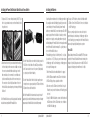
Important - Y-Harnesses and Servo Extensions
When using Y-harnesses or servo extensions, it’s important to use
standard non-amplified Y-harnesses and servo extensions as this
can/will cause the servos to operate erratically or not function at
all. Amplified Y-harnesses were developed several years ago to
boost the signal for some older PCM systems and should not be
used with Spektrum equipment. Note that when converting other
models to Spektrum be certain that all amplified Y-harnesses and/
or servo extensions are replaced with conventional, non-amplified
versions.
The JR PCM Y-Harness with Amplifier (JRPA133) is not compatible
with the AR9200 and should not be used.
Spektrum AR9200
Note: In order for the system to operate, all three remote receivers must be plugged
into the receiver in order for the receivers to bind and link to a transmitter.
It’s necessary to bind the AR9200 to the transmitter so that the AR9200 will
only recognize that specific transmitter, ignoring signals from any other
sources. If the PowerSafe Evolution is not bound to the transmitter, the
system will not operate. During binding the servo’s failsafe positions are
stored.
How To Bind the PowerSafe Evolution
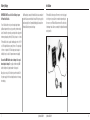
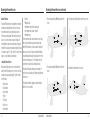
1. With the system hooked up and all remote receivers attached as
described previously, insert the bind plug in the DATA/BIND port in
the PowerSafe Evolution.
Spektrum AR9200
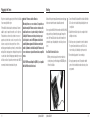
2. Turn on the PowerSafe Evolution with the SensorSwitch. Note that the
LEDs on all receivers should be flashing indicating that the receiver
is ready to bind.
3. Establish the desired failsafe stick positions, normally low throttle
and flight controls neutral.
4. Follow the procedures of your transmitter to enter it into bind mode.
The system will connect within a few seconds. The LEDs on all
receivers should go solid, indicating the system has connected.
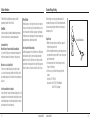
5. Remove the bind plug and store it in a convenient place.
6. After you’ve programmed your model, it’s important to rebind the
system so the true low throttle and neutral control surface positions
are programmed.
14