1
7.4.
7.4.3.
To Run A Timer
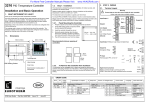
The example given here is for the simple programmer shown in section 7.1.1. with the following settings:o
Type = Dwell
SP1 = 70 C
o
o
End.T = SP2 = 20 C
Ramp Rate Set to 20 C/min
o
Threshold = 1 C
At start of run the controller servos to PV (starts at the current temperature). The procedure to Run, Hold, or Reset is the same for all timer types.
At start of run controller servos to PV and , therefore, starts at the current temperature
Do This
The Display You Should See
Power Cycling
If the power is turned off when the timer is running it will come back on
as follows:For a Dwell type timer it will come back on in Reset
For a Delayed Switch on timer or a Soft Start timer, the controller will
come back on in the Run condition and start again from the beginning.
Additional Notes
RUN beacon on
1.
Momentarily press
together)
36
43
and
RUN
Scrolling display ‘tim e r
ru n n in g ’
o
o
Controller ramping up to SP1 (70 C) at the set rate (20 C/min max for this
example)
When SP1 reached the controller will control at this temperature until the end
of the DWELL period set. This is from the point at which the timer was set to
run.
8.
FURTHER LEVELS OF OPERATION
Access to further levels of operation are described in the Engineering
Handbook Part No HA027986 available on www.eurotherm.co.uk
To ensure the dwell starts from SP1 (or close to) set THRES = a small value
(eg2)
20
20
SPX
2.
e n d ’ will be indicated
Controller ramp to SP2 (20oC) at the set rate (20oC /min max for this
example)
SPX beacon on
20
20
Press
and
(Ack)
together to reset the timer
When timed out Scrolling display ‘tim e r
SPX
RUN beacon off
Controller controlling at SP2 (20oC)
TIMER END message cancelled
SPX beacon on (indicating control at SP2)
The timer can be run again from this point
7.4.1.
To Hold the Timer
While the timer is running it can be put into Hold (timer stops counting down)
Do This
3.
4.
7.4.2.
Momentarily press
together)
The Display You Should See
and
Momentarily press
and
together to run the timer from the
hold condition
36
47
36
47
RUN
Additional Notes
RUN beacon flashing
Scrolling display ‘tim e r
h o ld ’
Controller controlling at SP1 (70 oC)
RUN beacon on
Scrolling display ‘tim e r
ru n n in g ’
o
Controller continues controlling at SP1 (70 C)
To Reset the Timer
While the timer is running it can be Reset
Do This
5.
Press and hold
together)
The Display You Should See
and
70
70
Additional Notes
When the timer is running it cannot be reset using the Ack button(s) since
pressing these will return the display to the HOME display
If reset T.REMN and T.ELAP stay at their values prior to reset. These reset
to their start values when the timer is run again
This indicator meets the European directives on safety and EMC
3216 User Guide
Part No. HA027985
Issue 1.0E
May 03