1
B7
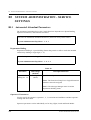
SYSTEM ADMINISTRATION - HARDWARE SETTINGS
B7.3
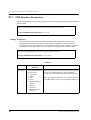
PBX Interface Parameters
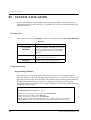
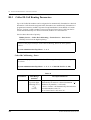
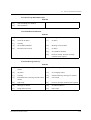
Three separate parameters are used to program the VPS for optimal signalling and performance
with the PBX.
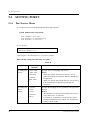
To select PBX Interface Parameters, follow the menu path as shown:
System Administration Top Menu - 1 - 6 - 3
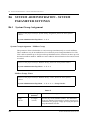
Dialing Parameters
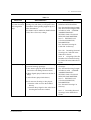
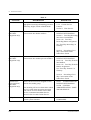
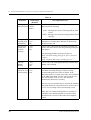
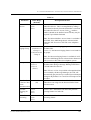
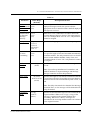
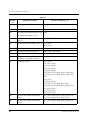
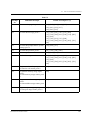
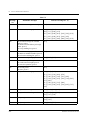
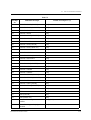
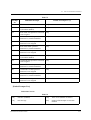
These parameters specify how the VPS will initiate and control call transfers, setup
outgoing calls, and control message waiting lamps on extensions. The procedure for
verifying the correct code sequences for non-Panasonic KX-T series telephone systems is
to manually execute the sequences from a single line telephone (SLT) with the PBX.
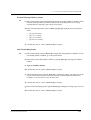
To select Dialing Parameters, follow the menu path as shown:
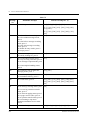
System Administration Top Menu - 1 - 6 - 3 - 1
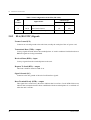
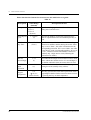
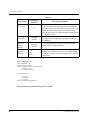
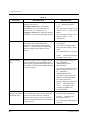
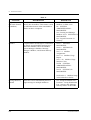
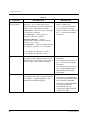
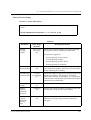
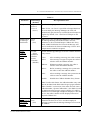
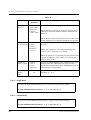
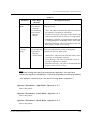
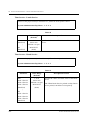
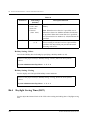
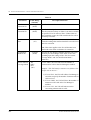
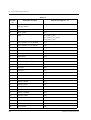
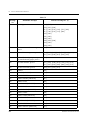
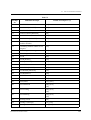
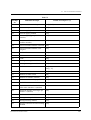
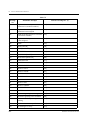
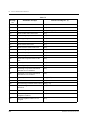
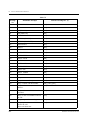
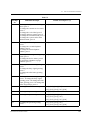
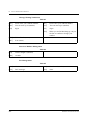
Table 67
Parameter
PBX Type
230
Value Range
(Default)
Description/Function
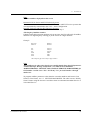
1. Other Manufacturers
2. KX-T Series
1. T308/T616
2. T1232
3. T96
4. T336
5. TD816/TD1232/
TD612
6. TD308
7. TA series
(TD816/TD1232/
TD612)
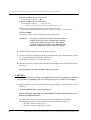
Specifies the type of PBX connected to the VPS. In
the case of a Panasonic KX-T series telephone
system, the model number should also be specified.
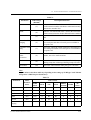
Note: The Dialing Parameters are set automatically to
each PBX default value after selecting the PBX type.
SYSTEM ADMINISTRATOR'S GUIDE