1
U = Default setting
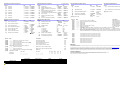
SECTION [001]: Partition Assignment
Option
[1]
Partition 1
[2]
Partition 2
[3]
Partition 3
[4]
[5]
[6]
Partition 4
Partition 5
Partition 6
OFF
N Disabled
N Disabled
N Disabled
ON
U Enabled
U Enabled
U Enabled
N Disabled
U Enabled
N Disabled
N Disabled
U Enabled
U Enabled
SECTION [002]: General Options 1
Option
[1]
Tamper Input
[2]
Battery Charging Current
[3]
Reader’s red LED to follow partition’s
status
[4]
Reader’s beeping to follow partition’s
status when option [3] is ON
[5]
Card activates door unlocked schedule
[6]
Door will relock
[7]
Partition 7
N Disabled
U Enabled
[7]
[8]
Partition 8
N Disabled
U Enabled
[8]
SECTION [003]: General Options 2
Option
[1]
Door Left Open Alarm
[2]
[3]
[4]
Door Left Open Pre-alarm
Door Left Open Alarm
Door Left Open Alarm follows
[5]
[6]
[7]
Door Forced Open Alarm
Door Forced Alarm
Door Forced Alarm follows
OFF
ON
U Disabled N Enabled
N Disabled
N Silent
U Alarm
Restore
[8]
[010]
[011]
[012]
[013]
N Silent
U Alarm
Restore
NVisual
Reader Access Feedback
Section
[005]
[006]
[007]
[008]
[009]
U Disabled
U Enabled
U Audible
N Beep
Timer
N Enabled
SECTION [004]: PGM Options
Option
[1]
PGM Deactivation After
N Disabled
U Enabled
N Disabled
U Enabled
diately
N Disabled
U Enabled
N Disabled
U Enabled
U Imme-
N When
closed
ON
N PGM Timer
N Card Only
N PIN Only
N Card and PIN
U Card or PIN
OFF
ON
OFF
ON
OFF
OFF
ON
ON
[6]
Reader Locate Feedback
U Visual
[7]
[8]
Unlock Door on Fire Alarm
AC and Battery Supervision
U Disabled
U Enabled
[2]
PGM Normal State
[3]
PGM Base Time
[4] & [5] Special
N Beep
Timer
SECTION [022]: Safe Mode Options
Option
[1]
Safe Mode
N N.C.
N 1 minute
[5]
N Visual &
audible
N Enabled
N Disabled
[2]
Safe Mode Access
N Disabled
[3]
Reader Safe Mode Feedback
U Visual
[4]
[5]
Unlock Door in Safe Mode
Access Cards in Safe Mode
Section
[023]
[024]
[025]
[026]
[027]
[028]
[029]
[030]
[032]
[040]
ON
U Enabled
U Enabled
N Visual &
audible
U Disabled N Enabled
N Any Cards
U Safe
Cards only
N N/A
N N/A
SECTION [031] PGM Options 2
Option
[1]
Flexible PGM Deactivation Option
Delete All Safe Mode Access Cards
Default
030
__/__/__ (001 to 255 seconds)
Door Unlocked Period
005
__/__/__ (001 to 255 seconds added to section [006])
Door Unlocked Period extension
015
[070]
[071]
[072]
[073]
[074]
__/__/__ (001 to 255 seconds)
__/__/__ (001 to 255 seconds)
Time to start pre-alarm before alarm is triggered
__/__/__ (001 to 255 seconds)
Door Left Open Interval
Door Left Open Pre-Alarm Timer
060
015
Warranty
Beep timer for Door Left Open Alarm
005
__/__/__ (001 to 255 seconds)
Beep timer for Door Forced Open alarm
005
__/__/__ (000 to 255; refer to option [3] in section [004])
PGM timer
005
[2]
Reload Timer on Activation Event
[3] to [8] Future Use
End Time
___ ___ : ___ ___
___ ___ : ___ ___
Event Group
Feature Group
Section
Section
PGM Activation
[014]
__/__/__
[015]
__/__/__
PGM Deactivation
[018]
__/__/__
[019]
__/__/__
Only Event Groups 000 to 055, 062 and 063 can be used to program the module’s PGM.
S M T
1 2 3
1 2 3
W T
4 5
4 5
Start #
Section
[016]
__/__/__
[020]
__/__/__
F S
6 7
6 7
H
8
8
End #
Section
[017]
__/__/__
[021]
__/__/__
Reload
N N/A
Assign Safe Mode Access Card 2 (Present Card 3 Times)
Assign Safe Mode Access Card 3 (Present Card 3 Times)
Assign Safe Mode Access Card 4 (Present Card 3 Times)
Delete Safe Mode Access Card 1
Delete Safe Mode Access Card 2
Delete Safe Mode Access Card 3
Delete Safe Mode Access Card 4
For complete warranty information on this product please refer to the Limited Warranty Statement found on the website www.paradox.com/terms. Your use of the Paradox product signifies your acceptance of all
warranty terms and conditions.
We strongly advise that you review and take into consideration the “Limitations of Alarm Systems” document available on our website at http://paradox.com/Terms/.
© 2003-2007 Paradox Security Systems Ltd. All rights reserved. Specifications may change without prior notice. One or more of the following US patents may apply: 7046142, 6215399, 6111256, 6104319, 5920259,
5886632, 5721542, 5287111, 5119069, 5077549 and RE39406 and other pending patents may apply. Canadian and international patents may also apply.
Digiplex EVO is a trademark or registered trademark of Paradox Security Systems Ltd. or its affiliates in Canada, the United States and/or other countries.
Start Time
___ ___ : ___ ___
___ ___ : ___ ___
U Don’t
ON
N Timer /
Deactivation
event
N Reload
Timer
N N/A
Description
Default
(001 to 024 hours; 000 = Disabled)
Safe Mode Door Unlocked Period
000
(001 to 255 seconds; 000 = Follow REX)
REX Unlocked Period
000
(000 to 003)
Red LED Brightness
003
(000 to 003)
Green LED Brightness
003
(000 to 003)
Buzzer Frequency
001
(000 to 255 minutes; 000 = instant)
AC Restore Report Delay
005
(000 to 255 minutes)
Stay Lock Delay
000
Test PGM: Activates the PGM for 8 seconds to verify if the PGM is functioning properly.
__/__/__ (000 = steady, 001 to 254 = pulsed (increments of 8ms), 255 = pulsed fire)
PGM Output type
000
Access Card Serial Number Display: View an access card’s serial number displayed on any LCD or Grafica keypad on the combus.
When the DGP-ACM12 is in access card display mode, the door connected to the module cannot be accessed.
Assign Safe Mode Access Card 1 (Present Card 3 Times)
Description
AC failure report delay
Door unlock schedule
OFF
U PGM
Data
__/__/__
__/__/__
__/__/__
__/__/__
__/__/__
__/__/__
__/__/__
[061]
[062]
[063]
[064]
Data
__/__/__ (000 to 255 x 1 minute; 000 = Instant)
Schedule A:
Schedule B:
OFF
N Disabled
Timer only
[6] to [8] Future Use
OFF
U Deactivation Event
U N.O.
U 1 second
[4]
U Audible
U Visual &
audible
Reader’s green LED for Access
Granted
Unlock on Request for Exit (REX)
OFF
ON
U Disabled N Enabled
N 850mA
U 350mA
N Disabled U Enabled
Technical Support
For technical support in Canada or the U.S., call 1-800-791-1919, Monday to Friday from 8:00 a.m. to 8:00 p.m. EST.
For technical support outside Canada and the U.S., call 00-1-450-491-7444, Monday to Friday from 8:00 a.m. to 8:00 p.m. EST.
Please feel free to visit our website at www.paradox.com.