1
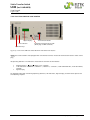
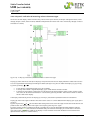
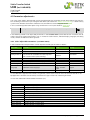
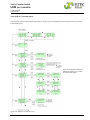
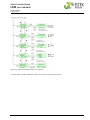
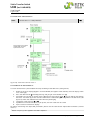
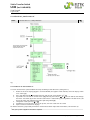
Static Transfer Switch UNB (incl. UNB-WEB) User Manual Page 34 (36) 8.2.2 Flow chart „Service menu 2“ NOTE: “Service Menu 2” is code protected1. Keep pressing the down button until the display shows the required service code1. xxx1 Figure 21) - Flow chart “Service menu 2” 8.2.3 Selection of “Service menu 2” To attain Service Menu 2 please follow the steps according to the flow chart (see figure 21): 1. 2. 3. 4. 5. 6. Based on the basic display [1] press and hold ENTER (for approx. three seconds) until the display shows “cust. menu” [2]. Press the down button and keep pressing until you get “servicecode: xxx1” [3]. Tip ENTER. You are then in service menu 2 [4]. Pressing the buttons or you are able to leaf through the menu. The arrow () shows the menu item which is selectable by pressing ENTER. The flow chart (see figure 14) shows the selected menu item “operating mode” [5]. Change the values pressing or . Tip ENTER to save the new values; if you tip ESC, the new values are not saved. Tip ESC to return to the basic display. For details concerning adjustable parameters see the table above “Adjustable Parameters (Service menu 2)”. 1 Ask your system supplier if the code is required. ©2012. Eltek Deutschland GmbH. Eltek_UM_UNB_incl-WEB_E_R6.1.docx