1
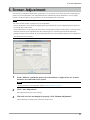
4. Color Adjustment
Register / Delete / Restore the monitor adjustment data
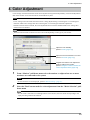
The color adjustment data adjusted in “Color Adjustment” tab can be registered with any name. By reading the
registered data, the adjusted values of each parameter can be reflected to the monitor all at once.
Register
Enter any name in “Adjustment Data Name” text box, and then click “Register”.
Delete
Select the color adjustment data name from “Adjustment Data Name” pull-down menu, and then click “Delete”.
Selected color adjustment data is deleted.
Restore
Select the color adjustment data name from “Adjustment Data Name” pull-down menu, and then click “Restore”.
Selected color adjustment data is reflected to the monitor.
16