1
9. DESCRIPTION OF BUTTONS AND SIGNAL LED INDICATORS
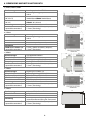
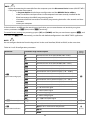
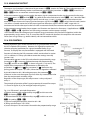
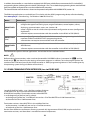
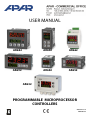
Description the front
elevation for
example AR652
7-segment LED display
programming buttons
LED indicators
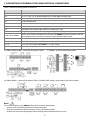
a) functions of buttons in the measurement display mode
Button
Description [and designation in the manual]
[UP] or [DOWN]: change set value for input 1 (parameter 9:
output 1 is in manual mode (see sections 10 and 12.8)
or 26:
when
[SET] :
- go to the quick access menu (see section 11)
[UP] and [DOWN] (simultaneously): go to the parameter configuration menu (if pressed
for longer than 1 s). If the parameter 33: PPro = on (password protection on), enter the
access password, section 10)
[F] (unavailable in AR602): start the function programmed by parameter 34: Func (if
pressed for longer than 1 s, sections 9.1 and 10)
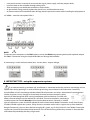
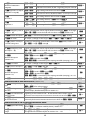
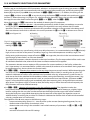
b) functions of buttons in the parameter configuration menu and quick access menu (sections 10 and 11)
Button
Description [and designation in the manual]
[SET] :
- edit current parameter (the value in the bottom display is flashing)
- confirm and save the edited parameter
[UP] or [DOWN]:
- go to the next parameter
- change the value of current parameter
[UP] and [DOWN] (simultaneously):
- cancel the modifications of edited value (flashing stops)
- return to the measurement display mode (if held for > 0.5s)
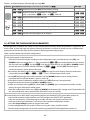
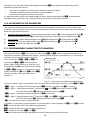
c) functions of signal LED indicators
LED indicators [designation]
[1] [2] [3]
Description
inputs P1/SSR1, P2/SSR2, P3/SSR3 are on
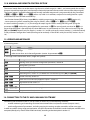
9.1. FUNCTION BUTTON AND BINARY INPUT
Function button [F] (unavailable in AR602) and binary input BIN perform the same function programmable by
parameter 34: Func (section 10). The binary input cooperates with the bistable signal, i.e. the received signal
(voltage or switch) must be of durable character (on/off type). In addition, the [F] is inactive when the BIN is active
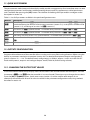
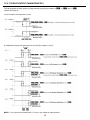
(short-circuit or voltage <0.8V). Starting and stopping of the function is signalled by relevant message on the
bottom display (described in Table 9.1).
9