1
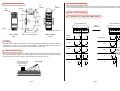
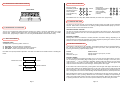
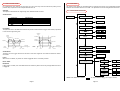
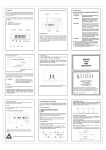
4.2 INSTALLATION DETAIL DIAGRAM
OUTPUTS
BUS
JUMPER
5.2 POWER/COMMS CONNECTIONS
BUS
JUMPER
55.0 mm
35.0 mm
BUS
JUMPER
Ensure that the power supply is correct for the application. Over voltage could damage the instrument.
Ensure that the exposed section of the wire is fully inserted and that no loose strands are exposed.
44.0 mm
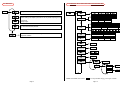
6.0 INPUT / OUTPUT CONNECTIONS
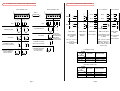
6.1.1 FREQUENCY INPUT CONNECTIONS WIRING DIAGRAM
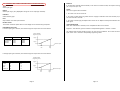
55.0 mm
86.0 mm
SINGLE CHANNEL UNIT
DUAL CHANNEL UNIT
53.0 mm
INPUT
CONNECTOR
INPUTS
1
2
3
4
5
CH1
CLIP - PULL TO RELEASE UNIT
SINGLE CHANNEL
UNIT
1
4 5
8
1
8
1
4 5
6
7
1
2 3 4
5
6
7 8
1 2 3
4 5
6
7
8
3
4
5
6
7
8
DISCRETES
1
4
1
4
4
2
TTL
TTL
4 5
6
7
3
8
4
mV
mV
+mV-
Page 5
2
NPN
1 2 3
‘BUS JUMPER’
5
PNP
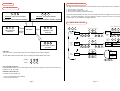
5.1 WIRING-UP MULTIPLE UNITS
Wires to Power and
communications to
one connector are
‘Bussed’ to all.
4
6
7
8
8
NPN
MEDACS is provided with a unique ‘BUS JUMPER’ system for quick wiring of COMMS and POWER connections.
To use the Bus Jumper, disconnect all power supply/comms connectors and place them so that they
connect between the two units. Wiring to one connector then connects to all units.
3
NAMUR INPUT
PNP
All connections are made to sockets which are removable for ease of maintenance. Installation should be
undertaken in accordance with relevant sections of BS6739 - British Standards Code of Practice for
"Instrumentation in Process Control Systems: Installation Design and Practice".
2
CH1
NAMUR
INPUT
1 2 3
5.0 WIRING
7
CH2
+mV-
+mV-
Page 6
(5 to 24) V
DIS 2
DUAL CHANNEL
UNIT
6
DIS 1
INPUTS
58.6 mm
A separate
power supply is
required for
discretes if
isolation is to
be maintained