1
Feature User Guide
4.4.2.4 Embedded Number
This feature allows you to call a number from a message or to start a group call with the message sender talkgroup.
4.4.2.5 Storing a Number from a Message
Prerequisites: Embedded Number feature is enabled by your service provider.
When and where to use: You can save the sender's or embedded number from the message to a new or existing
contact.
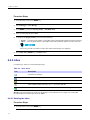
Procedure Steps
1
From the home screen, press MENU key.
2
Select Messages → Inbox.
3
Highlight the required message and select Read.
4
Press the PTT button.
5
Radio displays a list of the numbers (including the senders number).
6
Highlight the required number and press Store.
7
Highlight required contact and press View.
To store a number for a new contact, select [New Contact] and fill out the required fields. Press Done
to save it..
8
Select Edit.
9
Choose the Type of the new number and press Done.
4.4.2.6 Calling a Number in a Message
Prerequisites: Embedded Number feature is enabled by your service provider.
When and where to use: You can return a voice call to the sender of a message or to any number that is embedded
in the message text.
4-10
-