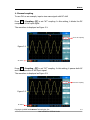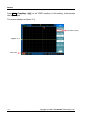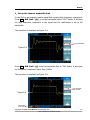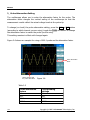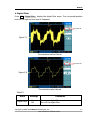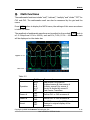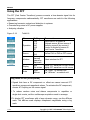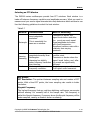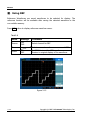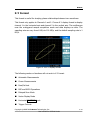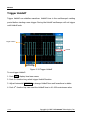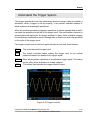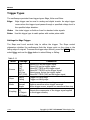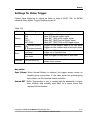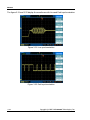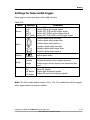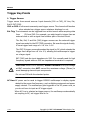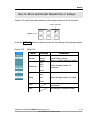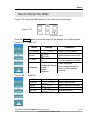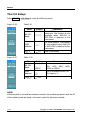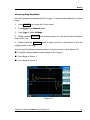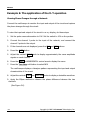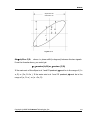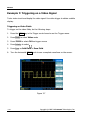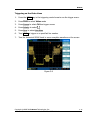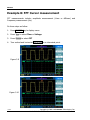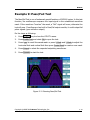
1
User’s Guide RIGOL Publication number DS5-080422 April 2008 DS-5000 Series Digital Storage Oscilloscope DS5000CA, DS5000C, DS5000MA, DS5000M DS5000CAE, DS5000CE, DS5000MAE, DS5000ME Copyright © 1998-2008 RIGOL Technologies, Inc. All Rights Reserved RIGOL Copyright © 1998-2008 RIGOL Technologies, Inc. All Rights Reserved. RIGOL products are protected by patent law in and outside of P.R. China. Information in this publication replaces all previously corresponding material. RIGOL Technologies, Inc. reserves the right to modify or change part of or all the specifications and pricing policies at company‟s sole decision. NOTE: RIGOL is registered trademark of RIGOL Technologies, Inc. Copyright © 1998-2008 RIGOL Technologies, Inc. User‟s Guide for DS5000 Series I RIGOL General Safety Summary Review the following safety precautions carefully before operating the instrument to avoid any personal injuries or damages to the instrument and any products connected to it. To avoid potential hazards use the instrument as specified by this user‟s guide only. The instrument should be serviced by qualified personnel only. To Avoid Fire or Personal Injury Use Proper Power Cord. Use the power cord designed for the instrument and authorized in your country only. Connect and Disconnect Accessories. Do not connect or disconnect probes or test leads while they are connected to a voltage source Ground The Instrument. The oscilloscope is grounded through the grounding conductor of the power cord. To avoid electric shock the instrument grounding conductor(s) must be grounded properly, before making connections to the input or output terminals of the instrument. Connect The Probe. The probes‟ ground terminals are at the same voltage level of the instrument ground. Do not connect the ground terminals to a high voltage. Observe All Terminal Ratings. To avoid fire or shock hazard, observe all ratings and marks on the instrument. Follow the user‟s guide for further ratings information before making connections to the instrument. Do Not Operate Without Covers. Do not operate the instrument with covers or panels removed. II Copyright © 1998-2008 RIGOL Technologies, Inc. User‟s Guide for DS5000 Series RIGOL Use Proper Fuse. Use the fuse of the type, voltage and current ratings as specified for the instrument. Avoid Circuit or Wire Exposure. Do not touch exposed connections and components when power is on. Do Not Operate With Suspected Failures. If suspected damage occurs with the instrument, have it inspected by qualified service personnel before further operations. Provide Proper Ventilation. Refer to the installation instructions for proper ventilation of the instrument. Do not operate in wet/damp conditions. Do not operate in an explosive atmosphere. Keep product surfaces clean and dry. The disturbance test of all the models meet the limit values of A in the standard of EN 61326: 1997+A1+A2+A3, but can’t meet the limit values of B. Measurement Category The DS5000 series Digital Oscilloscope is intended to be used for measurements in Measurement Category I. Measurement Category Definitions Measurement Category I is for measurements performed on circuits not directly connected to MAINS. Examples are measurements on circuits not derived from MAINS, and specially protected (internal) MAINS derived circuits. In the latter case, transient stresses are variable; for that reason, the transient withstand capability of the equipment is made known to the user. Copyright © 1998-2008 RIGOL Technologies, Inc. User‟s Guide for DS5000 Series III RIGOL WARNING IEC Measurement Category I. The input terminals may be connected to circuit terminal in IEC Category I installations for voltages up to 300 VAC. To avoid the danger of electric shock, do not connect the inputs to circuit‟s voltages above 300 VAC. Transient overvoltage is also present on circuits that are isolated from mains. The DS5000 series Digital Oscilloscopes is designed to safely withstand occasional transient overvoltage up to 500 Vpk. Do not use this equipment to measure circuits where transient overvoltage could exceed this level. Safety Terms and Symbols Terms in This Guide. These terms may appear in this guide: ! WARNING: Warning statements identify conditions or practices that could result in injury or loss of life. ! CAUTION: Caution statements identify conditions or practices that could result in damage to this product or other property. Terms on the Product. These terms may appear on the product: DANGER indicates an injury hazard immediately accessible as you read the marking. WARNING indicates an injury hazard not immediately accessible as you read the marking. CAUTION indicates a hazard to property including the product. Symbols on the Product. These symbols may appear on the product. ! DANGER ATTENTION High Voltage Refer to Manual IV Protective Conductor Terminal Frame or Chassis Terminal Earth Terminal Copyright © 1998-2008 RIGOL Technologies, Inc. User‟s Guide for DS5000 Series RIGOL General-Purpose Oscilloscopes The RIGOL DS5000-Series Digital Storage Oscilloscopes offer exceptional waveform viewing and measurements in a small, lightweight package. The DS5000 series are suited for production, field service, research and design labs, applications involving digital circuit test and troubleshooting, and education applications. Each of these oscilloscopes gives you: The DS5000 Series Digital Oscilloscopes naming rules: DS5 20 2 C/M A DS5000 Series Digital Oscilloscopes Oscilloscopes Bandwidth* The Numbers of Oscilloscopes The Display is Color(C) or Monochrome (M) Sampling Rate of the oscilloscopes („A‟ shows high sampling rate model) Dual Channel, Bandwidth: 200-MHz (DS5202CA/CAE) 150-MHz (DS5152CA/CAE, DS5152C/CE, DS5152MA/MAE, DS5152M/ME) 100-MHz (DS5102CA/CAE, DS5102C/CE, DS5102MA/MAE, DS5102M/ME) 60-MHz (DS5062CA/CAE, DS5062C/CE, DS5062MA/MAE, DS5062M/ME) 40-MHz (DS5042M/ME) 25-MHz (DS5022M/ME) 4K/Channel Memory Depth Mono/Color LCD Display 320*240 resolution Real-time Sample Rate 1GSa/s (DS5000CA/CAE series, DS5000MA/MAE series) 500MSa/s (DS5000C/CE series, DS5000M/ME series) Equivalent Sample Rate 50GSa/s (DS5202CAE/ MAE) 25GSa/s (DS5152CE/CAE/ME/MAE, DS5102CE/CAE/ME/MAE) Copyright © 1998-2008 RIGOL Technologies, Inc. User‟s Guide for DS5000 Series V RIGOL 10GSa/s (DS5062CE/CAE/ME/MAE) 5GSa/s (DS5042ME) 2.5GSa/s (DS5022ME) Automatic setup of the front panel 20 Automatic measurements Auto Calibration Storage 10 Waveforms, 10 setups Delayed Scan Function XY-PLOT Built-in FFT function, Frequency Counter Digital filter, includes LPF, HPF, BPF, BRF Selectable 50Ω/1MΩInput Impedance.(Certain models ONLY, see related section) Pass/Fail Function Trigger on Edger, Video, Pulse width Add, Subtract, Multiply and Divide Mathematic Functions Multiple Language User Interface * The ten and hundred of the DS5000 series oscilloscopes module representative oscilloscope bandwidth. „20‟ representative 200M bandwidth, „15‟ representative 200M bandwidth, „10‟ representative 100M bandwidth, „06‟ representative 60M bandwidth, „02‟ representative 25M bandwidth. VI Copyright © 1998-2008 RIGOL Technologies, Inc. User‟s Guide for DS5000 Series RIGOL Content General Safety Summary ............................................................................. II General-Purpose Oscilloscopes ..................................................................... V CHAPTER 1: THE OSCILLOSCOPE AT A GLANCE ..............................................1-1 The front panel and the user interface ........................................................1-2 To inspect the instrument ..........................................................................1-5 To take a functional check .........................................................................1-6 To compensate probes ..............................................................................1-8 To display a signal automatically .................................................................1-9 To set up the vertical window ................................................................... 1-10 To set up the horizontal system ................................................................ 1-12 To trigger the oscilloscope ....................................................................... 1-14 CHAPTER 2: OPERATING YOUR OSCILLOSCOPE ..............................................2-1 Understand the vertical system ...................................................................2-2 Understand the Horizontal System ............................................................ 2-18 Understand the Trigger System ................................................................ 2-25 How to Set Up the Sampling System ......................................................... 2-33 How to Set Up the Display System ............................................................ 2-37 How to Store and Recall Waveforms or Setups ........................................... 2-39 How to Set Up the Utility ......................................................................... 2-41 How to Measure Automatically.................................................................. 2-50 How to measure with cursors ................................................................... 2-57 How to use instant execute buttons .......................................................... 2-63 CHAPTER 3: APPLICATION & EXAMPLES .........................................................3-1 Example Example Example Example Example Example Example Example Example 1: 2: 3: 4: 5: 6: 7: 8: 9: Taking Simple Measurements ....................................................3-1 View a signal delay caused by a circuit .......................................3-2 Capture a Single-Shot Signal .....................................................3-3 To reduce the random noise on a signal .....................................3-4 Making Cursor Measurements ....................................................3-6 The application of the X-Y operation ...........................................3-8 Triggering on a Video Signal .................................................... 3-10 FFT Cursor measurement ........................................................ 3-12 Pass/Fail Test ......................................................................... 3-13 Copyright © 1998-2008 RIGOL Technologies, Inc. User‟s Guide for DS5000 Series VII RIGOL CHAPTER 4:PROMPT MESSAGES & TROUBLESHOOTING ................................. 4-1 Prompting messages ................................................................................ 4-1 Troubleshooting ....................................................................................... 4-3 CHAPTER 5: SPECIFICATIONS ...................................................................... 5-1 CHAPTER 6: APPENDIX ................................................................................ 6-1 Appendix A: Accessories ........................................................................... 6-1 Appendix B: Warranty ............................................................................... 6-2 Appendix C: Maintenance .......................................................................... 6-3 Appendix D: Contact RIGOL ...................................................................... 6-4 Index ............................................................................................................. i VIII Copyright © 1998-2008 RIGOL Technologies, Inc. User‟s Guide for DS5000 Series RIGOL Chapter 1 : The Oscilloscope at a glance This chapter covers the following topics: The front panel and user interface To inspect the instrument To take a functional check To compensate probes To display a signal automatically To set up the vertical window To set up the horizontal system To trigger the oscilloscope Copyright © 1998-2008 RIGOL Technologies, Inc. User‟s Guide for DS5000 Series 1-1 RIGOL The front panel and the user interface The first thing to do with your new oscilloscope is know the front panel. This chapter helps to familiarize with the layout of the knobs and keys and how to use them. Read the chapter carefully before further operations. The knobs are used most often and are similar to the knobs on other oscilloscopes. The keys bring up soft button menus on the display that allow you access to many of the oscilloscope features and menus associated with channels, math, and reference or instant action features. Figuer1-1 DS 5000-Series Oscilloscope‟s Front Panel DS5000 series oscilloscopes provide an easy-to-use front panel, the definitions of the buttons and the knobs are listed as follows: Menu buttons: Associate with MEASURE, CURSOR, ACQUIRE, DISPLAY, STORAGE, and UTILITY menus. Vertical buttons: Associate with CH1, CH2, MATH and REF menus, the OFF button can set waveform or menu which currently active off. 1-2 Copyright © 1998-2008 RIGOL Technologies, Inc. User‟s Guide for DS5000 Series RIGOL Horizontal buttons: Associate with horizontal MENU. Trigger buttons: Associate with trigger MENU, instant action to set 50% trigger level and FORCE trigger. Action buttons: Include Instant action buttons for AUTO and RUN/STOP. Function buttons: Five gray buttons from top to bottom on the right to the LCD screen, which set choice of operation in the currently active menu. Knobs: For the adjustment of vertical or horizontal POSITION, SCALE, and trigger LEVEL. Menu buttons Instant action buttons Trigger control Function button Horizontal control Vertical control Probe EXT trigger input Compensator Signal input channel Figure 1-2 Front Panel Controls Throughout this guide, a box around the name of the key denotes the front-panel keys, and the name with a sunken shadow denotes the soft buttons. Copyright © 1998-2008 RIGOL Technologies, Inc. User‟s Guide for DS5000 Series 1-3 RIGOL For example, CH1 is a front-panel key labeled CH1 under the vertical portion of the front panel, and Coupling is a soft button. The word Coupling is on the top of the menu on the screen, directly on the left of an unlabeled soft button (which is also gray). The position of current Trigger position window in memory in memory Trigger position in current window Execute status Channel 1 symbol Operation menu Channel 2 symbols Waveform display CH1 status CH2 status Time base status Trigger position Figure 1-3 User Interface 1-4 Copyright © 1998-2008 RIGOL Technologies, Inc. User‟s Guide for DS5000 Series RIGOL To inspect the instrument After you get a new DS5000 series oscilloscope, please inspect the instrument as followings: 1. Inspect the shipping container for damage. Keep the damaged shipping container or cushioning material until the contents of the shipment have been checked for completeness and the instrument has been checked mechanically and electrically. 2. Check the accessories. Accessories supplied with the instrument are listed in "Appendix A" in this guide. If the contents are incomplete or damaged notify your RIGOL sales office. 3. Inspect the instrument. If there is mechanical damage or defect, or if the instrument does not operate properly or pass performance tests, notify your RIGOL sales office. If the shipping container is damaged, or the cushioning materials show signs of stress, notify the carrier as well as your RIGOL sales office. Keep the shipping materials for the carrier‟s inspection. The RIGOL office will arrange for repair or replacement at RIGOL‟s option without waiting for claim settlement. Copyright © 1998-2008 RIGOL Technologies, Inc. User‟s Guide for DS5000 Series 1-5 RIGOL To take a functional check Perform this quick functional check to verify that your instrument is operating correctly. 1. Turn on the instrument. Use the power cords designed for your oscilloscope only. Use a power source that delivers 100 to 240 VACRMS, 50Hz. Turn on the instruments and wait until the display shows that all self-tests passed. Push the STORAGE button, select Setups in the top menu box and push the Factory menu box. STORAGE ON/OFF Figure 1-4 ! WARNNING: To avoid electric shock, be sure the oscilloscope is properly grounded. 2.Input a signal to a channel of the oscilloscope ① Set the attenuation switch on the probe to 10X and connect the probe to channel 1 on the oscilloscope. To do this, align the slot in the probe connector with the key on the CH1 BNC, push to connect, and twist to the right to lock the probe in place. Attach the probe tip and reference lead to the PROBE COMP connector. Figure 1-5 1-6 Copyright © 1998-2008 RIGOL Technologies, Inc. User‟s Guide for DS5000 Series RIGOL ! CAUTION: To avoid damage the instrument, always ensure the input voltage at BNC does not exceed the maximum voltage (400Vpp when 1M Ω input impedance is selected, or 5Vrms when 50Ω input impedance is selected.) Probe comp Figure 1-6 ② Set the probe attenuation to 10X. To do this, push CH1→Probe→10X. Figure 1-7 ③ Push the AUTO button. Within a few seconds, a square wave will display (approximately 1 kHz, 3 V peak- to- peak). ④ Push the OFF button to turn off Channel 1. Push the CH2 button to turn on channel 2, repeat steps 2 and 3. Copyright © 1998-2008 RIGOL Technologies, Inc. User‟s Guide for DS5000 Series 1-7 RIGOL To compensate probes Perform this adjustment to match your probe to the input channel. This should be done whenever you attach a probe for the first time to any input channel. 1. From CH1 menu, set the Probe attenuation to 10X (Press CH1→Probe→10X). Set the switch to 10X on the probe and connect it to Channel 1 on the oscilloscope. When using the probe hook-tip, ensure a proper connection by firmly inserting the tip onto the probe. Attach the probe tip to the PROBE COMP connector and the reference lead to the PROBE COMP Ground connector, turn on Channel 1, and then press AUTO. 2. Check the shape of the displayed waveform. Overcompensated Correctly Compensated Figure 1-8 Under Compensated 3. If necessary, use a nonmetallic tool to adjust the trimmer capacitor on the probe for the flattest square wave possible as displayed on the oscilloscope. Figure 1-9 4. Repeat as necessary. ! 1-8 WARNNING: To avoid electric shock while using the probe, be sure the perfection of the insulated cable, and do not touch the metallic portions of the probe head while it is connected with a voltage source. Copyright © 1998-2008 RIGOL Technologies, Inc. User‟s Guide for DS5000 Series RIGOL To display a signal automatically The oscilloscope has an Auto feature that automatically sets up the oscilloscope to best display the input signal. Using Auto requires signals with a frequency greater than or equal to 50 Hz and a duty cycle greater than 1%. Press the AUTO button, the oscilloscope turns on and scales all channels that have signals applied, and it selects a time base range based on the trigger source. The trigger source selected is the lowest numbered input that has a signal applied. The DS5000 series oscilloscopes have two-channels input and an external trigger input. Connect a signal to the channel 1 input. 1. Connect a signal to the oscilloscope. 2. Press AUTO. The oscilloscope may change the current setting to display the signal. It will automatically adjust the vertical and horizontal scaling, the trigger coupling, type, position, slope, level, and mode settings. Copyright © 1998-2008 RIGOL Technologies, Inc. User‟s Guide for DS5000 Series 1-9 RIGOL To set up the vertical window Figure 1-10 shows the VERTICAL controls: CH1, CH2, MATH, REF, OFF buttons and vertical POSITION, SCALE knobs. The following exercise of the vertical buttons, knobs, and status bar will help you to familiar with the vertical parameters settings. Figure 1-10 1 Center the signal on the display with the POSITION knob. The POSITION knob moves the signal vertically, and it is calibrated. Notice that as you turn the POSITION knob, a voltage value is displayed for a short time indicating how far the ground reference is located from the center of the screen. Also notice that the ground symbol on the left side of the display moves in conjunction with the POSITION knob. Measurement hints If the channel is DC coupled, you can quickly measure the DC component of the signal by simply noting its distance from the ground symbol. If the channel is AC coupled, the DC component of the signal is blocked, allowing you to use greater sensitivity to display the AC component of the signal. 1-10 Copyright © 1998-2008 RIGOL Technologies, Inc. User‟s Guide for DS5000 Series RIGOL 2 Change the vertical setup and notice that each change affects the status bar differently. You can quickly determine the vertical setup from the status bar in the display. Change the vertical sensitivity with the SCALE knob and notice that it causes the status bar to change. Press CH1. A soft button menu appears on the display, and the channel turns on (or remains on if it was already turned on). Toggle each of the soft buttons and notice which button cause the status bar to change. Channels 1 and 2 have a venire soft button that allows the SCALE knob to change the vertical step size in smaller increments. To press Volts/Div soft button, you can change the step size into Fine or Coarse status. Press OFF to turn off the channel. NOTE: OFF button can also shut the on-screen menu off. Vernier Shortcut key You can set the Coarse/Fine vertical control not only on the Volts/Div item in the CH1 or CH2 menus, but also by pressing the vertical SCALE knob. Copyright © 1998-2008 RIGOL Technologies, Inc. User‟s Guide for DS5000 Series 1-11 RIGOL To set up the horizontal system Figure 1-11 shows the HORIZONTAL controls: MENU button, POSITION and SCALE knobs. Follow the exercise to familiarize with these buttons, knobs, and status bar. Figure 1-11 1. Turn the SCALE knob and notice the change in the status bar. The horizontal SCALE knob changes the sweep speed in a 1-2-5 step sequence, and the value is displayed in the status bar. The time base ranges of the DS5000 series are listed as follows. From 1 ns/div* to 50 s/div and they can reach 10ps/div* in Delayed Scan mode. * NOTE: This characteristic varies by different model. Delayed Scan Shortcut key To press the SCALE knob in the horizontal control area on the front-panel is another way to enter or exit Delayed Scan mode and it is equal to the menu operations, MENU→Delayed. 1-12 Copyright © 1998-2008 RIGOL Technologies, Inc. User‟s Guide for DS5000 Series RIGOL 2 The horizontal POSITION knob move the displayed signal horizontally on waveform window. 3. Press the MENU key to display the TIME menu. Enter or exit the Delayed Scan mode, set the display to Y-T or X-Y format, and to set the horizontal POSITION knob to Trig-Offset or Holdoff mode. Horizontal position control Trig-Offset: In this setting, the trigger‟s position will be changed horizontally when turning the POSITION knob. Holdoff: Adjust Holdoff time when turning the POSITION knob. Copyright © 1998-2008 RIGOL Technologies, Inc. User‟s Guide for DS5000 Series 1-13 RIGOL To trigger the oscilloscope Figure 1-12 is the TRGGER controls: LEVEL knob, MENU, 50% and FORCE. Follow the exercise to familiarize with the buttons and the trigger level knob and status bar. Figure 1-12 1 Turn the trigger Level knob and notice the changes on the display. On the DS5000 series oscilloscopes, as you turn the LEVEL knob or press the 50% menu button, for a short time two things happen on the display. First, the trigger level value is displayed at the bottom-left of the screen. If the trigger is DC coupled, it is displayed as a voltage. If the trigger is AC coupled or LF reject, it is displayed as a percentage of the trigger range. Second, a line is displayed showing the location of the trigger level (as long as AC coupling or low frequency reject are not selected). 1-14 Copyright © 1998-2008 RIGOL Technologies, Inc. User‟s Guide for DS5000 Series RIGOL 2 Change the trigger setup and notice these changes affects the status bar differently. ·Press MENU button in the TRIGGER control area. A soft button menu appears on the display showing the trigger setting choices as shown in Figure 1-13. ·Pressing the trigger type button, it toggles between Edge Video Pulse. ·Pressing the trigger Slope button, it toggles between Rising Edge and Falling Edge. · Pressing the trigger Source button to select the trigger source. ·Pressing the trigger Mode button to select the triggering mode, it toggles between Auto, Normal and Single. ·Set the Coupling and notice affect on the waveform display. NOTE: The trigger type, slope and source change in conjunction with the status bar on the top-right of the screen. Figure 1-13 3 Press 50% This key is an action button. Every time you press the 50% button, the oscilloscope sets the trigger level to the center of the signal. 4 Press FORCE Press this button starts an acquisition regardless of an adequate trigger signal. This button has no effect if the acquisition is already stopped. Copyright © 1998-2008 RIGOL Technologies, Inc. User‟s Guide for DS5000 Series 1-15 RIGOL Chapter 2 : Operating your oscilloscope By now you should understand the VERTICAL, HORIZONTAL and TRIGGER control system and know how to determine the system setup from the status bar of DS5000 series digital oscilloscope. This chapter will go through all groups of front-panel buttons, knobs and menus; and further the knowledge of the operation by hints in this guide. It is recommended to perform all of the following exercises to get the most of the powerful measurement capabilities of the oscilloscope. Understand the vertical system Understand the horizontal system Understand the trigger system How to set up the sampling system How to set up the display system How to save and recall waveforms or setups How to set up utility How to measure automatically How to measure with cursors How to use instant execute buttons Copyright © 1998-2008 RIGOL Technologies, Inc. User‟s Guide for DS5000 Series 2-1 RIGOL Understand the vertical system Ⅰ. Settings of the channels Each channel of DS5000 has an operation menu and it will display after pressing CH1 or CH2 button. The settings of all items in the menu are shown in the table below. Table 2-1 Menu Coupling BW Limit Probe Settings AC DC GND ON OFF 1X 10X 100X 1000X AC blocks the DC component of the input Signal DC passes both AC and DC components of the input signal GND disconnects the input signal Limit the channel bandwidth to 20MHz to reduce display noise. Set “OFF” will get full bandwidth. Set this to match the probe attenuation factor to make the vertical scale readout correct Setup digital filter Digital filter Coarse Volts/Div Comments Fine Select the resolution of the SCALE knob coarse defines a 1-2-5 sequence. Change the resolution by small steps between the coarse settings. Invert ON OFF Turn on the invert function. Restore to original display of the waveform. Input 1MΩ 50Ω Set 1MΩ input impedance Set 50Ω input impedance NOTE: The input impedance select function (1MΩ/50Ω) is only provided in certain models. 2-2 Copyright © 1998-2008 RIGOL Technologies, Inc. User‟s Guide for DS5000 Series RIGOL 1. Channel coupling To use CH1 as an example, input a sine wave signal with DC shift Press CH1→Coupling→AC, to set “AC” coupling. In this setting, it blocks the DC component of the input signal. The waveform is displayed as Figure 2-1: Set to AC Coupling Figure 2-1 AC status Press CH1→Coupling→DC, to set “DC” coupling. In this setting, it passes both AC and DC components of the input signal. The waveform is displayed as Figure 2-2: Set to DC Coupling Figure 2-2 DC status Copyright © 1998-2008 RIGOL Technologies, Inc. User‟s Guide for DS5000 Series 2-3 RIGOL Press CH1→Coupling→GND, to set “GND” coupling. In this setting, it disconnects the input signal. The screen displays as Figure 2-3: Set to GND Coupling Figure 2-3 GND status 2-4 Copyright © 1998-2008 RIGOL Technologies, Inc. User‟s Guide for DS5000 Series RIGOL 2.Set up the channel bandwidth limit To use CH1 as an example, input a signal that contains high frequency component. Press CH1→BW Limit→OFF , to set up bandwidth limit to “OFF” status. It will pass the high frequency component in the signal and the oscilloscope is set to full bandwidth. The waveform is displayed as Figure 2-4: Set off bandwidth Figure 2-4 Press CH1→BW Limit→ON, to set up bandwidth limit to “ON” status. It will reject the frequency component higher than 20MHz. The waveform is displayed as Figure 2-5: Set bandwidth limit to 20M Figure 2-5 Bandwidth limit symbol Copyright © 1998-2008 RIGOL Technologies, Inc. User‟s Guide for DS5000 Series 2-5 RIGOL 3.Probe Attenuation Setting The oscilloscope allows you to enter the attenuation factor for the probe. The attenuation factor changes the vertical scaling of the oscilloscope so that the measurement results reflect the actual voltage levels at the probe tip. To change (or check) the probe attenuation setting, press the CH1 or CH2 button (according to which channel you are using), toggle the Probe soft button to change the attenuation factor to match the probe you are using. This setting remains in effect until changed again. Figure 2-6 shows an example for using a 1000:1 probe and its attenuation factor. Probe attenuation factor. Status changes with the probe attenuation Figure 2-6 Table 2-2 2-6 Probe attenuation factors 1:1 Corresponding settings 1X 10:1 10X 100:1 100X 1000:1 1000X Copyright © 1998-2008 RIGOL Technologies, Inc. User‟s Guide for DS5000 Series RIGOL 4. Digital Filter: Press CH1→Digital filter , display the digital filter menu. Turn horizontal position knob to set high and low limit of frequency. Set filter Off Figure 2-7 The waveform before filtered Set filter ON Figure 2-8 The waveform after filtered Table2-3 Menu Digital Filter Settings On Off Comments Turn on the digital filter Turn off the digital filter Copyright © 1998-2008 RIGOL Technologies, Inc. User‟s Guide for DS5000 Series 2-7 RIGOL Upper limit Setup as LPF (Low Pass Filter) Setup as HPF(High Pass Filter) Setup as BPF (Band Pass Filter) Setup as BRF(Band Reject Filter) Turn horizontal position knob to set high limit Lower limit Turn horizontal position knob to set low limit Filter Type 5. Volts/Div settings The Volts/Div control has Coarse or Fine configuration. Coarse: It is the default setting of Volts/Div, and it makes the vertical scaling in a 1-2-5-step sequence from 2mV/div, 5mV/div, 10mV, to 5 V/div. Fine: This setting changes the vertical scale to small steps between the coarse settings. It will be helpful to adjust the waveform‟s vertical size in smooth steps. Set Vernier to Fine Symbol for “Fine” setting Figure 2-9 Coarse/Fine Shortcut key: Changing Coarse/Fine function not only by menu but also by pressing vertical SCALE knob 2-8 Copyright © 1998-2008 RIGOL Technologies, Inc. User‟s Guide for DS5000 Series RIGOL 6.To invert a waveform Invert turns the displayed waveform 180 degrees, as respect to the ground level, and is available for channel 1 and 2 only. When the oscilloscope is triggered on the inverted signal, the trigger is also inverted. Push the CH1 or CH2 button and then press the Invert button to invert the waveform on this activated channel. Figure 2-10 and 2-11 show the changes after inversion. Set invert OFF Figure 2-10 The waveform before inversion Set invert ON Figure 2-11 The waveform after inversion Copyright © 1998-2008 RIGOL Technologies, Inc. User‟s Guide for DS5000 Series 2-9 RIGOL 7. Select input impedance Select channel input impedance as 1MΩ or 50Ω. If 50Ω is selected, the input coupling is automatically set to DC. ! CAUTION: When 50Ω is selected, ALWAYS ENSURE the input voltage at BNC does NOT exceed the maximum voltage (5Vrms) to avoid damaging channel input components. Do not use 50Ω with the standard probe. 1MΩ Impedance Figure 2-12 Table2-4 50Ω 2-10 Models Available DC5202 Series, DS5152 Series Not Available DS5102 Series, DS5062 Series, DS5102 Series, DS5062 Series, DS5042 Series, DS5022 Series Copyright © 1998-2008 RIGOL Technologies, Inc. User‟s Guide for DS5000 Series RIGOL Ⅱ. Math functions The mathematic functions include “add”, “subtract”, “multiply” and “divide” “FFT” for CH1 and CH2. The mathematic result can also be measured by the grid and the cursor. Press MATH button to display the MATH menu, the settings of this menu are shown in table 2-5 below. The amplitude of mathematic waveform can be adjust by the vertical SCALE knob in a 1-2-5 step from 0.1% to 1000%, such as0.1%; 0.2%; 0.5%…..1000%. The scale will be displayed on the status bar. Figure 2-13 MATH scale Table 2-5 Menu Operation Source A Source B Invert Settings A+B A-B A×B A÷ B FFT CH1 CH2 CH1 CH2 ON OFF Comments Add source A to source B Subtract source B from source A Multiply source B by source A Source A divided by source B Fast Fourier Transform Define CH1 or CH2 as source A Define CH1 or CH2 as source B Set “ON” to invert the MATH waveform. Restore to original display of the waveform. Copyright © 1998-2008 RIGOL Technologies, Inc. User‟s Guide for DS5000 Series 2-11 RIGOL Using the FFT The FFT (Fast Fourier Transform) process converts a time-domain signal into its frequency components mathematically. FFT waveforms are useful in the following applications: Measuring harmonic content and distortion in systems Characterizing noise in DC power supplies Analyzing vibration Figure 2-14 Table2-6 Menu Operation Source Window Display Scale Settings Comments A+B Add source A to source B A- B Subtract source B from source A AxB Multiply source B by source A A÷ B Source A divided by source B FFT Fast Fourier Transform CH1 Define CH1 or CH2 as FFT source CH2 Rectangle Hanning Select window for FFT Hamming Blackman Display FFT waveform on half screen Split Full screen Display FFT waveform on full screen Vrms Set “Vrms ” as vertical unit dBVrms Set “dBVrms ” as vertical unit Key points for FFT(1024 points) 1 Signals that have a DC component or offset can cause incorrect FFT waveform component magnitude values. To minimize the DC component, choose AC Coupling on the source signal. 2 To reduce random noise and aliases components in repetitive or single-shot events, set the oscilloscope acquisition mode to average. 3 To display FFT waveforms with a large dynamic range, use the dBVrms scale. The dBVrms scale displays component magnitudes using a log scale. 2-12 Copyright © 1998-2008 RIGOL Technologies, Inc. User‟s Guide for DS5000 Series RIGOL Selecting an FFT Window The DS5000 series oscilloscopes provide four FFT windows. Each window is a trade-off between frequency resolution and amplitude accuracy. What you want to measure and your source signal characteristics help determine which window to use. Use the following guidelines to select the best window. Table2-7 Window Rectangle Hanning Hamming Blackman Characteristics Best frequency resolution, worst magnitude resolution. This is essentially the same as no window. Best for measuring Better frequency, poorer magnitude accuracy than Rectangular. Hamming has slightly better frequency resolution than Hanning. Best magnitude, worst frequency resolution. Sine, periodic, and narrow-band random noise. Transients or bursts where the signal levels before and after the events are significantly different. Single frequency waveforms, to Find higher order harmonics. Transients or bursts, the signal levels before and after the event are nearly equal. Equal-amplitude sine waves with fixed frequencies. Broadband random noise with a relatively slow varying spectrum. Key points: FFT Resolution: The quotient between sampling rate and number of FFT points. With a fixed FFT points, the lower sampling rate results in better resolution. Nyquist Frequency The highest frequency that any real-time digitizing oscilloscope can acquire without aliasing. It‟s normally half of the sample rate. This frequency is called the Nyquist frequency. Frequency above the Nyquist frequency will be under sampled, causing a situation known as aliasing. Copyright © 1998-2008 RIGOL Technologies, Inc. User‟s Guide for DS5000 Series 2-13 RIGOL Ⅲ.Using REF Reference Waveforms are saved waveforms to be selected for display. The reference function will be available after saving the selected waveform to the non-volatile memory. Press REF button to display reference waveform menu. Table2-8 Menu Settings Comments Source CH1 CH2 Select channel for REF Save Invert ON OFF Select reserved waveform as resource of REF Set “ON” to invert the REF waveform. Restore to original display of the waveform. Figure 2-15 2-14 Copyright © 1998-2008 RIGOL Technologies, Inc. User‟s Guide for DS5000 Series RIGOL Displaying a Reference Waveform. 1. Push REF button to show the reference waveform menu. 2. Select Source CH1 or CH2 to display the channel you want. 3. Turn the vertical position and vertical scale to change positions 4. Press save to save the currently displayed waveform as REF. NOTE: 1. The reference function is not available in X-Y mode. 2. You cannot adjust the horizontal position and scale on the reference waveform. Copyright © 1998-2008 RIGOL Technologies, Inc. User‟s Guide for DS5000 Series 2-15 RIGOL Ⅳ. Remove Waveforms from the Display The CH1, CH2 of DS5000 series are signals input channels. The operations for MATH and REF are also regarded as independent channels. Press MATH and REF buttons to select these channels, press OFF button to remove the selected waveform from the screen. Table2-9 Channel Status Channel 1 (CH1) Selected ON OFF Channel 2 (CH2) Mathematic operation (MATH) 2-16 Symbol Selected ON OFF DS5000M CH1 CH1 No status symbol CH2 CH2 No status symbol DS5000C CH1 CH1 No status symbol CH2 CH2 No status symbol Selected ON OFF Math Math No status symbol Math Math No status symbol Copyright © 1998-2008 RIGOL Technologies, Inc. User‟s Guide for DS5000 Series RIGOL Ⅴ. Using Vertical POSITION and SCALE Use the vertical controls to display waveforms by adjusting the vertical scale and position, and setting the input parameters. 1. Using vertical POSITION knob. The vertical position of waveforms (including MATH and REF) can be changed by moving them up or down on the screen. To compare data, you can align a waveform above one another or you can align waveforms in superposition. 2. Using vertical SCALE knob. The vertical scale of a waveform (including MATH and REF) can be changed. The waveform display will contract or expand about the ground level. If the Volts/Div is set to “Coarse”, the waveform scales in a 1-2-5 step sequence from 2 mV to 5 V. If the Volts/Div is set to “Fine”, it scales to small steps between the coarse settings. When scaling MATH waveform, amplitude can be changed with the SCALE knob in a 1-2-5 step from 0.1% to 1000%. The FINE vertical control can be achieved by pressing the vertical SCALE knob. 3. Adjust the vertical position and scale only when the waveform is selected. 4. When changing the vertical position, the position message is displayed on the left bottom of the screen. Copyright © 1998-2008 RIGOL Technologies, Inc. User‟s Guide for DS5000 Series 2-17 RIGOL Understand the Horizontal System The oscilloscope shows the time per division in the scale readout. Since all active waveforms use the same time base, the oscilloscope only displays one value for all the active channels, except when using Delayed Scan. The horizontal controls can change the horizontal scale and position of waveforms. The horizontal center of the screen is the time reference for waveforms. Changing the horizontal scale causes the waveform to expand or contract around the screen center. Horizontal position changes the point, relative to the trigger, where the waveform appears on the center of the screen. The Horizontal Knobs POSITION: The horizontal POSITION knob adjusts the horizontal position of all channels and math or REF waveforms. The resolution of this control varies with the time base. The oscilloscope digitizes waveforms by acquiring the value of an input signal at discrete points. The time base allows you to control how often the values are digitized. SCALE: To adjust the time base to a horizontal scale that suits your purpose, use the horizontal SCALE knob. The SCALE selects the horizontal time/div (scale factor) for the main or the Delayed Scan time base. When Delayed Scan is enabled, it changes the width of the window zone by changing the Delayed Scan time base. Horizontal Menu. Press the horizontal MENU button to display the horizontal menu. The settings of this menu are listed in the following table. 2-18 Copyright © 1998-2008 RIGOL Technologies, Inc. User‟s Guide for DS5000 Series RIGOL Table 2-10 Menu Settings X-Y Comments Turn on the Enter Delayed Scan mode Turn off the Delayed Scan mode Show the relation between vertical voltage and horizontal time. Show CH1 value at X axis; CH2 value at Y axis. Trig-offset Holdoff Adjust horizontal position in memory Adjust Holdoff time ON OFF Delayed Y-T Time Base Trig-offset Reset Adjust to the center Holdoff Reset Reset Hold off time to 100ns ① ② ③ ④ ⑤ Figure 2-16 Status bar and mark for Horizontal control Copyright © 1998-2008 RIGOL Technologies, Inc. User‟s Guide for DS5000 Series 2-19 RIGOL Marks and status bar ①. This mark displays the trigger position in the memory. ②. The mark “[ ]” represent the current waveform window‟s position in the memory. ③. This mark displays the trigger position in the waveform windows. ④. Status bar displays the horizontal time base (main time base). ⑤. Status bar displays the trigger‟s horizontal offset according to the center of the window. Key Points Y-T: The conventional oscilloscope display format. It shows the voltage of a waveform record (on the vertical axis) as it varies over time (on the horizontal axis). X-Y: XY format displays Channel 1 in the horizontal axis and Channel 2 in the vertical axis. Time/Div: Horizontal scale. If the waveform acquisition is stopped (using the RUN/STOP button), the Time/Div control expands or compresses the waveform. 2-20 Copyright © 1998-2008 RIGOL Technologies, Inc. User‟s Guide for DS5000 Series RIGOL Delayed Scan: The Delayed Scan is a magnified portion of the main waveform window. You can use Delayed Scan to locate and horizontally expand part of the main waveform window for a more detailed (higher horizontal resolution) analysis of signal. Use Delayed Scan to expand a segment of a waveform to see more detail. The Delayed Scan time base setting cannot be set slower than the Main time base setting. Waveform needs to be expanded Delayed time base Waveform expanded after zoom Figure 2-17 Delayed Scan window The following steps show you how to use Delayed Scan. 1. Connect a signal to the oscilloscope and obtain a stable display. 2. Press horizontal MENU→Delayed →ON or press horizontal SCALE knob to enter Delayed Scan mode. The screen splits into two parts. The upper half displays the main waveform window and the lower half displays an expanded portion of the main waveform window. This expanded portion of the main window is called the Delayed Scan window. Two blocks shadow the upper half; the un-shadowed portion is expanded in the lower half. The horizontal POSITION and SCALE knobs control the size and position of the Delayed Scan. The symbol in the middle of the screen is the main time base and the symbol on the center bottom is the Delayed Scan time base (see Figure 2-17). Copyright © 1998-2008 RIGOL Technologies, Inc. User‟s Guide for DS5000 Series 2-21 RIGOL Use the horizontal POSITION knob to change the position of the expanded portion. Use the horizontal SCALE knob to adjust the Delayed Scan resolution. To change the main time base, turn off the Delayed Scan mode. Since both the main and Delayed Scan are displayed; there are half as many vertical divisions so the vertical scaling is doubled. Notice the changes in the status bar. Delayed Scan Shortcut Key: Delayed Scan function can be activated not only in the menu but also by pressing horizontal SCALE knob. 2-22 Copyright © 1998-2008 RIGOL Technologies, Inc. User‟s Guide for DS5000 Series RIGOL X-Y Format This format is useful for studying phase relationships between two waveforms. This format only applies to Channels 1 and 2. Choose X-Y display format to display channel 1 in the horizontal axis and channel 2 in the vertical axis. The oscilloscope uses the untriggered sample acquisition mode and data displays as dots. The sampling rate can vary from 4 KS/s to 100 MS/s, and the default sampling rate is 1 MS/s. Figure 2-18 X-Y display format The following modes or functions will not work in X-Y format. ■ Automatic Measurements ■ Cursor Measurements ■ Pass/Fail test ■ REF and MATH Operations ■ Delayed Scan Mode ■ Vector Display Mode ■ Horizontal POSITION knob ■ Trigger Controls Copyright © 1998-2008 RIGOL Technologies, Inc. User‟s Guide for DS5000 Series 2-23 RIGOL Trigger Holdoff Trigger Holdoff can stabilize waveform. Holdoff time is the oscilloscope‟s waiting period before starting a new trigger. During the Holdoff oscilloscope will not trigger until Holdoff ends Trigger Position Holdoff Holdoff Time Figure 2-19 Trigger Holdoff To use trigger Holdoff: 1. Push TIME, display time base menu 2. Push 3rd function key, select trigger Holdoff function 3. Adjust horizontal POSITION to change Holdoff time until waveform is stable 4. Push 4th function key can reset the Holdoff time to it‟s 100ns minimum value 2-24 Copyright © 1998-2008 RIGOL Technologies, Inc. User‟s Guide for DS5000 Series RIGOL Understand the Trigger System The trigger determines when the oscilloscope starts to acquire data and display a waveform. When a trigger is set up properly, it can convert unstable displays or blank screens into meaningful waveforms. When the oscilloscope starts to acquire a waveform, it collects enough data so that it can draw the waveform to the left of the trigger point. The oscilloscope continues to acquire data while waiting for the trigger condition to occur. After it detects a trigger, the oscilloscope continues to acquire enough data so that it can draw the waveform to the right of the trigger point. The trigger control area on the front panel includes a knob and three buttons: LEVEL: The knob that set the trigger level 50%: The instant executes button setting the trigger level to the vertical midpoint between the peaks of the trigger signal FORCE: Starts an acquisition regardless of an adequate trigger signal. This button has no effect if the acquisition is already stopped. MENU: The button that activates the trigger controls menu. Figure 2-20 Trigger controls Copyright © 1998-2008 RIGOL Technologies, Inc. User‟s Guide for DS5000 Series 2-25 RIGOL Trigger Types The oscilloscope provides three trigger types: Edge, Video and Pulse. Edge: Edge trigger can be used in analog and digital circuits. An edge trigger occurs when the trigger input passes through a specified voltage level in the specified slope direction. Video: Use video trigger on fields or lines for standard video signals. Pulse: Use this trigger type to catch pulses with certain pulse width. Settings for Edge Trigger The Slope and Level controls help to define the trigger. The Slope control determines whether the oscilloscope finds the trigger point on the rising or the falling edge of a signal. To access the trigger slope control, press the MENU button, select Edge, and use the Slope button to select Rising or Falling. Table 2-11 Menu Source Slope Mode Coupling 2-26 Settings CH1 CH2 EXT EXT/5 AC Line EXT (50Ω) Comments Selects CH1 as the trigger signal Select CH2 as the trigger signal Select EXT TRIG as the trigger signal Select EXT TRIG/5 as the trigger signal Select power line as the trigger signal Select EXT TRIG (50Ω) as the trigger signal, Rising Falling Trigger on rising edge Trigger on falling edge Auto Normal Single AC DC LF Reject HF Reject Acquire waveform even no trigger occurred Acquire waveform when trigger occurred. When trigger occurs, acquire one waveform then stop Selects the components of the trigger signal applied to the trigger circuitry Copyright © 1998-2008 RIGOL Technologies, Inc. User‟s Guide for DS5000 Series RIGOL Settings for Video Trigger Choose video triggering to trigger on fields or lines of NTSC, PAL, or SECAM standard video signals. Trigger coupling preset AC. Table 2-12 Menu Source Polarity Sync Standard Settings CH1 CH2 EXT EXT/5 EXT (50Ω) Normal polarity Inverted polarity All Lines Line Num Odd field Even field PAL/SECAM/NTSC Comments Selects CH1 as the trigger signal Select CH2 as the trigger signal Select EXT TRIG as the trigger signal Select EXT TRIG/5 as the trigger signal Select EXT TRIG (50Ω) as the trigger signal Triggers on the negative edge of the sync pulse Triggers on the positive edge of the sync pulse Trigger on all lines Trigger on an Specified line Select to trigger on odd field or even field Setup synchronization and line number count to certain video system Key points Sync Pulses: When Normal Polarity is selected, the trigger always occurs on negative-going sync pulses. If the video signal has positive-going sync pulses, use the Inverted Polarity selection. Source-EXT (50Ω): This function is only in models that the bandwidth is higher than 100MHz. And normally used ONLY for a signal source that requires 50Ω termination. Copyright © 1998-2008 RIGOL Technologies, Inc. User‟s Guide for DS5000 Series 2-27 RIGOL The figure 2-21 and 2-22 display the waveforms with Line and Field synchronization. Figure 2-21 Line synchronization Figure 2-22 Field synchronization 2-28 Copyright © 1998-2008 RIGOL Technologies, Inc. User‟s Guide for DS5000 Series RIGOL Settings for Pulse width trigger Pulse trigger occurs according to the width of pulse. Table 2-13 Menu Source Settings CH1 CH2 EXT EXT/5 EXT (50Ω) When Setting Mode Coupling <Width> Auto Normal Single DC AC HF Reject LF Reject Comments Selects CH1 as the trigger signal Select CH2 as the trigger signal Select EXT TRIG as the trigger signal Select EXT TRIG/5 as the trigger signal Select EXT TRIG (50Ω) as the trigger signal Positive pulse width less than Positive pulse width larger than Positive pulse width equal to Negative pulse width less than Negative pulse width larger than Negative pulse width equal to Adjust pulse width Acquire waveform even no trigger occurred Acquire waveform when trigger occurred. When trigger occurs, acquire one waveform then stop Allow all signals pass Block DC signals Reject high frequency signals Reject DC and Low frequency signals Note: The Pulse width adjust range is 20ns - 10s. The oscilloscope will be trigged when signal meets the preset condition. Copyright © 1998-2008 RIGOL Technologies, Inc. User‟s Guide for DS5000 Series 2-29 RIGOL Trigger Key Points 1. Trigger Source: Trigger occurs from several sources: Input channels (CH1 or CH2), AC Line, Ext, Ext/5. EXT (50Ω) CH1 or CH2: it is the most commonly used trigger source. The channel will function when selected as a trigger source whatever displayed or not. Ext Trig: The instrument can be triggered from a third source while acquiring data from CH1 and CH2. For example, you might want to trigger from an external clock or with a signal from another part of the test circuit. The Ext, Ext/ 5 and Ext (50Ω) trigger sources use the external trigger signal connected to the EXT TRIG connector. Ext uses the signal directly, it has a trigger level range of +1.6 V to -1.6 V. The EXT/ 5 trigger source attenuates the signal by 5X, which extends the trigger level range from +8 V to -8 V, allowing the oscilloscope to trigger on a larger signal. EXT (50Ω) sets the input impedance to 50Ω. It is normally used for high frequency signals where a 50Ω low impedance termination is required ! CAUTION: When 50Ω is selected, ALWAYS ENSURE the input voltage at BNC connector does NOT exceed the maximum voltage (5Vrms) to avoid damaging channel input components. Do not use 50Ω with the standard probe. AC Line: AC power can be used to trigger DS5000 oscilloscope to display signals related to the power line frequency, such as lighting equipment and power supply devices. The oscilloscope gets triggered on its AC power cord, so you do not have to input an AC trigger signal. When AC Line is selected as trigger source, the oscilloscope automatically set coupling to DC, set trigger level to 0v. 2-30 Copyright © 1998-2008 RIGOL Technologies, Inc. User‟s Guide for DS5000 Series RIGOL 2. Trigger Mode: The trigger mode determines how the oscilloscope behaves in the absence of a trigger event. The oscilloscope provides three trigger modes: Auto, Normal, and Single. Auto: This trigger mode allows the oscilloscope to acquire waveforms even when it does not detect a trigger condition. If no trigger condition occurs while the oscilloscope waits for a specific period (as determined by the time-base setting), it will force itself to trigger. When forcing invalid triggers, the oscilloscope cannot synchronize the waveform, and the waveform seems to roll across the display. If valid triggers occur, the display becomes stable on the screen. NOTE: When horizontal control is set under 50ms/div, Auto mode allows the oscilloscope go to the rolling mode without trigger. Normal: The Normal mode allows the oscilloscope to acquire a waveform only when it is triggered. If no trigger occurs, the oscilloscope keeps waiting, and the previous waveform, if any, will remain on the display. Single: In Single mode, after pressing the RUN/STOP key, the oscilloscope waits for trigger. While the trigger occurs, the oscilloscope acquires one waveform then stop. 3. Coupling: Trigger coupling determines what part of the signal passes to the trigger circuit. Coupling types include AC, DC, LF Reject and HF Reject. AC: AC coupling blocks DC components. DC: DC coupling passes both AC and DC components. LF Reject: LF Reject coupling blocks DC component, and attenuates all signal with a frequency lower than 8 kHz. HF Reject: HF Reject coupling attenuates all signal with a frequency higher than 150 kHz. Copyright © 1998-2008 RIGOL Technologies, Inc. User‟s Guide for DS5000 Series 2-31 RIGOL 4. Pretrigger/delayed trigger: the data before and after trigger The trigger position is typically set at the horizontal center of the screen. In the full-screen display the 6div data of pretrigger and delayed trigger can be surveyed. More data (14div) of pretrigger and 1s delayed trigger can be surveyed by adjusting the horizontal POSITION. This feature is very useful because you can see the events that led up to the trigger point. Everything to the right of the trigger point is called posttrigger information. The delay range (pre-trigger and post-trigger information) depends on the sweep speed selected. 2-32 Copyright © 1998-2008 RIGOL Technologies, Inc. User‟s Guide for DS5000 Series RIGOL How to Set Up the Sampling System Figure 2-23 shows the ACQUIRE button for sampling system. Acquire Menu Key Figure 2-23 Press ACQUIRE button, the interface menu shows as follows: Figure 2-24 Table 2-15 Menu Acquisition Sampling Averages Intensity Settings Normal Average Analog Peak Detect Real-Time Equal-Time Comments Normal Acquisition mode Average Acquisition mode Analog Acquisition mode Peak Detect Acquisition mode Real-time sampling mode Equivalent sampling mode 2 to 256 Step by multiple of two. Set average times from 2 to 256 <i%> Anti-Aliasing ON OFF Adjust the analog display intensity Turn on Anti-Aliasing function Turn off Anti-Aliasing function Copyright © 1998-2008 RIGOL Technologies, Inc. User‟s Guide for DS5000 Series 2-33 RIGOL The waveform displayed on the screen will change in conjunction with the setting of ACQUIRE menu. Figure 2-25: Signal that contains noise, and without average sampling Figure 2-26: Display signal after average sampling Note: Select Real-time acquisition to observe the single-shot or pulse signals. Select Equal-Time to observe high frequency repetitive signal. To reduce the displayed random noise, select the Averages Acquisition. This mode would make the screen refresh slower. To Avoid signal aliasing, select Peak Detect Acquisition. 2-34 Copyright © 1998-2008 RIGOL Technologies, Inc. User‟s Guide for DS5000 Series RIGOL Figure 2-27 Signal with Peak Detect Acquisition The Peak Detect is shown as the figure above, and the signal is displayed with the diagonal between the envelopes. Stop acquisition When acquisition stopped, the freeze waveform is displayed. It can be moved by vertical horizontal control. Copyright © 1998-2008 RIGOL Technologies, Inc. User‟s Guide for DS5000 Series 2-35 RIGOL Key Points Real-time Sampling: DS5000 has Real-time sampling rate up to 1GSa/s. At the time base 20ns or faster, the oscilloscopes use the sine(x)/x interpolation to expand the horizontal time base. Equivalent sampling: Known as Repetitive sampling. In this mode, you can get up to 20 ps of horizontal resolution (equivalent50Gsa/s). This mode is good for observing repetitive signals, and it will not be available for single-shot or pulse. Average Acquisition: Apply averaging to your signal to remove uncorrelated noise and improve measurement accuracy. Reduces random or uncorrelated noise in the signal display. The averaged waveform is a running average over a specified number of acquisitions from 2 to 256. Analog acquisition: The oscilloscope calculates a probability based on how often a dot is lit on throughout multiple acquisitions and displays the dot intensity according to that probability, to make the waveform looks like an analog oscilloscope display. Peak Detect: Peak Detect mode captures the maximum and minimum values of a signal. Finds highest and lowest record points over many acquisitions. Anti-Aliasing: Aliasing is the condition that oscilloscope acquires frequency is lower than twice the max frequency of input signal. Anti-Aliasing prevents it. The Anti-Aliasing function could detect the max signal frequency to avoid aliasing. 2-36 Copyright © 1998-2008 RIGOL Technologies, Inc. User‟s Guide for DS5000 Series RIGOL How to Set Up the Display System Figure 2-28 shows the menu button for the display system on the front panel. Figure 2-28 Display Setting Menu Press the DISPLAY button, the interface menu for settings shows as follows: Figure 2-29 Table 2-16 Menu Type Setting Vectors Dots Comments Display waveforms as vectors Display waveforms as dots Display grids and coordinates on the screen Turn off the grids Turn off the grids and coordinates Grid Press to increase display contrast Press to decrease display contrast Figer2-30 Table2-17 Menu Persist Menu Display Screen Settings Infinite OFF 1s 2s 5s 10s 20s Infinite Normal Invert Comments The sample points remain displayed until turn the persistence “OFF”. Turn off the persistence function Set the time before hiding menu. The menu will be hidden according to the time after last button pressing. Set to normal mode Set to invert color display mode Copyright © 1998-2008 RIGOL Technologies, Inc. User‟s Guide for DS5000 Series 2-37 RIGOL Key points: Display type: Display type contains Vectors and Dots. In vectors type, oscilloscope connects with dots through digital interpolation and contains linearity with sin(x)/x. sin(x)/x interpolation is suitable for Real-time sampling and will be more effective at 20ns or faster time base. Refresh rate: It is an important performance of digital oscilloscopes. It means times of oscilloscopes‟ refreshing per second and will affect the ability to observe signal. The refresh rate of DS5000 series digital oscilloscope is over 1K per second. 2-38 Copyright © 1998-2008 RIGOL Technologies, Inc. User‟s Guide for DS5000 Series RIGOL How to Store and Recall Waveforms or Setups Figure 2-31 shows the menu button for the storage system on the front panel. Storage Setting Key Figure 2-31 Press the STORAGE button to show the menu for the settings of the storage system. Figure 2-32 Table 2-18 Menu Storage Waveform Setup Settings Waveforms Factory Setups No.1 No.2 No.3 … No10 No.1 No.2 No.3 … No10 Comments Store or recall waveforms Recall factory setups Store or recall instrument setups Select storage location of waveform Select storage location of setup Load Set recalling of stored documents Save Set storage of waveform data Copyright © 1998-2008 RIGOL Technologies, Inc. User‟s Guide for DS5000 Series 2-39 RIGOL Key Points for Storage System Factory Setup: The oscilloscope is set up for normal operation when it is shipped from the factory. You can recall the factory default setup any time you want to operate the oscilloscope using or starting from the factory default settings. Waveform: The oscilloscope can save 10 waveforms of two channels and 10 settings in the nonvolatile memory of the oscilloscope and overwrite previously saved contents as needed. By default, the oscilloscope saves the setup each time it is powered off. The oscilloscope automatically recalls this setup the next time it is powered on. Load: The stored waveforms, setups and factory setup can be recalled out. Save: Store current waveforms or setups. NOTE: The Save stores not only the waveforms, but also the current settings of the oscilloscope Wait at least five seconds before turning off the instrument if the settings are changed. This ensures the setup be saved properly. The oscilloscope can store 10 settings permanently and can restore at anytime. 2-40 Copyright © 1998-2008 RIGOL Technologies, Inc. User‟s Guide for DS5000 Series RIGOL How to Set Up the Utility Figure 2-33 shows the MENU button for the Utility on the front panel. Figure 2-33 Utility function setting Press the UTILITY button to show the menu of the settings of the Utility system. Figure 2-34 Table 2-19 Menu Setting I/O settings Sound Counter Language Figure 2-35 Comments Setup I/O configuration (ON) (OFF) OFF ON Simplified Chinese Traditional Chinese English Korean Japanese Switch beeper sound on/off Turn off Frequency Counter Turn on Frequency Counter Select languages (More languages may be added in later software versions) Table2-20 Menu Settings Comments Pass/Fail Setup Pass/Fail test Record Setup Waveform Recorder Self-Cal Execute Self-calibration Self-Test Execute Self-test Copyright © 1998-2008 RIGOL Technologies, Inc. User‟s Guide for DS5000 Series 2-41 RIGOL The I/O Setup: Press UTILITY→ I/O Setup to enter the following menu Figure 2-36 Table2-21 Menu Display RS-232 Baud ****** GPIB Address **** Comments Set RS-232 communication baud rate. This function is only available when EM5-CM or EM5-COM is attached to the instrument Set GPIB address. This function is only available when EM5-CM or EM5-COM is attached to the instrument USB unconnected Figure 2-37 Table 2-22 Menu RS-232 Baud GPIB Address Settings 300 … 38400 0 … 30 Comments Set RS-232 baud rate as 300, 2400, 4800, 9600, 19200 or 38400. Set GPIB address from 0 to 30, steps by 1. USB connected NOTE: Before install or uninstall an extension module, the oscilloscope power must be off. More details could be found in the user‟s guide for extension module. 2-42 Copyright © 1998-2008 RIGOL Technologies, Inc. User‟s Guide for DS5000 Series RIGOL Auto Calibration The Auto-Calibration adjusts the oscilloscope‟s internal circuitry to get the best accuracy. Use these functions to calibrate the oscilloscope‟s vertical and horizontal systems. For maximum accuracy at any time, run the routine if the ambient temperature changes by 5° C or more. Before running this procedure, do these steps: 1. Disconnect any probes or cables from all channel inputs, otherwise failure or damage to the oscilloscope may occur. 2. Push the UTILITY button and select Self-Cal The self-calibration menu is as shown in Figure 2-38. Figure 2-38 NOTE: The oscilloscope must have been working or warm-up at least 30-minutes before running self-calibrate Copyright © 1998-2008 RIGOL Technologies, Inc. User‟s Guide for DS5000 Series 2-43 RIGOL Pass/fail The Pass/Fail function can monitor changes of signals and output pass or fail signals by judging the input signal if it is within the pre-defined mask or not. Figure 2-39 Table 2-23 Menu Figure 2-40 Setting Enable Test On Off Turn on Pass/Fail test Turn off Pass/Fail test Source CH1 CH2 Select pass/fail test on CH1 Select pass/fail test on CH2 Operation (RUN) ■ (STOP) Pass/fail test stopped, press to run Pass/fail test running, press to stop Msg display On Off Turn on pass/fail information display Turn off pass/fail information display Table 2-24 Menu Settings Output Fail Fail + Pass Pass + Stop on Output Load 2-44 Comments On Off Comments Output when Fail condition detected Output and beep when Fail condition detected Output when Pass condition detected Output and beep when Pass condition detected Stop test when output occur Continue test when output occur Load a pre-defined test mask Copyright © 1998-2008 RIGOL Technologies, Inc. User‟s Guide for DS5000 Series RIGOL Figure 2-41 Table 2-25 Menu Settings X Mask < x div > Y Mask < y div> Comments Set horizontal clearance waveform (0.04div-4.00div) to the Set vertical clearance to the waveform (0.04div-4.00div) Create Mask Create a test mask according to the above clearance Save Store created test mask NOTE: Pass/Fail function is unavailable in X-Y mode. Copyright © 1998-2008 RIGOL Technologies, Inc. User‟s Guide for DS5000 Series 2-45 RIGOL Waveform recorder Waveform recorder can record input waveform from CH1 and CH2, with a maximum record length of 1000 frames. This performance can also be activated by the Pass/Fail test output, which makes this function especially useful to capture abnormal signals in long term without keeping an eye watching it. Press UTILITY → Record → Mode → Record Waveform recorder: Record the waveforms with specified interval. Figure 2-42 Table2-26 Menu Mode Settings Record Play back Storage Off Comments Select record mode Select play back mode Select storage mode Turn off all recorder functions Source CH1 CH2 Interval Set time interval between record <1.00ms-1000s> frames End Frames <1-1000> Operate ● (Record) Select record source channel Set number of record frames ■ (Stop) Record stopped, press to Start recording Recording, press to stop Play back: Play back the recorded waveforms. Figure 2-43 Table2-27 Menu Comments Operation (Play) ■ (Stop) Play stopped, press to Start playback Playing, press to stop Msg Display On Off Turn on recorder information display Turn off recorder information display Play mode 2-46 Settings Set circular play mode Set single time play mode Copyright © 1998-2008 RIGOL Technologies, Inc. User‟s Guide for DS5000 Series RIGOL Figure 2-44 Table2-28 Menu Settings Comments Interval <1.00ms-20s> Start frame Current frame End frame <1-1000> <1-1000> <1-1000> Set time frames interval between Set start frame Select current frame to be played Set End frame Note: the RUN/STOP button can also control playback run/stop. Storage: Store recorded waveforms to non-volatile memory according to setup frames. Figure 2-45 Table2-29 Menu Start frame End frame Settings <1-220> <1-220> Comments Set first frame to be saved Set last frame to be saved Save Store the waveforms between start frame to End frame Load Recall the saved waveforms from non-volatile memory Copyright © 1998-2008 RIGOL Technologies, Inc. User‟s Guide for DS5000 Series 2-47 RIGOL Self-Test Press UTILITY→ Self-Test to enter the following menu. Figure 2-46 Table 2-30 Menu Settings System Info Press to display the information of scope. Screen Test Press to run screen test program. Key Test Press to run keypad test program. 1. System Info: Press this soft button to display the information of oscilloscope. It contains Model, Power up times, Serial No., Software version and Installed module of the oscilloscope. And you could follow the prompting message of "<<Press „RUN‟ Key to Exit The Test>>" to exit this interface. 2. Screen Test: Press this soft button to run Screen Test program. Fellow the prompt message on the screen “Press „RUN‟ Key to Continue the Test”. The screen of DS5000M series turns black or white in sequence (Mono) and the screen of DS5000C series turns red, green and blue in sequence (Color) when keep pressing the RUN/STOP button. You could check the screen for display failures. 3. Key Test: Press this soft button to run Keyboard Test program and start the keyboard test routine. The blocks represent the buttons on the front-panel; the rectangular boxes with two arrows beside represent the knobs on the front-panel; the square boxes represent the pressing function for the SCALE knobs. Test all keys and knobs, and check whether the blocks on the screen response whether or not. 2-48 Copyright © 1998-2008 RIGOL Technologies, Inc. User‟s Guide for DS5000 Series RIGOL NOTE: 1. The corresponding block on the screen will temporary turn into green (Color models) or white (Mono models) when pressing a key. 2. The blocks will reverse its color to red (Color models) or black (Mono models) when the corresponding key or knob get pressed, and the color will keep reversed during the test. 3. Follow the prompting message of " <<Press RUN‟ Key Three Times to Exit The Test>>" to exit the test. Language: The DS5000 series oscilloscopes have multi-language user menu, choose as desired. Press UTILITY → Language to select the language. Copyright © 1998-2008 RIGOL Technologies, Inc. User‟s Guide for DS5000 Series 2-49 RIGOL How to Measure Automatically The MEASURE button in MENU area actives the automatic measurement function. The instruction below will show how to use the DS5000 series measurement function. Menu for Auto Measure Figure 2-47 Menu explanation: Press the MEASURE button to display the menu of the Automatic Measurements settings. The oscilloscopes provide 20 parameters for auto measurement, including Vpp, Vmax, Vmin, Vtop, Vbase, Vamp, Vavg, Vrms, Overshoot, Preshoot, Freq, Period, Rise Time, Fall Time, Delay1-2 , Delay1-2 , +Width, -Width, +Duty, -Duty, include 10 voltage and 10 time measurements. Figure 2-48 Table 2-31 Menu Settings CH1 CH2 Source Select voltage measurement parameter Select time measurement parameter Voltage Time Clear Display All 2-50 Comments Select CH1 or CH2 as source channel for measurement OFF ON Clear measurement result on screen Turn off all measurement result Turn on al measurement result Copyright © 1998-2008 RIGOL Technologies, Inc. User‟s Guide for DS5000 Series RIGOL Page 1 for voltage measurements Figure 2-49 Table 2-32 Menu Voltage Settings 1/3 Vpp Comments Page 1 for voltage measurements parameters Measure Peak-to-Peak Voltage Measure maximum voltage of a waveform Measure minimum voltage of a waveform Measure average voltage of a waveform Vmax Vmin Vavg Page 2 for voltage measurements Figure 2-50 Table 2-33 Menu Settings Comments Voltage 2/3 Page 2 for voltage measurements Vamp Vtop Vbase Vrms parameters Measure voltage between Vtop and Vbase Measure a flat top voltage of a square waveform Measure a flat base voltage of a square waveform Measure Root Mean Square Voltage of a waveform Copyright © 1998-2008 RIGOL Technologies, Inc. User‟s Guide for DS5000 Series 2-51 RIGOL Page 3 for voltage measurements Figure 2-51 Table 2-34 Menu Settings Comments Voltage 3/3 Page 3 for voltage parameters measurements Measure overshoot in percentage of a square waveform Measure preshoot in percentage of a square waveform Overshoot Preshoot Page 1 for time measurements Figure 2-52 Table 2-35 Menu Time 2-52 Settings 1/3 Comments Page 1 for time parameters measurement Freq Measure Frequency of a waveform Period Measure Period of a waveform Rise time Measure Rise Time of a waveform Fall time Measure Fall Time of a waveform Copyright © 1998-2008 RIGOL Technologies, Inc. User‟s Guide for DS5000 Series RIGOL Page 2 for time measurements Figure 2-53 Table 2-36 Menu Settings Comments Time 2/3 Page 2 for measurement time parameters +Width Measure +Pulse Width of a waveform -Width Measure –Pulse Width of a waveform +Duty Measure +Duty Cycle of a waveform -Duty Measure –Duty Cycle of a waveform Page 3 for time measurements Figure 2-54 Table 2-37 Menu Settings Time 3/3 Delay1→2 Delay1→2 Comments Page 3 for time parameters measurement Measure the signals delay between two channels at the rising edge Measure the signals delay between two channels at the falling edge NOTE: The results of the automatic measurements will be displayed on the bottom of the screen. Maximum 3 results could be displayed at the same time. The next new measurement result will make the previous results moving left out of screen. Copyright © 1998-2008 RIGOL Technologies, Inc. User‟s Guide for DS5000 Series 2-53 RIGOL Using Automatic Measurement as the following steps demonstrate: 1. Select the signal channel for measuring. You could select CH1 or CH2 according to the signal you are interested in. Press soft buttons as follows: MEASURE→Source→ CH1 or CH2. 2. To see all measurement value, set the Display All to ON. 18 measurement parameters will be displayed on the screen. 3. Select parameters page for measuring. You could select voltage or time parameters pages by pressing soft button as follows: MEASURE→Voltage or time Voltage1/3, Voltage2/3… 4. To get the measured value on the screen. You could select the parameters you are interested in by pressing the soft button on the right of the menu, and read the data on the bottom of the screen. If the data is displayed as “*****”, that means the parameter cannot be measured in current condition. 5. Clear the measure values: press Clear. Now, all of the auto measured values would disappear from the screen. Figure 2-55 Clear the display measure parameter Display 18 measurements 2-54 Copyright © 1998-2008 RIGOL Technologies, Inc. User‟s Guide for DS5000 Series RIGOL The automatic measurement of the voltage parameters The DS5000 series oscilloscopes provide voltage measurements including Vpp, Vmax, Vmin, Vavg, Vamp, Vrms, Vtop, Vbase, Overshoot and Preshoot. Figure 2-55 below shows a pulse with some of the voltage measurement points. Overshoot Vmax Vtop Vpp Vbase Vmin Preshoot Figure 2-56 Vpp: Peak-to-Peak Voltage. Vmax: The maximum amplitude. The most positive peak voltage measured over the entire waveform. Vmin: The minimum amplitude. The most negative peak voltage measured over the entire waveform. Vamp: Vtop: Voltage between Vtop and Vbase of a waveform Voltage of the waveform‟s flat top, useful for square and pulse waveforms. Vbase: Voltage of the waveform‟s flat base, useful for square and pulse waveforms. Overshoot: Defined as (Vmax-Vtop)/Vamp, useful for square and pulse waveforms. Preshoot: Defined as (Vmin-Vbase)/Vamp, useful for square and pulse waveforms. Average: The arithmetic mean over the entire waveform. Vrms: The true Root Mean Square voltage over the entire waveform. Copyright © 1998-2008 RIGOL Technologies, Inc. User‟s Guide for DS5000 Series 2-55 RIGOL The automatic measurement of the time parameters The DS5000 series oscilloscopes provide time parameters auto-measurements; Frequency, Period, Rise Time, Fall Time, +Width, -Width, Delay 1→2 , Delay 1→2 , +Duty and -Duty. Figure 2-56 shows a pulse with some of the time measurement points. Fall Time Rise Time 90% 50% 10% +Width -Width Figure 2-57 Rise Time: Time that the leading edge of the first pulse in the waveform takes to rise from 10% to 90% of its amplitude. Fall Time: Time that the falling edge of the first pulse in the waveform takes to fall from 90% to 10% of its amplitude. +Width: The width of the first positive pulse in 50% amplitude points. -Width: The width of the first negative pulse in the 50% amplitude points. Delay 1→2 : The delay between the two channels at the rising edge. Delay 1→2 : The delay between the two channels at the falling edge. +Duty: +Duty Cycle, defined as +Width/Period -Duty: -Duty Cycle, defined as -Width/Period 2-56 Copyright © 1998-2008 RIGOL Technologies, Inc. User‟s Guide for DS5000 Series RIGOL How to measure with cursors Figure 2-58 shows the CURSOR button on the front-panel. Figure 2-58 Cursor Measurement The cursor measurement has three modes: Manual, Track and Auto Measure. 1. Manual: In this mode, the screen displays two parallel cursors. You can move the cursors to make custom voltage or time measurements on the signal. The values displayed on the boxes below the menu. Before using cursors, you should make sure that you have set the Signal Source as the channel for measuring. 2. Track: In this mode, the screen displays two cross cursors. The cross cursor sets the position on the waveform automatically. You could adjust cursor‟s horizontal position on the waveform by turning the horizontal POSITION knob in conjunction with the cursor. The oscilloscope displays the values of the coordinates on the boxes below the menu. 3. Auto Measure: This mode will take effect with Automatic Measurements. The instruments will display cursors while measuring parameters automatically. These cursors demonstrate the physical meanings of these measurements. NOTE: The Auto Measure mode for Cursor measuring will take no effect without automatic measurements. Copyright © 1998-2008 RIGOL Technologies, Inc. User‟s Guide for DS5000 Series 2-57 RIGOL Menus and operations of Cursor Measurements 1. Manual Mode Figure 2-59 Table 2-38 Menu Mode Type Source Settings Manual Voltage Time CH1 CH2 MATH Comments Set Manual mode in cursor measurement Use cursor to measure voltage parameters. Use cursors to measure time parameters Select the measurement signal source. In this mode, the oscilloscope measures the cursors‟ coordinate values for voltage or time, and the increment between the two cursors. To do manual Cursor Measurements, follow these steps: (1). Select the Manual mode for cursor measurement by pressing soft button as: CURSOR→Mode→Manual. (2). Select channel Source for measurements by pressing soft button as: CURSOR→Source→CH1, CH2 or MATH. NOTE: While measuring the channel of MATH, the results are valued with “d” (division) as units. (3). Select the cursors type by pressing soft button as CURSOR→ Type→ Voltage or Time. (4). Move the cursors to adjust the increment between the cursors: (Details in the following Table) 2-58 Copyright © 1998-2008 RIGOL Technologies, Inc. User‟s Guide for DS5000 Series RIGOL Table 2-39 Cursor Cursor A Cursor B Increment Voltage Time Voltage Time Operation Turn the vertical POSITION knob to move cursor A vertically Turn the vertical PSSITION knob to move cursor A horizontally Turn the horizontal POSITION knob to move cursor B vertically Turn the horizontal PSSITION knob to move cursor B horizontally NOTE: Cursor could be moved only when the cursor is only possible with cursor function menu displayed. (5). To gain measurement value: Display Cursor 1 (time cursor centered on the midpoint of screen; Voltage cursor centered on channel ground level) Display Cursor 2 (same as above) Display horizontal space between cursor 1 and 2 (△ X): Time between cursors Display (1/△ X), units in Hz, kHz, MHz, GHz Display vertical space between cursor 1 and 2 (△ Y): Voltage between cursors NOTE: The values will be automatically displayed on the right upper corner of the screen when the cursor function menu is hidden or displaying other menus. Key Points Voltage Cursors: Voltage cursors appear as horizontal lines on the display and measure the vertical parameters. Time Cursors: Time cursors appear as vertical lines on the display and measure the horizontal parameters. Copyright © 1998-2008 RIGOL Technologies, Inc. User‟s Guide for DS5000 Series 2-59 RIGOL 2. Track Mode Figure 2-60 Table 2-40 Menu Mode Settings Track Cursor A Cursor B CH1 CH2 None CH1 CH2 None Cur-Ax Cur-Ay Coordinate Cur-Bx Cur-By △X 1/△X Increment △Y Comments Set Track mode in cursor measurement Set Cursor A in conjunction with CH1, CH2 or turn off Cursor A Set Cursor B in conjunction with CH1, CH2 or turn off Cursor B Display X or Y axis values of Cursor A Display X or Y axis values of Cursor B Display the X-axis increment and its reciprocal between the cursors Display the Y-axis increment between the cursors Switch the value display between Cursor A or B by pressing the key beside this menu Switch the value display between △ X or △ Y by pressing the key beside this menu In cursor track mode, the cursors move together with the selected waveform. To do Track mode Cursor Measurements, follow these steps: (1). Select the Track mode for cursor measurement by pressing soft button as: CURSOR→Mode→Track. (2). Select channel Source for Cursor A and Cursor B by pressing soft button as: CURSOR→Cursor A or Cursor B→CH1, CH2 or None. (3). Move the cursors to adjust the horizontal positions of the cursors: (Details in the following Table ) 2-60 Copyright © 1998-2008 RIGOL Technologies, Inc. User‟s Guide for DS5000 Series RIGOL Table 2-41 Cursor Operation Cursor A Turn the vertical POSITION knob to move Cursor A horizontally Cursor B Turn the horizontal POSITION knob to move Cursor B horizontally NOTE: Horizontally moving cursor is only possible with cursor track menu displayed. (4) To gain measurement value: Display Cursor 1 (Time cursor centered around the midpoint of screen; Voltage cursor centered around channel ground level) Display Cursor 2 (same as above) Display horizontal space between cursor 1 and 2 (△ X): Time between cursors Display (1/△ X), units in Hz, kHz, MHz, GHz Display vertical space between cursor 1 and 2 (△ Y): Voltage between cursors NOTE: The values will be automatically displayed on the right upper corner of screen when the cursor function menu is hidden or displaying other menus. Copyright © 1998-2008 RIGOL Technologies, Inc. User‟s Guide for DS5000 Series 2-61 RIGOL 3. Auto mode: Figure 2-61 Table 2-42 Menu Mode Settings Comments Auto Display the cursors applied by the current automatic measuring. (See the following figure) Figure 2-62: Auto Measure Mode of Cursor Measurement There will be no cursor display if no parameter were chosen in MEASURE menu. This oscilloscope could move cursor automatically to measure 20 parameters in the MEASURE menu. 2-62 Copyright © 1998-2008 RIGOL Technologies, Inc. User‟s Guide for DS5000 Series RIGOL How to use instant execute buttons The action buttons include AUTO (auto setting) and RUN/STOP . Auto: The AUTO features automatic adjustments to produce a usable display of the input signal. When AUTO button is pressed, the following menu will appear. Table2-63 Table 2-43 Menu Settings Comments Multi-cycle Press to display multi- cycle waveform on the screen Single-cycle Press to display single cycle waveform on the screen Rise edge Press to display the waveform‟s rising edge and measure its rise time automatically Fall edge Press to display the waveform‟s falling edge and measure its fall time automatically (Cancel) Press to cancel all the Auto Set actions, the oscilloscope will recover to its previous status Copyright © 1998-2008 RIGOL Technologies, Inc. User‟s Guide for DS5000 Series 2-63 RIGOL Auto-set functions After the AUTO is pressed the oscilloscope is configured to the following defaults: Table 2-44 Menu Settings Display format Y-T Sampling mode Equal-time Acquire mode Normal Vertical coupling Adjust to AC or DC according to the signal. Vertical “V/div” Adjusted Volts/Div Coarse Bandwidth limit Full Signal Invert OFF Horizontal position Center Horizontal “S/div” Adjust to right position Trigger type Trigger coupling Edge Measure the channel with input signal automatically. DC Trigger voltage Midpoint setting Trigger mode POS knob Auto Trigger source Trigger offset RUN/STOP: To Run or Stop waveform acquiring. NOTE: In STOP status, the volts/div and horizontal time base can be adjusted in a fixed limit. That is, to zoom in/out the signal in vertical and horizontal directions. When the horizontal s/div is 50ms/div or faster, the horizontal time base can be expand 5 div up or down. 2-64 Copyright © 1998-2008 RIGOL Technologies, Inc. User‟s Guide for DS5000 Series RIGOL Chapter 3 : Application & Examples Example 1: Taking Simple Measurements To observe an unknown signal in a circuit, to quickly display the signal and measure the frequency, period, and peak-to-peak amplitude. To quickly display a signal, do these steps as follow: 1. Set the probe and the channel attenuations to 10X 2. Connect signal to CH1 with the probe 3. Press the AUTO button The oscilloscope sets the vertical, horizontal, and trigger controls at the best status automatically. To optimize the display of the waveform, adjust these controls manually. Selecting Automatic Measurements The oscilloscope could take automatic measurements on most signals. To measure the frequency and peak-to-peak amplitude, do these steps as follow: 1. Measure peak-to-peak amplitude Press MEASURE →Source →CH1 to set measurement source Press Voltage →Voltage1/3 to select measurement page Press Vpp to select peak-to-peak measurements and the result will be displayed on the screen. 2. Measure frequency Press Time → Time1/3 to select measurement page Press Freq to select frequency measurements 3. Measure period Press Time → Time1/3 to select measurement page Press Period to select period measurements NOTE: The frequency, period, and peak-to-peak measurements are shown on the screen and are updated periodically. Copyright © 1998-2008 RIGOL Technologies, Inc. User‟s Guide for DS5000 Series 3-1 RIGOL Example 2: View a signal delay caused by a circuit This example is to test the input and output signals of a circuit and observe the signal delay. First, set the probe and the channel attenuation to 10X and connect CH1 probe to the input, CH2 to the output of the circuit. Do these steps as follow: 1. Display the signals (CH1 and CH2): 1) 2) 3) 4) Pressing the AUTO button Adjust the vertical and the horizontal scale by turning the SCALE knobs to appropriate ranges for display. Press the CH1 button to select CH1, and turn the vertical POSITION knob to adjust the vertical position of CH1‟s waveform. Press the CH2 button to select CH2, and turn the vertical POSITION knob to adjust the vertical position of CH2‟s waveform. 2.Measure the delay time when a signal going through the circuit Auto-measuring the delay: Press MEASURE →Source→ CH1 to set measurement source Press Time to select measurement Type Press Time3/3 to select measurement page. Press Delay1→2 to display the result on the screen. Figure 3-1 Delay of the signals 3-2 Copyright © 1998-2008 RIGOL Technologies, Inc. User‟s Guide for DS5000 Series RIGOL Example 3: Capture a Single-Shot Signal To capture a single event, it needs to gather some pre-test knowledge of the signal in order to set up the trigger level and slope correctly. For example, if the event is derived from TTL logic, a trigger level of 2 volts should work on a rising edge. The following steps show how to use the oscilloscope to capture a single event. 1. Connect a signal to the oscilloscope. 2. Set up the trigger. ·Press the MENU button in the Trigger control area to display the menu. ·Press Edge to select trigger mode ·Press Slope to select Rising ·Press Source to select CH1 ·Press Mode to select Single ·Press Coupling to select DC ·Turn the vertical and horizontal SCALE knobs to adjust the Volts/Div and the Time base in a proper range for the signal ·Turn the LEVEL knob to adjust trigger level 3. Press RUN/STOP button to start capturing When the trigger conditions are met, data appears on the display representing the data points that the oscilloscope obtained with one acquisition. Press the RUN/STOP button again rearms the trigger circuit and erases the display. Copyright © 1998-2008 RIGOL Technologies, Inc. User‟s Guide for DS5000 Series 3-3 RIGOL Example 4: To reduce the random noise on a signal If the signal is noisy (Figure 3-2), set up the oscilloscope to reduce the noise on the waveform. First, stabilize the displayed waveform by removing the noise from the trigger path. Second, reduce the noise on the displayed waveform. Figure 3-2 1. Connect a signal to the oscilloscope and obtain a stable display. 2. Remove the noise from the trigger path by turning on HF Reject. HF Reject (High frequency reject) adds a low pass filter with the 3 dB point at 150 kHz. Uses HF reject to remove high frequency noise such as AM or FM broadcast stations from the trigger path. LF Reject (Low frequency reject) adds a high pass filter with the 3 dB point at 8 kHz. Use LF Reject to remove low frequency signals such as power line noise from the trigger path. 3. Use averaging to reduce noise on the displayed waveform. 3-4 Copyright © 1998-2008 RIGOL Technologies, Inc. User‟s Guide for DS5000 Series RIGOL To use Average follow these steps. ·Press soft button as ACQUIRE→Acquisition→Average ·Toggle the Averages soft button to select the number of averages that eliminates the noise best from the displayed waveform. The higher the number of averages is, the more noise that is removed from the display. However, the higher number of averages, the slower the displayed waveform response to waveform changes. You need to choose between how quickly the waveform responds to changes and how much noise there is on the signal. (See Figure 3-3) Figure 3-3 Copyright © 1998-2008 RIGOL Technologies, Inc. User‟s Guide for DS5000 Series 3-5 RIGOL Example 5: Making Cursor Measurements There are 20 most desired parameters that could be automatically measured with the oscilloscope. These parameters can also be measured using cursors. You could use the cursors to quickly make time and voltage measurements on a waveform. Measuring Ring Frequency To measure the ring frequency at the rising edge of a signal, do these steps: 1. Press CURSOR key to see the Cursor menu. 2. Press Mode to set Manual mode. 3. Press Type to select Time measurement 4. Rotate vertical POSITION knob to place cursor A on the first peak of the ring. 5. Rotate horizontal POSITION knob to place cursor B on the second peak of the ring. You can read the delta time and frequency (the measured ring frequency) in the Cursor menu. Figure 3-4 3-6 Copyright © 1998-2008 RIGOL Technologies, Inc. User‟s Guide for DS5000 Series RIGOL Measuring Ring Amplitude Now let‟s measure the amplitude of the ringing. To measure the amplitude, do these steps: 1. Press CURSOR key to see the Cursor menu. 2. Press Mode to set Manual mode 3. Press Type to select Voltage. 4. Rotate vertical POSITION knob to place cursor A on the top of the first positive peak of the ring. 5. Rotate horizontal POSITION knob to place cursor B on the bottom of the first negative peak of the ring. You can see the following measurements in the cursor menu: (See Figure 3-5) ■ The delta voltage (peak-to-peak voltage of the ringing) ■ The voltage at Cursor 1 ■ The voltage at Cursor 2 Figure 3-5 Copyright © 1998-2008 RIGOL Technologies, Inc. User‟s Guide for DS5000 Series 3-7 RIGOL Example 6: The application of the X-Y operation Viewing Phase Changes through a Network Connect the oscilloscope to monitor the input and output of the circuit and capture the phase changes through the circuit. To view the input and output of the circuit in an x-y display, do these steps: 1. Set the probe menu attenuation to 10X. Set the switch to 10X on the probes. 2. Connect the channel 1 probe to the input of the network, and connect the channel 2 probe to the output. 3. If the channels are not displayed, press the CH1 and CH2 buttons. 4. Press the AUTO button 5. Adjust the vertical SCALE knob to display approximately the same amplitude signals on each channel 6. Press the MENU in HONRIZONTAL control area to display the menu 7. Press the Time Base soft button to select X-Y The oscilloscope displays a Lissajous pattern representing the input and output characteristics of the circuit 8. Adjust the vertical SCALE and POSITION knobs to display a desirable waveform. 9. Apply the Ellipse method to observe the phase difference between the two channels. (See Figure 3-6) 3-8 Copyright © 1998-2008 RIGOL Technologies, Inc. User‟s Guide for DS5000 Series RIGOL Signal must be centered in “X” D A B C Figure 3-6 Sin=A/B or C/D where = phase shift (in degrees) between the two signals. From the formula above, you could get = arcsine (A/B) or arcsine (C/D) If the main axis of the ellipse is at I and III quadrant, must be in the range of (0~ π /2) or (3π /2~2π ). If the main axis is at I and III quadrant, must be in the range of (π /2~π ) or (π ~3π /2). Copyright © 1998-2008 RIGOL Technologies, Inc. User‟s Guide for DS5000 Series 3-9 RIGOL Example 7: Triggering on a Video Signal Test a video circuit and display the video signal. Use video trigger to obtain a stable display. Triggering on Video Fields To trigger on the video fields, do the following steps: 1. Press the MENU key in the Trigger control area to see the Trigger menu. 2. Press Mode to select Video mode 3. Press Source to select CH1 as trigger source 4. Press Polarity to select 5. Press Sync as Odd Field or Even Field 6. Turn the horizontal SCALE knob to see a complete waveform on the screen. Figure 3-7 3-10 Copyright © 1998-2008 RIGOL Technologies, Inc. User‟s Guide for DS5000 Series RIGOL Triggering on the Video Lines 1. Press the MENU key in the triggering control area to see the trigger menu. 2. Press Mode to select Video mode 3. Press Source to select CH1 as trigger source 4. Press Polarity to select 5. Press Sync to select Line Num 6. Turn LEVEL to trigger on a specified line number 7. Turn the horizontal SCALE knob to see a complete waveform on the screen Figure 3-8 Copyright © 1998-2008 RIGOL Technologies, Inc. User‟s Guide for DS5000 Series 3-11 RIGOL Example 8: FFT Cursor measurement FFT measurements include: amplitude measurement (Vrms or dBVrms) and Frequency measurement (Hz). Do these steps as follow: 1. Press CURSOR key to display menu 2. Press Type to select Time or Voltage 3. Press Source to select FFT 4. Turn vertical and horizontal POSITION to an interested point. Figure 3-9 Figure 3-10 3-12 Copyright © 1998-2008 RIGOL Technologies, Inc. User‟s Guide for DS5000 Series RIGOL Example 9: Pass/Fail Test The Pass/Fail Test is one of enhanced special functions of DS5000 series. In this test function, the oscilloscope compares the input signal to the established waveform mask. If the waveform “touches” the mask, a “Fail” signal will occur, otherwise the test will pass. If oscilloscope has built in Pass/Fail output module, it could output fail pulse signals (open collector output). Do the steps as following: 1. Press UTILITY key to show the UTILITY menu. 2. Press Enable Test and select ON to open the test. 3. Press Load to recall the saved mask or press X Mask and Y Mask to adjust the horizontal limit and vertical limit then press Create Mask to create a new mask. 4. Press Output to select the expected outputting waveforms. 5. Press Operate to start the test. Figure 3-11 Running Pass/Fail Test Copyright © 1998-2008 RIGOL Technologies, Inc. User‟s Guide for DS5000 Series 3-13 RIGOL Chapter 4 : Prompt messages & troubleshooting Prompting messages Dot display only: Only use Dots type for display under this setting. Function not available: This function is not available under current setting. Measurement already selected: The measurement parameter you pressed is already displayed on screen. Memory position at limit: The Memo Offset is at the full range of the memory. No active cursor: The cursor source was not set while using the Track cursor measurements. No signal found: There is no signal connected to the instrument, or the signal is out of the AUTO range for detecting while pressing the AUTO button. No zoom at this Time/Div: Under some time bases or X-Y mode, the Delayed Scan function is not available. Position at limit: The channel offset is at limit while turning the vertical POSITION knob to adjust the vertical position of the channel. Real Time Div at limit: The time base is up to the highest horizontal resolution under the Real-Time sampling mode. Sampling at limit: The sampling rate is at limit under the X-Y mode. Save finished: The storage progress finished. Time/Div at limit: The Time/Div is at limit while turning the horizontal SCALE knob to adjust time base. The storage is empty: Current position of the memory is empty for waveforms or settings saved. Trigger level at limit: The trigger level is at limit while turning the LEVEL knob. Copyright © 1998-2008 RIGOL Technologies, Inc. User‟s Guide for DS5000 Series 4-1 RIGOL Trigger position at limit: Prompts that the trigger position is at the start or the end point of the memory while turning the horizontal POSITION knob to adjust the trigger offset. Volts/Div at limit: The Volts/Div is at full range while turning the vertical SCALE knob. Delay scale at limit: It is at the full range of horizontal resolution under the Delayed Scan mode while turning the horizontal SCALE knob. Delay position at limit: The horizontal position of the zoom window is at limit under the Delayed Scan mode while turning the horizontal POSITION knob. 4-2 Copyright © 1998-2008 RIGOL Technologies, Inc. User‟s Guide for DS5000 Series RIGOL Troubleshooting 1. After the oscilloscope is powered on, the screen remains dark, please inspects the instrument following these steps: (1) (2) (3) (4) Check the power cable connection Ensure the power switch is turned on After the inspections above, restart the oscilloscope If the problem still remains, please contact RIGOL for help 2. After the signal acquisition the waveform does not appear, please check according to the following steps: (1) (2) (3) (4) Check the probes connected with the signals Check the probes connected to the channels firmly Check the circuit that generates the signal at the test point Repeat the acquisition 3. The measurement result is 10 times higher or lower than the value expected. Check if the probe attenuation is the same as the channel attenuation. 4. If the oscilloscope does not get a stable waveform display, please check according to the following steps: (1) Check the Trigger Source and notice if it is set to the channel in use (2) Check the Trigger Type. Use “Edge” for normal signals, and use “Video” for VIDEO signals. 5. After pressing the RUN/STOP button, the oscilloscope does not display a waveform on screen. Check whether the Trigger Mode is set to “Normal” or “Single” and check if the trigger level is out of the signal range or not. If yes, set the trigger level in proper range by turning the LEVEL knob or pressing the 50% button. Or set the Trigger Mode as “AUTO”. Moreover, push AUTO button to display the waveform on screen. Copyright © 1998-2008 RIGOL Technologies, Inc. User‟s Guide for DS5000 Series 4-3 RIGOL 6. After the Acquisition is set to “Averages” or Display Persistence is set ON, the waveform refreshes slowly. It is normal in these settings. 7. The signal is displayed as ladder like waveform. The time base maybe is too slow. Turn the horizontal SCALE knob to increase horizontal resolution to improve the display. Maybe the display Type is set to “Vectors”. Set it to “Dots” mode to improve the display. 4-4 Copyright © 1998-2008 RIGOL Technologies, Inc. User‟s Guide for DS5000 Series RIGOL Chapter 5 : Specifications All specifications apply to the DS5000-Series Digital Oscilloscopes and a probe with the Attenuation switch set to 10X unless noted otherwise. To meet these specifications, two conditions must first be met: The instrument must have been operating continuously for twenty minutes within the specified operating temperature. You must perform the Self Cal operation, accessible through the Utility menu, if the operating temperature changes by more than 5 ℃. All specifications are guaranteed unless noted “typical”. Specifications Acquisition Sampling Modes Real-Time Equivalent Sampling Rate 1GSa/s (DS5000A Series) 500MSa/s (DS5000 Series) * 50GS/s Averages N time acquisitions, all channels simultaneously, N is selectable from 2, 4, 8, 16, 32, 64, 128 and 256 Probe Bandwidth 1X position 10X position DC to 6 MHz DC to full bandwidth Attenuation ratio 1:1 10:1 10pf-35pf Oscilloscope with 1MΩ input Compensation Range Input resistance Input capacitance Input voltage 1MΩ ± 2% 10MΩ ± 2% 85pf-115pf 150V RMS CAT I or 150V DC CAT I 150V RMS CAT II or 150V DC CAT II 100V RMS CAT III or 100V DC CAT III 14.5pf-17.5pf 300V RMS CAT I or 300V DC CAT I 300V RMS CAT II or 300V DC CAT II 100V RMS CAT III or 100V DC CAT III The probe index of different models is following its attached specification. Copyright © 1998-2008 RIGOL Technologies, Inc. User‟s Guide for DS5000 Series 5-1 RIGOL Inputs Input Coupling Input Impedance, DC Coupling AC, DC, GND 1MΩ ± 2%, in parallel with 13pF± 3pF 50Ω± 2%, see the following table for availability Probe Attenuation Factors 1X, 10X, 100X, 1000X 400V (DC+AC Peak, 1MΩ, 10X) Maximum input voltage 5V (Vrms, 50Ω, BNC) Time delay (typical) between 50Ω Provided Models DC5202CA/CAE, DS5152CA/CAE, DS5152C/CE, DS5152MA/MAE, DS5152M/ME DS5102CA/CAE, DS5102C/CE, DS5062CA/CAE, DS5062C/CE DS5102MA/MAE, DS5102M/ME, DS5062MA/MAE, DS5062M/ME, DS5042M/ME, DS5022M/ME Not provided channel 150ps Horizontal Sample Rate Range 10S/s-1GS/s (Real-Time), 50GS/s (Equivalent) (DS5000A Series) 10S/s-500MS/s (Real-time), 50GS/s (Equivalent) (DS5000 Series) Waveform Interpolation (Sin x)/x Record Length 4K samples for each channel Sec/div Range 1ns/div-50s/div* in 1-2-5 steps Delayed Scan to 10ps/div* Sample Rate and Delay Time Accuracy Delta Time Measurement Accuracy (Full Bandwidth) ± 50ppm over any 1ms time interval Single-shot: ± (1 sample interval+50ppm× reading+0.6 ns) >16 averages: ± (1sample interval+50ppm× reading+0.4 ns) ** This characteristics varies by different models 5-2 Copyright © 1998-2008 RIGOL Technologies, Inc. User‟s Guide for DS5000 Series RIGOL Vertical A/D converter Volts/div Range Offset Range Analog Bandwidth Single-shot Bandwidth Selectable Analog Bandwidth Limit (typical) Lower Frequency Limit (AC –3dB) Rise Time at BNC, typical 8-bit resolution, each channel samples simultaneously* 2mV/div-5V/div at input BNC ± 40V(200mV-5V), ± 2V(2mV-100mV) 200MHz(DS5202 Series) 150MHz(DS5152 Series) 100MHz(DS5102 Series) 60MHz(DS5062 Series) 40MHz(DS5042 Series) 25MHz(DS5022 Series) Full bandwidth (DS5000A Series), 50MHz (DS5000 Series) 20MHz (DS5022M/ME no Bandwidth Limit) ≤5Hz (at input BNC) <1.8ns, <2.3ns, <3.5ns, <5.8ns, <8.7ns, <14ns correspondingly at bandwidth of (200M) (150M) (100M) (60M) (40M) (25M) DC Gain Accuracy 2mV/div-5mV/div, ± 4% (Sample or Average acquisition mode) 10mV/div-5V/div, ± 3% (Sample or Average acquisition mode) DC Measurement Average of ≥16 Waveforms with vertical position at zero: Accuracy, Average ± (4%× reading+0.1div+1mV) at 2mV/div or 5mV/div Acquisition Mode ± (3%× reading+0.1div+1mV) at settings 10mV/div Average of ≥16 Waveforms with vertical position not at zero: ± [3%× (reading vertical position)+(1% of vertical position)+0.2div] Add 2mV for settings from 2mV/div to 200 mV/div Add 50mV for settings from 500mV/div to 5V/div Delta Volts Delta Volts between any two averages of ≥ 16 Measurement waveforms acquired under same setup and ambient Accuracy (Average conditions: ± (3%× reading + 0.05 div) Acquisition Mode) * When sampling rate is at 1GS/s, only one channel is available for use. Copyright © 1998-2008 RIGOL Technologies, Inc. User‟s Guide for DS5000 Series 5-3 RIGOL Trigger Trigger Sensitivity, (Edge Trigger Type) Trigger Level Range Trigger Level Accuracy, (typical) Trigger offset Trigger Holdoff range Set Level to 50%, (Typical) Default Settings, Video Trigger Sensitivity, (Video Trigger Type, typical) Signal Formats and Field Rates, Video Trigger Type Pulse trigger: Pulse Trigger mode Pulse width range DC CH1, CH2: 1div(DC~10MHz) EXT: 100mV(DC~10MH), 200mV(10MHz ~ Full) EXT/5: 500mV(DC ~ 10MHz), 1V(10MHz ~ Full) AC Same as DC at 50Hz and above LF REJ Same as the DC- coupled limits for frequencies above 100 kHz, attenuates signals below 8kHz. HF REJ Same as the DC- coupled limit from DC to 10 kHz, attenuates signals above 150 kHz Internal ± 12 divisions from center of screen EXT ± 1.6V EXT/5 ± 8V Internal ± (0.3div× Volts/div) (± 4 divisions from center of screen) EXT ± (6% of setting + 40 mV) EXT/5 ± (6% of setting + 200 mV) Pretrigger 14div, delay trigger 1s 100ns-1.5s Operates with input signals ≥50 Hz Trigger mode is Auto and Coupling is AC Internal Pk-pk amplitude of 2 divisions EXT 400mV EXT/5 2V Supports NTSC, PAL, and SECAM broadcast systems for any field or any line (≥,≤,=)+width (≥,≤,=)-width 20ns-10s Measurements Cursors Manual Measure Track Auto Measure 5-4 Voltage difference between cursors (∆V) Time difference between cursors (∆T) Reciprocal of ∆T in Hertz (1/∆T) Voltage value for Y-axis waveform Time value for Y-axis waveform Cursors are visible for Automatic Measurement Auto Measure Vpp, Vamp, Vmax, Vmin, Vtop, Vbase, Vavg, Vrms, Overshoot, Preshoot, Freq, Period, Rise Time, Fall Time, +Width, -Width, +Duty, -Duty, Delay1→2 , Delay1→2 Copyright © 1998-2008 RIGOL Technologies, Inc. User‟s Guide for DS5000 Series RIGOL General Specifications Display Display Type Display Resolution Display Color Display Contrast Backlight Intensity, typical 5.7 in. (145 mm) diagonal Liquid Crystal Display 320 horizontal by 240 vertical pixels VGA color, 256 (DS5000C Series) Mono color (DS5000M Series) Adjustable 60 lux/㎡ Probe Compensator Output Output Voltage, typical 3 Vp-p into ≥1 MΩ load Frequency, typical 1KHz Power Source Voltage Power Consumption Fuse 100 ~ 240 VACRMS, 50Hz, CATII Less than 50VA 2 A, T rating, 250 V Power Cable IEC60245/IEC60227 (250V, 10A) Environmental Temperature Cooling Method Humidity Altitude Mechanical Dimensions Weight (approximate) Operating 10℃~ 40℃ No operating -20℃~ +60℃ Fan force air +40℃ or below: ≤90% relative humidity +40℃~ +50℃: ≤60% relative humidity Operating 3,000 m No operating 15,000 m Height Width Depth Without package Packaged 288 mm 350 mm 145 mm 4.5 kg 5.6 kg IP Degree IP2X Adjustment Interval The recommended calibration interval is one year Copyright © 1998-2008 RIGOL Technologies, Inc. User‟s Guide for DS5000 Series 5-5 RIGOL Notes: Distinguish DS5000A and DS5000 from whether an A is included in a model, the model with A has a higher sample rate than the model without A. Distinguish DS5000C and DS5000M from the letter C and M included in the model, the model with C refers to color while the model with M refers to monochrome. The numbers in DS5202, DS5152, DS5102, DS5062, DS5042, DS5022 series are for the use of distinguishing the models, in which the second number and the third one from left to right refers to centesimal and tens respectively. For example, the bandwidth of DS5202 is 200MHz, the bandwidth of DS5062 is 60MHz. 5-6 Copyright © 1998-2008 RIGOL Technologies, Inc. User‟s Guide for DS5000 Series RIGOL Chapter 6 : Appendix Appendix A: Accessories Standard Accessories: Probe× 2 (1.5m), 1:1, (10:1) Passive Probes The passive probes have a 6MHz bandwidth with a rating of 150V CAT II when the switch is in the 1X position, and a Full oscilloscope bandwidth with a rating of 300 V CAT II when the switch is in the 10X position. Power Cable that fits the standard of destination country. User‟s Guide User Registration Form Optional Accessories: EM5-CM integration Communication module: RS232, GPIB, Pass/Fail output EM5-COM communication module: RS232, GPIB EM5-P/F Pass/Fail output module UltraScope for WIN98/ 2000/XP software Accessories case: PA-5000 All accessories (standard and optional) are available by contacting your local RIGOL office. Copyright © 1998-2008 RIGOL Technologies, Inc. User‟s Guide for DS5000 Series 6-1 RIGOL Appendix B: Warranty Warranty (DS5000 Series Digital Oscilloscopes) RIGOL Technologies, Inc. warrants its products‟ mainframe and accessories in materials and technics within the warranty period. During the period concerned, RIGOL guarantees the free replacement or repair of products which are approved defective. To get repair service or obtain a copy of the whole warranty statement, please contact with your nearest RIGOL sales and service office. RIGOL does not provide any other warranty items except the one being provided by this summary and the warranty statement. The warranty items include but not being subjected to the hinted guarantee items related to tradable characteristic and any particular purpose. RIGOL will not take any responsibility in cases regarding to indirect, particular and ensuing damage. 6-2 Copyright © 1998-2008 RIGOL Technologies, Inc. User‟s Guide for DS5000 Series RIGOL Appendix C: Maintenance General Care Do not store or leave the instrument in where the LCD display will be exposed to direct sunlight for long periods of time. ! CAUTION: To avoid damage to the instrument or probes, do not expose them to sprays, liquids, or solvents. Cleaning If this instrument requires cleaning, disconnect it from all power sources and clean it with a mild detergent and water. Make sure the instrument is completely dry before reconnecting it to a power source. To clean the exterior surface, perform the following steps: 1. Remove loose dust on the outside of the instrument and probes with a lint- free cloth. Take care to avoid scratching the clear plastic display filter. 2. Use a soft cloth dampened with water to clean the instrument. NOTICE: To avoid damage to the surface of the instrument or probes, do not use any abrasive or chemical cleaning agents. Copyright © 1998-2008 RIGOL Technologies, Inc. User‟s Guide for DS5000 Series 6-3 RIGOL Appendix D: Contact RIGOL If you have any problem or requirement during using our products, please contact RIGOL Technologies, Inc. or the local distributors. Domestic: Please call Tel: (86-10) 8070 6688 Fax: (86-10) 8070 5070 Service & Support Hotline: 800 810 0002 9:00 am –5: 00 pm from Monday to Friday Or by e-mail: [email protected] Or mail: RIGOL Technologies, Inc. 156# CaiHe Village, ShaHe Town, ChangPing District, Beijing, China Post Code: 102206 Overseas: Contact the local RIGOL distributors or sales office. For the latest product information and service, visit our website: www.rigolna.com 6-4 Copyright © 1998-2008 RIGOL Technologies, Inc. User‟s Guide for DS5000 Series RIGOL Index Ext and Ext/5 ........................... 2-30 Number 50%................................ 1-15, 2-25 A AC Coupling ............................... 2-3 AC Line ....................................2-30 Accessories ............................ V, 6-6 ACQUIRE ..................................2-33 Acquisition ................................. 6-1 AUTO ....................... 1-9, 2-64, 2-65 Auto Calibration ........................2-43 Auto Trigger .............................2-31 Automatic Measurement.............2-51 Average Acquisition ...................2-36 B Bandwidth Limit ......................... 2-5 Blackman Window .....................2-13 C Channel Coupling ....................... 2-3 Cleaning .................................... 6-7 CURSOR ...................................2-58 Cursor Measurements ......... 2-58, 3-6 D DC Coupling ............................... 2-3 Display ...................................... 6-5 Display System..........................2-37 Edge Trigger .............................2-26 E Envelope ..................................2-36 Equivalent sampling ...................2-36 F Factory Setup ........................... 2-40 FFT.......................................... 2-12 FORCE .............................1-15, 2-25 Front panel................................. 1-2 Functional check ......................... 1-6 G GND Coulping ............................. 2-4 H Hamming Window ..................... 2-13 Hanning Window ...................... 2-13 HF Reject ................................. 2-31 Horizontal .................................. 6-2 Horizontal Knobs ....................... 2-18 Horizontal Menu........................ 2-18 Horizontal System .............1-12, 2-18 I I/O setup ................................. 2-42 Inputs........................................ 6-2 Instant Execute Key .................. 2-64 Invert a waveform ...................... 2-9 K Keyboard Test .......................... 2-48 L Language ................................. 2-50 LEVEL ..............................2-25, 3-11 LF Reject.................................. 2-31 Copyright © 1998-2008 RIGOL Technologies, Inc. User‟s Guide for DS5000 Series i RIGOL M Math ....................................... 2-11 MEASURE ................................ 2-51 Measurements............................ 6-4 N Normal Trigger ......................... 2-31 Nyquist Frequency .................... 2-13 O OFF ......................................... 2-16 Options ........................................ V P Power........................................ 6-5 Pretrigger ................................ 2-32 Probe ........................................ 6-1 Probe Attenuation....................... 2-6 Probe compensation ................... 1-8 Probe Compensator .................... 6-5 Prompting messages ................... 4-1 R Random Noise ............................ 3-4 Realtime Sampling .................... 2-36 Rectangle Window .................... 2-13 REF ......................................... 2-14 Reference .................................. 6-1 Roll mode ................................ 2-35 Roll Mode Display ..................... 2-20 RUN/STOP ....................... 2-64, 2-65 S ii Sampling System ...................... 2-33 Save ........................................ 2-40 Save and Recall ........................ 2-39 Screen Test .............................. 2-48 Self-test ................................... 2-48 Single Trigger ........................... 2-31 STORAGE ................................. 2-39 Sync Pulses .............................. 2-27 T Trig Offset ................................ 1-13 Trigger ....................................... 6-4 Trigger Control ......................... 1-14 Trigger System ......................... 2-25 Troubleshooting .......................... 4-3 U UltraZoom ......................... 1-12, 2-8 UTILITY ................................... 2-41 V Vernier .............................. 1-11, 2-8 Vertical ...................................... 6-3 Vertical POSITION Knob ............ 2-17 Vertical SCALE Knob .................. 2-17 Vertical System ........................... 2-2 Vertical Window ........................ 1-10 Video Signal ............................. 3-10 Video Trigger ............................ 2-27 X X-Y ........................... 2-20, 2-23, 3-8 Y Y-T .......................................... 2-20 Copyright © 1998-2008 RIGOL Technologies, Inc. User‟s Guide for DS5000 Series